sensor AUDI Q3 2019 Workshop Manual
[x] Cancel search | Manufacturer: AUDI, Model Year: 2019, Model line: Q3, Model: AUDI Q3 2019Pages: 280, PDF Size: 72.73 MB
Page 233 of 280
83A012721BA
Wheels
ZA\ WARNING
Wheel bolts that are tightened or repaired in-
correctly can become loose and result in loss
of vehicle control, which increases the risk of
an accident. For the correct tightening specifi-
cation, see > page 245, Finishing.
— Always keep the wheel bolts and the threads
in the wheel hub clean and free of grease.
— Only use wheel bolts that fit the rim.
— Always have damaged rims repaired by an
authorized Audi dealer or authorized Audi
Service Facility. Never repair or disassemble
rims yourself, because this increases the risk
of an accident.
Loose wheel warning
Applies to: vehicles with loose wheel warning
Within the limits of the system, the loose wheel
warning in the instrument cluster warns you if
one or more wheels are loose.
Using the ABS sensors, the loose wheel warning
system compares the vibration characteristics of
the individual tires. If one or more wheels are
loose, it will be indicated in the instrument clus-
ter display with the fi indicator light and a mes-
sage. If only one wheel is affected, the location
of that wheel will be indicated.
Messages
fi Wheel bolts loose. Please safely stop the ve-
hicle and check all wheel bolts!
Loose wheel warning for at least one wheel > A\.
Check the wheel bolts on all wheels with the
wheel wrench (vehicle tool kit). Have the tighten-
ing specification checked as soon as possible with
a torque wrench. Drive carefully until then. For
the correct tightening specification, see
=> page 245, Finishing.
fi Wheel assessment active. Please continue
driving carefully
After this message appears and you have checked
the wheel bolts, the assessment phase begins
when the vehicle is in motion. This may take sev-
eral minutes.
fi Loose wheel warning: malfunction! See
owner's manual
There is a system malfunction. Drive immediately
to an authorized Audi dealer or authorized Audi
Service Facility to have the malfunction repaired.
Z\ WARNING
Wheel bolts that are tightened incorrectly can
become loose and result in loss of vehicle con-
trol, which increases the risk of an accident.
— If a message appears, reduce your speed im-
mediately and avoid any hard steering or
braking maneuvers. Stop as soon as possible
and check the wheel bolts.
— Check your wheels for damage. Have the
damaged wheels checked and/or replaced
immediately by an authorized Audi dealer or
authorized Audi Service Facility.
— Under certain conditions (such as a sporty
driving style, winter conditions, or unpaved
roads), the message may be delayed.
— The driver is responsible for ensuring that
the wheels are attached correctly.
(i) Tips
— The loose wheel warning system can also
stop working when there is an ESC malfunc-
tion.
— Using snow chains may result in a system
malfunction.
Winter tires significantly improve the vehicle's
handling when driving in winter conditions. Be-
cause of their construction (width, compound,
tread pattern), summer tires provide less traction
on ice and snow.
> Use winter tires on all four wheels.
> Only use winter tires that are approved for your
vehicle.
>» Please note that the maximum permitted
speed may be lower with winter tires > A\ in
General information on page 216. An author-
ized Audi dealer or authorized Audi Service Fa-
cility can inform you about the maximum per-
mitted speed for your tires.
231
>
Page 236 of 280
Wheels
check your tires as soon as possible, and inflate
them to the proper pressure. Driving ona signifi-
cantly under-inflated tire causes the tire to over-
heat and can lead to tire failure. Under-inflation
also reduces fuel efficiency and tire tread life,
and may affect the vehicle's handling and stop-
ping
ability.
Please note that the TPMS is not a substitute for
proper tire maintenance, and it is the driver's re-
sponsibility to maintain correct tire pressure,
even if under-inflation has not reached the level
to trigger illumination of the TPMS low tire pres-
sure telltale.
Your vehicle has also been equipped with a TPMS
malfunction indicator to indicate when the sys-
tem is not operating properly. The TPMS mal-
function indicator is combined with the low tire
pressure telltale. When the system detects a
malfunction, the telltale will flash for approxi-
mately one minute and then remain continuously
illuminated. This sequence will continue upon
subsequent vehicle start-ups as long as the mal-
function exists.
When the malfunction indicator is illuminated,
the system may not be able to detect or signal
low tire pressure as intended. TPMS malfunctions
may occur for a variety of reasons, including the
installation of replacement or alternate tires or
wheels on the vehicle that prevent the TPMS
from functioning properly. Always check the
TPMS malfunction telltale after replacing one or
more tires or wheels on your vehicle to ensure
that the replacement or alternate tires and
wheels allow the TPMS to continue to function
properly.
If the tire pressure monitoring indicator
appears
The tire pressure indicator in the instrument
cluster informs you if the tire pressure is too low
or if there is a system malfunction.
Using the ABS sensors, the tire pressure monitor-
ing system compares the tire tread circumference
and vibration characteristics of the individual
tires. If the pressure changes in one or more
tires, this is indicated in the instrument cluster
234
display with an indicator light @ and a message.
If only one tire is affected, the location of that
tire will be indicated.
The tire pressures must be stored again each
time you change the pressures (switching be-
tween partial and full load pressure) or after
changing or replacing a tire on your vehicle
=> page 235. The tire pressure monitoring system
only monitors the tire pressure you have stored.
Refer to the tire pressure label for the recom-
mended tire pressure for your vehicle
=> page 226, fig. 152.
Tire tread circumference and vibration character-
istics can change and cause a tire pressure warn-
ing if:
—the tire pressure in one or more tires is too low
— The tires have structural damage
— the tire was replaced or the tire pressure was
changed and it was not stored > page 235
— Tires that are only partially used are replaced
with new tires
Indicator lights
@ - Loss of pressure in at least one tire > A\.
Check the tires and replace or repair if necessary.
Check and correct the pressures of all four tires
and store the pressure again > page 235.
/TPMS| (Tire Pressure Monitoring System) Tire pres-
sure: malfunction! See owner's manual. If i
appears after switching the ignition on or while
driving and the @ indicator light in the instru-
ment cluster blinks for approximately one minute
and then stays on, there is system malfunction.
Try to store the correct tire pressures
= page 235. In some cases, you must drive for
several minutes after storing the pressures until
the indicator light turns off. If the indicator light
does turn off or turns on again after a short peri-
od of time, drive to an authorized Audi dealer or
authorized Audi Service Facility immediately to
have the malfunction corrected.
ZA\ WARNING
— If the tire pressure indicator appears in the
display, reduce your speed immediately and
avoid any hard steering or braking
Page 238 of 280
Care and cleaning
Care and cleaning
General information
Regular, proper care helps to maintain your vehi-
cle's value. It can also be a requirement when
submitting warranty claims for corrosion damage
and paint defects on the body.
The required cleaning and care products can be
obtained from an authorized Audi dealer or au-
thorized Service Facility. Read and follow the in-
structions for use on the packaging.
ZA\ WARNING
— Using cleaning and care products incorrectly
can be dangerous to your health.
— Always store cleaning and care products out
of reach of children to reduce the risk of poi-
soning.
@ For the sake of the environment
— Preferably purchase environmentally-friend-
ly cleaning products.
— Do not dispose of leftover cleaning and care
products with household trash.
Car washes
The longer that deposits such as insects, bird
droppings, tree sap or road salt remain on the ve-
hicle, the more the surface can be damaged. High
temperatures such as those caused by sunlight
increase the damaging effect.
Before washing, rinse off heavy deposits with
plenty of water.
Stubborn deposits such as bird droppings or tree
sap are best removed with plenty of water anda
microfiber cloth.
Also, wash the underside of your vehicle once
road salt stops being used for the season.
Pressure washers
When washing your vehicle with a pressure wash-
er, always follow the operating instructions pro-
vided with the pressure washer. This is especially
important in regard to the pressure and spraying
distance. Do not aim the spray directly at the
236
seals on the side windows, doors, lids or the sun-
roof* or at tires, rubber hoses, insulating materi-
al, sensors* or camera lenses*. Keep a distance of
at least 16 in (40 cm).
Do not remove snow and ice with a pressure
washer.
Never use cone nozzles or high pressure nozzles.
The water temperature must not be above 140 °F
(60 °C).
Automatic car wash
Spray off the vehicle before washing.
Make sure that the windows and roof* are closed
and the windshield wipers are off. Follow instruc-
tions from the car wash operator, especially if
there are accessories attached to your vehicle.
If possible, use car washes that do not have
brushes.
Washing by hand
Clean the vehicle starting from the top and work-
ing down using a soft sponge or cleaning brush.
Use solvent-free cleaning products.
Washing vehicles with matte finish paint by
hand
To avoid damaging the paint when washing, first
remove dust and large particles from your vehi-
cle. Insects, grease spots and fingerprints are
best removed with a special cleaner for matte
finish paint.
Apply the product using a microfiber cloth. To
avoid damaging the paint surface, do not use too
much pressure.
Rinse the vehicle thoroughly with water. Then
clean using a neutral shampoo and a soft micro-
fiber cloth.
Rinse the vehicle thoroughly again and let it air
dry. Remove any water residue using a chamois.
ZA WARNING
— Only wash the vehicle when the ignition is
off and follow the instructions from the car
wash operator to reduce the risk of acci-
dents.
Page 239 of 280
83A012721BA
Care and cleaning
—To reduce the risk of cuts, protect yourself
from sharp metal components when wash-
ing the underbody or the inside of the wheel
housings.
— After washing the vehicle, the braking effect
may be delayed due to moisture on the
brake rotors or ice in the winter. This in-
creases the risk of an accident. The brakes
must be dried first with a few careful brake
applications.
@) Note
— If you wash the vehicle in an automatic car
wash, you must fold the exterior mirrors in
to reduce the risk of damage to the mirrors.
Power folding exterior mirrors* must only
be folded in and out using the power folding
function.
—To reduce the risk of damage to the rims
and tires, compare the width between the
wheels on your vehicle with the distance be-
tween the guide rails in the car wash.
—To reduce the risk of damage, compare the
height and width of your vehicle with the
height and width of the inside of the car
wash.
—To reduce the risk of paint damage, do not
wash the vehicle in direct sunlight.
—To reduce the risk of damage, do not wash
decorative decals* with a pressure washer.
—To reduce the risk of damage to the surface,
do not use insect removing sponges, kitchen
sponges or similar items.
— Matte finish painted vehicle components:
—To reduce the risk of damage to the sur-
face, do not use polishing agents or hard
wax.
— Never use protective wax. It can destroy
the matte finish effect.
— Do not place any stickers or magnetic
signs on vehicle parts painted with matte
finish paint. The paint could be damaged
when the stickers or magnets are re-
moved.
@) For the sake of the environment
Only wash the vehicle in facilities specially de-
signed for that purpose. This will reduce the
risk of dirty water contaminated with oil from
entering the sewer system.
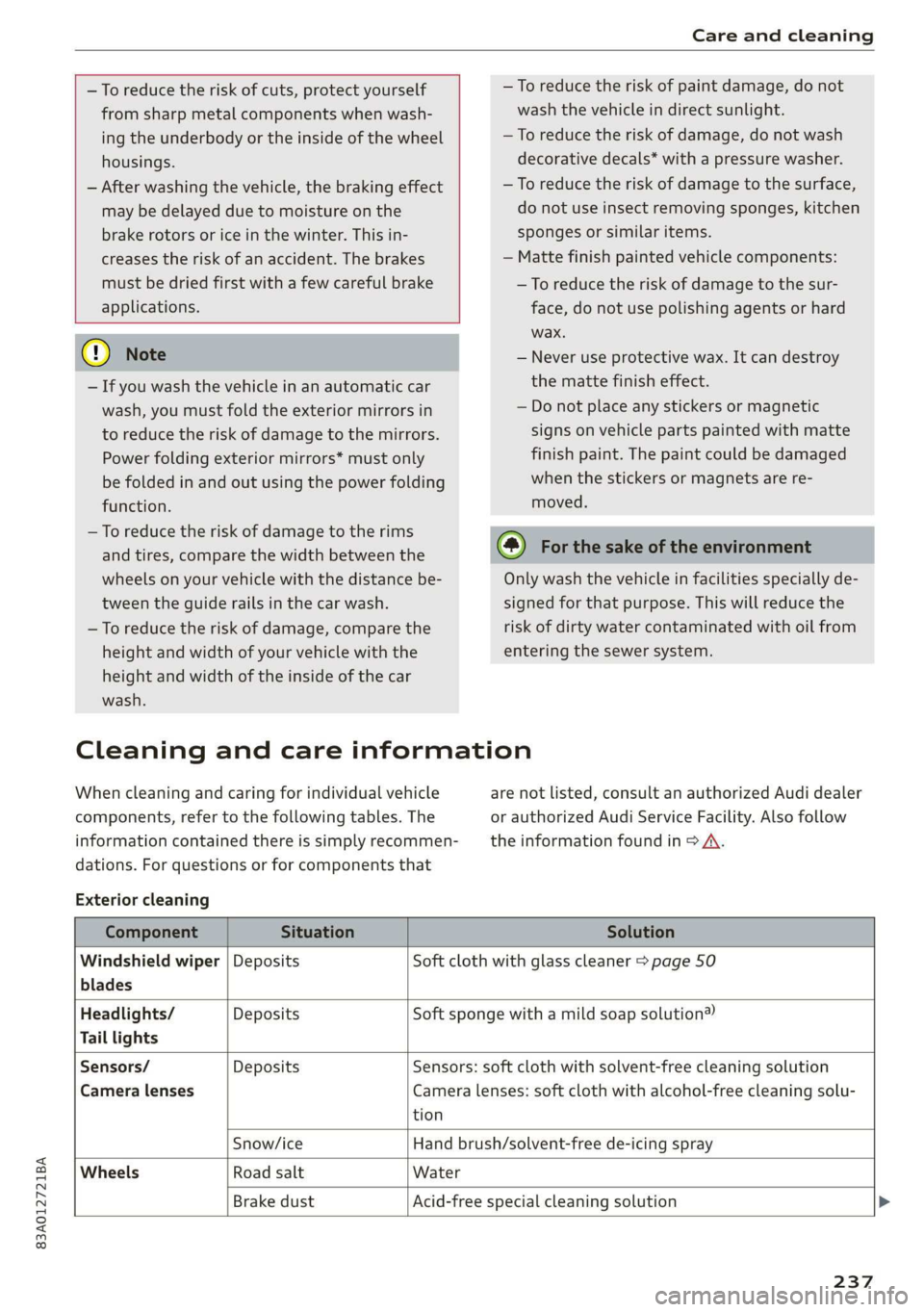
Cleaning and care information
When cleaning and caring for individual vehicle
components, refer to the following tables. The
information contained there is simply recommen-
dations. For questions or for components that
Exterior cleaning
are not listed, consult an authorized Audi dealer
or authorized Audi Service Facility. Also follow
the information found in > A.
Component Situation Solution
Windshield wiper | Deposits Soft cloth with glass cleaner > page 50
blades
Headlights/ Deposits Soft sponge with a mild soap solution®
Tail lights
Sensors/ Deposits Sensors: soft cloth with solvent-free cleaning solution
Camera lenses Camera lenses: soft cloth with alcohol-free cleaning solu-
tion
Snow/ice Hand brush/solvent-free de-icing spray
Wheels Road salt Water
Brake dust Acid-free special cleaning solution >
237
Page 254 of 280
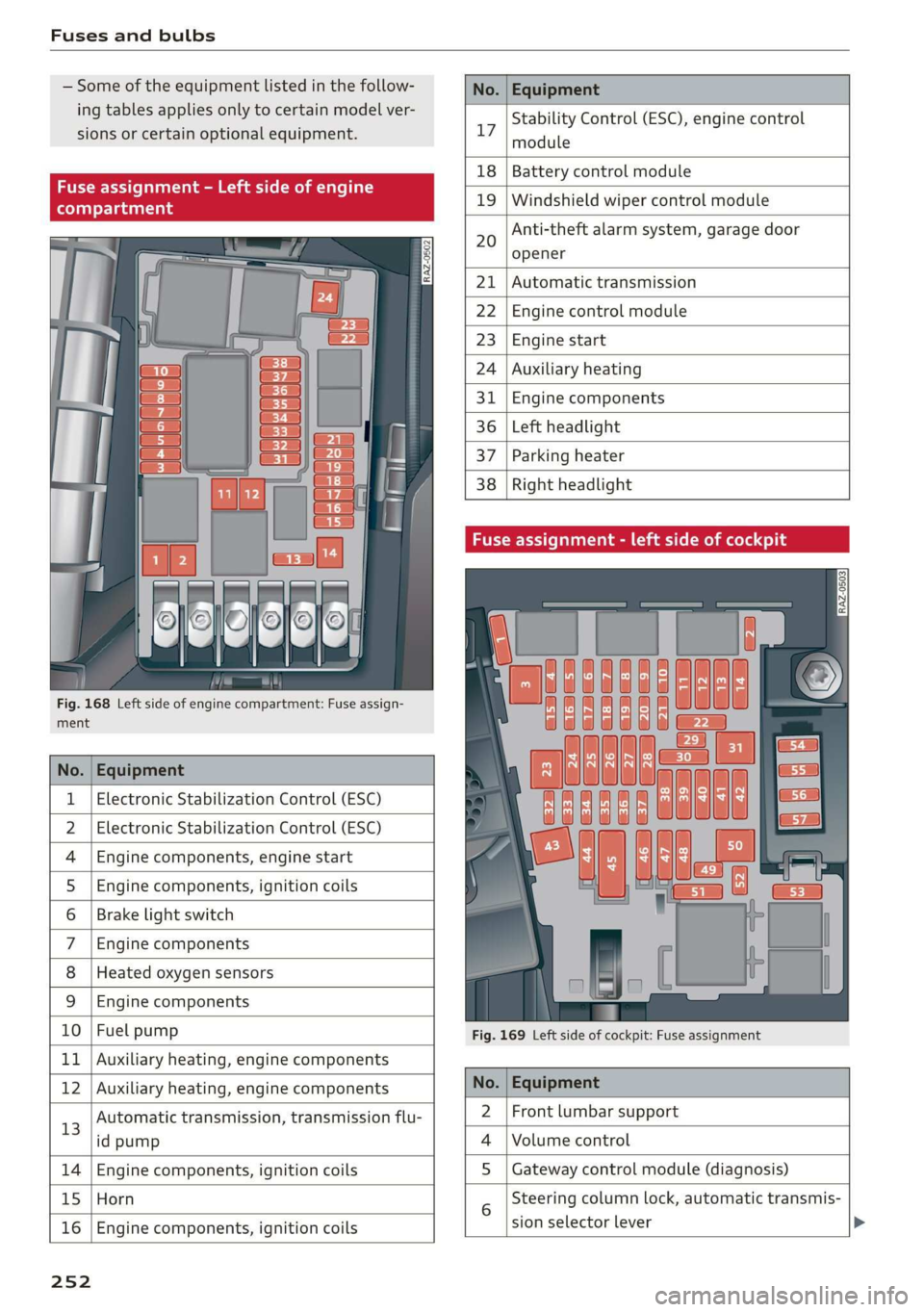
Fuses and bulbs
Some of the equipment listed in the follow-
ing tables applies only to certain model ver-
sions or certain optional equipment.
No. | Equipment
Stability Control (ESC), engine control
17
module
le of e
OVye OVOVO
Fig. 168 Left side of engine compartment: Fuse assign-
RAZ-0502
18 | Battery control module
19 | Windshield wiper control module
Anti-theft alarm system, garage door
opener
20
Automatic transmission
Engine control module
Engine start
Auxiliary heating
Engine components
Left headlight
Parking heater
Right headlight
ment
No. | Equipment
1 | Electronic Stabilization Control (ESC)
2 | Electronic Stabilization Control (ESC)
4 |Engine components, engine start
5 |Engine components, ignition coils
6 | Brake light switch
7 |Engine components
8 | Heated oxygen sensors
9 | Engine components
10 | Fuel pump
11 | Auxiliary heating, engine components
Fig. 169 Left side of cockpit: Fuse assignment
bh N Auxiliary heating, engine components No. | Equipment
13
Automatic transmission, transmission flu-
id pump
2 |Front lumbar support
Volume control
14 Engine components, ignition coils S | Gateway control module (diagnosis)
15 Horn
16
Engine components, ignition coils
sion selector lever
25 2
Steering column lock, automatic transmis-
Page 267 of 280
83A012721BA
Index
Numbers and
Symbols
2-zone deluxe automatic climate control.... 78
A
ALC cooling MOde ss « « vesiev «sass w © wernin eon 78
Accelerator pedals sais se cai sv aac oe ews 84
also refer to Accelerator pedal........... 84
AGCOSSOFIES « crvcei. 5 cesses « ceeness a & arene ww wnat 260
Active lane assist
refer to Lane departure warning......... 119
Adaptive cruise assist................04. 111
Cleaning the sensors........... 0c been 237
Adaptive dampers ...........-.00ee esau 96
Adaptive speed assist 111
also refer to Adaptive cruise assist....... 111
Adjusting the air distribution............. 78
Adjusting the brightness................. 47
Adjusting the sound.................005 195
Adjusting the temperature..............- 78
Adjusting the vents... 0... .... eee eee ee 79
Adjusting the volume................-005 26
Adjusting the volume (announcements).... 195
Adjusting the welcome sound............ 195
Airbag System « « sae« s sees ¢ v wees ee reese ee 61
Alarm system
refer to Anti-theft alarm system.......... 31
Alignment pin (changing the wheel)....... 242
All-weather lights...............-..20--- 43
Allseason tires. ...........000200200005 231,
All wheel drive
POPEP CO GUAT Oia 5 = yess s 5 meee Heme « 98
AMI
refer to Audi music interface........... 184
Android Auto
refer to Audi smartphone interface...... 193
Anti-freeze
Windshield washer system............. 214
Anti-lock braking system. ...........000-. 98
Anti-Slip Regulation.................0004 99
Anti-theft alarm system ...........-..000- 31
Anti-theft wheel bolts........0........4. 243
Apple CarPlay
refer to Audi smartphone interface...... 193
Aspect ratio (video).............00. 187, 189
ASR
refer to Anti-Slip Regulation............. 98
Audi adaptive light...............-..0000. 43
Audi connect
refer to connect..............00 154,155
Audi drive select. ...... 0. cece eee eee eee 96
Audimusicinterfacesic «scenes a0 oem 0 0 ote 184
AUdiOFMeS ricco cossoe wa concn ow anew wv x asite 185
Audi phone box. esi. ss ecw se eee ye ewe 141
Audi pre sense...........2+--eee eee eee 121
MOSSAGES cwssins so secnsas a a menage We imeuinis wo omen 124
Audi side assist
refer to Side assist............ 0.000005 124
Audi smartphone interface.......... 193, 197
Audi virtual cockpit
refer to Instrument cluster.............. 11
AUTO
Automatic headlights................5. 43
Climate control system.............0005 78
Auto Lock (central locking) ............... 28
Automatic luggage compartment lid.... 36,37
Automatic transmission............-..00- 82
Automatic wipe/wash system............. 49
Average consumption...............0-5. 14
Average speed .... 2... .- cee eee eee 14
B
Bag hooks
Batteny, sscsnn oo saosin 6 a anoxia ov aeiuie © ¥ oxneeRe
Charging
Winter operation...............0 ee eee 212
Blinds
refer to Sunshade (roof)...............-. 39
Block roWte ices « ¢ sawa x 2 ews 2 8 cage ¥ 8 oe 167
BIGWEP's « woven s 2 wome 4 @ noses © yee Ho toeee a 78
Bluetooth
‘Audio player cscs % cress =o reosae ve nese 182
Connecting a mobile device............ 140
Deleting
adevice.................000. 197
DeViC OVETVIOW': esrns 5 & coven s » ease 5 @ exes 196
Disconnecting a device................ 197
Displaying profiles................000. 197
Searching foradevice...............4. 197
Selecting adevice.................00. 197
Specifying a favorite.................. 197
Page 272 of 280
Index
PANIC Button ssicsooe © 2 cocvise © avant ww rumen @ eee 32
Replacing the battery...............0-. 34
Unlocking and locking...............005 33
Vehicle Code ssicve x + swine ee etre oe eas a 2 one 32
Kick#dOWn'. 2 scons e senea oe ae ao ca @ eee 84
L
Lane assist
refer to Lane departure warning......... 119
Lane departure warning................. 119
Cleaning the camera area.............. 237
LATCH (securing child safety seats)......... 68
Leather care/cleaning...............005 239
Legal information
License subscriptions................. 197
Software information................. 197
Software:licensesies . sowie ae iawn ws nsenn a 6 197
Version
information.................. 197
License plate bracket................0.. 260
Lifting points (vehicle jack).............. 243
Light/rain sensor
Headlights...............00 020-0 ee eee 43
Intermittent mode (windshield wipers) .... 49
Light functions
Interior lighting!sc . = ssw = 2 ese sy eee eee 46
Lighting
Exterior. « ic © wesen ae ease a 2 wane vo ore 43
Interior... 0... eee eee 46
Lights 0.0... eee eee eee 43
Listening to music
refertoMedia................005. 182,185
Load... 6.6... eee 264
Locking and unlocking
By remote control............2.2.0005. 33
Using the lock cylinder................. 30
With the convenience key............... 33
Low beam headlights.................... 43
Lowering the cargo floor................. 76
Luggage compartment...............05. 73
COVER ime x x cena % 2 soamere # x wemnER oo en aw Re 74
Double cargo floor..............0..000- 76
Increasing the size............0--.00 ee 75
also refer to Luggage compartment...... 73
Luggage compartment lid
Closing button. ...............000 ee eee 36
Emergency releasing:ss : < waa x x aeax ¢ gaee 37
270
General information 34
Opening and closing 35
Opening and closing with foot motion..... 37
Power opening/closing................. 36
Lumbar'support:s + ses so sews oo owen oo 54,55
M
Maintenance’: « « sews + » sen + e awe + pores a 258
Maintenance intervals................-. 245
Malfunction Indicator Lamp (MIL)........ 202
Manual shifting ................0020 eee 84
Map
Changing the scale ............ee eves 164
Display’ « sncine 2 2 setese a a comes ow anes ve to 166
Operating. ..... 0.0... cece eee eee eee 165
Setting the destination................ 164
Map preview...............0- 00-00 e eee 163
Map update................0 20. e ee eee 170
Oli: 2 gems + 2 wise = pense & ¥ em ee See = 170
SD card/USB connection........0.. 00006 170
Media somes: i sxonns ao eevee ¥ oe orem wae 182,185
Supported formats.................-. 190
Media Cemberin. « . acewus « w snonsue = auarems wo meriite 186
Memory card
SD card reader (MMI).............0... 182
Supported types and formats........... 190
Menu language
refer to Setting the language........... 195
MeSSaQeSixc: « ¢ sews & ¢ ese 2s ees § oe ees es 147
MIrforcompass:s « « ues cs wean: 2 meee + eee 51
Mirrors
Adjusting exterior mirrors............... 47
DUUANTING Ss, « scersiss ow snouts om exons 6 x oxmanm x 48
Vanity mirror... 1.2... eee ee eee 48
MMI Navigation plus
refer to Multi Media Interface........... 18
MMI Radio plus
refer to Multi Media Interface........... 18
Mobile device
referto Telephone..............0.0005 139
Mobile phone network
Connection settings...............00. 152
Mountain passeS....... 00.0. e cece ee eee 93
MouintainirOadsivn. « scins a 6 vimses a 6 nraeiise #6 om 93
Multifunction steering wheel
Buttons......... 0... ee eee eee eee 12, 26
Page 273 of 280
83A012721BA
Index
Operating « « secs + x sess 6 ot wees v aeaueee w & cams 12
Programming buttons...............00. 26
Voice recognition system.............-. 24
Multi Media Interface................... 18
Menus and symbols...............--00. 19
Operating ....... 0... cee ee eee eee 16,19
Switching on or off...........-....-00. 18
Muting (mute)............. 0002s 26
MmyAUdi..... eee eee eee 27,155
myAudi navigation................. 159, 163
N
Natural leather care/cleaning............ 239
Navigation susie c+ asco xv anti © oreo wn oan 159
Better route ......... 0.0... e cece 172
GalliniGis: s vem sv news ss tee ov eee see 163
Changing the scale. ......... cece eves 163
also refertoMap............-000 eee 165
Navigation database
Version information...............04- 197
Navigation (instrument cluster).......... 166
SY 260
Notification:cemter’. csiccis . « sessue oo ernuous oo weet 20
Oo
Octane rating (gasoline)................ 199
OMOMCLER wisi & 2 mace & oO + ¥ eOER oH ERED « 14
Resetting...............0..0..000000. 14
Office address
refer to Business address.............. 168
Offroad
refer to Offroad driving...............5. 93
Offroad ArivVinG!s + = sss <= evan ¢ = Hares ¢ = Hom 93
Oil
refer to Engine oils = acs 22 ees ee eees ee 205
On-board computer................-.04. 14
On Board Diagnostic System (OBD)... 202, 255
Online destination
refer to Point of interest............... 162
Online map
refer to Satellite map................. 169
Online: Mediates. «vies ss wees ss wees @ vee 183
OnliMePAdIO sx « weam x gogo gx mem Ge Se 178
also refer to Online radio.............. 178
Online services
refertoconnect...........0+-008 154,155
Online system update.................. 196
OPO bes » sccmesnse © axensies wo > vase @ 8 meme = = com 28
Automatic luggage compartment lid...... 36
Convenience opening................085 39
Fuel filler door........ 0... c eee eee ee 200
Hood... 0... eee ee 204
Luggage compartmentlid............... 35
Luggage compartment lid with foot motion . 37
Panoramic glass roof................... 39
Sunshade (FOOT): « 2 some a @ ears oo eee a eae 39
Wind OWS 3s « cence wv cmermes a a smenees oa omemee es 38
Opening and closing
refer to Unlocking and locking........ 28, 33
Operating
Instrument cluster.................00. 12
Multifunction steering wheel............ 12
Multi Media Interface ...... 0 cece eee 16,19
Text input......... 0.00.00... eee eee 22
Touch displays: « veces s eae x > wee se ree 16
Optional equipment number............. 263
Options
Media’. » 2 seas 2 4 segue 2s sete go ewe te ee 189
NAVIQAtIOMsc i « sunsais « x wrens o 0 suessun w seats 1 172
Radio... 2.6... cece eee cee eee eee 180
Overview (cockpit) ............00 eee eee ee 6
P
Paint damage.......... cece eee eee eee 238
Paintmumbe ttc 5 cscs 2 x ennme o « cereus 6 2 sownate 1 263
PANIC: DUttONY « & cresce: 6 0 cemmmes an awawons 1 a anos 32
Pani@ TUMGtion. « secs x x covers 2 2 serie ¥ 3 aoa © 3 32
Panorama glass roof...............-.05. 39
Panoramic glass roof
Convenience opening and closing......... 39
Emergency closing..............0eeeeae 40
QuickOpening << : sree ¢ = veces s eee se we 40
Park assist... 0.0.0... cc cece eee eee eee 136
Parking aid... ... 2... eee ee eee 127
Cleaning the sensors and camera........ 237
Parking space search.................. 134
Peripheral cameraS......- 0.0. - eee eee 129
Rearview Cameraiew. ss ews a vee as bees 129
Trailee views. 2s swavece x x sens « anamens a a amenees oo 130
271
Page 274 of 280

Index
Parking aids
Adjusting ..............0 cece eee eee 138
ParkeaSsist': « weave x sequen § 3 aameG ¢ & ae & 136
Parking and maneuvering.............-. 127
Parking brake
refer to Electromechanical parking brake.. 90
Parking lightSizx « = sax « y oss = ¢ sees 2 e eee 43
Parking lock
Manually releasing................004. 85
also refer to Gears... 1.6... cee eee ee eee 82
Parking systems
Parking system plus...............04. 127
Pass-through.............-0 eee eee eee 75
Paths... . 2... cece eee eee eee 17
Pause: (Media’files):. « «cies ov scsi 6 waves oo 185
PedalSiscis saien « x waren w ¥ eae 6 ¥ mae oo ee 84
Perchlorates + mcs + 2 mews & pase 2 s wee oe oe 258
Peripheral: cameras ses ss sua se come sg cos 129
Personal route assistance. ...........00. 167
Phone
Answering/ending acall............... 146
Connecting acellphone............... 140
Connecting a second mobile device...... 141
Disconnecting a mobile device.......... 141
SEEMS cxesise o exaasan w © means i 7 seeue 5 santas 150
Phonebook
refer to ContactS............. eee eae 144
Playback (media). « + scarce» s snesnin «sneer «0 « 185
Pointiofiintenests. + vicve x x susie x 2 euswere a ones 162
Point of interest search. .......... 000005 162
also refer to Point of interest........... 162
Polishing. .... 0.0... cece eee eee eee 238
POWerSOUNCESE: 5 6 sees as cowie 8 acm & v 72,184
Power WINdOWS « sieen . ¢ ewva s 6 eae we ews a a 38
Malfunction..............00000 0a ee 38, 39
Power windows malfunction.............. 38
pre sense
refer to Audi presense.............0.. 121
Presentation mode..............2--005 174
PLOSCES eres so smnews «a ems 9 sete oe tere @ 5 177
Presets list
refer to Presets... 0.0.0... cece eee eee 177:
Pressure
Tire pressure monitoring system........ 234
TGS: 2 cccane oo ome 2 o cae ¢ o cen Yo oR 226
Progressive steering................20055 97.
272
PROLCCUINGiices oo snesies w ot ceawis w euseees we ere 238
Pyrotechnic elements............0.0e ee 258
Q
QUACEOS + wae a s wanes a xe ee & 2 HOHE 5 £ ROTOR 6 98
Selective wheel torque control........... 99
R
RAGIOS x 5 cranes % 1 cusents © 5 sesuens 6 @ exsoams oo 175, 177:
Radio text.................0.000 00 179
Station MSt sewn: + x seme + x popes F x sRWOS Fo EE 175
Radio communications equipment........ 260
Radio equipment................--004- 260
Radio Standards Specification (RSS) ....... 261
Rain/light sensor
Headlights! ween = sases 2 3 neon § x Sou 5 ae 43
Intermittent mode (windshield wipers).... 49
Random
refer to Shuffle...............000200. 187
Range (fuelslevel)isc sx seni x sree oo aneweie a a as 14
Reading lights. <= see. 2 scum 2 2 mewn o ¥ eves 46
Rear cross-traffic‘assist - a ss caw ss oes 133
Rear lid
refer to Luggage compartment lid........ 35
RearsSeatsios 2 wens <2 were ss meme oo acne 9 6 we 55
Rearishelt': ses ¢ 2 cewe so ewe 2 2 gewe ¢ none 74
Rearview camera‘: = : asec = : sees ev owen ees 129
Rear window defogger............-.0000- 79
Reception range.............-.0-.0000- 75
Recirculation mode..............0e0 eee 79
RECUPCRAEION acosece oo suexem 4 suseene oe seem « one 15
Refi ling is oc ccs 2 x unmsen 0 mci a ema 6 200
Remote control
Garage door opener...........-.000000- 40
Remote control key............---00005 32
Remote control key 32
Convenience opening and closing......... 39
Key replacement...............-0000-- 32
LED... eee 34
Replacing the battery.................. 34
SyMehnomizationticns « « ssinem « o enero « os enewoce » oe 34
Unlocking and locking............-..005 33
also refer to Vehicle key................ 32
Removing the caps (wheel bolts)......... 242
Repairs. ...... 2.0.0... eee ee eee eee 258
Page 275 of 280
83A012721BA
Repeatix « sscemes v & sxcssus os anasaus oo aeeuens v stevens a 187
Replacement key........ 000s eee en eee eee 32
Replacement parts... .....-0secceeeevees 260
Replacing
Light BULBS « seems: swe © 2 aeawoe ¥ evens © 2 253
Replacing fuses. « csv. se even ae nen oo eee 251
Replacing wiper blades................0. 51
Reporting Safety Defects................ 260
Reverse gear
Fefer to Gears seiws «5 sw so wow eo wee 2 Oe 82
Rewinding (media files)................. 185
RUMS*: « aasay = & Qame 2 BREE s BRE Ze OE ees 230
Cleaning « « cessie: a x cnn
Roof
refer to Panoramic glass roof............ 39
Roof load... . 2... cc eee ee eee eee 76, 264
Rooftrackices » 2 sexes #0 waa 6% wii ¥ wenn © © ee 76
also refer to Roof rack..........--...--- 76
Route guidance
Stopping...............0....000000. 164
also refer to Navigation............... 159
Running direction (tires)...........00005 245
S
Safety beltSis:: « s seas 5 « xeme « pews 2 v wees es 58
Cleaning « « ssiws x 6 seis ow sees 2 a oneneen & © ae 238
Locking... .. 0... cece eee eee eee 70
Securing child safety seats.............. 69
Satellite map... .. 22... ee eee eee 169
Saving fuel
EMGtGYy CONSUMERS es: sx wsen 2 wae so Be 8 15
Recuperation « ssc wo cece «vores ow smn vs 15
Screen
refer to Touch display...............005 16
SErEWRIVERs = eveswos 2 5 wise wo aemsnme 6 4 axons © 242
SDicard reader (MMI) swewise © scm ao arene a a ao 182
Search area (point of interest)............ 162
Search function
refer to Free text search............... 189
SEAPMEALING sci 6 & sensine a w sxawere @ w saa @ & aerEOR 79
Seats
Adjusting... 0.0.0... cece cece ee eee 54
Adjusting the front seats................ 55
Adjusting the rearseats................ 55
Cleaning........ 0... cece eee ee eee 239
FOlGIMG secs «wo cnewess oo commen vw aneeens ¥ & commu wo ave 75
Head restraints. ........... 00 cece eee 57
Selecting a source (media).............. 185
Selector lever... 0.0.2... cece eee eee 82
Self-learning navigation
refer to Personal route assistance....... 167
Sensor overvieW.. 1... 0... eee eee 105
Service interval display................. 215
Service position
refer to Replacing wiper blades.......... 50
Setting measurement units.............. 195
SOCEMGS. 6 « snsnane a o wmmnaus wo orawiss % 6 cuienae a a ams 195
Announcements and tones............. 195
BlUGtOOth’s = s cues = seee se pew es deme eee 196
Datezand times «a cessive o ¥ arene 6 2 orevene 4 2 195
Language
Measurement units...........00.0 eee 195
Medias: « 3 scien x o ansane o cenne so ema 2 2 aes 190
Navigation ..... 0... c cece ee eee eee eee 173
RadiOis: s ¢ sees 2 e ees ee es ae eee gee 180
SOUNGb sem: «wena x x anne 3 2 seonee oH MUA oS ¥ 195
System... 2. ee eee eee 195
TiMGZOGinex s 2 eemK oy eees x BoeES eb ES 195
Wi-Fi Hotspot wise ss cso se sere oo oes 2 157
Setting the date’. « ¢ cas ¢ < new 4 e news s ¢ oe 195
Setting the language..........eeee scene 195
Setting the time. ¢ ¢ sees se eens ee ese eee 195
Shift paddles........... 0... cscs eee eee 84
Shortcut
réferto SHOrtcuts « wesa ss eews so wees sa ew 21
SHOFtCUtS:: « = aneu ¢ s qaaw 2 e Sewe sb ee EE ss 21
Shuffle... 2... ee eee eee 187
Side assist... 6... eee eee 124
Cleaning the sensors...............-.. 237
SIMGatd = scios + = S008 4 BERS ¥ BROS FB ORS 155
SiriusXM alert notifications.............. 179
Sliding/tilting sunroof
refer to Panoramic glass roof............ 39
Smart favorites................000000- 178
Smartphone
Wirelessicharging@’s « swiss « 2 gown 2 x same se 141
also refer to Telephone.............065 139
Snow chains: « + sis 2 6 sean so een ee eww 232
SOCKEb ss ss wane 5 x wae & EES & F RoUER XB HEHE 72
Software
Updates « esses ea ciaunee s scare» wenser ao sssoee 196
273