battery AUDI Q3 2019 Owners Manual
[x] Cancel search | Manufacturer: AUDI, Model Year: 2019, Model line: Q3, Model: AUDI Q3 2019Pages: 280, PDF Size: 72.73 MB
Page 5 of 280
83A012721BA
Table of contents
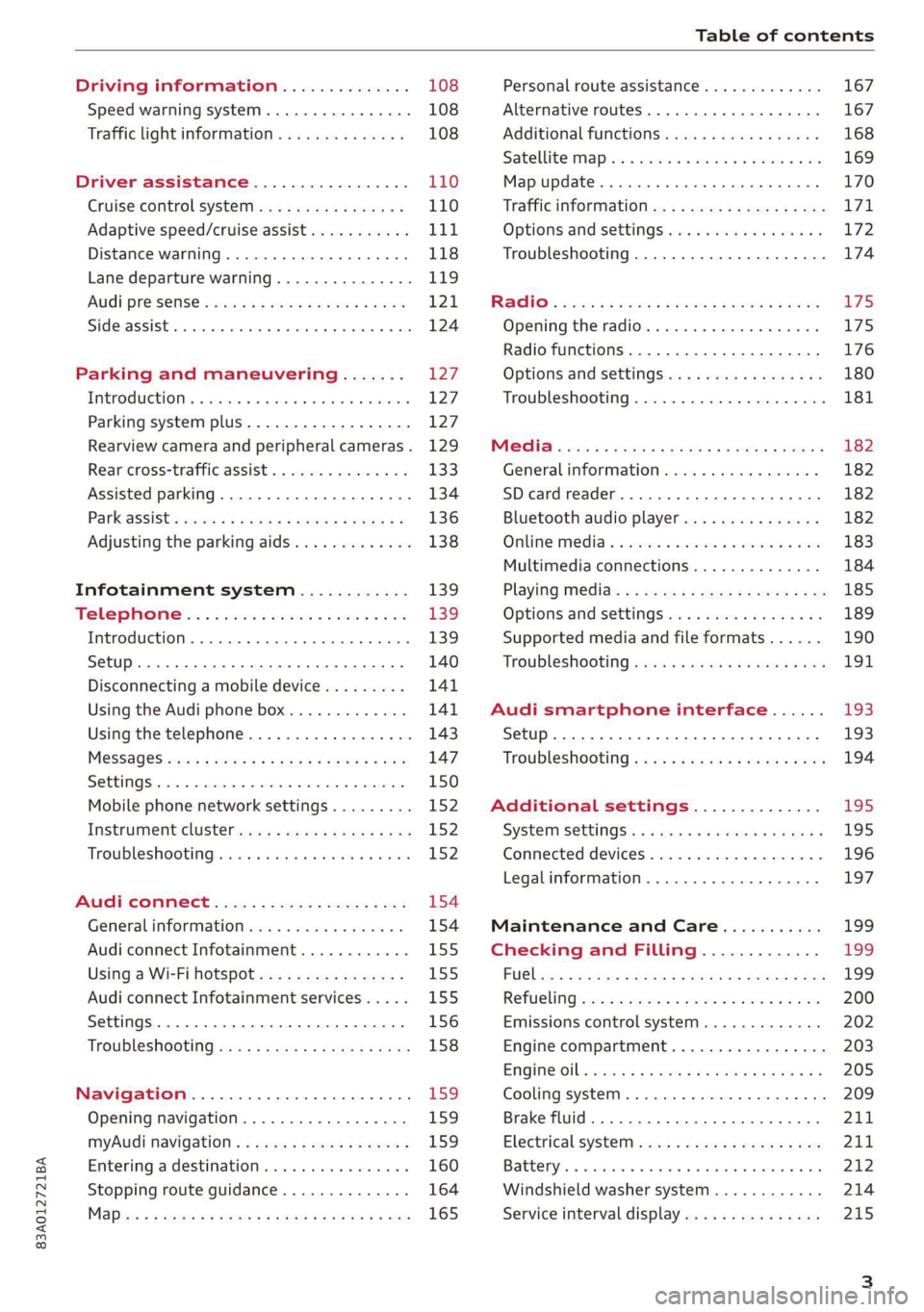
Driving information.............. 108
Speed warning system.........-..000- 108
Traffic light information.............. 108
Driver assistance................. 110
Cruise control systeM.......... 000 eee 110
Adaptive speed/cruise assist........... 111
Distance warning.................005 118
Lane departure warning............... 119
AUdi PrOSONsSe & seis + 2 mews 2» nee 2 oem 121
Side assist... 2... eee eee eee eee 124
Parking and maneuvering....... 127
IMtroduetion « x cicvers < e ersuens + x enavane oo saree 127
Parking system plus...............04. 127
Rearview camera and peripheral cameras. 129
Rear cross-traffic assist. ............-. 133
Assisted parking .............0.00005- 134
Parkassist': sexs « s neem sg aes + e wae 2 136
Adjusting the parking aids............. 138
Infotainment system............ 139
Telephone
Introduction
Setup..........
Disconnecting a mobile device......... 141
Using the Audi phone box............. 141
Using the telephone................0. 143
MESSAGES crus + ¢ ween ¢ 3 eeuen xy eee 4 2 ae 147
SOttiMGSicraice o saaneme « u eneneve © icameneies © eyeaeite 150
Mobile phone network settings......... 152
Instrument cluster.............2-.00. 152
Troubleshooting sais . eves 6 coarse es cae 152
AU CONMECE ces ¢ s xeee x 2 ews a i ee 154
Generalinformation................. 154
Audi connect Infotainment............ 155
Using a Wi-Fi hotspot................ 155
Audi connect Infotainment services..... 155
Settings............0 0.0000... 0000. 156
Troubleshooting sass ss eee ss ees ss ees 158
IIS VIG ABI. 5 cccccas os cones o enemies aoe 15S:
Opening navigation.................. 159
myAudi navigation.................0. 159
Entering adestination................ 160
Stopping route guidance.............. 164
Maize: = 2 sews ¢ 2 Som & eee Ee ees Fe eee 165
Personal route assistance............. 167
Alternative routes............02e000 167
Additional functions................. 168
Satellite mapiee e «sons e siemens ae aacens 2 4 ve 169
Map update............. 0. eee eee eee 170
Tratficintoritiationie: « : waa: xs seen 6 2 eu LZ)
Options and settings.............000e 172
Troubleshooting...............-.000- 174
R&GIO’: onic cs wea ss wens se eee & o Hews 175
Opening the radio................04. 175
Radio functions..................-4. 176
Options and settings...............0. 180
Troubleshooting.................0005 181
MG@Gias = acs ¢ = secs s © seme « s Seems so SeURS 182
General information ................. 182
SD card reader..........0.-..00 eee 182
Bluetooth audio player.............0. 182
Online Medias « ssi + exes ae omens oo veer 183
Multimedia connections.............. 184
Playing tedia. = s sees s 2 sees se wees ee 185
Options and settings...............0. 189
Supported media and file formats...... 190
Troubleshooting «ess 2s secu se vee ss ees 191
Audi smartphone interface...... 193
Setup... ee eee eee eee eee 193
Troubleshooting............ee eee eee 194
Additional settings.............. 195
SySteMm Settings: < saws ss sews se eee & 195
Connected devices............ 0 cee ee 196
Legal information................... 197
Maintenance and Care........... 199
Checking and Filling............. 199
FUGlaias s os08,8 & aay @ § aovon & § Sanne 8 OF eee 199
RePUCLING: is «a cms so ewes oe ese vB seen 200
Emissions control system............. 202
Engine compartment................. 203
EMGIMeiOils: acre « ¢ qaiea & © meee s 2 seNoN 8 Es 205
Cooling system. ............--00 00 eee 209
Brake fluid... . 0... eee eee eee 211
Electrical system.........--.0----05- 211
Battery. =o cecness « ommnaine « 0 omecwne 6 3 oats = oe 212
Windshield washer system............ 214
Service interval display............... 215
Page 11 of 280
83A012721BA
Quick access
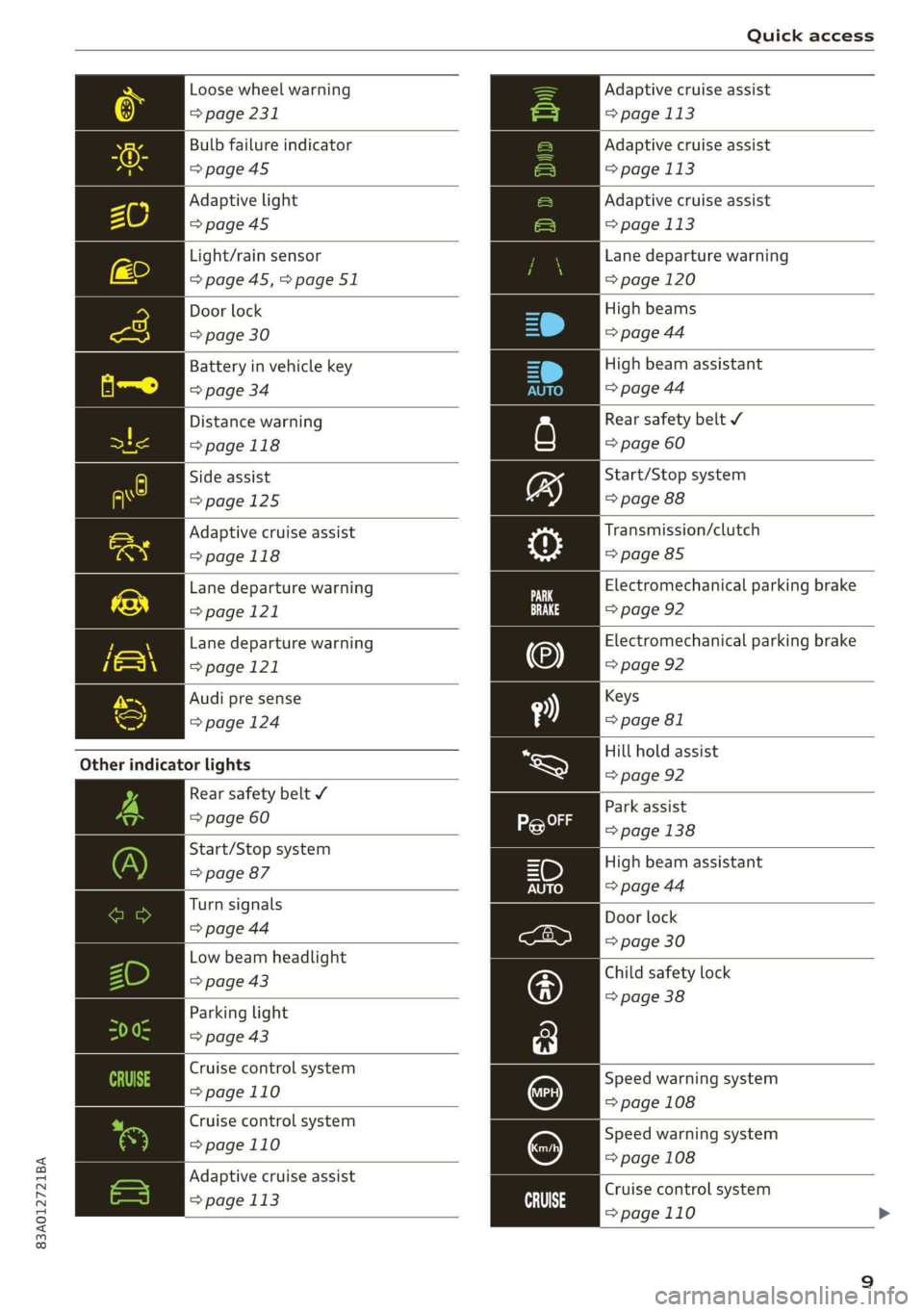
Loose wheel warning
> page 231
Bulb failure indicator
>page 45
Adaptive light
=>page45
Light/rain sensor
=> page 45,>page 51
Door lock
=> page 30
Battery in vehicle key
> page 34
Distance warning
>page 118
Side assist
>page 125
Adaptive cruise assist
=>page 118
Lane departure warning
=>page 121
Lane departure warning
>page 121
Audi pre sense
=> page 124
Other indicator lights
Rear safety belt ¥
=> page 60
Start/Stop system
=> page 87
Turn signals
=> page 44
Low beam headlight
=> page 43
Parking light
=> page 43
Cruise control system
=>page 110
Cruise control system
=>page
110
Adaptive cruise assist
=> page 113 ai
Adaptive cruise assist
= page 113
Adaptive cruise assist
= page 113
Adaptive cruise assist
= page 113
Lane departure warning
= page 120
High beams
=> page 44
High beam assistant
=> page 44
Rear safety belt ¥
=> page 60
Start/Stop system
=> page 88
Transmission/clutch
=> page 85
Electromechanical parking brake
=> page 92
Electromechanical parking brake
=> page 92
Keys
=> page 81
Hill hold assist
=> page 92
Park
assist
> page 138
High beam assistant
=> page 44
Door lock
=> page 30
Child safety lock
=> page 38
Speed warning system
= page 108
Speed warning system
= page 108
Cruise control system
=>page 110
Page 36 of 280
Opening and closing
@) Tips
— Only use the vehicle key when you can see
the
vehicle.
— The vehicle can only be locked when the "P”
selector lever position is engaged.
— Do not use the vehicle key to lock and un-
lock when you are inside the vehicle. Other-
wise, you could trigger the anti-theft
alarm*. If this happens, press the @ unlock
button.
@ Tips
Applies to: vehicles with convenience key
— When unlocking or locking the vehicle, the
convenience key cannot be more than ap-
proximately 4 feet (1.5 m) away from the
door handle or luggage compartment.
— Unlocking with the convenience key (keyless
access) can be deactivated > page 33.
— To prevent the vehicle battery from dis-
charging, the energy management gradual-
ly switches off convenience functions that
are not needed. You then may no longer be
able to unlock your vehicle with the sensors.
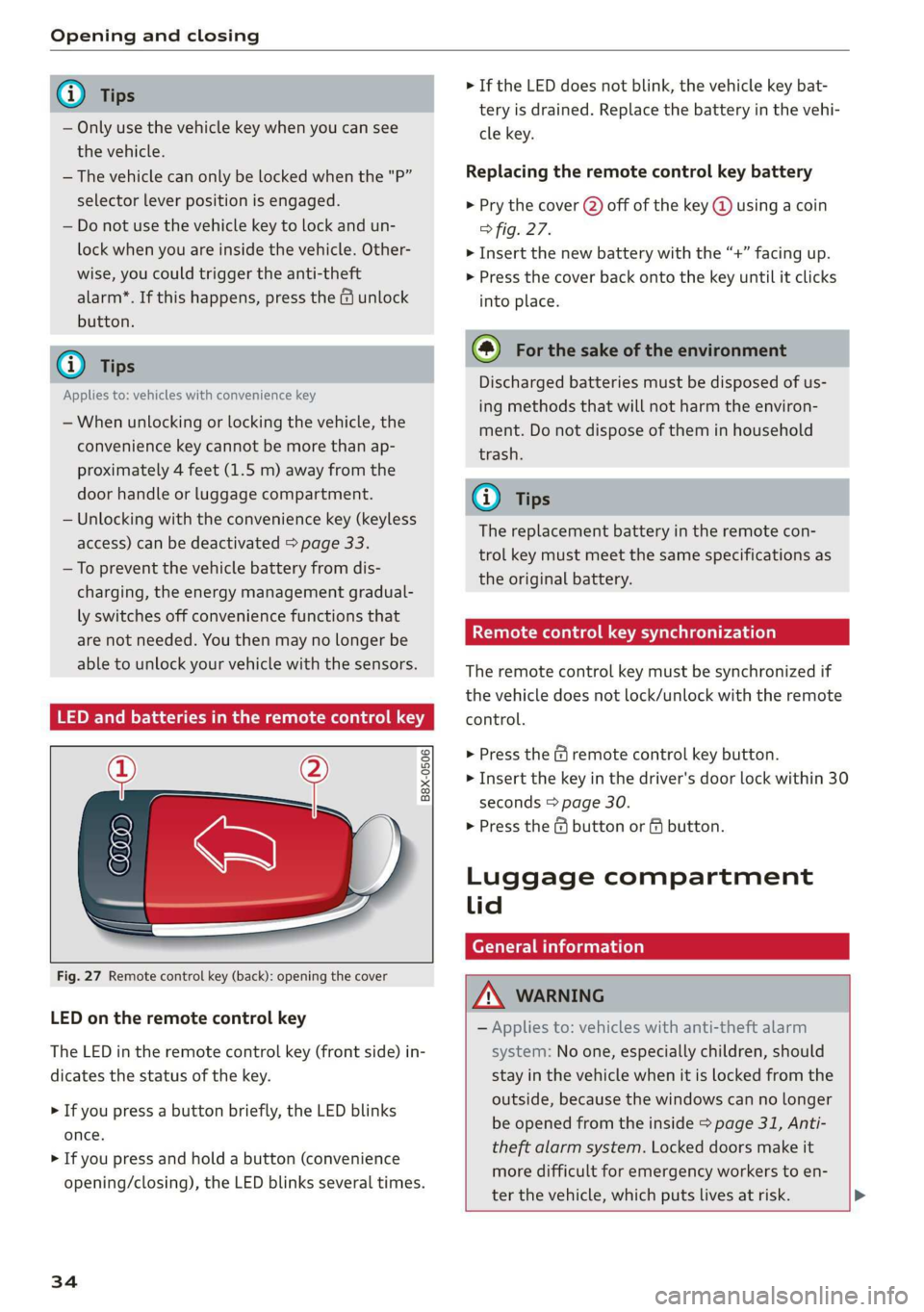
LED and batteries in the remote control key
B8X-0506
Fig. 27 Remote control key (back): opening the cover
LED on the remote control key
The LED in the remote control key (front side) in-
dicates the status of the key.
> If you press a button briefly, the LED blinks
once.
> If you press and hold a button (convenience
opening/closing), the LED blinks several times.
34
> If the LED does not blink, the vehicle key bat-
tery is drained. Replace the battery in the vehi-
cle key.
Replacing the remote control key battery
> Pry the cover (2) off of the key @ using a coin
fig. 27.
> Insert the new battery with the “+” facing up.
> Press the cover back onto the key until it clicks
into place.
@) For the sake of the environment
Discharged batteries must be disposed of us-
ing
methods that will not harm the environ-
ment. Do not dispose of them in household
trash.
G) Tips
The replacement battery in the remote con-
trol key must meet the same specifications as
the original battery.
etree wate ee Cele)
The remote control key must be synchronized if
the vehicle does not lock/unlock with the remote
control.
> Press the f remote control key button.
> Insert the key in the driver's door lock within 30
seconds > page 30.
> Press the ( button or fj button.
Luggage compartment
lid
General information
ZA WARNING
— Applies to: vehicles with anti-theft alarm
system: No one, especially children, should
stay in the vehicle when it is locked from the
outside, because the windows can no longer
be opened from the inside > page 31, Anti-
theft
alarm system. Locked doors make it
more difficult for emergency workers to en-
ter the vehicle, which puts lives at risk. >
Page 38 of 280
Opening and closing
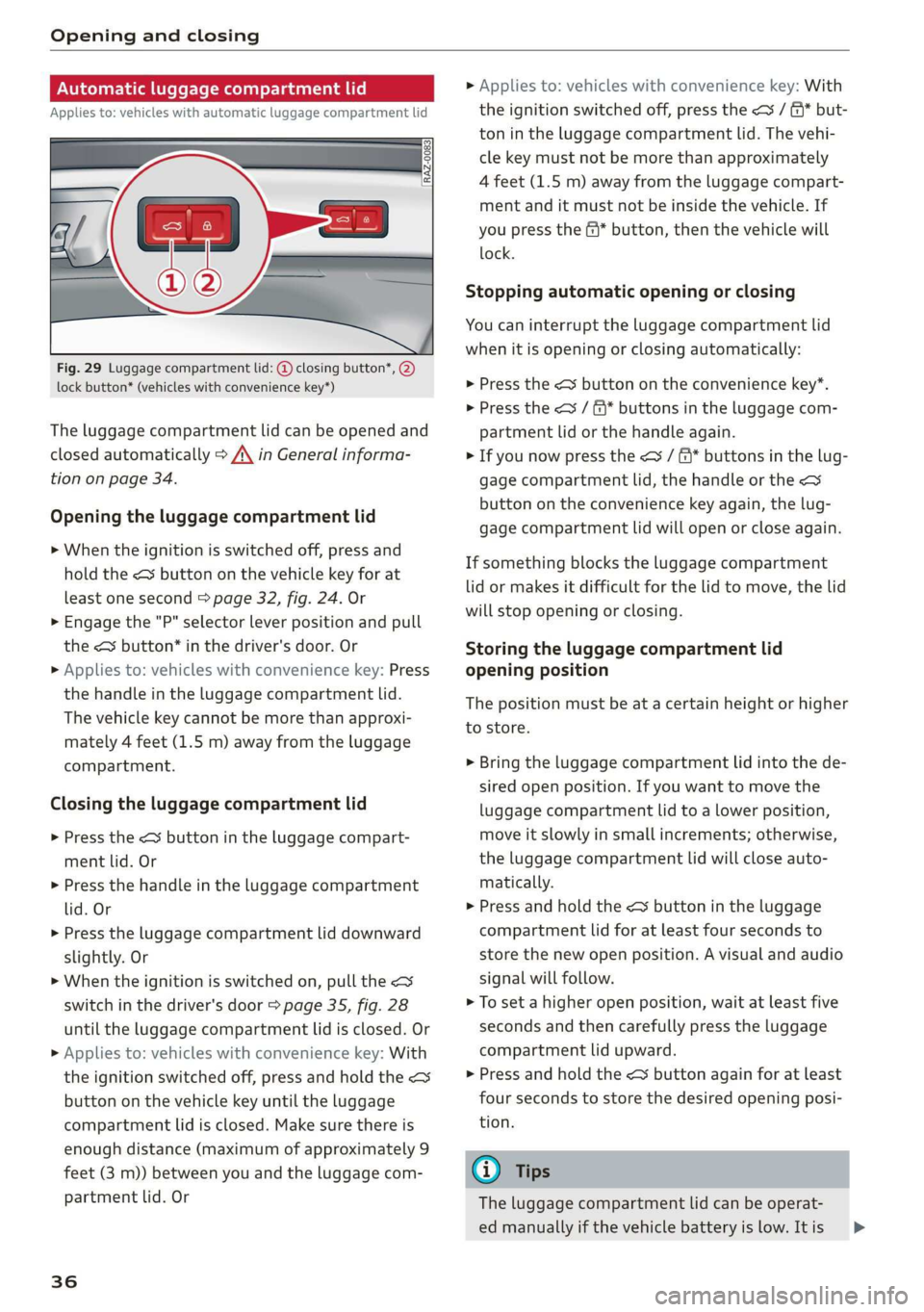
Automatic luggage compartment lid
Applies to: vehicles with automatic luggage compartment lid
Fig. 29 Luggage compartment lid: @ closing button*, @)
lock button* (vehicles with convenience key*)
The luggage compartment lid can be opened and
closed automatically > A\ in General informa-
tion on page 34.
Opening the luggage compartment lid
> When the ignition is switched off, press and
hold the < button on the vehicle key for at
least one second > page 32, fig. 24. Or
> Engage the "P" selector lever position and pull
the < button* in the driver's door. Or
» Applies to: vehicles with convenience key: Press
the handle in the luggage compartment lid.
The vehicle key cannot be more than approxi-
mately 4 feet (1.5 m) away from the luggage
compartment.
Closing the luggage compartment lid
> Press the <% button in the luggage compart-
ment lid. Or
> Press the handle in the luggage compartment
lid. Or
> Press the luggage compartment lid downward
slightly. Or
> When the ignition is switched on, pull the <>
switch in the driver's door > page 35, fig. 28
until the luggage compartment lid is closed. Or
> Applies to: vehicles with convenience key: With
the ignition switched off, press and hold the <
button on the vehicle key until the luggage
compartment lid is closed. Make sure there is
enough distance (maximum of approximately 9
feet (3 m)) between you and the luggage com-
partment lid. Or
36
» Applies to: vehicles with convenience key: With
the ignition switched off, press the < / f)* but-
ton in the luggage compartment lid. The vehi-
cle key must not be more than approximately
4 feet (1.5 m) away from the luggage compart-
ment and it must not be inside the vehicle. If
you press the @* button, then the vehicle will
lock.
Stopping automatic opening or closing
You can interrupt the luggage compartment lid
when it is opening or closing automatically:
> Press the < button on the convenience key”.
> Press the
partment lid or the handle again.
> If you now press the < / f* buttons in the lug-
gage compartment lid, the handle or the
button on the convenience key again, the lug-
gage compartment lid will open or close again.
If something blocks the luggage compartment
lid or makes it difficult for the lid to move, the lid
will stop opening or closing.
Storing the luggage compartment lid
opening position
The position must be at a certain height or higher
to store.
> Bring the luggage compartment lid into the de-
sired open position. If you want to move the
luggage compartment lid to a lower position,
move it slowly in small increments; otherwise,
the luggage compartment lid will close auto-
matically.
> Press and hold the <3 button in the luggage
compartment lid for at least four seconds to
store the new open position. A visual and audio
signal will follow.
> To set a higher open position, wait at least five
seconds and then carefully press the luggage
compartment lid upward.
> Press and hold the <3 button again for at least
four seconds to store the desired opening posi-
tion.
@ Tips
The luggage compartment lid can be operat-
ed manually if the vehicle battery is low. It is >
Page 45 of 280
83A012721BA
Lights and Vision
Lights and Vision
Exterior lighting
Stare MUL Las eal
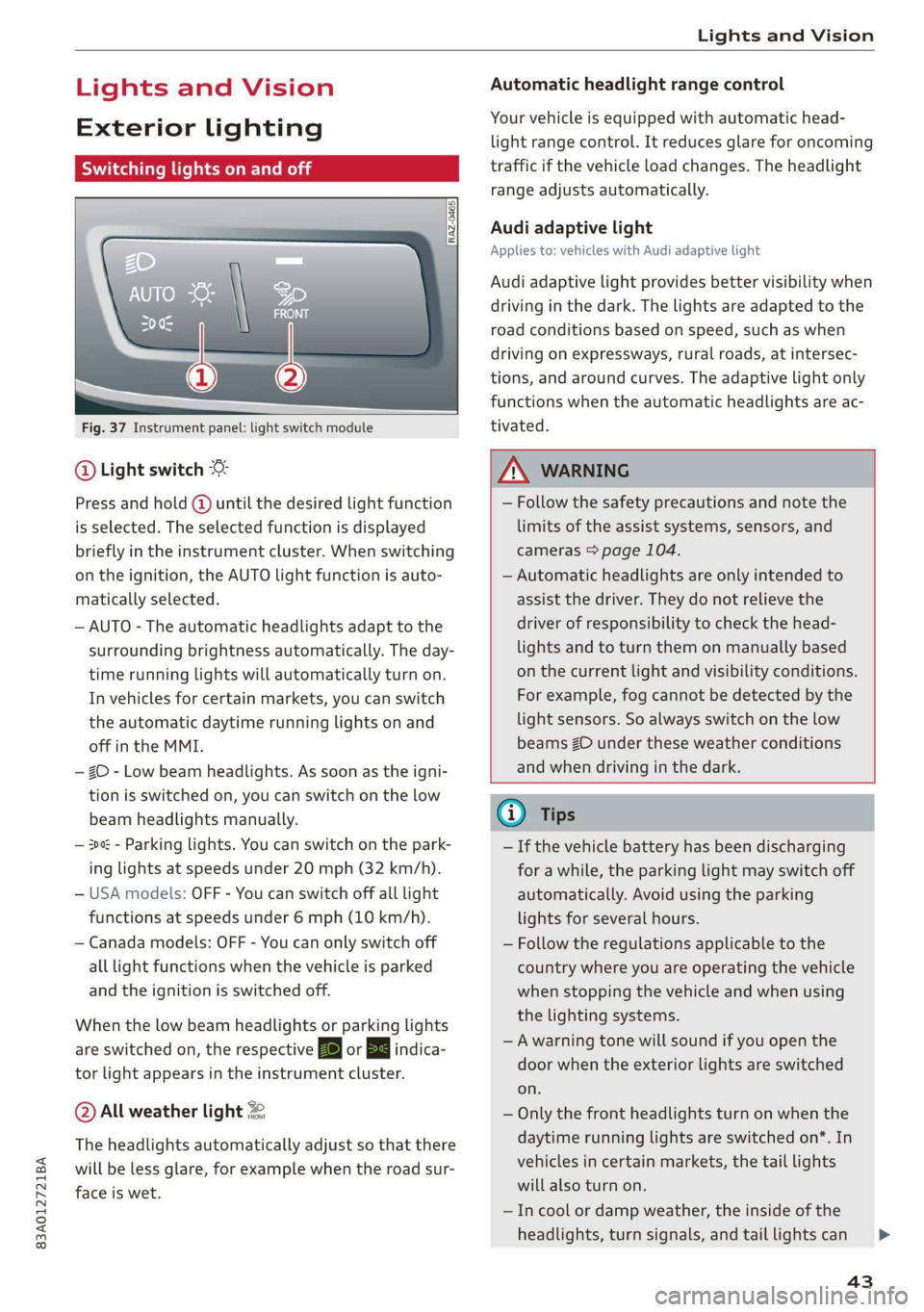
Fig. 37 Instrument panel: light switch module
@ Light switch
Press and hold @ until the desired light function
is selected. The selected function is displayed
briefly in the instrument cluster. When switching
on the ignition, the AUTO light function is auto-
matically selected.
— AUTO - The automatic headlights adapt to the
surrounding brightness automatically. The day-
time running lights will automatically turn on.
In vehicles for certain markets, you can switch
the automatic daytime running lights on and
off in the MMI.
— 20 - Low beam headlights. As soon as the igni-
tion is switched on, you can switch on the low
beam headlights manually.
— 30a - Parking lights. You can switch on the park-
ing lights at speeds under 20 mph (32 km/h).
— USA models: OFF - You can switch off all light
functions at speeds under 6 mph (10 km/h).
— Canada models: OFF - You can only switch off
all light functions when the vehicle is parked
and the ignition is switched off.
When the low beam headlights or parking lights
are switched on, the respective Ba or Ea indica-
tor light appears in the instrument cluster.
@ All weather light 2
The headlights automatically adjust so that there
will be less glare, for example when the road sur-
face is wet.
Automatic headlight range control
Your vehicle is equipped with automatic head-
light range control. It reduces glare for oncoming
traffic if the vehicle load changes. The headlight
range adjusts automatically.
Audi adaptive light
Applies to: vehicles with Audi adaptive light
Audi adaptive light provides better visibility when
driving in the dark. The lights are adapted to the
road conditions based on speed, such as when
driving on expressways, rural roads, at intersec-
tions, and around curves. The adaptive light only
functions when the automatic headlights are ac-
tivated.
Z\ WARNING
— Follow the safety precautions and note the
limits of the assist systems, sensors, and
cameras > page 104.
— Automatic headlights are only intended to
assist the driver. They do not relieve the
driver of responsibility to check the head-
lights and to turn them on manually based
on the current light and visibility conditions.
For example, fog cannot be detected by the
light sensors. So always switch on the low
beams ZO under these weather conditions
and when driving in the dark.
@) Tips
— If the vehicle battery has been discharging
for a while, the parking light may switch off
automatically. Avoid using the parking
lights for several hours.
— Follow the regulations applicable to the
country where you are operating the vehicle
when stopping the vehicle and when using
the lighting systems.
—Awarning tone will sound if you open the
door when the exterior lights are switched
on.
— Only the front headlights turn on when the
daytime running lights are switched on*. In
vehicles in certain markets, the tail lights
will also turn on.
—In cool or damp weather, the inside of the
headlights, turn signals, and tail lights can
43
Page 74 of 280
Stowing and using
Stowing and using
Power sources
When the ignition is switched on, you may be
able to use the electric power sources for exter-
nal devices, depending on the vehicle equipment.
12 volt sockets
You can connect electrical accessories to the 12
volt sockets. The power usage must not exceed
120 watts.
The 12 volt sockets are labeled with the 12V
symbol. They are located in the front center con-
sole, in the rear*, and in the left floor panel in the
luggage compartment*.
USB ports
Applies to: vehicles with USB port
You can charge mobile devices using the USB
ports. The USB ports are labeled with the «> or
(4 symbol or CHARGE ONLY.
ZX WARNING
— To reduce the risk of fatal injury, store all
connected devices securely when driving so
that they do not move around inside the ve-
hicle when braking or in the event of an acci-
dent.
— Incorrect usage can lead to serious injuries
or burns. To reduce the risk of injuries, never
leave children unattended in the vehicle
with the key.
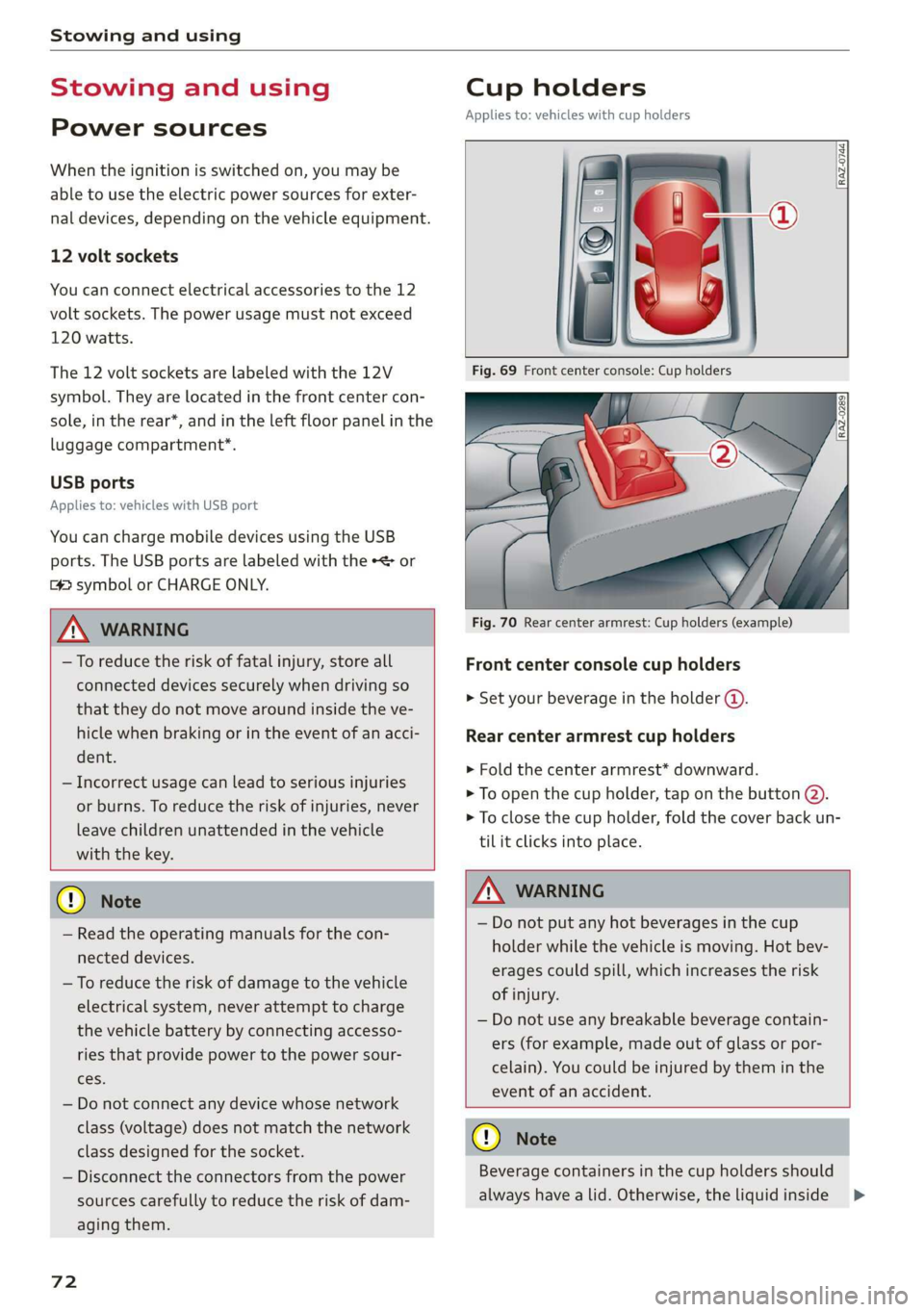
Cup holders
Applies to: vehicles with cup holders
RAZ-0744,
Fig. 70 Rear center armrest: Cup holders (example)
Front center console cup holders
> Set your beverage in the holder ().
Rear center armrest cup holders
> Fold the center armrest* downward.
> To open the cup holder, tap on the button @).
> To close the cup holder, fold the cover back un-
til it clicks into place.
© Note
— Read the operating manuals for the con-
nected devices.
— To reduce the risk of damage to the vehicle
electrical system, never attempt to charge
the vehicle battery by connecting accesso-
ries that provide power to the power sour-
ces.
— Do not connect any device whose network
class (voltage) does not match the network
class designed for the socket.
— Disconnect the connectors from the power
sources carefully to reduce the risk of dam-
aging them.
72
Z\ WARNING
— Do not put any hot beverages in the cup
holder while the vehicle is moving. Hot bev-
erages could spill, which increases the risk
of injury.
— Do not use any breakable beverage contain-
ers (for example, made out of glass or por-
celain). You could be injured by them in the
event of an accident.
CG) Note
Beverage containers in the cup holders should
always
have a lid. Otherwise, the liquid inside
>
Page 82 of 280
Driving
Driving
Starting the vehicle
eta
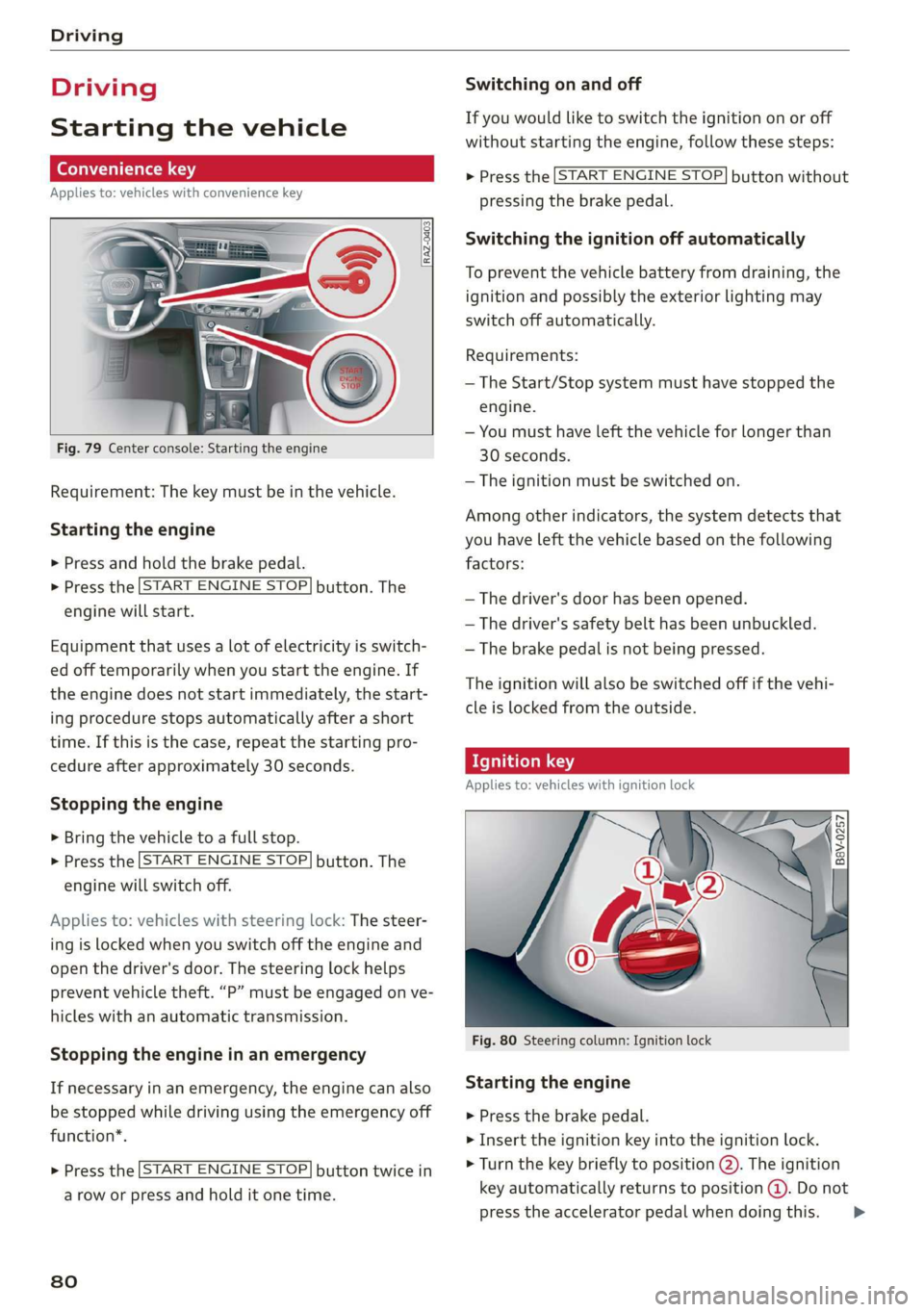
Applies to: vehicles with convenience key
Fig. 79 Center console: Starting the engine
Requirement: The key must be in the vehicle.
Starting the engine
> Press and hold the brake pedal.
> Press the [START ENGINE STOP.
engine will start.
button. The
Equipment that uses a lot of electricity is switch-
ed off temporarily when you start the engine. If
the engine does not start immediately, the start-
ing procedure stops automatically after a short
time. If this is the case, repeat the starting pro-
cedure after approximately 30 seconds.
Stopping the engine
> Bring the vehicle to a full stop.
> Press the [START ENGINE STOP
engine will switch off.
button. The
Applies to: vehicles with steering lock: The steer-
ing is locked when you switch off the engine and
open the driver's door. The steering lock helps
prevent vehicle theft. “P” must be engaged on ve-
hicles with an automatic transmission.
Stopping the engine in an emergency
If necessary in an emergency, the engine can also
be stopped while driving using the emergency off
function*.
START ENGINE STOP > Press the button twice in
a row or press and hold it one time.
80
Switching on and off
If you would like to switch the ignition on or off
without starting the engine, follow these steps:
START ENGINE STOP > Press the button without
pressing the brake pedal.
Switching the ignition off automatically
To prevent the vehicle battery from draining, the
ignition and possibly the exterior lighting may
switch off automatically.
Requirements:
— The Start/Stop system must have stopped the
engine.
— You must have left the vehicle for longer than
30 seconds.
— The ignition must be switched on.
Among other indicators, the system detects that
you have left the vehicle based on the following
factors:
— The driver's door has been opened.
— The driver's safety belt has been unbuckled.
— The brake pedal is not being pressed.
The ignition will also be switched off if the vehi-
cle is locked from the outside.
eT
Applies to: vehicles with ignition lock
ny 6 a =
> @ oO
Fig. 80 Steering column: Ignition lock
Starting the engine
» Press the brake pedal.
> Insert the ignition key into the ignition lock.
> Turn the key briefly to position @). The ignition
key automatically returns to position @. Do not
press the accelerator pedal when doing this. >
Page 84 of 280
Driving
B Remote control key: key not detected. Is the
key still in the vehicle?
The vehicle key was removed from the vehicle
while the engine is running. If the vehicle key is
no longer in the vehicle, you cannot switch the ig-
nition on or start the engine once you stop it. You
also cannot lock the vehicle from the outside.
Remote control key: hold back of key
against the designated area. See owner's man-
ual
The battery in the vehicle key may be drained or
there may be a malfunction. To start the vehicle,
you must also hold the vehicle key against the lo-
cation shown ?) & page 80, fig. 79.
If the malfunction remains, drive immediately to
an authorized Audi dealer or authorized Audi
Service Facility to have the malfunction correct-
ed.
When driving
Starting to drive, stopping, and parking
Starting from a stop
» Press and hold the brake pedal.
> Start the engine.
> Select a gear.
> Release the parking brake.
> Release the brake pedal. The vehicle may roll.
> Press the accelerator pedal to accelerate.
Stopping and parking
> Bring the vehicle to a full stop and press and
hold the brake pedal.
> Set the parking brake.
> Select the “P” selector lever position to secure
the vehicle from rolling away.
> Switch off the ignition before leaving the vehi-
cle.
> Turn the steering wheel when parking on in-
clines so that the wheels will roll into the curb
if the vehicle starts moving.
On hills, activate the parking brake first and then
shift into the "P" selector lever position. This pre-
vents too much stress from being placed on the
locking mechanism.
82
AN WARNING
—To reduce the risk of an accident, always se-
cure your vehicle from rolling.
— The vehicle can roll even when the engine is
switched off.
— Unintended vehicle movement can lead to
serious injuries.
— Do not inadvertently press the accelerator
pedal when the vehicle is stationary. Other-
wise the risk of an accident increases be-
cause the vehicle will start to move immedi-
ately, even if the parking brake is set.
C) Note
If you have to stop on an incline, always press
the brake pedal to hold the vehicle in place to
reduce the risk of the vehicle rolling back-
ward. Do not try to hold the vehicle in place
by pressing and holding the accelerator pedal.
The transmission can overheat, which increas-
es the risk of damage.
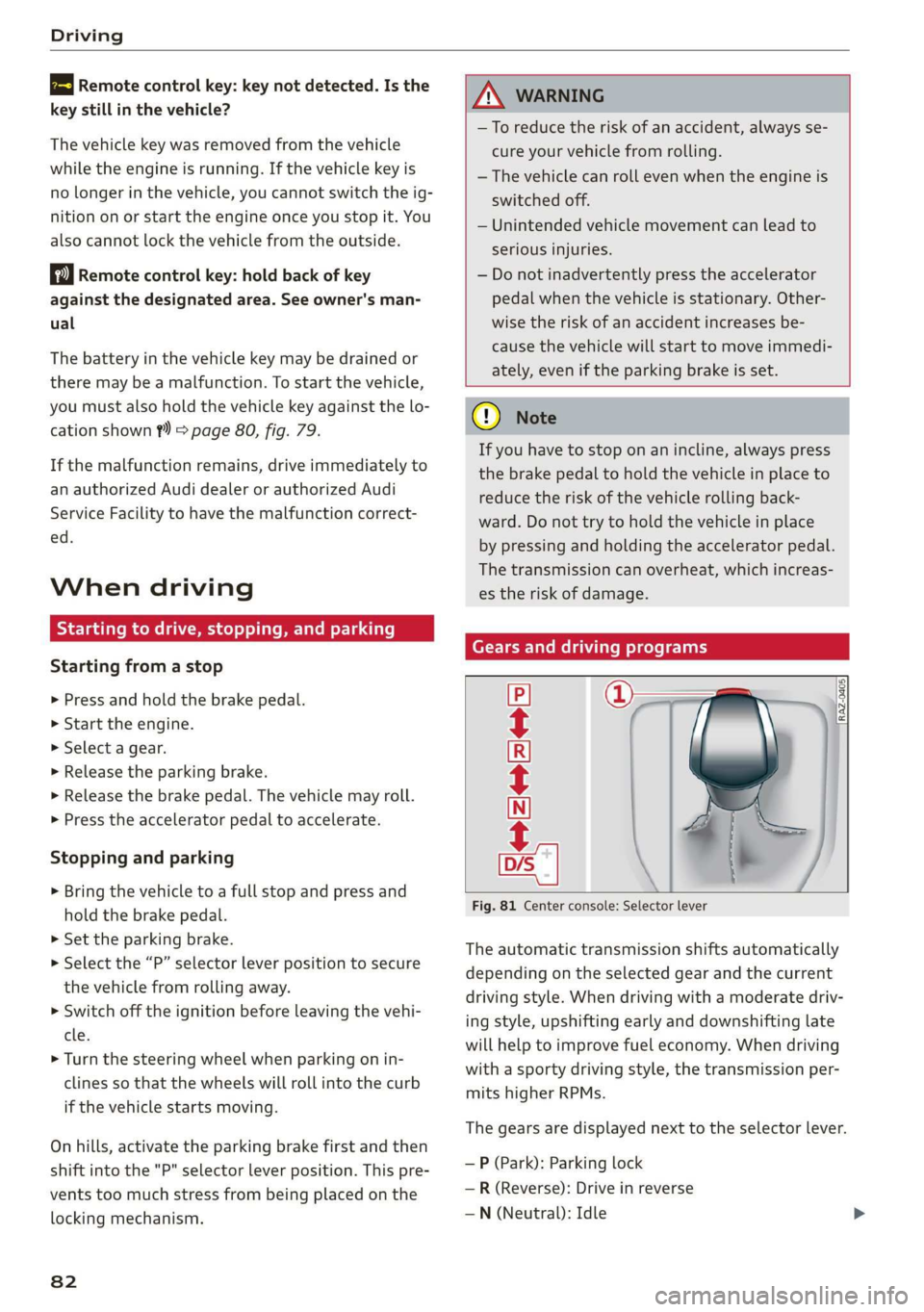
Gears and driving programs
=i
Fig. 81 Center console: Selector lever
CECRSE
The automatic transmission shifts automatically
depending on the selected gear and the current
driving style. When driving with a moderate driv-
ing style, upshifting early and downshifting late
will help to improve fuel economy. When driving
with a sporty driving style, the transmission per-
mits higher RPMs.
The gears are displayed next to the selector lever.
— P (Park): Parking lock
—R (Reverse): Drive in reverse
—N (Neutral): Idle
Page 89 of 280
83A012721BA
Driving
— Turn off electrical equipment that is not need-
ed, for example seat heating*.
— Anticipate upcoming traffic situations while
driving to avoid unnecessary acceleration and
braking.
— Avoid driving at high speeds.
— Avoid adding extra weight to the vehicle if pos-
sible, for example by not leaving roof racks or
bike racks installed when they are not needed.
— Make sure the tire pressure is correct.
— Have maintenance performed regularly on the
vehicle.
— Do not let the engine run while the vehicle
parked.
— Do not drive with winter tires during the summ-
er.
— Use the Start/Stop system.
— Utilize the engine braking effect.
— Avoid driving short distances when possible.
@ Tips
The amount of noise produced by the vehicle
can increase significantly when driving with a
sporty style. Show respect to others around
you and the environment with the way you op-
erate your vehicle, especially at night.
Energy management
Your vehicle is equipped with an intelligent ener-
gy management system for distributing electrici-
ty. This significantly improves the starting ability
and increases the vehicle battery life.
@ Tips
— If you drive short distances frequently, the
vehicle battery may not charge enough
while driving. As a result, convenience func-
tions for electrical equipment may be tem-
porarily unavailable.
— The vehicle battery will gradually drain if
the vehicle is not driven for long periods of
time, or if electrical equipment is used
when the engine is not running. To ensure
that the vehicle can still be started, the
electrical equipment will be reduced or
switched off.
B Drive system: malfunction! Safely stop vehi-
cle
There is a malfunction in the drive system. The
brake
booster and the power steering may stop
working. Stop the vehicle immediately or as soon
as possible and do not continue driving. Have the
problem corrected by an authorized Audi dealer
or authorized Audi Service Facility.
B Drive system: malfunction! Please contact
Service
There is a malfunction in the drive system. Drive
slowly to an authorized Audi dealer or authorized
Audi Service Facility to have the malfunction cor-
rected.
Start/Stop system
Applies to: vehicles with Start/Stop system
The Start/Stop system can help increase fuel
economy and reduce CO2 emissions.
In Start/Stop mode, the engine shuts off auto-
matically when stopped, for example at a traffic
light. The ignition and important assist systems
such as power steering and the brake booster will
remain available during the Stop phase. The en-
gine will restart automatically when needed.
The Start/Stop system is automatically activated
once the ignition is switched on.
Basic requirements
— The driver's door and hood must be closed.
—"P","N", or"D" must be engaged.
— The steering wheel must not be turned far in ei-
ther direction.
— The vehicle must have driven faster than 2 mph
(3 km/h) since the last time it stopped.
—The vehicle is not in trailer mode.
@) Note
Always switch the Start/Stop system off when
driving through water > page 88. >
87
Page 90 of 280
Driving
@) Tips
— Depending on the driving situation, the en-
gine may already stop when coasting before
the vehicle has come to a complete stop »).
— If you select the "D" position after shifting
into reverse, the vehicle must be driven fast-
er than 6 mph (10 km/h) in order for the
Start/Stop system to become active again.
This makes it possible to maneuver without
stopping the engine.
Stopping and starting the engine
Applies to: vehicles with Start/Stop system
> Press and hold the brake pedal until the vehicle
has stopped. The @ indicator light appears in
the instrument cluster once the engine stops
automatically.
> The engine starts again when you remove your
foot from the brake pedal. The indicator light
turns off.
@) Tips
— Press the brake pedal during a Stop phase
to keep the vehicle from rolling.
— The ignition will turn off if you press the
START ENGINE STOP] button during a Stop
phase.
— If you leave the vehicle briefly during a Stop
phase, the driver's door must be closed and
the safety belt buckled for the engine to be
able to restart.
— You can control if the engine will stop or not
by reducing or increasing the amount of
force you use to press the brake pedal. For
example, if you only lightly press on the
brake pedal in stop-and-go traffic or when
turning, the engine will not switch off when
the vehicle is stationary. If you press the
brake pedal harder, the engine will switch
off.
D_ In certain countries.
88
Starting and stopping the engine automat-
ier] NY
Applies to: vehicles with Start/Stop system
The system checks if certain conditions are met
before and during the Stop phase, and deter-
mines if the engine stops and how long it re-
mains stopped. For example, if power usage is
high, the engine will not be stopped. Along with
other conditions, the following factors influence
the automatic engine start or stop:
— Environmental conditions (slopes, inclines, ele-
vation, temperature)
— Battery (charge status, temperature, power us-
age)
— Engine temperature
— Assist systems
— Driving behavior
Depending on the engine, the indicator light
may appear if the engine is not stopped.
Manually switching the Start/Stop system
amare men)
Applies to: vehicles with Start/Stop system
The & button is located above the selector lever
in the center console.
> Press §& to switch on or off. The LED in the but-
ton turns on when the function is switched off.
@ Tips
If you switch the system off during a Stop
phase, the engine will start again automati-
cally.
Messages
Applies to: vehicles with Start/Stop system
Drive system: please start the vehicle manually
This message appears when specific conditions
are not met during a Stop phase. The Start/Stop
system will not be able to restart the engine. The
engine must be started with the
START ENGINE STOP] button.