battery AUDI Q3 2019 User Guide
[x] Cancel search | Manufacturer: AUDI, Model Year: 2019, Model line: Q3, Model: AUDI Q3 2019Pages: 280, PDF Size: 72.73 MB
Page 143 of 280
83A012721BA
Telephone
com/bluetooth or contact an authorized Au-
di dealer or authorized Audi Service Facility.
Operating two mobile devices throu Lat)
aE
Applies to: vehicles with telephone and Audi phone box
You can connect two mobile devices to the MMI,
for example your business and your personal mo-
bile device. You can use both mobile devices to
make calls in the vehicle.
Connecting another mobile device
Requirement: A cell phone must be connected to
the MMI.
> Applies to: MMI: Select on the home screen:
PHONE > [®. Follow the system instructions, or
> Applies to: MMI: Select on the home screen:
SETTINGS > Connected devices > Telephone 1
or Telephone 2 > New connection.
See > page 140, Connecting a mobile device to
the MMI.
Switching between two mobile devices
Requirement: telephone 1 and telephone 2 must
be connected.
> Applies to: MMI: Select on the home screen:
PHONE > ¢] > Switch telephones: The device
name of your active mobile device will be dis-
played.
@® Tips
— The device name of the active mobile device
(such as myPhone) will be displayed in the
PHONE menu.
— If telephone 1 does not connect automati-
cally to the MMI when the ignition is switch-
ed on, you can use a previously-connected
telephone 2 in the PHONE menu via J.
— You can send and receive messages on tele-
phone 1 as well as on telephone 2
=> page 147.
D_ Not available in all countries. These are additional car
phone functions only in conjunction with Audi connect In-
fotainment*.
— On mobile devices with multi-SIM function-
ality, the MMI only accesses one SIM card.
You can switch between SIM cards using the
mobile device.
Disconnecting a mobile
device
The mobile device will be disconnected from the
MMI and removed from the list of paired devices.
> To disconnect a connected device, use the con-
nection manager > page 197.
Using the Audi phone
box
Applies to: vehicles with Audi phone box
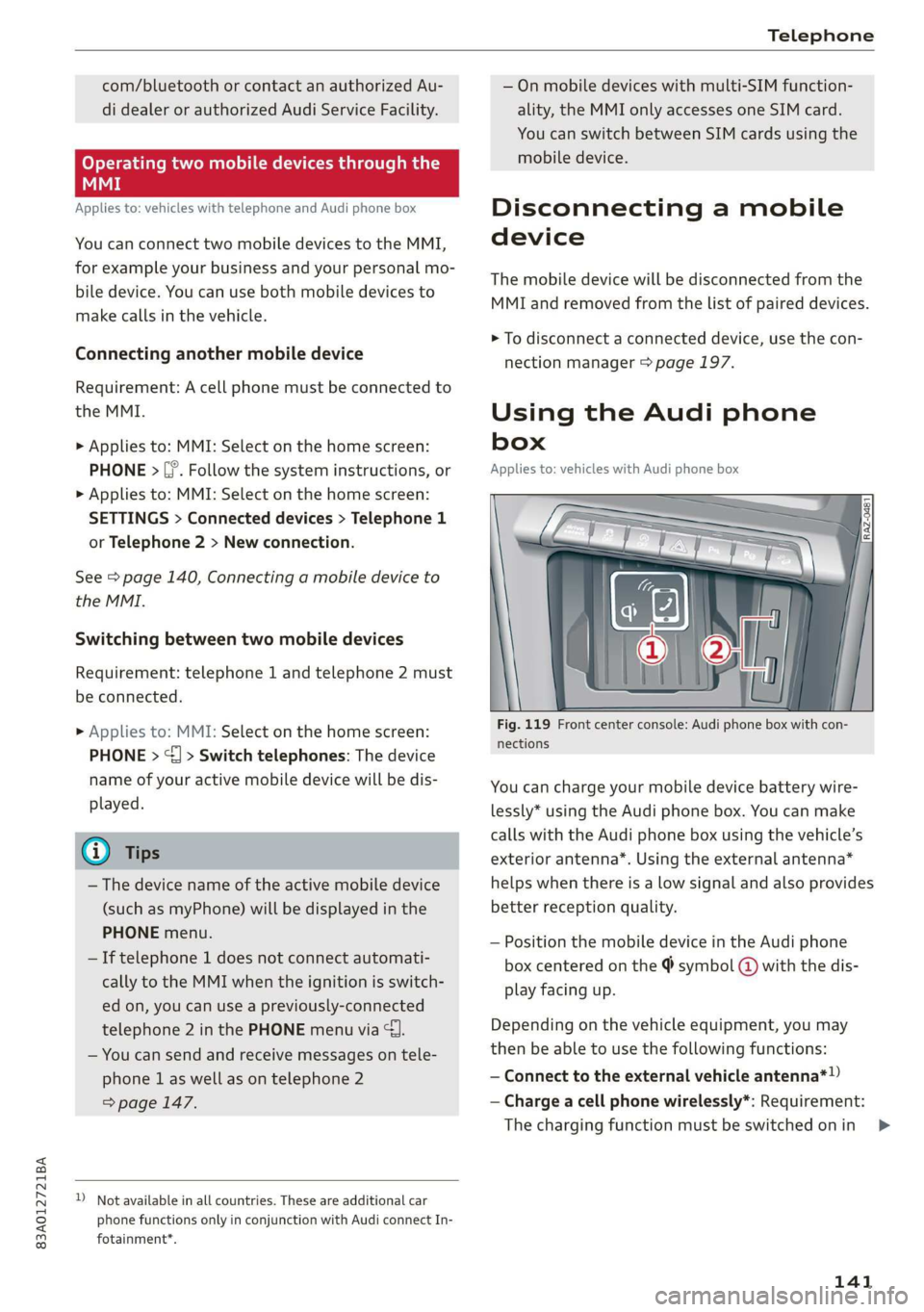
Fig. 119 Front center console: Audi phone box with con-
nections
You can charge your mobile device battery wire-
lessly* using the Audi phone box. You can make
calls with the Audi phone box using the vehicle’s
exterior antenna*. Using the external antenna*
helps when there is a low signal and also provides
better reception quality.
— Position the mobile device in the Audi phone
box centered on the @ symbol @ with the dis-
play facing up.
Depending on the vehicle equipment, you may
then be able to use the following functions:
— Connect to the external vehicle antenna*!)
— Charge a cell phone wirelessly*: Requirement:
The charging function must be switched on in
141
>
Page 186 of 280
Media
— There generally are additional costs when
using an online media service account,
especially when it is used internationally.
G) Tips
— Depending on the Internet connection and
network traffic, the connection may discon-
nected when online media sources are play-
ing.
— Online media usage depends on the service
availability of the third party provider.
— Audi AG simply makes the access to online
media services possible through the MMI
and does not take any responsibility for the
contents of the online media services.
— Always read the chapter > page 154.
— Depending on the mobile device being used,
there may be interruptions during media
playback and when using the myAudi app.
To avoid interruptions when using a mobile
device, do not lock the screen on your mo-
bile device and keep the myAudi app in the
foreground.
Multimedia connections
USB adapter cable
[RAH-9202
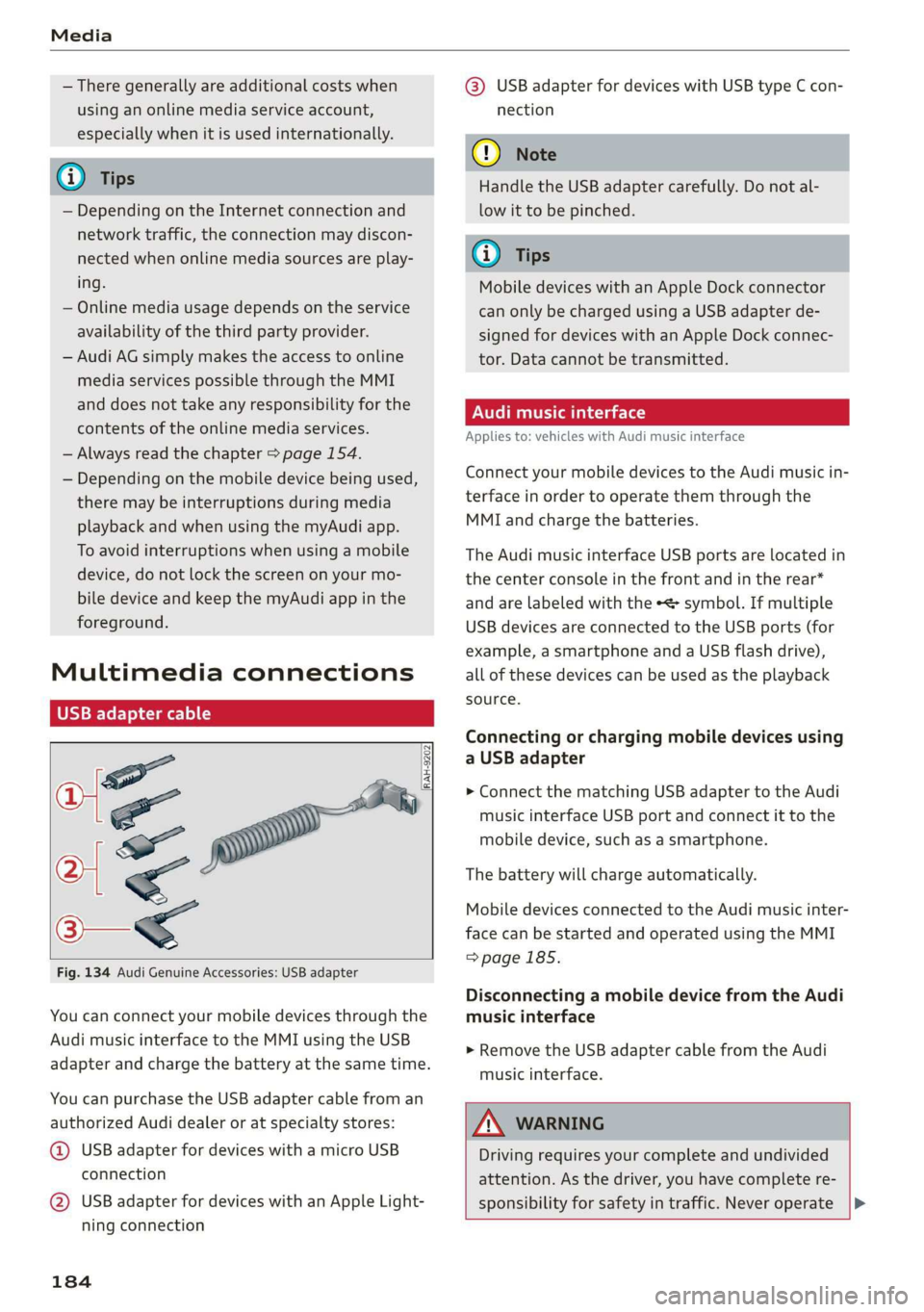
Fig. 134 Audi Genuine Accessories: USB adapter
You can connect your mobile devices through the
Audi music interface to the MMI using the USB
adapter and charge the battery at the same time.
You can purchase the USB adapter cable from an
authorized Audi dealer or at specialty stores:
@ USB adapter for devices with a micro USB
connection
@ USB adapter for devices with an Apple Light-
ning connection
184
@® USB adapter for devices with USB type C con-
nection
() Note
Handle the USB adapter carefully. Do not al-
low it to be pinched.
G) Tips
Mobile devices with an Apple Dock connector
can only be charged using a USB adapter de-
signed for devices with an Apple Dock connec-
tor. Data cannot be transmitted.
ONT Tae 1a 1e)
Applies to: vehicles with Audi music interface
Connect your mobile devices to the Audi music in-
terface in order to operate them through the
MMI and charge the batteries.
The Audi music interface USB ports are located in
the center console in the front and in the rear*
and are labeled with the «> symbol. If multiple
USB devices are connected to the USB ports (for
example, a smartphone and a USB flash drive),
all of these devices can be used as the playback
source.
Connecting or charging mobile devices using
a USB adapter
> Connect the matching USB adapter to the Audi
music interface USB port and connect it to the
mobile device, such as a smartphone.
The battery will charge automatically.
Mobile devices connected to the Audi music inter-
face can be started and operated using the MMI
=>page 185.
Disconnecting a mobile device from the Audi
music interface
> Remove the USB adapter cable from the Audi
music interface.
ZA WARNING
Driving requires your complete and undivided
attention. As the driver, you have complete re-
sponsibility for safety in traffic. Never operate |>
Page 193 of 280
83A012721BA
Media
Audio files Video files
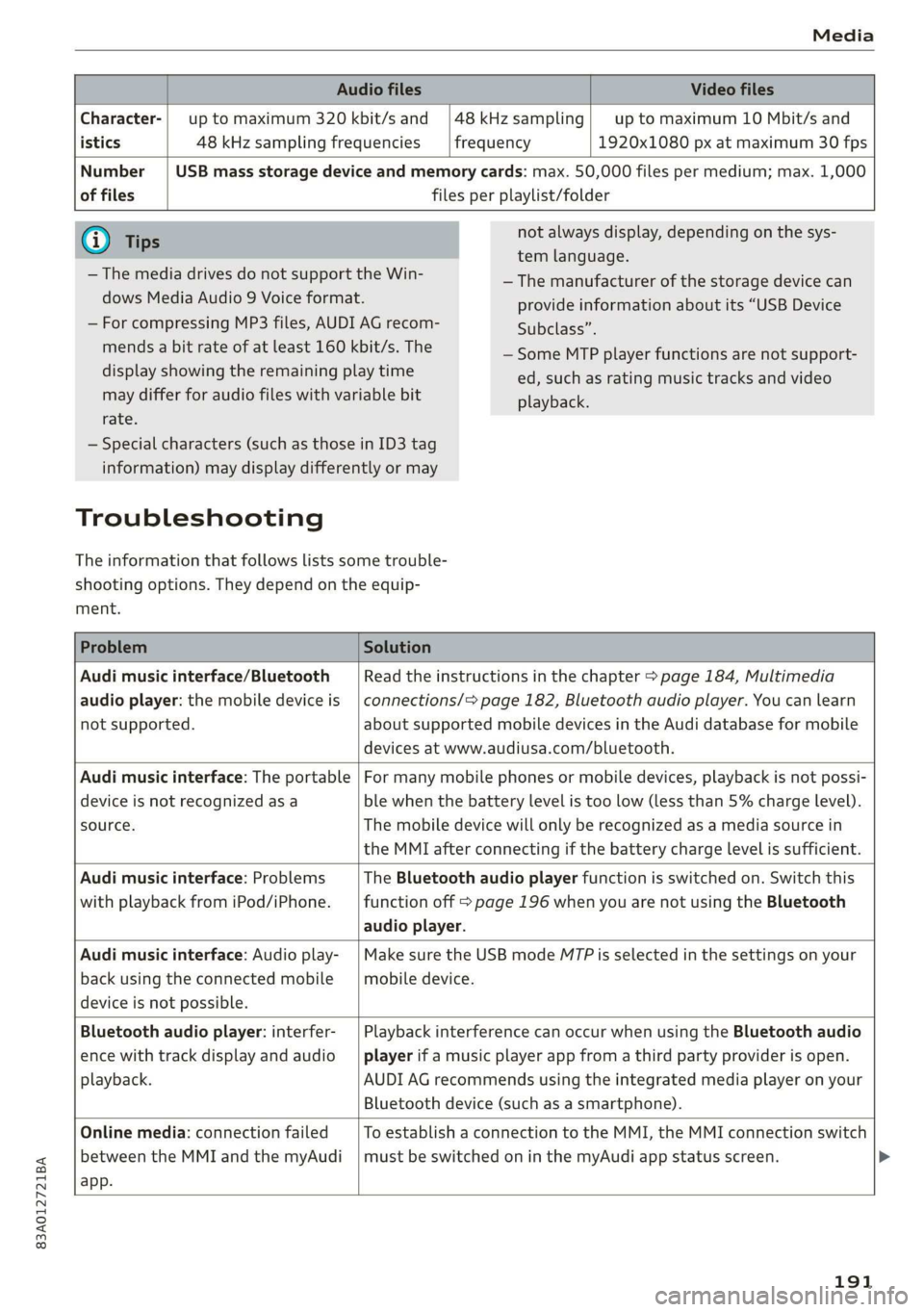
Character-| up to maximum 320 kbit/s and |48kHzsampling| up to maximum 10 Mbit/s and
istics 48 kHz sampling frequencies frequency 1920x1080 px at maximum 30 fps
Number | USB mass storage device and memory cards: max. 50,000 files per medium; max. 1,000
of files files per playlist/folder
G) Tips
— The media drives do not support the Win-
dows Media Audio 9 Voice format.
— For compressing MP3 files, AUDI AG recom-
mends a bit rate of at least 160 kbit/s. The
display showing the remaining play time
may differ for audio files with variable bit
rate.
not always display, depending on the sys-
tem language.
— The manufacturer of the storage device can
provide information about its “USB Device
Subclass”.
— Some MTP player functions are not support-
ed, such as rating music tracks and video
playback.
— Special characters (such as those in ID3 tag
information) may display differently or may
Troubleshooting
The information that follows lists some trouble-
shooting options. They depend on the equip-
ment.
Problem Solution
Audi music interface/Bluetooth
audio player: the mobile device is
not supported.
Read the instructions in the chapter > page 184, Multimedia
connections/=> page 182, Bluetooth audio player. You can learn
about supported mobile devices in the Audi database for mobile
devices at www.audiusa.com/bluetooth.
Audi music interface: The portable
device is not recognized as a
source.
For many mobile phones or mobile devices, playback is not possi-
ble when the battery level is too low (less than 5% charge level).
The mobile device will only be recognized as a media source in
the MMI after connecting if the battery charge level is sufficient.
Audi music interface: Problems
with playback from iPod/iPhone.
The Bluetooth audio player function is switched on. Switch this
function off > page 196 when you are not using the Bluetooth
audio player.
Audi music interface: Audio play-
back using the connected mobile
device is not possible.
Make sure the USB mode M7P is selected in the settings on your
mobile device.
Bluetooth audio player: interfer-
ence with track display and audio
playback.
Playback interference can occur when using the Bluetooth audio
player if a music player app from a third party provider is open.
AUDI AG recommends using the integrated media player on your
Bluetooth device (such as a smartphone).
Online media: connection failed
between the MMI and the myAudi
app.
To establish a connection to the MMI, the MMI connection switch
must be switched on in the myAudi app status screen.
191
Page 196 of 280
Audi smartphone interface
— The menu language shown in the MMI is
based on the settings in your smartphone.
— Some MMI functions are not available when
there is an active Audi smartphone interface
connection.
— You cannot connect any mobile devices via
Bluetooth when an Apple CarPlay connec-
tion is active.
Troubleshooting
Applies to: vehicles with Audi smartphone interface
The information that follows lists some trouble-
shooting options. They depend on the equip-
ment.
— Usage of the Audi smartphone interface de-
pends on the availability of services through
third party providers.
— AUDI AG merely provides access to third
party services through the MMI and does
not assume any responsibility for the con-
tent of these services.
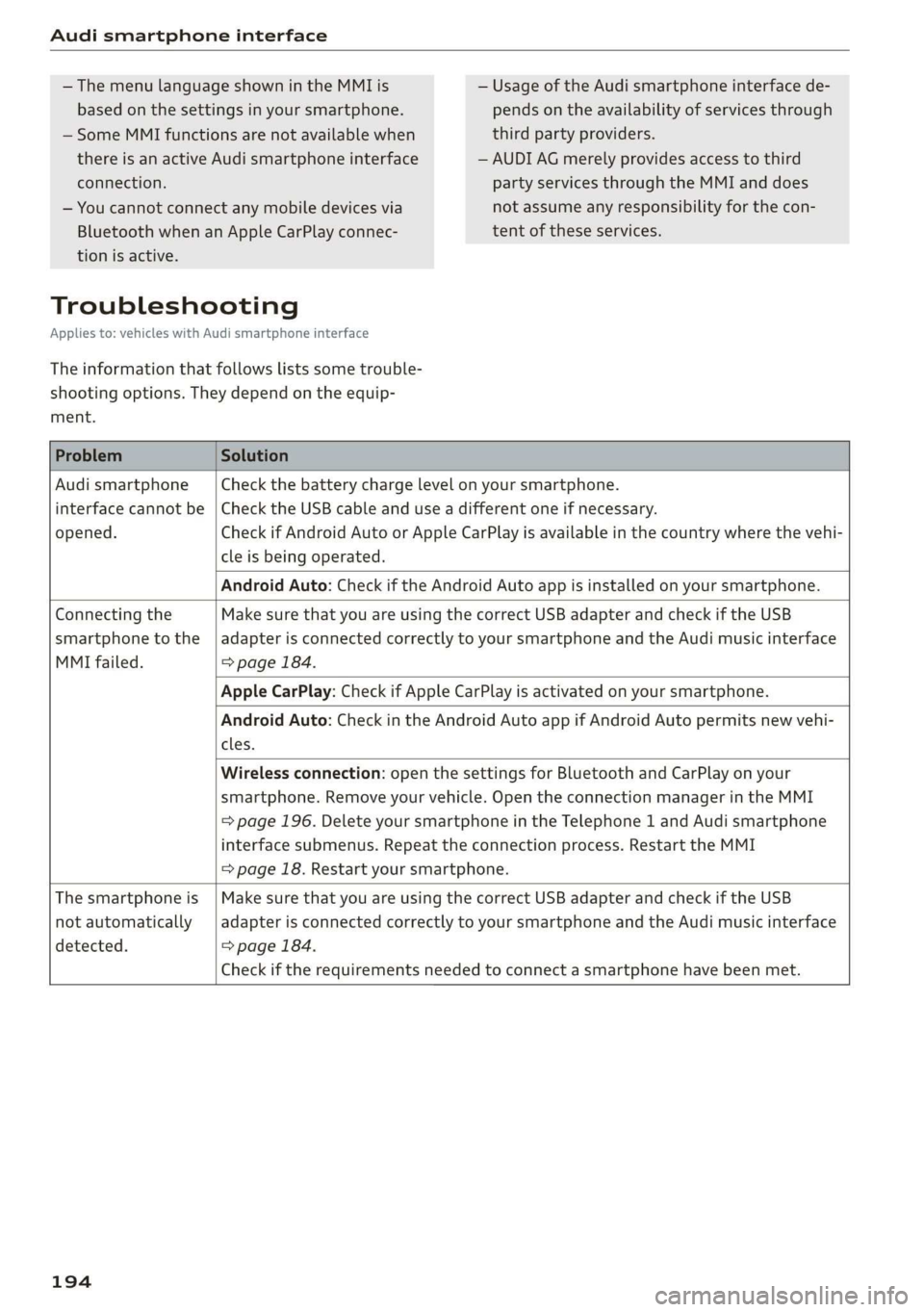
Problem Solution
Audi smartphone Check the battery charge level on your smartphone.
interface cannot be | Check the USB cable and use a different one if necessary.
opened.
cle is being operated.
Check if Android Auto or Apple CarPlay is available in the country where the vehi-
Android Auto: Check if the Android Auto app is installed on your smartphone.
Connecting the Make sure that you are using the correct USB adapter and check if the USB
smartphone to the | adapter is connected correctly to your smartphone and the Audi music interface
MMI failed. => page 184.
Apple CarPlay: Check if Apple CarPlay is activated on your smartphone.
cles.
Android Auto: Check in the Android Auto app if Android Auto permits new vehi-
Wireless connection: open the settings for Bluetooth and CarPlay on your
smartphone. Remove your vehicle. Open the connection manager in the MMI
= page 196. Delete your smartphone in the Telephone 1 and Audi smartphone
interface submenus. Repeat the connection process. Restart the MMI
= page 18. Restart your smartphone.
The smartphone is | Make sure that you are using the correct USB adapter and check if the USB
not automatically
detected. => page 184.
adapter is connected correctly to your smartphone and the Audi music interface
Check if the requirements needed to connect a smartphone have been met.
194
Page 205 of 280
83A012721BA
Checking and Filling
or authorized Audi Service Facility to have the
malfunction corrected.
The indicator light can also turn on if the fuel fill-
er cap is not closed correctly > page 200).
Engine compartment
ere eee)
Special care is required if you are working in the
engine compartment
For work in the engine compartment, such as
checking and filling fluids, there is a risk of in-
jury, scalding, accidents, and burns. For this
reason, follow all the warnings and general
safety precautions provided in the following in-
formation. The engine compartment is a dan-
gerous area on the vehicle. > A\.
ZA WARNING
— Turn the engine off.
— Switch the ignition off.
— Set the parking brake.
— Select the “P” (Park) selector lever position.
— Let the engine cool down.
— Keep children away from the engine com-
partment.
— Never spill fluids on a hot engine. These flu-
ids (such as the freeze protection contained
in the coolant) can catch fire.
— Avoid short circuits in the electrical system.
— Never reach into the radiator fan. The fan is
temperature-controlled and can turn on
suddenly, even when the ignition is switched
off.
— Never open the hood when there is steam or
coolant escaping from the engine compart-
ment, because there is a risk that you could
be burned. Wait until no steam or coolant is
escaping.
— Never open the cap on the coolant expan-
sion tank when the engine is warm. The
cooling system is under pressure.
) Depending on the engine and country
—To protect your face, hands, and arms from
hot steam or coolant, cover the cap with a
thick cloth when opening.
— Do not remove the engine cover under any
circumstances. This increases the risk of
burns.
— Due to the risk of electric shock, never touch
the ignition cable or other components in
the electronic high-voltage ignition system
when the engine is running or is starting.
— If a gear is engaged while the vehicle is sta-
tionary and the engine is running, do not
press the accelerator pedal inadvertently.
Pressing the accelerator pedal will cause the
vehicle to move, and this could result in an
accident.
—If inspections or repairs must be performed
while the engine is running, moving compo-
nents (such as the ribbed belt, generator,
and radiator fan) pose an additional risk.
— Set the parking brake first and select the
“P” (Park) selector lever position.
— Always make sure that no parts of the
body, jewelry, ties, loose clothing, and
long hair can be caught in moving engine
components. Before any work, always re-
move any jewelry and/or ties, tie back long
hair, and make sure all clothing fits close
to the body to reduce the risk of anything
becoming caught in engine components.
— Pay attention to the following warnings list-
ed when work on the fuel system or on the
electrical equipment is required.
— Do not smoke.
— Never work near open flames.
— Always have a working fire extinguisher
nearby.
— All work on the battery or electrical system
in your vehicle can result in injuries, chemi-
cal burns, accidents, or burns. Because of
this, all work must be performed only by an
authorized Audi dealer or authorized Audi
Service Facility.
— Limit your exposure to exhaust and chemi-
cals to as short a time as possible.
203
Page 206 of 280
Checking and Filling
Z\ WARNING
California Proposition 65 Warning:
— Engine exhaust, some of its constituents,
and certain vehicle components contain or
emit chemicals known to the State of Cali-
fornia to cause cancer and birth defects and
reproductive harm. In addition, certain flu-
ids contained in vehicles and certain prod-
ucts of component wear contain or emit
chemicals known to the State of California
to cause cancer and birth defects or other
reproductive harm.
— Battery posts, terminals and related acces-
sories contain lead and lead compounds,
chemicals known to the State of California
to cause cancer and reproductive harms.
Wash hands after handling.
®) Note
When filling fluids, be sure not to mix the flu-
ids up. Otherwise severe malfunctions and en-
gine damage will occur.
iC) For the sake of the environment
You should regularly check the ground under
your vehicle in order to detect leaks quickly. If
there are visible spots from oil or other fluids,
bring your vehicle to an authorized Audi deal-
er or authorized Audi Service Facility to be
checked.
Opening/closing the hood
The hood is released from inside the vehicle.
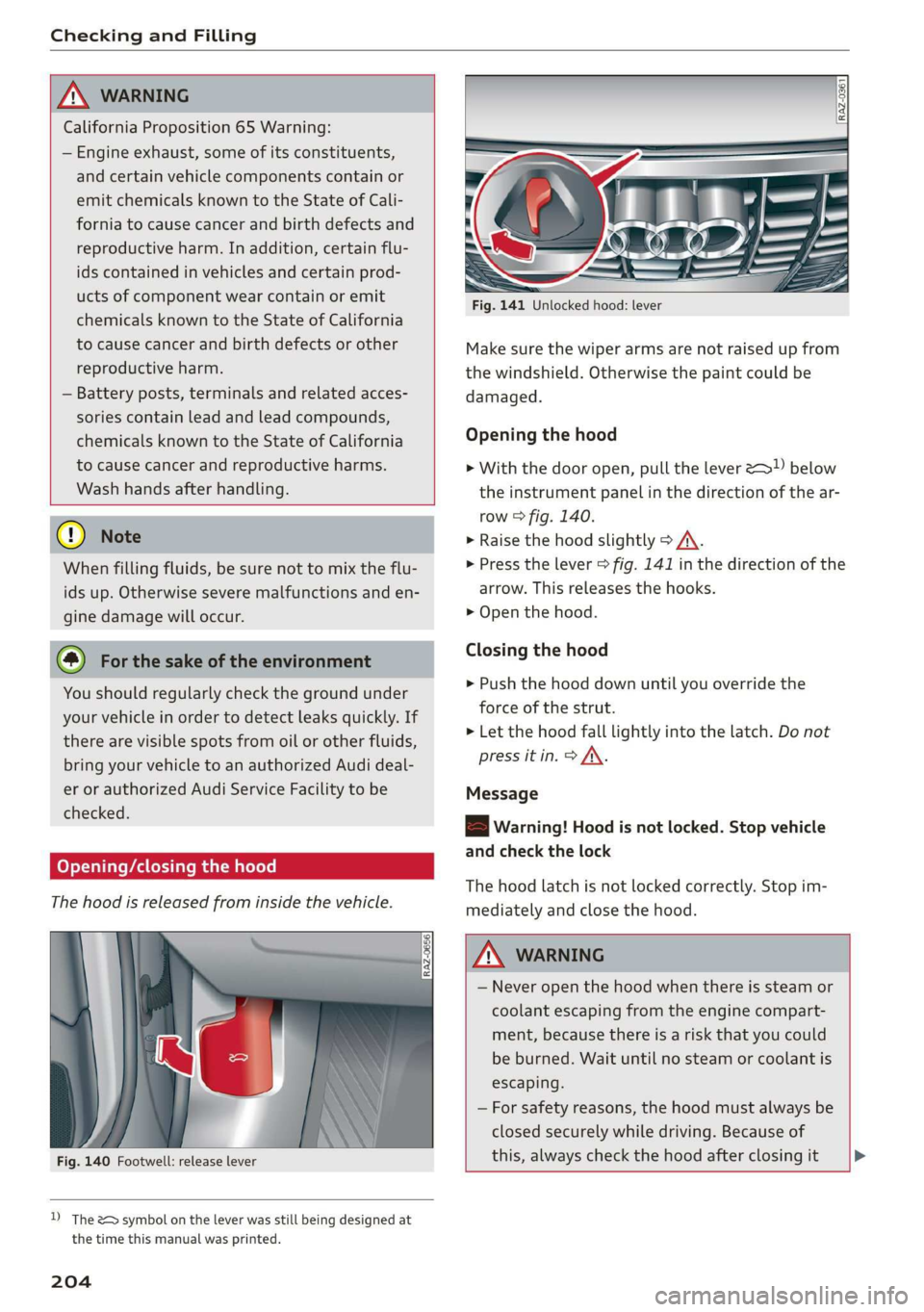
Fig. 140 Footwell: release lever
D) The &> symbol on the lever was still being designed at
the time this manual was printed.
204
Fig. 141 Unlocked hood: lever
Make sure the wiper arms are not raised up from
the windshield. Otherwise the paint could be
damaged.
Opening the hood
> With the door open, pull the lever >) below
the instrument panel in the direction of the ar-
row > fig. 140.
» Raise the hood slightly > /A\.
> Press the lever > fig. 141 in the direction of the
arrow. This releases the hooks.
> Open the hood.
Closing the hood
> Push the hood down until you override the
force of the strut.
> Let the hood fall lightly into the latch. Do not
press it in. > AX.
Message
8B Warning! Hood is not locked. Stop vehicle
and check the lock
The hood latch is not locked correctly. Stop im-
mediately and close the hood.
ZA\ WARNING
— Never open the hood when there is steam or
coolant escaping from the engine compart-
ment, because there is a risk that you could
be burned. Wait until no steam or coolant is
escaping.
— For safety reasons, the hood must always be
closed securely while driving. Because of
this, always check the hood after closing it >
Page 207 of 280
83A012721BA
Checking and Filling
to make sure it is latched correctly. The hood
is latched if the front corners cannot be lift-
close it, because driving when the hood is
not latched increases the risk of an accident.
ed.
— If you notice that the hood is not latched
while you are driving, stop immediately and
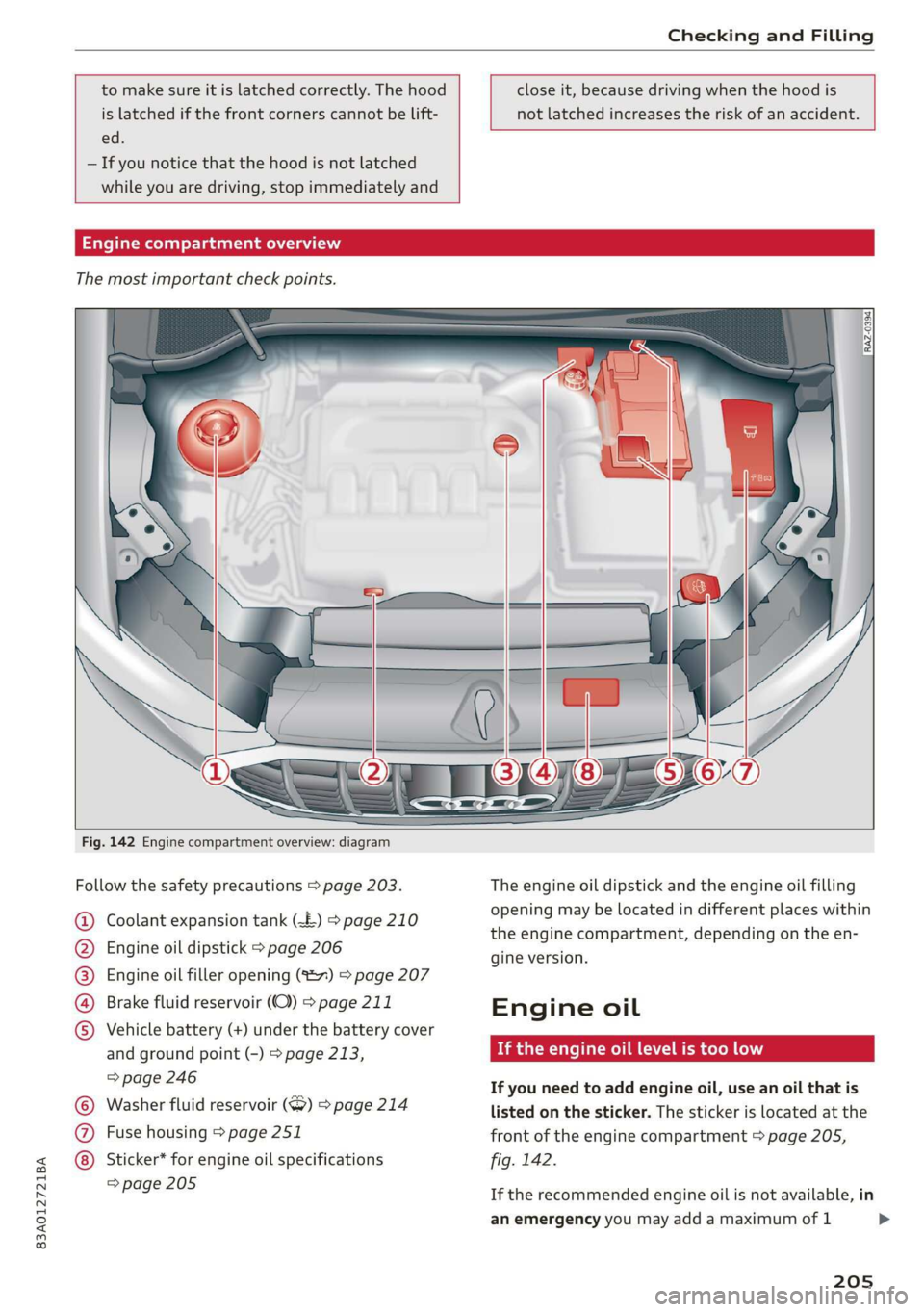
Engine compartment overview
The most important check points.
Fig. 142 Engine compartment overview: diagram
Follow the safety precautions > page 203.
Coolant expansion tank (£) > page 210
Engine oil dipstick > page 206
Engine oil filler opening (827) > page 207
Brake fluid reservoir (OC) > page 211
Vehicle battery (+) under the battery cover
and ground point (-) > page 213,
=> page 246
Washer fluid reservoir (>) > page 214
Fuse housing > page 251
©O®OOO
©C® Sticker* for engine oil specifications
=> page 205
The engine oil dipstick and the engine oil filling
opening may be located in different places within
the engine compartment, depending on the
gine version.
Engine oil
If the engine oil level is too low
ene
If you need to add engine oil, use an oil that is
listed on the sticker. The sticker is located at the
front of the engine compartment > page 205,
fig. 142.
If the recommended engine oil is not available, in
an emergency you may add a maximum of 1
205
>
Page 213 of 280
![AUDI Q3 2019 User Guide 83A012721BA
Checking and Filling
Brake fluid
BFV-0229]
Fig. 146 Engine compartment: cap on brake fluid reservoir
Follow the safety precautions > page 203, Gener-
al information.](/img/6/57626/w960_57626-212.png "AUDI Q3 2019 User Guide 83A012721BA
Checking and Filling
Brake fluid
BFV-0229]
Fig. 146 Engine compartment: cap on brake fluid reservoir
Follow the safety precautions > page 203, Gener-
al information.")
83A012721BA
Checking and Filling
Brake fluid
BFV-0229]
Fig. 146 Engine compartment: cap on brake fluid reservoir
Follow the safety precautions > page 203, Gener-
al information.
Checking the brake fluid level
Read the brake fluid level on the brake fluid res-
ervoir > page 205, fig. 142. The brake fluid level
must be between the MIN and MAX markings
>A.
The brake fluid level is monitored automatically.
Message
GG / @ Brakes: stop vehicle and check brake
fluid level
Stop the vehicle and check the brake fluid level.
See an authorized Audi dealer or authorized Audi
Service Facility for assistance.
Changing the brake fluid
Brake fluid should be changed at regular inter-
vals. Have the brake fluid changed by an author-
ized Audi dealer or authorized Audi Service Facili-
ty. The authorized Audi dealer or authorized Audi
Service Facility will inform you of the replace-
ment intervals.
/\ WARNING
— If the brake fluid level is below the MIN
marking, it can impair the braking effect and
driving safety, which increase the risk of an
accident. Do not continue driving. See an au-
thorized Audi dealer or authorized Audi
Service Facility for assistance.
— If the brake fluid is old, bubbles may form in
the brake system during heavy braking. This
would impair braking performance and driv-
ing safety, which increases the risk of an ac-
cident.
— The brake fluid in your vehicle must meet
the standard VW 501 14 and is available at
an authorized Audi dealer or authorized Au-
di Service Facility. If this brake fluid is not
available, another high-grade brake fluid of
equivalent quality may be used, and it must
meet the U.S. Federal Motor Vehicle Stand-
ard (FMVSS) 116 DOT 4, Class 6.
@) Note
— If the brake fluid level is above the MAX
marking, brake fluid may leak out over the
edge of the reservoir and result in damage
to the vehicle.
— Do not get any brake fluid on the vehicle
paint, because it will corrode the paint.
Electrical system
If the z= or fl indicator light turns on, there is a
malfunction in the generator, the battery, or the
vehicle electrical system.
[i Electrical system: malfunction! Safely stop
vehicle
Do not continue driving and switch the engine off
=
A\. See an authorized Audi dealer or authorized
Audi Service Facility for assistance.
= Electrical system: malfunction! Restart not
possible. Please contact Service
It will not be possible to restart the engine once
you turn it off. Vehicle functions/driving stability
may be limited. Drive to an authorized Audi deal-
er or authorized Audi Service Facility immediate-
ly.
=} Electrical system: malfunction! Please con-
tact Service
Switch off all electrical equipment that is not
needed. Vehicle functions/driving stability may
be limited. Drive to an authorized Audi dealer or
authorized Audi Service Facility immediately.
= Electrical system: low battery charge. Bat-
tery
will be charged while driving
211
>
Page 214 of 280
Checking and Filling
The starting ability may be impaired.
If this message turns off after a little while, the
vehicle battery charged enough while driving.
If this message does not turn off, drive immedi-
ately to an authorized Audi dealer or authorized
Audi Service Facility.
ZA WARNING
When there is an electrical system malfunc-
tion, vehicle functions may not work and driv-
ing stability may be limited, which increases
the risk of an accident. Stop driving and
switch the engine off. See an authorized Audi
dealer or authorized Audi Service Facility for
assistance.
Battery
rae Le cel)
Because of the complex power supply, all work on
batteries such as disconnecting, replacing, etc.,
should only be performed by an authorized Audi
dealer or authorized Audi Service Facility > A.
Multiple batteries with different technologies
may be installed in your vehicle:
— Vehicle battery (for example, for starting the
engine, basic power supply) > page 213, Lead
battery or > page 213, Other battery types
— Auxiliary battery (for example, for recuperation
or optional equipment) > page 213, Other bat-
tery types
Not running the vehicle for long periods of
time
The battery will gradually drain if the vehicle
does not run for long periods of time. To ensure
that the vehicle can still be started, the electrical
equipment will be reduced or switched off
= page 87. Some convenience functions, such as
interior lighting or power seat adjustment, may
not be available under certain circumstances.
These convenience functions will be available
again once you switch the ignition on and start
the
engine.
Even when electrical equipment is switched off,
the equipment can still drain the battery if the
212
vehicle is not driven for long periods of time.
Deep draining results in a chemical reaction that
destroys the inside of the battery. The battery
must be charged every month to prevent this
= page 213. Contact an authorized Audi dealer or
authorized Audi Service Facility for more infor-
mation.
Winter operation
Cold weather places higher demands on the bat-
tery. This results in reduced starting ability. Have
the battery checked by an authorized Audi dealer
or authorized Audi Service Facility before cold
weather begins.
ZA\ WARNING
All work on the battery or electrical system in
your vehicle can result in injuries, chemical
burns, accidents, or burns. Because of this, all
work must be performed only by an author-
ized Audi dealer or authorized Audi Service Fa-
cility.
ZA WARNING
California Proposition 65 Warning:
— Battery posts, terminals and related acces-
sories contain lead and lead compounds,
chemicals known to the State of California
to cause cancer and reproductive harms.
Wash hands after handling.
C) Note
— If the vehicle will be parked for long periods
of time, protect the battery against the cold
so that it will not be destroyed by “freezing”
= page 213, Charging the battery.
— There are electrical components under the
cargo floor behind a trim panel that warm
up during operation. To reduce the risk of
the components overheating, do not store
objects such as blankets under the cargo
floor. If the components overheat, they will
switch off temporarily. This will be indicated
by a message that will be displayed in the
instrument cluster until the temperature re-
turns to normal.
Page 215 of 280
83A012721BA
Checking and Filling
Lead battery
Explanation of warnings:
Always wear eye protection.
Battery acid is highly corrosive. Always
wear protective gloves and eye protection.
Fire, sparks, open flame and smoking are
forbidden.
A highly explosive mixture of gases can
A form when charging batteries.
® Always keep children away from battery
acid and the battery.
@/ | Always follow the instructions in the oper-
GQ) | ating manual.
@ For the sake of the environment
® Lead-acid batteries must be disposed of
using methods that will not harm the environ-
ment. Do not dispose of them in household
trash. They contain harmful substances, such
as sulfuric acid and lead, and also recyclable
raw materials. Contact an authorized Audi
dealer or authorized Audi Service Facility for
more information.
Other battery types
Explanation of warnings:
Fire, sparks, open flame and smoking are
& forbidden.
Always keep children away from battery
@) acid and the battery.
@/ | Always follow the instructions in the oper-
fQ) | ating manual.
ZA\ WARNING
All work on the batteries must only be per-
formed by an authorized Audi dealer or au-
thorized Audi Service Facility.
— Gases that escape from these different bat-
tery types can be poisonous or flammable.
— The contents of these battery types can be
corrosive. If any battery contents come into
contact with the skin, flush the affected
area for at least 15 minutes with clean wa-
ter. Then wash the affected area with soap.
Have the affected area examined by a medi-
cal professional.
@) Note
Components must not be connected to the
battery terminals and wires on these battery
types because this increases the risk of dam-
age, for example due to overvoltage.
(4) For the sake of the environment
“5 These types of batteries must be dis-
posed of using methods that will not harm
the environment. Do not dispose of them in
household trash. They contain harmful sub-
stances and recyclable raw materials. Contact
an authorized Audi dealer or authorized Audi
Service Facility for more information.
Cercle mentee iac lay
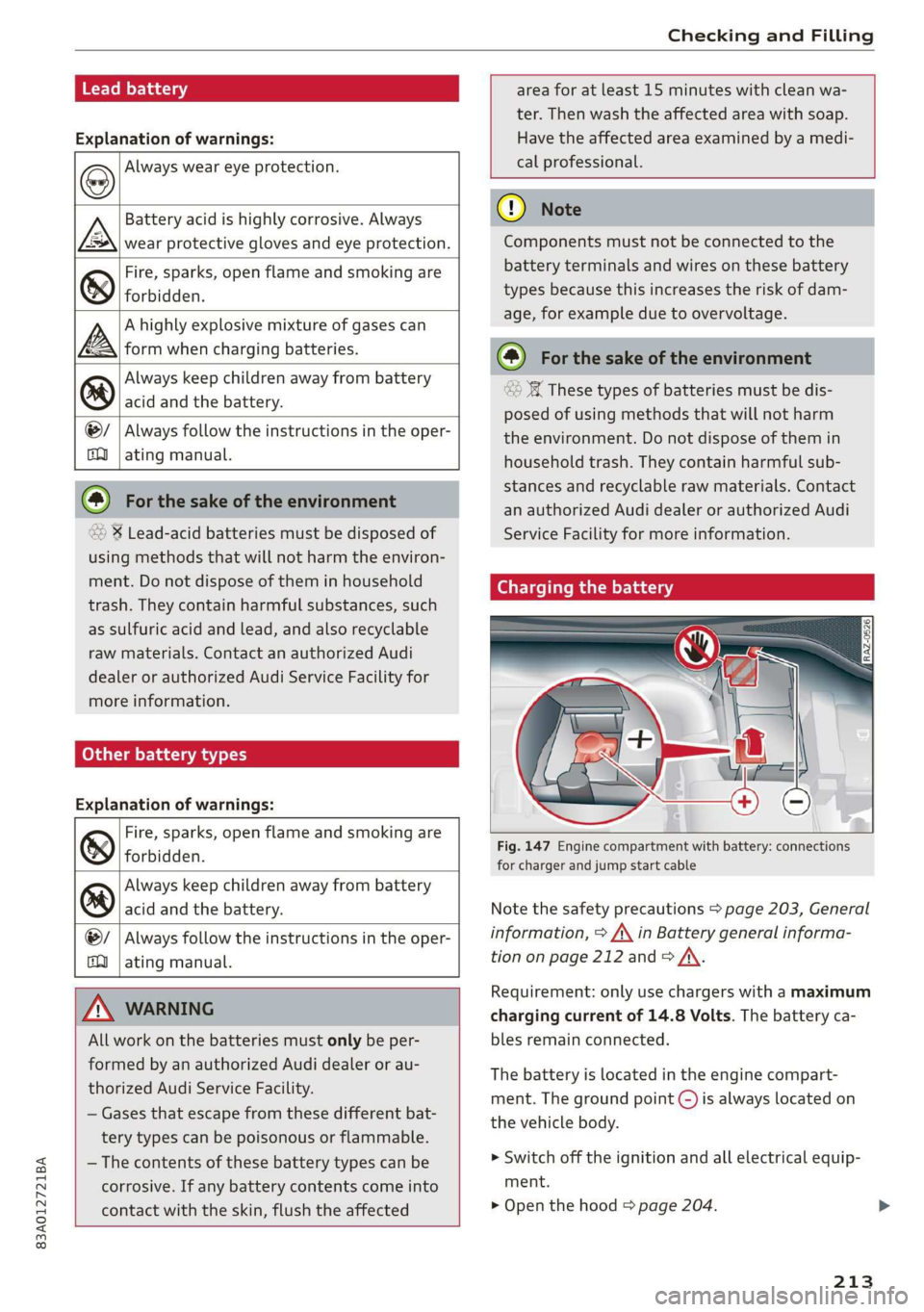
Fig. 147 Engine compartment with battery: connections
for charger and jump start cable
Note the safety precautions > page 203, General
information, > /\ in Battery general informa-
tion on page 212 and > /\.
Requirement: only use chargers with a maximum
charging current of 14.8 Volts. The battery ca-
bles remain connected.
The battery is located in the engine compart-
ment. The ground point ©) is always located on
the vehicle body.
>» Switch off the ignition and all electrical equip-
ment.
> Open the hood & page 204.
213