cruise control AUDI Q5 2013 User Guide
[x] Cancel search | Manufacturer: AUDI, Model Year: 2013, Model line: Q5, Model: AUDI Q5 2013Pages: 316, PDF Size: 78.89 MB
Page 110 of 316
108 Audi adaptive cruise control and braking guard
confirmed by the video camera, an acute
collision warning.
- For safety reasons, do not use adaptive
cruise control when driving on roads with
many curves, when the road surface is in
poor condition and/or in bad weather
(such as ice, fog, gravel, heavy rain and
hydroplan ing). Using the system under
these conditions could result in a colli
sion.
- Switch adaptive cruise control off tempo
rar ily when driv ing in turning lanes, on
expressway exits or in construc tion
zones. This prevents the vehicle from ac
celerating to the set speed when in these
situations.
- Th e adaptive cruise control system w ill
not brake by itse lf if you put your foot on
the accelerator pedal. Doing so can over
ride the speed and distance regulation.
- When approaching stationary objects
such as stopped traffic, adaptive cruise
control will not respond and braking
guard w ill have limited function.
- The adaptive cr uise control system and
braking guard do not react to people, an
ima ls, objects crossing the road or on
coming objects .
- The function of the radar sensor can be
affected by reflective objects such as
guard rails, the entrance to a tunnel,
heavy rain or ice.
- Never follow a vehicle so closely that you cannot stop your vehicle safely. The
adaptive cruise control cannot slow or
brake the vehicle safely when you follow
ano ther vehicle too closely . Always re
member that the automatic braking
function cannot bring the vehicle to a sudden or emergency stop under these
conditions.
- To prevent unintended operation, always
switch adaptive cruise control off when it
is not being used.
QJ Note
The sensor can be disp laced by impacts o r
damage to the bumper, whee l housing and underbody.
That could affect the adaptive
cruise control system and braking guard. Have yo ur authorized Aud i dea ler or a u
thorized Audi Service Facility check their
function.
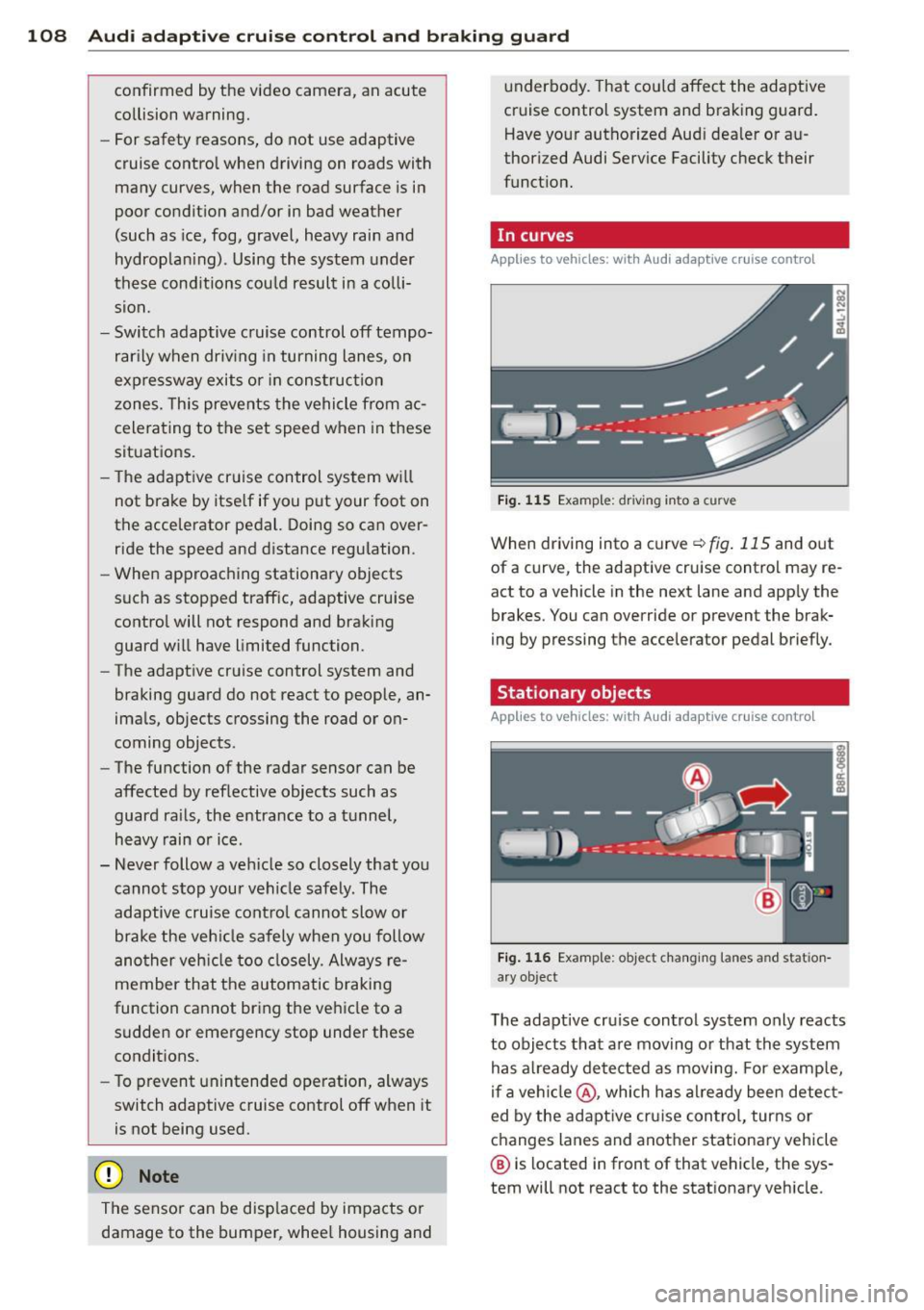
In curves
Applies to vehicles: with Audi adaptive cruise contro l
Fig. 115 Examp le: driv ing into a curve
When driving into a curve ¢fig . 115 and out
of a curve, the adaptive cruise control may re
act to a vehicle in the next lane and app ly the
brakes. You can override or prevent the brak
ing by pressing the accelerator pedal briefly.
' Stationary objects
Applies to vehicles: with Aud i adapt ive cru ise contro l
Fig. 116 Example: object changing lanes and station
a ry object
T he adaptive cru ise control system only reacts
to objects that are moving or that the system
has a lready detected as moving. For examp le,
if a vehi cle@ , which has al ready been detect
ed by the adaptive cruise control, turns or
changes lanes and another stationary vehicle
® is located in front of that vehicle, the sys
tem will not react to the stat ionary veh icle.
Page 111 of 316
Audi adaptive cruise control and braking guard 109
Audi adaptive cruise
control
Description
Applies to vehicles: with Audi adaptive cruise control
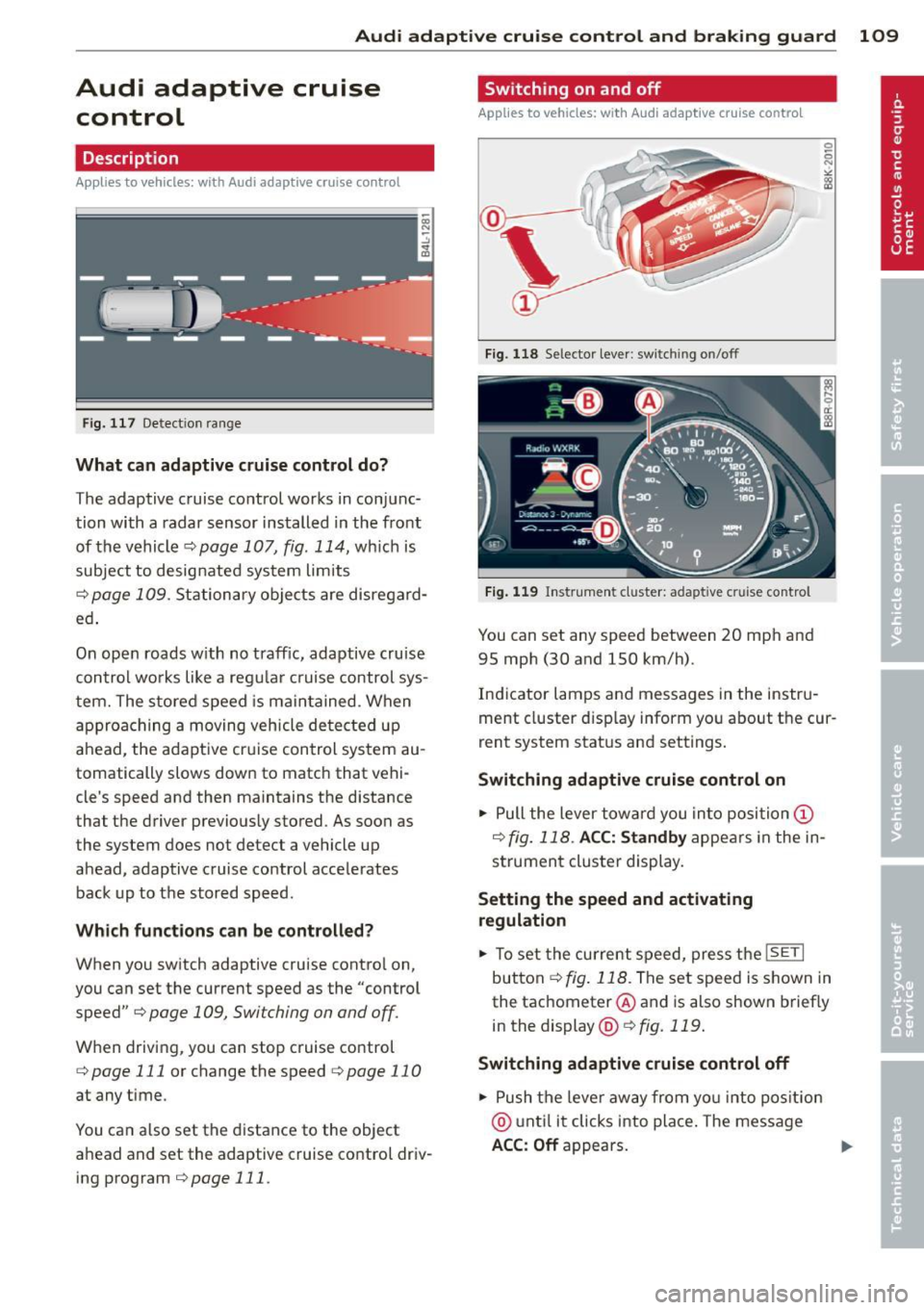
Fig. 117 Detect ion range
What can adaptive cruise control do?
The adaptive cruise control works in conjunc
tion with a radar sensor installed in the front
of the vehicle
¢ page 107, fig. 114, which is
subject to designated system limits
¢page 109. Stationary objects are disregard
ed .
On open roads w ith no traffic, adaptive cruise
control works like a regular cruise control sys
tem. The stored speed is maintained. When
approaching a moving vehicle detected up
ahead, the adaptive cruise control system au
tomatically slows down to match that vehi
cle's speed and then maintains the distance
that the driver previously stored. As soon as
the system does not detect a vehicle up ahead, adaptive cruise control accelerates back up to the stored speed.
Which functions can be controlled?
When you switch adaptive cruise control on,
you can set the current speed as the "control speed"
¢ page 109, Switching on and off.
When driving, you can stop cruise control
¢ page 111 or change the speed ¢ page 11 0
at any time .
You can a lso set the distance to the object
ahead and set the adaptive cruise control driv ing program
¢ page 111.
Switching on and off
Applies to vehicles: with Audi adaptive crui se contro l
Fig. 118 Selecto r lever : switch ing on/off
Fig. 119 Instrument cluster: adapt ive c ruise control
You can set any speed between 20 mph and
95 mph (30 and 150 km/h).
Indicator lamps and messages in the instru
ment cluster display inform you about the cur
rent system status and settings.
Switching adaptive cruise control on
.,. Pull the lever toward you into position @
¢ fig. 118 . ACC: Standby appears in the in
strument cluster display.
Setting the speed and activating
regulation
.,. To set the current speed, press the ISETI
button ¢ fig. 118 . The set speed is shown in
the tachometer @ and is also shown briefly
in the display @¢
fig. 119.
Switching adaptive cruise control off
.,. Push the leve r away from you into position
@ until it clicks into place. The message
ACC: Off appears. ..,.
Page 112 of 316
110 Audi adaptive cruise control and braking guard
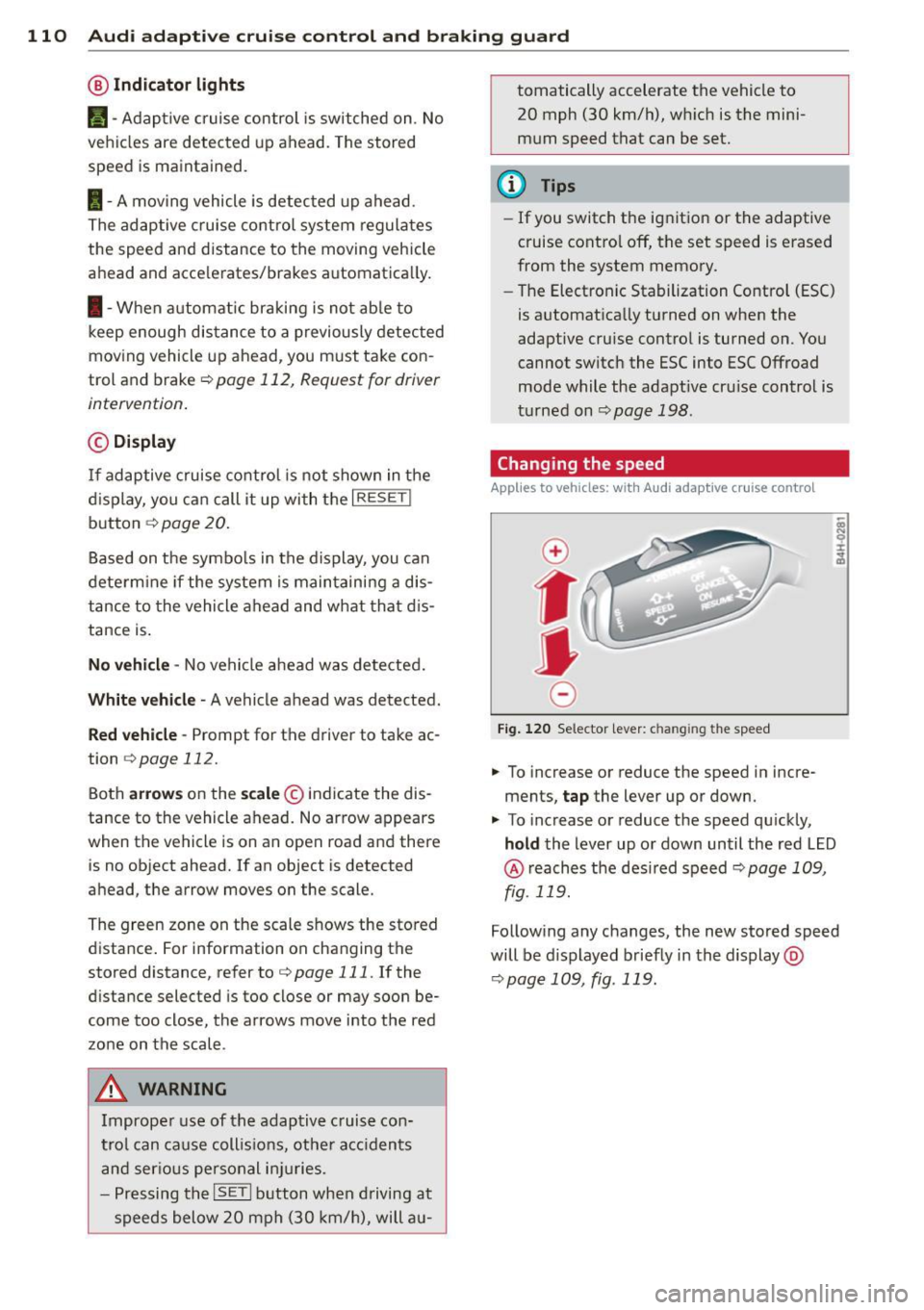
@ Indicator lights
r• 1 -A dap tive crui se control is switched on . No
ve hicl es are detected up ahead. The stored
speed is ma intained.
I -A mov ing vehicle is detec ted up ahe ad.
T he ad aptive cruise co ntro l sys tem regulates
the spee d and d istance to the moving vehicle
a head and acce le rates/brakes automat ica lly.
I -W hen a utoma tic br aking is no t ab le to
keep enough distance to a previously detec ted
moving vehicle up ahead, you m ust ta ke co n
trol and brake <=:>
page 112, Request for driver
intervention .
© Display
If ad aptive cruise co ntr ol is n ot shown in the
d ispl ay, you c an call it up with the
I RESET !
button ¢ page 20.
Based on the symbo ls in the display, you can
dete rm ine if the system is main taini ng a dis
tance to the vehicle ahead and w hat tha t di s
tance is .
No vehicle -No vehicle a head wa s de te cted.
White vehicle -A vehicle ahead was detected.
Red vehicle -Prompt for the driver to take ac
tion
<=:> page 112.
Both arrow s on the sc ale © indicate the dis
tance to the vehicle ahead. No ar row appears
when t he vehicle is on an open road and there
is no object ahead. If an object is detected
a head, the arrow moves on the scale.
The green zone on the scale s hows the sto red
distance . For information on changing the
stored distance, refer to <=:>
page 111. If the
d istance selected is too close or may soon be
come too close, the arrows move into the red
zo ne on the scale .
A WARNING
Improper use of the adaptiv e cruis e con
trol can ca use c oll is io ns, ot he r acc iden ts
a n d s eriou s pers onal i njuries.
- P re ss ing th e
ISETI button when driving at
sp eeds below 20 mp h (30 km/h), will a u- tomatically accelerate the vehicle to
20 mph (30 km/h), w hich is the mini
m um speed that can be set.
(D Tips
- If you switch t he ig nitio n or the adaptive
cruise contro l off, t he set speed is e rased
from the system memory.
- Th e Electronic Stabilization Control (ESC)
is a utomat ica lly turned on when the
adaptive cru ise contro l is turned on. You
cannot switc h the ESC into ESC Offroad
mode w hile the adapt ive cr uise c ontrol is
t ur ne d on
<=:> pag e 198 .
Changing the speed
Applies to veh icles: w ith Audi adaptive cruise co ntro l
0
f
• 0
Fig. 120 Selec tor lever: c han gin g the speed
.,. To increase or reduce the speed in incre
ments,
tap the lever up or down .
.,. To increase or reduce the speed qu ickly,
hold the Lever up o r down un til the red L ED
@ reaches t he des ired speed <=:> page 1 09,
fig . 119.
Follow ing any changes, the new sto red speed
will be d isplayed briefly in the display @
<=:>page 109, fig . 119.
Page 113 of 316
Audi adaptive cruise control and braking guard 111
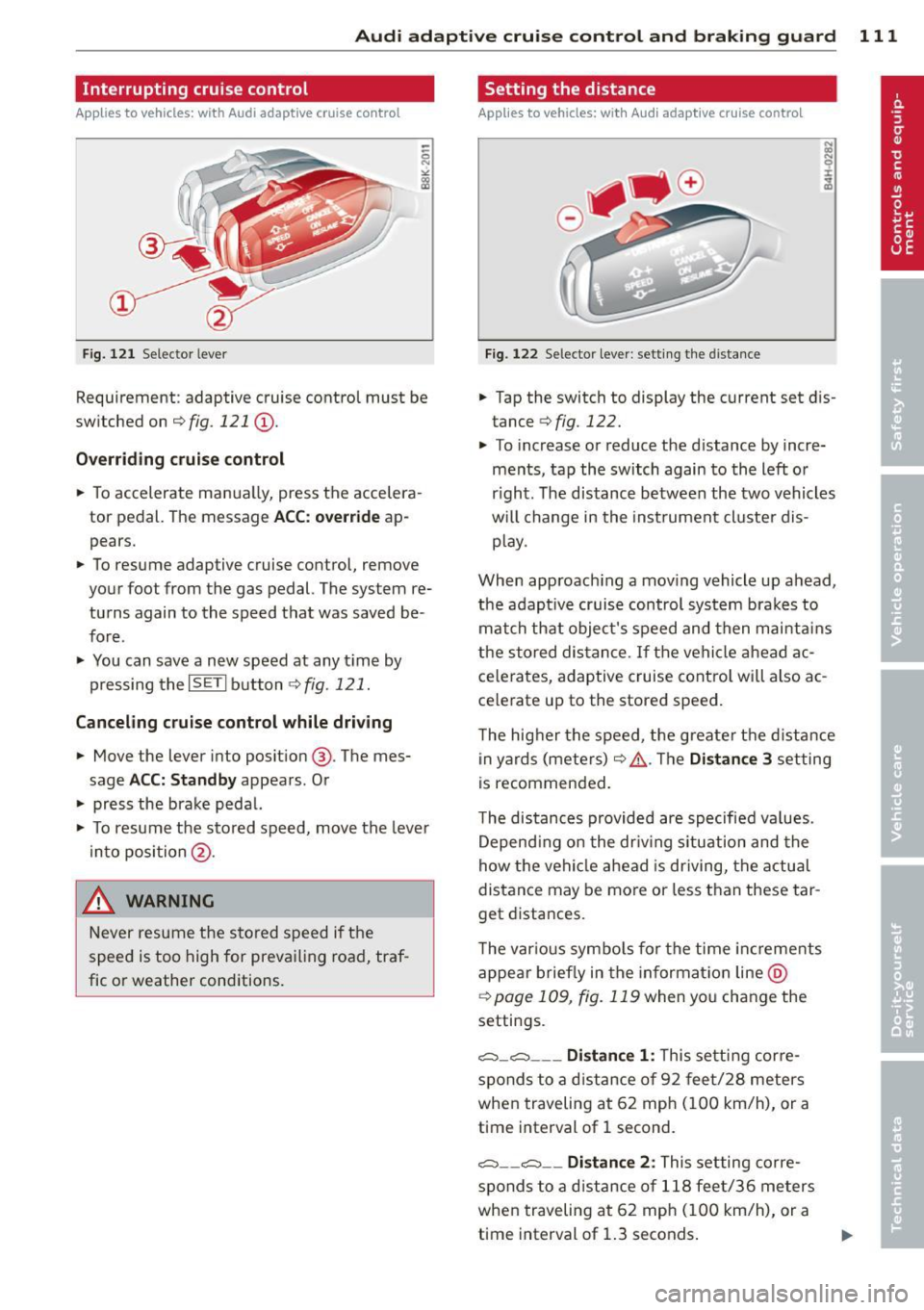
Interrupting cruise control
Applies to vehicles: with Audi adaptive cruise control
Fig. 121 Selector lever
Requirement: adaptive cruise control must be
switched on
¢fig. 121 (D .
Overriding cruise control
• To accelerate manually, press the accelera
tor pedal. The message
ACC: override ap
pears.
• To resume adaptive cruise control, remove
your foot from the gas pedal. The system re
turns again to the speed that was saved be
fore.
• You can save a new speed at any t ime by
pressing thelSETI button
¢fig. 121.
Canceling cruise control while driving
• Move the lever into position @. The mes
sage
ACC: Standby appears. Or
• press the brake pedal.
• To resume the stored speed, move the lever
into position @.
_& WARNING
Never resume the stored speed if the
speed is too high for prevailing road, traf
fic or weather conditions.
Setting the distance
App lies to vehicles: wit h Aud i adapt ive cr uise contro l
Fig. 122 Selector lever: setting the distance
• Tap the switch to display the current set dis
tance
¢ fig. 122.
• To increase or reduce the distance by incre
ments, tap the switch again to the left or
r ight. The distance between the two vehicles
w ill c hange in the instrument cluster dis
p lay .
When approach ing a moving vehicle up ahead,
the adapt ive cruise control system brakes to
match that object's speed and then mainta ins
the stored distance. If the vehicle ahead ac
ce lerates, adaptive cruise contro l will also ac
celerate up to the stored speed.
T he higher the speed, the greater the distance
in yards (meters) ¢& .The
Distance 3 setting
is recommended.
T he distances provided are specified va lues .
Depend ing on the driv ing s ituation and the
how the vehicle ahead is driving, the actual
distance may be more or less than these tar
get distances.
T he var ious symbols for the time increments
appear briefly in the informat ion line @
¢page 109 , fig. 119 when you change the
settings.
c:::::,_c:::::, ___ Distance 1: This setting corre-
sponds to a distance of 92 feet/28 meters
when traveling at 62 mph (100 km/h), or a
time interval of 1 second.
c:::::, __ c:::::, __ Distance 2 : This setting corre
sponds to a distance of 118 feet/36 meters
when traveling at 62 mph (100 km/h), or a
time interval of 1.3 seconds.
Page 114 of 316
112 Audi adaptive cruise control and braking guard
<:::::> ___ <:::::>_ Distance 3: This setting cor re-
sponds to a d istance of 164 feet/SO meters
when traveling at 62 mph (100 km/h), or a
time interval of 1.8 second s.
<:::::> ____ <:::::> Distance 4: This setting cor re-
sponds to a d istance of 210 feet/64 meters
when traveling at 62 mph (100 km/h), or a
time interva l of 2 .3 seconds .
A WARNING
Following other vehicles too closely in
creases the risk of collisions and serious
personal injury.
- Setting short distances to the traffic
ahead reduces the t ime and distance
available to br ing your vehicle to a safe
stop and makes it even more necessary
to pay close attention to traffic.
- Always obey applicable traffic laws, use
good judgment, and select a safe follow
ing distance for the traffic, road and
weather conditions.
(0 Tips
- Distance 3
is set automatically each time
you sw itch the ignition on.
- Your standa rd settings are automatically
stored and assigned to the remote con
trol key being used
c:::> page 36.
Setting the driving program
Applies to vehicles: with Audi adaptive cruise control
Depending on the selected dr iving program
and distance, driving behavior when accelerat
ing will vary from dynamic to comfortable.
Setting the driving program for vehicles
without Audi drive select*
• In the radio/MMI*, select: !CAR !function
button
> adaptive cruise control > Driving
program
> Comfort, Standard or Dynamic .
Or
• Select : ICARI function button>
Car sys
tems *
control button > Driver assist> Adap
tive cruise control> Driving program
>
Comfort, Standard or Dynamic. Setting the driving mode for vehicles with
Audi drive
select*
Refer to c:::> page 121.
(D Tips
Your settings are automatical ly stored and
assigned to the remote control key being
used
c:::> page 36 .
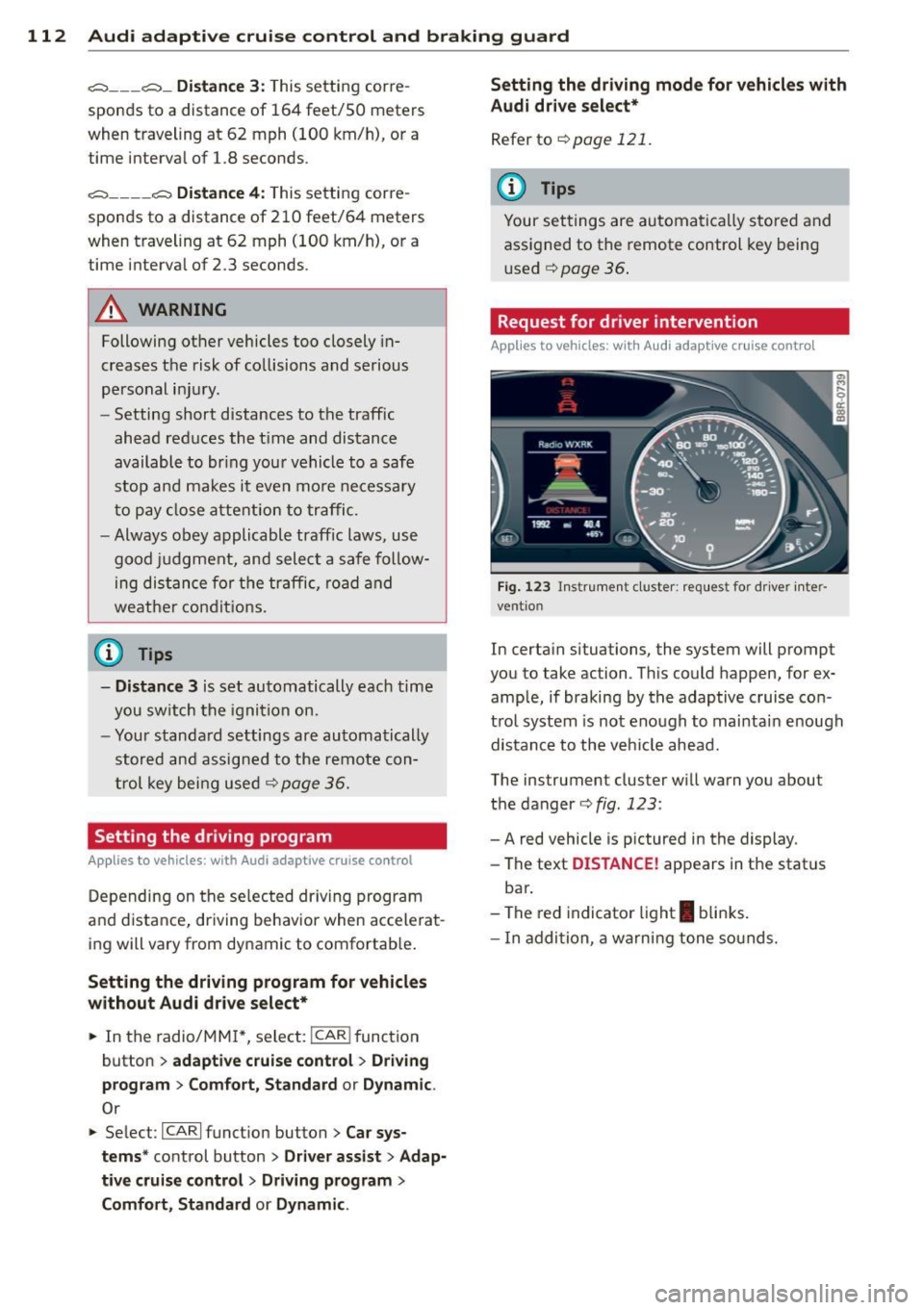
· Request for driver intervention
Applies to vehicles: with Audi adaptive cruise contro l
Fig. 123 Inst rumen t cl uster: r eque st for dr ive r in te r
ve ntion
In certain situations, the system will prompt
you to take ac tion . This could happen, for ex
ample, if braking by the adaptive cruise con
trol system is not enough to mai ntai n enough
distance to the vehicle ahead.
The ins trumen t cluster will warn you abou t
the danger
c:::> fig. 123 :
-A red vehicle is p ictured in the display.
- The text
DISTANCE! appears in the stat us
bar .
- The red indicator light
I blinks.
- In addition, a warning tone sounds.
Page 115 of 316
Audi adaptive cruise control and braking guard 113
Audi braking guard
Description
Applies to vehicles: with Audi adaptive cruise control
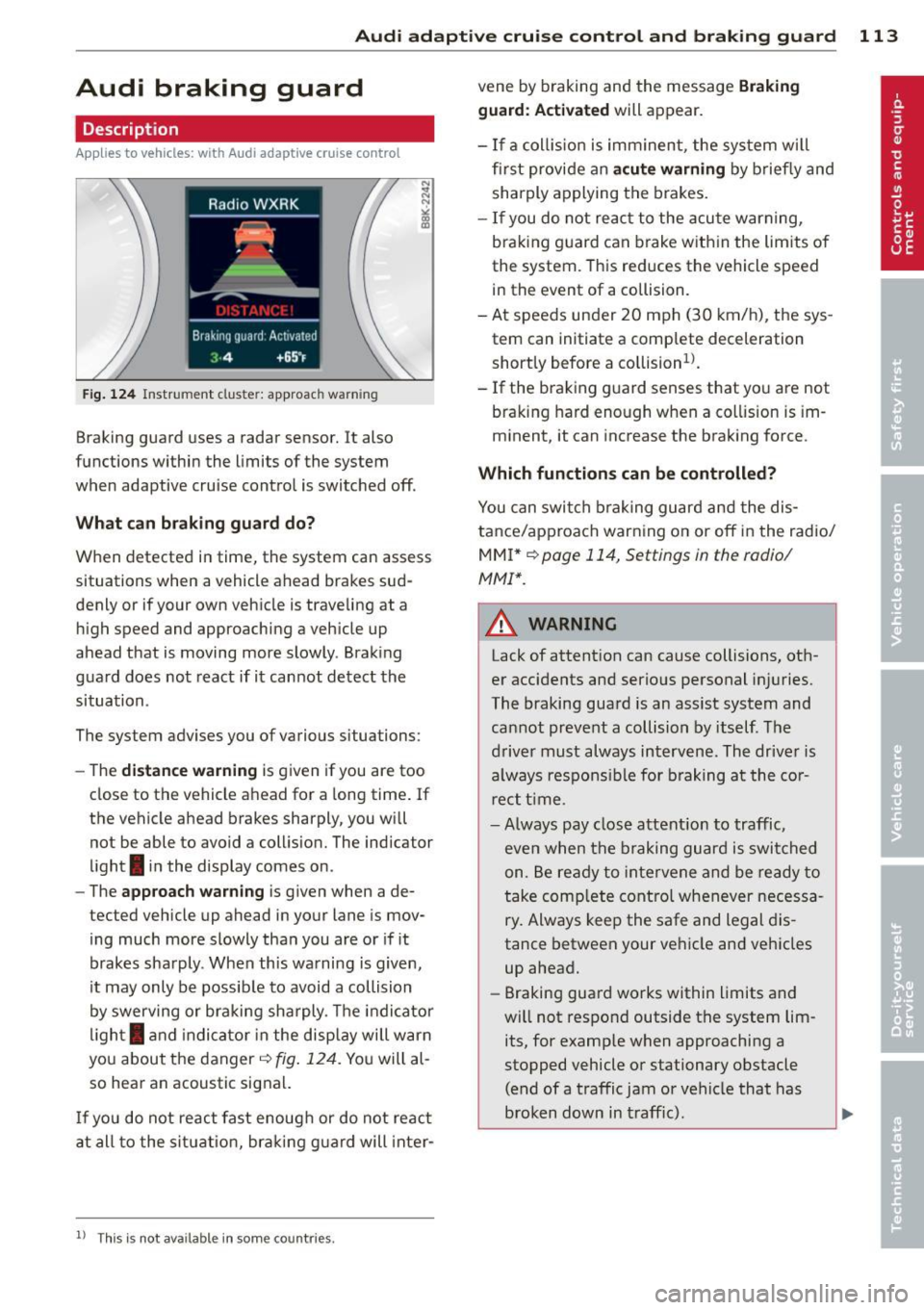
Fig. 124 Instrument cluste r: approac h warn ing
Braking guard uses a radar sensor. It also
functions within the limits of the system
when adaptive cruise control is switched off.
What can braking guard do?
When detected in time, the system can assess
situations when a vehicle ahead brakes sud
denly or if your own vehicle is traveling at a
high speed and approaching a vehicle up
ahead that is moving more slowly . Braking
gua rd does not react if it cannot detect the
situation .
The system advises you of various situations:
- The
distance warning is given if you are too
close to the vehicle ahead for a long time. If
the vehicle ahead brakes sharply, you wi ll
not be able to avoid a collision. The indicator
light
I in the display comes on .
- The
approach warning is given when a de
tected vehicle up ahead in your lane is mov
ing much more slowly than you are or if it
brakes sharply . When this warning is given,
it may only be possible to avoid a collision
by swerving or braking sharply. The indicator
light
I and indicator in the display will warn
you about the danger
c:> fig. 124. You will al
so hear an acoustic signal.
If you do not react fast enough or do not react
at all to the situation, braking guard will inter-
ll Th is is not ava ilable in som e coun tri es.
vene by braking and the message Braking
guard: Activated
will appear.
- If a coll ision is imminent , the sys tem wi ll
first provide an
acute warning by briefly and
sharply applying the brakes.
- If you do not react to the acute warning,
braking guard can brake within the limits of
the system. This reduces the vehicle speed
in the event of a collision.
- At speeds under 20 mph (30 km/h), the sys
tem can initiate a complete deceleration shortly before a collision
ll.
- If the braking guard senses that you are not
braking hard enough when a collision is im
minent, it can increase the braking force .
Which functions can be controlled?
You can switch braking guard and the dis
tance/approach warning on or off in the radio/
MMI* i::!> page 114, Settings in the radio/
MMI *.
A WARNING
--==
Lack of attention can cause collisions, oth-
er accidents and serious personal injuries.
The braking guard is an assist system and
cannot prevent a collision by itself. The
driver must always intervene. The driver is
always respons ible for braking at the cor
r ect time .
- Always pay close attention to traffic,
even when the braking guard is switched
on . Be ready to intervene and be ready to
take comp lete control whenever necessa
ry. Always keep the safe and legal dis
tance between your vehicle and vehicles
up ahead.
- Braking guard works within limits and
will not respond outside the system lim
its, for examp le when approaching a
stopped vehicle or stationary obstacle (end of a traffic jam or vehicle that has
broken down in traff ic).
Page 116 of 316
114 Audi adaptive cruise control and bra king guard
- Always remember t hat t he radar sens or
fo r the braking guard wo rks only within
defined detection and range limits that
may preve nt the proper detection of oth
er v eh icles.
- The radar senso r's fu nction and range
can be reduced by rain, s now a nd heavy
spray. Mo ving v ehicl es u p ahead may not
b e promptly det ecte d or may not be de
te cte d at al l.
- Reflective surfaces in cl udi ng c ras h barri
ers or tu nnel ent ran ces may impair the
f unc tion of the r ad ar sen sor.
(D Tips
- You can cance l th e braking tha t is initiat
ed by the system by braking yours elf, by
a cce lerati ng noticeab ly o r by swerving.
- Brak ing guard er ror m essages
Qpag e
114.
- Keep in mi nd that braking gua rd can
brake u nexpect edly . Always secure any
ca rgo or objects that you are tr ansport
i ng to reduce the risk of d amage or in
ju ry.
Settings in the radio/MM!*
Applies to vehicles: with Audi adaptive cruise control
• Se lect: ICARI f u nct io n button > Audi brak
ing guard.
O r
• Se lect :
ICARI fu nct ion button > Car sys
tems *
control button > Driver assist > Audi
braking guard .
System -
Switch bra king g uard On and Off .
When you sw itch the ignition on, the message
Brak ing guard: Off appears if the system is
switched off .
Early warning -The d istance and approach
warn ings in the display can be switched
On /
Off .
(D Tips
-Your settings are automatica lly sto red
and ass igned to the remote control key
being used at the t imes t he settings are
made¢ page
36.
- If you switch the ESC to ESC O ff road
mode, the braking guar d switches off a u
toma tically¢ page
198.
-Swit ch braking guar d off when you a re
loading the vehicle onto a veh icle carrier,
train, ship o r other type of t ransporta
tion. This can prevent undesired warn ings from the braking gua rd system .
Messages
Applies to vehicles: wit h Aud i adapt ive cru ise control
Braking guard : Off
T his dr iver message a ppears if t he system is
tu rned off via the radio/M M!* . Otherw ise, if
the system is turned off, the in formation ap
pears every t ime sho rtly after the start of the
trip .
T his dr iver's i nfo rmation also ap pears w hen
the system is not available because of a ma l
funct ion or if ESC is switched to the Offroad
m ode
Q page 198. In t his state the system
no longe r warns of a pend ing coll is io n.
Braking guard : Activated
T his dr iver mess age a ppears if shar p brake
p ressure was applie d due to a n acute warning.
•••
Three white dots appea r if a sett ing cannot be
selected w ith the operating lev er. For exam
ple, this happens if you want to raise/lower
t h e speed even thoug h there was no prev ious
l y saved speed.
ACC: Sensor blocked
Th is message appears if the senso r view is ob
structed, for examp le by leaves, snow, heavy
spray or d irt. Clean the sensor¢ page
107,
fig. 114.
ACC: Unavailable
The driver message appears if, for example,
t h e b rake temperat ure is too high . The ada p
tive cru ise contro l is temporarily unava ilable.
A ch ime sounds as a rem inder .
ACC: Not available
Page 117 of 316
Audi adaptive cruise control and braking guard 115
The driver message appears i f there is a ma l
function. The adaptive cruise control turns off.
A chime sounds as a reminder . Have the sys
tem checked by an author ized Audi dealer or
author ized Audi Serv ice Facility.
Shift lever position!
The driver message appears if the selector lev
e r i s shifted to the N position. The adaptive
cruise control is not availab le while in this po
sition.
Stabilization control (ESC)
This message appears if the Electronic Stabili
zation Contro l (ESC) is taking action to stabi
lize the vehicle. The adapt ive cruise control
turns off. A chime sounds as a reminder.
Speed too low
This message appears if the current speed is
too low
to set or to maintain the des ired
speed.
The speed being saved must be at least
20 mph (30 km/h). The cruise control is
turned off for speeds lower than 12 mph (20 km/h) . The adapt ive cruise control re
mains turned on for speeds above 95 mph
(150 km/h) (overr ide) .
It will stabilize aga in at
95 mph (150 km/h) when the dr iver takes his
foot off of the gas pedal.
Parking brake!
The driver message appears when the park ing
brake is activated. Adaptive cru ise contro l is
turned off . A chime sounds as a reminder.
Page 122 of 316
120 Audi drive select
Audi drive select
Driving settings
Introduction
App lies to vehicles: with Audi drive select
Drive select provides the possib ility to exper i
e nce diffe ren t types of vehi cle sett ings in o ne
ve hicl e. For ins tance, us ing t he three
Com
fort , Auto and Dynamic modes, the driver can
switch from a sporty to a comfortab le drivi ng
mode with the press of a b utton.
A ddit ionally, in veh icles wi th MM I*, the vehi
cle setup for
Individual* mode can be c us
tom ized by you. This makes it possib le to
comb ine settings such as a sporty engine tun
ing with comfortable steering.
A WARNING
Improper use of the drive select can cause
co llisions, other accide nts and ser ious per
sonal injury.
Description
App lies to vehicles: with Audi drive select
The vehicle setup in each mode depends on
the veh icle's features . However, the engin e,
automa tic t ransmissio n and steeri ng a re a l
ways involved.
Engine and automatic transmission
Depending on the mode , the e ng ine and the
automatic t ransm ission respond quicke r or i n
a more ba la nced manne r to a cce le rator pedal
move ments. In t he sporty dynam ic mode, the
a ut om at ic t ra nsmissio n shifts at h igher R PMs.
Steering
The steering adapts in terms of stee ring effort
and steering ra tios . Ind irect steer ing that
moves easi ly, l ike the stee rin g in comfort
mode, is best su ite d t o long dr ive s on a high
way. In co ntr ast, dynam ic mo de p rov ides
sporty, direct steering .
T he fo llow ing applies to vehicles with dynam ic
steer ing*: the stee ring ratio changes based on
ve hicl e spee d in order to maint ain op timum steering effort
for the drive r at all times . This
sets the stee ring to be less sens itive at higher
speeds in order to provide improved vehicle
control. At reduced speeds, however, steer ing
is more d irect in order to keep the steering ef
fort as minima l as poss ible when the driver is
mane uveri ng the veh icle. At low and ave rage
speeds, dynamic steering addit iona lly pro
vides more respon sive stee rin g pe rforma nce.
Adaptive dampers*
The adaptive dampers* use se nsors to record
informa tion regard ing steer ing movemen ts,
braking and acceleration o perations by the
drive r, road surfac e, d riv in g speed, and load.
T his makes it poss ible to adapt damp ing to
the driving si tua tion v irtu ally in real t ime.
Dr ive sele ct also makes i t possib le to sa tisfy
t h e desire fo r spo rty suspension ( Dynamic)
and comfortab le suspension (Comfort) with
o ut giving up ba lanced tuning (Auto) .
Adaptive cruise control*
The be havior when accelera ting can be adju st
ed from comforta ble to sporty, depending on
the d rive select mode . Adaptive cr uise contro l
also responds to the driv ing behavior of the
vehicle ahead in a more conservative or spo rty
manner.
(D Tips
- In some mo dels, t he maximum vehicle
speed can only be reached in the
Auto
and Dynamic mo des.
- Selecting the
Dynamic mode resu lts in
sporty shifting cha racte ristics. The S
gear position engages aut omatically.
- In vehicles that have dynamic stee ring *,
operating noise is heard when start ing or
stopping the e ngine. This does not indi
cate a problem .
Page 123 of 316
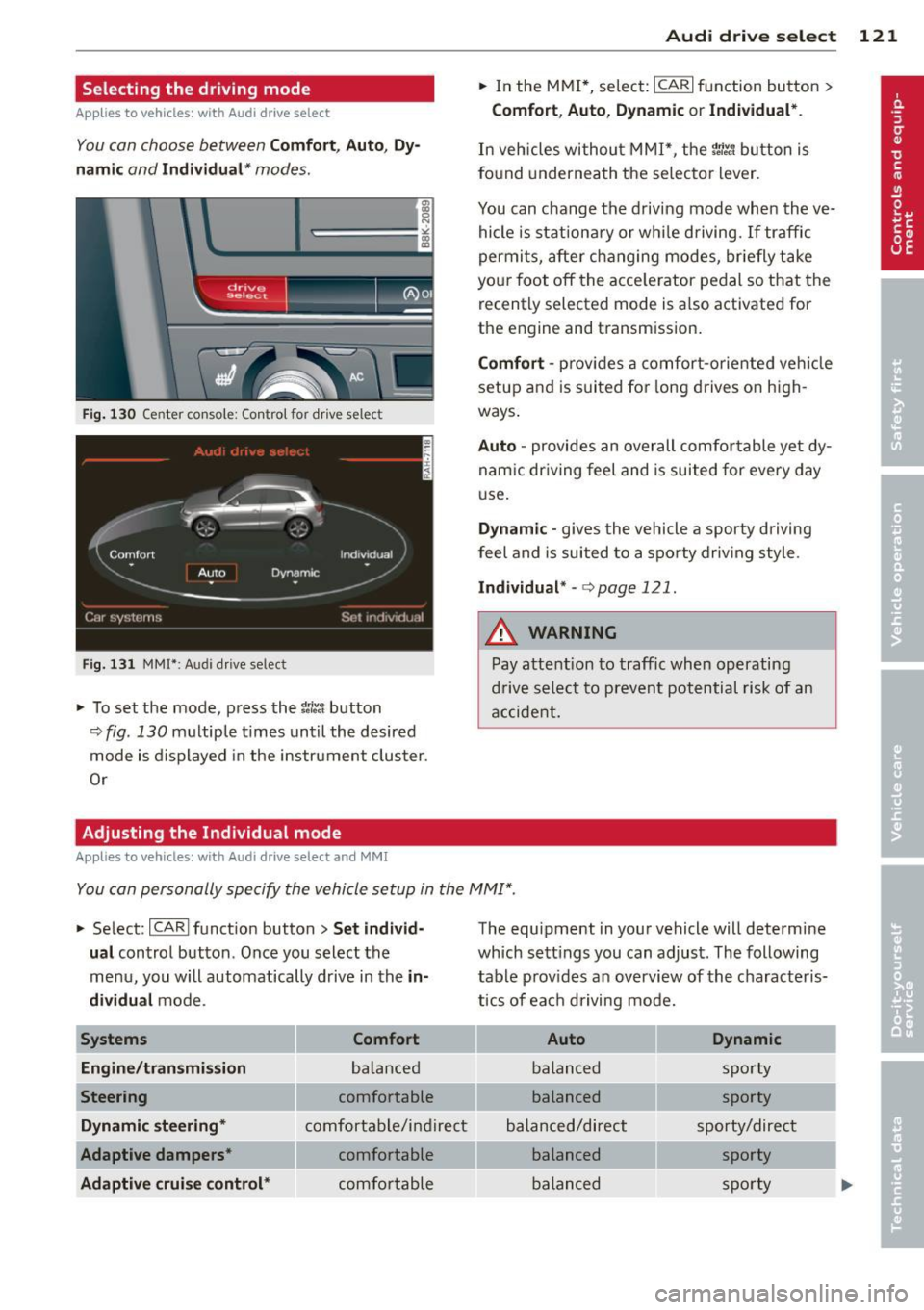
Selecting the driving mode
Applies to vehicles: with Audi drive select
You con choose between Comf ort , Aut o, Dy
namic
and Indi vidu al* modes .
drive I I a,. selact ~
Fig. 130 Ce nter co nsole: Con tro l for dr ive selec t
Fig. 131 MM I* : A udi drive se lect
,.. To set the mode, press the 1til.t button
9fig. 130 multiple times until the desired
mode is displayed in the instrument cluster.
Or
Adjusting the Individual mode
Appl ies to vehicles: with Audi drive select and MMI
Audi drive sele ct 121
,.. In the MMI*, select: ICARI function button >
Co mfo rt , Au to , D ynamic or Indi vidual *.
In vehicles without MMI*, the r.'i:.1 button is
fo und underneath the se lector lever .
You can change the driving mode when the ve hicle is stationary or whi le driving. If traffic
permits, after changing modes, briefly take
you r foot off the acce le rator pedal so that the
recently selected mode is a lso activated for
the engine and transm ission.
C omf ort -prov ides a comfort-oriented veh icle
setup and is suited for long drives on high
ways .
Auto -provides an overall comfortable ye t dy
nam ic dr iving feel and is suited for every day
u se.
Dynamic -gives the vehicle a sporty driving
feel and is suited to a spo rty dr iv ing style.
I n d iv idual * -c:> page 1 21 .
A WARNING
Pay attention to traffic when operating
drive select to prevent potential risk of an
accide nt.
-
You con personally specify the vehicle setup in the MMI ".
,.. Select: ICARlfunct ion button> Se t indiv id
ual
control button . Once you select the
menu, you will automatically drive in the
i n
di vidual
mode .
System s Comfort
En gine /tran smi ssion
balanced
Steering comfortable
Dynamic ste ering * comfortable/ind ire ct
Adapt ive dampe rs* comfortable
A daptiv e cruise control * comfortable The equipment in your vehicle will determine
which sett
ings you can adjust. The following
table prov ides an overview of the characteris
t ics of each driving mode.
Auto Dynamic
balanced sporty
balanced sporty
balanced/direct sporty/direct balanced sporty
balanced sporty