lights AUDI Q5 2013 Owner's Manual
[x] Cancel search | Manufacturer: AUDI, Model Year: 2013, Model line: Q5, Model: AUDI Q5 2013Pages: 316, PDF Size: 78.89 MB
Page 53 of 316
Canada models : The function cannot be
turned off.
It is activated a utomatica lly each
time the ignition is switched on.
Travel mod e (Canada models)*
The headlight beam is asymmetrical. This pro
vides stronge r illum ination on the s ide of the
road on which you are driving . If you are driv
ing in a co untry that drives on the opposite
side of the road from your own country, this
will cause glare for oncoming drivers. To pre
vent glare:
- Trave l mode must be selected in vehicles
with Xenon headlights*.
- In vehicles with halogen headlights, certain
areas of the head light lenses must be cov
ered with waterproof adhesive covers that
prevent light from passing through. For
more information, please see your author
ized Audi dealer or author ized repair facility .
@ Tips
When travel mode* is activated, a d isp lay
in the drive r information system ind icates
this each time you switch the ignit io n on .
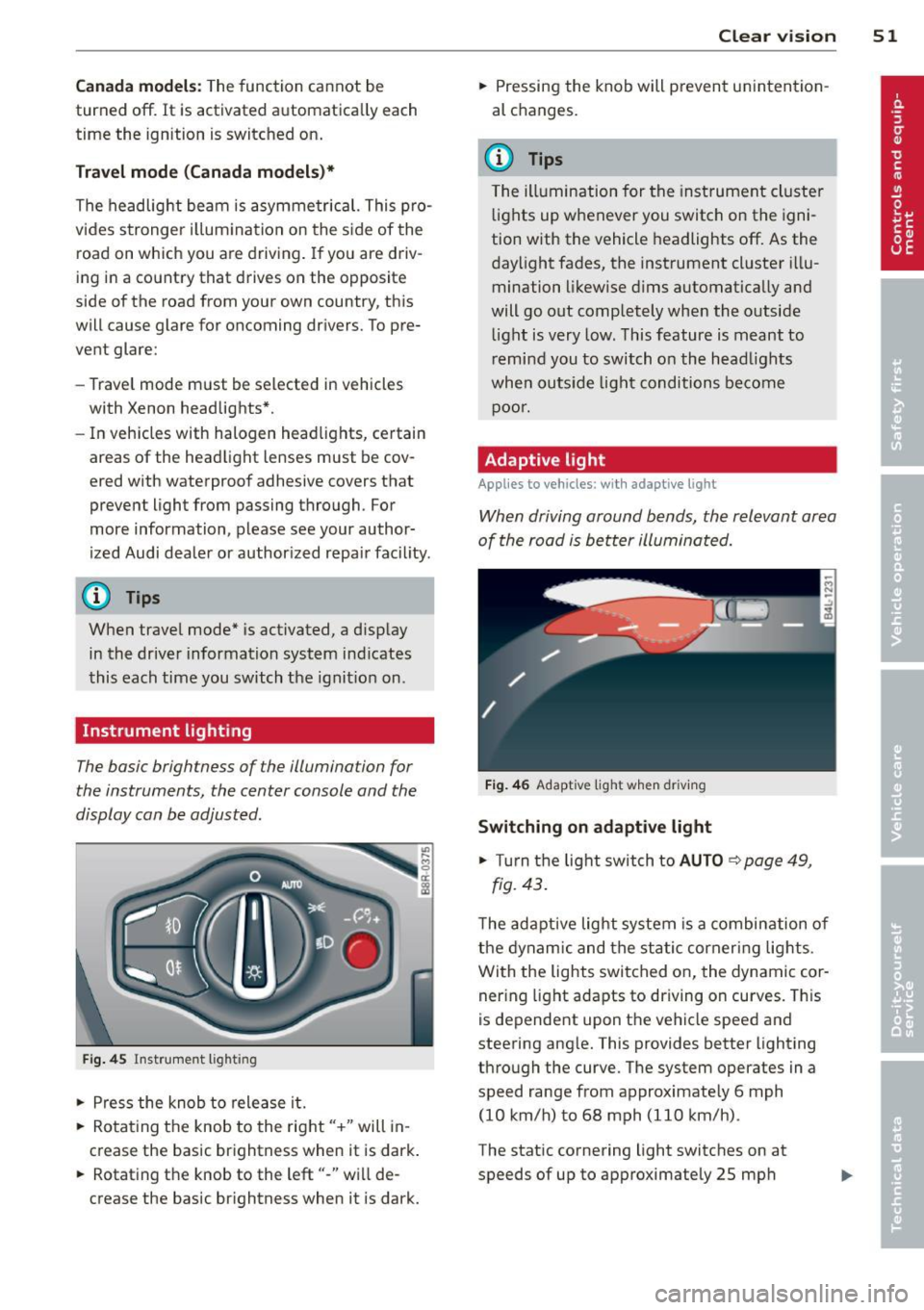
Instrument lighting
The basic brightness of the illumination for
the instruments, the center console and the
display can be adjusted .
Fig. 45 Inst rume nt lighting
.. Pres s the knob to release it.
.. Rota ting the knob to the rig ht" +" will in
c rease the basic brightness when it is dark .
.. Rotating the knob to the left"-" will de
crease the bas ic br ightness when it is dark. Clear vi
sion 51
.. Pressing the knob will p revent un intention
al changes.
(D Tips
T he ill umination for the instrument cluster
lights up w henever you switch on the igni
tion with the vehicle headlights off. As the
day light fades, the instrument cluster i llu
mination likewise dims automatica lly and
will go out completely when the outside li ght is very low. This feature is meant to
r emind you to switch on the head lights
whe n outside lig ht conditions become
p oor .
Adaptive light
Applies to vehicles: wi th adaptive light
Wh en driving around bends, the relevant area
of the road is be tter illuminated.
Fi g. 4 6 Adapt ive light w hen driv ing
Switching on adapt ive light
.. Turn t he light switch to AUTO ¢ page 49,
fig. 43 .
The adaptive lig ht system is a combin ation o f
the dynam ic and the static corneri ng lights.
Wi th the lights switched on, the dynamic cor
ner ing light adapts to driving on curves. This
is dependent upon t he vehicle speed and
steering ang le. This provides better lighting
through the curve. The system operates in a
speed range from approximate ly 6 mph
(10 km/h) to 68 mph (110 km/h) .
The static cornering light switches on at
speeds of up to approximately 25 mph
Page 54 of 316
52 Clear vision
(40 km/h) when a certain steering wheel an
gle is reached or when a turn signal is activat
ed. The area to the side of the vehicle is illu
minated better when turning .
Emergency flashers
The emergency flashers makes other moto
rists aware that you or your vehicle are in an
emergency situation.
Fig . 4 7 Emer gency flasher switc h
"" Press the switch &-, ¢ fig. 47 to turn the
emergency flashers on or off.
~
9 a: (X) a:,
When the emergency flashers are on, all four
turn signals blink at the same time. The turn signal indicator lights
BB in the instrument
cluster, as well as the light in the emergency
flasher switch &-, blink likewise . The emergen
cy flashers also work when the ignition is
turned off.
The emergency flashers will turn on automati
cally if you are in an accident where the airbag
has deployed.
@ Tips
You should turn on the emergency flashers
when :
-you are the last vehicle standing in a traf
fic jam so that any other vehicles coming
can see you, or when
-your vehicle has broken down or you are
in an emergency situation, or when
-your vehicle is being towed by a tow
truck or if you are towing another vehicle
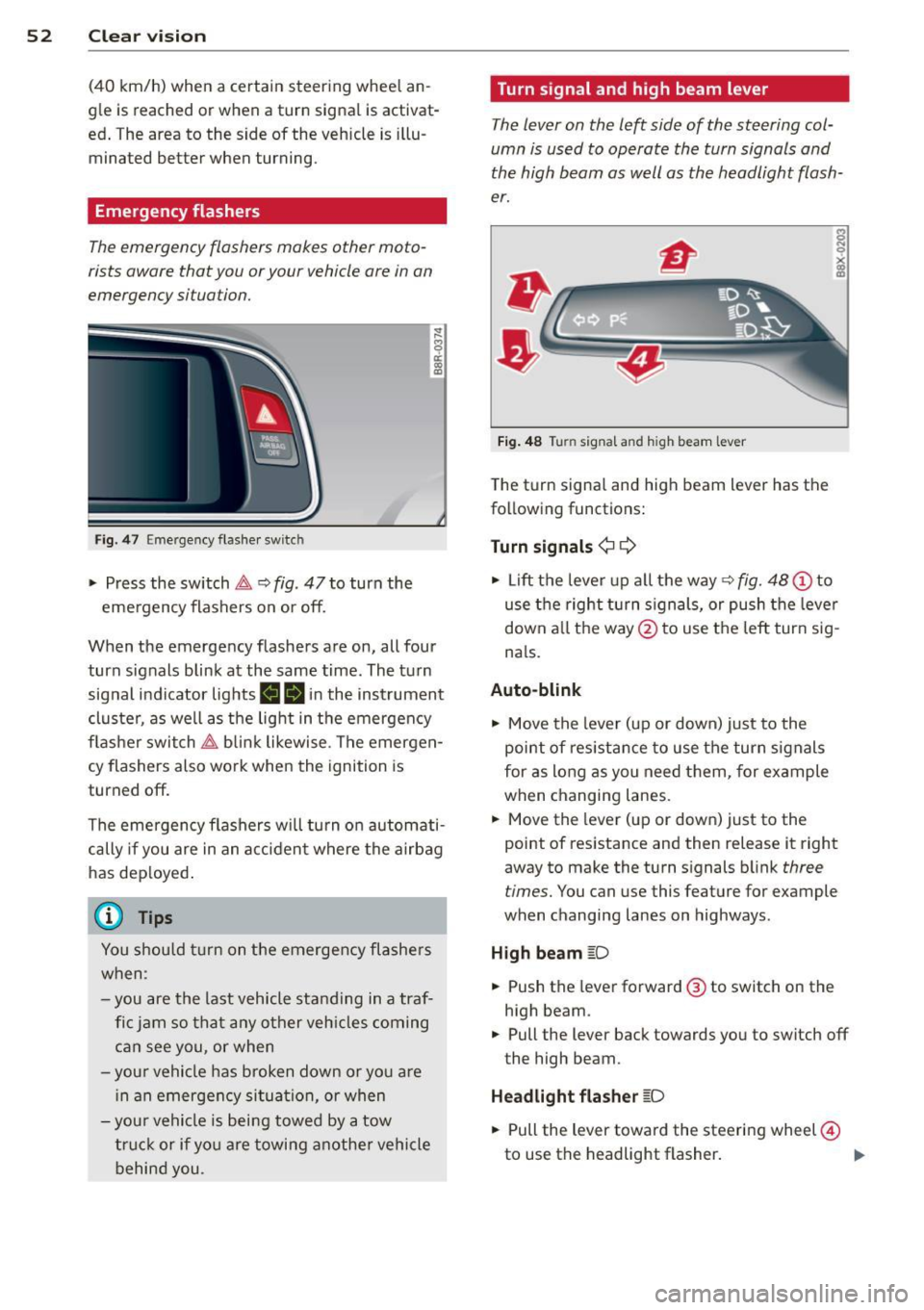
behind you. Turn signal and high beam lever
The
lever on the left side of the steering col
umn is used to operate the turn signals and
the high beam as well as the headlight flash
er.
Fig. 48 Turn signal and high beam lever
The turn signal and high beam lever has the
following functions:
Turn signals¢ ¢
s
"" '? X co a,
"" Lift the lever up all the way c:> fig. 48 (!) to
use the right turn signals, or push the lever
down all the way@ to use the left turn sig
n a ls.
Auto-blink .,. Move the lever (up or down) just to the
point of resistance to use the turn signals
for as long as you need them, for example
when changing lanes .
.,. Move the lever (up or down) just to the
point of resistance and then release it right
away to make the turn signals blink
three
times.
You can use this feature for example
when changing lanes on highways .
High beam
[D
"" Push the lever forward ® to switch on the
high beam .
.,. Pull the lever back towards you to switch off
the high beam.
Headlight flasher
[D
.. Pull the lever toward the steering wheel@
to use the headlight flasher.
IJJ>
Page 55 of 316
Notes o n these featur es
-The turn signals only work with the ignition
turned on. The indicator lights
II or Ill in
the instrument cluster
¢page 14 also b link.
- After you have turned a corner, the turn sig-
nal switches off automatica lly.
- The
high beam works only when the head
lights are on. The indicator light
II in th e
instrument cluster illuminates when the
high beams are on.
- The
headlight flasher wo rks only as long as
you hold the lever -even if there are no
lights turned on. The indicator light
II in
the instrument cluster illuminates when you
use the headlight flasher.
A WARNING
Do not use the high beam or headlight
flasher if you know that thes e cou ld blind
oncoming traffic.
Interior lights
Front interior lights
-
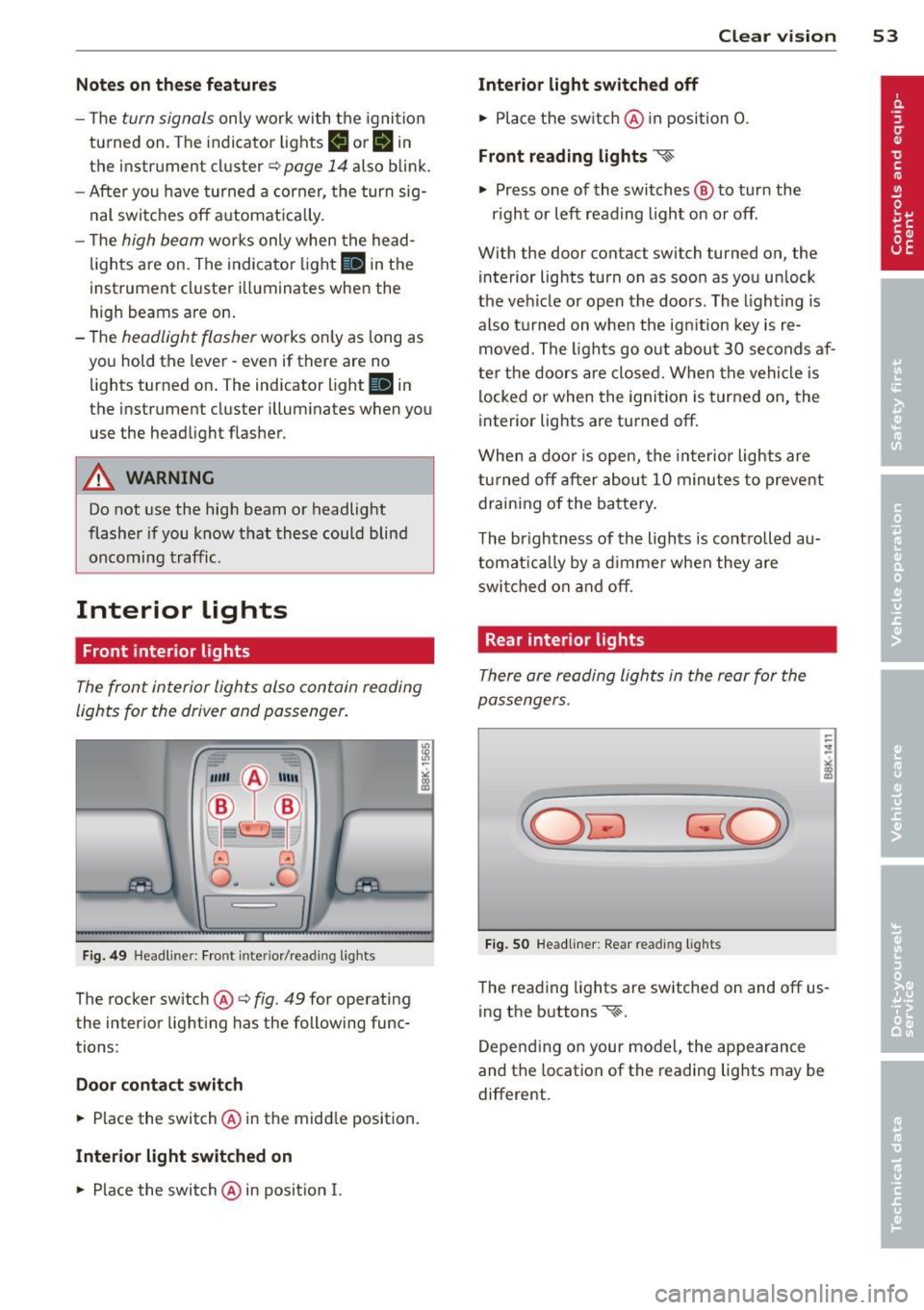
The front interior lights also contain reading
lights for the driver and passenger .
r ,,,,, , 11111
~8 ,~
G) Gl
,o . . o
I
Fig. 49 Headliner: Fro nt inte rior/rea ding lights
The rocker switch @¢ fig. 49 for operating
the interior lighting has the following func
tions :
Door cont act swi tch
.,. Place the switch @ in the middle position.
Inte rior light switched on
.,. Place the switch@ in posit ion I.
Clear vision 5 3
Interior light switch ed off
.,. Place the sw itch @ in position 0.
Front re ad in g lights ~
.,. Press one of the switches@ to turn the
r ight or left reading light on or off .
With the door contact switch turned on, the
interior lights turn on as soon as you unlock
the vehicle or open the doors. The lighting is
also turned on when the ignition key is re
moved. The lights go out about 30 seconds af
ter the doors are closed. When the vehicle is locked or when the ignition is turned on, the
interior lights are turned off.
When a doo r is open, the interior lights are
tu rned off after about 10 minutes to prevent
draining of the battery .
The brightness of the lights is controlled au
tomat ica lly by a d immer when they are
swi tched on and off.
Rear interior lights
There are reading lights in the rear for the
passengers .
Fig . 50 Headliner: Rear read ing lig hts
The read ing l ights are switched on and off us
ing the buttons ~-
Depending on your model, the appearance
and the location of the reading lights may be
different .
Page 57 of 316
while driving. You can switch this function off by moving the lever to position ® within 10
seconds of the afterwipe operation. The after
wipe function is reactivated the next time the ignit ion is switched on.
The rear wiper automatically switches on
when the reverse gear is engaged and the
front w indshield wipers are on and in opera
tion .
C lea ning the headlights *. The headlight wash
er system * operates on ly when the headlights
are on. If you move the lever to pos ition ®,
the headlights are washed in interva ls .
® -Wipe the rear window. The rear wiper
moves about every 4 seconds .
0-Clean the rear window. The number of
wiping operations depends on how long the l ever is held in positio n 7.
A WARNING
-The ra in sensor is only intended to assist
the driver. The driver is still responsible
for man ually sw itching the w ipers on ac
cording to the v is ibility conditions.
- The windshie ld may not be treated w ith
water-repe lling windshie ld coat ing
agents. Unfavorable conditions, such as
wetness, darkness, low sun, can res ult in
increased glare. W iper b lade chatter is
also possible .
- Proper ly functioning w indshie ld w iper
blade s are required fo r a clear view and
sa fe dr iv ing .
(D Note
-In the case of frost, check whether the
windsh ield wiper b lades a re fro zen to
t h e windshie ld. Swit ching on the wind
s h ield wipers can d amage t he wipe r
blades!
- Prior to using a car w ash, the windshield
wipe r system m ust be swit ched off (lever
i n position 0) . This helps to prevent unin
tentiona l switching on and damage to
the windshie ld w iper system.
Clear v is ion 5 5
(D Tips
- The windshie ld w ipers are switched off
when the ign it ion is tu rned off . Act ivate
the windsh ield wipers after the ignition
is switc hed back on by moving t he wind
shield wipe r lever to any position .
- Worn or d irty windshield wiper blades
result in streaking. This ca n affect the
rai n sensor function. Check your wind
shield w iper blades regularly.
- The washer fluid nozz les of the wind
shield washe r system a re heated at low
tempe rat ures whe n the ignition is on .
- When stopping temporarily, e .g. at a
t raffic light, the set spe ed of the wind
shield wiper s is automatically reduced by
one speed.
Service position
The windshield wiper blades ore replaced in
the service position.
"' If the w iper blades are no t frozen to t he
w indshield, br ing the w indshie ld w iper lever
to the basic position @¢
page 54, fig . 53 .
"' Sele ct: !CAR !func tion butt on> Windshield
wipers
> Service position . Or
"' Sele ct: I CAR I func tion b utton > Car sy s
tem s*
contro l butto n > Servicing & checks >
Wiper service position . Or
"' Switch the ignit ion off and move the wind
shield w iper lever to position ©¢
page 54,
fig . 53.
- On -changing the windshield wiper b lades
can only be done if you b ring the wiper arms
to the service position . You will also avoid
pai nt damage to the hood when working on
the wipe rs in th is posit ion .
-Off -the w indshield w ipers are moved to
their in itia l position again .
(D Note
Neve r mane uver yo ur vehicle with t he
front windshie ld w iper arms raised s ince
they wi ll automatically be moved back to
Page 60 of 316
58 Clear vision
vehicle), then you must first fold the mir
ror electrically. Do not readjust the mir
ror housing manually. You could damage
the motor which controls the mirror.
- If you wash the vehicle in an automatic
car wash, you must fold the exterior mir
rors in to reduce the risk of damage to
the mirrors. Never fold power folding ex
terior mirrors* by hand . Only fold them
in and out using the power controls.
@ Tips
If there should be a malfunction in the
electrical system, you can still adjust the
exterior mirrors by pressing the edge of
the mirror.
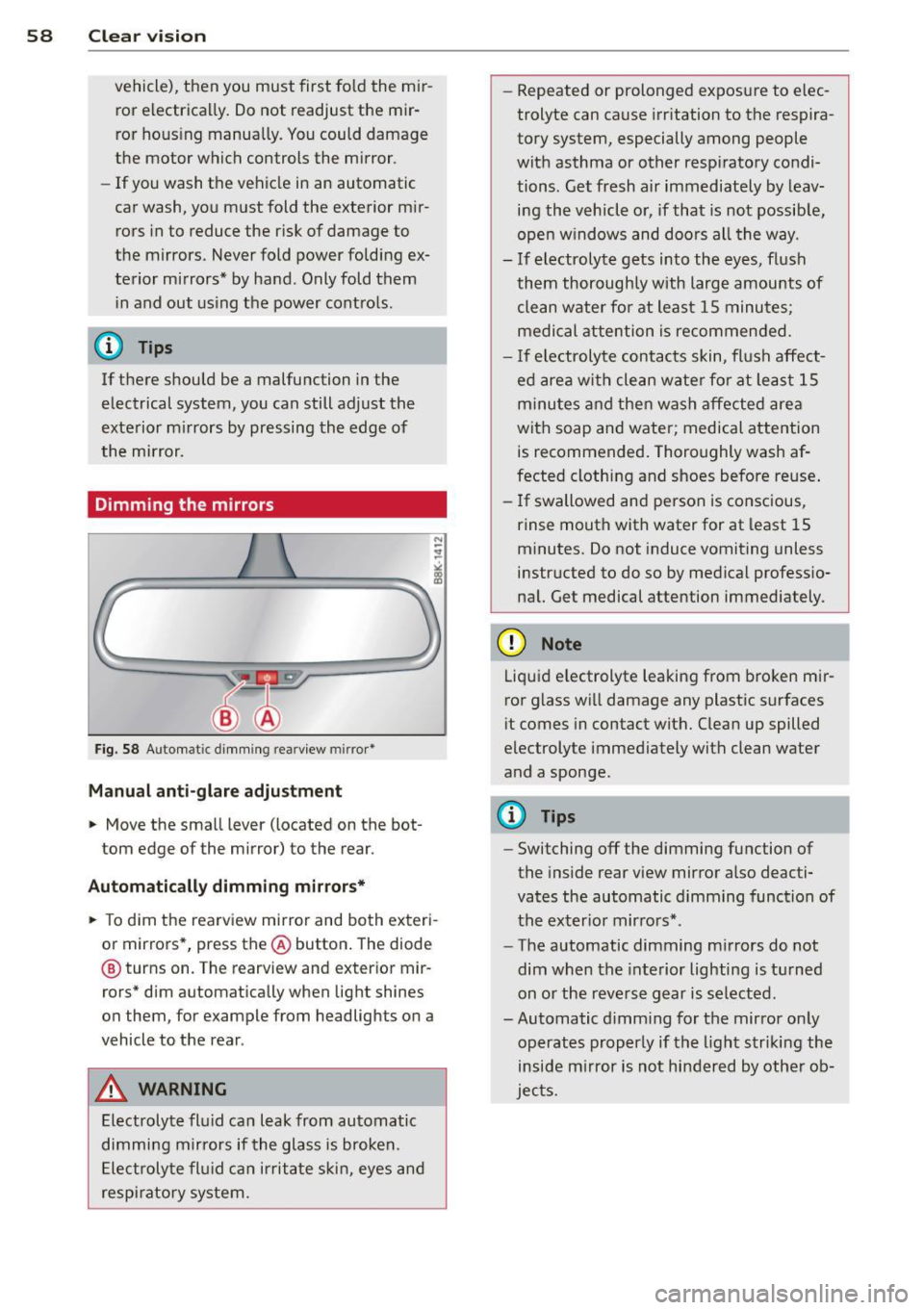
Dimming the mirrors
Fig. 58 Automat ic dimming rearview mirror*
Manual anti-glare adjustment
.. Move the small lever (located on the bot
tom edge of the mirror) to the rear.
Automatically dimming mirrors* .. To dim the rearview mirror and both exteri
or mirrors*, press the@button. The diode
@ turns on. The rearview and exterior mir
rors* dim automatically when light shines
on them, for example from headlights on a
vehicle to the rear .
A WARNING
Electrolyte fluid can leak from automatic
dimming mirrors if the glass is broken.
Electrolyte fluid can irritate skin, eyes and
respiratory system. -
Repeated or prolonged exposure to elec
trolyte can cause irritation to the respira
tory system, especially among people
with asthma or other respiratory condi
tions. Get fresh air immediately by leav
ing the vehicle or, if that is not possible,
open windows and doors all the way.
- If electrolyte gets into the eyes, flush
them thoroughly with large amounts of clean water for at least 15 minutes;
medical attention is recommended.
- If electrolyte contacts skin, flush affect
ed area with clean water for at least 15
minutes and then wash affected area
with soap and water; medical attention
is recommended. Thoroughly wash af
fected clothing and shoes before reuse.
- If swallowed and person is conscious,
rinse mouth with water for at least 15
minutes. Do not induce vomiting unless
instructed to do so by medical professio
nal. Get medical attention immediately .
(D Note
Liquid electrolyte leaking from broken mir
ror glass will damage any plastic surfaces
i t comes in contact with. Clean up spilled
electrolyte immediately with clean water
and a sponge.
@ Tips
- Switching off the dimming function of
the inside rear view mirror also deacti
vates the automatic dimming function of
the exterior mirrors* .
- The automatic dimming mirrors do not
dim when the interior lighting is turned
on or the reverse gear is selected.
-Automatic dimming for the mirror only
operates properly if the light striking the
inside mirror is not hindered by other ob
jects.
Page 65 of 316
Seat memory
Memory for driver's seat
Applies to vehicles: with seat memory
The seat adjustment settings for two drivers
can be stored using the memory buttons in
the driver's door.
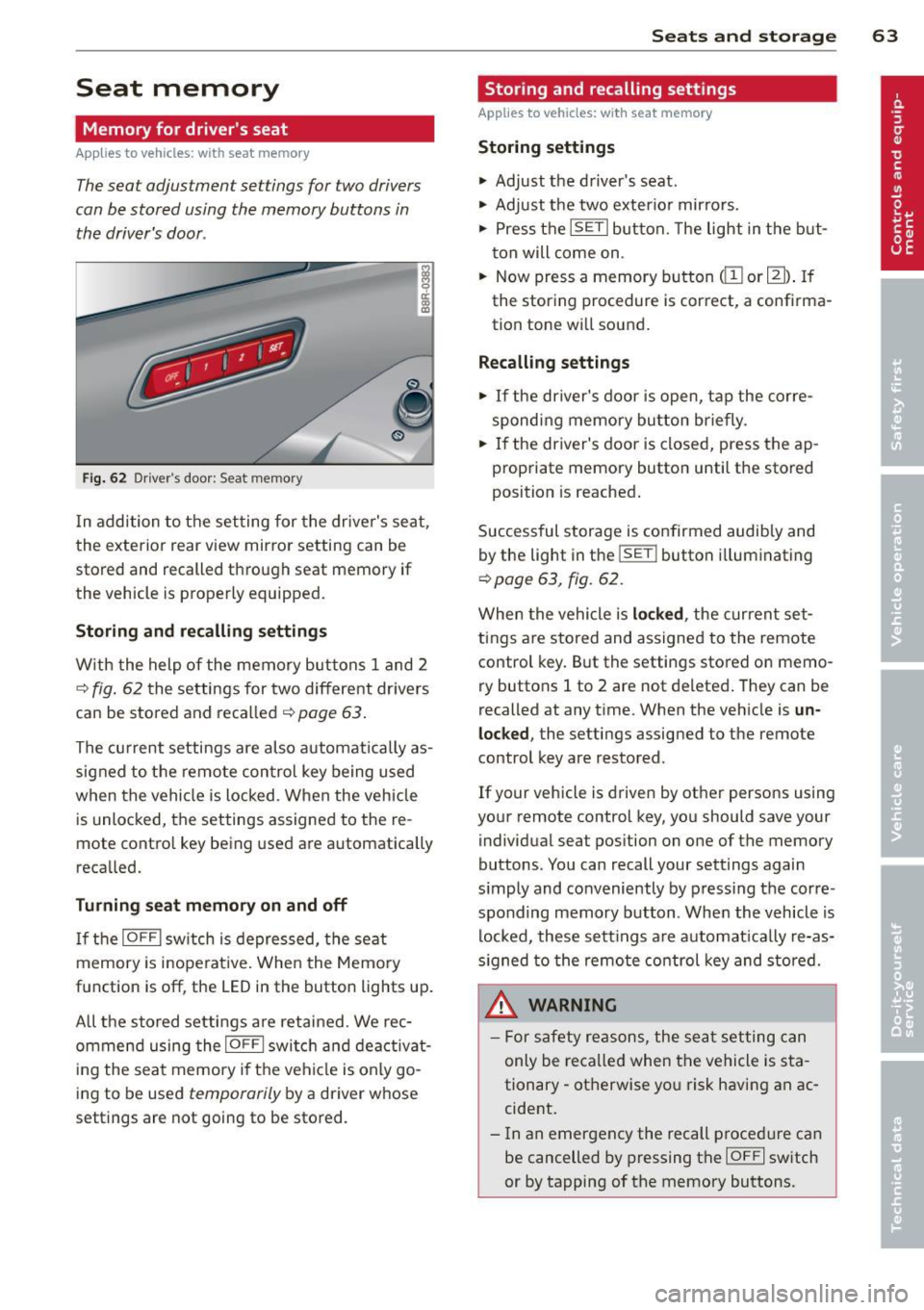
Fig. 62 Driver 's door : Seat me mory
In addition to the setting for the driver's seat ,
the exterior rear view mirror setting can be
stored and recalled through seat memory if
the vehicle is properly equipped.
Storing and recalling settings
With the help of the memory buttons 1 and 2
c::> fig. 62 the settings for two different dr ivers
can be stored and recalled
c::> page 63.
The current settings are also automatically as
signed to the remote control key being used
when the vehicle is locked . When the vehicle
is unlocked, the settings assigned to the re
mote contro l key being used are automatically
recalled.
Turning seat memory on and off
If the IOFF I switch is depressed, the seat
memory is inope rative. When the Memory
function is off , the LED in the button lights up.
A ll the stored settings are retained. We rec
ommend using the
I OFF I switch and deactivat
ing the seat memory if the vehicle is only go
ing to be used
temporarily by a driver whose
settings are not going to be stored.
Seats and storage 63
Storing and recalling settings
Applies to vehicles: with seat memory
Storing settings
.,. Adjust the driver's seat.
.,. Adjust the two exterior mirrors.
.,. Press the
ISETI button. The light in the but
ton will come on .
.,. Now press a memory button
tion tone will sound.
Recalling settings
.,. If the driver's door is open, tap the corre
sponding memory button briefly .
.,. If the driver's door is closed, press the ap
propriate memory button until the stored
position is reached.
Successful storage is confirmed audib ly and
by the light in the
ISE TI button i lluminating
c::> page 63, fig. 62 .
When the vehicle is locked , the current set
tings are stored and assigned to the remote
control key. But the settings stored on
memo
ry buttons 1 to 2 are not deleted. They can be
recalled at any time . When the vehicle is
un
locked ,
the settings assigned to the remote
control key are restored .
If your vehicle is driven by other persons using
your remote control key, you should save you r
individual seat position on one of the memory
buttons . You can recall your settings again
s imply and conveniently by pressing the corre
sponding memory button . When the vehicle is
locked, these sett ings are automatically re-as
signed to the remote control key and stored.
A WARNING
- For safety reasons , the seat setting can
only be recalled when the vehicle is sta
tionary -otherwise yo u risk having an ac
cident.
- In an emergency the recall p rocedure can
be cancelled by pressing the
IO FF I switch
or by tapping of the memory buttons .
Page 86 of 316
84 On th e road
• Press the key ¢fig . 97- the engine will
start.
Switching the ignition on /off
If you wou ld like to switch the ignition o n
without starting the eng ine, follow these
steps:
• Insert the key into the ignition lock.
• Press the key b riefly
w itho ut press the
brake pedal.
• To switch the ignition off, press the key
again .
When starting the engine, major e lectr ica l
loads are switched off temporarily.
You can only remove the key w ith the ignition
switched off. To do this, you have to press on
the key aga in.
If the engine should not start immediately,
the starting process is automatically stopped
after a sho rt time. Repeat starting procedu re.
Sw it c hing the ignition /engine off
automatically *
The following applies to vehicles with Start
Stop-System* /Hybrid drive*: to prevent the
battery from drain ing, the ignit ion and the en
g ine will switch off automatically under the
following conditions :
- T he veh icle has al ready bee n driven .
- The driver's door is opened .
- The driver's seat belt is removed.
- The brake peda l is not pressed down.
- The veh icle is stationary.
I n th is case, the activated low beam w ill be re
p laced by the side marker lights. The side
marker lights will switch off after a certain pe
riod of time or w hen you lock the vehicle .
A WARNING
-Never allow the engine to run in confined
spaces - danger of asphyxiation .
- Never remove the ign ition key from the
ignition lock while the vehicle is moving.
Otherw ise, the steering lock could sud- denly engage and yo
u wo uld not be able
to steer the vehicle .
- Always take the key with you whenever
you leave your vehicle. Otherw ise, the
engine could be started or electrical
equ ipment such as the power windows
could be operated. This can lead to seri
ous injury.
- Never leave children or persons requiring
assistance unattended in the vehicle . The
doors can be locked using the remote
transmitte r, prevent ing people from es
caping from the ve hicle on t heir own in
t he event of an emergency. Depending
on the time of year, peop le inside the ve
hicle can be exposed to very high or very
low tempe ratu res .
(D Note
Avoid high eng ine rpm, f ull throttle and
heavy engine loads unti l the engine has
r eached operating temperat ure - ot her
wise yo u risk eng ine damage.
@ For the sake of the environment
Do not let the engine run wh ile pa rked to
warm up. Begin driving immediately. This
r educes unnecessary emissions .
(D Tips
-If the key cannot be removed from the
ignition lock, you have to pull the me
chanical key out of the master key in or
der to be able to lock the vehicle
¢page 38.
-After starting a cold engine, there may
be a brief period of increased noise be
cause the oil pressure must f irst bu ild up
in the hydraulic valve adjusters . This is
normal and not a cause for concern.
- If you leave the ve hicle with the ignition
switched on, the ignit io n w ill switch off
afte r a certain per iod of t im e. Please
note that ele ctri cal eq uipment su ch as
exterior l igh ts will sw itch off as well
when that happens .
Page 88 of 316
86 On the road
(D Note
If the engine has been under heavy load
for an extended period, heat builds up in
the engine compartment after the engine
is switched off -there is a risk of damaging
the engine. Allow the engine to run at idle
for about two minutes before switching it
off.
Convenience key
Starting the engine
Appl ies to vehicles: with Convenience key
The I STAR T ENGINE S TOP! button switches
the ignition on and starts the engine .
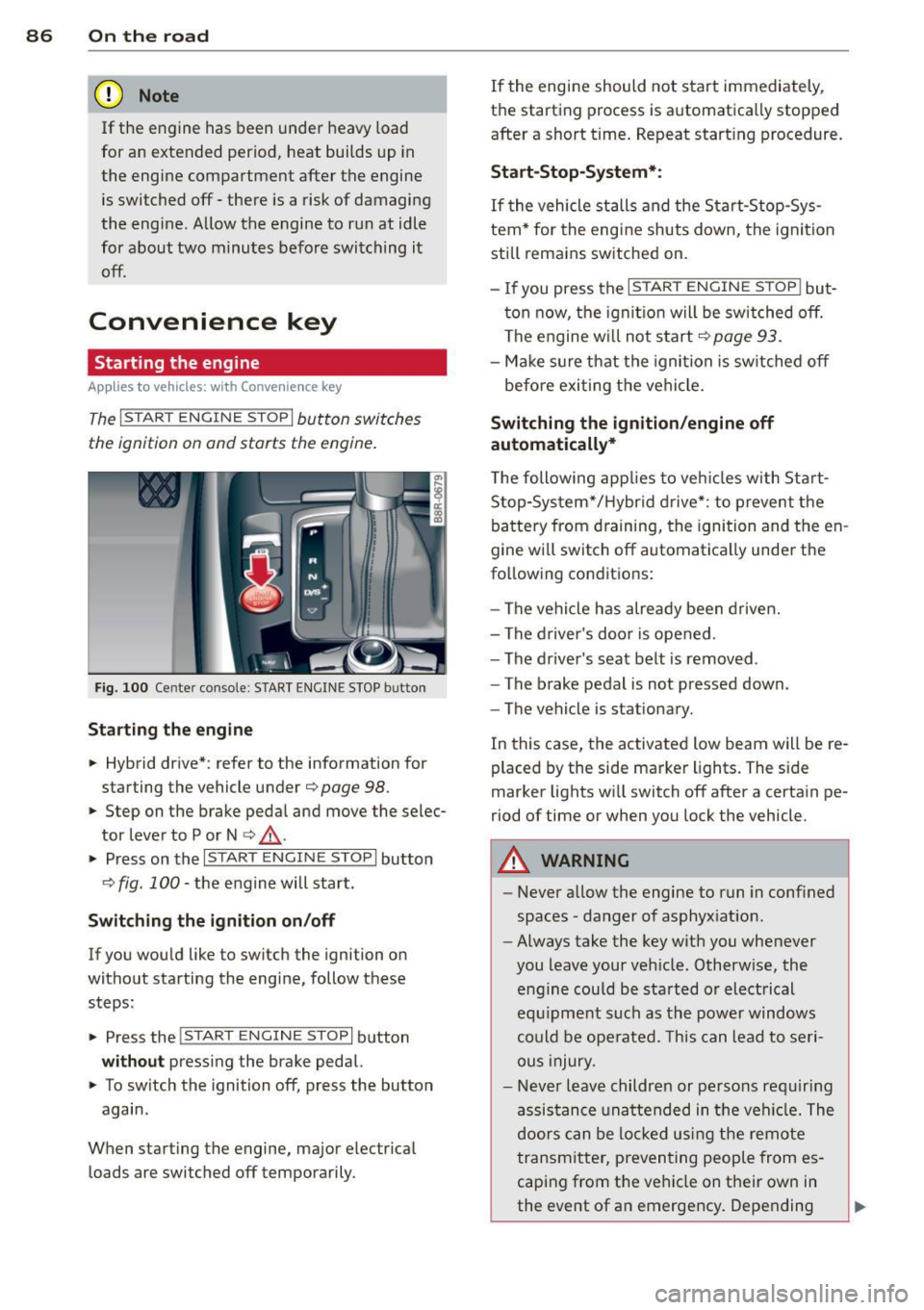
Fig. 100 Center console: START ENGINE STOP butto n
Starting the engine
.. Hybrid drive* : refer to the information for
starting the vehicle under
¢ page 98 .
.. Step on the brake peda l and move the selec
tor lever to P or N
¢ ,& .
.. Press on the r:I s==T::-:: A--=R== T=-c E=-c N:-;--:::: G-.,,.I ::-:N-;::: E-,S== T;:-; O:;--;P:cil button
c;, fig . 100 -the engine will start .
Switching the ignition on/off
If you would like to switch the ignition on
without starting the eng ine, follow these
steps :
.. Press the
!START ENGINE STOP! button
without pressing the brake pedal.
.. To sw itch the ignition off, press the button
again .
When starting the engine, major electr ical
loads are switched off temporarily . If
the engine should not start immediately,
the starting process is automatically stopped
after a short t ime. Repeat start ing procedure.
Start -Stop-System*:
If the vehicle stalls and the Start-Stop-Sys
tem* for the eng ine shuts down, the ignition
still remains switched on.
- If you press the
I START ENGINE STOP I but
ton now, the ignitio n will be switched off.
The engine w ill not start
¢page 93.
-Make sure that the igni tion is sw itched off
befo re exiting the vehicle.
Switching the ignition /engine off
automatically*
T he following app lies to veh icles with Start
Stop-System*/Hybrid drive*: to prevent the
battery from draining, the ignition and the en
gine wi ll switch off automatically unde r the
following conditions:
- The vehicle has already been driven.
- The driver's door is opened .
- The driver 's seat belt is removed .
- The brake pedal is not pressed down .
- The vehicle is stat ionary.
In this case, the activated low beam will be re
placed by the side marker lights. The side
marker lights wi ll switch off after a certain pe
riod of time or when you lock the vehicle.
A WARNING
--Never allow the engine to run in conf ined
spaces -danger of asphyx iat ion.
- Always take the key with you whenever
you leave your veh icle. Otherw ise, the
engine could be sta rted or electrical
equ ipment such as the power windows
could be operated. This can lead to seri
ous injury.
- Never leave children or persons requiring
assistance unattended in the vehi cle. The
doors can be locked us ing the remote
transmitter, preventing people from es
caping from the veh icle on their own in
the event of an emergency . Depending
Page 89 of 316
on the time of year, people inside the ve
hicle can be exposed to very high or very
low temperatures .
0 Note
Avoid high engine rpm, full throttle and
heavy engine loads until the engine has
reached operating temperature -other-
wise you risk engine damage.
@ For the sake of the environment
Do not let the engine run while parked to
warm up . Begin driving immediately. This
reduces unnecessary emissions.
@ Tips
- After starting a cold engine, there may
be a brief period of increased noise be
cause the oil pressure must first build up in the hydraulic valve adjusters . This is
normal and not a cause for concern .
- If you leave the vehicle with the ignition
switched on, the ignition will switch off
after a certain period of time . Please
note that electrical equipment such as
exterior lights will switch off as well
when that happens .
Switching engine off
App lies to vehicles: with Conve nie nce key
"" Bring your vehicle to a complete stop.
... Move the selector lever to the P or N posi
tion.
"" Press the
!START ENGINE STOPI button
r:::;, page 86, fig. 100 .
Steering lock
The steering locks when you turn the engine
off using the
I S TAR T ENGINE STOP I button
and open the d river 's doo r. T he locked steer
ing helps prevent vehicle theft.
Emergency off
If necessary, the engine can be switched off
with the selector lever in the R or D/S posi
tions. To do so , step on the brake pedal and
press and hold the
I START ENGINE STOP I but-
On the road 87
ton. The vehicle speed must be less than 6
mph/ 10 km/h.
A WARNING
- Never turn off the engine before the ve
hicle has come to a complete stop . The
full function of the brake booster and the power steering is not guaranteed . You
must use more force to turn or brake if
necessary . Because you cannot steer and
brake as you usually would, this could
lead to crashes and serious injuries.
- For safety reasons, you should always
park your vehicle with the selector lever
in P . Otherwise, the vehicle could inad
vertently roll away.
- The radiator fan can continue to run for
up to 10 minutes even after you have
turned off the engine and removed the ignition key. The radiator fan can also
turn on again if the engine coolant heats
up because of intense sunlight or heat
build-up in the engine compartment.
- Always take the key with you whenever you leave your vehicle. Otherwise, the
engine could be started or electrical
equipment such as the power windows
could be operated. This can lead to seri
ous inJury.
- Never leave children or persons requiring
assistance unattended in the vehicle. The
doors can be locked using the remote
transmitter, preventing people from es
caping from the vehicle on their own in
the event of an emergency. Depending
on the time of year, people inside the ve hicle can be exposed to very high or very
low temperatures.
(D Note
If the engine has been under heavy load
for an extended period, heat builds up in
the engine compartment after the engine is switched off -there is a risk of damaging
the engine. Allow the engine to run at idle
for about two minutes before switching it
off .
Page 91 of 316
Your vehicle is equipped with an electrome
chanica l parking brake . The parking brake is
des igned to prevent the vehicle from ro lling
un intent ionally and replaces the hand brake.
I n addition to the norma l functions of a tradi
tional hand brake, the electromechanica l
parking brake provides various convenience
and safety functions.
When start ing f rom re st
- T he integral starting assist helps you when
driving by automatically releasing the park
ing brake ¢
page 90, Starting from rest.
-When starting on inclines, the starting as
sist prevents the vehicle from unintentional
l y rolling back. The braking force of the
parking brake is not released until sufficient
driv ing force has been built up at the
wheels .
Emergenc y bra ke function
An emergency brake ensures that the vehicle
can be slowed down even if the
normal brakes
fa il¢
page 90, £mergency braking.
Ind icator light s
-If the parking brake is closed w ith the igni
tion
s witched on the indicator lights come
on . (USA models)/ . (Canada models) in
the instrument cluster and the sw itch.
- If the parking brake is closed with the igni
tion
switched off the indicator lights come
on . (USA models)/ . (Canada mode ls) in
the instrument cluster and the switch for
about 20 seconds.
A WARNING
If a drive range is engaged with the veh icle
stat ionary and the engine runni ng, you
must in no instance accelerate care lessly.
Otherw ise the vehicle will start to move
immediate ly- risk of an accident.
W Note
If the symbo l. in the display or the ind i
cato r light .. (USA models) . (Cana
da mode ls) in the instrument cluster flash-
On th e ro ad 89
es, there is a ma lf u nction in the brake sys
tem . By pressing the
ISETI button, you can
bring up a dr iver message which explains
the malfunct ion in more detai l. If the driv
er message
Pa rking brake s ystem fault!
See owner 's manual
appears, there is an
ope rat ing malfunction in the parking brake
which yo u should have repaired immedi
ate ly by an autho rized Aud i dea le r o r other
q ualified wor ks hop ¢
page 29.
(D Tips
-Yo u can app ly the parking brake at any
t ime -even with the ig nition turned off.
T he ign it io n m ust be tu rned on in o rder
to release the parking brake .
- Occasional noises when the pa rking
brake is app lied and released are no rmal
and are no t a cause for conce rn.
- Whe n the vehicle is pa rked, the park ing
brake goes through a sel f-test cycle at
regu lar interva ls. Any associated noises
are normal.
Parking
Parking
.,. Stop the vehicle with the foot brake .
.,. Pull the switch to apply the parking brake.
.,. Move the selector lever to P .
.,. Turn the engine off¢.&_.
In addit ion on incline s and grades
.,. Turn the steering wheel so that yo ur vehicle
wi ll roll against the curb in case it should
start to move.
A WARNING
--When you leave your vehicle -even if on-
ly briefly -always remove the ignition
key. Th is applies pa rticularly when chil
dren remain in the vehicle. Otherwise the
children could sta rt the eng ine, release
the par king brake or operate electrical
equ ipment (e.g. power windows). There
is the risk of an acc ident.