lights AUDI Q5 2013 Owner's Guide
[x] Cancel search | Manufacturer: AUDI, Model Year: 2013, Model line: Q5, Model: AUDI Q5 2013Pages: 316, PDF Size: 78.89 MB
Page 97 of 316
(30 km/h to 240 km/h). Settings can each be
adjusted in intervals of
5 mph (10 km/h).
Cruise control
Switching on
The cruise control system makes it possible to
drive at a constant speed starting at 20 mph
(30 km/h) .
0
f
®t
0
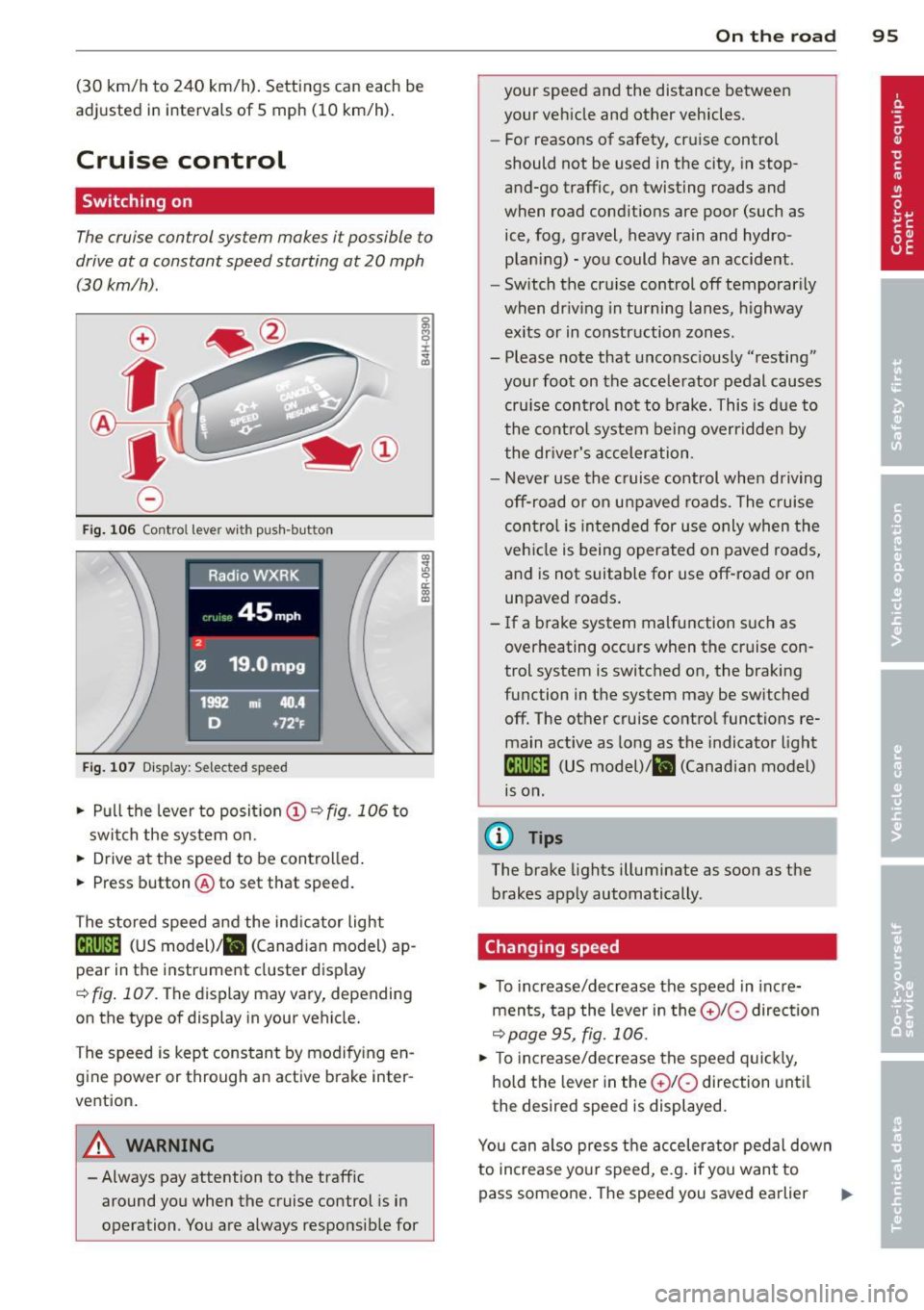
Fig. 106 Contro l lever with push -button
Fig. 107 Di sp lay: Selected speed
.. Pull the lever to posit ion (!) ~ fig. 106 to
switch the system on .
.. Drive at the speed to be controlled .
.. Press button @to set that speed.
The stored speed and the ind icator light
Bll!lm (US model)/ il (Canad ian model) ap
pear in the instrument cluster display
<=>fig. 107. The display may vary, depending
on the type of display in your vehicle.
The speed is kept constant by modifying en
gine power or through an active brake inter
vention.
A WARNING
- Always pay attention to the traffic around you when the cruise control is in
operation . You are always responsible for
c:o ;:g 0 ci: c:o al
On th e road 95
your speed and the distance between
your vehicle and other vehicles.
- For reasons of safety, cruise control
should not be used in the city, in stop
and-go traffic, on twisting roads and
when road conditions are poor (such as
ice, fog, gravel, heavy rain and hydro
plan ing) -you could have an accident.
- Switch the cruise control off temporarily
when dr iv ing in turning lanes, highway
exits or in construction zones.
- Please note that unconsciously "resting"
your foot on the accelerator pedal causes
cru ise contro l not to brake. This is due to
the control system being overridden by
the driver's acceleration.
- Never use the cruise control when driving
off-road or on unpaved roads. The cruise
con tro l is intended for use only when the
vehicle is being operated on paved roads,
and is not suitable for use off-road or on
unpaved roads.
- If a brake system malfunction such as
overheating occurs when the cruise con
trol system is switched on, the braking
function in the system may be switched off. The other cruise control functions re
main active as long as the indicator light
IR;\1)~14 (US model)/ fil (Canadian model)
1s on .
(D Tips
The brake lights illuminate as soon as the
brakes apply automatically .
Changing speed
.. To increase/decrease the speed in incre
ments, tap the lever in the
010 direction
~pa ge 95, fig. 106.
.. To increase/decrease the speed quickly,
hold the lever in the
010 direction until
the desired speed is displayed.
You can also press the accelerator pedal down
to increase your speed, e.g . if you want to
pass someone. The speed you saved earlier
Page 101 of 316
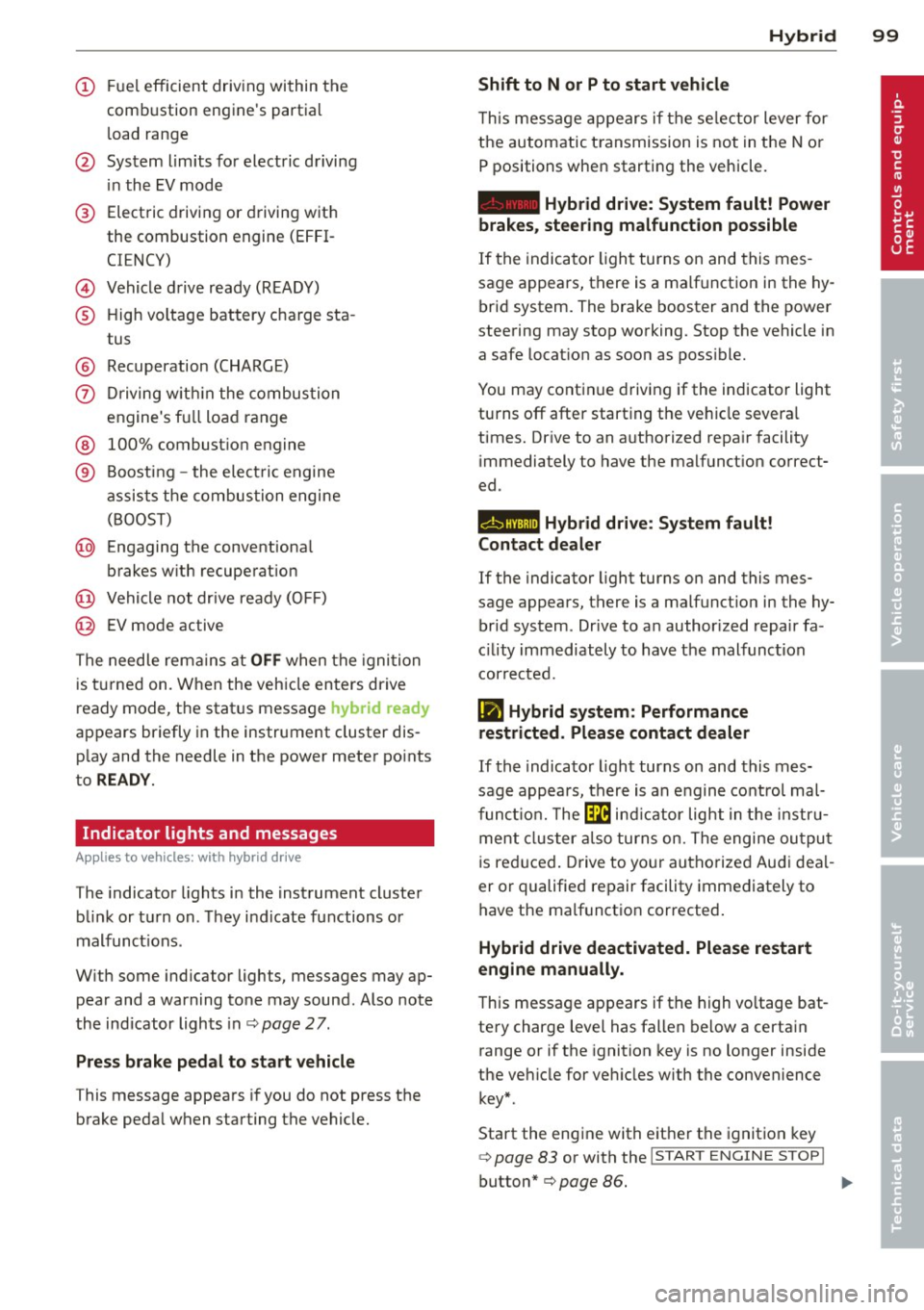
(!) Fuel efficient driv ing within the
comb ustion engine's partia l
l oad range
@ System limits fo r electric d riving
i n the EV mode
® Elect ric driving or d riving w it h
the combustion engine (EFFI -
CI ENCY)
© Vehicle d rive ready (READY)
® H igh vo ltage bat tery c ha rge sta -
tus
® Recuperation (CHARGE)
0 Dr iving w it hi n the combus tion
engine's fu ll loa d range
® 100% combust io n engine
® Boost ing -the elect ric e ngine
assists the combus tion engine
( B OOST)
@ Engaging the conventiona l
brakes w ith recuperat ion
@ Vehicle not drive ready ( OFF)
@ EV mode active
The needle rema ins at
OFF when the igni tion
is tur ned on. W hen the veh icle en ters drive
ready mode, t he stat us message
hybrid ready
ap pears briefly in the instrument cluster dis
p lay and the needle in the power meter po ints
to
READY .
Indicator lights and messages
Applies to vehicles: with hybrid drive
The indicator lights in the instrument cluste r
b link or t urn on . Th ey i ndicate fu nctions o r
malfunct ions .
W ith some ind icator lights, messages may ap
pear and a warning tone may sound. Also note
the indicator lights in c::,;,
pag e 27.
Press brake pedal to start vehicle
This message appea rs if you do not press the
brake peda l when starting the vehicle.
Hybrid 99
Shift to N or P to start vehicle
T his mess age appears if the se lector lever for
the automatic t ransmission is not in t he N or
P positions when starting the vehicle.
- Hybrid drive: System fault! Power
brakes, steering malfunction possible
I f the indica tor ligh t turns on and this mes
sage a ppears, t here is a ma lf u nction in the hy
bri d system. The brake booster and the power
steering may stop working. Stop the vehicle i n
a safe l ocat io n as soo n as poss ible.
You may cont in ue dr iving if the indicator light
turns
off afte r start ing the ve hicle severa l
times. Dr ive to an a uthorized repa ir facility
immediately to have the malfunct ion correct
ed .
EHithjj,j Hybrid drive : Sy stem fault!
Contact dealer
If the indicator light turns on and this mes
sage appears , there is a malfunct ion in the hy
br id system . Drive to a n author ized repair fa
c ili ty immediat ely to hav e th e m alfunc tion
corrected.
Ill Hybrid system: Performance
restricted. Please contact dealer
If th e i ndica to r light turns on and this mes
sag e appea rs, there is an engine contro l ma l
f unct io n .
The @B indi cator light in t he instr u
m ent cluster also tur ns on. The engine ou tput
i s re duced. Drive to yo ur autho rize d Au di dea l
er or qualifie d repair facility immediately to
have the malfunct io n corrected .
Hybrid drive deactivated. Please restart
engine manually.
Th is message ap pears if the high vo ltage bat
te ry charge leve l has fallen below a certa in
range or if the ignition key is no longer inside
the ve hicle for ve hicles with the convenience
key *.
Start the eng ine with e it h er the ignitio n key
¢page 83 or with the !STAR T EN GINE STOPI
button* c::> page 86.
Page 107 of 316
Additional information about the vehicle tool kit may be found under
c::> page 269 and
about the tire repa ir set under
c::> page 2 72 .
(D Tips
The right storage compartment in the lug
gage compartment and its contents must
always be kept in the vehicle. The veh icle
m ust not be operated w ithout the tire re
pa ir set.
Charging the batteries
Applies to vehicles: with hybrid drive
The vehicle is equipped with two 12 volt bat
ter ies and a h igh voltage battery.
If the
12 volt batter ies are dead, they may be
charged with a charger or the vehicle may be
jump started with assistance from another ve
hicle in the same way as a conventional vehi
cle .
The same applies to the high voltage battery
if it is d ischarged . However, in this case, the
charg ing process is accompanied w ith mes
sages in the inst rument cluste r display. The
i gnit ion m ust be switched on and all unneces
sary electric components m ust be turned off.
The connections in the engine compartment
are used for both charging and jump starting
c::> page 245 or c::> page 284.
Vehicle not ready to start. See owner's
manual
This message appears if the high voltage bat
tery charge level is too low. The vehicle can no
l onge r be started with its own power. The
high voltage battery must be charged with a
charger or the vehicle must be jump started
with the aid of another vehicle.
Afte r the connecting the cha rger or jumper ca
b les, the ignition must be turned off for ap
proximately two minutes and then turned on
again. After no more than one m inute, one of
the following indicator lights turns on in the instrument cluster d isp lay. Hybrid 105
II Charging battery. Please wait ...
If
the indicator light turns on and this mes
sage appears, the high voltage battery is
charging or the vehicle is being jump started
with assistance from another vehicle.
If the 12 vo lt batteries are dead, the -
indicator light turns on. The charging proce
dure takes longer in this case because the
12
volt batteries are charged first. The procedure
goes faster with the ignition switched off.
Vehicle ready to start.
This message appears if the charging proce
dure was successfu l. The vehicle may be start
ed again.
Battery could not be charged enough to
start vehicle.
T his message appears if the charging proce
dure was not successful or it was interrupted.
This may happen if the charger or the battery
in the veh icle that is assist ing is too weak.
If
the vehicle cannot be started, see an author
ized repa ir facility for assistance .
(D Tips
- The charger should deliver a current of at
least
30 A. Otherwise charging the high
voltage battery will take considerably longer. A current between
50 A and 70 A
is ideal.
- The ve hicle that is assist ing should be
somewhat within the same vehicle class
when jump starting a vehicle. A smaller
vehicle's battery may be drained.
- After approximately
30 minutes, the
c harging procedure ends because the ig
nition is automatically turned off.
If you
would like to continue to charge the bat
tery, turn the ignition on again.
Page 112 of 316
110 Audi adaptive cruise control and braking guard
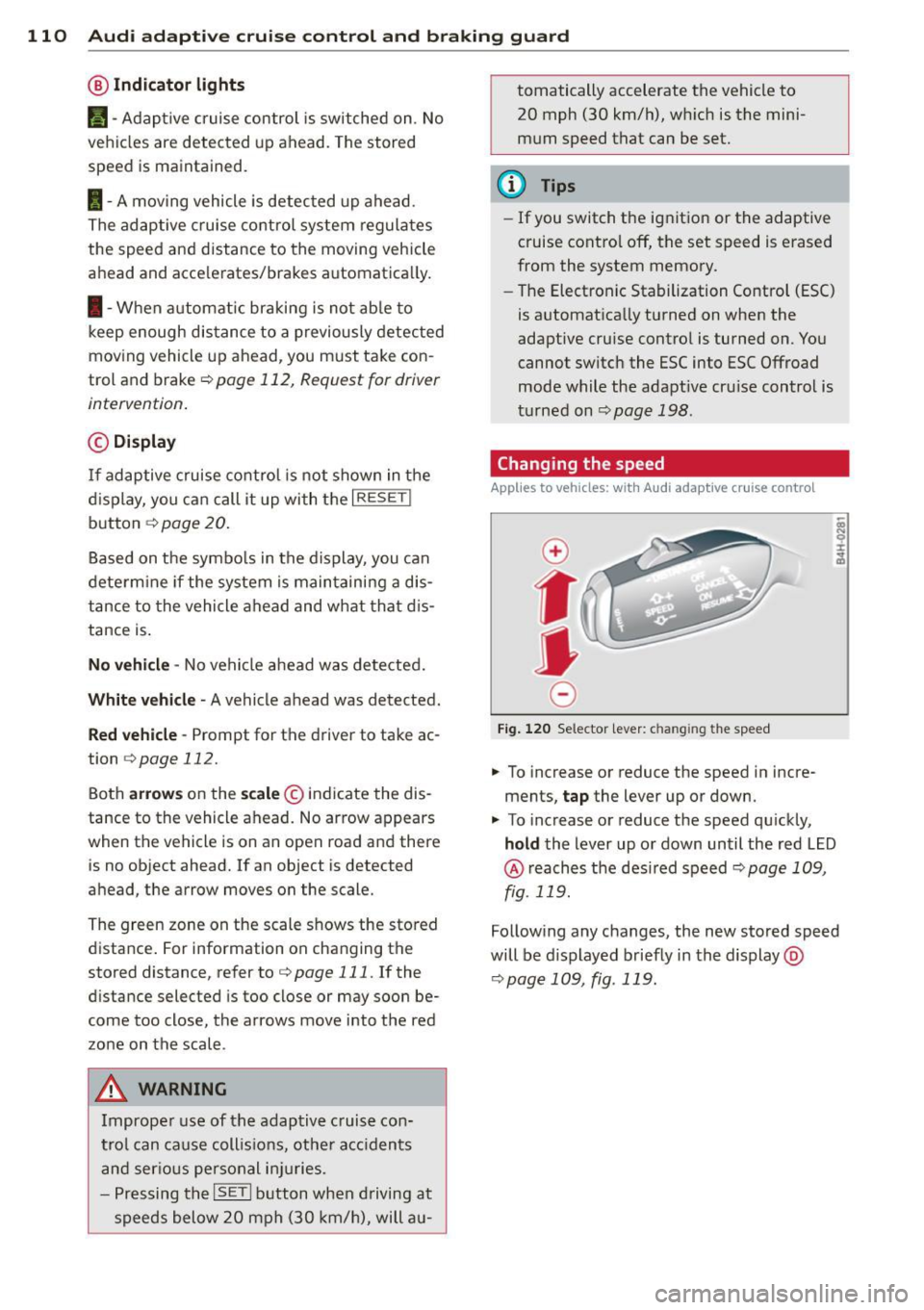
@ Indicator lights
r• 1 -A dap tive crui se control is switched on . No
ve hicl es are detected up ahead. The stored
speed is ma intained.
I -A mov ing vehicle is detec ted up ahe ad.
T he ad aptive cruise co ntro l sys tem regulates
the spee d and d istance to the moving vehicle
a head and acce le rates/brakes automat ica lly.
I -W hen a utoma tic br aking is no t ab le to
keep enough distance to a previously detec ted
moving vehicle up ahead, you m ust ta ke co n
trol and brake <=:>
page 112, Request for driver
intervention .
© Display
If ad aptive cruise co ntr ol is n ot shown in the
d ispl ay, you c an call it up with the
I RESET !
button ¢ page 20.
Based on the symbo ls in the display, you can
dete rm ine if the system is main taini ng a dis
tance to the vehicle ahead and w hat tha t di s
tance is .
No vehicle -No vehicle a head wa s de te cted.
White vehicle -A vehicle ahead was detected.
Red vehicle -Prompt for the driver to take ac
tion
<=:> page 112.
Both arrow s on the sc ale © indicate the dis
tance to the vehicle ahead. No ar row appears
when t he vehicle is on an open road and there
is no object ahead. If an object is detected
a head, the arrow moves on the scale.
The green zone on the scale s hows the sto red
distance . For information on changing the
stored distance, refer to <=:>
page 111. If the
d istance selected is too close or may soon be
come too close, the arrows move into the red
zo ne on the scale .
A WARNING
Improper use of the adaptiv e cruis e con
trol can ca use c oll is io ns, ot he r acc iden ts
a n d s eriou s pers onal i njuries.
- P re ss ing th e
ISETI button when driving at
sp eeds below 20 mp h (30 km/h), will a u- tomatically accelerate the vehicle to
20 mph (30 km/h), w hich is the mini
m um speed that can be set.
(D Tips
- If you switch t he ig nitio n or the adaptive
cruise contro l off, t he set speed is e rased
from the system memory.
- Th e Electronic Stabilization Control (ESC)
is a utomat ica lly turned on when the
adaptive cru ise contro l is turned on. You
cannot switc h the ESC into ESC Offroad
mode w hile the adapt ive cr uise c ontrol is
t ur ne d on
<=:> pag e 198 .
Changing the speed
Applies to veh icles: w ith Audi adaptive cruise co ntro l
0
f
• 0
Fig. 120 Selec tor lever: c han gin g the speed
.,. To increase or reduce the speed in incre
ments,
tap the lever up or down .
.,. To increase or reduce the speed qu ickly,
hold the Lever up o r down un til the red L ED
@ reaches t he des ired speed <=:> page 1 09,
fig . 119.
Follow ing any changes, the new sto red speed
will be d isplayed briefly in the display @
<=:>page 109, fig . 119.
Page 125 of 316
Automatic
transmission
tiptronic
Introduction
The automatic transmission is controlled elec
tronically. The transmission upshifts or down
shifts automatically depending on which drive
program is selected. The power is transferred
by a torque converter .
When a
mode rate d riv in g s ty le is used, the
transmission selects the most econom ica l
driving mode. It w ill then change up early and
delay the downshifts to g ive better fuel econ
omy.
T he transmission switches to a sporty mode
after a k ick-down or when the driver uses a
spo rty driving sty le characterized by quick ac
celerator pedal movements, heavy accelera
tion, frequent changes in speed and traveling
at the maximum speed.
If desired, the driver can a lso select the gears
manually ( tiptronic mode ) c:> page 12 7.
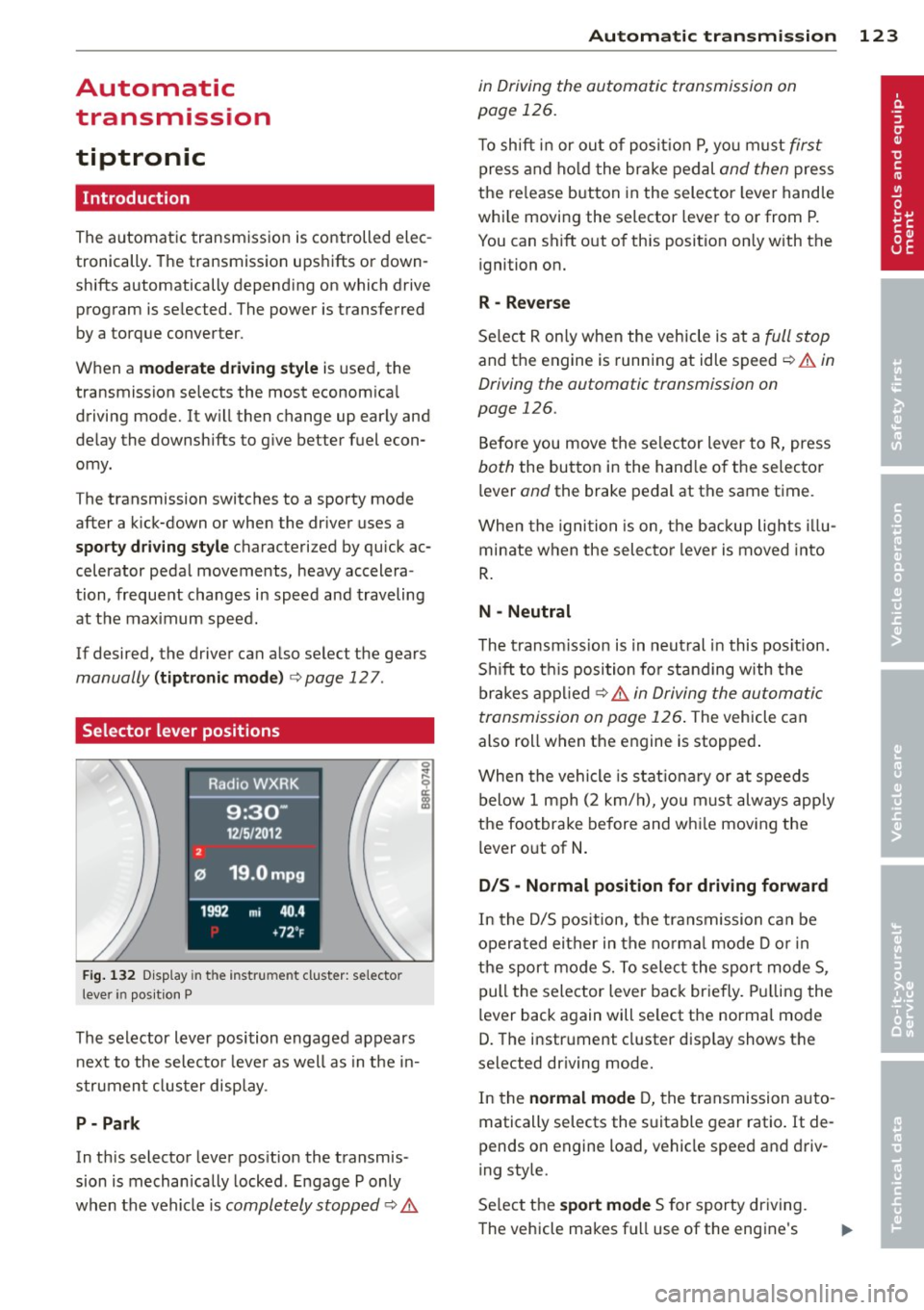
Selector lever positions
Fig . 132 D isp lay in t he i nst ru m en t cluster: selecto r
l ever in pos it ion P
The selector lever position engaged appears
next to the selecto r lever as well as in the in
strument clus ter disp lay.
P- P ark
In th is selector lever pos ition the transmis
sion is mechan ically locked . Engage P only
when the vehicle is
completely stopped c:> 11::..
Automa tic tran sm iss ion 123
in Driving the automatic transmission on
page 126.
T o shift in or out of posit io n P , yo u m ust first
press and ho ld the brake pedal and then press
the re lease button in the selector leve r handle
whi le moving the selector lever to or from P.
You can shift out of th is position only with the
ignition on.
R -Reverse
Se lect R on ly when the vehicle is at a full stop
and the engine is running at idle speed c:> 11::.. in
Driving the automatic transmission on
page 126.
Before you move the se lector lever to R, press
both the button in the hand le o f the selector
lever
and the brake pedal at the same t ime.
When the ignition is on, the backup lights illu
minate when the selecto r lever is moved into
R .
N -Neutral
The t ransm iss ion is in neut ral in this pos ition.
S hi ft to t his position fo r standing with the
brakes appl ied
c:> 11::.. in Driving the automatic
transmission on page 126 .
The vehicle can
also roll when the engine is stopped .
When the vehicle is stat iona ry or at speeds
below 1 mph (2 km/h), yo u m ust always apply
the footbrake before and whi le mov ing the
lever o ut of
N .
D/S - Normal position for driving forward
In the D/S pos ition, the transmission can be
operated either in the no rma l mode D or in
the sport mode S. To select the sport mode S,
pull the selector lever back briefly. Pulling the
lever back again will se lect the normal mode
D. The instrument cluster disp lay shows the
selected driving mode.
In the
normal mode D, the transmission auto
matically selects the s uitable gear ratio. It de
pends on engine load, vehicle speed and driv
ing style.
Se lect the
sport mode S for sporty dr iving .
The vehicle makes fu ll use of the engine's
Page 127 of 316
lever is left in N (Neutral) for more than ap
proximately 1 second, witho ut the brake ped
a l being pressed.
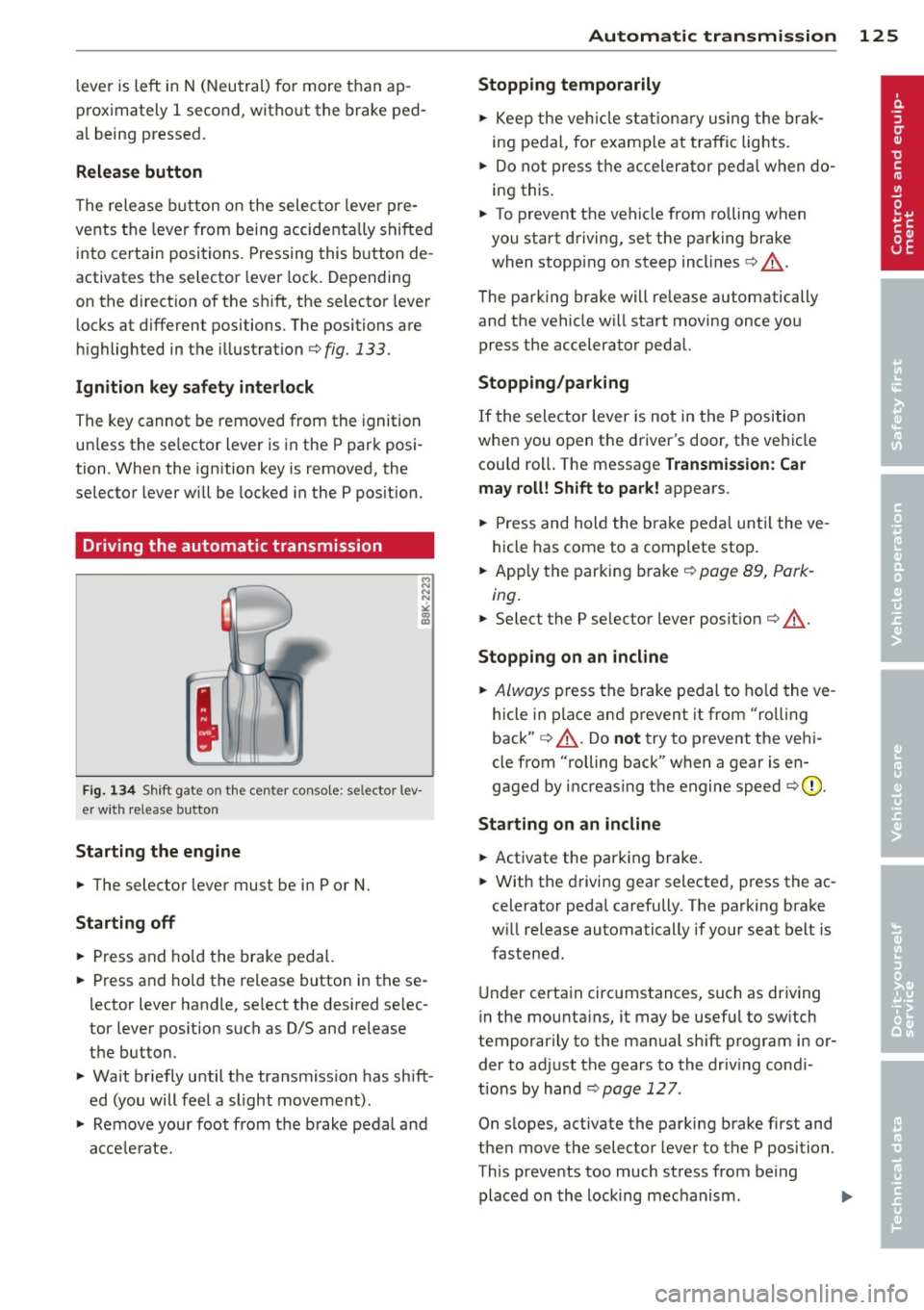
R elea se button
The release b utton on the selector lever pre
vents the lever from being accidentally shifted
into certain positions. Pressing this button de
activates the selector lever lock. Depending
on the direction of the shift, the selector lever
locks at different positions. The positions are
h ighlighted in the illustration¢ fig.
133.
Ign ition k ey safety int erlock
The key cannot be removed from the ignition
unless the se lector lever is in the P park posi
tion . When the ign ition key is removed, the
selector lever will be locked in the P pos ition.
Driving the automatic transmission
F ig . 134 Sh ift gate on th e center conso le: se lector lev
er with release button
Startin g the engine
... The selector lever must be in P or N.
Starting off
... Press and ho ld the brake pedal.
... Press and ho ld the release button in these
lector lever handle, se lect the desired se lec
tor lever pos ition such as D/S and release
the button.
... Wait briefly until the transmission has shift
ed (you will feel a slight movement) .
... Remove your foot from the brake pedal and
acce le rate.
Automa tic tran sm iss ion 125
Stopping temporarily
... Keep the veh icle stationa ry using the brak
ing pedal, for example at t raffic lights .
... Do not press the accelerator peda l when do
ing this .
... To prevent the vehicle from rolling when
you start driving, set the parking brake
when stopp ing on steep inclines¢_& .
The parking brake will re lease automatically
and the vehicle w ill start moving once you
press the accelerator pedal.
Stopping /parking
If the selector lever is not in the P position
when you open the driver's door, the vehicle
cou ld rol l. The message
Transmi ssion: C ar
ma y roll ! Shift to pa rk !
appears .
... Press and hold the brake peda l until the ve
hicle has come to a complete stop .
... App ly the parking brake
¢ page 89, Park-
ing .
... Select the P selector lever posit ion ¢ _& .
Stopping on an inclin e
... Always press the brake pedal to ho ld the ve
hicle in place and prevent it from "rolling
back" ¢_& . Do
not try to prevent the vehi
cle from "rolling back" when a gear is en
gaged by increasing the engine speed ¢(D .
Sta rting on an inclin e
... Activate the parking brake .
... With the driving gear selected, press the ac
celerator peda l carefully . The parking brake
w ill release automatically if your seat belt is
fastened .
Under certa in circ umstances, such as driving
in the mounta ins, it may be usefu l to sw itch
temporarily to the manual sh ift program in or
der to adjust the gears to the driv ing cond i
tions by hand
¢ page 12 7 .
On s lopes, activate the parking brake first and
then move the selector lever to the P position.
This prevents too much stress from being placed on the locking mechanism .
I),
Page 133 of 316
Switching on and off
Applies to vehicles: with Audi parking system p lus with
rea rview camera
The reorview camera switches on automati
cally together with the acoustic and visual
pork assist when you put the vehicle in re verse .
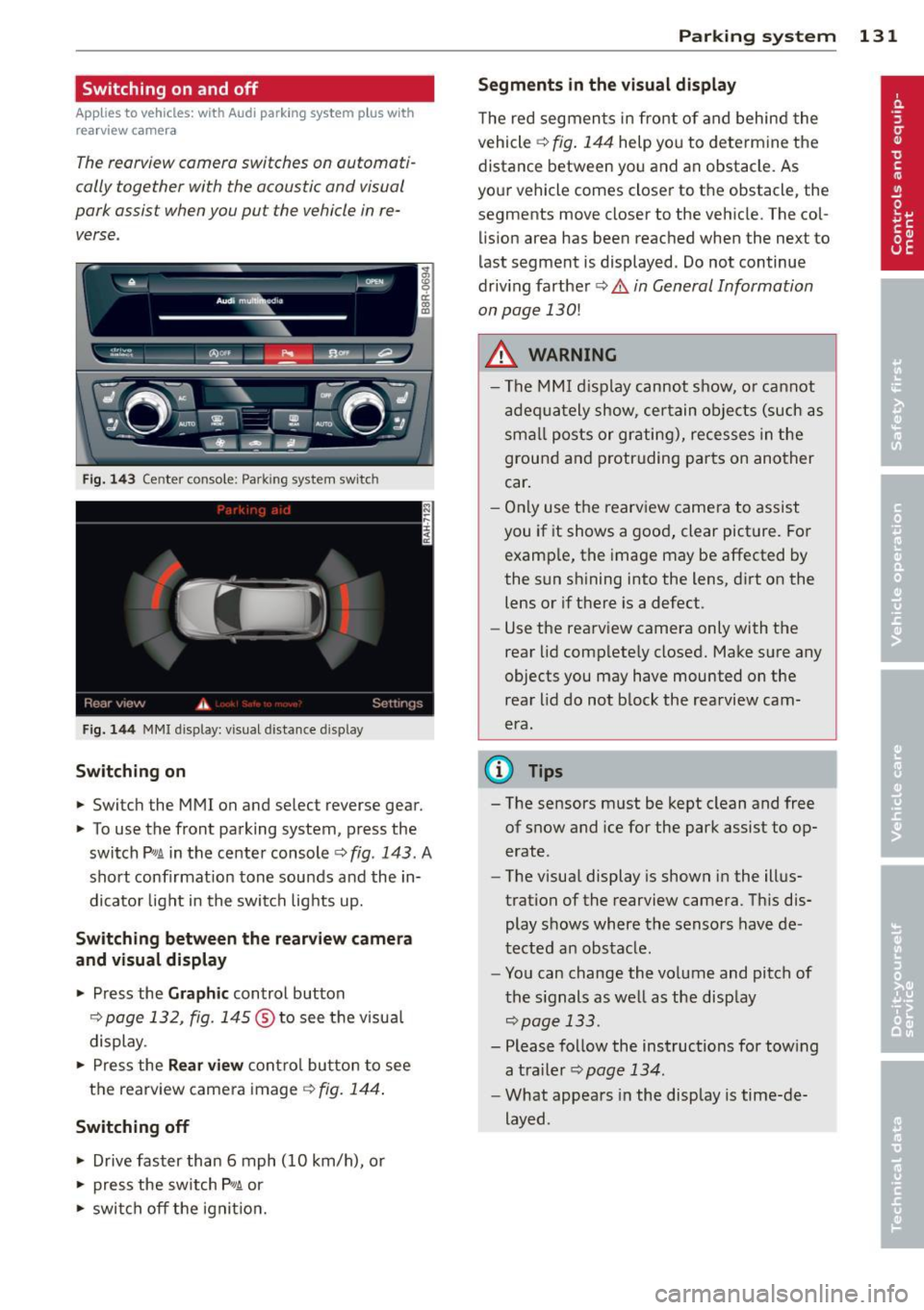
Fig. 14 3 Center co nsole ; Pa rk ing syste m switc h
Fig. 144 MMI disp lay: visu al dista nce display
Switching on
.,. Switch the MMI on and select reverse gear.
.,. To use the front parking system, press the
switch
P w.A in the center console c> fig . 143. A
sho rt confirmat ion tone sounds and the in
dicato r light in the switch lights up.
Switching between the rear view came ra
and visual display
.,. Press the Graphic control button
¢ page 132, fig . 145 ® to see the visua l
display.
.,. Press the
Rear view con trol bu tton to see
the rearview came ra image
¢ fig. 144 .
Switching off
.,. Drive faster than 6 mph (10 km/h), or
.,. press the sw itch
p ,q .A or
.,. swi tch off the ignit io n.
Par king system 131
Segm ents in the vi sual display
T he red segmen ts i n fro nt of and behind the
vehicle
c> fig . 144 help you to determ ine the
distance between yo u and an obstacle. As
you r vehicle comes close r to the obstacle, the
segments move closer to the vehicle. The col lision area has been reached when the next to
l ast segment is displayed . Do not continue
driv ing farther
c> .&. in General Information
on page
130!
A WARNING
- T he MMI display cannot s how, o r ca nnot
a dequa tely show, certain o bje cts (such as
smal l posts or gr ating), recesses in the
ground and p rotruding parts on another
car .
- On ly use the rearv iew came ra to assist
you if it shows a good, clear pict ure. For
examp le, the image may be affected by
the sun sh ining into the lens, d irt on the
lens or if there is a defect.
- Use the rearv iew camera only with the
rear lid comp lete ly closed. Make sure any
o bjects you may have mounted on the
rea r lid do not b lock the rearview cam
era.
(D Tips
- The sensors m ust be kept clean and free
of snow and ice for the park assist to op
erate .
- The visua l display is shown in the illus
tration of the rearview camera. Th is dis
play shows where the sensors have de
tected an obstacle .
- You can change the vo lume and pitch of
t he s ignals as we ll as the disp lay
<=>page 133.
- Please fo llow the instructions for tow ing
a tra iler
c> page 134.
-What appears in the display is time-de
layed .
Page 137 of 316
Homelink®
Universal remote
control
Description
Applies to vehicles: with Home link
The HomeLink universal remote control con
be programmed with the remo te control for
devices that ore already present.
With Home Link, you can control devices such
as the garage door, secu rity systems, ho use
lights , etc. comfortably from the inside of you
veh icle .
H omelink makes it poss ible for you to rep lace
t hree different remote controls from dev ices
in your home with one un ive rsal remo te. Th is
featu re works for most garage door and exte
rior door motor signals. Programming the in
d ividual remote control for your remote con
trol takes p lace near the center of the radiator
grille. There is a control module attached at
this location .
A one-t ime programm ing of the sensor must
be performed before you are able to use sys
tems with Homelink. If the system does not activate after performing the one-t ime pro
gramming, check whether the system uses a rolling code ¢
page 138 for vehicles without
the MMI*.
& WARNING
-
- Never use the Homelink ® transmi tter
with any garage door opener that does have not the sa fety stop and reverse fea
ture as requ ired by federa l safety stand
ards. Th is includes any garage door open
er mode l manufactured before April 1,
1982.
- A garage door opener which cannot de
tect an object, signaling the door to stop
and reverse does not meet current feder
al safety standards . Us ing
a garage door
opener without these features increases
r isk of serious inj ury or death.
Homelink ® 135
-For safety reasons never re lease the
parking brake or start the eng ine while
anyone is standing in front of the vehicle .
- A garage door or an estate gate may
sometimes be set in motion when the
Homelink ® remote control is being pro
grammed. If the device is repeatedly ac
tivated, th is can overstrain motor and
damage its e lectrical compon ents -an
overheated mo to r i s
a fire hazard!
- To avo id possib le injuries or property
damage, please always make abso lutely
certa in that no person s or objects are lo
cated in the range of motion of any
equ ipment being operated .
(0 Tips
-If you would like more information on
Homelink ®, where to purchase the
Home link ® compatib le products, or
would like to purchase the Homelink ®
Home Lighting Package, please ca ll toll
free: l-800-355-3515.
- For Declaration of Compliance to United
States FCC and Industry Canada reg ula
tions
¢ page 298.
- For security reasons, we recommend that
you clear the programmed b uttons be
fore selling the veh icle.
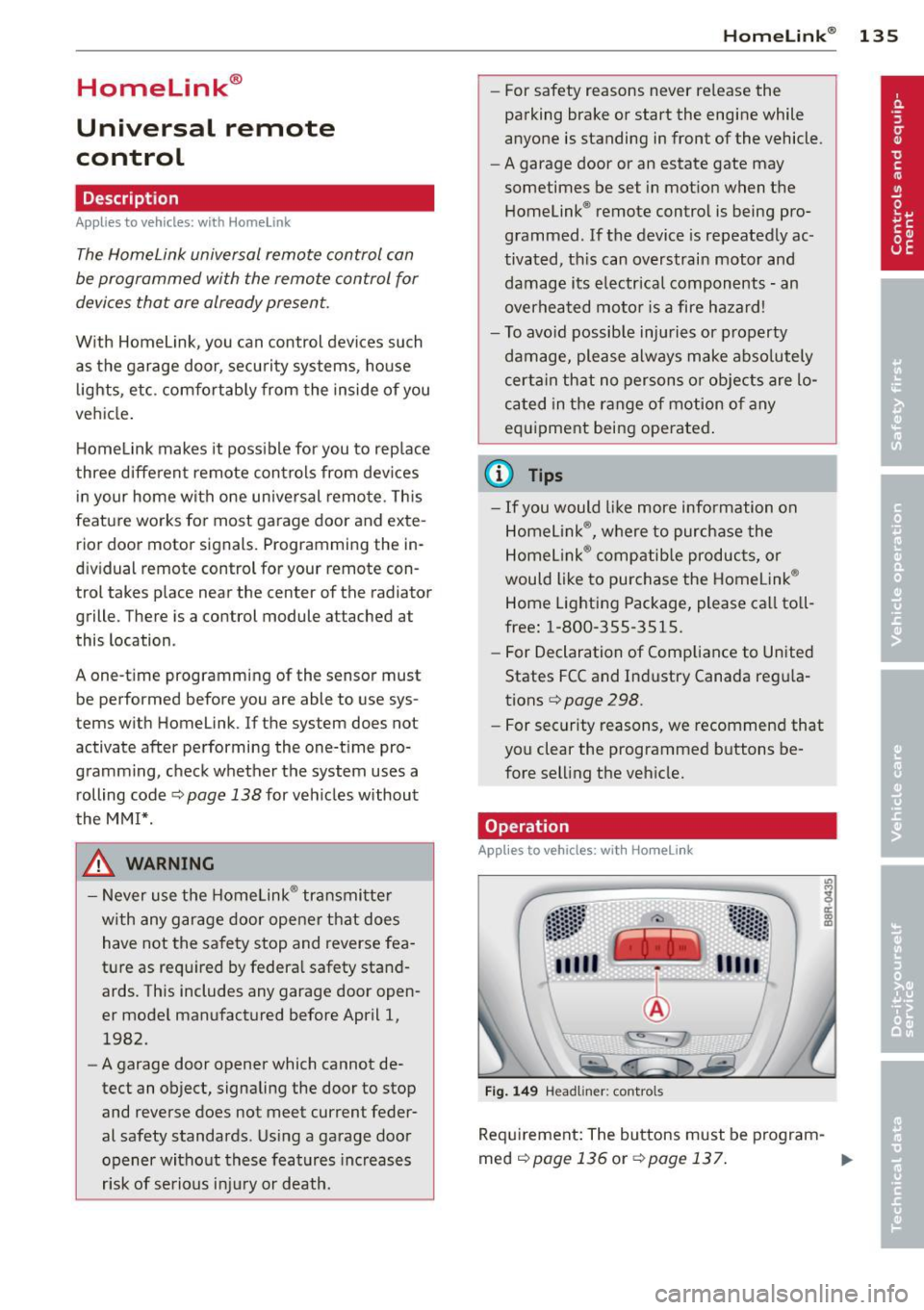
Operation
App lies to vehicles : with Homeli nk
Fig . 14 9 Head li ner: controls
Req uirement : The buttons must be program-
med
<:!)page 136 or ¢page 137. ..,_
Page 141 of 316
Driving Safely
General notes
Safe driving habits
Please remember -safety first!
This chapter contains important information,
tips, instructions and warnings that you need
to read and observe for your own safety, the
safety of your passengers and others . We have
summarized here what you need to know
about safety belts, airbags, child restraints as
well as child safety. Your safety is for us
priori
ty number 1.
Always observe the information
and warnings in this section - for your own
safety as well as that of your passengers.
The information in this section applies to all
model versions of your vehicle . Some of the
features described in this sections may be
standard equipment on some models, or may
be optional equipment on others. If you are
not sure, ask your authorized Audi dealer.
A WARNING
- Always make sure that you follow the in
structions and heed the WARNINGS in
this Manual. It is in your interest and in
the interest of your passengers.
- Always keep the complete Owner's Liter
ature in your Audi when you lend or sell
your vehicle so that this important infor
mation will always be available to the
driver and passengers.
- Always keep the Owner's literature handy
so that you can find it easily if you have
questions.
Safety equipment
The safety features are part of the occupant
restraint system and work together to help
reduce the risk of injury in a wide variety of
accident situations .
Your safety and the safety of your passengers
should not be left to chance. Advances in
technology have made a variety of features
available to help reduce the risk of injury in an
Driving Safely 139
accident. The following is a list of just a few of
the safety features in your Audi :
- sophisticated safety belts for driver and all
passenger seating positions,
- belt force limiters for the front seats,
- belt pretensioners for the seats,
- belt height adjustment for the front seats,
- head restraints for each seating position,
- front airbags,
- side airbags in the front seats and outer rear
seats*,
- side curtain airbags,
- special LATCH anchorages for child re-
straints,
- adjustable steering column.
These individual safety features, can work to gether as a system to help protect you and
your passengers in a wide range of accidents.
These features cannot work as a system if
they are not always correctly adjusted and cor
rectly used.
Safety is everybody's responsibility!
Important things to do before driving
Safety is everybody 's job! Vehicle and occu
pant safety always depends on the informed
and careful driver.
For your safety and the safety of your passen
gers,
before driving always:
.,. Make sure that all lights and signals are op
erating correctly .
.,. Make sure that the tire pressure is correct .
.,. Make sure that all windows are clean and
afford good visibility to the outside .
.,. Secure all luggage and other items carefully
qpage 76.
.,. Make sure that nothing can interfere with
the pedals.
.,. Adjust front seat, head restraint and mir
rors correctly for your height.
.,. Instruct passengers to adjust the head re
straints according to their height .
.,. Make sure to use the right child restraint
correctly to protect children ¢
page 178,
and~~~-~
•
•
Page 203 of 316
Fa u lts in th e brake sy stem
If you should notice a sudden increase in
brake peda l travel, then one of the two brake
circuits may have failed~.&. .
Low brak e flu id level
Malfunct ions can occur in the brake system if
the brake fl uid leve l is too low . T he b rake fluid
l eve l is monito red electronically .
Brake booster
The brake booster increases the pressure that
you generate w ith the brake pedal.
It only op
e rates while the eng ine is running or with the
i gnit ion sw itched on (hybr id dr ive*) ~.&, .
Brake lining wear statu s
Brake lining wear may be checked by visual in
spection of the condition of the brake pads
through the openings in the whee l. If neces
sa ry, the wheel may be removed for this in
spection
~ page 2 74, Changing a wheel.
.&_ WARNING
=
- You should perform braking maneuvers
for the purpose of clean ing the brake
system on ly if road conditions permit.
Other road users must not be put at risk -
you may cause an acc ident!
- Before descending a steep grade, reduce
speed and shift transmiss ion into a lower
gear or lower driving range . Do not ride
the brakes or hold the pedal down too long or too often . This could cause the
brakes to get hot and dimin ish b raking
efficiency .
- Do not "ride the brakes" by resting your
foot on the pedal when you do not intend
to brake . Th is may cause the b rakes to
overheat, premat ure wear and increased
stopping distance .
- Under certain climat ic and operating
condit ions such as passing through wa
ter , driving in heavy rain or after wash ing
the vehicle, the effectiveness of the brakes can be reduced. In winter, ice can
accumulate on the brake pads, linings,
discs and drums . Carefully apply brakes
Int ellig ent technolog y 201
for a test. Brakes will dry and ice coat
ings w ill be cleaned off after a few care
ful brake applicat ions.
- Driving for an extended period of time on
salt-covered roads without using your
brakes can also affect braking efficiency.
Clean off accumulated salt coating from
brake discs and pads with a few careful
brake applications.
- If you damage the front spoiler, or if you install a different spoiler, be sure the air
f low to the front brakes is not obst ruct
ed. Otherw ise the brake system could
overhea t reducing the effectiveness of
the entire brake system .
- Failure of one brake circuit will impair
the braking capability resulting in an in
creased stopping distance . Avoid driving
the vehicle and have it towed to the near
est a uthori zed Audi dea ler or qualified
workshop.
- Never let the vehicle roll to a stop with
the engine shut off .
- If the brake booster is not working, for
examp le when towing your vehicle, or
because the brake booster has somehow
been damaged, the brake pedal must be
pressed considerably harder to make up
for the lack of booster assistance .
Electromechanical
power assist, Dynamic
steering
The electromechanical power assist helps the
driver when s teering.
Power ste ering adapts electronically based on
the vehicle speed.
Indicator lights an d m ess age s
• Steeri ng defe ctive ! D o n ot dr ive vehi cle!
If this indicator light turns on and stays on
and this message appears, the power steer ing
may have failed .
Stop the vehicle in a safe location as soon as poss ible . Do
no t continue driving . See your ..,.
•
•