display AUDI Q5 2013 Workshop Manual
[x] Cancel search | Manufacturer: AUDI, Model Year: 2013, Model line: Q5, Model: AUDI Q5 2013Pages: 316, PDF Size: 78.89 MB
Page 129 of 316
conditions. Always be ready to apply the
brakes.
Manual shift program
Using the manual shift program you can
manually select gears.
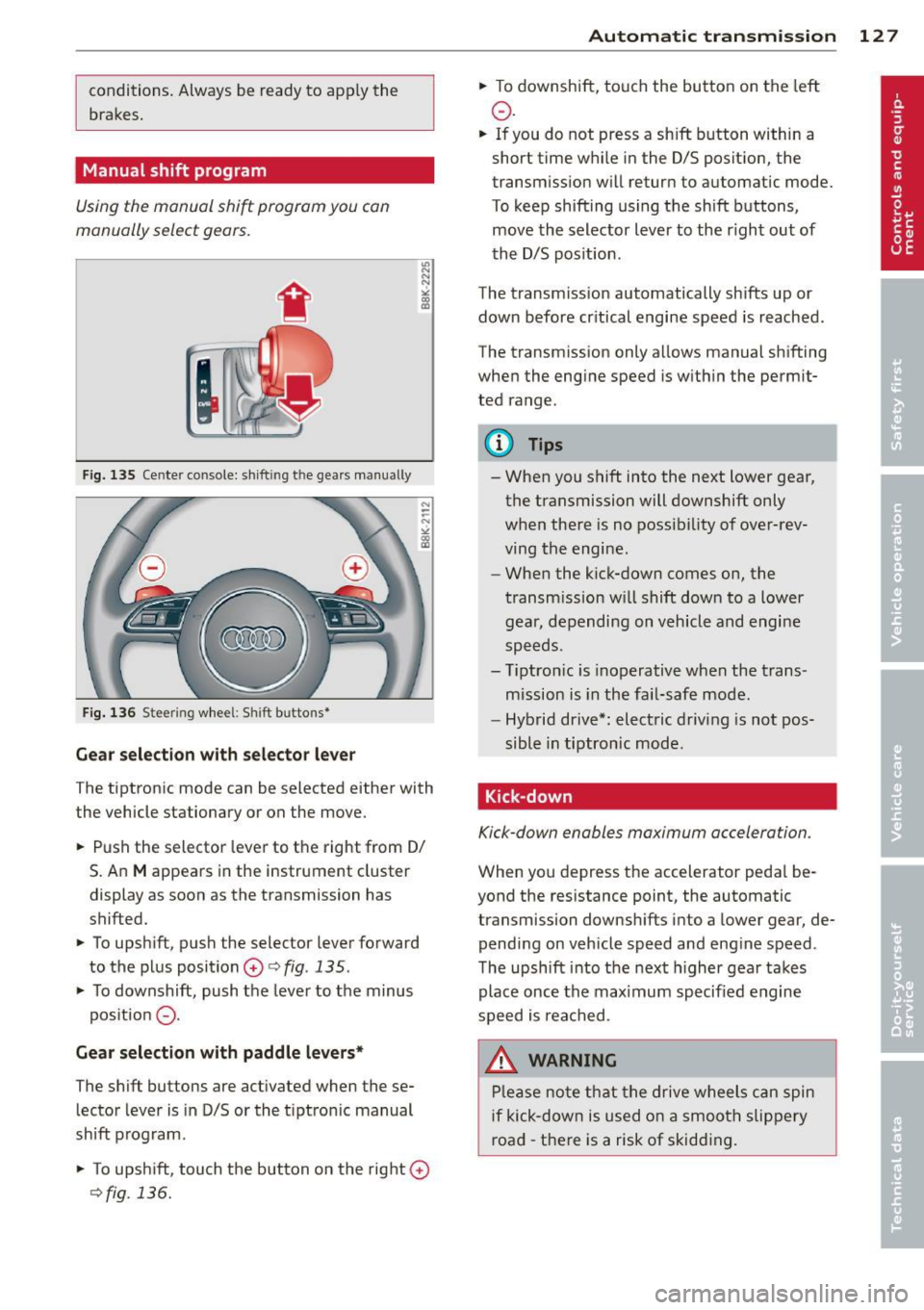
F ig. 135 Cente r console: sh ift in g t he gears manual ly
Fig. 136 S tee rin g wheel: S hift b utto ns*
Gear selection with selector lever
The tiptronic mode can be selected either with
the vehicle stationary or on the move.
.. Push the selector lever to the right from 0/
S. An
M appears in the instrument cluster
display as soon as the transmission has
shifted.
.. To upshift, push the selector lever forward
to the plus position
0 c:> fig. 135 .
.. To downshift, push the lever to the minus
pos ition
0 -
Gear selection with paddle levers*
The shift buttons are activated when these
lector lever is in D/S or the t iptron ic manual
shift program.
.. To upshift, touch the button on the right
0
c>fig . 136.
Autom atic transm ission 12 7
.. To downshift, touch the button on the left
0 .
.. If you do not press a sh ift button within a
short time while in the D/S position, the
transmission will return to automatic mode.
To keep shifting using the shift buttons,
move the selector lever to the r ight out of
the D/S position .
The transm iss ion automatically shifts up or
down before cr itical engine speed is reached.
The transmission only allows manual shifting
when the eng ine speed is with in the permit
ted range .
@ Tips
-When you shift into the next lower gear,
the transmission will downshift only
when there is no possibility of over-rev
ving the engine.
- When the kick-down comes on, the
transmission will shift down to a lower
gear, depending on vehicle and engine
speeds.
- Tiptron ic is inoperative when the trans
mission is in the fail-safe mode.
- Hybrid drive*: electric driving is not pos
sible in tiptronic mode.
Kick-down
Kick-down enables maximum acceleration .
When you depress the accelerator pedal be
yond the resistance point, the automatic
transmission downsh ifts into a lower gear, de
pending on vehicle speed and engine speed .
The upshift into the next higher gear takes
place once the max imum specified engine
speed is reached .
_& WARNING
Please note that the drive wheels can spin
if kick-down is used on a smooth slippery
road -there is a risk of skidding .
Page 132 of 316
130 Parking system
Rearv iew camer a coverage area
The MM I display shows the area cove red by
the rearview camera
r=> fig. 141 (D . Objects
that are not in the a rea covered @are not
shown on the MMI display .
We recommend that you p ractice park ing wi th
the rearview camera in a traffic-free location
or parking lot to become familiar with the sys
tem, the orientation lines, and their f unction.
When doing th is, there sho uld be good light
and weather conditions.
I n the MMI disp lay, objects or vehicles appear
closer or further away if:
- yo u are d riving in reverse gear from a level
s u rface on to an incline, or a downward
s lope,
- you are d riving in reverse gear toward pro
truding objects,
- the vehicle is carrying too much load in the
rear .
The accu racy of the orientat ion lines and b lue
surfaces dim inishes if:
- the rearview camera does not prov ide a reli
able image, for example, in poor visibility
condit io ns or if the lens is dirty,
- the image on t he screen is not visible due to
s u n glare and reflect ion .
Caring for the rear view came ra len s
The rearview camera is located above the rear
license plate bracket . For the parking system
to operate, the lens
r=> fig. 142 must be kept
clean:
- Dampen the lens with a househo ld alcoho l
based glass cleaner, and then wipe the lens
clean with a dry cloth
r=> 0 .
- Remove snow with a hand brush and ice
prefe rably with a de-icing spray
r=> 0 .
A WARNING
-The parking system cannot rep lace the
dr iver's at tention. The d river alone is re
sponsible fo r par kin g and similar dr iving
ma ne uvers .
-
-Sensors have blind spots in wh ich objects
cannot be detected. Pay spec ia l attention
to small childre n and an imals because
the sensors cannot always detect them .
- Always keep your eyes on the vehicle 's
sur roundings, us ing the rearv iew mir ror
as we ll.
- Do not allow yourself to be distracted
from traffic by the rea rv iew camera pic
tures .
- If the position and the installation angle
of the camera has changed, for example,
after a rear end coll ision, do not conti nue
to use the system for safety reasons .
H ave it chec ked by a qualified dea le rship.
Q) Note
- Low obstacles a lready s ignaled by a
wa rning can disappear from the system's
detection rang e as they are app roached
and w ill no t cont inue to be signaled. Ob
jec ts such as ba rr ier chains, tra iler draw
bars, thin painted vert ica l poles or fen
ces may not be detecte d by the system,
posing ris k of damage .
- N ever use warm or hot water to remove
snow or ice from the rearv iew camera
lens -this could ca use the lens to crac k!
- W hen cleaning the lens, never use prod
ucts that a re a brasive.
Page 133 of 316
Switching on and off
Applies to vehicles: with Audi parking system p lus with
rea rview camera
The reorview camera switches on automati
cally together with the acoustic and visual
pork assist when you put the vehicle in re verse .
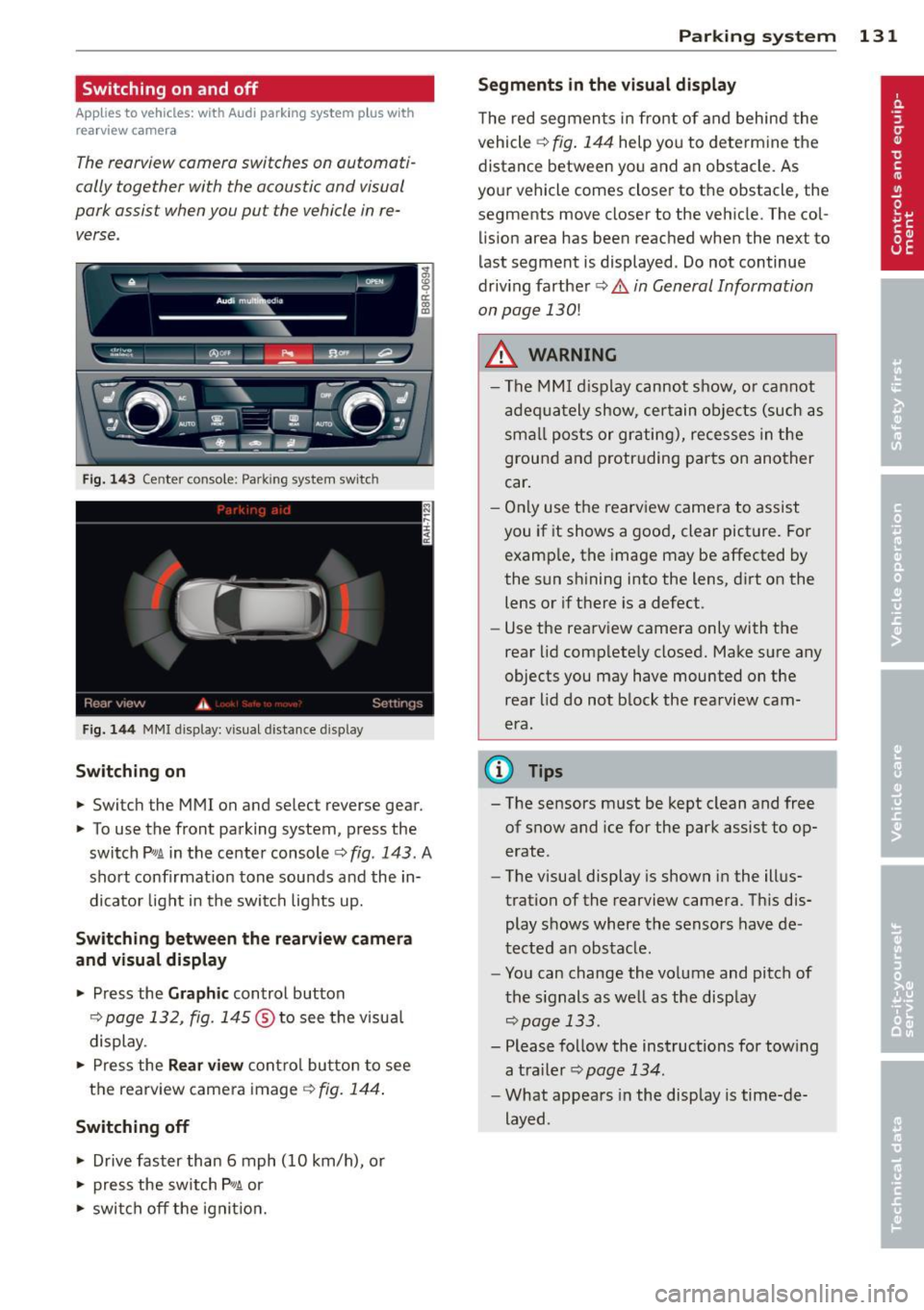
Fig. 14 3 Center co nsole ; Pa rk ing syste m switc h
Fig. 144 MMI disp lay: visu al dista nce display
Switching on
.,. Switch the MMI on and select reverse gear.
.,. To use the front parking system, press the
switch
P w.A in the center console c> fig . 143. A
sho rt confirmat ion tone sounds and the in
dicato r light in the switch lights up.
Switching between the rear view came ra
and visual display
.,. Press the Graphic control button
¢ page 132, fig . 145 ® to see the visua l
display.
.,. Press the
Rear view con trol bu tton to see
the rearview came ra image
¢ fig. 144 .
Switching off
.,. Drive faster than 6 mph (10 km/h), or
.,. press the sw itch
p ,q .A or
.,. swi tch off the ignit io n.
Par king system 131
Segm ents in the vi sual display
T he red segmen ts i n fro nt of and behind the
vehicle
c> fig . 144 help you to determ ine the
distance between yo u and an obstacle. As
you r vehicle comes close r to the obstacle, the
segments move closer to the vehicle. The col lision area has been reached when the next to
l ast segment is displayed . Do not continue
driv ing farther
c> .&. in General Information
on page
130!
A WARNING
- T he MMI display cannot s how, o r ca nnot
a dequa tely show, certain o bje cts (such as
smal l posts or gr ating), recesses in the
ground and p rotruding parts on another
car .
- On ly use the rearv iew came ra to assist
you if it shows a good, clear pict ure. For
examp le, the image may be affected by
the sun sh ining into the lens, d irt on the
lens or if there is a defect.
- Use the rearv iew camera only with the
rear lid comp lete ly closed. Make sure any
o bjects you may have mounted on the
rea r lid do not b lock the rearview cam
era.
(D Tips
- The sensors m ust be kept clean and free
of snow and ice for the park assist to op
erate .
- The visua l display is shown in the illus
tration of the rearview camera. Th is dis
play shows where the sensors have de
tected an obstacle .
- You can change the vo lume and pitch of
t he s ignals as we ll as the disp lay
<=>page 133.
- Please fo llow the instructions for tow ing
a tra iler
c> page 134.
-What appears in the display is time-de
layed .
Page 134 of 316
132 Parking system
Reverse Parking
App lies to vehicles: with Audi parking system p lus w ith
rea rview camera
Parking mode 1 con be used when parking in
a garage or into a parking space.
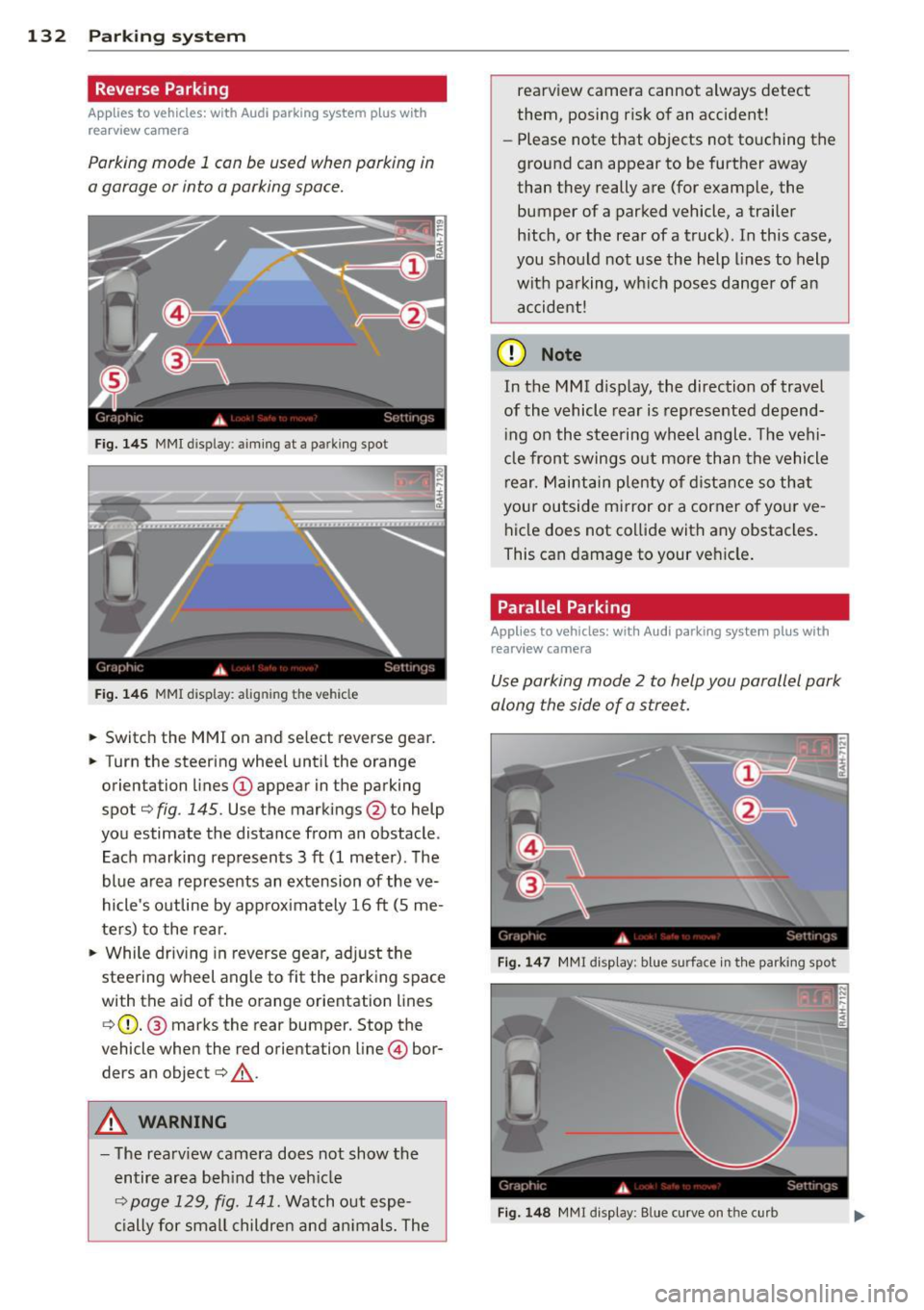
Fig. 145 MMI disp lay : aiming at a pa rking spot
Fig. 146 MMI display: alig nin g th e veh icle
... Switch the MMI on and select reverse gear .
... Turn the steering wheel until the orange
orientation lines
(D appear in the parking
spot¢
fig . 145. Use the markings @to help
you estimate the distance from an obstacle .
Each marking represents 3
ft (1 meter). The
blue area represents an extension of the
ve
hicle's outline by approximately 16 ft (5 me
ters) to the rear.
"' While driving in reverse gear, adjust the
steering wheel angle to fit the parking space
with the aid of the orange orientation lines ¢ (D. @ marks the rear bumper. Stop the
vehicle when the red orientation line © bor
ders an object¢ _&..
A WARNING
-The rearview camera does not show the
entire area behind the vehicle
¢ page 129, fig. 141. Watch out espe
cially for small children and animals. The rearview camera cannot always detect
them, posing risk of an accident!
- Please note that objects not touching the
ground can appear to be further away
than they really are (for example, the
bumper of a parked vehicle, a trailer
hitch, or the rear of a truck). In this case,
you should not use the help lines to help
with parking, which poses danger of an accident!
(D Note
In the M MI dis play , the direction of travel
of the vehicle rear is represented depend
ing on the steering wheel angle . The vehi
cle front swings out more than the vehicle
rear. Maintain plenty of distance so that
your outside mirror or a corner of your
ve
hicle does not collide with any obstacles.
This can damage to your vehicle.
Parallel Parking
Applies to vehicles: with Aud i parking system plus with
rearv i ew camera
Use parking mode 2 to help you parallel park
along the side of a street .
Fig. 147 MMI disp lay: blue surface in th e parking spot
Fig. 148 MM! display : B lue curve on th e curb
Page 135 of 316
The following steps apply only when there is
no obstacle such as a wall near the parking
spot. Otherwise, please read the information
prov ided in the "Parking Next to Obstacles"
section.
~ Activate the turn signal.
~ Position your vehicle parallel to the edge of
the street, approxim ately 3 ft (1 meter)
from a parked vehicle .
~ Switch the MMI on and se lect reverse gear .
The parking aid tu rns o n and parking mode
1 appears on the display .
~ Press the contro l button (D ¢ fig. 147 on
the MMI contro l conso le. Parking mode
2
appea rs .
~ Back up and align yo ur vehicle so t he b lue
area @ borders on the rear end of the vehi
cle or on the parking spot line. The bl ue area
represents an extension of the veh icle's out
line by approximate ly
16 ft (S meters) to the
rear . The long side of the blue area should
be o n the curb . The entire blue area must fit
i nto the parking spot .
~ With the vehicle stopped, turn the steer ing
whee l to the right as far as it w ill go.
~ Back into the park ing spot until the blue
cu rve to uches the curb¢
fig. 148. Stop the
vehicle.
~ With the veh icle stopped, turn the steer ing
wheel to the left as far as it will go .
~ Continue to back into the park ing spot until
the vehicle is parked parallel to the curb .@
marks the rear bumper. Stop the vehicle
when the red orientation line@ borde rs an
object ¢.&, . Keep an eye o n the fron t of
yo ur vehicle while do ing this ¢Ci) .
Parking n ext to obstacles
When t here is an obstacle (such as a wall)
next to the pa rking spot, choose a spot w ith
mo re space on t he sides. Position the long
side of the b lue a rea so that there is sufficient
space from the curb. The a rea m ust no t be on
the c urb. You w ill also need to start turn ing
the steering wheel much earlie r. T he re should
be a suffic ient amo unt of space between the
curb and the blue curve, and the blue c urve
¢ fig. 148 must not touch the curb.
Par king system 133
A WARNING
- The rearview camera does not show the
entire area behind the vehicle
¢ page 129, fig. 141 . Watch out espe
cially fo r small children and anima ls . The
rea rv iew camera cannot always detect
them, posing r is k of an a ccident!
- P lease note that objects not touching the
g rou nd can appear to be further away
than they really are (for example, the
bumper of a parked vehicle, a trai ler
hitch, or the rea r of a truck) . In this case,
you shou ld not use the help lines to help
with parking, wh ich poses danger of an
accident!
(D Note
In the MMI display, the direction of travel
of the vehicle rear is represented depend
i ng on the steering wheel angle . The vehi
cle front swings out more than the vehicle rear. Maintain ple nty of d istance so that
your outside mirror or a corner of your ve
hicle does not col lide with any obstacles.
T his can damage to your ve hicle.
(0 Tips
The left o r right orientation lines and su r
faces will be disp layed, depending on the
turn s ignal being used .
Adjusting the display
and warning tones
App lies to v ehicl es: wi th Audi parking sys te m plus wi th
rearv iew camera
The display and warning tones can be adjust
ed in the MMI .
~ Select: !CAR ! function button> Parking sys
tem .
Or
~ Select: ~I C- A- R~I func tion button > Car sy s
tems *
contro l bu tton > Driver a ssist > Park
ing aid.
Display
- Off -when the par king system is switched
off, only a udible s ignal s are given .
Page 136 of 316
134 Parking system
- On -when the parking system is switched
on, either the visua l d isplay or the picture
from the rearview camera is disp layed .
Warning tones
-Front volum e -front sensor vol ume
- Front frequ enc y-front sensor frequency
-Re ar volum e -rear sensor volume
- Rear frequenc y -rear sensor frequency
- In -ca r entertainme nt fader /Mu sic volume
w hile pa rking -
when the parking system is
switched on , the volume of the active audio
source is lowered .
The new ly adjusted value is briefly heard from
the signal generator.
@ Tips
- The warning tones can a lso be adjusted
directly by the v is ual disp lay or the p ic
ture from the rearview camera. Simp ly
press the
Sett ings contro l button.
- Changed settings are activated when
parking system is switched on again.
- The settings are automatically stored
and ass igned to the remote control key.
Trailer hitch
Applies to vehicles: with Audi parking system plus w ith
rea rview camera a nd trailer hitch
For vehi cles with a facto ry installed trai ler
hitch, or a trai ler hitch installed according to
factory specifications, the parking system rear
sensors do not come on whenever you shift in
to reverse gear or when you press the
P, #J\.
switch. Remember, there is no warning for
d istances to the rear . The front sensors re
main activated. The visual display switches to
the trailer towing mode. The picture from the
rearv iew camera will not show the orientation
l ines nor the blue su rfaces.
If you install a hitch yourself, th is function
may not work .
Error messages
Applies to vehicles: wi th Audi parking sys te m plus with
rearv iew camera
T he re is an error in the system if t he LED on
the
p, q~ switch is blinking and you hea r a con
t in uous alarm for a few se conds after switch
ing on the parking system or when the park
ing system is already activated . Have yo ur au
thorized Audi dea ler correct the error.
(D Tips
If the error is not corrected before you
switch off the ignition, when you switch on
the parking system again, the LED in the
Pw J\. switch will blink.
Page 138 of 316
136 Homelink®
• To open the garage door, press the p ro
grammed button . The LED @will light up or
flash.
• To close the garage door, press the button
again.
@ Tips
To open the garage door, press the button, but do not press it for longer ten seconds
or the Homelink module w ill switch to
programming mode.
Programming the transmitter (version A)
Appl ies to vehicles: with Home link
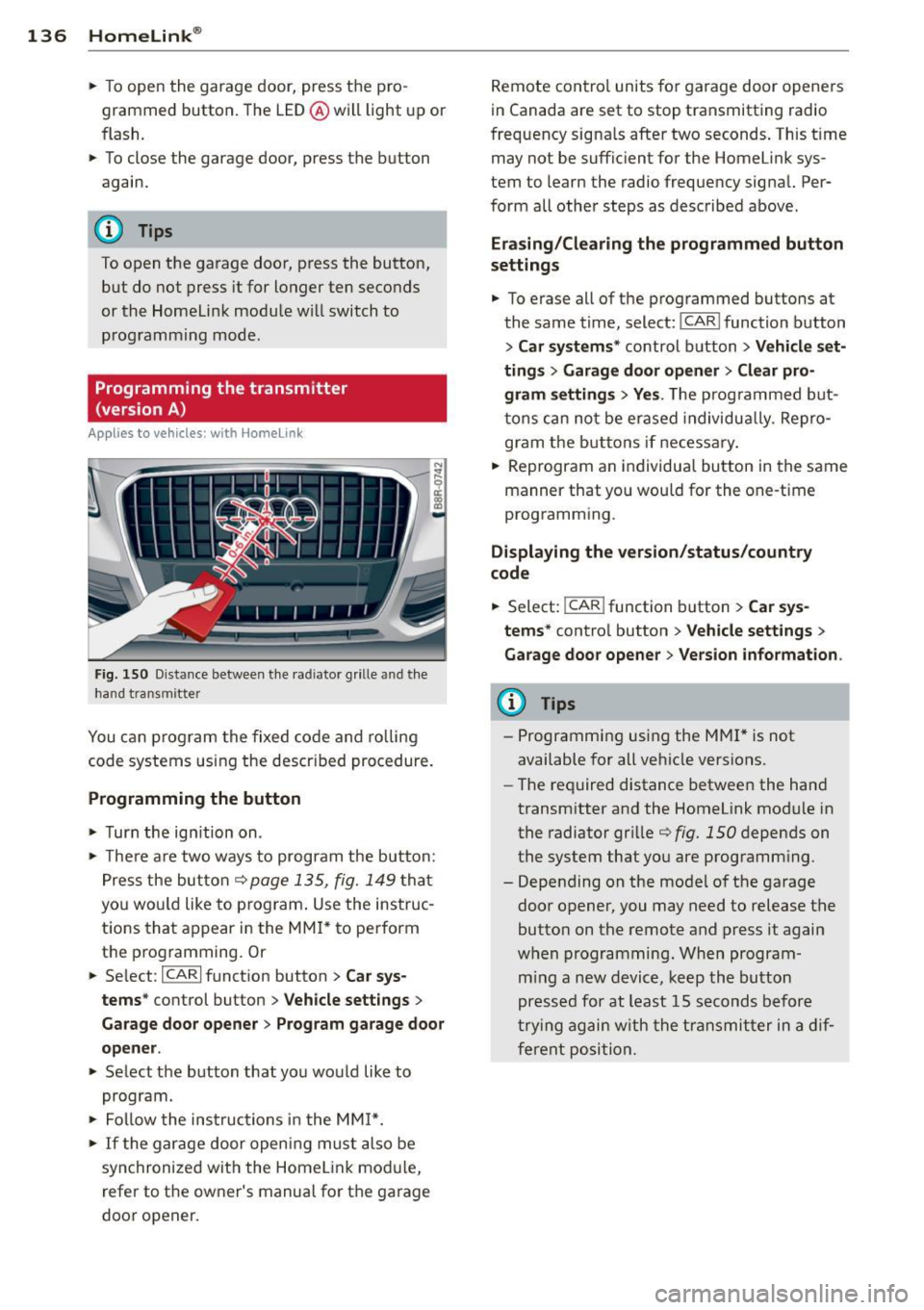
Fig. 15 0 Distance between t he rad iator grille and th e
hand transmitter
You can p rogram the fixed code and ro lling
code systems using the descr ibed procedure.
Programming the button
• Turn the ig nition on .
• The re a re two ways to program the but ton:
P res s the but ton¢
page 135, fig. 149 tha t
yo u wou ld like to p rogram . Use the instruc
t ions tha t appear in the MM I* to perform
the p rogramming. Or
• Se lect:
ICARI function button > Car sys·
terns *
control button > Vehicle settings >
Garage door opener > Program gar age door
opener .
• Select the button that yo u would like to
program.
• Fol low the ins truc tions in the MMI*.
• If the gar age door openi ng mus t also be
syn chronized wit h the Homel ink mod ule,
refer to t he owner's manual for t he garage
door opener. R
emote cont ro l units fo r garage door opene rs
in Canada are set to stop transmitting radio
frequency signa ls after two seconds . This t ime
may not be suffic ient for the Home link sys
tem to learn the radio frequency signal. Per·
form all other steps as described above .
Erasing/Clearing the programmed button
settings
• To e rase all of t he programmed buttons at
the same t ime, select:
I CAR I function button
> Car systems * control button > Vehicle set·
ting s
> Garage doo r open er > Clear pro·
gram setting s> Yes.
The prog rammed b ut
t ons can no t be erased individua lly. Re pro
gram the butt ons if necessa ry .
• Reprogram an individua l bu tton in the same
manner that you wou ld for the one-time
programm ing .
Displaying the version /status/country
code
• Select: I CAR ! function b utton > Car sys·
terns *
contro l button > Vehicle settings >
Garage door opener > Version information .
(D Tips
-Programming using the M MI* is not
available for all ve hicle vers ions.
- The required distance betwee n the hand
transm itter and the Homelink module in
the radiator gr ille ¢
fig. 1 SO depends on
the system that you are prog ramm ing .
- Depending on the mode l of the ga rage
door opener, you may need to release the
butto n on the remote and press it again
w hen programming. When program·
m ing a new device, keep the butto n
presse d for at least 15 s econds before
t ry ing ag ain w ith the tra nsmit ter in a dif
fere nt posi tion.
Page 162 of 316
160 Airbag sys te m
For this reason, a nd because t he bac k seat is
the safest place for children - when prop erly
restra ined according to their age and size - we
strongly recommend that children always sit in the back seat
Q page 178, Child Safety.
A WARNING
-
A child in a rearward-facing child safety
seat installed on the front passenger seat
w ill be seriously injured and can be k illed if
t he front a irbag inflates - even wit h an Ad
v a nced Airb ag System.
- T he inflating a irbag will hit the child
safety seat or infant carrier with g reat
force and w ill smash the ch ild safety sea t
and child against the backrest, center
armrest, door or roof .
- Always install rear-facing child safety
seats on the rear seat .
-If you mus t inst all a rearwar d fa cing
child safety seat on the front passenger
seat because of exceptional circ umstan
ces and the
PASSENGER AIR BAG OFF
light does not come on and stay on , im
med iately install the rear-facing child
safety seat in a rear seating position and
have the a irbag system inspected by you r
au thorized Audi dealer .
- Forward-fac ing ch ild safety seats instal
led on the front passenger's seat may in
terfer e wi th the deployment of the air
bag and cause se rious personal injury to
the ch ild.
A WARNING
If, in exceptional c ircumstances, you mus t
install a forwa rd-facing child restra int on
the front passenger's seat:
- Always m ake su re the forw ard-fa cing
sea t has been des igned and certified by
its manufact urer for use on a front seat
with a passenger front and side airbag.
- Never put the forward -facing child re
st raint up aga inst or very near the inst ru
ment pane l.
- Always move the passenger seat into its
rearmost position in the seat's fore and aft ad
justment range, as fa r away from
the airbag as possible before installing
the forward-fac ing ch ild restra int. The
backrest must be ad justed to an upright
position .
- Make sure that the
PASSENGER AIR BAG
OFF
li ght comes on and stays on all the
time wheneve r the ignit ion is switched
on.
A WARNING
To reduce the risk of serious inju ry, ma ke
sure that the
PASSENGER AIR BAG OFF
lig ht w ill be displayed whenever a child re
straint is insta lled on the front passenger
seat and the ignition is switched on .
- If the
PASSENGER AIR BAG OFF light
does not stay on, per form the checks de
scribed
¢ page 168, Monitoring the Ad
vanced Airbag System.
- Take the chi ld restraint off the front pas
senger seat and install it properly at one
of the rear seat positions if the
PASSEN
GER AIR BAG OFF light does not stay on.
-Have the airbag system inspected by
your author ized Audi dealer immed iate
ly.
- Always carefully follow instr uctions from
child restraint manufacture rs when in
stalling ch ild restra ints.
A WARNING
-If, in except iona l circumstances, you must
i nstall a forward or rearwa rd -facing child
r estra int on t he front passenger's seat :
- Improper installation of ch ild restra ints
can reduce their effectiveness o r even
p revent them from providing any protec
tion.
- An improperly installed ch il d restra int
can inter fere with the airbag as it de
p loys and seriously injure o r even kill the
child -even with an Advance d Airbag
System.
- Always caref ully follow the m anu factur
er 's ins truc tio ns p rov ided with the ch ild
safety sea t or carrier .
Page 172 of 316
1 70 Airbag system
in the instrument cluster display. This is to in
form the driver of the current front passenger
airbag status.
Important safety instructions on
monitoring the Advanced Airbag System
A WARNING
An airbag system that is not functioning properly cannot provide supplemental pro
tection in a frontal crash.
- If the airbag indicator light¢
page 15
comes when the vehicle is being used,
have the system inspected immediately
by your authori zed Audi dealer. It is pos
sible that the airbag will inflate when it
is not supposed to, or will not inflate
when it should .
A WARNING
If the front airbag inflates, a child without
a child restraint, in a rearward-facing child
safety seat or in a forward-facing child re
straint that has not been properly installed
will be seriously injured and can be killed.
- Even though your vehicle is equipped
with an Advanced Airbag System, make certain that all children, especially 12
years and younger, always ride on the back seat properly restrained for their
age and size.
- Always install forward or rear-facing
child safety seats on the rear seat -even
with an Advanced Airbag System.
- If you must install a rearward-facing
child safety seat on the front passenger
seat because of exceptional circumstan
ces and the
PASSENGER AIR BAG OFF
light does not appear and stay on, imme
diately install the rear-facing child safety
seat in a rear seating position and have
the airbag system inspected by your au
thorized Audi dealer.
- A tight tether or other strap on a rear
ward-facing child restraint attached to
the front passenger seat can put too
much pressure on the weight-sensing
-
mat in the seat and register more weight
than is actually on the seat. The heavier
weight registered can make the system
work as though an adult were on the seat and deploy the Advanced Airbag when it
must be suppressed causing serious or
even fatal injury to the child.
- If, in exceptional circumstances, you
must install a forward-facing child re
straint on the front passenger seat, al
ways move the seat into its rearmost po
sition in the seat's fore and aft adjust
ment range, as far away from the airbag
as possible. The backrest must be adjust
ed to an upright position. Make sure that
the
PASSENGER AIR BAG OFF light
comes on and stays on all the time when
ever the ignition is switched on .
A WARNING
-
-
-If the PASSENGER AIR BAG OFF light
does not go out when an adult is sitting
on the front passenger seat after taking
the steps described above, make sure the
adult is properly seated and restrained at
one of the rear seating positions.
- Have the airbag system inspected by
your authorized Audi dealer before trans
porting anyone on the front passenger
seat.
(D Tips
If the weight-sensing mat in the front pas
senger seat detects an empty seat, the
front airbag on the passenger side will be
turned off, and
PASSENGER AIR BAG OFF
will stay on.
Repair , care and disposal of the airbags
Par ts of the airbag system are ins talled at
many different places on your Audi. Installing,
removing, servicing or repairing a part in an
area of the vehicle can damage a part of an
airbag system and prevent that system from
working properly in a collision. .,..
Page 201 of 316
work are reduced to such a degree , that the
vehicle wheels could start to spin. The stab i
liz ing effects start to work later which results
in lim ited vehicle stability.
The ESC Offroad mode should then be used
under the fo llowing situat ions:
- rock ing the veh icle when it is stuck
- driv ing in deep snow or on loose ground
- dr iv ing on uneven roads w ith the wheel
heavily loaded (axle limitation)
- driv ing with snow chains
- driv ing downh ill wh ile braking on loose
ground
F or your safety, switch off the ESC offroad
mode in advance .
Switching on th e ESC Offroad mode
Press the I~ O FF I bu tton ¢ fig. 186 or
¢ fig . 187 . The indicator light fl illuminates
and
Stabil iz ation cont rol (ESC ): Off road.
W arning! Re stri cted stability
appears in the
driver information system display .
Switching off the ESC Offroad mode
Press 1-~ O FF I button again to switch the ESC
back on. The indicator light
fl goes out and
Stabilization control (ESC ): On appears in
the driver information system display.
A WARNING
- You should switch on the ESC Offroad
mode only when you are driving offroad
o r when driving w ith snow chains .
- Please note that the driving wheels can
spin and the vehicle can swerve when
ESC Offroad mode is switched on .
- Driv ing stability is reduced in the ESC
Offroad mode .
-
Intelligent technolog y 199
Hill descent assist
The hill descent assist makes it possible to
drive down an incline at a constant speed .
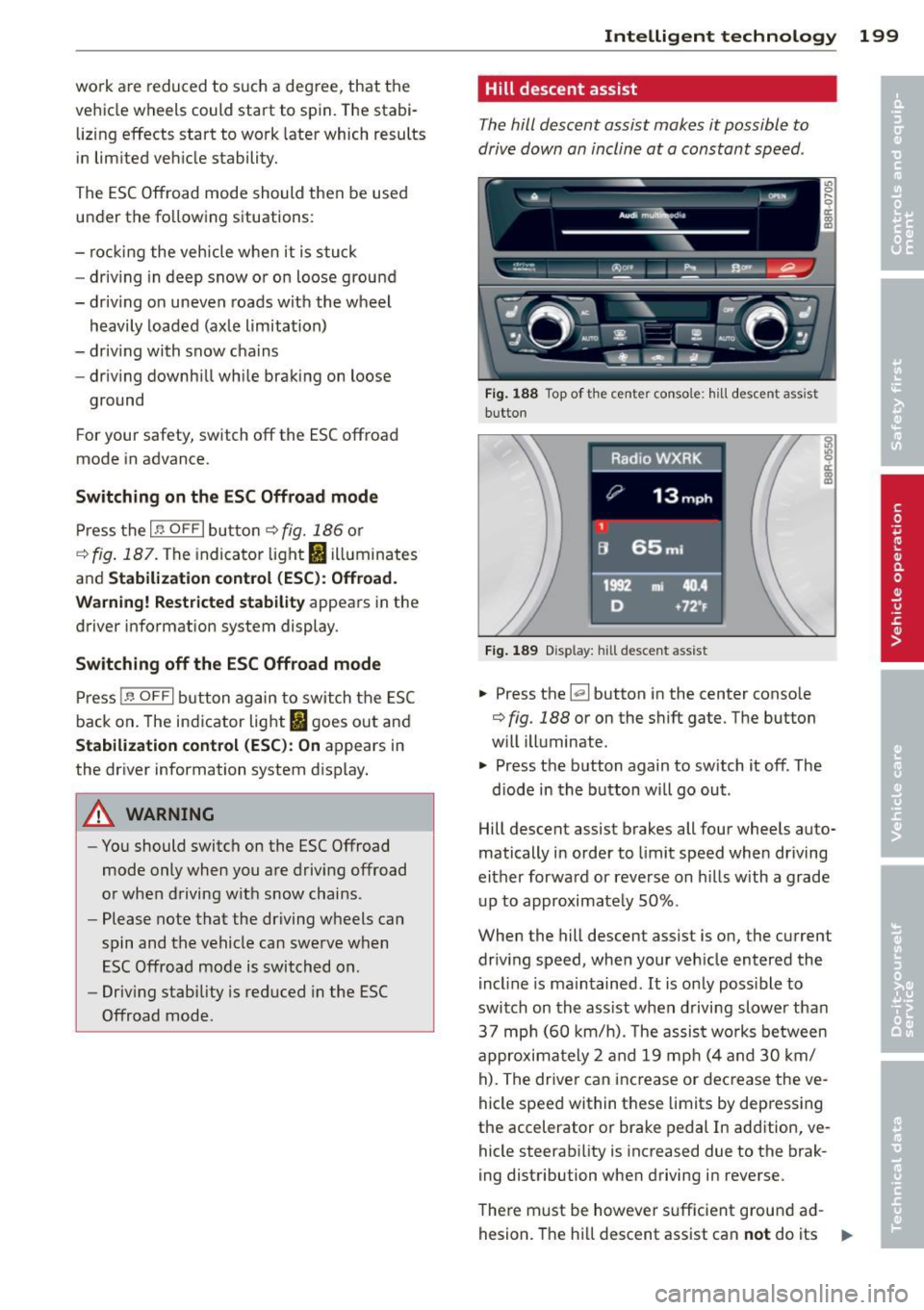
Fig . 1 88 Top of t he center conso le : h ill desce nt ass ist
button
F ig . 1 89 Disp lay: h ill des cent ass ist
.. Press the [el button in the center conso le
¢ fig. 188 or on the shift gate . The button
w ill illuminate .
.. Press the button again to sw itch it off . The
diode in the button wi ll go out .
Hill descent assist brakes all four wheels auto
matically in order to limit speed when driving
either forwa rd or reverse on h il ls with a grade
up to approximate ly 50% .
When the hill descent assist is on, the current
driv ing speed, when your veh icle entered the
i ncl ine is maintained .
It is only possible to
switch on the ass ist when driving slower tha n
37 mp h (60 km/h). The assist wo rks between
approximately 2 and 19 mp h (4 and 30 km/
h). The driver can inc rease or dec rease the ve
hicle speed within these limits by dep ressing
the accelerator or brake pedal In add ition, ve
hicle steerability is increased due to the brak
i ng distribution when driving in reverse .
The re m ust be however s ufficient ground ad
hesion. The h ill descent assist can
not do its "'"