warning AUDI Q5 2013 Manual Online
[x] Cancel search | Manufacturer: AUDI, Model Year: 2013, Model line: Q5, Model: AUDI Q5 2013Pages: 316, PDF Size: 78.89 MB
Page 115 of 316
Audi adaptive cruise control and braking guard 113
Audi braking guard
Description
Applies to vehicles: with Audi adaptive cruise control
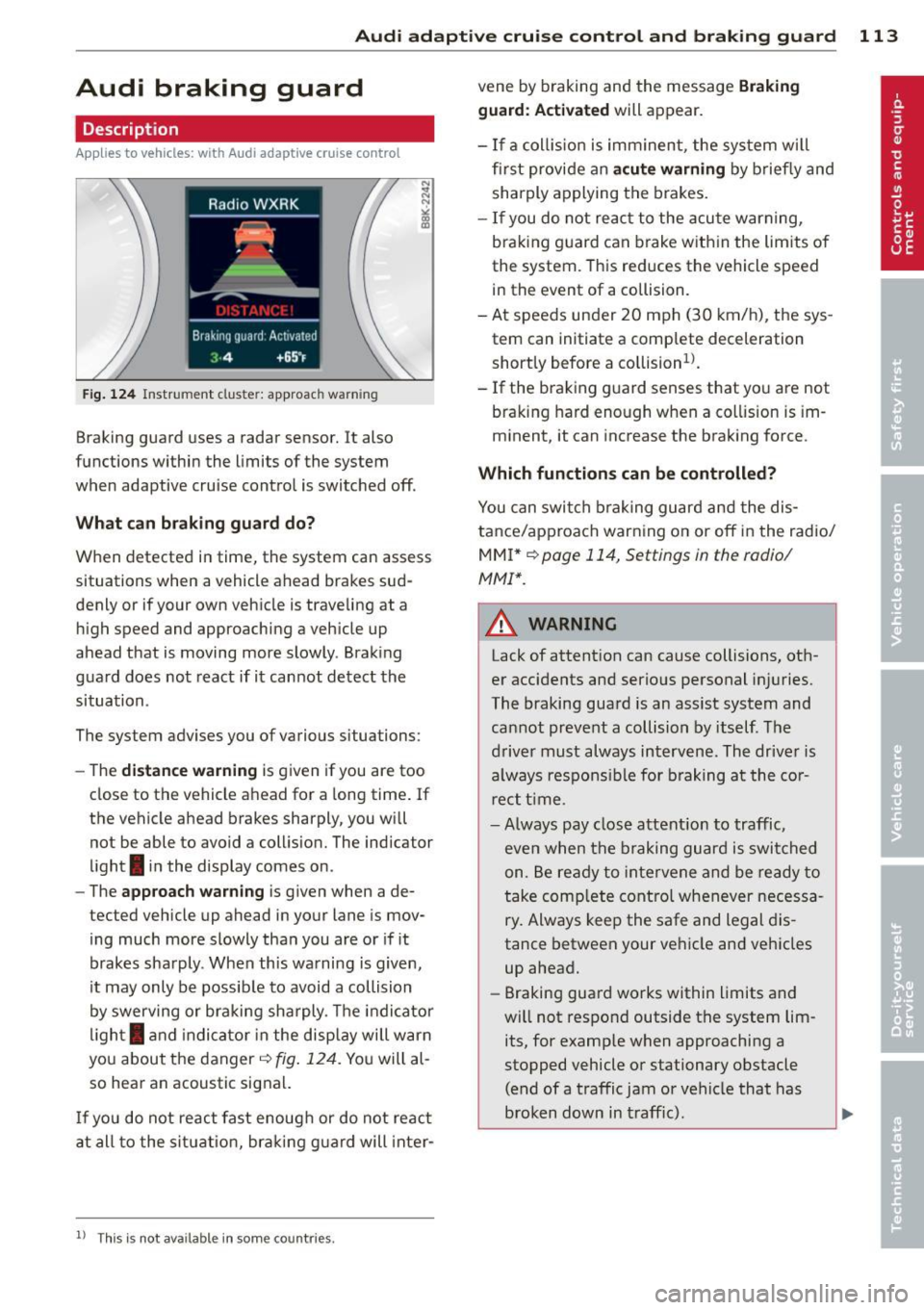
Fig. 124 Instrument cluste r: approac h warn ing
Braking guard uses a radar sensor. It also
functions within the limits of the system
when adaptive cruise control is switched off.
What can braking guard do?
When detected in time, the system can assess
situations when a vehicle ahead brakes sud
denly or if your own vehicle is traveling at a
high speed and approaching a vehicle up
ahead that is moving more slowly . Braking
gua rd does not react if it cannot detect the
situation .
The system advises you of various situations:
- The
distance warning is given if you are too
close to the vehicle ahead for a long time. If
the vehicle ahead brakes sharply, you wi ll
not be able to avoid a collision. The indicator
light
I in the display comes on .
- The
approach warning is given when a de
tected vehicle up ahead in your lane is mov
ing much more slowly than you are or if it
brakes sharply . When this warning is given,
it may only be possible to avoid a collision
by swerving or braking sharply. The indicator
light
I and indicator in the display will warn
you about the danger
c:> fig. 124. You will al
so hear an acoustic signal.
If you do not react fast enough or do not react
at all to the situation, braking guard will inter-
ll Th is is not ava ilable in som e coun tri es.
vene by braking and the message Braking
guard: Activated
will appear.
- If a coll ision is imminent , the sys tem wi ll
first provide an
acute warning by briefly and
sharply applying the brakes.
- If you do not react to the acute warning,
braking guard can brake within the limits of
the system. This reduces the vehicle speed
in the event of a collision.
- At speeds under 20 mph (30 km/h), the sys
tem can initiate a complete deceleration shortly before a collision
ll.
- If the braking guard senses that you are not
braking hard enough when a collision is im
minent, it can increase the braking force .
Which functions can be controlled?
You can switch braking guard and the dis
tance/approach warning on or off in the radio/
MMI* i::!> page 114, Settings in the radio/
MMI *.
A WARNING
--==
Lack of attention can cause collisions, oth-
er accidents and serious personal injuries.
The braking guard is an assist system and
cannot prevent a collision by itself. The
driver must always intervene. The driver is
always respons ible for braking at the cor
r ect time .
- Always pay close attention to traffic,
even when the braking guard is switched
on . Be ready to intervene and be ready to
take comp lete control whenever necessa
ry. Always keep the safe and legal dis
tance between your vehicle and vehicles
up ahead.
- Braking guard works within limits and
will not respond outside the system lim
its, for examp le when approaching a
stopped vehicle or stationary obstacle (end of a traffic jam or vehicle that has
broken down in traff ic).
Page 116 of 316
114 Audi adaptive cruise control and bra king guard
- Always remember t hat t he radar sens or
fo r the braking guard wo rks only within
defined detection and range limits that
may preve nt the proper detection of oth
er v eh icles.
- The radar senso r's fu nction and range
can be reduced by rain, s now a nd heavy
spray. Mo ving v ehicl es u p ahead may not
b e promptly det ecte d or may not be de
te cte d at al l.
- Reflective surfaces in cl udi ng c ras h barri
ers or tu nnel ent ran ces may impair the
f unc tion of the r ad ar sen sor.
(D Tips
- You can cance l th e braking tha t is initiat
ed by the system by braking yours elf, by
a cce lerati ng noticeab ly o r by swerving.
- Brak ing guard er ror m essages
Qpag e
114.
- Keep in mi nd that braking gua rd can
brake u nexpect edly . Always secure any
ca rgo or objects that you are tr ansport
i ng to reduce the risk of d amage or in
ju ry.
Settings in the radio/MM!*
Applies to vehicles: with Audi adaptive cruise control
• Se lect: ICARI f u nct io n button > Audi brak
ing guard.
O r
• Se lect :
ICARI fu nct ion button > Car sys
tems *
control button > Driver assist > Audi
braking guard .
System -
Switch bra king g uard On and Off .
When you sw itch the ignition on, the message
Brak ing guard: Off appears if the system is
switched off .
Early warning -The d istance and approach
warn ings in the display can be switched
On /
Off .
(D Tips
-Your settings are automatica lly sto red
and ass igned to the remote control key
being used at the t imes t he settings are
made¢ page
36.
- If you switch the ESC to ESC O ff road
mode, the braking guar d switches off a u
toma tically¢ page
198.
-Swit ch braking guar d off when you a re
loading the vehicle onto a veh icle carrier,
train, ship o r other type of t ransporta
tion. This can prevent undesired warn ings from the braking gua rd system .
Messages
Applies to vehicles: wit h Aud i adapt ive cru ise control
Braking guard : Off
T his dr iver message a ppears if t he system is
tu rned off via the radio/M M!* . Otherw ise, if
the system is turned off, the in formation ap
pears every t ime sho rtly after the start of the
trip .
T his dr iver's i nfo rmation also ap pears w hen
the system is not available because of a ma l
funct ion or if ESC is switched to the Offroad
m ode
Q page 198. In t his state the system
no longe r warns of a pend ing coll is io n.
Braking guard : Activated
T his dr iver mess age a ppears if shar p brake
p ressure was applie d due to a n acute warning.
•••
Three white dots appea r if a sett ing cannot be
selected w ith the operating lev er. For exam
ple, this happens if you want to raise/lower
t h e speed even thoug h there was no prev ious
l y saved speed.
ACC: Sensor blocked
Th is message appears if the senso r view is ob
structed, for examp le by leaves, snow, heavy
spray or d irt. Clean the sensor¢ page
107,
fig. 114.
ACC: Unavailable
The driver message appears if, for example,
t h e b rake temperat ure is too high . The ada p
tive cru ise contro l is temporarily unava ilable.
A ch ime sounds as a rem inder .
ACC: Not available
Page 118 of 316
116 Audi side assist
Audi side assist
Lane change assistant
Description
App lies to vehicles: with Audi side assist
D
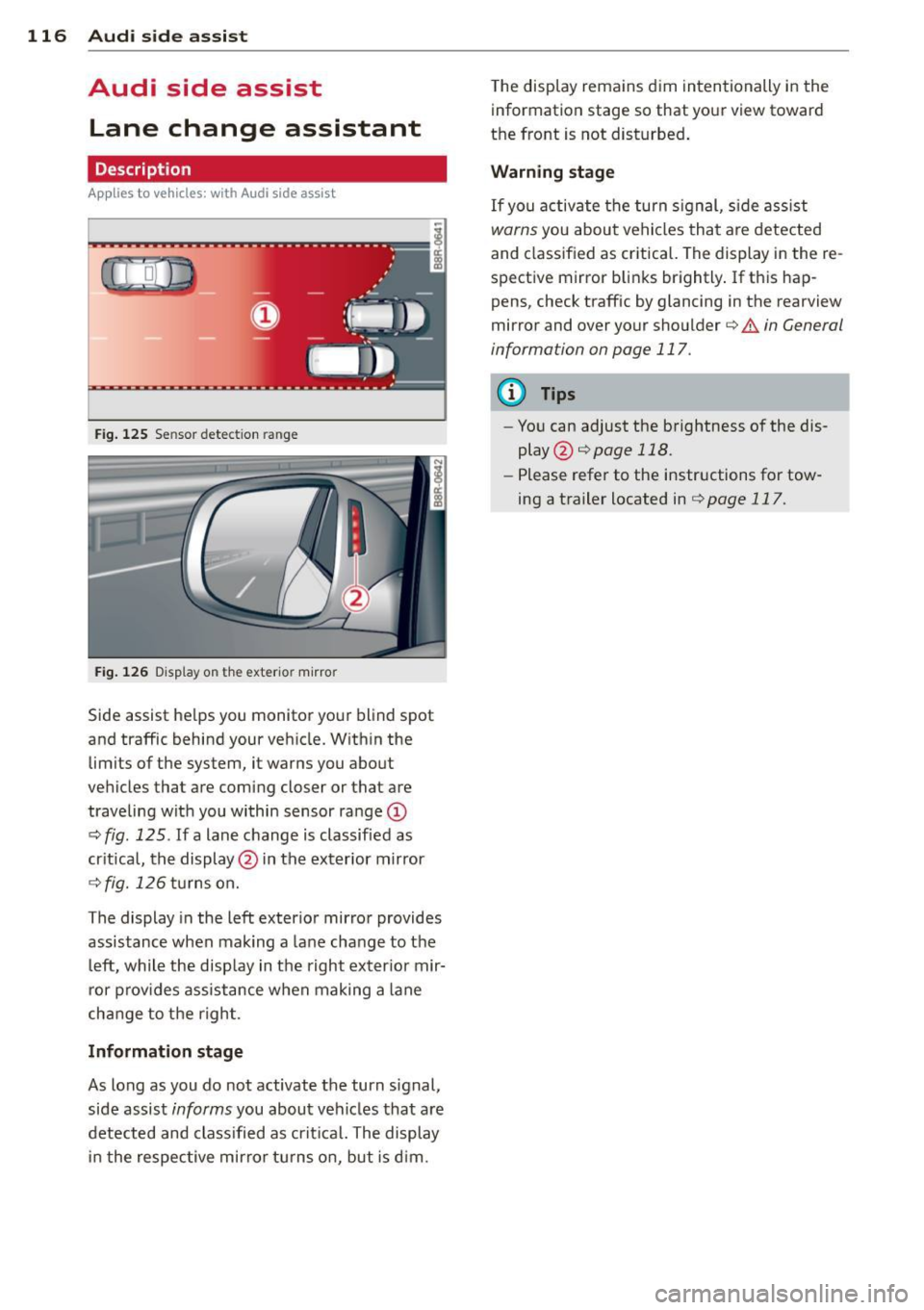
Fig. 125 Sensor detectio n ran ge
Fig. 126 Display on the exterio r mirro r
Side assist he lps you monitor your blind spot
and traffic behind your veh icle. W ith in the
limits of the system, it warns you about
vehicles that are coming closer or that are
traveling with you within sensor range
(D
c:> fig . 125 . If a lane change is classified as
critical, the display @in the exterior mirror
¢ fig. 126 turns on.
The display in the left exterior mirror provides
assistance when mak ing a lane change to the
le ft, while the display in the right exter ior mir·
ror provides assistance when making a lane
change to the right.
Information stage
As long as you do not activate the turn signal,
side assist
informs you about vehicles that are
detected and class ified as critical. The display
in the respective mirror turns on, but is d im. T
he display remains dim intentionally in the
information stage so that your view toward
the front is not disturbed .
Warning stage
If you activate the turn s ignal, s ide ass ist
warns you about vehicles that are detected
and class ified as critical. The display in the re
spective mirror blinks brightly . If this hap
pens, check traffic by glancing in the rearview
mirror and over your shoulder c:>
.&. in General
information on page 117.
(D Tips
- You can adjust the brightness of the dis
play @c:>
page 118.
-Please refer to the instructions for tow·
ing a trailer located in
¢ page 117.
Page 119 of 316
General information
Applies to vehicles: with Audi side assist
®
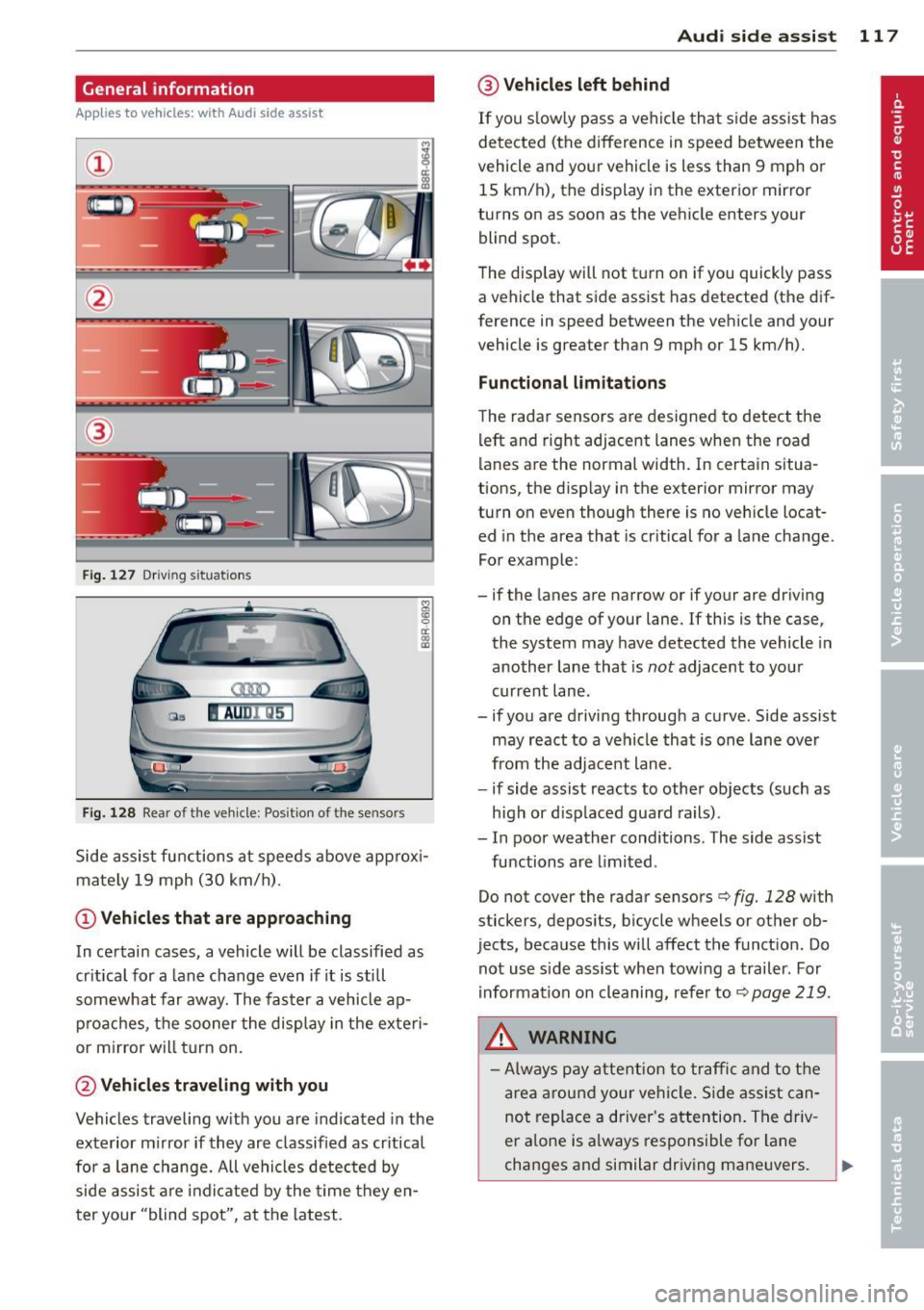
Fig . 127 Driving situations
Fi g. 1 28 Rear of t he ve hicle: Pos it ion of the sensors
M
m 0 ci: .. a,
Side assist functions at speeds above approx i
mately 19 mph (30 km/h).
@ Vehicl es th at ar e approaching
In certain cases, a vehicle will be classified as
cr itical for a lane change even if it is still
somewhat far away. The fas ter a vehicle ap
p roaches, the sooner the display in the exteri
or m irror will t urn on.
@ Vehicles traveling with you
Vehicles traveling w ith you are indicated in the
exterior m irror if they are classified as cr itical
for a lane change. All vehicles detec ted by
side assist are indicated by the time they en
ter your "blind spot", at the latest.
Audi side assist 11 7
@ Vehicle s left behind
If you s low ly pass a vehi cle that s ide assist has
detected (the difference in speed between the
vehicle and you r vehicle is less than 9 mph or
15 km/h), the display in the exterio r mir ror
turns on as soon as the vehicle enters your blind spot.
T he disp lay will not t urn on if you quickly pass
a vehicle that side assist has detected (the dif
ference in speed between the veh icle and your
vehicle is greater than 9 mph or 15 km/h).
Functi onal limitations
The radar sensors are designed to detect the
left and right adjacent lanes when the road
lanes are the normal width. In certain situa
tions, the d isp lay in the exterior mirror may
turn on even though there is no veh icle locat
ed in the area that is cr itical for a lane change.
For example:
- if the lanes are narrow or if your are dr iving
on the edge of your lane.
If this is the case,
the system may have detected the vehicle in
another lane that is
not adjacent to you r
current lane .
- if you a re driving through a curve. Side assist
may react to a vehicle that is one lan e ove r
from the adjacent lane.
- if side assist reacts to other objects (such as
high or d isp laced guard rails) .
- In poor weather conditions. The side assist
functions are l imited .
Do not
cover the radar sensors c> fig. 128 with
stickers, depos its, bicycle wheels or other ob
jects, because this will affect the funct ion. Do
not use s ide ass ist when towing a trailer. For
i nformation on cleaning, refer to
c> page 219 .
_&. WARNING
-Always pay attention to traffic and to t he
area a round your ve hicl e. S ide assist can
not replace a driver's attention. T he driv
er a lone is always responsible fo r lane
changes and similar driving mane uvers.
Page 120 of 316
118 Audi sid e as sist
- Improper reliance on the side ass ist sys
tem can cause co llisions and serious
persona l injury:
- Never rely only o n side assist when
ch anging lanes.
- Always check rear view m irrors to make
sure that it is safe to change lanes.
- Side ass ist cannot detect a ll vehicles un
der all cond it ions -danger of ac cident!
- Please note that side assist indicates
there are approachi ng veh icles, o r
vehicles in your blind spot, on ly afte r
yo ur vehicle has rea ched a driving speed
of at least 19 mph (30 km/h).
- In certain s ituations, the system may not
f unc tion o r its fun ct io n may be lim ite d.
For example:
- if veh icles are approaching or being left
behind very quick ly . The display may
not turn on in time.
- in poor weather co ndit ions such as
heavy ra in, snow or heavy m ist .
- on very wide lanes, in tight curves or if
there is a rise in the road surface.
Vehicles in the adjacent lane may not be detected because they are outside
of the sensor range.
(D Note
The sensors ca n be displaced by impacts or
damage to the bumpe r, wheel housing and
unde rbody . This can affect the system.
Have your author ized Audi dealer or au
thori zed A udi Se rvice Facility check the ir
function.
@ Tips
- If the window g lass in the driver 's door
o r fro nt passenger's door has been tin t
ed, the disp lay in the exterior mirror may
be misinterp reted.
- Fo r De clarat ion of Compliance to Uni ted
Sta tes FCC and Industry Canada regu la
tions¢
page 298.
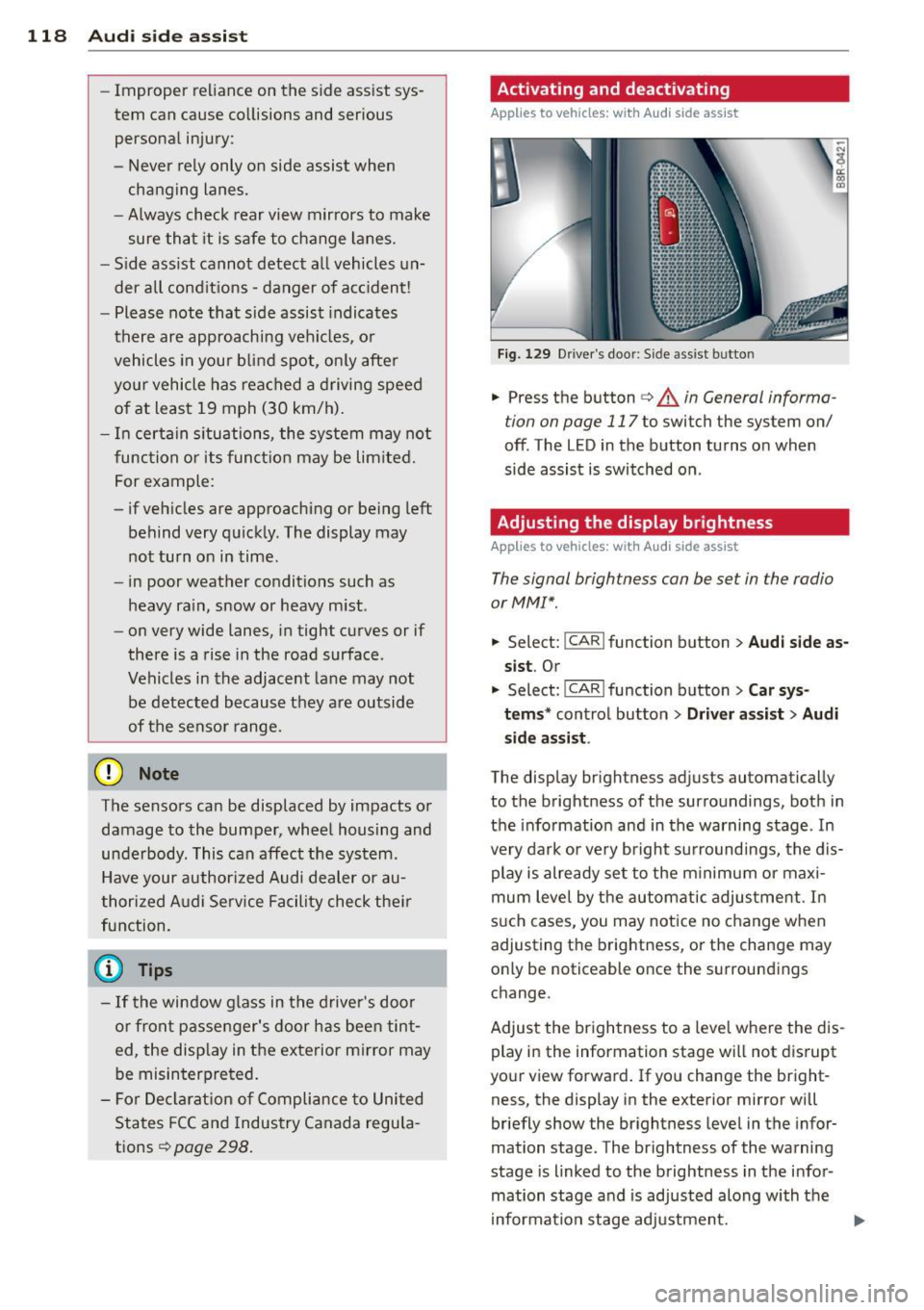
Activating and deactivating
Applies to vehicles: with A udi side assist
Fig. 129 D river 's doo r: Side ass ist butto n
-"' ~ a: co a,
.. Press the button c> & in General informa
tion on page 117
to switch the system on/
off. The LED in the button turns on when
side assist is switched on .
Adjusting the display brightness
Applies to vehicles: wit h Audi s ide assist
The signal brightness con be set in the radio
or MM!* .
.. Select: !CAR ! function b utton> Aud i side a s
s ist .
Or
.. Select:~ , C~ A~ R~ I function button > Car sy s
t e m s*
control button > Dri ver a ssis t > Au di
s id e a ss is t .
The display br ightness adjusts automatical ly
to the brightness of the surroundings, both in
the info rmation and in the warning stage . In
very dark or very bright su rroundi ngs, the dis
play is already se t to the m inimum or maxi
mum leve l by the automatic adjus tme nt. In
s u ch cases, you may notice no change when
adjusting the brightness, or the change may only be noticeable once the surroundings
change.
Adjust the br ightness to a leve l whe re the dis
play in the information stage wi ll not d isrupt
your view forward. If you change the bright
ness, the display in the exterior mirror will
briefly show the br ightness level in the infor
mation stage. The brightness of the warning
stage is linked to the brightness in the infor
mation stage and is adjusted along with the
i nformation stage adjustment.
Page 122 of 316
120 Audi drive select
Audi drive select
Driving settings
Introduction
App lies to vehicles: with Audi drive select
Drive select provides the possib ility to exper i
e nce diffe ren t types of vehi cle sett ings in o ne
ve hicl e. For ins tance, us ing t he three
Com
fort , Auto and Dynamic modes, the driver can
switch from a sporty to a comfortab le drivi ng
mode with the press of a b utton.
A ddit ionally, in veh icles wi th MM I*, the vehi
cle setup for
Individual* mode can be c us
tom ized by you. This makes it possib le to
comb ine settings such as a sporty engine tun
ing with comfortable steering.
A WARNING
Improper use of the drive select can cause
co llisions, other accide nts and ser ious per
sonal injury.
Description
App lies to vehicles: with Audi drive select
The vehicle setup in each mode depends on
the veh icle's features . However, the engin e,
automa tic t ransmissio n and steeri ng a re a l
ways involved.
Engine and automatic transmission
Depending on the mode , the e ng ine and the
automatic t ransm ission respond quicke r or i n
a more ba la nced manne r to a cce le rator pedal
move ments. In t he sporty dynam ic mode, the
a ut om at ic t ra nsmissio n shifts at h igher R PMs.
Steering
The steering adapts in terms of stee ring effort
and steering ra tios . Ind irect steer ing that
moves easi ly, l ike the stee rin g in comfort
mode, is best su ite d t o long dr ive s on a high
way. In co ntr ast, dynam ic mo de p rov ides
sporty, direct steering .
T he fo llow ing applies to vehicles with dynam ic
steer ing*: the stee ring ratio changes based on
ve hicl e spee d in order to maint ain op timum steering effort
for the drive r at all times . This
sets the stee ring to be less sens itive at higher
speeds in order to provide improved vehicle
control. At reduced speeds, however, steer ing
is more d irect in order to keep the steering ef
fort as minima l as poss ible when the driver is
mane uveri ng the veh icle. At low and ave rage
speeds, dynamic steering addit iona lly pro
vides more respon sive stee rin g pe rforma nce.
Adaptive dampers*
The adaptive dampers* use se nsors to record
informa tion regard ing steer ing movemen ts,
braking and acceleration o perations by the
drive r, road surfac e, d riv in g speed, and load.
T his makes it poss ible to adapt damp ing to
the driving si tua tion v irtu ally in real t ime.
Dr ive sele ct also makes i t possib le to sa tisfy
t h e desire fo r spo rty suspension ( Dynamic)
and comfortab le suspension (Comfort) with
o ut giving up ba lanced tuning (Auto) .
Adaptive cruise control*
The be havior when accelera ting can be adju st
ed from comforta ble to sporty, depending on
the d rive select mode . Adaptive cr uise contro l
also responds to the driv ing behavior of the
vehicle ahead in a more conservative or spo rty
manner.
(D Tips
- In some mo dels, t he maximum vehicle
speed can only be reached in the
Auto
and Dynamic mo des.
- Selecting the
Dynamic mode resu lts in
sporty shifting cha racte ristics. The S
gear position engages aut omatically.
- In vehicles that have dynamic stee ring *,
operating noise is heard when start ing or
stopping the e ngine. This does not indi
cate a problem .
Page 123 of 316
Selecting the driving mode
Applies to vehicles: with Audi drive select
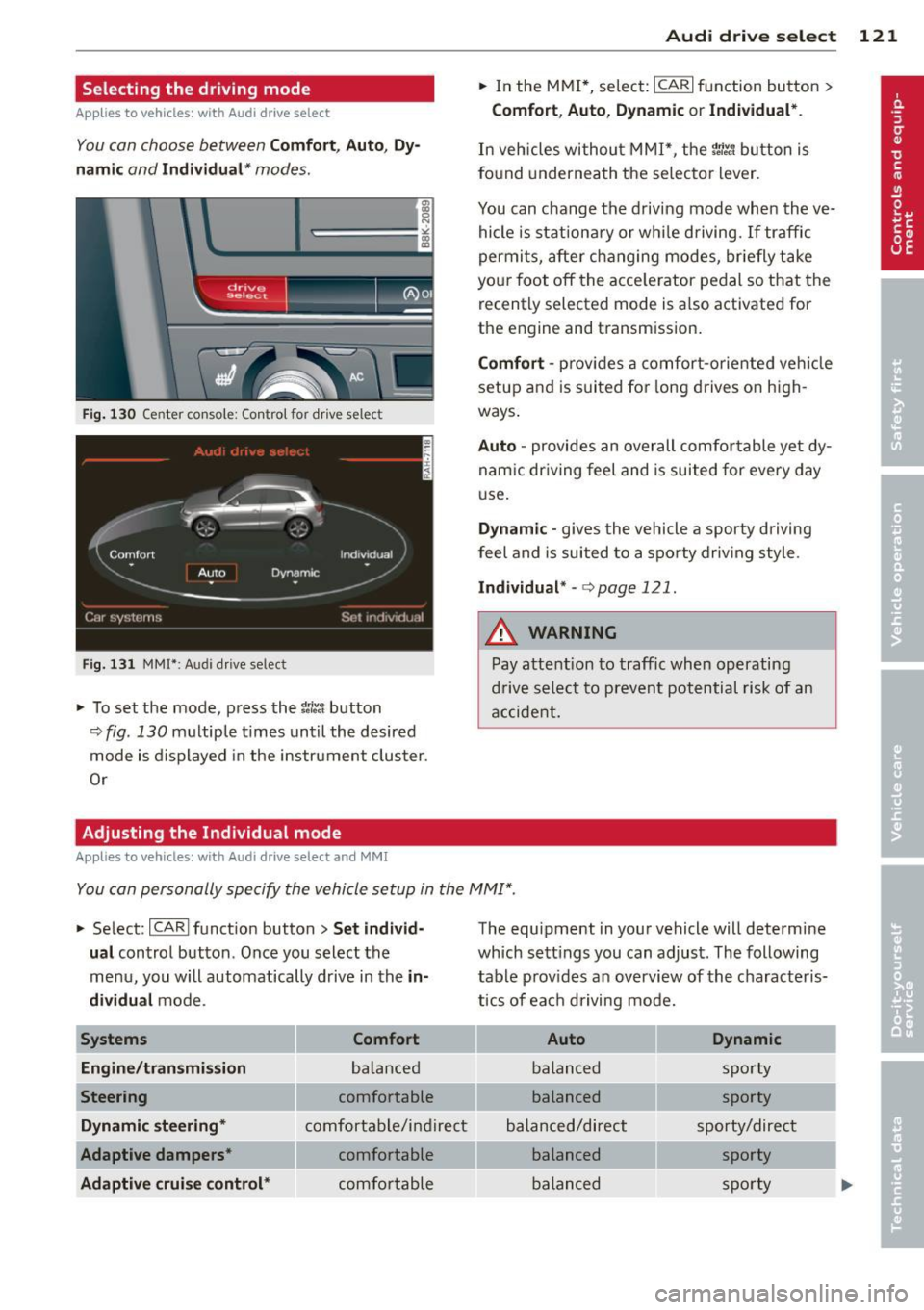
You con choose between Comf ort , Aut o, Dy
namic
and Indi vidu al* modes .
drive I I a,. selact ~
Fig. 130 Ce nter co nsole: Con tro l for dr ive selec t
Fig. 131 MM I* : A udi drive se lect
,.. To set the mode, press the 1til.t button
9fig. 130 multiple times until the desired
mode is displayed in the instrument cluster.
Or
Adjusting the Individual mode
Appl ies to vehicles: with Audi drive select and MMI
Audi drive sele ct 121
,.. In the MMI*, select: ICARI function button >
Co mfo rt , Au to , D ynamic or Indi vidual *.
In vehicles without MMI*, the r.'i:.1 button is
fo und underneath the se lector lever .
You can change the driving mode when the ve hicle is stationary or whi le driving. If traffic
permits, after changing modes, briefly take
you r foot off the acce le rator pedal so that the
recently selected mode is a lso activated for
the engine and transm ission.
C omf ort -prov ides a comfort-oriented veh icle
setup and is suited for long drives on high
ways .
Auto -provides an overall comfortable ye t dy
nam ic dr iving feel and is suited for every day
u se.
Dynamic -gives the vehicle a sporty driving
feel and is suited to a spo rty dr iv ing style.
I n d iv idual * -c:> page 1 21 .
A WARNING
Pay attention to traffic when operating
drive select to prevent potential risk of an
accide nt.
-
You con personally specify the vehicle setup in the MMI ".
,.. Select: ICARlfunct ion button> Se t indiv id
ual
control button . Once you select the
menu, you will automatically drive in the
i n
di vidual
mode .
System s Comfort
En gine /tran smi ssion
balanced
Steering comfortable
Dynamic ste ering * comfortable/ind ire ct
Adapt ive dampe rs* comfortable
A daptiv e cruise control * comfortable The equipment in your vehicle will determine
which sett
ings you can adjust. The following
table prov ides an overview of the characteris
t ics of each driving mode.
Auto Dynamic
balanced sporty
balanced sporty
balanced/direct sporty/direct balanced sporty
balanced sporty
Page 126 of 316
124 Autom atic tr an smi ssion
power. Shifting may become noticeable when
accelerating . Hybrid drive*: electric driving is
not possible .
When the veh icle is stationary o r at speeds
below 1 mph (2 km/h), you must always apply
the foot brake before and while moving the
lever to D/S out of N.
A WARNING
Read and follow a ll WARNINGS c:> & in
Driving the automatic transmission on
page 126 .
@ Note
-
Coasting downhi ll with the transmission in
N and the engine not r unning w ill result in
damage to the automatic transmission
and possibly the catalytic converter .
(D Tips
-On vehicles with Aud i drive select*, you
can adjust the sporty sh ift characteristics
i n the
Dynamic driving mode.Swill ap
pear in the instrument cluster display in
stead of D .
- If you accidenta lly select N while driv ing,
take your foot off the acce lerator pedal
i mmediately and wait fo r the engine to
s low down to idle before se le cting D/S.
- Hybrid drive*: if the
lasvl button
c:> page 100 is pressed w hile in sport
mode S, the transm issio n sw itches auto
matically to the normal mode D.
- If there is a power failure, the se lector
l ever will not move out of the P posi tio n.
The eme rgency release can be used if
this happens
q page 1 28.
Automatic Shift Lock {ASL)
The Automatic Shift Lock safeguards you
against accidentally shifting into a forward or
the reverse gear and causing the vehicle to
move unintentionally.
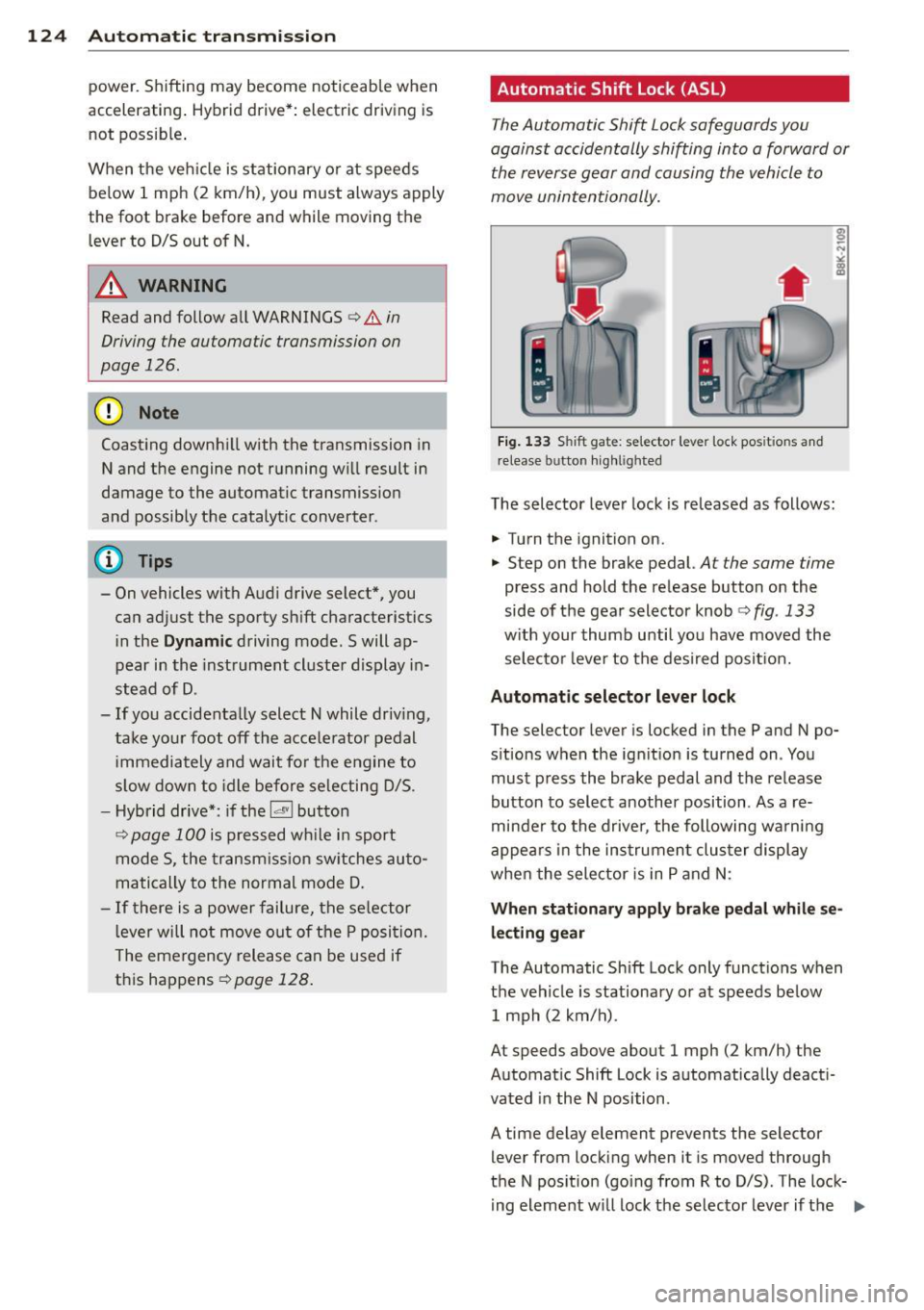
Fi g. 1 33 Shift gate: selecto r lever lock pos itions and
r elease button highl igh ted
The selector lever lock is released as follows :
.... Turn the ignition on.
.,.. Step on the brake pedal.
At the same time
press and hold the release button on the
side of the gear selector knob
c:> fig. 133
w ith your thumb until yo u have moved the
selecto r leve r to the desi red posit ion.
Automatic selector leve r lock
The selector lever is locked in the P and N po
s itions when the ign ition is turned on . You
must p ress the brake pedal and t he release
button to select another position . As a re
minde r to the drive r, the following wa rni ng
appea rs in the instrumen t clus ter display
when the sele ctor is in P and N:
When stationar y apply brak e pedal while se
lec ting gear
The Automatic Shift Lock only funct ions when
t h e veh icle is stationary or at speeds be low
1 mph (2 km/h) .
At speeds above about 1 mph (2 km/h) the
Automat ic Shift Lock is automatically deact i
vated in the N position .
A time delay element prevents the selector lever from locking when it is moved through
the N pos it ion (go ing from R to D/S) . The lock
i ng element w ill lock the selecto r lever if t he
Ill>
Page 128 of 316
126 Automatic transmission
8_ WARNING
-Unintended vehicle movement can cause
serious injury .
- Never leave your vehicle with the engine
running while in gear. If you must leave
your vehicle when the engine is running,
activate the parking brake and move the
selector lever to P.
- Power is still transmitted to the wheels
when the engine is running at idle. To
prevent the vehicle from "creeping", you
must keep your foot on the brake when
the engine is running and the selector lever is in D/S or R or "tiptronic" mode is
selected.
- Do not press the accelerator pedal when
changing the selector lever position
while the vehicle is stationary and the
engine is running.
- Never shift into
R or P while driving.
- Before driving down a steep slope, re-
duce your speed and shift into a lower
gear with "tiptronic".
- Do not ride the brakes or press the brake
pedal too often or too long when driving
down a hill. Constant braking causes the
brakes to overheat and substantially re
duces braking performance, increases
braking distance or causes complete fail
ure of the brake system .
- To preven t the vehicle from rolling back
when stopping on inclines, always hold it
in place with the brake pedal or parking
brake.
- Never hold the vehicle on an incline with
a slipping clutch . The clutch opens auto
matically when it becomes too hot from
the overload. An indicator lamp
[O] illu
minates and a driver message appears
Q page 128when the clutch is overload
ed.
- If the engine must remain running, never
have any driving position engaged when
checking under the hood. Make sure the
selector lever has securely engaged and
is locked in P with the parking brake set
Q page 226, Engine compartment . 0th-erwise, any increase in engine speed may
set the vehicle in motion, even with the
parking brake applied.
(D Note
- When stopping on an incline , do not try
to hold the vehicle in place by pressing
the accelerator pedal while a driving gear is selected. This can cause the transmis
sion to overheat and can damage it. Acti
vate the parking brake or press the brake
pedal to prevent the vehicle from rolling .
- Allowing the vehicle to roll when the en
gine is stopped and the selector lever is
in N will damage the transmission be
cause it is not lubricated under those cir
cumstances.
@ Tips
For safety reasons, the parking brake is re
leased automatically only when the driv
er's safety belt is engaged in the buckle.
Hill descent control
The hill descent control system assists the
driver when driving down declines.
Hill descent control is activated when these
lector lever is in D /S and you press the brake
pedal. The transmission automatically selects
a gear that is suitable for the incline. Hill de
scent control tries to maintain the speed ach
ieved at the time of braking, within physical
and technical limitations. If may still be nec
essary to adjust the speed with the brakes .
Hill descent control switches off once the de
cline levels out or you press the accelerator
pedal.
When the speed is set in the cruise control
system
q page 95, hill descent control is also
activated.
A WARNING
-
Hill descent control cannot overcome
physical limitations, so it may not be able
to maintain a constant speed under all
Page 129 of 316
conditions. Always be ready to apply the
brakes.
Manual shift program
Using the manual shift program you can
manually select gears.
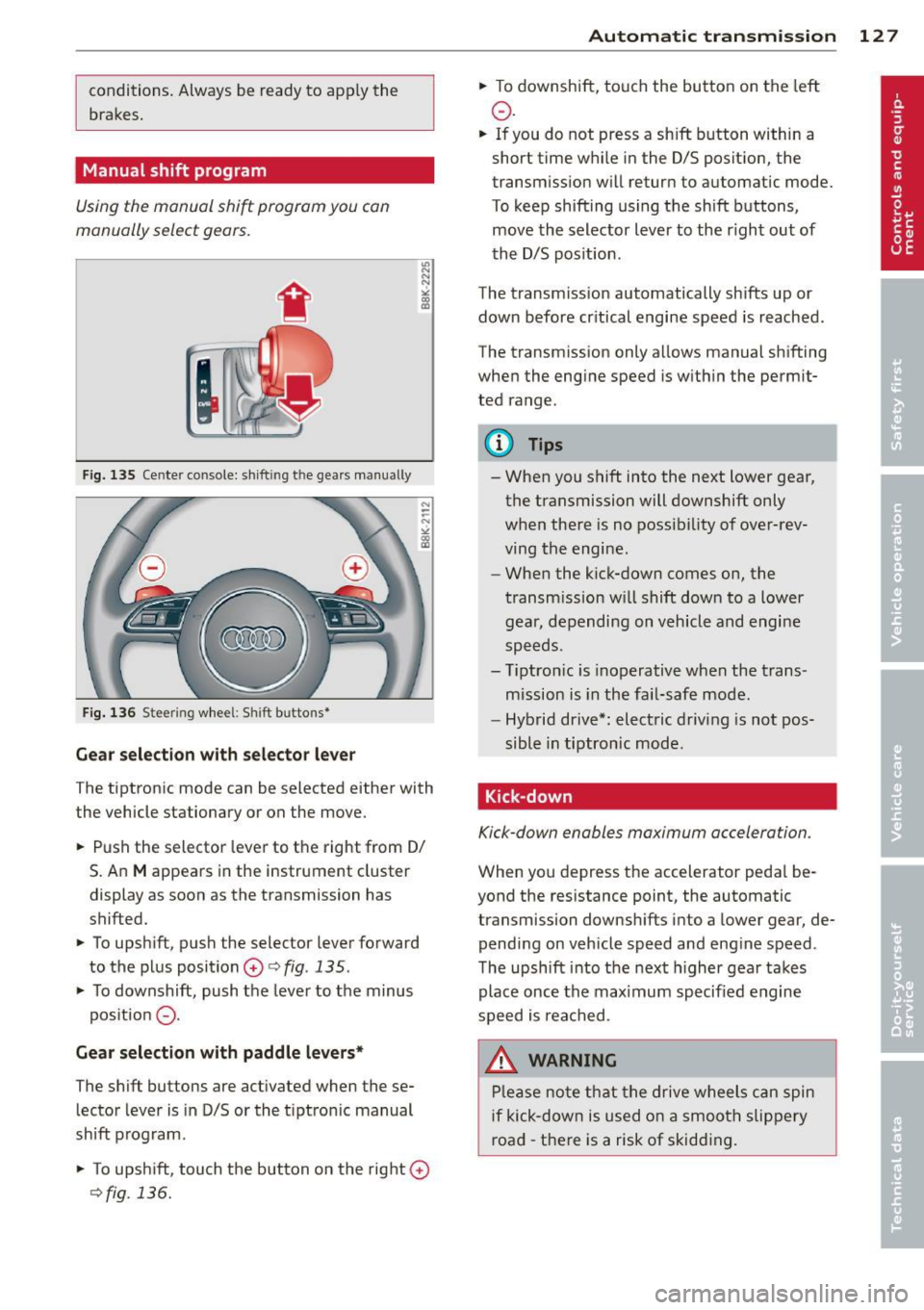
F ig. 135 Cente r console: sh ift in g t he gears manual ly
Fig. 136 S tee rin g wheel: S hift b utto ns*
Gear selection with selector lever
The tiptronic mode can be selected either with
the vehicle stationary or on the move.
.. Push the selector lever to the right from 0/
S. An
M appears in the instrument cluster
display as soon as the transmission has
shifted.
.. To upshift, push the selector lever forward
to the plus position
0 c:> fig. 135 .
.. To downshift, push the lever to the minus
pos ition
0 -
Gear selection with paddle levers*
The shift buttons are activated when these
lector lever is in D/S or the t iptron ic manual
shift program.
.. To upshift, touch the button on the right
0
c>fig . 136.
Autom atic transm ission 12 7
.. To downshift, touch the button on the left
0 .
.. If you do not press a sh ift button within a
short time while in the D/S position, the
transmission will return to automatic mode.
To keep shifting using the shift buttons,
move the selector lever to the r ight out of
the D/S position .
The transm iss ion automatically shifts up or
down before cr itical engine speed is reached.
The transmission only allows manual shifting
when the eng ine speed is with in the permit
ted range .
@ Tips
-When you shift into the next lower gear,
the transmission will downshift only
when there is no possibility of over-rev
ving the engine.
- When the kick-down comes on, the
transmission will shift down to a lower
gear, depending on vehicle and engine
speeds.
- Tiptron ic is inoperative when the trans
mission is in the fail-safe mode.
- Hybrid drive*: electric driving is not pos
sible in tiptronic mode.
Kick-down
Kick-down enables maximum acceleration .
When you depress the accelerator pedal be
yond the resistance point, the automatic
transmission downsh ifts into a lower gear, de
pending on vehicle speed and engine speed .
The upshift into the next higher gear takes
place once the max imum specified engine
speed is reached .
_& WARNING
Please note that the drive wheels can spin
if kick-down is used on a smooth slippery
road -there is a risk of skidding .