towing AUDI Q5 2013 Owners Manual
[x] Cancel search | Manufacturer: AUDI, Model Year: 2013, Model line: Q5, Model: AUDI Q5 2013Pages: 316, PDF Size: 78.89 MB
Page 5 of 316
Trailer hitch . ..... .... ... .. .. .. . .
Error messages
Homelink ® ... .. .... ... .. .. .. . .
Universal remote control ... .. .. .. . . 134
134
135
135
S afet y fir st . . . . . . . . . . . . . . . . . . . . 139
Dri ving Safely . . . . . . . . . . . . . . . . . 139
Gene ral notes ..... .... ... .. .. .. . .
Proper occupant seating posit ions . . .
Pedal area .. .. ............. .. .. . .
Stowing luggage ................ .
Report ing Safety Defects .......... .
Safety belts .................. .
General notes ................... .
Why safety belts? ............... .
Safety belts ..... .. ... ... .. .. .. . .
Safety bel t pretens ioners ......... .
Airbag sy stem .......... ...... .
Important things to know ......... .
Fr ont airbags ............ .... .. . .
M on itoring the A dvanced Airbag
System .... .. ... .. ..... ... .. .. . .
Side airbags . ... ...... ... .. .. .. . .
Side curtain airbags .... ... .. .. .. . .
Child Safety .. .. .... ... .. .. .. . .
Important things to know . ... .. .. . .
Ch ild safety seats ................ .
Instal ling a child safety seat .. .. .. . .
LATC H Lower anchorages and tethers
for chi ldren .... .. .. ... ... .. .. .. . .
Addit ional Information 139
140
144
145
146
149 149
150
152
155
157
157
16 1
168
172
175
178
178
184
188
191
196
Vehicle operation . . . . . . . . . . . . . 197
Intelligent technology . . . . . . . . 197
Not ice about data recorded by vehi cle
con trol mod ules . . . . . . . . . . . . . . . . . . 197
E lect ronic S tabiliz ation Control ( ESC) . 19 7
Brake system . . . . . . . . . . . . . . . . . . . . 200
Elect romechanical power assist,
Dynamic stee ring . . . . . . . . . . . . . . . . . 201
Driving w ith your quattro ® . . . . . . . . . 202
Energy management . . . . . . . . . . . . . . 203
Table of contents 3
Driving and environment . . . . .
205
The first 1,000 miles (1,500 km) and
afterwa rds . . . . . . . . . . . . . . . . . . . . . . 205
Catalytic converter . . . . . . . . . . . . . . . . 206
Avoid damaging the vehicle . . . . . . . . . 206
Operate your vehicle economically and
min imize pollut ion . . . . . . . . . . . . . . . . 207
Driving off road . . . . . . . . . . . . . . . 209
Drivi ng in difficult road conditions and
offroad . . . . . . . . . . . . . . . . . . . . . . . . . 209
Trailer towing . . . . . . . . . . . . . . . . . 212
D riving with a trailer . . . . . . . . . . . . . . 212
T rai le rtow ingtips ... .. .. ..... .... 214
Vehicle care . . . . . . . . . . . . . . . . . . . 216
Cleaning and protection . . . . . . 216
General infor mation . . . . . . . . . . . . . . 216
Care of ex ter ior . . . . . . . . . . . . . . . . . . 216
Care of interior . . . . . . . . . . . . . . . . . . . 223
Fuel supply and filling your
fuel tank . . . . . . . . . . . . . . . . . . . . . . .
228
Gasoline . . . . . . . . . . . . . . . . . . . . . . . . 228
F uel tank. . . . . . . . . . . . . . . . . . . . . . . . 230
Checking and filling . . . . . . . . . . . 233
Engine hood . . . . . . . . . . . . . . . . . . . . . 233
Engine compartment . . . . . . . . . . . . . . 235
Engine oil . . . . . . . . . . . . . . . . . . . . . . . 235
Engine cooling system . . . . . . . . . . . . . 240
Brake fluid . . . . . . . . . . . . . . . . . . . . . . 242
Battery . . . . . . . . . . . . . . . . . . . . . . . . . 243
Windsh ield/headlight washer
containe r . . . . . . . . . . . . . . . . . . . . . . . 24 7
Tires and wheels . . . . . . . . . . . . . . 248
T ires . . . . . . . . . . . . . . . . . . . . . . . . . . . 248
T ire pressu re mo nitoring system 266
Do-it-your self service . . . . . . . . . 269
What do I do now? . . . . . . . . . . . . 269
Jack , tools and inflatab le sp are tire . . 269
T ire repa ir . . . . . . . . . . . . . . . . . . . . . . . 272
Changing a wheel ... . .. .. ..... ... . 274
•
•
Page 6 of 316
4 Table of contents
Fuses and bulbs ....... .. .. ... .
Elect rical fuses . ....... ... .. .. ... .
Bulbs .. .. .. ... ... .... ... .. .. ... .
Emergency situations ... .. ... .
General .... ... .. ..... ... .. .. ... .
Starting by push ing or tow ing . .. .. . .
Starting with jumper cables .. .. .. . .
Use of jumper cab les .. .. .. .. .. .. . .
Eme rgency towing with commercial
tow truck .. ................ ... . .
Lift ing vehicle . ........... .... ... .
Technical data ............. .. . .
General information .. .. .. .. . .
Explana tion of te chnical data . .. ... .
Vehicle iden tifica tion .... ...... .. . .
Weights ... ... .. ..... ... .. .. ... .
Dimensions .... .. ..... ... .. .. ... .
Data .. .. .. .. .. .. .... ... .. .. .. . .
2 11 hp, 4 -cylinder engine, quattro .. .
2 11 hp, 4-cylinder engine, hybrid
quattro ...... ............. ..... .
272 hp, 6-cylinder engine, quattro . . .
Consumer Information ..... . .
Warranty coverages ....... .. .. ... .
Operating your vehicle outside the
U .S .A . or Canada .......... ... .. . .
Aud i Service Repair Man uals and 280
280
283
284 284
284
284
285
286 288
290 290
290
290
290
29 1
292
2 92
293
294
295 295
295
Literature . . . . . . . . . . . . . . . . . . . . . . . 295
M ain tenance . . . . . . . . . . . . . . . . . . . . . 295
Addi tional accesso ries , modifications
and parts replacement . . . . . . . . . . . . 297
D eclaration o f Compliance,
Te lecommunications and E lectronic
Systems . . . . . . . . . . . . . . . . . . . . . . . . 298
Index . . . . . . . . . . . . . . . . . . . . . . . . . . 300
Page 18 of 316
16 Instrum ent s and w arn ing /indic ato r light s
blink, then there is a ma lfunction somewhere
in the system.
If the light does not illuminate
when you switch the ignition on, this also
means there is a malfunction.
A WARNING
If you have a malfunction in the safety sys
tems, contact your author ized Audi dealer
immediately. Otherw ise the safety sys
tems may not work properly in an acci
dent.
U) Tire pressure monitoring system -
telltale indicator lamp
Appl ies to vehicles: with tire pressure monitoring system
The warning/indicator light appears in the
event of a significant loss of tire pressure or if there is a malfunction.
The indicator light IE illuminates to check
the function when you switch on the ignition.
If the
IE symbol remains on or blinks after
you switch on the ignition, the re is a loss of
tire pressure or a system malfunction.
If there
is a system malfunction, see your authorized
Aud i dealer as soon as possible.
Detai led information on the tire pressure
mon itoring system can be fou nd in
¢page 266.
¢ Q Turn signals
The indicator light blinks when you use either
turn signal.
Whenever you use the left B or the right II
turn signal, the ind icator light blinks. When
you use the emergency flashers, both indica tor lights flas h.
If one of the turn s ignal light bulbs burn out,
the turn signa l wi ll blink tw ice as fast as nor
mal.
This does not apply, however, in towing mode.
The indicator light does no t flash if a turn s ig
nal is out on the trailer or the tow ing vehicle.
Addit ional info rmation on the turn sig nals
¢page 52.
~,1 ¢ Trailer turn signal assembly
Applies to vehicles: with towing hitch
The indicator light also blinks if the turn sig
nal is operated when towing a trailer.
The ind icator light. bli nks when the turn
s ignal is used, if a trailer has been properly
con nected to the vehicle .
If one of the turn signa l bulbs on the trailer is
burned out or defective, the ind icator light
will not blink when you use the turn signals.
(D Tips
For vehicles with a factory installed towing
hitch or a trailer hitch that was installed
l ater according to factory spec ificat ions,
the trailer turn signal assembly is actuat
ed.
,(t Safety belts
This warning/indicator light reminds you to
put on your safety belt.
The . warn ing/ indicator light illum inates
when the ignition is switched on to remind
the driver and (o n USA models only) any front
passenger to put on the safety be lt . Addit ion
ally, an audib le warn ing tone w ill also sound .
For more Informat ion
¢ page 149, Safety
belt warning light.
o Malfunction Indicator Lamp (MIL )
The Ma lfunction Indicator Lamp (MIL) is part
of the On-Board Diagnos tic (OBD II) sys tem.
T he symbo l
(4 lights up when the ignition is
tu rned on and will turn off after the eng ine
has started and has settled at a constant idle
speed. This indicates that the MIL is working
properly.
The warning light ill uminates when the re is a
malfunction in the engine electronic system.
Contact your a uthorized Audi dea ler and have
the malfunction corrected. .,..
Page 54 of 316
52 Clear vision
(40 km/h) when a certain steering wheel an
gle is reached or when a turn signal is activat
ed. The area to the side of the vehicle is illu
minated better when turning .
Emergency flashers
The emergency flashers makes other moto
rists aware that you or your vehicle are in an
emergency situation.
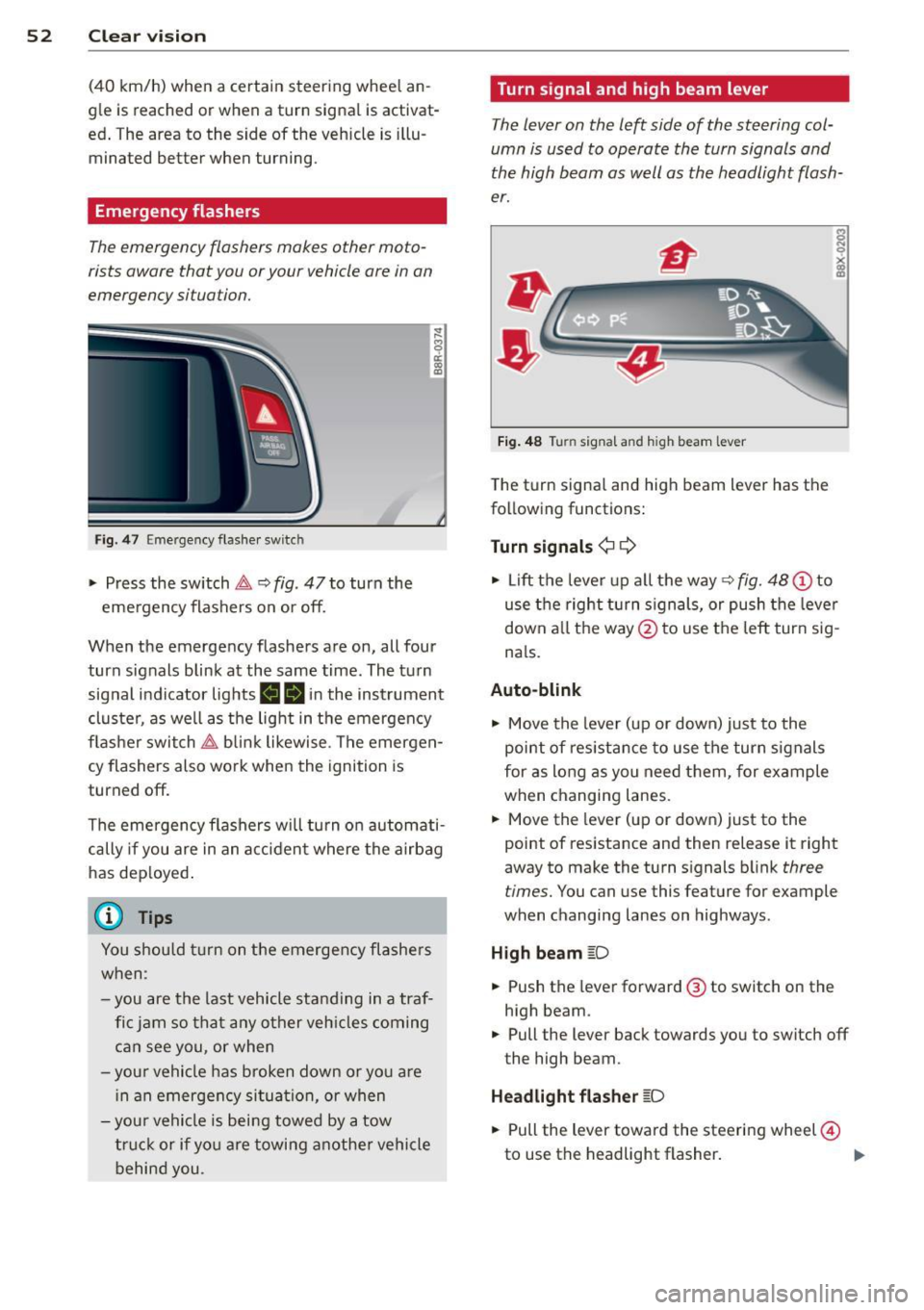
Fig . 4 7 Emer gency flasher switc h
"" Press the switch &-, ¢ fig. 47 to turn the
emergency flashers on or off.
~
9 a: (X) a:,
When the emergency flashers are on, all four
turn signals blink at the same time. The turn signal indicator lights
BB in the instrument
cluster, as well as the light in the emergency
flasher switch &-, blink likewise . The emergen
cy flashers also work when the ignition is
turned off.
The emergency flashers will turn on automati
cally if you are in an accident where the airbag
has deployed.
@ Tips
You should turn on the emergency flashers
when :
-you are the last vehicle standing in a traf
fic jam so that any other vehicles coming
can see you, or when
-your vehicle has broken down or you are
in an emergency situation, or when
-your vehicle is being towed by a tow
truck or if you are towing another vehicle
behind you. Turn signal and high beam lever
The
lever on the left side of the steering col
umn is used to operate the turn signals and
the high beam as well as the headlight flash
er.
Fig. 48 Turn signal and high beam lever
The turn signal and high beam lever has the
following functions:
Turn signals¢ ¢
s
"" '? X co a,
"" Lift the lever up all the way c:> fig. 48 (!) to
use the right turn signals, or push the lever
down all the way@ to use the left turn sig
n a ls.
Auto-blink .,. Move the lever (up or down) just to the
point of resistance to use the turn signals
for as long as you need them, for example
when changing lanes .
.,. Move the lever (up or down) just to the
point of resistance and then release it right
away to make the turn signals blink
three
times.
You can use this feature for example
when changing lanes on highways .
High beam
[D
"" Push the lever forward ® to switch on the
high beam .
.,. Pull the lever back towards you to switch off
the high beam.
Headlight flasher
[D
.. Pull the lever toward the steering wheel@
to use the headlight flasher.
IJJ>
Page 119 of 316
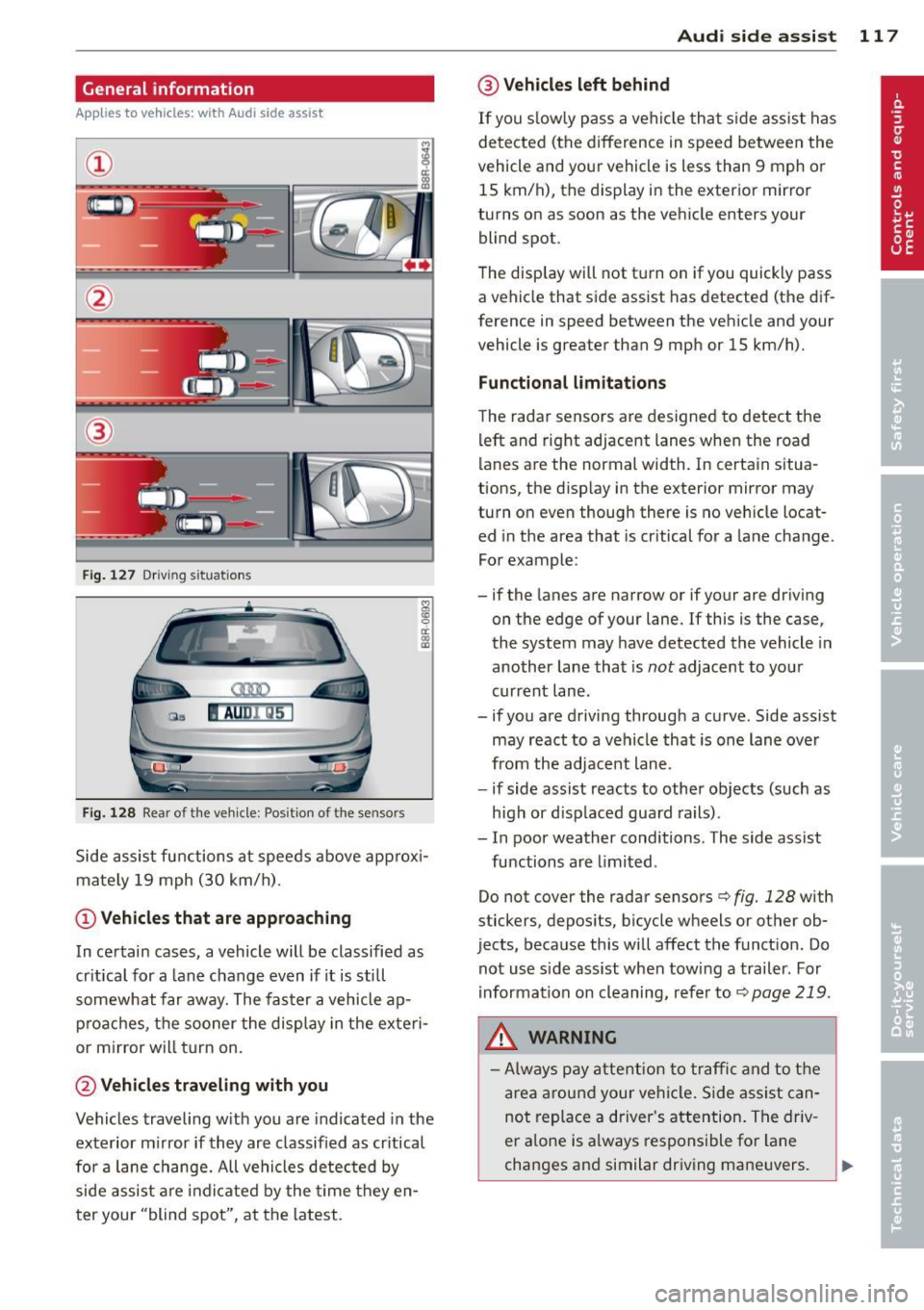
General information
Applies to vehicles: with Audi side assist
®
Fig . 127 Driving situations
Fi g. 1 28 Rear of t he ve hicle: Pos it ion of the sensors
M
m 0 ci: .. a,
Side assist functions at speeds above approx i
mately 19 mph (30 km/h).
@ Vehicl es th at ar e approaching
In certain cases, a vehicle will be classified as
cr itical for a lane change even if it is still
somewhat far away. The fas ter a vehicle ap
p roaches, the sooner the display in the exteri
or m irror will t urn on.
@ Vehicles traveling with you
Vehicles traveling w ith you are indicated in the
exterior m irror if they are classified as cr itical
for a lane change. All vehicles detec ted by
side assist are indicated by the time they en
ter your "blind spot", at the latest.
Audi side assist 11 7
@ Vehicle s left behind
If you s low ly pass a vehi cle that s ide assist has
detected (the difference in speed between the
vehicle and you r vehicle is less than 9 mph or
15 km/h), the display in the exterio r mir ror
turns on as soon as the vehicle enters your blind spot.
T he disp lay will not t urn on if you quickly pass
a vehicle that side assist has detected (the dif
ference in speed between the veh icle and your
vehicle is greater than 9 mph or 15 km/h).
Functi onal limitations
The radar sensors are designed to detect the
left and right adjacent lanes when the road
lanes are the normal width. In certain situa
tions, the d isp lay in the exterior mirror may
turn on even though there is no veh icle locat
ed in the area that is cr itical for a lane change.
For example:
- if the lanes are narrow or if your are dr iving
on the edge of your lane.
If this is the case,
the system may have detected the vehicle in
another lane that is
not adjacent to you r
current lane .
- if you a re driving through a curve. Side assist
may react to a vehicle that is one lan e ove r
from the adjacent lane.
- if side assist reacts to other objects (such as
high or d isp laced guard rails) .
- In poor weather conditions. The side assist
functions are l imited .
Do not
cover the radar sensors c> fig. 128 with
stickers, depos its, bicycle wheels or other ob
jects, because this will affect the funct ion. Do
not use s ide ass ist when towing a trailer. For
i nformation on cleaning, refer to
c> page 219 .
_&. WARNING
-Always pay attention to traffic and to t he
area a round your ve hicl e. S ide assist can
not replace a driver's attention. T he driv
er a lone is always responsible fo r lane
changes and similar driving mane uvers.
Page 121 of 316
@ Tips
-Side assist is not active whi le you are
making the adjustment.
- Your settings are automatically stored
and assigned to the remote control key
being used.
Driver messages
App lies to vehicles: with Audi side assist
If side ass ist switches off by itself, the LED in
the button turns off and a message will ap
pear in the instrument cluster d isplay:
Aud i side assist unavail able: S en sors
blocked
The radar sensors' vision is affected . Do not
cover the area in front of the senso rs with bike
wheels, st ickers, dirt or other objects . Clean
the area in front of the sensors, if necessary
~page 117, fig. 128.
Aud i side assi st: Currently un avail able
Side assist cannot be switched o n temporarily
because there is a malfunction (for example,
the battery charge leve l may be too low) .
Audi side assi st: S ystem fault!
The system cannot guarantee that it will de
tect vehicles correctly and it is switched off.
The sensors have been displaced or are faulty.
H ave the system checked by an authorized
Aud i dealer or authorized Aud i Service Fac ility
soon.
Audi side assist: Unav ailab le when towing
Side assist sw itches off automatically when a
factory- installed trailer h itch is connected to
the electrical connector on the trailer. There is n o guarantee the system will switc h off when
using a retrofitted tra iler hitch. Do not use
side assis t when towing a t railer.
Audi side a ssis t 119
Page 136 of 316
134 Parking system
- On -when the parking system is switched
on, either the visua l d isplay or the picture
from the rearview camera is disp layed .
Warning tones
-Front volum e -front sensor vol ume
- Front frequ enc y-front sensor frequency
-Re ar volum e -rear sensor volume
- Rear frequenc y -rear sensor frequency
- In -ca r entertainme nt fader /Mu sic volume
w hile pa rking -
when the parking system is
switched on , the volume of the active audio
source is lowered .
The new ly adjusted value is briefly heard from
the signal generator.
@ Tips
- The warning tones can a lso be adjusted
directly by the v is ual disp lay or the p ic
ture from the rearview camera. Simp ly
press the
Sett ings contro l button.
- Changed settings are activated when
parking system is switched on again.
- The settings are automatically stored
and ass igned to the remote control key.
Trailer hitch
Applies to vehicles: with Audi parking system plus w ith
rea rview camera a nd trailer hitch
For vehi cles with a facto ry installed trai ler
hitch, or a trai ler hitch installed according to
factory specifications, the parking system rear
sensors do not come on whenever you shift in
to reverse gear or when you press the
P, #J\.
switch. Remember, there is no warning for
d istances to the rear . The front sensors re
main activated. The visual display switches to
the trailer towing mode. The picture from the
rearv iew camera will not show the orientation
l ines nor the blue su rfaces.
If you install a hitch yourself, th is function
may not work .
Error messages
Applies to vehicles: wi th Audi parking sys te m plus with
rearv iew camera
T he re is an error in the system if t he LED on
the
p, q~ switch is blinking and you hea r a con
t in uous alarm for a few se conds after switch
ing on the parking system or when the park
ing system is already activated . Have yo ur au
thorized Audi dea ler correct the error.
(D Tips
If the error is not corrected before you
switch off the ignition, when you switch on
the parking system again, the LED in the
Pw J\. switch will blink.
Page 147 of 316
Stowing luggage
Loading the luggage compartment
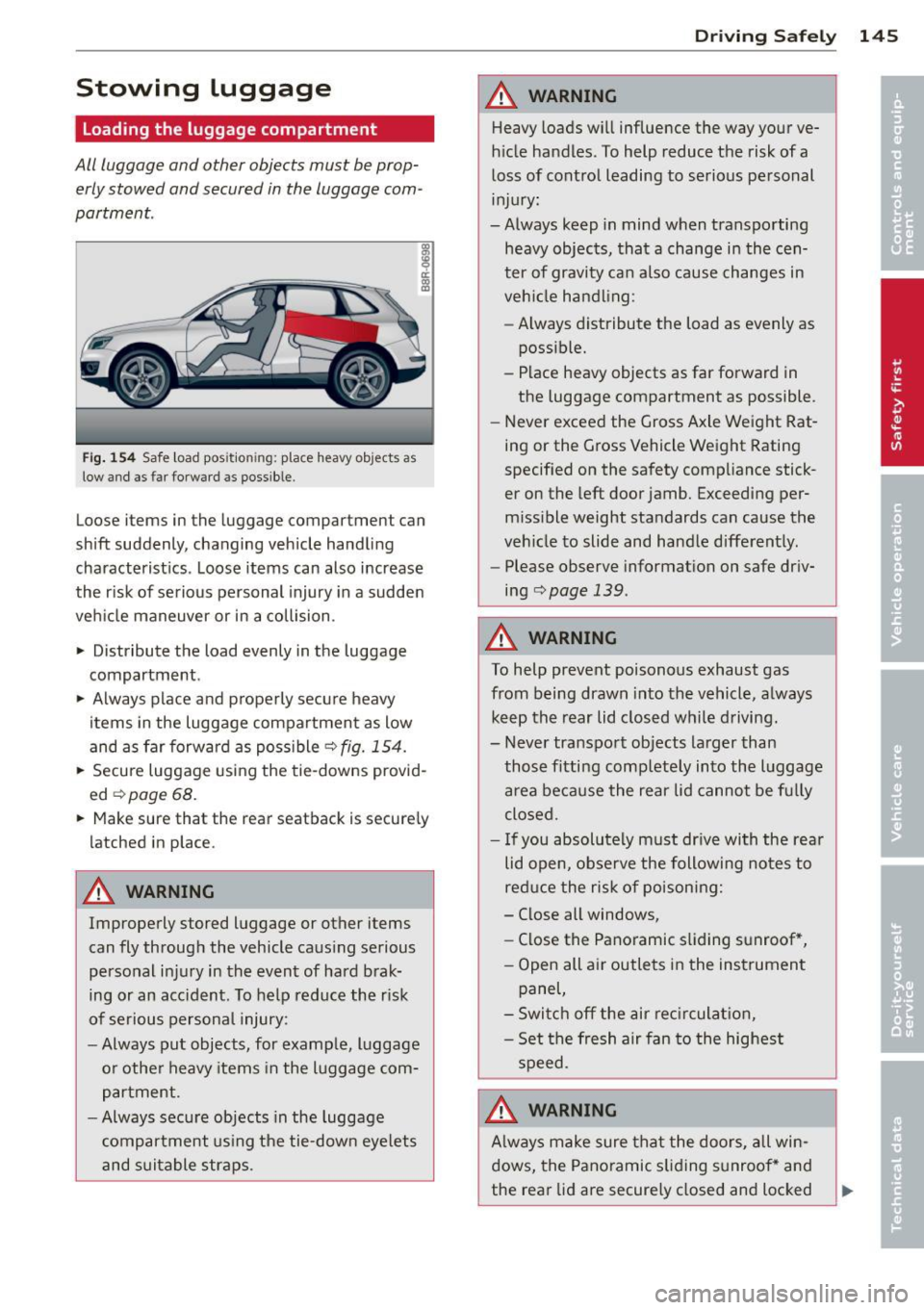
All luggage and other objects must be prop
erly stowed and secured in the luggage com
partment.
Fig . 154 Safe load pos ition ing: place heavy objects as
low and as far forward as possible.
Loose items in the luggage compartment can
shift suddenly, changing vehicle handling
characteristics . Loose items can also increase
the r isk of serious personal injury in a sudden
veh icle maneuver or in a collision .
.. Distribute the load evenly in the luggage
compartment.
.. Always place and properly secure heavy
items in the luggage compartment as low
and as far forward as poss ible
q fig. 154.
.. Secure luggage using the tie-downs provid
ed
¢ page 68.
.. Make sure that the rear seatback is secure ly
latched in place.
A WARNING
Improperly stored luggage or other items
can fly through the vehicle causing serious
personal injury in the event of hard brak
ing or an acc ident. To help reduce the risk
of serious personal injury:
- Always put objects, for example, luggage
or other heavy items in the luggage com
partment.
- Always secure objects in the luggage
compartment us ing the tie-down eye lets
and suitable straps .
Drivin g Sa fely 145
A WARNING
Heavy loads will influence the way your ve
h icle handles. To help reduce the risk of a
loss of control leading to serious personal
injury:
-Always keep in mind when transporting
heavy objects, that a change in the cen
ter of gravity can also cause changes in
veh icle handling:
- Always distribute the load as evenly as
possible.
- Place heavy objects as far forward in
the luggage compartment as possible.
- Never exceed the Gross Axle Weight Rat
ing or the Gross Vehicle Weight Rating
specified on the safety compliance stick
er on the left door jamb. Exceeding per
missible weight standards can cause the
veh icle to slide and handle differently.
- Please observe information on safe driv
ing
q page 139 .
A WARNING
To help prevent poisonous exhaust gas
from being drawn into the vehicle, a lways
keep the rear lid closed while driving.
- Never transport objects larger than
-
those fitting comp letely into the luggage
area because the rear lid cannot be fu lly
closed .
- If you absolutely must dr ive with the rear
lid open, observe the following notes to
reduce the risk of poisoning:
- Close all windows,
- Close the Panoramic sliding sunroof *,
- Open all air outlets in the inst rument
panel,
- Switch off the air rec irculat ion,
- Set the fresh a ir fan to the highest
speed.
A WARNING
A lways make sure that the doo rs, all win
dows, the Pano ramic s liding sunroof* and
the rear lid are securely closed and locked
Page 203 of 316
Fa u lts in th e brake sy stem
If you should notice a sudden increase in
brake peda l travel, then one of the two brake
circuits may have failed~.&. .
Low brak e flu id level
Malfunct ions can occur in the brake system if
the brake fl uid leve l is too low . T he b rake fluid
l eve l is monito red electronically .
Brake booster
The brake booster increases the pressure that
you generate w ith the brake pedal.
It only op
e rates while the eng ine is running or with the
i gnit ion sw itched on (hybr id dr ive*) ~.&, .
Brake lining wear statu s
Brake lining wear may be checked by visual in
spection of the condition of the brake pads
through the openings in the whee l. If neces
sa ry, the wheel may be removed for this in
spection
~ page 2 74, Changing a wheel.
.&_ WARNING
=
- You should perform braking maneuvers
for the purpose of clean ing the brake
system on ly if road conditions permit.
Other road users must not be put at risk -
you may cause an acc ident!
- Before descending a steep grade, reduce
speed and shift transmiss ion into a lower
gear or lower driving range . Do not ride
the brakes or hold the pedal down too long or too often . This could cause the
brakes to get hot and dimin ish b raking
efficiency .
- Do not "ride the brakes" by resting your
foot on the pedal when you do not intend
to brake . Th is may cause the b rakes to
overheat, premat ure wear and increased
stopping distance .
- Under certain climat ic and operating
condit ions such as passing through wa
ter , driving in heavy rain or after wash ing
the vehicle, the effectiveness of the brakes can be reduced. In winter, ice can
accumulate on the brake pads, linings,
discs and drums . Carefully apply brakes
Int ellig ent technolog y 201
for a test. Brakes will dry and ice coat
ings w ill be cleaned off after a few care
ful brake applicat ions.
- Driving for an extended period of time on
salt-covered roads without using your
brakes can also affect braking efficiency.
Clean off accumulated salt coating from
brake discs and pads with a few careful
brake applications.
- If you damage the front spoiler, or if you install a different spoiler, be sure the air
f low to the front brakes is not obst ruct
ed. Otherw ise the brake system could
overhea t reducing the effectiveness of
the entire brake system .
- Failure of one brake circuit will impair
the braking capability resulting in an in
creased stopping distance . Avoid driving
the vehicle and have it towed to the near
est a uthori zed Audi dea ler or qualified
workshop.
- Never let the vehicle roll to a stop with
the engine shut off .
- If the brake booster is not working, for
examp le when towing your vehicle, or
because the brake booster has somehow
been damaged, the brake pedal must be
pressed considerably harder to make up
for the lack of booster assistance .
Electromechanical
power assist, Dynamic
steering
The electromechanical power assist helps the
driver when s teering.
Power ste ering adapts electronically based on
the vehicle speed.
Indicator lights an d m ess age s
• Steeri ng defe ctive ! D o n ot dr ive vehi cle!
If this indicator light turns on and stays on
and this message appears, the power steer ing
may have failed .
Stop the vehicle in a safe location as soon as poss ible . Do
no t continue driving . See your ..,.
•
•
Page 214 of 316
212 Trailertowing
Trailer towing
Driving with a trailer
General information
Your Audi was designed primarily for passen
ger transportation .
If you plan to tow a trai ler, p lease remember
that the additional load will affect durability,
economy and performance .
Trailer towing not on ly places more stress on
the vehicle, it also calls for more concentra
tion from the driver.
For this reason, always fo llow the operating
and driving instructions provided and use
common sense.
Technical requirements
T ra ile r hitch
Use a weight-carrying hitch conforming to the
gross trailer weight. The hitch must be suita
ble for your vehicle and trailer and mu st be
mounted securely on the veh icle's chassis at a
technically sound location. Use only a trailer
h itch with a removable ball mount. A lways
check with the trai ler h itch manufact urer to
make sure that you are using the correct
hitch.
Do n ot use a bumper hi tch.
The hitch must be installed in such a way that
it does not interfere with the impact-absorb
ing bumper system . No modifications should
be made to the vehicle exhaust and brake sys
tems . From t ime to time, check that all hitch
mounting bo lts remain securely fastened.
When you are not towing a trailer, remove the
trailer h itch ball mount. This prevents the
h itch from causing damage should your veh i
cle be struck from behind
¢ A .
Traile r brak es
If your tra iler is equipped w ith a braking sys
tem, check to be sure that it conforms to a ll
regulat ions . The trailer hydraulic brake system must not be
direct ly connected to the vehicle's hydraulic
brake system
~ A .
Saf ety ch ain s
Always use safety chains between your veh icle
and the trai le r.
Trail er light s
Trailer lights must meet all regulations. Be
sure to check w ith your authorized Audi dealer
for correct wiring, sw itches, and relays.
Mirror s
If you are unable to see the traffic behind you
using the regular outside mirrors, then you
must install extended mirrors .
It is important
that you always have clea r vis io n to the rear.
,8. WARNING
- I f a trai ler has electrical brakes p lease
note that these brakes are not activated
by the factory -fitted control unit -risk of
accident!
- Afte r removing the trailer hitch, do not
store it in your vehicle. In case of sudden
braking, the hitch could fly forward and
injure you or your passengers.
- Never install a "weight distributing" or
"load equalizing" trailer hitch on your ve
h icle. The vehicle was not designed for
these kinds of trailer h itches. The h itch
attachment can fail, caus ing the trailer
to tear loose from the veh icle.
- The Gross Vehicle Weight Rating for your
veh icle, found on the safety compliance
label on the driver's s ide B-pillar, must
never be exceeded under any c ircumstan
ces. Exceeding the Gross Vehicle Weight
Rating of yo ur vehicle is likely to damage
your vehicle, and such damage will not
be covered by yo ur Limited New Ve hicle
Warranty . Exceeding the Gross Vehicle
Weight Rating will a lso change the per
formance and handling characteristics of
your veh icle, wh ich could cause a crash
resulting in serious injury or death.
-