brake light AUDI Q5 2014 Owner's Manual
[x] Cancel search | Manufacturer: AUDI, Model Year: 2014, Model line: Q5, Model: AUDI Q5 2014Pages: 316, PDF Size: 78.41 MB
Page 94 of 316
92 On the road
Shift from D/S to P quickly to prevent the en
gin e from starting unintentionally when shift
ing through R.
You can dete rm ine fo r yoursel f if the eng ine
will stop or not by reducing o r increasing the
amo unt of force you use to press th e brake
pedal. For example, if you only lightly press
on the brake pedal in stop-and and -go traffic
o r when turning , the engine will not switch off
when the vehicle is stationary . As soon as you
press the brake down harder , the eng ine will
switch off.
(D Tips
- Press the brake pedal during a stop
phase to keep the vehicle from rolling .
- The ign ition will turn off if you press the
I S TART ENGINE STOP I* button dur ing a
stop phase .
- The image in the display is slightly differ
ent in some mode ls .
General information
App lies to vehicles: with Start -Stop -System
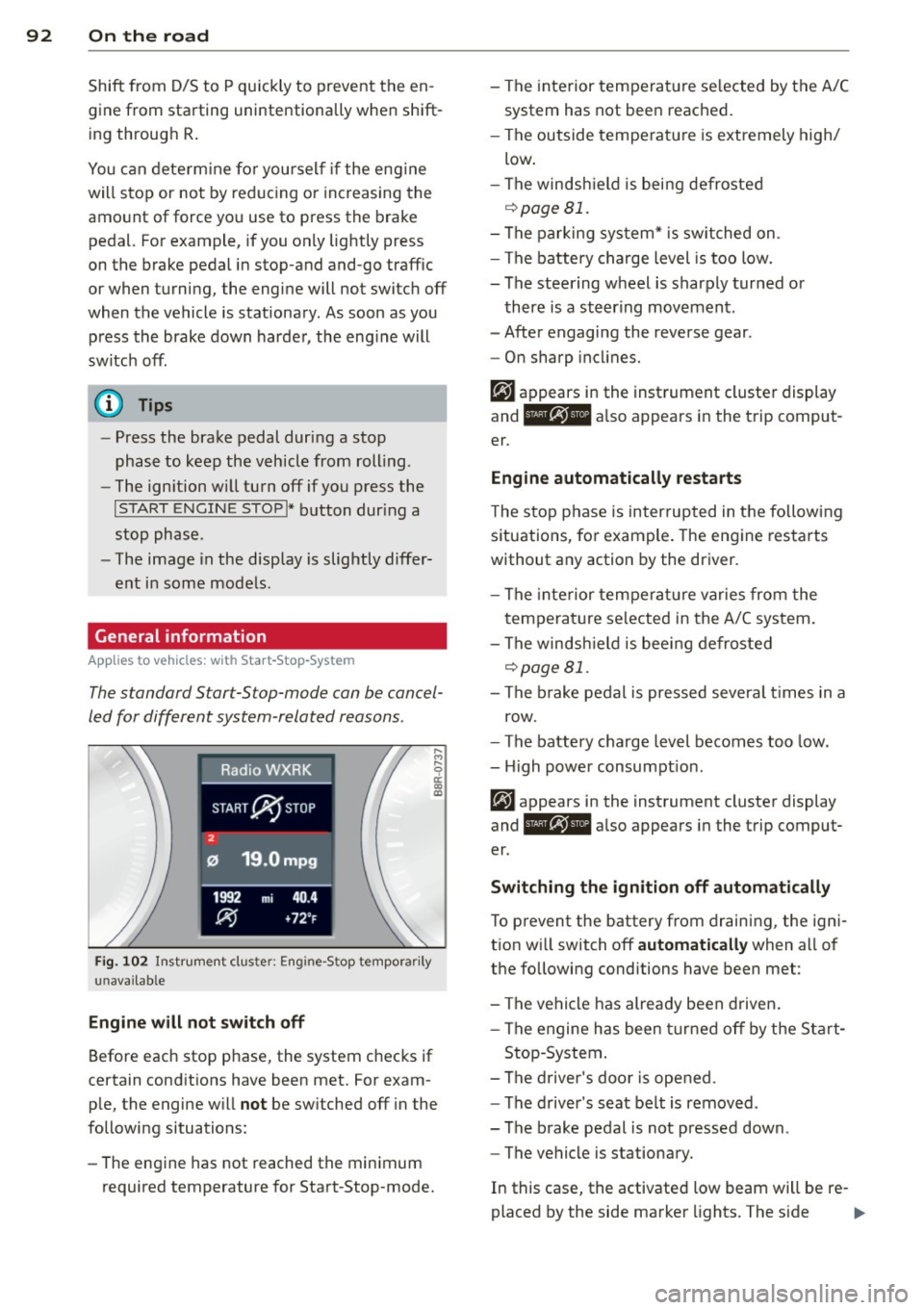
The standard S tar t-S top-mode can be cancel
led for different system -related reasons .
Fig. 1 02 Ins trument clust er: E ngin e-S top tempo rari ly
una va ilabl e
Engine w ill not switch off
Before each stop phase, the system checks if
ce rt a in cond itions have been met. For exam
ple, the engine w ill
not be sw itched off in the
following situations:
- The engine has not reached the min imum
required temperatu re for Start -Stop-mode. - The interior temperat
ure se lected by the A/C
system has not bee n reached.
- The outside tempe rature is extremely high/
low .
- The winds hield is being defroste d
o::::>pageBl.
-The parking sys tem* is switched on .
- The battery charge level is too low.
- The steering wheel is sharply turned or
there is a steer ing movement .
- After engaging the reverse gear .
- On sharp incl ine s.
er .
Eng ine automat ically r estarts
T he stop phase is interrupted in the follow ing
situations, fo r example . The engine restarts
without any action by the driver.
- The interior temperat ure varies from the
temperature se lected in the A/C system .
- The winds hield is bee ing defrosted
o::::> page 81.
- The b rake pedal is pressed severa l times in a
row.
- The battery charge level becomes too low .
- High power consumpt ion.
er .
Switching the ign ition off automatically
To p revent the battery from draining, the ign i
t ion w ill switch off
automatic ally when all of
the following conditions have been met :
- The vehicle has already been d riven .
- The engine has been turned off by the Sta rt-
Stop -System .
- The d river 's doo r is opened .
- The d river 's seat belt is removed .
- The brake pedal is not pressed down .
- The vehicle is stationary.
In this case, the activated low beam will be re-
placed by the side marker lights. The s ide ..,.
Page 97 of 316
(30 km/h to 240 km/h). Settings can each be
adjusted in intervals of
5 mph (10 km/h) .
Cruise control
Switching on
The cruise control sys tem makes it possible to
drive at a constant speed starting at 20 mph
(30 km/h) .
0
f
®t
0
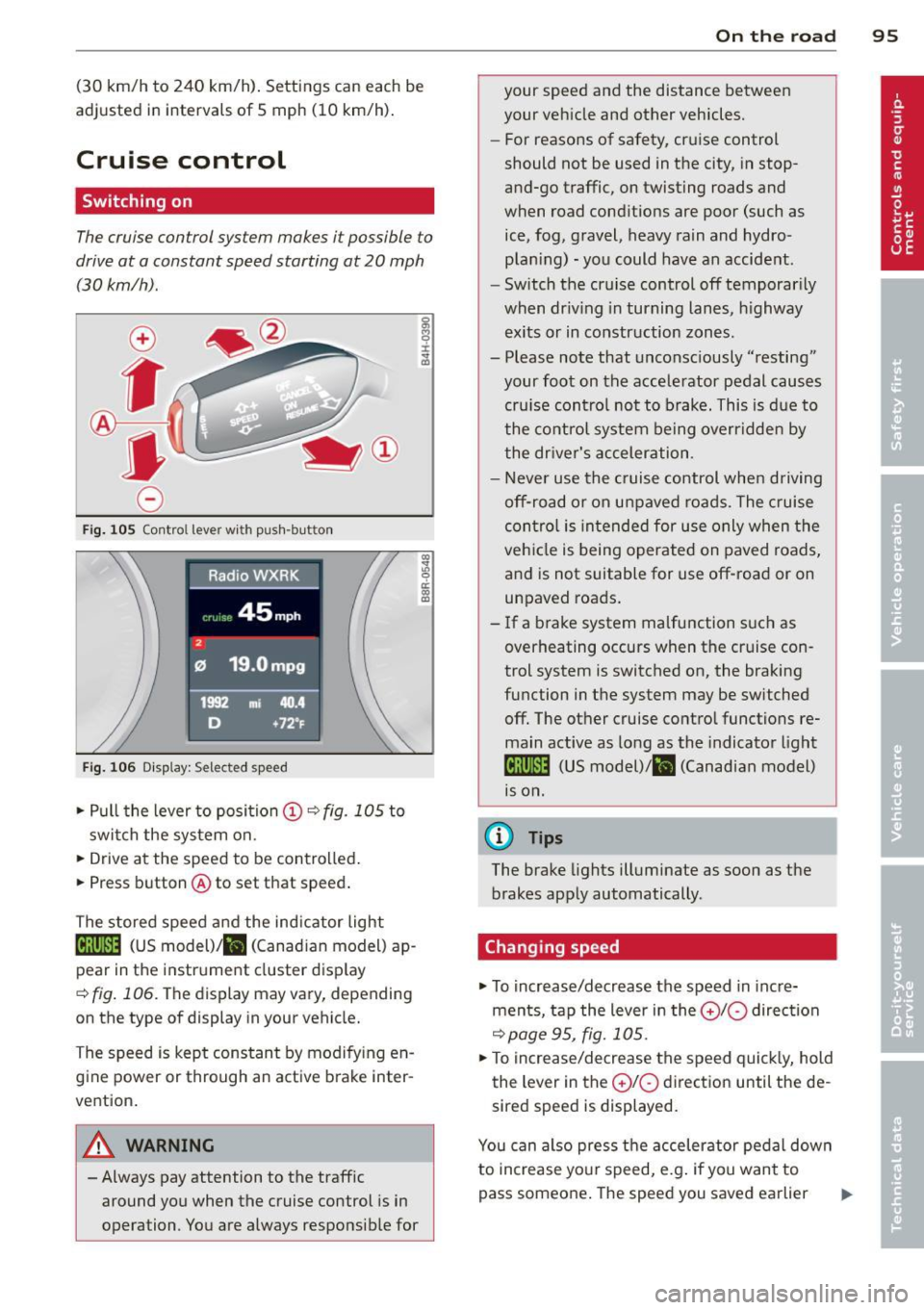
Fig. 10S Contro l lever wi th push -bu tton
Fig. 106 Di splay: Selec ted speed
.. Pull the lever to position (D c:? fig . 105 to
switch the system on .
.. Drive at the speed to be contro lled.
.. Press button @to set that speed .
The stored speed and the ind icator light
Bll!lm (US model)/ il (Canad ian model) ap
pear in the instrument cluster disp lay
<=> fig . 106. The display may vary, depending
on the type of display in your vehicle.
The speed is kept constant by modify ing en
gine power or through an active brake inter
vention.
A WARNING
- Always pay attention to the traffic around you when the cruise control is in
operation . You are always responsible for
c:o ;:g 0 ci: c:o al
On th e road 95
your speed and the distance between
your vehicle and other vehicles.
- For reasons of safety, cruise control
should not be used in the city, in stop
and-go traffic, on twisting roads and
when road conditions are poor (such as
ice, fog, gravel, heavy rain and hydro
plan ing) - you could have an accident.
- Switch the cruise control off temporarily
when dr iv ing in turning lanes, h ighway
exits or in construction zones .
- Please note that unconsciously "resting" your foot on the accelerator pedal causes cru ise contro l not to brake. This is due to
the control system be ing overridden by
the driver's acceleration.
- Never use the cruise control when driving off-road or on unpaved roads. The c ruise
con tro l is intended for use only when the
vehicle is being operated on paved roads,
and is not suitable for use off-road or on
unpaved roads.
- If a brake system malfunction such as overheating occurs when the cruise con
trol system is switched on, the braking
function in the system may be switched off. The other cruise control functions remain active as long as the indicator light
IR;\1 )~14 (US model)/ fil (Canadian model)
1s on .
(D Tips
The brake lights illuminate as soon as the
brakes apply automatically .
Changing speed
.. To increase/decrease the speed in incre
ments, tap the lever in the
0 10 direction
<=> page 95, fig. 105 .
.. To increase/decrease the speed quickly, hold
the lever in the
0 10 direction until the de
sired speed is displayed.
You can also press the accelerator pedal down
to increase your speed, e.g . if you want to
pass someone. The speed you saved earlier
Page 101 of 316
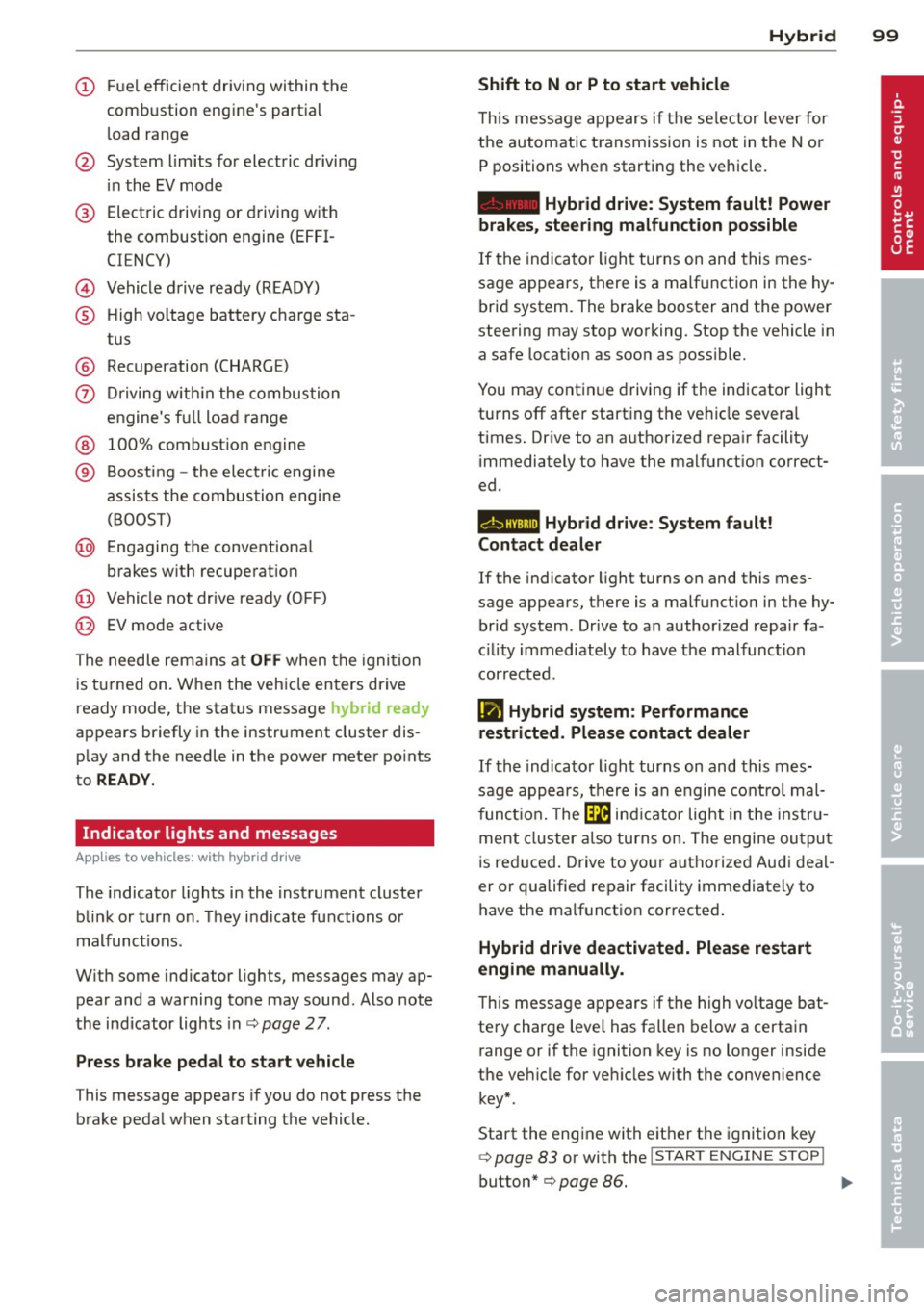
(!) Fuel efficient driv ing within the
comb ustion engine's partia l
l oad range
@ System limits fo r electric d riving
i n the EV mode
® Elect ric driving or d riving w it h
the combustion engine (EFFI -
CI ENCY)
© Vehicle d rive ready (READY)
® H igh vo ltage bat tery c ha rge sta -
tus
® Recuperation (CHARGE)
0 Dr iving w it hi n the combus tion
engine's fu ll loa d range
® 100% combust io n engine
® Boost ing -the elect ric e ngine
assists the combus tion engine
( B OOST)
@ Engaging the conventiona l
brakes w ith recuperat ion
@ Vehicle not drive ready ( OFF)
@ EV mode active
The needle rema ins at
OFF when the igni tion
is tur ned on. W hen the veh icle en ters drive
ready mode, t he stat us message
hybrid ready
ap pears briefly in the instrument cluster dis
p lay and the needle in the power meter po ints
to
READY .
Indicator lights and messages
Applies to vehicles: with hybrid drive
The indicator lights in the instrument cluste r
b link or t urn on . Th ey i ndicate fu nctions o r
malfunct ions .
W ith some ind icator lights, messages may ap
pear and a warning tone may sound. Also note
the indicator lights in c::,;,
pag e 27.
Press brake pedal to start vehicle
This message appea rs if you do not press the
brake peda l when starting the vehicle.
Hybrid 99
Shift to N or P to start vehicle
T his mess age appears if the se lector lever for
the automatic t ransmission is not in t he N or
P positions when starting the vehicle.
- Hybrid drive: System fault! Power
brakes, steering malfunction possible
I f the indica tor ligh t turns on and this mes
sage a ppears, t here is a ma lf u nction in the hy
bri d system. The brake booster and the power
steering may stop working. Stop the vehicle i n
a safe l ocat io n as soo n as poss ible.
You may cont in ue dr iving if the indicator light
turns
off afte r start ing the ve hicle severa l
times. Dr ive to an a uthorized repa ir facility
immediately to have the malfunct ion correct
ed .
EHithjj,j Hybrid drive : Sy stem fault!
Contact dealer
If the indicator light turns on and this mes
sage appears , there is a malfunct ion in the hy
br id system . Drive to a n author ized repair fa
c ili ty immediat ely to hav e th e m alfunc tion
corrected.
Ill Hybrid system: Performance
restricted. Please contact dealer
If th e i ndica to r light turns on and this mes
sag e appea rs, there is an engine contro l ma l
f unct io n .
The @B indi cator light in t he instr u
m ent cluster also tur ns on. The engine ou tput
i s re duced. Drive to yo ur autho rize d Au di dea l
er or qualifie d repair facility immediately to
have the malfunct io n corrected .
Hybrid drive deactivated. Please restart
engine manually.
Th is message ap pears if the high vo ltage bat
te ry charge leve l has fallen below a certa in
range or if the ignition key is no longer inside
the ve hicle for ve hicles with the convenience
key *.
Start the eng ine with e it h er the ignitio n key
¢page 83 or with the !STAR T EN GINE STOPI
button* c::> page 86.
Page 103 of 316
-Offroad mode and hill descent assist must
not be turned on
c::> page 198.
The combust ion eng ine tu rns on and inter
rupts
the enhanced electric d rive mode when
the vehicle is accelerated. The gray indicator
light
l:!I also turns on in the disp lay. The en
hanced electric drive mode resumes automati
cally once acceleration stops.
The enhanced e lectric drive mode is
deactivat
ed
if at least one of the following conditions is
met :
- Th e ign ition is turned off.
- Th e
1.:1"1 button is pressed again.
- The high voltage battery charge level is low .
- The veh icle speed is higher than approxi -
mately 62 mph (100 km/h).
- The
S selector lever position or tiptronic
mode is selected .
- Offroad mode or hill descent assist is
switched on .
T he
ld" I button must be pressed to reactivate
it .
Start-Stop function
The combustion engine is operated on ly as
needed. Generally, the combustion engine
turns off when the vehicle is stationary and
the high voltage battery powers the electrical
vehicle systems.
The purpose of automatica lly shutting the
combustion engine off in hybrid drive mode is
to save fuel. All of the important veh icle sys
tems, such as steering, brakes and the A/C
system, cont inue to remain active. In some
cases, systems may require the combustion
engine to cont inue running when the vehicle
is stationary. When dr iv ing in congested traf
fic for long per iods of time, the combustion
engine w ill cycle on when the vehicle is sta
tionary to keep the high voltage battery
charged.
Gliding
I f the gas pedal is not pressed and the D posi
tion is selected, the combustion engine re-
Hybrid 101
mains turned off up to speeds of approxi
mately 99 mph ( 160 km/h) . Driving conserva
tive ly like this can reduce fuel consumption .
Energy recovery (recuperation)
When braking, the elect ric motor will act as a
generator creating e lectric energy that is then
stored in the high voltage battery. This also
occurs when the ve hicle is coasting or driving
downhi ll. The combustion engine is automati
cally turned off in this case.
The vehicle is braked with the electric motor
by applying ear ly and even pressure to the
brakes and using short pedal movements
¢ page 98, fig. 107 @. By doing this, a large
amount of the kinetic energy is recovered and may be stored as electric energy in the high
voltage battery. During heavy braking, the
convent ional brakes are also act ivated
c::> page 98, fig. 107 @.
The energy recovery is shown in the MMI dis
play
c::> page 104 .
Automatic start of the combustion engine
Various operating conditions cause the com
bust ion engine to start automat ically :
- The high voltage battery charge leve l is low.
- The temperature of the comb ustion engine
is low.
- The temperature of the catalyt ic converter is
low .
- The power output needed for the A/C sys-
t em is high.
- The vehicle speed is hig h.
- The vehicle acceleration is high.
- The inclin e is steep.
- High charge level for the high voltage bat-
tery when coasting. In th is case, the h igh
voltage battery cannot absorb any mo re en
ergy and so the electric motor cannot slow
down the veh icle. The combustion engine
tu rns on (engine brake). In this situation the
h igh voltage battery will show a Ma x charge.
Page 112 of 316

110 Audi adaptive cruise control and braking guard
@ Indicator lights
r• 1-Adaptive cruise control is switched on . No
vehicles are detected up ahead. The stored
speed is maintained.
I-A moving vehicle is detected up ahead.
The adaptive cruise control system regulates
the speed and distance to the moving vehicle
ahead and accelerates/brakes automatically.
I -When automatic braking is not able to
keep enough distance to a previously detected
moving vehicle up ahead, you must take con
trol and brake<=:>
page 112, Request for driver
intervention.
© Display
If adaptive cruise control is not shown in the
display, you can call it up with the
I RESET !
button ¢ page 20.
Based on the symbols in the display, you can
determine if the system is maintaining a dis
tance to the vehicle ahead and what that dis
tance is.
No vehicle -No vehicle ahead was detected.
White vehicle -A vehicle ahead was detected.
Red vehicle -Prompt for the driver to take ac
tion
<=:> page 112.
Both arrows on the scale © indicate the dis
tance to the vehicle ahead. No arrow appears
when the vehicle is on an open road and there
is no object ahead. If an object is detected
ahead, the arrow moves on the scale.
The green zone on the scale shows the stored
distance. For information on changing the
stored distance, refer to <=:>
page 111. If the
distance selected is too close or may soon be
come too close, the arrows move into the red
zone on the scale .
A WARNING
Improper use of the adaptive cruise con
trol can cause collisions, other accidents
and serious personal injuries.
- Pressing the
ISETI button when driving at
speeds below 20 mph (30 km/h), will au- tomatically accelerate the vehicle to
20 mph (30 km/h), which is the mini
mum speed that can be set.
(D Tips
- If you switch the ignition or the adaptive
cruise control off, the set speed is erased
from the system memory.
- The Electronic Stabilization Control (ESC)
is automatically turned on when the
adaptive cruise control is turned on. You
cannot switch the ESC into offroad mode
while the adaptive cruise control is
turned on
<=:> page 198 .
Changing the speed
Applies to veh icles: w ith Audi adaptive cruise co ntro l
0
f
• 0
Fig. 119 Selector lever: ch an gin g the speed
.,. To increase or reduce the speed in incre
ments,
tap the lever up or down .
.,. To increase or reduce the speed quickly,
hold
the lever up or down until the red LED@
reaches the desired speed <=:>
page 109,
fig . 118.
Following any changes, the new stored speed
will be displayed briefly in the display @
<=:>page 109, fig . 118.
Page 115 of 316

Audi adaptive cruise control and braking guard 113
Audi braking guard
Description
Applies to vehicles: with Audi adaptive cruise control
Fig. 123 Instrument cluste r: approac h warn ing
Braking guard uses a radar sensor. It also
functions within the limits of the system
when adaptive cruise control is switched off.
What can braking guard do?
When detected in time, the system can assess
situations when a vehicle ahead brakes sud
denly or if your own vehicle is traveling at a
high speed and approaching a vehicle up
ahead that is moving more slowly . Braking
gua rd does not react if it cannot detect the
situation .
The system advises you of various situations:
- The
distance warning is given if you are too
close to the vehicle ahead for a long time. If
the vehicle ahead brakes sharply, you wi ll
not be able to avoid a collision. The indicator
light
I in the display comes on .
- The
approach warning is given when a de
tected vehicle up ahead in your lane is mov
ing much more slowly than you are or if it
brakes sharply . When this warning is given,
it may only be possible to avoid a collision
by swerving or braking sharply. The indicator
light
I and indicator in the display will warn
you about the danger
c:> fig. 123. You will al
so hear an acoustic signal.
If you do not react fast enough or do not react
at all to the situation, braking guard will inter-
ll Th is is not ava ilable in som e coun tri es.
vene by braking and the message Braking
guard: Activated
will appear.
- If a coll ision is imminent , the system will
first provide an
acute warning by briefly and
sharply applying the brakes.
- If you do not react to the acute warning,
braking guard can brake within the limits of
the system. This reduces the vehicle speed
in the event of a collision.
- At speeds under 20 mph (30 km/h), the sys
tem can initiate a complete deceleration shortly before a collision
ll.
- If the braking guard senses that you are not
braking hard enough when a collision is im
minent, it can increase the braking force .
Which functions can be controlled?
You can switch braking guard and the dis
tance/approach warning on or off in the radio/
MMI* i::!> page 114, Settings in the radio/
MMI *.
A WARNING
--==
Lack of attention can cause collisions, oth-
er accidents and serious personal injuries.
The braking guard is an assist system and
cannot prevent a collision by itself. The
driver must always intervene. The driver is
always respons ible for braking at the cor
r ect time .
- Always pay close attention to traffic,
even when the braking guard is switched
on . Be ready to intervene and be ready to
take comp lete control whenever necessa
ry. Always keep the safe and legal dis
tance between your vehicle and vehicles
up ahead.
- Braking guard works within limits and
will not respond outside the system lim
its, for examp le when approaching a
stopped vehicle or stationary obstacle (end of a traffic jam or vehicle that has
broken down in traff ic).
Page 125 of 316
Automatic
transmission
tiptronic
Introduction
The automatic transmission is controlled elec
tronically. The transmission upshifts or down
shifts automatically depending on which drive
program is selected. The power is transferred
by a torque converter .
When a
mode rate d riv in g s ty le is used, the
transmission selects the most econom ica l
driving mode. It w ill then change up early and
delay the downshifts to g ive better fuel econ
omy.
T he transmission switches to a sporty mode
after a k ick-down or when the driver uses a
spo rty driving sty le characterized by quick ac
celerator pedal movements, heavy accelera
tion, frequent changes in speed and traveling
at the maximum speed.
If desired, the driver can a lso select the gears
manually ( tiptronic mode ) c:> page 12 7.
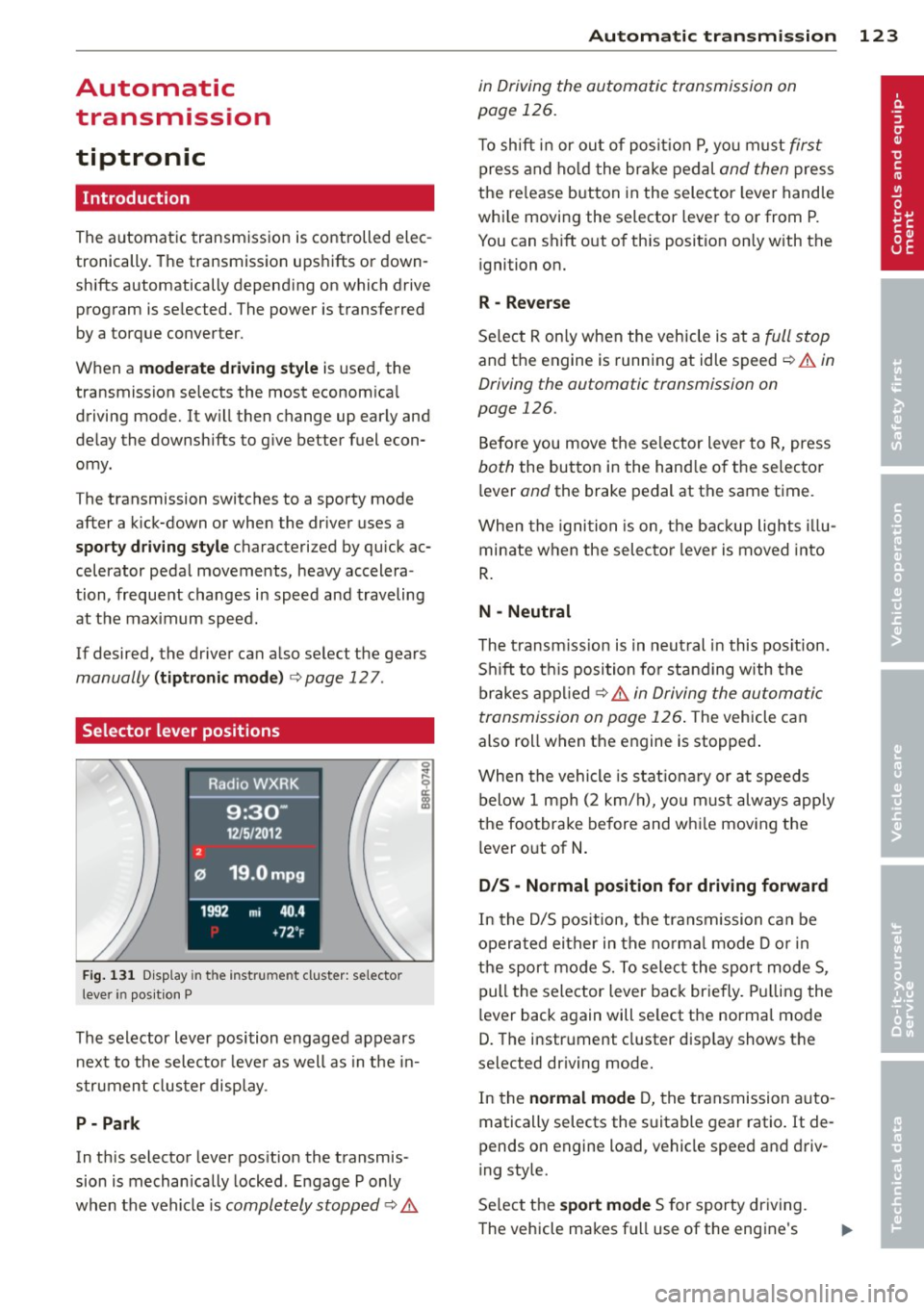
Selector lever positions
Fig . 131 D isp lay in t he i nst ru m en t cluster: selecto r
l ever in pos it ion P
The selector lever position engaged appears
next to the selecto r lever as well as in the in
strument clus ter disp lay.
P- P ark
In th is selector lever pos ition the transmis
sion is mechan ically locked . Engage P only
when the vehicle is
completely stopped c:> 11::..
Automa tic tran sm iss ion 123
in Driving the automatic transmission on
page 126.
T o shift in or out of posit io n P , yo u m ust first
press and ho ld the brake pedal and then press
the re lease button in the selector leve r handle
whi le moving the selector lever to or from P.
You can shift out of th is position only with the
ignition on.
R -Reverse
Se lect R on ly when the vehicle is at a full stop
and the engine is running at idle speed c:> 11::.. in
Driving the automatic transmission on
page 126.
Before you move the se lector lever to R, press
both the button in the hand le o f the selector
lever
and the brake pedal at the same t ime.
When the ignition is on, the backup lights illu
minate when the selecto r lever is moved into
R .
N -Neutral
The t ransm iss ion is in neut ral in this pos ition.
S hi ft to t his position fo r standing with the
brakes appl ied
c:> 11::.. in Driving the automatic
transmission on page 126 .
The vehicle can
also roll when the engine is stopped .
When the vehicle is stat iona ry or at speeds
below 1 mph (2 km/h), yo u m ust always apply
the footbrake before and whi le mov ing the
lever o ut of
N .
D/S -Normal position for driving forward
In the D/S pos ition, the transmission can be
operated either in the no rma l mode D or in
the sport mode S. To select the sport mode S,
pull the selector lever back briefly. Pulling the
lever back again will se lect the normal mode
D. The instrument cluster disp lay shows the
selected driving mode.
In the
normal mode D, the transmission auto
matically selects the s uitable gear ratio. It de
pends on engine load, vehicle speed and driv
ing style.
Se lect the
sport mode S for sporty dr iving .
The vehicle makes fu ll use of the engine's
Page 127 of 316
lever is left in N (Neutral) for more than ap
proximately 1 second, without the brake ped
a l being pressed.
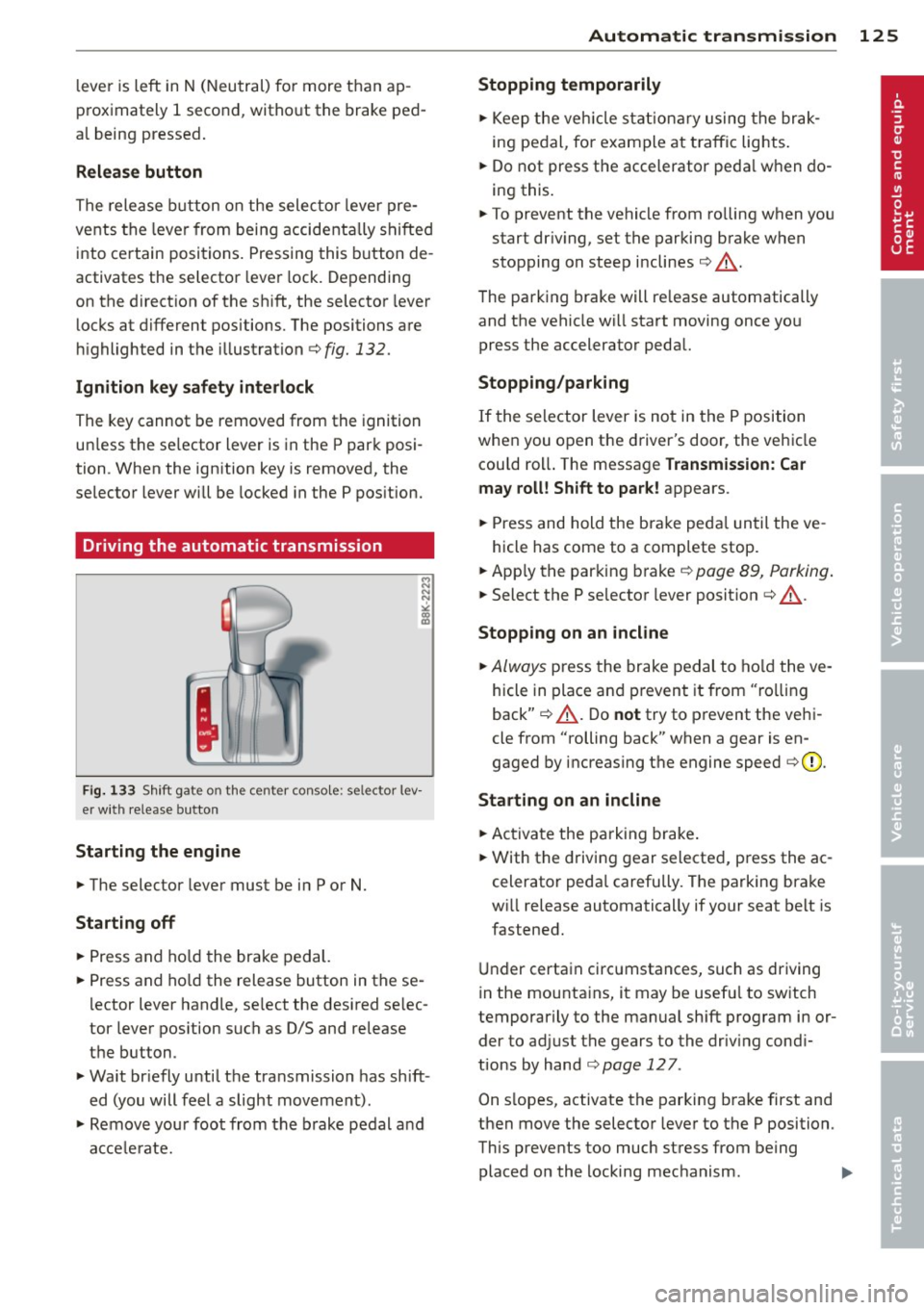
Release button
The release button on the selector lever pre
vents the lever from being accidentally shifted
into certain positions. Pressing this button de
activates the selector lever lock. Depending
on the direction of the shift, the selector lever
locks at different positions. The positions are
highlighted in the illustration ¢
fig. 132.
Ignition key safety interlock
The key cannot be removed from the ignition
un less the se lector lever is in the P park posi
tion . When the ign ition key is removed, the
selector lever will be locked in the P position.
Driving the automatic transmission
Fig. 133 Shift gate on th e center conso le: se lector lev
er with release button
Starting the engine
... The selector lever must be in P or N.
Starting off
... Press and hold the brake pedal.
... Press and hold the release button in these
lector lever handle, select the desired se lec
tor lever position such as
0/5 and release
the button.
... Wait briefly until the transmission has shift
ed (you will feel a slight movement).
... Remove your foot from the brake pedal and
accelerate.
Automatic transmission 125
Stopping temporarily
... Keep the vehicle stationary using the brak
ing pedal, for example at traffic lights .
... Do not press the accelerator pedal when do
ing this.
... To prevent the vehicle from rolling when you
start dr iv ing, set the parking brake when
stopping on steep inclines¢.&_ .
The parking brake will re lease automatically
and the vehicle w ill start moving once you
press the accelerator pedal.
Stopping/parking
If the selector lever is not in the P position
when you open the driver's door, the vehicle
cou ld roll. The message
Transmission: Car
may roll! Shift to park!
appears .
... Press and hold the brake peda l until the ve -
hicle has come to a complete stop .
... App ly the parking brake¢
page 89, Parking .
... Select the P selector lever position ¢ .&_ .
Stopping on an incline
... Always press the brake pedal to hold the ve
hicle in place and prevent it from "rolling
back" ¢.&_ . Do
not try to prevent the vehi
cle from "rolling back" when a gear is en
gaged by increasing the engine speed ¢0.
Starting on an incline
... Activate the parking brake.
... With the driving gear selected, press the ac
celerator pedal carefully . The parking brake
wi ll release automatically if your seat belt is
fastened .
Under certain circumstances, such as driving
in the mounta ins, it may be usefu l to sw itch
temporarily to the manual sh ift program in or
der to adjust the gears to the driv ing cond i
tions by hand
¢ page 127 .
On s lopes, activate the parking brake first and
then move the selector lever to the P position.
This prevents too much stress from being
placed on the locking mechanism . .,,.
Page 130 of 316
![AUDI Q5 2014 Owners Manual 128 Automatic transmission
Transmission malfunction
[O] Transmission: Press brake pedal and se·
lect g ear again.
Press the brake pedal and se lect t he des ired
selecto r lever posit](/img/6/57636/w960_57636-129.png "AUDI Q5 2014 Owners Manual 128 Automatic transmission
Transmission malfunction
[O] Transmission: Press brake pedal and se·
lect g ear again.
Press the brake pedal and se lect t he des ired
selecto r lever posit")
128 Automatic transmission
Transmission malfunction
[O] Transmission: Press brake pedal and se·
lect g ear again.
Press the brake pedal and se lect t he des ired
selecto r lever posit io n again . Yo u can then
continue dr iving .
[O] Transmission overheating: Please drive
conservatively.
The transmission temperature has increased
significantly d ue to the sporty driving ma nner.
Drive in a less sporty manne r unt il the tem
pe rat ure retu rns to the norma l range a nd the
i ndicator light switch es of.
[O] Transmission malfunct ion: You can con
tinue driving
There is a system ma lf u nct ion in the transmis
sion. You may continue driving. Drive to your
authorized Audi dealer or qualified repair fa
cility soon to have the malfunction corrected .
[O] Transmission malfunction: Limited driv
ing funct ionality
There is a sys tem ma lf u nction in t he transmis
sion. The transmission is sw itchi ng to emer
gency mode. Th is mode only sh ifts into cer
tain gea rs or will no lo nger shift at a ll. The en
g ine may stall . Drive to your auth orized A udi
deale r or qualified repair facility immed iately
to have the malf unction co rrec ted.
[O] T ransmission malfunction: Stop vehicle
and shift to park .
Do not continue d rivi ng . Select the P se lect or
l ever position and see yo ur authorized Aud i
dea ler or qualified repair facility for assis
tance .
(D Note
If the transmiss ion sw itches to emergency
mode, you sho uld take the vehicle to an
author ized Audi dealers hip as soon as p os
sibl e to have the cond ition co rrected.
Selector lever emergency release
If the vehicle 's power supply fails , th e selec
tor lever can be released in an emergency.
Fi g. 136 Fro nt center co nsole: Removing t he as htray
i nsert
Fig. 137 Selec tor lever e merg ency release
.. To access the emergency re lease mecha
nism, remove t he ashtray insert ® using the
release sw itch ®
c> fig. 136 .
.. Loosen and remove the cap in the asht ray
mou nt
¢ fig . 137 .
.. You n ow have access to a pin. U sing a s crew
d river or sim ilar obj ect , pre ss th e p in do wn
and hold i t in t hat p osition .
.. Now press t he re lease button and move the
selecto r lever to t he N posit io n.
T he sele ctor leve r ca n on ly be moved from the
P position i f the key is in the lock and the igni
t ion is switc hed on . If the power supply fails
(for example, the battery is discharged) and
the vehicle m ust be pushed or towed, move
t h e selecto r lever to the N posit ion first usi ng
t h e emerge ncy re lease.
Page 137 of 316
Homelink
Universal remote
control
Description
Applies to vehicles: with Home link
The HomeLink universal remote control can
be programmed with the remote control for
devices that are already present.
With Home Link, you can control devices such
as the garage door, security systems, house
lights , etc. comfortably from the inside of you
vehicle.
Homelink makes it possible for you to rep lace
three different remote controls from dev ices
in your home with one universal remote. This
feature works for most garage door and exte
rior door motor signals. Programming the in
dividual remote control for your remote con
trol takes place near the center of the radiator
grille. There is a control module attached at
this location .
A one-time programming of the sensor must be performed before you are able to use sys
tems with Homelink. If the system does not activate after performing the one-time pro
gramming, check whether the system uses a rolling code¢
page 138 for vehicles without
the MMI*.
& WARNING
-
- Never use the Homelink transmitter
with any garage door opener that does
have not the safety stop and reverse fea
ture as requ ired by federa l safety stand
ards. This includes any garage door open
er model manufactured before April 1,
1982.
-A garage door opener which cannot de
tect an object, signaling the door to stop
and reverse does not meet current feder
al safety standards . Using a garage door
opener without these features increases
risk of serious injury or death.
Homelink 135
- For safety reasons never release the
parking brake or start the engine while
anyone is standing in front of the vehicle .
- A garage door or an estate gate may
sometimes be set in motion when the
Homelink remote control is being pro
grammed. If the device is repeatedly ac
tivated, th is can overstrain motor and
damage its electrical components - an
overheated mo to r i s a fire hazard!
- To avoid possib le injuries or property
damage, please always make abso lutely
certa in that no persons or objects are lo
cated in the range of motion of any
equipment being operated.
(0 Tips
- If you would like more information on
Homelink, where to purchase the Home
Link compat ible products, or would like
to purchase the Home Link Home Light
ing Package, please call toll-free :
1-800-355-3515.
-For Declaration of Compliance to United
States FCC and Industry Canada regula
tions
¢ page 296.
-For security reasons, we recommend that
you clear the programmed buttons be
fore selling the vehicle.
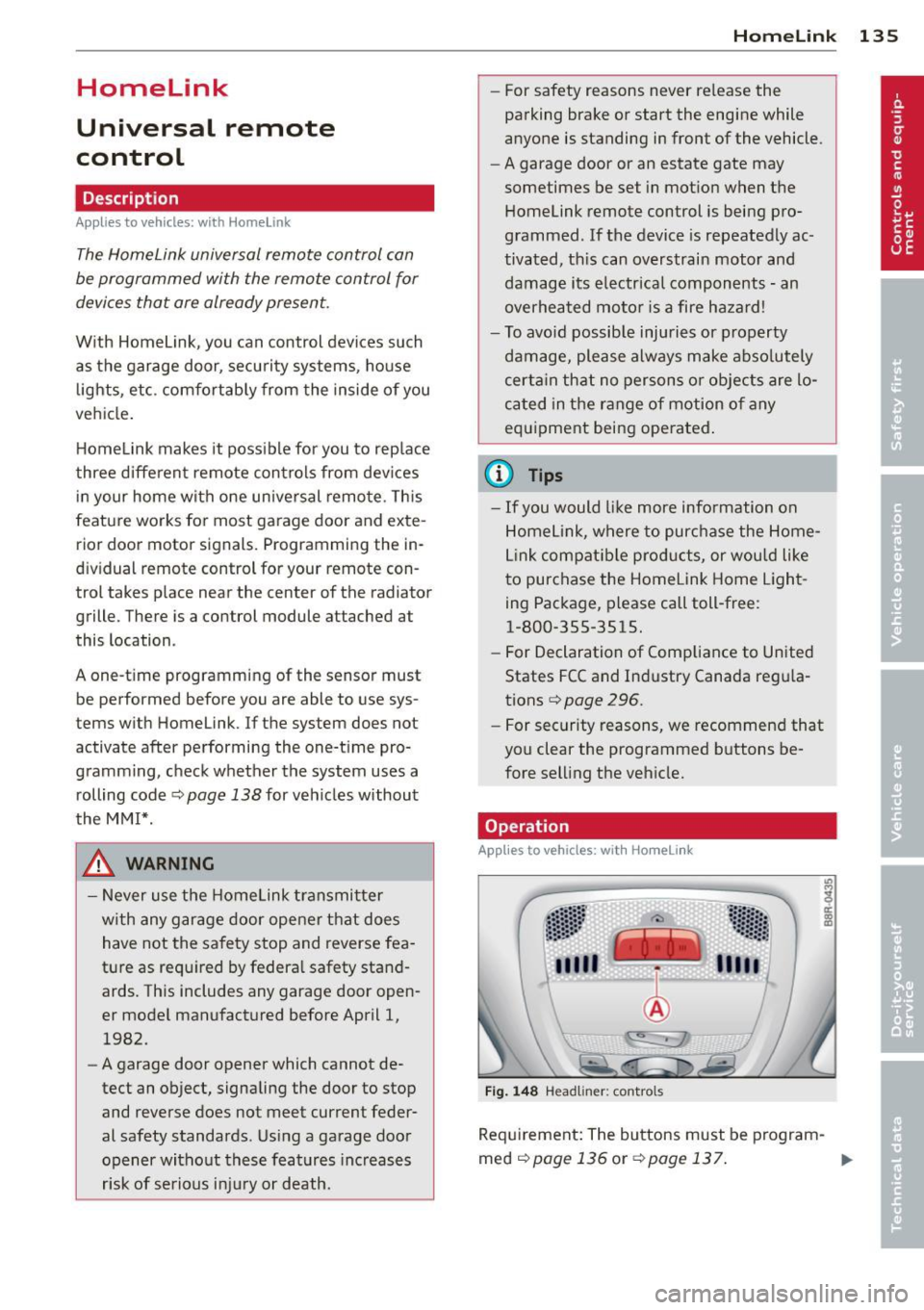
Operation
App lies to vehicles : with Homeli nk
Fig. 148 Headl iner: controls
Req uirement: The buttons must be program-
med
<:!)page 136 or ¢page 137. ..,_