brake light AUDI Q5 2014 User Guide
[x] Cancel search | Manufacturer: AUDI, Model Year: 2014, Model line: Q5, Model: AUDI Q5 2014Pages: 316, PDF Size: 78.41 MB
Page 35 of 316
-Ze Key not in vehicle
Applies to vehicles: with Convenience key
l!I Is the key in the vehicle?
This reminder appears along with the l!I sym
bol if the master key is removed from the ve
hicle with the engine running. It is intended
to remind you (e.g. when changing drivers)
not to continue the journey without the mas
ter key.
If the master key is no longer in the vehicle,
you cannot switch off the ignition after stop
p in g the engine and you also cannot start the
engine again . You also cannot lock the vehicle
from the outside.
@9 Light/rain sensor defective
El Automatic headlights / automatic wipers
defective
If the symbol illuminates, the light sensor has
failed. For safety reasons the low beams are
turned on permanently with the switch in
AU
T O . However, you can continue to turn the
lights on and off using the lig ht switch. In the
case of a defect in the rain sensor, the w ind
shield w iper lever functions are st ill available.
H ave the light/ra in sensor checked as soon as
possible by an autho rized Aud i deale r.
(0) Worn brake pads
li1 Brake pads!
If the warn ing light illuminates, immediately
contact your authorized Audi dealer or quali
fied workshop to have all bra ke pads inspect
ed. O n USA models the warning
light lil
comes on together with the warning light
1111. Both sets of brake pads on an axle
must always be replaced at the same time .
A WARNING
Driving with bad brakes can cause a colli
sion and serious personal injury.
1) - : USA mod els only
-
Driver information display 33
-If the warning light li1 and the warning
light
llll1l with the message Brake
pads!
comes on in the instrument cluster
disp lay, immediately contact your au
thorized Audi dealer or qualified work
shop to have all brake pads checked or
replaced if necessary.
~!}010$ Defective light bulb warning
f:;:1-If the indicat or light turns on, a bulb has
fa iled. The message indicates the location of
the bulb.
II-If a front fog lamp has failed, the indica
tor light tu rns on to indica te the locat ion on
the vehicle.
0 -If a rear fog lamp has failed, the indica
tor light turns on to indicate the location on
the vehicl e.
Vehicle lights: System fault!
If the message appears, there is a malfunc
tion in the headlights or light switch.
Drive to your authorized A udi dealer immedi
ate ly to have the malfunction corrected.
A WARNING
- Light bulbs are press urized and could ex
plode wh ile they are being changed caus
ing serious personal injury.
- Work with due care when handling the
high-voltage section of gas discharge
(xenon) lights*. Failure to do so could re
sult in death or serious injury .
(D Tips
Have the bu lb replaced or the connect ion
repaired by your authorized Audi Service
department .
c> Windshield washer fluid level too
low
- Please refill washer fluid
Page 63 of 316
Seats and storage
General recommen
dations
Why is your seat adjustment so important?
The safety belts and the airbag system can
only provide maximum protection if the front
seats are correctly adjusted.
There are various ways of adjusting the front
seats to provide safe and comfortable support
for the driver and the front passenger. Adjust
your seat properly so that :
- you can easily and quick ly reach all the
switches and controls in the instrument
panel
- your body is properly supported thus reduc ing physical stress and fatigue
- the safety belts and airbag system can offe r
maximum protection
¢ page 157.
In the following sections, you will see exactly
how you can best adjust your seats .
There are special regulations and instructions
for installing a child safety seat on the front passenger's seat. Always follow the informa
tion regard ing child safety provided in
¢ page 178, Child Safety.
A WARNING
Incorrect seating position of the driver and
all other passengers can result in serious
personal injury.
- Always keep your feet on the f loor when
the vehicle is in motion -never p ut your
feet on top of the instrument panel, out
of the w indow or on top of the seat cush
ion. Th is applies especially to the passen
gers . If your seating position is incorrect,
you increase the r isk of injury in the case
of sudden braking or an acc ident. If the
airbag inflates and the seating position
is incorrect, this could result in persona l
injury or even death.
- It is important for bo th the driver and
front passenger to keep a distance of a t
Seat s an d sto rage 61
least 10 inches (25 cm) between them
selves and the steering wheel and/or in
strument panel. If you're s itting any
closer than th is, the airbag system can
not protect you properly. In addition, the
front seats and head restraints must be
adjusted to your body height so that t hey
can give you maximum protect ion.
- Always try to keep as much distance as
possible between yourself and the s teer
ing wheel o r instrument pane l.
- Do not adjust the driver's or front pas
senger's seat whi le the vehicle is moving.
Your sea t may move unexpected ly, caus
ing sudden loss of vehicle cont rol and
personal injury . If you adjust yo ur seat
while the veh icle is moving, yo u are out
of posit ion.
Driver's seat
The correct seat position is important for safe
and relaxed driving.
We recommend that you adjus t the dr iver's
seat in the fo llowing manner:
.,. Adjust the seat in fore and aft direction so
that you can easily push the peda ls to the
floor wh ile keeping your knees s lightly bent
i:::> A in Why is your seat adjustment so im
portant? on page 61.
.,. Adjust the seatback so that when you sit
w ith your back against the seatback, you can
still grasp the top of the steering wheel.
.,. Adjust the head restraint so the upper edge
is as even as possible with the top of your
head . If that is not poss ible , try to adjust
the head res traint so that it is as close to
this pos ition as possib le
i:::> page 65.
A WARNING
Never place any objects in the dr iver's foot
well. An object could get into the pedal
area and interfere with pedal funct ion . In
case of sudden braking or an acc ident, you
wo uld not be able to brake or accelerate.
Page 78 of 316
76 Seats and storage
The 12-volt sockets can be used for electrical
accessories. The power input must not exceed
120 watts.
There is an additional 12-volt socket in the
center console. Before you purchase any accessories, always
read and follow the information in
Q page 295, Additional accessories and parts
replacement.
A WARNING
The power outlets and therefore the elec
trical accessories connected to them oper ate only with the ignition on. Improper use
of the outlets or of electrical accessories
can lead to serious injuries or cause a fire.
For this reason, children should never be
left unattended in the vehicle -they could
be injured!
(D Note
To avoid damaging the socket, only use
plugs that fit properly .
{D) Tips
When the engine is off and accessories are
still plugged in and are on, the vehicle bat
tery can still be drained .
Storage
General overview
There are numerous places to store items in
your vehicle.
Glove compar tment Q page 76
Cooling box in glove com part-Qpage 77
ment
Storage compartment in the
Qpage 77
roof
Coat hooks
Qpage 77
Storage in the door panels
Storage net in footwell
-
Storage net in the front seat- backs
Storage net in luggage com- partment
A WARNING
--
- Always remove objects from the instru
ment panel. Any items not put away
could slide around inside the vehicle
while driving or when accelerating or
when applying the brakes or when driv ing around a corner.
- When you are driving make sure that
anything you may have placed in the cen
ter console or other storage locations
cannot fall out into the footwells. In case
of sudden braking you would not be able
to brake or accelerate.
- Any pieces of clothing that you have
hung up must not interfere with the driv
er's view. The coat hooks are designed
only for lightweight clothing. Never hang
any clothing with hard, pointed or heavy
objects in the pockets on the coat hooks .
During sudden braking or in an accident -
especially if the airbag is deployed -
these objects could injure any passen
gers inside the vehicle.
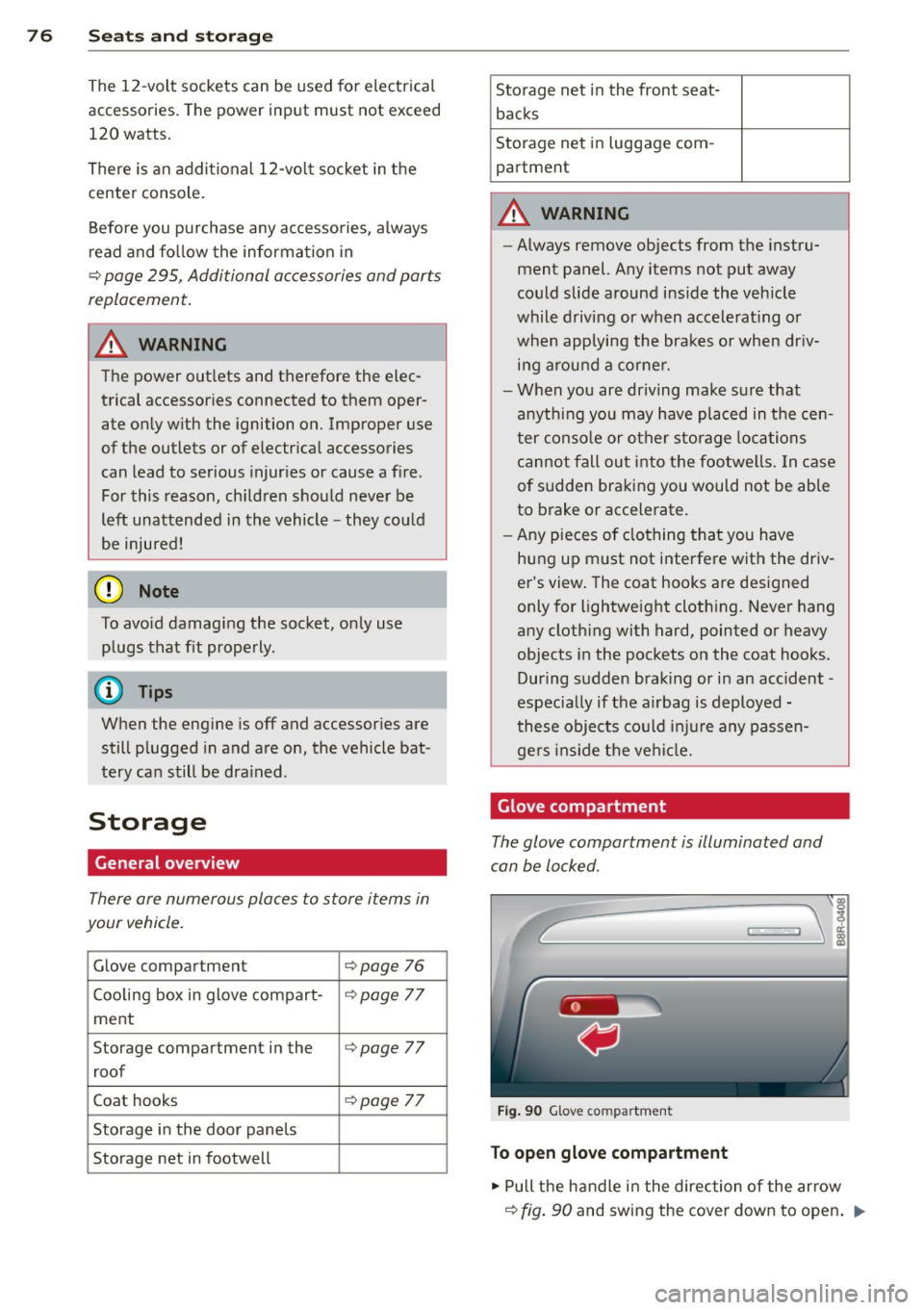
Glove compartment
The glove compartment is illuminated and
can be locked .
Fig. 90 Glove co mpartm ent
To open glove compartment
.,. Pull the handle in the direction of the arrow
Q fig. 90 and swing the cover down to open . ..,.
Page 86 of 316
84 On th e road
• Press the key¢ fig. 96 -the engine will
start.
• It is possible that there w ill be a slight delay
when start ing the engine for diesel vehicles*
in colder temperatures . Therefore, you must
hold the brake pedal down until the eng ine
starts. The indicator lamp
m i llum inates
when the eng ine is preheated .
Switching the ignition on /off
If you would like to switch the ignition on
without s tarting the engine, follow these
steps :
• Insert the key into the ignition lock.
• Press the key briefly
without press the brake
pedal.
• To switch the ignition off, press the key
again .
Diesel vehicles* are preheated while the igni
tion is sw itched on .
When starting the engine, major e lectrica l
loads are switched off temporarily .
You can on ly remove the key with the ignition
switched off. To do this, you have to press on
the key again.
I f the engine should not sta rt immediately,
the starting process is automatically stopped
after a short time. Repeat starting procedure .
Start-Stop-System*:
Note the information on¢ page 91, Start
Stop-System.
.&_ WARNING
- Never allow the engine to run in confined
spaces -danger of asphyxiation.
- Never remove the ign ition key from the
ignition lock whi le the vehicle is moving .
Otherwise, the stee ring lock co uld sud
denly engage and you would not be able
to steer the vehicle.
- Always take the key with yo u whenever
you leave your vehicle . Otherwise , the
engine could be started or e lectr ica l
equipment such as the power w indows could be operated
. This can lead to seri
ous injury.
- Never leave children or persons req uiring
assistance unattended in the vehicle. The
doors can be locked using the remote
transmitter, preventing people from es caping from the veh icle on their own in
the event of a n emergency. Depending
on the time of year, peop le inside the ve
h icle can be exposed to very high or very
low temperatu res.
0 Note
Avoid high eng ine rpm, full th rottle and
heavy engine loads unti l the engine has
r eached operating tempe rat ure -othe r
wise you ris k eng ine damage.
@) For the sake of the environment
D o not let the engine run wh ile pa rked to
warm up. Begin dr iving immediately . Thi s
r educes u nnecessary emissions.
(D Tips
- If the key cannot be removed from the
ign ition lock, yo u have to pull t he me
chanical key o ut o f the mas ter key in or
der to be able to lock the vehicle
<:!>page 38.
-Aft er s tarting a col d engine, there may
be a brief period of inc reased noise be
cause the oil pressure must first bui ld up
in the hydraulic valve ad justers . This is
n ormal and not a cause for concern.
- If you leave the vehicle with the ignition
switched on, the ignit ion w ill switch off
after a certain per iod of t ime. Please
note that electrical equ ipment such as
exterior lights will sw itch off as well
when that happens .
Page 87 of 316
Starting the vehicle with the emergency
key
You can use the emergency key as an ignition
key in an emergency.
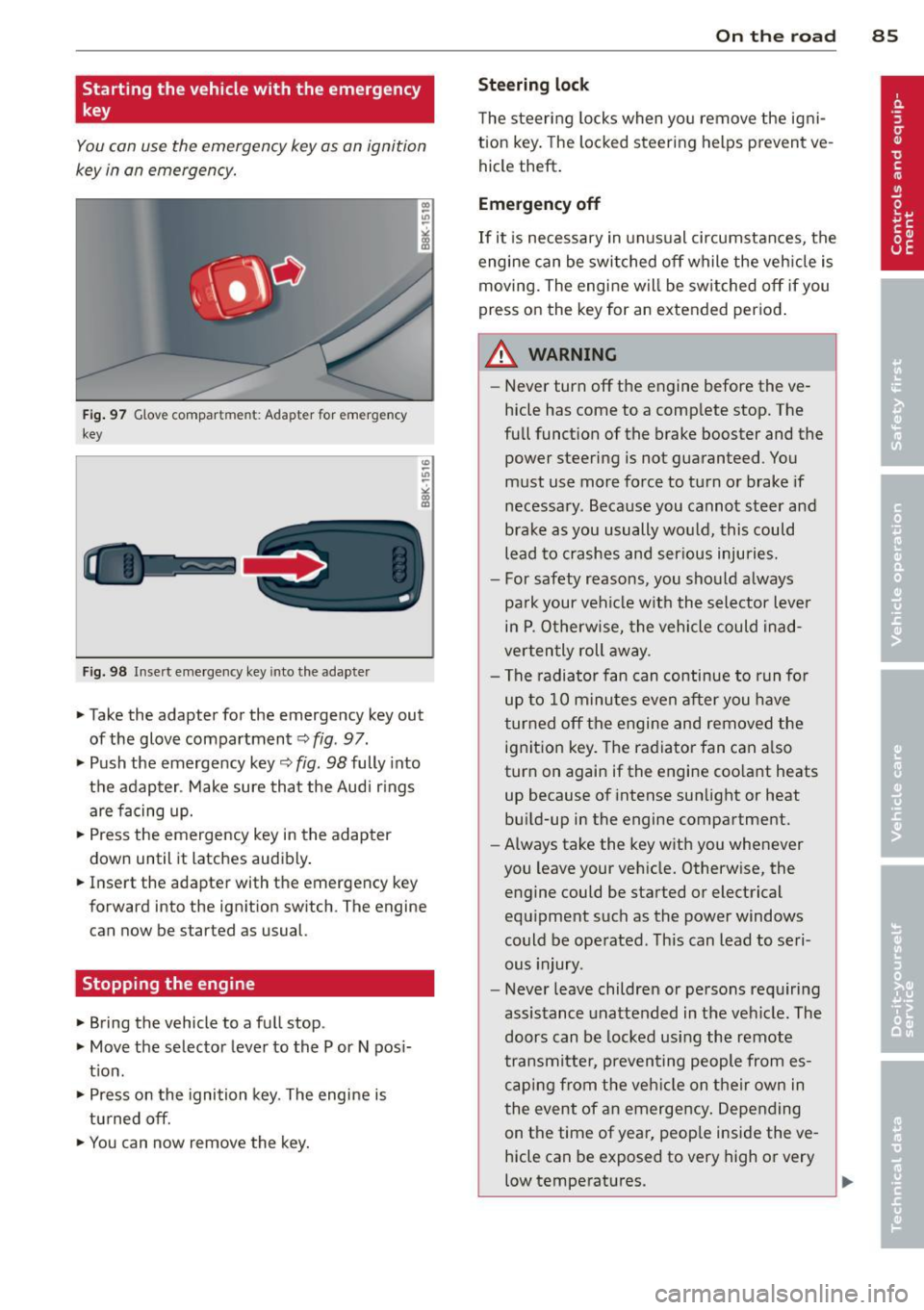
Fig . 97 G love compar tme nt: Adapter for emergency
key
Fig. 98 Inse rt emergency key into the adapter
~ Take the adapter for the emergency key out
of the glove compartment
c:> fig . 97.
~ Push the emergency key c:> fig. 98 fully into
the adapter . Make sure that the Audi r ings
are facing up.
~ Press the emergency key in the adapter
down until it latches audibly .
~ Insert the adapter with the emergency key
forward into the ignition switch . The engine
can now be started as usual.
Stopping the engine
~ Bring the vehicle to a full stop .
~ Move the selector lever to the P or N pos i
t ion .
~ Press on the ignition key. The engine is
turned off.
~ You can now remove the key.
On th e road 8 5
Steering lock
The steering locks when yo u remove the ig ni
tion key. The lo cked steering helps prevent ve
hicle theft .
Emergency off
If it is necessary in unusual circumstances, the
engine can be switched off while the veh icle is
moving. The engine will be switched off if you
press on the key for an extended period .
A WARNING
-Never turn off the engine before the ve
hicle has come to a comp lete stop. The
full funct ion of the brake booster and the
power steering is not guaranteed . You
must use more force to turn or brake if
necessary. Because you cannot steer and
brake as you usually would, this could
lead to crashes and ser ious injuries.
- For safety reasons, you should always
pa rk your vehicle with the selector lever
in P . Otherwise, the vehicle could inad
verten tly roll away.
- The radiator fan can continue to run fo r
up to 10 minutes even after you have
turned off the engine and removed the ignition key. The radiator fan can a lso
turn on again if the engine coo lant heats
up because of intense sunlight or heat
bu ild-up in the engine compartment.
- Always take the key with you whenever
you leave your vehicle. Otherw ise, the
engine could be started or electrical
equipment such as the power windows
could be operated . This can lead to seri
ous injury.
- Never leave children or persons requiring
assistance unattended in the vehicle. The
doors can be locked using the remote
transmitter, preven ting people from es
caping from the veh icle on their own in
the event of an emergency . Depending
on the time of year, peop le inside the ve
hicle can be exposed to very high or very
low temperatures.
Page 88 of 316
86 On the road
(D Note
If the engine has been under heavy load
for an extended period, heat builds up in
the engine compartment after the engine
is switched off -there is a risk of damaging
the engine. Allow the engine to run at idle
for about two minutes before switching it
off.
Convenience key
Starting the engine
Applies to vehicles: with Conve nie nce key
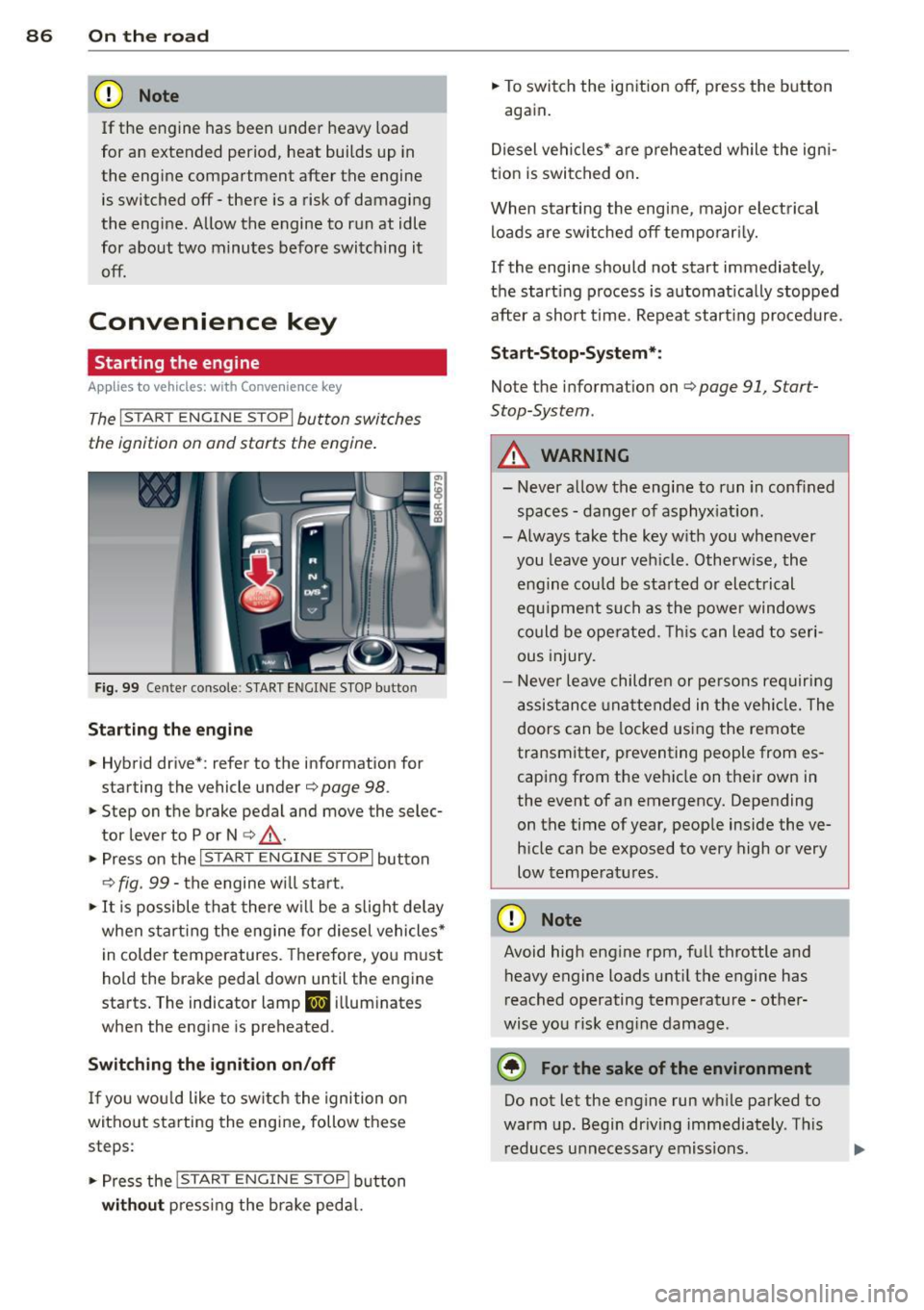
The I STAR T ENGINE S TOP! button switches
the ignition on and starts the engine .
Fig. 99 Center console: S TART ENGINE STOP butto n
Starting the engine
.. Hybrid drive*: refer to the information for
starting the vehicle under
c;, page 98 .
.. Step on the brake pedal and move the selec
tor lever to P or N
c;, ,& .
.. Press on the l ~s =T~ A_R_ T_ E_ N_ G _ I N_E_S_T_O_P~I button
¢ fig . 99 -the engine w ill start .
.. It is possible that there wi ll be a slight delay
when start ing the engine for diesel vehicles*
in colder temperatures. Therefore, yo u m ust
hold the brake pedal down until the engine
starts . The indicator lamp
lml illuminates
when the engine is preheated .
Switching the ignition on/off
If you wou ld like to switch the ignition o n
without starting the engine, follow these
steps :
.. Press the
I STAR T ENGINE S TOP! button
without pressing the brake peda l. ..
To switch the ignition off, press the button
again.
Diesel vehicles* are preheated while the ign i
tion is switched on.
When starting the engine, major elect rical
loads are switched off temporari ly.
If the engine should not start immediately,
the start ing process is automat ica lly stopped
after a short t ime. Repeat start ing procedure.
Sta rt-Stop-System*:
Note the information on c;, page 91, Start
Stop-System.
A WARNING
-
- Never allow the engine to run in confined
spaces -danger of asphyxiat ion.
- Always take the key w ith you whenever
you leave your veh icle. Otherw ise, the
engine could be sta rted or electrical
equ ipment su ch as the power windows
could be operated. This can lead to seri
ous injury.
- Never leave children or persons requiring
assistance unattended in the vehicle. The
doors can be locked using the remote
transmitter, preventing people from es
caping from the vehicle on their own in
the event of an emergency. Depending
on the time of year, people inside the ve
h icle can be exposed to very high or very
low temperatures.
(D Note
Avoid high engine rpm, full throttle and
heavy engine loads until the engine has
reached operating temperature -other
wise you risk eng ine damage .
@) For the sake of the environment
Do not let the engine run wh ile parked to
warm up. Begin driving immediately . This
reduces unnecessary emissions .
Page 89 of 316
@ Tips
-After starting a cold engine, there may
be a brief period of increased noise be
cause the o il pressure m ust first build up
i n the hydraulic valve adjusters. T his is
norma l and not a cause for concern.
- If you leave the vehicle with the ignition
switched on, the ignition will switch off
after a certain period of time. Please
note that electr ical equipment such as
exter ior lights wi ll switch off as well
when that happens.
Switching engine off
A ppl ies to vehicles: with Convenie nce key
.,. Bring your vehicle to a complete stop.
.,. Move the selector lever to the P or N posi
tion.
.,. Press the
!START ENGINE STOPI button
c> page 86, fig. 99.
St eering lock
The stee ring locks when you turn the engine
off using the
I START ENGINE STOP I button
and open the driver's door . The locked steer
ing helps prevent vehicle theft.
Emergency off
If necessary, the eng ine can be sw itched off
with the selector leve r in the R or D/S posi
tions . To do so, step on the brake peda l and
press and hold the
I START ENGINE STOP I but
ton. The vehicle speed must be less than 6 mph/ 10 km/h.
A WARNING
- Never turn off the eng ine before the ve
hicle has come to a complete stop. The
full function of the brake booste r and the
powe r steering is not guara nteed. You
must use mo re fo rce to turn or b rake if
necessary. Because yo u cannot steer and
brake as you usua lly would, this could
lead to c rashes and serious injur ies.
- F or safety reasons, you should always
par k your vehicle with the se lector lever
On th e ro ad 87
in P. Otherwise, the vehicle could inad
vertently roll away.
- The radiator fan can continue to run for
up to 10 minutes even after you have
turned off the engine and removed the
ignit ion key. The radiator fan can a lso
turn on again if the engine coo lant heats
up because of intense sunlight or heat
bui ld-up in the engine compa rtment.
- Always take the key w ith you whenever
you leave your veh icle . Otherwise, the
eng ine could be sta rted or elect rical
equ ipme nt such as the power windows
co uld be ope rated. This can lead to seri
ous injury.
- Never leave children or persons req uiring
assistance unattended in the vehi cle. The
doors can be locked using the remote
transmitter, preventing people from es
caping from the veh icle on their own in
the event of an emergency. Depending
on the time of year, peop le inside the ve
hicle can be exposed to very high or very
low tempe ratu res.
(D Note
If the engine has been under heavy load
for an extended period, heat bu ilds up in
the e ng ine compartment after the engine
i s sw itched off - there is a r isk of damag ing
the e ngine. A llow the engi ne to run at id le
for abo ut two minute s before switching it
off.
Driver messages
I g nition i s on
This message appears and a warning tone
sounds if you open the driver's door when the
ignition is sw itched on.
No key identified
This message appears when the
I S TART E NGINE STOPI* button is pressed if
there is no master key ins ide the veh icle or if
the system does not recognize it . For exam
ple, the master key cannot be recognized if it
is covered by an object (e .g . aluminum brief ..,.
Page 90 of 316
88 On the road
case) which screens the radio sig nal. Electron
ic devices such as ce ll phones can also inter
fere with the rad io signa l.
Press brake pedal to start engine
This message appea rs if you do not press the
brake pedal to start the engine.
Shift to N or P to start engine
This message appears when attempting to
start the engine if the selector lever for the
automatic transmission is not in the P or N
position . The engine can o nly be started w ith
the selector in these pos itions.
I!) Is the key in the vehicle?
This message appears in a veh icle with Con
venience key* if the master key is removed
from the vehicle w ith the engine running . If
the master key is no longer in the vehicle, you
cannot switch on the ignition after stopping
the eng ine and you also cannot start the en
g in e again. Moreover, you cannot lock the ve
hicle from the o utside with the key .
Shift to P otherwise vehicle can roll away.
Doors do not lock if lever is not in P.
This message appears fo r safety reasons
a long w ith a warning signa l. It appears if the
selector lever for the automatic transm iss ion
is not in the P position when switch ing off the
ig nit ion. Move the selector lever to the P pos i
tion, otherwise the veh icle is not sec ured
against rolling away. You also cannot lock the
vehi cle using the locking button* on the door
handle or using the remote key.
Turn off ignition before leaving car
This message appears if the driver's door is
opened while the ignition is switched on . Al
ways sw itch off the ignition if you are leaving
the vehicl e. See also
~ page 92 .
Shift to P and turn off ignition, otherwise ve
hicle can roll away
This message appears if the driver's door is
opened while the ignition is switched on and
the selector lever is not in the P position. Shift
the selector lever into the P position and switch off the
ignition when you exit the vehi
cle. Otherwise the vehicle could roll . See also
~ page 92.
Convenience key defective! Use ignition lock
This message appears if the engine must be
sta rted o r stopped using the ign ition key and
not the
I START ENGINE STOP I* button .
Electromechanical
parking brake
' Operation
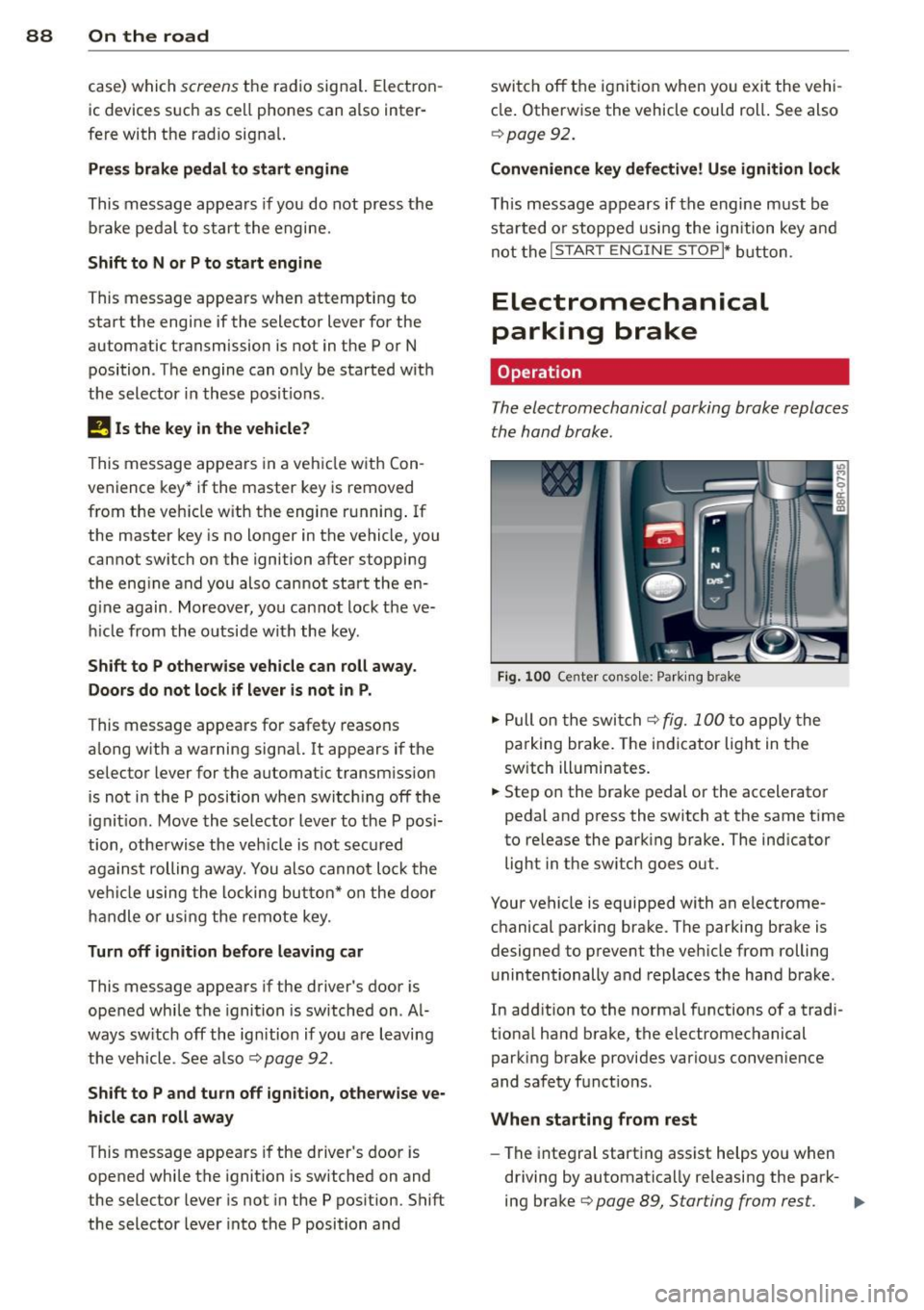
The electromechanical parking brake replaces
the hand brake.
Fig. 100 Center conso le: Par king brake
.,. Pull on the switch~ fig. 100 to apply the
parking brake. The indicator light in the
sw itch ill uminates.
.,. Step on the brake pedal or the accelerator
pedal and press the switch at the same time
to re lease the parking brake. The ind icator
light in the sw itch goes out.
Your vehicle is equipped with an electrome
chanical parking brake. The parking brake is
designed to prevent the vehicle from rolling
unintentionally and replaces the hand brake.
In add ition to the normal functions of a tradi
tiona l hand brake, the electromechanical
parking brake provides various convenience
and safety funct ions .
When starting from rest
-The integral starting assist helps yo u when
driving by automatica lly releasing the park-
ing brake
~ page 89, Starting from rest. .,.
Page 91 of 316
-When starting on inclines, the starting as
sist prevents the vehicle from unintentional
ly rolling back. The braking force of the
parking brake is not released until sufficient
driv ing force has been built up at the
wheels .
Emergency brake function
An emergency brake ensures that the vehicle
can be slowed down even if the
normal brakes
fa il
c::> page 90, Emergency braking.
Indicator light s
-If the parking brake is closed with the igni
tion
s witched on the indicator lights come
on . (USA mode ls)/ . (Canada mode ls) in
the instrument cluster and the switch.
- If the parking brake is closed with the igni
tion
s witched off the indicator lights come
on . (USA mode ls)/ . (Canada mode ls) in
the instrument cluster and the switch for
about 20 seconds.
A WARNING
If a drive range is engaged with the veh icle
stat iona ry and the engine running, you
must in no instance accele rate ca re lessly.
Otherw ise the vehicle will sta rt to move
immediately -risk of an accident .
(D Note
If the symbo l. in the display or the ind i
cato r light .. (USA models) . (Cana
da mode ls) in the instrument clus ter flash
es, the re is a malfunction in the brake sys
tem . By pressing the
ISETI button, you can
bring up a driver message which explains
the malfunction in more detail.
If the driv
er message
Parking brake system fault!
See owner's manua l
appears, there is an
operating malfunction in the park ing brake
which you should have repaired immedi ately by an author ized Audi dealer or other
qua lified workshop
c::> page 29.
@ Tips
- You can apply the pa rking brake at any
time -even w ith the ignition switched
'
On th e ro ad 89
off. The ignition must be turned on and
the brake pedal must be pressed in order
to release the parking b rake .
- Occasional noises w hen the parking
brake is app lied and released are normal
and are not a cause for concern.
- When the vehicle is pa rked, the parking
brake goes through a self -test cycle at
regu lar inte rva ls. Any associated noises
are normal.
Parking
"' Press the brake pedal to stop the veh icle.
"' Pull the sw itch
c::> page 88, fig. 100 to set
the parking b rake.
"' Move the selector lever to P.
"' Tu rn the engine off
c::> ,&. .
"'When on inclines or decl ines, turn the steer
ing wheel so that the vehicle will roll into
the cu rb if it begins to move.
A WARNING
-When you leave your vehicle -even if on
ly briefly- always remove the ignition
key. T his app lies particularly whe n chil
dren remain in the vehicle. Otherwise the
children could start the eng ine, release
the par king brake or operate elect rical
eq uipment (e.g. power w indows). The re
is the risk of an acc ident.
- When the veh icle is locked, no one -par
ticularly not children should rema in in
the vehicle. Locked doors make it more difficult for emergency workers to get in
to the vehicle -putting lives at risk.
Starting from rest
The starting assist function ensures that the
parking brake is released automatically upon
starting .
Stopping and applying parking brake
"' Pull the sw itch to app ly the parking b rake. .,.
Page 93 of 316
Press brake pedal to release parking brake
This driver message appears when the switch
to release the parking brake was pressed. The
parking brake can only be released if yo u step
on the brake pedal and at the same time press
the switch or you automatically re lease the
parking brake with the starting assist
<=>page 89.
fpii Parking brake malfunction!
This driver message appears together with
the yellow
rm symbol when there is a parking
brake malfunction.
Start-Stop-System
Descript ion
A ppl ies to vehicles: with Sta rt-Stop-System
The Start-Stop -System can help increase fuel
economy and reduce CO
2 emissions.
In the Start-Stop-mode, the eng ine shuts off
automatically when the vehicle is stopped,
such as at a traffic light. The ignition remains
sw itched on during this stop phase. The en
gine will be automatically restarted when
needed.
The last Start-Stop-System setting (o n/off us
ing the button
lr.;, .. I) will be restored when the
ignition is turned on. The LED in the
1r.;, .. 1 but
ton turns on when the Start-Stop-System is
switched off manually.
Basic requirements for the Start-Stop
mode
- The driver's door is closed .
- The driver's seat belt is latched.
- The hood is closed.
- The vehicle must have been driven faster
than 2.5 mph (4 km/h) since the last stop .
- A tra iler is not hitched to the veh icle .
A WARNING
- Never turn off the engine before the ve
hicle has come to a complete stop. The
full function of the brake booster and the
power steering is not guaranteed. You
On the road 91
must use more force to turn or brake if
necessary. Because you cannot steer and
brake as you usually would, this could
lead to crashes and ser ious injuries.
- To reduce the risk of injuries, make sure
that the Start-Stop-System is turned off
when working in the engine compart
ment
c:> page 93.
(D Note
Always switch off the Start-Stop-System
when driving through water
c:> page 93.
Starting /stopping the engine
App lies to vehicles: wit h Start -Stop -System
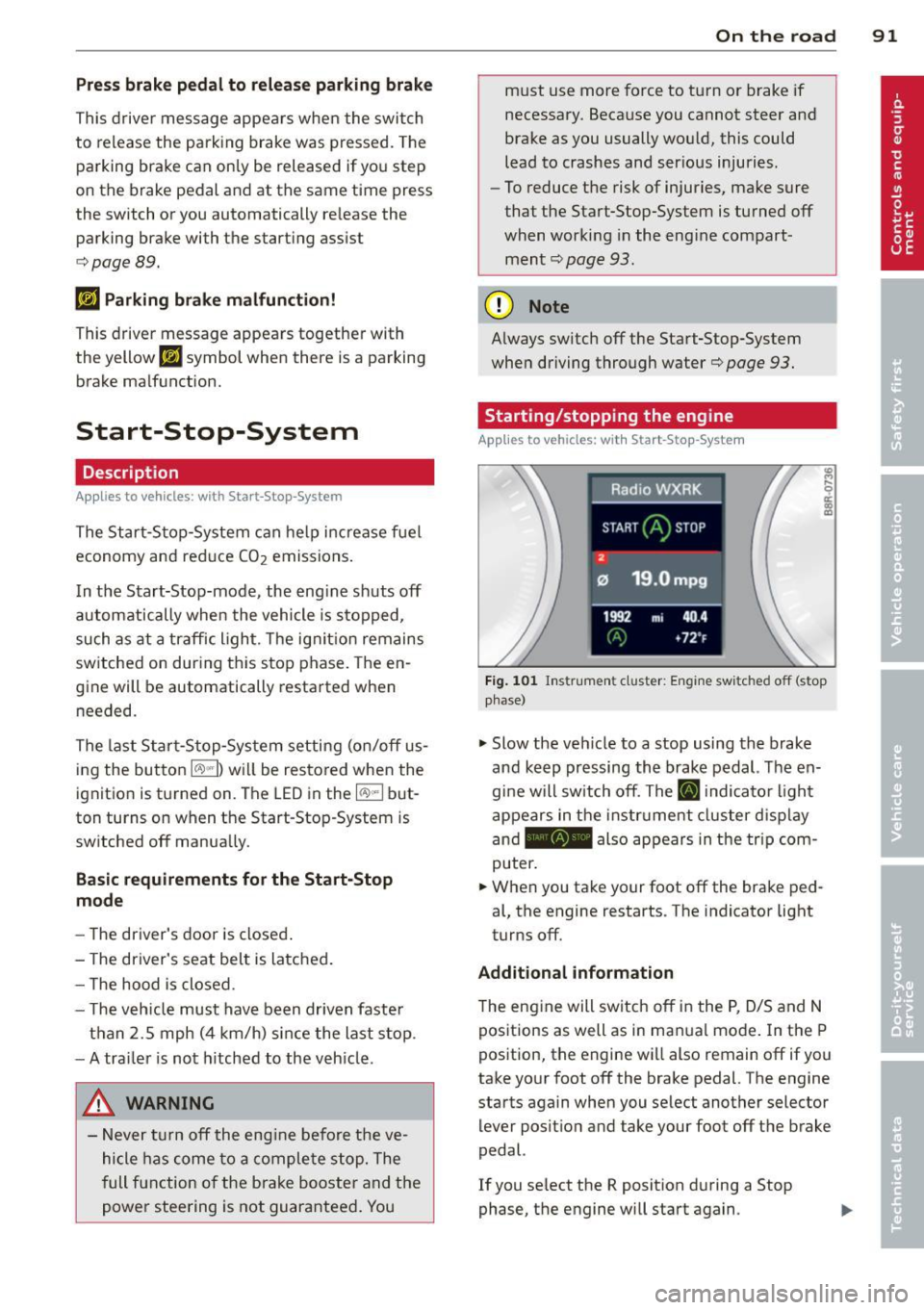
Fig. 101 Instrum ent cluster: Engine switched off (stop
phase)
.,. Slow the veh icle to a stop using the brake
and keep pressing the brake pedal. The en
gine will switch off. The
ti] indicator light
appears in the instrument cluster disp lay
and - also appears in the trip com
puter .
.,. When you take your foot off the brake ped
al, the engine restarts . The indicator light
turns off.
Additional information
T he engine will switch off in the P, D/S and N
positions as well as in ma nual mode. In the P
position, the engine will also remain off if you
take your foot off the brake pedal. The engine
starts again when you select another selector lever position and take your foot off the brake
pedal.
If you se lect the R position during a Stop
phase, the engine will start again .