warning lights AUDI Q5 2014 Owner's Guide
[x] Cancel search | Manufacturer: AUDI, Model Year: 2014, Model line: Q5, Model: AUDI Q5 2014Pages: 316, PDF Size: 78.41 MB
Page 112 of 316

110 Audi adaptive cruise control and braking guard
@ Indicator lights
r• 1-Adaptive cruise control is switched on . No
vehicles are detected up ahead. The stored
speed is maintained.
I-A moving vehicle is detected up ahead.
The adaptive cruise control system regulates
the speed and distance to the moving vehicle
ahead and accelerates/brakes automatically.
I -When automatic braking is not able to
keep enough distance to a previously detected
moving vehicle up ahead, you must take con
trol and brake<=:>
page 112, Request for driver
intervention.
© Display
If adaptive cruise control is not shown in the
display, you can call it up with the
I RESET !
button ¢ page 20.
Based on the symbols in the display, you can
determine if the system is maintaining a dis
tance to the vehicle ahead and what that dis
tance is.
No vehicle -No vehicle ahead was detected.
White vehicle -A vehicle ahead was detected.
Red vehicle -Prompt for the driver to take ac
tion
<=:> page 112.
Both arrows on the scale © indicate the dis
tance to the vehicle ahead. No arrow appears
when the vehicle is on an open road and there
is no object ahead. If an object is detected
ahead, the arrow moves on the scale.
The green zone on the scale shows the stored
distance. For information on changing the
stored distance, refer to <=:>
page 111. If the
distance selected is too close or may soon be
come too close, the arrows move into the red
zone on the scale .
A WARNING
Improper use of the adaptive cruise con
trol can cause collisions, other accidents
and serious personal injuries.
- Pressing the
ISETI button when driving at
speeds below 20 mph (30 km/h), will au- tomatically accelerate the vehicle to
20 mph (30 km/h), which is the mini
mum speed that can be set.
(D Tips
- If you switch the ignition or the adaptive
cruise control off, the set speed is erased
from the system memory.
- The Electronic Stabilization Control (ESC)
is automatically turned on when the
adaptive cruise control is turned on. You
cannot switch the ESC into offroad mode
while the adaptive cruise control is
turned on
<=:> page 198 .
Changing the speed
Applies to veh icles: w ith Audi adaptive cruise co ntro l
0
f
• 0
Fig. 119 Selector lever: ch an gin g the speed
.,. To increase or reduce the speed in incre
ments,
tap the lever up or down .
.,. To increase or reduce the speed quickly,
hold
the lever up or down until the red LED@
reaches the desired speed <=:>
page 109,
fig . 118.
Following any changes, the new stored speed
will be displayed briefly in the display @
<=:>page 109, fig . 118.
Page 133 of 316
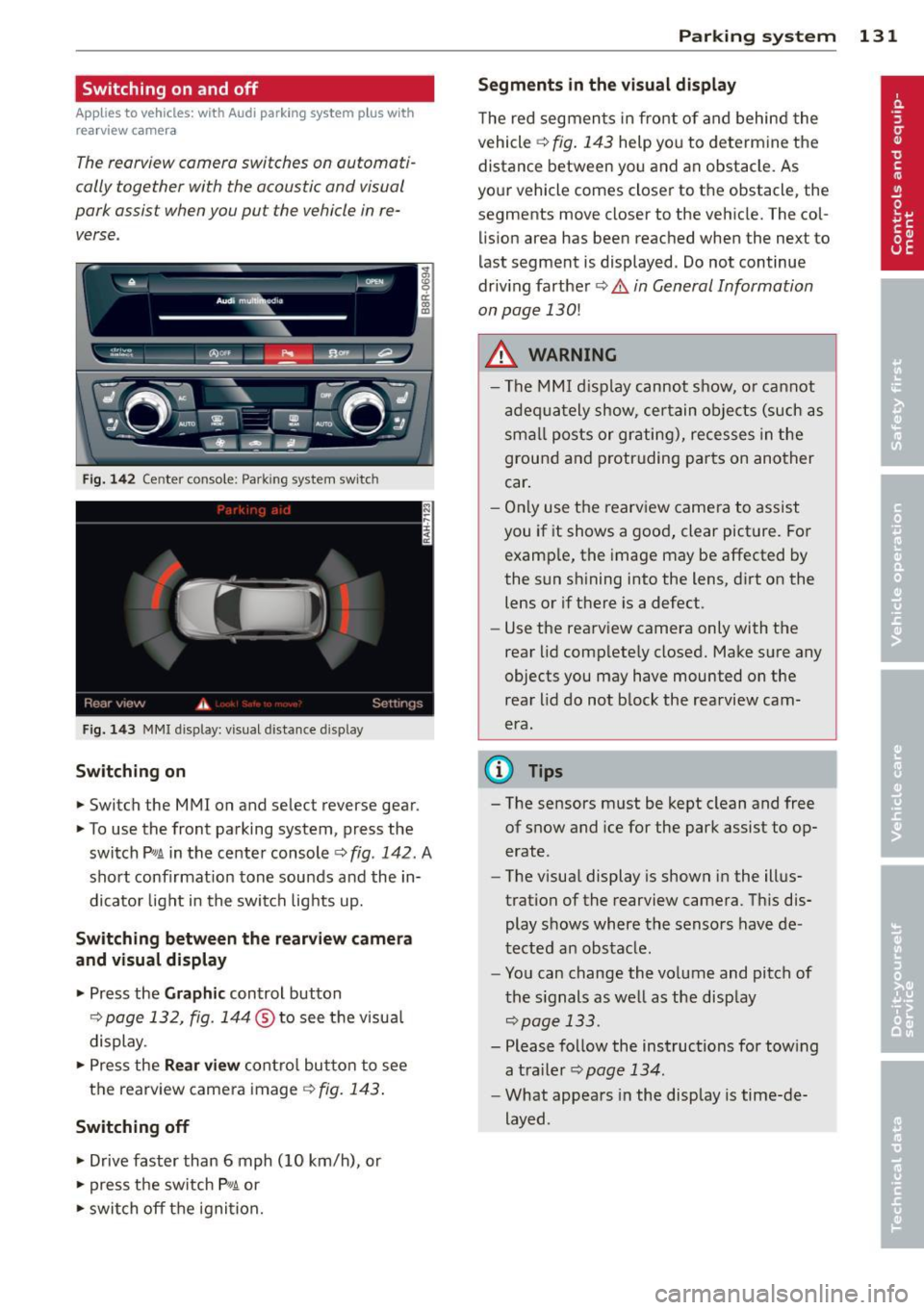
Switching on and off
Applies to vehicles: with Audi parking system p lus with
rea rview camera
The reorview camer a switches on automati
cally together with the acoustic and visual
pork assist wh en you put the vehicl e in re
verse .
Fig. 14 2 Center co nsole ; Pa rk ing syste m switc h
Fig. 14 3 MMI disp lay: visu al dista nce display
Switching on
.,. Switch the MMI on and se lect reverse gear.
.,. To use the front parking system, press the
switch
Pw.A in the center console~ fig. 142. A
sho rt confirmat io n tone sou nds a nd the in
dicato r light in the switch lights up.
Switching between the rearview came ra
and visual display
.,. Pr ess the Graphic control button
¢ page 132, fig. 14 4 ® to see t he visua l
display.
.,. Press the
Rear view cont ro l but to n t o see
the rearview came ra image
¢ fig. 143 .
Switching off
.,. Drive faster than 6 mph (10 km/h), or
.,. press the sw itch
p ,,,A or
.,. switch off t he igni tion.
Par king system 131
Segments in the visual display
The re d segmen ts i n fro nt of and behind the
vehicle ~
fig. 143 help yo u to determ ine the
distance between yo u and an obstacle. As
you r vehicle comes close r to t he obstacle, the
segments move closer to the vehicle. The col lis ion area has bee n reached when the next to
l ast segment is displayed . Do not continue
dr iv ing farther ~.&.
in General Information
on page 130!
A WARNING
- Th e M MI di splay can not s how, o r ca nnot
ad equa tely show, cer tain o bje cts ( such as
smal l posts or gr ati ng), recesses in the
grou nd and protr uding par ts on ano ther
car .
- On ly use t he rearv iew came ra to assist
you if it shows a goo d, clear pict ure. Fo r
examp le, the image may be affected by
the sun s hining into the lens, d irt on the
lens or if there is a defect.
- Use the rearv iew camera only with the
rear lid c om plete ly closed. Make s ure any
o bjects you may have mounted on the
rea r lid do n ot b lock the rearview cam
era.
(D Tips
- T he sensors m ust be kept clean and free
of snow and ice for the park assist to op
erate .
- The visua l display is shown in the ill us
tration of the rearview came ra. Th is dis
play s hows where the senso rs have de
tected an obstacle .
- Yo u can change the vo lume and pitch of
t he s ignals as we ll as the disp lay
~page 133.
- Please fo llow the ins tructions for tow ing
a tra iler
¢ page 134.
-What appears in the display is time-de
layed .
Page 137 of 316
Homelink
Universal remote
control
Description
Applies to vehicles: with Home link
The HomeLink universal remote control can
be programmed with the remote control for
devices that are already present.
With Home Link, you can control devices such
as the garage door, security systems, house
lights , etc. comfortably from the inside of you
vehicle.
Homelink makes it possible for you to rep lace
three different remote controls from dev ices
in your home with one universal remote. This
feature works for most garage door and exte
rior door motor signals. Programming the in
dividual remote control for your remote con
trol takes place near the center of the radiator
grille. There is a control module attached at
this location .
A one-time programming of the sensor must be performed before you are able to use sys
tems with Homelink. If the system does not activate after performing the one-time pro
gramming, check whether the system uses a rolling code¢
page 138 for vehicles without
the MMI*.
& WARNING
-
- Never use the Homelink transmitter
with any garage door opener that does
have not the safety stop and reverse fea
ture as requ ired by federa l safety stand
ards. This includes any garage door open
er model manufactured before April 1,
1982.
-A garage door opener which cannot de
tect an object, signaling the door to stop
and reverse does not meet current feder
al safety standards . Using a garage door
opener without these features increases
risk of serious injury or death.
Homelink 135
- For safety reasons never release the
parking brake or start the engine while
anyone is standing in front of the vehicle .
- A garage door or an estate gate may
sometimes be set in motion when the
Homelink remote control is being pro
grammed. If the device is repeatedly ac
tivated, th is can overstrain motor and
damage its electrical components - an
overheated mo to r i s a fire hazard!
- To avoid possib le injuries or property
damage, please always make abso lutely
certa in that no persons or objects are lo
cated in the range of motion of any
equipment being operated.
(0 Tips
- If you would like more information on
Homelink, where to purchase the Home
Link compat ible products, or would like
to purchase the Home Link Home Light
ing Package, please call toll-free :
1-800-355-3515.
-For Declaration of Compliance to United
States FCC and Industry Canada regula
tions
¢ page 296.
-For security reasons, we recommend that
you clear the programmed buttons be
fore selling the vehicle.
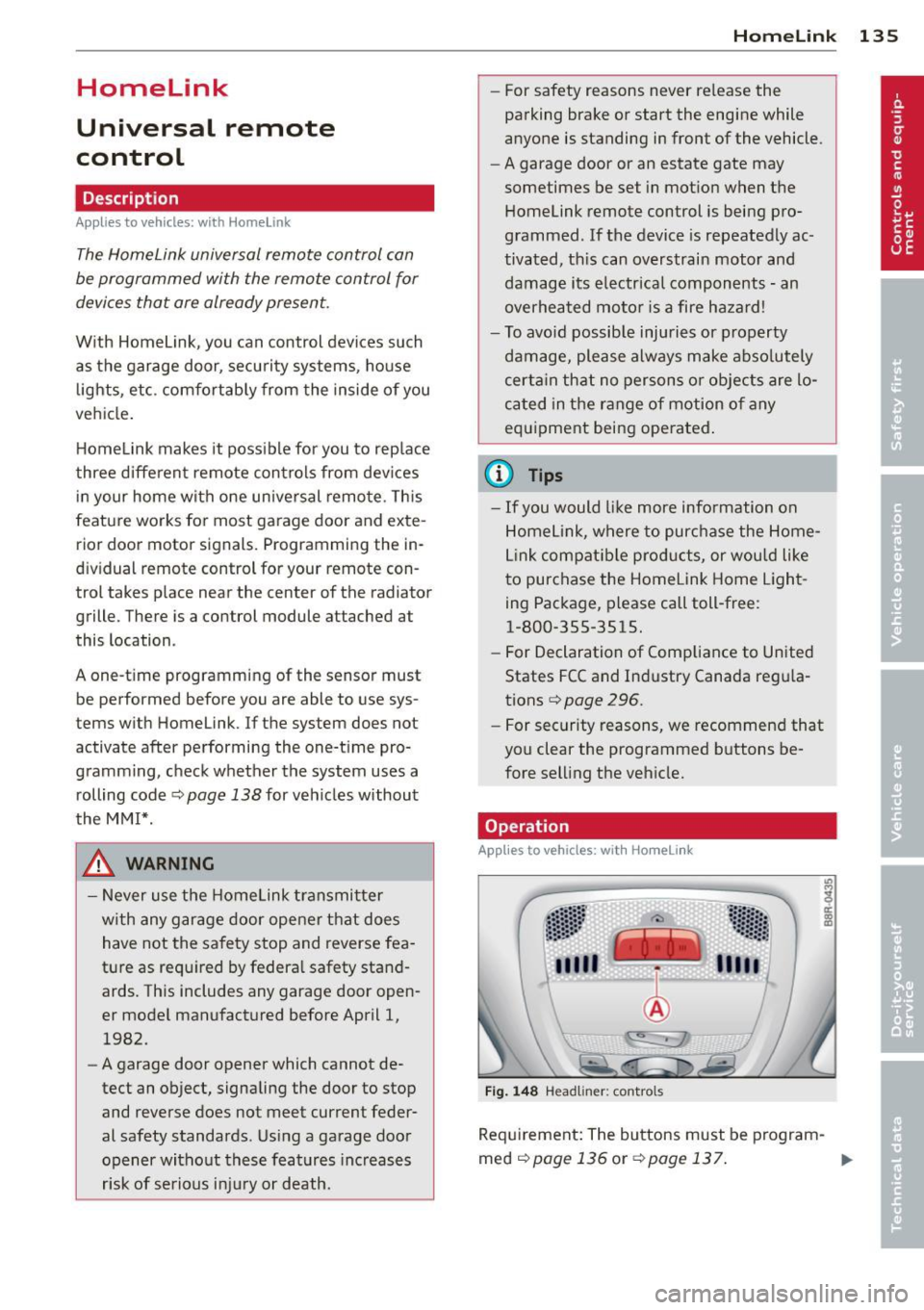
Operation
App lies to vehicles : with Homeli nk
Fig. 148 Headl iner: controls
Req uirement: The buttons must be program-
med
<:!)page 136 or ¢page 137. ..,_
Page 141 of 316
Driving Safely
General notes
Safe driving habits
Please remember -safety first!
This chapter contains important information,
tips, instructions and warnings that you need
to read and observe for your own safety, the
safety of your passengers and others . We have
summarized here what you need to know
about safety belts, airbags, child restraints as
well as child safety. Your safety is for us
priori
ty number 1.
Always observe the information
and warnings in this section - for your own
safety as well as that of your passengers.
The information in this section applies to all
model versions of your vehicle . Some of the
features described in this sections may be
standard equipment on some models, or may
be optional equipment on others. If you are
not sure, ask your authorized Audi dealer.
A WARNING
- Always make sure that you follow the in
structions and heed the WARNINGS in
this Manual. It is in your interest and in
the interest of your passengers.
- Always keep the complete Owner's Liter
ature in your Audi when you lend or sell
your vehicle so that this important infor
mation will always be available to the
driver and passengers.
- Always keep the Owner's literature handy
so that you can find it easily if you have
questions.
Safety equipment
The safety features are part of the occupant
restraint system and work together to help
reduce the risk of injury in a wide variety of
accident situations .
Your safety and the safety of your passengers
should not be left to chance. Advances in
technology have made a variety of features
available to help reduce the risk of injury in an
Driving Safely 139
accident. The following is a list of just a few of
the safety features in your Audi :
- sophisticated safety belts for driver and all
passenger seating positions,
- belt force limiters for the front seats,
- belt pretensioners for the seats,
- belt height adjustment for the front seats,
- head restraints for each seating position,
- front airbags,
- side airbags in the front seats and outer rear
seats*,
- side curtain airbags,
- special LATCH anchorages for child re-
straints,
- adjustable steering column.
These individual safety features, can work to gether as a system to help protect you and
your passengers in a wide range of accidents.
These features cannot work as a system if
they are not always correctly adjusted and cor
rectly used.
Safety is everybody's responsibility!
Important things to do before driving
Safety is everybody 's job! Vehicle and occu
pant safety always depends on the informed
and careful driver.
For your safety and the safety of your passen
gers,
before driving always:
.,. Make sure that all lights and signals are op
erating correctly .
.,. Make sure that the tire pressure is correct .
.,. Make sure that all windows are clean and af
ford good visibility to the outside .
.,. Secure all luggage and other items carefully
qpage 76.
.,. Make sure that nothing can interfere with
the pedals.
.,. Adjust front seat, head restraint and mirrors
correctly for your height .
.,. Instruct passengers to adjust the head re
straints according to their height .
.,. Make sure to use the right child restraint
correctly to protect children ¢
page 178,
and~~~-~
•
•
Page 203 of 316
Fa u lts in th e brake sy stem
If you should notice a sudden increase in
brake peda l travel, then one of the two brake
circuits may have failed~.&..
Low brak e flu id level
Malfunct ions can occur in the brake syste m if
the brake fl uid leve l is too low. The b rake fluid
l eve l is monito red electronically.
Brake boost er
The brake booster increases the pressure that
you generate w ith the brake pedal.
It only op
e rates while the eng ine is running or with the
i gnit ion sw itched on (hybr id dr ive*)~ .&,.
Brake lining wear statu s
Brake lining wear may be checked by visual in
spection of the condition of the brake pads
through the openings in the whee l. If neces
sa ry, the wheel may be removed for this in
spection
~ page 2 73, Changing a wheel.
.&_ WARNING
=
- You should perform braking maneuvers
for the purpose of clean ing the brake
system on ly if road conditions permit.
Other road users must not be put at risk -
you may cause an acc ident!
- Before descending a steep grade, reduce speed and shift transmiss ion into a lower
gear or lower driving range. Do not ride
the brakes or hold the pedal down too long or too often. This could cause the
brakes to get hot and dimin ish b raking
efficiency.
- Do not "ride the brakes" by resting your
foot on the pedal when you do not intend
to brake. Th is may cause the b rakes to
overheat, premat ure wear and increased
stopp ing distance .
- Under certain climat ic and operating
c ondit ions such as passing through wa
ter, driving in heavy rain or after wash ing
the vehicle, the effectiveness of the brakes can be reduced. In winter, ice can
accumulate on the brake pads, linings,
discs and drums. Carefully apply brakes
Int ellig ent technolog y 201
for a test . Brakes will dry and ice coat
ings w ill be cleaned
off after a few care
ful brake applicat ions.
- Driving for an extended period of time on
salt-covered roads without using your
brakes can a lso affect braking efficiency.
Clean
off accumulated salt coating from
brake discs and pads with a few ca reful
brake applications.
- If you damage the front spoiler, or if you install a different spoiler, be sure the ai r
f low to the front brakes is not obst ruct
ed. Otherw ise the bra ke system could
overhea t reducing the effectiveness of
the entire brake system .
- Failure of one b rake circuit will impair
the braking capab ility result ing in an in
creased stopping distance. Avoid driving
the vehicle and have it towed to the near
est a uthorized Audi dea ler or q ualified
workshop.
- Never let the vehicle roll to a stop with
the eng ine shut off .
- If the b rake booster is not working, the
brake peda l must be pressed considera
bly harder to make up for the lack of
booster assistance.
Electromechanical
power assist, Dynamic
steering
The electromechonical power assist helps the
driver when steering.
Power s teer ing adap ts electronically based on
the ve hicle speed .
Indicator lights and messages
• Stee ring d efec tiv e! Do not d rive vehi cle!
If this indicator light turns on and stays on
and this message appears, the power steer ing
may have failed .
Stop the vehicle in a safe location as soon as
poss ible. Do
not continue driving. See your
authorized Aud i dea ler or other qualified re-
pair facility fo r ass istance. ..,.
•
•
Page 210 of 316
208 Driving and environment
Reducing unnecessary idling
Even when your car is just idling it burns up
fuel.
.,. Shut the engine off when you are not driving
the vehicle.
.,. Do not warm up the vehicle by letting the
engine run at idle .
The idling phase is automatically reduced for
vehicles with the Start-Stop -System* . It is ef
fic ient to sw itch
off the eng ine in vehicles
without the Start-Stop-System* when stopped
at railroad crossings and long red lights. Turn
ing the eng ine
off for just 30-40 seconds
saves more fuel than is burned by sta rting the
engine again .
It takes a long time for the engine to wa rm up
fu lly when it is running at idle. However , wear
and nox ious emissions are especially high
when the engine is warming up. So you should
drive away as soon as you start the engine and
avoid running at high rpms while the engine is
still warming up.
(D Note
Do not leave engine idling unattended af
ter starting. If warning lights should come
on to indicate improper operation, they
would go unheeded. Extended idling also
produces heat, which could resu lt in over
heat ing or other damage to the vehicle or
other property .
Regular maintenance
A badly tuned engine unnecessarily wastes a
lot of fuel .
.,. Have your vehicle serviced at regular inter-
vals.
By having your vehicle regularly serviced by an
author ized Audi dealer helps to ensure that it
runs properly and economically . The condition
of your vehicle not only affects its safety and
ab ility to hold its value, it also affects
fuel
consumption. Check
your oil each time you fill your tank.
The amount of oi l used is re lated to engine
load and speed.
It is normal for the oil consumption of a new
engine to reach its lowest value after a certa in
mileage has been driven .
You must drive your veh icle about 3,000 mi les
(5,000 kilometers) before you can properly
assess oil consumpt ion.
This also app lies to fuel consumption and en
gine output .
(0 Note
- Have your veh icle ma inta ined properly
and in accordance with the service rec
ommendations in your Warranty
& Ma in
tenance booklet. Lack of proper ma inte
nance as well as improper use of the ve
hicle will impair the function of the
em iss ion control system and could lead
t o damage.
- Do not alter or remove any component of
the Emission Control System unless ap
proved by the manufacturer.
- Do not alter or remove any device, such
as heat shie lds , switches, ignition wires,
valves, which are designed to protect
your vehicle's Emission Control System
and other important vehicle compo
nents.
' Fewer short trips
Fuel consumption will always be relatively
high on short trips.
... Try to avoid driving sho rt distances w it h a
cold engine .
T he eng ine and catalytic converter have to
reach their optimal
operating temperature to
reduce fuel consumpt ion and nox ious emis
sions effectively.
Jus t after starting, a cold engine in a mid-s ize
car only achieves a fuel economy of 6-8 mi les
per gallon (30 -40 l/100 km). After about a
half a mile, fuel economy climbs to 12 mpg .,..
Page 215 of 316
Trailer towing Driving with a trailer
General information
Your Audi was designed primarily for passen
ger transportation .
If you plan to tow a trailer, please remember
that the additional load will affect durability,
economy and performance .
T railer towing not only places more stress on
the vehicle, it also calls for more concentra
tion from the driver.
For this reason, always follow the operating
and driving instructions provided and use
common sense.
Technical requirements
Trailer hitch
Use a weight-carrying hitch conforming to the
gross trailer weight. The hitch must be suita
ble for your vehicle and trailer and must be
mounted securely on the vehicle's chassis at a
technically sound location. Use only a trailer
hitch with a removable ball mount. Always
check with the trailer hitch manufacturer to
make sure that you are using the correct
hitch.
Do not use a bumper hitch.
T he hitch must be installed in such a way that
it does not interfere with the impact-absorb
ing bumper system. No modifications should
be made to the vehicle exhaust and brake sys
tems . From time to time, check that all hitch
mounting bolts remain securely fastened.
When you are not towing a trailer, remove the
trailer hitch ball mount. This prevents the
hitch from causing damage should your vehi
cle be struck from behind
¢ &. .
Trailer brakes
If your trailer is equipped with a braking sys
tem, check to be sure that it conforms to all
regulations .
Trailer towing 213
The trailer hydraulic brake system must not be
directly connected to the vehicle's hydraulic
brake system
¢ &. .
Safety chains
Always use safety chains between your vehicle
and the trailer.
Trailer lights
Trailer lights must meet all regulations . Be
sure to check with your authorized Audi dealer
for correct wiring, switches, and relays.
Mirrors
If you are unable to see the traffic behind you
using the regular outside mirrors, then you
must install extended mirrors.
It is important
that you always have clear vision to the rear .
.8, WARNING
- If a trailer has electrical brakes please
note that these brakes are not activated
by the factory-fitted control unit -risk of
accident!
- After removing the trailer hitch, do not
store it in your vehicle. In case of sudden
braking, the hitch could fly forward and
injure you or your passengers.
- Never install a "weight distributing" or
"load equalizing" trailer hitch on your ve
hicle. The vehicle was not designed for
these kinds of trailer hitches . The hitch
attachment can fail, causing the trailer
to tear loose from the vehicle .
- The Gross Vehicle Weight Rating for your
vehicle, found on the safety compliance
label on the driver's side B-pillar, must
never be exceeded under any circumstan
ces. Exceeding the Gross Vehicle Weight
Rating of your vehicle is likely to damage
your vehicle, and such damage will not
be covered by your Limited New Vehicle
Warranty. Exceeding the Gross Vehicle
Weight Rating will also change the per
formance and handling characteristics of
your vehicle, which could cause a crash resulting in serious injury or death.
-
•
•
Page 220 of 316
218 Vehicle care and cleaning
A WARNING
- Only wash the vehicle when the ignition
is off and follow the instructions from
the car wash operator to reduce the risk
of accidents .
- To reduce the r isk of cuts, protect your
self from sharp meta l components w hen
wash ing the unde rbody or the inside of
the whee l housings.
- After washing the vehicle, the braking ef
fect may be de layed due to mo isture on
the b rake ro to rs or i ce in the winter. The
brakes must be dried first with a few
careful brake applications.
(!;) Note
- If you wash t he vehi cle in an automatic
ca r wash, yo u m ust fold the exterior m ir
ro rs in to reduce the r is k of damage to
the mirrors. Power folding exte rior m ir
ro rs * must only be folded in and out us
i ng the power folding function.
- Compare the track of your vehicle wit h
the distance between the gui de rails of
the facility - there is a risk of damage to
the wheels and t ires.
- Compare the height and width of your
vehicle with the he ight and width of the
tunnel at the fac ility. -
To p revent paint damage, do not wash
the vehicle in di rect sunlight.
- T o reduce the ris k of damage to the sur
face, do not use insect removing spong
es, kitchen sponges or similar items.
- M atte finish painted veh icle compo
nents:
- To reduce the risk of damage to the
surface, do not use polishi ng agents or
hard wax.
- Never use car wash cycles that apply protective wax.
It can destroy the
matte fi nish effect.
- Do not place any stickers o r magnet ic
signs on v ehicle parts painted w ith
ma tte fi nish paint. The paint cou ld be
damaged when the stickers o r mag nets
a re removed .
@ For the sake of the environment
O nly wash the ve hicl e in facili ties spe cially
d esi gned for that p urpose. This will red uce
the r is k of dirty wate r contam ina ted with
o il from entering the sewer system.
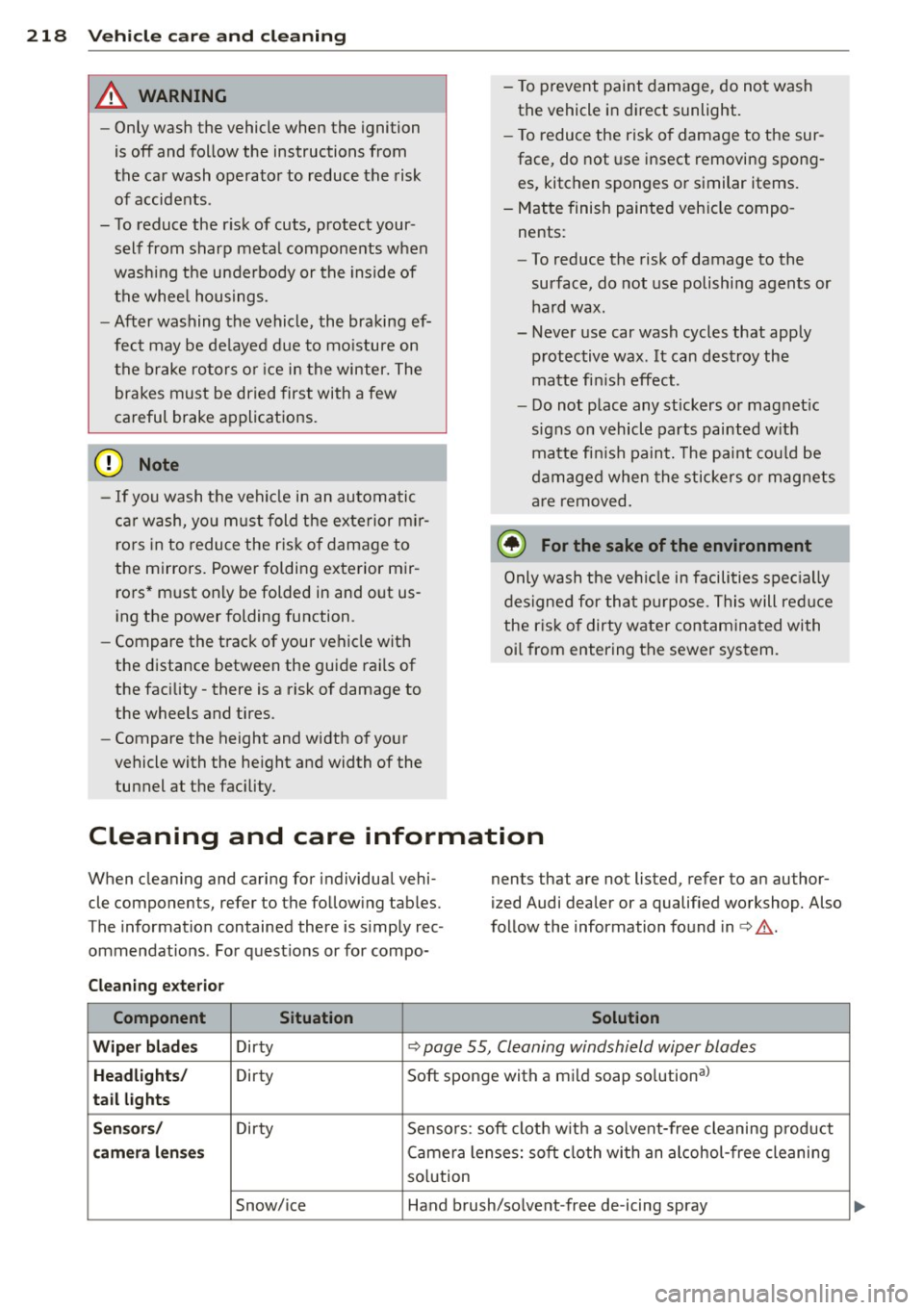
Cleaning and care information
When cleaning and caring for individua l vehi
cle components, refer to the fo llowing tab les .
The information contained there is simp ly rec
ommendat ions . For quest io ns or for compo- nents that are not listed, refer to an author
ized Audi dealer or a qualified workshop. Also
fo llow the information found in <=> & .
Cleaning exterior Component Situation Solution
Wiper blad es Dirty <=> page 55, Cleaning windshield wiper blades
Headlights/ Dirty Soft sponge with a mild soap so
lution al
tail lights
Sen sors / Dirty Sensors : soft clot h w it h a so lvent-free cleaning p roduct
camera l enses Camera lenses: soft cloth with an alcohol -free cleaning
so lution
Snow/ice Hand brush/so lvent -free de-icing spray
Page 222 of 316
220 Vehicle care and cleaning
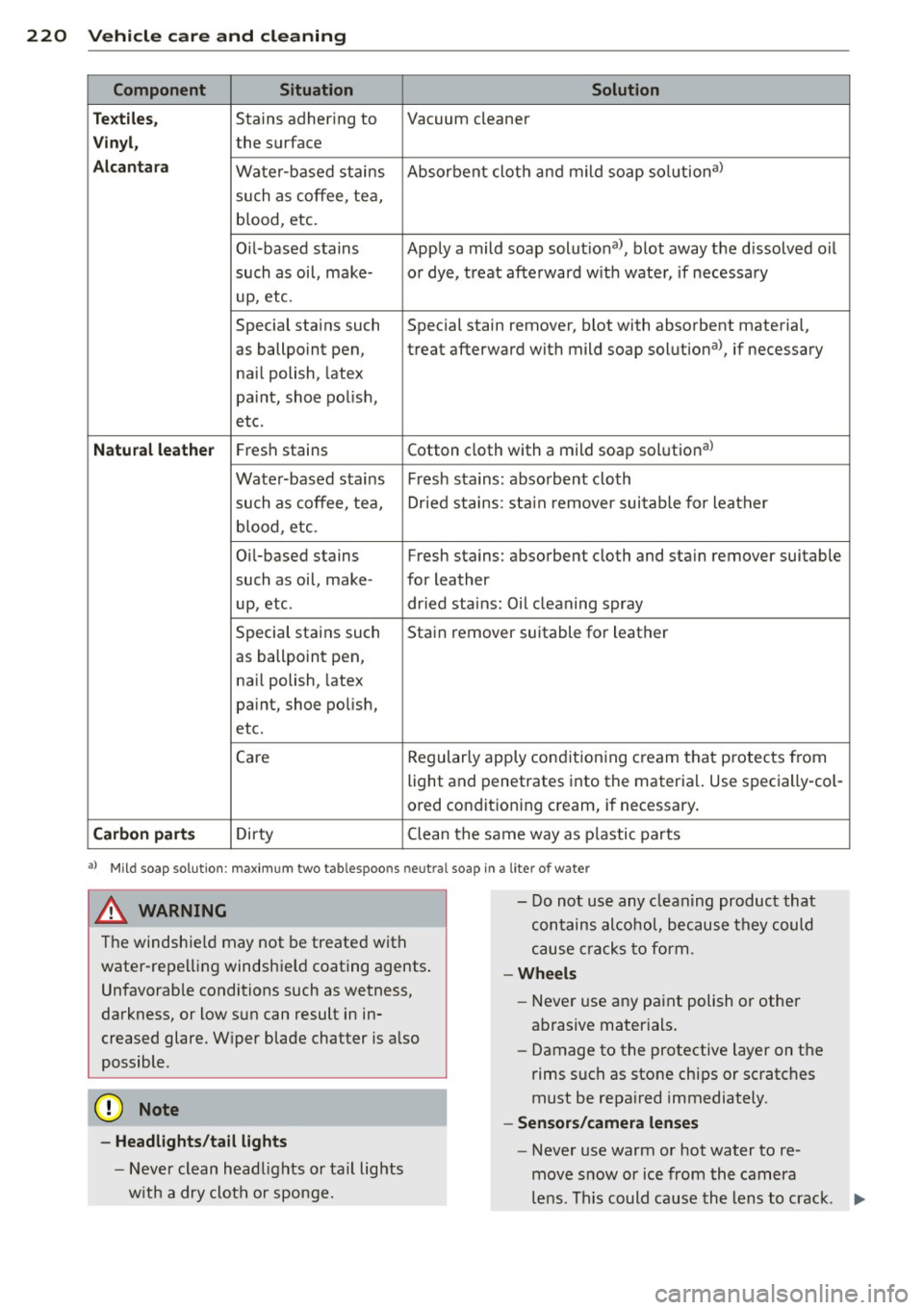
Component Situation Solution
T ex tile s,
Stains adhering to Vacuum cleaner
Vin yl, the surface
Alcan ta ra Water -based stains Absorbent cloth and mild soap solutiona>
such as coffee, tea,
blood, etc.
O il-based stains Apply a mild soap solutiona>, blot away the d issolved oil
such as oil, make- or dye, treat afte rward w ith water, if necessary
up, etc.
Special stains such Special stain remover, b lot with absorbent material,
as ballpoint pen, treat afterward with mild soap solutiona>, if necessary
na il polish, latex
pa int, shoe po lish,
etc.
Natu ral leather Fresh stains Cotton cloth with a mild soap solutiona>
Wate r-based stains Fresh s tains: absorbent cloth
such as coffee, tea, Dr ied stains: sta in remover sui table for leather
blood, etc.
Oi l-based stains Fresh stains: absorbent cloth and sta in remover suitable
such as oil, make- for leather
up, etc. dried stains: Oil cleaning spray
Special stains such Stain remover suitable for leather
as ballpo int pen,
na il polish, latex
pa int, shoe polish,
etc.
Care Regular
ly apply condit ion ing c ream that protec ts from
light a nd penetrates into the materia l. Use specially-col-
ored conditioning cream, if necessary.
Carbon part s Dirty Clean tlhe same way as plastic parts
a) Mi ld soap solut ion : maximum two tablespoons neut ra l soap in a lite r of wate r
& WARNING
The windshie ld may not be treated with
water -repe lling windshield coating agents .
Unfavorab le conditions such as wetness,
darkness, or low sun can result in in
creased glare. W iper blade chatter is a lso
possible .
(V Note
-Headlights /tail lights
- Never clean headlights or tail lights
w it h a dry cloth or sponge. -
Do not us e any cleaning product that
contains alcohol, because they could
cause cracks to form.
-Wheels
- Never use any paint polish or other
abrasive mater ials.
- Damage to the protective layer on the
rims such as stone chips or scratc hes
must be repa ired immediately.
- Sensor s/camera lenses
- Never use warm or hot water to re-
move snow or ice from the camera
le ns. Th is could cause th e lens to crack . ""
Page 237 of 316
names etc.) that conform to Audi oi l standard
VW 502 00 (vehicles with gasoline engine) or
VW 507 00 (vehicles with diesel engine).
C hang ing th e engin e oil
The engine oil and oi l filter must be changed
according to the m ileage (kilomete rs) and
time inte rva ls specified in yo ur vehicle's War
ranty
& Maintenance booklet. Do not exceed
these intervals -harmful deposits from old
engine oil can reduce engine performance and
can lead to expensive eng ine repairs.
Changing the o il at the recommended inter
va ls is so very important because the lubricat
ing properties of oi l decrease gradually during
norma l vehicle use . If you are not sure when
you have your oi l changed, ask your author
ized Audi Service Advisor.
Under some circ umstances the engine oi l
should even be changed more frequently .
Change o il more often if you drive mostly
short distances, operate the vehicle in dusty
areas or mostly under stop-and -go traffic con
d itions, or when you use your veh icle where
temperatures stay below freezing point for l ong periods.
Detergent addit ives in the o il w ill make fresh
oil look dark after the eng ine has been run
n ing for a short time. This is norma l and is not
a reason to change the o il mo re often than
r ecommended.
Damage or ma lf u nction s du e to lac k of
ma intenance
It is essential that you change your oil at the
recommended interva ls using only engine oil
that complies with Audi oil standard
VW 502 00 (vehicles with gasoline engine) or
VW S07 00 (veh icles with diese l engi ne). Yo ur
L im ited New Vehicle Warra nty does not cover
damage or ma lfunctions due to failure to fol
l ow recommended maintenance and use re
quirements as set forth in the A udi Owner's
Manual and Warranty
& Maintenance book let.
Your dealer will have to deny warranty cover age un less you present to the dea ler proof in
the form of Service or Repa ir Orders that a ll
Checking and fillin g 235
scheduled maintenance was performed in a
timely manner.
· Engine oil consumption
The engine in your vehicle depends on an ade
quate amount of oil to lubricate and cool all
of its moving parts.
In order to prov ide effective lubrication and
cooling o f inte rna l engine components, all in
ternal combustion engines consume a certain
amount of oil. Oil consumpt ion varies from
engine to engine and may change sign ificantly
over the life of the engine. Typically, engines
with a spec ified break-in period (see
Q page 205) consume more oil during the
break-in pe riod than they consume after o il
consump tion has stabilized.
Under normal cond itions, the rate of oi l con
sumption depends on the quality and viscos ity
of the oil, the RP M (revolut ions per minute) at
which the engine is operated, the ambient
tempe rature a nd road conditions. Furt her fac
tors are the amount of oil dilut ion from wa ter
condensation or fue l residue and the oxida
tion level of the oi l. As any engine is subject to
wear as mi leage builds up, the oil consump
tion may increase over time until replacement
of worn components may become necessary.
With a ll these variab les coming into p lay, no
standard rate of oil consumpt ion can be es
tablished or spec ified. There is no alternative
to regular and frequent check ing of the o il lev
el, see
Not e.
If the yellow engine oil level warning symbo l
in the instrument cluster
II lights up, you
shou ld check the oil leve l as soon as possib le
¢ page 236 . Top off the oil at your earliest
convenience
~ page 236.
&_ WARNING
Before you chec k anything in the engine
compa rtmen t, always read and heed al l
WARNI NGS
Q .&. in Working in the engine
compartment on page 231 .
•
•