ECO mode AUDI Q5 2015 User Guide
[x] Cancel search | Manufacturer: AUDI, Model Year: 2015, Model line: Q5, Model: AUDI Q5 2015Pages: 302, PDF Size: 75.01 MB
Page 30 of 302

Driver inform ation system
The driver message disappears after a few sec
onds. The driver m essage can be displayed again
by briefly pressing the
I SETI button.
Red symbols
F ig. 23 Display: Dang er symbol
W ith a priority 1 malfunction, a red symbol ap
pears in the upper center area of the disp lay
0 ~
"' 0 ci: a, al
¢ fig . 23. A driver message appears as well to ex
p lain the ma lfunction in more detail. When this
symbo l appears,
three warning tones sound in
success ion . The symbol continues to flash until
the fault has been corrected .
If
several pr iority 1 malfunctions are present, the
symbo ls appear in succession and remain for
about 2 seconds.
The driver warning goes out after about 5 sec
onds, but it can be brought up again at any time by pressing the
! SET ! button ¢ page 2 7.
28
Alternator fa i Lu re
¢ page28
Electromechanica l steering
¢ page 195
USA m odels : Brake system
malfunct ion
¢ page28
Canada models: Brake system
malfunct ion
¢page28
E ng ine coolant leve l too low/
engine coolant temperature
too high
¢ page29
Eng ine oi l pressure too low
¢ page30
Refi ll eng ine oi l now
¢ page 30
Refill Ad Blue*
¢ page 218
AdBlue malfunction*
¢ page 218
Steering malfunction
¢page30
Ign it ion lock malfunction
¢ page 30
Hybrid dr ive*
¢ page 100, ¢ page 1 OS
0 Alternator malfunction
If the . symbo l in the instr ument pane l display
flashes, then there is a malf unction in the alter
nator or the vehicle electronics . A warning to t he
driver will appear, too . The driver warning goes
out after about 5 seconds, but it can be brought up at any t ime by pressing the
ISE TI button again.
Usually, yo u can sti ll drive to the next dealership.
Turn off a ll but the most necessary electrica l con
sumers, s ince these dra in the veh icle 's battery .
CJ) Note
If the . warning symbo l (coo lant system
malfunction) also lights up on the instrument
panel during the trip
¢ page 29, then you
have to stop immediately and turn off the en
gine . The coolant pump is not working a ny
more -da nger of damage to the eng ine !
BRAKE /C(D ) Brake system malfunction
A malfunction in the brake sy stem mus t be re
paired as soon as possible .
If the warning/indicator light 1111 (USA mod
els)/ . (Canada models) in the instrument clus
ter flashes, there is a brake system malfunction .
A d river message appea rs as well to expla in the
malfunction in more detail. The d river war ning
goes out after about S seconds, but it can be
brought up a t any time by pressing the
ISE TI but-
ton again. .,.
Page 31 of 302
M N
co
a:
co
,...., \!) ..,.,
N ..,., ,....,
Stop vehicle and check b rake fluid l evel
"' Stop the vehicle.
"' Check the brake fluid level
o page 229.
"'Seek professiona l assistance if necessary .
Warning! Fault in brake system. Contact
worksho p
"'Drive carefu lly to the nearest authorized Audi
dealer or other qualified workshop and have
the malfunction corrected
o A .
Pa rking brak e system fault! See owner 's
m anual
"' If this symbol appears when the vehicle is sta
tionary or after the ignitio n is turned on, check
to see if the parking brake can be re leased.
Drive to an authorized Audi dealer or other
qualified workshop as soon as possible and
have the malfunct ion corrected. If the park ing
brake cannot be opened, then take it to an ex
pert at an authorized Audi dea ler.
"' If the symbol appears while you are driving, it is
poss ible that the trac tion control or the eme r
gency brake has malfunctioned. It is possible
that the parking brake cannot be applied.
It is
also possible that the parking brake cannot be
released after it has been applied. Drive to an
authorized Aud i dealer or other qualified work
shop to have the malfunction corrected.
If the ABS system malfunctions, the ABS warn ing/indicator light illuminates together with the
brake system malfunction warning/ind icator
light
o _&. .
A WARNING
-Always observe the wa rnings in
o page 221, before opening the hood and
c heck ing the b rake fluid.
- Driv ing with low b rake fluid is a safety haz
ard. Stop the car and get p rofess ional assis
tance.
- If the
111111 (USA models)/ . (Canada mod
els) brake system indi cator lig ht t urns on to
ge ther with the ABS an d ESC i ndica to r
lights, the ABS/ ESC regu lating function may
have failed. Functions that stab ilize the ve
hicle a re no longer avai lab le . This could
Dri ver information s ystem
cause the vehicle to swerve and increase the
risk of s liding. Drive carefully to the nearest
authorized Audi dealer or other qualif ied
workshop and have the malfunct ion correct
ed.
- L Engine cooling system malfunction
A malfunction in the engine cooling system must
be repaired as soon as possible.
If the . symbo l flashes in the disp lay, either the
engine coo lant
temperature is too high or the en
gine coolant
level is too low . A driver message
appears as we ll to explain the malfunct ion in
more detail. The d river warn ing goes out after
about 5 seconds, but it can be brought up at any
t ime by press ing the
ISET I button again.
Turn off engin e an d check coolant leve l
"'Pull off the road .
"' Stop the vehicle .
"' Turn
off the engine.
"' Check coolant level
o page 22 7 .
"' Add coolant if necessary ~ page 228.
"'Continue driv ing on ly afte r the engine coo lant
warning/indi cato r light goes out.
"' Con ta ct yo ur au thorize d Aud i dealer for assis
tance if necessary .
If the engine coolant level is correct, then the ra
diato r fan may be the cause of the malfunct io n.
A WARNING
- If your vehicle should brea k down for me
chan ica l or other reasons, pa rk at a safe d is
tance from moving traffic, turn
off the en
gine and turn on the hazard warning lights
o page 54, Emergency flashers.
- Never open the hood if you see or hear
steam or coo lant escaping from the eng ine
compartment -you risk being scalded. Wait
until you can no longer see or hear steam or
coo lant escaping.
- The engine compartment of any vehicle is a
dangerous area. Before you perform any
work in the eng ine compartment, turn of
the engine and a llow it to cool. Fo llow the
~
warn ing stickers o page 221. ~
29
Page 51 of 302
M N
co ~ co
rl I.O
"' N
"' rl
Operation
Applies to vehicles: with garage door opener (Homelink)
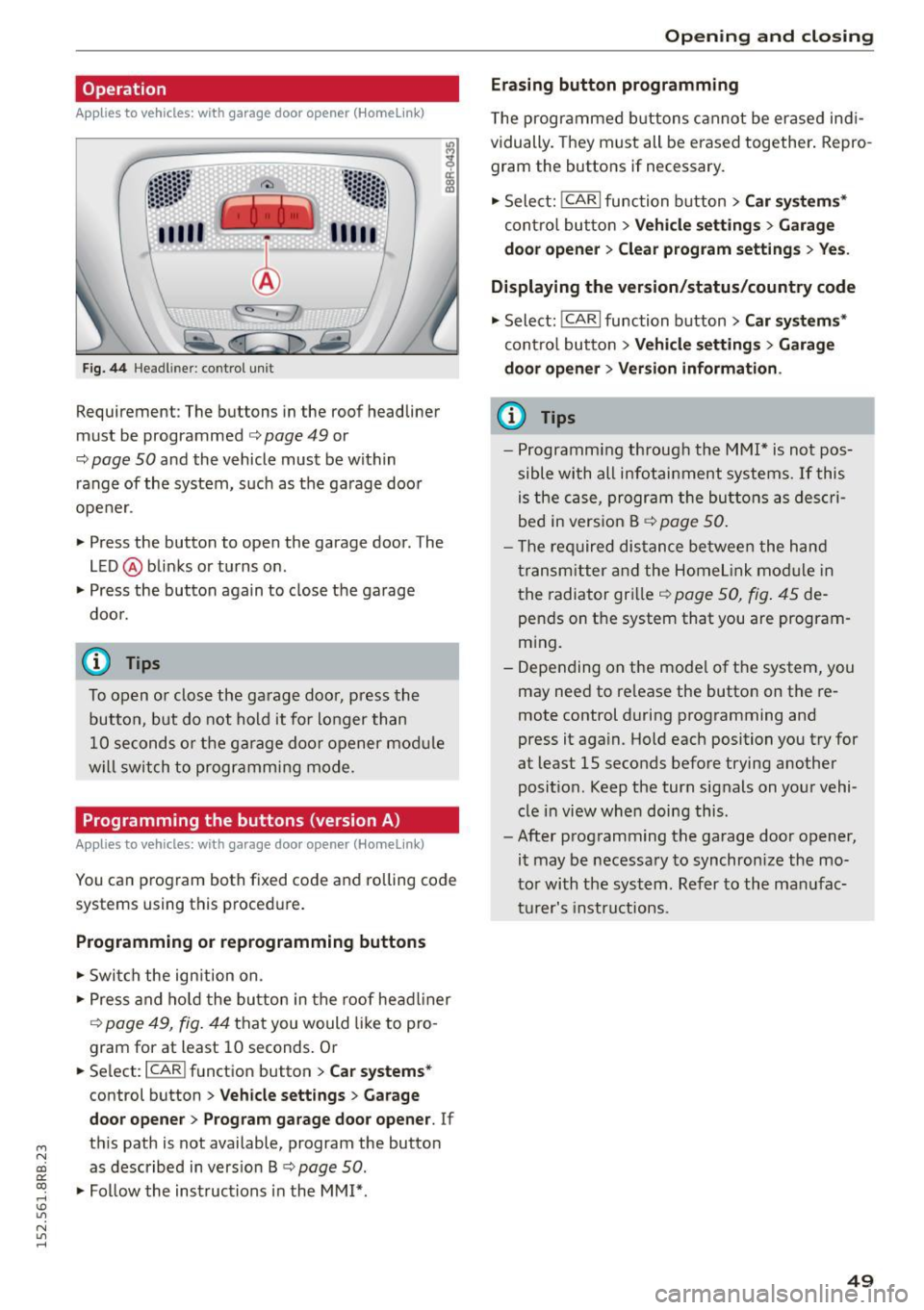
Fig. 44 Hea dlin er: co ntrol un it
Requirement : The but tons in the roof headliner
mu st be programmed
c:> page 49 or
c::> page SO and the vehicle must be within
range of the system, such as the garage door
opener .
" Press the button to open the garage door . T he
LED @ blinks or turns on .
" Press the button again to clos e the garage
doo r.
@ Tips
To open o r close the ga rage doo r, press the
button, but do not hold it fo r longer than
10 seconds o r the g arage doo r opener mod ule
w ill switch to programm ing mode .
Programming the buttons (version A )
Applies to vehicles: with garage door opener (Ho meli nk)
You can p rogram both fixed code and roll ing code
systems using this proced ure.
Programming or reprogramming buttons
" Swi tch the ign ition on .
" Press and ho ld the bu tton in the roof head liner
c::> page 49, fig. 44 that you would like to pro
gram for at least 10 seconds . Or
.. Se lect:
I CAR I function button > Car sy stem s*
control button > Vehicle sett ing s > Garage
door opene r> Program gar age door opener .
If
th is path is not available, program the button
as described in vers io n B
c::> page SO .
"Fo llow the instructions in the MMI* .
Opening and clo sing
Erasing button programming
The programmed b uttons cannot be er ased ind i
vidually. They must all be erased together . Repro
gram the buttons if necessary .
" Select:
!CARI function button> Car sy ste m s*
contro l butto n > Vehicle settin gs > Garag e
d oo r opener
> Clear program setting s > Yes.
Displaying the version /status /country code
" Select: !CARI function button> Car sy ste ms *
cont ro l button > Vehicle s etting s> Garage
d o or open er > Version information .
(D Tips
-Programm ing throug h the MMI* is not pos
sible with all infotai nment systems. If this
is the ca se, program the buttons as des cri
bed in vers ion B
c::> page 50 .
- T he req uired dis tance be twee n the h and
transm itter and the Home link mo dule in
the radiator gr ille
c::> page 50, fig . 45 de
pends on t he system that you are program
m ing.
- Depending on the mode l of the system, you
may need to re lease the button on the re
mote control during programming and
press it aga in. Hold each position you try for
at least 15 seconds before trying another
posit ion . Keep the turn signals on your vehi
cle i n view when doing this.
- After programm ing the garage door opener,
it may be necessary to synchronize the mo
to r wi th the sys tem. Ref er to the man ufac
t ur e r's instru ct ions .
49
Page 52 of 302
Opening and closing
Programming the buttons (version 8)
Applies to vehicles: with garage door opener (Homelink)
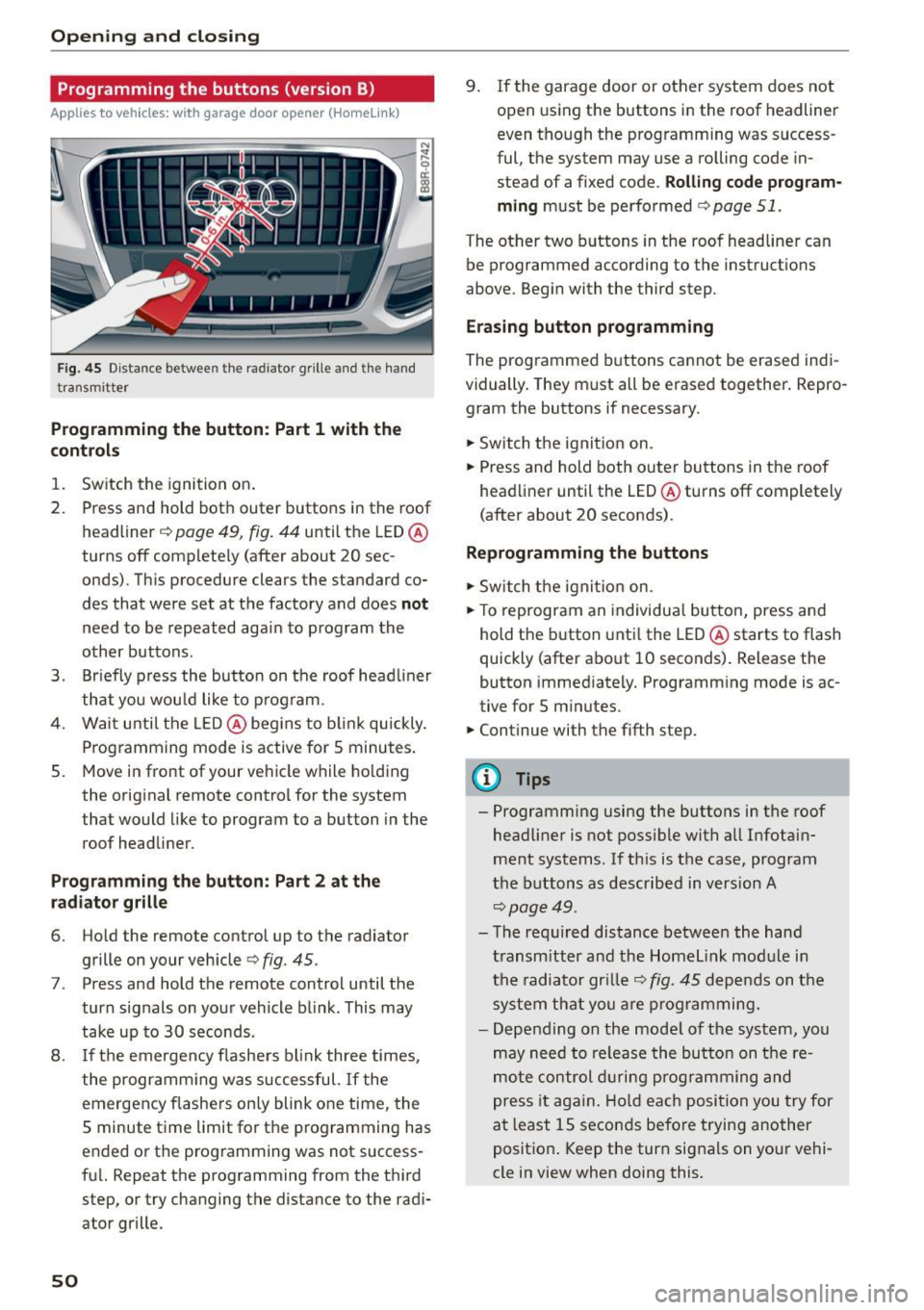
Fig . 4 5 Dis tan ce betwee n th e ra diato r grille a nd the hand
t ra n sm itter
Programming the button : Part 1 with th e
controls
1. Switch the ignition on .
2. Press and hold both outer buttons in the roof headliner
c;, page 49, fig. 44 until the LED @
turns off comp lete ly (after about 20 sec
onds). This procedure clears the standard co
des that were set at the factory and does
not
need to be repeated again to p rogram the
other buttons .
3. Br iefly p ress the button on the roof head liner
that you wou ld like to p rog ram.
4. Wai t unti l the LED @ beg ins to b link quickly.
P rog ramming mode is active for S minutes .
5. Move in front of your ve hicle while ho ld ing
the orig inal remote control for the system
that would like to program to a button in the
roof headliner.
P rogramming the button : Part 2 at the
radiator grille
6. Ho ld the remote control up to the radiator
grille on your vehicle
c;, fig . 45.
7. Press and hold the remote control until the
turn sig nals on yo ur vehicle b link . This may
take up to 30 seconds .
8 . If th e emergen cy flashe rs bl ink three times,
the programm ing was s uccessful.
If the
emergency flashers on ly blink one time, the
5 minute t ime limit for t he p rogramming has
e nded o r the p rog ramming was not success
fu l. Repeat the programming from the t hird
step, or try changing t he distance to the radi
ator grille.
50
9 . If the garage door or other system does not
open using the buttons i n the roof headliner
even tho ugh the programming was success
ful, the system may use a rolling code in
stead of a fixed code.
Rolling code program
ming
must be perfo rmed c;, page 51.
The other two b uttons in the roof headliner can
be programmed according to the instruct io ns
above. Beg in with the third step.
Erasing button programming
The programmed buttons cannot be erased indi
vidually. They m ust all be erased together . Repro
gram the buttons if necessary .
.,.. Sw itch t he ignit io n on.
.,.. Press and hold both outer buttons in the roof
head liner until the LED @turns off completely
(after about 20 seconds) .
Reprogramming the buttons
.,.. Switch the ignit io n o n.
.,.. To reprogram an individua l bu tto n, press and
hold the button unti l the LED @starts to flash
quickly (after a bout 10 seconds) . Release the
button immed iately . Programm ing mode is ac
tive for S m inutes .
.,.. Continue with the fifth step.
@ Tips
- Programming using the buttons in the roof
headliner is not poss ible with all Infotain
ment systems. If th is is the case, program
t he b uttons as descr ibe d in version A
c;, page 49 .
-Th e re quired dis tance between the hand
t ransm itt er an d th e H ome link mo dule i n
t h e radiator gr ille
c;, fig. 45 dep end s on t he
s y st em t hat you are pr ogra mming.
- Depen ding on the mode l of the sys tem, you
m ay need to re lease the bu tton on t he re
m ote co nt rol dur ing p rog ramming an d
p ress i t ag ain. H old ea ch posi tion you try for
a t l east 15 seco nds be fo re trying another
p osit io n. K eep the tur n signa ls on you r vehi
cle in view when doing this .
Page 58 of 302
Lights and Vision
@Interior lights
Press the switch¢ fig. 51 in the corresponding
position.
0 -Interior lights off
I -Interio r lights on
If the sw itch is in the center position, the interior
lighting is controlled automatically.
@ Front/rear reading lights
To turn a reading light on/off, press the button
@~ fig. 51 or ¢fig. 52.
The appearance and location of the rear reading
lights may differ depending on the model.
Instrument illumination
The basic brightness of the illumination for the
instruments, the center console and the display
can be adjusted.
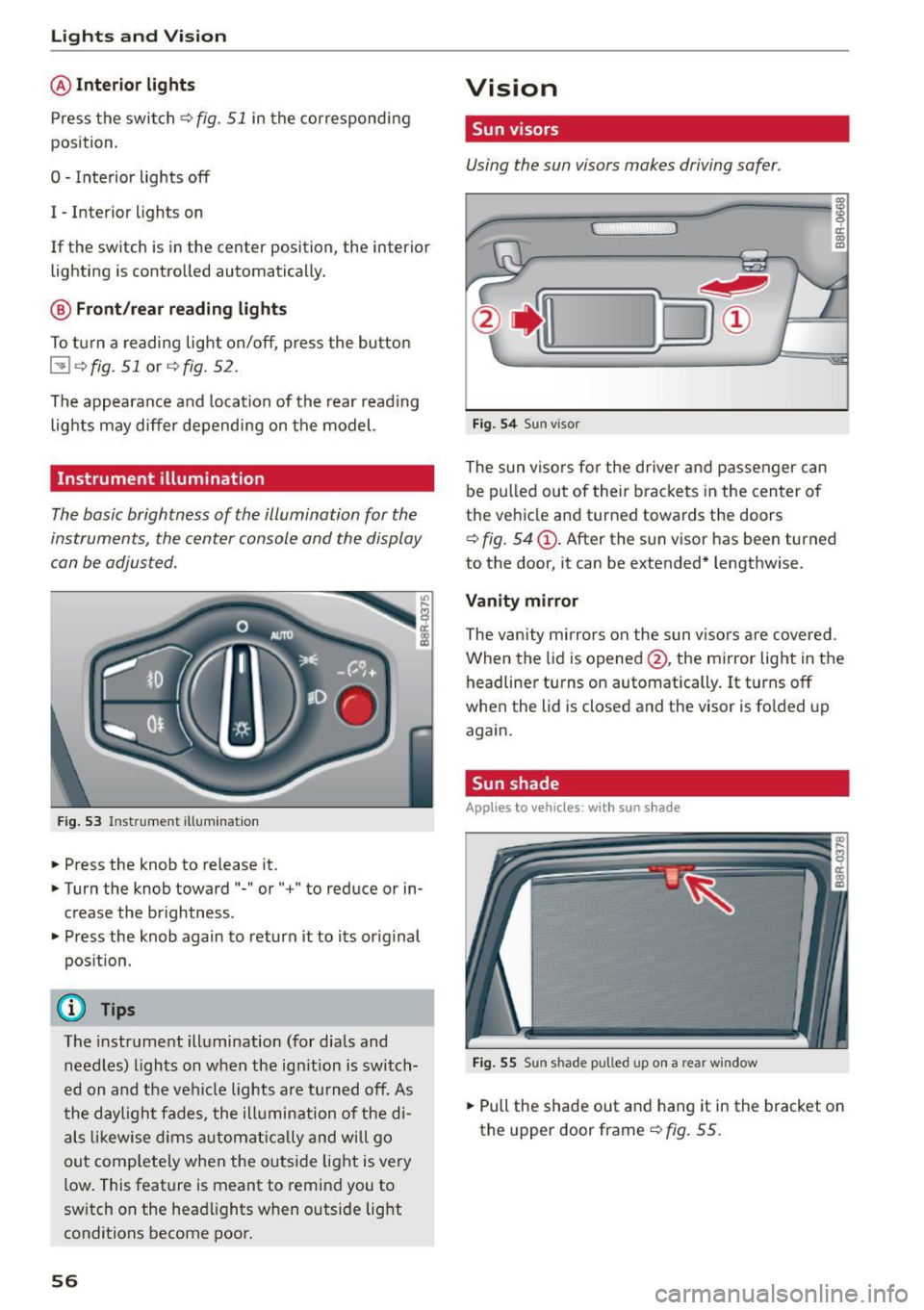
Fig. 53 Instrume nt illumina tion
.. Press the knob to release it .
.. Turn the knob toward "-" or"+" to reduce or in
crease the brightness .
.. Press the knob again to return it to its original
position.
(D Tips
The instrument illumination (for dials and
needles) lights on when the ignition is switch
ed on and the vehicle lights are turned off. As
the daylight fades, the illumination of the di
als likewise dims automatically and will go
out completely when the outside light is very
low. This feature is meant to remind you to
switch on the headlights when outside light
conditions become poor.
56
Vision
Sun visors
Using the sun visors makes driving safer .
Fig. 54 Sun visor
The sun visors for the driver and passenger can
be pulled out of their brackets in the center of
the vehicle and turned towards the doors
~ fig. 54 @. After the sun visor has been turned
to the door, it can be extended* lengthwise .
Vanity mirror
The vanity mirrors on the sun visors are covered.
When the lid is opened @, the mirror light in the
headliner turns on automatically.
It turns off
when the lid is closed and the visor is folded up
again.
Sun shade
App lies to vehicles: wi th sun s had e
Fig. 55 Su n sha de pulled up on a rear win dow
.. Pull the shade out and hang it in the bracket on
the upper door frame ~
fig. 55.
Page 59 of 302

M N
co ~ co
rl I.O
"' N
"' rl
Windshield wipers
Switching the windshield wipers on
Fig. S6 Windshie ld wiper lever
Fig. S7 Rear w ipe r act uation
Move the windshield wiper lever to the corre
spond ing pos ition:
@ -Windshield wiper off
(D-Interval mode. The windshield w iper auto
matical ly activates when you drive 2 mph (4 km/
h). The higher the sensitivity of the rain sensor is
set (switch @ to the right), the earlier the wind
shield w ipers react to moisture on the wind
shield. In some models, you can switch rain sen
sor mode off and switch intermittent mode on in
the MMI* . Select:
!CARI function button> Car
systems*
contro l button > Driver assist > Rain
sensor.
In i nterm ittent mode, you can adjust the
interval time using the@ switch .
@-Slow wiping
®-Fast wiping
©-Single wipe
® -Clean the windshield . To eliminate water
d roplets , the w indshield wiper performs one af
terwipe operat ion after several seconds while
dr iving . You can switch this function off by mov-
Lights and Vision
ing the lever to position® within 10 seconds of
the afterwipe operation. The afterwipe function is reactivated the next t ime the ignition is switch
ed on.
T he rear wiper automat ica lly switches on when
the reverse gear is engaged and the front wind shield wipers are on and in operation.
Cleaning the headlights*. The headlight washer
system * operates only when the headlights are
on . If you move the lever to position ®, the
headlights are washed in interva ls .
@ -Wipe the rear window. The rear wipe r moves
about every 4 seconds.
(!) -Clean the rear window . Th e number of wiping
operations depends on how long the lever is held
in position 7.
_&. WARNING
-
- The rain sensor is only intended to assist the
driver . The driver is still responsible for
manually switching the wipers on according
to the visibility condit ions.
- The windshield may not be treated with wa
ter-repelling windshield coating agents. Un
favorable conditions, such as wetness, dark ness, low sun, can result in increased glare.
W iper blade chatter is also possible .
- Properly funct ion ing windshield wiper
blades are requ ired for a clear view and safe
driving.
(D Note
- In the case of frost, check whether the windshield wiper blades are frozen to the
windshield . Switching on the w indshield
wipers can damage the wiper blades!
- Prior to using a car wash, the windshield
w iper system must be sw itched off (lever in
position 0). This helps to prevent un inten
tional switching on and damage to the
w indshield wiper system.
(D Tips
-The windshie ld wipers are switched off
when the ignit ion is turned off. Activate the
w indshield wipers after the ignition is ..,
57
Page 63 of 302

M N
co ~ co
rl I.O
"' N
"' rl
-If swallowed and person is conscious, rinse
mouth with water for at least 15 minutes.
Do not induce vomiting unless instructed to
do so by medical professional. Get medical
attent ion immed iately .
(D Note
Liquid electrolyte leaking from broken mirror
glass will damage any plastic surfaces it
comes in contact with . C lean up spilled elec
trolyte immed iately w ith clean water and a
sponge.
@ Tips
- Switching off the dimming function of the
i nside rear view mirror also deactivates the
automat ic dimming function of the exterior
mir rors*.
- The automatic dimming mirrors do not d im
when the interior lighting is turned on or
the reverse gear is selected.
-Automatic dimming for the m irror only op
erates properly if the light striking the in
side mirror is not hindered by other objects.
Digital compass
Activating or deactivating the compass
App lies to vehicles: with dig ital compass
The direction is displayed on the interior rear
view mirror.
Fig. 62 Inside rea r view m irror: digital compa ss activated
.,. To activate or deactivate, hold the@ button
down until the red display appears or disap
pears .
Lights and Vision
The digital compass on ly works with the ignition
turned on. The directions are displayed as initials:
N (North), NE (Northeast), E (East), SE (South
east),
S (South), SW (Southwest), W (West), NW
(Northwest) .
(!_) Tips
To avoid inaccurate directions, do not allow
any remote controls, electrical systems, or
metal parts close to the mirror.
Setting the magnetic deflection zone
Applies to vehicles: wit h dig ita l compass
The correct magnetic deflection zone must be
set in order to display the directions correctly.
®
Fig. 63 North Ame rica: magne tic deflection zo ne bo unda
ri es
.,. Hold the@~ page 61, fig . 62 button down un
til the number of the set magnet ic deflection
zone appears on the inter io r r ear view mirror .
.,. Adjust the magnetic deflection zone by repeat
ed ly pressing on the @button . The set mode
automatically deactivates after a few seconds .
61
Page 80 of 302
Seats and storag e
_& WARNING
-Always remove objects from the instrument
panel. Any items not put away could slide
around inside the vehicle while dr iving or
when accelerating or when applying the brakes or when dr iv ing aro und a corner .
- When you are driving make sure that any
thi ng you may have placed in the cente r con
so le or other storage loca tions cannot fall
o ut into the footwells. I n case of sudden
braking you would not be able to brake or
acce lerate .
- Any pieces of cloth ing that you have hung
up must not interfere with the driver's view .
The coat hooks are designed only for light
weight cloth ing . Never hang any clothing
with hard, pointed or heavy objects in the
pockets on the coat hooks. During sudden
braking or in an acc ident -especially if the
airbag is deployed -these objects could in
jure any passengers ins ide the veh icle.
Glove compartment
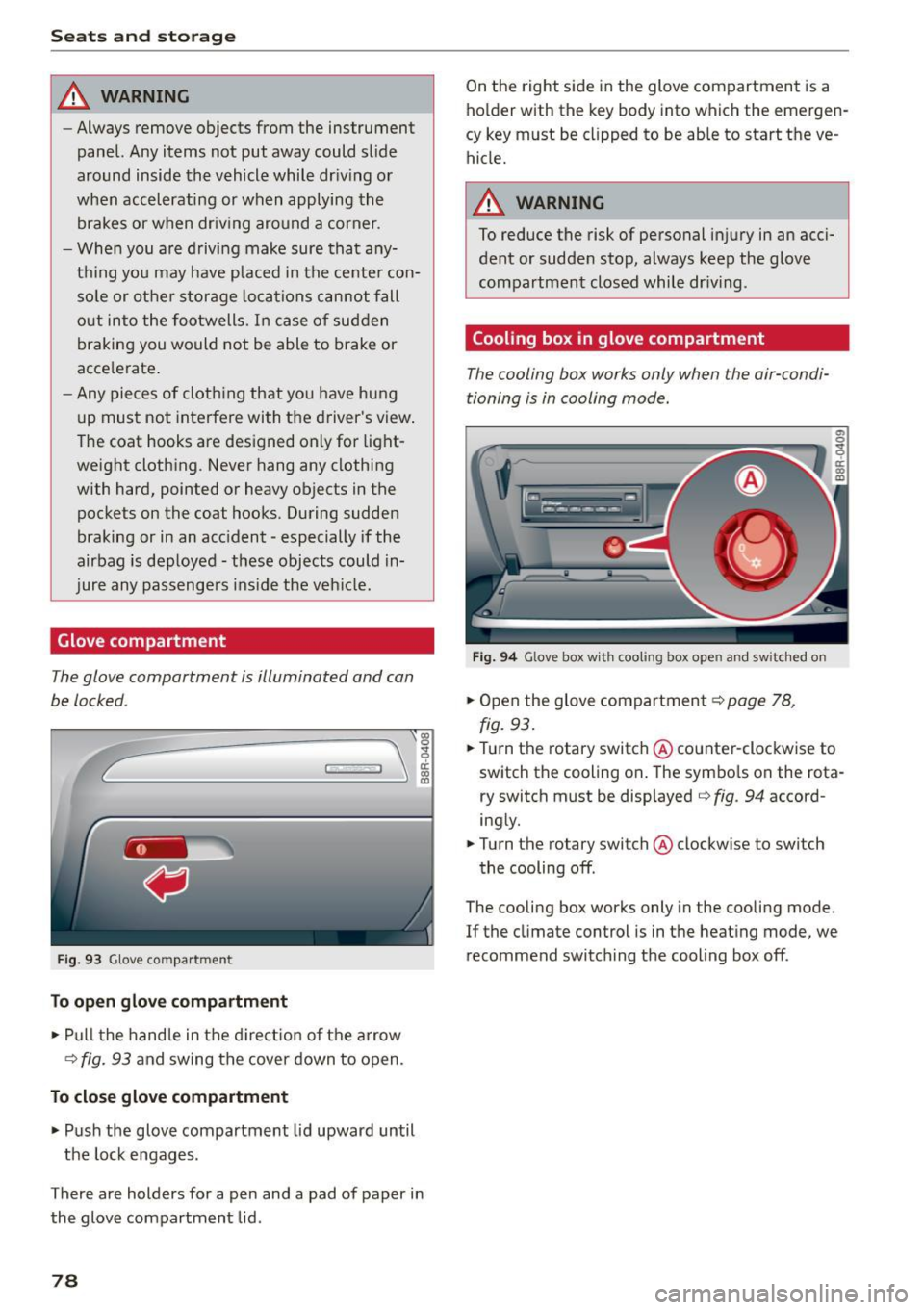
The glove comportment is illuminated and con
be locked .
C
Fig. 93 Glove compar tmen t
To open glov e compartment
,.. Pu ll t he hand le in the d ire ct io n of the arrow
¢
fig. 93 and swing the cover down to open .
To close glove compartment
.,. Push the glove compartment lid upward until
the lock engages .
There are holders for a pen and a pad of paper in the glove compartment lid .
78
On the right side in the glove compartment is a
ho lder with the key body into which the emergen
cy key must be clipped to be able to start the ve
hicle.
_& WARNING
To reduce the risk of personal inj ury in an acci
dent or sudde n stop, always keep the glove
compartmen t closed while dr iv ing .
Cooling box in glove compartment
The cooling box works only when the air-condi
tioning is in cooling mode.
Fig . 9 4 Glove box w it h coo li ng box ope n and s wit c hed on
.,. Open the glove compartment¢ page 78,
fig.
93 .
.,. Turn the rotary switch @counter-clockwise to
switch the cooling on . The symbo ls on the rota
r y switch must be displayed ¢
fig. 94 accord
ing ly .
.,. Turn the ro tary switch @clockw ise to switch
the cooling off .
The cooling box works only in the cooling mode.
If the climate con trol is in t he heat ing mode, we
recommend switch ing the cooling box off .
Page 83 of 302
M N
co ~ co
rl I.O
"' N
"' rl
Warm and cold
Operation
We recommend pressing the IAUTO I button and setting the temperature to 72 °F (22 °C) .
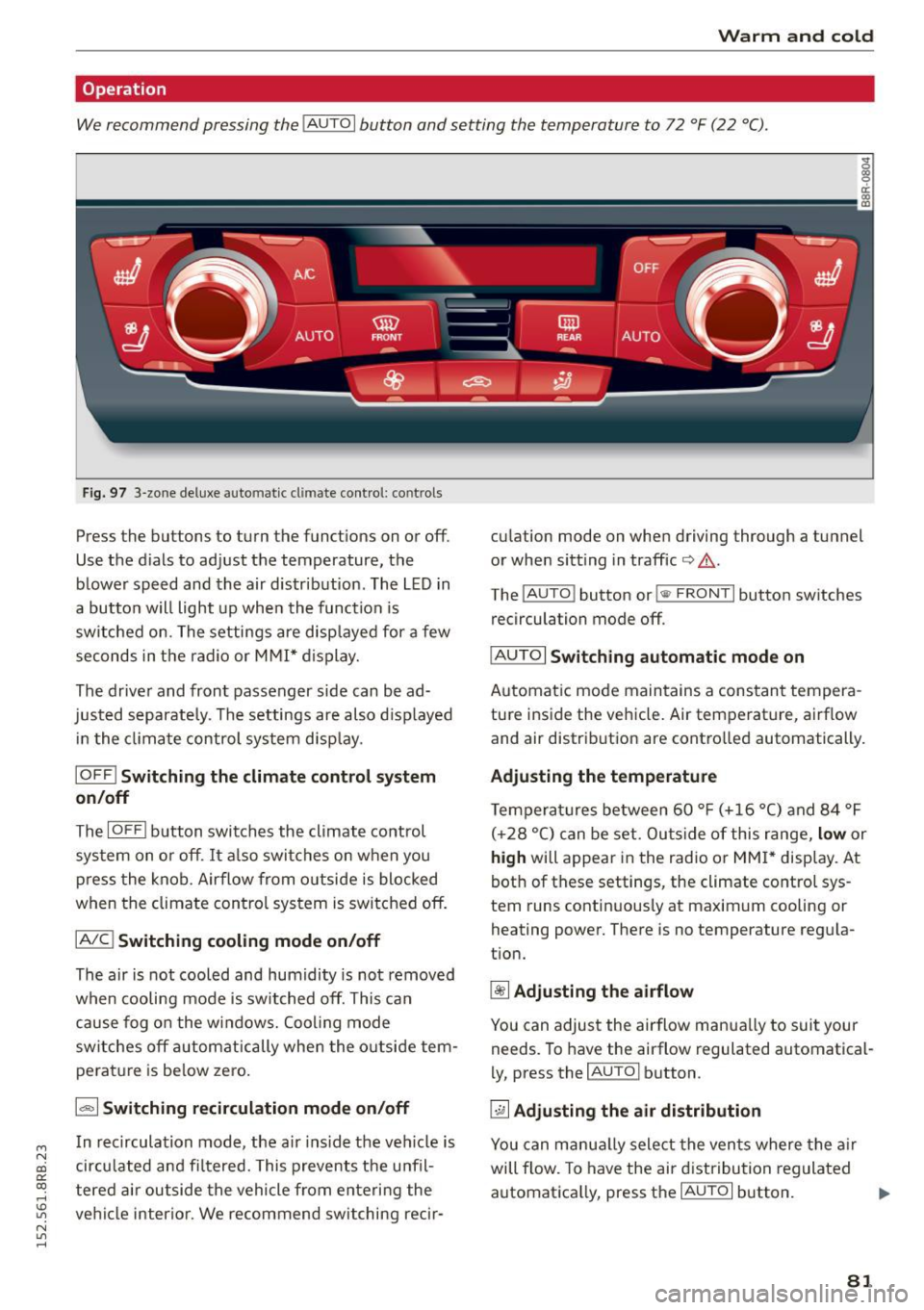
Fig. 97 3-zone de luxe au to ma tic c lima te contro l: co ntrols
Press the bu ttons to turn the funct ions on or off.
Use the d ials to adjust the temperature, the
blower speed and the air distr ibution . The L ED in
a button w ill light up when the function is
switched on . The settings are disp layed for a few
seconds in the radio or M MI* d isplay.
The driver and front passenger side can be ad
justed separate ly . The settings are also d isp layed
i n the climate control system disp lay .
IOFF ! Switching the climate control syst em
on/off
The IOFFI b utton switches the climate control
system on o r off. It also switches on when you
p ress the knob . Airflow from o utside is blocked
when the climate con trol system is switched off.
IAIC ! Switching cooling mode on /off
The air is not cooled and humidity is not removed
when cooling mode is switched off. This can
cause fog o n the windows. Cooling mode
switches off autom atically when the o utside tem
pe rat ure is be low zero.
1.,,., 1 Switching recirculation mode on /off
In recirculation mode, the a ir ins ide the ve hicle is
cir culated and fi ltered. This prevents the u nfil
tered air outside the vehicle from enteri ng the
ve hicl e interior . We recommend switching recir- cu
la tion mode on whe n driving thro ugh a tunnel
or when sitt ing in traffic
io A .
The IAU TO I button or !<11> F RONT I button switches
recirculation mode off .
IAU TOI Switch ing automatic mode on
Automatic mode maintains a cons tant tempera
ture inside the vehicle. Air temperature, airf low
and air distrib ution are contro lled automatically.
Ad justing the temp erature
Temperatures between 60 ° F (+16 °C) and 84 °F
( + 28 °C) can be set. Outs ide of this range,
low or
high will appear in the radio or MM I* display. At
bot h of these settings , the climate control sys
tem runs contin uous ly at maximum cooling or
heating power. There is no temperature regu la
t ion.
~ Adjusting the airflow
You can adjust the airflow manua lly to suit your
needs. To have the ai rflow regulated automatical
l y, press the
IAU TO I button .
~ Adjusting the air di stribution
You can manu ally select the vents where the a ir
will flow. To have the air dist ribution regulated
automatica lly, press the
IAU TOI button. .,.
81
Page 84 of 302
![AUDI Q5 2015 User Guide Warm and cold
[i] Adjusting seat heating*
Pressing the but ton switches the seat heating on
at the highest setting (level 3). The LEDs indicate
the temperat ure leve l. To red](/img/6/57635/w960_57635-83.png "AUDI Q5 2015 User Guide Warm and cold
[i] Adjusting seat heating*
Pressing the but ton switches the seat heating on
at the highest setting (level 3). The LEDs indicate
the temperat ure leve l. To red")
Warm and cold
[i] Adjusting seat heating*
Pressing the but ton switches the seat heating on
at the highest setting (level 3). The LEDs indicate
the temperat ure leve l. To red uce the tempera
ture, press the button again. To switch the seat heating off, press the button repeatedly until the
LED turns off.
After
10 minutes, the seat heating automatica lly
switches from leve l
3 to leve l 2.
lil Adjusting seat ventilation*
Press ing the button switches the seat ventilation
on at the highest setting ( leve l
3). The LEDs ind i
cate the venti lation level. To reduce the venti la
tion level, press the button aga in. To switch the
seat ventilation off, press the button repeatedly
until the L ED turns off.
l(;I> FRONT I S w itch the d efroster on/off
The windshield and s ide windows are defrosted
or cleared of condensation as quickly as possible.
The maximum amo unt of air flows mainly from
the vents below the windshield. Recirculation
mode switches off. The temperature should be
set to 72 °F (22 °C) or higher. The temperature is
cont ro lled automatically .
The
IAUTOI button switches the defroster off.
I Qiil REAR I Switching rear window heater on /
o ff
The rear window heater only operates when the
engine is running. It switches off automatically
after a few m inutes, depending on the outs ide
temperature .
To prevent the rear window heater from switch
ing off automatically, press and hold the
!lliD REARI
button for more than 2 seconds. This rema ins
stored unt il the ignition is switched off.
Air vent s
You can open and close the center and rea r air
vents using the thumbwheels. The levers adjust
the direction of the airflow from the vents .
You can adjust the air temperatu re in the rear by
turning the thumbwheel toward the red side to
82
make it wa rmer or towa rd the blue side to make
it coo ler .
A WARNING
- Do not use the recircu lation for extended
periods of time. The windows could fog up
since no fresh air can enter the vehicle. If
the windows fog up, press the air rec ircula
tion button again immed iately to sw itch off
the air recircu lation function or se lect de
frost.
- Individuals w ith reduced sensitivity to pain
or temperatu re could develop burns when
using the seat heating* function . T o reduce
the r isk of in ju ry, these indiv iduals should
no t use seat hea ting.
(D Note
To avoid damage to the heat ing e lements* in
the seats, do not kneel on the sea ts or place
h eavy loads on a sma ll are a of the seat .
Setup
-
The basic climate control settings can be adjust
ed in the radio or MMI".
"'Select : !CAR I function button> A/C control but
ton. O r
"' Sele ct:
I CAR I function b utton > Car sy stem s*
cont ro l bu tton
> A /C.
Automatic recirculation
When switched on, automat ic recirculation con
trols the recirculation mode automatically . If the
windows fog up , p ress the!@
F RON T! butto n.
Synchronization
When synchronization is switched on, the same
settings are applied to both the driver and front passenger, except for the seat heating/ventila
t ion* . Synchron izat ion switches off when you ad
just the settings on the front passenge r's side.
You can also switch synchronization on by press -
i ng and holding the knob on t he d river 's side . ..,_