ECO mode AUDI Q5 2015 Owner's Guide
[x] Cancel search | Manufacturer: AUDI, Model Year: 2015, Model line: Q5, Model: AUDI Q5 2015Pages: 302, PDF Size: 75.01 MB
Page 125 of 302
M N
co
a:
co
,...., \!) ..,.,
N ..,., ,....,
Automatic transmission
tiptronic
Introduction
Th e automat ic transm iss ion is controlled elec
tronically. The transmiss ion ups hifts o r down
shifts aut om atic ally depe nding on which drive
p rogram is se lected. The power is t ransferred by
a to rque conve rter .
W hen a
moderate driving style is used, the
tr an smi ssion se lec ts the mos t econom ica l dr iving
mode.
It will then change up early an d de lay the
downshifts to give better fue l economy.
The t ran smis sion swi tches to a sporty mode a fter
a kick-down o r w he n the dr iver uses a
sporty driv
ing style
cha racte rized by quick acce lerator pedal
movements, heavy acceleration, frequent
changes in speed and traveling at the max imum
speed.
If desired, the drive r can a lso se lect t he gears
manually (tiptronic mode ) ¢page 127.
Selector lever positions
0
~ 9 a: CX) ID
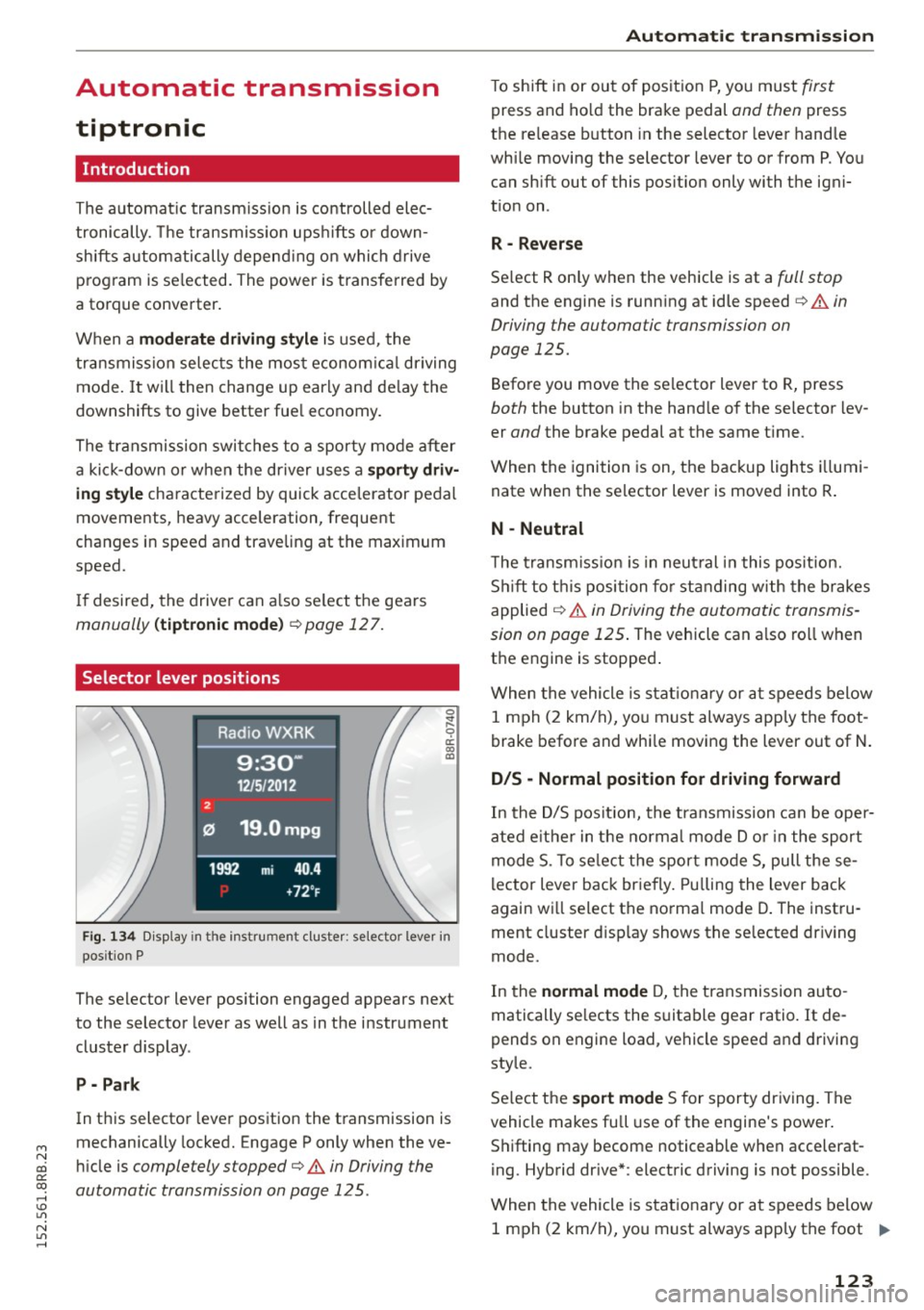
Fig. 1 34 Disp lay in t he instru ment cluste r: selecto r leve r in
pos it io n P
The selector lever position engaged appears next
to the selector leve r as well as in the instrument
cluste r display .
P - Park
In this selector leve r pos ition the t ransmission is
mechanically locked. Engage P only when the ve
hi cle is
completely stopped¢ A in Driving the
automatic transmission on page 125 .
Automatic transmission
T o shift in or ou t of pos it ion P, you must first
press and ho ld the brake pedal and then press
t h e re lease button in the selector leve r hand le
whi le mov ing the selector lever to or from P. Yo u
can sh ift out of this pos it io n only with t he igni
t io n on .
R - Rever se
Se lect R only when the vehicle is at a full stop
and the engine is runn ing at idle speed¢ A in
Driving the automatic transmission on
page 125.
Befo re you move the se lector lever to R, press
both the button in the hand le of the se lecto r lev
er
and the brake pedal at the same t ime.
When the igni tion is on, the backup lights illumi
nate when the se lector lever is moved into R .
N - Neutral
The trans mission is in neu tral in t his pos ition.
Shi ft to t his posi tion for stand ing w ith th e br akes
applied
¢ A in Driving the automa tic transmis
sion on page 125 .
The vehicle can a lso ro ll when
t h e engine is stopped .
W hen the vehicle is stat ionary or a t speeds below
1 m ph ( 2 km/h), yo u m ust always app ly t he foot
brake bef ore and whi le moving the lever out of N.
D/S - Normal position for driving forward
In the D/S pos it ion, the tra nsmission ca n be ope r
ated e it h e r in the normal m ode Dor i n the sport
m ode S . To selec t th e spor t mo de S, pull these
l ector lever bac k br ie fly. Pullin g t he lever back
again w ill select t he no rma l mode D. The inst ru
ment cluster d isp lay shows t he se lected dr iving
mode.
In the
normal mode D , the t ransmission au to
matically se lects the s uita ble gear ratio.
It de
pends on engine load, vehi cle spee d and drivi ng
style.
S e lect t he
sport mode S for sporty dr iv ing. The
vehicle makes full use of the engine's power .
S hi fting may become noticeable when accelerat
i ng. Hybrid dr ive *: electric d riving is not possible .
When the vehicle is s tat iona ry or a t speeds below
1 m ph ( 2 km/ h), yo u m ust always app ly t he foot
IJ>-
123
Page 128 of 302
Automatic transmission
-Never leave your vehicle with the engine
running while in gear. If you must leave your
vehicle when the engine is running, activate
the parking brake and move the selector lev er to P.
- Power is still transmitted to the wheels
when the engine is running at idle. To pre
vent the vehicle from "creeping", you must keep your foot on the brake when the engine
is running and the selector lever is in D/S or
R or "tiptronic" mode is selected.
- Do not press the accelerator pedal when
changing the selector lever position while
the vehicle is stationary and the engine is
running.
- Never shift into R or P while driving.
- Before driving down a steep slope, reduce
your speed and shift into a lower gear with
"tiptronic".
- Do not ride the brakes or press the brake
pedal too often or too long when driving
down a hill. Constant braking causes the
brakes to overheat and substantially re
duces braking performance, increases brak
ing distance or causes complete failure of
the brake system.
- To prevent the vehicle from rolling back
when stopping on inclines, always hold it in
place with the brake pedal or parking brake.
- Never hold the vehicle on an incline with a
slipping clutch. The clutch opens automati
cally when it becomes too hot from the
overload. An indicator lamp[!] illuminates
and a driver message appears
<=> page 127
when the clutch is overloaded .
-If the engine must remain running, never
have any driving position engaged when
checking under the hood. Make sure these
lector lever has securely engaged and is
locked in P with the parking brake set
<=>page 221. Otherwise, any increase in en
gine speed may set the vehicle in motion,
even with the parking brake applied.
0 Note
- When stopping on an incline, do not try to
hold the vehicle in place by pressing the ac
celerator pedal while a driving gear is se-
126
lected. This can cause the transmission to
overheat and can damage it. Activate the
parking brake or press the brake pedal to
prevent the vehicle from rolling.
- Allowing the vehicle to roll when the engine
is stopped and the selector lever is in N will
damage the transmission because it is not
lubricated under those circumstances.
{!) Tips
For safety reasons, the parking brake is re
leased automatically only when the driver's
safety belt is engaged in the buckle.
Hill descent control
The hill descent control system assists the driver
when driving down declines.
Hill descent control is activated when the selec
tor lever is in D/S and you press the brake pedal.
The transmission automatically selects a gear
that is suitable for the incline. Hill descent con
trol tries to maintain the speed achieved at the
time of braking, within physical and technical limitations.
It may still be necessary to adjust the
speed with the brakes.
Hill descent control switches off once the decline
levels out or you press the accelerator pedal.
When the speed is set in the cruise control sys
tem <=>
page 95, hill descent control is also acti
vated .
A WARNING
Hill descent control cannot overcome physical
limitations, so it may not be able to maintain
a constant speed under all conditions. Always
be ready to apply the brakes.
Page 131 of 302

M N
co ~ co
rl I.O
"' N
"' rl
Parking system
Parking system plus with
• rearv1ew camera
Introduction
Appl ies to vehicles: with Audi park in g system p lus w ith rea r·
vi ew ca mera
I
u
Fig. 141 Parking mode 1: Back ing into a parking space
Fig. 1 42 Pa rking mode 2: paral lel park ing
Vehicles w ith the Audi parking system p lus with
rearv iew camera are equ ipped w ith a
r e ar vie w
c amera
in addition to the acoust ic and visual
parking system .
You ca n choose between parking modes to help
you when parking your vehicle. Use "parking mode 1" when park ing in a pa rking space or ga
rage
~ fig. 141. If you are go ing to be para llel
pa rking, use "parking mode 2"
i=:;fig. 142.
Par king system
General Information
App lies to vehic les : with Audi parking sys te m plus with rear
vi ew camera
Fi g. 14 3 Area covered © and area not covered @by t he
r ea rvi ew came ra.
F ig. 144 Rea r lid: Locat ion of t he rearview came ra
Sensors in the bumper
"'
~ a: (0 m
ci: (0 m
Sensors are located in the front and rear bump
ers. If these detect an obstacle, audible and visu
al signals wa rn you. The ra nge at wh ich the sen
sors begin to measu re is app rox ima tely:
side 3
ft (0
.90 m)
front center 4
ft (1.20 m)
side 2
ft (0.60 m)
rear center 5.2 ft (1.60 m)
The close r you get to the obstacle, the shorte r
the interval between the aud ible signals . A con
t inuous tone sounds when the ob stacle is less
than approximate ly 1 foot (0 .30 meters) away.
Do not continue driving farther.
If the distance to an obstacle rema ins constant,
t h e volume of the dista nce warn ing gradually
drops after about fo ur seconds (this does no t ap-
ply in the contin uo us tone range) . .,,_
129
Page 136 of 302
Parkin g system
mirror or a corner of yo ur vehicle does not col
lide with any obstacles. This can damage to
your vehicle.
(D Tips
The left or right orientation lines and sur faces
wi ll be displayed, depending on the turn sig
nal being used .
Adjusting the display
and warning tones
A pp lies to veh icles: w ith Audi park ing system p lus w ith rear
view ca mera
The display and warning tones can be adjusted in
the MMI.
~ Select: I CARI function button > Pa rking system .
Or
~ Select: ICARI funct ion button > Car s ystem s*
control button> Driver ass ist > Par king aid .
D is pl ay
- Off -when the parking system is switched on,
only audib le signals are given .
-On -when the parking system is switched on,
either the visual disp lay or the picture from the
rearview camera is disp layed.
Warning tones
- Front volum e -
front sensor volume
- Front frequency -front sensor frequency
-Rea r volume -rear sensor volume
-Rear fre quenc y -rear sensor frequency
- In -ca r entertainment fader /M usic volume
w hile pa rking -
when the parking system is
switched on, the volume of the active audio
source is lowered.
The newly adjusted value is briefly heard from
the signal generator.
(D Tips
- The warning tones can also be adjusted d i
rectly by the visual display or the picture
from the rearview camera. Simply press the
S ett ing s control button.
- Changed settings are activated when park
i ng system is switched on again .
134
-The settings are automatica lly stored and
assigned to the remote contro l key .
Trailer hitch
App lies to vehicles : wi th Audi parking sys te m plus wi th rea r
v iew camera a nd t railer hitch
For vehicles with a factory installed trailer hitch,
o r a trai ler h itch installed accord ing to factory
spec ifications, the parking sys tem rear sensors
do not come on whenever you shift into reverse
gear or when you press the
P" 1A switch. Remem
ber, there is no warning for distances to the rear.
The front sensors remain activated . The visua l
display switches to the trailer towing mode. The
picture from the rearv iew camera w ill not show
the or ientat ion lines nor the blue surfaces.
If you insta ll a hitch yourse lf, this function may
not work.
Error messages
App lies to vehicles: wi th Audi parking sys te m plus with rea r·
v iew camera
There is an error in the system if the LED on the
PwA switch is b linking and you hear a continuous
a larm for a few seconds after switching on the
parking system or when the parking system is al
ready act ivated. Have your authori zed Audi dealer
correct the error.
(D Tips
If the error is not corrected before you switch
off the ignition, when you switch on the park i ng system again, the LED in the
Pw.o. sw itch
will blink.
Page 167 of 302
M N
co
a:
co
,...., \!) 1.1"1
N 1.1"1 ,....,
@ Tips
If the weight-sensing mat in the front passen
ger seat detects an empty seat, the front air
bag on the passenger side will be turned off,
and
PASSENGER AIR BAG OFF will stay on.
Repair, care and disposal of the airbags
Parts of the airbag system are installed at many
different places on your Audi. Installing, remov ing , servicing or repairing a part in an area of the
vehicle can damage a part of an airbag system and prevent that system from working properly in a collision.
There are some important things you have to know to make sure that the effectiveness of the
system will not be impaired and that discarded
components do not cause injury or pollute the
environment.
A WARNING
-
Improper care, servicing and repair proce
dures can increase the risk of personal injury
and death by preventing an airbag from de
ploying when needed or deploying an airbag
unexpectedly:
- Never cover, obstruct, or change the steer
ing wheel horn pad or airbag cover or the in
strument panel or modify them in any way .
- Never attach any objects such as cup holders
or telephone mountings to the surfaces cov
ering the airbag units .
- For cleaning the horn pad or instrument panel, use only a soft, dry cloth or one mois
tened with plain water. Solvents or cleaners could damage the airbag cover or change
the stiffness or strength of the material so
that the airbag cannot deploy and protect
properly.
- Never repair, adjust, or change any parts of
the airbag system.
- All work on the steering wheel, instrument
panel, front seats or electrical system (in
cluding the installation of audio equipment,
cellular telephones and CB radios, etc.)
must be performed by a qualified technician
Airbag system
who has the training and special equipment
necessary.
- For any work on the airbag system, we
strongly recommend that you see your au
thorized Audi dealer or qualified workshop.
- Never modify the front bumper or parts of
the vehicle body.
- Always make sure that the side airbag can
inflate without interference:
- Never install seat covers or replacement
upholstery over the front seatbacks that
have not been specifically approved by
Audi .
- Never use additional seat cushions that
cover the areas where the side airbags in
flate.
- Damage to the original seat covers or to
the seam in the area of the side airbag
module must always be repaired immedi
ately by an authorized Audi dealer.
- The airbag system can be activated only
once. After an airbag has inflated, it must
be replaced by an authorized Audi dealer or
qualified technician who has the technical
information, training and special equipment
necessary.
- The airbag system can be deployed only
once . After an airbag has been deployed, it
must be replaced with new replacement
parts designed and approved especially for
your Audi model version. Replacement of complete airbag systems or airbag components must be performed by qualified work
shops only. Make sure that any airbag serv
ice action is entered in your Audi Warranty
&
Maintenance booklet under AIRBAG RE
PLACEMENT RECORD.
- In accidents when an airbag is deployed, the
vehicle battery separates the alternator and
the starter from the vehicle electrical sys tem for safety reasons with a pyrotechnic
circuit interrupter .
- Work on the pyrotechnic circuit interrupt
er must only be performed by a qualified
dealer -risk of an accident!
- If the vehicle or the circuit interrupter is
scrapped, all applicable safety precautions
must be followed.
165
Page 176 of 302
Child safety
child restraint is being used on the front passen
ger seat with a typical 1 year-old child , the Ad
vanced Airbag System compares the weight
measured by the weight sensing mat with the in
formation stored in the electron ic control unit.
The electronic control unit a lso reg isters the ten
sion on the front passenger safety be lt. The ten
sion on the safety belt for the front passenger
seat will be d ifferent for an adult who is properly
using the safety belt as compared to the tens ion
on the belt when it is used to attach a child re
straint to the seat. The senso r below the latch fo r
the safety belt for the fron t seat passenge r
measures the tension on the be lt. T he inp ut from
t his sensor is then used w ith the weight to "de
cide", whether there is a c hild restraint with a
typical 1 year -old chi ld on the front passenge r
seat and whether or not the airbag must be
turned off .
Child restraints and Advanced Airbags
Regardless of the child restraint that you use,
make sure that it has been certified to meet Un it
ed States Federal Motor Vehicle Safety Standards
and has been ce rtified by i ts manufact urer for
use with an airbag . A lways be sure tha t the child
restrain t is properly ins talled at one of the re ar
seating posi tions . If in exceptiona l circumstances
you must use it on the front passenger seat, care
fu lly read all of the informat ion on child safety
and Advanced Airbags and heed a ll of the appli
cable WARNINGS . Make certain that the ch ild re
straint is correctly recognized by the weight -sens
i n g mat inside the front passenger seat, that the
front pass enge r airbag is turned off and that the
a ir bag s tatus is a lways corre ctly s ignaled by t he
PASSENGER AIR BAG OFF li ght.
Many types and models of ch ild restra ints have
been ava ila ble over the y ears, new models are in
troduced regu larly i ncorpo rat ing new and im
p rove d des igns and o lde r models a re t aken o ut o f
p rod uction. Child rest rain ts a re not standardized .
C hild restraints of the same type typically have
diffe rent weights and sizes and different 'foot
prints,' the size and shape of the bottom of the
child restraint that sits on the seat, w hen they
are i nstalled on a veh icle seat. These differences
174 make
it virtua lly impossib le to cert ify compliance
with t he requirements for advanced airbags with
each and every chi ld restraint that has ever been
so ld in the past or will be sold over the course of
the usefu l life of your vehicle.
Fo r th is reason, the Unite d States National High
way T raffic Safety Adm inistrat ion has published a
li st of specific type, makes and models of child
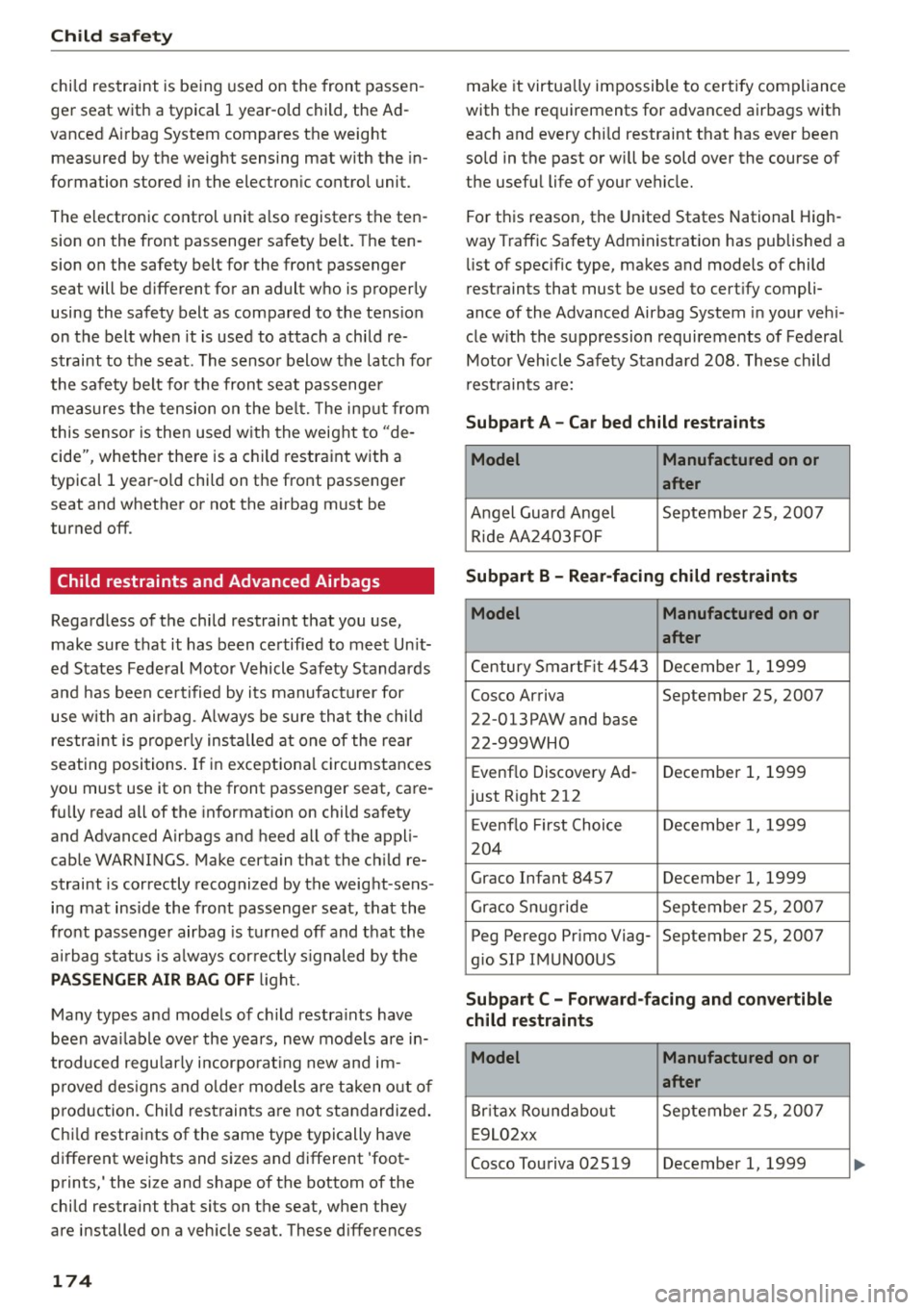
rest raints that must be used to cert ify compli
ance of the Advanced Airbag System in your veh i
cle w ith the s uppression requi rements of Federal
Motor Veh icle Safety S tanda rd 208. These child
r est raints a re:
Subpart A -Car bed child restraints
Model Manufactured on or
after
A ngel Guard Angel September 2S , 2007
R id e AA 2403FOF
Subpart B - Rear-facing child restraints
Model Manufactured on or
after
Century Smart Fit 4 54 3 December 1, 1999
Cosco Arriva September 25, 2007
22 -013PAW and base
22-999WHO
Evenflo Discove ry Ad- December 1, 1999
just R ight 212
E venflo First Choi ce Decembe r 1, 1999
2 04
Graco Infant 8457 December 1, 1999
Gr aco S nugride Se pte mber 25 , 20 07
Peg Perego Pr imo Viag- September 25, 2007
gio SIP IM UNOOUS
Subpart C - Forward-facing and convertible
child restraints
Model Manufactured on or
after
B rit a x Round about Septe mber 25, 200 7
E 9 L02xx
Cosco Tou riva 02519 December 1, 1999
Page 202 of 302
Driving and th e environment
consumption by 10-15 percent. This section will
give you some tips on how you can help the envi ronment and your pocketbook.
(D Tips
The consumption estimates as published by ENVIRONMENTAL PROTECTION AGENCY (EPA)
and Transport Canada may not correspond to
your actual consumption on the road, wh ich
w ill vary depend ing upon vehicle load and
speed, road and weather conditions, trip
length, etc .
Drive smoothly and keep a lookout ahead
Vehicles use the most fuel when they are acceler
ating .
"'Avoid unnecessary accelerating and braking.
Vehicles use the most fuel when they are acceler
ating . If you anticipate what is going to happen
next, you will need to brake less and, thus, accel
erate less. Let the vehicle coast whenever possi
ble -for example when you see that the next traf
fic light is red .
Avoid full throttle
Driving at moderate speeds saves fuel and im
proves your mileage.
"' Try and keep well be low your car's max imum
speed.
Accelerating gently reduces fuel consumption,
engine wear, and does not disturb the environ
ment.
Fue l consumption, exhaust emissions and engine
noise increase disproportionately at high speeds.
If you drive at approximately three quarters of
top speed, fuel consumpt ion w ill be reduced by
one half. Never dr ive faster than the posted
speed lim it and weather conditions permit .
200
· Reducing unnecessary idling
Even when your car is just idling it burns up fuel .
"'Shut the engine off when you are not driving
the vehicle.
"' Do not warm up the vehicle by letting the en-
gine run at idle .
The idling phase is automatically reduced for
vehicles with the Start-Stop-System*. It is effi c ient to sw itch off the eng ine in vehicles w ithout
the Start-Stop-System* when stopped at railroad
crossings and long red lights. Turn ing the engine
off for just 30-40 seconds saves more fuel than is
burned by start ing the eng ine again.
It takes a long t ime for the engine to warm up
fully when it is runn ing at id le . However, wear
and noxious emissions are especia lly high when
the engine is warming up. So you sho uld drive
away as soon as you start the eng ine and avoid
running at high rpms whi le the engine is s till
warming up.
Q) Note
Do not leave engine id ling unattended after
starting. If warning lights should come on to
indicate improper operation, they would go
unheeded. Extended idling also produces
heat, which could result in overheating or oth
er damage to the veh icle or other property.
· Regular maintenance
A badly tuned engine unnecessarily wastes a lot
of fuel.
"' Have your vehicle serviced at regu lar intervals.
By having your veh icle reg ularly serv iced by an
authorized Aud i dea le r helps to ensure that i t
runs proper ly and economica lly. The condition of
your vehicle not on ly affects its safety and ability
to hold its value, it also affects
fuel consump
t ion .
Chec k your oil ea ch t ime y ou fill your tank.
The amount of o il used is re lated to engine load
and speed. .,.
Page 204 of 302
Offroad driving
Off road driving
Driving under difficult
conditions and off-road
General information
The opera tion of the E lectronic Stabilization Con
trol (ESC) is expanded for operation away from paved roads. In situat ions where s lip or a differ
ential locking function is required, the offroad mode can be activated
<=> page 191. Your Aud i al
so has permanent a ll-wheel drive in addition .
However, your Audi is not a pure offroad veh icle.
It was not bu ilt for driving under extreme condi
tions, e.g. for trips that are in the nature of an ex
pedit io n.
Dri ve o nly on roads and offro ad sections which
match the des ign of you r vehicle and your abil i
ties as a dr iver. Neve r take r isks!
B efo re driving offroad
- Check the eng ine oil level, tire p ressure, cool
ant leve l, and the fluid level i n the windshield
washer reservo ir.
- Stow luggage items and other objects in the
lu ggage compartment, and sec ure them
against slid ing aro und.
After dri ving off road
- After trips offroad, remove any twigs and othe r
f oreign objects from the grill, the unde rbody
and the wheels . Pay special attention to foreign
objects (stones) which have become lodged in
the tire tread.
- Clean the body and the vehicle unders ide, and
inspect the vehicle for poss ible damage.
- Clean dirty windows, headlamp lenses, rear
lights, and license p lates.
- Perform a brake check (particularly after t ravel
li ng through water).
A WARNING
- Drive especia lly attentive ly and plan ahead
in diffic ult road cond itions and w hen
off
road. Excessive speed or incorrect mane u
vers can cause in ju ries and damage to the
vehicle.
202
- Always adapt your speed and driving sty le to
road, off road, traffic, and weather cond i
tions. Dr ive espec ially slowly offroad w hen
your view is restricted.
- Please be aware that in offroad mode, par
ticularly on a smooth and slippery road, the
wheels may have an increased tendency to
spin and the vehicle may break away -dan
ge r of skidding!
- Stability is limited in the offroad mode .
® For the sake of the environment
Avoid damage to the environment and respect
nature.
(D Tips
Only drive where it is permitte d and stay on
marked roads and paths .
Explanation of some technical terms
The following data refer to ideal cond itions. De
pend ing on veh icle load a nd gro und cond itions
and the env ironment, the numbe rs may vary.
It is
the d river 's responsibility to decide whethe r ave
h icle can overcome a specific s ituation
<=> .&, .
Gradient angle
The number of meters in alt itude ga ined over a
distance of 109 .4 yards or 100 meters (grade)
are given as a pe rcentage o r degrees . Info rma
tion about the gradient the ve hicle can climb un
der i ts own power (depends in part on the road
s ur fa ce and eng ine power). M axim um permi tted
grade: 31°
Ground clearance
The distanc e between the road s urface and the
l owest poi nt of the veh icle underbody . G round
cl ear ance 7.9 in ( 20 0 mm)
A WARNING
Exceed ing the s tated max imum figur es c an
res ult in seve re injuries or vehicle damage .
- All the info rm ation w as g athered on level,
-
fi rm and non -slip pery road s urfaces, and un-
de r dry weather conditions .
llll>
Page 206 of 302
Trailer mode
Trailer mode
Driving with a trailer
General information
Your Audi was designed primarily for passenger
transportation.
If you plan to tow a trai ler, please remember that
the additional load will affect durability, econo my and performance.
Trailer towing not on ly places more stress on the
vehicle, it also calls for more concentration from the driver .
F or this reason, always follow the operating and
driving instructions provided and use common
sense.
Technical requirements
Tr aile r h itch
Use a weight-carrying hitch conforming to the
gross trailer weight. The hitch must be suitable
for your vehicle and trailer and must be mounted
securely on the veh icle's chassis at a technically
sound
location . Use only a trai ler hitch w ith a re
movable bal l mount . Always check with the tra il
er h itch man ufacturer to make sure that you are
using the co rrect hitch.
D o not u se a bump er hit ch.
The hitch must be installed in such a way that it
does not interfere with the impact -absorbing
bumper system. No mod ificat ions should be
made to the vehicle exhaust and brake systems .
From time to time, check that all hitch mounting
bolts remain securely fastened .
When you are not towing a trailer, remove the
trailer h itch ball mount. This prevents the hitch
from causing damage should your vehicle be struck from behind ¢ .&, .
Trailer bra kes
If your trailer is equipped with a braking system,
check to be sure that it conforms to all regula
tions.
204
The trailer hydraulic brake system must not be di
rect ly connected to the vehicle's hydraulic brake
system ¢.&, .
Safet y ch ain s
Always use safety chains betwee n your veh icle
and the trai ler .
Tr aile r lights
Trailer lights must meet all regulations. Be sure
to check w ith your author ized Audi dealer for cor
rect w iring, sw itches, and relays .
Mirro rs
If you are unable to see the traffic behind you us
ing the regular outside mirrors, then you
must in
stall extended mirrors .
It is important that you
always have clear vision to the rear.
&, WARNING
-If a trailer has electrical brakes p lease note
that these brakes are not activated by the
factory -fitted contro l unit -risk of accident!
- After removing the t railer hitch, do not store
it in your vehicle . In case of sudden braking,
the hitch could fly forward and injure you or
your passengers.
- Never install a "weight distributing" or "load equalizing" trailer hitch on your vehi
cle. The vehicle was not designed for these
kinds of tra iler hitches. The hitch attach
ment can fail, causing the tra iler to tear
loose from the veh icle.
- The Gross Vehicle Weight Rating for your ve
hicle, found on the safety compliance label
on the driver's side B-p illar, must never be
exceeded under any circumstances . Exceed
ing the Gross Vehicle We ight Rating of your
veh icle is likely to damage your vehicle, and
such damage will not be covered by your Limited New Vehicle Warranty. Exceeding
the Gross Vehicle Weight Rating will also
change the performance and handling char
acteristics of your vehicle, wh ich could cause
a crash resulting in serious injury or death .
Page 208 of 302
Trailer mode
Weight distribution
Towing a loaded trai ler with an empty car res ults
in a high ly unstable distribution of weight. If this
cannot be avoided , drive at very low speeds only
to avoid the risk of losing steering contro l.
A "balanced" rig is easier to operate and control.
This means that the tow vehicle should be loaded
to the extent possible and permissible, while
keeping the trailer as light as possible under the
circumstances. Whenever possible, transfer
some cargo to the luggage compartment of the
tow vehicle while observing tongue load require
ments and vehicle loading considerations .
Speed
The higher the speed, the more difficult it be
comes for the driver to control the rig . Do not
drive at the maximum permiss ible speed. Reduce
your speed even more if load, weathe r or wind
conditions are unfavorable - particularly when
going downhill.
Reduce vehicle speed
immediately if the trailer
shows the s lightest sign of swaying .
Do not try
to stop the swaying by accelerating.
Observe speed limits. In some areas, speeds for
veh icles towing trailers are lower than for regular
ve hicles .
A lways app ly brakes ear ly. When driving down
hill, shift into a lower gear to use the engine
brak ing effect to slow the vehicle. Use of the
brakes alone can cause them to overheat and fa il.
Coolant temperature
The coolant temperature gauge c::> page 10 must
be observed carefully.
If the need le moves close
to the upper end of the scale, reduce speed im
mediately and/or turn off the a ir condit ioner.
If the coo lant temperature warning light in the
instr ument cluster starts flashing •• pu ll off
the road, stop and let the engine
idle for about
two minutes to prevent heat build-up.
A WARNING
Anyone not properly restrained in a moving
vehicle is at a much greater r isk in an acc i-
206
-
dent. Never let anyone ride in your car who is
not properly wearing the restraints provided
by Audi.
Trailer mode notes
Important to know
Your vehicle handles differently when towing a
trai ler because of the additiona l weight and dif
ferent we ight distribution . Safety, performance
and economy will greatly depend on how careful
l y you load your trailer and operate your rig.
Before you actua lly tow your trai ler, practice
turning, stopping and backing up in an area away
from traffic . Keep practicing until you have be
come comp lete ly familiar with the way your vehi
cle-trailer comb inat ion behaves and responds.
Backing up is difficult and requires practice. Back
ing up with a trai ler generally requires steering
action opposite to that when backing up your ve
hicle without a tra iler.
Maintain a greater distance between your vehicle
and the one in front of you. Yo u will need more
room to stop. To compensate for the trailer, you
will need a larger than normal turn ing radius.
When passing, remember that you cannot accel
erate as fast as you norma lly wou ld because of
the added load. Make sure you have enough room
to pass. After passing, allow plenty of room for
your tra iler before changing lanes again.
Avoid jerky starts , sharp t urns or rapid lane
changes.
@ Tips
- Do not tow a trailer during the break-in peri
od of your vehicle.
- If you tow a trailer, your Audi may requi re
more frequent maintenance due to the ex
tra load
c::> page 281.