ECO mode AUDI Q5 2015 Owner's Manual
[x] Cancel search | Manufacturer: AUDI, Model Year: 2015, Model line: Q5, Model: AUDI Q5 2015Pages: 302, PDF Size: 75.01 MB
Page 93 of 302
M N
co
a:
co
,...., \!) ..,.,
N ..,., ,....,
Starting off with a trailer
To prevent rolling back unintentionally on an in
cline, do the following:
11-Keep the switch pulled and depress the acceler
ator. The park ing brake stays applied and pre
vents the vehicle from roll ing backward .
11-You can release the switch once you are sure
th at you a re developing enough dr iving force at
the whee ls by depressing the a cce le rato r.
Depending on the weight of the r ig (veh icle and
trai ler) and the severity of the inc line, you may
r oll bac kwards as you sta rt . Yo u can prevent roll
in g ba ckwards by ho ld in g the pa rking brake
sw itch pulled o ut and accelera ting - just as you
wo uld when sta rting on a hill with a conventiona l
hand brake .
Emergency braking
In the event that the conventional brake system
fails or locks .
11-In a n eme rgency, pull the sw itch and conti nue
to pull it to slow your vehi cle down wi th the
parking brake .
11-As soon as you release the switch or acce le rate,
the braking process stops.
If yo u pull the sw itch and hold it above a speed of
about S mph (8 km/h), t he emergency braking
f u nction is init iated . The veh icle is braked at all
four whee ls by activating the hydra ulic brake sys
t em. The brake performance is simi lar to making
an emergency stop¢.&. .
In o rder not to activate the emergency brak ing by
mistake, an audible warning tone (b uzzer)
sounds w hen the sw itch is p ulled. As soon as t he
sw itch is released, or the accelerator peda l is de
p ressed, emergency brak ing stops.
A WARNING
Emergency b raking should on ly b e used i n an
eme rgency, when the normal foot brake has
f ail ed or the br ake pedal is obstruc ted. Using
t he par king brake to pe rform emergency brak
ing w ill slow your vehicle down as if you had
made a fu ll brake a pplicat ion . The laws of
Dri ving
physics cannot be suspended even with ESC
and its associated components (ABS, ASR,
EDS). In corners and when road or weather
c o nditions are bad, a f ull brake application
can cause the vehicle to skid o r th e rear end to
b reak away -risking an accid ent .
Driver messages in the instrument cluster
Caution: Vehicle parked too steep
T h is message appears w hen t he pa rking brake is
applied on an in cli ne that exceeds about 30% .
In this case the braking power of the park ing
brake may
not be adequat e to prevent the veh i
cle from rolling unintentionally .
Press brake pedal to release parking brake
This dr iver message appears when the sw itch to
release the parking bra ke was pressed. The par k
ing brake can only be released if you step on the
brake pedal and at the same t ime press t he
switch or you automat ica lly release the parki ng
brake with the starti ng assist ¢
page 90.
fpjj Parking brake malfunction!
This dr iver message appears together w ith the
yellow
rm symbol whe n there is a parking brake
malfu nction .
Start/Stop system
Description
Applies to veh icles: w ith Start -Stop -System
T he Sta rt-Stop -System can help increase fuel
economy and reduce CO2 emissions.
In the Star t-Stop -mode, the engine shu ts o ff au
tomatica lly when the vehicle is stoppe d, such as
at a t raffic lig ht. The ignition remains sw itche d
on during this stop phase. The engine w ill be au
tomat ica lly restarted when needed.
The last S tart -Stop -System sett ing (on/off using
t h e b utton
10 ~1) will be restored w hen the ig ni
t ion is turned on. The LED in the
l(A) ~I b utton turns
on when the Start-Stop-System is sw itched off
manua lly.
91
Page 95 of 302
M N
co ~ co
rl I.O
"' N
"' rl
General information
Applies to vehicles: with Start-Stop-System
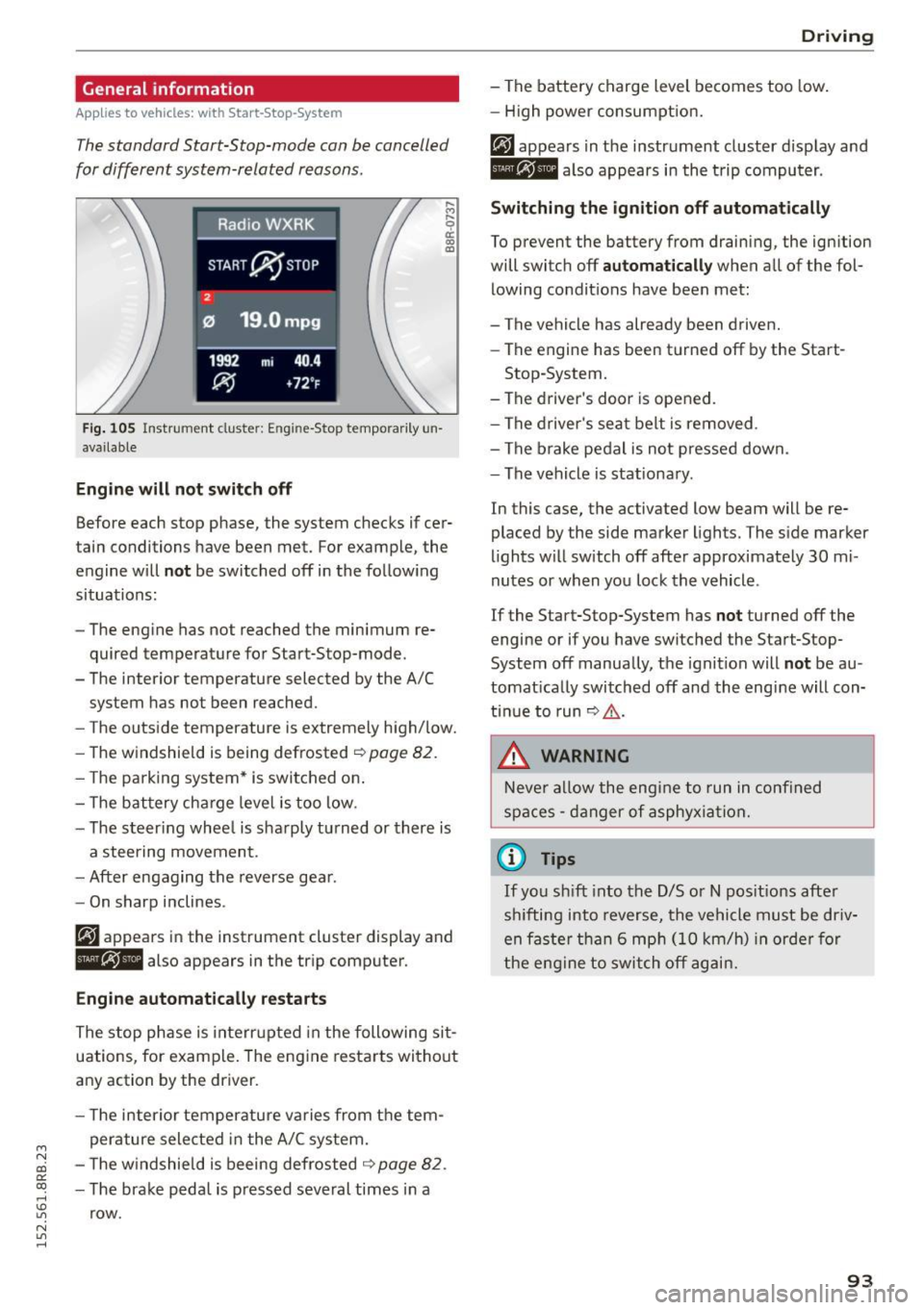
The standard Start-Stop-mode can be cancelled
for different system-related reasons.
Fig . 105 Instrument cluster: E ngin e-Stop tempo rarily un
available
Engine will not switch off
.... M
9 cc IX) ID
Before each stop phase, the system checks if cer
tain conditions have been met. For example, the
engine will
not be switched off in the following
situations:
- The engine has not reached the minimum re
quired temperature for Start-Stop-mode.
- The interior temperature selected by the A/C system has not been reached.
- The outside temperature is extremely high/low.
- The windshield is being defrosted ~
page 82.
-The park ing system* is switched on .
- The battery cha rge level is too low.
- The steer ing whee l is sharply turned or there is
a steering movement.
- After engaging the reverse gear.
Engine automatically restarts
The stop phase is interrupted in the following sit
uations, for example. The engine restarts without
any action by the driver.
- The interior temperature varies from the tem
perature selected in the A/C system.
- The windshield is beeing defrosted
~ page 82.
-The brake pedal is pressed several times in a
row.
Driving
- The battery charge level becomes too low.
Switching the ignition off automatically
To prevent the battery from draining, the ignition
will switch off
automatically when all of the fol
lowing condit ions have been met:
- The vehicle has already been driven.
- The engine has been turned off by the Start-
Stop-System.
- The driver's door is opened.
- The driver's seat belt is removed .
- The brake pedal is not pressed down.
- The vehicle is stationary .
In this case, the activated low beam will be re
placed by the side marker lights. The side marker
lights will switch off after approximately 30 mi
nutes or when you lock the vehicle .
If the Start-Stop-System has
not turned off the
engine or if you have switched the Start-Stop
System off manually, the ignition will
not be au
tomatically switched off and the engine will con
tinue to run~,&. .
A WARNING
Never allow the engine to run in confined
spaces - danger of asphyxiation.
(D Tips
-
If you shift into the D/S or N positions after
sh ifting into reverse, the vehicle must be driv
en faster than 6 mph (10 km/h) in orde r for
the engine to switch off again.
93
Page 96 of 302
Driving
Switching the Start-Stop-System on/off
manually
Applies to veh icles: with Sta rt-Stop-System
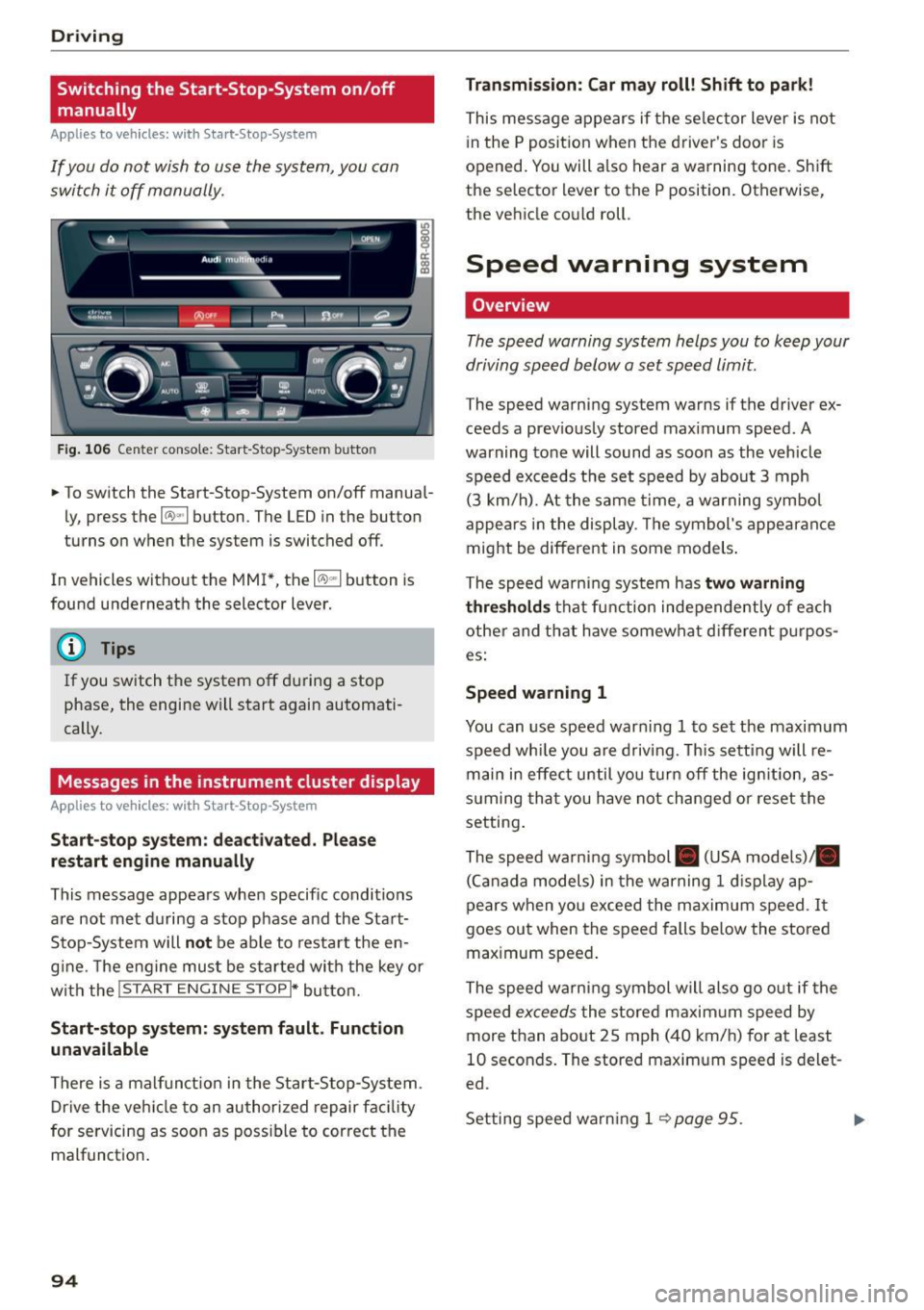
If you do not wish to use the system, you can
switch it off manually.
F ig . 10 6 Ce nter co nsole : Start -S top -System butto n
• To switch the Start-Stop-System on/off manua l
ly, press the
1 0 ••1 button . The LED in the button
turns on when t he system is switched off .
In vehicles without the MMI*, the
10 ~1 b utton is
found underneath the selector lever.
@ Tips
If you switch t he system off du ring a stop
phase, the engine will start again automati
cally.
Messages in the instrument cluster display
Applies to veh icles: with Start-Stop-System
Start-stop system: deactivated. Plea se
restart engine manually
This message appea rs whe n specific conditions
are not met du ring a stop phase and the Sta rt
Stop-System will
not be able to resta rt the en
g ine. The e ngine mu st be started with the key or
w ith the !S TAR T
ENGINE STOPI* button.
Start-stop system: system fault. Function
unavailable
There is a malf unct ion in the Star t-Stop -System .
Dr ive the veh icle to an author ized repair fac ility
for servicing as soon as poss ible to cor rect the
malfunct ion .
94 Transmission
: Car may roll! Shift to park!
This message appears if the se lector lever is not
i n the
P posit ion when the driver 's door is
opened. You will a lso hear a warning tone. Sh ift
the selector lever to the
P position. Otherwise,
the vehicle could roll .
Speed warning system
Overview
The speed warning system helps you to keep your
driving speed below a set speed limit.
The speed warning sys tem warns if the driver ex
ceeds a prev iously stored maximum speed. A
warning tone will sound as soon as the vehicle
speed exceeds t he set speed by abo ut
3 mph
(3 km/h). At the same time, a warning sym bol
appe ars in t he display . Th e symbol's appea ran ce
might be different in some models .
The spe ed wa rni ng system has
two warning
thre sholds
that fu nction inde pendently of eac h
other and tha t have somewha t diffe ren t p urpos
es:
Speed warning 1
You can use speed war ning 1 to set the maxim um
speed wh ile you are d riv ing. This setting will re
main in effec t until yo u turn off the ig nition, as
s u ming tha t you have not changed or reset the
setting .
The speed wa rn ing symbol . (USA models)/ .
(C an ada model s) in the warning
1 d is pla y ap
pears when yo u exceed the maximum speed . It
goes ou t when the speed falls be low the stored
max imum speed .
The speed warni ng symbol will also go o ut if the
speed
excee ds the stored maxim um speed by
more than abo ut
2 5 mph (4 0 km/h) for at least
10 seconds . The stored maxim um speed is delet
ed.
Set ting spee d warn ing 1
<=? page 95 . .,._
Page 97 of 302
M N
co ~ co
rl I.O
"' N
"' rl
Speed warning 2
Storing wa rning 2 is recomme nded if you always
want to be reminded of a certa in speed, for ex
ample when you are trave ling in a co untry that
has a genera l maxim um speed limit, or if you do
not want to exceed a specified speed fo r w inter
ti res.
The speed warning 2 symbol ,. (USA mode ls)/
• (Canada models) app ears in the display when
you exceed the stored speed lim it . Unlike warning
1, it w ill not go out until the vehicle speed d rops
be low the stored speed limit .
Sett ing speed warning 2
~ page 95 .
@ Tips
Even tho ugh you r vehicle is equipped with a
spee d warn ing system, you sho uld still watch
the speedomete r to make s ure you are not
driving faster than the speed limit.
Speed warning 1: setting a speed limit
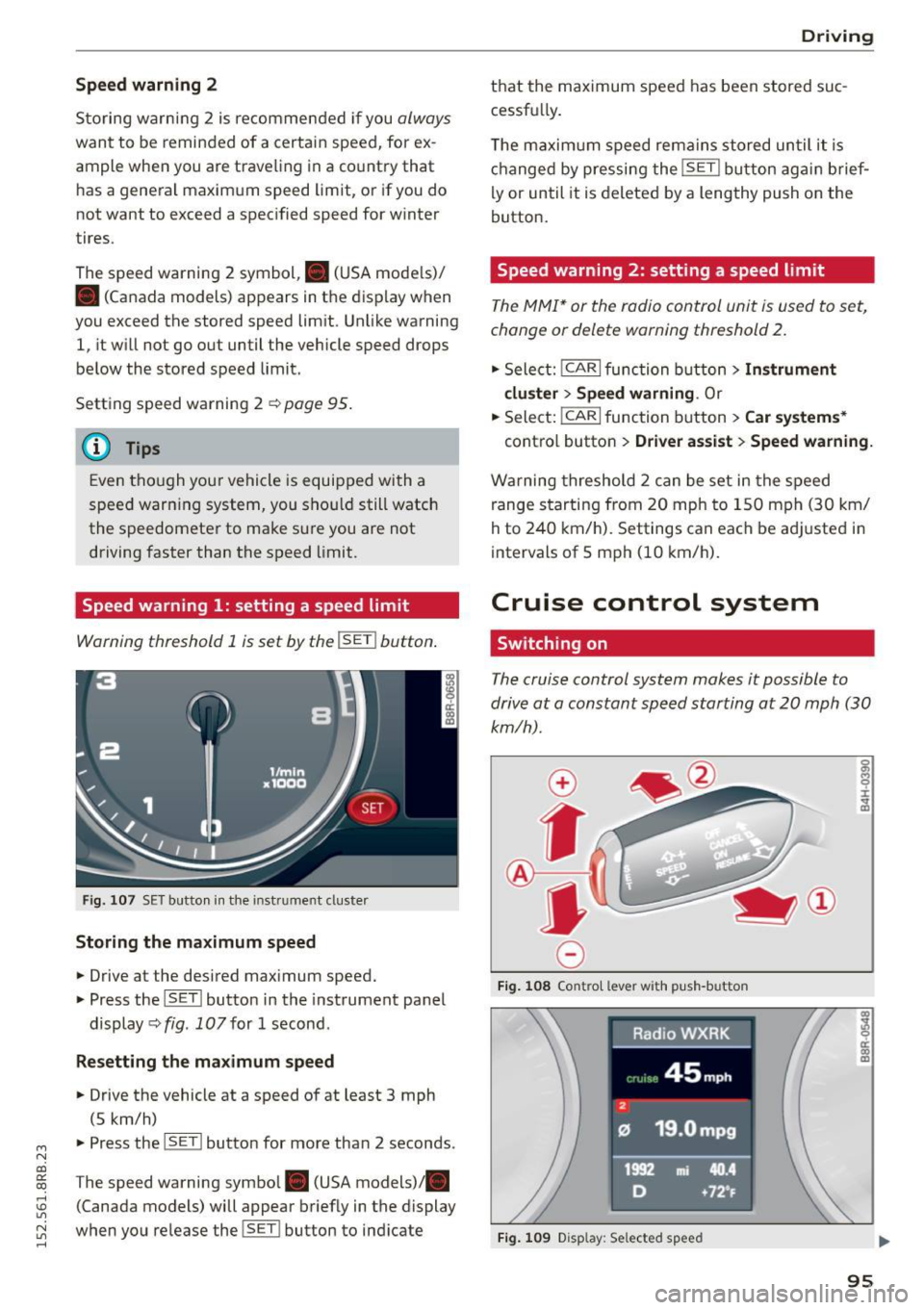
Warning threshold 1 is set by the !SET I button .
Fig. 10 7 SET butto n in t he in st ru me nt cl uster
Storing the maximum speed
.,. Drive at the desired max imum speed.
.,. Press the ISET l button in the instrument panel
display ~fig .
107for 1 second .
Resetting the maximum speed
.,. Drive the vehicle at a speed of at least 3 mph
(5 km/h)
.,. Press the l~S -ET~ ! butto n for more than 2 seconds.
T he speed warning symbol. (USA models) .
(Canada models) will appear briefly in the display
when you release the !SET l button to ind icate
D riv ing
th at the maximum speed has been stored suc
cessfu lly.
T he maxim um s peed rema ins stored un til i t is
ch anged by pressing the !SE T! button ag ain brief
ly or until it is deleted by a lengthy push on the
button.
Speed warning 2: setting a speed limit
T he MMI* or the radio control unit is u sed to s et,
change or delete warning threshold
2.
.,. Sele ct: !CAR!func tion butt on> Instrument
cluster > Speed warning .
Or
.,. Select: I CAR I function button > Car systems *
contro l butto n > Driver as sist > Speed warning.
W arning threshold 2 can be set in the speed
range s tarting from 20 mph to 1 50 mph (3 0 km/
h to 240 km/ h). Settings can each be ad justed i n
intervals of 5 mph (10 km/h).
Cruise control system
Switching on
The cruise control system makes it possible to
drive at a constant speed starting at
20 mph (30
km/h).
0
f
®t
0
F ig. 1 08 Co ntr ol leve r w ith p ush -b u tto n
Fig. 1 09 Disp lay : Se lected speed
a)
8 ci: a) m
95
Page 101 of 302
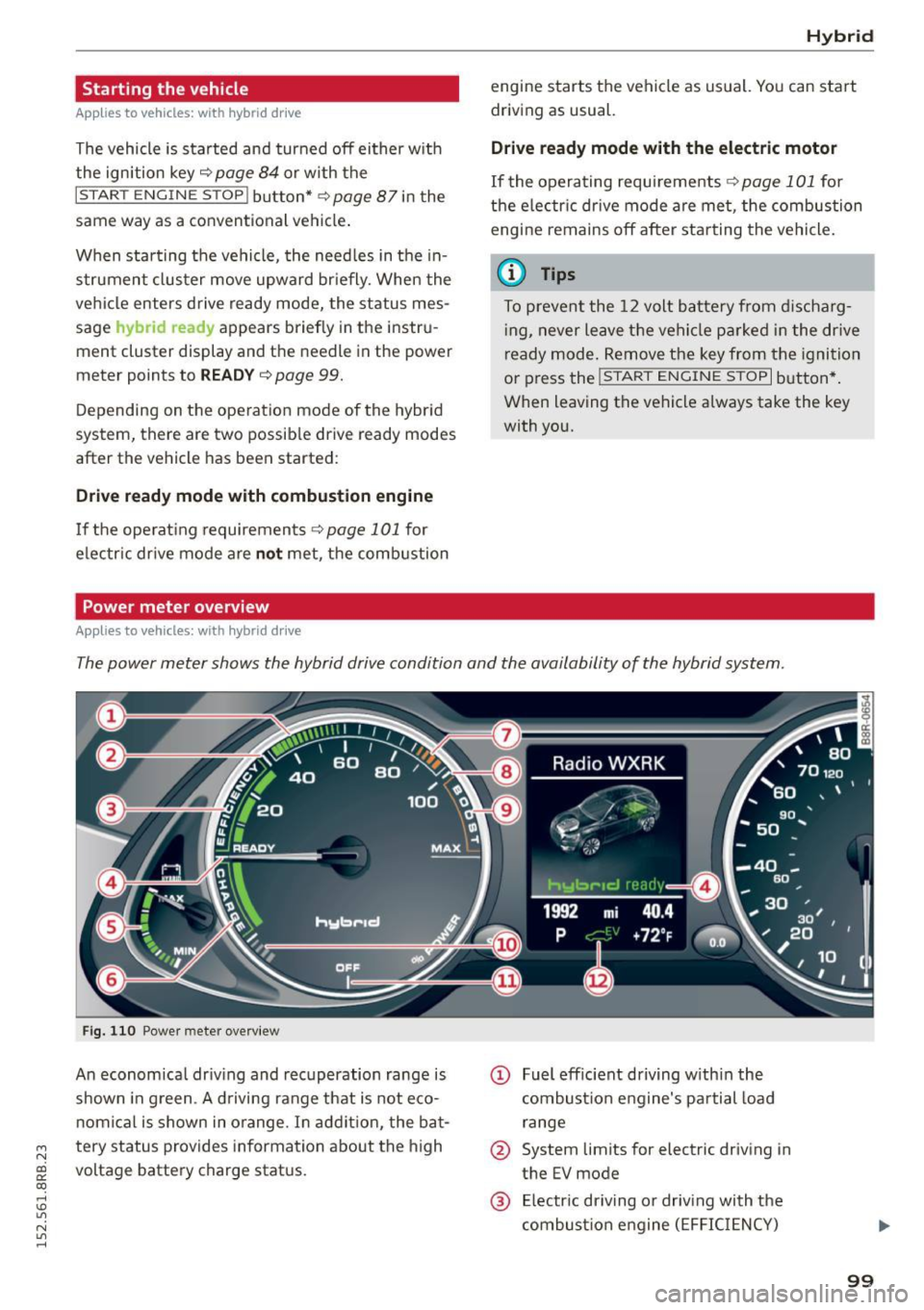
Starting the vehicle
Applies to vehicles: with hybrid drive
The vehicle is started and turned off either w ith
the ign ition key
q page 84 or with the
IS TAR T ENGINE STOP I button* ¢page 87 in the
same way as a conventional vehicle .
When starting the vehicle, the need les in the in
strument cluster
move upward br iefly. When the
vehicle enters d rive ready mode, the status mes
sage
hybrid ready appears briefly in the instru
ment cluster display and the needl e in the power
meter points to READY
q page 99.
Depending on the operation mode of the hybr id
system, there are two possib le drive ready modes
after the vehicle has been started:
Drive r eady mode with combustion engine
If the ope rat ing requirements q page 101 for
e lec tric dr ive mode are
not met, the combustion
Power meter overview
Applies to vehicles: with hybrid drive
H ybri d
engine starts the vehicle as usual. You can start
driving as usual.
Drive ready m ode with th e el ectric motor
If the operating requi rements 9 page 101 for
the e lectr ic dr ive mode are met , the combustion
engi ne remains off after starting the vehicle.
(j) Tips
To p reven t the 12 volt batte ry from d ischarg
i ng, never leave t he veh icle parked in the dr ive
ready mode. Remove the key from the igni tion
or press the
! S T AR T ENGINE ST OP I button *.
When leaving the vehicle always take the key
with you.
The power meter shows the hybrid drive condition and the availability of the hybrid system.
F ig. 1 10 Powe r meter overview
An economical dr iv ing and recuperation range is
shown in g reen . A d riving range that is not eco
n omical is shown in o range. In addi tion, the ba t-
"' tery status provides information about the high
N
~ voltage battery charge stat us.
co
rl I.O
"' N
"' rl
@ Fuel eff icient driving with in the
combust ion engine 's pa rtial load
range
@ System limits for electric driving in
the EV mode
@ El ectric dr iving or driv ing with the
combust ion engine (EFFIC IENCY)
99
Page 104 of 302
Hybrid
St art-Stop function
The combust ion engine is operated only as need
ed . Genera lly, the combustion engine turns
off
when the vehicle is stationary and the high volt
age battery powers the electrical vehicle sys
tems .
The purpose o f automatica lly shutting the com
bustion engine
off in hybrid drive mode is to save
fue l. All of the important vehicle systems, such
as steering, brakes and the A/C system, contin ue
to remain active. In some cases, systems may re
qu ire the combustion engine to continue running
when the vehicle is stationary. When driv ing in
congested traffic for long periods of t i me, the
combustion engine will cycle on when the veh icle
is stationa ry to keep the h igh voltage battery
charged .
Gliding
If the gas pedal is not pressed and the D position
is selected, the combustion engine rema ins
turned
off up to speeds of approximate ly 99 mph
(160 km/h). Dr iving conse rvative ly like this can
r educe fue l consumpt ion.
Energy recovery (recup eration )
When braking, the e lectr ic motor will act as a
generator creating electric energy that is then
s to red in the h igh voltage batte ry. This also oc
curs when the ve hicle is coas ting or dr iv ing down
hi ll. The combust ion engine is automatically
turned
off in t his case.
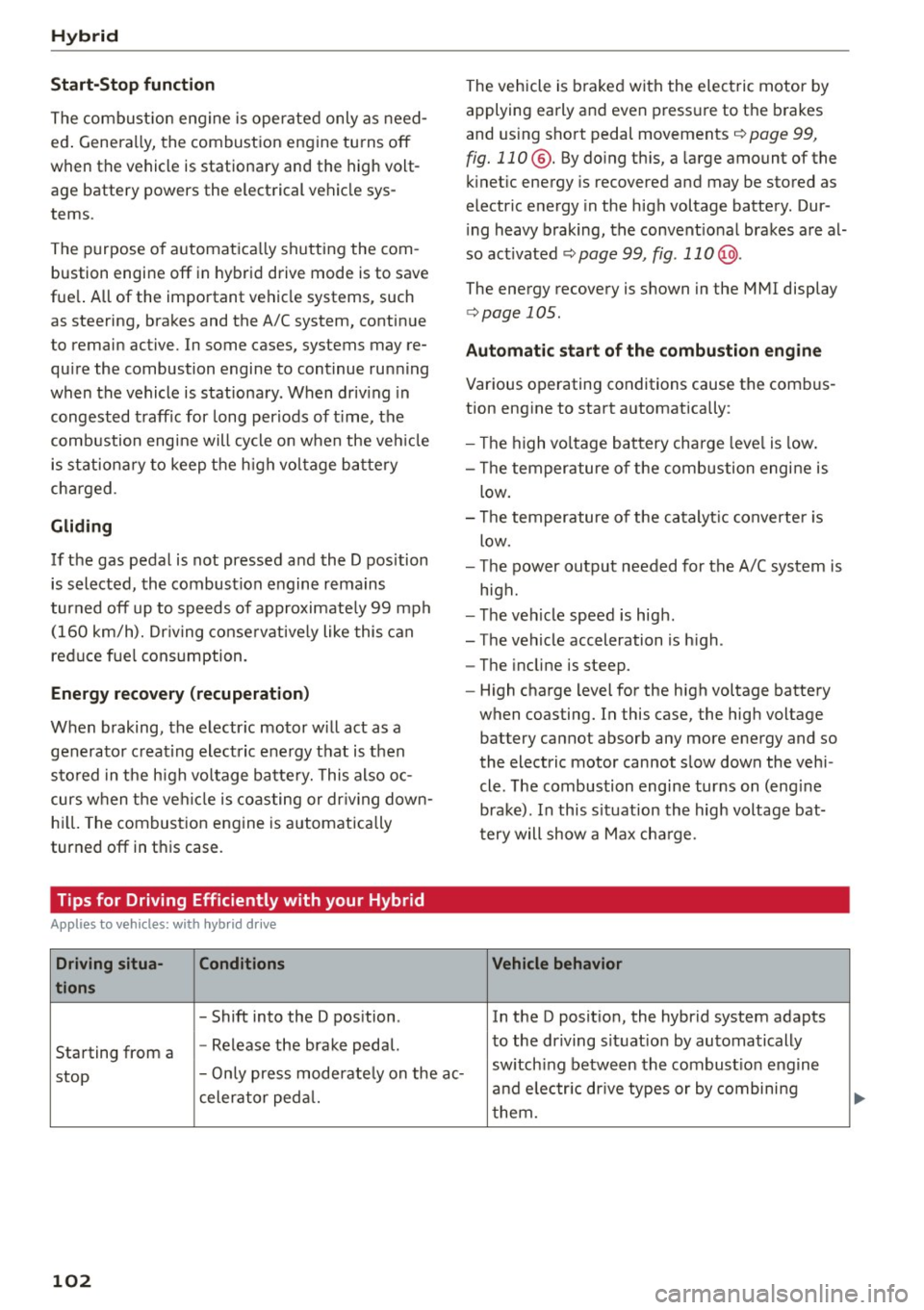
Tips for Driving Efficiently with your Hybrid
Applies to veh icles: w ith hybrid drive
Driving situa- Conditions
tions
- Shift into the D pos ition .
Starting from a -
Release the brake pedal.
stop -
Only press mode rate ly on the ac-
celer ator peda l.
102
The vehicle is braked with the electric motor by
applying early and even press ure to t he brakes
and us ing short pedal movements¢
page 99,
fig. 110@. By do ing th is, a large amount of the
k inet ic energy is recovered and may be stored as
electric energy in the high voltage batte ry. Dur
i ng heavy braking, the convent ional brakes are al
so act ivated
¢ page 99, fig . 110 @.
The energy recovery is shown in the MMI display
¢page 105 .
Automatic start of the combu stion engine
Various operating conditions cause the combus
tion eng ine to start a utomatica lly :
- T he high vo ltage battery charge leve l is low.
- T he temperature of the combustion engi ne is
low.
- Th e temperature of the cataly tic converte r is
low.
- T he power output needed for the A/C system is
high.
- T he veh icle speed is high .
- The vehicle acceleration is h igh .
- The incline is steep.
- High charge level for the high voltage battery
when coasting. In this case, the hig h voltage
battery cannot absorb any more ene rgy and so
the electric motor cannot s low down the veh i
cle. The combustion engine tur ns on (eng ine
brake) . In this situation the high voltage bat
tery will show a Max cha rge.
Vehicle behavior
In the D posit io n, the hybrid system adapts
to the driving s ituat ion by automatically
sw itch ing between the combust io n engine
a nd e lectr ic dr ive types or by combini ng
them.
Page 105 of 302
M N
co
a:
co
,...., \!) 1.1'1
N 1.1'1 ,....,
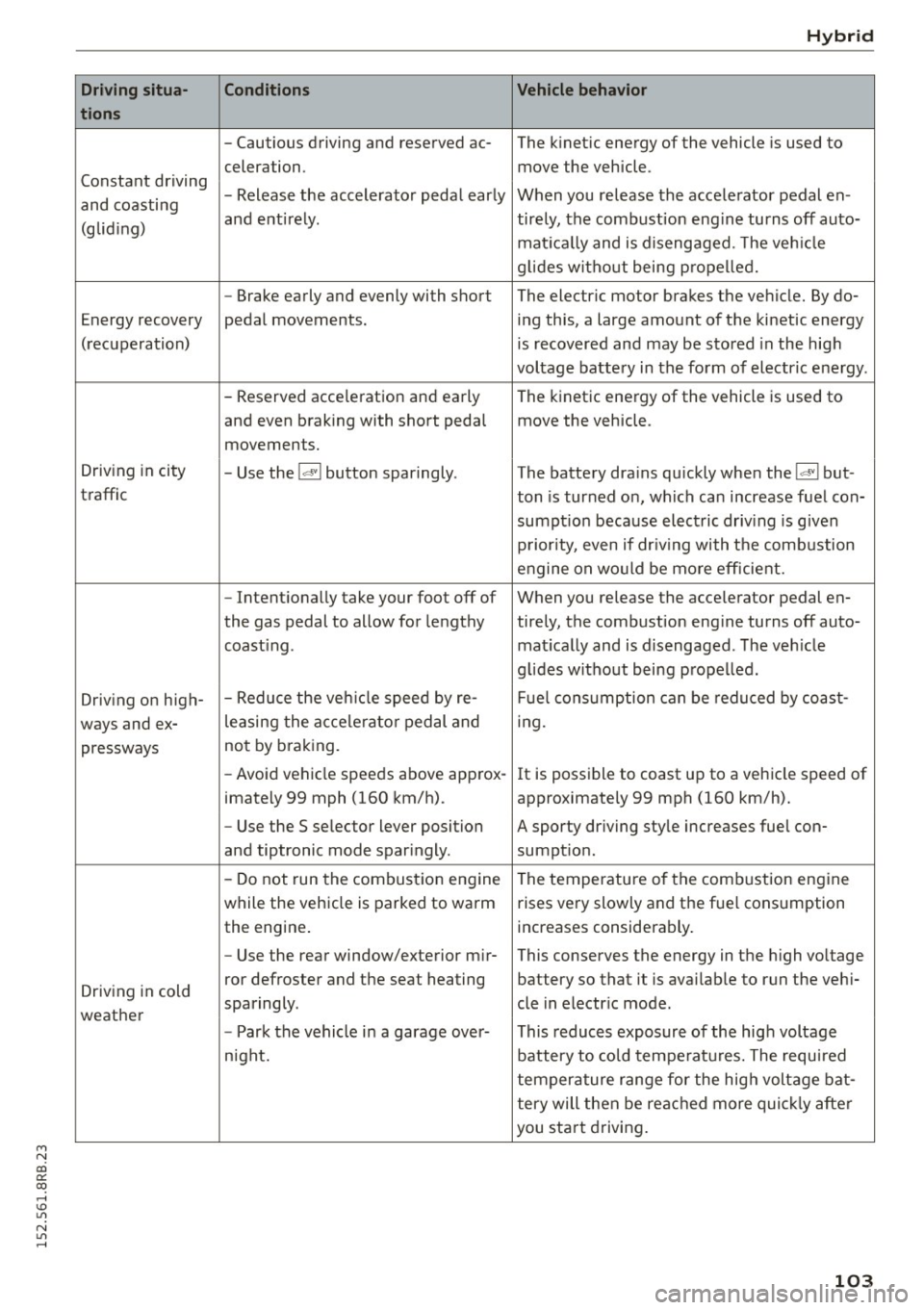
Driving situa-
tions
Constant driving
and coasting
(glid ing)
Energy recovery
(recuperation)
Driving in city
traffic
Driving on high-
ways and ex- pressways
Driving in cold
weather
Conditions
- Cautious driving and reserved ac-
celeration .
- Release the accelerator pedal early
and entirely .
- Brake early and evenly with shor t
pedal movements.
- Reserved acce leration and early
and even braking with short pedal
movements.
- Use the
!<=!VI button sparingly.
- Intentionally take your foot off of
the gas pedal to allow for lengthy
coast ing .
- Reduce the veh icle speed by
re-
leasing the acce lerato r pedal and
not by braking.
- Avoid vehicle speeds above approx-
imately 99 mph (160 km/h).
- Use the S selec tor lever position
and tiptronic mode sparingly .
- Do not run the combustion erngine
while the veh icle is parked to warm
the engine.
- Use the rear window/exterior mir-
ror defroster and the seat heat ing
sparingly .
- Park the vehicle in a garage over-
night. Hybrid
Vehicle behavior
The kinetic energy of the vehicle
is used to
move the vehicle .
When you release the accelerator pedal en-
tirely, the combustion eng ine turns off auto-
matically and is disengaged. The veh icle
g lid es without being propelled.
The electric motor brakes the vehicle. By do- ing this, a large amount of the kinetic energy
is recovered and may be stored in the high
voltage battery in the form of electric energy .
The kinetic energy of the vehicle is used to
move the vehicle .
T he battery drains quickly when the
!<=!VI but-
ton is turned on, which can increase fuel con-
sumpt ion because electric driv ing is given
priority, even if driving with the combustion
engine on wo uld be more efficient.
When you release the accelerator pedal en-
tirely, the combustion engine turns off auto- matically and is disengaged . The vehicle
g lid es without being propelled.
Fu el consumption can be reduced by coast-
ing .
It is possible to coast up to a vehicle speed of
approximately 99 mph (160 km/h).
A sporty dr iving style increases fuel con-
sumpt ion .
The temperature of the combustion engine
rises very slowly and the fue l consumption
increases considerably.
This conserves the energy in the high voltage
bat tery so that it is available to run the veh i-
cle in electr ic mode .
This reduces exposure of the high voltage
battery to cold temperatures. The required
temperature range for the high voltage bat-
tery will then be reached more quickly after
you start driving.
103
Page 112 of 302
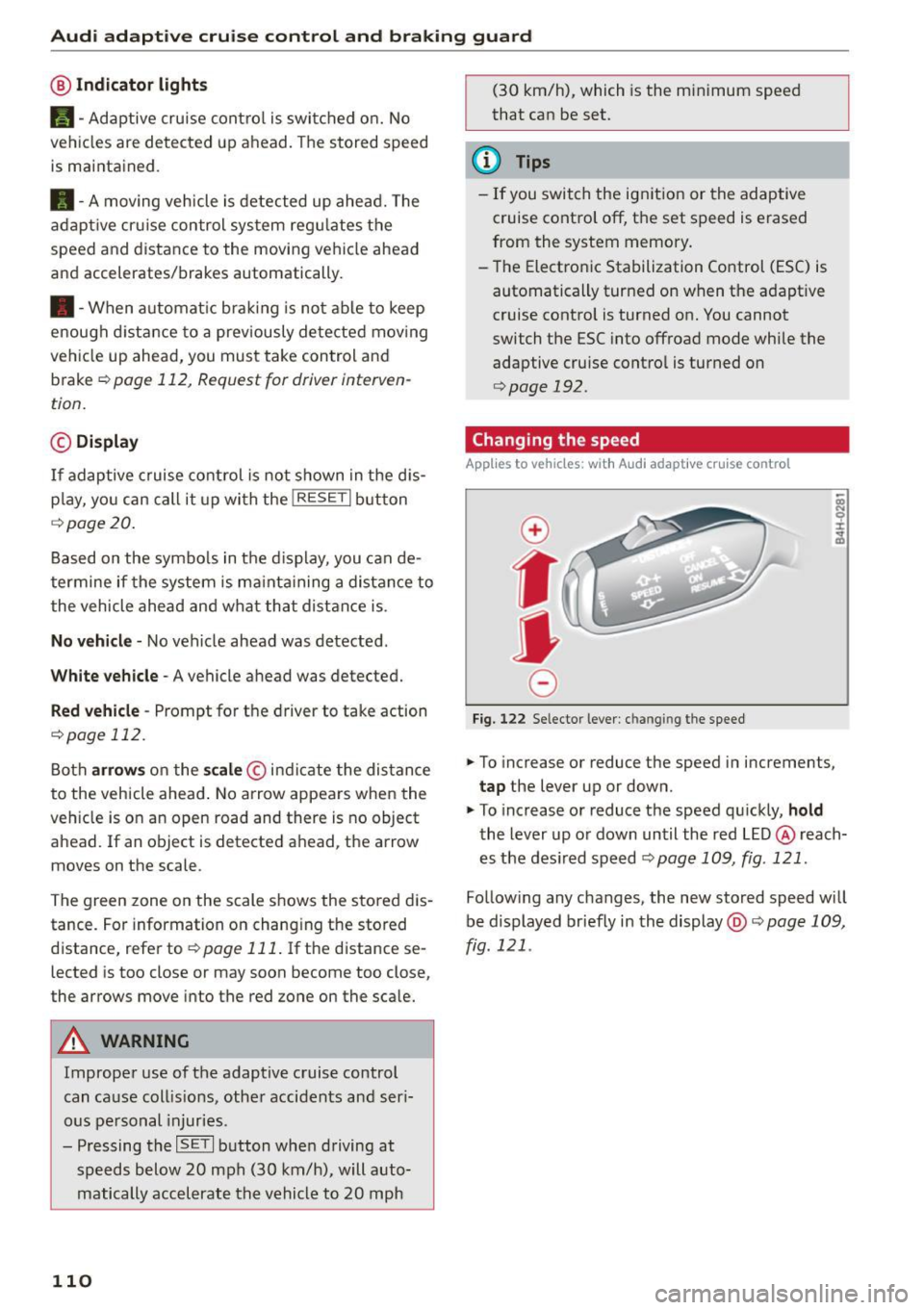
Audi adapt ive cru ise control and brak ing gu ard
@ Indicator light s
Ill -Adaptive cruise contro l is switched on. No
vehicles are detected up ahead . The stored speed
is maintained .
• -A moving veh icle is detected up ahead. The
adaptive cruise control system regulates the
speed and distance to the moving vehicle ahead
and accelerates/brakes automatically.
• -When automat ic brak ing is not able to keep
enough d istance to a prev iously detected mov ing
ve hicle up ahead, you must take control and
brake
~ page 112, Request for driver interven
tion.
© Di splay
If adaptive c ruise cont rol is not shown in the dis
p lay, yo u can call it up with the
!RESET I button
r::!> page 20 .
Based on the symbo ls in the display, you can de
termine if the system is ma inta ining a distance to
the vehicle ahead and what that distance is .
N o ve hicle -No vehicle ahead was detected .
White vehicle -A vehicle ahead was detected.
Red vehicle -Prompt for the driver to take action
r::!> page 112.
Both arrows on the sca le © indi cate the dis tance
to the vehicle ahead . No arrow appears when the
ve hicle is on an open road and there is no object
ahead. If an object is detected ahead, the arrow
moves on the scale .
The green zone on the scale shows the stored dis
tance . For information on changing the stored
distance, refer to
~ page 111 . If the distance se
lected is too close or may soon become too close,
the arrows move into the red zone on the scale.
A WARNING
Improper use of the adaptive cruise control
can ca use coll is ions, other accidents and ser i
ous pe rsonal injuries.
- Pressing the
ISE TI button whe n driving at
speeds below 20 mph (30 km/h), will auto matically accelerate the vehicle to 20 mph
110
(30 km/h), which is the minimum speed
that can be set.
@ Tips
- If you switch the ign it ion or the adaptive
cruise contro l off, the set speed is erased
from the system memory.
- The Electronic Stabilization Control (ESC) is automatically turned on when the adapt ive
cruise control is turned on. You cannot
switch the ESC into offroad mode while the
adaptive cruise contro l is turned on
¢ page 192.
Changing the speed
App lies to vehicles: with A udi adapt ive cruise contro l
0
f
•
0
Fig. 122 Selector lever : ch an gin g the speed
.,. To increase or reduce the speed in increments,
tap the lever up or down.
.,. To increase or reduce the speed qu ickly,
hold
the lever up or down until the red LED@ reach
es the des ired speed
~ page 109, fig . 121 .
Follow ing any changes, the new stored speed will
be displayed briefly in the display@r::!>
page 109,
fig . 121 .
Page 114 of 302
Audi adapt ive cru ise control and brak ing gu ard
c::::, ___ c::::,_ Distan ce 3: This setting corresponds
to a distance of 164 feet/SO meters when travel
ing at 62 mph (100 km/h), or a t ime interval of
1.8 seconds.
c::::, ___ _ c::::, Di stan ce 4: This setting corresponds
to a distance of 210 feet/64 meters when travel
ing at 62 mph (100 km/h), or a t ime interval of
2 .3 seconds.
_&. WARNING
Following other vehicles too closely increases
the risk of collisions and ser ious personal in
jury .
- Setting short distances to the traffic ahead
reduces the time and d istance available to
br ing your vehicle to a safe stop and makes
it eve n mo re necessa ry to pay close atten
t ion to traffic.
- Always obey applicable traffic laws, use
good judgment, and select a safe followi ng
distance for the traffic, ro ad an d wea ther
cond itio ns.
¢j) Tips
- Distance 3
is set automatically each time
you sw itch the ignit ion on.
- Your standard settings are automatically
stored and assigned to the remote contro l
k ey being used
~ page 36.
Setting the driving program
A ppl ies to veh icles: w ith Audi adaptive cruise co ntrol
Depending on the se lected dr iv ing program and
distance, driving behavior when acce le rat ing will
vary from dynamic to comfortab le .
Setting the driving program for vehicles
w ithout Audi dr ive s elect*
~ In the radio/MM! *, select: I CAR ! function but
ton
> adaptive cruise control > Dri ving pro
gram
> C omfort , Stan dard or Dynamic . Or
~ Select : ICARI funct ion button > Car s ystems *
control button > Driver ass ist > Adap tive crui se
contro l> Driving program > Comfort , Stand
ard or Dynamic .
112
Setting the driving mode for vehicles with
Audi drive se lect*
Refer to r:!> page 121.
(D Tips
Your settings are automat ica lly stored and as
signed to the remote control key being used
r:!> page 36 .
Request for driver intervention
App lies to vehicles: wit h Aud i adapt ive c ru ise contro l
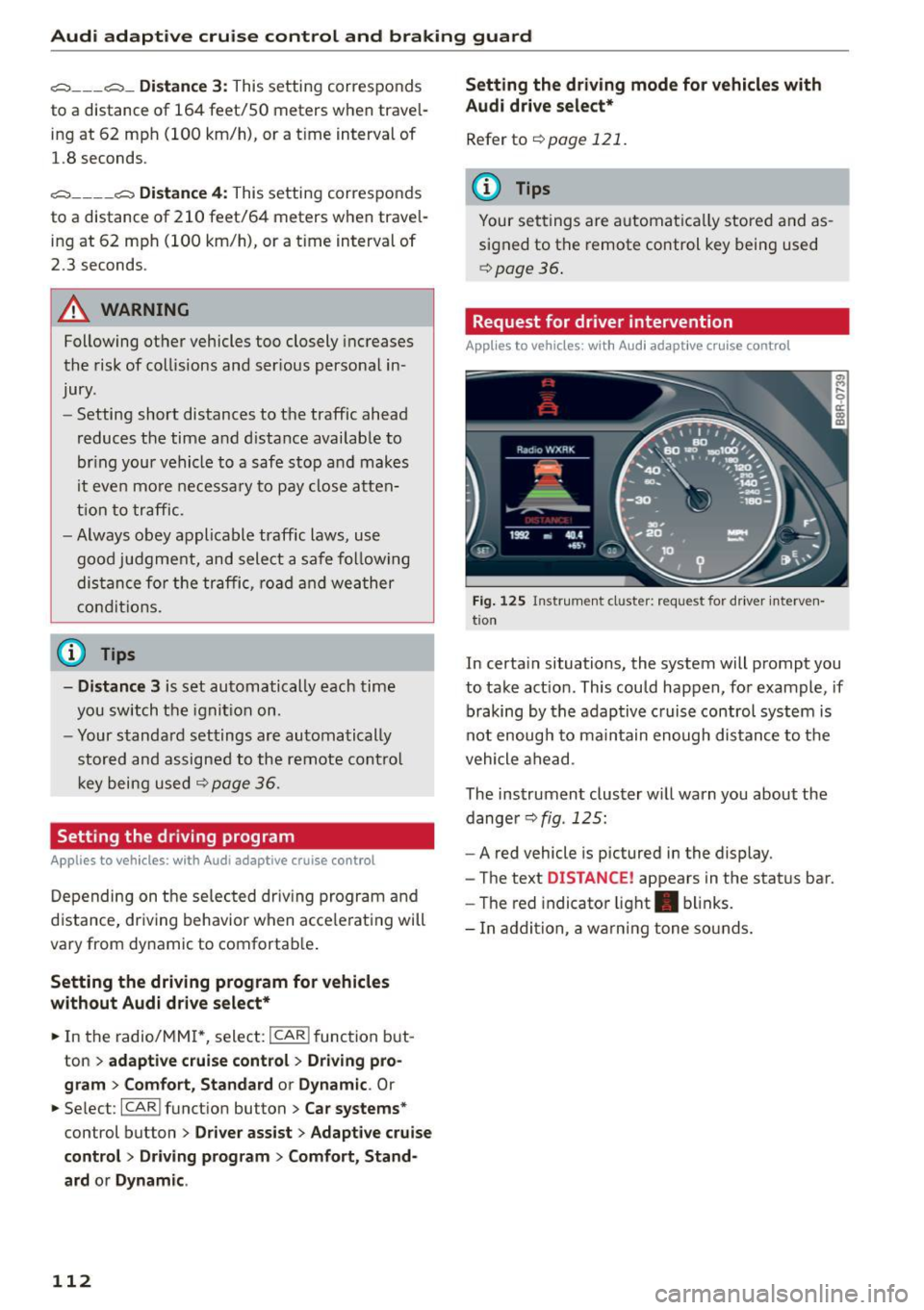
Fig. 125 Instr um ent cl uster: reque st for driver interven
t io n
In certa in situations, the system will prompt you
to take act ion . This could happen, for example , if
braking by the adaptive c ruise control system is
not enough to maintain enough distance to the
vehicle ahead .
The instrument cluster w ill warn you about the
dange r
r:!> fig. 125:
-A red vehicle is pictured in the display.
- The text
DISTANCE! appears in the status bar.
- The red indicator light . blinks.
- In addition, a wa rn ing tone so unds.
Page 122 of 302
Audi drive select
Audi drive select
Driving settings
Introduction
Applies to veh icles: w ith Audi drive select
Drive select provides the possibility to experience
d ifferent types of vehicle settings in one vehicle.
F or instance, using the three
Comfort, Auto and
Dynamic modes, the driver can switch from a
sporty to a comfortable driving mode with the press of a button.
Addit ionally, in vehicles with MM I*, the vehicle
setup for
Individual* mode can be customized by
you. This makes it possible to combine settings
such as a sporty engine tuning with comfortable
steering .
A WARNING
-
Improper use of the drive select can cause
collisions, other accidents and serious person
al injury.
Description
Applies to veh icles: w ith Audi dr ive select
The vehicle setup in each mode depends on the
veh icle's features . However, the engine, automat
ic transmission and steering are always involved.
Engine and automatic transmission
Depending on the mode, the engine and the au
tomatic transmission respond quicker or in a
more balanced manner to accelerator pedal
movements. In the sporty dynamic mode, the au
tomatic transmission shifts at higher RPMs.
Steering
The steering adapts in terms of steering effort and steering ratios. Indirect steer ing that moves
easily, like the steering in comfort mode, is best
suited to long drives on a highway. In contrast,
dynamic mode provides sporty, direct stee ring.
The follow ing applies to vehicles with dynam ic
steer ing*: the steering ratio changes based on ve
h icle speed in order to maintain optimum steer
ing effort for the dr iver at all times. This sets the
s teer ing to be less sensitive at higher speeds in
120
order to provide improved vehicle control. At re
duced speeds, however, steering is more direct in
order to keep the steer ing effort as m inima l as
possib le when the driver is maneuvering the vehi
cle. At low and average speeds, dynamic steering
additionally provides more responsive steering
performance.
Adaptive dampers*
The adaptive dampers* use sensors to record in
formation regarding steering movements, brak ing and acceleration operations by the driver,
road surface, driving speed, and load. This makes
i t possible to adapt damp ing to the driving situa
tion virtually in real t ime . Drive select also makes
i t possible to sat isfy the desire fo r sporty suspen
s ion (Dynamic) and comfortable suspension
(Comfo rt) without giving up ba lanced tuning (Au
to).
Engine sound*
T he sound of the engine is adapted to the select
ed mode and ranges from subtle to sporty.
Adaptive cruise control*
The behavior when accelerating can be adjusted
from comfortable to sporty, depending on the
drive select mode . Adaptive cruise control a lso
r esponds to the driving behavior of the vehicle
ahead in a more conse rvative or sporty manner.
@ Tips
- In some models, the maximum vehicle
speed can only be reached in the
Auto and
Dynamic modes.
- Selecting the
Dynamic mode resu lts in spor
ty shifting characteristics. The 5 gear pos i
tion engages automatical ly.
- In vehicl es that have dynamic stee ring*, op
erating noise is heard when starting or stop
ping the engine. This does not indicate a
problem .