cruise control AUDI Q5 2015 User Guide
[x] Cancel search | Manufacturer: AUDI, Model Year: 2015, Model line: Q5, Model: AUDI Q5 2015Pages: 302, PDF Size: 75.01 MB
Page 111 of 302

M N
co ~ co
rl I.O
"' N
"' rl
Audi adaptive cruise control and braking guard
Audi adaptive cruise
control
Description
Applies to vehicles: with Audi adaptive cruise control
Fig. 119 Detect ion range
What can adaptive cruise control do?
The adaptive cruise control works in conjunction
with a radar sensor installed in the front of the
vehi cle
¢ page 107, fig. 116, which is subject to
designated system limits¢
page 109 . Stationary
objects are disregarded.
On open roads w ith no traff ic, adaptive cruise
control wo rks like a reg ular cruise control system.
The stored speed is maintained . When approach
ing a moving vehicle detected up ahead, the
adapt ive cruise control system automatically
slows down to match that vehicle's speed and
then maintains the distance that the driver previ
ously stored. As soon as the system does not de
tect a vehicle up ahead, adaptive cruise control
accelerates back up to the stored speed .
Which functions can be controlled?
When you switch adaptive cruise contro l on, you
can set the current speed as the "contro l speed"
¢ page 109, Switching on and off.
When driving , you can stop cruise control
¢
page 111 or change the speed ¢ page 110 at
any time.
You can also set the distance to the object ahead
and set the adaptive cruise control driving pro
gram
¢ page 111. Switching on and off
Applies
to vehicles: with A udi adapt ive cru ise contro l
Fig. 120 Selector lever: switc hing on/off
Fig . 121 Instrume nt cluste r: adapt ive c ruise co ntro l
You can set any speed between 20 mph and
95 mph (30 and 150 km/h) .
Indicator lamps and messages in the instrument
cluster display inform you about the current sys
tem status and settings .
Switching adaptive cruise control on
.,. Pull the lever toward you into position(!)
¢
fig. 120. ACC: Standby appears in the instru
ment cluster display .
Setting the speed and activating regulation
.,. To set the current speed, press the ISETI button
¢
fig. 120. Th e set speed is shown in the tach
ometer @and is also shown briefly in the dis
play @¢
fig. 121.
Switching adaptive cruise control off
.,. Push the lever away from you into posit ion @
until it clicks into place. The message
ACC: Off
appears. .,..
109
Page 112 of 302
Audi adapt ive cru ise control and brak ing gu ard
@ Indicator light s
Ill -Adaptive cruise contro l is switched on. No
vehicles are detected up ahead . The stored speed
is maintained .
• -A moving veh icle is detected up ahead. The
adaptive cruise control system regulates the
speed and distance to the moving vehicle ahead
and accelerates/brakes automatically.
• -When automat ic brak ing is not able to keep
enough d istance to a prev iously detected mov ing
ve hicle up ahead, you must take control and
brake
~ page 112, Request for driver interven
tion.
© Di splay
If adaptive c ruise cont rol is not shown in the dis
p lay, yo u can call it up with the
!RESET I button
r::!> page 20 .
Based on the symbo ls in the display, you can de
termine if the system is ma inta ining a distance to
the vehicle ahead and what that distance is .
N o ve hicle -No vehicle ahead was detected .
White vehicle -A vehicle ahead was detected.
Red vehicle -Prompt for the driver to take action
r::!> page 112.
Both arrows on the sca le © indi cate the dis tance
to the vehicle ahead . No arrow appears when the
ve hicle is on an open road and there is no object
ahead. If an object is detected ahead, the arrow
moves on the scale .
The green zone on the scale shows the stored dis
tance . For information on changing the stored
distance, refer to
~ page 111 . If the distance se
lected is too close or may soon become too close,
the arrows move into the red zone on the scale.
A WARNING
Improper use of the adaptive cruise control
can ca use coll is ions, other accidents and ser i
ous pe rsonal injuries.
- Pressing the
ISE TI button whe n driving at
speeds below 20 mph (30 km/h), will auto matically accelerate the vehicle to 20 mph
110
(30 km/h), which is the minimum speed
that can be set.
@ Tips
- If you switch the ign it ion or the adaptive
cruise contro l off, the set speed is erased
from the system memory.
- The Electronic Stabilization Control (ESC) is automatically turned on when the adapt ive
cruise control is turned on. You cannot
switch the ESC into offroad mode while the
adaptive cruise contro l is turned on
¢ page 192.
Changing the speed
App lies to vehicles: with A udi adapt ive cruise contro l
0
f
•
0
Fig. 122 Selector lever : ch an gin g the speed
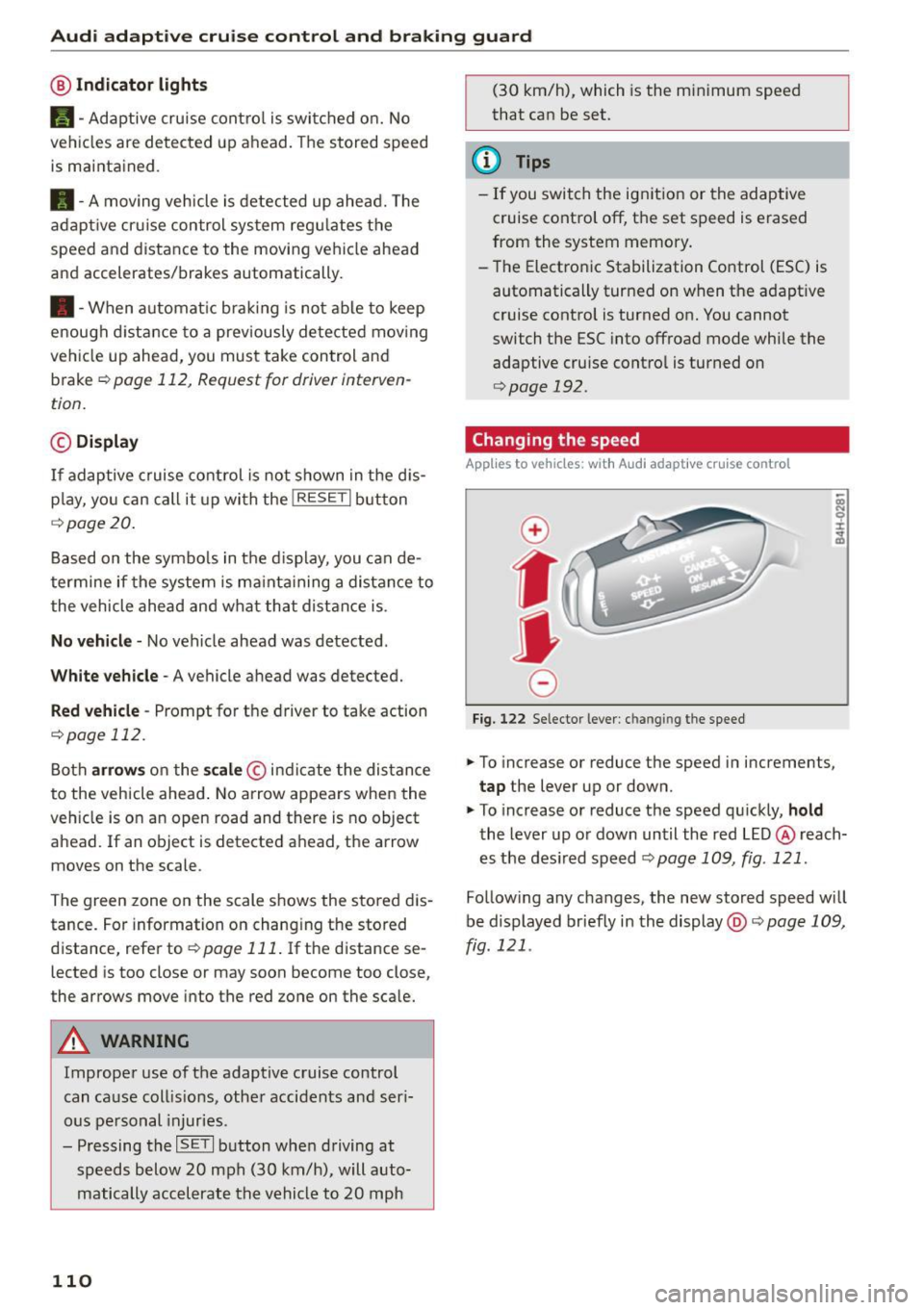
.,. To increase or reduce the speed in increments,
tap the lever up or down.
.,. To increase or reduce the speed qu ickly,
hold
the lever up or down until the red LED@ reach
es the des ired speed
~ page 109, fig . 121 .
Follow ing any changes, the new stored speed will
be displayed briefly in the display@r::!>
page 109,
fig . 121 .
Page 113 of 302
M N
co ~ co ,...,
I.O
"' N
"' ,...,
Audi adapt ive crui se cont rol and bra king gu ard
Interrupting cruise control
Applies to vehicles: with Audi adaptive cruise control
Fig. 123 Selecto r lever
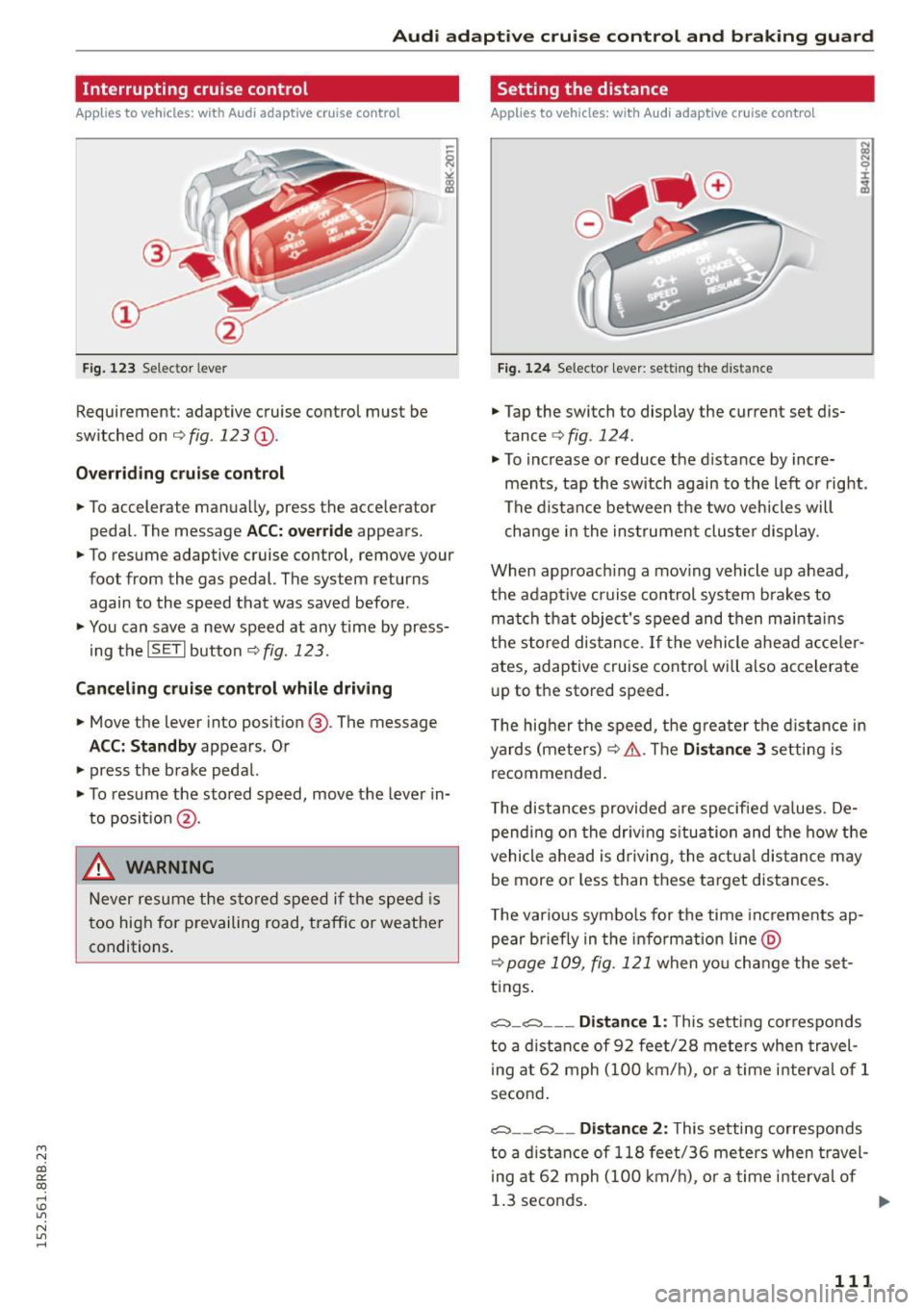
Requirement : adaptive cruise control must be
switched on ¢
fig. 123 (D.
Over rid in g crui se c ontr ol
• To accelerate man ually, press the accelerator
pedal. The message
ACC: overr ide appears.
• To resume adaptive cruise control, remove your
foot from the gas pedal. The system returns
again to the speed that was saved before .
• You can save a new speed at any time by press
i ng the
ISET I button ¢ fig. 123.
Canceling c rui se control while driving
• Move the lever into posit ion @. The message
ACC: Standb y appears. Or
• press the brake pedal.
• To resume the stored speed, move the lever in
to position @.
& WARNING
Never resume the s tored speed if the speed is
too high for prevailing road, traffic or weather
conditions .
Setting the distance
Applies to vehicles: wit h Audi adapt ive cr uise contro l
Fig. 124 Selector leve r: sett ing the distance
• Tap the switch to display the current set dis
tance ¢
fig. 124.
• To increase or reduce the d istance by incre
ments, tap the switch again to the left or right .
The distance between the two veh icles will
change i n the ins trumen t cluster display .
When app roach ing a mov ing vehicle up ahead,
the adaptive cruise control system bra kes to
mat ch that object's speed and then maintains
the s tored dis tance .
If the vehicle ahead acce ler
ates, adaptive cruise control will also accelerate
up to the stored speed.
T he hig her the speed, the greater the d istance in
yards (meters) ¢&. .The
Di stan ce 3 setting is
recommended.
T he distances provided are specified values . De
pending on the driv ing s ituation and the how the
vehicle ahead is driving, the actua l distance may
be more or less than these target distances .
T he various symbo ls for the time inc rements ap
pear briefly in the info rmation line @
¢page 109, fig. 121 when yo u change the set
tings .
,:;::::,_,:;::::, ___ Distan ce 1 : This setting cor responds
to a distance of 92 feet/28 meters when travel i ng at 62 mph (100 km/h), o r a time in terval of 1
second .
,:;::::, __ ,:;::::, __ Distan ce 2: This setting co rresponds
to a d istance of 118 fee t/36 meters when t ravel
i ng at 62 mph (100 km/h), o r a time in terval of
1.3 seconds.
111
Page 114 of 302
Audi adapt ive cru ise control and brak ing gu ard
c::::, ___ c::::,_ Distan ce 3: This setting corresponds
to a distance of 164 feet/SO meters when travel
ing at 62 mph (100 km/h), or a t ime interval of
1.8 seconds.
c::::, ___ _ c::::, Di stan ce 4: This setting corresponds
to a distance of 210 feet/64 meters when travel
ing at 62 mph (100 km/h), or a t ime interval of
2 .3 seconds.
_&. WARNING
Following other vehicles too closely increases
the risk of collisions and ser ious personal in
jury .
- Setting short distances to the traffic ahead
reduces the time and d istance available to
br ing your vehicle to a safe stop and makes
it eve n mo re necessa ry to pay close atten
t ion to traffic.
- Always obey applicable traffic laws, use
good judgment, and select a safe followi ng
distance for the traffic, ro ad an d wea ther
cond itio ns.
¢j) Tips
- Distance 3
is set automatically each time
you sw itch the ignit ion on.
- Your standard settings are automatically
stored and assigned to the remote contro l
k ey being used
~ page 36.
Setting the driving program
A ppl ies to veh icles: w ith Audi adaptive cruise co ntrol
Depending on the se lected dr iv ing program and
distance, driving behavior when acce le rat ing will
vary from dynamic to comfortab le .
Setting the driving program for vehicles
w ithout Audi dr ive s elect*
~ In the radio/MM! *, select: I CAR ! function but
ton
> adaptive cruise control > Dri ving pro
gram
> C omfort , Stan dard or Dynamic . Or
~ Select : ICARI funct ion button > Car s ystems *
control button > Driver ass ist > Adap tive crui se
contro l> Driving program > Comfort , Stand
ard or Dynamic .
112
Setting the driving mode for vehicles with
Audi drive se lect*
Refer to r:!> page 121.
(D Tips
Your settings are automat ica lly stored and as
signed to the remote control key being used
r:!> page 36 .
Request for driver intervention
App lies to vehicles: wit h Aud i adapt ive c ru ise contro l
Fig. 125 Instr um ent cl uster: reque st for driver interven
t io n
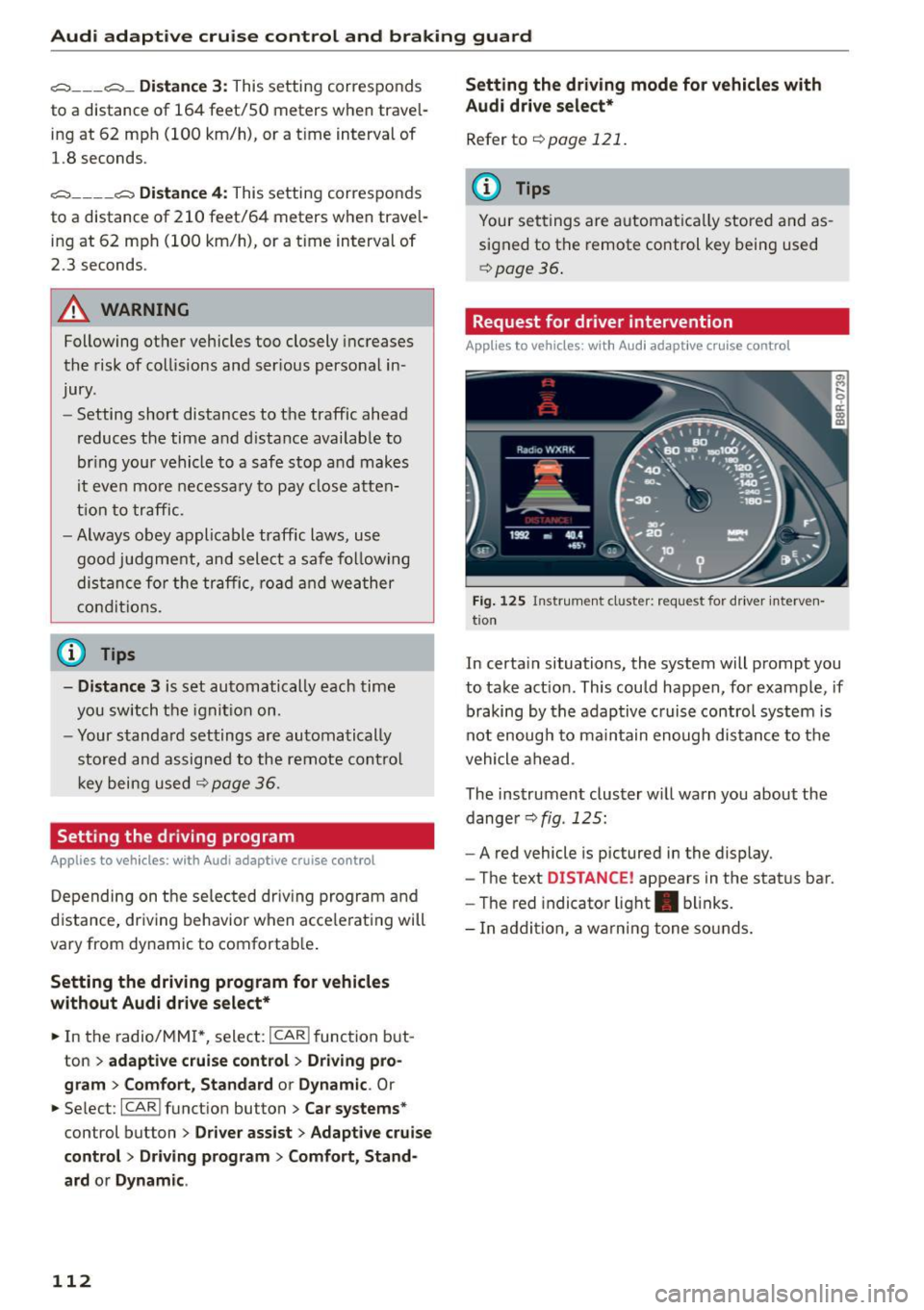
In certa in situations, the system will prompt you
to take act ion . This could happen, for example , if
braking by the adaptive c ruise control system is
not enough to maintain enough distance to the
vehicle ahead .
The instrument cluster w ill warn you about the
dange r
r:!> fig. 125:
-A red vehicle is pictured in the display.
- The text
DISTANCE! appears in the status bar.
- The red indicator light . blinks.
- In addition, a wa rn ing tone so unds.
Page 115 of 302

Audi adapt ive crui se cont rol and bra king gu ard
Audi braking guard
Description
Applies to vehicles: with Audi adaptive cruise co ntrol
F ig. 126 Instrument cluste r: app roac h warn ing
Braking guard uses a radar sensor. It also func
tions within the limits of the system when adap tive cruise control is switched off .
What can bra king gu ard do ?
When detected in time, the system can assess
situations when a vehicle ahead brakes suddenly
or if your own veh icle is traveling at a high speed
and approaching a vehicle up ahead that is mov
ing more slowly . Braking guard does not react if it
cannot detect the s ituation.
The system advises you of various situations:
- The
di sta nce wa rning is given if you are too
close to the vehicle ahead for a long time.
If the
vehicle ahead brakes sharply, you will not be
able to avoid a collision. The indicator light .
in the d isplay comes o n.
- The
app roach warning is g iven when a detected
vehicle up ahead in your lane is moving much
more slowly than you are or if it brakes sharply .
When this warning is g iven, it may only be pos
s ible to avoid a co llision by swerving or braki ng
sharp ly. The indicator light . and indicator in
t h e d isplay w ill warn yo u about the danger
¢ fig. 126. You wi ll also hear an acoust ic signa l.
If you do not react fast enough or do not react at
all to the situation, braking guard will intervene by bra king and the message
Br aking guard : A cti-
~ vat ed will appear. co ~ co
rl I.O
"' N "' 11
This is not ava ilable in som e count ries. rl
- If a collision is imminent, the system wi ll first
provide an
a cute war ning by brief ly and sharply
app ly ing the brakes.
- If you do not react to the acute warning, brak
ing guard can brake within the limits of the sys
tem. This reduces the veh icle speed in the event
of a collision.
- At speeds under 20 mph (30 km/h), the system
can initiate a comp lete deceleration shortly be
fore a collisionl).
- If the braking guard senses that you are not
braking hard enough when a collision is immi
nent, it can increase the braking force.
Which function s can b e cont roll ed ?
You can switch braking guard and the distance/
approach warning on or off in the radio/MMI*
¢ page 114, Settings in the radio/MM!*.
A WARNING
-
Lack of attention can cause collisions, other
accidents and serious personal injuries. The b raking guard is an ass ist system and cannot
p revent a coll is ion by itself. The dr iver must
a lways intervene. The driver is always respon
s ib le for b ra ki ng at the corre ct time.
- Always pay close attent ion to traffic, even
when the b rak ing guard is switched on. Be
ready to intervene and be ready to take com
p lete control whenever necessary . Always
keep the safe a nd legal distance between
your vehicle and vehicles up ahead.
- Braking guard works within limits and will not respond outside the system limits, for
examp le when approaching a stopped vehi
cle or stationary obstacle (end of a traffic
jam or vehicle that has broken down in traf f ic).
- Always remember that the radar sensor for
the braking guard works on ly w ithin defined
detection and range limits that may prevent
the prope r detection of other vehicles.
- The radar sensor's funct ion and range can
be reduced by ra in, snow and heavy spray.
Moving vehicles up ahead may not be
,.
113
Page 116 of 302

Audi adaptive cru ise control and b ra king guard
promptly detected or may not be detected
at all.
- Reflective surfaces including cras h barriers
or tunnel entrances may impair the function
of the radar sensor.
(D Tips
- You can cance l the braking that is initiated
by the system by braking yourself, by accel
erating noticeably or by swerving.
- Braking g uard error messages ¢page
114 .
-Keep in mind that braking guard can brake
unexpected ly . Always sec ure any cargo or
objects that you are transporting to red uce
the risk of damage or injury.
Settings in the radio/MMI*
Applies to veh icles: with Audi adaptive cruise control
.,. Se lect : I CAR I funct ion button > Audi brak ing
guard .
Or
.,. Select :
~ I C~ A~ R~ I funct ion button > Car sy stem s*
control button > Drive r ass is t> Audi braking
guard .
Syst em -
Sw itch braking guard On and Off . When
you switch the ign ition on, the message
Braking
guard : Off
appears if the system is switched off.
Earl y warning -The dis tance and appro ach war n
ing s in the display can be sw itched
On/ Off.
(D Tips
-Your settings are automat ica lly stored and
assigned to the remote control key being used at the times the sett ings are made
¢ page
36 .
-If you restrict the ESC, the b raking guard al
so switches itself off¢ page
192 .
-Switch brak ing guard off when you are load
i ng the veh icle onto a vehicle carr ier, tra in ,
sh ip or other type of transpo rtation . Th is
can prevent undesired wa rnings from the
braking guard system.
Messages
Applies to vehicles: w ith Aud i adaptive cruise control
B raking guard: Off
114
This driver message appears if the system is
turned off via the radio/MM I *. Otherwise, if th e
system is turned off, the information appears ev
ery time short ly after the s tart of the tr ip .
The driver message a lso appears if the system is
not available due to a malfunction or if the ESC is
not switched on ¢ page
192 . If th is is the case,
the system w ill not provide warn ings about a
poss ible collis ion.
B raking gu ard: Ac tivat ed
This dr iver message appears if sharp b rake pres
sure was applied due to an a cute warn ing.
•••
Th ree white dots appear if a sett ing cannot be se
l ected w ith the operating lever . For example, th is
happens if you want to raise/lower the speed
even though there was no prev ious ly saved
speed .
ACC: Sensor block ed
This messag e appears if th e sensor v iew is ob
structed, for examp le by leaves, snow, heavy
spray or d i rt . Cle an the sensor ¢ page
10 7,
fig. 116 .
ACC: Una vailable
The driver message appears if, for example, the
brake temperature is too h igh. The adaptive
cru ise control is temporarily unavailable. A chime
sounds as a r emind er.
ACC: Not avail able
The driver message appears if there is a malfunc
tion. The adaptive cruise cont ro l tu rns off . A
c hi me so unds as a rem inder. Have the system
che cked by an a utho riz ed Aud i dealer o r auth o r
i zed Audi Serv ice Facility.
Shift lev er po sition!
T he driver message appears if the selector lever
i s sh ifted to the N pos it ion . The adaptive cru ise
control is not ava ilable while in this posit io n .
Stab ilizat ion control (ESC )
This message appears if the Elect ronic Stabiliza
tion Contro l (ESC) is taking act ion to stabilize the .,..
Page 117 of 302
M N
co
a:
co
,...., \!) 1.1'1
N 1.1'1 ,....,
Audi adaptive cruise control and braking guard
vehicle. The adaptive cruise control turns off. A
chime sounds as a reminder.
Speed too low
This message appears if the current speed is too
l ow
to set or to maintain the des ired speed .
The speed being saved must be at least 20 mph (30 km/h) . The cru ise control is turned off for
speeds lower than 12 mph (20 km/h) . The adap
tive cruise control remains turned on for speeds
above 95 mph (150 km/h) (override). It will sta
bilize again at 95 mph (150 km/h) when the driv
e r takes his foot off of the gas pedal.
Parking brake!
The driver message appears when the park ing
brake is activated. Adaptive cru ise control is
turned off . A chime sounds as a reminder.
115
Page 122 of 302
Audi drive select
Audi drive select
Driving settings
Introduction
Applies to veh icles: w ith Audi drive select
Drive select provides the possibility to experience
d ifferent types of vehicle settings in one vehicle.
F or instance, using the three
Comfort, Auto and
Dynamic modes, the driver can switch from a
sporty to a comfortable driving mode with the press of a button.
Addit ionally, in vehicles with MM I*, the vehicle
setup for
Individual* mode can be customized by
you. This makes it possible to combine settings
such as a sporty engine tuning with comfortable
steering .
A WARNING
-
Improper use of the drive select can cause
collisions, other accidents and serious person
al injury.
Description
Applies to veh icles: w ith Audi dr ive select
The vehicle setup in each mode depends on the
veh icle's features . However, the engine, automat
ic transmission and steering are always involved.
Engine and automatic transmission
Depending on the mode, the engine and the au
tomatic transmission respond quicker or in a
more balanced manner to accelerator pedal
movements. In the sporty dynamic mode, the au
tomatic transmission shifts at higher RPMs.
Steering
The steering adapts in terms of steering effort and steering ratios. Indirect steer ing that moves
easily, like the steering in comfort mode, is best
suited to long drives on a highway. In contrast,
dynamic mode provides sporty, direct stee ring.
The follow ing applies to vehicles with dynam ic
steer ing*: the steering ratio changes based on ve
h icle speed in order to maintain optimum steer
ing effort for the dr iver at all times. This sets the
s teer ing to be less sensitive at higher speeds in
120
order to provide improved vehicle control. At re
duced speeds, however, steering is more direct in
order to keep the steer ing effort as m inima l as
possib le when the driver is maneuvering the vehi
cle. At low and average speeds, dynamic steering
additionally provides more responsive steering
performance.
Adaptive dampers*
The adaptive dampers* use sensors to record in
formation regarding steering movements, brak ing and acceleration operations by the driver,
road surface, driving speed, and load. This makes
i t possible to adapt damp ing to the driving situa
tion virtually in real t ime . Drive select also makes
i t possible to sat isfy the desire fo r sporty suspen
s ion (Dynamic) and comfortable suspension
(Comfo rt) without giving up ba lanced tuning (Au
to).
Engine sound*
T he sound of the engine is adapted to the select
ed mode and ranges from subtle to sporty.
Adaptive cruise control*
The behavior when accelerating can be adjusted
from comfortable to sporty, depending on the
drive select mode . Adaptive cruise control a lso
r esponds to the driving behavior of the vehicle
ahead in a more conse rvative or sporty manner.
@ Tips
- In some models, the maximum vehicle
speed can only be reached in the
Auto and
Dynamic modes.
- Selecting the
Dynamic mode resu lts in spor
ty shifting characteristics. The 5 gear pos i
tion engages automatical ly.
- In vehicl es that have dynamic stee ring*, op
erating noise is heard when starting or stop
ping the engine. This does not indicate a
problem .
Page 124 of 302
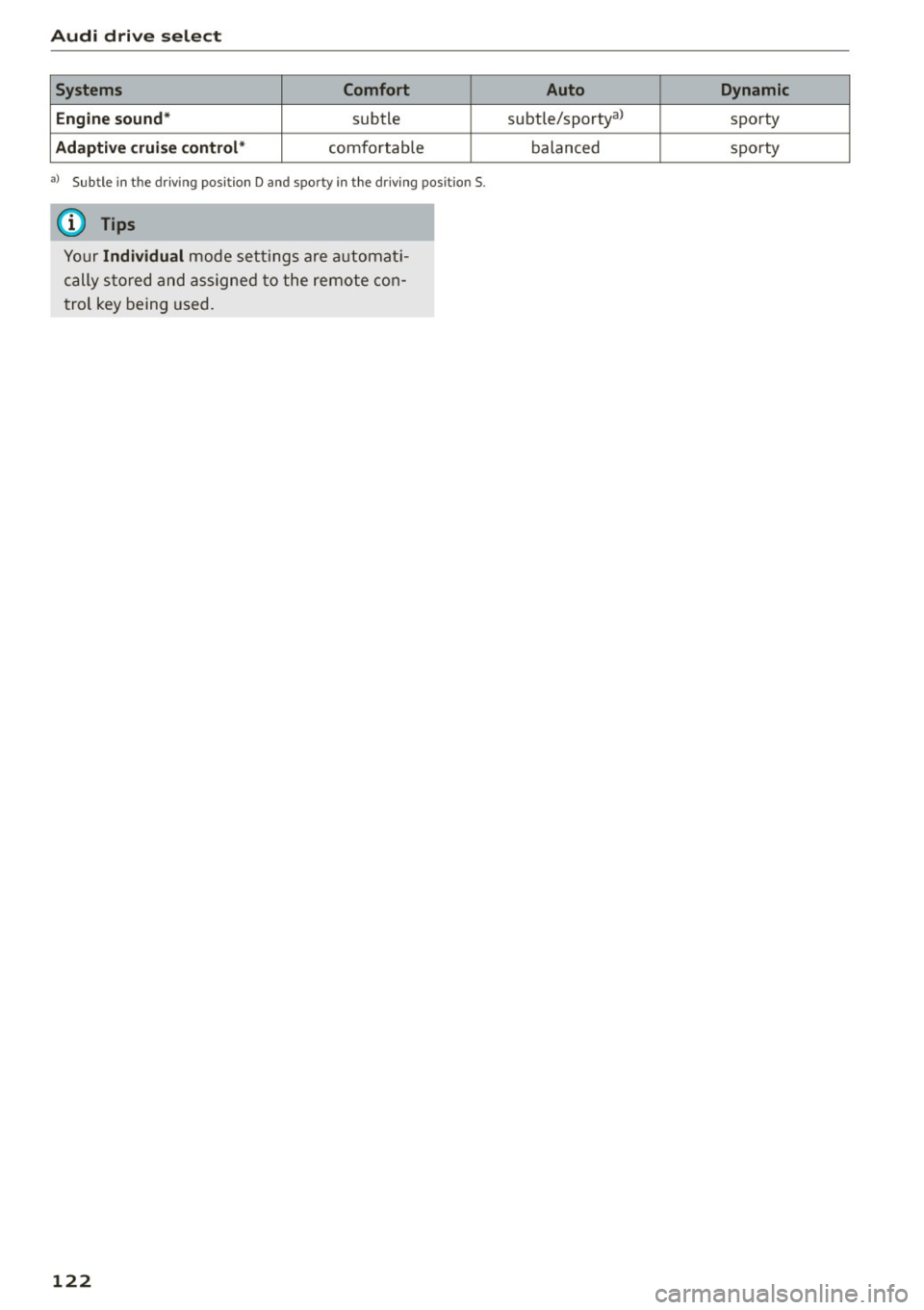
Audi drive select Systems Comfort
Engine sound*
subtle
Adaptive cruise control* comfo rtab le
al Subtle i n th e dr iving posit io n D and sporty in the driv in g pos it ion S.
(D Tips
Y our Individual m ode setting s are a utomat i
cally s tored and assig ned t o the remote co n
t rol key being used.
122
Auto Dynamic
subtle/sportya> sporty
balanced sporty
Page 128 of 302
Automatic transmission
-Never leave your vehicle with the engine
running while in gear. If you must leave your
vehicle when the engine is running, activate
the parking brake and move the selector lev er to P.
- Power is still transmitted to the wheels
when the engine is running at idle. To pre
vent the vehicle from "creeping", you must keep your foot on the brake when the engine
is running and the selector lever is in D/S or
R or "tiptronic" mode is selected.
- Do not press the accelerator pedal when
changing the selector lever position while
the vehicle is stationary and the engine is
running.
- Never shift into R or P while driving.
- Before driving down a steep slope, reduce
your speed and shift into a lower gear with
"tiptronic".
- Do not ride the brakes or press the brake
pedal too often or too long when driving
down a hill. Constant braking causes the
brakes to overheat and substantially re
duces braking performance, increases brak
ing distance or causes complete failure of
the brake system.
- To prevent the vehicle from rolling back
when stopping on inclines, always hold it in
place with the brake pedal or parking brake.
- Never hold the vehicle on an incline with a
slipping clutch. The clutch opens automati
cally when it becomes too hot from the
overload. An indicator lamp[!] illuminates
and a driver message appears
<=> page 127
when the clutch is overloaded .
-If the engine must remain running, never
have any driving position engaged when
checking under the hood. Make sure these
lector lever has securely engaged and is
locked in P with the parking brake set
<=>page 221. Otherwise, any increase in en
gine speed may set the vehicle in motion,
even with the parking brake applied.
0 Note
- When stopping on an incline, do not try to
hold the vehicle in place by pressing the ac
celerator pedal while a driving gear is se-
126
lected. This can cause the transmission to
overheat and can damage it. Activate the
parking brake or press the brake pedal to
prevent the vehicle from rolling.
- Allowing the vehicle to roll when the engine
is stopped and the selector lever is in N will
damage the transmission because it is not
lubricated under those circumstances.
{!) Tips
For safety reasons, the parking brake is re
leased automatically only when the driver's
safety belt is engaged in the buckle.
Hill descent control
The hill descent control system assists the driver
when driving down declines.
Hill descent control is activated when the selec
tor lever is in D/S and you press the brake pedal.
The transmission automatically selects a gear
that is suitable for the incline. Hill descent con
trol tries to maintain the speed achieved at the
time of braking, within physical and technical limitations.
It may still be necessary to adjust the
speed with the brakes.
Hill descent control switches off once the decline
levels out or you press the accelerator pedal.
When the speed is set in the cruise control sys
tem <=>
page 95, hill descent control is also acti
vated .
A WARNING
Hill descent control cannot overcome physical
limitations, so it may not be able to maintain
a constant speed under all conditions. Always
be ready to apply the brakes.