door lock AUDI Q5 2015 User Guide
[x] Cancel search | Manufacturer: AUDI, Model Year: 2015, Model line: Q5, Model: AUDI Q5 2015Pages: 302, PDF Size: 75.01 MB
Page 44 of 302
Opening and closing
Locking and unlocking the vehicle from
inside
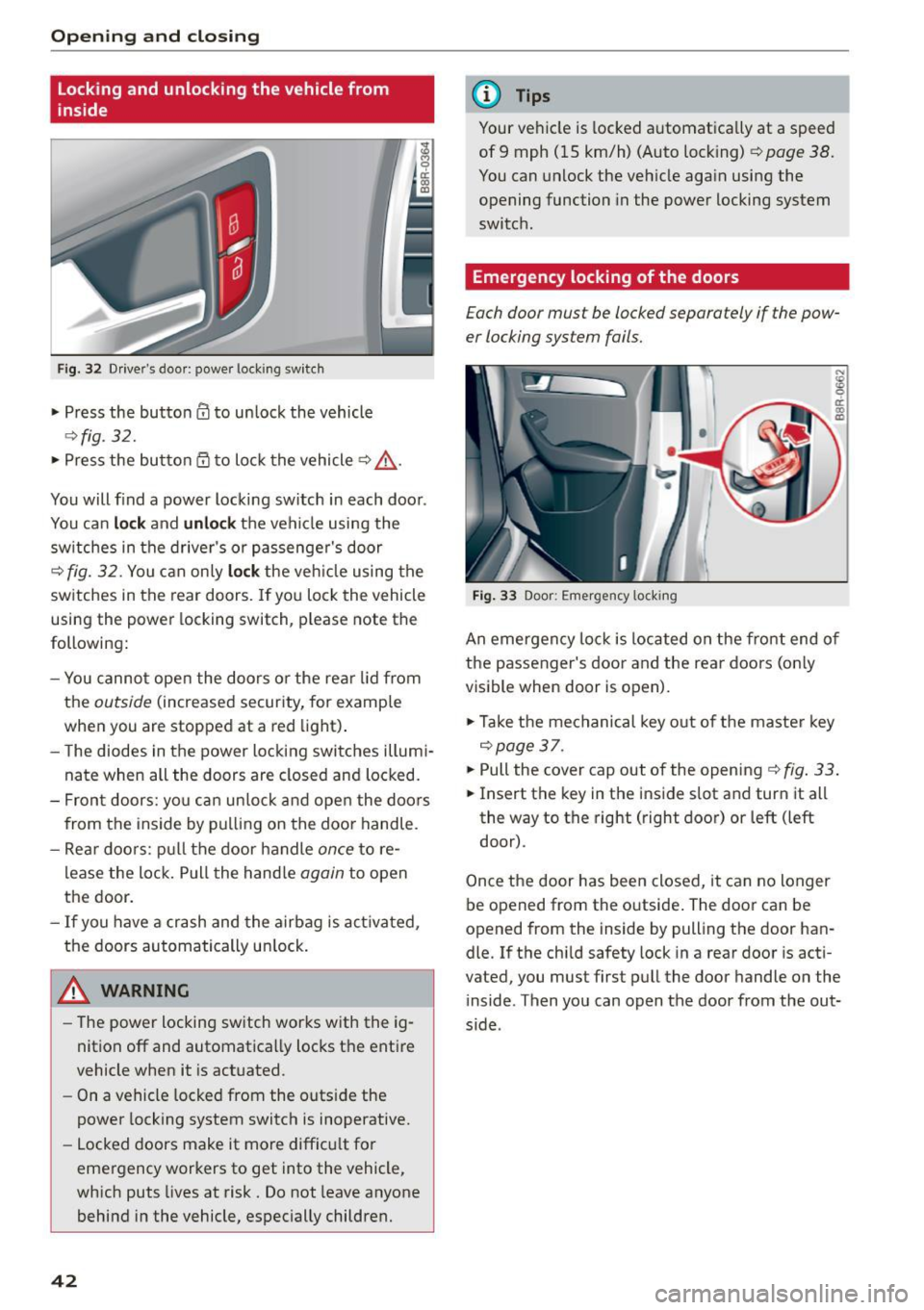
Fig. 32 Drive r's door : power lo ckin g sw it ch
• Press the button 0 to unlock the vehicle
~ fig. 32.
• Press the button Qj to lock the vehicle ~.&, .
You will find a power locking switch in each door .
You can
lo ck and unlock the veh icle using the
sw itches in the driver's or passenger's door
¢
fig. 32. You can only lo ck the veh icle using the
switches in the rear doors. If you lock the vehicle
using the power locking switch , please note the
following:
- You cannot open the doors o r the rear lid from
the
outside (increased security, for example
when you are stopped at a red light) .
- The diodes in the power locking switches illumi
nate when all the doors are closed and locked.
- Front doors: yo u can un lock and open the doors
from the inside by pulling on the door handle.
- Rear doo rs: pull the door handle
once to re
lease the lock. Pull the hand le
again to open
the door.
- If you have a crash and the airbag is act ivated,
the doors automatically un lock.
A WARNING
- The power locking sw itch works with the ig
nition off and automatically locks the entire
vehicle when it is actuated.
- On a vehicle locked from the outs ide the
power locking system switch is inoperative.
- Locked doors make it more difficu lt for
emergency workers to get into the vehicle,
which puts lives at risk. Do not leave anyone
behind in the vehicle, especially children.
42
@ Tips
Your vehicle is locked automatica lly at a speed
of 9 mph ( 15 km/h) (Auto locking)¢
page 38.
You can unlock the vehicle again using the
opening function in the power locking system
switch .
Emergency locking of the doors
Each door mus t be locked separately if the pow
er locking sys tem fails.
Fig. 33 Door : Emerge ncy lo ckin g
An emergency lock is located on the front end of
the passenger's door and the rear doors (only
visible when door is open).
• Take the mechanical key out of the master key
¢page 37 .
• Pull the cover cap out of the opening ¢ fig. 33.
• Insert the key in the inside slot and turn it all
the way to the right (right door) or left (left
door) .
Once the door has been closed, it can no longer
be opened from the outside. The door can be
opened from th e inside by pulling the door han
dle. If the child safety lock in a rear door is acti
vated , you must first pull the door handle on the
inside . T hen you can open the door from the out
s ide .
Page 45 of 302
M N
co ~ co
rl I.O
"' N
"' rl
Opening and closing rear
lid
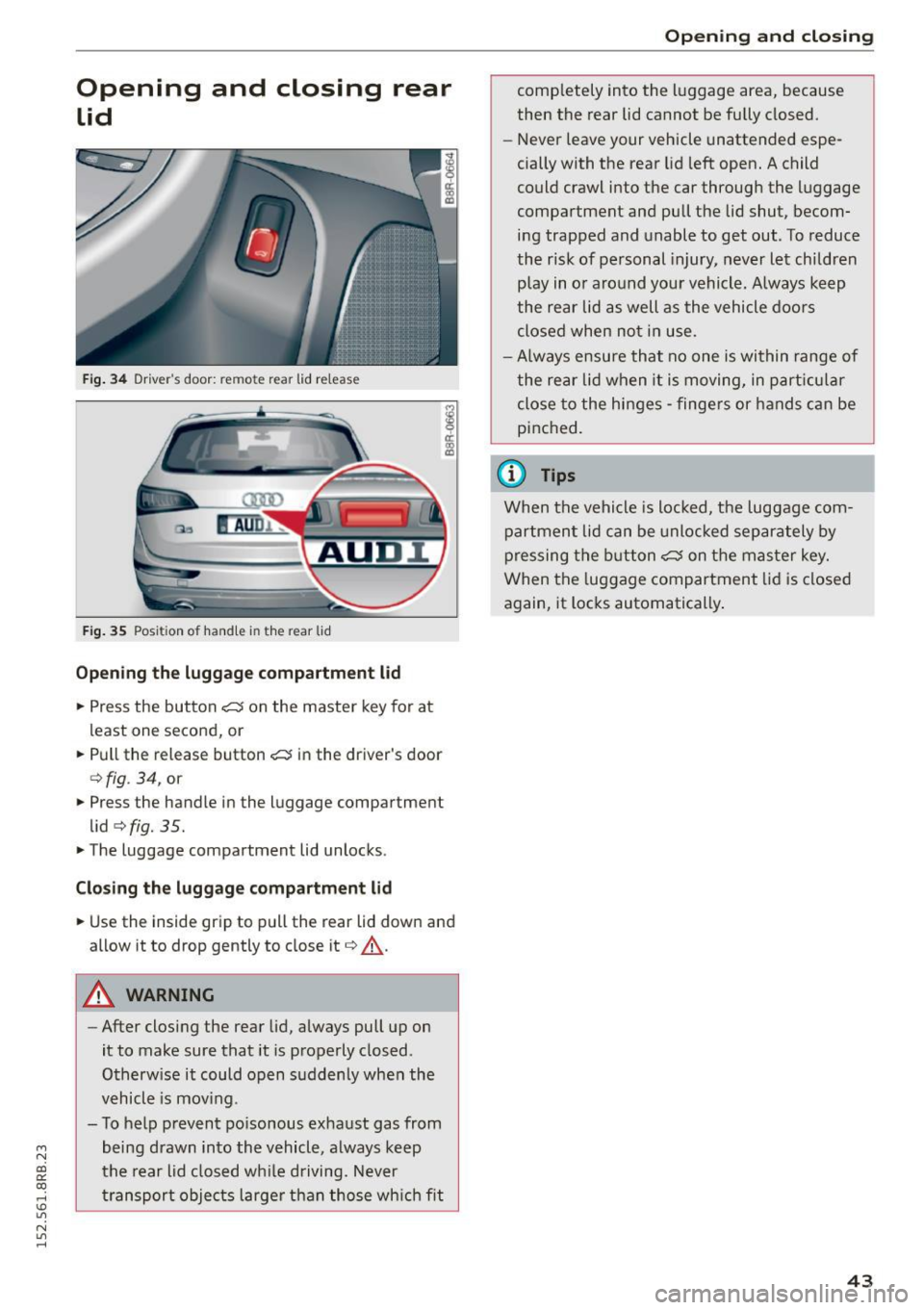
Fig. 34 Driver's door: remote rear lid release
Fig. 35 Position of handle in the rear l id
Opening the luggage compartment l id
.,. Press the button <:::::5 on the master key for at
least one second, or
.. Pull the release button
<:::::5 in the driver's door
c:>fig . 34, or
.,. Press the handle in the luggage compartment
lid
c:> fig. 35 .
.. The luggage compartment lid unlocks.
Closing the luggage compartment lid
.. Use the inside grip to pull the rear lid down and
allow it to drop gently to close it
c:> A .
A WARNING
-After closing the rear lid, always pull up on
it to make sure that it is properly closed .
Otherwise it could open suddenly when the
vehicle is mov ing.
- To help prevent po isonous exhaust gas from
being drawn into the vehicle, always keep
the rear lid closed while driving. Never
transport objects larger than those which fit
Opening and closing
completely into the luggage area, because
then the rear lid cannot be fully closed.
- Never leave your vehicle unattended espe
cially with the rear lid left open. A child
could crawl into the car through the luggage
compartment and pull the lid shut, becom ing trapped and unable to get out. To reduce
the risk of personal injury, never let children
play in or around your vehicle. Always keep
the rear lid as well as the vehicle doors
closed when not in use.
-Always ensure that no one is within range of
the rear lid when it is moving, in particular
close to the hinges -fingers or hands can be
pinched.
(0 Tips
When the vehicle is locked, the luggage com
partment lid can be unlocked separately by
pressing the button
<:::::5 on the master key.
When the luggage compartment lid is closed
again, it locks automatically .
43
Page 46 of 302
Opening and closing
Automatic rear lid/trunk
lid operation
Applies to vehicles: w ith automatic rear lid/trunk lid opera
t io n
The trunk lid con be opened and closed automat
ically.
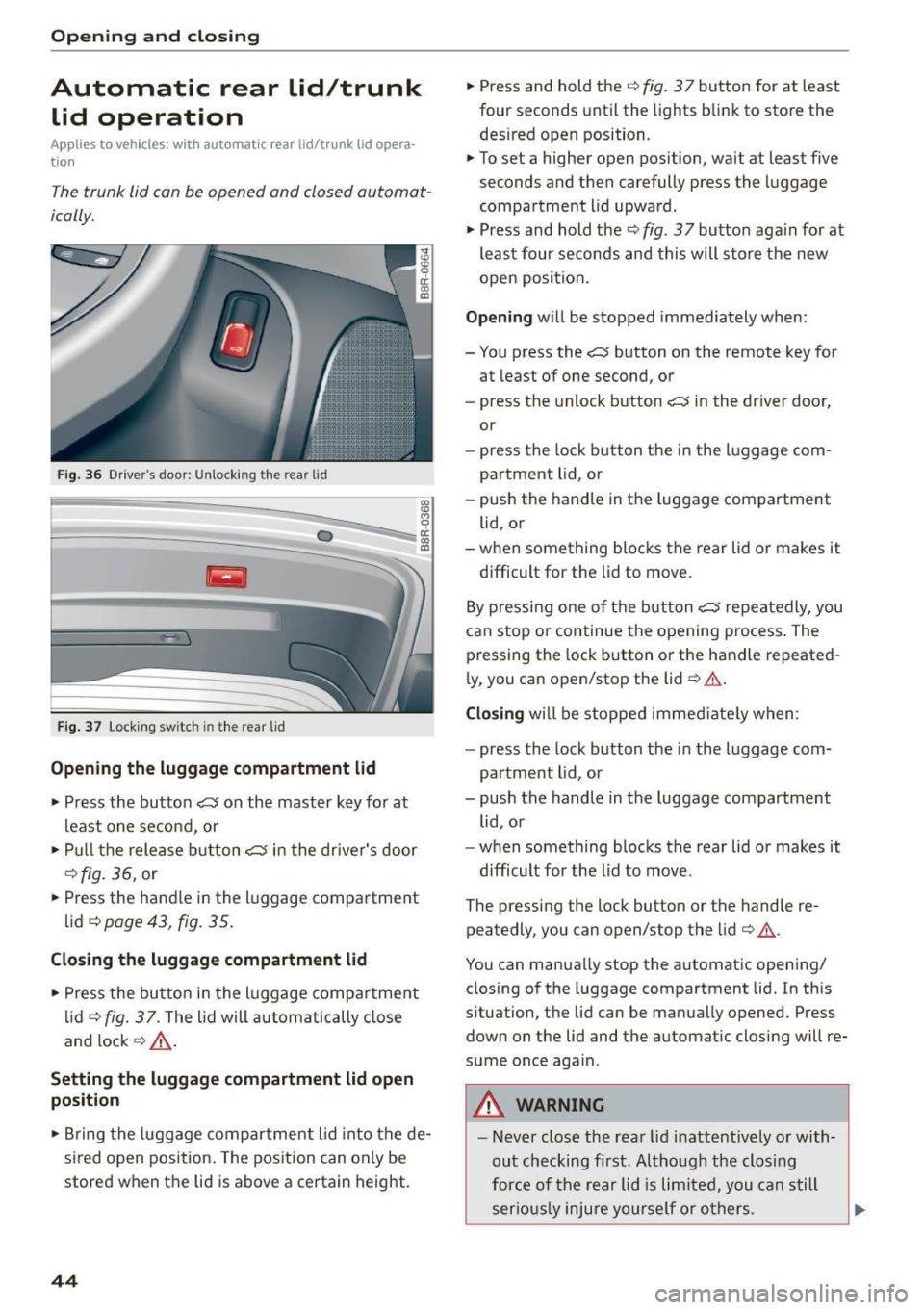
F ig . 36 D river's doo r: Unlock ing the rear lid
Fig . 37 Loc king sw itc h in th e rea r lid
Opening th e luggage compartment lid
., Press the button ~ on the master key for at
least one second, or
., Pu ll t he release button~ in the dr iver's door
¢ fig. 36, or
., Press the handle in the luggage compartment
lid ~
page 43, fig. 35.
Closing th e luggage compartment lid
., Press the but to n in t he luggage compa rtment
li d ¢
fig. 37. The lid will autom atically close
and lock ¢,& .
Setting the luggage compartment lid open
position
0 cl:
"' al
., Bring the luggage compar tment l id into the de
sired open position. The position can only be
stored when the lid is above a certain height .
44
., Press and hold the¢ fig. 3 7 button for at least
four seconds until the lights blink to store the
desired open position.
., To set a higher open position, wait at least five
seconds and then carefully press the luggage
compartment lid upward.
., Press and hold the¢
fig. 37 button aga in fo r at
least four seconds and this will sto re the new
open position.
Opening wi ll be stopped immediately when:
- You press the
~ button on the remote key for
at least of one second, or
- press the unlock button~ in the driver door,
or
- press the lock b utton t he i n the l uggage com
partment lid, or
- push the handle in t he luggage compartment
lid, or
- when something blocks the rear lid or makes it
difficult for the lid to move.
By pressi ng one o f the butt on~ repeatedly, you
can stop or continue the opening process . The
pressing the lock b utton or the handle repeated
ly, you can open/stop the lid~.&. .
Closing will be stoppe d immed iate ly when :
- press the lock button the in the l uggage com
partment lid, or
- push the handle in the luggage compartment
lid , o r
- when something blocks the rear lid or makes it
difficult for the lid to move .
The pressing the lock button or the handle re peatedly, you can open/stop the lid ¢ .&. .
You can manua lly stop the a utomatic opening/
closing of the luggage compartment lid. In this
situation, the lid can be manua lly opened. Press
down on the lid and the automatic closing will re
sume once again .
_& WARNING
-Never close the rea r lid inattentively o r with
ou t checking fi rst. Although the clos ing
for ce of the rear lid is lim ite d, you can s till
serio usly inju re yourse lf or o thers.
Page 47 of 302
M N
co ~ co
rl I.O
"' N
"' rl
-Always ensure that no one is with in range of
the rear lid when it is mov ing, in particular
close to the hinges and the upper and lower
edges - f ingers or hands can be pinched.
- To help prevent po isonous exhaust gas from
being drawn into the vehicle, a lways keep
the rear lid closed wh ile driving . Never
transport objects large r than those wh ich fit
compl etely into the luggage area , because
then the rea r lid cannot be fully closed .
- Never leav e your vehicle unattended espe
c ially w ith the rear lid left open. A ch ild
c ou ld craw l in to the car through t he luggage
c ompartment and pull the lid s hut, becom
ing t rapped and unable to get ou t. To red uce
the risk of perso nal in jury, never let children
play i n or around your veh icle . Always keep
the rear lid as well as the vehicle doors
closed when not in use.
- If there is a luggage rack or bicycle rack
mounted on the rear lid, it may not be able
to open completely or an ope ned rear lid
may close by itse lf because of the added
we ight. So the open rear lid must be sup
ported or the weight m ust be removed from
the luggage ra ck fi rst .
(O} Tips
- As soon as the electrical connection to the
tra ile r socket is completed on veh icles with
a f actory insta lled towing hitch, o r a trailer
hitch that was insta lled later acco rding to
fac tory spe cifi ca tions , th e au tomat ic rear li d
fu nct ion can only be operate d via the hand le
in the rea r lid .
- If th e vehicle battery charge drops below a
certain level, yo u can sti ll open or close the
r ear lid manua lly, however, you w ill need to
apply more force to close it.
- If the rear lid on a locked vehicle is un locked
with the middle button
,c:$ on the remote
key, the rear lid is automatically locked
again immediately after closing. This is indi
cated by the turn s ignals bli nking.
- The f ollowing applies to veh icles equipped
with the Conve nience key" feature: if the re
mote control key is left in the luggage com
partment, luggage compartment will auto-
Open ing and clo sing
matically unlock itse lf after yo u loc k the ve
hicle. This prevents you from unintentional·
Ly locking yo ur key in the luggage compart
ment.
Emergency unlocking of
the luggage compartment Lid
The luggage compartment lid can be released in
an emergency from the inside.
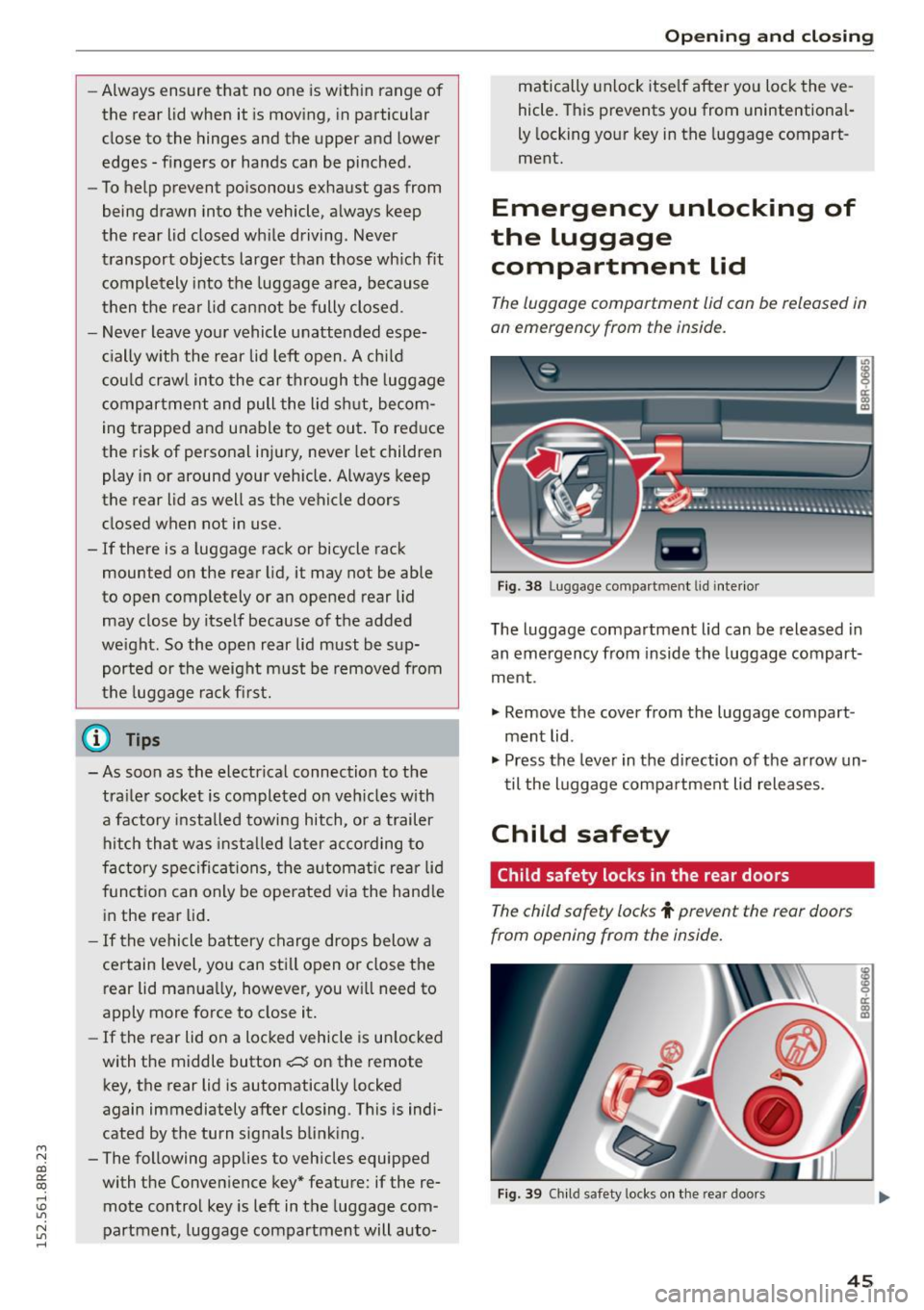
Fi g. 3 8 Luggage co mpa rtment lid i nte rior
T he luggage compartment lid can be released in
an emergency from inside the luggag e compart
me nt.
., Remove the cover from t he luggage compart
ment lid .
., Press the leve r in the di rection of the arrow un
t il the luggage compa rtment lid releases.
Child safety
Child safety locks in the rear doors
The child safety locks t prevent the rear doors
from opening from the inside.
Fig . 39 Chil d safety locks o n th e rea r doo rs
45
Page 48 of 302
Opening and closing
The rear doors are equipped with child safety
locks . The lock is only visib le when the door is
open . Take the mechan ica l key out of the master
key
c> page 3 7.
Switch ing the child safety loc ks on
"Turn the key in the direction of the arrow
<:>fig. 39.
Switching the child safety locks off
"Turn the key in the opposite d irection of the ar
row.
When the child safety locks are activated, the in
side door hand les do not work and the doors can
only be opened from the outside.
Power Windows
Controls
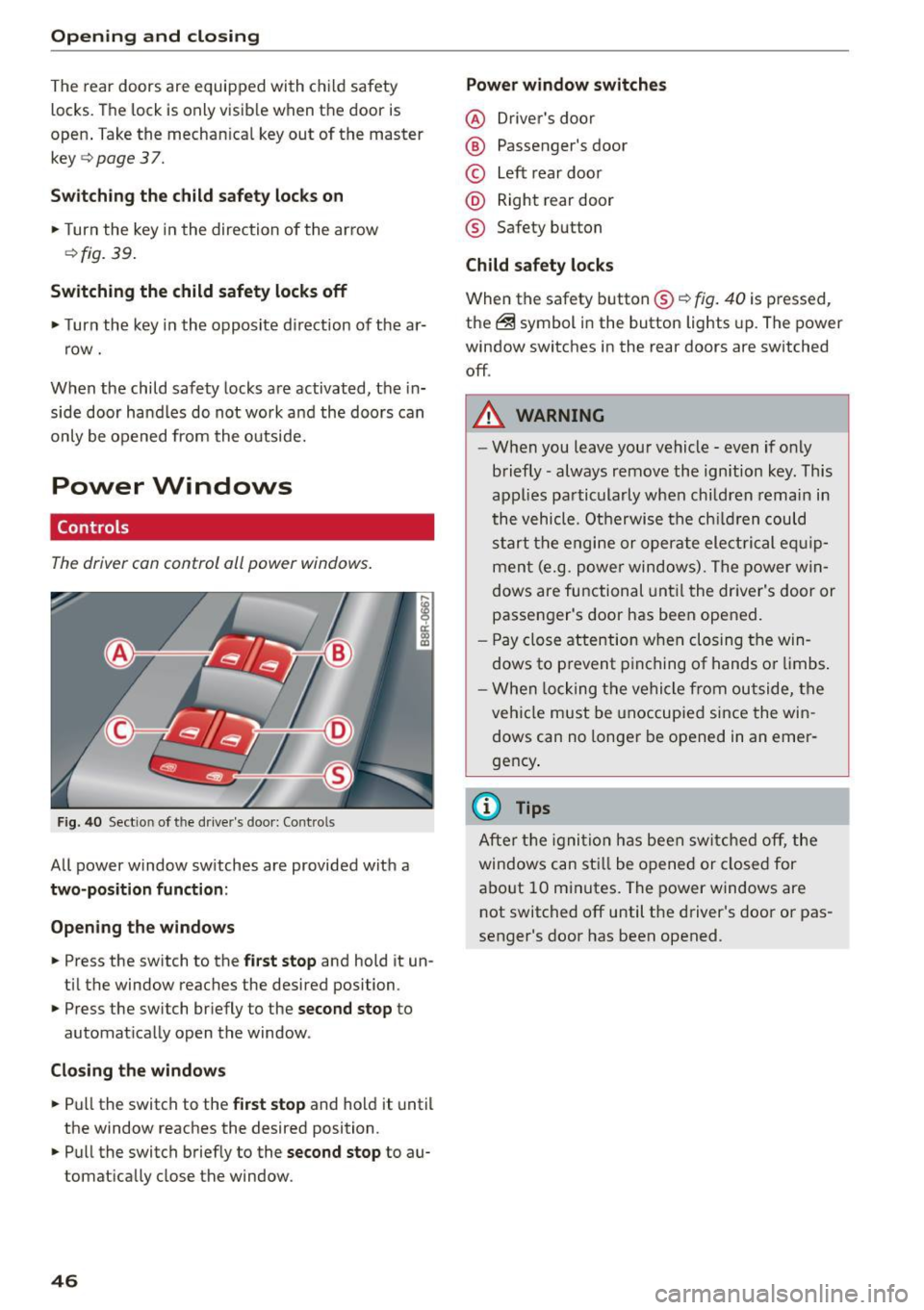
The driver con control all power windows .
Fig . 40 Sect ion of the driver 's doo r: Con trols
All power window sw itches are provided with a
two-position function :
Open ing th e windows
... Press the switch to the first stop and hold it un
ti l the window reaches the desired position .
... Press the switch br iefly to the
second stop to
automat ica lly open the window.
Clo sing the window s
... Pu ll the switch to the first stop and hold it until
the window reaches the desired position .
... Pull the switch briefly to the
second stop to au
tomatically close the window.
46 Power window switches
@ D
river 's doo r
® Passenger's door
© Left rear doo r
@ Right rear door
® Safety button
Child safety locks
When the safety button® c> fig. 40 is pressed,
the ~ symbol in the button lights up. The power
window switches in the rear doors are switched
off .
A WARNING
-W hen you leave you r vehicle - even if only
briefly -always remove the ignition key. This
applies pa rticula rly when children remain in
the vehicle. Otherwise t he ch ild ren could
s t art the e ngi ne or operate ele ct rical eq uip
men t (e.g. p ower windows). The power w in
dows are functional unt il the dr iver's door or
passenger's door has been ope ned.
- Pay close attention w he n closing t he win
dows to p revent p inching of hands o r limbs .
- W hen locking the ve hicle from outside, the
vehi cle must be unoccupied since the win
dows can no longer be opened in an emer
gency .
(D Tips
After t he ig nit ion has bee n swi tc h ed off , th e
windows can st ill be o pened or closed for
a bo ut 10 m inutes. The power windows are
not switched off until the driver's door or pas
senger's door has been opened .
Page 49 of 302
M N
co ~ co
rl I.O
"' N
"' rl
Convenience opening/closing
The windows and the Panoramic sliding sunroof*
can be opened and closed with the mechanical
key or the emergency key.
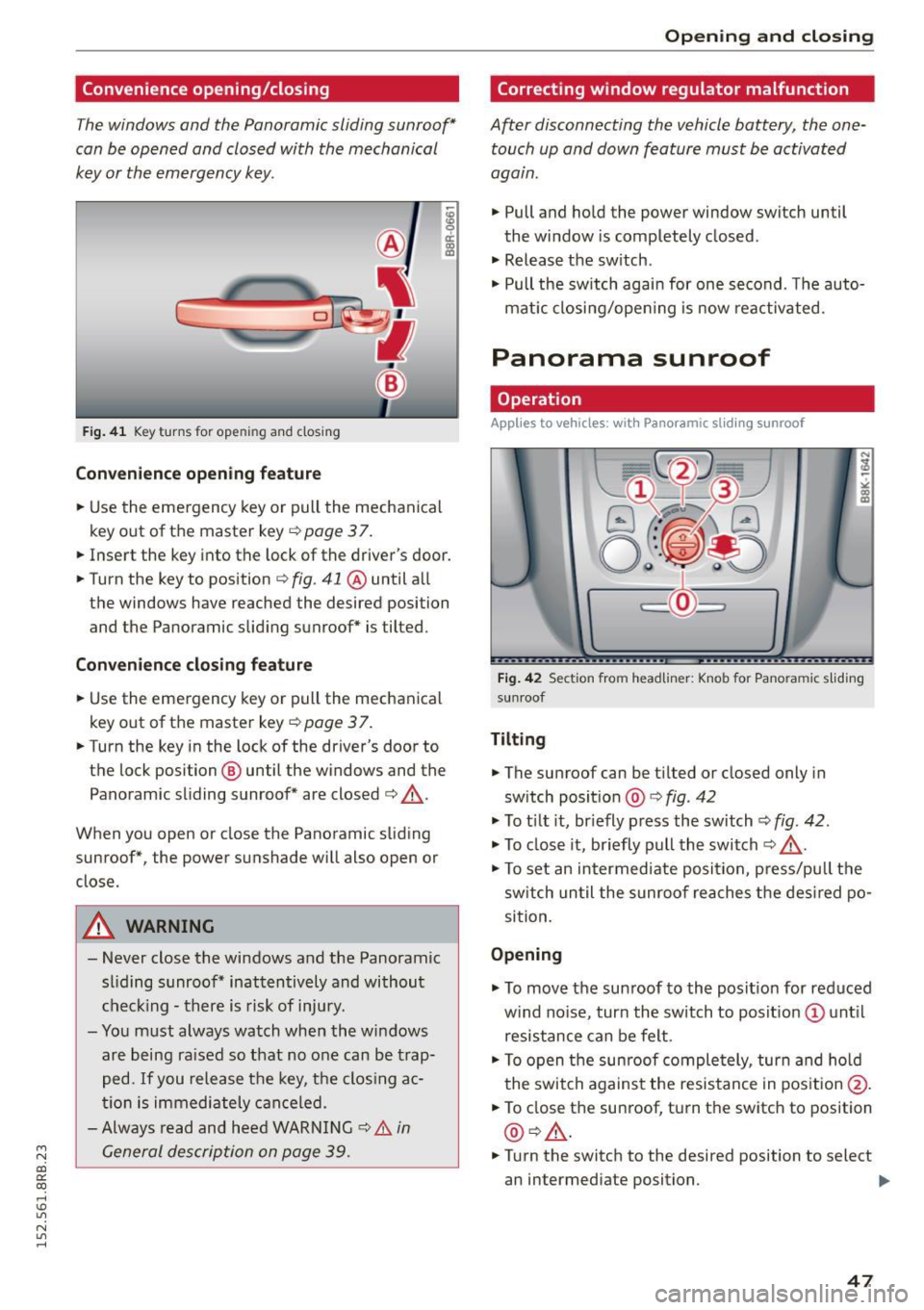
F ig . 41 K ey turns for ope ning and closing
Convenience opening feature
.. Use the emergency key or pull the mechanical
key out of the master key ¢
page 3 7 .
18 9 a::
"' a,
.. Insert the key into the lock of the driver's door .
.. Turn the key to position ¢
fig. 41 @ until a ll
the windows have reached the desired position and the Panoramic slid ing sunroof* is tilted.
Convenience closing feature
.. Use the emergency key or pull the mechanical
key out of the master key
¢ page 37.
.. Turn the key in the lock of the driver's door to
the lock position @ until the windows and the
Panoramic sliding sunroof* are closed ¢ ,&..
When you open or close the Panoramic sliding
sunroof*, the power sunshade will also open or
close.
A WARNING
- Never close the windows and the Panoramic
sl iding sunroof* inattentively and without
checking -there is risk of injury.
- You must always watch when the windows
are being ra ised so that no one can be trap
ped.
If you release the key, th e clos ing ac
tion is immediately canceled.
- Always read and heed WARNING ¢
& in
General description on page 39.
Opening and closing
Correcting window regulator malfunction
After disconnecting the vehicle battery , the one
touch up and down feature must be activated
again .
.. Pull and hold the power window switch until
the window is completely closed .
.. Release the sw itch .
.. Pull the switch again for one second . T he auto
mat ic closing/opening is now reactivated.
Panorama sunroof
Operation
Applies to veh icles: w ith Panoramic sl iding sunroof
Fig. 42 Section fro m headliner : Knob fo r Pano ra m ic s liding
sun roof
Tilting
.. The sunroof can be t ilted or closed only in
sw itch posit ion @ ¢
fig. 42
.. To t ilt it, briefly press the switch
<=;>fig. 42.
.. To close it, briefly pull the switch¢.&. -
.. To set an intermediate posi tion, press/pu ll the
switch until the sunroof reaches the desired po
sition.
Opening
.. To move the sun roof to the position for reduced
w ind no ise, turn the switch to posit ion (!) until
resistance can be felt.
.. To open the sunroof completely, turn and hold
the switch against the resistance in position @.
.. To close the sunroof, turn the switch to position
@ ¢,&. .
.. Turn the switch to the desired position to select
an intermediate position. .,,_
47
Page 67 of 302
M N
co
a:
co
,...., \!) ..,.,
N ..,., ,....,
In addition to the setting for the drive r's seat ,
the exterior rear view mirror setting can be stor
ed and reca lled through seat memory if the veh i
cle is properly equipped.
Storin g and recallin g se tting s
With the help of the memory buttons 1 and 2
¢ fig. 65 the settings for two different drivers
can be stored and reca lled
r::!> page 65.
The cu rrent settings are also a utomat ica lly as
signed to the remote control key being used
when the vehicle is locked . When the vehicle is
un locked, the settings assigned to the remote
contro l key being used are automatica lly recalled .
Turnin g seat m emo ry on and off
If the IO FF I sw itch is depressed, the seat memory
is inoperative . When the Memory function is off,
the LED in the button lights up.
All the stored settings a re retained. We recom
mend using the
I O FF I sw itch and de activating the
seat memory if the vehicle is only go ing to be
used
temporarily by a driver whose settings are
not going to be stored .
Storing and recalling settings
Applies to vehicles: with seat memory
Storing settings
~ Adjust the driv er's seat.
~ Adjust the two exter ior mirrors.
~ Press the !SET I button. The light in the button
will come on.
~ Now p ress a memory button (III or~). If the
stor ing procedure is correct, a confirmation
tone w ill sound .
Recall ing setting s
~ If the dr iver 's door is open and the ignit ion is
switched off, tap the correspond ing memory
button br iefly .
~ If the dr iver's door is closed or the ignit ion is
switched on, p ress the approp riate memo ry
button until the s to red pos ition is rea ched .
Successful storage is confirmed audibly and by
the light in the
ISET I button illum inat ing
r::!> page 64, fig . 65.
S eat s and stor age
When the vehicle is lo cked , the current settings
are stored and assigned to the remote contro l
key . But the settings stored on memory buttons
1 to 2 are not deleted . They can be recalled at
any time . When the vehicle is
unlocked , the set
t ings assigned to the remote control key a re re
stored .
If your vehicle is driven by other persons using
your remote control key, you should save your in
dividua l seat position on one of the memory but
tons . You can recall your settings again simply
and conveniently by p ress ing the corresponding
memo ry butto n. When the vehicle is locked,
these settings are automatica lly re-assigned to
the remote control key and stored .
& WARNING
- For safety reasons, the seat setting can only
be recalled when the vehicle is stationary -
otherwise you risk hav ing an accident.
- In an emergency the recall proced ure can be
cancelled by pressing the
I OFF I switch or by
tapp ing of the memory buttons.
Activating remote control key memory
Applies to vehicles: wit h seat memory
To assign the dr iver 's seat settings to the remote
control key when locking the vehicle, the function
must be activated in the radio or MMI*.
~ Select: ! CAR I function button > Seat adju st
ment > Dri ver's seat > Key mem. p ro fi le > On .
Or
~ Select: !CARI function button> Car sy ste ms*
cont ro l butto n > Vehicl e se tting s > Seats >
Driver 's seat > Remote control ke y> On .
(j) Tips
If you do not want anothe r driver's sett ings to
be assigned to the remote control key, switch
off the memory function usi ng the rad io or
M MI* or t he
I OFF I button r::!> page 64.
65
Page 88 of 302
Driving
Starting the vehicle with the emergency
key
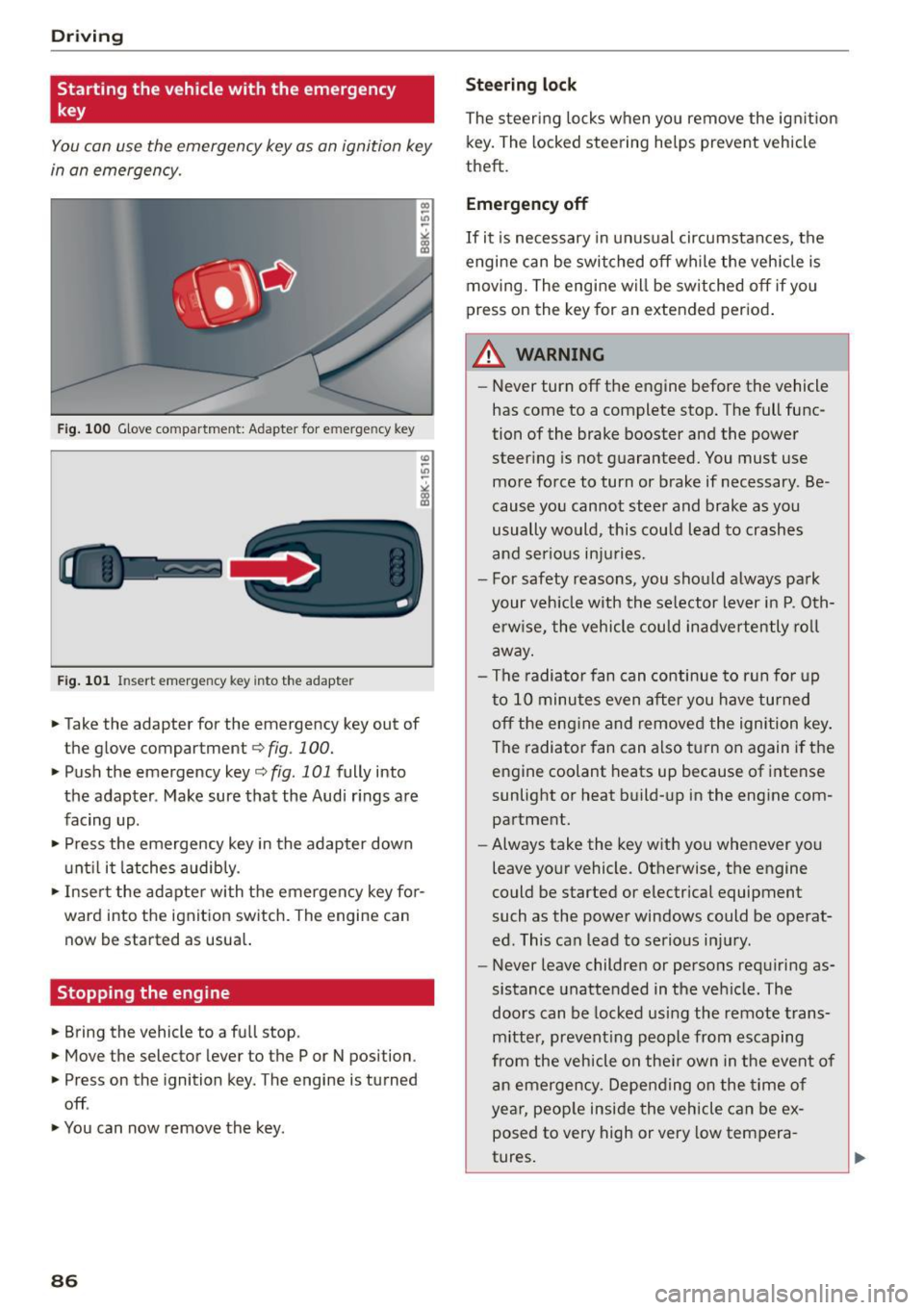
You can use the emergency key as an ignition key
in an emergency.
Fig. 100 Glove compartment: Adapter for e merg en cy key
Fig. 101 In sert emergency key into the adapter
... Take the adapter for the emergency key out of
the glove compartment
r:::;, fig . 100 .
.,. Push the emergency key r:::;, fig. 101 fully into
the adapter . Make sure that the Audi rings are
facing up .
.,. Press the emergency key in the adapter down
until it latches audibly.
.,. Insert the adapter with the emergency key for
ward into the ignition switch. The engine can now be started as usual.
Stopping the engine
... Bring the vehicle to a full stop.
... Move the selector lever to the P or N position .
.,. Press on the ignition key. The engine is turned
off .
.,. You can now remove the key.
86
Steering lock
The steering locks when you remove the ignition
key. The locked steering helps prevent vehicle
theft.
Emergency off
If it is necessary in unusual circumstances, the
engine can be switched off while the vehicle is
moving. The engine will be switched off if you
press on the key for an extended period.
A WARNING
- Never turn off the engine before the vehicle
has come to a complete stop. The full func
tion of the brake booster and the power
steering is not guaranteed. You must use
more force to turn or brake if necessary . Be
cause you cannot steer and brake as you
usually would, this could lead to crashes
and serious injuries.
- For safety reasons, you should always park
your vehicle with the selector lever in P. Oth erwise, the vehicle could inadvertently roll
away.
- The radiator fan can continue to run for up
to 10 minutes even after you have turned off the engine and removed the ignition key .
The radiator fan can also turn on again if the
engine coolant heats up because of intense
sunlight or heat build-up in the engine com
partment .
- Always take the key with you whenever you
leave your vehicle. Otherwise, the engine
could be started or electrical equipment
such as the power windows could be operat
ed. This can lead to serious injury.
- Never leave children or persons requiring as
sistance unattended in the vehicle. The
doors can be locked using the remote trans
mitter, preventing people from escaping
from the vehicle on their own in the event of
an emergency. Depending on the time of
year, people inside the vehicle can be ex
posed to very high or very low tempera
tures.
Page 89 of 302
M N
co ~ co
rl I.O
"' N
"' rl
CD Note
If the engine has been under heavy load for
an extended per iod, heat builds up in the en
gine c ompartment after the engine is switch
ed off -there is a risk of damag ing the eng ine .
Allow t he engine to run at idle fo r about two
m inutes befo re switch ing it off.
Convenience key
Starting the engine
Applies to vehicles: with Conven ience key
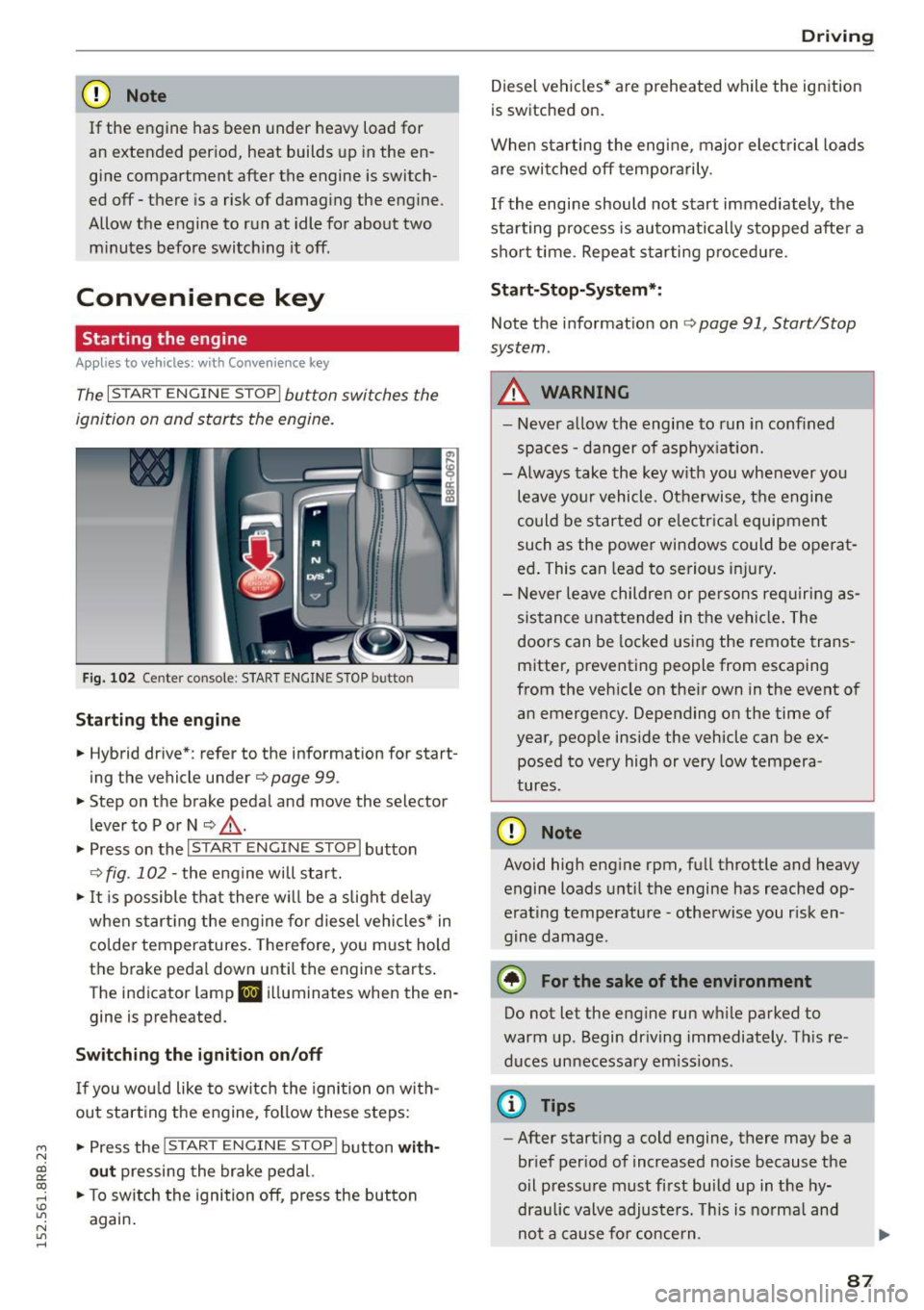
The I STAR T ENGINE S TOP I button switches the
ignition on and starts the engine.
Fi g. 1 02 Cente r co nsole : STAR T ENGIN E STOP b utto n
Starting the engine
• Hybrid dr ive *: refer to the information for start
ing the vehicle under
Q page 99 .
• Step on t he brake pedal and move the selector
lever to P o r N
Q ,& .
• Press on the 1~s= T~A_R_T_E_N--GI N_E_S_T_O_P_I button
Q fig. 102 -the engine will start.
• It is possible that there w ill be a slight de lay
when start ing the eng ine for diesel vehicles * in
colder temperatures. Therefore, yo u must hold
t h e brake pedal down until the engine starts .
The indicator lamp
II i ll uminates when the en
gine is preheated.
Switching the ignition on /off
If yo u wou ld like to switch the ignition on with
out start ing the engine, fo llow these steps:
• Press the
!S TAR T EN GINE STOPI button with
out pressing the brake ped al.
• To sw itch the ignition off, press the button
again .
Driv ing
Diesel vehicles * are preheated while the ignition
is switched on.
When sta rting the engine, major electrical loads
are swi tched off temporarily .
If the engine should not start immediately, the
sta rting process is au tomatically s topped afte r a
sho rt time. Repeat s tarting p roced ure.
Sta rt-Stop-System* :
Note the information on Q page 91, Start/Stop
system .
A WARNING
=
-Never a llow th e engine to run in confined
spaces -da nger of asphyx iat io n.
- Always take the key w ith you whenever you
leave your vehicle. Ot herwise, t he engine
could be started or e lectr ica l equipment
such as the power win dows could be ope rat
ed . This can lead to se rious i njury.
- Never le ave children or pe rsons re quiring as
sistance unattende d in the vehi cle. The
doors can be locked us ing the remote trans
mitter, preventing people from escaping
from the veh icle on the ir own in the event o f
an emergency. Depending on the time of
year, people inside the vehicle can be ex posed to very high or very low tempera
tures.
CD Note
Avoid high eng ine rpm, full throttle and heavy
engine loads u ntil the engine has reached op
erating temperature -otherwise you r isk en
gine damage.
@ For the sake of the environment
Do not let the engine run wh ile parked to
warm up. Begin dr iving immediately . Th is re
duces unnecessa ry em iss io ns.
@ Tips
- After starting a cold engine, there may be a
brief per iod of increased noise because the
oil p ressu re must f irst build up in the hy
draulic valve adjusters. Th is is norma l and
-
no t a cause fo r concern . ..,
87
Page 90 of 302
Driving
-If you leave the vehicle with the ignit ion
switched on, the ignition will switc h off af
ter a certa in period of time. P lease note that
e lectr ica l equipment s uch as exterior lights
will switch off as well when that happens.
Switching engine off
A pp lies to veh icles: w ith Convenie nce key
.,. Bring your veh icle to a complete stop.
.. Move the selector lever to the P or N position .
.,. Press the
!START ENGINE STOPI button
"*page 87, fig. 102.
Stee ring lock
The steering locks when you turn the engine off
using the
!START ENGINE STOP I button and open
the dr iver's door. The locked steering helps pre
vent vehicle theft.
Emergen cy off
If necessary, the eng ine can be sw itched off with
the selector lever in the R or D/S position . The en
g ine stops if you press and hold the
I STAR T ENGINE ST OP ! button at speeds below
6 mph ( 10 km/h) a nd p ress the brake pedal.
..&, WARNING
- Never turn off the engine be fore the ve hicle
has come to a comp lete stop. The fu ll func
tion of the b rake booster and the power
stee ring is not guaranteed. Yo u must use
more force to turn or bra ke i f necessary. Be
cause you cannot steer and brake as you
usually wou ld, this could lead to crashes
and serious injur ies.
- For safety reasons, you should always park
your vehicle with the selector lever in P. Oth
erwise , the vehicle could inadver tently roll
away.
- The rad iator fan ca n continue to run for up
to 10 m inutes eve n after you have turned
off the engine a nd removed the ignition key.
T he ra diato r fan ca n also turn on aga in if the
engi ne coola nt he ats up becau se of intense
s u nligh t or heat bui ld-up in the engine com
partment.
88
- Always take the key with you whenever you
leave your vehicle. Otherwise, the engine
could be started or electrical equipment
such as the power windows could be operat
ed. This can lead to serious in jury.
- Never leave children or persons requiring as
sistance unattended in the vehicle. The
doors can be locked using the remote t rans
m itter, prevent ing people from escaping
from the vehicle on the ir own in the event of
a n emergency. Depe nding on the time o f
yea r, peop le inside the vehicle can be ex
posed to very high or very low tempera
tures .
(D Note
If the engine h as been unde r heavy lo ad for
an ex tended pe riod, hea t bu ilds up in t he en
gine compartment after the engine is switch
ed off -there is a risk of damaging the engine .
A llow the engine to run at id le for about two
minutes before switching it off.
Driver messages
Ignition is on
This message appears and a warning tone sounds i f you open the drive r's door when the ign ition is
switched on .
No key identified
This message appears when the
I START ENGI NE STO PI* button is p ressed if the re
i s no master key ins ide the ve hicle or if the sys
tem does no t re cogn ize it. For examp le, the mas
te r k ey cannot be recogn ized if it is covered by an
ob ject (e.g. a luminum brief case) wh ic h
screens
the radio sig na l. Electro nic devices such as cell
phones can a lso interfere with the radio signa l.
Press brake pedal to start engine
This message appears if yo u do not p ress the
brake pedal to start the eng ine.
Shift to N or P to start engin e
This message appears when attempt ing to start
the engine if the selector lever for the automat ic .,.