instrument cluster AUDI Q5 2015 User Guide
[x] Cancel search | Manufacturer: AUDI, Model Year: 2015, Model line: Q5, Model: AUDI Q5 2015Pages: 302, PDF Size: 75.01 MB
Page 29 of 302
M N
co ~ co
rl I.O
"' N
"' rl
Lamp (MIL) ¢..ffi will il luminate. If this occurs,
contact the nea rest authorized Audi dea ler for as
sistance.
.&_ WARNING
Always observe the posted speed limits and adjust your speed to suit prevailing road, traf
fic and weather cond it ions . Never drive your
vehicle faster than the maximum speed rating
of the tires installed .
Auto Check Control
Introduction
The Auto-Check control monitors the function of
certain vehicle features and components .
It sim
ply makes sure these features and components
are working properly . The Auto-Check control
works as long as the ignition is on, as well as
whenever the veh icle is driven .
-
If a component is malfunctioning or if the need
for an urgent repair has been detected, this will appear in the instrument cluster display . You w ill
also hear an audible warning tone . The displays
are color coded in either red or ye llow depending
on their level of prior ity.
A red symbol means
Danger , a yellow symbol in
dicates
Warning . In certain situations, informa
tion message for the dr iver appear in addition to
the red and yellow symbols.
Note about automatic transmission
The Auto-Check Control will automat ically per
form a test each time you switch o n the ignition .
With the selector lever in P or N, the following
message appears in the display :
When stationary apply brake pedal while select
ing gear
When you select a different gear (for example: R,
D, etc.), the message will disappear and the Au
to -Check function is d isplayed.
If there is a malfunction, then the malfunction
message will appear about 15 seconds after you
start the vehicle. At the same time you will hear a
warning tone.
Dri ver information system
Dr iver information messages
Driver information messages are shown in the in
strument cluster display in addition to symbols .
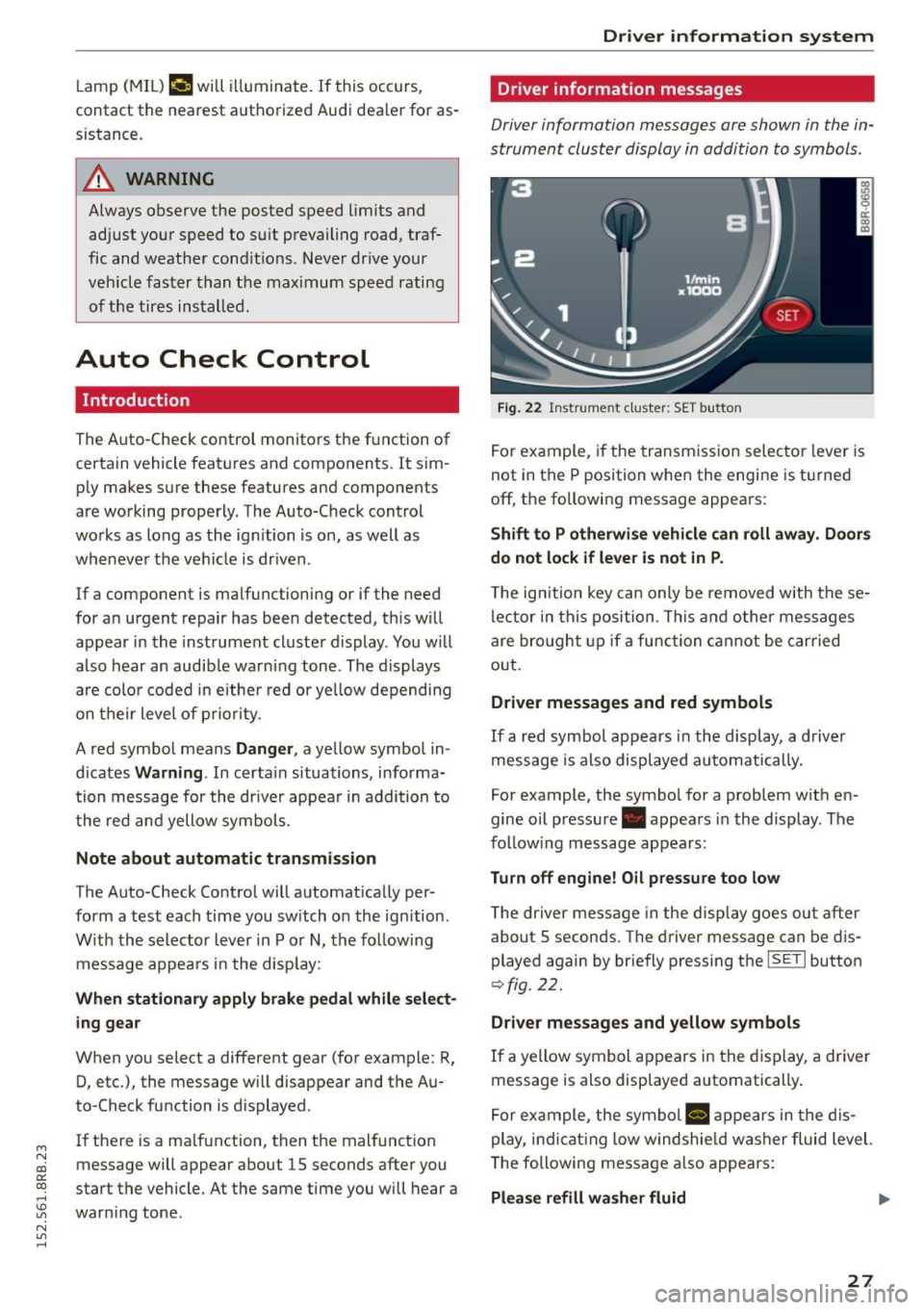
Fig. 22 Inst rume nt clust er: SET button
For example, if the transmission selector lever is
not in the P position when the engine is turned
off, the following message appears :
Shift to P otherwise vehicle can roll away. Doors
do not lock if lever is not in P .
The ign ition key can only be removed w ith these
lector in this position . This and other messages
are bro ught up if a function cannot be carried
out .
Driver messages and red symbols
If a red symbol appears in the display, a driver
message is also displayed automatically.
For example, the symbol for a problem w ith en
gine oil pressure . appears in the display . The
fo llow ing message appears:
Turn off engine! O il pressure too low
T he driver message in the display goes out after
about S seconds . The dr iver message can be dis
played again by briefly press ing the
ISETI button
9 fig . 22.
Driver messages and yellow symbols
If a yellow symbol appears in the display, a driver
message is also displayed automatically .
For example, the symbol
Ill appears in the dis
play, indicat ing low windshie ld washer fluid level.
The following message also appears :
Please refill washer fluid ..,_
27
Page 34 of 302
Driver inform ation system
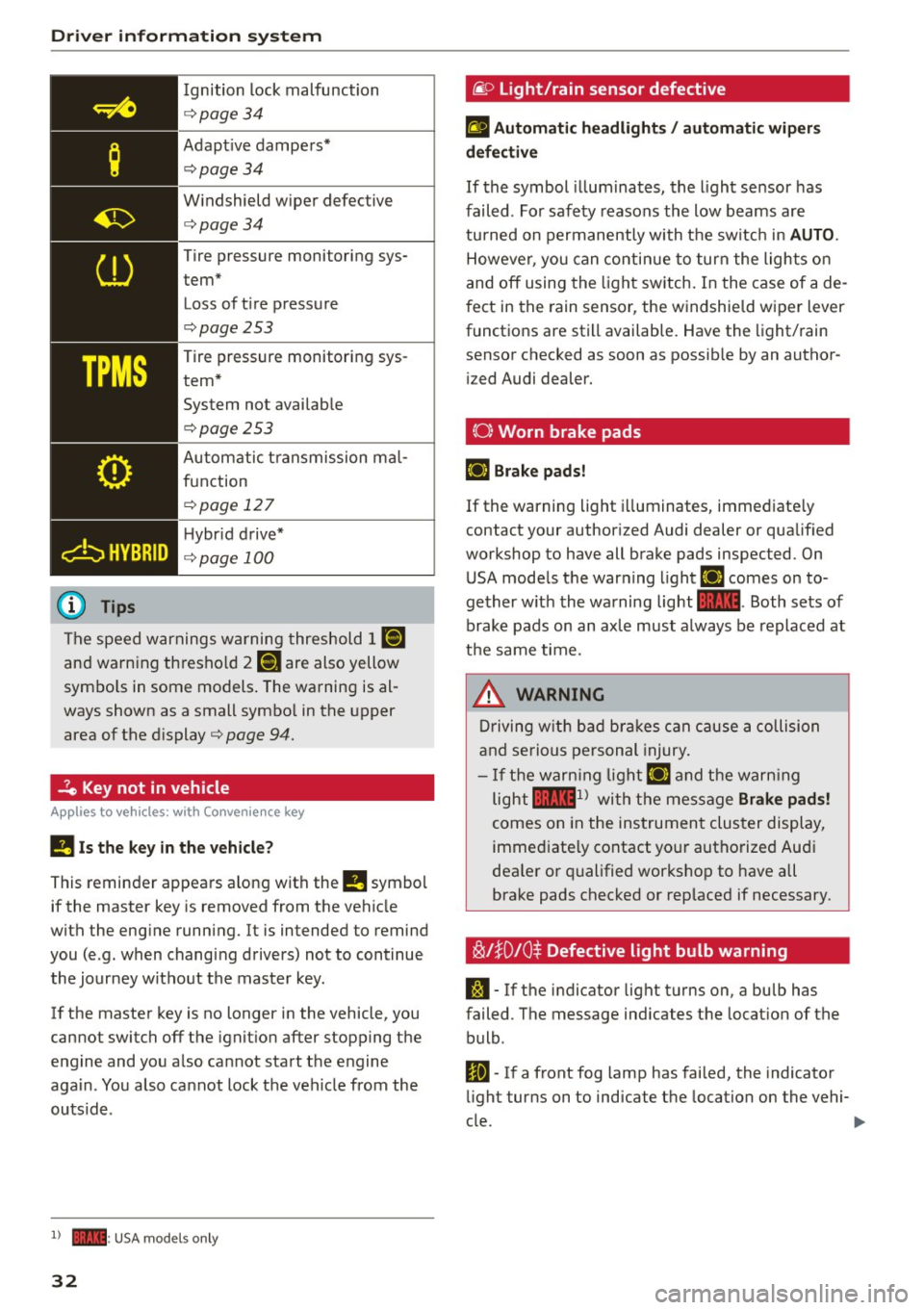
Ignition lock malfunction
<=>page 34
Adapt ive dampers*
c:> page 34
W indshield wiper defective
c:>page34
Tire pressure monitoring sys
tem*
Loss of t i re pressure
c:>page253
Tire pressure monitoring sys
tem* System not avai lab le
c:>page253
Automatic t ransmission ma l
function
c:> page 12 7
H ybr id drive*
<=> page 100
The speed warnings warning threshold J IIIIJ
and warning thresho ld 2 llH are also yellow
symbo ls in some models . The warning is al
ways shown as a small symbo l in the upper
area of the d isplay
c:> page 94.
-?e Key not in vehicle
Applies to veh icles: w ith Convenience key
II Is the key in the vehicle ?
This reminder appears along with the II symbol
if the master key is removed from the vehicle
with the eng ine running. It is intended to remind
you (e .g. when changing drivers) not to continue
the journey without the master key .
If the master key is no longer in the vehicle, you
cannot switch off the ignit ion after stopping the
e ngine and you a lso cannot start the engine
aga in . You also cannot lock the veh icle from the
outsid e.
l ) - : USA models only
32
@ Light/rain sensor defective
£1 Automati c he adlight s/ auto mati c wi per s
defective
If the symbol illum inates, the light sensor has
failed. For safety reasons the low beams are
tu rned on permanently with the sw itch in
AUTO .
However, you can contin ue to turn the lights on
and off using the light sw itch. In the case of a de
f ect in the rain sensor, the windshie ld wiper lever
functions are still available. Have the light/rain
sensor checked as soon as possib le by an author
i zed Audi dealer.
(0) Worn brake pads
E+J Brake pad s!
If the warning light i lluminates, immediate ly
contact your author ized Audi dealer or qualified
workshop to have all brake pads inspected. On
USA mode ls the warning light
E+J comes on to
gether w ith the warning light
1111 . Both sets of
brake pads on an axle must always be replaced at
t h e same time.
.&_ WARNING
Driving w ith bad bra kes can cause a collision
and serious personal injury.
- If the warn ing lig ht E+J and the warn ing
light
llll1l with the message Brake pad s!
comes on in the instrument cluster display,
immed iate ly contact yo ur authorized Aud i
dea le r or q ualified workshop to have all
brake pads checked or rep laced if necessary.
~l}D10$ Defective light bulb warning
S:1 -If the indicator light turns on, a bulb has
failed. The message indicates the location of the
bulb .
Im-If a front fog lamp has fai led, the indicator
li ght turns on to indicate the location on the vehi-
cle.
~
Page 35 of 302
M N
co
a:
co
,...., \!) ..,.,
N ..,., ,....,
IJ-If a rea r fog lamp has failed , the indicator
light turns on to indicate the location on the vehi
cle.
Vehi cle light s: Sy stem fault!
If the message appea rs, there is a malfunct ion in
the head lights or light switch.
Drive to your authorized Aud i dea le r immediately
to have the malfunction corrected .
A WARNING
-Light bu lbs are pressurized and could ex
plode whi le they a re being changed causing
serious persona l injury.
-
- Wor k w ith due care when handling the high
voltage section of gas discharge (xenon) l igh ts *. Failure to do so could result in death
o r serious injury.
@ Tips
Have the bulb replaced or the connection re
pa ired by your authorized Audi Serv ice depart
ment.
<:;::> Windshield washer flu id level too low
llt Plea se refill wa sher fluid
If the symbol illuminates, add windshield washe r
fluid to the washer system and also to the head
light washer system¢
page 234 .
Bil Fuel supply too low
When the D symbol i llum inates, this means
there are about 2 .6 gallons ( 10 liters) of fue l left
in the fuel tank. Time to refuel!
¢ page 215.
If the symbo l lights up, even when the re is ample
fue l in the tank, and the text
Fuel tank sy stem
malfun ction! Contact dealer
appears in the dis
p lay, there is a fau lt in the system . Contact an a u
thor ized Audi dealer to have the fault rectified.
D Battery voltage
If battery power drops into the range where it
can limit the abil ity of the engine to sta rt, th is
the symbo l(•) ::ippears in the instrument cluster
Driver information s ystem
display with the following driver message Lo w
batter y: Batte ry will be charged while d riving.
While t his d river no tification is disp layed, you
have to be prepa red fo r limited star ting capabili
ty .
Driver message appears and goes out again
If this drive r message appears after the ign ition
is tur ned on or while d riving a nd it goes ou t again
after a wh ile, the ba ttery has been adequa tely re
charged .
Driver message appears and does not go out
again
If this drive r notific ation appea rs after the ign i
t ion is tu rned on or while dr iv ing and does not go
out again, the battery's state of charge is no t in
the optimal range. Start ing capability is restrict
ed. Have the battery checked at an authorized
Audi dealer or other qualified workshop as soon as possible.
~ Check engine oil
II Add oil, ma x x qt (l) . You may cont . driv .
When the Ill symbol and dr iver message appear,
add the amount of oil appear ing in the disp lay at
the next opportunity ¢
page 225.
'l:7;,.. Engine oil sensor defective
• Oil le vel! Sen sor defective
If the symbol illuminates, contact yo ur author
ized Audi dealer and have the oil sensor inspect
ed . Until you have this done, check the oil level
each time you ref uel just to be on the safe s ide
¢ page 225.
!? Engine speed limitation
Applies to vehicles: with engine speed limitation
II! Do not ex ce ed max . engine speed of XXXX
rpm
T he II! symbol illuminates when there is a n en
gine co ntro l malfunction . The indicato r light ~
i n t he i nstr ument cluster also illum inates. The
engine speed is limited to the speed displayed in .,,.
33
Page 39 of 302
from transmitters in the v icinity of the vehi
cle working in the same frequency range
(e.g . a cell phone, rad io equipment).
- If you open the driver's door with the key
l eft in the ign ition lock, a chime will sound .
This is your reminder to remove the key and
l ock the door.
- For security reasons, replacement keys are
on ly available from Audi dea lers.
- For Declarat ion of Compliance to United
States FCC and Industry Canada regulations
¢page 284.
Check light and battery in the master key
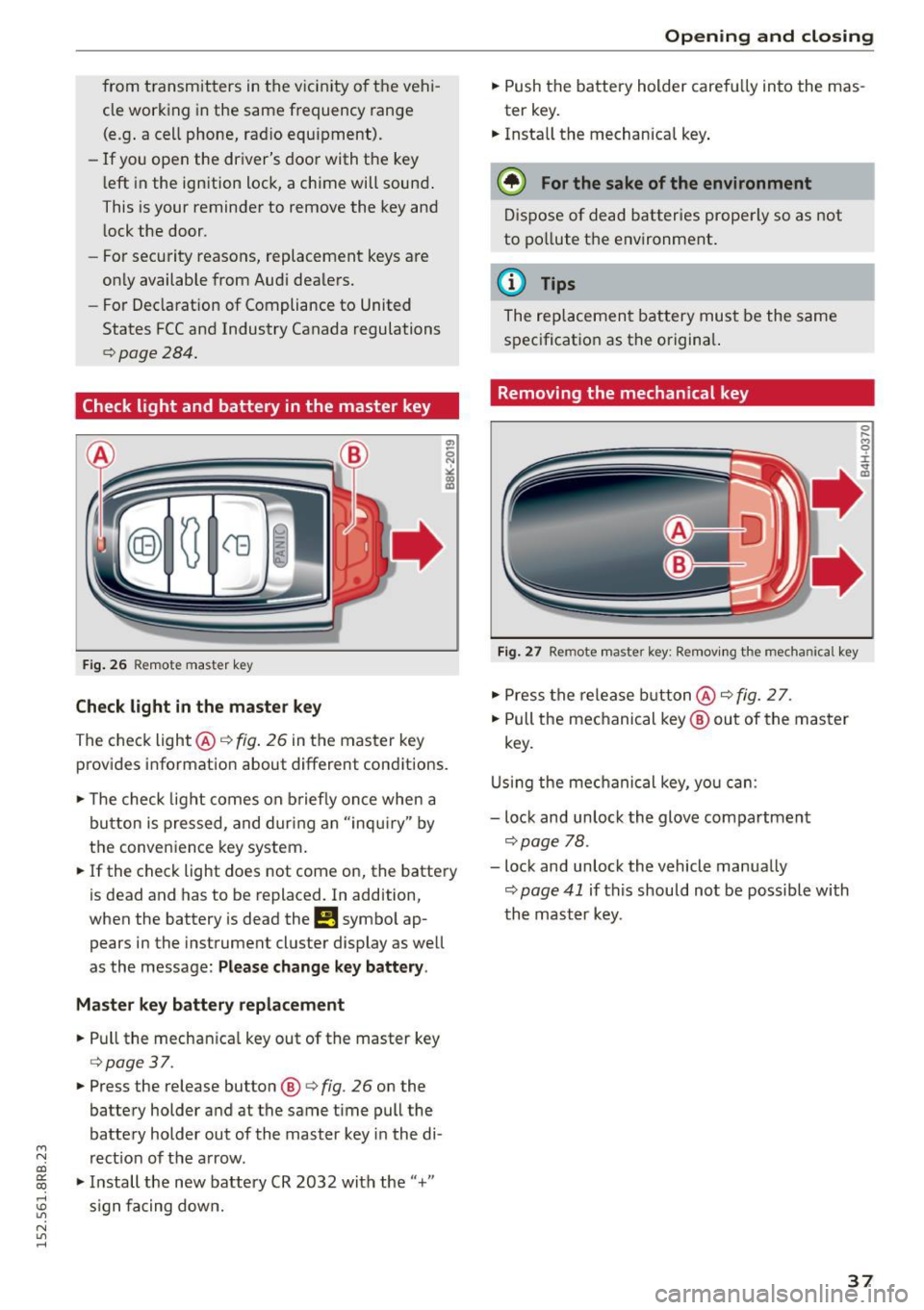
F ig . 26 Remote master key
Check light in the maste r key
The check light @¢ fig. 26 in the master key
provides informat ion about different conditions.
.,. The check light comes on b riefly once when a
button is pressed, and dur ing an "inqui ry" by
the conven ience key system.
.,. If the check light does not come on, the battery
is dead and has to be replaced. In addition,
when the battery is dead the
!I symbo l ap
pears in the instrument cluster display as well
as the message:
Please change k ey battery .
Ma ster key b attery repl ace ment
.,. Pull the mechan ica l key out of the master key
¢ page 37 .
.,. Press the release button ®¢ fig. 26 on the
battery holder and at the same time pull the
battery holder out of the master key i n the di-
M
N rect ion of the a rrow. co
~ .,. Install the new battery CR 2032 with the"+"
; s ign fa cing down.
N l/1 ......
Open ing and clo sing
.,. Push the battery holder carefully into the mas
ter key .
.,. Insta ll the mechanical key .
@ For the sake of the en vironment
D ispose of dead batter ies prope rly so as not
to po llute the environment .
@ Tips
The replacement battery must be the same
specification as the origina l.
Removing the mechanical key
Fig . 27 Remote master key: Re mov ing the mechanical key
.,. Press the release b utton @¢ fig. 2 7.
.,. Pull the mechanical key ® out of the master
key.
U sing the mec hanical key, you can:
- lock and unlock the glove compartment
¢page 78.
- lock and unlock the vehicle manually
¢ page 41 if this should not be possible with
th e mast er key.
37
Page 54 of 302

Lights and Vi sion
Lights and Vision
Exterior Lighting
Switching the lights on and off
Fig. 46 Inst rume nt pane l: ligh t sw itc h
Sw itch ing on AUTO -Automati c headlight
controls
• Turn the light switch to AUTO ¢ fig . 46 .
Sw itch ing on the side m arker lights
• Turn the light switch to ;o o: .
Switching on low beams
• Turn the light swit ch to io.
Switch ing off the lights
• Turn the ligh t sw itch to 0 .
The low beams only illuminate with the ignition
t urned on.
With the side marker lights or headlights switch
ed on , the symbol next to the light switch illumi
nates
~oo :.
AU TO - Automatic headlight control
W ith the swi tch i n the AUTO position, the low
beams are switched o n automatically depend ing
on the ambient light, fo r example in a tunnel, at
dusk and when it is raining or sno win g . When th e
low beams are switched on, the
oe> o: symbol comes
on . The low beams rema in switched on regard
less of the amb ient light when you turn on the
fog lights .
When you turn
off the ignition, the low beams
are automatically switched
off .
52 With automatic headlight cont
ro l, you also have
t he high-b eam function available . However , if you
have not switched high beams back to low beams
while dr iving with automatic headlight control ,
on ly the low beams come on the next time you
turn o n automatic headlight control. In order to
r etu rn to high beams again, you f irs t h ave to pull
the high beam lever back to the no rma l posit ion
and t hen push the lever forwa rd .
Light sensor malfunction
In the event o f a light sensor malfunction, the
driver is notified in the instrument cluster dis
play:
El Automatic headlights / automatic wipers
defective
For safety reasons, the low beams are turned on
permanently with the switch in
AUTO . However,
you can continue to turn the lights o n and
off us
i ng the light switch. Have the light sensor
checked as soon as possib le at an authorized Audi
dealer or other qualified wo rkshop.
_&, WARNING
- Automatic headlights are only intended to
as sis t the driver. T hey do no t re lieve the
driver of his re sponsibili ty to c heck th e
headligh ts and to turn them o n manually
according to the c urrent light and visibility
conditions . For e xamp le, fog cannot be de
tected by the light sensors. So always switch
on t he headlights
io unde r these weather
conditions and whe n driving in the dark .
- Cras hes can happen when you cannot see
the road ahead and when you cannot be
seen by ot her motorists. Always turn on the
headl ights so that you ca n se e ahead a nd so
that others can se e yo ur car fro m the back.
- Please obey all laws when usi ng the lighting
sys tems described her e.
(D Tips
- The light sensor for headlight control is lo
cated in the rear v iew mirror mount . You
should therefore not app ly any st ickers to
the windsh ield in this area in o rder to pre
vent malfunctions or fail ures.
Page 57 of 302
M N
co ~ co
rl I.O
"' N
"' rl
-your vehicle is being towed by a tow truck or
if you are towing another vehicle behind
you.
Turn signal and high beam lever
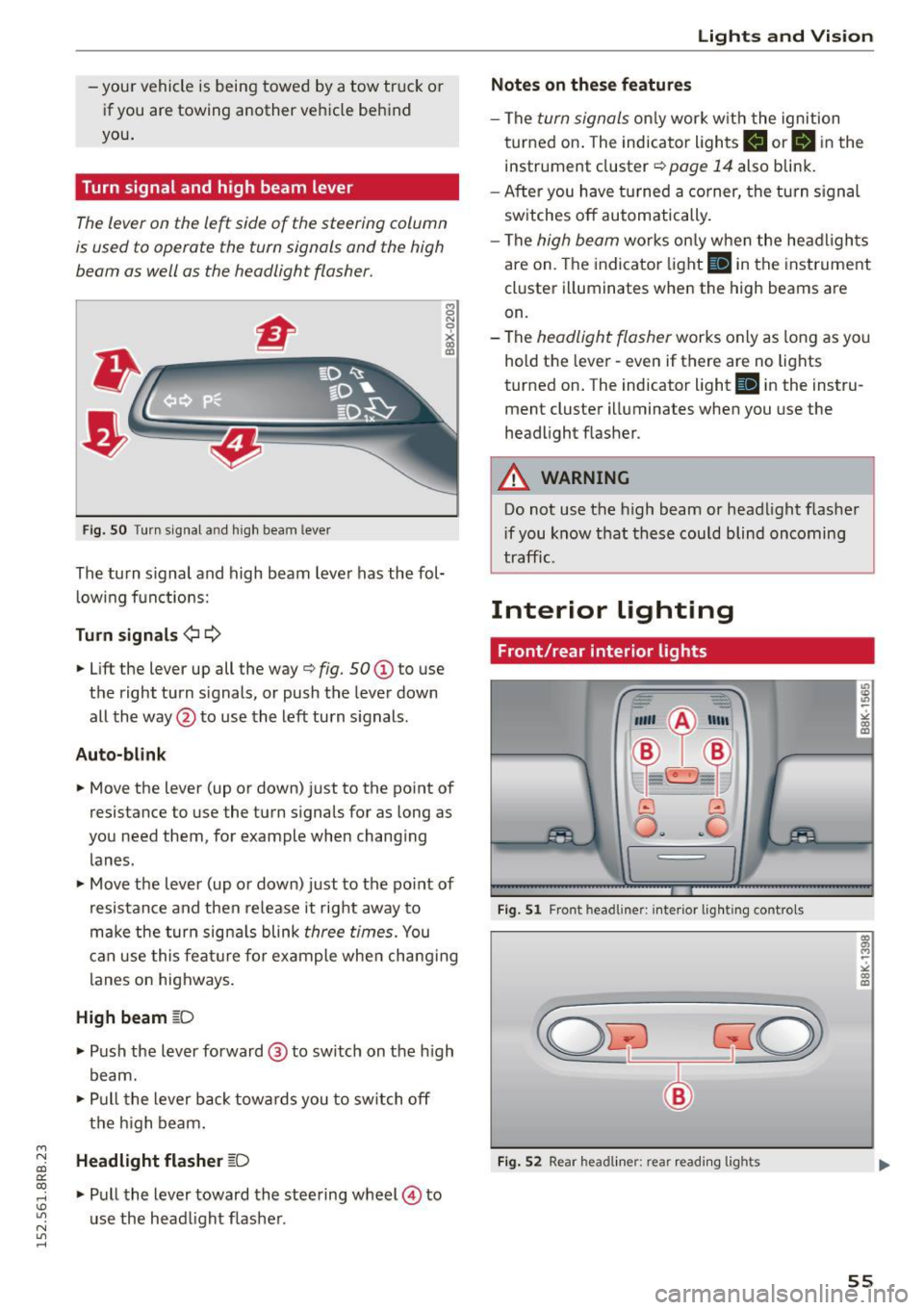
The lever on the le~ side of the steering column
is used to operate the turn signals and the high
beam as well as the headlight flasher.
Fig. SO Turn s ignal a nd high beam lever
The turn s ignal and high beam lever has the fol·
lowing functions:
Turn signals ¢1 ¢
• Lift the lever up all the way o fig. 50 (D to use
the right turn s ignals, or push the lever down
all the way @to use the left turn signals .
Auto-blink
8 N
0
~ IXI
• Move the lever (up or down) just to the point of
resistance to use the turn signals for as long as
you need them, for example when changing
lanes.
• Move the lever (up or down) just to the point of
resistance and then release it right away to
make the turn signals blink
three times. You
can use this feature for example when changing
lanes on highways.
High beam gD
• Push the lever forward @ to switch on the high
beam.
• Pull the lever back towards you to switch off
the high beam.
Headlight flasher ~D
• Pull the lever toward the steering wheel@ to
use the head light flasher .
Lights and Vision
Notes on these features
-The turn signals only work w ith the ignition
turned on. The indicator lights
II orlll in the
instrument cluster
o page 14 also blink.
- After you have turned a corner, the turn signal
switches off automatically.
- The
high beam works only when the headlights
are on. The indicator light
SI in the instrument
cluster illuminates when the high beams are
on.
- The
headlight flasher works only as long as you
hold the lever· even if there are no lights
turned on. The indicator light
SI in the instru
ment cluster illuminates when you use the
headlight flasher .
A WARNING
-Do not use the high beam or headlight flasher
i f you know that these could blind oncoming
traffic.
Interior lighting
Front/rear interior lights
_. --=:.
I-~~
._ -- v
8 G
o .. .. c
l
Fig. Sl Front headline r: inter ior lighting controls
Fig. S2 Rear headliner : rea r read ing lig h ts
55
Page 92 of 302
Driving
- When starting on inclines, the sta rting assist
prevents the vehicle from unintentionally roll
i ng back . T he braking force of the parking brake
is not released unt il sufficient driving force has
been built up at the wheels.
Em ergency brake function
An emergency bra ke ensures that the vehicle can
be slowed down even if the normal brakes fa il
c::> page 91, Emergency broking .
A WARNING
-
If a drive range is engaged with the vehicle
stationary and the engine running, you must
in no instance accelerate careless ly. Otherwise
t he vehicle will start to move immed iate ly -
r isk of an accident.
(1) Tips
- If the parking brake is applied with the igni
tion switched off, the indicator lights in the
swi tch and . (USA
models) ;II (Cana-
da models) in t he instrument cluster wil l go
out after a certa in period of time.
- Occasiona l noises when th e par king b rake is
applied and released are normal and are not
a cau se for co nce rn.
- When the ve hicle is par ked, the parking
b rake goes t hro ugh a se lf-test cycle a t regu
lar in tervals . Any associa ted noises are no r
mal.
Parking
~ Press the brake peda l to stop the vehicle.
~ Pu ll the switch c::> page 89 , fig . 103 to set the
parking brake.
~ Move the selecto r lever to P .
~ Turn the eng ine off c::> ,&. .
~ When on incl ines or declines, turn the steer ing
whee l so that the vehicle w ill roll into the curb
if it beg ins to move.
A WARNING
- W hen you leave your veh icle -even if only
br ie fly -always remove the igni tion key. This
applies part icu larly when children remain in
90
-
the vehicle. Ot herwise the ch ild ren could
start the engine, release the parking b rake
or operate electrical equ ipment (e.g . power
w indows) . There is the risk of an accident.
- W hen the veh icle is locked, no one -part icu
larly not chi ldren shou ld remain in the ve hi
cle. Locked doors make it more d ifficult for
emerge ncy wor kers to get into the ve hicle -
putting lives at risk .
Starting from rest
The starting assist function ensures that the
parking broke is released automatically upon
starting.
Stopping and applying parking brake
~ Pull the sw itch to app ly the parking brake.
Starting and automatically releasing the
parking brake
~ When you sta rt to drive as us ual, the parking
brake is automatically released and yo ur vehicle
beg ins to move.
When stopping at a traffic signa l or stopping in
c ity t raffic on vehicles with an a utomat ic trans
mission, the parking brake ca n be applied. The
vehicle does not have to be he ld with the foot
brake . The park ing brake e liminates the tendency
to c reep with a d rive ra nge engaged . As soon as
you d rive off as usua l, the par king b rake is re
l eased a utomat ic all y and the vehi cle starts to
move .
Starting on slopes
When sta rting on inclines, the starting assist pre
vents the vehicle from unintentionally ro lling
ba ck. The braking for ce of t he parking b ra ke is
not released until sufficient dr iv ing force has
been built up a t the wheels.
(D Tips
Fo r safety reaso ns, the p arking bra ke is re
l e ased auto m atically only w hen t he d river 's
s a fe ty be lt is engaged in t he b uckle .
Page 93 of 302
M N
co
a:
co
,...., \!) ..,.,
N ..,., ,....,
Starting off with a trailer
To prevent rolling back unintentionally on an in
cline, do the following:
11-Keep the switch pulled and depress the acceler
ator. The park ing brake stays applied and pre
vents the vehicle from roll ing backward .
11-You can release the switch once you are sure
th at you a re developing enough dr iving force at
the whee ls by depressing the a cce le rato r.
Depending on the weight of the r ig (veh icle and
trai ler) and the severity of the inc line, you may
r oll bac kwards as you sta rt . Yo u can prevent roll
in g ba ckwards by ho ld in g the pa rking brake
sw itch pulled o ut and accelera ting - just as you
wo uld when sta rting on a hill with a conventiona l
hand brake .
Emergency braking
In the event that the conventional brake system
fails or locks .
11-In a n eme rgency, pull the sw itch and conti nue
to pull it to slow your vehi cle down wi th the
parking brake .
11-As soon as you release the switch or acce le rate,
the braking process stops.
If yo u pull the sw itch and hold it above a speed of
about S mph (8 km/h), t he emergency braking
f u nction is init iated . The veh icle is braked at all
four whee ls by activating the hydra ulic brake sys
t em. The brake performance is simi lar to making
an emergency stop¢.&. .
In o rder not to activate the emergency brak ing by
mistake, an audible warning tone (b uzzer)
sounds w hen the sw itch is p ulled. As soon as t he
sw itch is released, or the accelerator peda l is de
p ressed, emergency brak ing stops.
A WARNING
Emergency b raking should on ly b e used i n an
eme rgency, when the normal foot brake has
f ail ed or the br ake pedal is obstruc ted. Using
t he par king brake to pe rform emergency brak
ing w ill slow your vehicle down as if you had
made a fu ll brake a pplicat ion . The laws of
Dri ving
physics cannot be suspended even with ESC
and its associated components (ABS, ASR,
EDS). In corners and when road or weather
c o nditions are bad, a f ull brake application
can cause the vehicle to skid o r th e rear end to
b reak away -risking an accid ent .
Driver messages in the instrument cluster
Caution: Vehicle parked too steep
T h is message appears w hen t he pa rking brake is
applied on an in cli ne that exceeds about 30% .
In this case the braking power of the park ing
brake may
not be adequat e to prevent the veh i
cle from rolling unintentionally .
Press brake pedal to release parking brake
This dr iver message appears when the sw itch to
release the parking bra ke was pressed. The par k
ing brake can only be released if you step on the
brake pedal and at the same t ime press t he
switch or you automat ica lly release the parki ng
brake with the starti ng assist ¢
page 90.
fpjj Parking brake malfunction!
This dr iver message appears together w ith the
yellow
rm symbol whe n there is a parking brake
malfu nction .
Start/Stop system
Description
Applies to veh icles: w ith Start -Stop -System
T he Sta rt-Stop -System can help increase fuel
economy and reduce CO2 emissions.
In the Star t-Stop -mode, the engine shu ts o ff au
tomatica lly when the vehicle is stoppe d, such as
at a t raffic lig ht. The ignition remains sw itche d
on during this stop phase. The engine w ill be au
tomat ica lly restarted when needed.
The last S tart -Stop -System sett ing (on/off using
t h e b utton
10 ~1) will be restored w hen the ig ni
t ion is turned on. The LED in the
l(A) ~I b utton turns
on when the Start-Stop-System is sw itched off
manua lly.
91
Page 94 of 302
Driving
Ba sic requirements for the Start -Stop mod e
- The driver's door is closed.
-The driver's seat belt is latched.
- The hood is closed.
- The vehicle must have been driven faster than
2.5 mph (4 km/h) since the last stop .
- A trai ler is not h itched to the vehicle.
A WARNING
-Never turn off the engine before the veh icle
has come to a comp lete stop. The full func
t ion of the b rake booster and the power
stee ring is not guaranteed. Yo u mus t use
more force to t urn or brake if ne cessary. Be
ca use you cannot steer and brake as you
us ually would, this could lead to crashes
and serious injuries.
- To red uce the r isk o f injuries, make sure that
the Start-Stop-System is t urned off whe n
working in the engine compartment
c:>page 94.
(D Note
Always switch off the Start -Stop -System when
driving through water
c::> page 94 .
Starting/stopping the engine
App lies to veh icles: w ith S tart-Stop-System
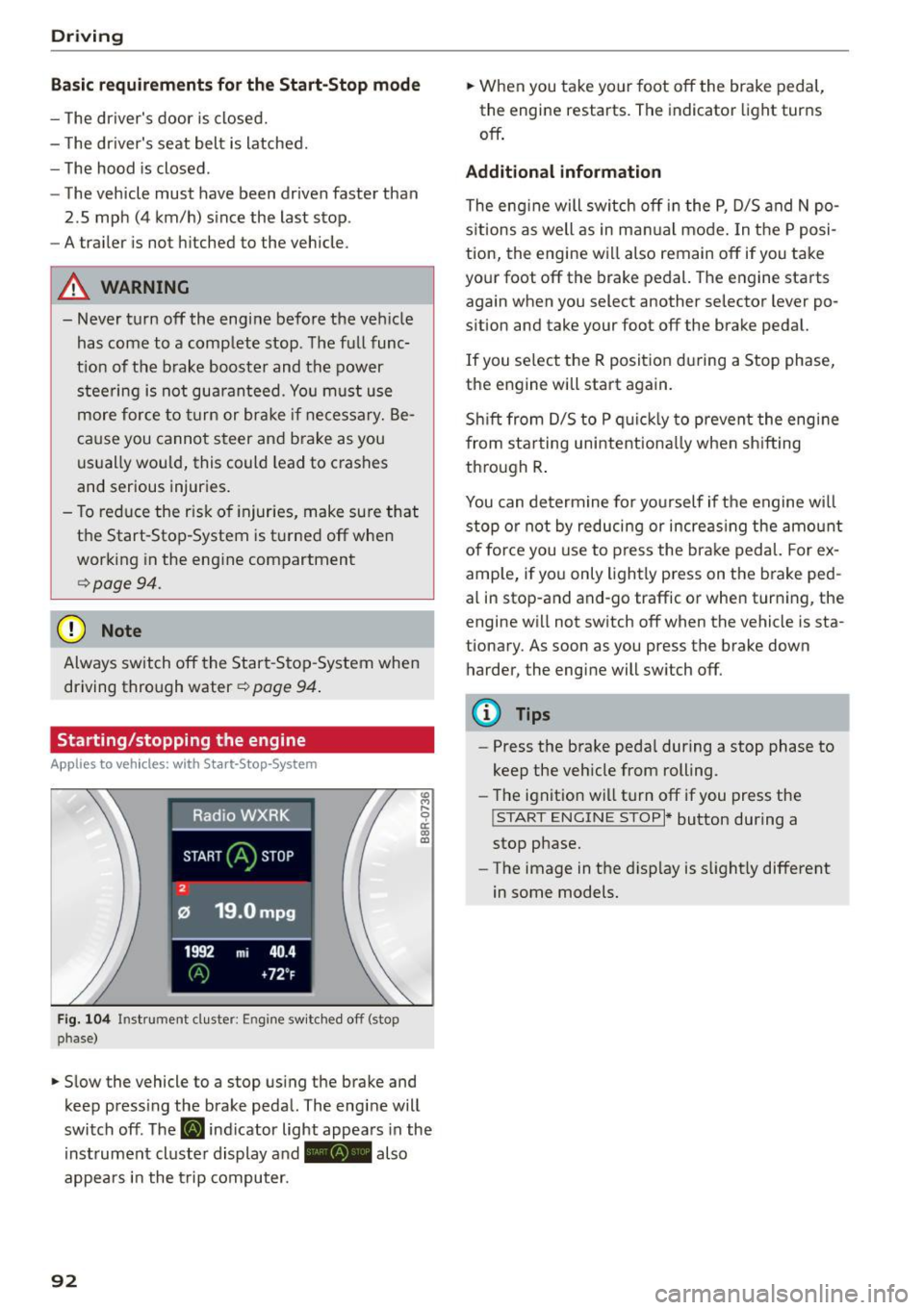
F ig. 104 Instrument duster: Engine sw itc hed off (stop
phase)
.,. Slow the vehicle to a stop using the brake and
keep press ing the brake peda l. The engine will
switch off. The
[i] indicator light appea rs in the
instrument cluster display a nd - also
appears in the t rip computer.
92
.,. When you take your foot off the brake pedal,
the engine restarts. The indicator light turns
off .
Additional information
The eng ine will switch off in the P, D/5 and N po
s it ions as well as in ma nual mode. In the P posi
tion, the engine will also remain off if you take
your foot off the brake pedal. The engine starts
again when you select another selector lever po
sition and take your foot off the brake pedal.
If you se lect the R positio n during a Stop phase,
the engine will start again.
Sh ift from D/S to P quic kly to prevent the eng ine
from sta rting unintent iona lly when sh ifting
th rough R .
You can determine for yo urself if the engine will
stop or not by reducing or increas ing the amo unt
of force you use to press the brake pedal. For ex
ample, if you only lightly press on the b rake ped
al in stop-and and-go traffic or when turn ing, the
engine w ill not switch off when the vehicle is sta
tionary. As soon as you press the brake down
harder, the engine will switch off.
{!) Tips
-Press the brake peda l during a stop phase to
keep the vehicle from rolling.
- The ignit ion wi ll turn off if you press the
!START ENGINE STOP I* button during a
stop phase.
- The image in the d isp lay is slight ly different
in some models.
Page 95 of 302
M N
co ~ co
rl I.O
"' N
"' rl
General information
Applies to vehicles: with Start-Stop-System
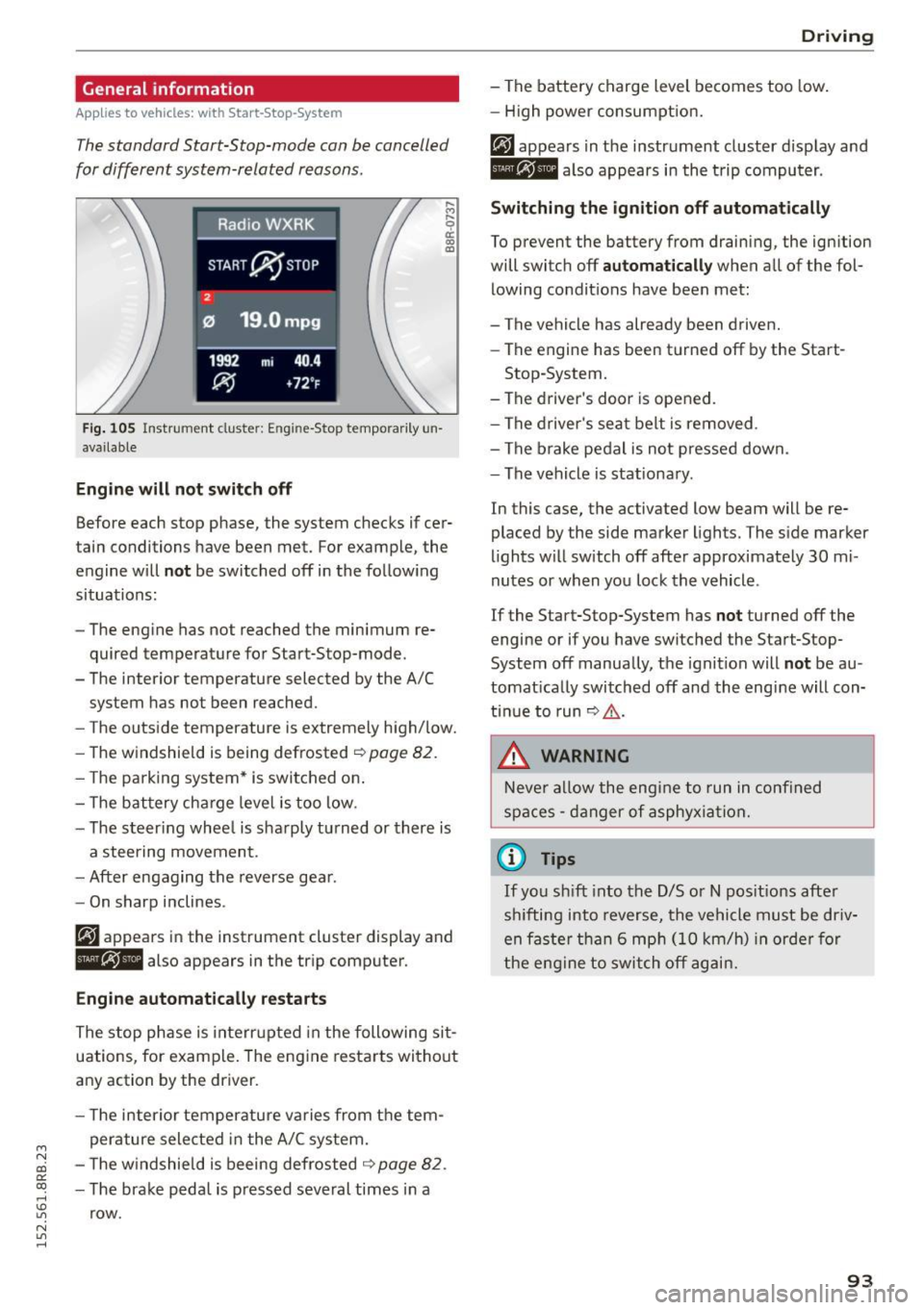
The standard Start-Stop-mode can be cancelled
for different system-related reasons.
Fig . 105 Instrument cluster: E ngin e-Stop tempo rarily un
available
Engine will not switch off
.... M
9 cc IX) ID
Before each stop phase, the system checks if cer
tain conditions have been met. For example, the
engine will
not be switched off in the following
situations:
- The engine has not reached the minimum re
quired temperature for Start-Stop-mode.
- The interior temperature selected by the A/C system has not been reached.
- The outside temperature is extremely high/low.
- The windshield is being defrosted ~
page 82.
-The park ing system* is switched on .
- The battery cha rge level is too low.
- The steer ing whee l is sharply turned or there is
a steering movement.
- After engaging the reverse gear.
Engine automatically restarts
The stop phase is interrupted in the following sit
uations, for example. The engine restarts without
any action by the driver.
- The interior temperature varies from the tem
perature selected in the A/C system.
- The windshield is beeing defrosted
~ page 82.
-The brake pedal is pressed several times in a
row.
Driving
- The battery charge level becomes too low.
Switching the ignition off automatically
To prevent the battery from draining, the ignition
will switch off
automatically when all of the fol
lowing condit ions have been met:
- The vehicle has already been driven.
- The engine has been turned off by the Start-
Stop-System.
- The driver's door is opened.
- The driver's seat belt is removed .
- The brake pedal is not pressed down.
- The vehicle is stationary .
In this case, the activated low beam will be re
placed by the side marker lights. The side marker
lights will switch off after approximately 30 mi
nutes or when you lock the vehicle .
If the Start-Stop-System has
not turned off the
engine or if you have switched the Start-Stop
System off manually, the ignition will
not be au
tomatically switched off and the engine will con
tinue to run~,&. .
A WARNING
Never allow the engine to run in confined
spaces - danger of asphyxiation.
(D Tips
-
If you shift into the D/S or N positions after
sh ifting into reverse, the vehicle must be driv
en faster than 6 mph (10 km/h) in orde r for
the engine to switch off again.
93