key AUDI Q5 2015 Owner's Manual
[x] Cancel search | Manufacturer: AUDI, Model Year: 2015, Model line: Q5, Model: AUDI Q5 2015Pages: 302, PDF Size: 75.01 MB
Page 66 of 302

Seats and storag e
panel than necessary and always wear the three
point safety belt provided adjusted correctly. We
recommend that you adjust the passenger's seat
in the following manner:
.. Move the front passenger seat into the rear
most position of the fore and aft adjustment
range ¢
.A in Why is your seat adjustment so
important? on page 63.
.. Bring the backrest up to an (almost) upright
pos ition.
D o not ride with the seat reclined.
.. Adjust the head restra int so the upper edge is
as even as possible with the top of your head . If
that is not possible, try to adjust the head re stra int so that it is as close to th is posi tion as
poss ib le¢
page 67.
.. Place your feet on the floor in front of the pas
senger's seat .
Front seats
Power seat adjustment
Fig. 6 4 Front seat ; Controls for seat adjustment
Contr ols
@ -Adjusting the lumbar support: press the but
ton in the corresponding posit ion¢ &.
@ -Moving the seat up/down: press the button
up/down . To ad just the front seat cush ion, press
the front button up/down. To adjust the rear seat
cushion, press the rear button up/down
¢ &.
@ -Moving the seat forward/back: press the but
ton forward/back ¢ & .
©-Adjusting the backrest a ngle: press the but
ton fo rward/back ¢ & .
@ -Lengthen ing/shortening the upper th igh
suppor t*: lift the handle¢&,.
64
A WARNING
-Never adjust the driver's or front passeng
er 's seat while the veh icle is moving. If you
do th is while the veh icle is moving, you will
be out of pos it ion. Always adjust the d river 's
or front passenger's sea t when the vehicle is
no t moving.
- Be ca reful whe n ad justing the seat he ight.
Check to see t hat no one is in the way, or se
r io us inju ry co uld resu lt!
- Because the seat s can be elec trically adjust
e d w ith the ignition off or with the ignition
key removed, neve r leave childre n unattend
ed in the vehicle . Unsupervised use o f the
electric seat ad justments may cause serious
in jury.
- To reduce the risk of injury in the case of
sudden braking or accident, front passen
gers must never ride in a moving vehicle
w it h the backrest reclined. Safety belts and
the airbag system only offer max imum pro
tect ion when the backrest is up right and the
safety belts are prope rly positioned on the
body. The more the ba ckrest is re cli ned, the
greate r the risk of perso na l inju ry from an
incorrect seating posit ion and improperly
posi tioned safety belts.
Memory function
Memory for driver's seat
App lies to vehicles: wit h seat memory
The seat adjustment settings for two drivers can
be stored using the memory buttons in the driv
er's door .
Fig. 65 Dr ive r's door: Seat memory
M a,
"' 9 a: a, m
Page 67 of 302
M N
co
a:
co
,...., \!) ..,.,
N ..,., ,....,
In addition to the setting for the drive r's seat ,
the exterior rear view mirror setting can be stor
ed and reca lled through seat memory if the veh i
cle is properly equipped.
Storin g and recallin g se tting s
With the help of the memory buttons 1 and 2
¢ fig. 65 the settings for two different drivers
can be stored and reca lled
r::!> page 65.
The cu rrent settings are also a utomat ica lly as
signed to the remote control key being used
when the vehicle is locked . When the vehicle is
un locked, the settings assigned to the remote
contro l key being used are automatica lly recalled .
Turnin g seat m emo ry on and off
If the IO FF I sw itch is depressed, the seat memory
is inoperative . When the Memory function is off,
the LED in the button lights up.
All the stored settings a re retained. We recom
mend using the
I O FF I sw itch and de activating the
seat memory if the vehicle is only go ing to be
used
temporarily by a driver whose settings are
not going to be stored .
Storing and recalling settings
Applies to vehicles: with seat memory
Storing settings
~ Adjust the driv er's seat.
~ Adjust the two exter ior mirrors.
~ Press the !SET I button. The light in the button
will come on.
~ Now p ress a memory button (III or~). If the
stor ing procedure is correct, a confirmation
tone w ill sound .
Recall ing setting s
~ If the dr iver 's door is open and the ignit ion is
switched off, tap the correspond ing memory
button br iefly .
~ If the dr iver's door is closed or the ignit ion is
switched on, p ress the approp riate memo ry
button until the s to red pos ition is rea ched .
Successful storage is confirmed audibly and by
the light in the
ISET I button illum inat ing
r::!> page 64, fig . 65.
S eat s and stor age
When the vehicle is lo cked , the current settings
are stored and assigned to the remote contro l
key . But the settings stored on memory buttons
1 to 2 are not deleted . They can be recalled at
any time . When the vehicle is
unlocked , the set
t ings assigned to the remote control key a re re
stored .
If your vehicle is driven by other persons using
your remote control key, you should save your in
dividua l seat position on one of the memory but
tons . You can recall your settings again simply
and conveniently by p ress ing the corresponding
memo ry butto n. When the vehicle is locked,
these settings are automatica lly re-assigned to
the remote control key and stored .
& WARNING
- For safety reasons, the seat setting can only
be recalled when the vehicle is stationary -
otherwise you risk hav ing an accident.
- In an emergency the recall proced ure can be
cancelled by pressing the
I OFF I switch or by
tapp ing of the memory buttons.
Activating remote control key memory
Applies to vehicles: wit h seat memory
To assign the dr iver 's seat settings to the remote
control key when locking the vehicle, the function
must be activated in the radio or MMI*.
~ Select: ! CAR I function button > Seat adju st
ment > Dri ver's seat > Key mem. p ro fi le > On .
Or
~ Select: !CARI function button> Car sy ste ms*
cont ro l butto n > Vehicl e se tting s > Seats >
Driver 's seat > Remote control ke y> On .
(j) Tips
If you do not want anothe r driver's sett ings to
be assigned to the remote control key, switch
off the memory function usi ng the rad io or
M MI* or t he
I OFF I button r::!> page 64.
65
Page 69 of 302

M N
co ~ co
rl I.O
"' N
"' rl
Head restraints
Front head restraints
Fig. 68 Front se ats head restraints : adj usting t he heig ht
The head restraints on the front seats can be ad
justed to provide safe support to head and neck
at the optimum heig ht. W hen optimally ad just
ed, the top of the restra int should be level w ith
the top of the head . If that is not possible, t ry to
ad just t he head res tra in t so that i t is as cl ose to
this posit ion as poss ible ¢
page 138 , Proper ad
justment of head restraints .
• Grasp the sides of the head restra int wit h both
hands and slide it upward/dow nw ard un til you
f eel it cli ck into place ¢
fig. 68.
Refe r to ¢ page 138, Proper adjustment of head
res traint s
fo r guide lines on how to adj ust t he
h e igh t of the fron t head re st ra in ts to suit t he oc
cupa nt's body size .
A WARNING
-Driv ing without hea d restra ints or with hea d
restraints that are not properly adjusted in
c reases the r isk of serious or fata l neck in
jury dramatically.
- Read and heed all WARNINGS¢
page 138,
Proper adjustment of head restraints.
(D Tips
Cor rectly adjusted head restraints and safety
be lts are a n ext reme ly effective combination
of sa fety fea tures .
Seats and storage
Rear head restraints
Fig. 69 Rea r seat : head rest ra in ts
Fig. 70 Rea r sea t: o ute r head rest ra in t
If there is a passenger on t he rear center seating
pos ition, slid e the center head restraint upward
a t le ast to the next notch¢
A.
Adju sting the head restraint s
• To move t he head rest raint up, ho ld it at the
sides with both hands and s lide it upward unt il
you feel it cl ick into p lace .
• To move the head rest rain t down, press the
button @and slide t he head rest raint down
ward .
Removing the outer head restraints
• Fold the backrest forward¢ page 69.
• Move the head restraint upwa rd as fa r as it ca n
go.
• Press the re lease @¢
fig. 70 with the mechan
ical key ¢
page 3 7 and the button @¢ fig. 69 .
Pull the he ad restrai nt ou t of the bac krest at
the same ti me
c:::> A .
Installing the outer head restraints
• Slide the posts on the head rest raint down into
the guides until you feel the posts click into
p lace . .,.
67
Page 80 of 302
Seats and storag e
_& WARNING
-Always remove objects from the instrument
panel. Any items not put away could slide
around inside the vehicle while dr iving or
when accelerating or when applying the brakes or when dr iv ing aro und a corner .
- When you are driving make sure that any
thi ng you may have placed in the cente r con
so le or other storage loca tions cannot fall
o ut into the footwells. I n case of sudden
braking you would not be able to brake or
acce lerate .
- Any pieces of cloth ing that you have hung
up must not interfere with the driver's view .
The coat hooks are designed only for light
weight cloth ing . Never hang any clothing
with hard, pointed or heavy objects in the
pockets on the coat hooks. During sudden
braking or in an acc ident -especially if the
airbag is deployed -these objects could in
jure any passengers ins ide the veh icle.
Glove compartment
The glove comportment is illuminated and con
be locked .
C
Fig. 93 Glove compar tmen t
To open glov e compartment
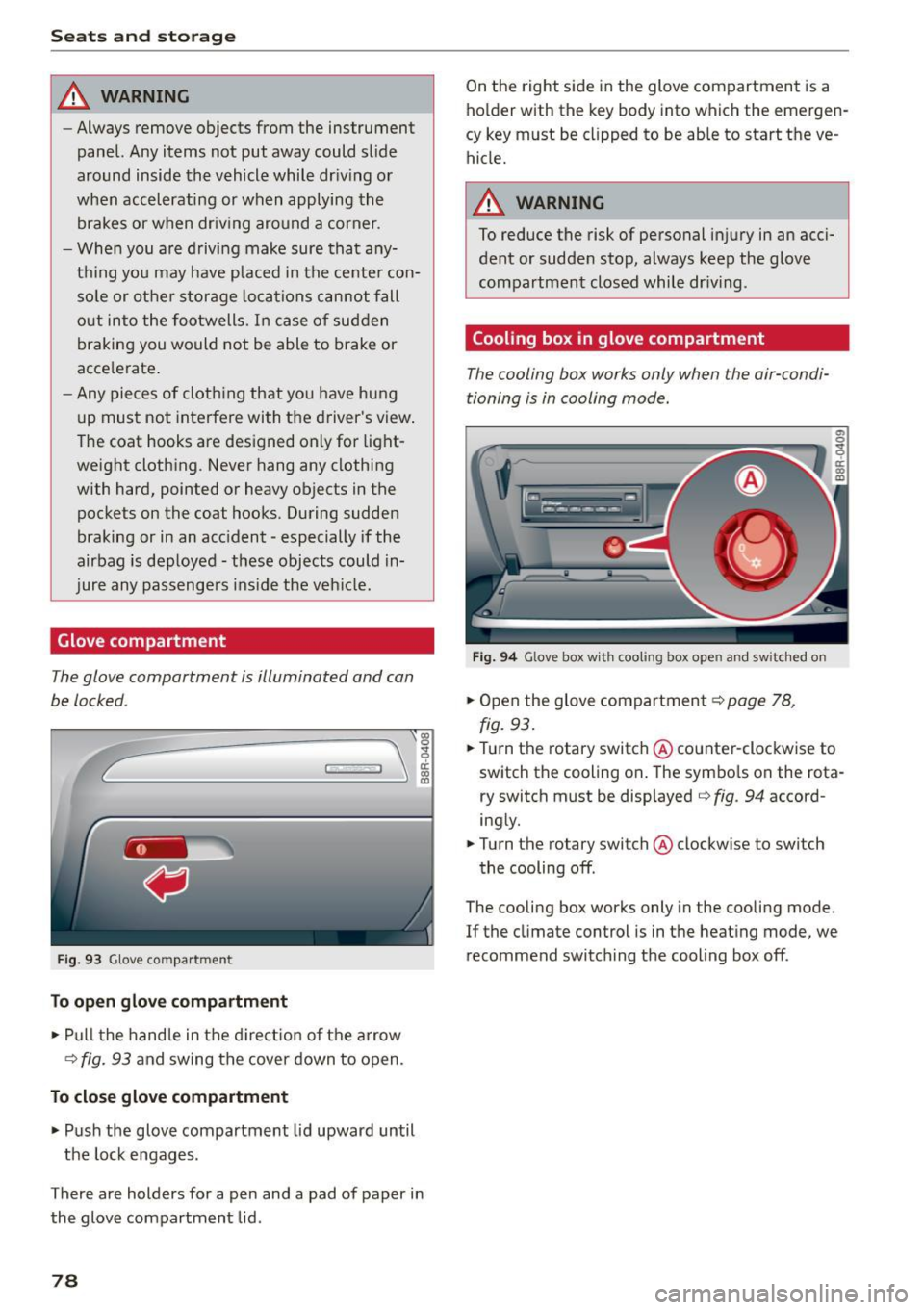
,.. Pu ll t he hand le in the d ire ct io n of the arrow
¢
fig. 93 and swing the cover down to open .
To close glove compartment
.,. Push the glove compartment lid upward until
the lock engages .
There are holders for a pen and a pad of paper in the glove compartment lid .
78
On the right side in the glove compartment is a
ho lder with the key body into which the emergen
cy key must be clipped to be able to start the ve
hicle.
_& WARNING
To reduce the risk of personal inj ury in an acci
dent or sudde n stop, always keep the glove
compartmen t closed while dr iv ing .
Cooling box in glove compartment
The cooling box works only when the air-condi
tioning is in cooling mode.
Fig . 9 4 Glove box w it h coo li ng box ope n and s wit c hed on
.,. Open the glove compartment¢ page 78,
fig.
93 .
.,. Turn the rotary switch @counter-clockwise to
switch the cooling on . The symbo ls on the rota
r y switch must be displayed ¢
fig. 94 accord
ing ly .
.,. Turn the ro tary switch @clockw ise to switch
the cooling off .
The cooling box works only in the cooling mode.
If the climate con trol is in t he heat ing mode, we
recommend switch ing the cooling box off .
Page 82 of 302
Warm and cold
Warm and cold Climate control system
Description
The climate control system warms, cools and
adds humidity to the air in the vehicle interior. It
is the most effective when the windows and pan
oramic sliding sunroof* are closed . If there is a
build-up of heat inside the vehicle, ventilation
can help to speed up the cooling proc ess.
In all heating mode functions except
defrost, the
blower only switches to a higher speed once the
engine coolant has reached a certain tempera
ture.
Condensation from the cooling system can drip
and form a puddle of water under the vehicle.
This is normal and does not mean there is a leak.
Pollutant filter
The pollutant filter removes pollutants such as
dust and pollen from the air.
The air pollutants filter must be changed at the
intervals specified in your Warranty & Mainte
nance booklet, so that the air conditioner can
properly work.
If you drive your vehicle in an area with high air pollution , the filter may need to be changed
more frequently than specified in your Audi War
ranty
& Maintenance booklet. If in doubt, ask
your authorized Audi Service Advisor for advice.
Key coded settings
The climate control settings are automatically
stored and assigned to the remote control key
that is in use .
.8, WARNING
Reduced visibility is dangerous and can cause
accidents.
- For safe driving it is very important that all
windows be free of ice, snow and condensa
tion.
80
- Completely familiarize yourself with the
proper use and function of the heating and
ventilation system and especially how to de
fog and defrost the windows .
- Never use the windshield wiper/washer sys
tem in freezing weather until you have
warmed the windshield first, using the heat
ing and ventilation system . The washer solu
tion may freeze on the windshield and re
duce visibility .
(D Note
-If you suspect that the air conditioner has
been damaged, switch the system off to
avoid further damage and have it inspected
by a qualified dealership.
- Repairs to the Audi air conditioner require
special technical knowledge and special
tools. Contact an authorized Audi dealer for
assistance.
@ For the sake of the environment
By reducing the amount of fuel you use, you
also reduce the amount of pollutants emitted
into the air.
(D Tips
-Keep the air intake slots (in front of the
windshield) free from ice, snow and debris
in order to maintain the proper function of
the climate control system.
- The energy management system may switch
the seat heating* or rear window defroster
off temporarily. These systems are available
again as soon as the energy balance has
been restored.
- The air flowing out of the vents and
throughout the vehicle's entire interior is
discharged at the rear of the vehicle. Make
sure that the outlet slots are not covered by clothing, etc.
Page 86 of 302
Driving
Driving
Steering
Manually adjustable steering wheel
The height and reach of the steering wheel can
be adjusted .
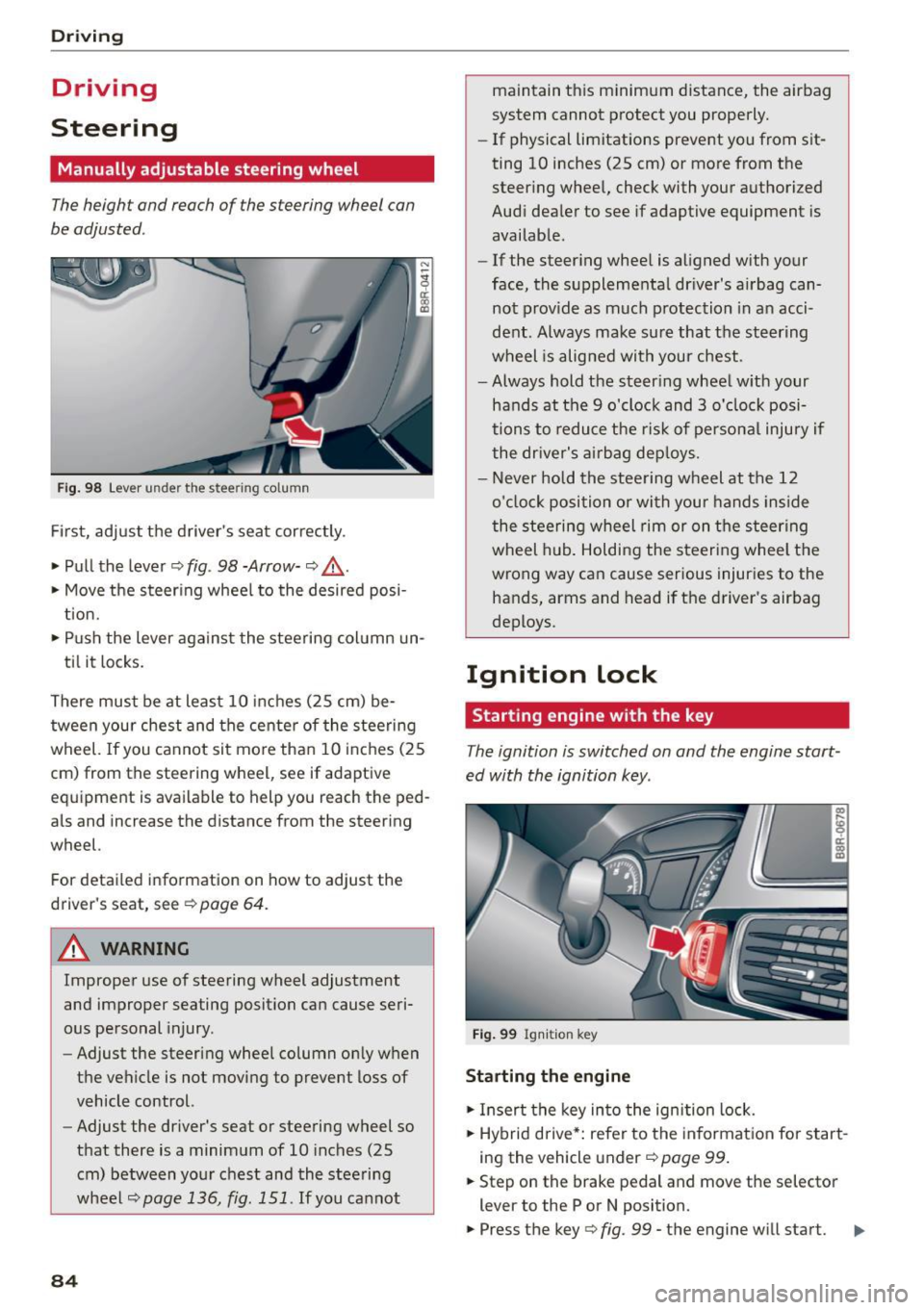
Fig. 98 Lever under the steering column
Firs t, adjust the driver 's seat cor rectly .
• Pull the lever ¢
fig. 98 -Arrow-¢ &_.
• Move the steer ing whee l to the desired posi
t ion.
• Push the lever agains t the steering col umn un-
ti l it locks.
There must be at least 10 inches (25 cm) be tween your chest and the cente r of the steering
wheel.
If you cannot sit mo re than 10 i nch es (25
cm) from the steering wheel, see if adaptive
equipment is available to help you reach the ped
als and increase the distance from the steering
wheel.
For detailed information on how to adjust the
driver 's seat, see ¢
page 64.
A WARNING
Improper use of steering wheel adjustment
and improper seating position can cause seri
ous pe rsonal injury .
- Adjust the steering wheel column on ly when
the vehicle is not moving to prevent loss of
vehicle control.
- Adjust the driver's seat or steering wheel so
that there is a minimum of 10 inches (25
cm) between your chest and the steering
wheel
¢page 136, fig. 151 . If you cannot
84
maintain this minimum distance, the airbag
system cannot p rotect you properly.
- If physical limitations prevent you from sit
ting 10 inches (25 cm) or more from the
steer ing whee l, check with your authorized
Audi dea ler to see if adaptive equipment is
availab le.
- If the steer ing whee l is aligned with your
face, the supplementa l driver 's airbag can
not prov ide as much p rotection in a n acci
dent. Always make su re that the steering
wheel is alig ned with your chest.
- Always hold the steer ing wheel w ith your
hands at the 9 o'clock and 3 o'clock posi
tions to reduce the ris k of persona l injury if
the dr iver's air bag dep loys.
- Never hold the stee ring wheel at the 12
o'cloc k position o r with your hands inside
the steering wheel rim or on t he steering
wheel hub . Holding the steeri ng whee l the
wrong way can cause serious injuries to the
hands, arms and head if the driver's airbag
deploys.
Ignition lock
Starting engine with the key
The ignition is switched on and the engine start
ed with the ignition key.
Fig . 99 Ign iti on key
Starting the engine
• Insert the key in to the ign ition lock.
• Hybrid drive *: refe r to the informat ion fo r start
i ng the veh icle under ¢
page 99 .
• Step on the brake pedal and move the selector
lever to the P or N position.
• Press the key¢
fig. 99 -the engine will start. IIJ,
Page 87 of 302
M N
co
a:
co
,...., \!) 1.1"1
N 1.1"1 ,....,
~ It is possible that there wi ll be a slight de lay
when starting the engine for diesel vehicles* in
colder temperatures. Therefore, yo u must hold
the brake peda l down until the engine starts.
The ind icator lamp
1,1 illuminates when the en
gine is preheated .
Switching the ignition on /off
If you wou ld like to switch the ignition on with
out sta rt ing the engine, fo llow these steps:
~ In se rt the key into the ignition lock .
~ Press the key briefly without press the brake
peda l.
~ To switch the ignition off, press the key again .
D iese l vehicles * are prehea ted whi le the ignition
is switched on.
W hen sta rting the engine, ma jor e lectr ica l load s
a re sw itche d
off temporar ily.
You can only remove the key w ith the ignition
sw itched off. To do this, you have to p ress on the
key again.
I f the engine sho uld not start immediately, the
start ing process is a utomat ica lly stopped after a
short time. Repeat start ing procedure.
Start-Stop-System*:
Note the information on c:> page 91, Start/Stop
system .
A WARNING
-Never allow the engine to run i n confined
spaces - dange r of asphyxiation .
- Never remove the ign ition key from the ign i
t io n lock while the vehicle is moving . O ther
wise, the stee ring loc k cou ld suddenly e n
gage and you would not be able to stee r th e
vehicle .
- Always ta ke t he key with y ou wheneve r you
leave you r vehicle. Othe rwi se , the eng ine
cou ld be started or ele ctrical eq uipment
s u ch as the power windows co uld be operat
ed. This can lead to ser ious injury.
- Never le ave c hildren o r persons requi ring as
sistance unattended in the vehicle. The doo rs can be locked using the remote trans-
-
Dri ving
mitter, preventing people from escaping
from the veh icle on the ir own in the event of
an emergency. Depend ing on the time of
year, peop le inside the vehicle can be ex
posed to very high or very low tempera
tures.
(D Note
Avoid high eng ine rpm, full throttle and heavy
engine loads unti l the engine has reached op
era ting temperature - othe rwise you r isk en
g in e damage .
@ For the sake of the environment
Do not let the engine run wh ile pa rked to
warm up. Begin dr iving immediat ely . T hi s re
duces unnecessa ry em iss ions .
(D Tips
-If the key cannot be removed from the ign i
t ion lock, you have to pull the mecha nica l
key out of th e mas ter key in orde r to be able
to lo ck the vehicle
c:> page 38.
-After starting a cold engine, ther e may be a
br ief per iod of incr eased nois e because the
oil p ress ure mu st fi rst bu ild up in the hy
dr au lic valve adju ste rs. This i s norm al a nd
no t a cause fo r concern.
- If you leave the ve hicle with the ignition
s witched on, the ig nit ion w ill switch
off af
t er a ce rtain period of time . Please note that
elect rical eq uipment such as exterior lights
w ill switch off as well when that happens .
85
Page 88 of 302
Driving
Starting the vehicle with the emergency
key
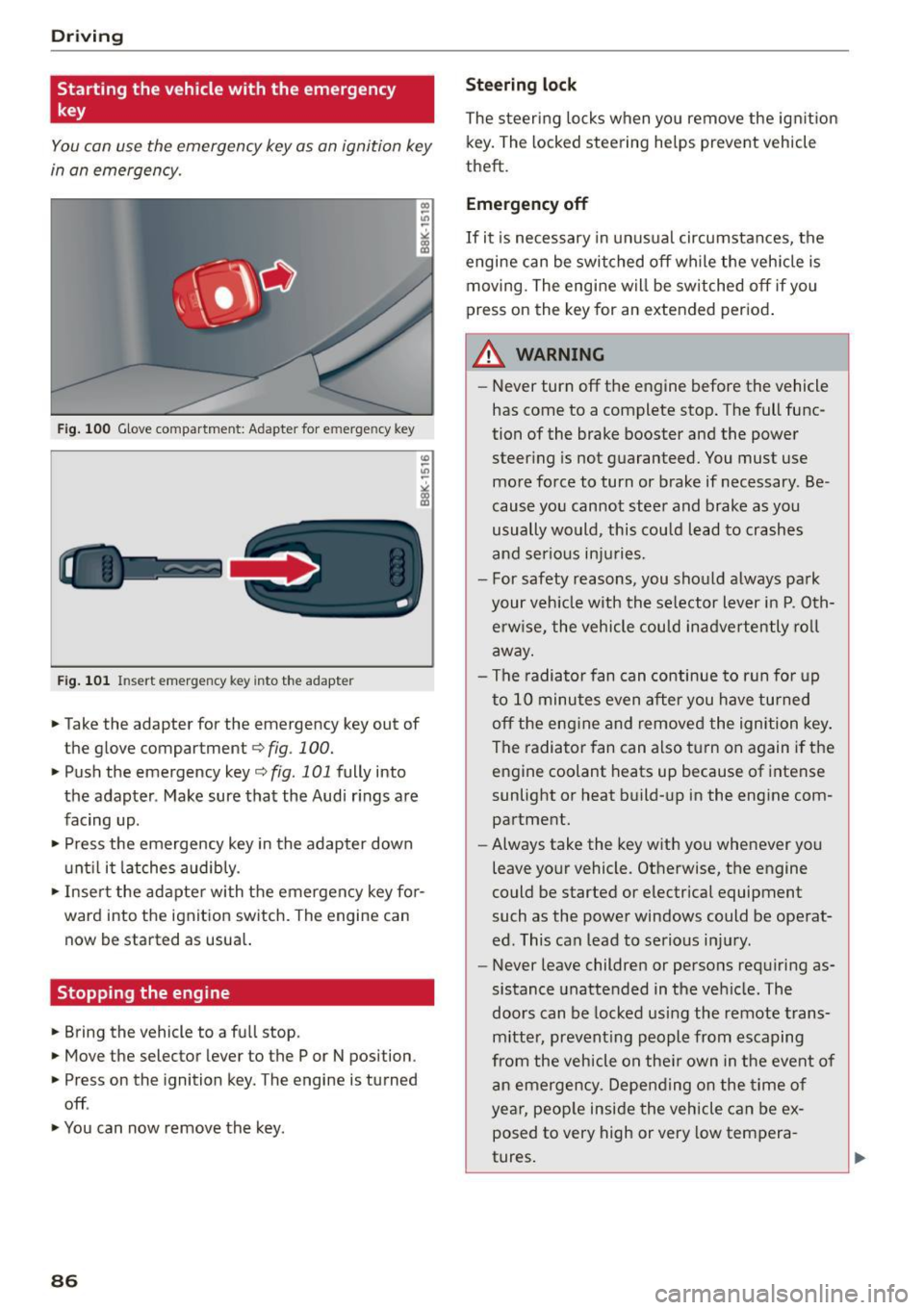
You can use the emergency key as an ignition key
in an emergency.
Fig. 100 Glove compartment: Adapter for e merg en cy key
Fig. 101 In sert emergency key into the adapter
... Take the adapter for the emergency key out of
the glove compartment
r:::;, fig . 100 .
.,. Push the emergency key r:::;, fig. 101 fully into
the adapter . Make sure that the Audi rings are
facing up .
.,. Press the emergency key in the adapter down
until it latches audibly.
.,. Insert the adapter with the emergency key for
ward into the ignition switch. The engine can now be started as usual.
Stopping the engine
... Bring the vehicle to a full stop.
... Move the selector lever to the P or N position .
.,. Press on the ignition key. The engine is turned
off .
.,. You can now remove the key.
86
Steering lock
The steering locks when you remove the ignition
key. The locked steering helps prevent vehicle
theft.
Emergency off
If it is necessary in unusual circumstances, the
engine can be switched off while the vehicle is
moving. The engine will be switched off if you
press on the key for an extended period.
A WARNING
- Never turn off the engine before the vehicle
has come to a complete stop. The full func
tion of the brake booster and the power
steering is not guaranteed. You must use
more force to turn or brake if necessary . Be
cause you cannot steer and brake as you
usually would, this could lead to crashes
and serious injuries.
- For safety reasons, you should always park
your vehicle with the selector lever in P. Oth erwise, the vehicle could inadvertently roll
away.
- The radiator fan can continue to run for up
to 10 minutes even after you have turned off the engine and removed the ignition key .
The radiator fan can also turn on again if the
engine coolant heats up because of intense
sunlight or heat build-up in the engine com
partment .
- Always take the key with you whenever you
leave your vehicle. Otherwise, the engine
could be started or electrical equipment
such as the power windows could be operat
ed. This can lead to serious injury.
- Never leave children or persons requiring as
sistance unattended in the vehicle. The
doors can be locked using the remote trans
mitter, preventing people from escaping
from the vehicle on their own in the event of
an emergency. Depending on the time of
year, people inside the vehicle can be ex
posed to very high or very low tempera
tures.
Page 89 of 302
M N
co ~ co
rl I.O
"' N
"' rl
CD Note
If the engine has been under heavy load for
an extended per iod, heat builds up in the en
gine c ompartment after the engine is switch
ed off -there is a risk of damag ing the eng ine .
Allow t he engine to run at idle fo r about two
m inutes befo re switch ing it off.
Convenience key
Starting the engine
Applies to vehicles: with Conven ience key
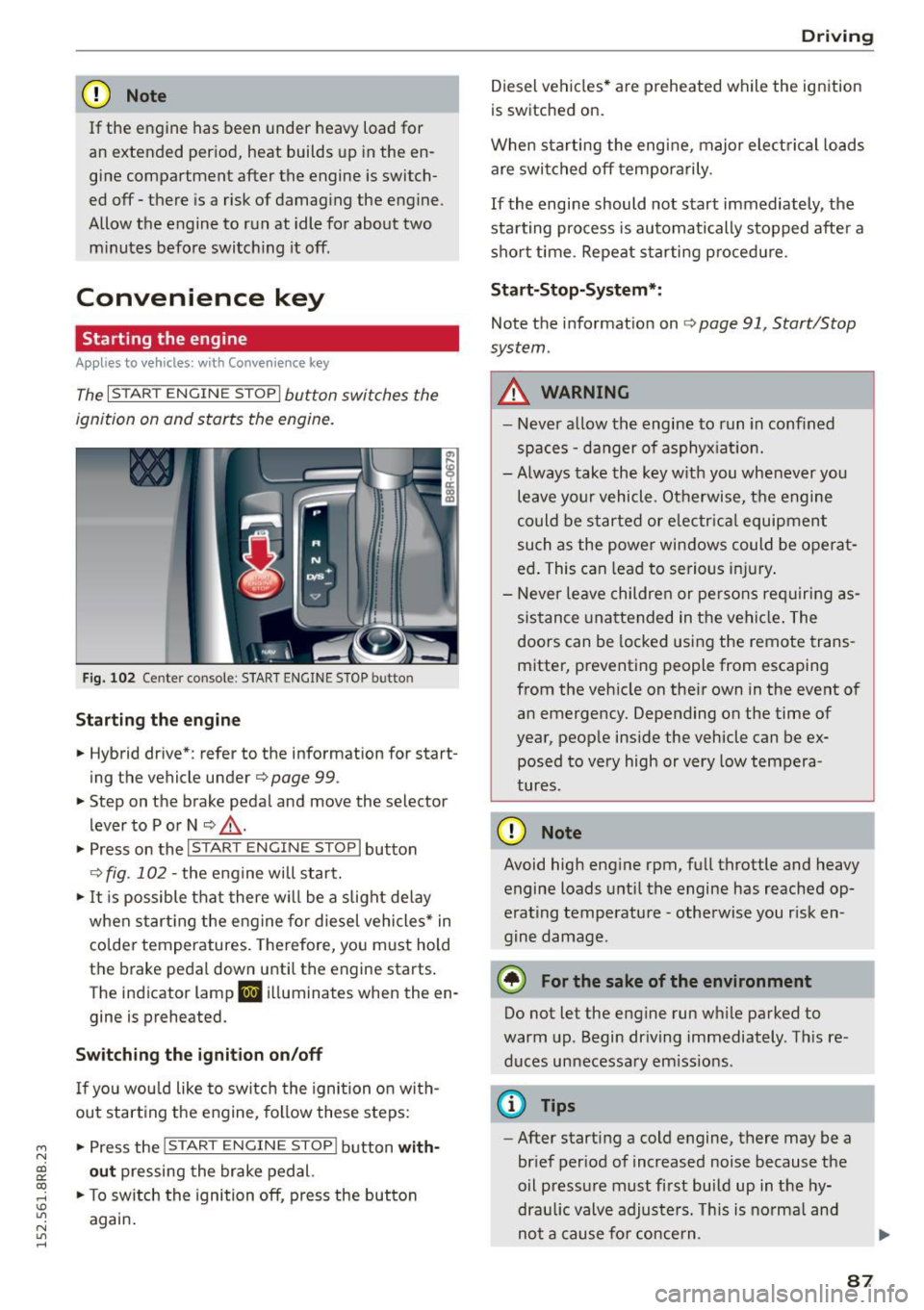
The I STAR T ENGINE S TOP I button switches the
ignition on and starts the engine.
Fi g. 1 02 Cente r co nsole : STAR T ENGIN E STOP b utto n
Starting the engine
• Hybrid dr ive *: refer to the information for start
ing the vehicle under
Q page 99 .
• Step on t he brake pedal and move the selector
lever to P o r N
Q ,& .
• Press on the 1~s= T~A_R_T_E_N--GI N_E_S_T_O_P_I button
Q fig. 102 -the engine will start.
• It is possible that there w ill be a slight de lay
when start ing the eng ine for diesel vehicles * in
colder temperatures. Therefore, yo u must hold
t h e brake pedal down until the engine starts .
The indicator lamp
II i ll uminates when the en
gine is preheated.
Switching the ignition on /off
If yo u wou ld like to switch the ignition on with
out start ing the engine, fo llow these steps:
• Press the
!S TAR T EN GINE STOPI button with
out pressing the brake ped al.
• To sw itch the ignition off, press the button
again .
Driv ing
Diesel vehicles * are preheated while the ignition
is switched on.
When sta rting the engine, major electrical loads
are swi tched off temporarily .
If the engine should not start immediately, the
sta rting process is au tomatically s topped afte r a
sho rt time. Repeat s tarting p roced ure.
Sta rt-Stop-System* :
Note the information on Q page 91, Start/Stop
system .
A WARNING
=
-Never a llow th e engine to run in confined
spaces -da nger of asphyx iat io n.
- Always take the key w ith you whenever you
leave your vehicle. Ot herwise, t he engine
could be started or e lectr ica l equipment
such as the power win dows could be ope rat
ed . This can lead to se rious i njury.
- Never le ave children or pe rsons re quiring as
sistance unattende d in the vehi cle. The
doors can be locked us ing the remote trans
mitter, preventing people from escaping
from the veh icle on the ir own in the event o f
an emergency. Depending on the time of
year, people inside the vehicle can be ex posed to very high or very low tempera
tures.
CD Note
Avoid high eng ine rpm, full throttle and heavy
engine loads u ntil the engine has reached op
erating temperature -otherwise you r isk en
gine damage.
@ For the sake of the environment
Do not let the engine run wh ile parked to
warm up. Begin dr iving immediately . Th is re
duces unnecessa ry em iss io ns.
@ Tips
- After starting a cold engine, there may be a
brief per iod of increased noise because the
oil p ressu re must f irst build up in the hy
draulic valve adjusters. Th is is norma l and
-
no t a cause fo r concern . ..,
87
Page 90 of 302
Driving
-If you leave the vehicle with the ignit ion
switched on, the ignition will switc h off af
ter a certa in period of time. P lease note that
e lectr ica l equipment s uch as exterior lights
will switch off as well when that happens.
Switching engine off
A pp lies to veh icles: w ith Convenie nce key
.,. Bring your veh icle to a complete stop.
.. Move the selector lever to the P or N position .
.,. Press the
!START ENGINE STOPI button
"*page 87, fig. 102.
Stee ring lock
The steering locks when you turn the engine off
using the
!START ENGINE STOP I button and open
the dr iver's door. The locked steering helps pre
vent vehicle theft.
Emergen cy off
If necessary, the eng ine can be sw itched off with
the selector lever in the R or D/S position . The en
g ine stops if you press and hold the
I STAR T ENGINE ST OP ! button at speeds below
6 mph ( 10 km/h) a nd p ress the brake pedal.
..&, WARNING
- Never turn off the engine be fore the ve hicle
has come to a comp lete stop. The fu ll func
tion of the b rake booster and the power
stee ring is not guaranteed. Yo u must use
more force to turn or bra ke i f necessary. Be
cause you cannot steer and brake as you
usually wou ld, this could lead to crashes
and serious injur ies.
- For safety reasons, you should always park
your vehicle with the selector lever in P. Oth
erwise , the vehicle could inadver tently roll
away.
- The rad iator fan ca n continue to run for up
to 10 m inutes eve n after you have turned
off the engine a nd removed the ignition key.
T he ra diato r fan ca n also turn on aga in if the
engi ne coola nt he ats up becau se of intense
s u nligh t or heat bui ld-up in the engine com
partment.
88
- Always take the key with you whenever you
leave your vehicle. Otherwise, the engine
could be started or electrical equipment
such as the power windows could be operat
ed. This can lead to serious in jury.
- Never leave children or persons requiring as
sistance unattended in the vehicle. The
doors can be locked using the remote t rans
m itter, prevent ing people from escaping
from the vehicle on the ir own in the event of
a n emergency. Depe nding on the time o f
yea r, peop le inside the vehicle can be ex
posed to very high or very low tempera
tures .
(D Note
If the engine h as been unde r heavy lo ad for
an ex tended pe riod, hea t bu ilds up in t he en
gine compartment after the engine is switch
ed off -there is a risk of damaging the engine .
A llow the engine to run at id le for about two
minutes before switching it off.
Driver messages
Ignition is on
This message appears and a warning tone sounds i f you open the drive r's door when the ign ition is
switched on .
No key identified
This message appears when the
I START ENGI NE STO PI* button is p ressed if the re
i s no master key ins ide the ve hicle or if the sys
tem does no t re cogn ize it. For examp le, the mas
te r k ey cannot be recogn ized if it is covered by an
ob ject (e.g. a luminum brief case) wh ic h
screens
the radio sig na l. Electro nic devices such as cell
phones can a lso interfere with the radio signa l.
Press brake pedal to start engine
This message appears if yo u do not p ress the
brake pedal to start the eng ine.
Shift to N or P to start engin e
This message appears when attempt ing to start
the engine if the selector lever for the automat ic .,.