key AUDI Q5 2015 Owner's Guide
[x] Cancel search | Manufacturer: AUDI, Model Year: 2015, Model line: Q5, Model: AUDI Q5 2015Pages: 302, PDF Size: 75.01 MB
Page 91 of 302
transmission is not in the P or N position . The en
gine can only be started with the se lecto r in
these posit ions.
l!,JI Is the key in the vehicle ?
This message appears in a veh icle w ith Conven
i en ce key* if the mas ter key is removed from the
ve hicl e with the eng ine running.
If th e maste r
key is no longer in the vehicle, you c annot sw itch
on the i gnition after s topping the engine and you
also ca nnot start the engine again . Moreover, you
cannot lock the veh icle from the o utside with the
key .
Shift to P otherwi se vehicle can roll awa y. Doors
do not lock if lever is not in P.
This mes sage appea rs for sa fe ty rea sons a long
w ith a w arning s ignal.
It ap pears if the se lector
l ever fo r the automatic t ransmission is not in the
P posit ion when switching
off the ignition. Move
the selector lever to the P posit ion, otherwise the
ve hicle is not secured aga inst ro lling away. You
also ca nnot lock the vehicle using the locking
button* on the door ha ndle or using the remote
key .
Turn off ignition before leav ing car
This message appears i f the driver's door is
opened while the ignition is switched on. Always
sw itch
off the ign ition if yo u are leaving the vehi
cle . See a lso
c;, page 93.
Turn off ignition before leaving car . Batter y is
discharging
This mes sage appea rs if the driver's door is
opened while the igni tion is sw itched on . Always
switch
off the ignition if yo u are leaving the vehi
cle. See a lso
c;, page 93.
Shift to P and turn off ignition, oth erwise ve hi
cle can roll away
This m essage appears if the driv er's door is
ope ned while the igni tion is sw itched on and t he
se lec to r lever i s not in t he P po siti on. Shift these
l ec to r l ever in to the P pos ition and switch
off t he
~ ignit ion when yo u exit the vehicle . Otherwise the
co ~ ve hicle co uld roll. See also c;, page 93.
rl
:5: Convenien ce key defec tive! Use ignition lock
N l/1 rl
D riv ing
This message appears if the engine m ust be
started or stopped using the ignition key and not
the
I START ENGINE STOPi* button.
Electromechanical
parking brake
Operation
The electromechanical parking brake replaces
the hand brake.
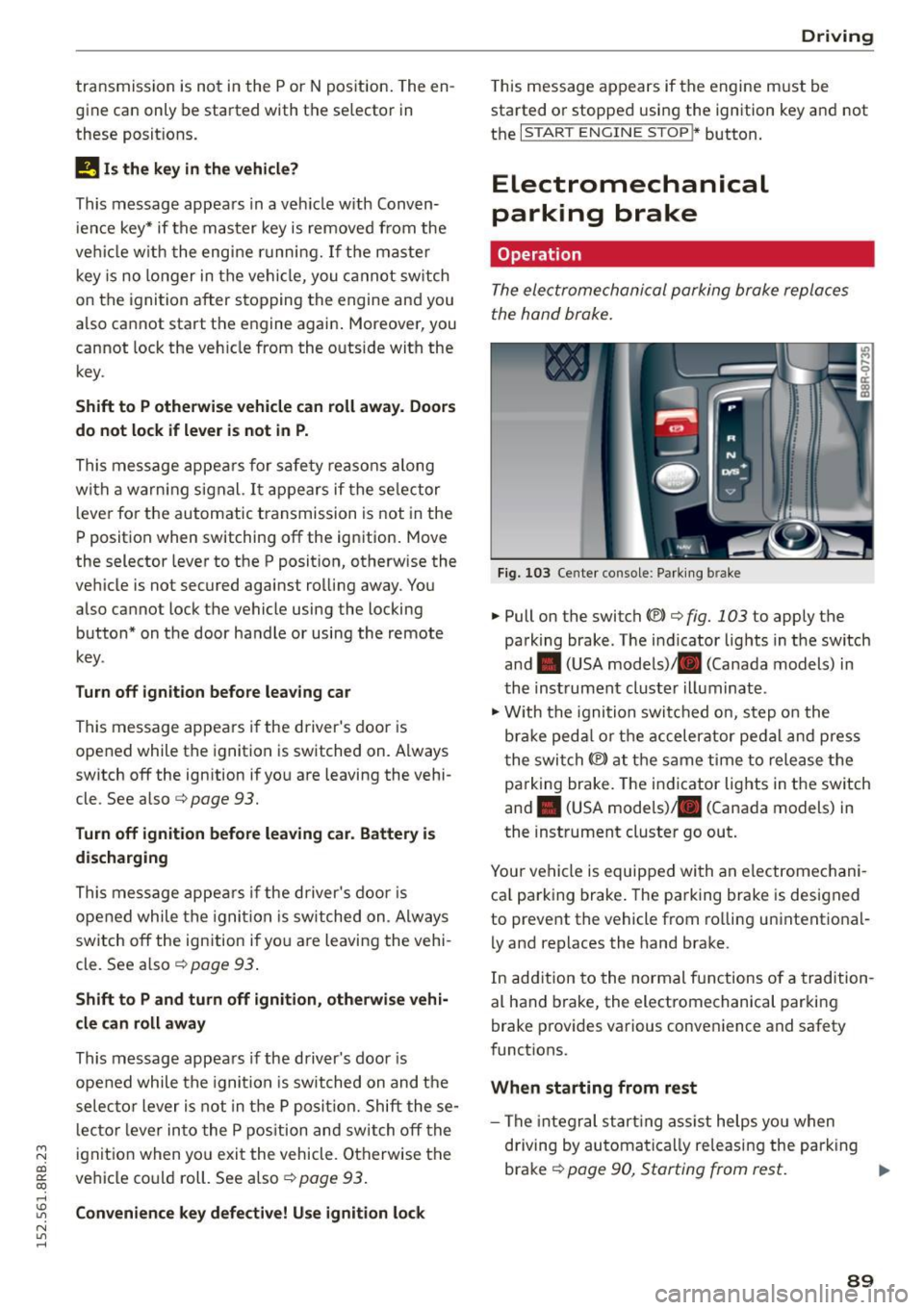
Fig . 103 Ce nte r console : Parki ng b rake
.,. Pull on the switch «el) c:;, fig. 103 to apply the
parking brake . The i ndicator lig hts in the switch
and . (USA models) . (Canada models) in
th e inst rument cluste r illuminat e.
.,. With the ignition swi tch ed on, step o n the
b rak e ped al or t he ac celer ato r pe dal an d pre ss
t he swi tch
(®) at the same time to release the
pa rking brake. The ind icator lights in the switch
and . (USA mode ls) . (Canada models) in
the inst rument cluste r go out.
Your vehicle is equipped with an electromechani ca l park ing brake . The pa rking brake is designed
to prevent the vehicle from ro lling u nintent io na l
l y and replaces the hand brake .
In add ition to the normal f unctions of a tradition
al hand brake, the electromechanical parki ng
brake prov ides various conve nience and safety
funct ions.
When starting from rest
- The integr al st art ing ass ist helps yo u when
d riving by automa tica lly re leasi ng the par king
brake
c:;, page 90, Starting from rest. IJo-
89
Page 92 of 302
Driving
- When starting on inclines, the sta rting assist
prevents the vehicle from unintentionally roll
i ng back . T he braking force of the parking brake
is not released unt il sufficient driving force has
been built up at the wheels.
Em ergency brake function
An emergency bra ke ensures that the vehicle can
be slowed down even if the normal brakes fa il
c::> page 91, Emergency broking .
A WARNING
-
If a drive range is engaged with the vehicle
stationary and the engine running, you must
in no instance accelerate careless ly. Otherwise
t he vehicle will start to move immed iate ly -
r isk of an accident.
(1) Tips
- If the parking brake is applied with the igni
tion switched off, the indicator lights in the
swi tch and . (USA
models) ;II (Cana-
da models) in t he instrument cluster wil l go
out after a certa in period of time.
- Occasiona l noises when th e par king b rake is
applied and released are normal and are not
a cau se for co nce rn.
- When the ve hicle is par ked, the parking
b rake goes t hro ugh a se lf-test cycle a t regu
lar in tervals . Any associa ted noises are no r
mal.
Parking
~ Press the brake peda l to stop the vehicle.
~ Pu ll the switch c::> page 89 , fig . 103 to set the
parking brake.
~ Move the selecto r lever to P .
~ Turn the eng ine off c::> ,&. .
~ When on incl ines or declines, turn the steer ing
whee l so that the vehicle w ill roll into the curb
if it beg ins to move.
A WARNING
- W hen you leave your veh icle -even if only
br ie fly -always remove the igni tion key. This
applies part icu larly when children remain in
90
-
the vehicle. Ot herwise the ch ild ren could
start the engine, release the parking b rake
or operate electrical equ ipment (e.g . power
w indows) . There is the risk of an accident.
- W hen the veh icle is locked, no one -part icu
larly not chi ldren shou ld remain in the ve hi
cle. Locked doors make it more d ifficult for
emerge ncy wor kers to get into the ve hicle -
putting lives at risk .
Starting from rest
The starting assist function ensures that the
parking broke is released automatically upon
starting.
Stopping and applying parking brake
~ Pull the sw itch to app ly the parking brake.
Starting and automatically releasing the
parking brake
~ When you sta rt to drive as us ual, the parking
brake is automatically released and yo ur vehicle
beg ins to move.
When stopping at a traffic signa l or stopping in
c ity t raffic on vehicles with an a utomat ic trans
mission, the parking brake ca n be applied. The
vehicle does not have to be he ld with the foot
brake . The park ing brake e liminates the tendency
to c reep with a d rive ra nge engaged . As soon as
you d rive off as usua l, the par king b rake is re
l eased a utomat ic all y and the vehi cle starts to
move .
Starting on slopes
When sta rting on inclines, the starting assist pre
vents the vehicle from unintentionally ro lling
ba ck. The braking for ce of t he parking b ra ke is
not released until sufficient dr iv ing force has
been built up a t the wheels.
(D Tips
Fo r safety reaso ns, the p arking bra ke is re
l e ased auto m atically only w hen t he d river 's
s a fe ty be lt is engaged in t he b uckle .
Page 96 of 302
Driving
Switching the Start-Stop-System on/off
manually
Applies to veh icles: with Sta rt-Stop-System
If you do not wish to use the system, you can
switch it off manually.
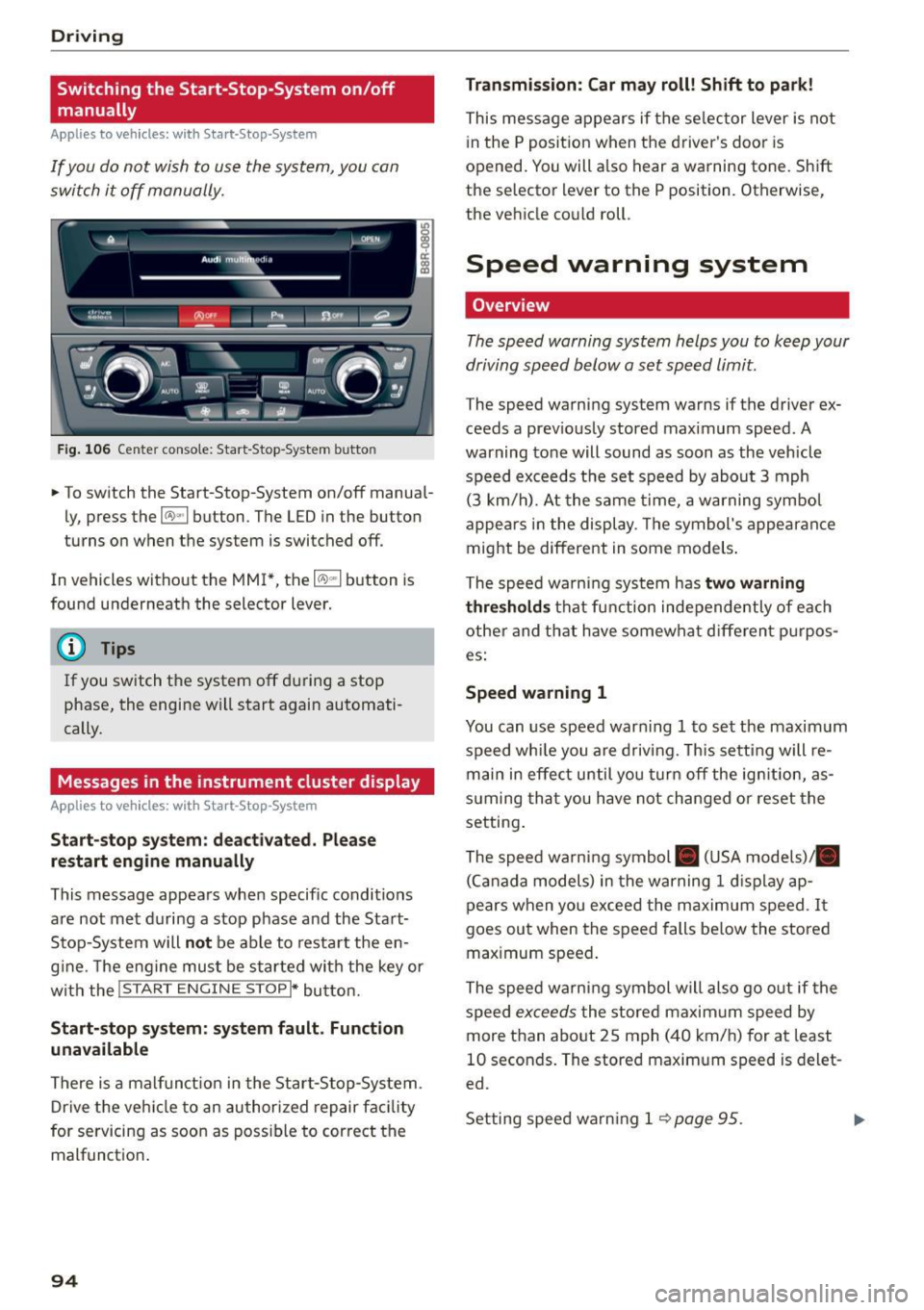
F ig . 10 6 Ce nter co nsole : Start -S top -System butto n
• To switch the Start-Stop-System on/off manua l
ly, press the
1 0 ••1 button . The LED in the button
turns on when t he system is switched off .
In vehicles without the MMI*, the
10 ~1 b utton is
found underneath the selector lever.
@ Tips
If you switch t he system off du ring a stop
phase, the engine will start again automati
cally.
Messages in the instrument cluster display
Applies to veh icles: with Start-Stop-System
Start-stop system: deactivated. Plea se
restart engine manually
This message appea rs whe n specific conditions
are not met du ring a stop phase and the Sta rt
Stop-System will
not be able to resta rt the en
g ine. The e ngine mu st be started with the key or
w ith the !S TAR T
ENGINE STOPI* button.
Start-stop system: system fault. Function
unavailable
There is a malf unct ion in the Star t-Stop -System .
Dr ive the veh icle to an author ized repair fac ility
for servicing as soon as poss ible to cor rect the
malfunct ion .
94 Transmission
: Car may roll! Shift to park!
This message appears if the se lector lever is not
i n the
P posit ion when the driver 's door is
opened. You will a lso hear a warning tone. Sh ift
the selector lever to the
P position. Otherwise,
the vehicle could roll .
Speed warning system
Overview
The speed warning system helps you to keep your
driving speed below a set speed limit.
The speed warning sys tem warns if the driver ex
ceeds a prev iously stored maximum speed. A
warning tone will sound as soon as the vehicle
speed exceeds t he set speed by abo ut
3 mph
(3 km/h). At the same time, a warning sym bol
appe ars in t he display . Th e symbol's appea ran ce
might be different in some models .
The spe ed wa rni ng system has
two warning
thre sholds
that fu nction inde pendently of eac h
other and tha t have somewha t diffe ren t p urpos
es:
Speed warning 1
You can use speed war ning 1 to set the maxim um
speed wh ile you are d riv ing. This setting will re
main in effec t until yo u turn off the ig nition, as
s u ming tha t you have not changed or reset the
setting .
The speed wa rn ing symbol . (USA models)/ .
(C an ada model s) in the warning
1 d is pla y ap
pears when yo u exceed the maximum speed . It
goes ou t when the speed falls be low the stored
max imum speed .
The speed warni ng symbol will also go o ut if the
speed
excee ds the stored maxim um speed by
more than abo ut
2 5 mph (4 0 km/h) for at least
10 seconds . The stored maxim um speed is delet
ed.
Set ting spee d warn ing 1
<=? page 95 . .,._
Page 101 of 302
Starting the vehicle
Applies to vehicles: with hybrid drive
The vehicle is started and turned off either w ith
the ign ition key
q page 84 or with the
IS TAR T ENGINE STOP I button* ¢page 87 in the
same way as a conventional vehicle .
When starting the vehicle, the need les in the in
strument cluster
move upward br iefly. When the
vehicle enters d rive ready mode, the status mes
sage
hybrid ready appears briefly in the instru
ment cluster display and the needl e in the power
meter points to READY
q page 99.
Depending on the operation mode of the hybr id
system, there are two possib le drive ready modes
after the vehicle has been started:
Drive r eady mode with combustion engine
If the ope rat ing requirements q page 101 for
e lec tric dr ive mode are
not met, the combustion
Power meter overview
Applies to vehicles: with hybrid drive
H ybri d
engine starts the vehicle as usual. You can start
driving as usual.
Drive ready m ode with th e el ectric motor
If the operating requi rements 9 page 101 for
the e lectr ic dr ive mode are met , the combustion
engi ne remains off after starting the vehicle.
(j) Tips
To p reven t the 12 volt batte ry from d ischarg
i ng, never leave t he veh icle parked in the dr ive
ready mode. Remove the key from the igni tion
or press the
! S T AR T ENGINE ST OP I button *.
When leaving the vehicle always take the key
with you.
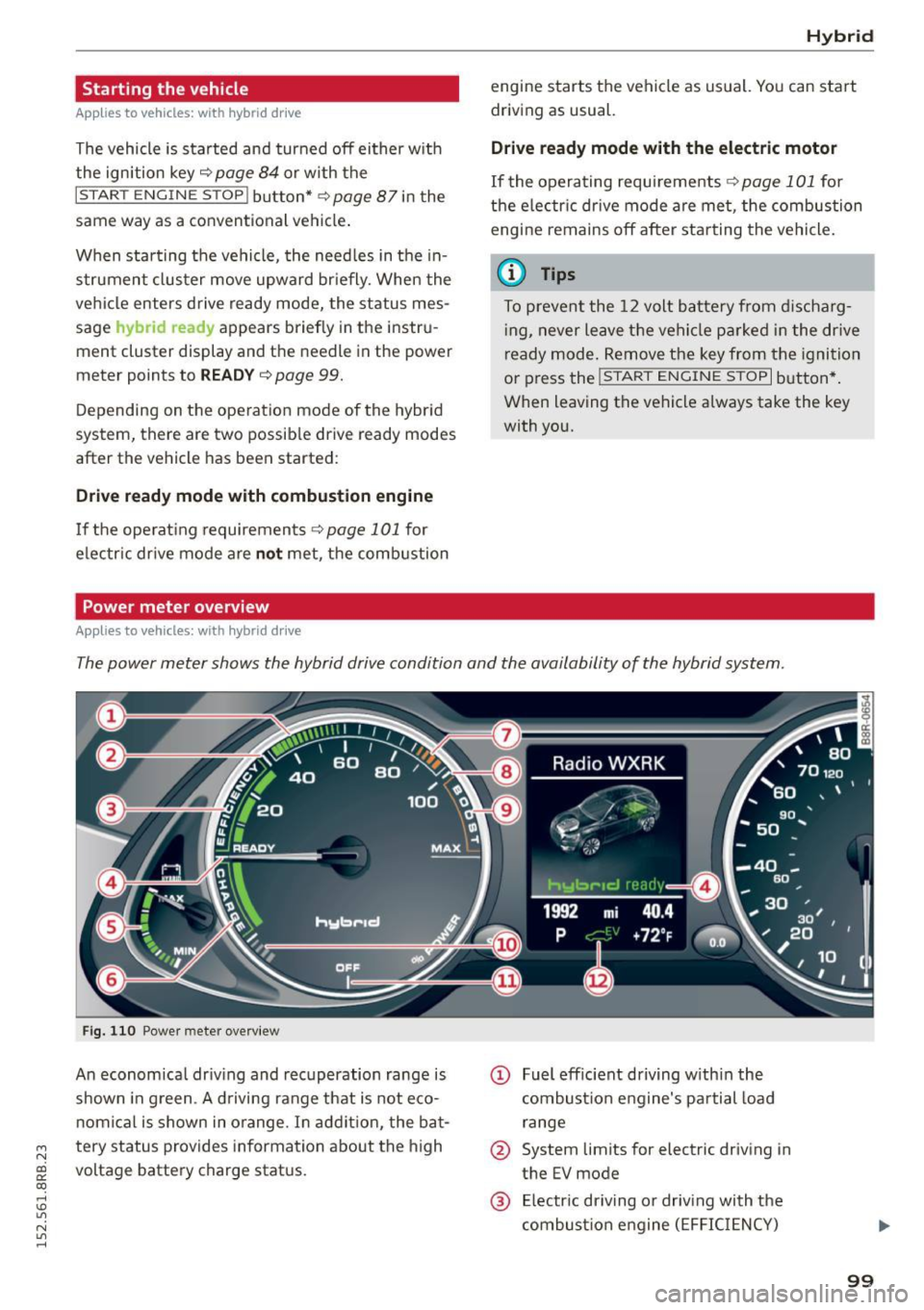
The power meter shows the hybrid drive condition and the availability of the hybrid system.
F ig. 1 10 Powe r meter overview
An economical dr iv ing and recuperation range is
shown in g reen . A d riving range that is not eco
n omical is shown in o range. In addi tion, the ba t-
"' tery status provides information about the high
N
~ voltage battery charge stat us.
co
rl I.O
"' N
"' rl
@ Fuel eff icient driving with in the
combust ion engine 's pa rtial load
range
@ System limits for electric driving in
the EV mode
@ El ectric dr iving or driv ing with the
combust ion engine (EFFIC IENCY)
99
Page 102 of 302
Hybrid
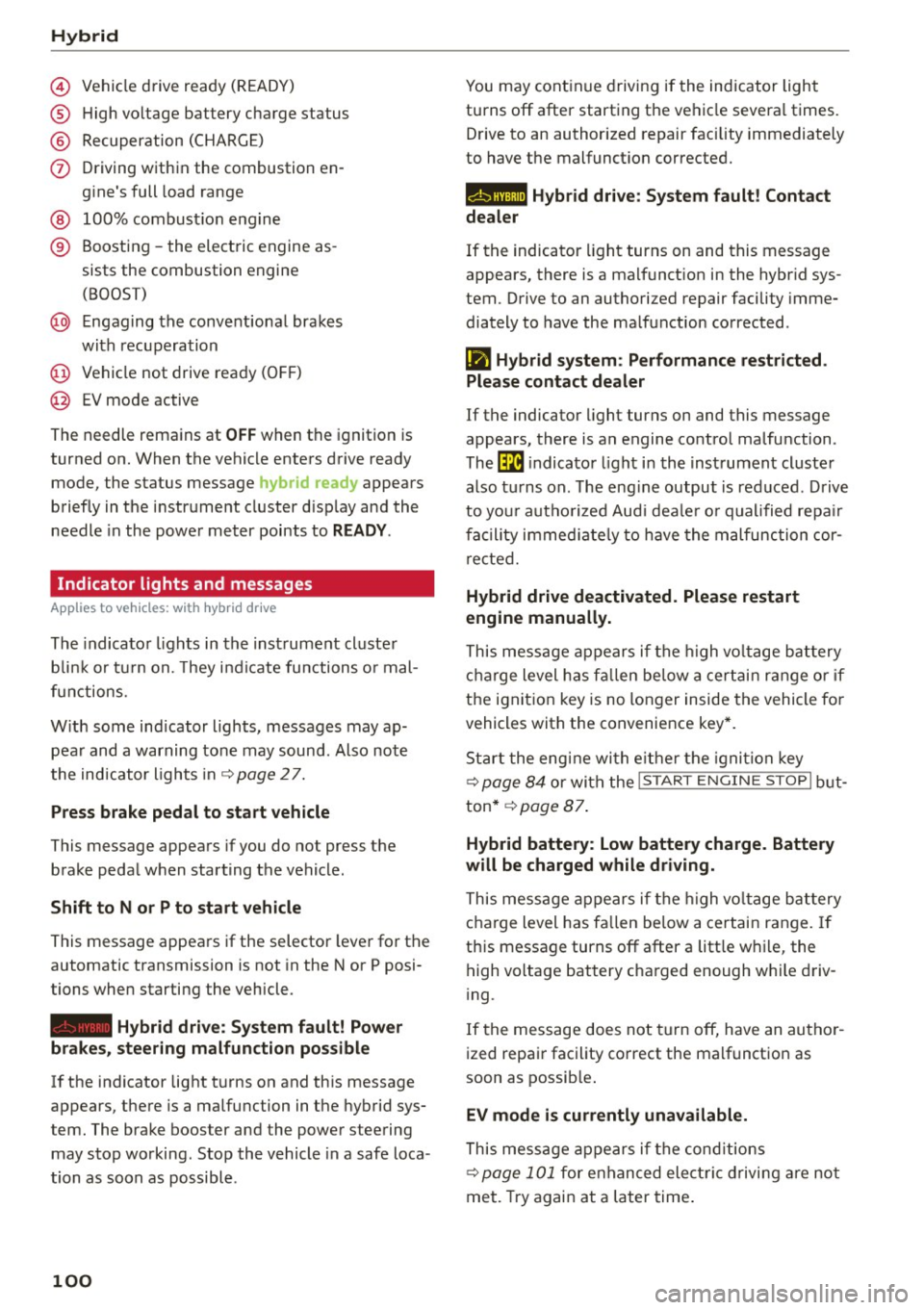
© Vehicle drive ready (READY)
® High voltage battery charge status
® Recuperation (CHARGE)
(f) Driving within the combustion en
gine's full load range
@ 100% combust ion engine
® Boosting -the electric engine as
sists the combustion engine (BOOST)
@ Engaging the convent ional brakes
with recuperation
@ Vehicle not drive ready (OFF)
@ EV mode active
The needle remains at
OFF when the ignition is
turned on. When the vehicle enters drive ready mode, the status message
hybrid ready appears
briefly in the instrument cluster d isplay and the
needle in the power meter points to
READY .
Indicator lights and messages
Applies to vehicles: with hybrid drive
The indicator lights in the instrument cluster
b lin k or tu rn on. They i ndicate functions o r mal
functions.
W ith some ind icator lights, messages may ap
pear and a warning tone may sound. Also note
the indicator l ights in ¢
page 2 7.
Press brake pedal to start vehicle
This message appears if you do not press the
brake pedal when starting the vehicle.
Shift to N or P to start vehicle
This message appears if the selector lever for the
automatic transmission is not in the Nor P posi
tions when starting the vehicle .
-Hybrid drive: System fault! Power
brakes, steering malfunction pos sible
lfthe indicator light turns on and this message
appears, there is a malfunction in the hybrid sys
tem. The brake booster and the power steering
may stop working. Stop the vehicle in a safe loca
tion as soon as possible.
100
You may continue driving if the indicator light
turns off after starting the vehicle severa l times.
Drive to an authorized repair facility immediately
to have the malfunct ion corrected.
Q/ij:@ ,j rlybrid drive: System fault! Contact
dealer
If the indicator light turns on and this message
appears, there is a malfunct ion in the hybr id sys
tem. Drive to an authorized repair facility imme
diately to have the ma lfunction corrected.
Ill Hybrid system : Performance restricted .
Please contact dealer
If the indicator light turns on and this message
appears, there is an engine control malfunction .
The
ffa i ndicator light in the instrument cluster
also t urns on. The eng ine output is red uced . Drive
to you r autho rized Aud i deale r o r qualified repair
facility immediate ly to have the malfunction cor
rected.
Hybrid drive deactivated. Please restart
engine manually.
This message appears if the high volta ge battery
charge level has fallen be low a certain range or if
the ignition key is no longer inside the vehicle fo r
vehicles with the convenience key*.
Start the engine with e ither the ignition key
¢
page 84 or with the !S TAR T EN GINE STOPI but
ton* ¢
page 87.
Hybrid battery: Low battery charge. Battery
will be charged while driving.
This message appears if the high volta ge battery
charge level has fa llen below a certain range. If
this message turns off after a litt le while, the
high voltage battery charged enough w hile driv
i ng .
If the message does not turn off, have an autho r
ized repair facility correct the malfunct ion as
soon as possible.
EV mode is currently unavailable.
This message appears if the cond itions
¢ page 101 for enhanced elect ric driving are not
met. Try again at a later time.
Page 114 of 302
Audi adapt ive cru ise control and brak ing gu ard
c::::, ___ c::::,_ Distan ce 3: This setting corresponds
to a distance of 164 feet/SO meters when travel
ing at 62 mph (100 km/h), or a t ime interval of
1.8 seconds.
c::::, ___ _ c::::, Di stan ce 4: This setting corresponds
to a distance of 210 feet/64 meters when travel
ing at 62 mph (100 km/h), or a t ime interval of
2 .3 seconds.
_&. WARNING
Following other vehicles too closely increases
the risk of collisions and ser ious personal in
jury .
- Setting short distances to the traffic ahead
reduces the time and d istance available to
br ing your vehicle to a safe stop and makes
it eve n mo re necessa ry to pay close atten
t ion to traffic.
- Always obey applicable traffic laws, use
good judgment, and select a safe followi ng
distance for the traffic, ro ad an d wea ther
cond itio ns.
¢j) Tips
- Distance 3
is set automatically each time
you sw itch the ignit ion on.
- Your standard settings are automatically
stored and assigned to the remote contro l
k ey being used
~ page 36.
Setting the driving program
A ppl ies to veh icles: w ith Audi adaptive cruise co ntrol
Depending on the se lected dr iv ing program and
distance, driving behavior when acce le rat ing will
vary from dynamic to comfortab le .
Setting the driving program for vehicles
w ithout Audi dr ive s elect*
~ In the radio/MM! *, select: I CAR ! function but
ton
> adaptive cruise control > Dri ving pro
gram
> C omfort , Stan dard or Dynamic . Or
~ Select : ICARI funct ion button > Car s ystems *
control button > Driver ass ist > Adap tive crui se
contro l> Driving program > Comfort , Stand
ard or Dynamic .
112
Setting the driving mode for vehicles with
Audi drive se lect*
Refer to r:!> page 121.
(D Tips
Your settings are automat ica lly stored and as
signed to the remote control key being used
r:!> page 36 .
Request for driver intervention
App lies to vehicles: wit h Aud i adapt ive c ru ise contro l
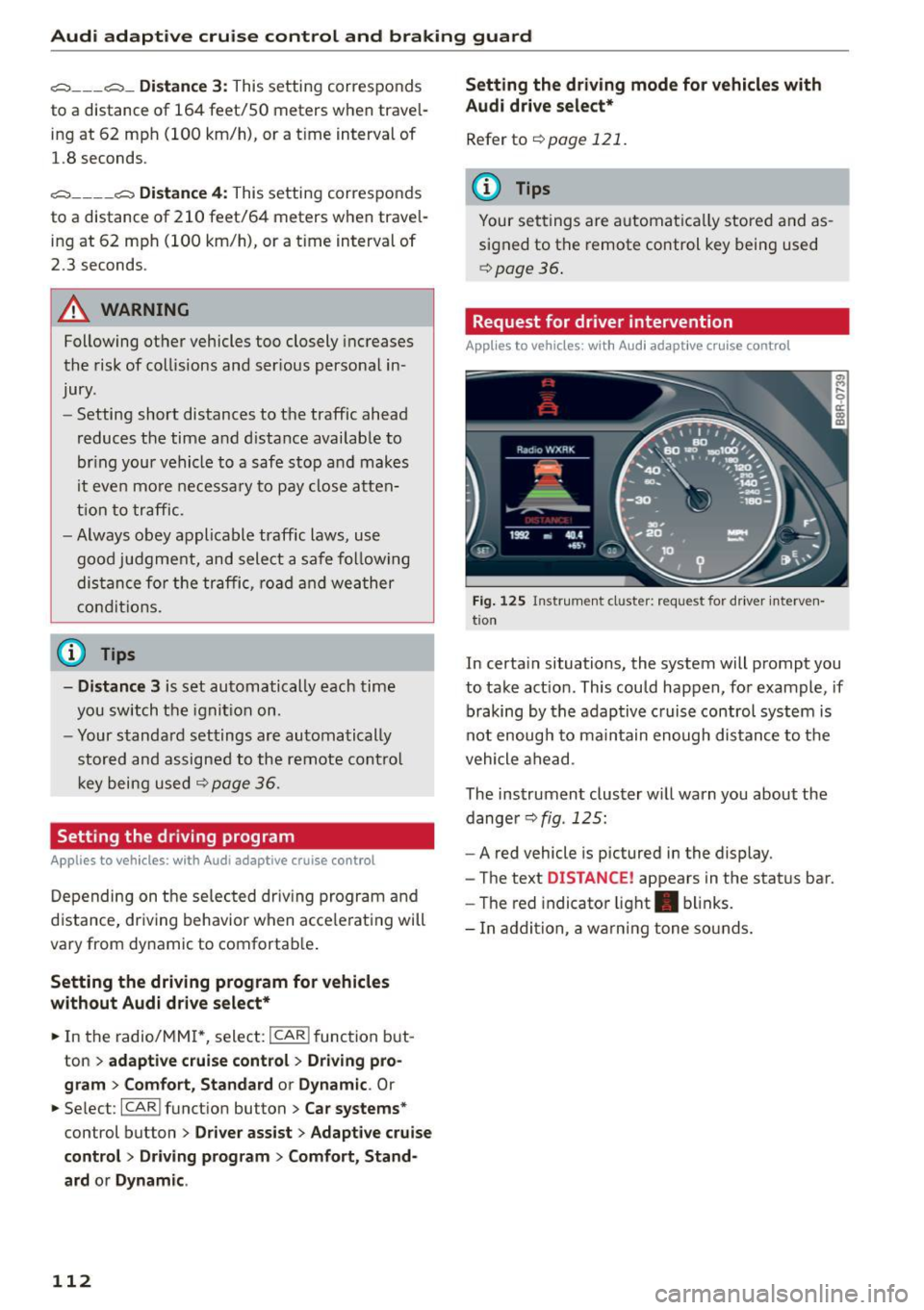
Fig. 125 Instr um ent cl uster: reque st for driver interven
t io n
In certa in situations, the system will prompt you
to take act ion . This could happen, for example , if
braking by the adaptive c ruise control system is
not enough to maintain enough distance to the
vehicle ahead .
The instrument cluster w ill warn you about the
dange r
r:!> fig. 125:
-A red vehicle is pictured in the display.
- The text
DISTANCE! appears in the status bar.
- The red indicator light . blinks.
- In addition, a wa rn ing tone so unds.
Page 116 of 302

Audi adaptive cru ise control and b ra king guard
promptly detected or may not be detected
at all.
- Reflective surfaces including cras h barriers
or tunnel entrances may impair the function
of the radar sensor.
(D Tips
- You can cance l the braking that is initiated
by the system by braking yourself, by accel
erating noticeably or by swerving.
- Braking g uard error messages ¢page
114 .
-Keep in mind that braking guard can brake
unexpected ly . Always sec ure any cargo or
objects that you are transporting to red uce
the risk of damage or injury.
Settings in the radio/MMI*
Applies to veh icles: with Audi adaptive cruise control
.,. Se lect : I CAR I funct ion button > Audi brak ing
guard .
Or
.,. Select :
~ I C~ A~ R~ I funct ion button > Car sy stem s*
control button > Drive r ass is t> Audi braking
guard .
Syst em -
Sw itch braking guard On and Off . When
you switch the ign ition on, the message
Braking
guard : Off
appears if the system is switched off.
Earl y warning -The dis tance and appro ach war n
ing s in the display can be sw itched
On/ Off.
(D Tips
-Your settings are automat ica lly stored and
assigned to the remote control key being used at the times the sett ings are made
¢ page
36 .
-If you restrict the ESC, the b raking guard al
so switches itself off¢ page
192 .
-Switch brak ing guard off when you are load
i ng the veh icle onto a vehicle carr ier, tra in ,
sh ip or other type of transpo rtation . Th is
can prevent undesired wa rnings from the
braking guard system.
Messages
Applies to vehicles: w ith Aud i adaptive cruise control
B raking guard: Off
114
This driver message appears if the system is
turned off via the radio/MM I *. Otherwise, if th e
system is turned off, the information appears ev
ery time short ly after the s tart of the tr ip .
The driver message a lso appears if the system is
not available due to a malfunction or if the ESC is
not switched on ¢ page
192 . If th is is the case,
the system w ill not provide warn ings about a
poss ible collis ion.
B raking gu ard: Ac tivat ed
This dr iver message appears if sharp b rake pres
sure was applied due to an a cute warn ing.
•••
Th ree white dots appear if a sett ing cannot be se
l ected w ith the operating lever . For example, th is
happens if you want to raise/lower the speed
even though there was no prev ious ly saved
speed .
ACC: Sensor block ed
This messag e appears if th e sensor v iew is ob
structed, for examp le by leaves, snow, heavy
spray or d i rt . Cle an the sensor ¢ page
10 7,
fig. 116 .
ACC: Una vailable
The driver message appears if, for example, the
brake temperature is too h igh. The adaptive
cru ise control is temporarily unavailable. A chime
sounds as a r emind er.
ACC: Not avail able
The driver message appears if there is a malfunc
tion. The adaptive cruise cont ro l tu rns off . A
c hi me so unds as a rem inder. Have the system
che cked by an a utho riz ed Aud i dealer o r auth o r
i zed Audi Serv ice Facility.
Shift lev er po sition!
T he driver message appears if the selector lever
i s sh ifted to the N pos it ion . The adaptive cru ise
control is not ava ilable while in this posit io n .
Stab ilizat ion control (ESC )
This message appears if the Elect ronic Stabiliza
tion Contro l (ESC) is taking act ion to stabilize the .,..
Page 121 of 302

M N
co
a:
co
,...., \!) 1.1'1
N 1.1'1 ,....,
@ Tips
-Side assist is not active wh ile you are mak
i ng the ad justment .
- Your settings are automatically stored and
ass igned to the remote control key being
u sed.
Driver messages
App lies to vehicles: with Audi side assist
If s ide ass ist switches off by itse lf, the LED in the
button turns off and a message wi ll appea r in the
in str ument cluster d is pl ay:
Audi side assist unavailable: Sensors blocked
The radar sensors' vision is affected. Do not cover
the area in front of the senso rs with bike wheels,
sticke rs, dirt or other objects. Clean the area in
fro nt of t he sensors, if necessary
c:> page 117,
fig . 130 .
Audi side assist: Currently unavailable
Side assist cannot be switched o n tempo rari ly be
cause there i s a ma lf u nctio n (for examp le, the
battery c harge level may be too l ow) .
Audi side assist: System fault!
The system cannot guara ntee that it wi ll dete ct
ve hicles co rrectly an d it is switc hed off. The sen
sors have been disp laced or are fau lty. Have t he
system checked by an auth orized A udi dealer or
author ized Audi Serv ice Facility so on .
Audi side ass ist: Unavailable when towing
Side assist sw itches off automatically when a fac
tory- insta lled trailer hitch is connected to the
e lectrica l connector on the tra ile r. The re is n o
g ua rantee the system w ill switch off w hen using
a retr ofitted tra ile r hitch. Do not use s ide assist
wh en towing a tra ile r.
Aud i side assist
119
Page 124 of 302
Audi drive select Systems Comfort
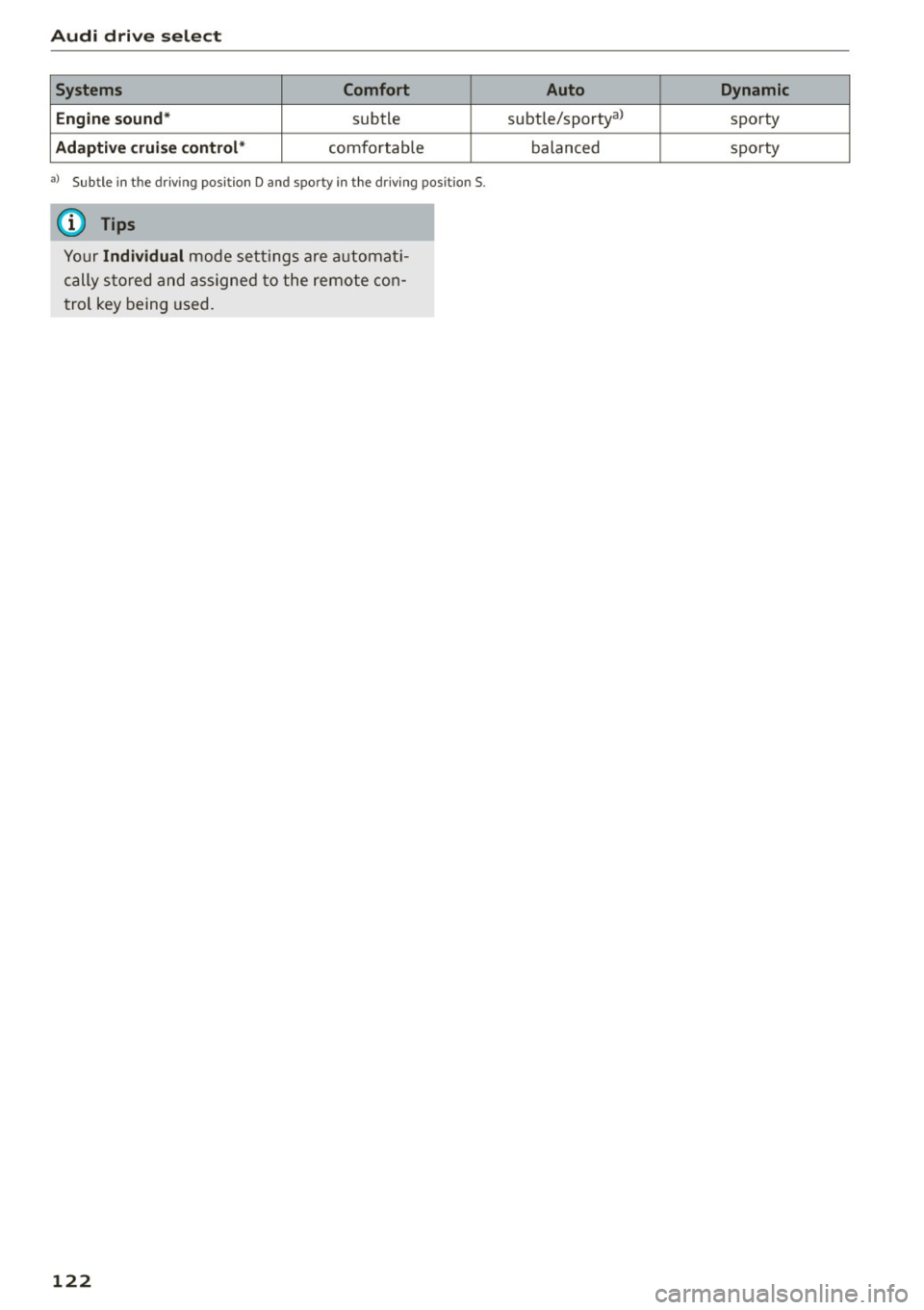
Engine sound*
subtle
Adaptive cruise control* comfo rtab le
al Subtle i n th e dr iving posit io n D and sporty in the driv in g pos it ion S.
(D Tips
Y our Individual m ode setting s are a utomat i
cally s tored and assig ned t o the remote co n
t rol key being used.
122
Auto Dynamic
subtle/sportya> sporty
balanced sporty
Page 127 of 302
M N
co
a:
co
,...., \!) 1.1"1
N 1.1"1 ,....,
(Neutral) for more than approximately 1 second,
without the brake pedal being pressed.
Release button
The release button on the selector lever prevents
the lever from be ing acc identally shifted into cer
tain positions. Pressing this button deactivates
the selector lever lock . Depending on the direc
tion of the shift, the se lector lever locks at differ
ent positions. The positions are highlighted in
the illustration¢
fig. 135.
Ignition key safety interlock
The key cannot be removed from the igni tion un
l ess the se lector lever is in the P park position .
When the ignition key is removed, the selector
l ever will be locked in the P position.
Driving the automatic transmission
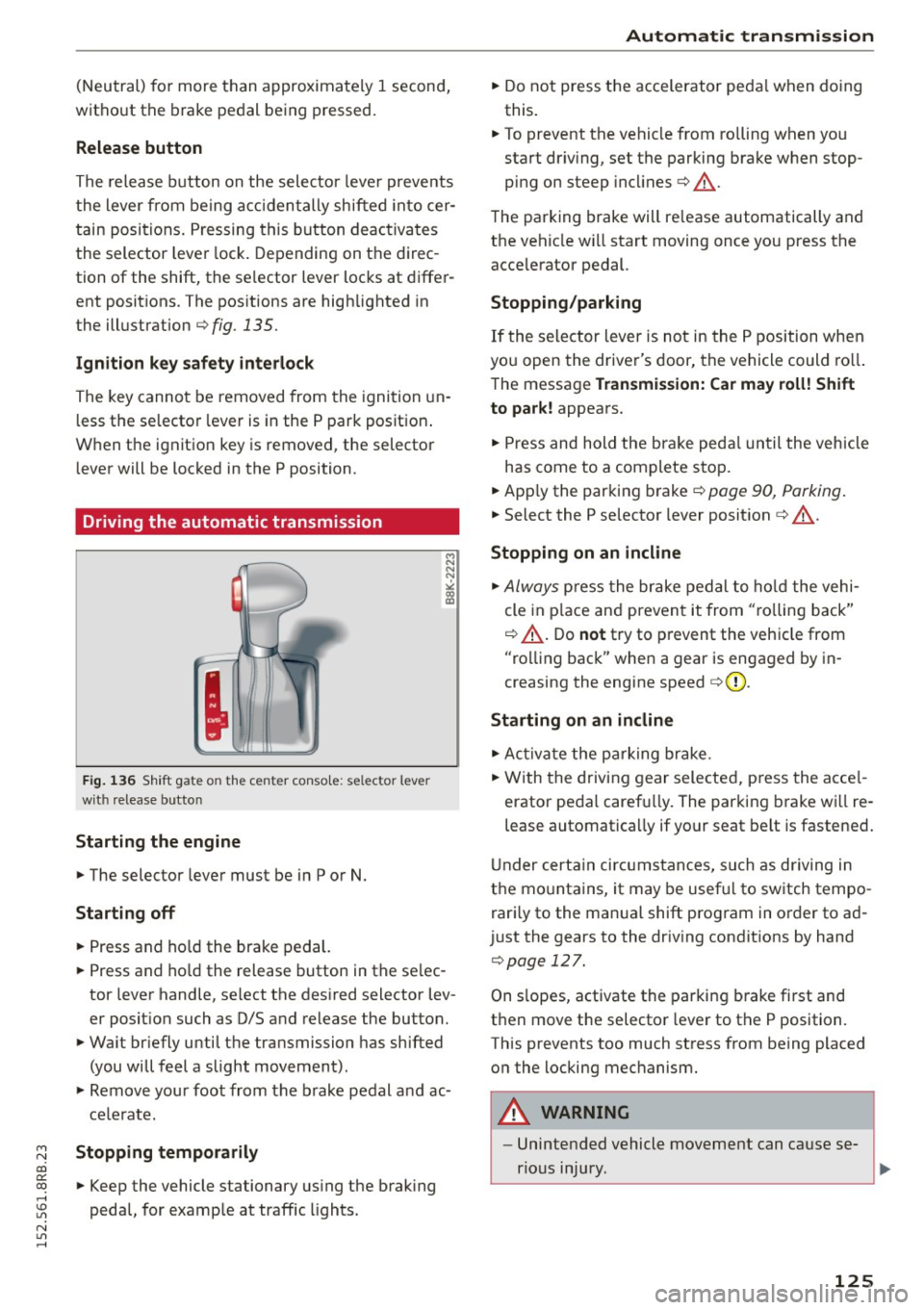
Fig. 136 Shift gate on the center conso le: selector lever
with release button
Starting the engine
.,. The selector lever must be in P or N.
Starting off
.,. Press and hold the brake pedal.
.,. Press and ho ld the release button in the se lec
tor lever handle, select the desired selector lev
er position such as D/S and release the button.
.,. Wait br iefly until the transmission has shifted
(you will feel a slight movement).
.,. Remove your foot from the brake pedal and ac
celerate.
Stopping temporarily
.,. Keep the vehicle stationary using the brak ing
pedal, for example at traffic lights.
Automatic transmission
.,. Do not press the accelerator peda l when doing
this.
.,. To prevent the vehicle from rolling when you
start dr iv ing, set the parking brake when stop
ping on steep incl ines¢ &_.
The parking brake will re lease automatically and
the vehicle wi ll start moving once you press the
acce lerator pedal.
Stopping/parking
If the selector lever is not in the P position when
you open the driver's door, the vehicle could roll.
The message
Transmission: Car may roll! Shift
to park!
appears.
.,. Press and hold the brake pedal until the vehicle
has come to a complete stop.
.,. App ly the parking brake¢
page 90, Parking .
.,. Select the P se lector lever position ¢ &_ .
Stopping on an incline
.,. Always press the brake pedal to hold the vehi
cle in place and prevent it from "ro lling back"
¢ &_ . Do
not try to prevent the vehicle from
"rolling back" when a gear is engaged by in
creasing the engine speed
c> (D .
Starting on an incline
.,. Activate the parking brake .
.,. With the driving gear selected, press the acce l
erator pedal carefu lly. The parking brake wi ll re
lease automatically if your seat belt is fastened.
Under certain circumstances, such as driving in
the mountains, it may be usefu l to switch tempo
rari ly to the manual shift program in order to ad
just the gears to the driving conditions by hand
¢page 127 .
On s lopes, activate the parking brake first and
then move the selector lever to the P position .
This prevents too much stress from being placed on the locking mechanism .
A WARNING ,_
-Unintended vehicle movement can cause se-
rious injury.
~
125