mirror AUDI Q5 2016 User Guide
[x] Cancel search | Manufacturer: AUDI, Model Year: 2016, Model line: Q5, Model: AUDI Q5 2016Pages: 300, PDF Size: 75.02 MB
Page 118 of 300
Audi side assist
General information
Applies to vehicles: with Audi side assist
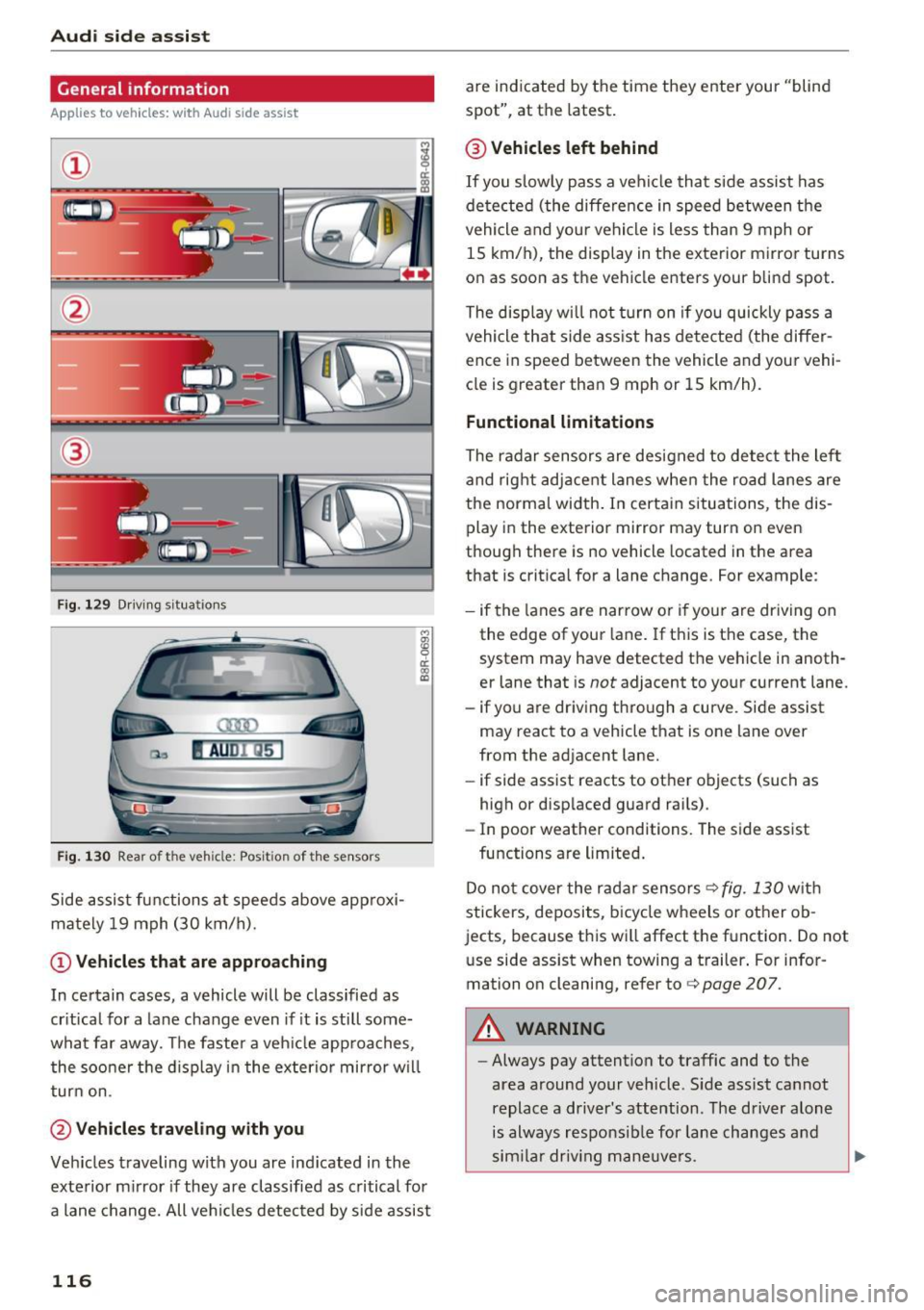
F ig . 129 Driving s it ua tion s
Fig. 130 Rear of the veh icle: Posit ion of the se nsor s
Side assist functions at speeds above approxi
mately 19 mph (30 km/h).
(D Vehicles that are appro aching
M
! OJ CD
In certain cases, a vehicle will be classified as
cr itical for a la ne change even if it is still some
what far away. The faster a veh icle approaches ,
the soo ner the d isplay in the exterior mirror w il l
turn on.
@ Vehicles tra veling with you
Veh icles traveling with you are ind icated in the
exterior m irror if they are classified as critical for
a lane change. All ve hicl es detected by side assist
116
are indicated by the time they enter your "blind
spot", at th e latest .
@ Vehicle s left behind
If you slow ly pass a vehicle that s ide assist has
de tected (the diffe rence in speed between the
vehicle and your vehicle is less than 9 mph or
15 km/h), the display in the exterior mirror turns
on as soon as the vehicle enters your blind spot.
The display w ill not turn on if you quickly pass a
vehicle that side ass ist has detected (the differ
ence in speed between the vehicle and your vehi
cle is greater than 9 mph or 15 km/h).
Functional limitation s
The radar sensors are designed to detect the lef t
and rig ht adjacent lanes whe n the road lanes are
the normal width . In certa in situations, the dis
play in the exterior mirror may turn on even
t hough there is no vehicle located in the area
that is crit ica l for a lane change. For example :
- if the lanes a re narrow o r if your are driving on
the edge of your lane . If this is the case, the
system may have detect ed the vehicle in anoth
e r lane that is
not adjacent to your current lane.
- if yo u are driving through a curve. Side assist
may r eact to a vehicle that is on e lane over
from the ad jacent lane.
- if side assist reacts to other objects (such as
high or disp laced guard rai ls) .
- In poor weather condit ions. The side assist
functions are limited .
Do no t cover the radar sensors ¢
fig. 130 wit h
stickers, deposits, bicycl e wheels or other ob
jects, because this wi ll affect the function. Do not
u se side assist when towing a trailer . For infor
mation on cleaning, refer to ¢
page 207.
A WARNING
-Always pay attention to traffic and to the
area around your veh icle . S ide assist cannot
replace a driver's attention . The driver alone
is always responsib le for lane changes and
sim ila r driv ing mane uve rs .
Page 119 of 300
..... N
co ~ CX)
..... I.Cl U"I
..... I.Cl ..... -
Improper reliance on the side assist system
can cause collisions and serious personal in
jury:
- Never rely only on side assist when chang
ing lanes.
- Always check rear view mirrors to make
sure that it is safe to change lanes.
- Side assist cannot detect all vehicles under
all conditions -danger of accident!
- Please note that side assist indicates there
are approaching vehicles, or vehicles in your
blind spot, only after your vehicle has
reached a driving speed of at least 19 mph
(30 km/h).
- In certain situations, the system may not
function or its function may be limited. For
example:
- if vehicles are approaching or being left
behind very quickly. The display may not
turn on in time.
- in poor weather conditions such as heavy
rain, snow or heavy mist.
- on very wide lanes, in tight curves or if
there is a rise in the road surface. Vehicles
in the adjacent lane may not be detected
because they are outside of the sensor
range.
(D Note
The sensors can be displaced by impacts or
damage to the bumper, wheel housing and
underbody. This can affect the system. Have
your authorized Audi dealer or authorized
Audi Service Facility check their function.
(D Tips
-If the window glass in the driver's door or
front passenger's door has been tinted , the
display in the exterior mirror may be misin
terpreted.
- For Declaration of Compliance to United
States FCC and Industry Canada regulations
¢page 283.
Audi side assist
Activating and deactivating
Applies to vehicles: with A udi side ass ist
Fig. 131 Dr iver 's do or: Sid e assis t button
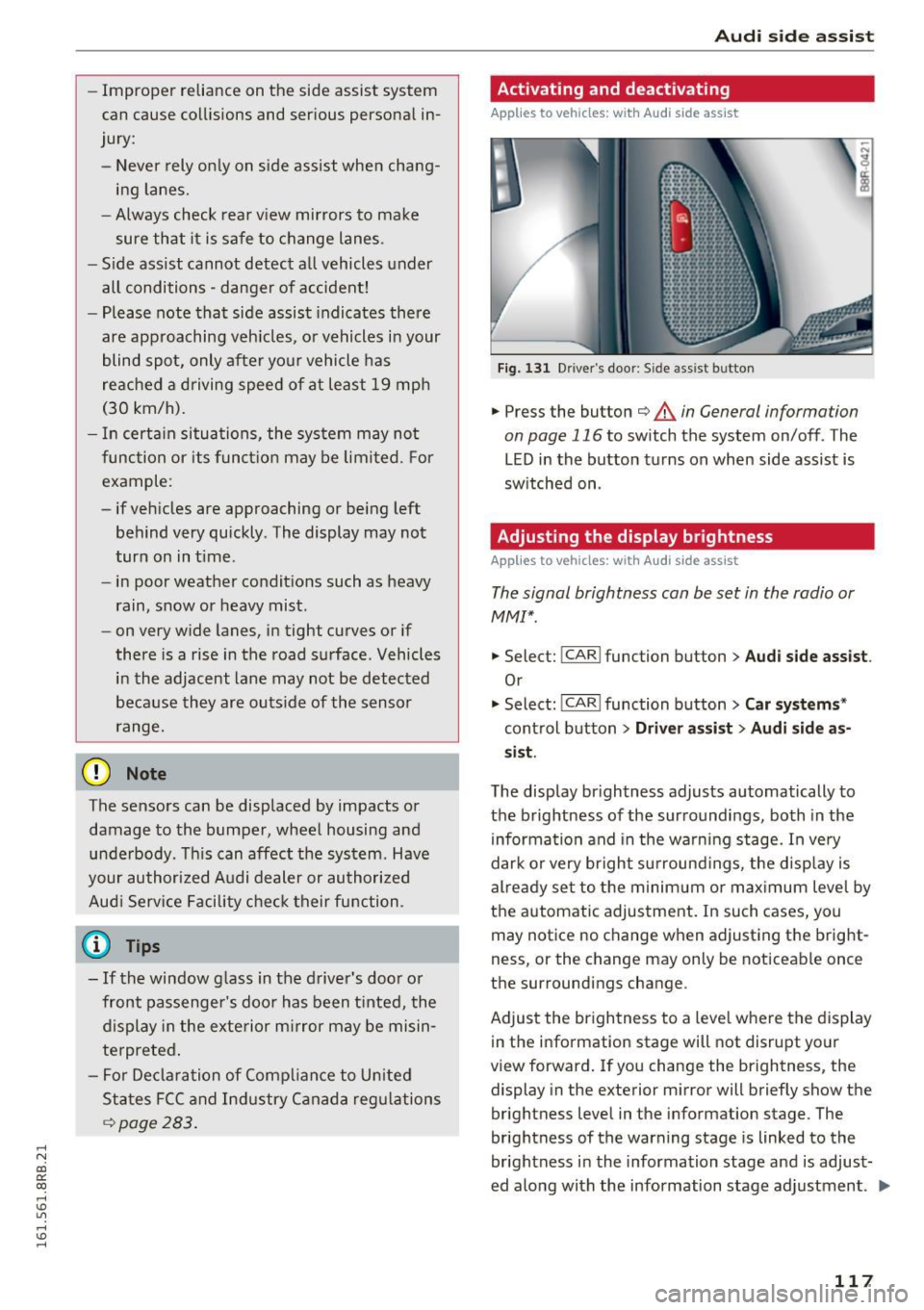
.,. Press the button ¢ & in General information
on page 116
to switch the system on/ off . The
LED in the button turns on when side assist is
switched on .
Adjusting the display brightness
Applies to vehicles: with Audi side assist
The signal brightness can be set in the radio or
MM!*.
.,. Select: !CAR I function button> Audi side assist .
Or
.,. Select: !CAR I function button> Car systems *
control button > Driver assist > Audi side as
sist.
The display brightness adjusts automatically to
the brightness of the surroundings, both in the
information and in the warning stage. In very
dark or very bright surroundings, the display is
already set to the minimum or maximum level by
the automatic adjustment. In such cases, you
may notice no change when adjusting the bright
ness, or the change may only be noticeable once
the surroundings change .
Adjust the brightness to a level where the display
in the information stage will not disrupt your
view forward. If you change the brightness, the
display in the exterior mirror will briefly show the
brightness level in the information stage . The
brightness of the warning stage is linked to the
brightness in the information stage and is adjust
ed along with the information stage adjustment . ..,.
117
Page 131 of 300
,....,
N
co
er::
co
,....,
The MM I display s hows the area covered by the
rearv iew camera ¢
fig. 143 (!). Objects that a re
not in the area covered @are not shown on the
MMI disp lay .
We recommend that yo u pract ice pa rking with
the rearview camera in a t raff ic-free location o r
parking lot to become familiar w ith the system ,
the orientation lines, and their function . When
doing this, there should be good light and weath
er cond itions.
I n the MMI disp lay, objects or vehicles appea r
closer o r furthe r away if :
- yo u are driving in reverse gea r from a level sur
f ace onto an in cli ne, or a downward s lope,
- yo u are d riving in reverse ge ar toward protr ud
ing objects,
- th e vehi cle is ca rrying too much lo ad in the
re ar .
The accuracy of the o rientation lines and blue
surfaces d imin ishes if:
- the rearv iew camera does not provide a reliab le
i mage, for example, in poor visibility cond itions
or if the lens is d irty,
- the image on the screen is not visib le due to
s u n glare and reflection .
Caring for the rear view c amera lens
The rearview camera is located above the rear li
cense plate bracket. For the parking system to
operate, the lens¢
fig. 144 must be kept clean:
- Dampen the lens with a house hold alcoho l-
based glass cleaner, and then wipe the lens
clean with a dry cloth¢(!).
- Remove snow with a hand brush and ice pref
erab ly w ith a de -icing spray ¢(D .
A WARNING
-The parking system cannot replace the dr iv
er's attention. The driver alone is responsi
ble for parki ng and similar dr iving ma neu
vers.
- Senso rs have blind spots in which objects
cannot be detected . Pay spec ial attention to
Par king sy stem
sma ll children and anima ls because the sen
sors cannot always detect them.
- Always keep your eyes on the vehicle's sur
roundings, using the rearv iew mirror as
wel l.
- Do not allow you rself to be dist racted from
traffic by the rearview camera pictures.
- If the position and the installation angle of
the camera has changed, for example, after
a rear end co llision, do not continue to use
the system for safety reasons. Have it
checked by a qualified dealership .
CI) Note
-Low obstacles a lready signa led by a warning
can disappea r from the system's detection
range as they are approached and w ill not
cont inue to be s ignaled. Objects such as
barrie r cha ins, tra iler draw bars, th in pain t
ed vertical poles or fences may not be de
te cted by the system, posi ng risk of dam
a ge.
- N ever use warm o r hot wate r to remove
snow o r ic e from the rearview camera lens -
t his could ca u se the lens to c ra ck!
- Whe n cleani ng the lens, never use prod ucts
t ha t are abras ive.
129
Page 133 of 300
..... N
co ~ CX)
..... I.Cl U"I
..... I.Cl .....
Reverse Parking
Applies to vehicles: with Audi parking system plus with rear
view came ra
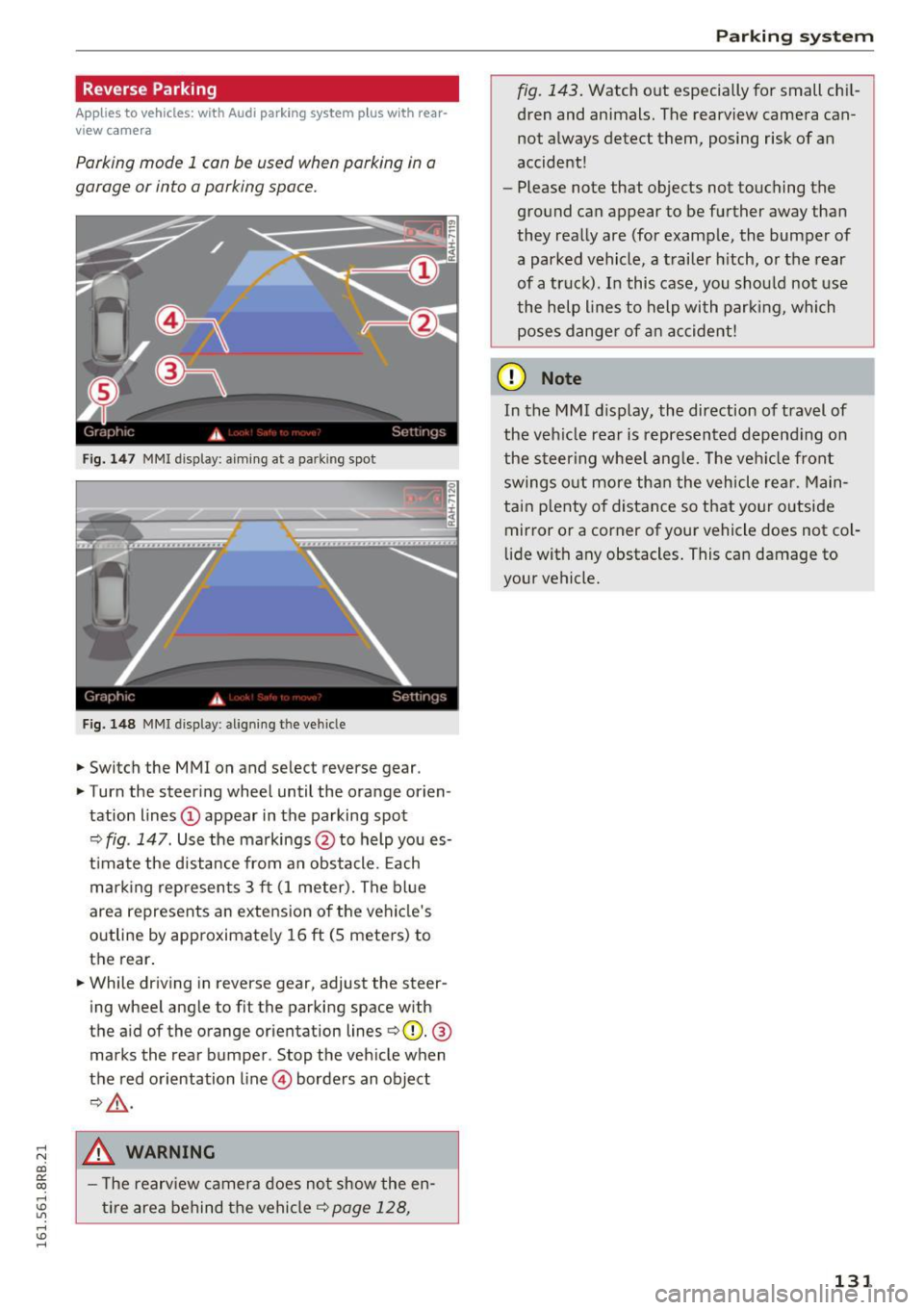
Parking mode 1 can be used when parking in a
garage or into a parking space.
Fig. 147 MMI displa y: aiming at a p arkin g spot
Fig. 148 MMI displa y: align ing t he ve hicle
.,. Switch the MMI on and se lect reverse gear .
.,. Turn the steering wheel until the orange orien
tation lines
(D appear in the parking spot
Q fig . 147 . Use the markings @to help you es
t imate the distance from an obstacle . Each
marking represents 3 ft (1 meter). The blue
area represents an extension of the vehicle's
outline by approximately 16
ft (S meters) to
the rear.
.,. While driving in reverse gear, adjust the steer
ing wheel angle to fit the parking space with
the aid of the orange orientation lines
QQ). @
marks the rear bumper . Stop the vehicle when
the red orientation line © borders an object
Q,Lr:i. ,
.8, WARNING
-The rearv iew camera does not show the en
tire area behind the vehicle¢
page 128,
Parking system
fig. 143. Watch out especially for small chil
dren and animals. The rearview camera can
not always detect them, posing risk of an
accident!
- Please note that objects not touching the
ground can appear to be further away than
they really are (for example, the bumper of
a parked vehicle , a trailer hitch, or the rear
of a truck). In this case, you should not use
the help l ines to help with parking, which
poses danger of an accident!
(D Note
In the MMI display, the direction of travel of
the veh icle rear is represented depend ing on
the steer ing wheel angle. The vehicle front
swings out more than the vehicle rear. Main
tain p lenty of distance so that your outside
mirror or a corner of your vehicle does not col
lide with any obstacles . This can damage to
your vehicle.
131
Page 135 of 300
,....,
N
co
er::
co
,....,
lide with any obstacles. This can damage to
your veh icle.
(D Tips
The left or right orientation lines and surfaces
wi ll be displayed, depending on the turn sig
na l being used .
Adjusting the display
and warning tones
Applies to vehicles: with Audi parking system plus with rear
view camera
The display and warning tones can be adjusted in
the MMI.
~ Select: I CARI function button > Parking syste m.
Or
~ Se lect: I CARI funct ion button > C ar sy stem s*
control button > Driver a ssi st > Pa rking aid .
Di sp lay
- Off -
when the parking system is switched on,
only aud ible signals are g iven.
- On -when the parking system is switched on,
either the visual disp lay or the picture from the
rearview camera is displayed.
Warning tones
- Front volu me -
fron t se nso r volume
- Front fr equ ency -front se nsor frequency
- Rea r volum e -rear sensor vol ume
- Rea r frequency -rear sensor frequency
-In -car enterta inment fade r/Mus ic volum e
w hile pa rking -
when the parking system is
switched on, the volume of the active audio
source is lowered .
The new ly adjusted value is briefly heard from
the signal generator .
- The warning tones can also be ad justed d i
rectly by the vis ual disp lay or the picture
from the rearview camera. Simply press the
Sett ings control button.
- Changed settings are activated when park
ing system is switched on again.
Par king system
- The settings are automatically stored and
assigned to the remote control key .
Trailer hitch
Applies to vehicles: with Audi parking system plus with rear
view camera and trailer hitch
Fo r vehicles with a factory installed trailer hitch,
o r a tra ile r hi tch installed according to factory
specifications, the par king system rear sensors
do not come on whenever you shift into reverse
gear or when you press the
P •1~ switch . Remem
ber, there is no war ning for distances to the rear .
The front sensors remain activated. The visual
display switches to the tra iler tow ing mode. The
picture from the rearview camera w ill not show
the or ientat io n lines nor the blue surfaces .
If you insta ll a hitch yourse lf, this f unct ion may
not work.
Error messages
Applies to vehicles: with Audi parking system plus with rear
view camera
T he re is an error in the system if the LE D on the
Pw~ switch is blink ing and yo u hear a continuous
alarm for a few seconds after sw itch ing on the
park ing system or when the parking system is al
ready activated. Have your authorized Audi dealer
correct the error.
(D Tips
If the error is not corrected before you switch
off the ign ition, when you switch on the park
i ng system again, the LED in the
Pw.A sw itch
will blink.
133
Page 136 of 300
Driving sa fe ty
Driving safety
Basics
Safe driving habits
Please remember -safe ty first!
This chapter contains important information,
tips, instruct ions and warn ings that you need to
read and observe for your own safety, the safety
of your passengers and others. We have summar ized here what you need to know about safety
be lts, a irbags, child restra ints as well as child
safety. Your safety is for us
priority number 1 . Al
ways observe the i nfo rmation and wa rn ings in
this section - for your own safety as well as that
of your passengers.
The information i n this section applies to all
model versions of yo ur vehicle . Some of the fea
tures descr ibed in t his sections may be s tanda rd
equipment on some models, or may be optional
equipment on others . If you are not sure, ask
your authorized Audi dealer.
A WARNING
- Always make sure that you follow the in
structions and heed the WARNINGS in th is
Manual.
It is in your interest and in the in
te rest of your passengers .
- Always keep the comp lete Owner's Litera
ture in your A udi when you lend or sell your
vehicle so that this important information
will always be available to the d river and
passenge rs.
- Always keep the Owner 's literature handy so
that you can find it easily if you have ques
t ions.
Safety equipment
The safety features are part of the occupant re
straint system and work together to help reduce
the risk of injury in a wide variety of occident si t
uations.
Your safety and the safety of your passenge rs
should not be left to chance. Advan ces i n tech
nology have made a var iety of features avai lab le
to help reduce t he risk of injury in an accident .
134
The following is a list of just a few of the sa fety
features in your Audi :
- sophis tica ted safety be lts fo r dr ive r and all pas-
senge r seat ing pos itions,
- belt fo rce limi ters for the front seats,
- be lt pretensione rs fo r the seats,
- belt height adjustment for the front seats,
- head restraints for each seating position,
- front airbags,
- side airbags in the front seats and outer rear
seats *,
- side curtain airbags,
- special LAT CH anchorages for ch ild rest rai nts,
- adj ustab le steer ing column.
T hese ind iv idual safety features , can work to
gether as a system to help protect you and your
passengers in a wide range of acc idents. These
features cannot wo rk as a system if they are not
a lways correc tly ad justed a nd cor rect ly used.
Safety i s everybody' s responsibil ity!
Important things to do before driving
Safety is everybody 's job! Vehicle and occupant
safety always depends on the informed and care
ful driver .
For your safety and the safety of your passen
gers,
before driving always:
.,. Make sure that a ll lights and signals are operat
ing correctly .
.,. Make sure that the tire pressure is correct .
.,. Make sure that all windows are clean and afford
good vis ibility to the outs ide .
.,. Secure all luggage and othe r items ca refully
i=> page 77 .
.,. Ma ke sure that noth ing ca n interfere wi th the
pedals.
.,. Adjust front seat, head rest raint and mirrors
correctly for yo ur height.
.,. Instruct passeng ers to adjust the head re
straints according to their he ight.
.,. Make sure to use the rig ht child restraint cor
rectly to protect children
c> page 171 , Child
safety . ..,.
Page 205 of 300
,....,
N
co
er::
co
,....,
General information
Your Audi was designed primarily for passenger
transportation .
If you plan to tow a trailer, please remember that
the additional load will affect durability, econo my and performance.
T railer towing not only places more stress on the
vehicle, it also calls for more concentration from
the driver.
For this reason, always follow the operating and
driving instructions provided and use common
sense.
Technical requirements
Trailer hitch
Use a weight-carrying hitch conforming to the
gross trailer weight. The hitch must be suitable
for your vehicle and trailer and must be mounted
securely on the vehicle's chassis at a technically
sound
location . Use only a trailer hitch with a re
movable ball mount . Always check with the trail
er hitch manufacturer to make sure that you are
using the correct hitch.
Do not use a bumper hitch.
The hitch must be installed in such a way that it
does not interfere with the impact -absorbing
bumper system . No modifications should be
made to the vehicle exhaust and brake systems .
From time to time, check that all hitch mounting
bo lts remain securely fastened.
When you are not towing a trailer,
remove the
tra iler hitch ball mount . This prevents the hitch
from causing damage should your vehicle be
struck from beh ind ¢
,&. .
Trailer brakes
If your trailer is equipped with a braking system,
check to be sure that it conforms to all regula
tions .
Trailer mode
The trailer hydraulic brake system must not be
directly connected to the vehicle's hydraulic
brake system ¢.&. .
Safety chains
Always use safety chains between your vehicle
and the trailer.
Trailer lights
T ra iler lights must meet all regulations . Be sure
to check with your author ized Audi dealer for cor
rect wiring, switches, and relays.
Mirrors
If you are unable to see the traffic behind you us
ing the regular outside mirrors, then you
must in
stall extended mirrors. It is important that you
always have clear vision to the rear.
,8. WARNING
-If a trailer has electrical brakes please note
that these brakes are not activated by the
factory-fitted control unit -risk of accident!
- After removing the trailer hitch, do not store it in your vehicle. In case of sudden
braking, the hitch could fly forward and in
jure you or your passengers.
- Never install a "weight distributing" or
"load equalizing" trailer hitch on your vehi
cle. The vehicle was not designed for these
kinds of trailer hitches . The hitch attach
ment can fail, causing the trailer to tear
loose from the vehicle.
- The Gross Vehicle Weight Rating for your
vehicle, found on the safety compliance la bel on the driver's side B-pillar, must never
be exceeded under any circumstances. Ex
ceeding the Gross Vehicle Weight Rating of
your vehicle is likely to damage your vehicle,
and such damage will not be covered by
your Limited New Vehicle Warranty. Exceed
ing the Gross Vehicle Weight Rating will al
so change the performance and handling
characteristics of your vehicle, which could
cause a crash resulting in serious injury or
death.
203
Page 210 of 300
Care and cleaning
& WARNING
-Only wash the vehicle when the ignition is
off and follow the instructions from the car
wash operator to reduce the risk of acci dents.
- To reduce the risk of cuts, protect yourself from sha rp metal components when wash
ing the underbody or the inside of t he wheel
hous ings.
- After was hing the vehicle, the braking effect
may be delayed due to mo isture on the
bra ke rotors o r ice i n the winte r. The bra kes
mus t be d ried first w ith a few care ful brake
applications .
@ Note
-If you wash the ve hicle in an automa tic car
wash, you m ust fold the exte rior m irrors i n
to reduce the risk of damage to the mirrors.
Power folding exterior m irrors * must on ly
be fo lded in and out using the power folding
funct ion.
- To reduce the risk of damage to the rims
and tires, compare the width between the
whee ls on your ve hicle w ith the distance be
tween the gu ide rails in the car wash. -
To red uce the risk of damage, compare the
heig ht and width of your vehicle with the
heig ht and w idth of the inside of the car
wash.
- To prevent paint damage, do not wash the
vehicle in direct sunlight.
- To reduce the risk of damage to the surface,
do not use insect removing sponges, k itchen
sponges or s imilar items.
- Matte finish painted vehicle components:
- To reduce the r isk of damage to the sur-
face, do not use polish ing agents or hard
wax.
- Never use protective wax. It can destroy
the matte finish effect.
- Do not place any stickers or magnetic signs on vehicle parts pain ted with matte
finish paint. The paint could be damaged
when the stickers or magne ts are re
moved.
@ For the sake of the environment
Only wash the veh icle in facilities spe cially de
signed for that pu rpose. This will reduce the
r isk of dirty wate r contamina ted with o il from
entering the sewer system .
Cleaning and care information
When cleaning and caring for individua l vehicle
components, refer to the following tables. The information conta ined there is s imply recom
mendations . Fo r quest ions or for components that are not
listed, consult an authorized Aud i
dealer or authorized Audi Service Fac ility. Also
fo llow the information found in c::> & .
Ex ter io r cleaning
Component S ituation Solution
Wind shield wiper
Deposits c::> page 58, Cleaning windshield wiper blades
blades
Headlights /
Deposits Soft sponge with a mild soap solution a)
Tail lights
Sen sor s/
Deposits Sensors: soft cloth with solvent-free cleaning sol utio n
camera len ses Camera lenses: soft cloth w ith alcoho l-free cleaning so lu-
tion
Snow/ice Hand brush/solvent -free de -icing spray
Wheels Road salt Water
Brake dust Acid-free special cleaning solution
208
Page 212 of 300
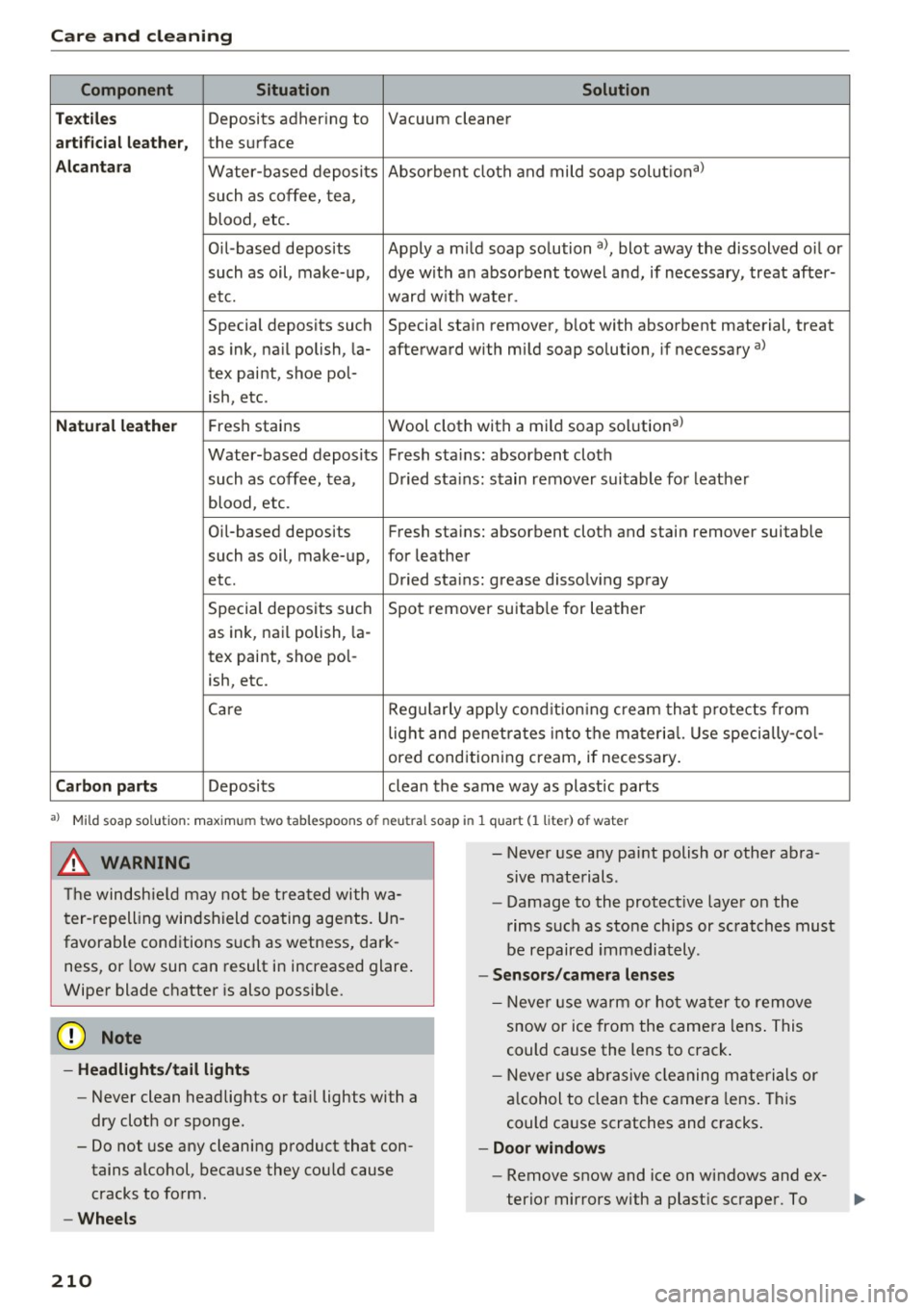
Care and cleaning
Component Situation Solution
Te xtil es
Deposits adhering to Vacuum cleaner
a rt ifici al le ather , the surface
Alcant ara Water-based deposits Absorben
t cloth and mild soap solutiona>
such as coffee, tea,
blood, etc.
O il-based deposits Apply a m ild soap solution a), blot away the dissolved oil or
such as oil, make-up, dye with an absorbent towel and, if necessary, treat after-
etc. ward wit h water.
Special deposits such Special stain remover, b lot with absorbent material, treat
as ink, na il polish, la- afterward with mild soap solution, if necessary a)
tex paint, shoe pol-
ish, etc.
Natural leather Fresh stains Wool cloth with a mild soap so
lutiona)
Water-based deposits Fresh sta ins : absorbent cloth
such as coffee, tea, Dried sta ins: stain remover suitable fo r leather
blood, etc.
Oil-based deposits Fresh stains: absorbent cloth and stain remover suitable
such as oil, make-up, for leather
etc. Dried sta ins : grease dissolv ing spray
Special deposits such Spot remover suitab le for leather
as ink, nai l polish, la -
tex paint, shoe pol-
ish, etc.
Ca re Regularly apply cond ition ing cream that protects from
light and penet rates into the materia l. Use specia lly-co l-
ored conditioning cream, if necessary.
Carbon parts Deposits clean the same way as plastic parts
a) Mild soap solution: maximum two tablespoons of neutral soap in 1 quart (l liter) of water
_& WARNING
The windshie ld may not be trea ted with wa
ter-repelling windshield coating agents. Un
favorable conditions s uch as wetness, dark
ness, or low sun can result in increased glare .
Wiper blade chatter is also possible.
(D Note
- Headlights/tail light s
-Never clean headlights or tail lights with a
dry cloth or sponge.
- Do not use any cleaning product that con
tains alcohol, because they could cause
cracks to form.
- Wheels
210
-
- Never use any paint polish or other abra
sive materials.
- Damage to the protect ive layer on the
rims such as stone chips or scratches must
be repaired immediately.
- Sensors /camera lenses
- Neve r use wa rm or ho t wa ter to remove
snow or ice from the camera lens . This
could cause the lens to crack .
- N eve r use ab rasive cleaning materials or
a lcohol to clea n the camera lens . This
could cause scratches and cracks .
-Doo r window s
-Remove snow and ice on windows and ex-
terior mirrors with a plast ic scraper. To
Page 213 of 300
,....,
N
co
er::
co
,....,
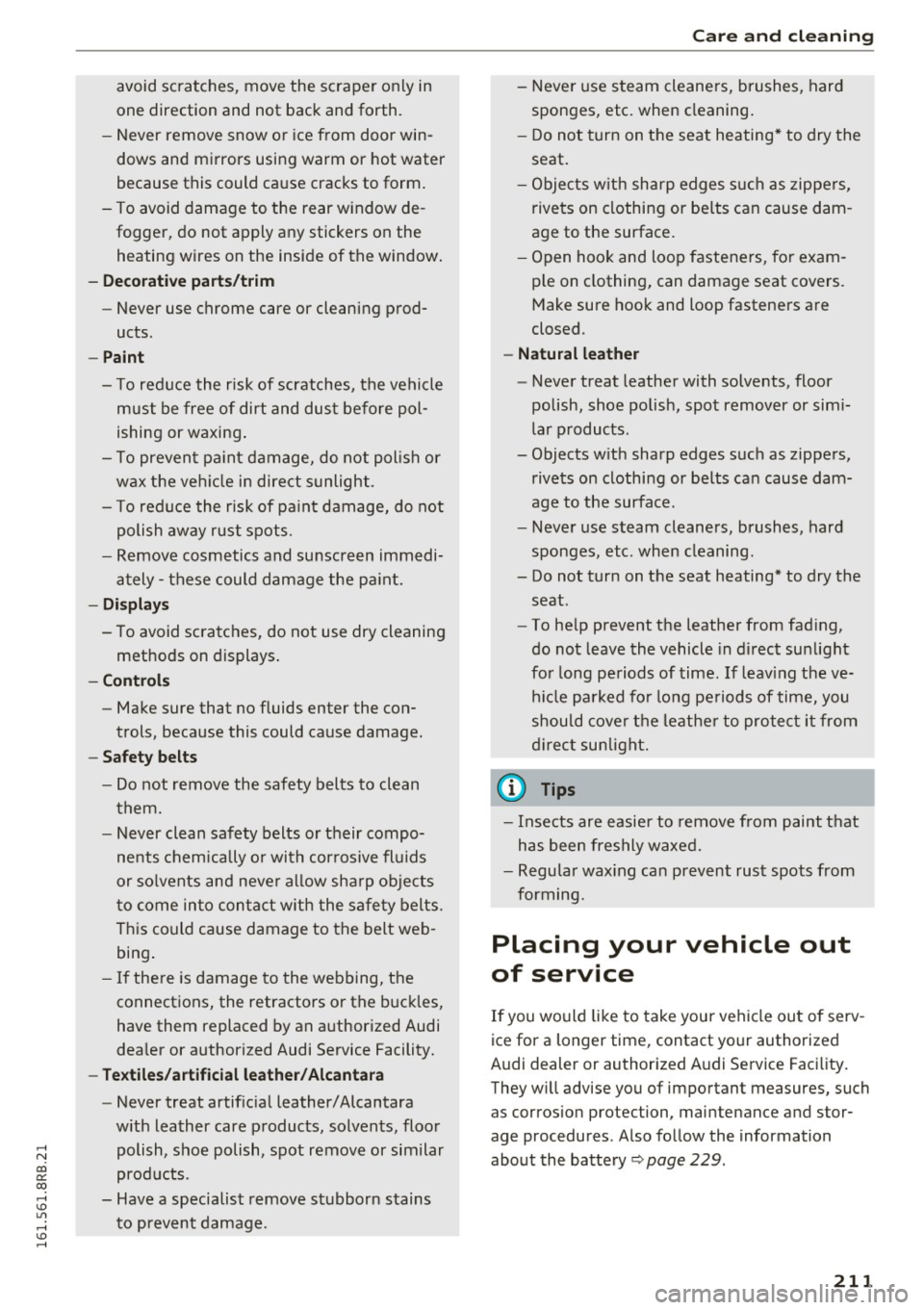
one direction and not back and forth.
- Never remove snow or ice from door win
dows and mirrors using warm or hot water
because this could cause cracks to form.
- To avoid damage to the rear window de
fogger, do not apply any stickers on the
heating wires on the inside of the window.
- Decorative parts/trim
- Never use chrome care or cleaning prod-
ucts.
-Paint
- To reduce the risk of scratches, the vehicle
must be free of dirt and dust before pol
ishing or waxing.
- To prevent paint damage, do not polish or
wax the vehicle in direct sunlight.
- To reduce the risk of paint damage, do not
polish away rust spots.
- Remove cosmetics and sunscreen immedi
ately- these could damage the paint.
-Displays
-To avoid scratches, do not use dry cleaning
methods on displays.
-Controls
- Make sure that no fluids enter the con-
trols, because this could cause damage.
- Safety belts
- Do not remove the safety belts to clean
them.
- Never clean safety belts or their compo
nents chemically or with corrosive fluids
or solvents and never allow sharp objects
to come into contact with the safety belts.
This could cause damage to the belt web
bing.
- If there is damage to the webbing, the
connections, the retractors or the buckles,
have them replaced by an authorized Audi
dealer or authorized Audi Service Facility.
- Textiles/artificial leather/ Alcantara
- Never treat artificial leather/ Alcantara
with leather care products, solvents, floor
polish, shoe polish, spot remove or similar
products.
- Have a specialist remove stubborn stains
to prevent damage.
Care and cleaning
-Never use steam cleaners, brushes, hard
sponges, etc. when cleaning.
- Do not turn on the seat heating* to dry the
seat.
- Objects with sharp edges such as zippers,
rivets on clothing or belts can cause dam
age to the surface.
- Open hook and loop fasteners, for exam
ple on clothing, can damage seat covers.
Make sure hook and loop fasteners are
closed.
- Natural leather
- Never treat leather with solvents, floor
polish, shoe polish, spot remover or simi
lar products.
- Objects with sharp edges such as zippers, rivets on clothing or belts can cause dam
age to the surface.
- Never use steam cleaners, brushes, hard
sponges, etc. when cleaning.
- Do not turn on the seat heating* to dry the
seat.
- To help prevent the leather from fading,
do not leave the vehicle in direct sunlight
for long periods of time. If leaving the ve
hicle parked for long periods of time, you
should cover the leather to protect it from
direct sunlight.
(D Tips
-Insects are easier to remove from paint that
has been freshly waxed.
- Regular waxing can prevent rust spots from
forming.
Placing your vehicle out
of service
If you would like to take your vehicle out of serv
ice for a longer time, contact your authorized
Audi dealer or authorized Audi Service Facility.
They will advise you of important measures, such
as corros ion protection, maintenance and stor
age procedures . Also follow the information
about the battery ¢
page 229.
211