radio AUDI Q5 2016 User Guide
[x] Cancel search | Manufacturer: AUDI, Model Year: 2016, Model line: Q5, Model: AUDI Q5 2016Pages: 300, PDF Size: 75.02 MB
Page 42 of 300
Opening and clo sin g
Unlocking and locking the vehicle with the
remote control
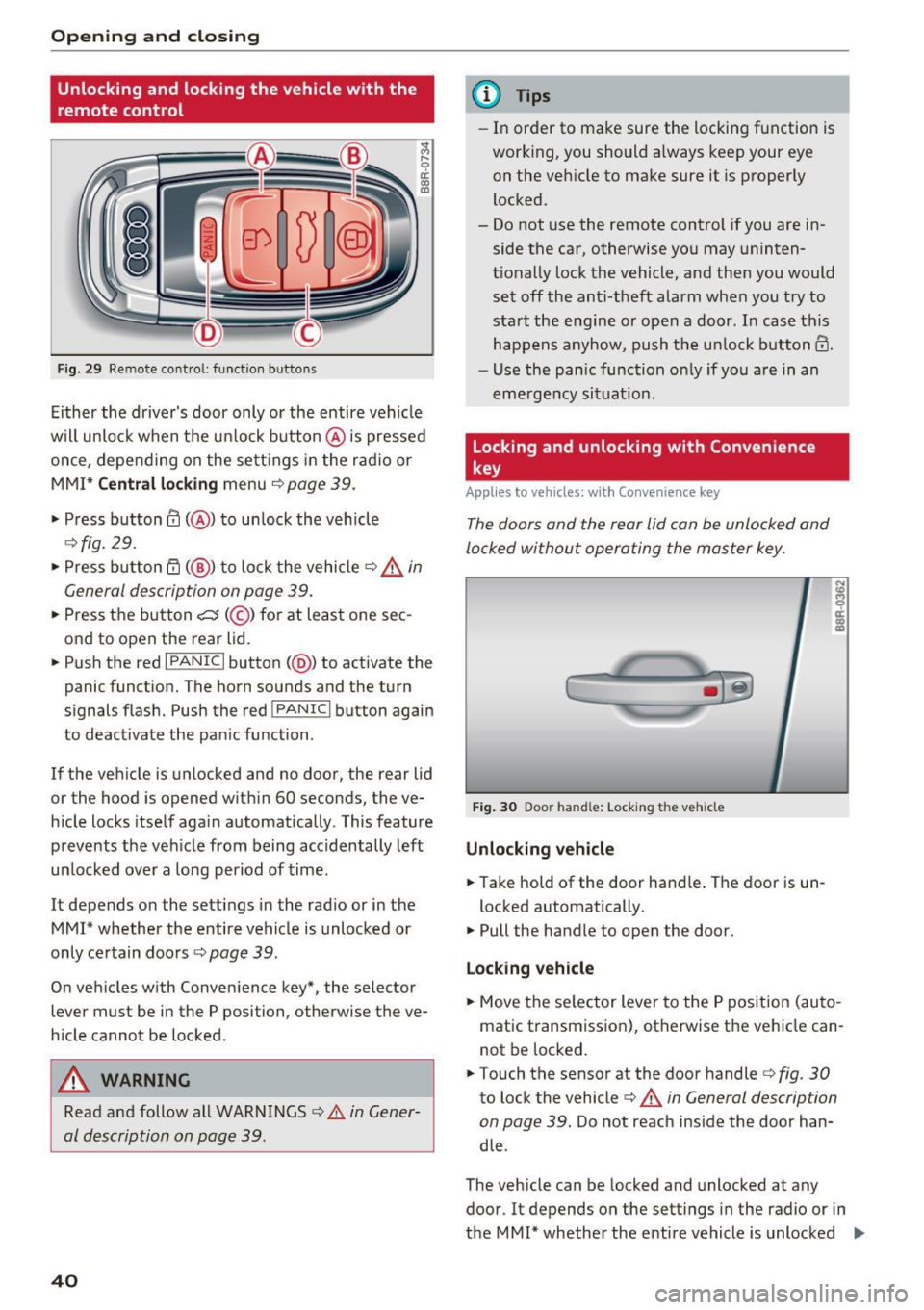
Fig. 29 Remo te cont ro l: function b uttons
Ei ther the driver's door only or the entire vehicle
wil l unlock when the u nlock button @is pressed
once, depe nd ing on the sett ings in the radio or
MMI*
C entral l ocking menu ¢page 39.
• Press button@( @) to un lock the vehicle
¢ fig. 29.
• Press button rfl (@ ) to lock the vehicle ~.&. in
General description on page 39.
• Press the button c::5 (@ ) for at least one sec
ond to open the rear lid.
• Push the red
I PANIC I button (@ ) to act ivate the
panic funct ion. The horn sounds and the turn
signals flash. Push the red
! PANIC I button again
to deactivate the pan ic function .
If the veh icle is unlocked and no door, the rear lid
or the hood is opened with in 60 seconds, the ve
h icle locks itself aga in automatically. This feature
prevents the veh icle from being accidentally left
un locked over a long period of time.
It depends on the settings in the rad io or in the
MMI* whether the entire vehicle is unlocked or
only ce rtain doo rs
r:!> page 39.
On veh icles w ith Conven ience key*, the selector
lever must be in the P position, otherw ise the ve
h icle cannot be locked .
A WARNING
Read and follow all WARNINGS ¢ A in Gener
al description on page 39.
40
@ Tips
- In order to make sure the locking function is
working, you should a lways keep your eye
on the vehicle to make sure it is properly
locked.
- Do not use the remote control if you are in side the car, otherwise you may uninten
tionally lock the vehicle, and then you would
set off the anti-theft alarm when you try to
sta rt the eng ine or open a door. In case this
happens anyhow, push the un lock button@.
- Use the pan ic function on ly if you are in an
eme rgency situat io n.
Locking and unlocking with Convenience
key
App lies to vehicles : wi th Convenience key
The doors and the rear lid can be unlocked and
locked without operating the master key.
Fig . 30 Door ha nd le: Lock ing the vehicle
Unlocking vehicle
• Take hold of the door hand le . The door is un -
locked automatically.
• Pull the handle to open the door .
Lo ck ing v ehicle
• Move the se lector lever to the P pos ition (au to
matic transmission), otherwise the vehicle can
not be locked.
• Touch the sensor at the door handler:!>
fig. 30
to lock the vehicle c:> A in General description
on page 39.
Do not reach inside the door han
dle .
The vehicle can be locked and unlocked at any
door. It depends on the sett ings in the radio or in
the MMI* whether the entire vehicle is unlocked
II>-
Page 55 of 300
..... N
co ~ CX)
..... I.Cl U"I
..... I.Cl .....
-Some exterior lighting functions can be a d
j u sted
¢page 53 .
-When yo u remove your key from the igni
tion while the vehicle's lights are t urne d on,
a buzzer sounds as long as the driver's door
i s open.
- In coo l or damp weather, the inside of the
headlights, turn signals and tai l lights can
fog over d ue to the temperature d ifference
between the inside and outs ide. They will
clea r short ly after switch ing them on. This
does not affect the serv ice life of the lig ht
i ng .
- In the event of a light sensor malfunct ion,
the d river is not ifi ed in t he i nstr ument clus
te r dis play¢
pag e 32.
Fog lights
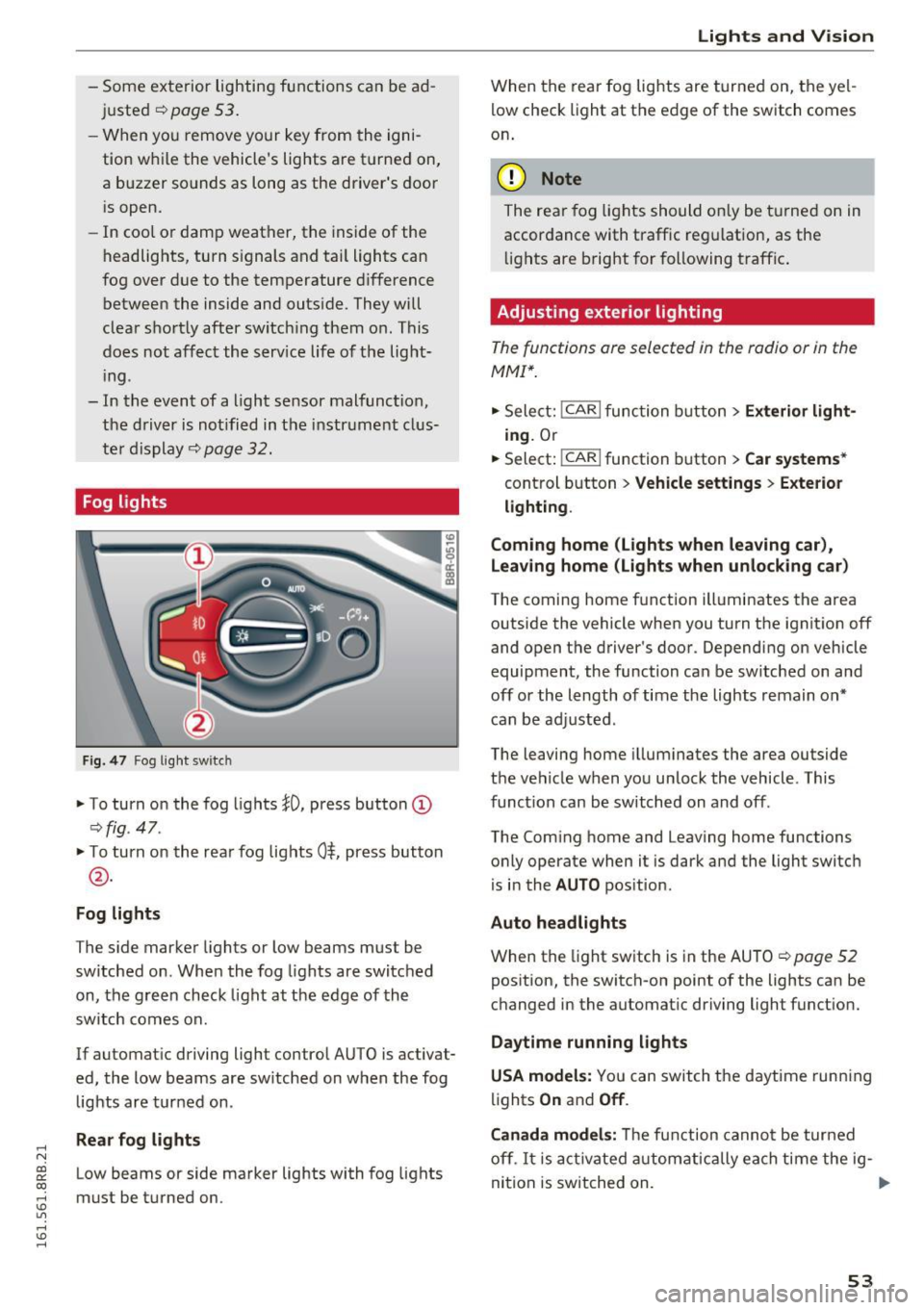
Fig . 4 7 Fog ligh t sw itc h
"To turn on the fog lights }O, press button (D
¢ fig. 47.
"T o turn on the rea r fog lights 0$, press but ton
@ .
Fog lights
The s ide marker lights or low beams must be
switche d on. When the fog lights are switc hed
on, the g reen check light at the edge of the
sw itch comes on.
If automat ic driving light control AUTO is activat
ed, the low beams are sw itched on w hen the fog
lights are tur ned on .
Rear fog lights
Low beams or side marker lights with fog lights
must be t urned on .
Lights and V ision
W hen the rear fog lights are t urned on, the yel
l ow check light at the edge of the switch comes
on .
(D Note
The rear fog lig hts should o nly be t urne d on in
accor dance with traffic reg ulation, as the
li g hts are b right for f ollowing traffic .
Adjusting exterior lighting
The functions are selected in the radio or in the
MMI*.
"Sele ct: !CAR ! func tion b utton> Exterior light
ing .
Or
.. Select:
-,c- A- R~I function button > Car systems *
control b utton > Vehicle settings > Exterior
lighting .
Coming home (Lights when leaving car ),
Leav ing home (Lights when unlock ing car )
The coming home f unction illuminates the area
outside the vehicle when you turn the ignit ion off
and open the d river's doo r. Dependi ng on vehicle
equipment, the function can be sw itched on and
off or the length of time the lights remain on*
c an be ad justed .
The leaving home i llum inates the area outside
t h e ve hicle when you un lock the vehicle . This
funct ion can be switched on and off .
The Com ing home and Leaving home functions
o nly operate when it is dark and the light switch
i s i n the
AUTO pos it ion.
Auto headlights
When the light sw itch is in the AU TO ¢ page 52
pos ition, the switch-on point of the lights can be
changed in the automat ic driving light funct ion.
Daytime running lights
USA models: You can switch the daytime runn ing
li ghts
On and Off .
Canada models:
Th e fu nction canno t be turned
off .
It is a ct ivate d automatica lly ea ch time the ig-
ni tio n i s switched on. ..,
53
Page 60 of 300
Lights and Vi sion
switched back on by moving the windshield
wiper lever to any position .
- Worn or dirty windshield wiper blades result
in streaking. This can affect the rain sensor
function . Check your windshield wiper
blades regularly.
- The washer fluid nozzles of the windshield
washer system are heated at low tempera
tures when the ignition is on .
- When stopp ing temporarily, e .g . at a traffic
light, the set speed of the windsh ield wipers
i s automatically reduced by one speed .
Cleaning windshield wiper blades
Clean the windshield wiper blades when they be
gin to leave streaks . Use a soft cloth and g lass
cleaner to clea n the windshield wipe r blades .
Front wipe r
.,. Place the windshield wiper arms in the service
pos ition. Refer to¢
page 58.
.,. Lift the wiper arm away from the front window .
Rear wiper
.,. Lift the wiper arm away from the rear window .
A WARNING
Dirty windshield wiper blades can impair your
view. This can lead to accidents.
Replacing windshield wiper blades
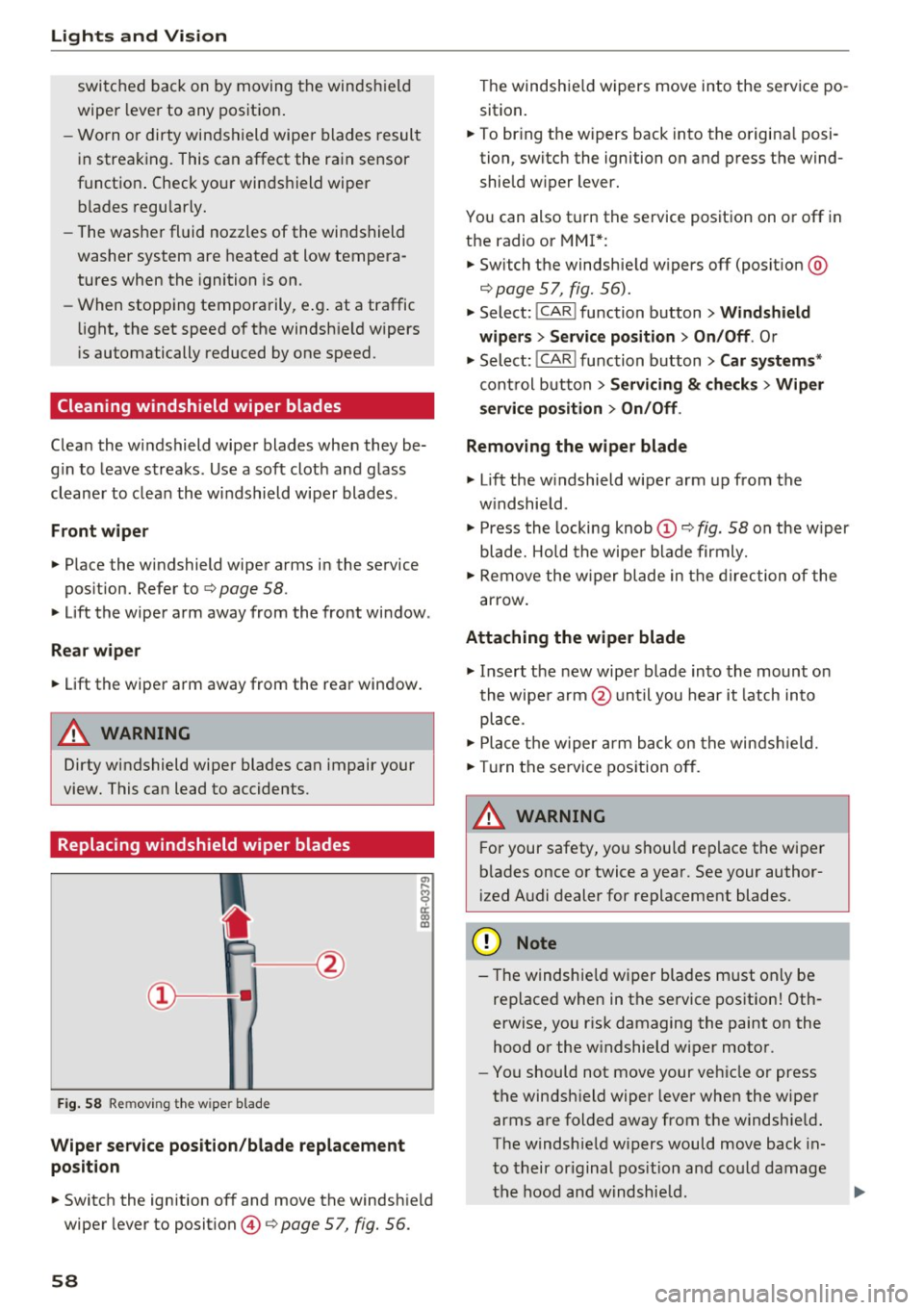
F ig. 58 Remov ing the w ipe r blad e
Wiper servic e position /blad e re placem ent
po sit ion
"' ij
a: CX) ID
.,. Switch the ignition off and move the windsh ie ld
wiper lever to position @ ¢
page 57, fig. 56.
58
The windshie ld wipers move into the service po
sition .
.,. To br ing the w ipers back into the origina l posi
tion, switch the ignition on and press the wind
shie ld w iper lever.
You can also turn the service position on or off in
the radio or MMI *:
.,. Switch the windshie ld w ipers off (posit ion @
¢page 57, fig. 56).
.,. Select:
!CAR I function button> Windshield
wiper s
> Servic e po sition > On /Off . Or
.,. Select :
!CAR I function button> Car system s*
control button > Ser vicing & ch eck s > Wiper
s ervi ce po sition
> On /Off .
Removing the wiper blade
.,. Lift the w indshield w iper arm up from the
w indshie ld .
.,. Press the locking knob@¢
fig. 58 on the w iper
blade. Ho ld the wipe r blade firmly .
.,. Remove the w iper blade in the direction of the
arrow .
Attaching the wiper blade
.,. Insert the new wiper blade into the mount o n
the wipe r arm @unt il you hear it latch into
place .
.,. Place t he w iper a rm back on the winds hield.
.,. Tur n the se rvice pos ition off.
A WARNING
F or your safety, you shou ld replace the wiper
b lades once or twice a year. See your author
ized Audi dealer for replacement blades.
(D Note
- The windshie ld wiper blades must only be
replaced when in the service pos ition! Oth
erwise, you r isk damaging the paint on the
hood or the w indshield wiper moto r.
- You should not move your vehicle or press
the windsh ield wiper lever when the wiper
arms are folded away from the windshie ld.
The windshie ld w ipers would move back in
to their or iginal pos ition and could damage
the hood and w indshie ld .
Page 68 of 300
Sea ts and stor age
Activating remote control key memory
Applies to vehicles: with seat memory
To assign the drive r's seat settings to the remote
con trol key when locking the vehicle, the function
m ust be activated in the radio or M MI*.
• Select:
ICARI funct ion button > Seat adjust
ment > Dr iver' s se at
> Key mem. profi le > On .
Or
• Se lect:
I CARI funct io n button > Car sy stem s*
contro l button > Vehicle sett ing s > S eats >
Driv er's s eat > Remote control key > On .
@ Tips
If you do not want another driver's settings to
be assigned to the remote control key, switch
off the memory function using the radio or
MMI* or the
j o FF I button ¢ page 65.
Rear seat
General information
Safe transportation of passengers on the rear
seats requires proper safety precautions.
All passengers on the rear seats must be seated
in compliance w ith the safety guidelines ex
p lai ned in
¢ page 143 and ¢page 151. The cor
rect seating positio n is critical for the safety of
fron t
and rear seat passengers a like ¢ page 13 7.
_8. WARNING
- O ccupan ts in the front and rear seats m ust
always be properly res trained.
- Do not let anyone ride in the vehicle withou t
t h e head restraints prov ided. Head re
straints hel p to reduce injuries.
- Loose items ins ide the passenger compa rt
ment, can fly forward in a crash or sudden
maneuver and injure occupants. Always
store articles in the luggage compartment
and use the fasten ing eyes, especially when
t h e rear seatbacks have been folded down.
- Read and heed all WARNINGS
¢page 137,
Proper seating positions for passengers in
rear seats.
66
Adjusting seat
The fore-and-a~ adjustment of the seat cushion
and the seatback angle can be adjusted .
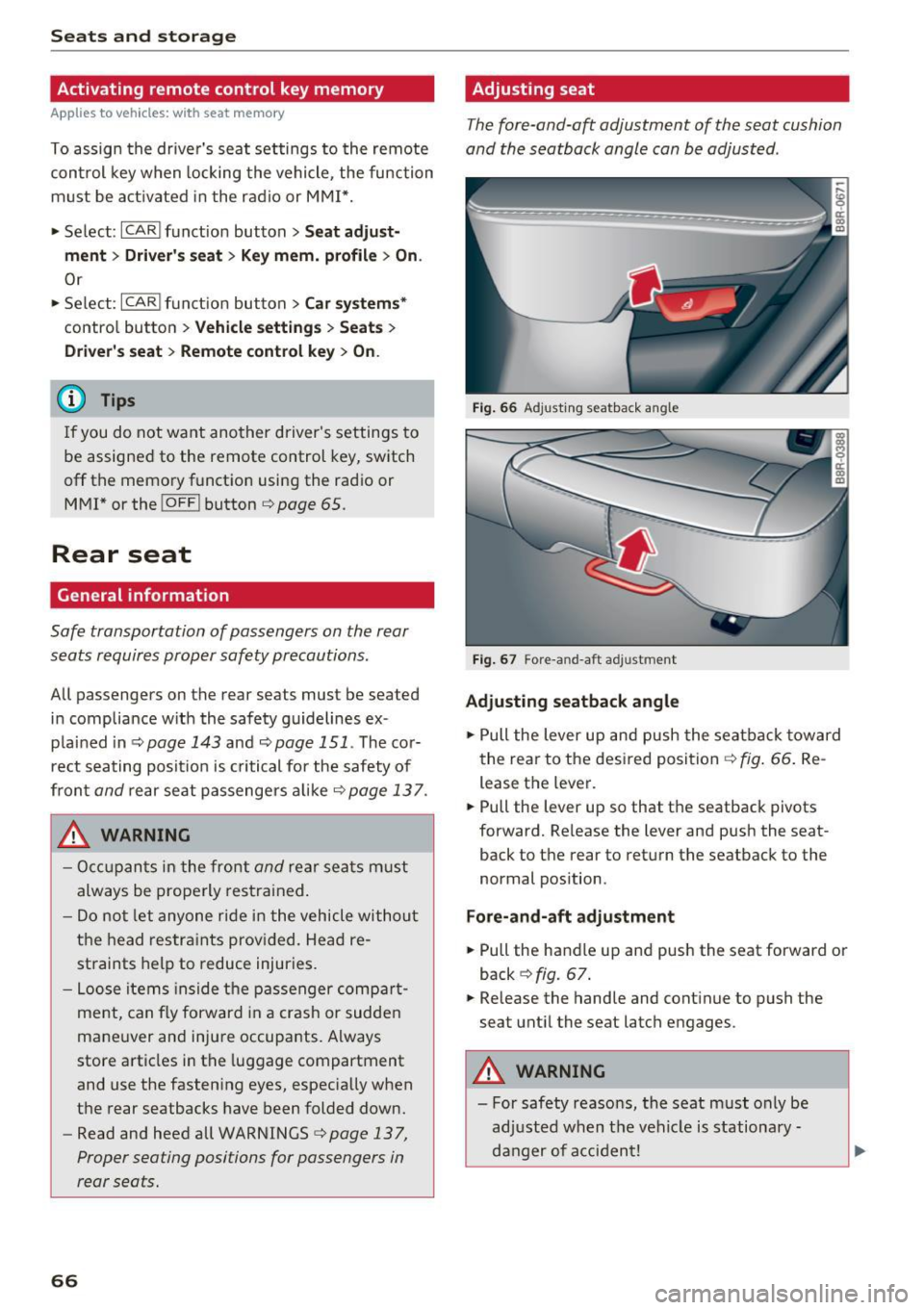
Fig. 66 Ad justing seatback angle
F ig . 67 Fore -a n d-aft ad justment
Adjusting seatback angle
• Pull the lever up and push the seatba ck toward
the rea r to the desired position~
fig. 66 . Re
lease the lever.
• Pull the lever up so that the seatback pivots
forward. Release the lever and push the seat
back to the rear to retu rn the seatback to the
normal pos ition .
Fore-and-aft adju stment
• Pull the handle up and push the seat forward or
back ¢
fig. 67.
• Release the handle and cont inue to push the
seat until the seat latch engages .
_8. WARNING
- For safety reasons, the seat must only be
ad justed when t he vehicle is stationa ry -
danger of acci dent!
Page 83 of 300
..... N
co ~ CX)
rl I.Cl U"I
rl I.Cl .....
Warm and cold
Operation
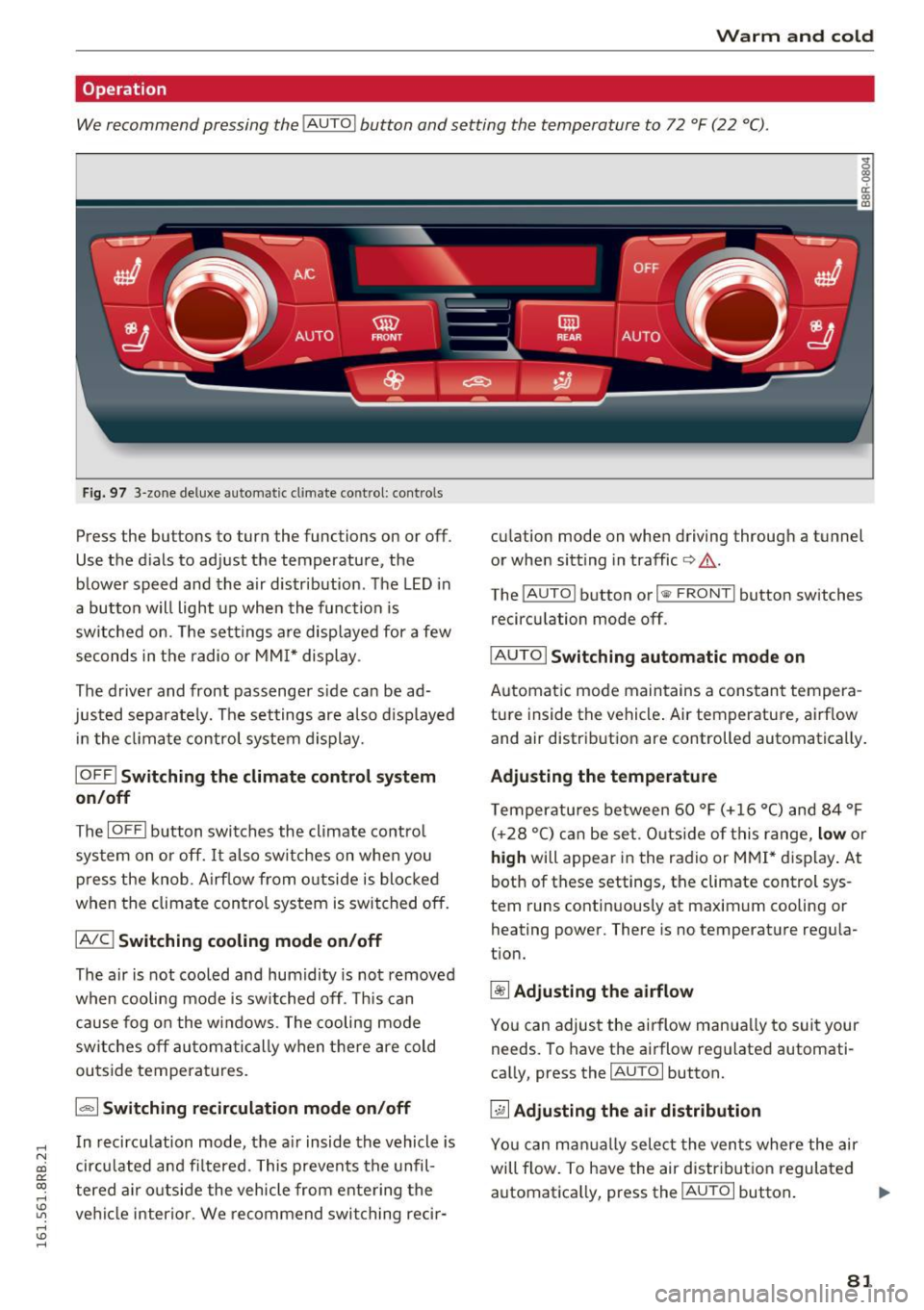
We recommend pressing the !AUTO ! button and setting the temperature to 72 °F (22 °C).
Fig. 97 3-zone deluxe automatic cl imate control: co ntrols
Press the buttons to turn the functions on or off .
Use the d ials to adjust the temperature, the
blower speed and the air distr ibut ion. The LED in
a button w ill light up when the function is
switched on. The settings are displayed for a few
seconds in the radio or MMI* display .
The driver and front passenger s ide ca n be ad
justed separately. The settings are also displayed
in t he climate control system display.
IOFFI Switching the climate control system
on/off
The I OF Fi button switches the climate contro l
system on or off.
It also sw itches on when you
press the knob. Airf low from o utside is blocked
when the climate control system is switched off.
IA/C l Switching cooling mode on/off
The air is not cooled and humidity is not removed
when cooling mode is switched off. This can
cause fog on the windows. The cooling mode
switches off automatically when there are cold
outside temperat ures.
1.,,., 1 Switching recirculation mode on/off
In recirculation mode, the air inside the vehicle is
circu lated and fi ltered. This prevents the unfil
tered air o utside the vehicle from ente ring the
ve hicl e interior. We recommend switching rec ir- cu
lation mode on when driving through a tunnel
or when sitt ing in traffic
c> .&. .
The !AUTO I button or I @ FRONT I button switches
recirculation mode off.
I AUTO I Switching automatic mode on
Automatic mode maintains a constant tempera
ture inside the vehicle . Air temperature, airf low
and air distribut ion are controlled automatically .
Adjusting the temperature
Temperatu res between 60 °F (+ 16 °C) and 84 °F
( +2 8 °C) ca n be set. O uts ide of this range,
low or
high will appear in the radio or M MI* display. At
both of these settings, the climate control sys
tem runs continuous ly at maximum cooling or
heating power. There is no temperat ure regula
t ion.
~ Adjusting the airflow
You can adjus t the airflow manua lly to suit your
needs. To have the airflow reg ulated automati
ca lly, press the
IAUTO I button.
~ Adjusting the air distribution
You can man ually select the ven ts where the air
will flow. To have the air distribut ion regulated
automatica lly, press the
IAUTOi button . ..,.
81
Page 84 of 300
Warm and cold
[ii Adjusting seat heating*
P ressing the button switches the seat heating on
at the highest setting (level 3). The LEDs indicate
the temperature level. To reduce the tempera
ture, press the button again. To switch the seat heating
off, press the button repeatedly until the
LED turns
off.
After 10 minutes, the seat heating automatically
switches from level 3 to level 2.
lil Adjusting seat ventilation*
Pressing the button switches the seat vent ilation
on at the highest sett ing (level 3). The LEDs indi
cate the venti lation level. To reduce the ventila
tion level, press the button again. To sw itch the
seat ventilation
off, press the button repeatedly
until the LED turns
off.
l qo, FRONT I Switch the defroster on/off
The windshield and side windows are defrosted
or cleared of condensation as quickly as possible.
The maximum amount of air flows main ly from
the vents below the windshield. Recirculation
mode switches off. The temperature should be
set to 72 °F (22 °() or higher. The temperature is
controlled automat ically .
The
IAUTOI button switches the defroster off.
IQiil REARI Switching rear window heater on/
off
The rear window heater on ly operates when the
engine is running. It switches off automatica lly
after a few minutes, depending on the outside
temperature.
To prevent the rear window heater from switch ing
off automatically, press and ho ld the l(jji) REARI
button for more than 2 seconds. This remains
stored until the ign it ion is switched off.
Air vents
You can open and close the center and rear air
vents using the thumbw heels . The levers adjust
the direction of the airflow from the vents.
You can adjust the air temperature in the rear by
turning the thumbwheel toward the red side to
82
make it warmer or toward the blue side to make
it coo ler.
A WARNING
- Do not use the recirculation for extended
periods of time. The windows could fog up
since no fresh air can enter the vehicle. If
the windows fog up, press the air rec ircula
tion button again immed iately to switch
off
the air rec irculat ion function or select de
frost.
- Individuals with reduced sensit iv it y to pain
or temperature could develop burns when
using the seat heating* function . To reduce
the risk of injury, these individuals should
not use seat heating.
(D Note
To avoid damage to the heating elements* in
the seats, do not kneel on the seats or place heavy loads on a small area of the seat.
Setup
-
The basic climate control settings can be adjust
ed in the radio or MM!".
"'Select : !CAR I function button> A/C control but
ton. Or
"' Select:
I CAR I function button > Car systems*
control button >
A/C.
Automatic recirculation
When switched on, automat ic rec irculation con
tro ls the recirculation mode automatically. If the
windows fog up, press the
I® FRO NT ! button.
Synchronization
When synchron izat ion is switched on, the same
settings are applied to both the dr iver and front
passenger , except for the seat heating/ventila
tion* . Synchronization switches
off when you ad
just the settings on the front passenger's side.
You can also switch synchronizat ion on by press -
i ng and holding the knob on the driver's side .
Ill>-
Page 90 of 300
Driving
electrical equipment such as exterior lights
will switch off as well when that happens.
Switching engine off
Applies to veh icles: w ith Conven ience key
~ Bring your vehicle to a complete stop.
~ Move the selector lever to the P or N position.
~ Press the I START ENGIN E STOPI button
¢page 87, fig. 10 2.
Steering lock
The steering locks when you turn the engine off
using the
!START ENGINE STOP ! button and
open the driver 's door. The locked steering helps
prevent vehicle theft.
Emergency off
If necessary, the engine can be switched off with
the s ele ctor lever in the R or D/S position. The
engine stops if you press and hold the
!START ENGINE STOP! button at speeds below
6 mph (10 km/h) and press the brake pedal.
A WARNING
- Never turn off the engine before the vehicle
has come to a complete stop. The full func
t ion of the brake booster and the power
steering is not guaranteed. You must use
more force to turn or brake if necessary. Be
cause you cannot steer and brake as you
usually would, this could lead to crashes
and serious injuries.
- For safety reasons, you should always park
your vehicle with the selector lever in P.
Otherwise, the vehicle could inadvertently
roll away .
- The radiator fan can continue to run for up
to 10 minutes even after you have turned
off the engine and removed the ignition key.
The radiator fan can also turn on again if the
engine coolant heats up because of intense
sunlight or heat build-up in the engine com
partment.
- Always take the key with you whenever you
leave your vehicle. Otherwise, the engine
could be started or electrical equipment
88
such as the power windows could be operat
ed. This can lead to serious injury.
- Never leave children or persons requiring as
sistance unattended in the vehicle. The
doors can be locked using the remote trans
mitter, preventing people from escaping
from the vehicle on their own in the event of
an emergency. Depending on the time of
year, people inside the vehicle can be ex
posed to very high or very low tempera
tures.
0 Note
If the engine has been under heavy load for
an extended period, heat builds up in the en
gine compartment after the engine is switch
ed off -there is a risk of damaging the engine.
Allow the engine to run at idle for about two
minutes before switching it off.
Driver messages
Ignition is on
This message appears and a warning tone sounds
if you open the driver 's door when the ignition is
switched on.
No key identified
This message appears when the
ISTART E NGIN E STOP !* button is pressed if there
is no master key inside the vehicle or if the sys
tem does not recognize it. For example, the mas
ter key cannot be recognized if it is covered by an
object (e .g . aluminum brief case) which
screens
the radio s ignal. Electronic devices such as cell
phones can also interfere with the radio signal.
Press brake pedal to start engine
This message appears if you do not press the
brake pedal to start the engine .
Shift to N or P to start engine
This message appears when attempting to start
the engine if the selector lever for the automatic
transmission is not in the P or N position. The en
gine can only be started with the selector in
these positions.
ll-
Page 97 of 300
..... N
co ~ CX)
..... I.Cl U"I
..... I.Cl .....
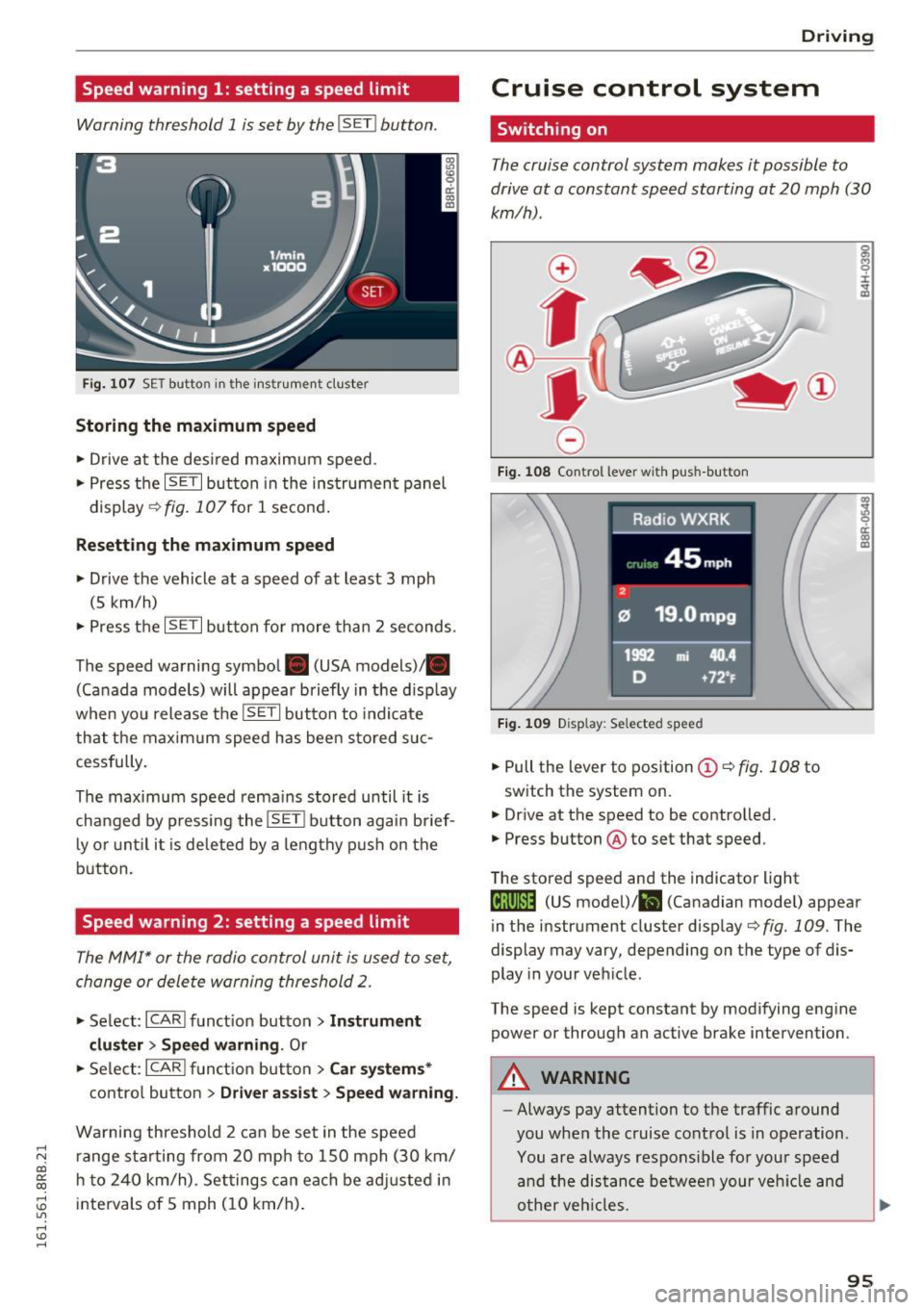
Speed warning 1: setting a speed limit
Warning threshold 1 is set by the IS ET I button .
Fig. 107 SET butto n in t he inst rume nt cluster
Storing the maximum speed
.. Drive at the desired maximum speed.
.. Press the
ISE TI button in the instrument panel
display ¢fig .107for 1 second .
Resetting the maximum speed
.. Drive the vehicle at a speed of at least 3 mph
(5 km/h)
.. Press the
~ IS- ET~I button for more than 2 seconds .
The speed warning symbol. (USA models)/ .
(Canada models) will appear briefly in the d isp lay
when you release the
ISE TI button to indicate
that the maxim um speed has been sto red suc
cessfully.
The maximum speed rema ins stored until it is
changed by pressing the
I S ET I button aga in brief
l y o r until it is deleted by a lengthy p ush on the
button.
Speed warning 2: setting a speed limit
The MMI* or the radio control unit is used to set,
change or delete warning threshold
2.
.. Se lect: I CARI f u nct ion button > Instrum ent
clu ster > Sp eed warning .
Or
.. Se lect: ICARI funct ion but ton> C ar sys tem s*
contro l button > Dri ver a ssist > Speed warning.
Wa rning threshold 2 can be set in the speed
r ange sta rting from 20 mp h to 150 mph (30 km/
h t o 240 km/h) . Settings can each be ad justed i n
intervals of 5 mph ( 10 km/h) .
Drivi ng
Cruise control system
Switching on
The cruise control system makes it possible to
drive at a constant speed starting at 20 mph (30
km/h) .
0
f
~
0
Fig . 108 Co ntrol lever w it h push -b utton
F ig . 1 09 Disp la y: Se lected speed
.. Pull the lever to position ©¢ fig. 108 to
switch the system on.
.,. Dr ive at the speed to be controlled.
.. Press button @to set that speed.
The stored speed and the indicator light
g M 0 :i:
;A
..
~ a: .. m
@;\l)M4 (US model) !&I (Canadian mode l) appear
in the instrument cluster display
¢fig. 109 . The
display may vary, depending on the type of dis
play in your veh icle .
The speed is kept constant by modifying engine power or through an active brake intervention .
A WARNING
--
-Always pay attention to the traffic around
you when the cruise control is in operation .
You are always respons ible for your speed
a nd the distance between your veh icle and
o ther veh icles.
95
Page 113 of 300
..... N
co ~ CX)
..... I.Cl U"I
..... I.Cl .....
Audi adaptive cruise control and braking guard
~--- ~-Di stance 3: This setting corresponds
to a distance of 164 feet/SO meters when travel
ing at 62 mph (100 km/h), or a time interval of
1.8 seconds.
~ ---- ~ Distance 4: This setting corresponds
to a distance of 210 feet/64 meters when travel
ing at 62 mph (100 km/h), or a time interval of
2 .3 seconds.
A WARNING
Following other vehicles too closely increases
the risk of collisions and ser ious personal in
jury.
- Setting short distances to the traffic ahead
reduces the time and distance available to
br ing your vehicle to a safe stop and makes
it even more necessary to pay close atten
tion to traffic.
- Always obey applicable traffic laws, use
good judgment, and select a safe following
distance for the traffic, road and weather
conditions.
¢j) Tips
- Distance 3
is set automatically each time
you switch the ignition on.
- Your standard sett ings are automat ically
stored and assigned to the remot e control
k ey be ing used
<=> page 36.
Setting the driving program
Applies to vehicles: with Audi adaptive cruise control
Depending on the selected dr iv in g program and
d istance, driving behavior when accelerating w ill
vary from dynamic to comfortable.
Setting the driving program for vehicles
without Audi drive select*
~ In the radio/MM!*, select: !CARI funct ion but
ton >
adaptive cruise control > Driving pro
gram > Comfort, Standard or Dynamic .
Or
~ Select: ICARI function button> Car systems*
contro l button > Driver ass ist > Adaptive cruise
control > Driving program > Comfort, Stand
ard or Dynamic . Setting the driving mode for vehicles with
Audi drive select*
Refer to c!:>poge 120 .
(D Tips
Your settings are automatically stored and as
s ig ned to the remote control key being used
c!:> page 36.
Request for driver intervention
Applies to vehicles: with Audi adaptive cruise control
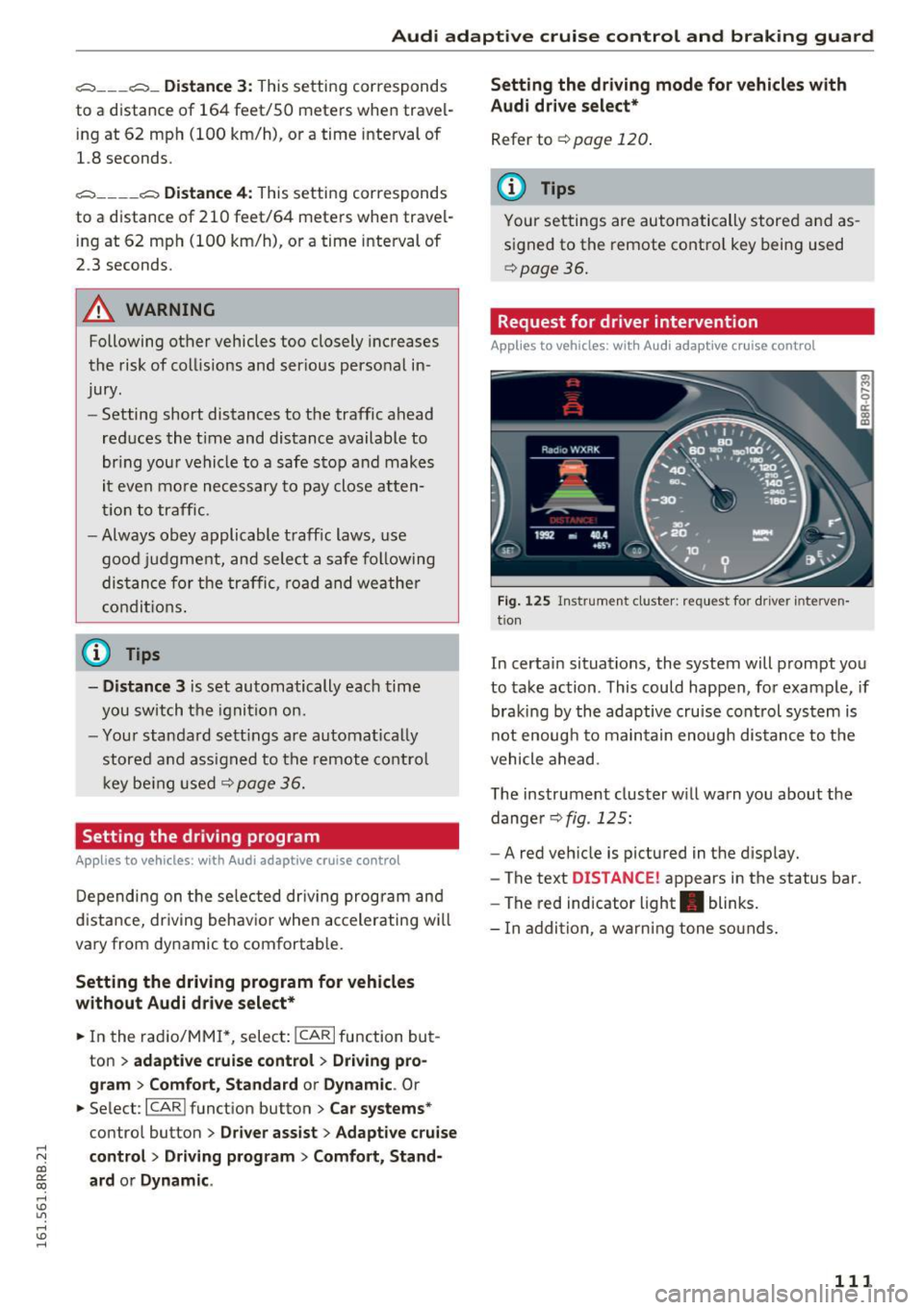
Fig. 125 Instrument cluster: req uest for driver interven
tion
In certain situations, the system will prompt you
to take action . This could happen, for example, if
braking by the adaptive cruise control system is
not enoug h to maintain enough distance to the
vehicle ahead.
The instrument cluster w ill warn you about the
dange r
c!:>fig . 125:
-A red vehicle is pictured in the display.
- The text
DISTANCE! appears in the status bar.
- The red indicator light . blinks.
- I n addition, a warning tone sounds.
111
Page 114 of 300
Audi adaptive cruise control and braking guard
Audi braking guard
Description
Applies to vehicles: with Audi adaptive cruise contro l
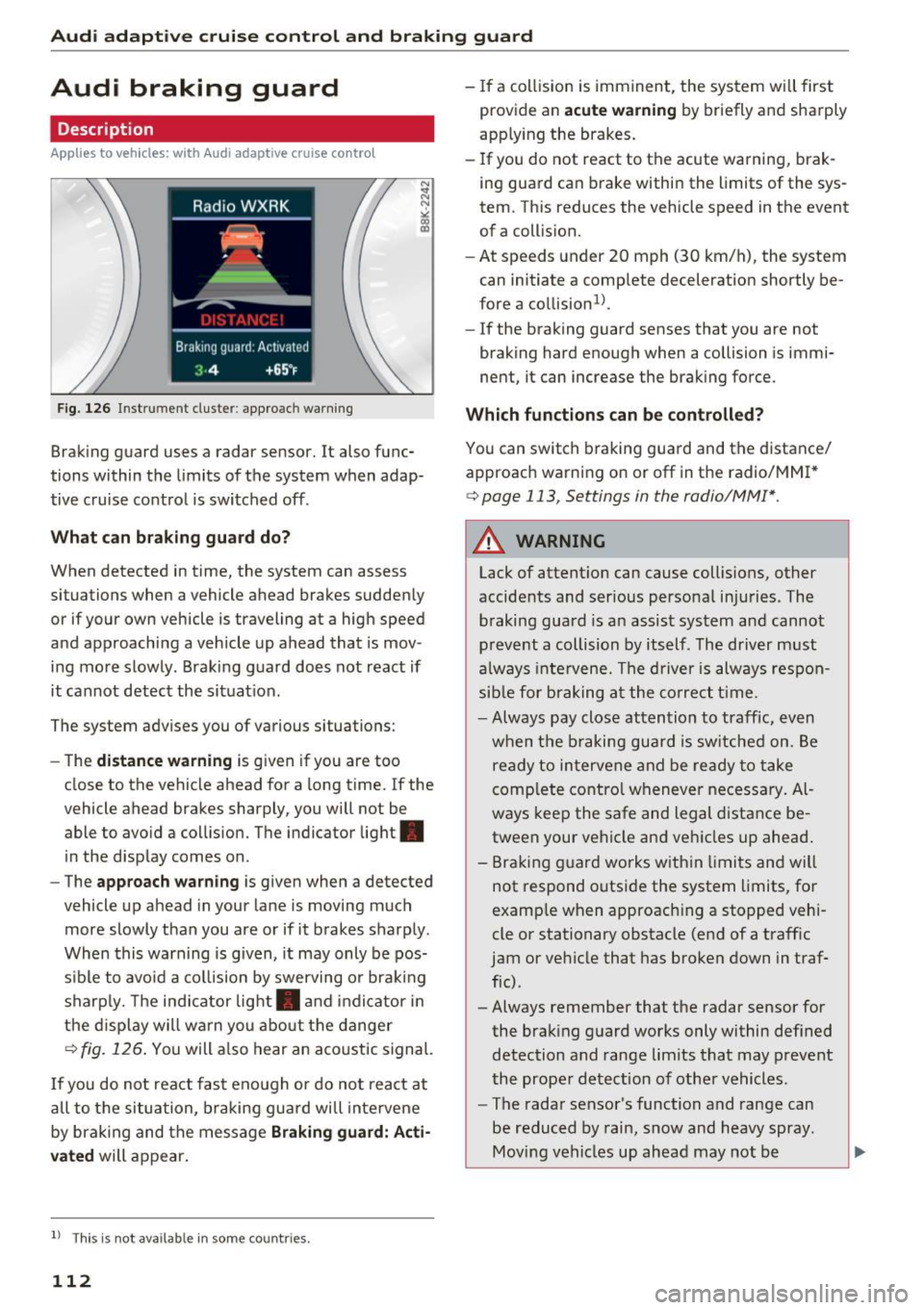
Fig. 126 In strument cluste r: appro ach warning
Braking guard uses a radar sensor. It also func
tions within the limits of the system when adap
tive cruise control is switched off .
What can braking guard do?
When detected in time, the system can assess
situations when a veh icle ahead brakes suddenly
or if your own vehicle i s traveling at a high speed
and approaching a vehicle up ahead that is mov
ing more slowly . Braking guard does not react if
it cannot detect the situat ion.
The system advises you of variou s situations:
- The
distance warning is given if you are too
close to the vehicle ahead for a long time. If the
vehicle ahead brakes sharply, you will not be
able to avoid a collision. The indic ator light .
in the display comes on.
- The
approach warning is given when a detected
vehicle up ahead in your lane is moving much
more slowly than you are or if it brakes sharply .
When this warning is given, it may only be pos
s ib le to avo id a collision by swerving or braking
sharply. The indicator light . and indicator in
the display will warn you about the danger
¢fig. 126. You will also hear an acoustic signal.
If you do not react fast enough or do not react at
a ll to the situation, braking guard will intervene
by braking and the message
Braking guard: Acti
vated
will appear.
l) Thi s is no t a vail able in som e coun trie s.
112
- If a collision is imminent, the system will first
provid e an
acute warning by briefly and sharply
app ly ing the b rakes.
- If you do not react to the acute warning, brak
ing guard can brake within the limits of the sys
tem . This reduces the vehicle speed in the event
of a collision.
- At speeds under 20 mph (30 km/h), the system
can initiate a comp lete deceleration shortly be
fore a collision ll.
- If the braking gua rd senses that you are not
braking hard enough when a collision is immi
nent, it can increase the braking force.
Which functions can be controlled?
You can switch braking guard and the distance/
approach warning on or off in the radio/MM
I*
¢ page 113 , Settings in the radio/MM!* .
A WARNING
Lack of attent ion can cause collisions, other
accidents and ser ious personal injuries . The
braking guard is an assist system and cannot
prevent a collision by itself . The driver must
always intervene. The driver is always respon
sible for braking at the correct time .
- Always pay close attention to traffic, even
when the braking guard is switched on. Be
ready to intervene and be ready to take
complete control whenever necessary. Al
ways keep the safe and legal distance be
tween your vehicle and vehicles up ahead .
- Braking guard works within limits and will
not respond outside the system limits, for
examp le when approach ing a stopped vehi
cle or stationary obstacle (end of a traffic
jam or vehicle that has broken down in traf
fic) .
- Always remember that the radar sensor for
the braking guard works only within defined
detection and range limits that may prevent
the proper detection of other vehicles.
- The radar sensor's function and range can
be reduced by rain, snow and heavy spray.
Moving vehicles up ahead may not be
-