warning AUDI Q5 2016 Owners Manual
[x] Cancel search | Manufacturer: AUDI, Model Year: 2016, Model line: Q5, Model: AUDI Q5 2016Pages: 300, PDF Size: 75.02 MB
Page 273 of 300
..... N
co ~ CX)
..... I.Cl U"I
..... I.Cl .....
When jump starting or charging the bat
tery, never connect the negative ground ca
ble to tbe battery negat ive post because the
battery manager system must be ab le to de
tect the battery's state of charge. Always
connect the negative ground cable to the
negative ground post of the battery manag
er contro l unit .
Use of jumper cables
Make sure to connect the jumper coble clomps in
exactly the order described below!
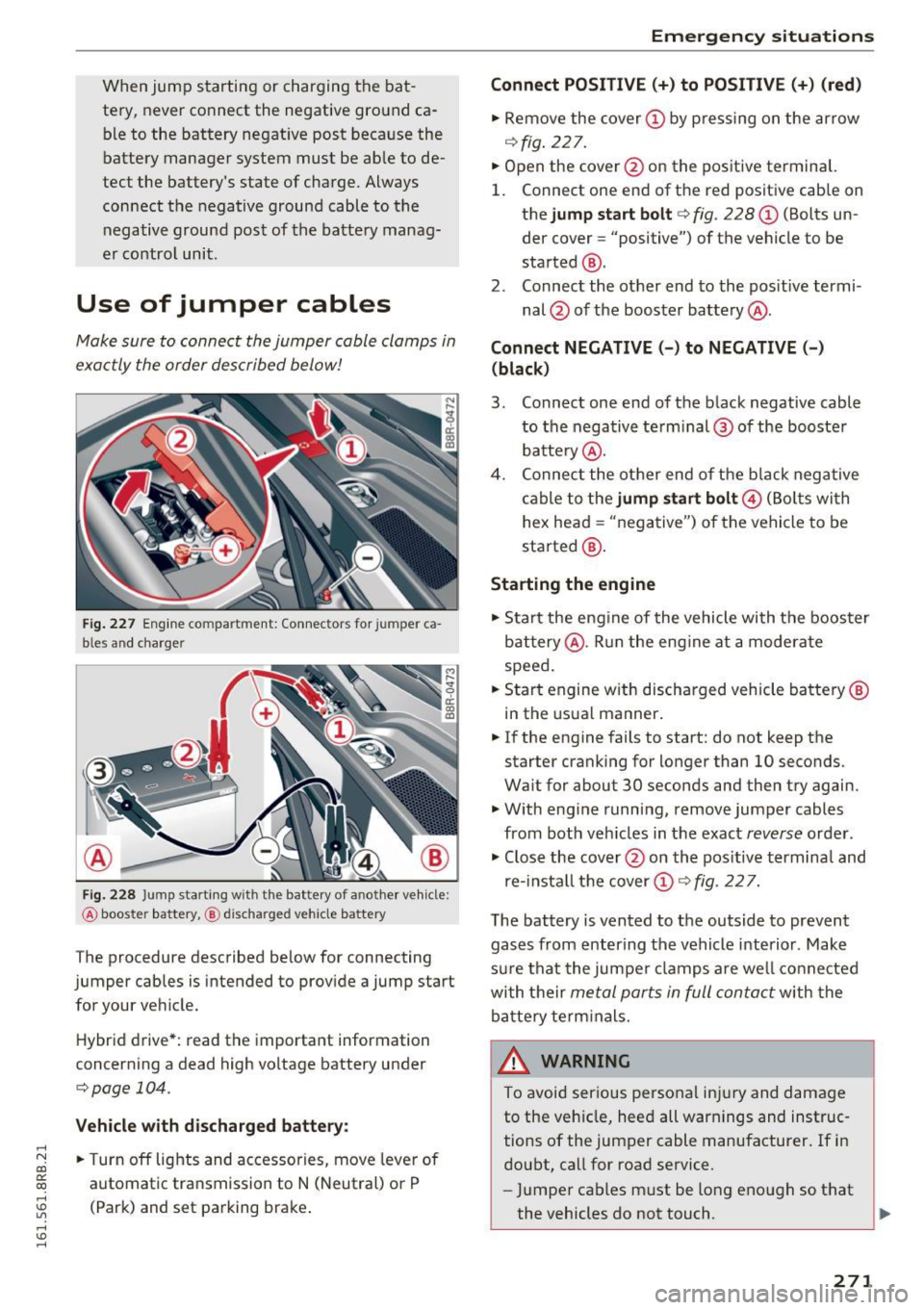
Fig. 227 Engine co mpartment: Connectors for jumper ca
b les and charger
Fig. 228 Jump starting w ith the bat tery of a nother vehicle:
@ booste r battery, @ discha rged veh icle battery
The procedure described below for connecting
jumper cables is intended to provide a jump start for your vehicle.
Hybrid drive*: read the important information
concerning a dead high voltage battery under
c;;,poge 104.
Vehicle with discharged battery:
.. Turn off lights and accessories, move lever of
automatic transmission to N (Neutral) or P
(Park) and set parking brake .
Emergency situations
Connect POSITIVE(+) to POSITIVE (+) (red)
.. Remove the cover@ by pressing on the arrow
¢fig. 227.
.. Open the cover @on the positive terminal.
1. Connect one end of the red positive cab le on
the
jump start bolt r=;;, fig. 228 @ (Bolts un
der cover= "positive") of the vehicle to be
started @.
2. Connect the other end to the positive termi-
nal @ of the booster battery @.
Connect NEGATIVE(-) to NEGATIVE(-)
(black)
3. Connect one end of the black negative cable
to the negative te rm i nal @of the booster
battery @.
4. Connect the other end of the bla ck negative
cable to the
jump start bolt@ (Bolts wi th
hex head = "negative") of the vehicle to be
started @.
Starting the engine
.. Start the engine of the vehicle with the booster
battery @. Run the eng ine at a moderate
speed .
.. Start engine w ith discharged vehicle battery®
in the usual manner .
.. If the engine fails to start: do not keep the
starter cranking for longer than 10 seconds.
Wait for about 30 seconds and then try again .
.. With eng ine running,
remove jumper cables
from both veh icles in the exact
reverse order .
.. Close the
cover @on the positive terminal and
re-install the cover (!)¢
fig. 227.
T he battery is vented to the outside to prevent
gases from entering the vehicle interior . Make
sure that the jumper clamps are well connected
with their
metal ports in full contact with the
battery term inals.
& WARNING ~
To avoid serious personal injury and damage
to the veh icle, heed all warnings and instruc
tions of the jumper cable manufacturer. If in
doubt, call for road
service.
-Jumper cables must be long enough so that
the vehicles do not touch.
~
271
Page 274 of 300
Emergency situations
-When connecting jumper cables, make sure
that they cannot get caught in any moving
parts in the engine compartment.
- Do not bend over the batteries -danger of
chemical burns!
- The battery cell locking screws must be
tightened securely.
- Before you check anything in the engine
compartment, always read and heed all
WARNINGS
c> page 220.
(D Note
Improper hook-up of jumper cables can ruin
the generator .
- Always connect POSITIVE(+) to POSITIVE
(+), and NEGATIVE(-) to NEGATIVE(-)
ground post of the battery manager control
unit.
- Check that all screw p lugs on the battery
cells are screwed in firmly. If not, tighten
plugs prior to connect ing clamp on negative
battery terminal.
- Please note that the procedure for connect
i ng a jumper cable as described above ap
plies specifically to the case of your vehicle
being jump started . When you are giving a
ju mp start to another vehicle , do
not con
nect the negative (-) cable to the negative
(-) terminal on the discharged batte ry @
c> fig. 228. Instead, securely connect the
negative( -) cab le to either a solid metal
component that is firm ly bolted to the en
gine block or to the engine block itself. If
the battery that is being charged does not
vent to the outside, escap ing battery gas
could ignite and explode !
Towing with a tow truck
General hints
Your Audi requires special handling for towing.
The following information is to be used by com
mercial tow truck operators who know how to op
erate the ir equipment safely.
-Never tow your Audi, towing will cause dam
age to the engine and transmission.
272
-Never wrap the safety chains or winch cables
around the brake lines .
- To prevent unnecessary damage, your Audi
must be transported with a flat bed truck .
- To load the vehicle on to the flat bed, use the
towing loop found in the vehicle tools and at
tach to the front or rear anchorage
i:>pag e 272 and i:> page 273.
A WARNING
A vehicle being towed is not safe for passen
gers . Never allow anyone to ride in a vehicle
being towed, for any reason.
Front towing loop
Do not install the front towing loop until it is
needed.
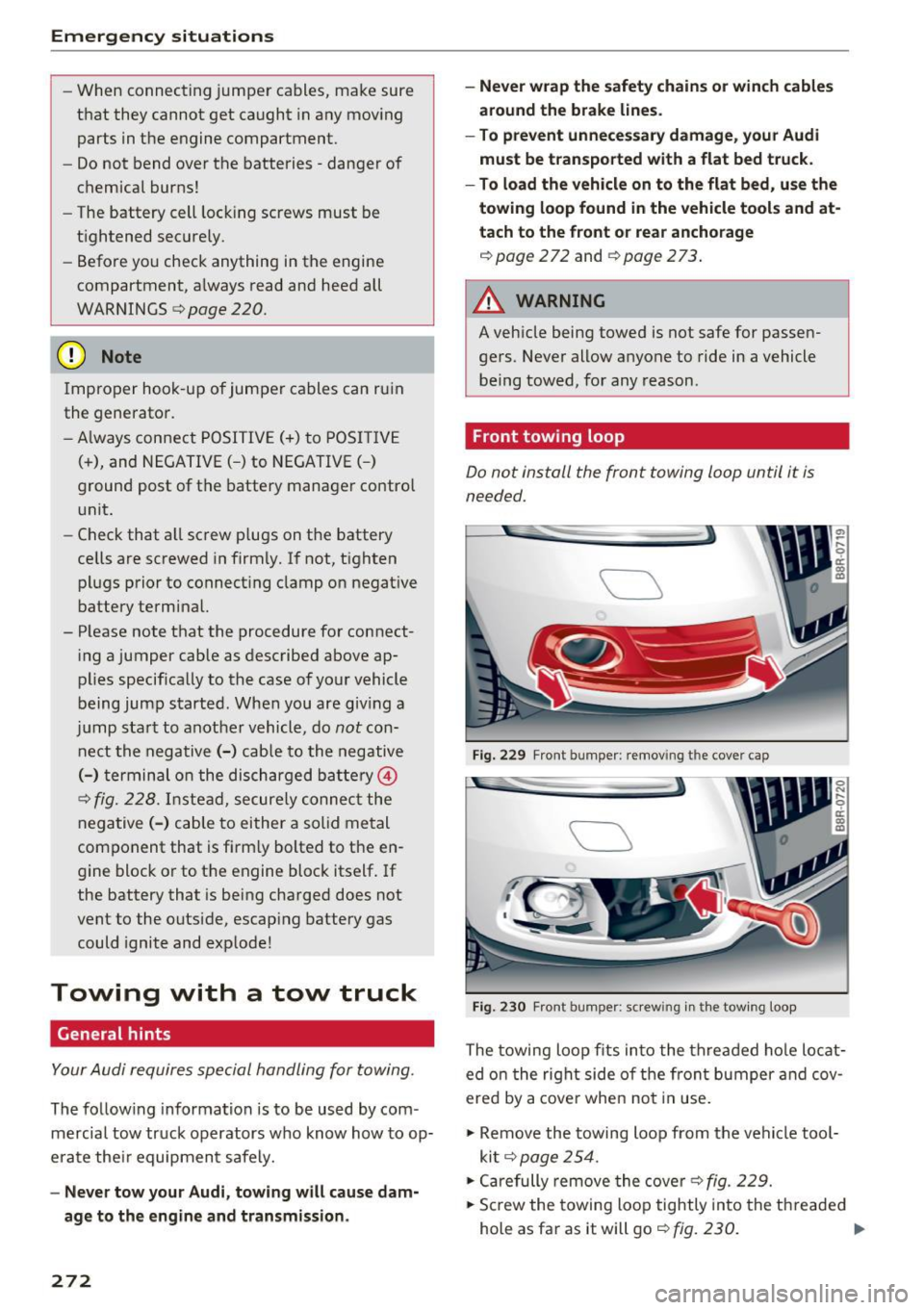
Fig. 229 Front bumper : remov ing the cover cap
Fig. 230 Front bumper: s crew ing in t he towing loop
The towing loop fits into the threaded hole locat
ed on the right side o f the front bumper and cov
ered by a cover when not in use.
.,. Remove the towing loop from the vehicle tool
kit
c> page 254 .
.,. Carefully remove the cove r c> fig. 229.
.,. Screw the towing loop tightly into the threaded
hole as far as it will go
c> fig. 230. Ill>
Page 275 of 300
..... N
co ~ CX)
..... I.Cl U"I
..... I.Cl .....
When it is no longer needed, unscrew the towing
loop and put it back into the vehicle toolkit. Be
sure to have the towing loop stored in the vehicle
at all times.
When r e-installing the cover be sure to first in
sert the tabs on the cover into the retainers near
the radiator grille. Then install the other side of
the cover and push it into the retainers
¢fig. 229.
The appearance of the cover varies from the i llus
tration for some model vers ions.
.&_ WARNING
If the towing loop is not screwed in as far as it
will go, the thread can pull out when the vehi
cle is towed -potential risk of an accident.
(D Note
The cover is attached to the bumper with sev
eral hooks. Do not use excessive force when
removing the cover to avoid damag ing it.
Rear towing loop
On vehicles without a factory-installed trailer
hitch*, the threaded hole for the towing loop is
on the right side of the rear bumper.
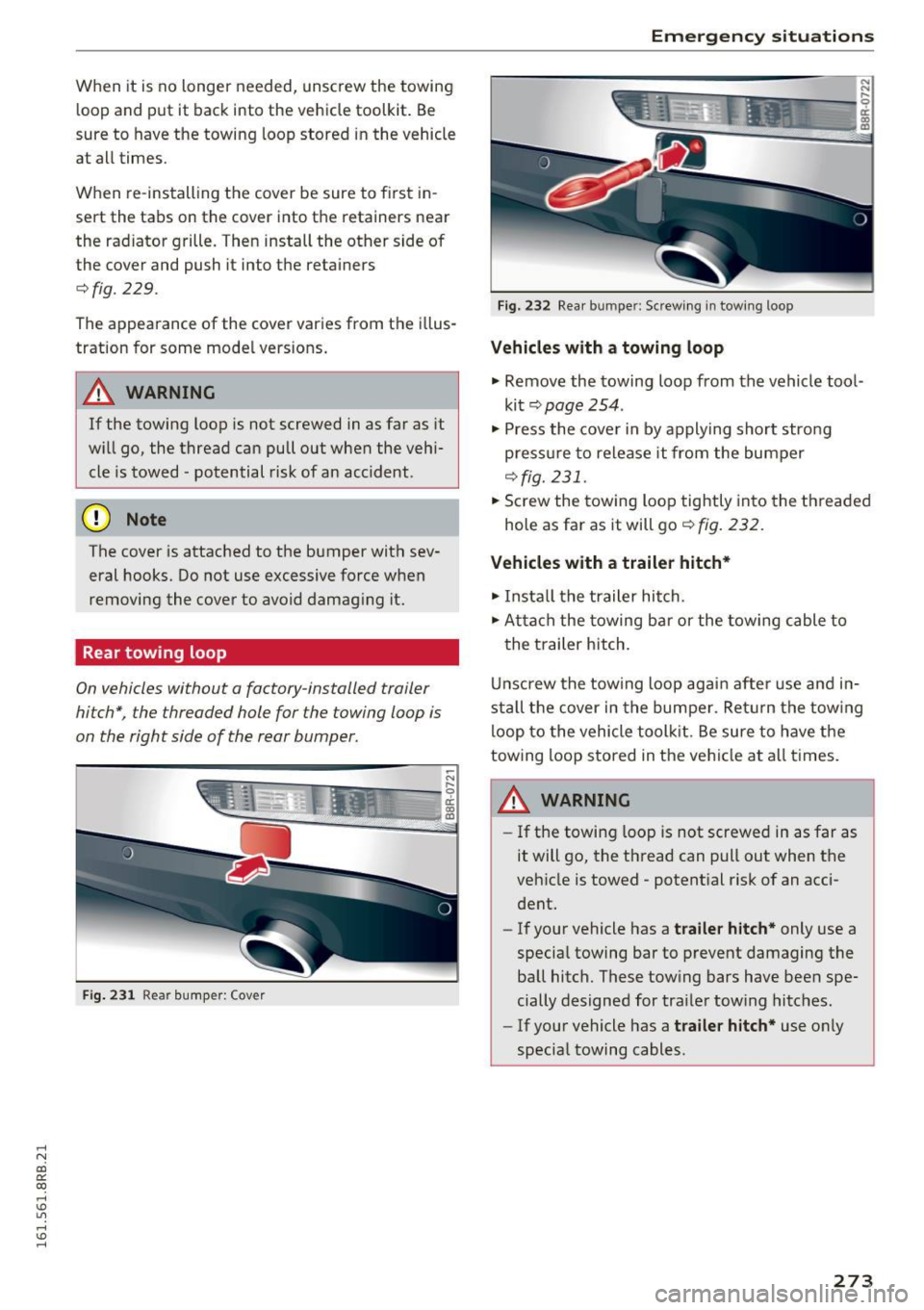
Fig. 231 Rear bumper: Cover
Emergency situations
Fig. 232 Rear bumper: Screw ing in towing loop
Vehicles with a towing loop
.,. Remove the towing loop from the vehicle tool
kit
c;, page 254.
.,. Press the cover in by applying short stro ng
press ure to release it from the bumper
¢fig. 231 .
.,. Screw the towing loop tightly into the threaded
hole as far as it will go
c;, fig. 232.
Vehicles with a trailer hitch*
.,. Insta ll the trailer hitch.
.,. Atta ch the towing bar or the towing cable to
the trailer hitch.
Unscrew the towing loop again after use and in
stall the cover in the bumper . Ret urn the towing
loop to the vehicle toolkit. Be sure to have the
towing loop stored in the vehicle at all times.
A WARNING
-If the towing loop is not screwed in as far as
it will go, the thread can pull out when the
vehicle is towed - potential risk of an acci
dent.
- If your vehicle has a
trailer hitch* only use a
special towing bar to prevent damaging the
ball hitch. These tow ing bars have been spe
cially designed for trailer tow ing hitches.
- If your vehicle has a
trailer hitch* use only
special towing cables .
273
Page 276 of 300
Emergency situations
Loading the vehicle onto a flat bed truck
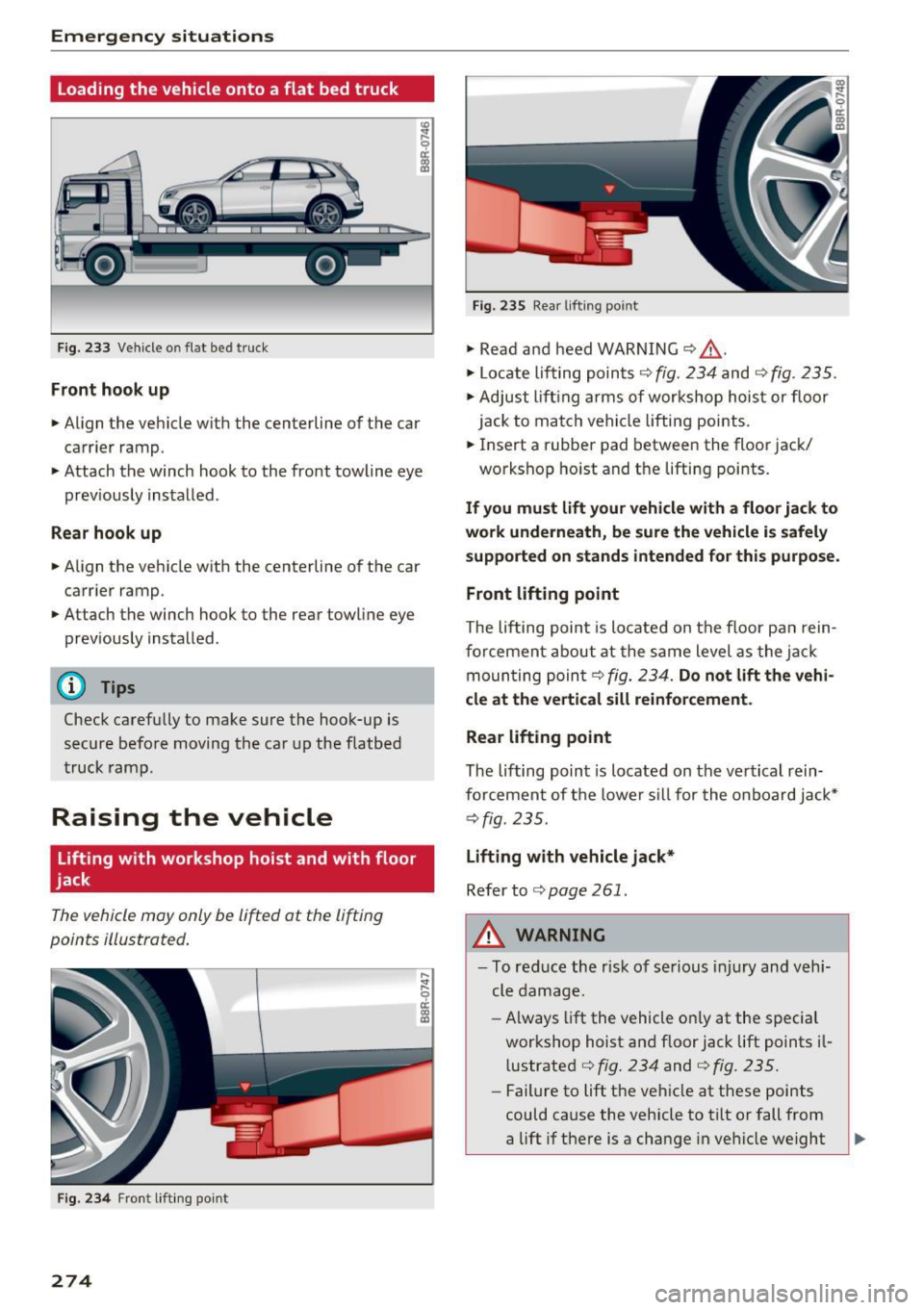
Fig. 233 Veh icle o n flat bed truck
Front hook up
.. Align the vehicle with the centerline of the car
carr ier ramp.
.. Attach the winch hook to the front towline eye
prev iously installed.
Rear hook up
.. Align the vehicle with the centerline of the car
carrier ramp.
.. Attach the winch hook to the rear towline eye
previously installed .
@ Tips
Check carefully to make sure the hook-up is
secure before moving the car up the flatbed
truck ramp.
Raising the vehicle
Lifting with workshop hoist and with floor
jack
The vehicle may only be lifted at the lifting
points illustrated.
Fig. 234 Front lifting point
274
Fig. 235 Rear lifting point
.. Read and heed WARNING ¢ f1..
.. Locate lifting points r;!) fig. 234 and c;!) fig. 235.
.. Adjust lifting arms of workshop hoist or floor
jack to match vehicle lifting points .
.. Insert a rubber pad between the floor jack/
workshop hoist and the lifting points .
If you must lift your vehicle with a floor jack to
work underneath, be sure the vehicle is safely
supported on stands intended for this purpose .
Front lifting point
The lifting point is located on the floor pan rein
forcement about at the same level as the jack
moun ting poin t¢
fig. 234. Do not lift the vehi
cle at the vertical sill reinforcement.
Rear lifting point
The lifting point is located on the vertical rein
forcement of the lower sill for the on board jack*
¢fig. 235.
Lifting with vehicle jack*
Refer to<=> page 261.
,&. WARNING
-To reduce the r isk of serious injury and vehi
cle damage.
- Always lift the vehicle on ly at the special
workshop hoist and floor jack lift points il
l ustrated <=>
fig. 234 and ¢ fig. 235.
-Failure to lift the vehicle at these points
could cause the vehicle to tilt or fall from
a lift if there is a change in vehicle weight
Page 278 of 300
Technical data
Technical data
Vehicle identification
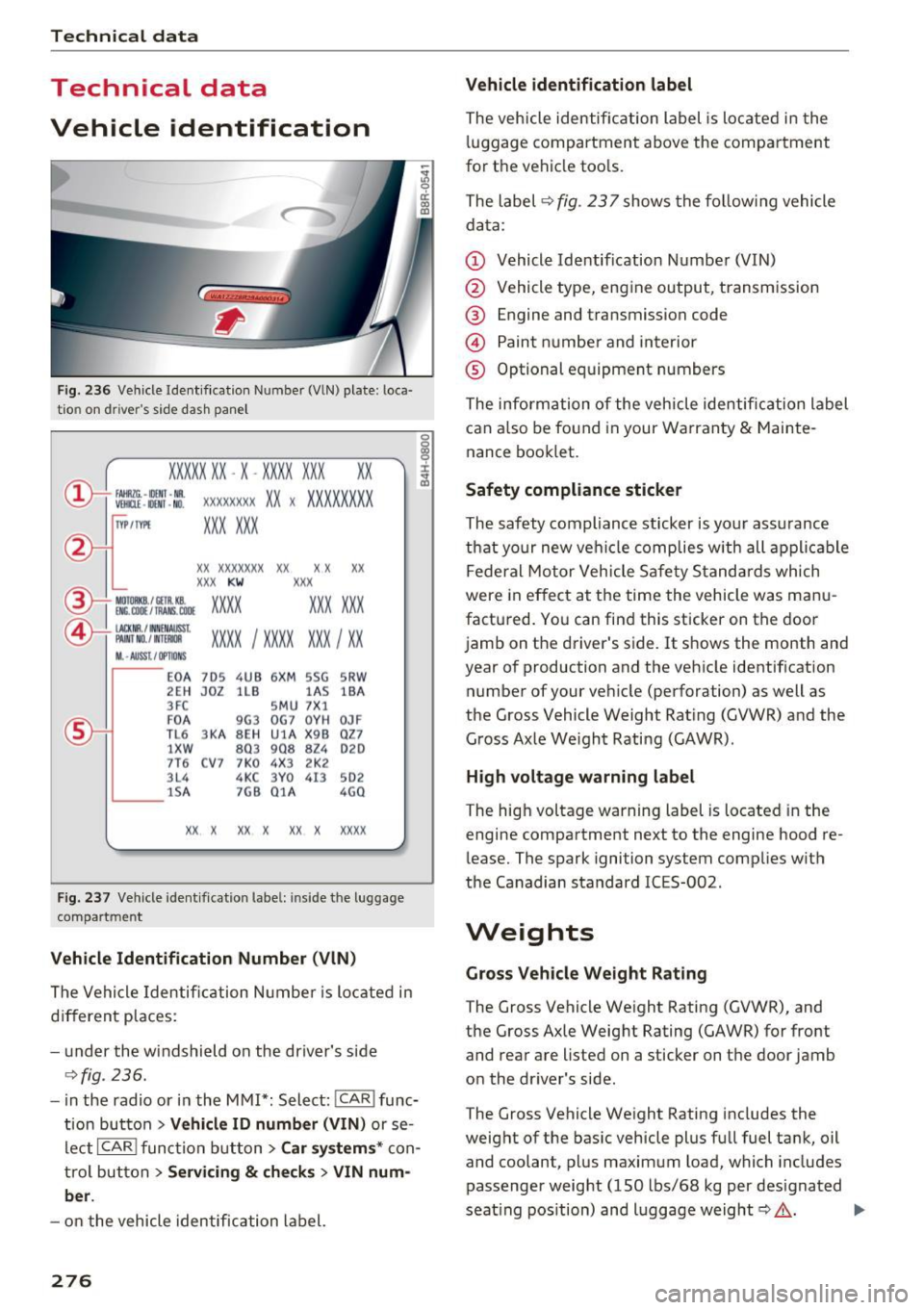
Fig. 236 Vehicle Ident if ication Numbe r (VlN) plate : loca·
tio n on d river 's side dash panel
XXXXX XX -X -XX XX XXX XX
@-+ ~J:~t::1 ::: xxxxxxxx xx x xxxx xxx x
IYP lf'VPE XXX X XX
xx xxxxxxx xx xx xx
XXX KW
XXX
EM:. COil / fAANS , COOE xxxx XXX XXX ®i MOIOlll
©-+ IAC KIIR . / tN NEN AIJSSt
XXXX I XXXX XXX I XX PAI NT NO./ WT£Jldl
II. -AUSST . / OPTIO NS
E0 A 7D5 4UB 6X
M SSG SR W
2EH JOZ lLB lAS
lBA
3FC SM U 7 X1
F0 A
9G3 0
G7 0Y H
0JF
TL 6 3 KA 8EH UlA X 9B Q
Z7
1 XW
803 908
824 020
7T6 C V7 7 K0 4X3 2K2
3L4 4KC 3Y0 413
502
lS A 7GB 01A
4G0
XX X XX X
XX X xxxx
Fig. 237 Vehicle identificat ion labe l: in side the luggage
compart ment
Vehicle Identification Number (VlN)
The Vehicle Identification Number is located in
different places :
- under the windshield on the driver's side
¢fig . 236.
- in the radio or in the MMI*: Select: !CAR i func·
tion button
> Vehicle ID number (VIN) or se·
Leet
I CAR ! function button > Car systems* con·
trol button
> Servicing & checks > VIN num
ber .
-on the vehicle identification label.
276
Vehicle identification label
The vehicle identification label is located in the
luggage compartment above the compartment
for the vehicle tools.
The label ¢
fig. 237 shows the following vehicle
data:
(D Vehicle Identification Number (VIN)
@ Vehicle type, engine output, transmission
® Engine and transmission code
@ Paint number and interior
® Optional equipment numbers
The information of the vehicle identification label
can also be found in your Warranty
& Mainte·
nance booklet.
Safety compliance sticker
The safety compliance sticker is yo ur ass urance
that your new vehicle complies with all applicable
Federal Motor Vehicle Safety Standards which
were in effect at the time the vehicle was manu
factured. You can find this sticker on the door
jamb on the driver's side. It shows the month and
year of production and the vehicle identification
number of your vehicle (perforation) as well as
the Gross Vehicle Weight Rating (GVWR) and the
Gross Axle We ight Rating (GAWR).
High voltage warning label
The high voltage warning label is located in the
engine compartment next to the engine hood re·
lease. The spark ignition system complies w ith
the Canadian standard ICES-002 .
Weights
Gross Vehicle Weight Rating
The Gross Vehicle Weight Rating (GVWR), and
the Gross Axle Weight Rating (GAWR) for front
and rear are listed on a sticker on the door jamb
on the dr iver's side .
The Gross Vehicle Weight Rating includes the
weight of the basic vehicle plus full fuel tank, oil
and coolant, plus maximum load, which includes
passenger weight (150 lbs/68 kg per designated
seat ing position) and luggage weight¢,&. .
Page 279 of 300
,....,
N
co
er::
co
,....,
The G ross Axle We igh t Rating is the max imum
l oad that can be applied at each axle of the vehi
cle ~.& .
Vehicle capacity weight
The vehicle capac ity we ight (max. load) is listed
on the drive r's side 8-p illar.
_& WARNING
- T he ac tual Gross Ax le Weight Ra ting a t the
front and rear axles sho uld not exceed the
permissible weights, and their combination
must not exceed the Gross Ve hicle We ight
Rating.
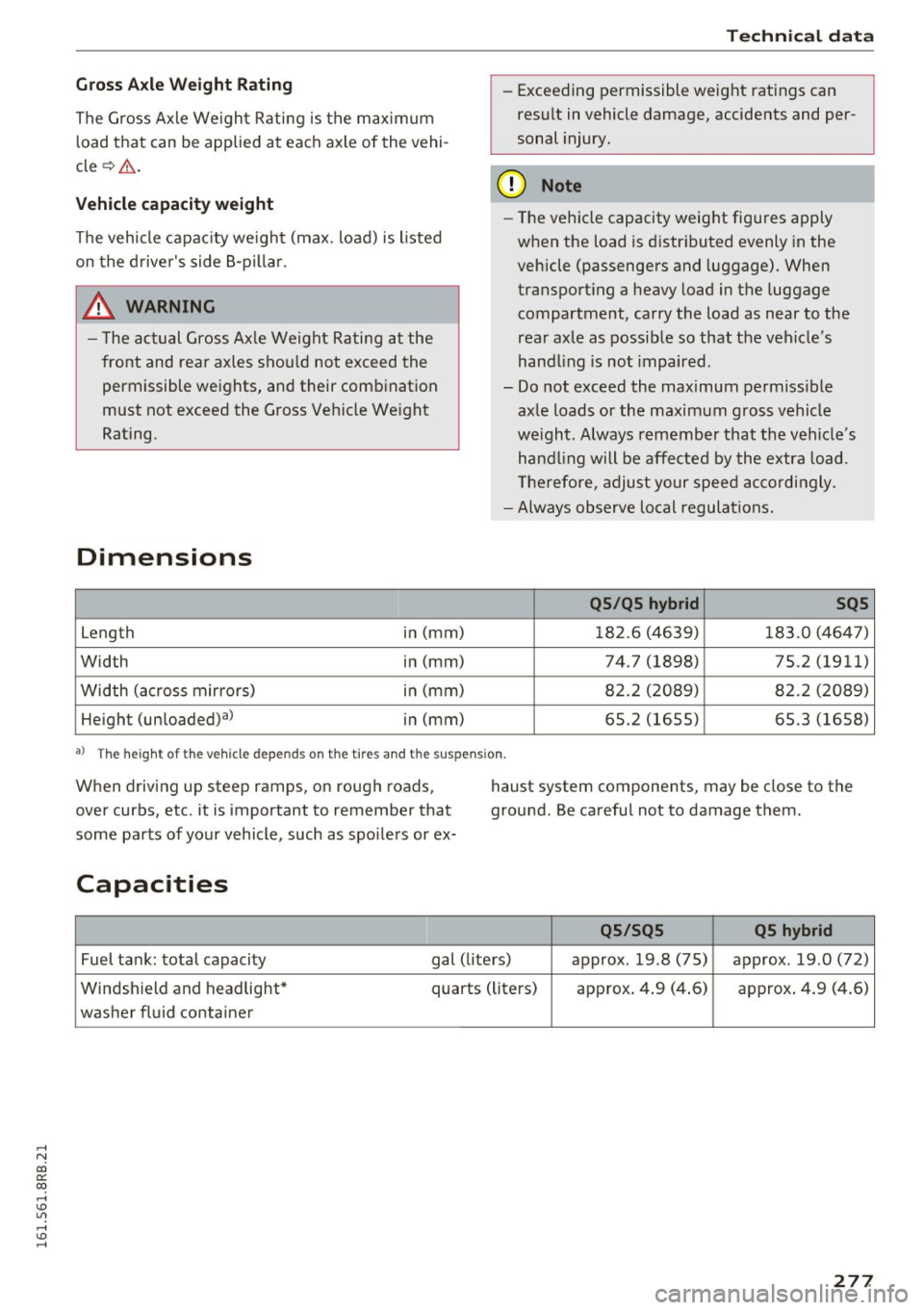
Dimensions
Leng th i
n (mm)
Width in (mm)
Width (a cross mirro rs) in (mm)
He ight (un loaded)al in (mm)
Technical data
- Exceeding permissible weight ratings can
res ult in vehicle damage, accidents and per
sonal injury.
(D Note
- The vehi cle capacity weig ht figures apply
when the load is d istributed evenly in the
vehicle (passengers and luggage) . When
transport ing a heavy load in the luggage
compartment, carry the load as near to the
rear axle as possib le so that the veh icle's
hand ling is not impaired .
- Do not exceed the maximum perm iss ible
ax le loads or the maximum gross vehicle
we igh t. Always remember that the veh icle's
han dling will be affe cted by the extra load.
Th erefore, adjust your spee d accordingly.
- Always observe local regulations.
QS /QS hybrid SQS
18 2.6 (4639) 183 .0 (464 7)
74.7 (1898) 75.2 (1911)
8 2.2 ( 2089) 82 .2 (2089)
65.2 (1655) 65 .3 (1658)
a ) T he heig h t of t he ve hicl e de pe nds on th e tir es and the suspen sio n.
When driving up steep ramps, on rough roads,
over curbs, etc . it is important to remember that
some pa rts of your vehicle, such as spo ile rs or ex- haust system components, may be close to the
ground. Be carefu
l not to damage them.
Capacities
QS /SQS QS hybrid
Fuel tank: tota l capacity gal (liters) approx. 19.8 (75) approx . 19 .0 (72)
Windsh ield and h eadlight* quarts (liters) approx . 4 .9 (4 .6) approx . 4 .9 (4 .6)
washer fluid container
277
Page 283 of 300
,....,
N
co
er::
co
,....,
scope of maintenance and repairs which can be
carried out by vehicle owners.
Also, safety and
environmental
concerns place very strict limits
on the nature of repairs and adjustments to en
gine and transmission parts which an owner can perform .
Maintenance, adjustments and repairs usually re
quire special tools, testing devices and other
equipment available to specially trained work
shop personnel in order to assure proper per
formance, reliability and safety of the vehicle and
its many systems.
Improper maintenance, adjustments and repairs
can impair the operation and reliability of your
vehicle and even void your vehicle warranty .
Therefore, proof of servicing in accordance with
the maintenance schedule may be a condition for upholding a possible warranty claim made within
the warranty period.
Above all , operational safety can be adversely af
fected, creating unnecessary risks for you and
your passengers.
If in doubt about any servicing, have it done by
your authorized Audi dealer or any other properly equipped and qualified workshop. We strongly urge you to give your authorized Audi dealer the
opportunity to perform all scheduled mainte nance and necessary repairs. Your dealer has the
facilities, original parts and trained specialists to keep your vehicle running properly .
Performing limited maintenance yourself
The following pages describe a limited number of
procedures which can be performed on your vehi
cle with ordinary tools, should the need arise and
trained personnel be unavailable. Before per
forming any of these procedures, always thor
oughly read all of the applicab le text and careful
ly follow the instructions given . Always rigorously
observe the
WARNINGS provided .
Before you check anything in the engine com
partment, always read and heed all WARNINGS
c::> .&. and c::> .&. in Working in the engine compart
ment on page 220.
Consumer information
A WARNING
- Serious personal injury may occur as a result
of improperly performed maintenance, ad
justments or repairs .
- Always be extremely careful when working
on the vehicle. Always follow commonly ac
cepted safety practices and general com
mon sense. Never risk personal injury.
- Do not attempt any of the maintenance,
checks or repairs described on the following pages if you are not fully familiar with these
or other procedures with respect to the ve hicle, or are uncertain how to proceed.
- Do not do any work without the proper tools
and equipment. Have the necessary work
done by your authorized Audi dealer or an
other properly equipped and qualified work
shop.
- The engine compartment of any motor vehi cle is a potentially hazardous area. Never
reach into the area around or touch the radi
ator fan.
It is temperature controlled and
can switch on suddenly - even when the en
gine is off and the ignition key has been re
moved. The radiator fan switches on auto
matically when the coolant reaches a certain
temperature and will continue to run until
the coolant temperature drops.
- Always remove the ignition key before any
one gets under the vehicle.
- Always support your vehicle with safety
stands if it is necessary to work underneath
the vehicle . The jack* supplied with the vehi
cle is not adequate for this purpose and
could collapse causing serious personal in
jury.
- If you must work underneath the vehicle
with the wheels on the ground, always make
sure the vehicle is on level ground, that the
wheels are always securely blocked and that the engine cannot be started.
- Always make sure the transmission selector
lever (automatic transmission) is in P (Park
position) and the park brake is applied.
281
Page 284 of 300
Consumer inf orm ation
@ For the sake of the env ironment
- Changing the engine settings wi ll adversely
affect emission levels. Th is is detrimental to
the environment and increases fuel con
sumption.
- A lways observe environmental regu lations
when disposing of old engine o il, used brake
fl ui d, d irty engine coolant, spent batteries
or worn out tires.
- Undeployed airbag modules and pretension
ers mig ht be classified as Perchlorate Mate
rial -special handl ing may apply, see
www.dtsc .ca.gov/hazardouswaste/perchlo
r ate. When the vehicle or parts of the re
straint system including airbag modu les
safety be lts wi th pretensioners are scrap
ped, all applicab le laws and regulations
must be observed. Your authorized Audi
dealer is familiar with these requirements
and we recommend that you have your deal er perform this service for you.
Accessories and technical changes
Additional accessories and parts replacement
Always consult an authorized Audi dealer before
purchasing accessories.
Your vehicle incorporates the latest safety design
features ensuring a high standard of active and passive safety.
This safety could be comp romised by non-ap
proved changes to the vehicle . For this reason, if
parts have to be replaced, please observe the fo l
lowing points when insta lling addit ional accesso
ries:
Approved Audi accessories and genuine Audi parts are available from author ized Audi dealers.
These dealers also have the necessary facilities,
too ls and trained specialists to install the parts
and accessories properly.
282
A WARNING
-
Using the wrong spare parts or using non-ap-
proved accessories can cause damage to the
vehicle and serious personal injury.
- Use only accessories expressly approved by
Aud i and genuine Audi spare parts
- These parts and accessor ies have been spe
cially designed to be used on your vehicle.
- Never install accessor ies such as telephone
cradles or beverage holders on airbag covers
or w ith in the airbag deployment zones. Do
ing so will increase the risk of injury if a ir
bags are triggered in an accident!
- Before you check anything in the eng ine
compartment, always read and heed all
WARN INGS
Qpage 220.
(D Note
-If items other than genu ine Audi spare
parts, add-on equipment and accessory
items are used or if repair wor k is not per
formed a ccording to specified methods, this
c an resul t in severe damage to you r vehi
cle's eng ine and body (such as corrosion)
and adve rsely af fect your vehicle's war ranty.
- I f emergency repai rs must be performed
elsewhere, have the vehicle exam ined by an
authorized A udi dealer as soon as possib le .
- T he manuf acture r ca nnot be held liable for
damage which occurs d ue to failure to com
ply with these stipulations.
Technical Modifications '
Our guidelines must be complied with when tech
nical modifications are made .
Always consult an a uthorized Audi de aler bef ore
sta rt ing work on any modifica tions.
This will help ensure that vehicle fu nction, per
fo rmance and safety are not impaired
Q ,& .
Attempting to work on electronic components
and the software used with them can cause mal
funct io ns. Because of the way elect ronic compo
nen ts a re interconnected with each othe r, such
malfunc tions c an also have an adverse affect on
othe r systems that are not d irectl y involved. This ..,.
Page 285 of 300
,....,
N
co
er::
co
,....,
in the operationa l safety of your vehicle and an
increased wear of vehicle parts¢
A.
Author ized Audi dealers w ill per form this wor k in
a professional and competent manner or, in spe
cial cases, refer you to a professional company
that spec ializes in such modifications.
A WARNING
Improper repairs and mod ificat ions can
change the way veh icle systems work and
cause damage to the veh icle and ser ious per
sonal injury.
If emergency repa irs must be pe rformed else
where, have the vehicle examined by an au thorized A udi dealer as soon as possib le .
Declaration of
Compliance, Telecom munications and
Electronic Systems
Radio Frequency Devices and Radiocommunica
tion Equipment User Manual Notice.
T he manufacturer is not respons ible for any radio
or TV interference caused by unauthor ized modi
fications to this equ ipment .
Devices
The fo llow ing devices each comp ly w ith FCC Part
15.19, FCC Part 15.21 and RSS-Gen Issue
1:
- Adaptive cruise control*
- Convenience key*
- Audi s ide ass ist*
- Cell phone package*
- E lectron ic immobilizer
- Homelink universal remote contro l"
- Remote contro l key
FCC Part 15.19
This devi ce comp lies with p art 15 of the FCC
Ru les. Ope ra tion is subject to the following two
conditions :
Consumer inf ormation
(1) This dev ice may not ca use ha rmf ul inter fer
ence, and
( 2 ) th is d evice m us t ac cep t any inte rference re
c e ived, in clu ding in terference tha t may c ause un
desired ope ra tion.
FCC Part 15.21
CAU TION:
Changes or mod ificat ions not express ly approved
by the party responsible for compliance cou ld
vo id the user's a uth ori ty to ope rate t he equ ip
me nt.
RSS-Gen Issue 1
Operat ion is subject to the following two cond i
t ions:
(1) this device may not cause inte rfe rence, and
( 2 ) this devi ce m us t a cc ep t any inte rference, in
cl udi ng interference tha t may cause undes ired
operation of the device .
283
Page 286 of 300
Index
A
A/C (climate control) . . . . . . . . . . . . . . . . . . . 81
Accessories . . . . . . . . . . . . . . . . . . . . . . . . . . 282
Active lane assist
Cleaning the camera area . . . . . . . . . . . . . 208
Adapt ive cruise control. . . . . . . . . . . . . . . . . 106
Cleaning the sensor . . . . . . . . . . . . . . . . . . 208
Indicator lamp . . . . . . . . . . . . . . . . . . . . . . 108
Messages . . . . . . . . . . . . . . . . . . . . . . . . . . 113
Requestfordriverintervention ........ . 111
Setting the distance............... ... 110
Setting the driving program . . . . . . . . . . . 111
Adaptive dampers..................... 119
Adapt ive light . . . . . . . . . . . . . . . . . . . . . . . . . 54
Defective . . . . . . . . . . . . . . . . . . . . . . . . . . . 34
AdBlue .... .. .. .... ........... ....... 217
Messages . . . . . . . . . . . . . . . . . . . . . . . . . . 217
Opening the tank door ... ...... .. .. .. . 218
Refilling . .. .. .... ........... .... ... 218
Adding Engine coolant . . . . . . . . . . . . . . . . . . . . . . 227
Engine oil .. .. .. .. ... ........... ... .
Windshield washer fluid . ...... .. .. .. .
Additional accessories
Addit ives
Engine oil .... .. .. .............. ... .
Adjusting 224
233
282
224
Air distribution (climate control) . . . . . . . . 81
I nstrument illum inat ion . . . . . . . . . . . . . . . 56
Steering column manually . . . . . . . . . . . . . 84
Temperature (climate control) . . . . . . . . . . 81
Airbag . . . . . . . . . . . . . . . . . . . . . . . . . . . . . . 151
Airbag system . . . . . . . . . . . . . . . . . . . . . . . . 166
Advanced Airbag-System . . . . . . . . . . . . . . 155
Advanced Airbag System components . . . 157
Care . . . . . . . . . . . . . . . . . . . . . . . . . . . . . . 164
Children . . . . . . . . . . . . . . . . . . . . . . . . . . . 172
Child restraints . . . . . . . . . . . . . . . . . . . . . 173
Components (front airbags) . . . . . . . . . . . 157
Danger of fitting a child safety seat on the
front passenger seat . . . . . . . . . . . . . . . . . 152
Disposal . . . . . . . . . . . . . . . . . . . . . . . . . . . 164
Fr ont airbags . . . . . . . . . . . . . . . . . . . 155, 156
How do the front airbags work? . . . . . . . . 159
How many airbags does my vehicle have? 157
How the Advanced Airbag System compo-
nents work together . . . . . . . . . . . . . . . . . 159
284
Important information . . . . . . . . . . . . . . . 151
Monitoring . . . . . . . . . . . . . . . . . . . . . . . . . 161
PASSENGER AIR BAG OFF light . . . . . . . . . 161
Repairs . . . . . . . . . . . . . . . . . . . . . . . . . . . . 164
Safety instructions . . . . . . . . . . . . . . . . . . . 163
Side airbags . . . . . . . . . . . . . . . . . . . . . . . . 165
Side curtain airbags . . . . . . . . . . . . . . . . . . 168
Warning/indicator lights . . . . . . . . . . . . . . . 16
Warning/Indicator lights . . . . . . . . . . . . . 161
Weight-sensing mat . . . . . . . . . . . . . . . . . 172
When must the system be inspected? . . . 161
Air transport . . . . . . . . . . . . . . . . . . . . . . . . . 105
All-wheel drive .. .... .. ............... 194
Se lective wheel torque control . . . . . . . . . 190
All season tires
Alternator 249
Malfunction . . . . . . . . . . . . . . . . . . . . . . . . . 28
Anti-freeze
refer to E ngine coolant system . . . . . . . . . 226
Anti-lock brake system
Warning/indicator lights ............ 15, 17
Anti-Lock Braking System . . . . . . . . . . . . . . 190
Anti-slip regulation
Warning/indicator lights . . . . . . . . . . . . . . . 15
Anti-Slip Regulation . . . . . . . . . . . . . . . . . . . 190
Anti-theft alarm warning system . . . . . . . . . 38
Electronic immobilizer. . . . . . . . . . . . . . . . . 38
Approach/departure angle ............ .. 201
Ashtray . . . . . . . . . . . . . . . . . . . . . . . . . . . . . . 76
Audi braking guard
refer to Braking guard 112
Audi drive select Indicator light . . . . . . . . . . . . . . . . . . . . . . 194
also refer to Drive select . . . . . . . . . . . . . . 119
Audi parking system plus with rearview cam-
era . . . . . . . . . . . . . . . . . . . . . . . . . . . . . . . . . 128
Adjusting the display . . . . . . . . . . . . . . . . . 133
Adjusting the warning tones . . . . . . . . . . . 133
Rearview camera -parking mode 1 . . . . . . 131
Rearview camera -parking mode 2 . . . . . . 132
Safety precautions . . . . . . . . . . . . . . . . . . . 128
Switching on and off . . . . . . . . . . . . . . . . . 130
Trailer hitch . . . . . . . . . . . . . . . . . . . . . . . . 133
Audi Service Repair Manuals and Literature 280
Auto -Check Control . . . . . . . . . . . . . . . . . . . . 27
Auto locking . . . . . . . . . . . . . . . . . . . . . . . . . . 38
Automatic belt retractor . . . . . . . . . . . . . . . 146