Display AUDI Q5 2016 Owner's Manual
[x] Cancel search | Manufacturer: AUDI, Model Year: 2016, Model line: Q5, Model: AUDI Q5 2016Pages: 300, PDF Size: 75.02 MB
Page 35 of 300
,....,
N
co
er::
co
,....,
light tu rns on to indicate the location on the vehi
cle.
Vehicle light s: System fault!
If the message appears, there is a ma lfunction in
the head lights or light switch.
Drive to your authorized Aud i dealer immediately
to have the malfunct ion corrected .
A WARNING
-Light bu lbs are pressur ized and could ex
plode while they are being changed caus ing
ser ious persona l injury.
-
- Work with due care when handling the high
voltage section of gas dis charge (xenon)
ligh ts*. Failure to do so co uld result in death
or serious injury .
@ Tips
Have the bulb replaced or the connect ion re
pa ired by yo ur autho rized Aud i Serv ice depart
men t.
<:;::> Windshield washer flu id level too low
llt Plea se refill washer fluid
If the symbol illumi nates, add w indshield was her
fluid to the washer system and also to the head
light washer system
c::> page 233 .
Bil Fuel supply too low
When the liD symbol i llum inates, this means
there are about 2.6 ga llons ( 10 liters) of fue l left
in the fuel tank. Time to refuel!
c::> page 214.
If the symbol lights up, even when there is amp le
fuel in the tank, and the text
Fuel tank sy stem
malfun ction! Contact deale r
appears in the dis
p lay, there is a fault in the system. Contact an au
thor ized Audi dealer to have the fault rect ified.
D Battery voltage
If battery power drops into the range where it
can limit the ab il ity of the engine to start, th is
the symbol (•) ;ippears in the instrument cluster
Dri ver informa tion system
display with the following driver message Lo w
batter y: Batte ry will be char ged while dri ving.
While t his driver notification is disp layed , you
have to be prepared for limited start ing capabili
ty .
Driver message appears and goes out again
If this d rive r message appea rs after the ignition
is turned on or while d riving a nd it goes ou t again
after a whi le, the battery has been adequately re
charged .
Driver message appears and does not go out
again
If this drive r notificat ion appea rs after the igni
tion is tu rned on or while driv ing and does not go
out again, the battery's state of charge is not in
the optimal range. Start ing capability is restrict
ed . Have the battery checked at an authorized
Audi dealer or other qualified workshop as soon as possible.
~ Check engine oil
II Add oil, ma x x qt (l). You may cont. driv.
When the Ill symbol and dr iver message appear,
add the amount of oil appear ing in the disp lay at
the next opportunity
c::> page 224 .
'l:7;,.. Engine oil sensor defective
• Oil le vel! Sen sor defecti ve
If the symbol illuminates, contact your author
ized Audi dea ler and have the oil sensor inspect
ed . Until you have this done, check the oil level
each time you refuel just to be on the safe side
c::> page 224.
! ? Engine speed limitation
Applies to vehicles: with engine speed limitation
II! Do not exceed max. engine spe ed of XXXX
rpm
T he II! symbol illuminates when there is an en
gine co ntrol malf unct ion. The indi cator light ~
in t he i nstr ument cluster also illum ina tes. The
engine speed is limited to the speed displayed in ..,.
33
Page 39 of 300
from transmitters in the vicinity of the vehi
cle work ing in the same frequency range
(e .g . a cell p hone, radio equipment) .
- If yo u open the dr iver's doo r with t he key
l eft in the ignition Lock, a chime w ill sound.
This is your remi nder to remove the key and
l ock the door.
- Fo r security reasons, replacement keys are
on ly availab le from Audi dealers.
- Fo r De claration of Comp liance to U nite d
States FCC and Ind ustry Canada reg ulations
r:=> page283 .
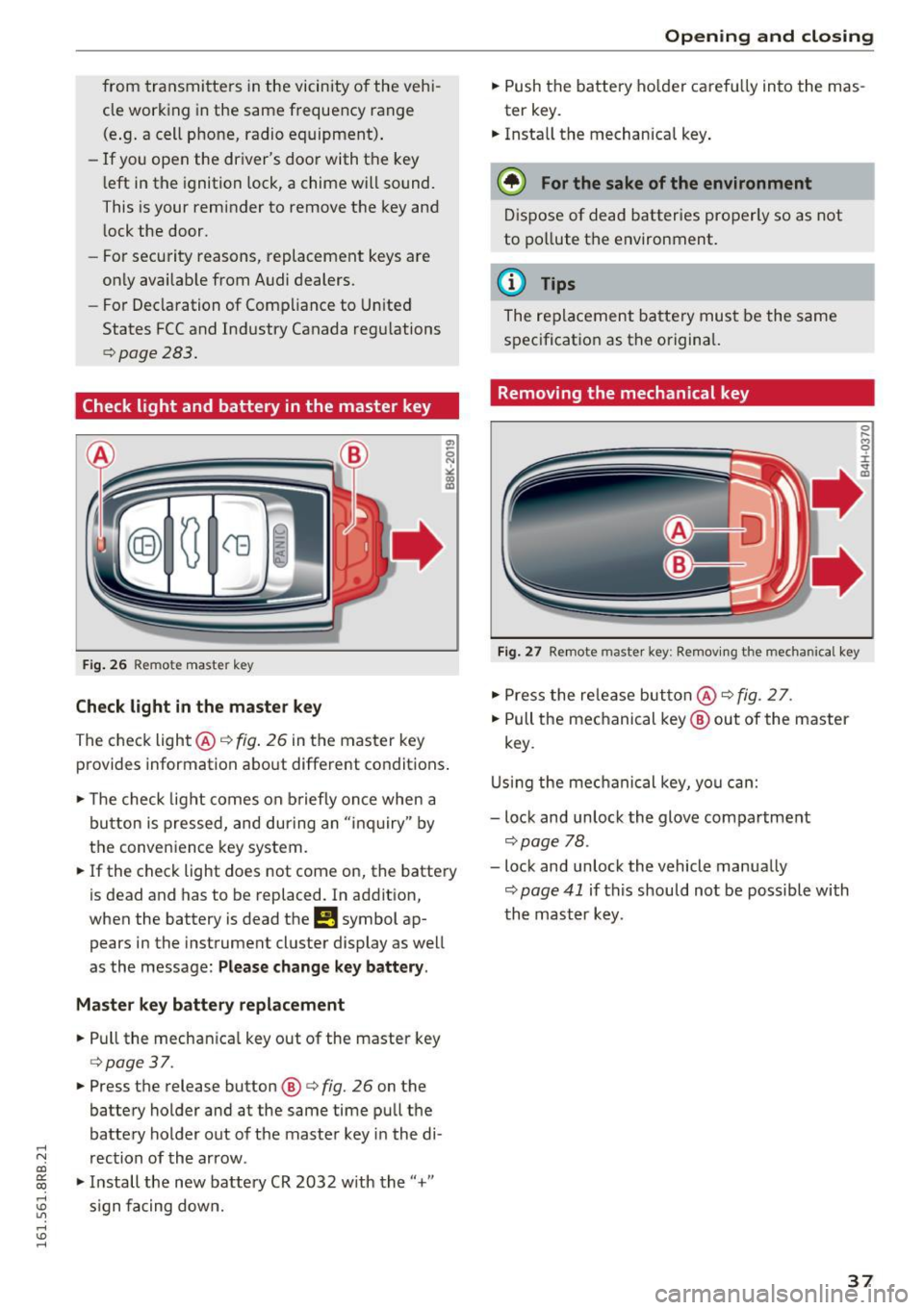
Check light and battery in the master key
Fig. 26 Re mote mast er key
Check light in the master key
The check light@q fig. 26 in t he master key
p rovides information abo ut different condit ions .
.,. The check light co m es on briefly on ce when a
button is pressed, and dur ing an " in qu iry" by
the conven ience key system .
.,. If the check light does not come on, the batte ry
is dead and has to be replaced. In ad dition,
when the battery is dead
the m symbol ap
pears in the instrument cluster display as well
as the message :
Please change key battery .
Master key battery replacement
.,. Pull the mechan ica l key out of the master key
c=> page 37 .
.,. Press the release button @ r=> fig. 26 on the
batte ry holder and at the same time pu ll th e
batte ry holder out of t he maste r key in the di-
.....
'"" rection of the arrow . co
~ .,. In stall the new battery CR 2032 w ith the "+"
; s ign f acing dow n.
Open ing and closing
.,. Push the batt ery ho lder caref ully into the mas
ter key.
.,. Insta ll the mechanical key .
@ For the sake of the environment
Dis pose of dead batter ies properly so as not
to po llute t he environment.
@ Tips
The re placeme nt ba tte ry mus t be the same
s p ec ificat ion as t he o rigina l.
Removing the mechanical key
Fig. 27 Remote maste r key: Re mov ing the mecha nical key
.,. Press the re le a se but ton @ r=> fig. 2 7.
.,. Pull the me chanical key @ out of the master
key .
U sing th e mec hanical key, yo u ca n:
- lock and unlock the glove compartment
c=> page 78 .
-lock and unlock the vehicle manua lly
c=> page 41 if this should no t be possible with
t h e m aster k ey .
37
Page 51 of 300
..... N
co ~ CX)
..... I.Cl U"I
..... I.Cl .....
Operation
Applies to vehicles: with garage door opener (Homelink)
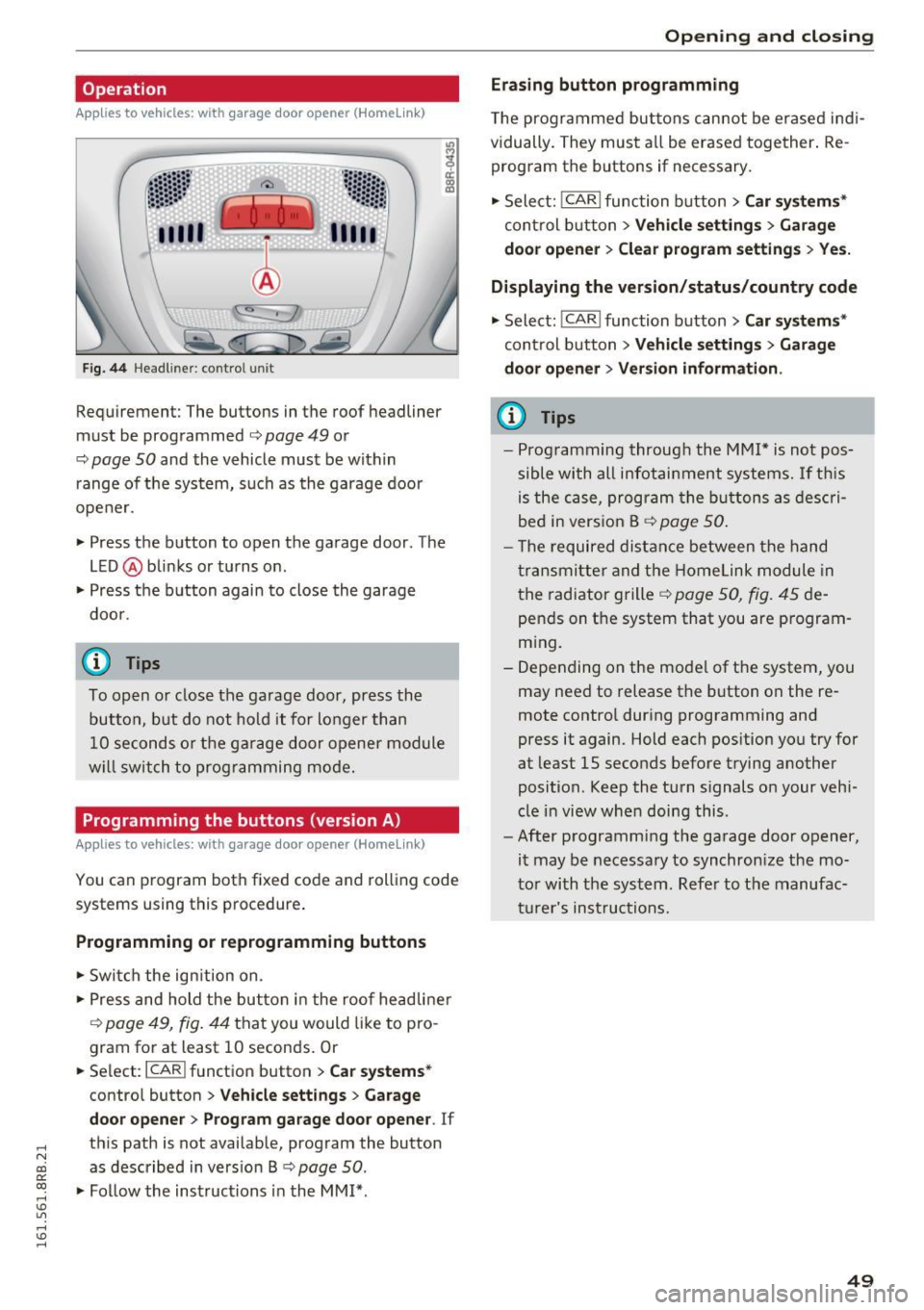
Fig. 44 Headl iner: c on tro l uni t
Requiremen t: The buttons in the roof headliner
must be programmed
c:> page 49 or
c::> page 50 and the vehicle must be within
range of the system, such as the garage door
opener.
" Press the button to open the garage door . The
LED @blinks or turns on .
" Press the button again to close the garage
door .
@ Tips
To open or close the garage door, press the
button, but do not hold it for longer than
10 seconds or the garage door opener module
will switch to programming mode.
Programming the buttons (version A )
Applies to vehicles: with garage door opener (Homelink)
You can program both fixed code and rolling code
systems using this procedure.
Programming or reprogramming buttons
"Switch the ignition on .
"Press and hold the button in the roof headliner
c::> page 49, fig. 44 that you would like to pro
gram for at least
10 seconds. Or
.. Select:
I CAR I function button > Car systems*
control button > Vehicle settings > Garage
door opener> Program garage door opener .
If
this path is not available, program the button
as described in version B
c::> page 50.
"Follow the instructions in the MMI* .
Opening and closing
Erasing button programming
The programmed buttons cannot be erased indi
vidually. They must all be erased together. Re
program the buttons if necessary.
"Select:
! CAR ! function button> Car systems*
control button > Vehicle settings > Garage
door opener> Clear program settings > Yes.
Displaying the version/status/country code
"Select: ! CAR ! function button> Car systems*
control button > Vehicle settings > Garage
door opener> Version information.
(D Tips
- Programming through the MMI* is not pos
sible with all infotainment systems. If this
is the case, program the buttons as descri
bed in version B
c::> page 50.
- The required distance between the hand
transmitter and the Homelink module in
the radiator grille
c::> page 50, fig. 45 de
pends on the system that you are program
ming.
- Depending on the model of the system, you
may need to release the button on the re
mote control during programming and
press it again. Hold each position you try for
at least
15 seconds before trying another
position . Keep the turn signals on your vehi
cle in view when doing this .
- After programming the garage door opener,
it may be necessary to synchronize the mo
tor with the system. Refer to the manufac
turer's instructions.
49
Page 56 of 300
Lights and Vision
Tra ve l m ode ( Canada models )*
The headlight beam is asymme trical. This pro
vides stronger i llumination on the side of the
road on which you are driving. If you are driving
i n a country that drives on the opposit e sid e of
the road from your own country , this will cause
g lare for oncoming dr ivers . To prevent glare:
- Travel mode must be selected in vehicles with
Xenon headlights *.
- In vehicles with halogen headlights, certain
areas of the headlight lenses must be covered
with waterproof adhesive covers that prevent
li ght from pa ssing through. For more informa
tion, please see your authori zed Audi dea ler or
autho rized repair facility .
(!) Tips
When travel mode* is activated, a display in
the driver information system ind icates this
each t ime yo u switch the ignition on.
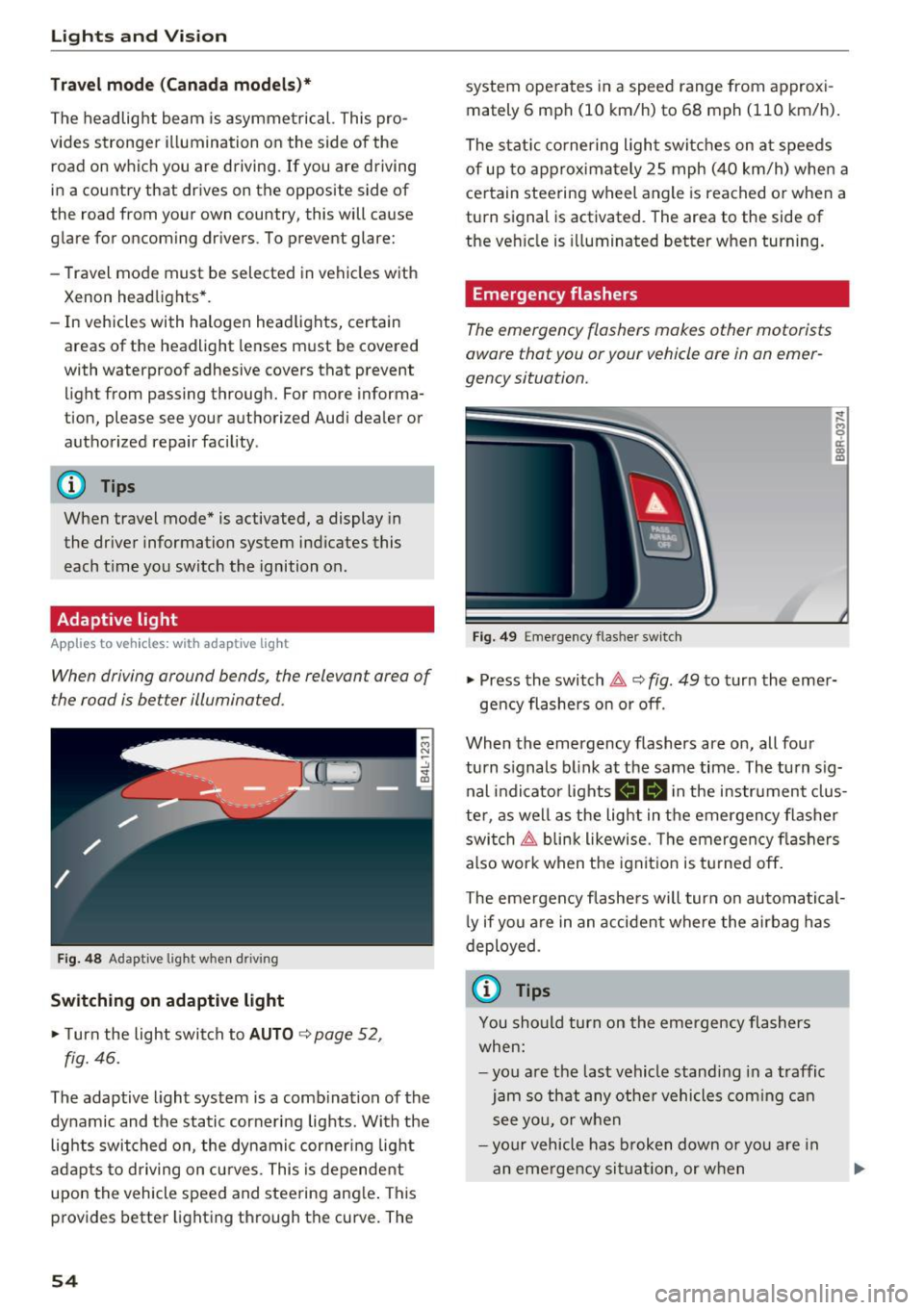
Adaptive light
Applies to vehicles: with adaptive ligh t
When driving around bends, the relevan t area of
the road is be tter illuminated.
Fig. 4 8 Adapt ive lig ht when d riving
Switching on adaptive light
~ T urn the light swit ch to AUTO ~ page 52,
fig. 46.
The adaptive light system is a comb ination of the
dynamic and the static cornering lights . With the
lights switched on , the dynamic cornering light
a dapts to driving on cu rves. This is dependent
upon the vehicle speed and steering ang le . This
provides better lighting through the curve. The
54
system ope rates in a speed range from approxi
mately 6 mph (10 km/h) to 68 mph (110 km/h) .
The stat ic co rnering ligh t switc hes on a t speeds
of up to approxima tely 25 mph (40 km/h) whe n a
ce rtain steering w heel angle is reached o r whe n a
turn signal is activated . The area to the side of
the ve hicle is illuminated better when turning.
Emergency flashers
The emergency flashers makes other motorists
aware that you or your vehicle ore in an emer
gency situation.
Fi g. 49 Eme rge ncy f las her switch
~
9 a: (X) m
~ Press the switch~ c::> fig. 49 to turn the eme r-
ge ncy flashers on or off .
When the emergency flashers are on, all four
turn s ignals b link at the same time. The turn s ig
nal indicator lights
II Bi n the instrument clus
te r, as we ll as the light in t he emergency flasher
swi tch ~ blin k likewise . T he emergency fl ashers
also work when t he ign it ion is tu rned o ff.
The eme rgency flashe rs will turn on automatical
l y if you a re in an acci dent where the air bag has
deployed .
(j) Tips
You should turn on the eme rgency flashers
when:
- yo u are t he last vehicle s tandi ng in a traffic
jam so th at any othe r vehicles com ing c an
s ee yo u, or whe n
- you r vehicle has broken down o r yo u are in
an eme rge ncy si tuati on, or w hen
Page 58 of 300
Lights and Vision
@ Interior lights
Press the switch
~fig. 51 in the co rresponding
position.
0 -Inte rior lights off
I -Interior lights on
If the sw itch is in the center position, the interio r
lighting is controlled automatically.
@ Front /rear reading lights
To tur n a reading light on/off, press the button
@~ fig. 51 or~fig . 52.
The appearance and location of the rea r read ing
lights may differ depending on the model.
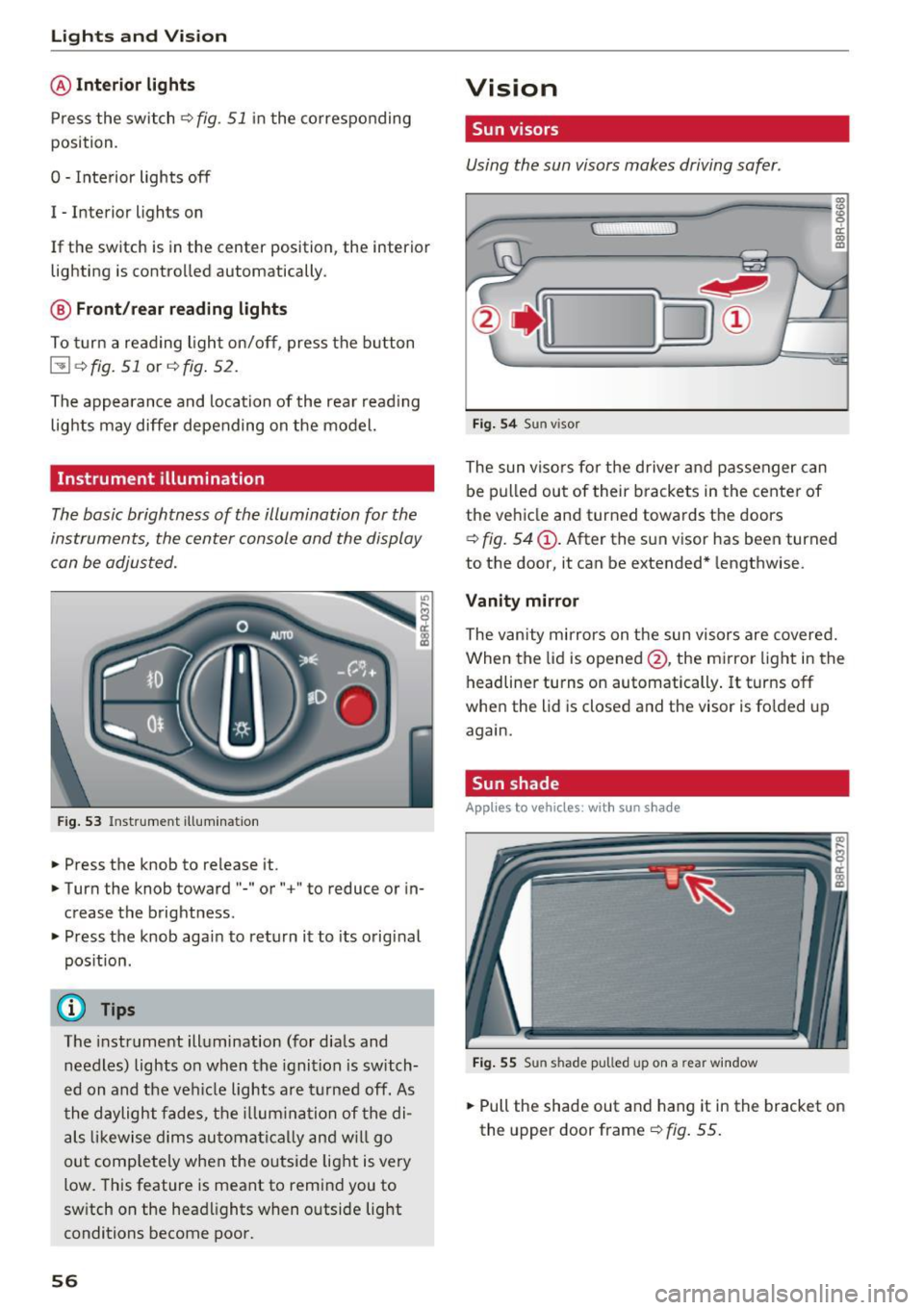
Instrument illumination
The basic brightness of the illum ination for the
instruments, the center console and the display
can be adjusted.
Fi g. 53 Instrument illum inat io n
.. Press the knob to release it .
.. Turn the knob toward"-" or" +" to reduce or in
c rease the brightness .
.. Press t he knob again to retu rn it to its original
pos ition.
(D Tips
T he instrument illumination (fo r dials and
needles) lights o n when the ignition is switch
e d on and the ve hicle lights are turned off. As
t he daylight fades, t he illum ina tion of the di
als likewise dims au tomati ca lly and w ill go
out comp letely when the outside light is very
low. This feature is meant to remind you to
sw itch on the head lights when o utside light
conditions become poor.
56
Vision
Sun visors
Using the sun visors makes driving safer .
Fig. 54 Sun v isor
The sun viso rs fo r th e driver and passenger can
be p ulled out of their brackets in the center of
the ve hicle and turned towa rds t he doors
~ fig. 54@. After the s un v isor has been turned
to the door, it can be extended* lengthwise.
Vanity mirror
The van ity mirrors on t he sun visors are covered.
When the lid is opened @, the mi rror light in the
headliner turns on automatically . It turns off
when the lid is closed and the visor is fo lded up
again.
Sun shade
App lies to vehicles, with sun s had e
Fig . 55 Sun shade pulled up on a rear window
.. Pull the shade out and hang it in the bracket on
the upper door frame~
fig. 55.
Page 63 of 300
..... N
co ~ CX)
..... I.Cl U"I
..... I.Cl .....
-If swa llowed and person is conscious, rinse
mouth with water for at least 15 m inutes.
Do not induce vomit ing unless instructed to
do so by medical professional. Get medical
attent ion immed iately.
(D Note
Liquid electrolyte leaking from broken m irror
glass will damage any plastic surfaces it
comes in contact with. C lean up spilled elec
trolyte immediately w ith clean water and a
sponge.
@ Tips
- Switch ing off the dimming function of the
i nside rear v iew mirror also deact ivates the
automat ic dimming function of the exte rior
mir rors*.
- The automatic d imm ing mirrors do not dim
when the interior lighting is turned on or
the reverse gea r is selected .
- Automat ic dimming for the m irror on ly op
erates prope rly if the light str iking the in
s ide mirror is not hinde red by othe r objects.
Digital compass
Activating or deactivating the compass
A ppl ies to vehicles: with digital compass
The direction is displayed on the interior rear
view mirror.
Fi g. 62 Inside rea r view m irror: d igital compass activated
... To activate or deactivate, hold the @button
down until the red d isplay appears or disap
pears.
Lights and V ision
The digita l compass on ly works with the ignition
turned on. The directions are disp layed as initia ls :
N (North), NE (Northeast), E (East), SE (South
east),
S (South), S W (Southwest), W (West), NW
(Northwest).
(!_) Tips
To avoid inaccurate d irect ions, do not allow
any remote controls, electrical systems, or
metal parts close to the mirror.
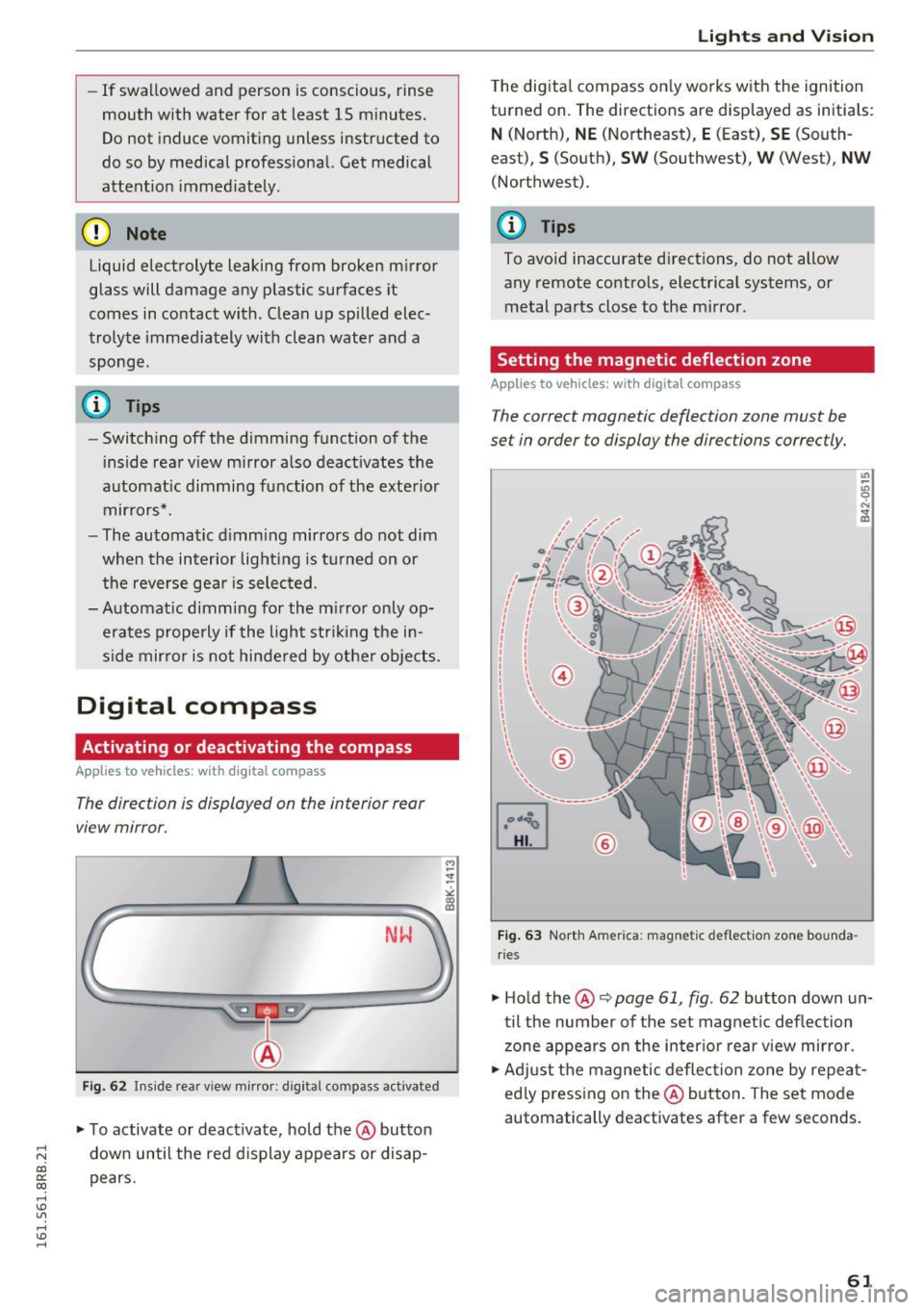
Setting the magnetic deflection zone
App lies to vehicles: wi th digita l co mp ass
The correct magnetic deflection zone must be
set in order to display the directions correctly.
®
F ig . 63 No.rth Ame rica: magnetic deflection zone bounda
ri es
... Hold the@~ page 61, fig . 62 button down un
til the number of the set magnet ic deflection
zone appears on the in ter io r r ear view mirror.
... Adjust the magnetic deflection zone by repea t
ed ly press ing on the@ button. The set mode
automatically deactivates after a few seconds .
61
Page 64 of 300
Lights and Vi sion
Calibrating the compass
Applies to vehicles: with digital compass
The compass has to be recalibrated if the display
is wrong or inaccurate .
.,. Hold the@ button down until the letter C is
displayed on the interior rear view mirror.
.,. Drive in a circle at a speed of about 6 mph (10
km/h) until a d irection is shown on the interior
. . rear view mirror.
A WARNING
The digital compass is to be used as a direc
tional aid only. Even though you may want to
look at it whi le you are driving, you must still
pay attention to traffic, road and weather
conditions as well as other possible hazards.
62
Page 77 of 300
..... N
co ~ CX)
..... I.Cl U"I
..... I.Cl ......
Opening rear beverage h olders
• To open the rear cupholder, press on the sym
bol~ @~
fig. 86.
Hold ing bev erages at the rear
• To adjust the arm @, swing it in the d irect ion
of the ar row .
• Place the beverage in the holde r and release
the a rm. The a rm swings back by itse lf and au
tomatica lly sec ures the beverage.
Clo sing the r ear cupholders
• To close the rear cupholder, press on the center
section between the two arms and p ush the cu
pholder in the s lot as far as it will go.
The hold ing arm must be adjusted such that it
l ies closely against the cupholde r.
A maximum of two beverages can be placed in
the center armrest.
A WARNING
Spilled hot liquid can cause an accident and
personal injury.
- Never carry any beverage containers with
hot liquids, such as hot coffee or hot tea, in
the vehicle while it is moving. I n case of a n
acc ident, sudden braki ng or o ther veh icle
movement, hot liq uid could spill, causing
sca ld ing burns . Spilled hot liquid can also
cause an accident and perso nal i nju ry.
- Use only soft cups in the cupholder . Hard
cups and g lasses can cause i njury in an acci
dent.
- Never use t he cupholder or adapter as an
ashtray -risk of fire .
(D Note
Onl y drink containe rs with lids should be ca r
r ied in the cupholder . Liquid could sp ill out
and damage your vehicle's electronic equip
ment or stain the upho lstery, etc .
Seats and storag e
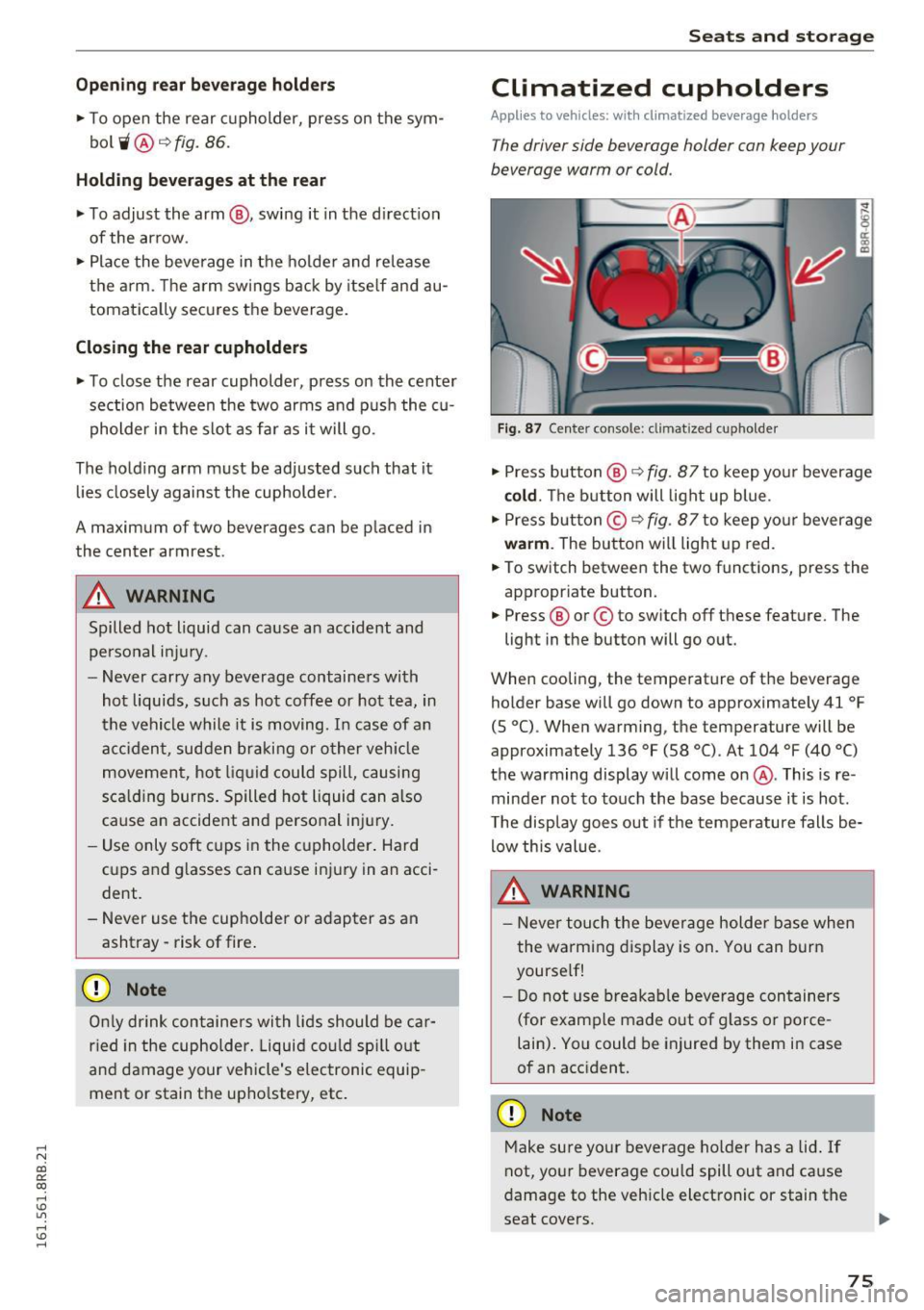
Climatized cupholders
Applies to vehicles: w it h climat ized beve rage holders
The driver side beverage holder can keep your
beverage warm or cold.
Fig. 87 Center console: climatized cupholder
• Press button @¢ fig. 87 to keep you r beverage
cold . The b utton will light up blue.
• Press but ton © ¢
fig. 87 to keep yo ur beverage
wa rm . The button will light up red.
• To switch between the two functions, press the
appropr iate button.
• Press ® or© to sw itch off these feature. The
light in the button will go out.
When cooling, the temperature of t he beverage
holder base will go down to approximately 41
°F
(S °C). When warm ing, the temperature will be
approximately 136
°F (58 °(). At 104 °F (40 °()
the warming display will come on@. This is re
minder not to touch the base because it is hot.
T he disp lay goes out if the temperature falls be
low this value.
A WARNING
- Neve r tou ch the bever age holder base when
the wa rming display is on. You can bur n
yourse lf!
- Do not use bre akab le beverage con tainers
(for e xamp le made out of g lass or porce
lain) . Yo u could be injured by them in case
of an acc ident.
(D Note
M ake sure your beverage ho lder has a lid . If
not, your beverage cou ld spill out and cause
damage to the vehicle electronic or stain the
seat covers .
75
Page 80 of 300
Sea ts and stor age
when accelerat ing or when app lying the
brakes or when driving around a corner.
- When you are driving make sure that any
thing you may have placed in the center con
so le or other storage locations cannot fall
out into the footwells. In case of sudden
braking you would not be able to brake or
acce le rate .
- Any pieces of cloth ing that you have hung
up must not interfere with the driver's view.
The coat hooks are designed only for light
weight cloth ing . Neve r hang any clothing
with hard , po inted or he avy objects in the
poc kets on the coat hooks . Dur ing s udden
braking or in an accident -especia lly i f the
airbag is dep loyed -these objects could in
jure any passengers inside the vehicle .
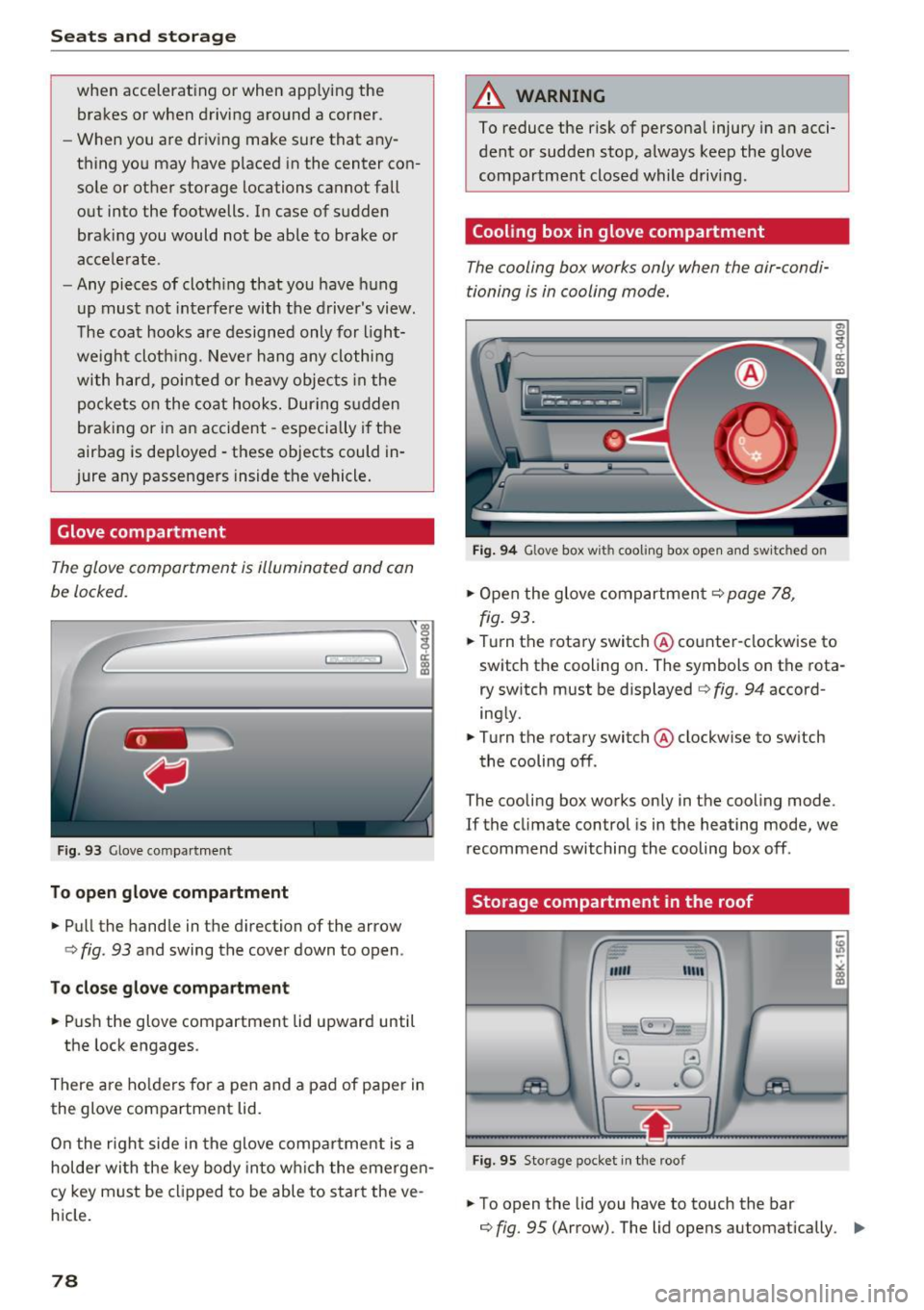
Glove compartment
The glov e comportm ent is illuminat ed and con
be locked.
F ig . 93 Glove co mpa rt men t
To open glove compartment
.. Pull the handle in the d irection of the arrow
c> fig . 93 and swing the cover down to open .
To clo se glove c omp artm ent
.. Push the glove compartment lid upward until
the lock engages .
There are ho lders for a pen and a pad of paper in
the glove compartment lid.
On the r ight side in the glove compa rtment is a
hol der wi th the key body into w hich the emerge n
cy key must be clipped to be able to star t the ve
h icle.
78
A WARNING
To reduce the risk of persona l injury in a n acci
dent or sudde n stop, a lways keep the glove
compartment closed while driving .
Cooling box in glove compartment
The cooling box works only when the air-condi
tioning i s in cooling mode.
Fig . 94 Glove box w ith cooli ng box ope n and sw itc hed on
.. Open the glove compartmen t c> page 78,
fig. 93 .
.. Tu rn the rotary switch @ counte r-clockwise to
switch th e cooling on . The symbols on th e rota
ry sw it c h must be displayed c> fig . 94 accord
ing ly .
.. Turn the rotary switch @ clockwise to sw itch
the cooling off .
The cooling box works only in the cooling mode.
If the climate con trol is in the heating mode, we
recommend switching the cooling box off .
Storage compartment in the roof
""' "'"
-~
@ ..!J
O .. ~O
Fig. 95 Sto ra g e pocket in t he roof
.. To open the lid you have to touch the bar
c> fig. 95 (Arrow). The lid open s automatically . ..,.
Page 83 of 300
..... N
co ~ CX)
rl I.Cl U"I
rl I.Cl .....
Warm and cold
Operation
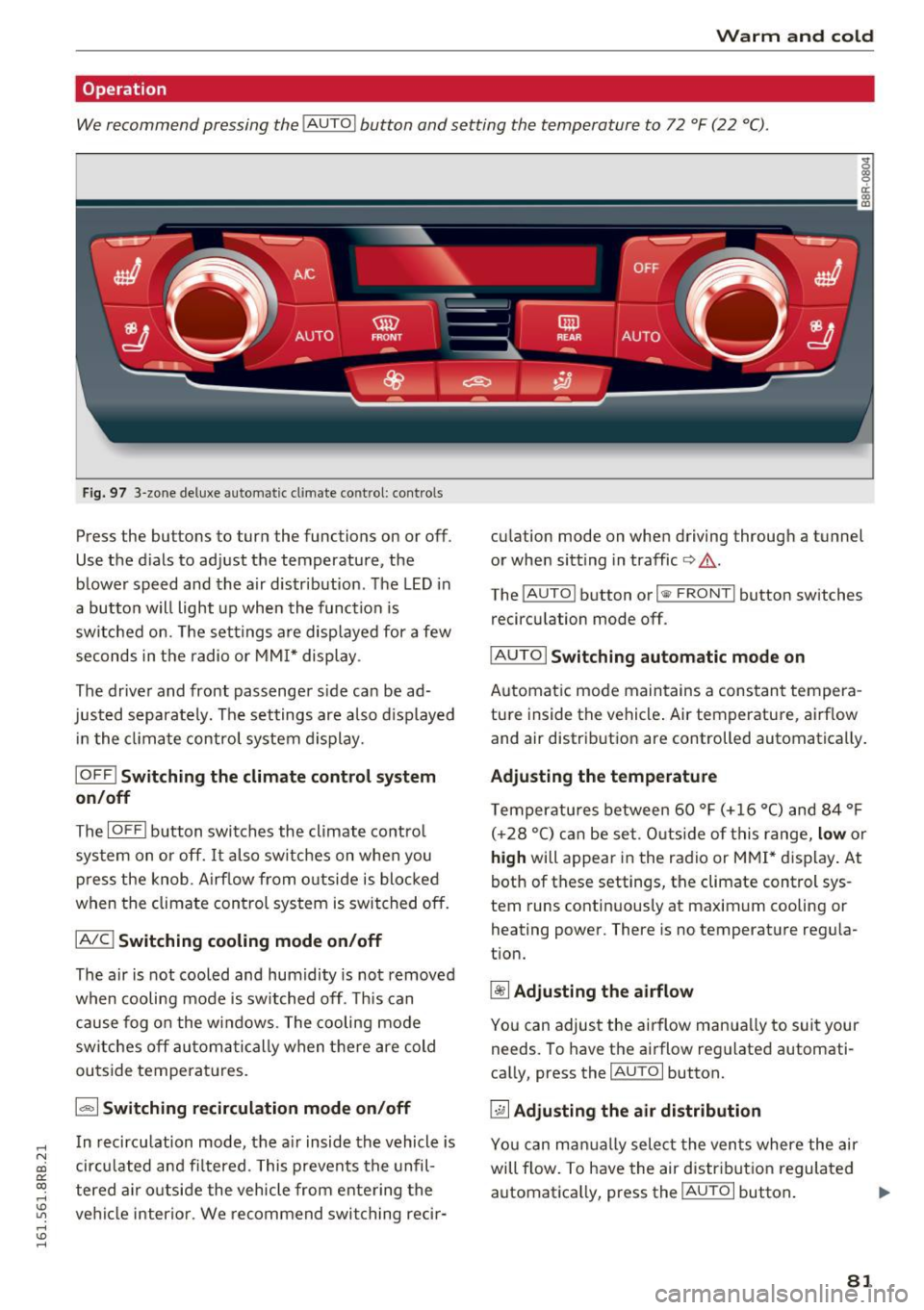
We recommend pressing the !AUTO ! button and setting the temperature to 72 °F (22 °C).
Fig. 97 3-zone deluxe automatic cl imate control: co ntrols
Press the buttons to turn the functions on or off .
Use the d ials to adjust the temperature, the
blower speed and the air distr ibut ion. The LED in
a button w ill light up when the function is
switched on. The settings are displayed for a few
seconds in the radio or MMI* display .
The driver and front passenger s ide ca n be ad
justed separately. The settings are also displayed
in t he climate control system display.
IOFFI Switching the climate control system
on/off
The I OF Fi button switches the climate contro l
system on or off.
It also sw itches on when you
press the knob. Airf low from o utside is blocked
when the climate control system is switched off.
IA/C l Switching cooling mode on/off
The air is not cooled and humidity is not removed
when cooling mode is switched off. This can
cause fog on the windows. The cooling mode
switches off automatically when there are cold
outside temperat ures.
1.,,., 1 Switching recirculation mode on/off
In recirculation mode, the air inside the vehicle is
circu lated and fi ltered. This prevents the unfil
tered air o utside the vehicle from ente ring the
ve hicl e interior. We recommend switching rec ir- cu
lation mode on when driving through a tunnel
or when sitt ing in traffic
c> .&. .
The !AUTO I button or I @ FRONT I button switches
recirculation mode off.
I AUTO I Switching automatic mode on
Automatic mode maintains a constant tempera
ture inside the vehicle . Air temperature, airf low
and air distribut ion are controlled automatically .
Adjusting the temperature
Temperatu res between 60 °F (+ 16 °C) and 84 °F
( +2 8 °C) ca n be set. O uts ide of this range,
low or
high will appear in the radio or M MI* display. At
both of these settings, the climate control sys
tem runs continuous ly at maximum cooling or
heating power. There is no temperat ure regula
t ion.
~ Adjusting the airflow
You can adjus t the airflow manua lly to suit your
needs. To have the airflow reg ulated automati
ca lly, press the
IAUTO I button.
~ Adjusting the air distribution
You can man ually select the ven ts where the air
will flow. To have the air distribut ion regulated
automatica lly, press the
IAUTOi button . ..,.
81