Display AUDI Q5 2016 Workshop Manual
[x] Cancel search | Manufacturer: AUDI, Model Year: 2016, Model line: Q5, Model: AUDI Q5 2016Pages: 300, PDF Size: 75.02 MB
Page 124 of 300
Automatic transmissio n
Automatic transmission
tiptronic
Introduction
The automat ic transmission is controlled e lec
tron ically . The transmission upshifts or down
shifts automatically depending on wh ich dr ive
p rogram is selected. The powe r is transferred by
a torque converter .
When a
moderate driving style is used, the
transmission se lects the most economical d riving
mode .
It will then change up early and de lay the
downshifts to give better fuel economy .
The transm ission switches to a spo rty mode afte r
a kick-down or when the drive r uses a
sport y
d riv ing sty le
charac ter ized by quick accelerator
pedal movements, heavy acce leration, frequent
changes in speed and traveling at the maximum
speed.
If desired, the dr iver can a lso select the gears
manually ( tiptronic mod e) ¢ page 126.
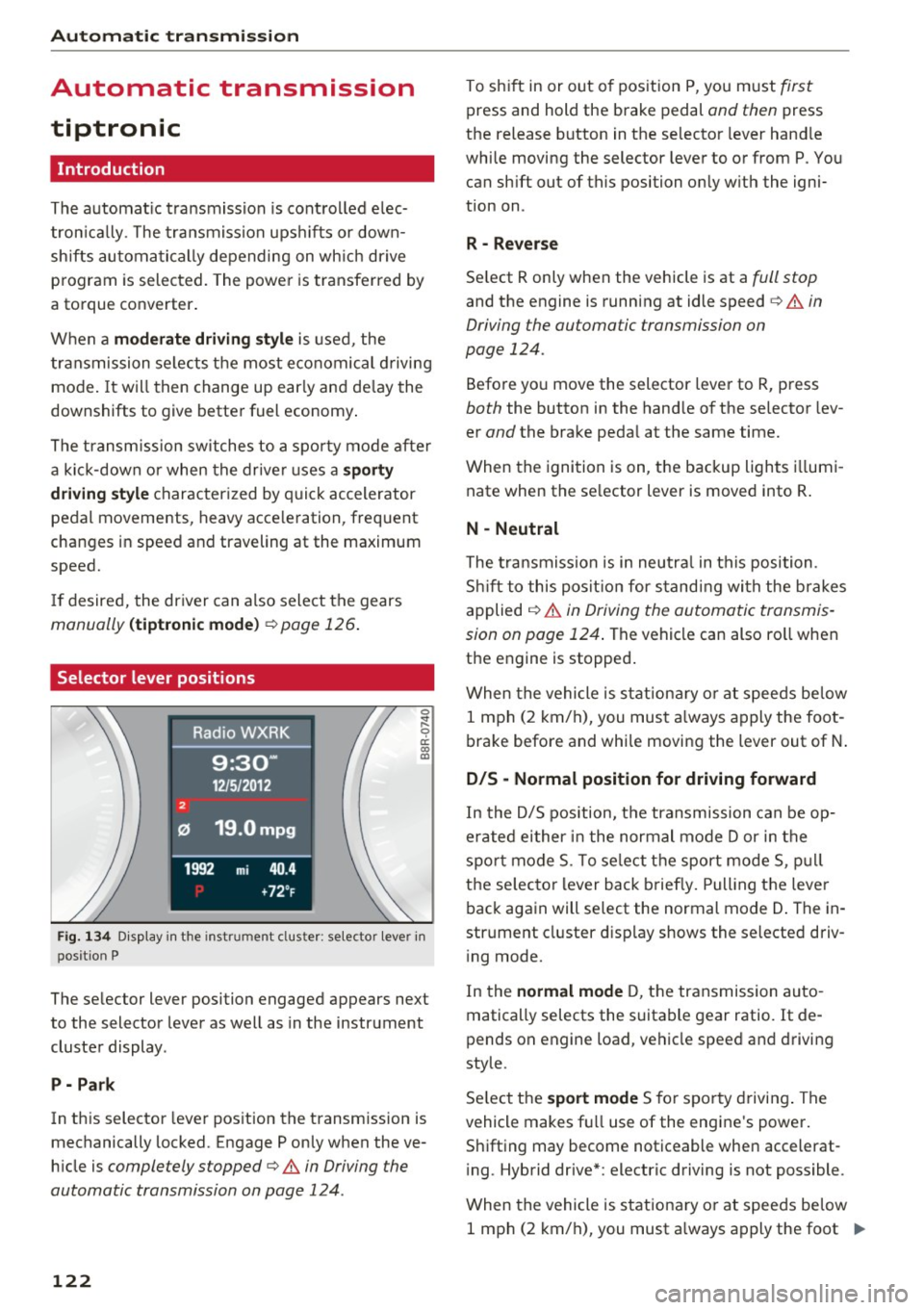
Selector lever positions
0 ;:t 0 ct CX) a,
Fig. 1 34 Disp lay in the instrument cl uster: selector lever in
position P
The selector lever position engaged appears next
to the selector lever as well as in the instrument
cluster display .
P -Pa rk
In this selector lever position the transmission is
mechanically locked. Engage P only when the ve
h icle is
completely stopped¢.& in Driving the
automatic transmission on page 124 .
122
To shift in or out of pos ition P, you m ust first
press and hold the brake pedal and then press
the release button in the selector lever hand le
while moving the selector lever to or from P. You can sh ift out of this position on ly w ith the igni
tion on .
R -Reve rse
Se lect R only when the vehicle is at a full stop
and the engine is running at idle speed c> .& in
Driving the automatic transmission on
page 124.
Befo re yo u move the selector lever to R, press
both the button in the hand le of the se lector lev
er
and the brake peda l at the same time.
When the ignition is on, the backup lights i llumi
nate when the se lector lever is moved into R .
N -Neutral
The t ra nsmission is in neutra l in this position .
S hi ft to this pos it ion for s tand ing wi th the brakes
applied
¢ .&. in Driving the automatic transmis
sion on page 124 .
The vehicle can also ro ll when
the engine is stopped .
When the vehicle is stationa ry o r at speeds be low
1 mph (2 km/h), you must a lways apply the foot
brake before and whi le moving the lever out of N .
D/S -Normal position for driving forward
In the D/5 position, the transmission can be op
erated either in the normal mode Dor in the
spo rt mode 5. To se lect the sport mode 5, p ull
t h e se lecto r lever back briefly. Pulling the leve r
back again will select the normal mode D . The in
strument cluster d isplay shows the se lected driv
i ng mode.
In the
normal mode D, t he transmission auto
matically selects the suitable gear ratio . It de
pends on engine load, vehicle speed and d riving
style.
Se lect t he
sport mode 5 for sporty drivi ng . The
vehicle makes fu ll use of the engine 's power.
Shifting may become noticeable when accelerat
i ng . Hybrid drive* : electric driving is not possible .
When the vehicle is stationary o r at speeds be low
1 mph (2 km/h), you must a lways apply the foot ..,.
Page 125 of 300
..... N
co ~ CX)
..... I.Cl U"I
..... I.Cl ..... brake before and wh
ile moving th e le ver to D/S
out of N.
A WARNING
Read and follow all WARNINGS¢ & in Driv
ing the automatic transmission on
page 124.
(D Note
Coasting downhill with the transmission in N
and the engine not running will result in dam
age to the automatic transmission and possi
bly the catalytic converter .
(D Tips
-On vehicles with Audi drive select*, you can
adjust the sporty shift characteristics in the
Dynamic driving mode .Swill appear in the
i nstrument cluster display instead of 0.
- If you accidentally select N while driving ,
take your foot off the accelerator pedal im
mediately and wa it for the engine to slow
down to idle before selecting D/S .
- Hybrid drive*: if the
l-,,sv ! button r::::;, page 100
is pressed while in sport mode S, the trans
mission switches automatically to the nor
mal mode D.
- If there is a power failure, the selector lever
will not move out of the P posit ion. The
eme rgency release can be used if this hap
pens
¢ page 127.
'
Automatic transmission
Automatic Shift Lock (ASL)
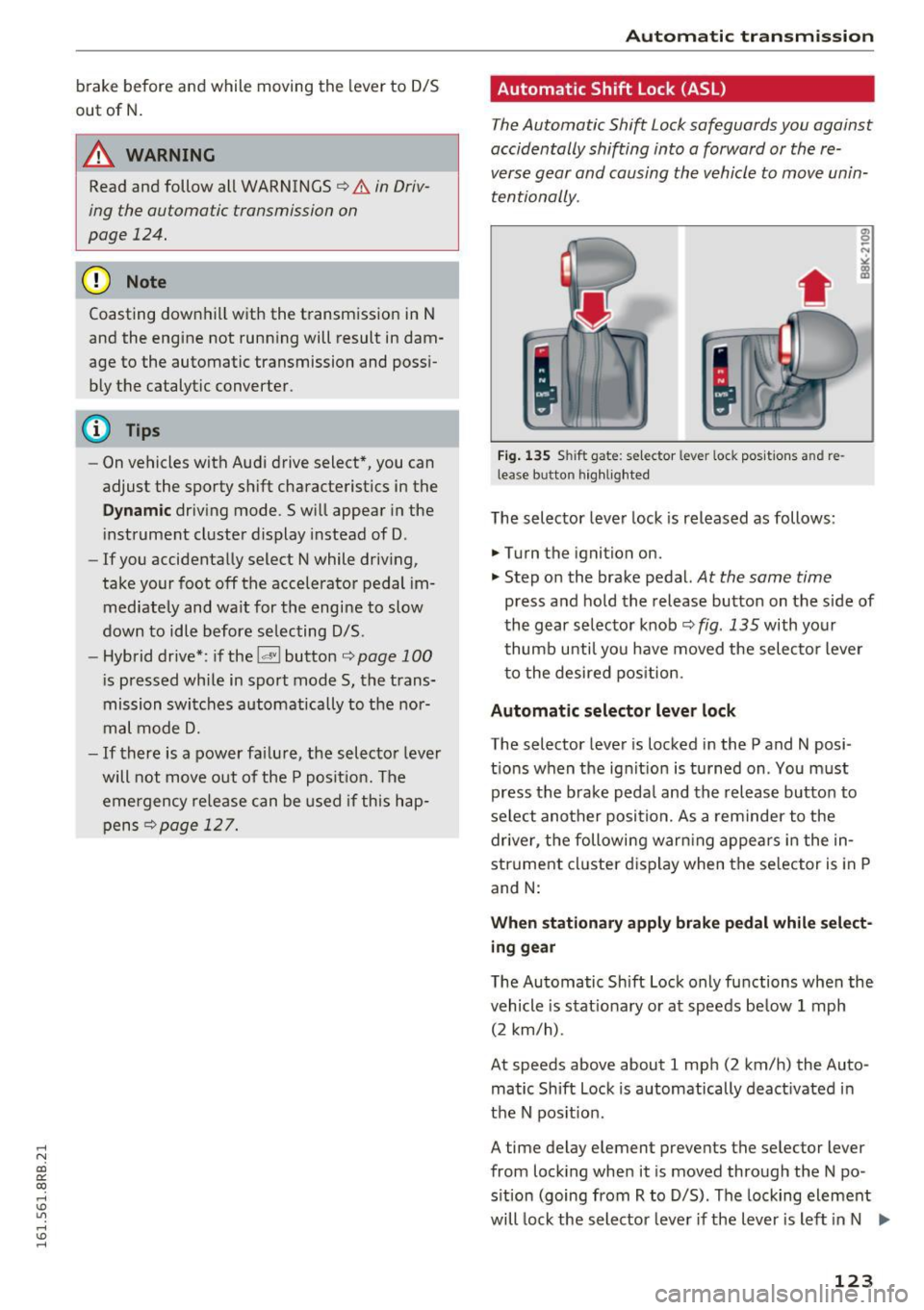
The Automatic Shift Lock safeguards you again st
accidentally shifting into a forward or the re
verse gear and causing the vehicle to move unin
tentionally .
Fig. 13S Shi ft gat e: se lec tor le ver loc i< po sition s and re
lea se butto n highlighted
The selector lever lock is released as follows :
.,. Turn the ignition on.
"" Step on the brake pedal.
At the same time
press and hold the release button on the side of
the gear selector knob
r::::;, fig. 135 with your
thumb until you have moved the selector lever
to the desired position .
Automatic selector lever lock
The selector lever is locked in the P and N po si
tions when the ignit ion is turned on . You must
press the brake peda l and the release button to
select another position. As a reminder to the
driver , the following warn ing appears in the in
strument cluster d isplay when the se lector is in P
and N:
When stationary apply brake pedal while select
ing gear
The Automatic Shift Lock only functions when the
vehicle is stat ionary or at speeds be low 1 mph
(2 km/h) .
At speeds above about 1 mph (2 km/h) the Auto ·
matic Shift Lock is automatically deact ivated in
the N pos it ion .
A time delay element preven ts the selec tor lever
from locking when it is moved through the N po
sition (going from R to D/S). The locking element
will lock the selector lever if the lever is left in N .,..
123
Page 131 of 300
,....,
N
co
er::
co
,....,
The MM I display s hows the area covered by the
rearv iew camera ¢
fig. 143 (!). Objects that a re
not in the area covered @are not shown on the
MMI disp lay .
We recommend that yo u pract ice pa rking with
the rearview camera in a t raff ic-free location o r
parking lot to become familiar w ith the system ,
the orientation lines, and their function . When
doing this, there should be good light and weath
er cond itions.
I n the MMI disp lay, objects or vehicles appea r
closer o r furthe r away if :
- yo u are driving in reverse gea r from a level sur
f ace onto an in cli ne, or a downward s lope,
- yo u are d riving in reverse ge ar toward protr ud
ing objects,
- th e vehi cle is ca rrying too much lo ad in the
re ar .
The accuracy of the o rientation lines and blue
surfaces d imin ishes if:
- the rearv iew camera does not provide a reliab le
i mage, for example, in poor visibility cond itions
or if the lens is d irty,
- the image on the screen is not visib le due to
s u n glare and reflection .
Caring for the rear view c amera lens
The rearview camera is located above the rear li
cense plate bracket. For the parking system to
operate, the lens¢
fig. 144 must be kept clean:
- Dampen the lens with a house hold alcoho l-
based glass cleaner, and then wipe the lens
clean with a dry cloth¢(!).
- Remove snow with a hand brush and ice pref
erab ly w ith a de -icing spray ¢(D .
A WARNING
-The parking system cannot replace the dr iv
er's attention. The driver alone is responsi
ble for parki ng and similar dr iving ma neu
vers.
- Senso rs have blind spots in which objects
cannot be detected . Pay spec ial attention to
Par king sy stem
sma ll children and anima ls because the sen
sors cannot always detect them.
- Always keep your eyes on the vehicle's sur
roundings, using the rearv iew mirror as
wel l.
- Do not allow you rself to be dist racted from
traffic by the rearview camera pictures.
- If the position and the installation angle of
the camera has changed, for example, after
a rear end co llision, do not continue to use
the system for safety reasons. Have it
checked by a qualified dealership .
CI) Note
-Low obstacles a lready signa led by a warning
can disappea r from the system's detection
range as they are approached and w ill not
cont inue to be s ignaled. Objects such as
barrie r cha ins, tra iler draw bars, th in pain t
ed vertical poles or fences may not be de
te cted by the system, posi ng risk of dam
a ge.
- N ever use warm o r hot wate r to remove
snow o r ic e from the rearview camera lens -
t his could ca u se the lens to c ra ck!
- Whe n cleani ng the lens, never use prod ucts
t ha t are abras ive.
129
Page 132 of 300
Parking system
Switching on and off
Applies to veh icles: w ith Aud i park ing system p lus w ith rear
view ca mera
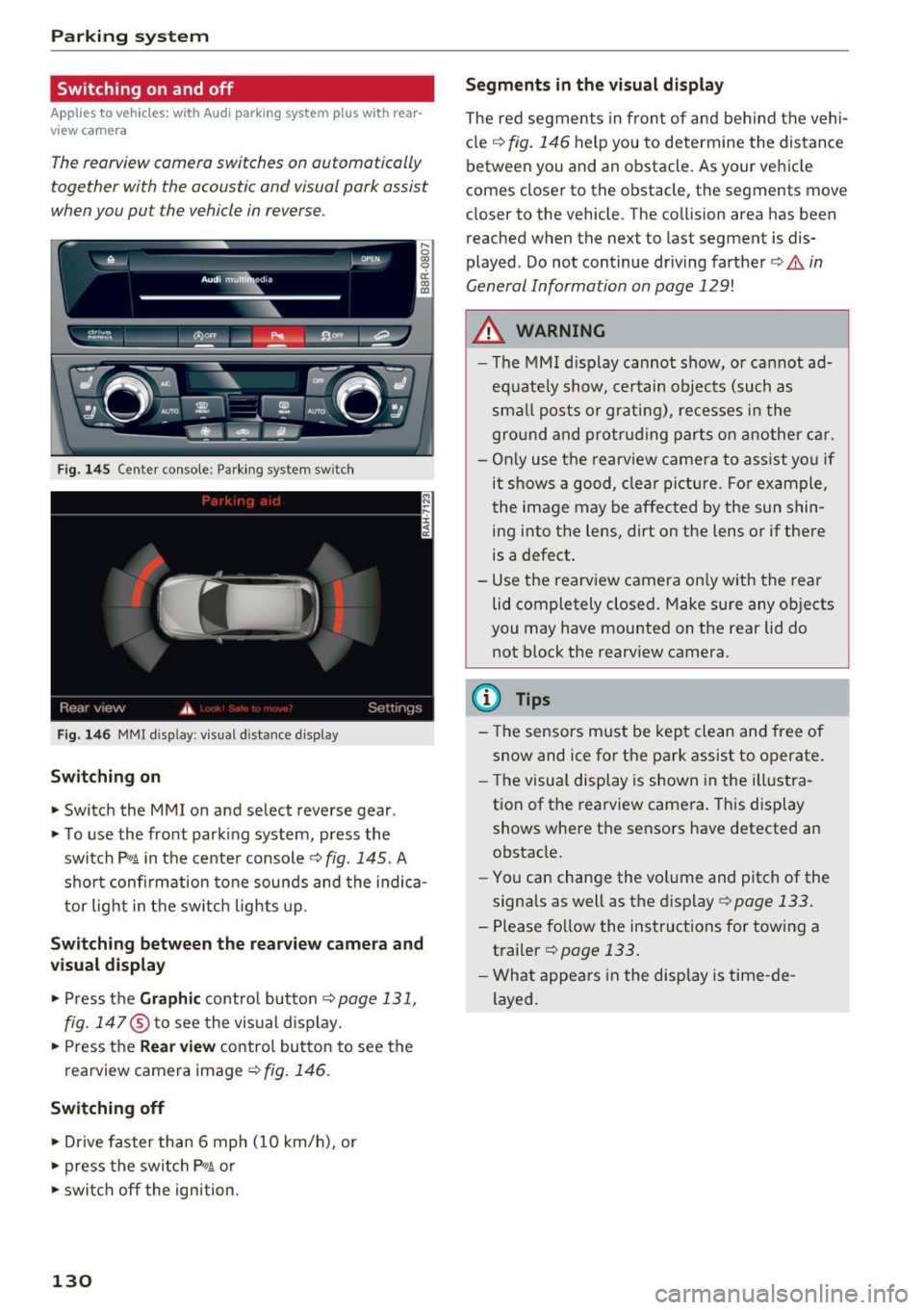
The rearview camera switches on automatically
together with the acoustic and visual park assist
when you put the vehicle in reverse.
F ig. 145 Center console: Pa rking system sw itch
F ig. 146 MM I d isp lay : v isual d istance display
Sw itch ing on
• Switch the MM I on and select reverse gear .
• To use the front parking system, press the
switch
P11A in the center console¢ fig. 145. A
sho rt confi rmation to ne sounds and the indica
tor light in the switch lights up.
Sw itching betwe en th e re arview came ra and
visual display
• Press t he Graphi c control but ton ¢ page 131,
fig. 147
® to see the vis ual d isplay.
• Press the
Re ar view contro l button to see the
rearview camera image¢
fig. 146.
Switching off
• Drive faster than 6 mph (10 km/h), or
• press the switch
P"1A or
• swit ch off the ignition.
130
S egments in the vis ual d isplay
The red segments in front of and behind the vehi
cle
¢ fig. 146 help you to determine the distance
between you and an obstacle . As your vehicle
comes closer to the obstacle, the segments move
closer to the vehicle . The collision area has been
reached when the next to last segment is dis
played . Do not continue dr iving farther ¢.&.
in
General Information on page 129!
,& WARNING
- The MMI display cannot show, or cannot ad
equate ly show, certain objects (such as
sma ll posts or grati ng), re cesses in the
gro und and protrud ing parts on another car.
- On ly use the rearv iew camera to ass ist you if
it shows a good, clear picture . For example,
the image may be affected by the sun shin
ing into the lens, dirt on the lens o r if there
is a defect .
- Use the rearview camera on ly with the rear
lid completely closed. Make sure any ob jects
you may have mounted on the rear lid do
not block the rearview camera.
(D Tips
- The sensors m ust be kept clean and free of
snow and ice for the park assist to operate .
- The visu al display is shown in the illustra
tion of the rearview camera. This display
shows where the sensors have detected an obstacle.
- Yo u can change the vol ume and pitch of the
signals as well as the disp lay ¢
page 133.
-Please follow the instruc tions for tow ing a
trailer
¢ page 133.
- What appears in the display is time -de
layed .
Page 133 of 300
..... N
co ~ CX)
..... I.Cl U"I
..... I.Cl .....
Reverse Parking
Applies to vehicles: with Audi parking system plus with rear
view came ra
Parking mode 1 can be used when parking in a
garage or into a parking space.
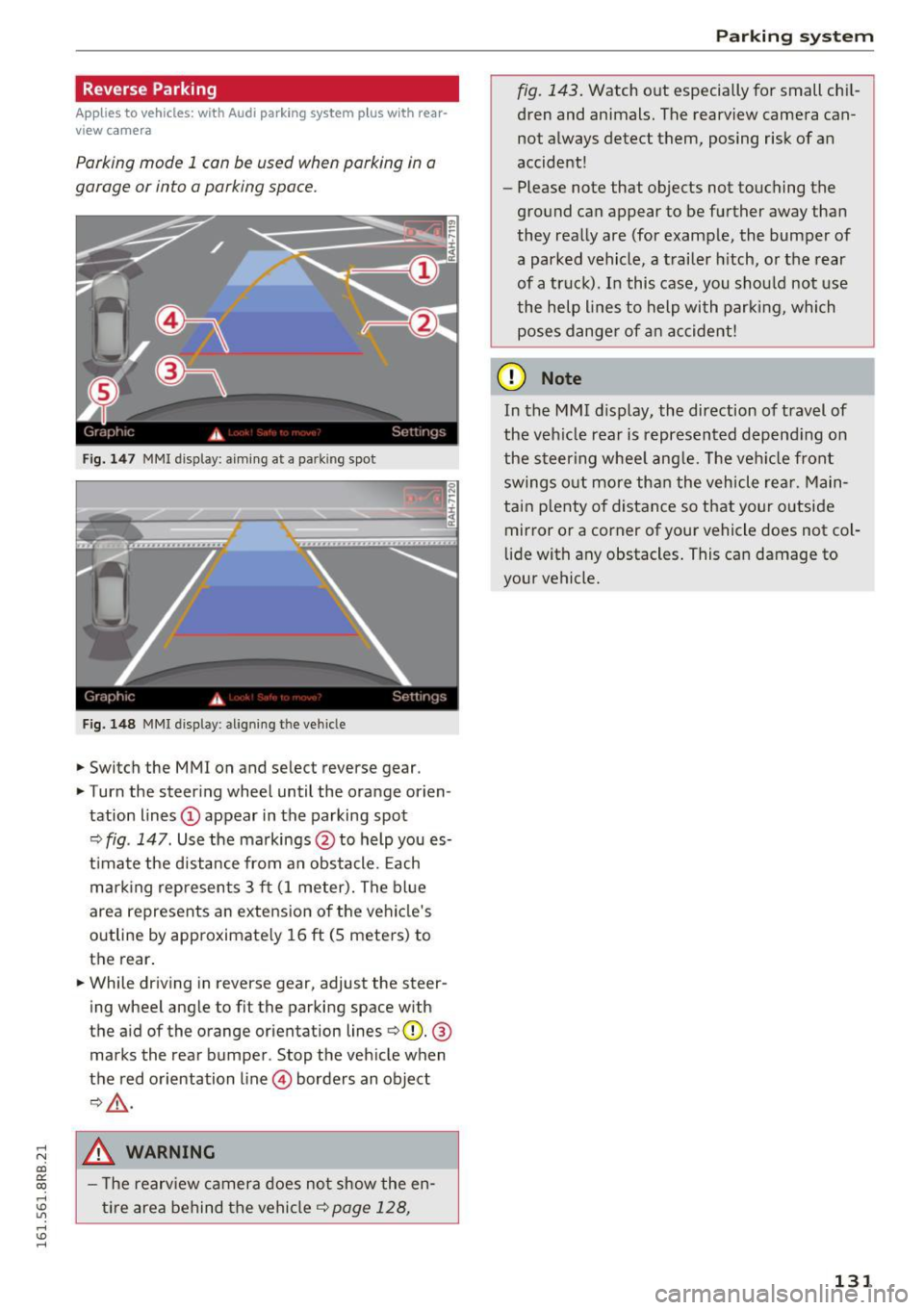
Fig. 147 MMI displa y: aiming at a p arkin g spot
Fig. 148 MMI displa y: align ing t he ve hicle
.,. Switch the MMI on and se lect reverse gear .
.,. Turn the steering wheel until the orange orien
tation lines
(D appear in the parking spot
Q fig . 147 . Use the markings @to help you es
t imate the distance from an obstacle . Each
marking represents 3 ft (1 meter). The blue
area represents an extension of the vehicle's
outline by approximately 16
ft (S meters) to
the rear.
.,. While driving in reverse gear, adjust the steer
ing wheel angle to fit the parking space with
the aid of the orange orientation lines
QQ). @
marks the rear bumper . Stop the vehicle when
the red orientation line © borders an object
Q,Lr:i. ,
.8, WARNING
-The rearv iew camera does not show the en
tire area behind the vehicle¢
page 128,
Parking system
fig. 143. Watch out especially for small chil
dren and animals. The rearview camera can
not always detect them, posing risk of an
accident!
- Please note that objects not touching the
ground can appear to be further away than
they really are (for example, the bumper of
a parked vehicle , a trailer hitch, or the rear
of a truck). In this case, you should not use
the help l ines to help with parking, which
poses danger of an accident!
(D Note
In the MMI display, the direction of travel of
the veh icle rear is represented depend ing on
the steer ing wheel angle. The vehicle front
swings out more than the vehicle rear. Main
tain p lenty of distance so that your outside
mirror or a corner of your vehicle does not col
lide with any obstacles . This can damage to
your vehicle.
131
Page 135 of 300
,....,
N
co
er::
co
,....,
lide with any obstacles. This can damage to
your veh icle.
(D Tips
The left or right orientation lines and surfaces
wi ll be displayed, depending on the turn sig
na l being used .
Adjusting the display
and warning tones
Applies to vehicles: with Audi parking system plus with rear
view camera
The display and warning tones can be adjusted in
the MMI.
~ Select: I CARI function button > Parking syste m.
Or
~ Se lect: I CARI funct ion button > C ar sy stem s*
control button > Driver a ssi st > Pa rking aid .
Di sp lay
- Off -
when the parking system is switched on,
only aud ible signals are g iven.
- On -when the parking system is switched on,
either the visual disp lay or the picture from the
rearview camera is displayed.
Warning tones
- Front volu me -
fron t se nso r volume
- Front fr equ ency -front se nsor frequency
- Rea r volum e -rear sensor vol ume
- Rea r frequency -rear sensor frequency
-In -car enterta inment fade r/Mus ic volum e
w hile pa rking -
when the parking system is
switched on, the volume of the active audio
source is lowered .
The new ly adjusted value is briefly heard from
the signal generator .
- The warning tones can also be ad justed d i
rectly by the vis ual disp lay or the picture
from the rearview camera. Simply press the
Sett ings control button.
- Changed settings are activated when park
ing system is switched on again.
Par king system
- The settings are automatically stored and
assigned to the remote control key .
Trailer hitch
Applies to vehicles: with Audi parking system plus with rear
view camera and trailer hitch
Fo r vehicles with a factory installed trailer hitch,
o r a tra ile r hi tch installed according to factory
specifications, the par king system rear sensors
do not come on whenever you shift into reverse
gear or when you press the
P •1~ switch . Remem
ber, there is no war ning for distances to the rear .
The front sensors remain activated. The visual
display switches to the tra iler tow ing mode. The
picture from the rearview camera w ill not show
the or ientat io n lines nor the blue surfaces .
If you insta ll a hitch yourse lf, this f unct ion may
not work.
Error messages
Applies to vehicles: with Audi parking system plus with rear
view camera
T he re is an error in the system if the LE D on the
Pw~ switch is blink ing and yo u hear a continuous
alarm for a few seconds after sw itch ing on the
park ing system or when the parking system is al
ready activated. Have your authorized Audi dealer
correct the error.
(D Tips
If the error is not corrected before you switch
off the ign ition, when you switch on the park
i ng system again, the LED in the
Pw.A sw itch
will blink.
133
Page 156 of 300
Airbag syste m
-The inflating airbag will hit the child safety
seat or infant carrier with great force and
will smash the child safety seat and child
against the backrest, center armrest, door
or roof .
- Always install rear-facing child safety seats
on the rear seat .
- If you must install a rearward facing child
safety seat on the front passenger seat be cause of exceptional circumstances and the
P ASS ENGER AIR BAG OFF light does not
come on and stay on, immed iate ly install
the rear-fac ing ch ild safety seat in a rear
seat ing pos ition and have the airbag system
inspected by your authorized Audi dea ler.
- Forward-facing ch ild safety seats installed
on the front passenger's seat may interfere
with the deployment of the airbag and
cause serious personal injury to the child .
A WARNING
If, in exceptional circumstances, you must in
stall a forward-facing chi ld restraint on the
front passenger's seat:
- Always make sure the forward-facing seat
has been designed and certified by its man
ufacturer for use on a front seat with a pas
senger front and side a irbag .
- Never put the forward-facing child restraint
up against or very near the instrument pan
el.
-Always move the passenger seat into its
rearmost position in the seat 's fore and aft
adjustment range, as fa r away from the air
bag as possib le before insta lling the for
ward-facing child restra int. The bac krest
mus t be adjusted to an up right posit ion.
- Make s ure that the
PASSENGER AI R BAG
OFF
light comes on and s tays on all the time
whenever the ignition is switched on.
A WARNING
To red uce the risk of serio us in jury, make s ure
that the
PASSENGER AIR BAG OFF light wi ll
be displayed whenever a child restraint is in
stalled on the front passenger seat and the
ign ition is switched on.
154
- If the PASSENGER AIR BAG OF F light does
not stay on, perform the checks described
¢ page 161, Monitoring the Advanced Air
bag System .
-Take the child restra int off the front passen
ger seat and install it properly at one of the
rear seat positions if the
PA SSENGER AIR
BAG OFF
light does not stay on .
- Have the airbag system inspected by your
author ized Audi dealer immed iately .
- Always carefully follow instructions from
child restraint manufacturers when instal
ling child restra ints.
A WARNING
If, in exceptional circumstances, you must in
stall a forward or rearward-fac ing child re
stra int on the fron t passenger's seat:
- Improper installat ion of child restraints can
reduce the ir effectiveness or even prevent
them from provid ing any pro tect ion.
- An improperly installed child res tra int can
inter fere with the airbag as it deploys and
serious ly injure or even kil l the child -eve n
w ith an Advanced A irbag System.
- Always carefully follow the manufacturer's
instructions provided with the child safe ty
seat o r carrier.
- Never p lace add ition al items on the seat
that can increase the tota l weight registered
by the weight -sensing mat and can cause in
jury in a crash .
Page 165 of 300
,....,
N
co
er::
co
,....,
ly seated on the center of the seat cushion with
his or her back up against the backrest and the
backrest is not reclined
9 page 135 , Correc t
passenger seating positions,
- the adult is not taking weight off the seat by
holding on to the passenger assis t handle
above the front passenger door or suppor ting
their weight on the armrest,
- the safety bel t is being properly worn and that
there is not a lot of slack in the safety belt web
bing,
- accessory seat covers or cushions or other
things that may cause an incorrect reading or
impression on the weight-sensing mat under
the upholstery of the seat have been removed
from the front passenger seat,
- a safety belt extender has not been left in the
safety belt latch for the front passenger seat.
In addition to the
PASSENGER AIR BAG OFF
light in the center of the instrument panel, the
message
PASSENGER AIR BAG OFF or PASSEN
GER AIR BAG ON
will briefly appear in the instru
ment cluster display . This is to inform the driver
of the current front passenger airbag status.
Important safety instructions on
monitoring the Advanced Airbag System
A WARNING
An airbag system that is not functioning prop erly cannot provide supplemental protection
in a frontal crash .
- If the airbag indicator light
9 page 16
comes when the vehicle is being used, have
the system inspected immediately by your
authorized Audi dealer. It is possible that
the airbag will inflate when it is not sup
posed to, or will not inflate when it should.
A WARNING
If the front airbag inflates, a child without a
child restraint, in a rearward-facing child safe
ty seat or in a forward-facing child restraint
that has not been properly installed will be
seriously injured and can be killed.
Airbag system
-Even though your vehicle is equipped with
an Advanced Airbag System, make certain
that all children, especially 12 years and
younger, always ride on the back seat prop erly restrained for their age and size .
- Always install forward or rear-facing child
safety seats on the rear seat -even with an
Advanced Airbag System .
- If you must install a rearward-facing child
safety seat on the front passenger seat be
cause of exceptional circumstances and the
PASSENGER AIR BAG OFF light does not
appear and stay on, immediately install the
rear-facing child safety seat in a rear seating
position and have the airbag system in
spected by your authorized Audi dealer.
-A tight tether or other strap on a rearward
facing child restraint attached to the front passenger seat can put too much pressure
on the weight-sensing mat in the seat and
register more weight than is actually on the
seat . The heavier weight registered can
make the system work as though an adult
were on the seat and deploy the Advanced
Airbag when it must be suppressed causing
serious or even fatal injury to the child.
- If, in exceptional circumstances, you must
install a forward-facing child restraint on
the front passenger seat, always move the
seat into its rearmost position in the seat's
fore and aft adjustment range, as far away
from the airbag as possible. The backrest must be adjusted to an upright position .
Make sure that the
PASSENGER AIR BAG
OFF
light comes on and stays on all the time
whenever the ignition is switched on.
A WARNING
-- If the PASSENGER AIR BAG OFF light does
not go out when an adult is sitting on the
front passenger seat after taking the steps
described above, make sure the adult is
properly seated and restrained at one of the rear seating positions.
- Have the airbag system inspected by your
authorized Audi dealer before transporting
anyone on the front passenger seat.
163
Page 194 of 300
Intelligent Technology
Hill descent assist
The hill descent assist makes it possible to drive
down an incline at a constant speed .
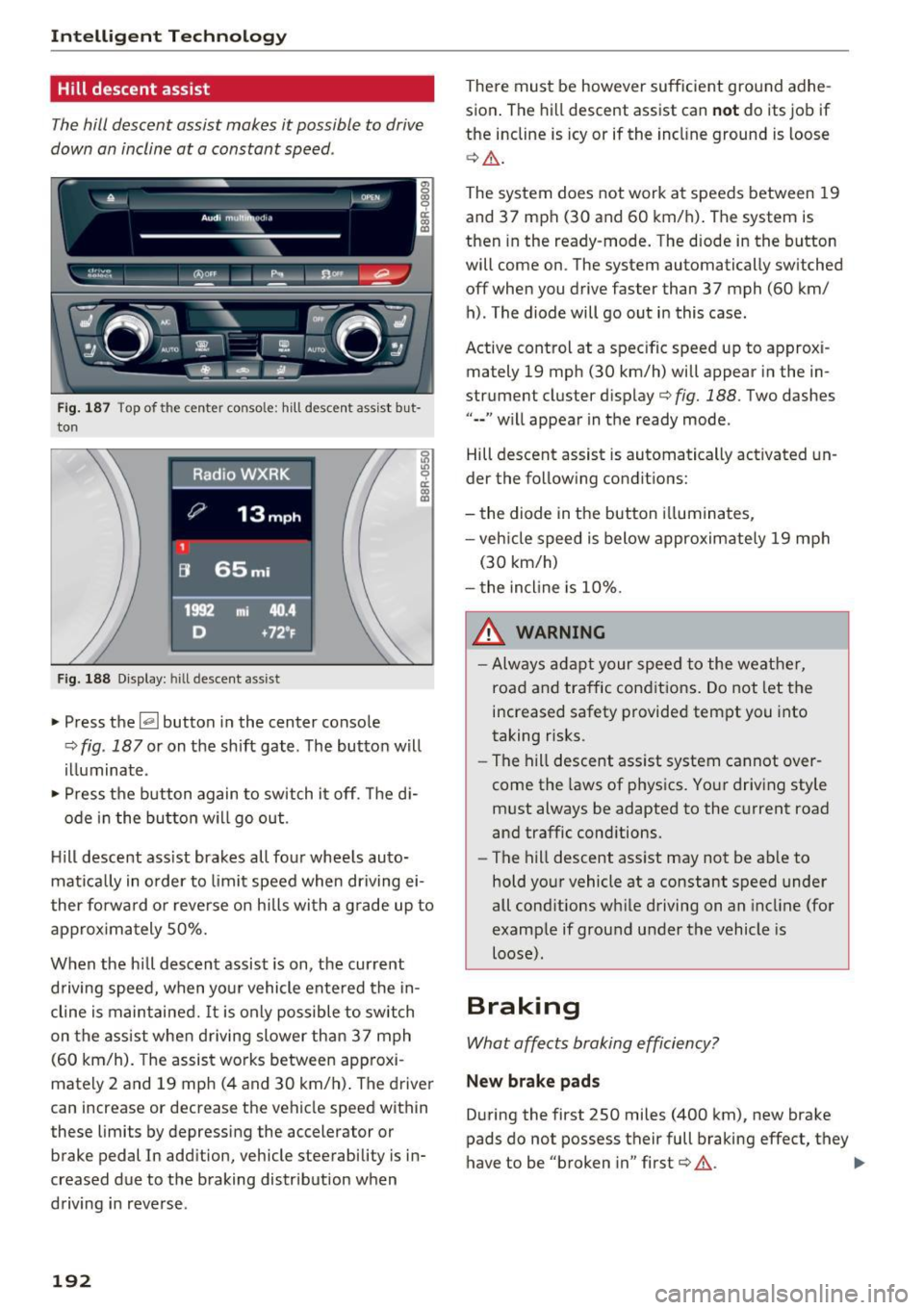
~~,·~ ('l)ofF ___ P..1 --- fl~ IIL..~
---
Fig. 187 Top of the center conso le: hill descent assist but
ton
Fig. 188 Display: hill descent assist
.. Press the~ button in the center console
¢ fig . 187 or on the shift gate . The button will
illuminate .
" Press the button again to switch it off. The di-
ode in the button will go out .
Hill descent ass ist brakes all four wheels auto
matically in order to limit speed when driving ei
ther forwa rd o r reverse on hills with a grad e up to
approximately 50%.
When the hill descent assist is on, the current
driving speed, when your vehicle entered the in
cline is maintained.
It is only possible to switch
on the assist when driving slower than 37 mph
(60 km/h). The assist works between app roxi
mately 2 and 19 mph (4 and 30 km/h) . The driver
can increase or decrease the vehicle speed within
these limits by depressing the accelerator or
brake pedal In addition, vehicle steerability is in
creased due to the braking distribution when
driving in reverse .
192
There must be however sufficient ground adhe
sion . The hill descent assist can
not do its job if
the incline is icy or if the incl ine ground is loose
¢ &.
The system does not work at speeds between 19
and 37 mph (30 and 60 km/h). The system is
then in the ready-mode. The diode in the button
will come on . The system automatically sw itched
off when you drive faster than 37 mph (60 km/ h) . The diode will go out in this case .
Active control at a specific speed up to approxi
mately 19 mph (30 km/h) will appear in the in
strument cluster display
c:> fig. 188 . Two dashes
" •• " w ill appear in the ready mode .
Hill descent assist is automatically activated un
der the following conditions:
- the diode in the button illuminates,
- veh icle speed is below approximately 19 mph
(30 km/h)
- the incline is 10%.
& WARNING
-Always adapt your speed to the weather,
road and traffic cond itions. Do not let the
increased safety provided tempt you into
taking risks.
-
-The hill descent assist system cannot over
come the laws of phys ics. Your driving style
must always be adapted to the current road
and traffic conditions.
- The hill descent assist may not be ab le to
hold your vehicle at a constant speed under
all cond itions wh ile driving on an incline (for
example if ground under the vehicle is
loose).
Braking
What affects braking efficiency?
New brake pads
Du ring the first 2 50 miles (400 km), new brake
pads do not possess their full braking effect, they
have to be "broken in" first
c:> &. ..,_
Page 196 of 300
Intelligent Technology
brake. This may cause the brakes to over
heat, premature wear and increased stop
ping distance.
- Under certain climatic and operating condi
tions such as passing through water, driving
in heavy rain or after washing the vehicle,
the effectiveness of the brakes can be re duced . In winter, ice can accumulate on the
brake pads, linings, discs and drums. Care
fully apply brakes for a test. Brakes will dry
and ice coatings will be cleaned off after a
few careful brake applications.
- Driving for an extended period of time on
salt-covered roads without using your
brakes can also affect braking efficiency.
Clean off accumulated salt coating from
brake discs and pads with a few carefu l
brake app lications .
-If you damage the front spoiler, or if you in
stall a different spoiler, be sure the air flow
to the front brakes is not obstructed. Other
wise the brake system could overheat reduc ing the effectiveness of the entire brake sys
tem .
- Failure of one brake circuit will impair the
braking capability resulting in an increased
stopping distance. Avoid driving the vehicle and have it towed to the nearest author ized
Audi dealer or qualified workshop.
- Never let the vehicle roll to a stop with the
engine shut off.
- If the brake booster is not working, the
brake pedal must be pressed considerably
harder to make up for the lack of booster
assista nee.
Electromechanical power
assist, Dynamic steering
The electromechanical power assist helps the
driver when steering.
Power steering adapts electronically based on
the vehicle speed.
Indicator lights and messages
• Steering defective! Do not drive vehicle!
194 If
this indicator light turns on and stays on and
this message appears, the power steering may
have failed.
Stop the vehicle in a safe location as soon as pos
sible. Do
not continue driving . See your author
ized Audi dealer or other qualified repair facility
for ass istance .
'-r, ij Dynamic steering: System fault! You can
continue driving
If the indicator l ight turns on and the message
appears, the steering may be more difficult to
move or more sensitive than usual. The steering
may also be at an angle when driving straight.
Drive slowly to your authorized Audi dealer or
qualified workshop to have the malfunct ion cor
rected.
1 :r- ij Dynamic steering: Initializing
Audi drive select* : if the indicator light blinks and
the driver message appears, the dynamic steer i ng* is reinitial ized. After start ing the engine, the
steering wheel will move slightly . Re-initial iza
tion might be necessary if the steering wheel was
moved hard to the left and right while the vehicle
was not moving. The display turns off if the initi
alization was successful.
(D Tips
- If the . or 1:r- ij in dicato r light only stays on
for a short time, you may continue driving.
- T he dynamic steering* stab ility systems
¢ page 190 are not available in the event of
a system malfunction.
- For additional information on dynamic
steering*
¢page 119.
Driving with your
quattro
With all-wheel drive, all four wheels are driven .
General information
With all-wheel drive, power is distributed to all
four wheels. This happens automatically depend
ing on your driving style and the road conditions
at the time. See also
c> page 190. ..,.