brake AUDI Q5 2016 Owner's Manual
[x] Cancel search | Manufacturer: AUDI, Model Year: 2016, Model line: Q5, Model: AUDI Q5 2016Pages: 300, PDF Size: 75.02 MB
Page 92 of 300
Driving
E m erg ency b ra ke function
An emergency b rake ensures that the veh icle can
be slowed down even if the normal brakes fai l
¢ page 91, Emergency broking.
A WARNING
If a drive range is engaged with the vehicle
stationary and the engine running, you must
in no instance accelerate care lessly. Other
w ise the vehicle will start to move immediate
ly -risk of an accident.
(D Tips
- If the parking brake is app lied with the igni
tion switched off, the indicator lights in the
switch and. (USA models)/ . (Cana-
da models) in the instrument cluster will go
out after a ce rtain per iod of t ime.
- Occasiona l noises whe n the parking b rake is
applied and released are normal and are not
a cause for conce rn.
- When the vehicle is par ked, the park ing
brake goes thro ugh a self-test cycle at regu
l a r i nte rvals. Any associa ted noises a re nor
mal.
Parking
" Press the brake ped al to stop the vehicle.
" Pull the switch
¢ page 89, fig. 103 to set the
parking brake.
" Move the selector lever to P.
" Turn the eng ine off¢ &_.
-
"When on incl ines or declines, turn the steering
wheel so that the vehicle w ill roll into the curb
if it beg ins to move .
A WARNING
-When you leave your vehi cle - even if on ly
br iefly- always remove the ign ition key. This
applies particular ly when c hildren remain in
the vehicle . Otherwise the children could
sta rt the engine, release the pa rking brake
or operate electrical eq uipment (e .g. power
windows). There is the risk of an acc ident.
- When the vehicle is loc ked, no one - particu
larly not children shou ld remain in the vehi-
90
-
cle. Locked doors make it more d ifficult for
emergency wo rkers to get into the vehicle -
putting lives at risk.
Starting from rest
The starting assist function ensures that the
parking broke is released automatically upon
starting.
Stopping and applying park ing brake
" Pull the switch to app ly the parking b rake.
Starting and automat ically releasing the
park ing brake
" When you start to d rive as usua l, the par king
brake is automatically released and yo ur vehicle
beg ins to move.
When stopp ing at a t raffic sig na l or s topping in
c ity traff ic on vehicles with an automat ic t rans
mission, the pa rking brake can be applied . The
vehicle does not have to be held with the foot brake. The parking brake eliminates the tendency
to c reep w ith a dr ive range engaged . As soon as
you drive off as usual, the parking brake is re
leased automat ica lly and the vehicle starts to
move.
Starting on slope s
When starting on incl ines, the starting assist pre
vents the vehicle from un intent iona lly rolling
back. The braking force of the parking brake is
not re leased u nti l sufficient dr iv ing fo rce has
been built up at the wheels.
@ Tips
For safety reasons, the park ing brake is re
l eased automatically on ly when the d river's
safety be lt is engaged in the b uckle.
Starting off with a trailer
To prevent rolling bock unintentionally on on in
cline, do the following:
" Keep the switch pu lled and depress the acceler
ator. The park ing brake stays applied and pre-
vents the ve hicle from roll ing backward.
IJ,,
Page 93 of 300
,....,
N
co
er::
co
,....,
that you are developing enough driving force at
the wheels by depressing the accelerator .
Depending on the weight of the r ig (vehi cle and
tra iler) and the severity of the incline, you may
ro ll backwards as you start . You can prevent roll
ing backwards by holding the parking brake
switch pulled out and accelerating -just as you
wou ld when starting on a hill with a conventiona l
h and brake .
Emergency braking
In the event that the conven tional brake system
fails or locks .
~ In an emergency, pull the sw itch and cont inue
to pull it to slow your veh icle down with the
parking b rake.
~ As soon as you release the switch or accelerate,
the b raking process stops .
If you pull the sw itch and hold it above a speed of
about 5 mph (8 km/h) , the eme rgency braking
function is in it iated . The vehicle is braked at all
four wheels by activating the hydraulic brake sys
te m. T he b rake perfo rman ce is sim ila r t o making
an em ergen cy sto p ~ ,& .
In o rder not to activate the emergency brak ing by
mista ke, an audib le wa rn ing tone (buzze r)
sounds w hen the sw itch is p ulled. As soon as t he
sw itch is rele ased, or the acce le ra to r p edal is de
p ressed, eme rgency bra king stops.
A WARNING
Emergency bra king should only be use d in an
emergency, w hen the normal foot brake has
fai led or the bra ke pedal is obstructed . Using
the par king b rake to perfo rm emergency
brak ing will slow your vehicle down as if you
had made a full bra ke ap plication . The laws of
physics cannot be suspended even wi th ESC
a n d its associated components (A BS, ASR,
E DS). In c orn ers and when road or weath er
c ondi tions are bad, a full brake ap plication
c an ca use the vehicle to sk id or the rear end to
break away· r isking an accident .
Driving
Driver messages in the instrument cluster
Caution: Vehicle parked too steep
T h is message appears when the pa rking bra ke is
applie d on an in cl in e that exceeds about 30%.
In this case the braki ng power o f the pa rking
brake may not be adequate to prevent the ve hi
cle from roll ing uninten tionally.
Press b rake pedal to release park ing brake
This dr iver message appears when the sw itch to
re lease the par king brake was pressed. The park
ing brake can only be released if you step o n the
brake pedal and at the same time press the
switch or you automatica lly re lease the park ing
bra ke w ith the sta rting ass ist ~
page 90 .
r.lJ Parking brake malfunction!
This dr iver message appears together w ith the
yellow
rlJ symbol whe n there is a parki ng brake
malfu nction .
Start/Stop system
Description
Applies to vehicles: wit h Start-Stop-Syste m
The Start -Stop -System can he lp increase f uel
economy and reduce CO2 emissions.
In the Start -S top -mode, the engine sh uts off au
tomat ica lly when the vehicle is stoppe d, such as
at a t raff ic light. The ignition remains switched
on d uring this stop phase. The eng ine will be a u
tomat ically restarted when needed.
T he last Start-Stop -System setting (on/off usin g
the b utton
10~ 1) will be restored when the ign i
t ion is turned on. The LED in the
10'" 1 button turns
on when the Start-Stop-System is switched off
manua lly .
Ba sic requirements for the Start-Stop mode
- The d river 's door is closed.
- The driver 's sea t belt is latc hed.
- The hood is closed.
- The vehicle must have bee n driven fast er than
2.5 mph (4 km/h) s in ce the last s top.
- A t railer is not hitched to the vehicle . .,.
91
Page 94 of 300
Driving
_& WARNING
-Ne ver turn off the engine before the veh icle
has come to a comp lete stop . The f ull func
t ion of the brake booster and the power
steering is not guaranteed. Yo u must use
more force to turn or brake if necessary . Be
ca use you cannot steer and b rake as you
us ually wou ld, this could lead to crashes
and serious injur ies.
- To reduce the risk of inju ries, make s ure that
t h e S tart -Stop-System is turned off whe n
wor king in the eng ine compart ment
9page 93 .
(D Note
Always sw itch off the Start-Stop-System
when dr iv ing th rough water
9 page 93 .
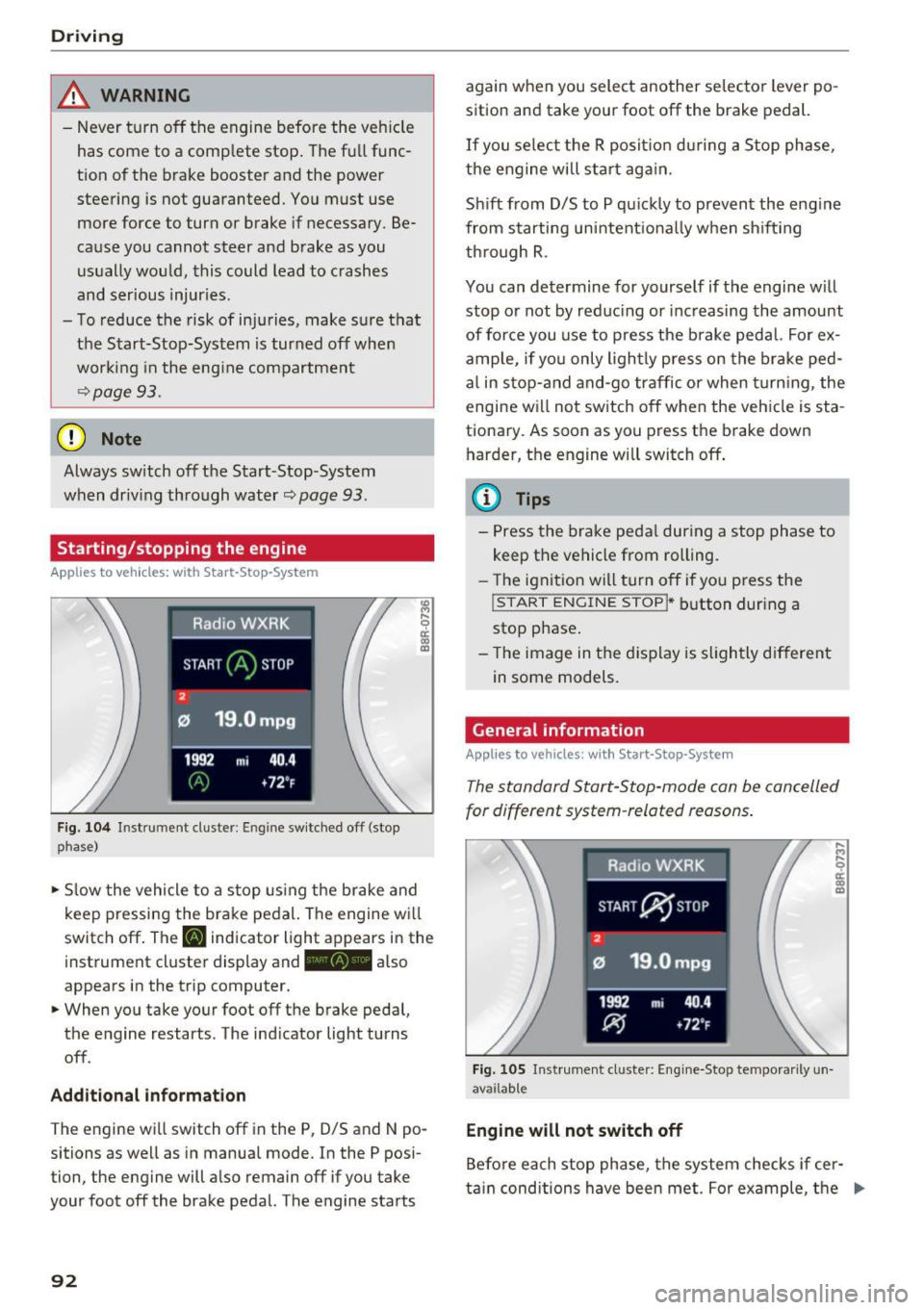
Starting/stopping the engine
Applies to veh icles: w ith Start -Stop -System
F ig . 104 In strum ent cluste r: En gin e sw itc hed off (stop
phase}
• Slow the vehicle to a s top using the brake and
k eep pressing the bra ke pe dal. The engine w ill
switc h off . The
[I] ind icator light appears in the
i nst rument cluste r display and -also
appears in the t rip computer.
• When you take yo ur foot off the b rake peda l,
the engine restarts . The ind icator light tu rns
off .
Add itional informat ion
The eng ine wi ll switch off in the P, D/S and N po
sitions as we ll as in manua l mode. In the P pos i
tion, the eng ine will a lso remain off if you take
your foot off the brake pedal. The engine starts
92
again w hen you select another se lecto r lever po
sition and take your foot off the brake pedal.
If you se lect t he R posit io n dur ing a Stop phase,
the e ngine will sta rt ag ain.
Sh ift from D/S to P qu ic kl y to prevent the eng ine
from starting uni ntent io na lly when sh if ti ng
th rough R.
You can determine for yourself if t he engine w ill
stop o r not by re duc ing or inc reasing the amount
of force you use to p ress the b rake pedal. Fo r ex
amp le, if yo u only ligh tly press o n the brake ped
a l in s top- and and-go traffic or when turning, the
engine will not switch off when the veh icle is sta
tiona ry. As soon as you press the brake down
h arder, the engine will switch off .
{i) Tips
-Press the brake peda l during a stop phase to
keep the vehicle from rolling.
- The igni tio n wi ll turn off if y ou press the
! START ENGINE STOPI * button dur ing a
stop p hase .
- Th e image in the displ ay is s ligh tly d ifferent
in some models.
General information
Applies to vehicles: with Start-Stop-System
The standard Start-S top-mode can be can celled
for different system -related reasons .
Fig. 1 05 In str um ent cl uste r: E ngi ne-Stop te mpo rari ly un
ava ilab le
Engine will not switch off
.... .., .... 0
~ m
Befo re each sto p phase, t he system checks if cer
ta in conditions have been met. For example, t he .,.
Page 95 of 300
..... N
co ~ CX)
..... I.Cl U"I
..... I.Cl .....
engine will no t be switched off in the following
situations:
- The eng ine has not reached the m in imum re
quired temperature for Start-Stop-mode.
- T he interior temperature selected by the A/C
system has not been reached.
- The outs ide temperatu re is ext remely h igh/low.
- The w indshield is being defrosted
¢ page 82.
-The parking system* is switched on.
- The battery charge level is too low.
- The steering whee l is sharply turned or there is
a steering movement.
- After engaging the reverse gear.
- On sharp inclines .
IIJ appears in the instrument cluster display and
§ii;Ff&Ff ~lso appears in the tr ip comp ute r.
Engine automatically re starts
The stop phase is interrupted in the following sit
uations, for example . The eng ine restarts without
any action by the driver .
- The interior temperature varies from the tem
perature se lected in the A/C system .
- The windshield is beeing defrosted
¢ page 82.
- The brake pedal is pressed several times in a
row.
- The battery charge level becomes too low.
- High power cons umption .
IIJ appears in the instrument cluster display and
H§;Ff&Fii ~lso appears in the tr ip comp ute r.
Switching the ignition off autom atically
To prevent the battery from draining, the ignition
will switch off
automati cally when all of the fol
lowing cond itions have been met:
- The veh icle has already been driven.
- The eng ine has been turned off by the Start-
Stop-System .
- The driver's door is opened .
- T he dr iver's seat bel t is removed.
- The brake pedal is not pressed down.
- T he veh icle is stationary .
In this case, the activated low beam will be re
placed by the s ide marker lights . The side marker
D rivi ng
lights will switch of f after approximate ly 30 m i
nutes or when you lock the veh icle.
If t he Start-S top-System has not turned off the
engine or if you have swi tched the S tart -Stop
System off manually, the ignition will
not be au
tomatica lly switched off and the eng ine wi ll con
t in u e to run¢& .
A WARNING <= -
Never allow the engine to run in confined
spaces -danger of asphyx iation.
(D Tips
If you shift into the 0/S or N positions after
shifting into reverse, the vehicle must be dr iv
en faster than 6 mph (10 km/h) in order for
the engine to switch off again .
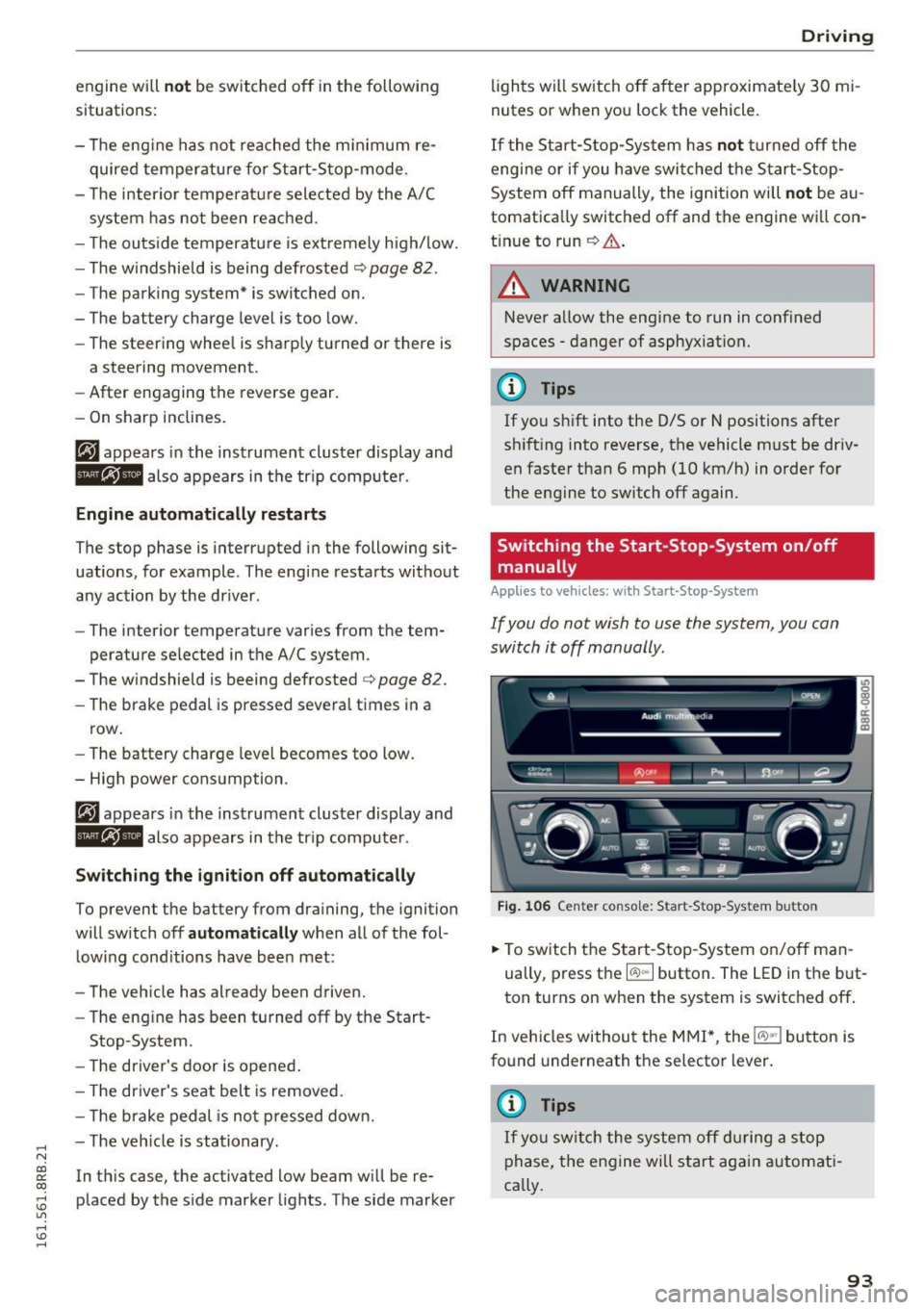
Switching the Start-Stop -System on /off
manually
App lies to vehicles: wi th Start -S top-Syste m
If you do not wish to use the system, you can
switch it off manually.
= , __ (A)Off _ --"'-- f'~-.::a-----
Fig . 10 6 Cen ter co nsole: S ta rt -Stop -System button
.. To switch the Start -Stop-System on/off man
ually, press the
I CAJ ,,.I button. The LED in the b ut
ton turns on when the system is switched off .
In vehicles without the M MI*, the
!CA.> "'! button is
found underneath the se lector lever.
(D Tips
If y ou swit ch the system off d uring a stop
phase, the engine will st art aga in automati
ca lly.
93
Page 97 of 300
..... N
co ~ CX)
..... I.Cl U"I
..... I.Cl .....
Speed warning 1: setting a speed limit
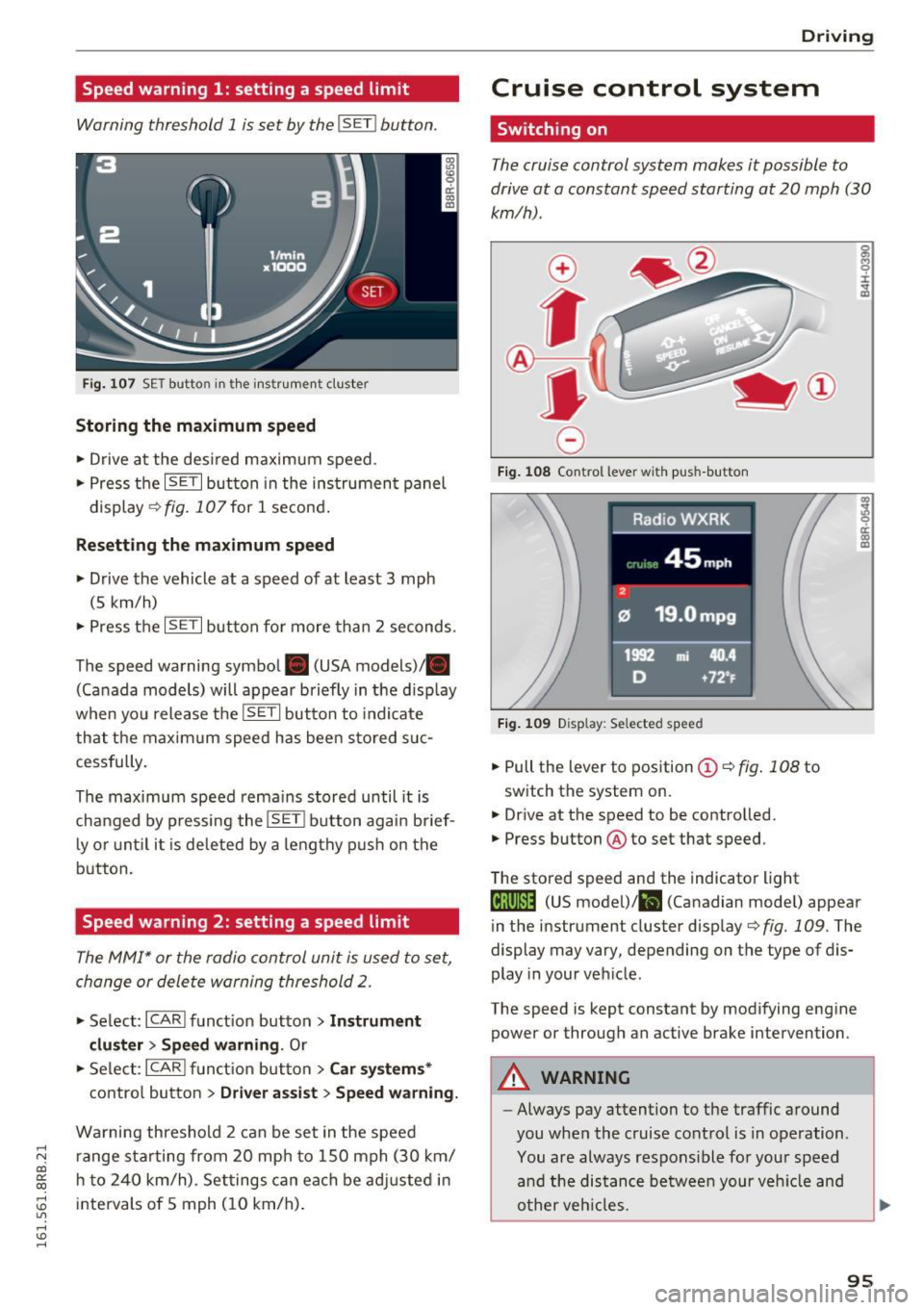
Warning threshold 1 is set by the IS ET I button .
Fig. 107 SET butto n in t he inst rume nt cluster
Storing the maximum speed
.. Drive at the desired maximum speed.
.. Press the
ISE TI button in the instrument panel
display ¢fig .107for 1 second .
Resetting the maximum speed
.. Drive the vehicle at a speed of at least 3 mph
(5 km/h)
.. Press the
~ IS- ET~I button for more than 2 seconds .
The speed warning symbol. (USA models)/ .
(Canada models) will appear briefly in the d isp lay
when you release the
ISE TI button to indicate
that the maxim um speed has been sto red suc
cessfully.
The maximum speed rema ins stored until it is
changed by pressing the
I S ET I button aga in brief
l y o r until it is deleted by a lengthy p ush on the
button.
Speed warning 2: setting a speed limit
The MMI* or the radio control unit is used to set,
change or delete warning threshold
2.
.. Se lect: I CARI f u nct ion button > Instrum ent
clu ster > Sp eed warning .
Or
.. Se lect: ICARI funct ion but ton> C ar sys tem s*
contro l button > Dri ver a ssist > Speed warning.
Wa rning threshold 2 can be set in the speed
r ange sta rting from 20 mp h to 150 mph (30 km/
h t o 240 km/h) . Settings can each be ad justed i n
intervals of 5 mph ( 10 km/h) .
Drivi ng
Cruise control system
Switching on
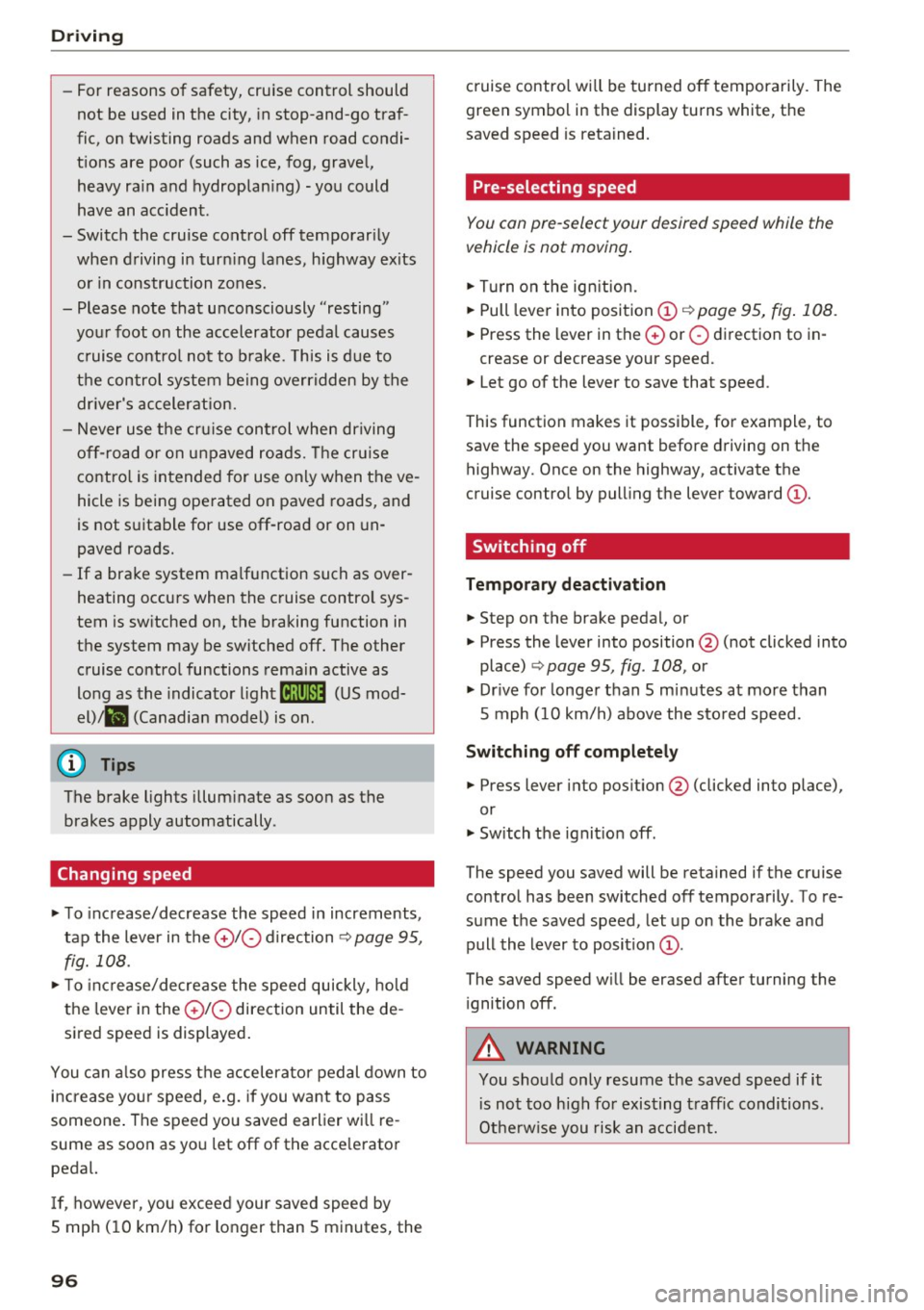
The cruise control system makes it possible to
drive at a constant speed starting at 20 mph (30
km/h) .
0
f
~
0
Fig . 108 Co ntrol lever w it h push -b utton
F ig . 1 09 Disp la y: Se lected speed
.. Pull the lever to position ©¢ fig. 108 to
switch the system on.
.,. Dr ive at the speed to be controlled.
.. Press button @to set that speed.
The stored speed and the indicator light
g M 0 :i:
;A
..
~ a: .. m
@;\l)M4 (US model) !&I (Canadian mode l) appear
in the instrument cluster display
¢fig. 109 . The
display may vary, depending on the type of dis
play in your veh icle .
The speed is kept constant by modifying engine power or through an active brake intervention .
A WARNING
--
-Always pay attention to the traffic around
you when the cruise control is in operation .
You are always respons ible for your speed
a nd the distance between your veh icle and
o ther veh icles.
95
Page 98 of 300
Driving
-For reasons of safety, cruise control should
not be used in the city, in stop-and-go traf
fic, on twisting roads and when road condi
tions are poor (such as ice, fog, gravel, heavy rain and hydroplaning) -you could
have an accident.
- Switch the cruise control off temporarily when driving in turning lanes, highway exits
or in construction zones.
- Please note that unconsciously "resting"
your foot on the accelerator pedal causes cruise control not to brake . This is due to
the control system being overridden by the
driver's acceleration.
- Never use the cruise control when driving
off-road or on unpaved roads. The cruise
control is intended for use only when the ve
hicle is being operated on paved roads, and
is not suitable for use off-road or on un
paved roads.
- If a brake system malfunction such as over
heating occurs when the cruise control sys
tem is switched on, the braking function in
the system may be switched off. The other
cruise control functions remain active as
long as the indicator light
tii;(O~i4 (US mod
el)/lil (Canadian model) is on .
{D) Tips
The brake lights illuminate as soon as the
brakes apply automatically.
Changing speed
.,. To increase/decrease the speed in increments,
tap the lever in the
010 direction ¢ page 95,
fig. 108 .
.,. To increase/decrease the speed quickly, hold
the lever in the
010 direction until the de
sired speed is displayed.
You can also press the accelerator pedal down to
increase your speed, e.g. if you want to pass
someone. The speed you saved earlier will re
sume as soon as you let off of the accelerator
pedal.
If, however, you exceed your saved speed by
S mph
(10 km/h) for longer than 5 minutes, the
96
cruise control will be turned off temporarily. The
green symbol in the display turns white, the
saved speed is retained.
Pre-selecting speed
You can pre-select your desired speed while the
vehicle is not moving.
.,. Turn on the ignition.
.,. Pull lever into position
(D ¢page 95, fig. 108.
.,. Press the lever in the 0 or 0 direction to in-
crease or decrease your speed.
.,. Let go of the lever to save that speed .
This function makes it possible, for example, to
save the speed you want before driving on the
highway. Once on the highway, activate the
cruise control by pulling the lever toward
(D .
Switching off
Temporary deactivation
.,. Step on the brake pedal, or
.,. Press the lever into position @ (not clicked into
place) ¢
page 95, fig . 108, or
.,. Drive for longer than 5 minutes at more than
5 mph (10 km/h) above the stored speed.
Switching off completely
.,. Press lever into position @ (clicked into place),
or
.,. Switch the ignition off .
The speed you saved will be retained if the cruise control has been switched off temporarily . To re
sume the saved speed , let up on the brake and
pull the lever to position
(D.
The saved speed will be erased after turning the
ignition off.
A WARNING
You should only resume the saved speed if it
is not too high for existing traffic conditions.
Otherwise you risk an accident.
Page 101 of 300

© Vehicle drive ready (READY)
® H igh voltage battery charge status
@ Recupe ration (CHARG E)
(J) Driving within the combustion en
g ine's full load range
@ 100% combust ion engine
® Boosting - the elect ric engine as
sists the combustion engine (BOOST)
@ E ngaging the conve ntiona l brakes
with recuperat ion
@ Vehicle not drive ready (OFF)
@ EV mode act ive
The need le remains at
OFF whe n the ignition is
turned on. When the veh icle enters drive ready
mode, the status message
hybrid ready appears
briefly in the instrument cluster d isplay and the
needle in the powe r meter poi nts to
READY .
Indicator lights and messages
Applies to vehicles: with hybrid drive
The indica to r li gh ts in the inst rument cluste r
b link or tur n on. They indicate functions or mal
f u nctions .
W ith some ind icator lights, messages may ap
pear and a warning tone may sou nd . A lso note
the ind icator lights in
<=:> page 2 7.
Press brake pedal to start vehicle
This message appears if you do not press the
b rake pedal whe n starting the vehicle.
Shift to N or P to start vehicle
This message appea rs if the selecto r leve r fo r the
automatic transm iss ion is not in the Nor P posi
tions whe n starting the vehicle .
-Hybrid drive: System fault! Power
brakes , steering malfunction pos sible
If the indicator lig ht turns on and th is message
appears, there is a malfunction in the hybrid sys
tem. The brake booster and the power steeri ng
~ may stop working . Stop the vehicle in a safe loca -
co g:; tion as soon as possible.
Hybrid
You may con tinue dr iving i f the indicator light
tu rns off after sta rt ing the ve hicl e several times .
Drive to an authorized repa ir facility immed iate ly
to have the malfunction cor rected .
f#iifj:j;jj,j Hybrid drive: System fault! Contact
dealer
If the indicator light turns on and this message
appea rs, there is a ma lfunction in the hybrid sys
tem. Drive to an autho rized repair fac ility imme
diately to have the malfunct io n corrected.
(II Hybrid system : Performance rest ricted .
Please contact dealer
If the indicator light turns on and this message
appears, there is an eng ine control malfunction .
The
[Ia i ndica to r li ght in the ins trument clus te r
also t urns on. The engine ou tput is red uced .
Dr ive to your authori zed A udi dealer or qualified
r ep air fa cility i mme diate ly to h ave the m alfu n c
t io n corre cte d.
Hybrid drive deactivated. Please restart
engine manually.
T h is m ess age appe ars if t he high vo lt a ge b attery
c h arge leve l h as fallen below a cer tain range or i f
t h e ig nition key is no longer i nsid e the veh icle for
vehicles with the convenience key* .
Start the engi ne w it h eithe r th e ig nitio n key
<=:> page 84 o r wi th the !START ENGI NE STOPI
button* <=:> page 87.
Hybrid battery: Low battery charge. Battery
will be charged while driving.
T h is mess age app ea rs if the high vo lt a ge b att ery
c h arge leve l has fallen be low a certa in range . If
t hi s message turns off afte r a litt le while, the
high voltage battery cha rged enoug h while driv
ing .
If the message does not turn off, have an au thor
ized repair facility cor rect the ma lf u nction as
soon as possib le .
EV mode is currently unavailable.
Th is me ssa ge appears if the con ditions
<=:> page 10 0 for enhanced ele ctric drivi ng ar e not
met. Try aga in at a late r time .
99
Page 103 of 300
,....,
N
co
er::
co
,....,
The combustion engine is operated on ly as need
ed . Gene rally, the combustion engine turns off
when the vehicle is stationary and the high vo lt
age battery powers the electrical vehicle sys
tems.
The purpose of automatica lly shutting the com
bustion engine off in hybrid drive mode is to save
fuel. All of the important vehicle systems, such
as steering, brakes and the A/C system, continue
to rema in active. In some cases, systems may re
qu ire the combustion eng ine to continue running
when the vehicle is stationary . When dr iving in
congested traffic for long periods of t ime, the
combustion engine will cycle on when the veh icle
is stat iona ry to keep the h igh voltage battery
charged.
Gliding
If the gas pedal is not pressed and the D posit ion
is selected, the combustion engine remains
turned off up to speeds of app roximately 99 mph
(160 km/h) . D riving conservat ively like th is can
reduce fuel c:on5umption .
Energy recovery (recuperation )
When braking, the electric motor will act as a
generator creating electr ic energy that is then
sto red in the high voltage battery. This also oc
curs when the ve hicle is coasting or dr iving down
hill. The combustion engine is automatica lly
turned off in this case.
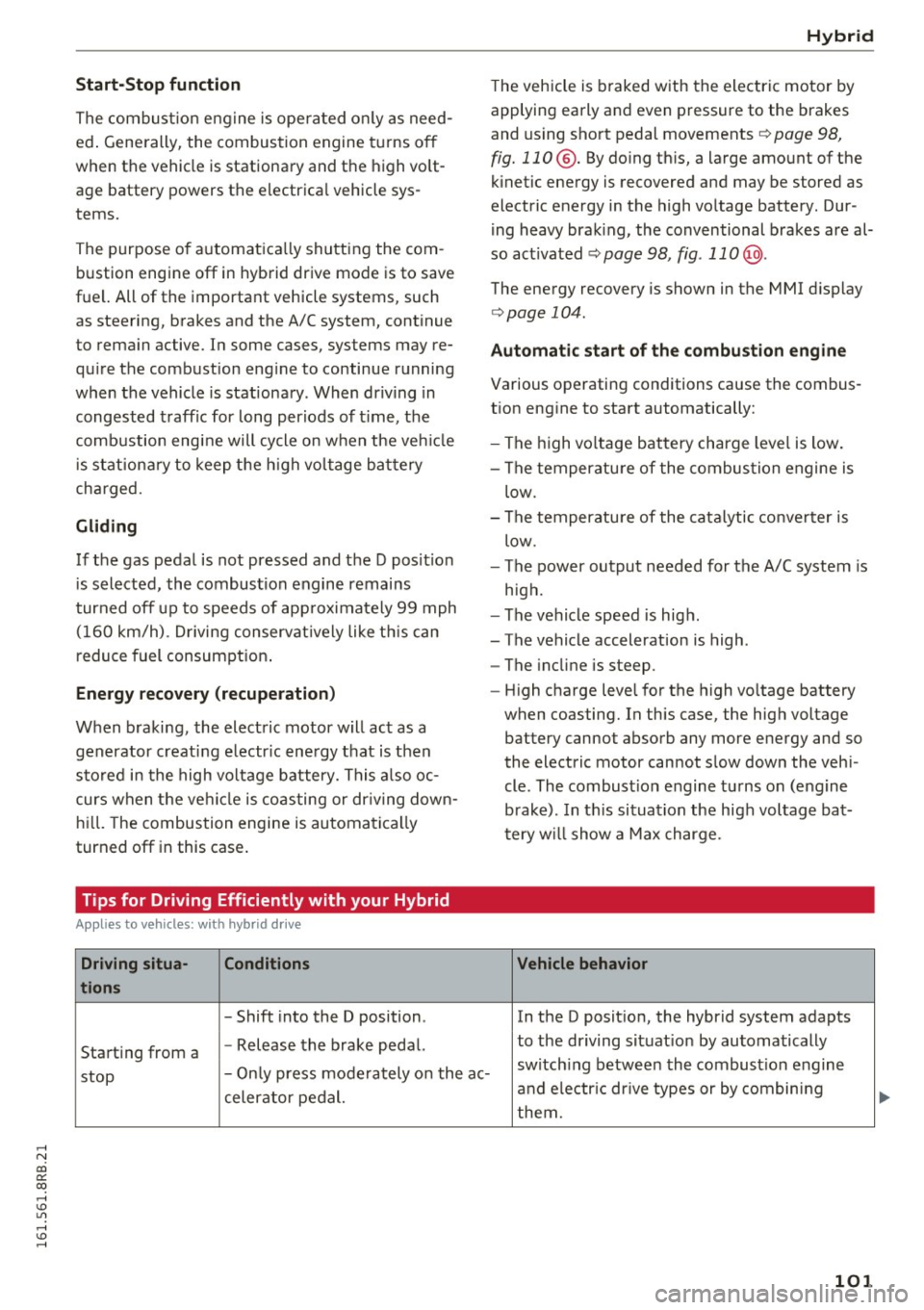
Tips for Driving Efficiently with your Hybrid
A ppl ies to vehicles: with hybr id drive
Driving situa- Conditions
tions
- Shift into the D position .
Starting from a -
Release the brake pedal.
Hybrid
The vehicle is braked with the electric motor by
applying early and even pressure to the brakes
and using short pedal movements~
page 98,
fig. 110 @. By doing this, a large amount of the
kinetic energy is recovered and may be stored as
electric energy in the high voltage battery. Dur
i ng heavy brak ing, the conventional brakes are al
so act ivated
~ page 98, fig . 11 0@ .
The energy recovery is shown in the MMI d isplay
~ page 104 .
Automatic start of the combustion engine
Various operating conditions cause the combus
t ion eng ine to start automatically:
- The high vo ltage battery charge level is low.
- The temperatu re of the combustion engine is
low.
- The temperature of the catalytic converter is
low.
- The power output needed for the A/C system is
high.
- The vehicle speed is high .
- The vehicle acceleration is high .
- The incline is steep .
- High charge level for the high voltage battery
when coasting. In this case, the high voltage battery cannot absorb any more energy and so
the electric motor cannot slow down the veh i
cle . The combust ion engine turns on (engine
brake). In th is situation the high voltage bat
tery will show a Max charge.
Vehicle behavior
In the D posit ion, the hybrid system adapts
to the dr iving situat ion by automatically
stop -
Only press moderately on the ac- switch
ing between the combust ion engine
and e lectr ic dr ive types or by combining
celerator pedal.
them.
101
Page 104 of 300
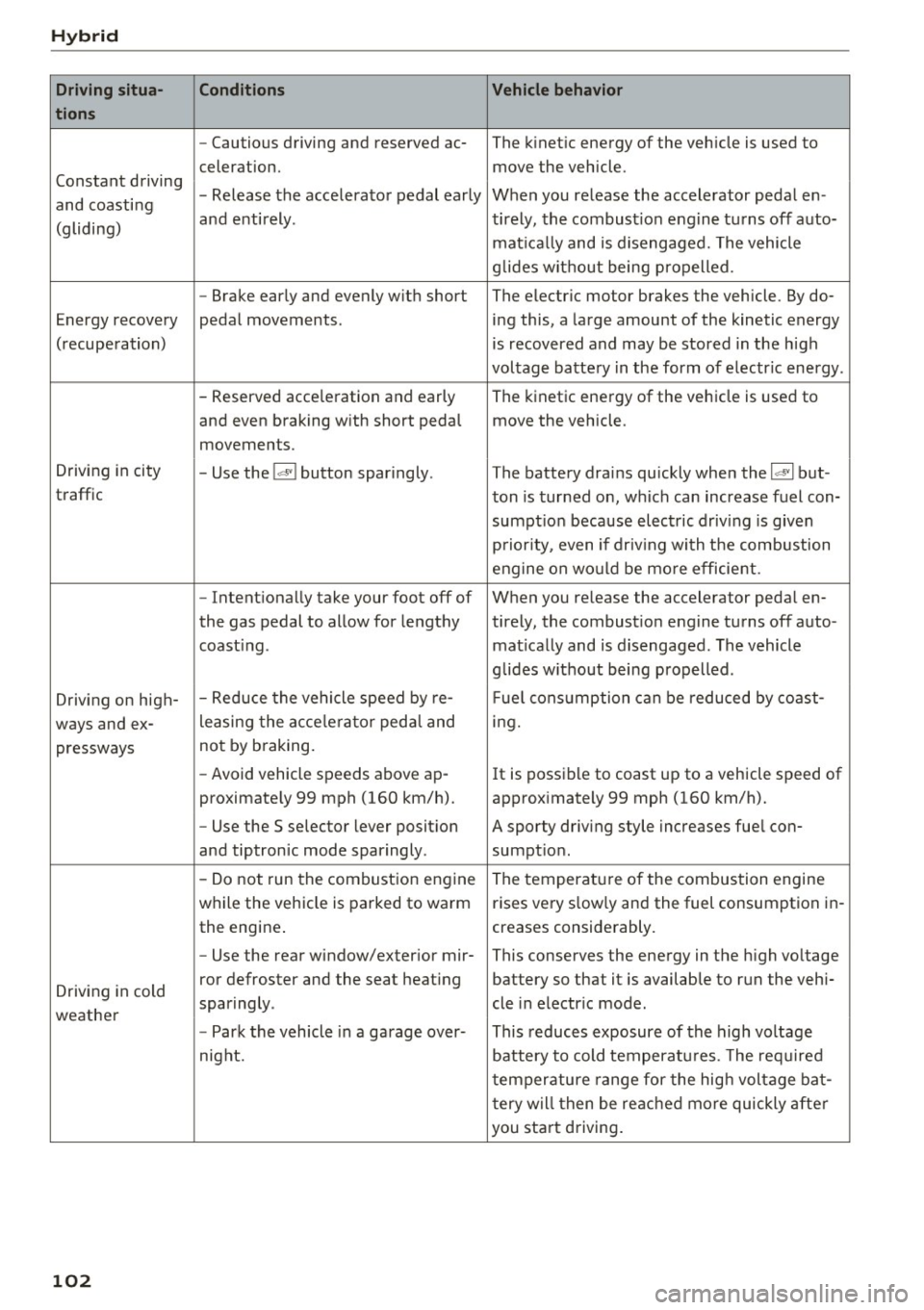
Hybrid
Driving situa- Conditions Vehicle behavior
tions
- Cautious driving and reserved ac- The kinetic energy of the vehicle is used to
celeration. move the vehicle.
Constant driving - Release the accelerator pedal early When you release the accelerator pedal en-
and coasting
and entirely. tirely, the combust ion engine turns off auto-
(gliding)
matically and is disengaged. The vehicle
g lides without being propelled.
- Brake early and evenly with short The electric motor brakes the vehicle . By do-
Energy recovery pedal movements. ing this, a large amount of the kinetic energy
(recuperation) is recovered and may be stored in the high
voltage battery in the form of electr ic energy .
- Reserved acce leration and early The kinetic energy of the vehicle is used to
and even braking w ith short pedal move the vehicle .
movements.
Driving in city
- Use the
l~I button sparingly. The battery drains quickly when the 1~ 1 but -
traffic ton is turned on, which can increase fuel con-
sumpt ion because electric driv ing is given
priority, even if driv ing with the combustion
engine on would be mo re efficient.
- Intentionally take your foot off of When you release the accelerator pedal en-
the gas pedal to allow for lengthy ti rely, the combustion engine turns off auto-
coast ing . matically and is disengaged. The vehicle
glides w ithout being propelled .
Driving on high- - Reduce
the vehicle speed by re- Fuel consumption can be reduced by coast-
ways and ex- leasing
the acce lerato r peda l and ing.
pressways not
by braking.
- Avoid vehicle speeds above ap -
It is possible to coast up to a vehicle speed of
proximately 99 mph (160 km/h). approximately 99 mph (160 km/h).
- Use the S selector lever posit ion A sporty driving style increases fuel con-
and tiptronic mode sparingly . sumption .
- Do not run the combustion engine
The temperature of the combustion engine
while the vehicle is parked to warm rises very s
low ly and the fuel consumption in-
the engine . creases considerably.
- Use the rear window/exterior
mir-This conserves the energy in the high voltage
Driving in cold ror defroster and the seat
heating battery so that it is available to run the vehi-
sparingly . cle in electric mode .
weather
-Park the vehicle in a garage over- This reduces exposure of the high voltage
night. battery to cold temperatures. The required
temperature range for the high voltage bat-
tery will then be reached more quickly after
you start driving.
102
Page 108 of 300
Audi adaptive cruise control and braking guard
Audi adaptive cruise
control and braking
guard
Introduction
Applies to vehicles: with Audi adaptive cruise contro l
The adaptive cruise contro l system assists the
driver by regulating vehicle speed and helping to
maintain a set distance to the veh icle ahead ,
within the limits of the system. If the system de
tects a moving vehicle up ahead, adaptive cruise
control can brake and then accelerate your vehi
cle. This helps to make driving more comfortable
on long highway stretches.
The braking guard system can warn you about an
impending collision and initiate braking maneu
vers
c::> page 112.
Adaptive cruise control and braking guard have
technical limitations that you must know, so
please read th is section carefully, understand
how the system works and use them properly at
all times.
General information
General information
Applies to veh icles: with Audi adaptive cruise control
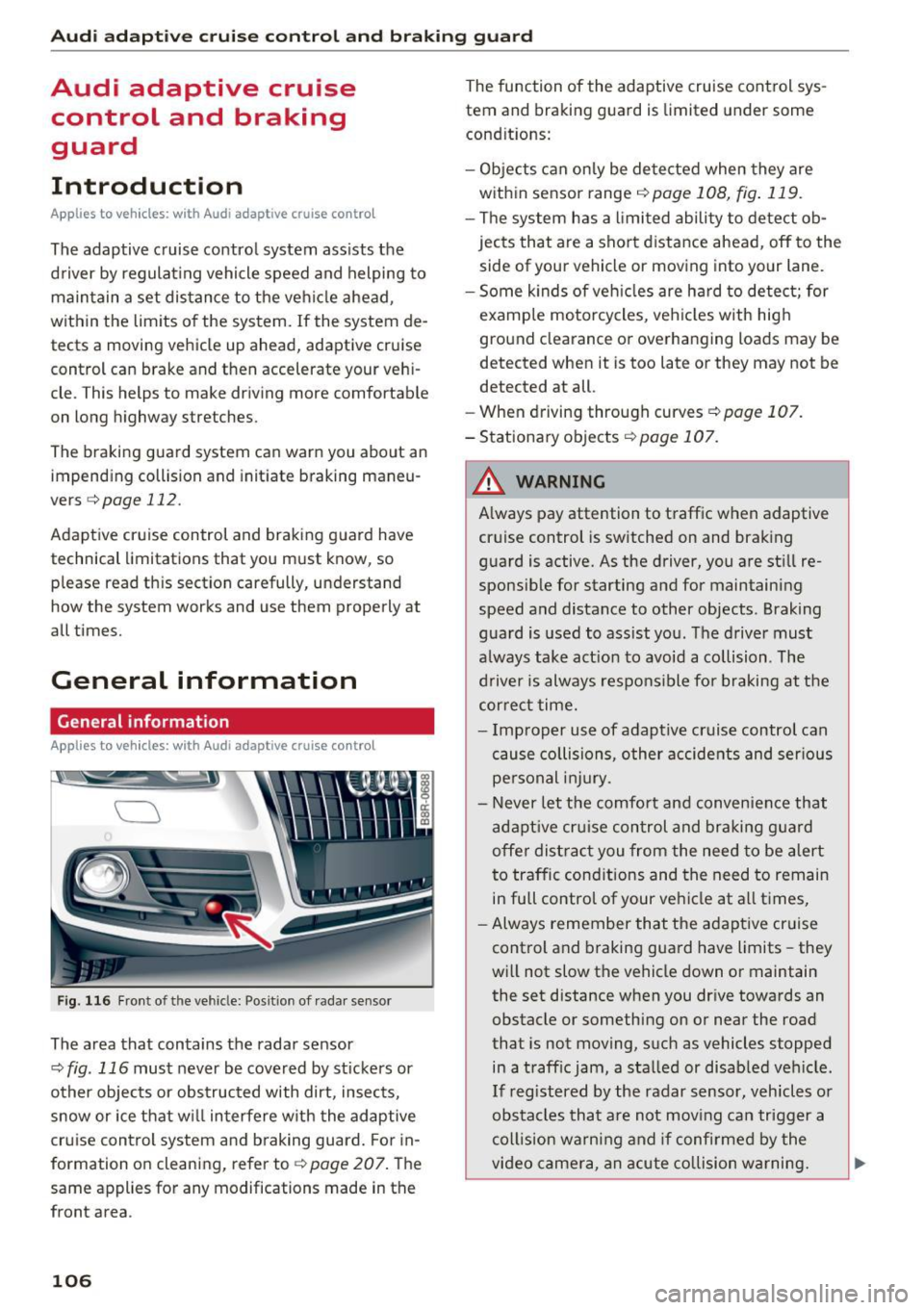
Fig. 116 Front of t he veh icle: Posit ion of radar sensor
The area that contains the radar sensor
c::> fig . 116 must never be covered by st ickers or
other objects or obstructed with dirt, insects,
snow or ice that w ill interfere w ith the adaptive
cruise control system and braking guard. For in
formation on cleaning, refer to
c::> page 207. The
same appl ies for any modifications made in the
front area .
106
The function of the adaptive cruise control sys
tem and braking guard is limited under some
condit ions:
- Objects can only be detected when they are
within sensor range
<:!) page 108, fig . 119.
-The system has a limited ability to detect ob
jects that are a short distance ahead, off to the
side of your vehicle or moving into your lane.
- Some k inds of veh icles are hard to detect; for
example motorcycles, veh icles with high
ground clearance or overhanging loads may be
detected when it is too late or they may not be
detected at all.
- When driving through curves ¢
page 107.
- Stationary objects i::!) page 107.
& WARNING
-Always pay attention to traffic when adaptive
cruise control is switched on and braking
guard is active. As the driver, you are still re
sponsible for starting and for maintaining
speed and distance to other objects . Braking
guard is used to assist you . The driver must
a lways take action to avoid a collision . The
driver is always responsible fo r braking at the
correct time.
- Improper use of adaptive cruise contro l can
cause collisions, other accidents and serious
personal injury.
- Never let the comfort and convenience that
adapt ive cr uise control and braking guard
offe r dist ract you from the need to be alert
to traffic cond itions and the need to remain
in full control of your ve hicle at all times,
- Always remember that the adaptive cruise
control and braking guard have limits -they
will not slow the vehicle down or maintain
the set distance when you dr ive towards an
obstacle or something on or near the road
that is not moving, such as vehicles stopped
in a traff ic jam, a stalled or disab led veh icle.
If registered by the radar sensor, veh icles o r
obstacles that are not moving can trigger a
coll ision warning and if confirmed by the
video camera, an acute collision warning. ..,