brake light AUDI Q5 2016 Owner's Manual
[x] Cancel search | Manufacturer: AUDI, Model Year: 2016, Model line: Q5, Model: AUDI Q5 2016Pages: 300, PDF Size: 75.02 MB
Page 95 of 300
..... N
co ~ CX)
..... I.Cl U"I
..... I.Cl .....
engine will no t be switched off in the following
situations:
- The eng ine has not reached the m in imum re
quired temperature for Start-Stop-mode.
- T he interior temperature selected by the A/C
system has not been reached.
- The outs ide temperatu re is ext remely h igh/low.
- The w indshield is being defrosted
¢ page 82.
-The parking system* is switched on.
- The battery charge level is too low.
- The steering whee l is sharply turned or there is
a steering movement.
- After engaging the reverse gear.
- On sharp inclines .
IIJ appears in the instrument cluster display and
§ii;Ff&Ff ~lso appears in the tr ip comp ute r.
Engine automatically re starts
The stop phase is interrupted in the following sit
uations, for example . The eng ine restarts without
any action by the driver .
- The interior temperature varies from the tem
perature se lected in the A/C system .
- The windshield is beeing defrosted
¢ page 82.
- The brake pedal is pressed several times in a
row.
- The battery charge level becomes too low.
- High power cons umption .
IIJ appears in the instrument cluster display and
H§;Ff&Fii ~lso appears in the tr ip comp ute r.
Switching the ignition off autom atically
To prevent the battery from draining, the ignition
will switch off
automati cally when all of the fol
lowing cond itions have been met:
- The veh icle has already been driven.
- The eng ine has been turned off by the Start-
Stop-System .
- The driver's door is opened .
- T he dr iver's seat bel t is removed.
- The brake pedal is not pressed down.
- T he veh icle is stationary .
In this case, the activated low beam will be re
placed by the s ide marker lights . The side marker
D rivi ng
lights will switch of f after approximate ly 30 m i
nutes or when you lock the veh icle.
If t he Start-S top-System has not turned off the
engine or if you have swi tched the S tart -Stop
System off manually, the ignition will
not be au
tomatica lly switched off and the eng ine wi ll con
t in u e to run¢& .
A WARNING <= -
Never allow the engine to run in confined
spaces -danger of asphyx iation.
(D Tips
If you shift into the 0/S or N positions after
shifting into reverse, the vehicle must be dr iv
en faster than 6 mph (10 km/h) in order for
the engine to switch off again .
Switching the Start-Stop -System on /off
manually
App lies to vehicles: wi th Start -S top-Syste m
If you do not wish to use the system, you can
switch it off manually.
= , __ (A)Off _ --"'-- f'~-.::a-----
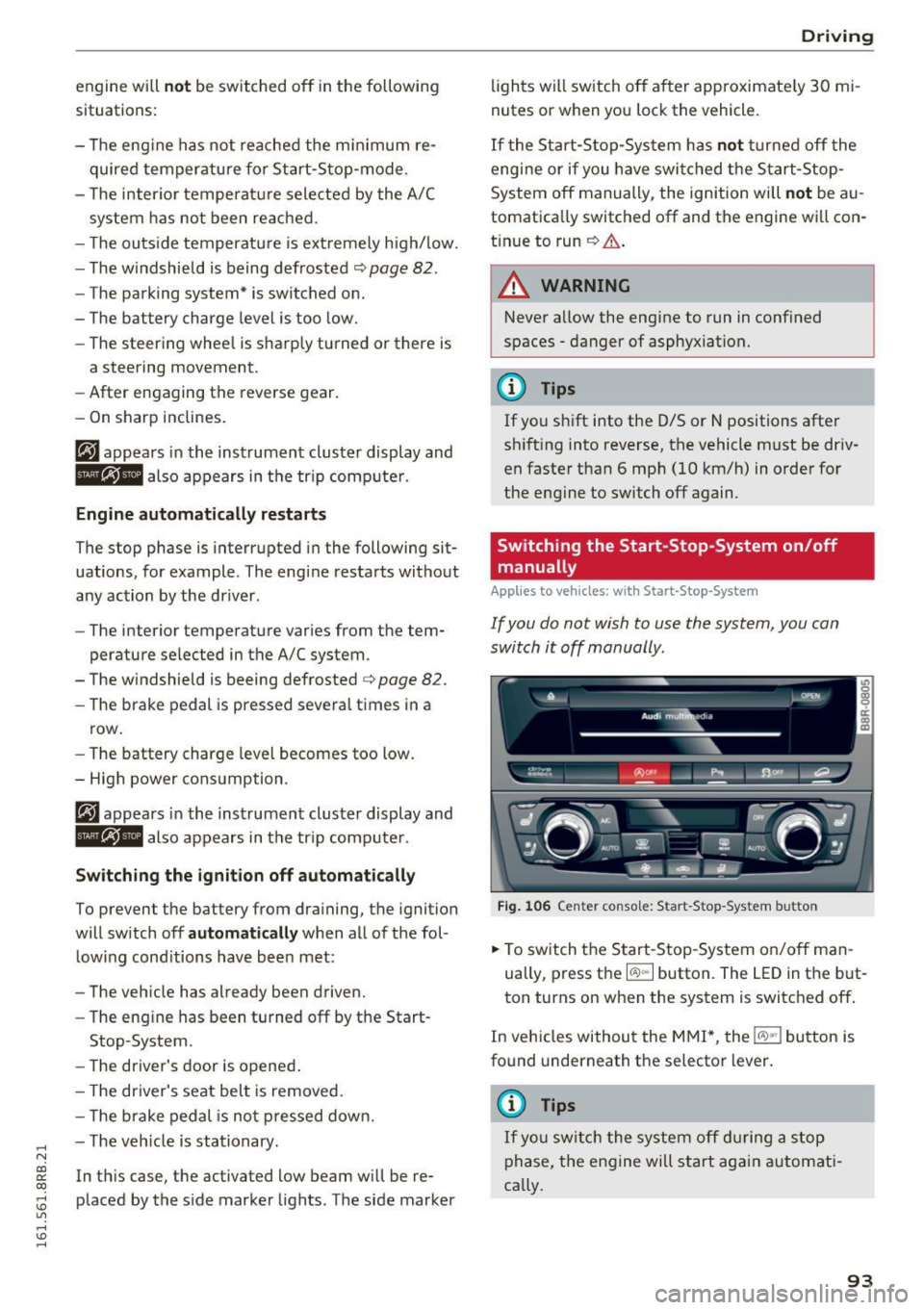
Fig . 10 6 Cen ter co nsole: S ta rt -Stop -System button
.. To switch the Start -Stop-System on/off man
ually, press the
I CAJ ,,.I button. The LED in the b ut
ton turns on when the system is switched off .
In vehicles without the M MI*, the
!CA.> "'! button is
found underneath the se lector lever.
(D Tips
If y ou swit ch the system off d uring a stop
phase, the engine will st art aga in automati
ca lly.
93
Page 97 of 300
..... N
co ~ CX)
..... I.Cl U"I
..... I.Cl .....
Speed warning 1: setting a speed limit
Warning threshold 1 is set by the IS ET I button .
Fig. 107 SET butto n in t he inst rume nt cluster
Storing the maximum speed
.. Drive at the desired maximum speed.
.. Press the
ISE TI button in the instrument panel
display ¢fig .107for 1 second .
Resetting the maximum speed
.. Drive the vehicle at a speed of at least 3 mph
(5 km/h)
.. Press the
~ IS- ET~I button for more than 2 seconds .
The speed warning symbol. (USA models)/ .
(Canada models) will appear briefly in the d isp lay
when you release the
ISE TI button to indicate
that the maxim um speed has been sto red suc
cessfully.
The maximum speed rema ins stored until it is
changed by pressing the
I S ET I button aga in brief
l y o r until it is deleted by a lengthy p ush on the
button.
Speed warning 2: setting a speed limit
The MMI* or the radio control unit is used to set,
change or delete warning threshold
2.
.. Se lect: I CARI f u nct ion button > Instrum ent
clu ster > Sp eed warning .
Or
.. Se lect: ICARI funct ion but ton> C ar sys tem s*
contro l button > Dri ver a ssist > Speed warning.
Wa rning threshold 2 can be set in the speed
r ange sta rting from 20 mp h to 150 mph (30 km/
h t o 240 km/h) . Settings can each be ad justed i n
intervals of 5 mph ( 10 km/h) .
Drivi ng
Cruise control system
Switching on
The cruise control system makes it possible to
drive at a constant speed starting at 20 mph (30
km/h) .
0
f
~
0
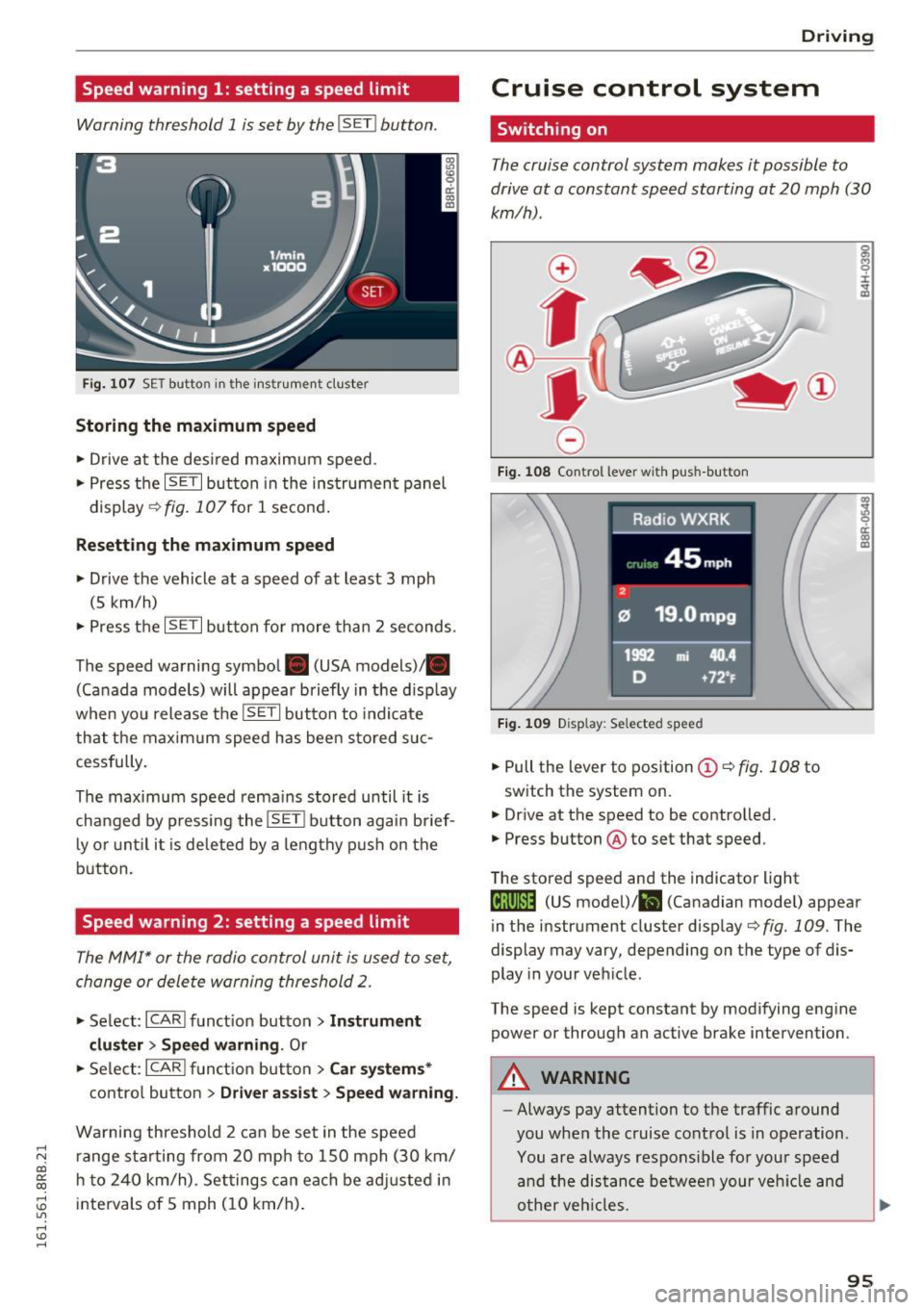
Fig . 108 Co ntrol lever w it h push -b utton
F ig . 1 09 Disp la y: Se lected speed
.. Pull the lever to position ©¢ fig. 108 to
switch the system on.
.,. Dr ive at the speed to be controlled.
.. Press button @to set that speed.
The stored speed and the indicator light
g M 0 :i:
;A
..
~ a: .. m
@;\l)M4 (US model) !&I (Canadian mode l) appear
in the instrument cluster display
¢fig. 109 . The
display may vary, depending on the type of dis
play in your veh icle .
The speed is kept constant by modifying engine power or through an active brake intervention .
A WARNING
--
-Always pay attention to the traffic around
you when the cruise control is in operation .
You are always respons ible for your speed
a nd the distance between your veh icle and
o ther veh icles.
95
Page 98 of 300
Driving
-For reasons of safety, cruise control should
not be used in the city, in stop-and-go traf
fic, on twisting roads and when road condi
tions are poor (such as ice, fog, gravel, heavy rain and hydroplaning) -you could
have an accident.
- Switch the cruise control off temporarily when driving in turning lanes, highway exits
or in construction zones.
- Please note that unconsciously "resting"
your foot on the accelerator pedal causes cruise control not to brake . This is due to
the control system being overridden by the
driver's acceleration.
- Never use the cruise control when driving
off-road or on unpaved roads. The cruise
control is intended for use only when the ve
hicle is being operated on paved roads, and
is not suitable for use off-road or on un
paved roads.
- If a brake system malfunction such as over
heating occurs when the cruise control sys
tem is switched on, the braking function in
the system may be switched off. The other
cruise control functions remain active as
long as the indicator light
tii;(O~i4 (US mod
el)/lil (Canadian model) is on .
{D) Tips
The brake lights illuminate as soon as the
brakes apply automatically.
Changing speed
.,. To increase/decrease the speed in increments,
tap the lever in the
010 direction ¢ page 95,
fig. 108 .
.,. To increase/decrease the speed quickly, hold
the lever in the
010 direction until the de
sired speed is displayed.
You can also press the accelerator pedal down to
increase your speed, e.g. if you want to pass
someone. The speed you saved earlier will re
sume as soon as you let off of the accelerator
pedal.
If, however, you exceed your saved speed by
S mph
(10 km/h) for longer than 5 minutes, the
96
cruise control will be turned off temporarily. The
green symbol in the display turns white, the
saved speed is retained.
Pre-selecting speed
You can pre-select your desired speed while the
vehicle is not moving.
.,. Turn on the ignition.
.,. Pull lever into position
(D ¢page 95, fig. 108.
.,. Press the lever in the 0 or 0 direction to in-
crease or decrease your speed.
.,. Let go of the lever to save that speed .
This function makes it possible, for example, to
save the speed you want before driving on the
highway. Once on the highway, activate the
cruise control by pulling the lever toward
(D .
Switching off
Temporary deactivation
.,. Step on the brake pedal, or
.,. Press the lever into position @ (not clicked into
place) ¢
page 95, fig . 108, or
.,. Drive for longer than 5 minutes at more than
5 mph (10 km/h) above the stored speed.
Switching off completely
.,. Press lever into position @ (clicked into place),
or
.,. Switch the ignition off .
The speed you saved will be retained if the cruise control has been switched off temporarily . To re
sume the saved speed , let up on the brake and
pull the lever to position
(D.
The saved speed will be erased after turning the
ignition off.
A WARNING
You should only resume the saved speed if it
is not too high for existing traffic conditions.
Otherwise you risk an accident.
Page 101 of 300

© Vehicle drive ready (READY)
® H igh voltage battery charge status
@ Recupe ration (CHARG E)
(J) Driving within the combustion en
g ine's full load range
@ 100% combust ion engine
® Boosting - the elect ric engine as
sists the combustion engine (BOOST)
@ E ngaging the conve ntiona l brakes
with recuperat ion
@ Vehicle not drive ready (OFF)
@ EV mode act ive
The need le remains at
OFF whe n the ignition is
turned on. When the veh icle enters drive ready
mode, the status message
hybrid ready appears
briefly in the instrument cluster d isplay and the
needle in the powe r meter poi nts to
READY .
Indicator lights and messages
Applies to vehicles: with hybrid drive
The indica to r li gh ts in the inst rument cluste r
b link or tur n on. They indicate functions or mal
f u nctions .
W ith some ind icator lights, messages may ap
pear and a warning tone may sou nd . A lso note
the ind icator lights in
<=:> page 2 7.
Press brake pedal to start vehicle
This message appears if you do not press the
b rake pedal whe n starting the vehicle.
Shift to N or P to start vehicle
This message appea rs if the selecto r leve r fo r the
automatic transm iss ion is not in the Nor P posi
tions whe n starting the vehicle .
-Hybrid drive: System fault! Power
brakes , steering malfunction pos sible
If the indicator lig ht turns on and th is message
appears, there is a malfunction in the hybrid sys
tem. The brake booster and the power steeri ng
~ may stop working . Stop the vehicle in a safe loca -
co g:; tion as soon as possible.
Hybrid
You may con tinue dr iving i f the indicator light
tu rns off after sta rt ing the ve hicl e several times .
Drive to an authorized repa ir facility immed iate ly
to have the malfunction cor rected .
f#iifj:j;jj,j Hybrid drive: System fault! Contact
dealer
If the indicator light turns on and this message
appea rs, there is a ma lfunction in the hybrid sys
tem. Drive to an autho rized repair fac ility imme
diately to have the malfunct io n corrected.
(II Hybrid system : Performance rest ricted .
Please contact dealer
If the indicator light turns on and this message
appears, there is an eng ine control malfunction .
The
[Ia i ndica to r li ght in the ins trument clus te r
also t urns on. The engine ou tput is red uced .
Dr ive to your authori zed A udi dealer or qualified
r ep air fa cility i mme diate ly to h ave the m alfu n c
t io n corre cte d.
Hybrid drive deactivated. Please restart
engine manually.
T h is m ess age appe ars if t he high vo lt a ge b attery
c h arge leve l h as fallen below a cer tain range or i f
t h e ig nition key is no longer i nsid e the veh icle for
vehicles with the convenience key* .
Start the engi ne w it h eithe r th e ig nitio n key
<=:> page 84 o r wi th the !START ENGI NE STOPI
button* <=:> page 87.
Hybrid battery: Low battery charge. Battery
will be charged while driving.
T h is mess age app ea rs if the high vo lt a ge b att ery
c h arge leve l has fallen be low a certa in range . If
t hi s message turns off afte r a litt le while, the
high voltage battery cha rged enoug h while driv
ing .
If the message does not turn off, have an au thor
ized repair facility cor rect the ma lf u nction as
soon as possib le .
EV mode is currently unavailable.
Th is me ssa ge appears if the con ditions
<=:> page 10 0 for enhanced ele ctric drivi ng ar e not
met. Try aga in at a late r time .
99
Page 111 of 300
..... N
co ~ CX)
..... I.Cl U"I
..... I.Cl .....
Audi adaptive cruise control and braking guard
@ Indicator lights
Ill-Adaptive cru ise control is switched on. No
vehicles are detected up ahead. The stored speed
is maintained.
• -A moving vehicle is detected up ahead. The
adaptive cruise control system regulates the
speed and distance to the moving vehicle ahead
and accelerates/brakes automatically.
• -When automatic braking is not ab le to keep
enough distance to a previously detected moving
vehicle up ahead, you must take control and
brake
~ page 111, Request for driver interven
tion.
© Display
If adaptive cruise control is not shown in the dis
play, you can call it up with the
I RESETI button
¢page 20.
Based on the symbols in the display, you can de
termine if the system is maintaining a distance to
the vehicle ahead and what that distance is.
No vehicle -No vehicle ahead was detected.
White vehicle -A vehicle ahead was detected.
Red vehicle -Prompt for the dr iver to take action
¢page 111.
Both arrows on the scale © indicate the distance
to the vehicle ahead . No arrow appears when the
vehicle is on an open road and there is no object
ahead . If an object is detected ahead, the arrow
moves on the scale .
The green zone on the scale shows the stored dis
tance. For information on changing the stored
distance, refer to
¢page 110. If the distance se
lected is too close or may soon become too close,
the arrows move into the red zone on the scale.
A WARNING
Improper use of the adaptive cruise control
can cause collis ions, other acc idents and seri
ous personal injur ies.
- Pressing the
!SET ! button when driving at
speeds below 20 mph (30 km/h), will auto
matically accelerate the vehicle to 20 mph (30
km/h), which is the minimum speed
that can be set.
(D Tips
- If you switch the ignition or the adaptive
cruise control off, the set speed is erased
from the system memory.
- Th e Electronic Stabilization Control (ESC) is
automatically turned on when the adaptive
cruise control is turned on . You cannot
switch the ESC into offroad mode while the
adaptive cru ise control is turned on
¢page 191.
Changing the speed
Applies to vehicles: with Audi adapt ive cru ise control
0
f
•
0
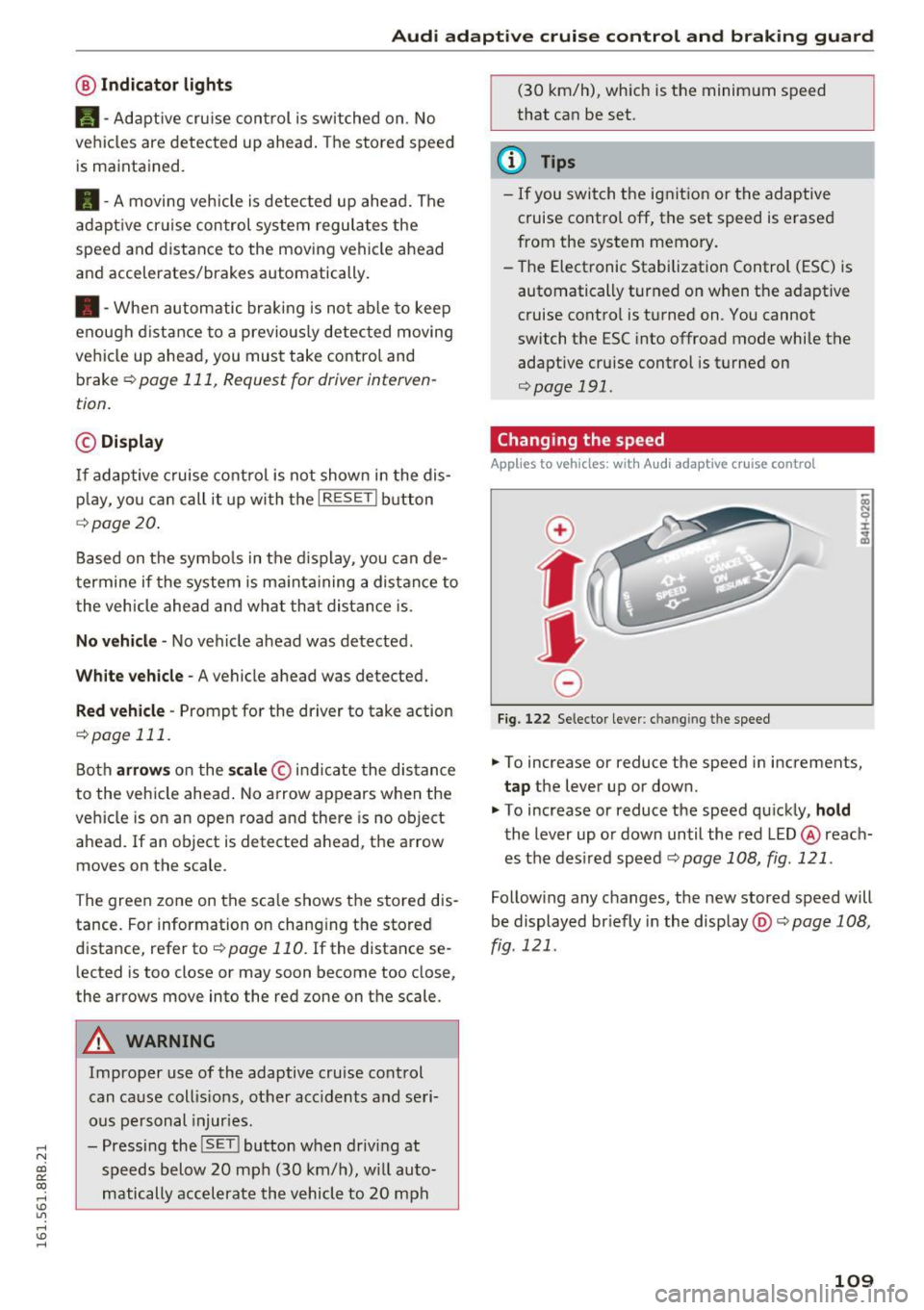
Fig. 122 Selector lever: ch an gin g the speed
.,. To increase or reduce the speed in increments,
tap the lever up or down.
" To increase or reduce the speed quickly,
hold
the lever up or down until the red LED @ reach
es the des ired speed c::>
page 108, fig. 121 .
Following any changes, the new stored speed will
be displayed br iefly in the display @c::>
page 108,
fig. 121 .
109
Page 114 of 300
Audi adaptive cruise control and braking guard
Audi braking guard
Description
Applies to vehicles: with Audi adaptive cruise contro l
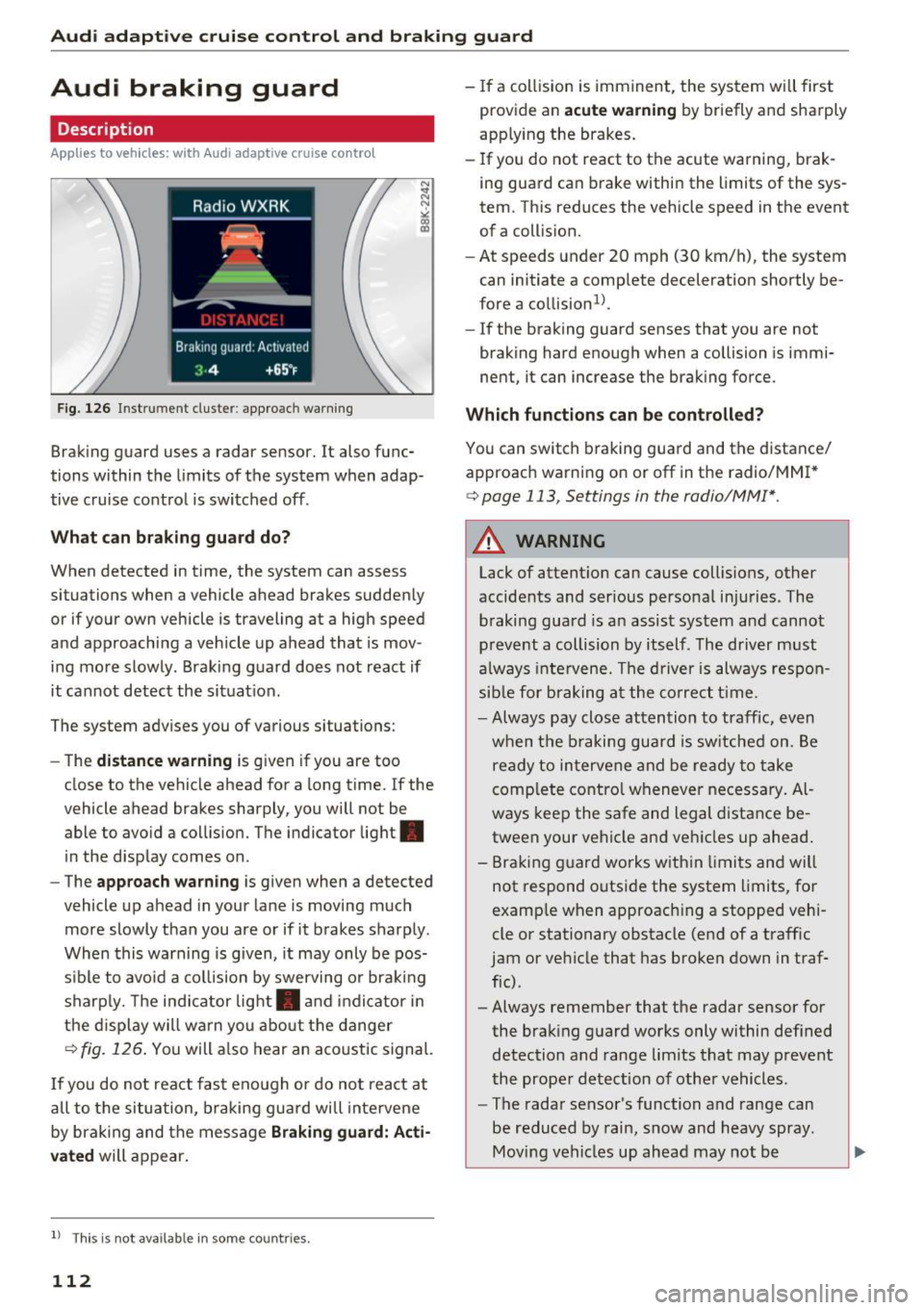
Fig. 126 In strument cluste r: appro ach warning
Braking guard uses a radar sensor. It also func
tions within the limits of the system when adap
tive cruise control is switched off .
What can braking guard do?
When detected in time, the system can assess
situations when a veh icle ahead brakes suddenly
or if your own vehicle i s traveling at a high speed
and approaching a vehicle up ahead that is mov
ing more slowly . Braking guard does not react if
it cannot detect the situat ion.
The system advises you of variou s situations:
- The
distance warning is given if you are too
close to the vehicle ahead for a long time. If the
vehicle ahead brakes sharply, you will not be
able to avoid a collision. The indic ator light .
in the display comes on.
- The
approach warning is given when a detected
vehicle up ahead in your lane is moving much
more slowly than you are or if it brakes sharply .
When this warning is given, it may only be pos
s ib le to avo id a collision by swerving or braking
sharply. The indicator light . and indicator in
the display will warn you about the danger
¢fig. 126. You will also hear an acoustic signal.
If you do not react fast enough or do not react at
a ll to the situation, braking guard will intervene
by braking and the message
Braking guard: Acti
vated
will appear.
l) Thi s is no t a vail able in som e coun trie s.
112
- If a collision is imminent, the system will first
provid e an
acute warning by briefly and sharply
app ly ing the b rakes.
- If you do not react to the acute warning, brak
ing guard can brake within the limits of the sys
tem . This reduces the vehicle speed in the event
of a collision.
- At speeds under 20 mph (30 km/h), the system
can initiate a comp lete deceleration shortly be
fore a collision ll.
- If the braking gua rd senses that you are not
braking hard enough when a collision is immi
nent, it can increase the braking force.
Which functions can be controlled?
You can switch braking guard and the distance/
approach warning on or off in the radio/MM
I*
¢ page 113 , Settings in the radio/MM!* .
A WARNING
Lack of attent ion can cause collisions, other
accidents and ser ious personal injuries . The
braking guard is an assist system and cannot
prevent a collision by itself . The driver must
always intervene. The driver is always respon
sible for braking at the correct time .
- Always pay close attention to traffic, even
when the braking guard is switched on. Be
ready to intervene and be ready to take
complete control whenever necessary. Al
ways keep the safe and legal distance be
tween your vehicle and vehicles up ahead .
- Braking guard works within limits and will
not respond outside the system limits, for
examp le when approach ing a stopped vehi
cle or stationary obstacle (end of a traffic
jam or vehicle that has broken down in traf
fic) .
- Always remember that the radar sensor for
the braking guard works only within defined
detection and range limits that may prevent
the proper detection of other vehicles.
- The radar sensor's function and range can
be reduced by rain, snow and heavy spray.
Moving vehicles up ahead may not be
-
Page 124 of 300
Automatic transmissio n
Automatic transmission
tiptronic
Introduction
The automat ic transmission is controlled e lec
tron ically . The transmission upshifts or down
shifts automatically depending on wh ich dr ive
p rogram is selected. The powe r is transferred by
a torque converter .
When a
moderate driving style is used, the
transmission se lects the most economical d riving
mode .
It will then change up early and de lay the
downshifts to give better fuel economy .
The transm ission switches to a spo rty mode afte r
a kick-down or when the drive r uses a
sport y
d riv ing sty le
charac ter ized by quick accelerator
pedal movements, heavy acce leration, frequent
changes in speed and traveling at the maximum
speed.
If desired, the dr iver can a lso select the gears
manually ( tiptronic mod e) ¢ page 126.
Selector lever positions
0 ;:t 0 ct CX) a,
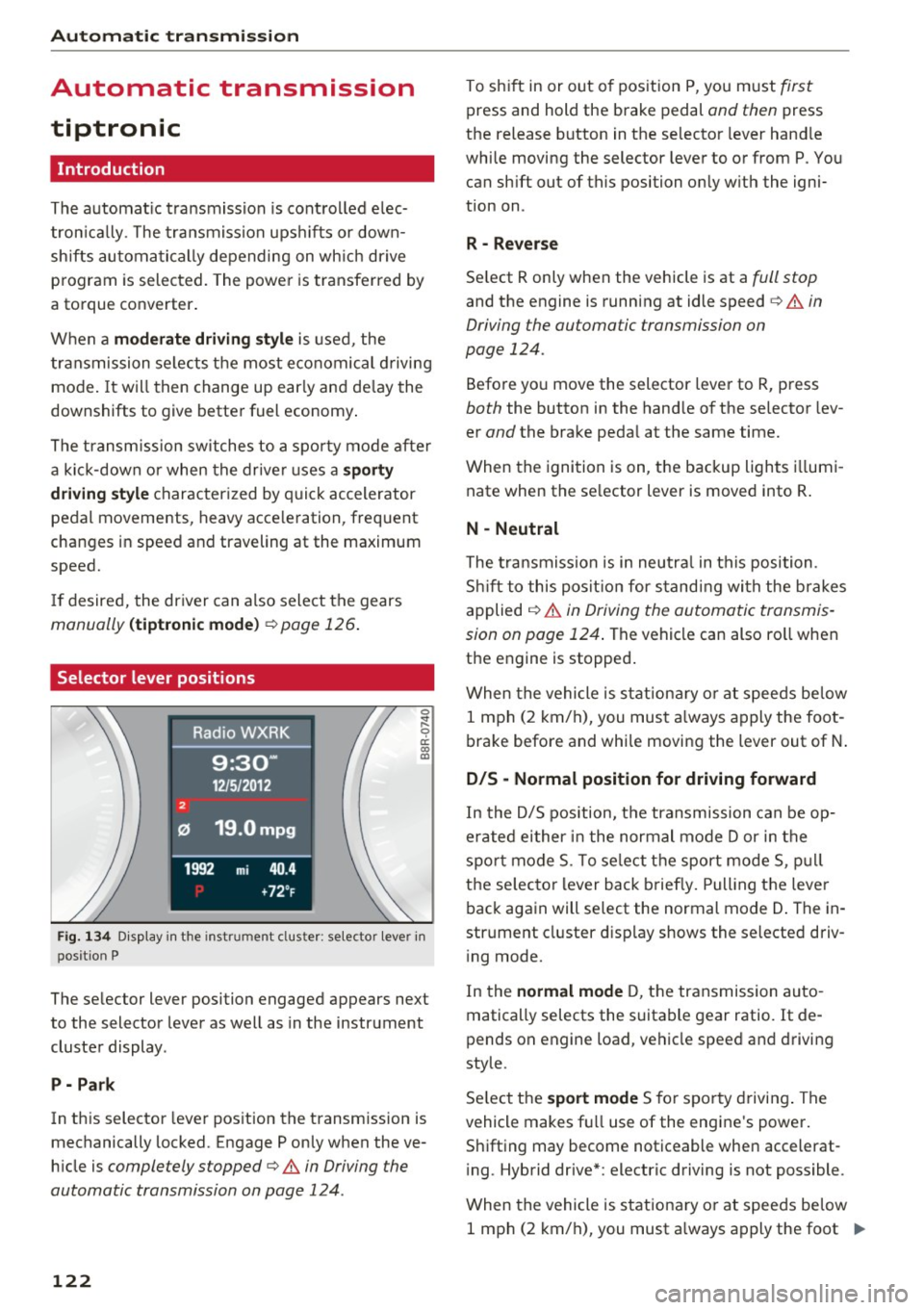
Fig. 1 34 Disp lay in the instrument cl uster: selector lever in
position P
The selector lever position engaged appears next
to the selector lever as well as in the instrument
cluster display .
P -Pa rk
In this selector lever position the transmission is
mechanically locked. Engage P only when the ve
h icle is
completely stopped¢.& in Driving the
automatic transmission on page 124 .
122
To shift in or out of pos ition P, you m ust first
press and hold the brake pedal and then press
the release button in the selector lever hand le
while moving the selector lever to or from P. You can sh ift out of this position on ly w ith the igni
tion on .
R -Reve rse
Se lect R only when the vehicle is at a full stop
and the engine is running at idle speed c> .& in
Driving the automatic transmission on
page 124.
Befo re yo u move the selector lever to R, press
both the button in the hand le of the se lector lev
er
and the brake peda l at the same time.
When the ignition is on, the backup lights i llumi
nate when the se lector lever is moved into R .
N -Neutral
The t ra nsmission is in neutra l in this position .
S hi ft to this pos it ion for s tand ing wi th the brakes
applied
¢ .&. in Driving the automatic transmis
sion on page 124 .
The vehicle can also ro ll when
the engine is stopped .
When the vehicle is stationa ry o r at speeds be low
1 mph (2 km/h), you must a lways apply the foot
brake before and whi le moving the lever out of N .
D/S -Normal position for driving forward
In the D/5 position, the transmission can be op
erated either in the normal mode Dor in the
spo rt mode 5. To se lect the sport mode 5, p ull
t h e se lecto r lever back briefly. Pulling the leve r
back again will select the normal mode D . The in
strument cluster d isplay shows the se lected driv
i ng mode.
In the
normal mode D, t he transmission auto
matically selects the suitable gear ratio . It de
pends on engine load, vehicle speed and d riving
style.
Se lect t he
sport mode 5 for sporty drivi ng . The
vehicle makes fu ll use of the engine 's power.
Shifting may become noticeable when accelerat
i ng . Hybrid drive* : electric driving is not possible .
When the vehicle is stationary o r at speeds be low
1 mph (2 km/h), you must a lways apply the foot ..,.
Page 125 of 300
..... N
co ~ CX)
..... I.Cl U"I
..... I.Cl ..... brake before and wh
ile moving th e le ver to D/S
out of N.
A WARNING
Read and follow all WARNINGS¢ & in Driv
ing the automatic transmission on
page 124.
(D Note
Coasting downhill with the transmission in N
and the engine not running will result in dam
age to the automatic transmission and possi
bly the catalytic converter .
(D Tips
-On vehicles with Audi drive select*, you can
adjust the sporty shift characteristics in the
Dynamic driving mode .Swill appear in the
i nstrument cluster display instead of 0.
- If you accidentally select N while driving ,
take your foot off the accelerator pedal im
mediately and wa it for the engine to slow
down to idle before selecting D/S .
- Hybrid drive*: if the
l-,,sv ! button r::::;, page 100
is pressed while in sport mode S, the trans
mission switches automatically to the nor
mal mode D.
- If there is a power failure, the selector lever
will not move out of the P posit ion. The
eme rgency release can be used if this hap
pens
¢ page 127.
'
Automatic transmission
Automatic Shift Lock (ASL)
The Automatic Shift Lock safeguards you again st
accidentally shifting into a forward or the re
verse gear and causing the vehicle to move unin
tentionally .
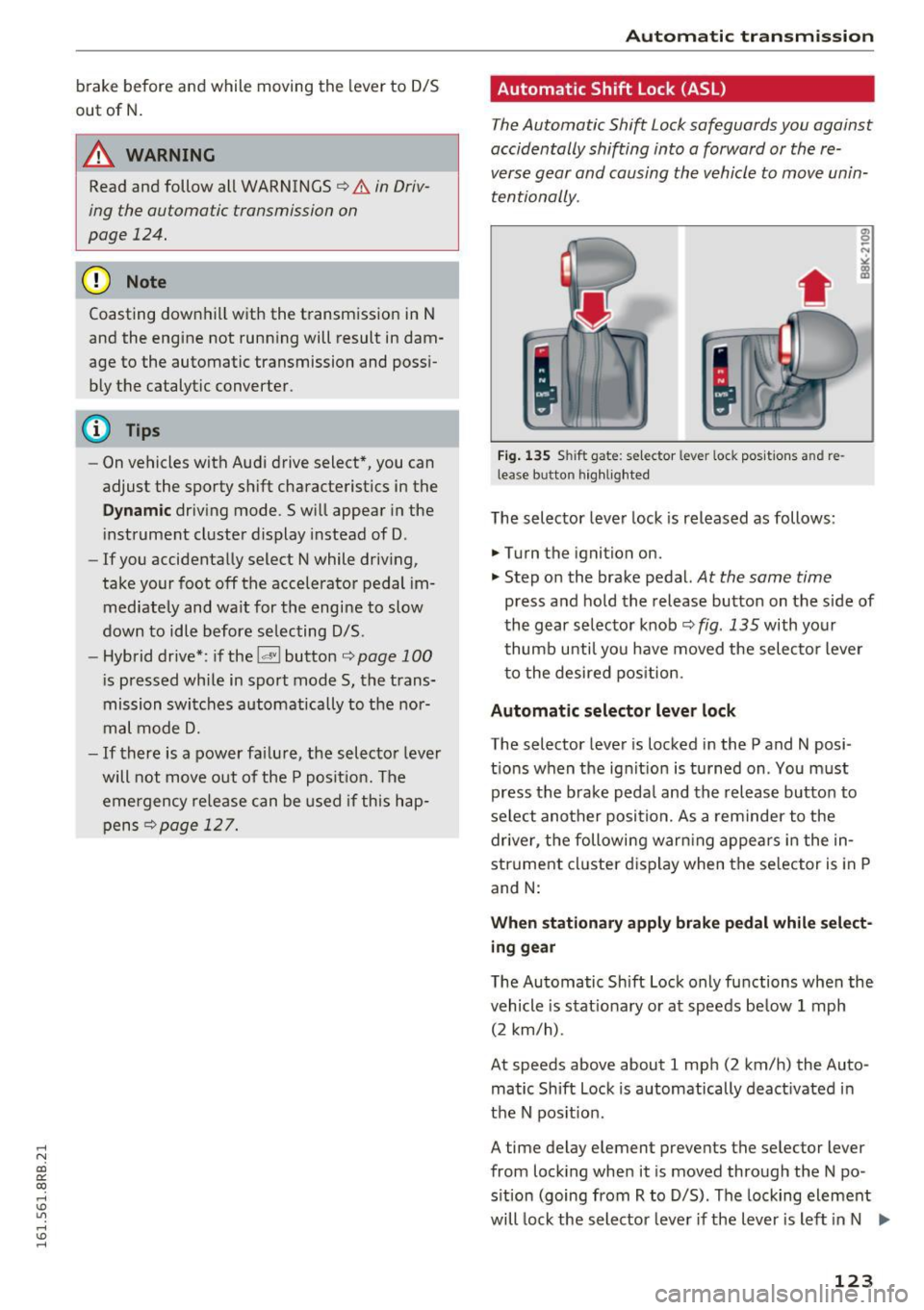
Fig. 13S Shi ft gat e: se lec tor le ver loc i< po sition s and re
lea se butto n highlighted
The selector lever lock is released as follows :
.,. Turn the ignition on.
"" Step on the brake pedal.
At the same time
press and hold the release button on the side of
the gear selector knob
r::::;, fig. 135 with your
thumb until you have moved the selector lever
to the desired position .
Automatic selector lever lock
The selector lever is locked in the P and N po si
tions when the ignit ion is turned on . You must
press the brake peda l and the release button to
select another position. As a reminder to the
driver , the following warn ing appears in the in
strument cluster d isplay when the se lector is in P
and N:
When stationary apply brake pedal while select
ing gear
The Automatic Shift Lock only functions when the
vehicle is stat ionary or at speeds be low 1 mph
(2 km/h) .
At speeds above about 1 mph (2 km/h) the Auto ·
matic Shift Lock is automatically deact ivated in
the N pos it ion .
A time delay element preven ts the selec tor lever
from locking when it is moved through the N po
sition (going from R to D/S). The locking element
will lock the selector lever if the lever is left in N .,..
123
Page 126 of 300
Automatic transmissio n
(N eu tra l) for more than approx imately 1 second,
w ithout th e brake peda l being pressed.
Release button
The release button on the se lec to r lever preven ts
the lever from being accidentally sh ifted into cer
tain posit ions . Press ing t his but ton deactivates
the selector lever lock . Depending on the direc
tion of the shift, the selector lever locks at differ
ent positions. The positions are high lighted in
the illustrat ion ¢
fig. 135 .
Ignition key safety int erlock
The key cannot be removed from the igni tion un
less the selector lever is in the P park pos ition .
When the ignition key is removed, the selector lever will be locked in the P pos ition.
Driving the automatic transmission
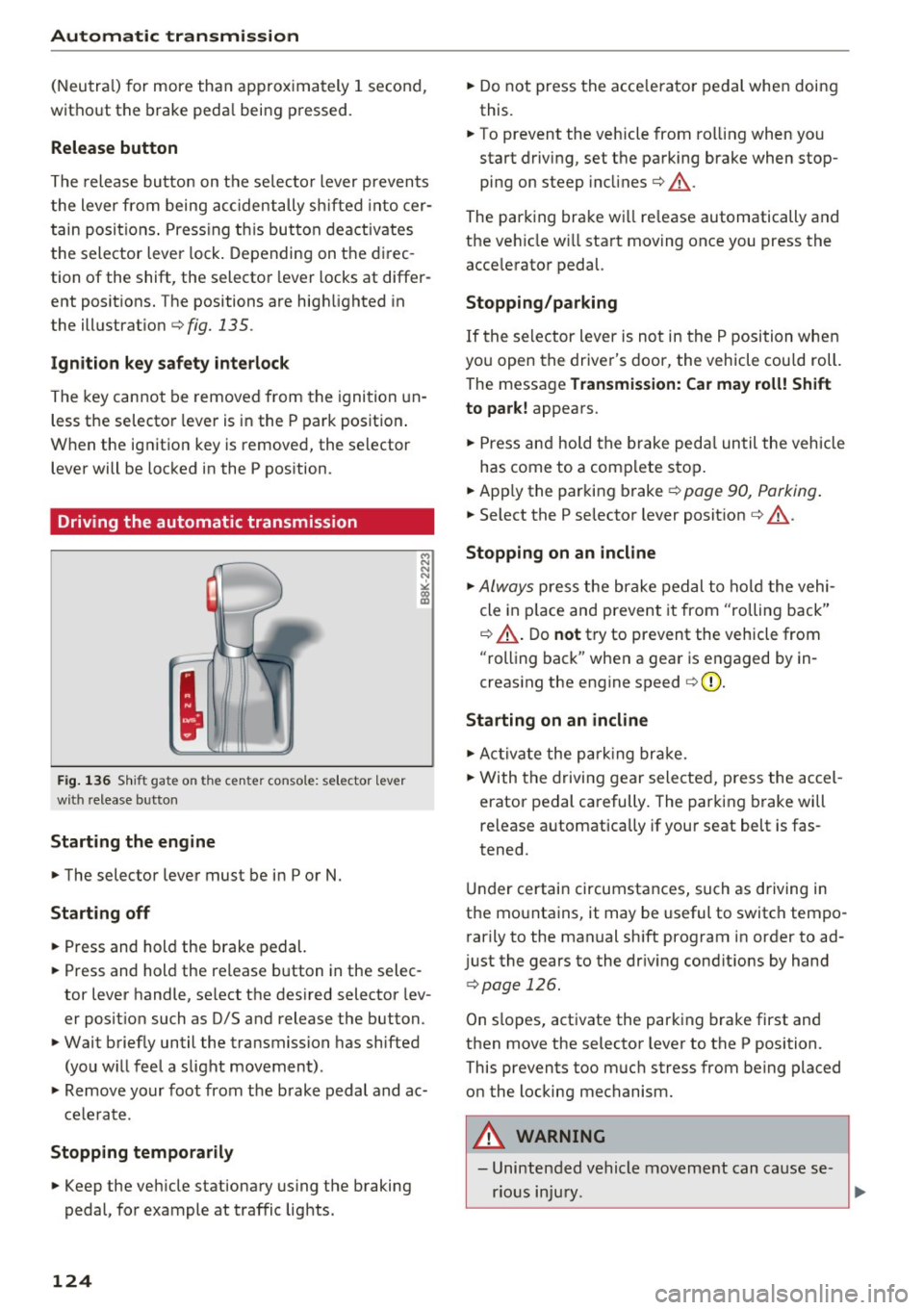
F ig. 1 36 Shi ft gat e on t he c en te r co nsole : se lecto r lev er
w ith release b utto n
Starting the engine
~ The selector lever must be in P or N.
Starting off
~ Press and hold the brake pedal.
~ Press and hold the release button in the selec
tor lever handle, se lect the des ired selector lev
er posit ion such as D/S and release the button.
~ Wait briefly until the transmission has shifted
(you w ill feel a slight movement) .
~ Remove your foot from the brake pedal and ac
cele rate .
Stopp ing temporarily
~ Keep the veh icle stationary us ing the braking
pedal, for example at traffic lights .
124
~ Do not press the acce lerato r pedal when doing
this.
~ To prevent the veh icle from ro lling when you
start driving, set the parking brake when stop
ping on steep incl ines¢ &_.
The parking brake wi ll re lease automatically and
the ve hicle w ill start moving once you press the
acce lerator pedal.
Stopping /par king
If the se lector lever is not in the P position whe n
you open the driver's door, the vehicle cou ld roll.
The message
Tr ansmis sion: Car may roll! Shift
to park!
appears.
~ Press and hold the brake peda l un til the vehicle
has come to a comp lete stop .
~ Apply the parking brake¢ page 90, Parking .
~ Select the P selector lever posit ion ¢ &_ .
Stopping on an incline
~ Always press the brake pedal to ho ld the vehi
cle in p lace and prevent it from "rolling back"
¢ &_ . D o
not try to prevent the vehicle from
"rolling back" when a gear is engaged by in
creas ing the engine speed ¢(D .
Starting on an incline
~ Ac tivate the pa rk ing br ake.
~ With the d riving gear selected, press the accel
erator pedal carefully. The parking brake will
release a utomatica lly if your seat belt is fas
tened.
Under certain circumstances, such as driving in
the mounta ins, it may be useful to switch tempo
rarily to the manual sh ift program in order to ad
j ust the gears to the dr iv ing cond it ions by hand
¢ page 126.
On slopes, activate the parking b rake first and
then move the selector lever to the P position.
This prevents too m uch stress from being placed
on the locking mechanism.
A WARNING
- Unintended vehicle movement can cause se
rious injury .
Page 192 of 300
Intelligent Technology
shared, please see your contract with the
wireless te lecommunications provider and the
"About Aud i connect" tab in your vehicle's
MMI*:
I MENU ! button > Audi connect > About
Audi connect .
Electronic Stabilization
Control (ESC)
Description
The Electroni c Stab ili z at ion Control (ESC) re infor
ces driver safety. It reduces the r isk of slipping
and improves driving stability. ESC detects crit i
cal s ituations suc h as the vehicle overstee ring
and understeering o r the wheels sp inning. The
ve hicl e is stab ilized by applying the b rakes o r re
ducing e ngine torque . Once t he ESC is acti ve , the
i n dicator light
m bli nks in the instrument cl us
ter.
The fo llow ing sys tems a re integrated in the ESC:
Anti-lock b rake system (ABS)
ABS preve nts the wheels from lock ing up when
b raking . The veh icle can sti ll be steered even dur
i n g ha rd brak ing . Apply steady press ure to the
b rake pedal. Do no t pump t he pedal. A pulsing in
the brake pedal indicates tha t the system i s help
i n g you to br ake the vehicle .
Brake assist system
The brake assist system can decrease brak ing dis
tance . It increases brak ing power when the d river
p resses the brake pedal q uic kl y in eme rgency si t
uations . You m ust press and hold t he b rake pedal
until the situa tion is over. In vehi cles w it h ad ap
tive cruise contro l* , the brake assist system is
mo re sensit ive if the distance detected to the ve
h icle ahead is too small.
Anti -slip regulation (ASR)
A SR re duces eng ine power when the drive w heels
begin to spin and adapts the force to the roa d
conditions. This makes it easie r to sta rt, acceler
ate and drive up hi lls.
190
Electronic differential lock (EDL)
The EDL brakes wheels that are spi nning and
transfers the drive power to the other w heels .
This function is not ava ilable at higher speeds.
I n ext reme cases , ED L automat ica lly swi tches off
to help keep the b rake on the bra ke d whee l from
overheating . EDL will sw itch on again automa ti
ca lly w hen conditions have returned to normal.
Steering recommendation
The ESC he lps to stabilize the vehicle by cha ng ing
t h e s teer ing torque .
On vehicles with dynam ic steering*, ESC helps
stab il ize the steer ing in crit ica l sit uat ions .
Selective wheel torque control
Selective wheel torque cont rol is used when d riv
i ng o n curves. The front whee l on the inside of
the curve or both wheels on the i nside of the
curve are braked selectively as needed . Th is al
l ows mo re prec ise driving in c urves . The applica
ble sys tem may not a ctivate w hen d riv in g in we t
o r snowy cond it ions.
_8. WARNING
- The ESC and i ts integ ra ted systems cannot
overcome the laws of physics . This is espe
cially important on slippery or wet roads. If
the systems begin act ing to stab ilize your
veh icle, you should immediately change
your speed to matc h the road and traffic
conditions. Do no t let the increased safe ty
provided by t hese systems tempt yo u to
t ake risks. Doing so will i ncreas e th e risk of
a loss of vehicle con trol, collisi on and se ri
ou s person al injur ies .
- Always a dap t your spee d to road , traffic and
weather condi tions. The risk of los ing con
t rol of the vehicle in cr eases w hen driving
t oo f ast, es pecially throu gh curves and on
slippe ry or wet roads, and when driving too
close to ve hicles up ahea d. The ESC and its
integ rated systems cannot always prevent
col lisions - there is still a risk of accidents!
- Always accelerate w ith special ca re on even,
smooth surfaces s uch as those that are wet
o r covered with ice and snow. The drive .,..