ignition AUDI Q5 2016 Owner's Manual
[x] Cancel search | Manufacturer: AUDI, Model Year: 2016, Model line: Q5, Model: AUDI Q5 2016Pages: 300, PDF Size: 75.02 MB
Page 38 of 300
Opening and closing
Opening and closing
Keys
Key set
Fig. 25 Key set
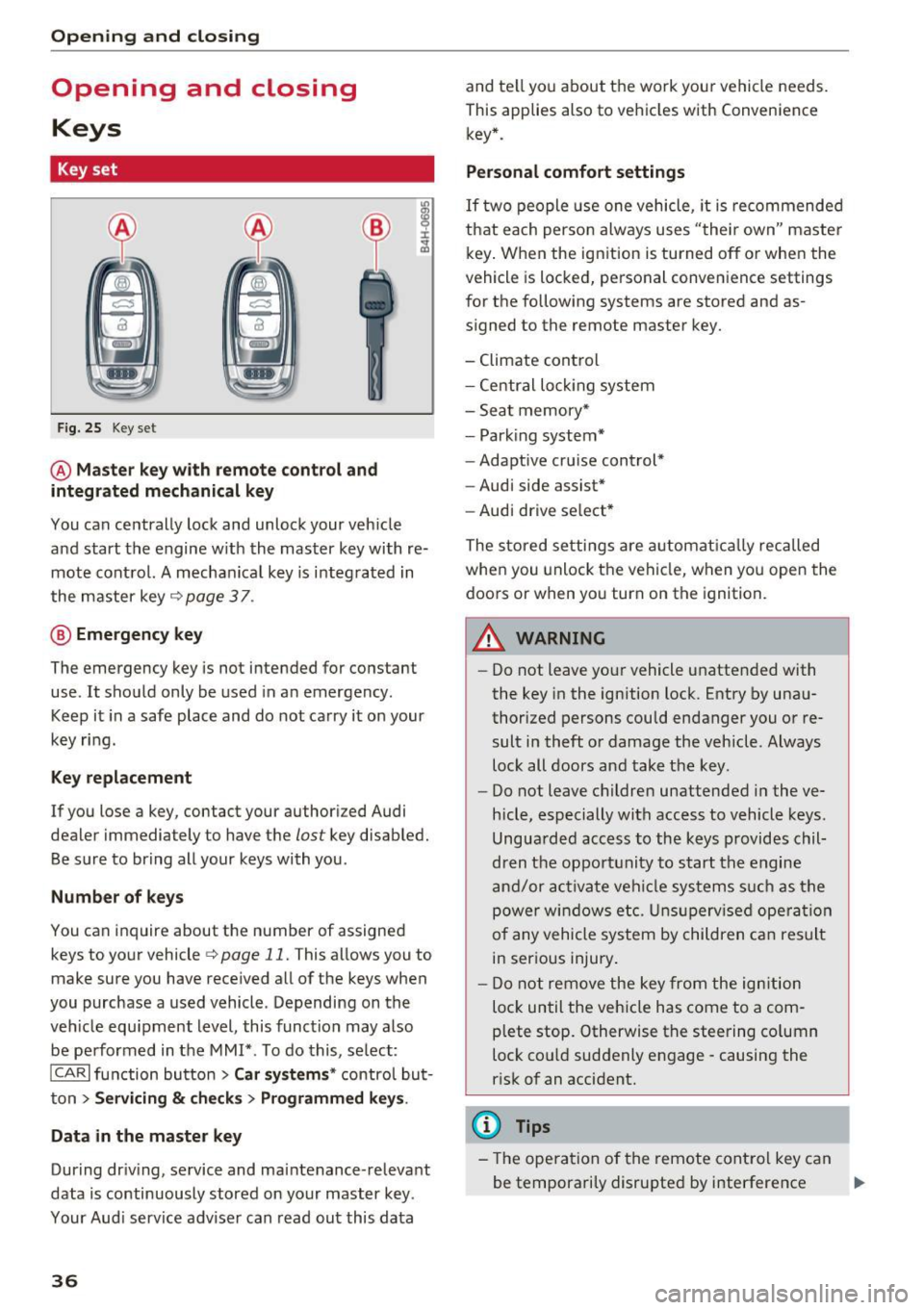
@ Master key with remote control and
integrated mechanical key
You can centrally lock and unlock your veh icle
and start the engine w ith the master key with re
mote control. A mechanical key is i ntegrated in
the master key
c> page 3 7 .
@ Emergency key
The emergency key is not intended for constant
use . It should only be used in a n emergency.
Keep it in a safe place and do not carry it on your
key ring.
Key replacement
If you lose a key, contact your authori zed Audi
dealer immediately to have the
lost key disabled.
Be su re to bring all your keys with you .
Number of keys
You can inquire about the number of assigned
keys to your vehicle
c> page 11. This allows you to
make sure you have received all of the keys when
you purchase a used vehicle . Depending on the
veh icle equ ipment level, this function may also
be performed in the MMI*. To do this, select:
ICARI function button > Car systems* control but
ton
> Servicing & checks> Programmed keys .
Data in the master key
Dur ing dr iv ing, service and ma intenance -relevant
data is continuously stored on your master key .
Your Aud i service adviser can read out this data
36
and te ll you about the work your vehicle needs.
This applies also to vehicles with Convenience key* .
Personal comfort settings
If two people use one vehicle, it is recommended
that each person always uses "the ir own" master
key. When the ignition is turned off or whe n the
vehicle is locked, personal convenience settings
for the following systems are stored and as
signed to the remote master key.
- Climate control
- Central loc king system
- Seat memory*
- Park ing system*
- Adaptive cru ise cont rol*
- Audi side assist*
- Audi drive se lect *
The stored settings are automatically recalled
when you unlock the vehicle, when you open the
doors or when yo u turn on the ignition.
A WARNING
-
-Do not leave your vehicle unattended with
the key in the ignition lock. Entry by unau
thorized persons could endanger you or re
sult in theft or damage the vehicle . Always
lock all doors and take the key.
- Do not leave children unattended in the ve
hicle, especially with access to vehicle keys.
Unguarded access to the keys provides chil
dren the opportunity to start the engine
and/or activate vehicle systems s uch as the
power windows etc. Unsupervised operation
of any vehicle system by children can result
in serious injury.
- Do not remove the key from the ignition
loc k until the veh icle has come to a com
plete stop. Otherwise the steering co lumn
lock co uld suddenly e ngage -causing the
risk of an accident.
(D Tips
-Th e operation of the remote control key can
be temporarily disrupted by interference ..,.
Page 39 of 300
from transmitters in the vicinity of the vehi
cle work ing in the same frequency range
(e .g . a cell p hone, radio equipment) .
- If yo u open the dr iver's doo r with t he key
l eft in the ignition Lock, a chime w ill sound.
This is your remi nder to remove the key and
l ock the door.
- Fo r security reasons, replacement keys are
on ly availab le from Audi dealers.
- Fo r De claration of Comp liance to U nite d
States FCC and Ind ustry Canada reg ulations
r:=> page283 .
Check light and battery in the master key
Fig. 26 Re mote mast er key
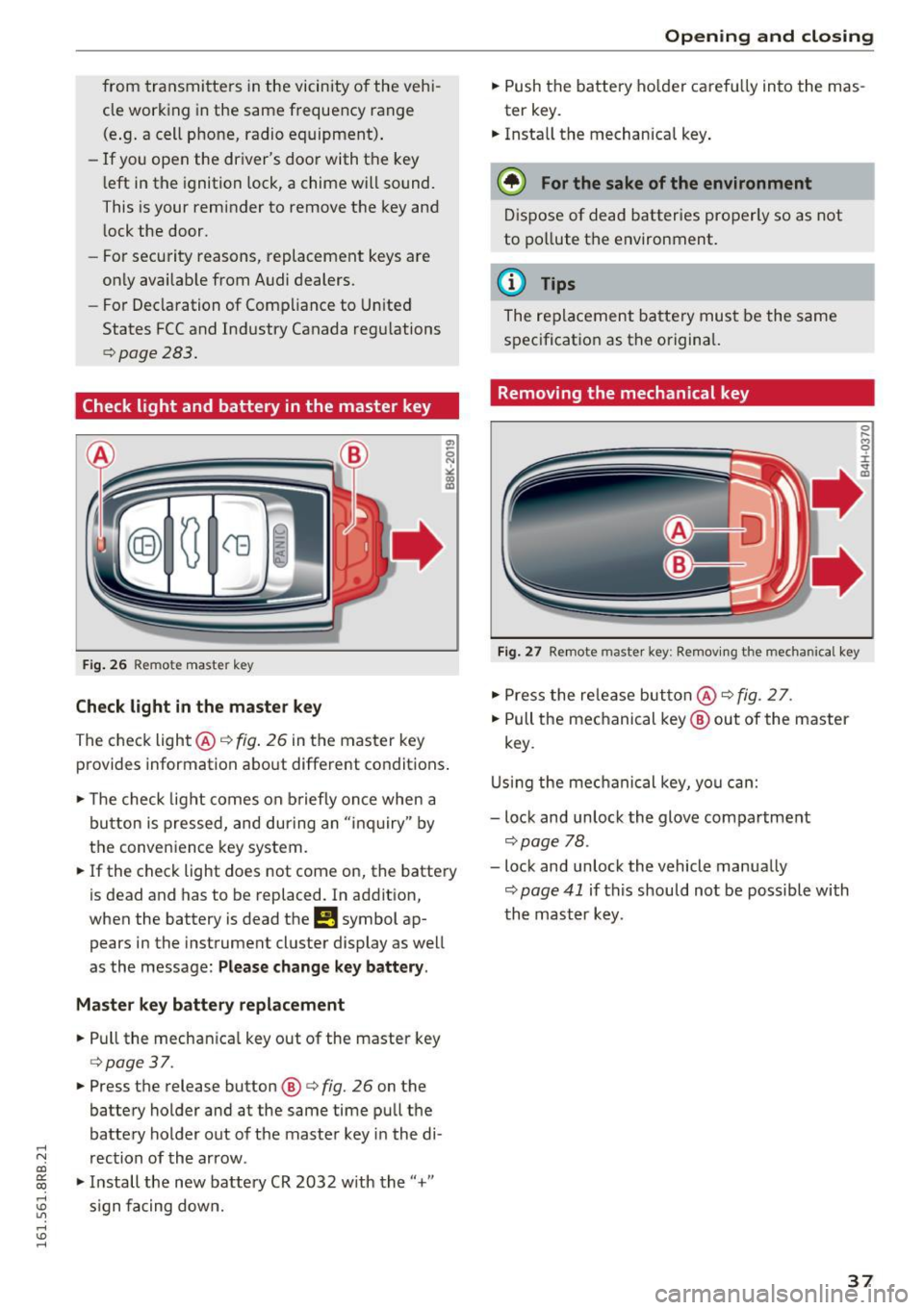
Check light in the master key
The check light@q fig. 26 in t he master key
p rovides information abo ut different condit ions .
.,. The check light co m es on briefly on ce when a
button is pressed, and dur ing an " in qu iry" by
the conven ience key system .
.,. If the check light does not come on, the batte ry
is dead and has to be replaced. In ad dition,
when the battery is dead
the m symbol ap
pears in the instrument cluster display as well
as the message :
Please change key battery .
Master key battery replacement
.,. Pull the mechan ica l key out of the master key
c=> page 37 .
.,. Press the release button @ r=> fig. 26 on the
batte ry holder and at the same time pu ll th e
batte ry holder out of t he maste r key in the di-
.....
'"" rection of the arrow . co
~ .,. In stall the new battery CR 2032 w ith the "+"
; s ign f acing dow n.
Open ing and closing
.,. Push the batt ery ho lder caref ully into the mas
ter key.
.,. Insta ll the mechanical key .
@ For the sake of the environment
Dis pose of dead batter ies properly so as not
to po llute t he environment.
@ Tips
The re placeme nt ba tte ry mus t be the same
s p ec ificat ion as t he o rigina l.
Removing the mechanical key
Fig. 27 Remote maste r key: Re mov ing the mecha nical key
.,. Press the re le a se but ton @ r=> fig. 2 7.
.,. Pull the me chanical key @ out of the master
key .
U sing th e mec hanical key, yo u ca n:
- lock and unlock the glove compartment
c=> page 78 .
-lock and unlock the vehicle manua lly
c=> page 41 if this should no t be possible with
t h e m aster k ey .
37
Page 40 of 300
Opening and clo sin g
Emergency unlocking of the ignition key
In the event of malfunctions in the electrical sys
tem, it may happ en that you cannot remove the
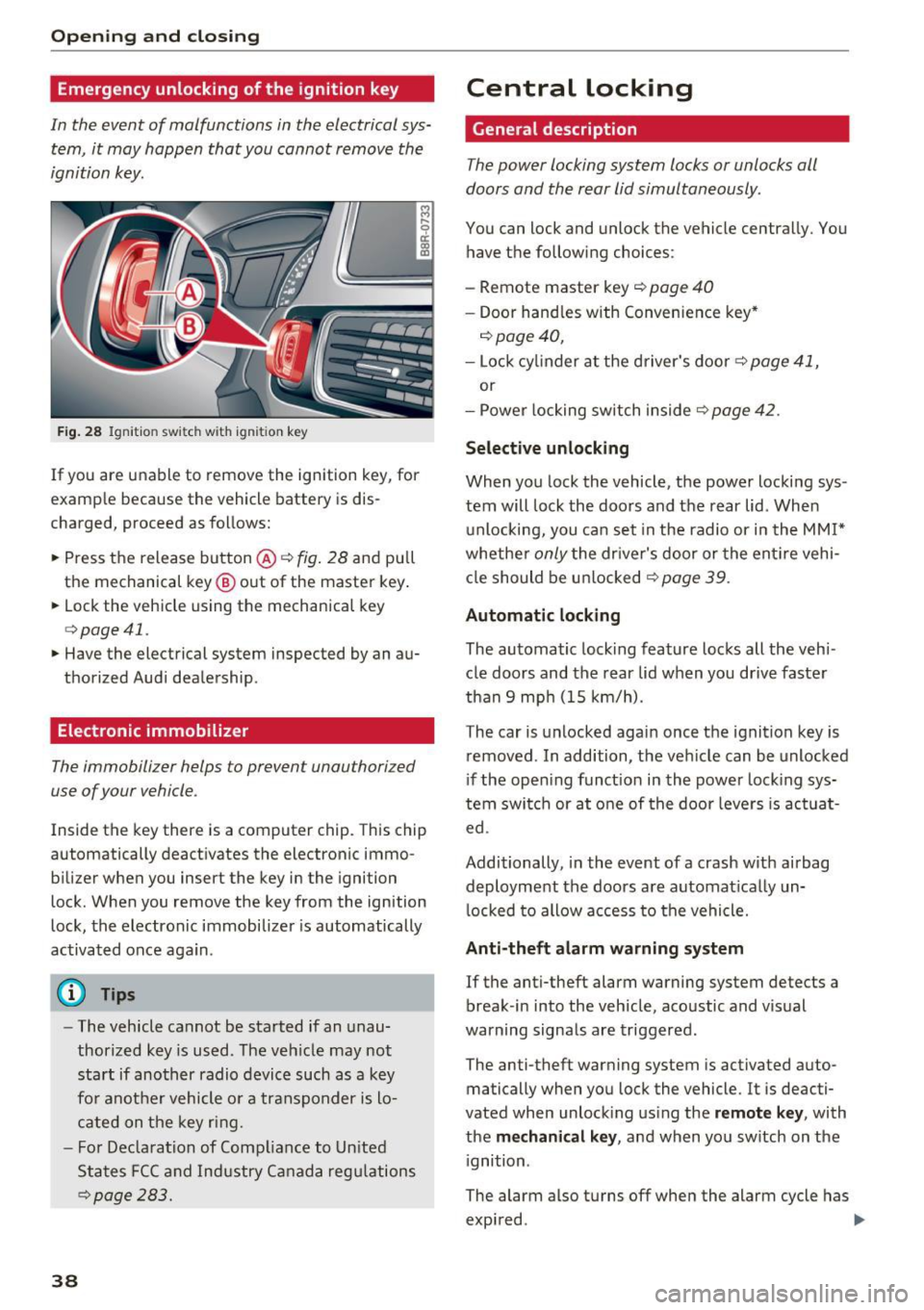
ignition key.
Fig . 28 Ignit ion switch with ignition key
If you are unable to remove the ignition key, for
example because the vehicle battery is dis
charged, proceed as follows:
.. Press the release button @
c::> fig. 28 and pull
the mechanical key ® out of the master key .
.. Lock the vehicle using the mechanica l key
c::> page 41.
.. Have the electrical system inspected by an au
thorized Audi dealership.
Electronic immobilizer
The immobilizer helps to prevent unauthorized
use of your vehicle.
Inside the key there is a computer chip. This chip
automatically deact ivates the electronic immo
bilizer when you insert the key in the ignition
lock. When you remove the key from the ignition
lock, the electronic immobilizer is automatically
activated once again.
(D Tips
- The vehicle cannot be started if an unau
thorized key is used. The veh icle may not
start if another radio device such as a key
fo r anot her vehicle o r a transponder is lo
cated on the key ring.
- F or Declara tion of Comp liance to Un ited
States FCC and Industry Ca nada regu lations
c::> page 283.
38
Central Locking
General description
The power locking system locks or unlocks all
doors and the rear lid simultaneously.
You can lock and unlock the vehicle centrally. You
have the following choices:
- Remote master key
c::> page 40
- Doo r hand les w ith Convenience key*
c::> page 40,
- Lock cy linder a t the d river's door c::> page 41,
or
- Power locking switch inside
c::> page 42.
Select ive unlocking
When yo u lock the vehicle, the power locki ng sys
tem will lock the doo rs and the rear lid. When
u nlocking, you ca n set in the radio or i n the
MM I*
whethe r only the driver's door or the ent ire vehi
cl e should be u nlocked
c::> page 39.
Automatic locking
The automatic locking feature locks all the veh i
cle doors and the rear lid when you drive faster
than 9 mp h (15 km/h).
The car is unlocked agai n once the ignition key is
removed . In addition, the ve hicle can be unlocked
i f the open ing funct ion in the power lock ing sys
tem switch or at o ne of the door leve rs is act uat
ed.
Additionally, in the event of a crash w ith airbag
deployment the doors a re automat ica lly un
l ocked to allow access to the vehicle.
Anti-theft alarm warning system
If the anti-theft alarm warning system detects a
break-in into the veh icle, aco ustic and vis ual
warning signals are triggered.
The anti-theft warning system is activated auto
matically when you lock the vehicle. It is deacti
vated when unlock ing us ing the remote k ey , with
the
me chan ical key , and when yo u sw itch on the
i gnition.
The alarm also turns off when the alarm cycle has
expi red . .,..
Page 41 of 300
,....,
N
co
er::
co
,....,
When you unlock the vehicle, the turn signa ls
flash twice. When you lock the vehicle, the turn
signals flash once. If they do not flash, one of the
doors, the rear lid or the hood is not locked .
Unintentionall y loc king your self out
In the following cases there safeguards to pre
vent you locking yo ur remote master key in the
veh icle:
- T he veh icle does not lock with the power lock
ing switch ~
page 42 if the dr iver's door is
open .
- On vehicles with Co nvenience key*, if the most
recently used master key is in the luggage com
partment, the rear lid is automatically un locked
again after it is closed.
Do not lock you r vehicle with the
remot e ma st e r
ke y or C onvenience key *
unti l all doors and the
r ear lid are closed . In t his way you avoid locking
yourse lf out accidentally.
& WARNING
- When you leave the vehicle, always remove
the ignition key and take it with you. This
will prevent passengers (children, for exam
ple) from accidentally being locked in the
vehicle should they acc identally press the
power locking switch in the front doors.
- Do not leave children inside the vehicle un
su perv ised. In an emergency it wou ld be im
poss ible to open the doors from the outs ide
withou t the key.
(D} Tips
- In the event of a crash with airbag deploy
ment all locked doors w ill be automatically
unlocked to give access to the veh icle occu
pants from the outside.
- If the power lock ing system should mal
funct ion, you can lock the dr iver's door us
i ng the me chanical key~
page 42.
- If the power lock ing system should fail, you
ca n still open the fuel tan k flap in an eme r
gency
~page 216.
-You are well adv ised not to keep valuables
:;;: inside an unattended vehicle, v is ible or not.
,....,
Op ening and cl osing
Even a properly locked vehicle cannot p ro
vide the security of a safe.
- If the LED in the upper edge of the driver's
door pane l comes on for about 30 seconds
after the vehicle is locked, there is a mal
function in the power locking or the anti
theft warning system. Have the malfunction
corrected by an authorized Aud i dealership
or qualified repair fac ility.
Setting power locking
The driver can determine the functions for power
locking in the radio or in the MMI* .
.. Select: !CAR I function button> Cent ral locki ng .
Or
.,. Select:
!CAR I function button > Car syst ems *
control button > Vehicl e setting s> (Ce ntr al
loc king )* .
Unloc king single door /Unloc k doo rs -
you can
specify which doors unlock when you open the ve
hicle .
-Select ing Off /All and pressing the IQ] button on
the remote control key unlocks the entire vehi
cle .
- Select ing
On /Dri ver and pressing the IQ] button
on the remote control key once unlocks only
the dr iver's door. In vehicles w ith a convenience
key*, only the door whose handle you pull will
un lock. If you press the
Im button tw ice, the en
tire veh icle w ill unlock.
If you press the I:@ but
ton, the entire ve hicl e w ill always lock .
Trunk lid/tailgate /lock e xterior trunk handle -if
you select
On , the rea r lid handle locks
c=> page 43, fig. 35 . In this case, the rear lid can
be opened with the
l asl bu tto n on the master key
c=> page 40, fig. 29 or with the~ button in the
driver's door
c:> page 43, fig . 34 .
Fold mirrors * -if you se lect On , the outside m ir
rors w ill fold i n autom atic ally when you press the
Im but ton on the remote control key c:> page 59.
Confirmation ton e/Tone wh en lo cking -if you
select
On , a tone w ill sound when you lock the ve
hicle.
39
Page 43 of 300
,....,
N
co ~ CX) ,....,
I.Cl U"I ,....,
I.Cl ,....,
or one of the doors¢ page 39. The master key
must be within a range of about 5 feet (1.5 me
ters) from the appropriate door or the rear lid. It
makes no difference whether the master key is in
your jacket pocket or in your brief case .
If you grip the door handle while lock ing, this can
adversely affect the lock ing funct ion.
It is not possible to re-open the doo r for a brief
period directly after closing it. This allows you to
ensure that the doors are properly locked.
A WARNING
Read and follow all WARNINGS¢ & in Gener
al description on page 39.
@ Tips
If your vehicle has been standing for an ex
tended period, please note the following:
- The proximity sensors are deactivated after
a few days to save power. You then have to
pull on the door handle once to unlock the
vehicle and a second time to open the vehi
cle.
- To prevent the battery from being dis
charged and to preserve your vehicle's abili
ty to start for as long as possible, the ener
gy management system gradually switches
off unnecessary convenience functions.
It is
possible that you will not be able to unlock
your vehicle using these convenience func
tions.
- For Declaration of Compliance to United
States FCC and Industry Canada regulations
¢page 283.
Opening and closing
Operating locks with the mechanical key
In the event of a failure of the power locking sys
tem, the driver's door can locked and unlocked
with the mechanical key at the lock cylinder .
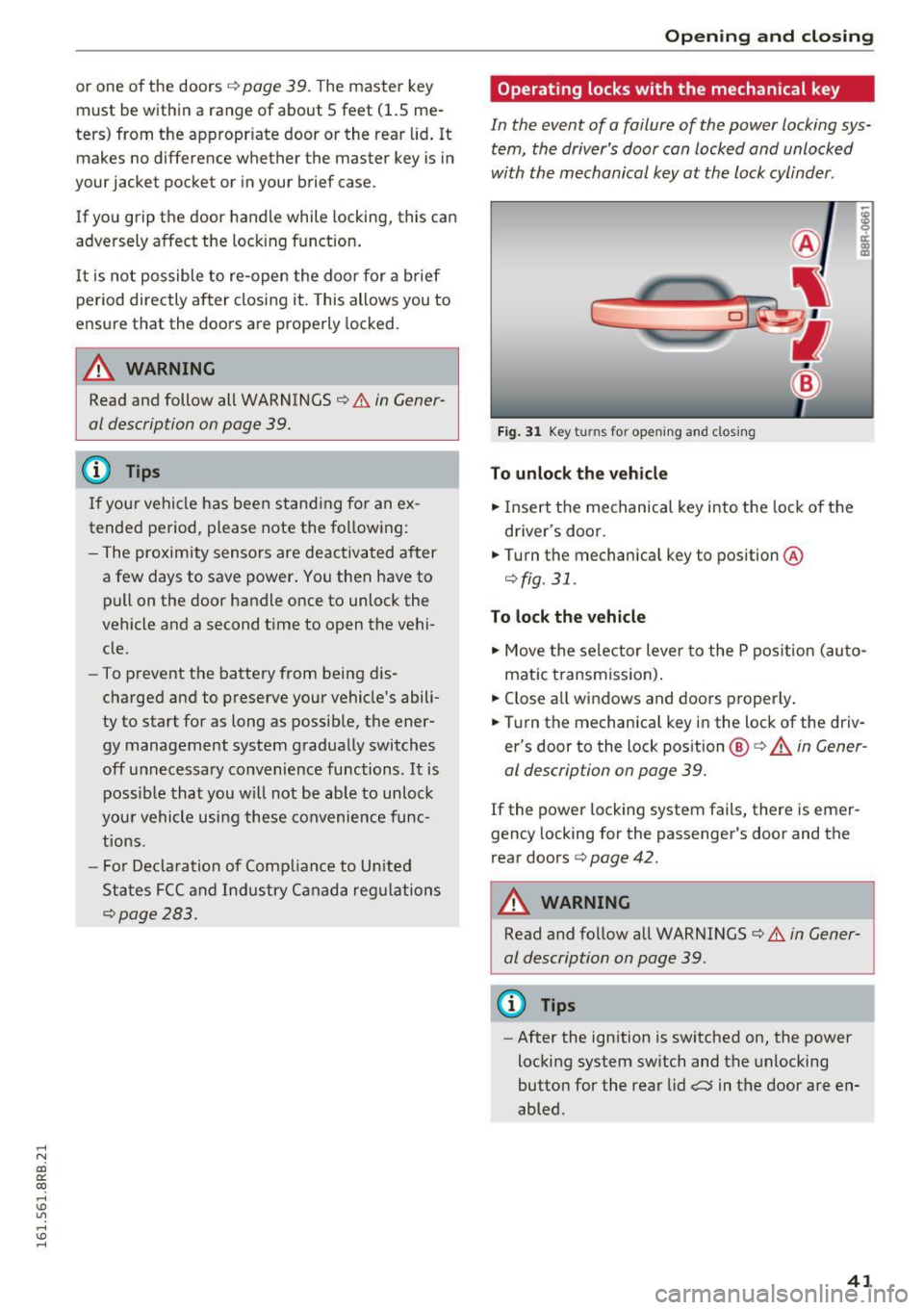
Fig. 31 Key turns for opening and closing
To unlock the vehicle
"" Insert the mechanical key into the lock of the
driver's door .
.. Turn the mechanical key to position ®
¢fig. 31.
To lock the vehicle
"" Move the selector lever to the P pos ition (auto
matic transmiss ion) .
.. Close all windows and doors properly .
.. Turn the mechanical key in the lock of the driv
er's door to the lock position @¢
A in Gener
al description on page 39.
If the power locking system fails, there is emer
gency locking for the passenger's door and the
rear doors ¢
page 42.
A WARNING
Read and follow all WARNINGS¢ & in Gener
al description on page 39 .
(D Tips
-After the ignition is switched on, the power
locking system switch and the unlocking
button for the rear lid,:::::;$ in the door are en
abled .
41
Page 48 of 300
Opening and clo sin g
The rear doors are equipped wit h child safety
locks. The lock is only visib le when the door is
open . Take the mechanica l key out of the master
key
9 page 3 7 .
Swi tch ing th e child saf ety locks on
" Turn the key in the d irect ion of the arrow
~ fig. 39.
Switching the child safety locks off
"Turn the key in the opposite direction of the ar·
row .
When the child safety locks are activated, the in·
side door handles do not work and the doors can
only be opened from the outs ide.
Power windows
Controls
The driver can control all power windows .
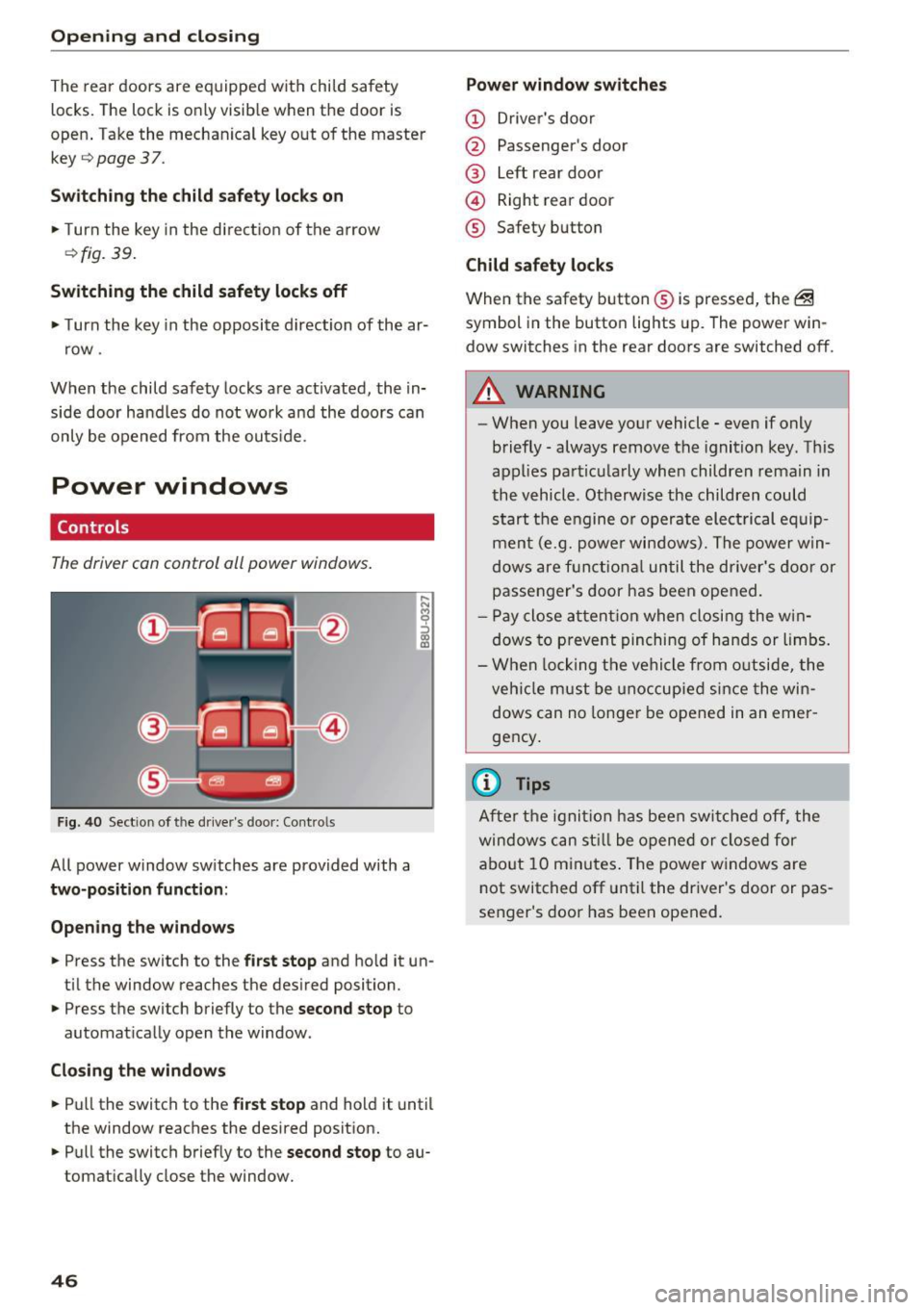
Fig. 40 Sect ion of the driver 's doo r: Contro ls
All power window switches are provided with a
two-position funct ion :
Open ing the windo ws
... Press the switch to the first stop and ho ld it un·
ti l the window reaches the desired position .
... Press the switch briefly to the
second stop to
automat ically open the window .
Closing the window s
... Pull the switch to the first s top and hold it until
the window reaches the desired posit ion .
... Pull the switch briefly to the
sec ond stop to au·
tomatically close the window.
46
Power window swit ches
(D Driver 's doo r
@ Passenger's door
@ Left rear door
@ Right rear door
® Safety button
Child safety l ocks
When the safety button ® is pressed, the @
symbol in the butto n lights up. The power win·
dow switches in the rear doors are switched off.
A WARNING
-When you leave your vehicle· even if only
briefly· always remove the ignition key. This
appl ies particularly whe n children rema in in
the vehicle . Otherwise the children could
start the engine or operate electrical eq uip·
ment (e.g. powe r windows). The power win·
dows are f unctio nal until the driver's door or
passenger's door has been opened.
- P ay close a ttent ion when closing the w in·
dows to prevent pinching of hands or limbs.
- W hen locking the vehi cle from o utside, the
veh icle must be unoccupied si nce the win·
dows can no longer be opened in an emer ·
gency .
{i) Tips
After the ignit ion has been swi tched off, the
windows can st ill be opened or closed for
abo ut 10 minutes . The power w indows are
not switched off unt il the dr iver's door or pas·
senger's door has been opened.
-
Page 50 of 300
Opening and clo sin g
Open ing and clo sing th e sunsh ade
.. To a utomat ically open the sunshade complete
ly, briefly press the switch @ in the des ired ar
row direction.
.. To stop the sunshade in an intermediate posi
tion, press the switch again, or
.. Press and hold the switch in the desired arrow
direction .
.. Release the sw itch when sunshade is at desired
pos ition .
After the ignition is switched off, you can still op
erate the Panoramic sliding sunroof for about 10 minutes . As soon as the driver's o r passenger's
door is opened, the switch is inoperat ive.
The power sunshade can also be closed when the Panoramic sliding sunroof is open.
A WARNING
Pay careful attention when closing the Panor
am ic sliding sunroof- otherwise ser ious injury
cou ld result! For this reason, always remove
the ignition key when leaving the vehicle.
(D Note
Always close your Panoramic sl iding sunroof
when leaving yo ur vehicle. Sudden rain can
cause damage to the i nterior equipment of
your veh icle, particularly the electron ic eq uip
ment.
(j) Tips
I nformat ion regarding convenience opening/
closing
¢page 47.
Emergency closing of the Panoramic slid ing
sunroof
Applies to veh icles: w ith Panoramic sliding sunroof
If the Panoram ic sliding sunroof detects an ob
ject in its path when it is clos ing , it will open
aga in automatically . In this case, you can close
the roof with the power emergency clos ing func
tion .
.. Within five seconds after the sunroof opens au
tomat ically, pull the switch unt il the roof
closes .
48
Garage door opener
(Homelink)
Description
Applies to vehicles: with garage door opene r (Home Link)
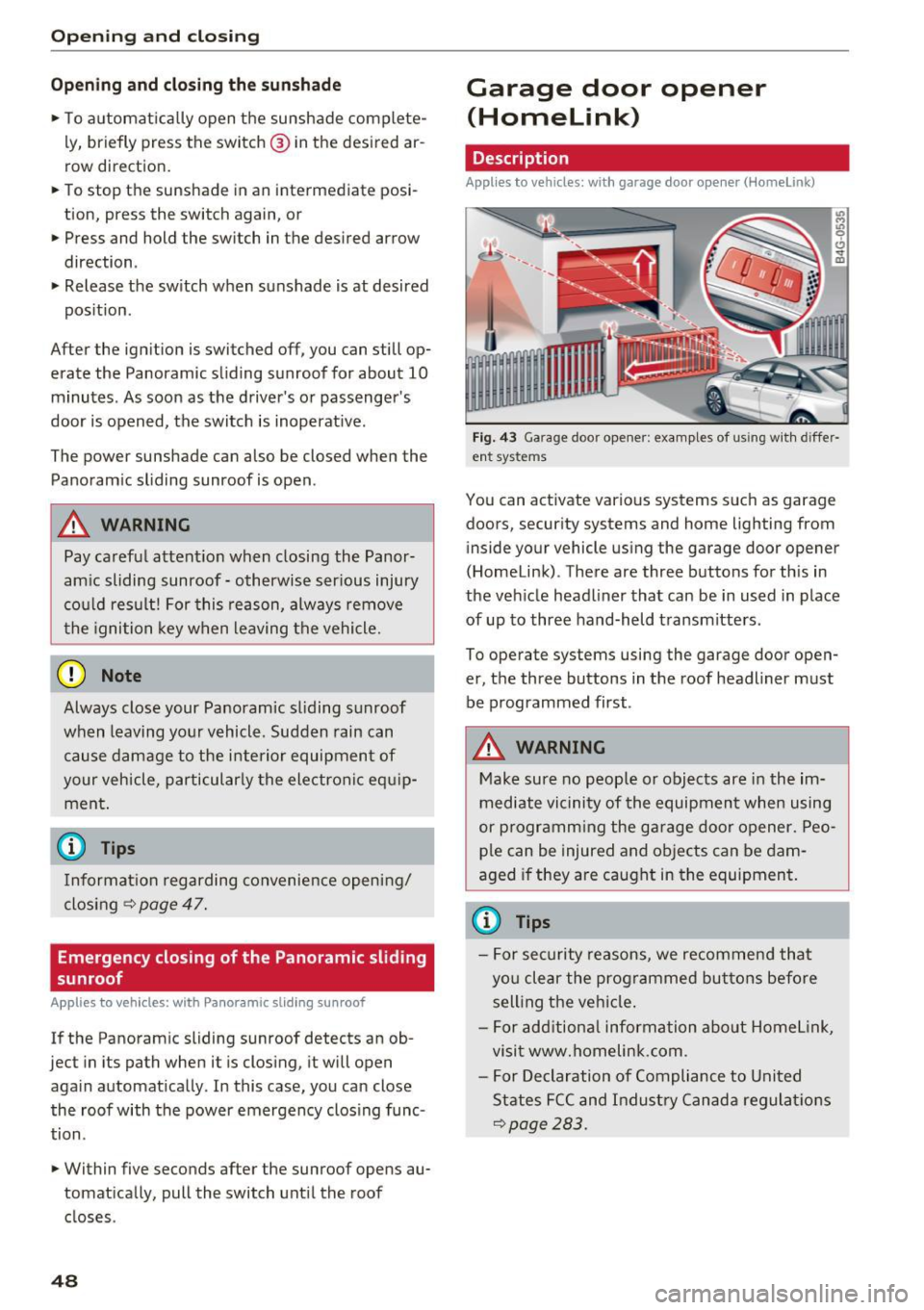
F ig. 43 Ga rage door opene r: examples of us ing w it h d iffer·
ent syste ms
You can act ivate various systems suc h as garage
doors, secur ity systems and home lighting from
inside your vehicle using the garage door opener
(Homelink) . There are three buttons for th is in
the veh icle headliner that can be in used in place
of up to three hand-held transmitters.
To operate systems using the garage door open
er, the three buttons in the roof headliner must be programmed first .
A WARNING
Make sure no people or objects are in the im
mediate vi cinity of the equipment when using
or p rogramm ing the ga rage door opener. Peo
p le can be injured and ob jects can be dam
aged if they are caught in the equipment.
(D Tips
- For sec urity reasons, we recommend that
yo u clear the prog rammed but tons before
sell ing t he ve hicl e.
- For add itiona l information about Homel ink,
visit www.homelink.com .
- For Declaration of Compliance to United
States FCC and Indust ry Canada regulat ions
~page 283.
Page 51 of 300
..... N
co ~ CX)
..... I.Cl U"I
..... I.Cl .....
Operation
Applies to vehicles: with garage door opener (Homelink)
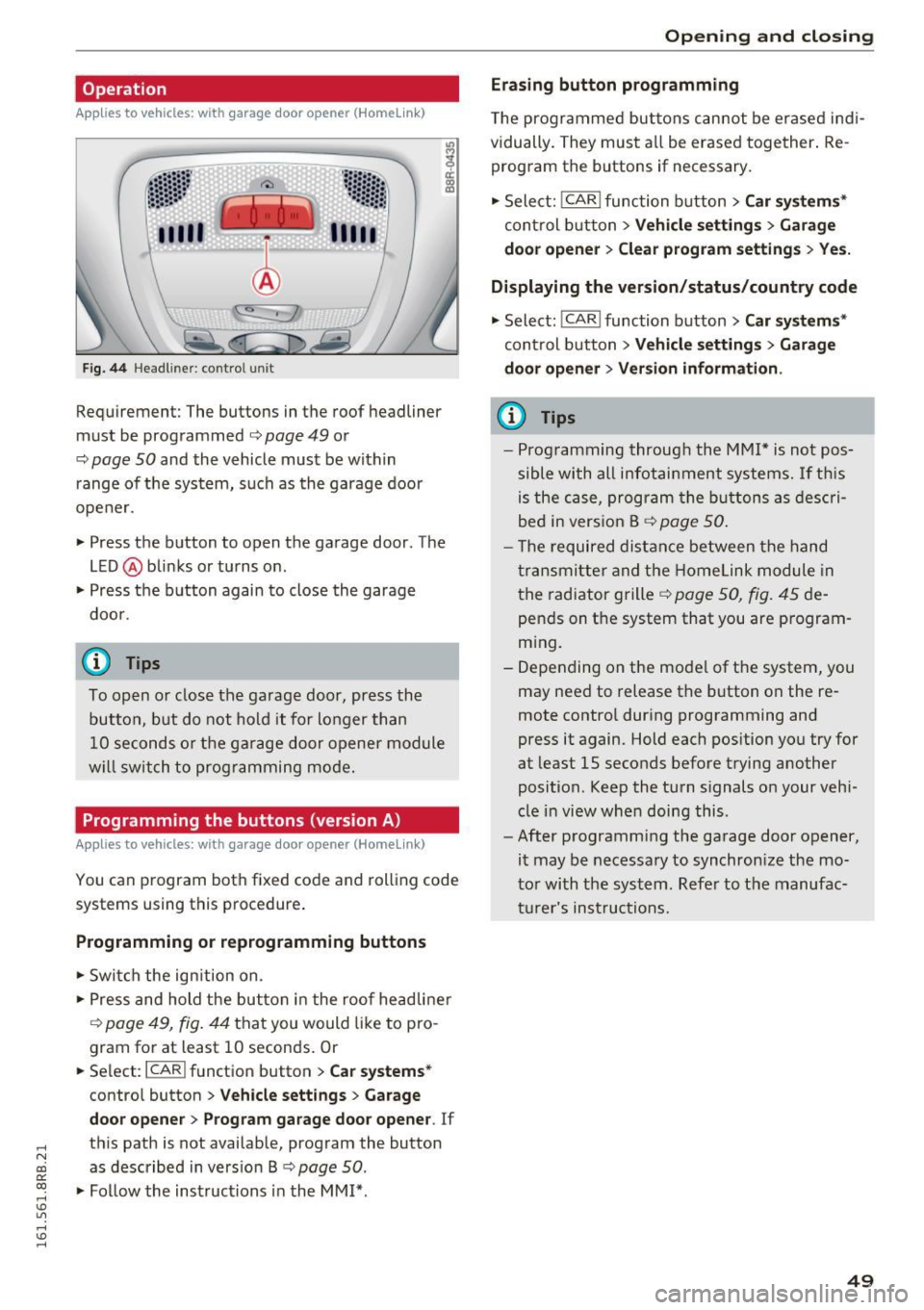
Fig. 44 Headl iner: c on tro l uni t
Requiremen t: The buttons in the roof headliner
must be programmed
c:> page 49 or
c::> page 50 and the vehicle must be within
range of the system, such as the garage door
opener.
" Press the button to open the garage door . The
LED @blinks or turns on .
" Press the button again to close the garage
door .
@ Tips
To open or close the garage door, press the
button, but do not hold it for longer than
10 seconds or the garage door opener module
will switch to programming mode.
Programming the buttons (version A )
Applies to vehicles: with garage door opener (Homelink)
You can program both fixed code and rolling code
systems using this procedure.
Programming or reprogramming buttons
"Switch the ignition on .
"Press and hold the button in the roof headliner
c::> page 49, fig. 44 that you would like to pro
gram for at least
10 seconds. Or
.. Select:
I CAR I function button > Car systems*
control button > Vehicle settings > Garage
door opener> Program garage door opener .
If
this path is not available, program the button
as described in version B
c::> page 50.
"Follow the instructions in the MMI* .
Opening and closing
Erasing button programming
The programmed buttons cannot be erased indi
vidually. They must all be erased together. Re
program the buttons if necessary.
"Select:
! CAR ! function button> Car systems*
control button > Vehicle settings > Garage
door opener> Clear program settings > Yes.
Displaying the version/status/country code
"Select: ! CAR ! function button> Car systems*
control button > Vehicle settings > Garage
door opener> Version information.
(D Tips
- Programming through the MMI* is not pos
sible with all infotainment systems. If this
is the case, program the buttons as descri
bed in version B
c::> page 50.
- The required distance between the hand
transmitter and the Homelink module in
the radiator grille
c::> page 50, fig. 45 de
pends on the system that you are program
ming.
- Depending on the model of the system, you
may need to release the button on the re
mote control during programming and
press it again. Hold each position you try for
at least
15 seconds before trying another
position . Keep the turn signals on your vehi
cle in view when doing this .
- After programming the garage door opener,
it may be necessary to synchronize the mo
tor with the system. Refer to the manufac
turer's instructions.
49
Page 52 of 300
Opening and clo sin g
Programming the buttons (version B)
Applies to vehicles: with garage door opener (Homelink)
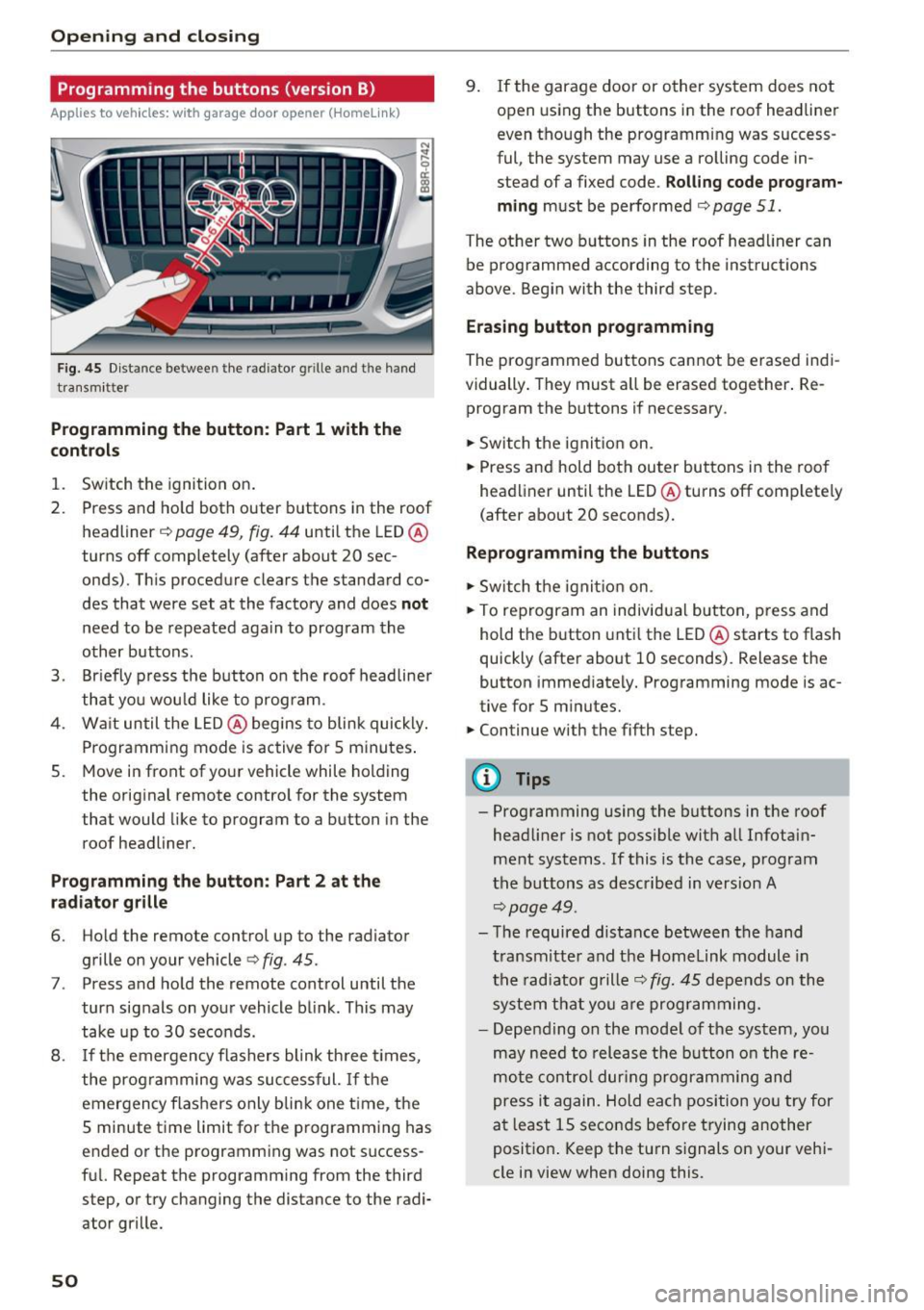
Fig. 45 Dist an ce betwee n th e rad iator g rille an d th e hand
tra nsm itt er
Programming the button : Part 1 with the
contr ols
1. Switch the ignition on.
2. Press and ho ld both outer buttons in the roof
headliner ~
page 49, fig. 44 until the LED @
turns off completely (after about 20 sec
onds). This procedure clears the s tandard co
des that were set at the factory and does
not
need to be repeated again to program the
other buttons .
3. Br iefly p ress the b utton o n the roof headliner
that you wou ld like to program .
4. Wa it until the LED @ begins to blink quickly .
Programming mode is active for 5 minutes .
5. Move in front of yo ur vehicle while holding
the original remote control for the system
t hat would like to program to a button in the
roof headliner.
Prog ramming th e butt on : Part 2 at the
r a d iat or gr ille
6. Ho ld the remote control up to the radiator
grille on your vehicle¢
fig. 45 .
7. Press and hold the remote control until the
turn signals on your vehicle blink . This may
take up to 30 seconds.
8 .
If the emergency flashers blink th ree t imes,
the programming was suc cessful.
If th e
emergency flashers only b lin k one t ime , the
5 minute time limit for the p rogramming has
ended or the programm ing was not success
fu l. Repeat the programming from the third
step, or try changing the distance to the radi
ator grille.
50
9. If the garage door or other system does not open using the buttons in the roof headliner
even though the programming was success
ful , the system may use a ro lling code in
s tead of a fixed code .
Rolling code prog ram
m ing
must be performed ¢ page 51.
The other two b uttons in the roof head liner can
be programmed according to the instruct ions
above . Begin with the third s tep .
Era sing button prog ramm ing
The prog rammed buttons cannot be erased indi
vidually . They must a ll be erased tog ether . Re
program the buttons if necessary .
.. Switch the ignit io n on.
.. Press and hold both outer bu ttons in the roof
headliner until the LED @turns off comp lete ly
( after about 20 seconds).
Reprogramm ing the buttons
.. Switch the ignit io n on .
.. To reprogram an individual button, press and
hold the button unti l the LED @starts to flash
quickly (after about 10 seconds) . Release the
button immed iately. Programming mode is ac
tive for 5 m inu tes.
.. Continue with the fifth step.
@ Tips
- Programming using the buttons in the roof
headliner is not possible with all Infotain
ment systems . If this is the case, program
the buttons as descr ibed in version A
¢ page 49 .
-The required distance between the hand
transm itte r and the Homelink module in
the radiator grille~
fig. 45 depends o n the
system that you a re prog ramming.
- Depending on the mode l of the system, you
may need to release the b utton o n the re
mote contro l dur ing programming and
press it again. Hold each position yo u try for
a t least 15 seconds before trying another
posit ion . Keep the turn s ignals on your vehi
cle in view when doing this .
Page 54 of 300
Lights and Vision
Lights and Vision
Exterior lighting
Switching the lights on and off
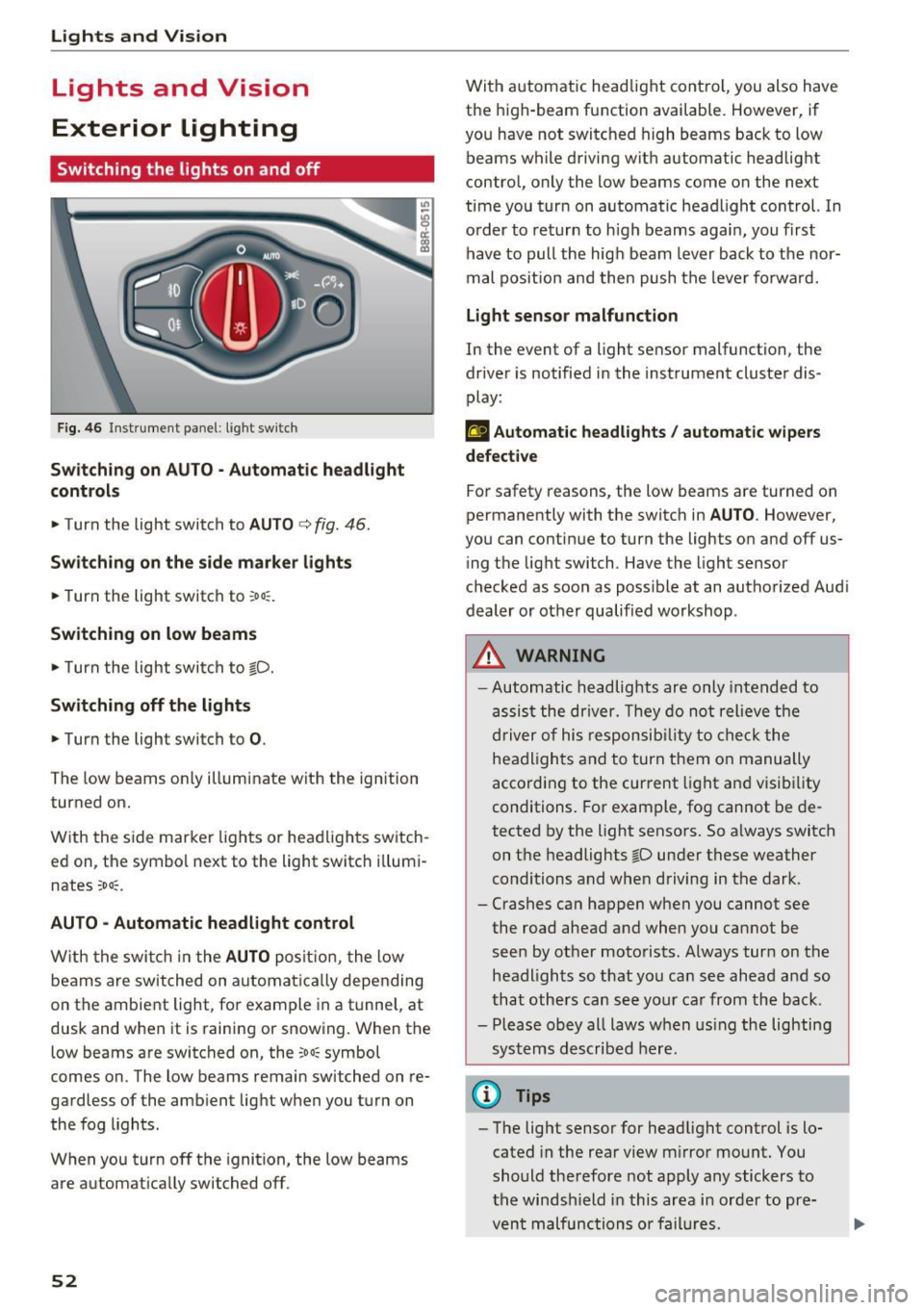
Fig. 46 Instrument panel: l ight sw itch
S wi tch in g on AUTO· Automatic headlight
controls
• Turn the light switch to AUTO c> fig. 46 .
Sw itch ing on the side marke r lights
• Turn the light switch to ~o o:.
Switching on low beams
• Turn the light swi tch to io.
Sw itch ing off the lights
• Turn the light switch to 0.
The low beams only illuminate with the ignition
turned on.
With the side marker lights or headlights switch
ed on, the symbol next to the light switch i llumi
nates
~oo~.
AU TO -Automatic headlight control
W ith the swi tch in the AUTO posit io n, the low
beams are switched on automat ic all y depending
on the ambient light, fo r example in a tunnel, at
dusk and when it is raining or snowing. When the
low beams are switched on, the
~oo~ symbol
comes on. The low beams remain switched on re
gardless of the amb ient light when you turn on
the fog lights .
When you turn off the ignition , the low beams
are automat ically switched off .
52
With automatic head light cont rol, you also have
the high-beam function available. However, if
you have not switched high beams back to low beams while driving with automatic headlight
contro l, only the low beams come on the next
time you turn on automatic headlight control. In
o rder to return to h igh beams agai n, you first
have to pull the hig h beam lever back to the nor
mal pos it ion and then push the leve r fo rwa rd.
Light sen sor malfunction
In the event of a light sensor malfunction, the
dr ive r is notified in the instrument cluster dis
play:
El Automat ic headlights / auto matic wipers
defective
For safety reasons, the low beams are turned on
permanently with the switch in
AU TO . However,
you can contin ue to turn the lights on and off us
i ng t he light switch. Have the light sensor
checked as soon as poss ible at an autho rized Aud i
dealer or other qualified workshop .
_&, WARNING
-Automatic headlights are only inte nded to
assis t the driver. They do not relieve the
driver of his respon sib ility to check the
headligh ts a nd to turn them o n manually
according to the cur rent light an d visibility
conditions. For example, fog cannot be de
tected by the light sensors. So a lways switch
on t he headlights
io under these weather
conditions and when driving in the dark .
- Crashes ca n happen when you cannot see
the road ahead and when you cannot be seen by other motorists. Always turn on the
headl igh ts so that you ca n see ahead a nd so
that others can see yo ur car from the back.
- Please obey all laws w hen us ing the lighting
sys tems described here.
@ Tips
- The light sensor for headlight control is lo
cated in the rear view m irror mount. You
should therefore not apply any stickers to
the windsh ield in this area i n order to pre
vent malfunctions or fail ures.