warning lights AUDI Q5 2016 Owner's Guide
[x] Cancel search | Manufacturer: AUDI, Model Year: 2016, Model line: Q5, Model: AUDI Q5 2016Pages: 300, PDF Size: 75.02 MB
Page 92 of 300
Driving
E m erg ency b ra ke function
An emergency b rake ensures that the veh icle can
be slowed down even if the normal brakes fai l
¢ page 91, Emergency broking.
A WARNING
If a drive range is engaged with the vehicle
stationary and the engine running, you must
in no instance accelerate care lessly. Other
w ise the vehicle will start to move immediate
ly -risk of an accident.
(D Tips
- If the parking brake is app lied with the igni
tion switched off, the indicator lights in the
switch and. (USA models)/ . (Cana-
da models) in the instrument cluster will go
out after a ce rtain per iod of t ime.
- Occasiona l noises whe n the parking b rake is
applied and released are normal and are not
a cause for conce rn.
- When the vehicle is par ked, the park ing
brake goes thro ugh a self-test cycle at regu
l a r i nte rvals. Any associa ted noises a re nor
mal.
Parking
" Press the brake ped al to stop the vehicle.
" Pull the switch
¢ page 89, fig. 103 to set the
parking brake.
" Move the selector lever to P.
" Turn the eng ine off¢ &_.
-
"When on incl ines or declines, turn the steering
wheel so that the vehicle w ill roll into the curb
if it beg ins to move .
A WARNING
-When you leave your vehi cle - even if on ly
br iefly- always remove the ign ition key. This
applies particular ly when c hildren remain in
the vehicle . Otherwise the children could
sta rt the engine, release the pa rking brake
or operate electrical eq uipment (e .g. power
windows). There is the risk of an acc ident.
- When the vehicle is loc ked, no one - particu
larly not children shou ld remain in the vehi-
90
-
cle. Locked doors make it more d ifficult for
emergency wo rkers to get into the vehicle -
putting lives at risk.
Starting from rest
The starting assist function ensures that the
parking broke is released automatically upon
starting.
Stopping and applying park ing brake
" Pull the switch to app ly the parking b rake.
Starting and automat ically releasing the
park ing brake
" When you start to d rive as usua l, the par king
brake is automatically released and yo ur vehicle
beg ins to move.
When stopp ing at a t raffic sig na l or s topping in
c ity traff ic on vehicles with an automat ic t rans
mission, the pa rking brake can be applied . The
vehicle does not have to be held with the foot brake. The parking brake eliminates the tendency
to c reep w ith a dr ive range engaged . As soon as
you drive off as usual, the parking brake is re
leased automat ica lly and the vehicle starts to
move.
Starting on slope s
When starting on incl ines, the starting assist pre
vents the vehicle from un intent iona lly rolling
back. The braking force of the parking brake is
not re leased u nti l sufficient dr iv ing fo rce has
been built up at the wheels.
@ Tips
For safety reasons, the park ing brake is re
l eased automatically on ly when the d river's
safety be lt is engaged in the b uckle.
Starting off with a trailer
To prevent rolling bock unintentionally on on in
cline, do the following:
" Keep the switch pu lled and depress the acceler
ator. The park ing brake stays applied and pre-
vents the ve hicle from roll ing backward.
IJ,,
Page 95 of 300
..... N
co ~ CX)
..... I.Cl U"I
..... I.Cl .....
engine will no t be switched off in the following
situations:
- The eng ine has not reached the m in imum re
quired temperature for Start-Stop-mode.
- T he interior temperature selected by the A/C
system has not been reached.
- The outs ide temperatu re is ext remely h igh/low.
- The w indshield is being defrosted
¢ page 82.
-The parking system* is switched on.
- The battery charge level is too low.
- The steering whee l is sharply turned or there is
a steering movement.
- After engaging the reverse gear.
- On sharp inclines .
IIJ appears in the instrument cluster display and
§ii;Ff&Ff ~lso appears in the tr ip comp ute r.
Engine automatically re starts
The stop phase is interrupted in the following sit
uations, for example . The eng ine restarts without
any action by the driver .
- The interior temperature varies from the tem
perature se lected in the A/C system .
- The windshield is beeing defrosted
¢ page 82.
- The brake pedal is pressed several times in a
row.
- The battery charge level becomes too low.
- High power cons umption .
IIJ appears in the instrument cluster display and
H§;Ff&Fii ~lso appears in the tr ip comp ute r.
Switching the ignition off autom atically
To prevent the battery from draining, the ignition
will switch off
automati cally when all of the fol
lowing cond itions have been met:
- The veh icle has already been driven.
- The eng ine has been turned off by the Start-
Stop-System .
- The driver's door is opened .
- T he dr iver's seat bel t is removed.
- The brake pedal is not pressed down.
- T he veh icle is stationary .
In this case, the activated low beam will be re
placed by the s ide marker lights . The side marker
D rivi ng
lights will switch of f after approximate ly 30 m i
nutes or when you lock the veh icle.
If t he Start-S top-System has not turned off the
engine or if you have swi tched the S tart -Stop
System off manually, the ignition will
not be au
tomatica lly switched off and the eng ine wi ll con
t in u e to run¢& .
A WARNING <= -
Never allow the engine to run in confined
spaces -danger of asphyx iation.
(D Tips
If you shift into the 0/S or N positions after
shifting into reverse, the vehicle must be dr iv
en faster than 6 mph (10 km/h) in order for
the engine to switch off again .
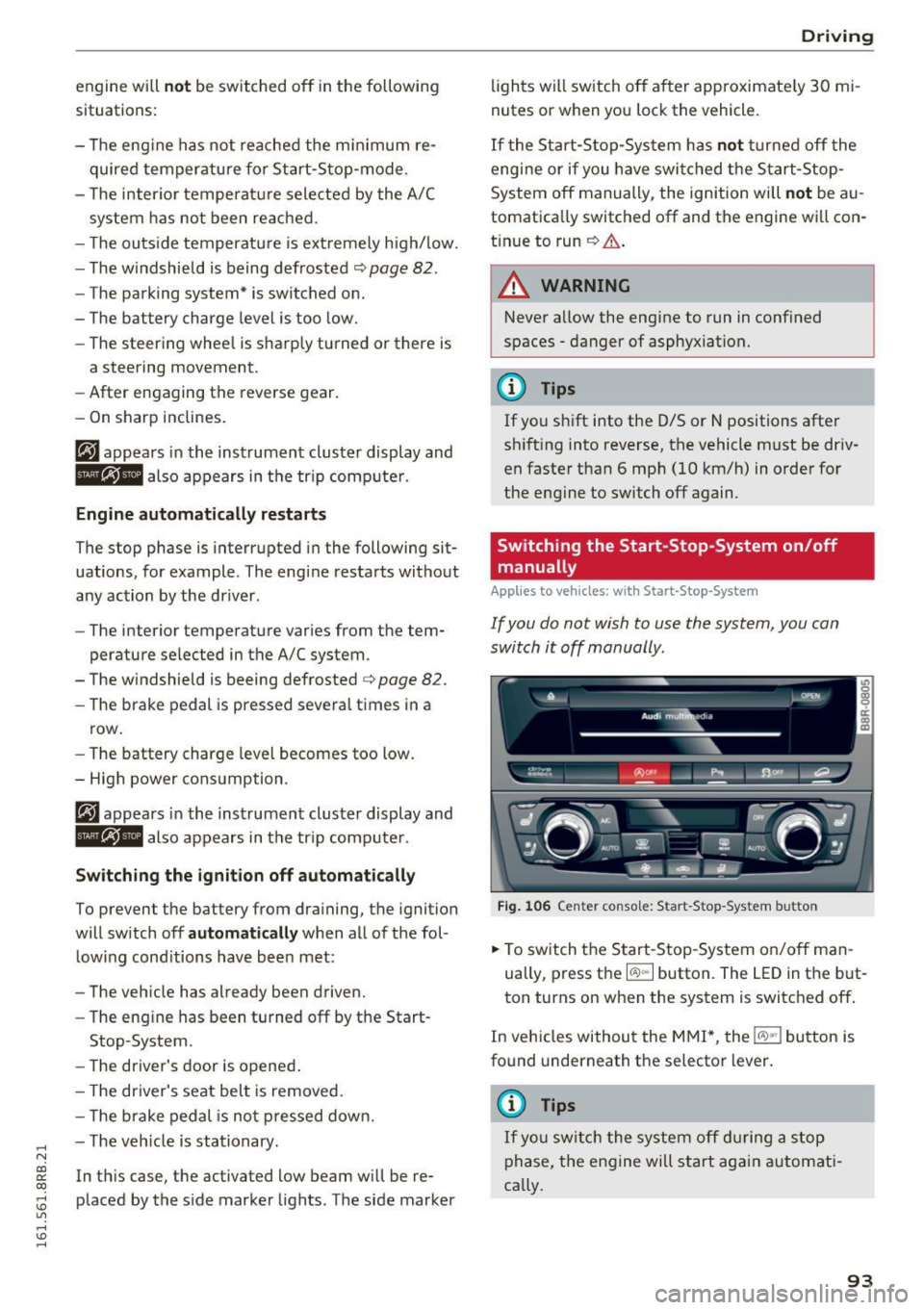
Switching the Start-Stop -System on /off
manually
App lies to vehicles: wi th Start -S top-Syste m
If you do not wish to use the system, you can
switch it off manually.
= , __ (A)Off _ --"'-- f'~-.::a-----
Fig . 10 6 Cen ter co nsole: S ta rt -Stop -System button
.. To switch the Start -Stop-System on/off man
ually, press the
I CAJ ,,.I button. The LED in the b ut
ton turns on when the system is switched off .
In vehicles without the M MI*, the
!CA.> "'! button is
found underneath the se lector lever.
(D Tips
If y ou swit ch the system off d uring a stop
phase, the engine will st art aga in automati
ca lly.
93
Page 98 of 300
Driving
-For reasons of safety, cruise control should
not be used in the city, in stop-and-go traf
fic, on twisting roads and when road condi
tions are poor (such as ice, fog, gravel, heavy rain and hydroplaning) -you could
have an accident.
- Switch the cruise control off temporarily when driving in turning lanes, highway exits
or in construction zones.
- Please note that unconsciously "resting"
your foot on the accelerator pedal causes cruise control not to brake . This is due to
the control system being overridden by the
driver's acceleration.
- Never use the cruise control when driving
off-road or on unpaved roads. The cruise
control is intended for use only when the ve
hicle is being operated on paved roads, and
is not suitable for use off-road or on un
paved roads.
- If a brake system malfunction such as over
heating occurs when the cruise control sys
tem is switched on, the braking function in
the system may be switched off. The other
cruise control functions remain active as
long as the indicator light
tii;(O~i4 (US mod
el)/lil (Canadian model) is on .
{D) Tips
The brake lights illuminate as soon as the
brakes apply automatically.
Changing speed
.,. To increase/decrease the speed in increments,
tap the lever in the
010 direction ¢ page 95,
fig. 108 .
.,. To increase/decrease the speed quickly, hold
the lever in the
010 direction until the de
sired speed is displayed.
You can also press the accelerator pedal down to
increase your speed, e.g. if you want to pass
someone. The speed you saved earlier will re
sume as soon as you let off of the accelerator
pedal.
If, however, you exceed your saved speed by
S mph
(10 km/h) for longer than 5 minutes, the
96
cruise control will be turned off temporarily. The
green symbol in the display turns white, the
saved speed is retained.
Pre-selecting speed
You can pre-select your desired speed while the
vehicle is not moving.
.,. Turn on the ignition.
.,. Pull lever into position
(D ¢page 95, fig. 108.
.,. Press the lever in the 0 or 0 direction to in-
crease or decrease your speed.
.,. Let go of the lever to save that speed .
This function makes it possible, for example, to
save the speed you want before driving on the
highway. Once on the highway, activate the
cruise control by pulling the lever toward
(D .
Switching off
Temporary deactivation
.,. Step on the brake pedal, or
.,. Press the lever into position @ (not clicked into
place) ¢
page 95, fig . 108, or
.,. Drive for longer than 5 minutes at more than
5 mph (10 km/h) above the stored speed.
Switching off completely
.,. Press lever into position @ (clicked into place),
or
.,. Switch the ignition off .
The speed you saved will be retained if the cruise control has been switched off temporarily . To re
sume the saved speed , let up on the brake and
pull the lever to position
(D.
The saved speed will be erased after turning the
ignition off.
A WARNING
You should only resume the saved speed if it
is not too high for existing traffic conditions.
Otherwise you risk an accident.
Page 101 of 300

© Vehicle drive ready (READY)
® H igh voltage battery charge status
@ Recupe ration (CHARG E)
(J) Driving within the combustion en
g ine's full load range
@ 100% combust ion engine
® Boosting - the elect ric engine as
sists the combustion engine (BOOST)
@ E ngaging the conve ntiona l brakes
with recuperat ion
@ Vehicle not drive ready (OFF)
@ EV mode act ive
The need le remains at
OFF whe n the ignition is
turned on. When the veh icle enters drive ready
mode, the status message
hybrid ready appears
briefly in the instrument cluster d isplay and the
needle in the powe r meter poi nts to
READY .
Indicator lights and messages
Applies to vehicles: with hybrid drive
The indica to r li gh ts in the inst rument cluste r
b link or tur n on. They indicate functions or mal
f u nctions .
W ith some ind icator lights, messages may ap
pear and a warning tone may sou nd . A lso note
the ind icator lights in
<=:> page 2 7.
Press brake pedal to start vehicle
This message appears if you do not press the
b rake pedal whe n starting the vehicle.
Shift to N or P to start vehicle
This message appea rs if the selecto r leve r fo r the
automatic transm iss ion is not in the Nor P posi
tions whe n starting the vehicle .
-Hybrid drive: System fault! Power
brakes , steering malfunction pos sible
If the indicator lig ht turns on and th is message
appears, there is a malfunction in the hybrid sys
tem. The brake booster and the power steeri ng
~ may stop working . Stop the vehicle in a safe loca -
co g:; tion as soon as possible.
Hybrid
You may con tinue dr iving i f the indicator light
tu rns off after sta rt ing the ve hicl e several times .
Drive to an authorized repa ir facility immed iate ly
to have the malfunction cor rected .
f#iifj:j;jj,j Hybrid drive: System fault! Contact
dealer
If the indicator light turns on and this message
appea rs, there is a ma lfunction in the hybrid sys
tem. Drive to an autho rized repair fac ility imme
diately to have the malfunct io n corrected.
(II Hybrid system : Performance rest ricted .
Please contact dealer
If the indicator light turns on and this message
appears, there is an eng ine control malfunction .
The
[Ia i ndica to r li ght in the ins trument clus te r
also t urns on. The engine ou tput is red uced .
Dr ive to your authori zed A udi dealer or qualified
r ep air fa cility i mme diate ly to h ave the m alfu n c
t io n corre cte d.
Hybrid drive deactivated. Please restart
engine manually.
T h is m ess age appe ars if t he high vo lt a ge b attery
c h arge leve l h as fallen below a cer tain range or i f
t h e ig nition key is no longer i nsid e the veh icle for
vehicles with the convenience key* .
Start the engi ne w it h eithe r th e ig nitio n key
<=:> page 84 o r wi th the !START ENGI NE STOPI
button* <=:> page 87.
Hybrid battery: Low battery charge. Battery
will be charged while driving.
T h is mess age app ea rs if the high vo lt a ge b att ery
c h arge leve l has fallen be low a certa in range . If
t hi s message turns off afte r a litt le while, the
high voltage battery cha rged enoug h while driv
ing .
If the message does not turn off, have an au thor
ized repair facility cor rect the ma lf u nction as
soon as possib le .
EV mode is currently unavailable.
Th is me ssa ge appears if the con ditions
<=:> page 10 0 for enhanced ele ctric drivi ng ar e not
met. Try aga in at a late r time .
99
Page 111 of 300
..... N
co ~ CX)
..... I.Cl U"I
..... I.Cl .....
Audi adaptive cruise control and braking guard
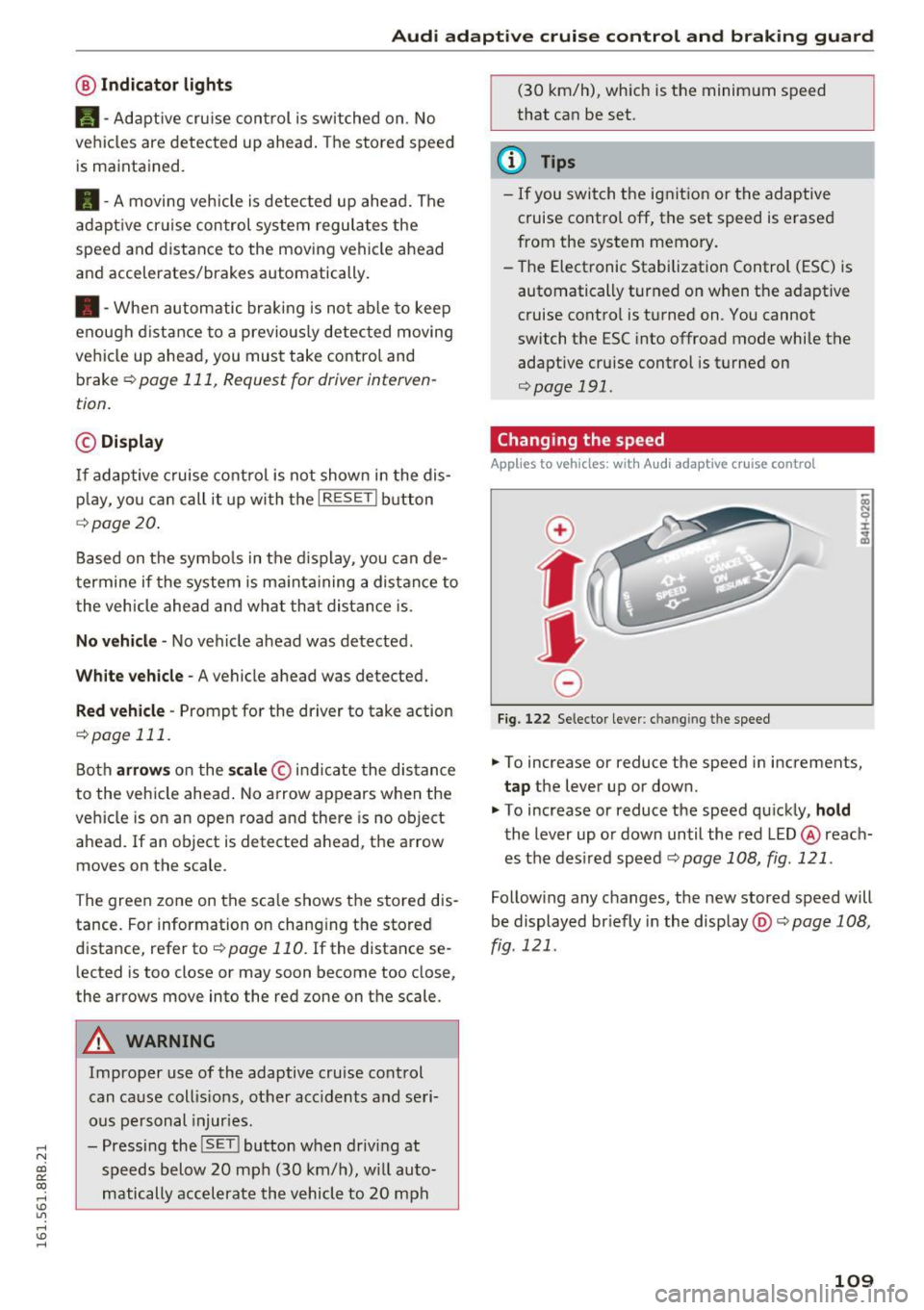
@ Indicator lights
Ill-Adaptive cru ise control is switched on. No
vehicles are detected up ahead. The stored speed
is maintained.
• -A moving vehicle is detected up ahead. The
adaptive cruise control system regulates the
speed and distance to the moving vehicle ahead
and accelerates/brakes automatically.
• -When automatic braking is not ab le to keep
enough distance to a previously detected moving
vehicle up ahead, you must take control and
brake
~ page 111, Request for driver interven
tion.
© Display
If adaptive cruise control is not shown in the dis
play, you can call it up with the
I RESETI button
¢page 20.
Based on the symbols in the display, you can de
termine if the system is maintaining a distance to
the vehicle ahead and what that distance is.
No vehicle -No vehicle ahead was detected.
White vehicle -A vehicle ahead was detected.
Red vehicle -Prompt for the dr iver to take action
¢page 111.
Both arrows on the scale © indicate the distance
to the vehicle ahead . No arrow appears when the
vehicle is on an open road and there is no object
ahead . If an object is detected ahead, the arrow
moves on the scale .
The green zone on the scale shows the stored dis
tance. For information on changing the stored
distance, refer to
¢page 110. If the distance se
lected is too close or may soon become too close,
the arrows move into the red zone on the scale.
A WARNING
Improper use of the adaptive cruise control
can cause collis ions, other acc idents and seri
ous personal injur ies.
- Pressing the
!SET ! button when driving at
speeds below 20 mph (30 km/h), will auto
matically accelerate the vehicle to 20 mph (30
km/h), which is the minimum speed
that can be set.
(D Tips
- If you switch the ignition or the adaptive
cruise control off, the set speed is erased
from the system memory.
- Th e Electronic Stabilization Control (ESC) is
automatically turned on when the adaptive
cruise control is turned on . You cannot
switch the ESC into offroad mode while the
adaptive cru ise control is turned on
¢page 191.
Changing the speed
Applies to vehicles: with Audi adapt ive cru ise control
0
f
•
0
Fig. 122 Selector lever: ch an gin g the speed
.,. To increase or reduce the speed in increments,
tap the lever up or down.
" To increase or reduce the speed quickly,
hold
the lever up or down until the red LED @ reach
es the des ired speed c::>
page 108, fig. 121 .
Following any changes, the new stored speed will
be displayed br iefly in the display @c::>
page 108,
fig. 121 .
109
Page 126 of 300
Automatic transmissio n
(N eu tra l) for more than approx imately 1 second,
w ithout th e brake peda l being pressed.
Release button
The release button on the se lec to r lever preven ts
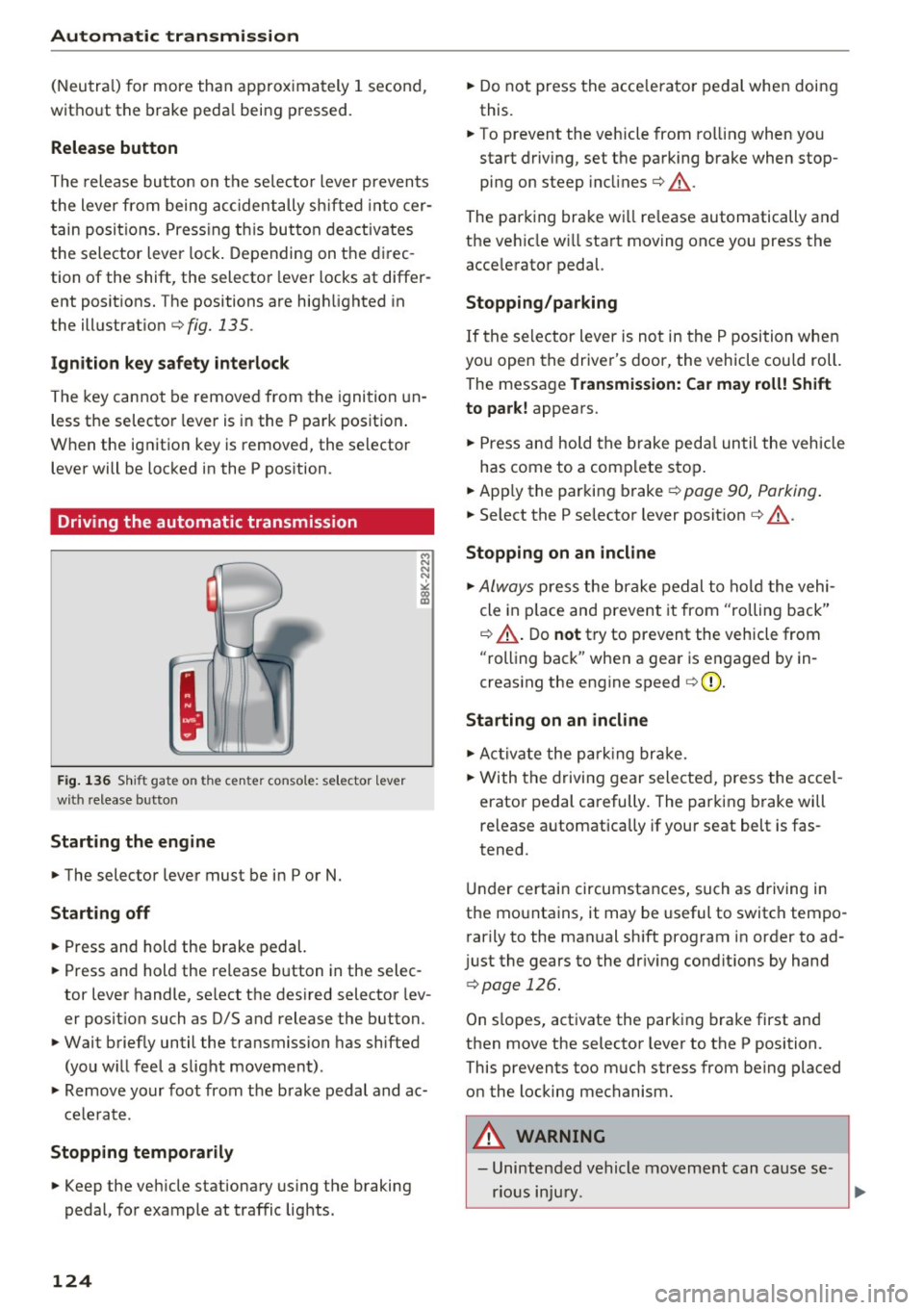
the lever from being accidentally sh ifted into cer
tain posit ions . Press ing t his but ton deactivates
the selector lever lock . Depending on the direc
tion of the shift, the selector lever locks at differ
ent positions. The positions are high lighted in
the illustrat ion ¢
fig. 135 .
Ignition key safety int erlock
The key cannot be removed from the igni tion un
less the selector lever is in the P park pos ition .
When the ignition key is removed, the selector lever will be locked in the P pos ition.
Driving the automatic transmission
F ig. 1 36 Shi ft gat e on t he c en te r co nsole : se lecto r lev er
w ith release b utto n
Starting the engine
~ The selector lever must be in P or N.
Starting off
~ Press and hold the brake pedal.
~ Press and hold the release button in the selec
tor lever handle, se lect the des ired selector lev
er posit ion such as D/S and release the button.
~ Wait briefly until the transmission has shifted
(you w ill feel a slight movement) .
~ Remove your foot from the brake pedal and ac
cele rate .
Stopp ing temporarily
~ Keep the veh icle stationary us ing the braking
pedal, for example at traffic lights .
124
~ Do not press the acce lerato r pedal when doing
this.
~ To prevent the veh icle from ro lling when you
start driving, set the parking brake when stop
ping on steep incl ines¢ &_.
The parking brake wi ll re lease automatically and
the ve hicle w ill start moving once you press the
acce lerator pedal.
Stopping /par king
If the se lector lever is not in the P position whe n
you open the driver's door, the vehicle cou ld roll.
The message
Tr ansmis sion: Car may roll! Shift
to park!
appears.
~ Press and hold the brake peda l un til the vehicle
has come to a comp lete stop .
~ Apply the parking brake¢ page 90, Parking .
~ Select the P selector lever posit ion ¢ &_ .
Stopping on an incline
~ Always press the brake pedal to ho ld the vehi
cle in p lace and prevent it from "rolling back"
¢ &_ . D o
not try to prevent the vehicle from
"rolling back" when a gear is engaged by in
creas ing the engine speed ¢(D .
Starting on an incline
~ Ac tivate the pa rk ing br ake.
~ With the d riving gear selected, press the accel
erator pedal carefully. The parking brake will
release a utomatica lly if your seat belt is fas
tened.
Under certain circumstances, such as driving in
the mounta ins, it may be useful to switch tempo
rarily to the manual sh ift program in order to ad
j ust the gears to the dr iv ing cond it ions by hand
¢ page 126.
On slopes, activate the parking b rake first and
then move the selector lever to the P position.
This prevents too m uch stress from being placed
on the locking mechanism.
A WARNING
- Unintended vehicle movement can cause se
rious injury .
Page 132 of 300
Parking system
Switching on and off
Applies to veh icles: w ith Aud i park ing system p lus w ith rear
view ca mera
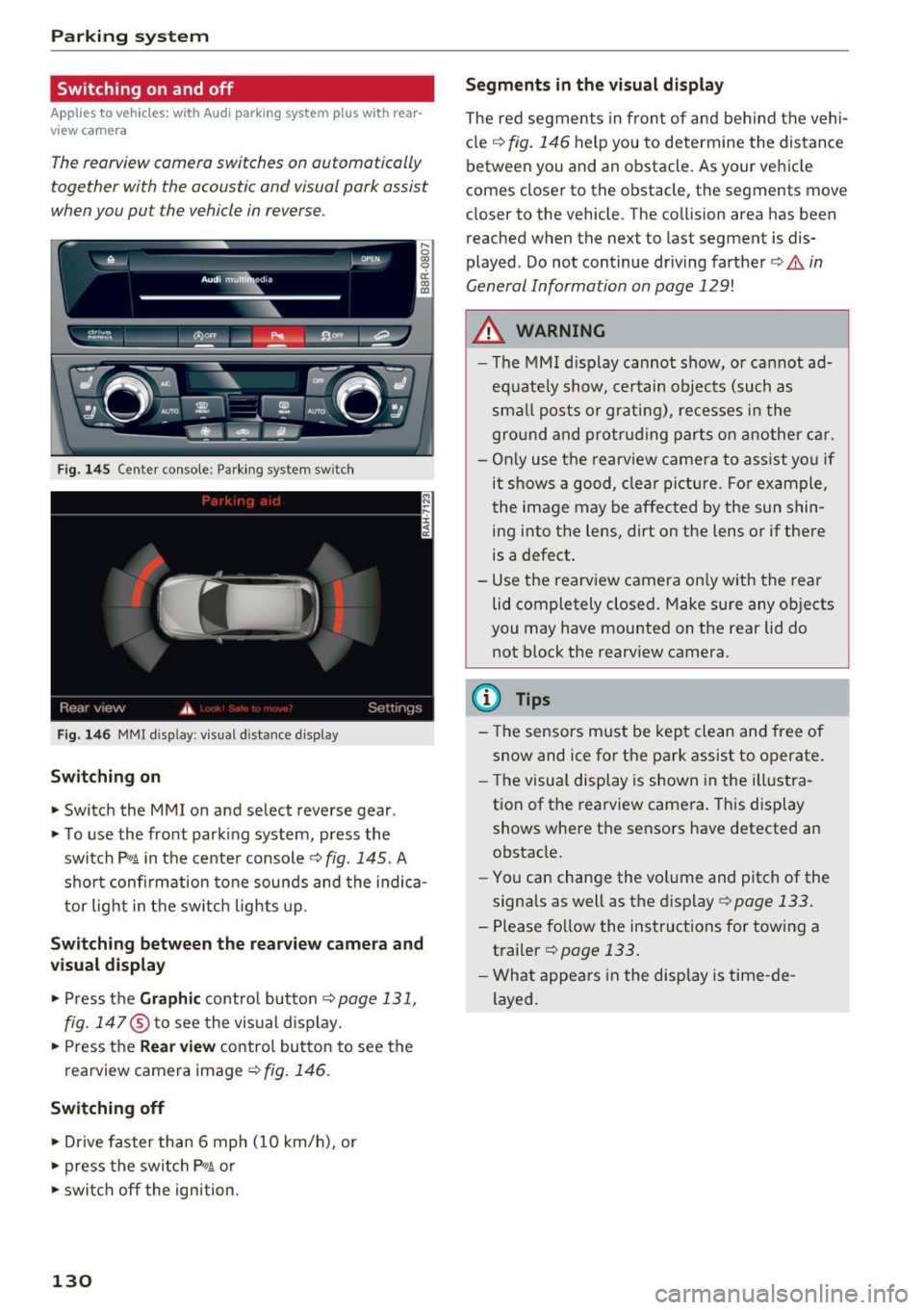
The rearview camera switches on automatically
together with the acoustic and visual park assist
when you put the vehicle in reverse.
F ig. 145 Center console: Pa rking system sw itch
F ig. 146 MM I d isp lay : v isual d istance display
Sw itch ing on
• Switch the MM I on and select reverse gear .
• To use the front parking system, press the
switch
P11A in the center console¢ fig. 145. A
sho rt confi rmation to ne sounds and the indica
tor light in the switch lights up.
Sw itching betwe en th e re arview came ra and
visual display
• Press t he Graphi c control but ton ¢ page 131,
fig. 147
® to see the vis ual d isplay.
• Press the
Re ar view contro l button to see the
rearview camera image¢
fig. 146.
Switching off
• Drive faster than 6 mph (10 km/h), or
• press the switch
P"1A or
• swit ch off the ignition.
130
S egments in the vis ual d isplay
The red segments in front of and behind the vehi
cle
¢ fig. 146 help you to determine the distance
between you and an obstacle . As your vehicle
comes closer to the obstacle, the segments move
closer to the vehicle . The collision area has been
reached when the next to last segment is dis
played . Do not continue dr iving farther ¢.&.
in
General Information on page 129!
,& WARNING
- The MMI display cannot show, or cannot ad
equate ly show, certain objects (such as
sma ll posts or grati ng), re cesses in the
gro und and protrud ing parts on another car.
- On ly use the rearv iew camera to ass ist you if
it shows a good, clear picture . For example,
the image may be affected by the sun shin
ing into the lens, dirt on the lens o r if there
is a defect .
- Use the rearview camera on ly with the rear
lid completely closed. Make sure any ob jects
you may have mounted on the rear lid do
not block the rearview camera.
(D Tips
- The sensors m ust be kept clean and free of
snow and ice for the park assist to operate .
- The visu al display is shown in the illustra
tion of the rearview camera. This display
shows where the sensors have detected an obstacle.
- Yo u can change the vol ume and pitch of the
signals as well as the disp lay ¢
page 133.
-Please follow the instruc tions for tow ing a
trailer
¢ page 133.
- What appears in the display is time -de
layed .
Page 136 of 300
Driving sa fe ty
Driving safety
Basics
Safe driving habits
Please remember -safe ty first!
This chapter contains important information,
tips, instruct ions and warn ings that you need to
read and observe for your own safety, the safety
of your passengers and others. We have summar ized here what you need to know about safety
be lts, a irbags, child restra ints as well as child
safety. Your safety is for us
priority number 1 . Al
ways observe the i nfo rmation and wa rn ings in
this section - for your own safety as well as that
of your passengers.
The information i n this section applies to all
model versions of yo ur vehicle . Some of the fea
tures descr ibed in t his sections may be s tanda rd
equipment on some models, or may be optional
equipment on others . If you are not sure, ask
your authorized Audi dealer.
A WARNING
- Always make sure that you follow the in
structions and heed the WARNINGS in th is
Manual.
It is in your interest and in the in
te rest of your passengers .
- Always keep the comp lete Owner's Litera
ture in your A udi when you lend or sell your
vehicle so that this important information
will always be available to the d river and
passenge rs.
- Always keep the Owner 's literature handy so
that you can find it easily if you have ques
t ions.
Safety equipment
The safety features are part of the occupant re
straint system and work together to help reduce
the risk of injury in a wide variety of occident si t
uations.
Your safety and the safety of your passenge rs
should not be left to chance. Advan ces i n tech
nology have made a var iety of features avai lab le
to help reduce t he risk of injury in an accident .
134
The following is a list of just a few of the sa fety
features in your Audi :
- sophis tica ted safety be lts fo r dr ive r and all pas-
senge r seat ing pos itions,
- belt fo rce limi ters for the front seats,
- be lt pretensione rs fo r the seats,
- belt height adjustment for the front seats,
- head restraints for each seating position,
- front airbags,
- side airbags in the front seats and outer rear
seats *,
- side curtain airbags,
- special LAT CH anchorages for ch ild rest rai nts,
- adj ustab le steer ing column.
T hese ind iv idual safety features , can work to
gether as a system to help protect you and your
passengers in a wide range of acc idents. These
features cannot wo rk as a system if they are not
a lways correc tly ad justed a nd cor rect ly used.
Safety i s everybody' s responsibil ity!
Important things to do before driving
Safety is everybody 's job! Vehicle and occupant
safety always depends on the informed and care
ful driver .
For your safety and the safety of your passen
gers,
before driving always:
.,. Make sure that a ll lights and signals are operat
ing correctly .
.,. Make sure that the tire pressure is correct .
.,. Make sure that all windows are clean and afford
good vis ibility to the outs ide .
.,. Secure all luggage and othe r items ca refully
i=> page 77 .
.,. Ma ke sure that noth ing ca n interfere wi th the
pedals.
.,. Adjust front seat, head rest raint and mirrors
correctly for yo ur height.
.,. Instruct passeng ers to adjust the head re
straints according to their he ight.
.,. Make sure to use the rig ht child restraint cor
rectly to protect children
c> page 171 , Child
safety . ..,.
Page 145 of 300
..... N
co
er::
co
.....
General information
Always wear safety belts!
Wearing safety belts correctly saves lives!
This chapter explains why safety belts are neces
sary, how they work and how to adjust and wear
them correctly. "' Read all the information that follows and heed
all of the instructions and WARNINGS.
A WARNING
Not wearing safety belts or wearing them im
properly increases the risk of serious personal
injury and death.
- Safety belts are the single most effective
means available to reduce the risk of serious
injury and death in automobile accidents.
For your protection and that of your passen
gers, always correctly wear safety belts
when the vehicle is moving.
- Pregnant women, injured, o r physically im
paired persons must also use safety belts.
Like all vehicle occupants, they are more
likely to be seriously injured if they do not
wear safety belts. The best way to protect a
fetus is to protect the mother -throughout
the entire pregnancy.
Number of seats
Your Audi has a total of five seating positions:
two in the front and three in the rear. Each seat ing position has a safety belt.
A WARNING
Not wearing safety belts or wearing them im
properly increases the risk of serious personal
injury and death.
- Never strap more than one person, includ
ing small children, into any belt.
It is espe
cially dangerous to place a safety belt over a
child sitting on your lap.
- Never let mo re people ride in the vehicle
than there are safety belts available .
Safety belts
-Be sure everyone riding in the vehicle is
properly restrained with a separate safety
belt or child restraint.
Safety belt warning light
Your vehicle has a warning system for the driver
and (on USA models only) front seat passenger
to remind you about the importance of buckling
up .
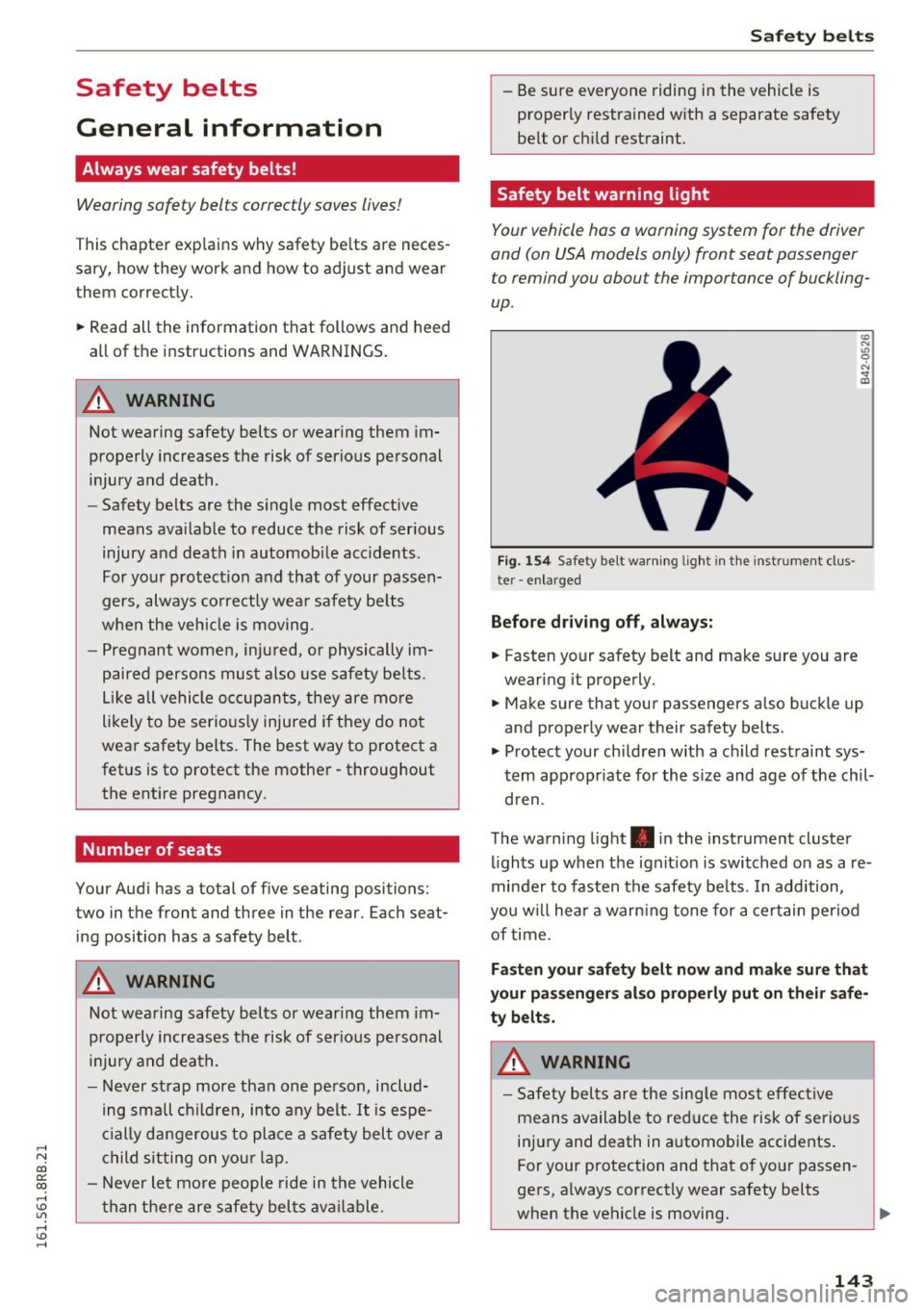
Fig. 154 Safety belt warning light in the instrument clus
te r -enlarged
Before driving off, always:
.. Fasten your safety belt and make sure you are
wearing it properly.
.,, N
"' 0 ..:, ., m
"' Make sure that your passengers also buckle up
and properly wear their safety belts.
"' Protect your children with a ch ild restraint sys
tem appropr iate for the size and age of the chil
dren .
The warning light . in the instrument cluster
lights up when the ignit ion is switched on as a re
minder to fasten the safety be lts. In addition,
you w ill hear a warn ing tone for a certain period
of time.
Fasten your safety belt now and make sure that
your passengers also properly put on their safe
ty belts.
A WARNING
-
-Safety belts are the single most effective
means available to reduce the risk of serious
injury and death in automobile accidents .
For your protection and that of your passen
gers, a lways correctly wear safety belts
when the vehicle is moving.
143
Page 193 of 300
..... N
co ~ CX)
..... I.Cl U"I
.... I.Cl .....
wheels can spin even with these ass istance
systems that cannot always he lp to reduce
the risk of loss of vehicle control.
@ Tips
-ABS and AS R on ly work correctly when a ll
fo ur whee ls are e quipped w ith ide ntical
Switching on /off
Intelligent Technology
tires. Diff eren t tire s izes can lead to a red uc
tion i n engine po wer .
- You may hear noises when t he sy stems de
scribe d are workin g.
- Whe n in sta lling a facto ry-s up plied roo f ra ck
system o n the roof r ailing , the ESC wi ll
adapt itself to a different center of gravity .
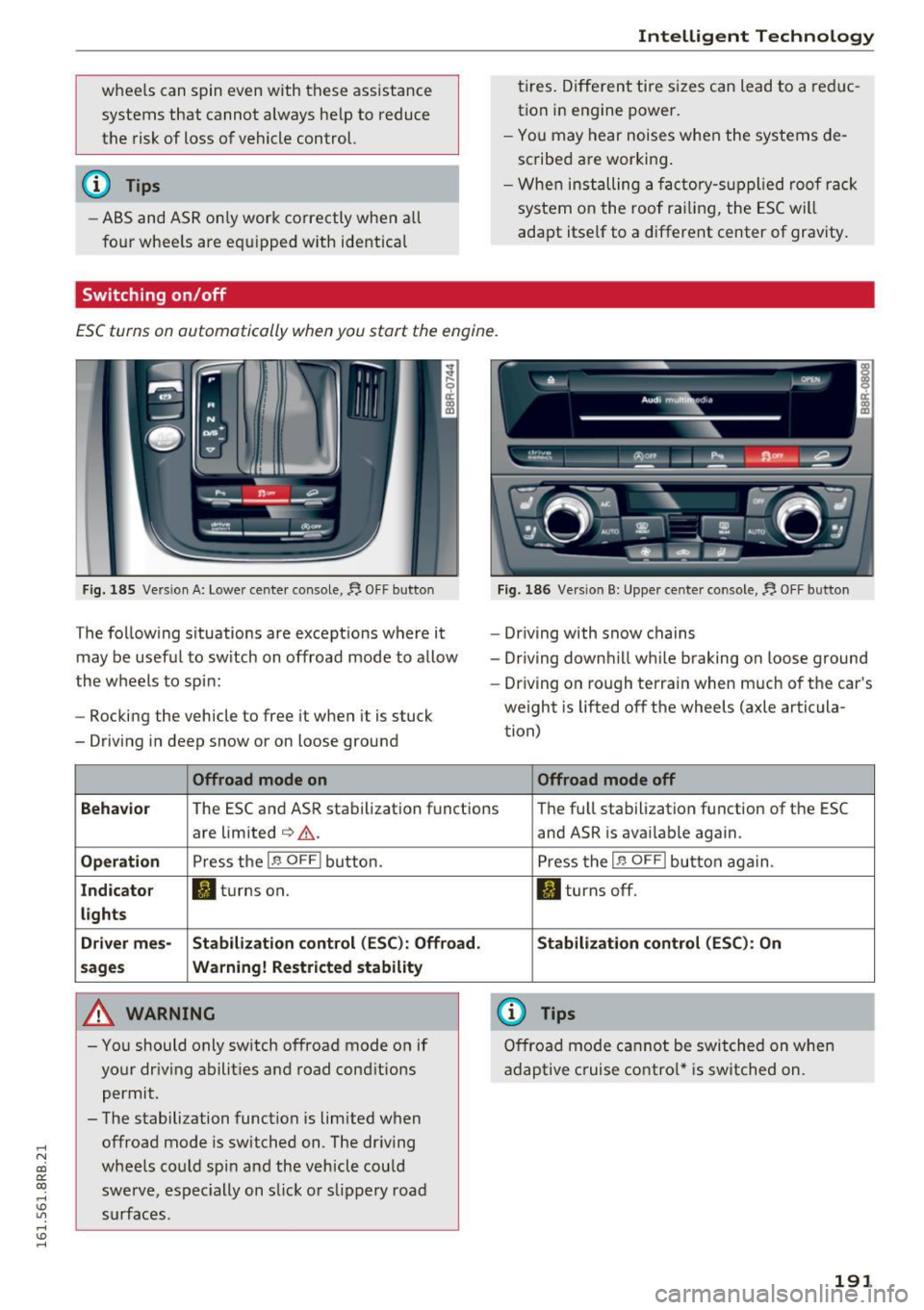
ESC turns on automatically when you start the engine.
Fig . 18 5 Versio n A: Lowe r cente r conso le,~ OFF b utto n
The follow ing s ituations are except ions where it
may be usef ul to sw itch on offroad mode to allow
the wheels to spi n:
- Rocking the vehicle to free it when it is stuck
- Driv ing in deep snow or on loose ground
Offroad mode on
~ Q:)01_1 _ --.!'3.- -ft.
- Driving with snow chains
- Dr iving down hill wh ile braking on loose ground
- Dr iving on ro ugh te rra in when m uch of the car's
weight is lifted off the wheels (axle articula
tion)
Offroad mode off
Behavio r
The ESC and AS R stabilization f unctions Th
e fu ll sta bilization f unction of the ESC
a re limited
c:> &. .
Operation Press the 1.$ OFF I button.
Indicator II turns on.
lights
Driver mes- Stabilization
control (ESC): Offroad.
sages Wa rning! Restricted stability
A WARNING
- You should only sw itch o ffroad mode o n if
yo ur dr iv ing abilit ies a nd road cond it io ns
permit.
- The stabilization function is limited when offroa d mode is switched on. The dr iv ing
wheels co uld spi n and th e vehicle cou ld
swerve, es pec ially on s lick o r sli ppery roa d
s ur fac es. and ASR
is avai lab le again.
P ress t he
1.$ OFFI button aga in.
II turns off.
Stabilization control (ESC ): On
(D Tips
Offro ad mode ca nno t be switche d on whe n
adaptive c ruise co ntro l* is switched on.
191