brakes AUDI Q5 2017 User Guide
[x] Cancel search | Manufacturer: AUDI, Model Year: 2017, Model line: Q5, Model: AUDI Q5 2017Pages: 296, PDF Size: 74.43 MB
Page 112 of 296
Audi adaptive cruise control and braking guard
-For safety reasons, do not use adaptive
cruise control when driving on roads with
many curves, when the road surface is in
poor condition and/or in bad weather (such
as ice, fog, gravel, heavy ra in and hydroplan
ing). Using the system under these condi·
tions could result in a collision.
- Switch adaptive cruise control off tempora
rily when driving in turning lanes, on ex
pressway exits or in construction zones. This
prevents the vehicle from accelerating to
the set speed when in these situations .
- The adaptive cruis e control system will not
brake by itself if you put your foot on the ac
celerator pedal. Doing so can override the
speed and distance regu lation.
- When approaching stationary objects such
as stopped traffic, adaptive cruise control
will not respond and braking guard will have
limited function.
- The adaptive cruise control system and
braking guard do not react to people, ani
mals, objects crossing the road or oncom ing
objects.
- The function of the radar sensor can be af
fected by reflective objects such as guard
rails, the entrance to a tunnel, heavy rain or
ice.
- Never follow a vehicle so closely that you
cannot stop your vehicle safely. The adap·
t ive cruise control cannot slow or brake the
vehicle safely when you fo llow another veh i
cle too closely. Always remember that the
automatic braking function cannot bring the
vehicle to a sudden or emergency stop un
der these conditions .
- To prevent unintended operation, always
switch adaptive cruise control off when it is
not being used.
(D Note
The sensor can be displaced by impacts or
damage to the bumper, wheel housing and
underbody. That could affect the adaptive
cruise control system and braking guard .
Have your authorized Audi dealer or author
ized Audi Service Facility check their function.
110
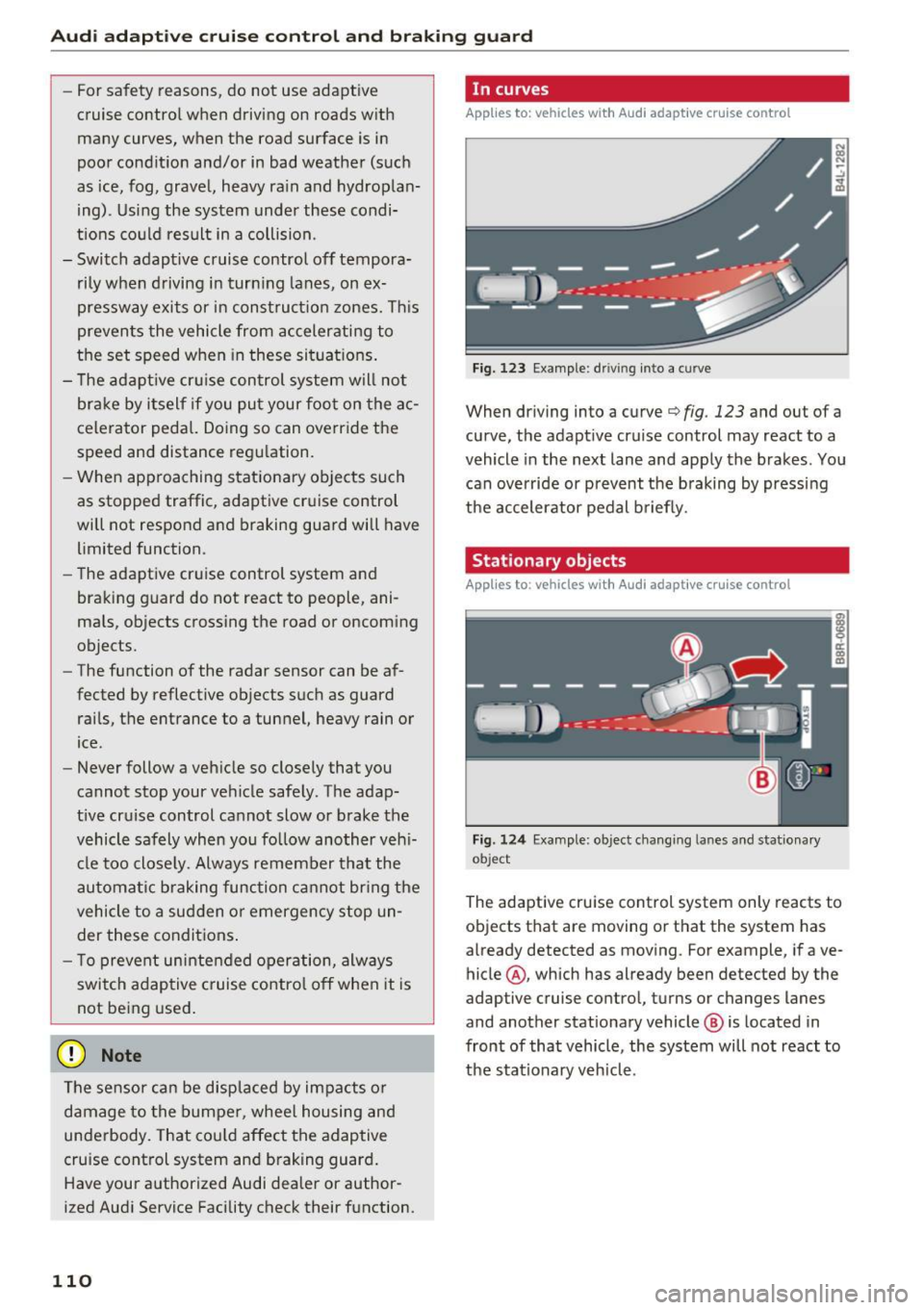
In curves
App lies to : vehicles wit h Audi adapt ive cruise control
Fig. 123 Example: driv ing into a curve
When driving into a curve c:::> fig . 123 and out of a
curve, the adapt ive cruise control may react to a
vehicle in the next lane and apply the brakes . You
can override or prevent the braking by pressing
the accelerator pedal briefly.
Stationary objects
Applies to: vehicles wi th Audi adaptive cruise control
Fig . 124 Examp le: object chang ing lanes and stat ionary
ob ject
The adaptive cruise control system only reacts to
objects that are moving or that the system has
already detected as moving . Fo r example, if ave
hicle @, which has already been detected by the
adaptive cruise control, turns or changes lanes
and another stationary vehicle @ is located in
front of that vehicle, the system will not react to
the sta tionary veh icle.
Page 114 of 296
Audi adaptive cruise control and braking guard
@ Indicator lights
Ill -Adaptive cruise control is switched on. No
vehicles are detected up ahead. The stored speed
is maintained .
• -A moving veh icle is detected up ahead. The
adaptive cruise control system regulates the
speed and distance to the moving vehicle ahead
and accelerates/brakes automatically.
• -When automatic braking is not able to keep
enough distance to a previously detected moving
vehicle up ahead, you must take contro l and
brake
¢ page 114, Request for driver interven
tion.
© Display
If
adaptive cruise control is not shown in the dis
play, you can call it up with the
IRESETI button
¢page 17.
Based on the symbo ls in the display, you can de
termine if the system is ma inta ining a distance to
the vehicle ahead and what that distance is .
No vehicle -No vehicle ahead was detected .
White vehicle -A vehicle ahead was detected.
Red vehicle -Prompt for the driver to take action
¢page 114.
Both arrows on the scale© indicate the distance
to the vehicle ahead . No arrow appears when the
veh icle is on an open road and there is no object
ahead. If an object is detected ahead, the arrow
moves on the scale .
The green zone on the scale shows the stored dis
tance . For information on changing the stored
distance, refer to
¢page 113. If the distance se
lected is too close or may soon become too close,
the arrows move into the red zone on the scale .
A WARNING
Improper use of the adaptive cruise control
can cause collis ions, other accidents and seri
ous personal injuries.
- Pressing the
! SET ! button when driving at
speeds below 20 mph (30 km/h), will auto
matically accelerate the vehicle to 20 mph
112
(30 km/h), which is the minimum speed
that can be set.
@ Tips
- If you switch the ign it ion or the adaptive
cruise control off, the set speed is erased
from the system memory.
- The Electronic Stabilization Control (ESC) is
automatically turned on when the adapt ive
cruise control is turned on. You cannot
switch the ESC into offroad mode while the
adaptive cruise control is turned on
¢page 187.
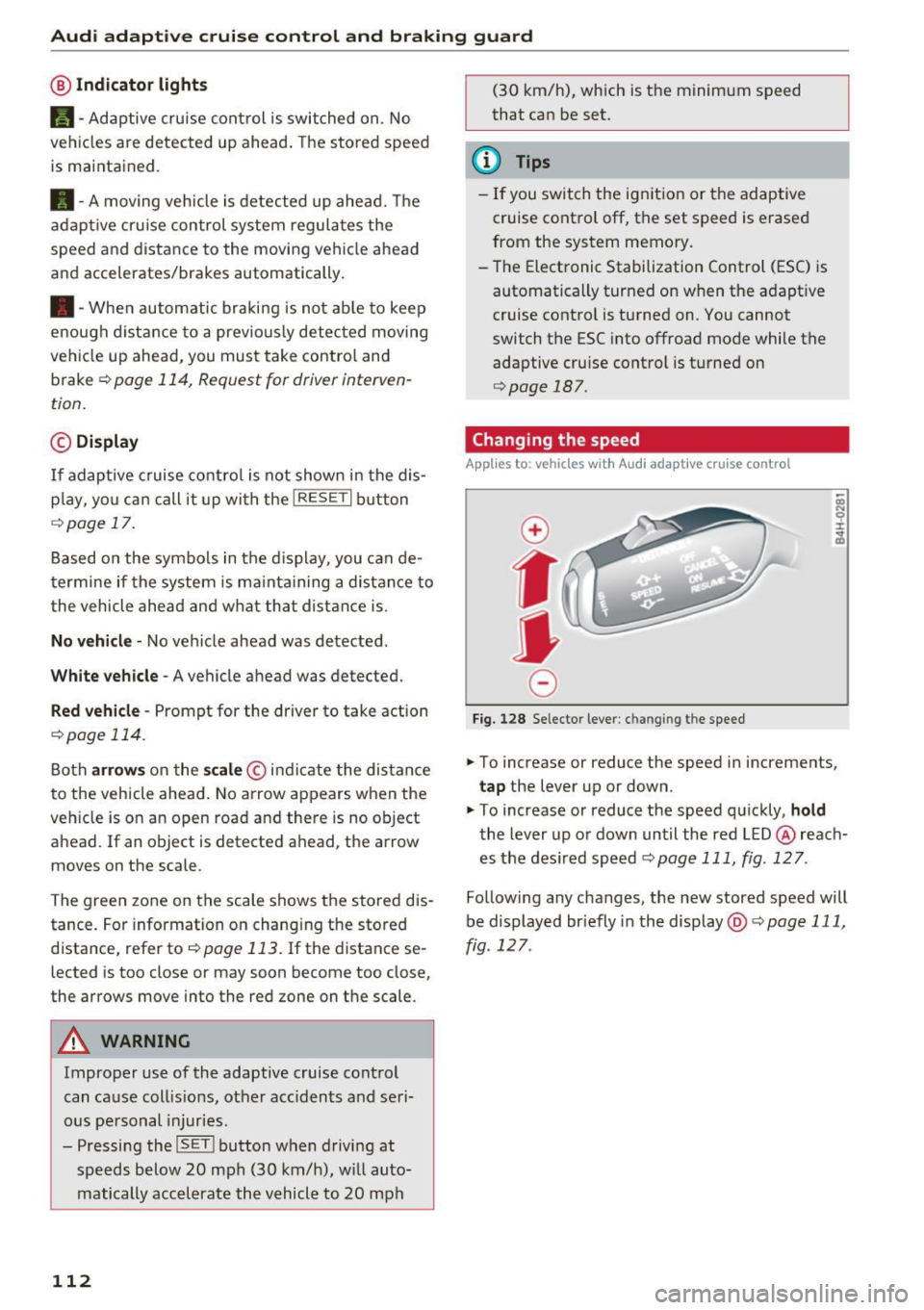
Changing the speed
App lies to: vehicles with Audi adaptive cru ise control
0
f
•
0
Fig. 128 Selector lever: ch an gin g the speed
.,. To increase or reduce the speed in increments,
tap the lever up or down.
.,. To increase or reduce the speed quickly,
hold
the lever up or down until the red LED @ reach
es the desired speed
¢page 111, fig . 127 .
Follow ing any changes, the new stored speed will
be displayed br iefly in the display @¢
page 111,
fig . 127 .
Page 115 of 296
a,
a,
..... N r-N ..... 0 0
0:
co
Audi adaptive cruise control and braking guard
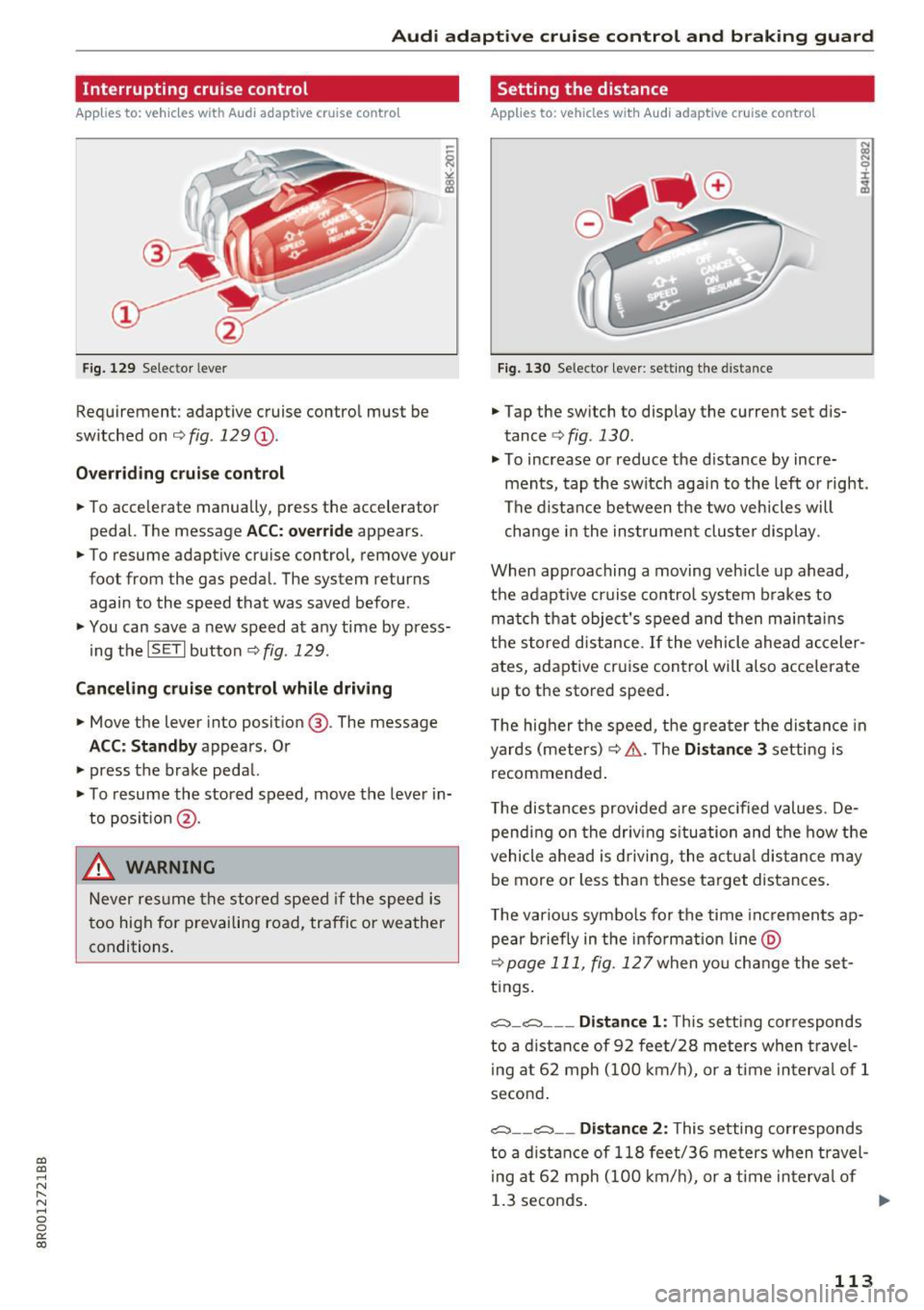
Interrupting cruise control
Applies to: vehicles with Audi adaptive cruise contro l
Fig. 129 Selector lever
Requirement: adaptive cruise control must be
switched on ¢
fig. 129 (D.
Overriding cruise control
• To accelerate manua lly, press the accelerator
pedal. The message
ACC: override appears.
• To resume adaptive cruise control, remove your
foot from the gas pedal. The system returns again to the speed that was saved before .
• You can save a new speed at any time by press
i ng the
ISET I button ¢fig. 129.
Canceling cruise control while driving
• Move the lever into position @. The message
ACC: Standby appears. Or
• press the brake pedal.
• To resume the stored speed, move the lever in
to posit ion
@ .
& WARNING
Never resume the stored speed if the speed is
too high for prevailing road, traffic or weather
conditions.
Setting the distance
Applies to: vehicles with Audi adaptive cruise control
Fig. 130 Selector lever: setting the distance
• Tap the switch to display the current set dis
tance ¢
fig. 130.
• To increase or reduce the d istance by incre
ments, tap the switch aga in to the left or right.
The distance between the two veh icles will
change in the instrument cluster display.
When approaching a moving vehicle up ahead,
the adaptive cruise control system brakes to
match that object's speed and then maintains
the stored distance.
If the vehicle ahead acceler
ates, adaptive cruise control will also accelerate
up to the stored speed .
The higher the speed, the greater the distance in
yards (meters) ¢.& .T he
Distance 3 setting is
recommended .
T he distances provided a re spec ified values . De
pending on the driving situation and the how the
vehicle ahead is driving, the actual distance may
be more or less than these target distances .
T he various symbo ls for the time inc rements ap
pear briefly in the info rmat ion line @
¢page 111, fig. 127when yo u change the set
tings.
c::::,_ c::::, ___ Distance 1: This setting corresponds
to a distance of 92 feet/28 meters when travel
i ng at 62 mph (100 km/h), or a tim e interval of 1
second .
c::::, __ c::::, __ Distance 2: This setting corresponds
to a distance of 118 feet/36 meters when travel
i ng at 62 mph (100 km/h), or a time interval of
1.3 seconds . ..,.
113
Page 117 of 296
a,
a,
..... N r-N ..... 0 0
0:
co
Audi adaptive cruise control and braking guard
Audi braking guard
Description
Applies to: ve hicles with Audi adaptive cruise co ntro l
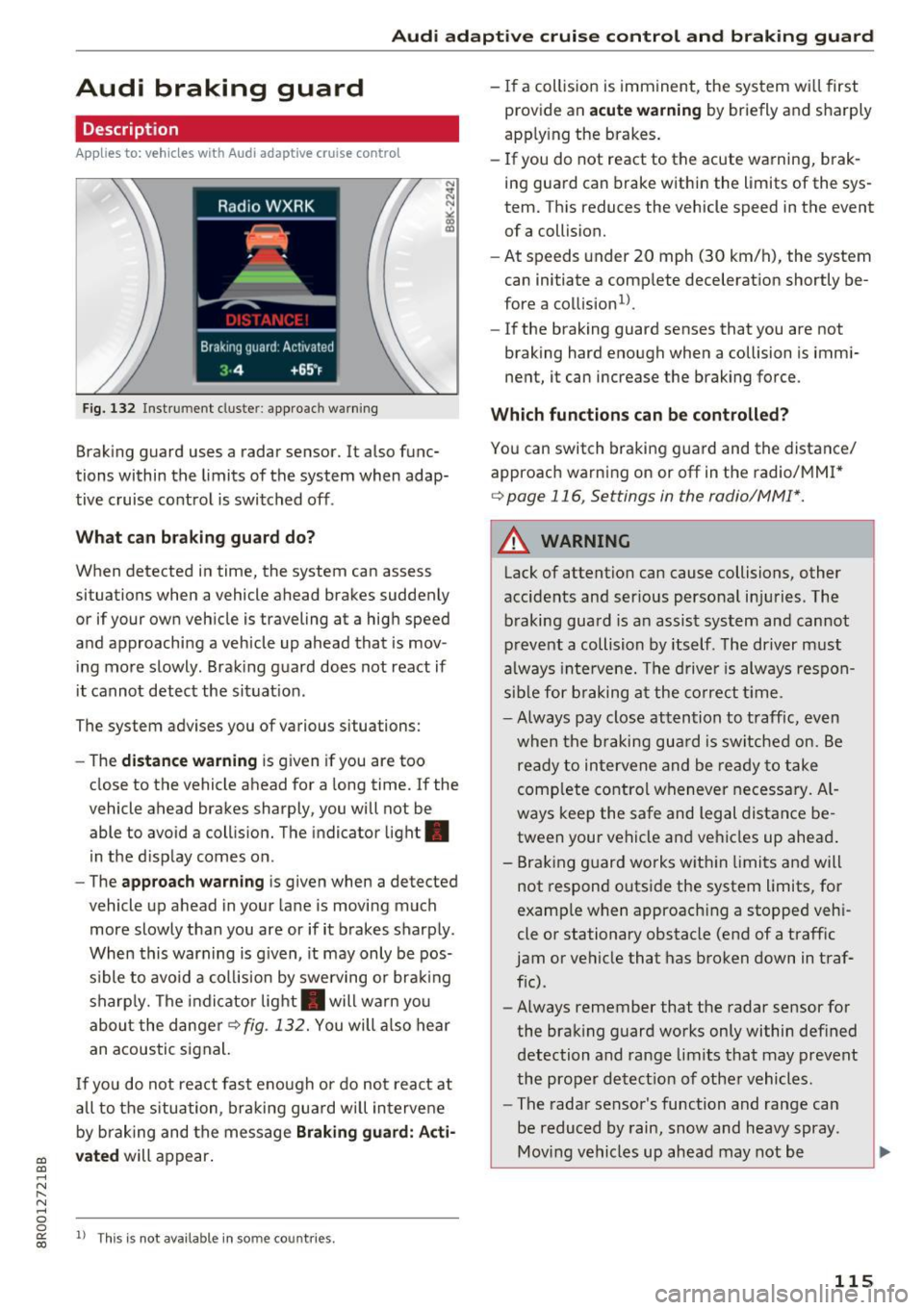
Fig. 132 Instrument cluste r: approach warning
Braking guard uses a radar sensor. It also func
tions within the limits of the system when adap
tive cruise control is switched off .
What can braking guard do?
When detected in time, the system can assess
situations when a vehicle ahead brakes suddenly
or if your own vehicle is traveling at a high speed
and approaching a vehicle up ahead that is mov
ing more slowly . Braking guard does not react if
it cannot detect the situat ion.
The system advises you of various situations:
- The
distance warning is g iven if you are too
close to the vehicle ahead for a long time.
If the
vehicle ahead brakes sharply, you will not be
able to avoid a collision. The indicator light .
in the display comes on.
- The
approach warning is given when a detected
vehicle up ahead in your lane is moving much
more slowly than you are or if it brakes sharply .
When this warning is g iven, it may only be pos
s ible to avo id a col lision by swerving or brak ing
sharp ly. Th e indicator light . will warn you
about the danger
¢fig. 132. You will also hear
an acoustic signal.
If you do not react fast enough or do not react at
all to the situation, braking guard will intervene
by braking and the message
Braking guard: Acti
vated
will appear.
1> Th is is not ava ilab le in some coun tries.
-If a collision is imminent, the system wi ll first
provide an
acute warning by briefly and sharply
apply ing the brakes.
- If you do not react to the acute warning, brak
ing guard can brake within the limits of the sys
tem. This reduces the vehicle speed in the event
of a collision.
- At speeds under 20 mph (30 km/h), the system
can initiate a comp lete decelerat ion shortly be
fore a collision
ll.
- If the braking guard senses that you are not
braking hard enough when a collision is immi
nent, it can increase the braking force .
Which functions can be controlled?
You can switch braking guard and the distance/
approach warn ing on or
off in the radio/MM!*
¢ page 116, Settings in the radio/MM!*.
A WARNING
-
Lack of attention can cause collisions, other
accidents and ser ious personal in juries. The
braking guard is an assist system and cannot
prevent a collision by itself. The driver must
always intervene. The driver is always respon
sible for braking at the correct tim e.
- Always pay close attention to traffic, even
when the braking guard is switched on. Be
ready to intervene and be ready to take
comp lete control whenever necessary. Al
ways keep the safe and legal distance be
tween your vehicle and vehicles up ahead .
- Braking guard works wit hin limits and will
not respond outside the system limits, for
examp le when approaching a stopped veh i
cle or stationary obstacle (end of a traffic
jam or vehicle that has broken down in traf
fic).
- Always remember that the radar sensor for
the braking guard works only within defined
detection and range limits that may prevent
the proper detect ion of other vehicles.
- The radar sensor's function and range can
be reduced by rain, snow and heavy spray.
Moving vehicles up ahead may not be
,.
115
Page 188 of 296
Intelligent Technology
Intelligent Technology
Electronic Stabilization
Control (ESC)
Description
The Electronic Stabilization Control (ESC) reinfor
ces driver safety . It reduces the risk of slipping
and improves driving stability. ESC detects crit i
cal s ituations such as the vehicle oversteering
and understeering or the wheels sp inning. The
veh icle is stab ilized by applying the brakes or re
ducing engine torque . Once t he ESC is active, the
indicator light
Ji) blinks in t he instrument clus
ter.
The fo llow ing systems are integrated in the ESC :
Ant i-loc k brake system (ABS)
ABS preve nts the wheels from locking up when
braking. The veh icle can still be steered even dur
ing hard brak ing. Apply steady pressure to the
brake pedal. Do not pump t he pedal. A pulsing in
the brake pedal indicates that the system is help
i n g you to brake the vehicle .
Br ake assist system
The brake assist system can decrease brak ing dis
tance . It increases braking power when the driver
presses the brake pedal quick ly in emergency sit
uations . You must press and hold the b rake pedal
until the situa tion is over. In vehicles w it h adap
tive c ruise contro l* , the brake assist system is
mo re sensit ive if the di stance de te cte d to the ve
h icle ahead is too small.
Anti -slip regulation (ASR)
ASR reduces eng ine power when the drive wheels
begin to spin and adapts t he force to the road
conditions . This makes it easie r to sta rt, acceler
ate and dr ive up h ills.
Electronic differential lock (EDL )
The EDL brakes w heels that a re spinning and
transfers the drive power to the other whee ls .
This f unction is not avai lab le at higher speeds.
In extreme cases, EDL automatically switches off
to help keep the brake on the braked wheel from
186
overheating . EDL will sw itch on again automati
ca lly when conditions have returned to normal.
Steering recommendation
The ESC he lps to s tabilize the vehicle by chang ing
t h e s teer ing torque.
On vehicles with dynam ic steeri ng*, ESC helps
stab ilize the steer ing in crit ica l sit uat io ns.
Selective wheel torque control
Se lective wheel torque cont rol is used when driv
i ng on curves. The front whee l on the inside of
the curve or both wheels on the inside of the cu rve are braked se lectively as needed. This al
l ows mo re precise dr iving in c urves . The applica
ble system may not ac tiv ate when d riving in wet
o r snowy cond it ions.
_&. WARNING
- The ESC and i ts in teg ra ted systems can not
overcome the laws of physics . This is espe
cially important on slippery or wet roads. If
the systems begin act ing to stab ilize your
veh icle, you should immediately change
your speed to match the road and traffic conditions. Do not let the increased safety
provided by t hese systems tempt yo u to
take risks. Doing so will i ncrease the r isk of
a loss of vehicle con trol, collisi on and se ri
ous person al injur ies.
- Always a dapt your speed to road, traffic and
weather condi tions. The risk of los ing c on
t rol of the vehicle in creases w hen driving
too fast, es pecially through curves and on
slippe ry or wet roads, and when driving too
close to ve hicles up ahead. The ESC and its
integ rated systems cannot always prevent
col lisions - there is still a risk of accidents!
- Always accelerate w ith special care on even,
smooth su rfaces s uch as those that are wet
or covered wit h ice and snow. The drive
wheels can spin even w it h these assistance
sys tems t hat cannot a lways help to reduce
t he risk of loss of vehicle co ntro l.
Page 190 of 296
Inte llig ent Techn olo gy
Hill descent assist
The hill descent assist makes it possible to drive
down an incline at a constant speed .
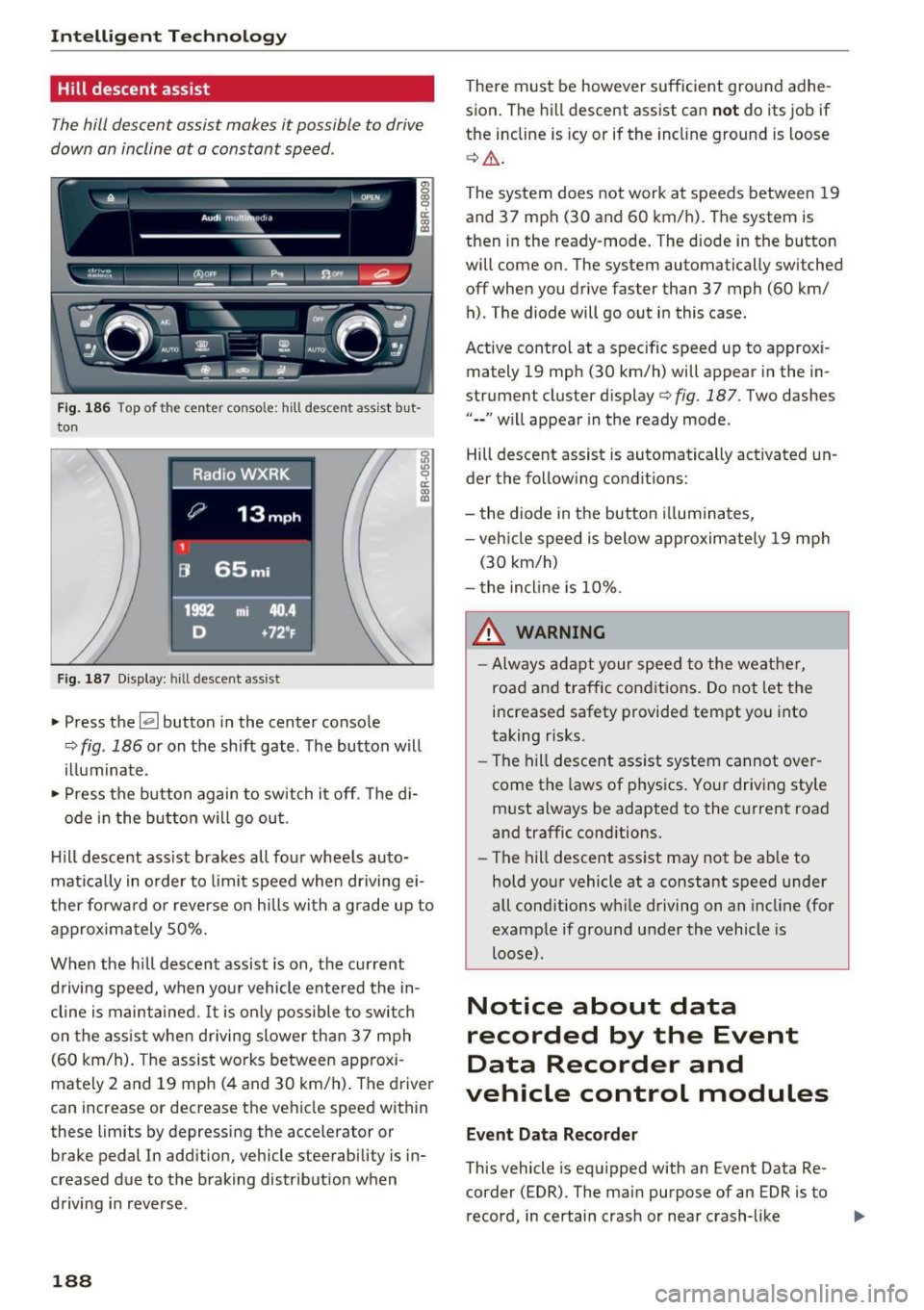
~~,·~ ('l)ofF ___ P..1 --- fl~ IIL..~
---
Fig. 186 Top of the center conso le: hill descent assist but
ton
Fig. 187 Display: hill descent assist
.. Press the~ button in the center console
¢ fig . 186 or on the shift gate . The button will
illuminate .
" Press the button again to switch it off. The di-
ode in the button will go out .
H ill descent ass ist brakes all four wheels auto
matically in order to limit speed when driving ei
ther forwa rd o r reverse on hills with a grade up to
approx imately 50%.
When the hill descent assist is on, the current
driving speed, when your vehicle entered the in
cline is maintained.
It is only possible to switch
on the assist when driving slower than 37 mph
(60 km/h). The assist works between app roxi
mately 2 and 19 mph (4 and 30 km/h) . The driver
can increase or decrease the vehicle speed within
these limits by depressing the accelerator or
brake pedal In addition, vehicle steerability is in
creased due to the braking distribution when
driving in reverse .
18 8
There must be however sufficient ground adhe
sion . The hill descent assist can
no t do its job if
the incline is icy or if the incl ine ground is loose
¢ &.
The system does not work at speeds between 19
and 37 mph (30 and 60 km/h). The system is
then in the ready-mode. The diode in the button
will come on . The system automatically sw itched
off when you drive faster than 37 mph (60 km/ h) . The diode will go out in this case .
Active control at a specific speed up to approxi
mately 19 mph (30 km/h) will appear in the in
strument cluster display
c:> fig. 187 . Two dashes
" •• " w ill appear in the ready mode .
Hill descent assist is automatically activated un
der the following conditions:
- the diode in the button ill uminates,
- veh icle speed is below approximately 19 mph
(30 km/h)
- the incl ine is 10%.
& WARNING
- Always adapt your speed to the weather,
road and traffic cond itions. Do not let the
increased safety provided tempt you into
taking risks.
-
-The hill descent assist system cannot over
come the laws of phys ics. Your driving style
must always be adapted to the current road
and traffic conditions.
- The hill descent assist may not be ab le to
hold your vehicle at a constant speed under
all cond itions wh ile driving on an incline (for
example if ground under the vehicle is
loose).
Notice about data
recorded by the Event
Data Recorder and
vehicle control modules
E ven t Data R eco rde r
This vehicle is equipped with an Event Data Re
corder ( EDR). The main purpose of an EDR is to
record, in certain crash or near crash-like .,,_
Page 192 of 296
Intelligent Technology
Braking
What affects braking efficiency?
New brake pads
During the firs t 25 0 miles (400 km), new b rake
pads do not possess their full braking effect , they
have to be "broken i n" first ¢& .
Operating conditions and driving habits
The brakes on today 's automobiles a re sti ll sub
ject to wea r, depend ing la rgely on ope rating con
d itions and dr iv ing habits
c::> .&,. . On veh icles that
are either dr iven most ly in stop-and -go city traf
f ic or are driven hard, the brake pads should be
checked by your authorized Audi dea ler more of
ten than spec ified in the
Warr ant y & Ma inte
nance booklet .
Failure to have your brake pads
inspected can result in reduced brake perform
ance .
On steep slopes, you shou ld use the braking ef
fect of the eng ine. This way, you prevent unnec
essary wear on t he brake system . If you must use
your brakes , do not hold the brakes down cont in
uously . Pump the brakes at interva ls.
Oper ating noise
Noises may occur when braking depend ing on the
speed, braking force and outs ide cond itions such
as temperature and humidity .
Effect of wat er and road salt
In certain s ituations, for example after driving
through water, in heavy ra in, after overnight con
densat ion or after washing your car, the braking
effect can be reduced by moisture or ice on the brake rotors and b rake pads . The brakes must be
dried first with a few careful b rake applications.
At higher speeds and with the windshie ld wipers
turned on, the brake pads press aga inst the brake
rotors for a short amount of t ime. Th is occurs at
regular intervals w ithout the driver noticing and
provides fo r bette r brake response time under
wet conditions.
The effectiveness of the brakes can be reduced
when the vehicle is dr iven on a salt-covered road
and the brakes a re not used . Likewise , you clean
off acc umu lated salt coat ing from brake d iscs
190
and pads with a few cautious app lications of the
bra ke
c::> & .
Corrosion
There may be a tendency fo r dirt to build up on
the b rake pads and corrosion to form on the discs
if the car is not dr iven regu la rly or only for short
trips wi th little use of the brakes .
If the bra kes are not used frequent ly, o r if cor ro
s io n has formed on the discs , it is advisable to
clean off the pads and discs by b rak ing firmly a
few times from a moderately high speed
c::> & .
Faults in the brake system
If you s hou ld notice a sudden increase in brake
pedal travel, then one of the two brake circu its
may have fai led ¢
_&.
Low brake fluid level
Malfunctions can occur in the brake system if the
brake fluid level is too low . The brake fluid level
i s monitored electronically.
Brake booster
The brake booster increases the pressure that
you generate with the brake pedal. It only oper
ates wh ile the eng ine is r unning or w ith the igni
tion switched on (hybr id drive *) ¢ & .
Brake lining wear statu s
Brake lining wear may be checked by visual in
spection of the condition of the brake pads
through the openings in the wheel. If necessary,
the wheel may be removed for t his inspection
¢page 255, Replacing wheels .
A WARNING
-New brake pads do n't have the best s top
ping power and m ust be "broken-in" du ring
the initial 250 miles (400 km) . You can
compensate for this by pressing the brake pedal more firmly . This a lso applies later
when new pads are installed.
- You shou ld perform braking maneuvers for
the purpose of cleaning the brake system
only if road condit ions permit. Other road
users must not be put at risk -you may
cause an accident!
Page 193 of 296
CD
CD
.... N ,-... N ..... 0 0 C<'. 00
-Before descending a steep grade , reduce
speed and shift transm iss ion into a lower
gear or lower driving range. Do not ride the
brakes or hold the pedal down too long or
too often . This could cause the brakes to get
hot and d iminish brak ing efficiency .
- Do not "r ide the brakes" by resting your foot
on the pedal when you do not intend to
bra ke. This may cause the bra kes to over
heat , premat ure wea r and increased stop
ping distance.
- Under certa in climat ic and operating condi
tions su ch as p assing thro ugh w ater, dr iving
in heavy ra in or after washing the vehicle,
the ef fectiveness of the brakes can be re
duced. In winter, ice can acc umulate on the
brake pads, linings, discs and drums . Care
fully apply b rakes for a test. Brakes wi ll dry
and ice coatings wi ll be cleaned off after a
few careful brake applications .
- Driv ing for an extended period of time on
salt-covered roads without using your
bra kes can also affect bra king efficiency .
Clean off accumulated sa lt coating from
bra ke discs and pads with a few caref ul
bra ke appl ic a tion s.
- If you damage the front spoiler, or if yo u in
sta ll a differen t spoi le r, be sure the air flow
to the front br akes is not o bstru cte d. O the r
wise the br ake system could over heat reduc
ing the e ffec tiveness of the entire brake sys
tem.
- Failure of one brake circuit will imp air the
brak ing capability resulting in an increased
stopping distance . Avoid driving the vehicle
and have it towed to the nearest a uthorized
Audi dealer or qualif ied workshop.
- Never let the vehicle roll to a stop with the
engine shut off .
- If the brake booster is not wor king, the
brake pedal m ust be pressed considerably
harder to make up for the lack of booster
assistance .
Intelligent Technology
Electromechanical power
assist, Dynamic steering
The electromechanical power assist helps the
driver when steering .
Power steering adap ts elec tronically based on
the vehicle speed .
Indicator lights and message s
• Steering defecti ve! Do not drive vehicle!
If this indi ca to r li ght tur ns on and st ays on and
t hi s message appea rs, the powe r steering may
have failed.
Stop t he vehi cle in a safe location as soon as pos
s ible. Do
not cont inue drivi ng. See yo ur author
ized Audi dea ler or o ther qualif ied repa ir facility
for assistance .
l;rij Dynamic steering : Sy stem fault! You can
continue driving
If the indicator light turns on and the message
appea rs , the steer ing may be more diffic ult to
move o r more sensitive than usu a l. Th e steering
m ay also be at an angle when dr iving st raig ht.
D rive slowly to your a uthorized Aud i dea le r or
qualified wo rksh op to have t he malfunct io n cor
rec ted .
'Iij Dynamic steering: Initializing
Aud i drive select* : if the indicato r light blinks and
the driver message appears, the dynamic steer
ing* is re init ia liz ed . After sta rting the engine , the
steering wheel will move slig htly . Re -initializa
t io n m ight be necessary if the steer ing whee l was
moved hard to t he left and r ight wh ile the veh icle
was not mov ing. The display turns off if the initi
aliza tion was successful.
(D Tips
- If the . or l~ij indicato r light only stays on
for a shor t time, you m ay cont inue drivi ng.
- The dynam ic stee ring* sta bility systems
r=;, page 186 are no t ava ilable in the event of
a system mal func tio n.
- For add itiona l information on dy namic
steering*
r=;, page 122 .
191
Page 197 of 296
CD
CD
.... N ,-... N .... 0 0 c:<: 00
-Do not apply additional undercoating or
rustproofing on or near the exhaust mani
fold, exhaust pipes, catalytic converter or heat shields. During dr iv ing, the substance
used for undercoating could overheat and
cause a fire.
Q) Note
- Be aware that just one tank filling with
leaded fuel will already ser iously degrade
t h e pe rformance of the catalytic converter .
- Do not exceed the correct eng ine o il level
c:> page 221.
-Do not drive until the fuel tank becomes
complete ly empty. The engine could mis
fire. Unburned fuel could also get into the
exhaust system and this cou ld cause the
catalytic conve rte r to overheat.
- Do not tur n off the ignition whi le the vehicle
i s mov ing.
- Do not continue to operate your vehicle un
der these cond it ions, as otherwise fuel can
r each the catalytic converte r. This cou ld re
su lt in ove rheating of the converte r, req uir
i ng its replacement.
- To assu re efficient operation of the Emis
s ion Control System:
- Have your vehicle maintained properly and
in accordance with the service recommen
dations in your Warranty
& Maintenance
booklet.
- Lack of proper maintenance as well as im
proper use of the vehicle will impair the
function of the em ission control system
and co uld lead to damage.
@) For the sake of the environment
Even when the Em ission Control System is op
erat ing properly, the exhaust gas can have a
sulfur-like exhaust gas smell under some op
erat ing states. This depends on the su lfu r
conten t of the fuel being used. Using a differ
ent brand of fue l may he lp, or filling the tan k
with lead -free s uper grade gasoline.
Driving and the envir onment
Diesel particulate filter
App lies to : veh icles w ith diesel en gine
The diese l particu late filter filters near ly all of
the soot particles out of the exhaust. The filter
cleans itself automatica lly under norma l driving
condit ions. If the filter cannot clean itself (for ex
amp le, because you are only driving short distan
ces), the filter becomes clogged with soot and
the m symbol for the d iesel part icu late filter il
luminates
c:> page 31 .
_&. WARNING
-Do not park your veh icle over flammab le
mate ria ls s uch as grass or leaves because
the high temperature of the diesel particu
late filter cou ld start a fi re.
-
- Do not app ly an underbody pro te ctant in the
exhaust system area or a fire could sta rt .
Avoid damaging the
vehicle
When you are driving on poor roads, or over
curbs, steep ramps, etc., make certain that low
ly ing parts such as spo ilers and exhaust system
parts do not bottom out and get damaged .
This is especially true for vehicles with low-s lung
chassis (sports chass is)* and fully loaded
vehicles.
Economical and environ
mentally-friendly driving
General
Your personal style of driving will determine the
economy of your vehicle, as well as exhaust and
noise levels .
Fuel economy, env ironmental impact, and wear
o n your engine, brakes and tires large ly depend
on three factors :
- your pe rsonal d riving s tyle
- operat ing cond itions
- technical limitat ions
If you ant ic ipate what you need to do next and
drive economically, you can easily cut your fuel
195
Page 201 of 296
CD
CD
.... N ,-... N ..... 0 0 C<'. 00
-Ideal conditions do not prevail offroad . Nev
er utilize the maximum readings to their
fullest, always leave a safety reserve.
Driving tips
On poor rood and offrood, there is always only
one motto: Plan ahead and drive slowly!
Please observe the following when driving away
from paved roads:
~ Drive only on roads and offroad sections wh ich
match the design of your veh icle and your abili
ties as a driver. Never take risks!
~ Drive slowly and plan ahead!
~ Take into consideration the ground clearance
of your veh icle.
~ Activate the off road mode q page 186 as need
ed .
~ Use the hill descent assist q page 188 when
driv ing down steep sections on h ills.
Unpaved road s and offroad
Drive s low ly on unfamiliar roads and unknown
offroad sections, and look out for unexpected ob
stacles (e .g . potholes, rocks, tree stumps, etc .).
T o prevent the vehicle from bottoming and avoid
damage to the underbody, you should drive
stra ight across severe bumps in the ground with
only one side of the vehicle so that only two of
your wheels cross the bumps .
Drive briskly through sandy or marshy offroad
sections and do not stop, if at all possible.
Driving through water
Note the following to avoid vehicle damage when
driving through water, for example on flooded
roads:
- Th e wate r must not be any higher than the bot-
tom of the vehicle body.
- Do not drive faster than walking speed.
Driving on a slope
If you ever find yourself not able to climb a slope,
do not try to turn around, drive back down in
re
verse.
Othe rw ise, you run the risk of tipping over.
Offroad driving
If the vehicle threatens to tip over when driving
across a slope, you must immediately steer
downhill in the direction of the slope.
Do not park your vehi cle on steep slopes or
grades .
T o reduce the risk of tipping over, drive on slopes
i n the direction of the downward slope (fall line) -
not crosswise .
& WARNING ~ -
After driving thro ugh water, mud, slush, etc.,
the brakes may be slow to take effect beca use
of wet brake rotors and pads. Dry the brakes
f ir st by braking carefu lly to restore the full
braking effect.
(D Note
-Vehicle components such as the engine,
transmission, suspension or electrical sys
tem can be severely damaged by driving
through water .
- Always switch off the Start-Stop-System*
when driving through water
Q page 90.
(D Tips
-Check the depth of the water before driving
through it.
- Do not stop the vehicle, drive in reverse or
switch the engine off when driving through
water.
- Keep in mind that oncoming vehicles may
create waves that raise the water level and
make it too deep for your vehicle to drive
through safely.
-Avoid dr iv ing through salt water because it
can cause corros ion.
199