radio AUDI Q5 2017 User Guide
[x] Cancel search | Manufacturer: AUDI, Model Year: 2017, Model line: Q5, Model: AUDI Q5 2017Pages: 296, PDF Size: 74.43 MB
Page 57 of 296
CD
CD
.... N ,-... N ..... 0 0 C<'. 00
switched back on by moving the windshield
wiper lever to any position .
- Worn or dirty windshield wiper blades result
i n streaking. This can affect the rain sensor
funct ion . Check yo ur windshield wiper
blades regularly.
- The washer fluid nozzles of the windshield
washer system are heated at low tempera
tures when the ignition is on.
- When stopping temporarily, e .g . at a traffic
light, the set speed of the windsh ield wipers
i s automatically reduced by one speed.
Cleaning windshield wiper blades
Clean the windshield wiper blades when they be
g in to leave streaks . Use a soft cloth a nd glass
cleane r to clean the w indshield wiper blades .
Front w ipe r
.. Place the windshield wiper arms in the service
pos ition. Refer to
9 page 55 .
.. Lift the wiper arm away from the front window .
Rear wiper
.. Lift the wiper arm away from the rear window.
A WARNING
Dirty windshield wiper blades can impair your
view. This can lead to accidents.
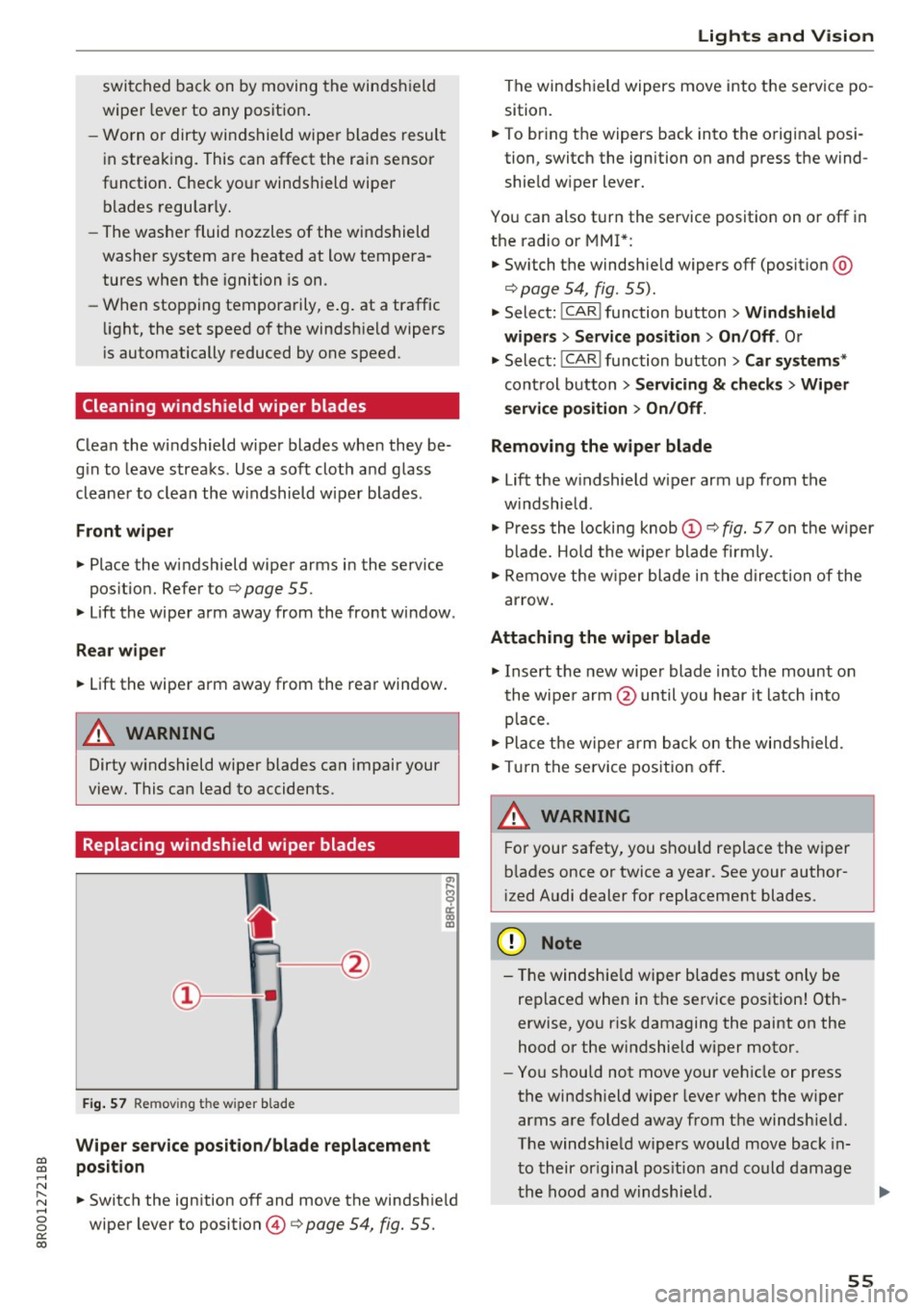
Replacing windshield wiper blades
F ig. 57 Remov ing the w ipe r blade
Wiper s ervice position /blade replac em ent
posit ion
a,
ij
a: co
"'
.. Switch the ign ition off and move the windsh ield
wiper lever to position @
9 page 54, fig. 55.
Lights and Vision
The windshield wipers move into the service po
sition .
.. To br ing the wipers back into the orig ina l posi
tion, switch the ignition on and press the wind shie ld w iper lever.
You can also turn the service position on or off in
the radio or MMI*: .. Switch the windshie ld wipers
off (posit ion @
9page 54, fig. 55).
.. Select: !CAR ! function button > Wind shield
wiper s
> Servic e po sition > On /Off . Or
.. Select:
!CAR ! function button> Car syst em s*
cont rol button > Servicing & c heck s> Wiper
s ervi ce po sition
> On /Off .
Removing the wiper blade
.,. Lift the w indshield wiper arm up from the
w indshield .
.,. Press the locking knob
(D 9 fig. 57 on the wiper
b lade. Hold the wipe r blade firmly .
.. Remove the w iper blade in the direction of the
ar row .
Attaching the wiper blade
.. Insert t he new wipe r blade into the mount on
the wipe r arm @until you hear it latch into
p lace.
.. Place t he w iper arm back on the windshield.
.. Turn the se rvice pos ition off.
A WARNING ~ -
F or your safety, you should replace the wiper
b lades once or twice a year . See your author
i zed Audi dealer for replacement blades.
(D Note
- T he windshie ld wiper blades must on ly be
replaced when in the service position! Oth
erwise, you r isk damaging the paint on the
hood or the w indshield wiper motor .
- You should not move your vehicle or press
the windsh ield wiper lever when the wiper
arms a re folded away from the windshie ld.
The windshield wipers would move back in
t o their or iginal pos ition and could damage
the hood and w indshie ld .
55
Page 80 of 296
Warm and cold
Operation
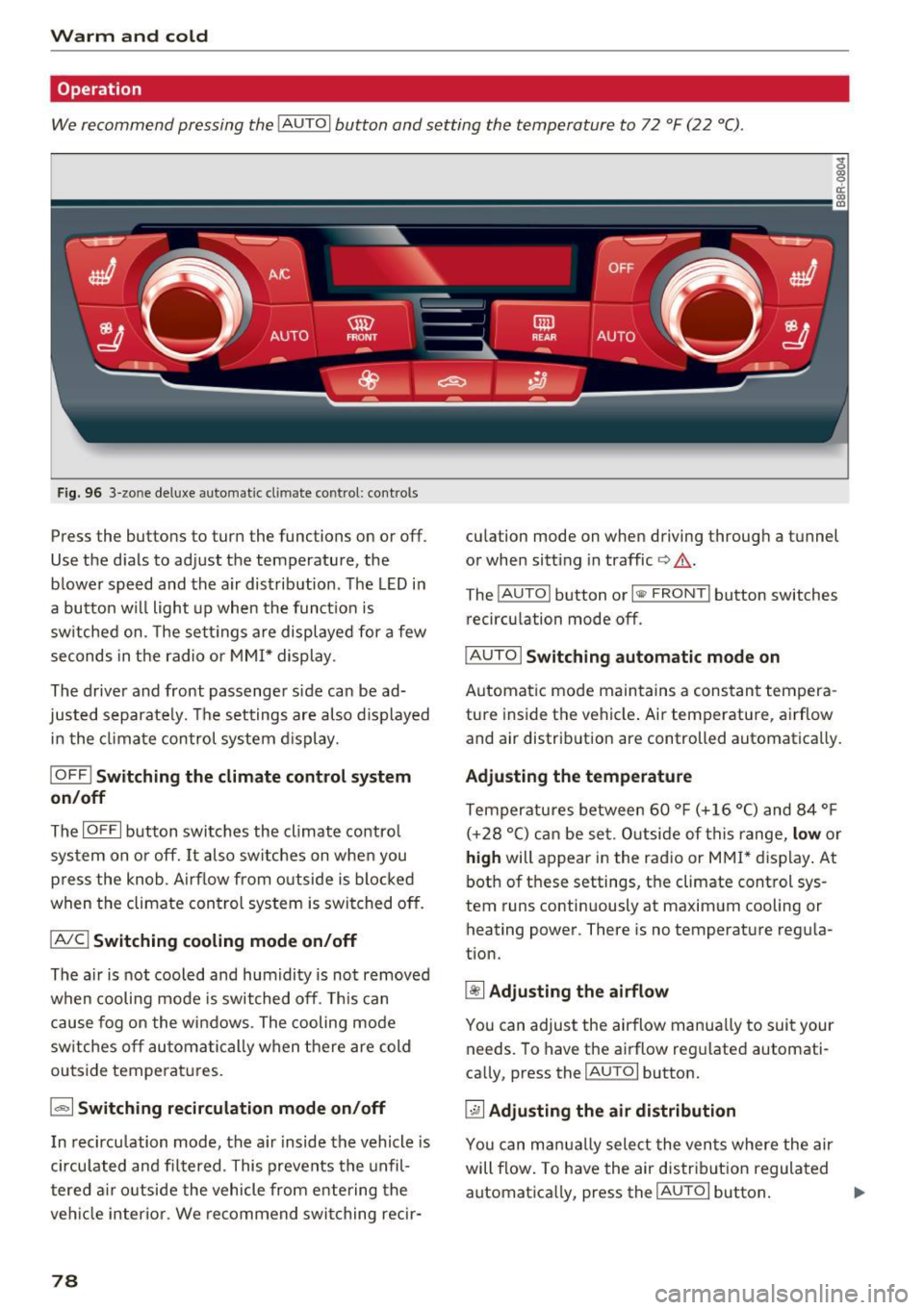
We recommend pressing the IAUTOI button and setting the temperature to 72 °F (22 °C) .
Fig . 96 3-zo ne de luxe automat ic cl imate co ntrol: con tro ls
Press the buttons to turn the functions on or off .
Use the dials to adjust the temperature, the
b lowe r speed and the air distrib ution . The LED in
a bu tton w ill light up when the funct ion is
sw itched on. The sett ings a re displayed for a few
seconds in the radio or MMI* display .
The driver and front passenger side can be ad
jus ted separate ly. Th e settings are also d isplayed
in the clima te control system d isplay.
I O FF j Switching the climate control system
on /off
The IOFFI button swi tches the climate contro l
sys tem on or off. It also switches on when you
press the knob . Ai rf low from o utside is blocked
when the climate con trol system is switched off.
IAIC ! Switching cooling mode on /off
The air is not cooled and humidity is not removed
when cooling mode is switched off . T h is can
cause fog on the windows . The cooling mode
sw itches off au toma tic ally when there are cold
outside temperat ures.
la, I Switching recirculation mode on /off
In recirculation mode, the a ir inside the vehicle is
circu lated and filtered . This prevents the unfil
tered a ir o utside the vehicle from e ntering the
veh icle interior . We recommend switching recir-
78
culation mode on when driving through a tunnel
or when sitt ing in traffic
Q &. -
The !AUTO I button or I l1ii> FRONT ! button switches
reci rculation mode off .
I AUTO I Switching automatic mode on
Automatic mode main tains a constan t tempera
ture inside the vehicle . Air temperature , airflow
and air distribution are controlled automatically.
Adjusting the temp erature
Temperatures between 60 ° F (+ 16 °C) and 84 ° F
( + 28 °C) can be set . O utside of th is range,
l ow or
high will appear in the radio or MMI* display . At
both of these settings, the climate control sys
tem runs continuously at maximum cooling or
heating power. There is no temperature regula
tion.
~ Adju sting th e airfl ow
You can adjust the airflow manua lly to suit your
needs . To have the airflow reg ulated automati
cally, press the
IAUTO I button.
~ Adjusting the air distribution
Yo u can manual ly select the vents where the air
will flow. To have the air distribut ion regulated
automat ica lly, press the
IAUTO I button. ""
Page 81 of 296
![AUDI Q5 2017 User Guide CD
CD
.... N ,-... N .... 0 0 C<. 00
[i] Adjusting seat heating*
Pressing the button switches the seat heating on
at the highest setting (level 3) . The LEDs indicate
the temperat](/img/6/57633/w960_57633-80.png "AUDI Q5 2017 User Guide CD
CD
.... N ,-... N .... 0 0 C<. 00
[i] Adjusting seat heating*
Pressing the button switches the seat heating on
at the highest setting (level 3) . The LEDs indicate
the temperat")
CD
CD
.... N ,-... N .... 0 0 C<'. 00
[i] Adjusting seat heating*
Pressing the button switches the seat heating on
at the highest setting (level 3) . The LEDs indicate
the temperature level. To reduce the tempera
ture, press the button again. To switch the seat heating off, press the button repeatedly until the
LED turns off.
After 10 minutes, the seat heating automatically
switches from level 3 to level 2.
lil Adjusting seat ventilation*
Pressing the button switches the seat ventilation
on at the highest sett ing (level 3). The LEDs indi
cate the venti lation level. To reduce the ventila
tion level, press the button again. To switch the
seat v entilation off, press the button repeatedly
until the LED turns off.
I ..., FRONT I Switch the defroster on/off
The windshield and side windows are defrosted
or cleared of condensation as quickly as possib le.
The maximum amount of air flows mainly from
the vents below the windshield. Recirculation
mode switches off. The temperature should be
set to 72 °F (22 °() or higher. The temperature is
controlled automatically .
T he
IAUTOI button switches the defroster off.
llliil REARI Switching rear window heater on/
off
The rear window heater on ly operates when the
engine is running. It switches off automatica lly
after a few minutes, depending on the outs ide
temperature.
To prevent the rear window heater from switching off automatically, press and hold the
!llil> REAR I
button for more than 2 seconds . This remains
s tored until the ignition is switched off .
Air vents
You can open and close the center and rear air
vents using the thumbwheels . The levers adjust
the direction of the airflow from the vents.
You can adjust the air temperature in the rear by
turning the thumbwheel toward the red side to
Warm and cold
make it warmer or toward the blue s ide to make
it coo ler.
A WARNING
-~
- Do not use the recirculation for extended
periods of time. The windows could fog up
since no fresh air can enter the vehicle . If
the windows fog up, press the air rec ircula
tion button again immed iately to switch off
the air rec irculat ion function or select de
frost.
- Individuals with reduced sensit ivity to pain
or temperature could develop burns when
using the seat heating* function. To reduce
the risk of injury, these individua ls should
not use seat heating.
(D Note
To avoid damage to the heating elements* in
the seats, do not kneel on the seats or place heavy loads on a small area of the seat.
Setup
The basic climate control settings can be adjust
ed in the radio or MMI*.
"'Select: !CAR I function button> A/C control but
ton. Or
"' Select:
!CAR ! function button> Car systems*
control button >
A/C.
Automatic recirculation
When switched on, automat ic rec irculat ion con
trols the recirculation mode automatically. If the
windows fog up, press the
I@ F RON T I button.
Synchronization
When synchronization is switched on, the same
settings are appl ied to both the driver and front
passenger , except for the seat heating/ventila
t ion* . Synchronization switches off when you ad
just the settings on the front passenger's sid e.
You can also sw itch synchronizat ion on by press-
i ng and holding the knob on the driver's side. ..,.
79
Page 87 of 296
CD
CD
.... N ,-... N .... 0 0 C<'. 00
electrical equipment s uch as exterior lights
will switch off as well when that happens.
Switching engine off
A pp lies to: ve hicles with Conve nien ce key
~ Bring your vehicle to a complete stop.
~ Move the selector lever to the P or N position.
~ Press the I STAR T ENGINE ST OPI button
¢ page 84, fig. 101.
Ste ering lock
The steering locks when you turn the engine off
using the
! S TART ENGINE STOPI button and
open the dr iver's door. The locked steering helps
prevent vehicle theft.
Emer gency off
If necessary, the engine can be switched off with
the selector lever in the R or D/S position. The
engine stops if you press and ho ld the
I START ENGINE STOPI button at speeds below
6 mph (10 km/h) and press the brake pedal.
A WARNING
- Never turn off the engine before the veh icle
has come to a comp lete stop. The fu ll func
t ion of the brake booster and the power
steering is no t gua ranteed. You must use
more fo rce to turn or brake i f necessary. Be
cause you cannot steer and b rake as you
usually wou ld, this could lead to crashes
and ser ious injuries.
- For safety reasons, you should a lways park
your vehicle with the selector lever in P .
Otherwise, the vehicle could inadvertently
roll away.
- The radiator fan can continue to run for up
to 10 m inutes even after you have turned
off the engine and removed the ignition key.
The radiator fan can also turn on again if the engine coolant heats up because of intense
sunlight or heat bui ld-up in the engine com
partment.
- Always take the key with you whenever you
leave you r vehicle. Othe rw ise, the engine
c ou ld be started o r electrical equ ipme nt
D riv ing
such as the power windows could be operat
ed. This can lead to ser ious injury.
- Never leave chi ldren or persons requiring as
sistance unattended in the vehicle. The
doors can be locked using the remote trans mitter, preventing people from escaping
from the vehicle on their own in the event of
a n emergency. Depending on the time of
year, people ins ide the veh icle can be ex
posed to very high o r very low tempera
tures.
0 Note
If the engine has been under heavy load for
an extended pe riod, heat bu ilds up in the en
g ine compartment afte r the engine is switch
ed off -there is a ris k of damaging the engine.
A llow the engine to run at id le for about two
minutes before switching it off.
Driver messages
Ignition i s on
This message appears and a warning tone sounds
if you open the drive r's door when the ig nition is
swi tched on.
No k ey id ent ified
This message appears when the
I START ENGINE STOP !* button is pressed if there
is no master key inside the vehicle or if the sys
tem does not recognize it. For example, the mas
ter key cannot be recognized if it is covered by an
obje ct (e.g. al uminum brief case) which
screens
the radio s ignal. Elec tronic devices such as ce ll
phones can a lso interfere with the radio signal.
Pre ss brake p edal to start en g ine
This message appears if you do not press the
brake pedal to start the engine.
S hift to N or P to start en gine
This message appears when attempting to start
the engine if the se lector lever for the automatic
transm ission is not in the P or N position. The en
gine can on ly be started with the se lector in
these positions.
Ill-
85
Page 94 of 296
Driving
Speed warning 1: setting a speed limit
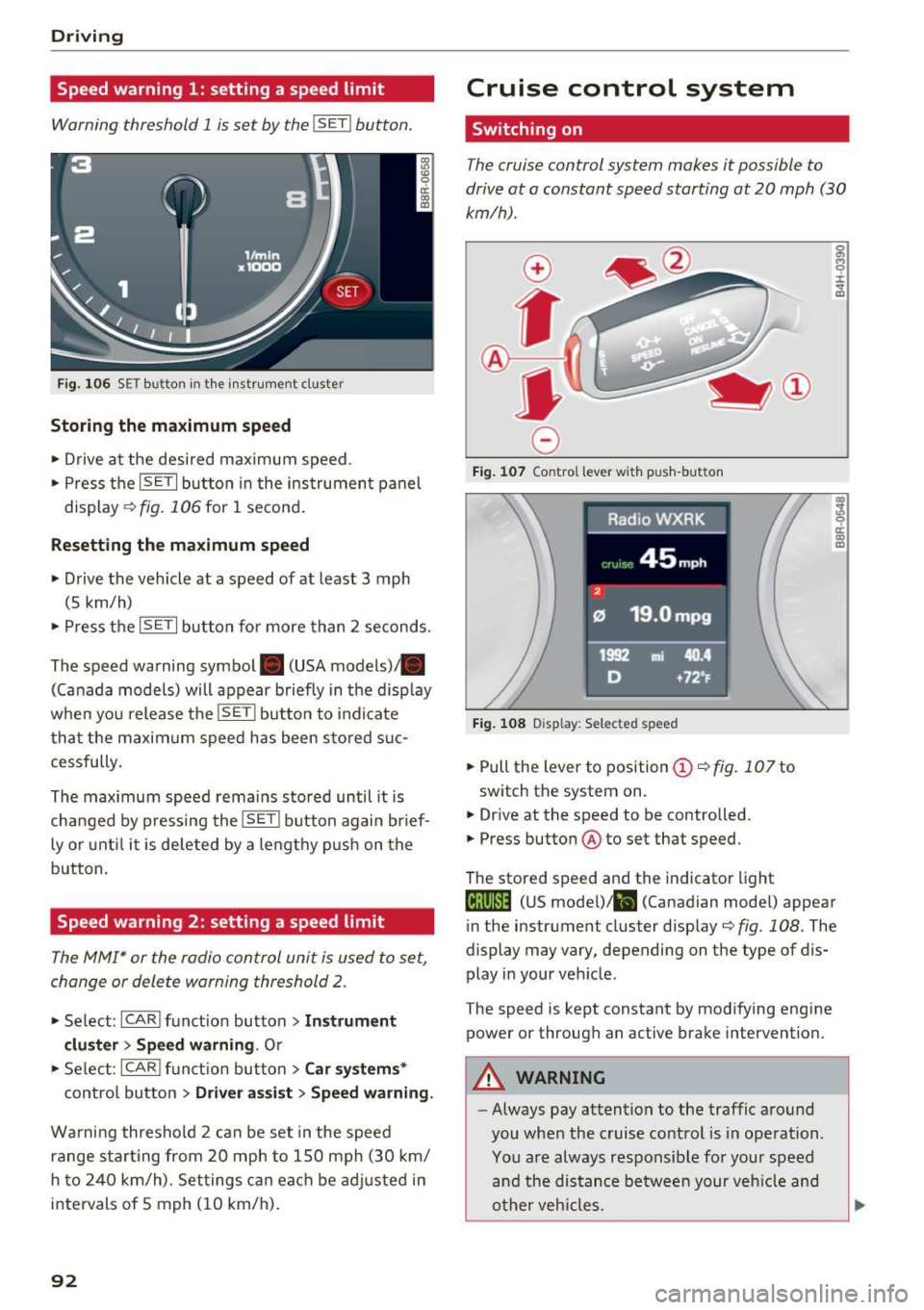
Warning threshold 1 is set by the I SET I button .
Fig. 1 06 SET button in t he ins trume nt cluster
Storing the maximum spe ed
• Drive at the desired maximum speed.
• Press the
!SE TI but ton in the ins trumen t panel
display ~fig.106for 1 second.
Resetting the maximum speed
• Drive the vehicle at a speed of at least 3 mph
(5 km/h)
• Press the
~IS-E T~I button for more than 2 seconds .
The speed warning symbol. (USA models)/ .
(Canada models) will appear briefly in the disp lay
when you release the
!SE TI butto n to indicate
that the maxim um speed has been sto red suc
cessfully.
The max imum speed remains stored until it is
changed by pressing the
I SETI button again brief
ly or unt il it is deleted by a lengthy p ush on the
button.
Speed warning 2: setting a speed limit
The MMI* or the radio control unit is used to set,
change or delete warning threshold 2 .
• Se lect : !CARI funct ion button> Ins trum ent
clu st e r > S peed warning .
Or
• Select : !CARI function button> C ar sys te m s*
contro l button > Dri ver ass ist > S peed w arnin g.
Wa rning threshold 2 can be set in the speed
range star ting from 20 mph to 150 mph (30 km/
h to 240 km/h) . Set tings can each be ad justed in
intervals of 5 mph (10 km/h).
92
Cruise control system
Switching on
The cruise control system makes it possible to
drive at a constant speed starting at
20 mph (30
km/h) .
0
f
®l
0
Fig. 10 7 Control leve r wit h pu sh-but ton
Fig . 108 Disp lay: Selected speed
• Pull the lever to position (D <=> fig . 10 7 to
switch the system on.
• Drive at the speed to be controlled.
• Press button @to set that speed .
The stored speed and the indicator light
g M 0 ±
~
Q)
~ ci: Q) m
Iij;\1)~14 (US model) !lll (Canadian mode l) appear
in the instrument cluster display
c::> fig. 108 . The
display may vary, depending on the type of dis
play in your vehicle .
The speed is kept constant by modifying engine power or through an active brake intervention.
A WARNING
- Always pay attention to the traffic around
you when the cruise control is in operation .
You are always respons ible for your speed
and the distance between your veh icle and
other veh icles .
-
Page 116 of 296
Audi adaptive cruise control and braking guard
c:::::, ___ c:::::,_ Distance 3 : This setting corresponds
to a distance of 164 feet/SO mete rs when trave l
ing at 62 mph (100 km/h), or a time interval of 1.8 seconds .
c:::::, ____ c:::::, Distance 4 : This setting corresponds
to a distance of 210 feet/64 meters when trave l
ing at 62 mph (100 km/h), or a time interval of
2 .3 seconds .
_&. WARNING
Following ot her vehicles too closely increases
the risk of collisions and ser ious personal in
jury.
- Setting short distances to the traffic ahead
reduces the t ime and distance ava ilable to
br ing your vehicle to a safe sto p an d makes
i t eve n mo re necessary to pay close atten
t ion t o traffic.
- Always obey applicable traffic laws, use
g ood ju dgment, and select a safe f ollow ing
di st ance f or th e tra ffic, road and we athe r
c ondition s.
¢j) Tips
- Distance 3
is set au tomati cally e ach time
yo u sw itch th e ig nit io n o n.
- Y our sta ndard setti ngs a re a uto mat ica lly
stor ed and as signed to th e re m ote contro l
k ey be ing used ¢
page 33 .
Setting the dr iving program
A pp lies to: ve hicles w ith Audi adaptive cruise co ntro l
Depending on t he se lec ted dr iv ing program and
d istance, dr iv ing behavior whe n accelerating wi ll
vary from dynamic to comfo rtable.
Setting the driving program for vehicles
without Audi drive select*
~ In the radio/ MM!*, selec t: !CARI function but
ton
> adaptive cruise control > Driving pro
gram
> Comfort , Standard or Dynamic. Or
~ Se lect : I CARI funct ion button > Car systems*
contro l button > Driver assist > Adaptive cruise
control
> Driving program > Comfort, Stand
ard
o r Dynamic .
114
Setting the driving mode for vehicles with
Audi drive select*
Refer to ¢page 123 .
(D Tips
Your set tings are automatic ally store d and as
signed to t he remote contro l key being used
¢ page 33 .
Request for driver intervention
App lies to: vehicles wi th Audi ada ptive c ru ise control
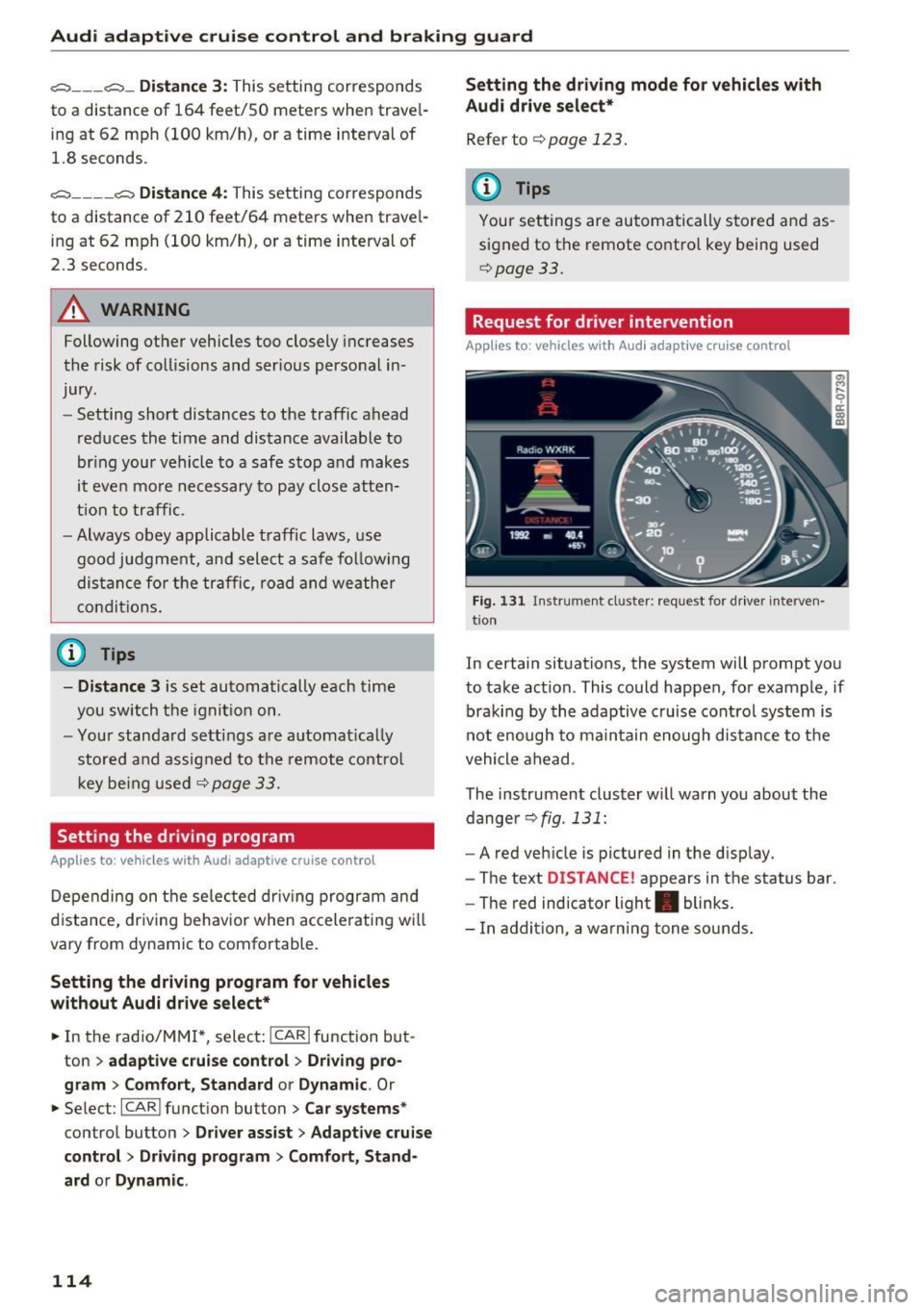
Fig. 131 I n str um ent cl uste r: re quest for driver interve n
t io n
In certain situations, the system will prompt yo u
to take ac tion . This could happen, for example, if
braki ng by the adaptive cruise cont rol sys tem is
not en ough to ma in tain enough dis tance to t he
vehicle a he ad .
The ins trument cluster w ill warn you about the
dange r¢
fig . 131 :
-A red veh icle is pictured in the d isp lay.
- The te xt
DISTANCE! appears in the status bar .
- The red indicator light . blinks .
- In ad dition, a wa rni ng tone so unds .
Page 117 of 296
a,
a,
..... N r-N ..... 0 0
0:
co
Audi adaptive cruise control and braking guard
Audi braking guard
Description
Applies to: ve hicles with Audi adaptive cruise co ntro l
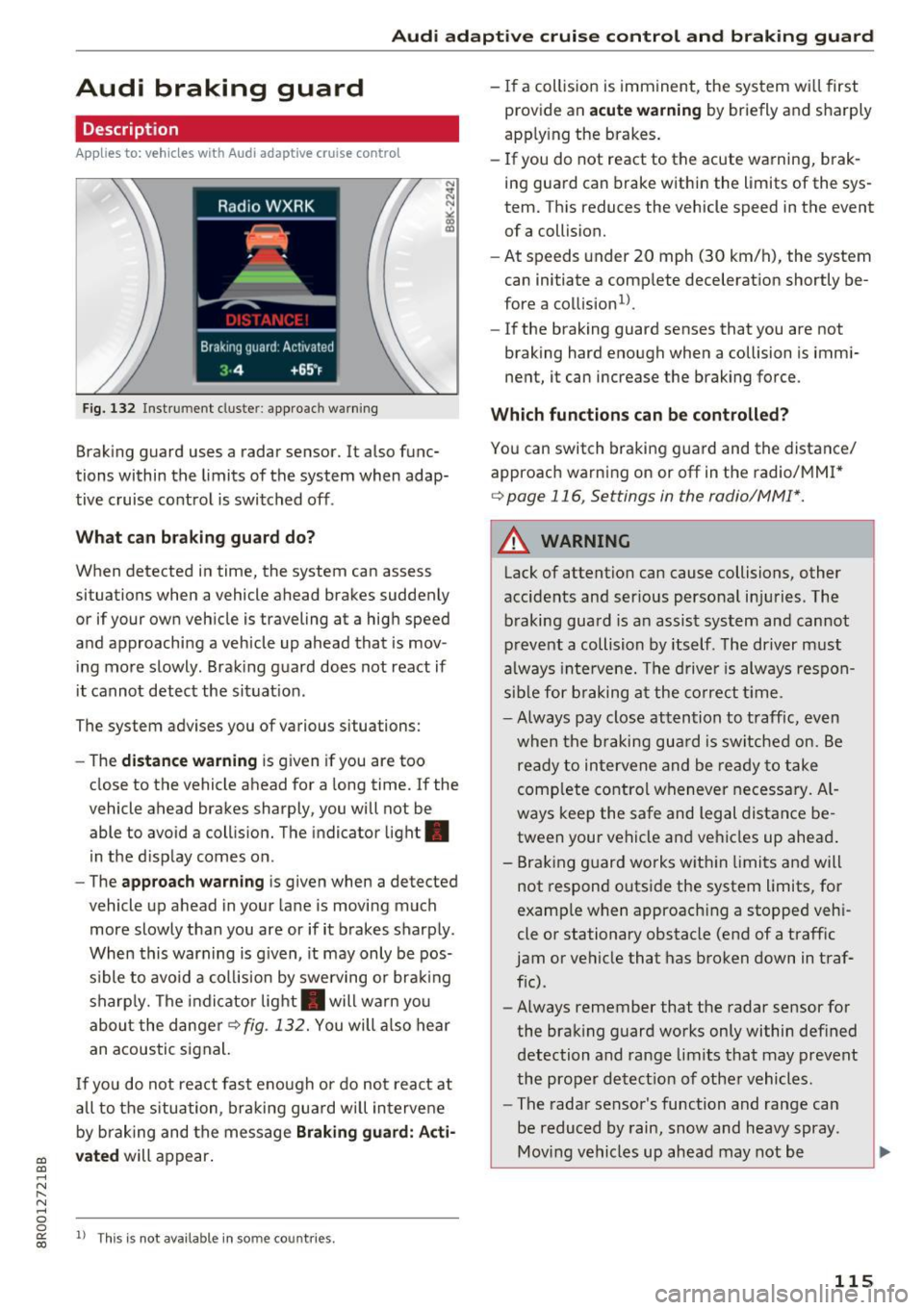
Fig. 132 Instrument cluste r: approach warning
Braking guard uses a radar sensor. It also func
tions within the limits of the system when adap
tive cruise control is switched off .
What can braking guard do?
When detected in time, the system can assess
situations when a vehicle ahead brakes suddenly
or if your own vehicle is traveling at a high speed
and approaching a vehicle up ahead that is mov
ing more slowly . Braking guard does not react if
it cannot detect the situat ion.
The system advises you of various situations:
- The
distance warning is g iven if you are too
close to the vehicle ahead for a long time.
If the
vehicle ahead brakes sharply, you will not be
able to avoid a collision. The indicator light .
in the display comes on.
- The
approach warning is given when a detected
vehicle up ahead in your lane is moving much
more slowly than you are or if it brakes sharply .
When this warning is g iven, it may only be pos
s ible to avo id a col lision by swerving or brak ing
sharp ly. Th e indicator light . will warn you
about the danger
¢fig. 132. You will also hear
an acoustic signal.
If you do not react fast enough or do not react at
all to the situation, braking guard will intervene
by braking and the message
Braking guard: Acti
vated
will appear.
1> Th is is not ava ilab le in some coun tries.
-If a collision is imminent, the system wi ll first
provide an
acute warning by briefly and sharply
apply ing the brakes.
- If you do not react to the acute warning, brak
ing guard can brake within the limits of the sys
tem. This reduces the vehicle speed in the event
of a collision.
- At speeds under 20 mph (30 km/h), the system
can initiate a comp lete decelerat ion shortly be
fore a collision
ll.
- If the braking guard senses that you are not
braking hard enough when a collision is immi
nent, it can increase the braking force .
Which functions can be controlled?
You can switch braking guard and the distance/
approach warn ing on or
off in the radio/MM!*
¢ page 116, Settings in the radio/MM!*.
A WARNING
-
Lack of attention can cause collisions, other
accidents and ser ious personal in juries. The
braking guard is an assist system and cannot
prevent a collision by itself. The driver must
always intervene. The driver is always respon
sible for braking at the correct tim e.
- Always pay close attention to traffic, even
when the braking guard is switched on. Be
ready to intervene and be ready to take
comp lete control whenever necessary. Al
ways keep the safe and legal distance be
tween your vehicle and vehicles up ahead .
- Braking guard works wit hin limits and will
not respond outside the system limits, for
examp le when approaching a stopped veh i
cle or stationary obstacle (end of a traffic
jam or vehicle that has broken down in traf
fic).
- Always remember that the radar sensor for
the braking guard works only within defined
detection and range limits that may prevent
the proper detect ion of other vehicles.
- The radar sensor's function and range can
be reduced by rain, snow and heavy spray.
Moving vehicles up ahead may not be
,.
115
Page 118 of 296
Audi adaptive cruise control and braking guard
promptly detected or may not be detected
at all.
- Reflective surfaces including crash barriers
or tunnel entrances may impair the function
oftheradarsensor.
(D Tips
-You can cancel the braking that is initiated
by the system by braking yourself, by accel
erating noticeably or by swerving.
- Braking guard error messages
c:> page 116.
- Keep in mind that braking guard can brake
unexpectedly. Always secure any cargo or
objects that you are transporting to reduce
the risk of damage or injury.
Settings in the radio/MMI*
Applies to: vehicl es w ith Audi adaptive cruise control
.,. Select : ICARI function button> Audi braking
guard .
Or
.,. Select:
~I C~A~R~I function button > Car systems*
control button > Driver assist> Audi braking
guard .
System -
Switch braking guard On and Off. When
you switch the ignition on, the message
Braking
guard: Off
appears if the system is switched off .
Early warning -The distance and approach warn
ings in the display can be switched
On/Off .
(D Tips
-Your settings are automatically stored and
assigned to the remote control key being
used at the times the settings are made
r=;,page 33.
-If you restrict the ESC, the braking guard al
so switches itself off
c:> page 18 7.
- Switch braking guard
off when you are load
ing the vehicle onto a vehicle carrier, train,
ship or other type of transportation . This
can prevent undesired warnings from the
braking guard system.
Messages
Applies to: vehicles w ith Audi adaptive cruise contro l
Braking guard: Off
116
This driver message appears if the system is
turned
off via the radio/MM I*. Otherwise, if the
system is turned
off, the information appears ev
ery time shortly after the start of the trip.
The driver message also appears if the system is
not available due to a malfunction or if the ESC is
not switched on
c:> page 187. If this is the case,
the system will not provide warnings about a possible collision.
Braking guard: Activated
This driver message appears if sharp brake pres
sure was applied due to an acute warning.
•••
Three white dots appear if a setting cannot be se
lected with the operating lever . For example, this
happens if you want to raise/lower the speed
even though there was no previously saved
speed.
ACC: Sensor blocked
This message appears if the sensor view is ob
structed, for example by leaves, snow, heavy
spray or dirt. Clean the sensor
r=;, page 109,
fig. 122 .
ACC: Unavailable
The driver message appears if, for example, the
brake temperature is too high. The adaptive
cruise control is temporarily unavailable. A chime
sounds as a rem inder.
ACC: Not available
The driver message appears if there is a malfunc
tion. The adaptive cruise control turns off. A
chime sounds as a reminder. Have the system
checked by an authorized Audi dealer or author
ized Audi Service Facility.
Shift lever position!
The driver message appears if the selector lever
is shifted to the N position. The adaptive cruise
control is not available while in this position.
Stabilization control (ESC)
This message appears if the Electronic Stabiliza
tion Control (ESC) is taking action to stabilize the .,.
Page 122 of 296
Audi side assist
-Improper reliance on the side assist system
can cause collisions and serious personal in
jury:
- Never rely only on side assist when chang
ing lanes.
- Always check rear view mirrors to make
sure that it is safe to change lanes.
- Side assist cannot detect all vehicles under
all conditions -danger of accident!
- Please note that side assist indicates there
are approaching vehicles, or vehicles in your blind spot, only after your vehicle has
reached a driving speed of at least 19 mph
(30 km/h).
- In certain situations, the system may not
function or its function may be limited. For
example:
- if vehicles are approaching or being left
behind very quickly . The display may not
turn on in time .
- in poor weather conditions such as heavy
rain, snow or heavy mist .
- on very wide lanes, in tight curves or if
there is a rise in the road surface . Vehicles
in the adjacent lane may not be detected
because they are outside of the sensor
range.
(D Note
The sensors can be displaced by impacts or damage to the bumper, wheel housing and
underbody . This can affect the system . Have
your authorized Audi dealer or authorized
Audi Service Facility check their function.
(D Tips
-If the window glass in the driver's door or
front passenger's door has been tinted, the
display in the exterior mirror may be misin
terpreted.
- For Declaration of Compliance to United
States FCC and Industry Canada regulations
c::> page 2 79.
120
Activating and deactivating
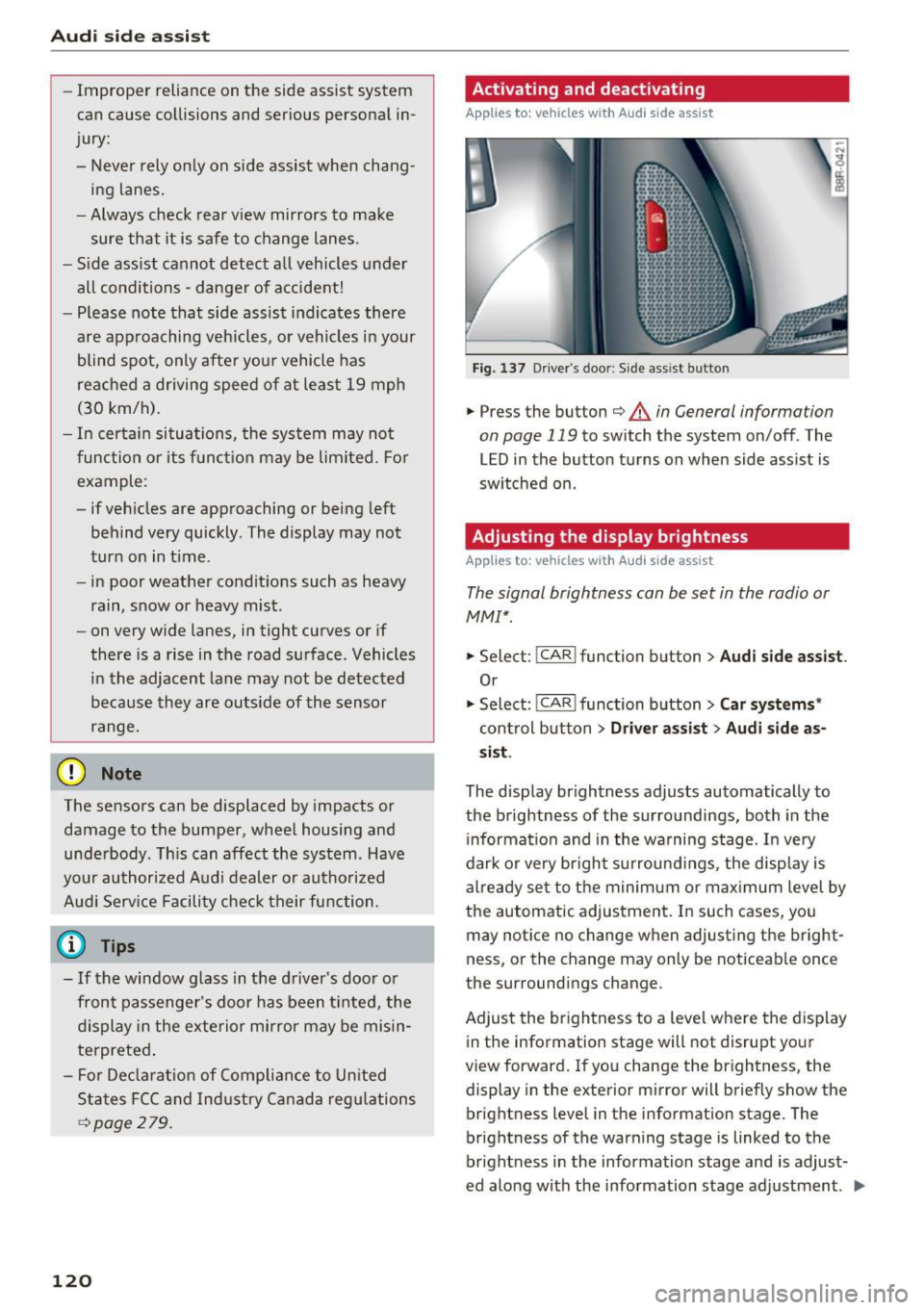
Applies to : vehicles wit h Audi side ass ist
Fig. 137 D riv er's doo r: Side ass ist butto n
.,.. Press the button c::> &. in General information
on page 119
to switch the system on/off . The
LED in the button turns on when side assist is
switched on .
Adjusting the display brightness
Applies to: vehicles wit h Aud i side ass ist
The signal brightness can be set in the radio or
MMI* .
.,.. Select: I CAR I function button > Audi side assist.
Or
.,.. Select: I CAR I function button > Car systems*
control button > Driver assist> Audi side as
sist.
The display brightness adjusts automatically to
the brightness of the surroundings, both in the
information and in the warning stage. In very
dark or very bright surroundings, the display is
already set to the minimum or maximum level by
the automatic adjustment. In such cases, you may notice no change when adjusting the bright
ness, or the change may only be noticeable once
the surroundings change.
Adjust the brightness to a level where the display
in the information stage will not disrupt your
view forward. If you change the brightness, the
display in the exterior mirror will briefly show the
brightness level in the information stage . The
brightness of the warning stage is linked to the
brightness in the information stage and is adjust
ed along with the information stage adjustment . .,,.
Page 163 of 296
CD
CD
.... N ,-... N .... 0 0 C<'. 00
OFF light comes on and stays on all the time
whenever the ignition is switched on.
A WARNING
- If the PASSENGER AIR BAG OFF light does
not go out when an adult is sitting on the
front passenger seat after taking the steps described above, make sure the adult is
properly seated and restrained at one of the
rear seating positions.
- Have the airbag system inspected by your
authorized Audi dealer before transporting
anyone on the front passenger seat.
(0 Tips
If the weight-sensing mat in the front passen
ger seat detects an empty seat, the front air
bag on the passenger side will be turned off,
and
PASSENGER AIR BAG OFF will stay on.
Repair, care and disposal of the airbags
Parts of the airbag system are installed at many
different places on your Audi. Installing, remov
ing, servicing or repairing a part in an area of the
vehicle can damage a part of an airbag system and prevent that system from working properly in a collision.
There are some important things you have to know to make sure that the effectiveness of the
system will not be impaired and that discarded
components do not cause injury or pollute the
environment.
A WARNING
Improper care, servicing and repair proce
dures can increase the risk of personal injury
and death by preventing an airbag from de
ploying when needed or deploying an airbag
unexpectedly:
-
- Never cover, obstruct, or change the steer
ing wheel horn pad or airbag cover or the in
strument panel or modify them in any way.
- Never attach any objects such as cupholders
or telephone mountings to the surfaces cov
ering the airbag units.
Airbag system
-For cleaning the horn pad or instrument
panel, use only a soft, dry cloth or one mois
tened with plain water. Solvents or cleaners
could damage the airbag cover or change
the stiffness or strength of the material so
that the airbag cannot deploy and protect properly.
- Never repair, adjust, or change any parts of
the airbag system.
-All work on the steering wheel, instrument panel, front seats or electrical system (in
cluding the installation of audio equipment,
cellular telephones and CB radios, etc.) must be performed by a qualified technician
who has the training and special equipment
necessary.
- For any work on the airbag system, we
strongly recommend that you see your au
thorized Audi dealer or qualified workshop.
- Never modify the front bumper or parts of
the vehicle body.
- Always make sure that the side airbag can
inflate without interference:
- Never install seat covers or replacement
upholstery over the front seatbacks that
have not been specifically approved by
Audi.
- Never use additional seat cushions that
cover the areas where the side airbags in
flate.
- Damage to the original seat covers or to
the seam in the area of the side airbag
module must always be repaired immedi
ately by an authorized Audi dealer.
- The airbag system can be activated only
once. After an airbag has inflated, it must
be replaced by an authorized Audi dealer or
qualified technician who has the technical
information, training and special equipment
necessary.
- The airbag system can be deployed only
once. After an airbag has been deployed, it
must be replaced with new replacement
parts designed and approved especially for
your Audi model version. Replacement of complete airbag systems or airbag components must be performed by qualified work-
shops only. Make sure that any airbag
Ill-
161