lights AUDI Q5 2017 Service Manual
[x] Cancel search | Manufacturer: AUDI, Model Year: 2017, Model line: Q5, Model: AUDI Q5 2017Pages: 296, PDF Size: 74.43 MB
Page 114 of 296
Audi adaptive cruise control and braking guard
@ Indicator lights
Ill -Adaptive cruise control is switched on. No
vehicles are detected up ahead. The stored speed
is maintained .
• -A moving veh icle is detected up ahead. The
adaptive cruise control system regulates the
speed and distance to the moving vehicle ahead
and accelerates/brakes automatically.
• -When automatic braking is not able to keep
enough distance to a previously detected moving
vehicle up ahead, you must take contro l and
brake
¢ page 114, Request for driver interven
tion.
© Display
If
adaptive cruise control is not shown in the dis
play, you can call it up with the
IRESETI button
¢page 17.
Based on the symbo ls in the display, you can de
termine if the system is ma inta ining a distance to
the vehicle ahead and what that distance is .
No vehicle -No vehicle ahead was detected .
White vehicle -A vehicle ahead was detected.
Red vehicle -Prompt for the driver to take action
¢page 114.
Both arrows on the scale© indicate the distance
to the vehicle ahead . No arrow appears when the
veh icle is on an open road and there is no object
ahead. If an object is detected ahead, the arrow
moves on the scale .
The green zone on the scale shows the stored dis
tance . For information on changing the stored
distance, refer to
¢page 113. If the distance se
lected is too close or may soon become too close,
the arrows move into the red zone on the scale .
A WARNING
Improper use of the adaptive cruise control
can cause collis ions, other accidents and seri
ous personal injuries.
- Pressing the
! SET ! button when driving at
speeds below 20 mph (30 km/h), will auto
matically accelerate the vehicle to 20 mph
112
(30 km/h), which is the minimum speed
that can be set.
@ Tips
- If you switch the ign it ion or the adaptive
cruise control off, the set speed is erased
from the system memory.
- The Electronic Stabilization Control (ESC) is
automatically turned on when the adapt ive
cruise control is turned on. You cannot
switch the ESC into offroad mode while the
adaptive cruise control is turned on
¢page 187.
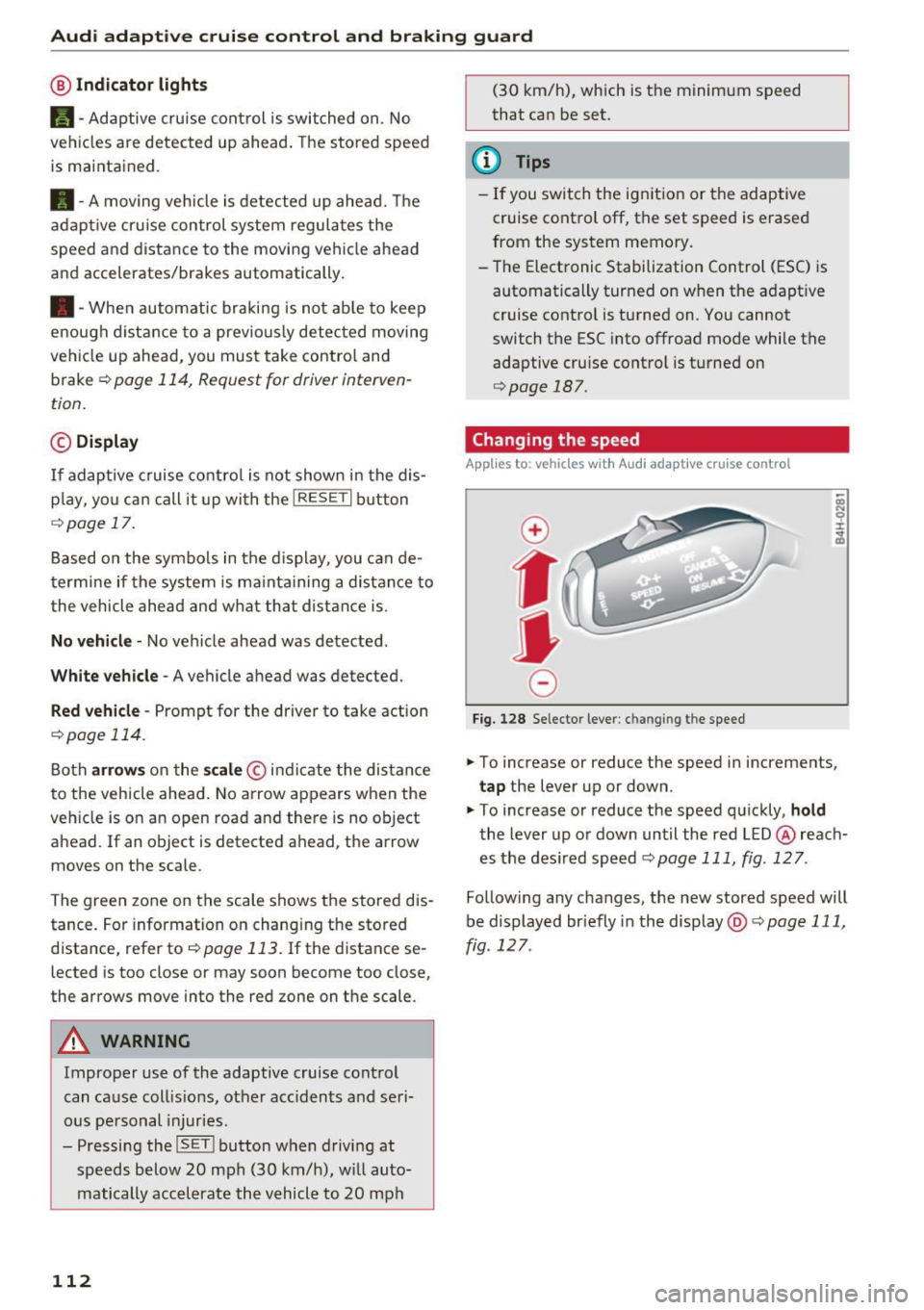
Changing the speed
App lies to: vehicles with Audi adaptive cru ise control
0
f
•
0
Fig. 128 Selector lever: ch an gin g the speed
.,. To increase or reduce the speed in increments,
tap the lever up or down.
.,. To increase or reduce the speed quickly,
hold
the lever up or down until the red LED @ reach
es the desired speed
¢page 111, fig . 127 .
Follow ing any changes, the new stored speed will
be displayed br iefly in the display @¢
page 111,
fig . 127 .
Page 129 of 296
Switching on and off
Applies to: vehicl es wit h Aud i parking system p lus w ith rear
view came ra
The rearview camera switches an automatically
together with the acoustic and visual park assist
when you put the vehicle in reverse.
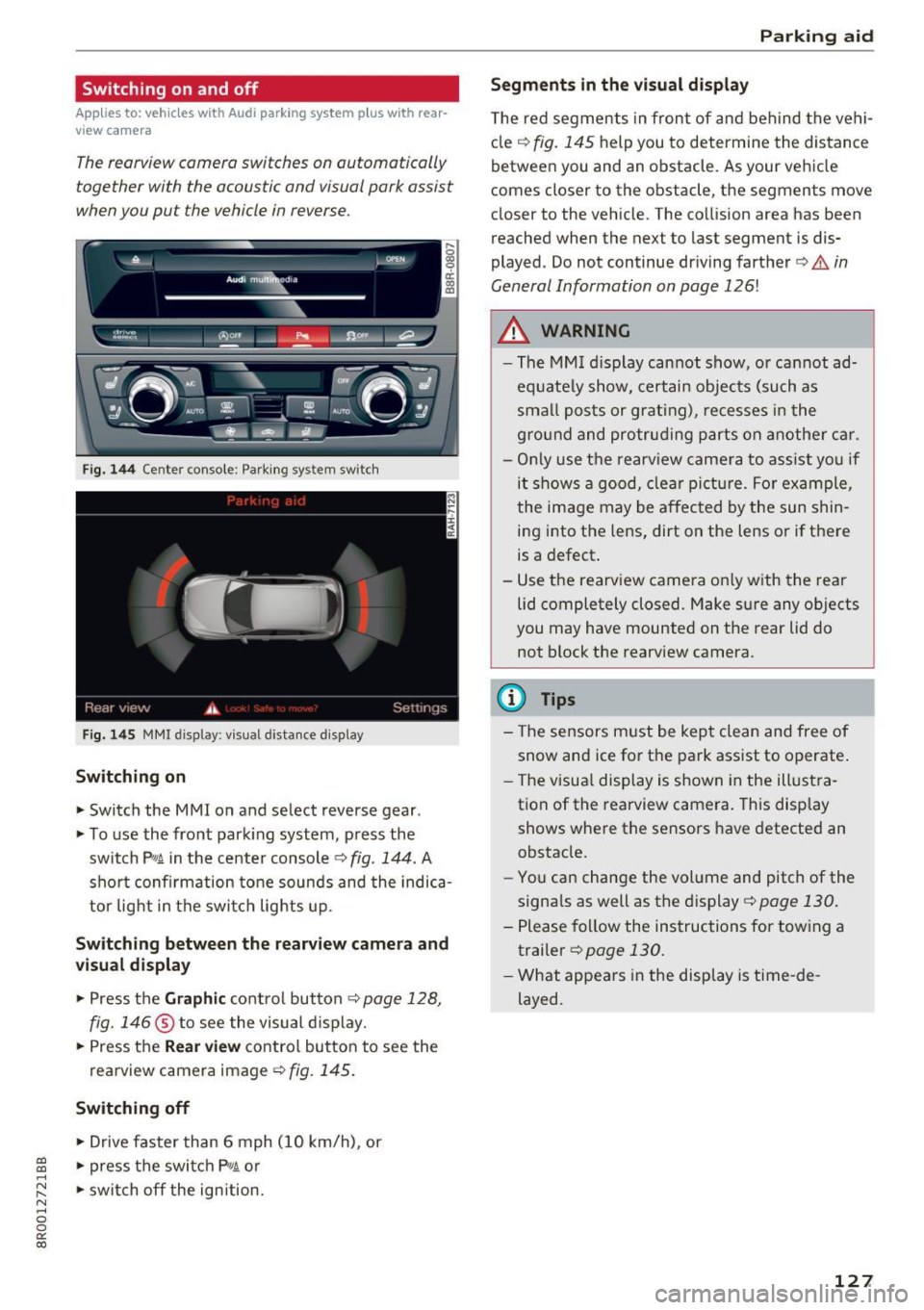
Fig. 144 Center console: Park ing system switch
Fig . 1 45 MMI display: visual distance display
Switching on
.. Switch the MMI on and select reverse gear .
.. To use the front park ing system, press the
switch
p,, 1A in the center console c::> fig . 144. A
sho rt confirmation tone sounds and the indica
tor light in the switc h lights up.
Switching between th e re arview came ra and
vi sual displa y
.. Press the Graphi c co ntrol button c::>page 128,
fig. 146
® to see the visual d isplay .
.. Press the
Rear view contro l butto n to see the
rearview camera image
¢fig. 145.
Switching off
.. Drive faster than 6 mph ( 10 km/h), or
~ .. press the switch P'#A or .....
~ .. switch off the ign ition. N ..... 0 0
0:
co
P ark ing aid
Segments in the visual di splay
T he red segments in front of and behind the vehi
cle
c:::> fig. 145 help you to determine the distance
between you and an obstacle. As your vehicle
comes closer to the obstacle, the segments move
closer to the vehicle. The collision area has been
reached when the next to last segment is dis
played . Do not continue dr iving farther
c:::> .&. in
General Information on page
126!
A WARNING
-- The MM I display cannot show, o r cannot ad-
equate ly show, certain objects (such as
smal l posts or grating), recesses i n the
g ro und and protruding parts on another car.
- On ly use the rearv iew camera to ass ist yo u if
it shows a good, clea r pi ctu re. For example,
the image may be affected by the sun shin
ing into the lens, dirt on the lens or if there
is a defect.
- Use the rearv iew camera on ly w ith the rea r
lid completely closed. Make sure any objects
you may have mounted on the rear lid do
not block the rearv iew camera.
(D Tips
- The sensors must be kept clean and free of
snow and ice for t he park ass ist to operate .
- The visua l display is shown in the illust ra
tion of the rearview camera. This display shows where the sensors have detected an
obstacle.
- You can change the volume and pitch of the
signa ls as well as the display
c:::> page 130.
- Please fol low the instructions for tow ing a
trailer
c:::> page 130.
- What appears in the display is time -de
layed.
127
Page 133 of 296
CD
CD
.... N ,-... N ,....,
0 0 C<'. 00
Driving safety
Basics
Safe driving habits
Please remember -safety first!
This chapter contains important information,
tips, instructions and warnings that you need to
read and observe for your own safety, the safety
of your passengers and others . We have summar
ized here what you need to know about safety
belts, airbags, child restraints as well as child
safety. Your safety is for us
priority number 1. Al
ways observe the information and warnings in
this section - for your own safety as well as that
of your passengers.
The information in this section applies to all
model versions of your vehicle. Some of the fea
tures descr ibed in this sections may be standard
equipment on some models, or may be optional
equipment on others. If you are not sure, ask
your authorized Audi dealer.
A WARNING
- Always make sure that you follow the in
structions and heed the WARNINGS in this
Manual. It is in your interest and in the in
terest of your passengers .
-
-Always keep the complete Owner's Litera
ture in your Audi when you lend or sell your
vehicle so that this important information
will always be available to the driver and
passengers.
- Always keep the Owner's literature handy so
that you can find it easily if you have ques
tions.
Safety equipment
The safety features are part of the occupant re
straint system and work together to help reduce
the risk of injury in a wide variety of accident sit
uations.
Your safety and the safety of your passengers
should not be left to chance. Advances in tech
nology have made a var iety of features available
to help reduce the risk of injury in an accident.
Driving safety
The following is a list of just a few of the safety
features in your Audi:
- sophisticated safety belts for driver and all pas-
senger seat ing pos itions,
- be lt force limiters for the front seats,
- belt pretensioners for the seats,
- belt height adjustment for the front seats,
- head restraints for each seating position,
- front airbags,
- side airbags in the front seats and outer rear
seats *,
- side curtain airbags,
- special LATCH anchorages for child restraints,
- adjustab le steering column.
These individual safety features, can work to gether as a system to help protect you and your
passengers in a wide range of accidents . These
features cannot work as a system if they are not
always correctly adjusted and correctly used.
Safety is everybody's responsibility!
Important things to do before driving
Safety is everybody 's job! Vehicle and occupant
safety always depends on the informed and care
ful driver .
For your safety and the safety of your passen
gers,
before driving always:
.,. Make sure that all lights and signals are operat
ing correctly.
.,. Make sure that the tire pressure is correct .
.,. Make sure that all windows are clean and afford
good visibility to the outside .
.,. Secure all luggage and other items carefully
~page 74 .
.,. Make sure that nothing can interfere with the
pedals.
.,. Adjust front seat, head restraint and mirrors
correctly for your height.
.,. Instruct passengers to adjust the head re
straints according to their height.
.,. Make sure to use the right child restraint cor
rectly to protect children
¢ page 168, Child
safety. ..,.
131
Page 189 of 296
a,
a,
..... (',J r-(',J ..... 0 0
0:
co
@ Tips
-ABS and AS R on ly work correctly when a ll
fo ur whee ls are e quipped w ith identical
tires. Different tire sizes can lead to a reduc
tion in eng ine power.
Switching on/off
Intelligent Technology
- You may hear noises when the sy stems de
scribed a re worki ng .
- Whe n in st alling a factory -s up plied roo f ra ck
system o n the roof ra iling, the ESC wi ll
adapt itself to a different center of grav ity .
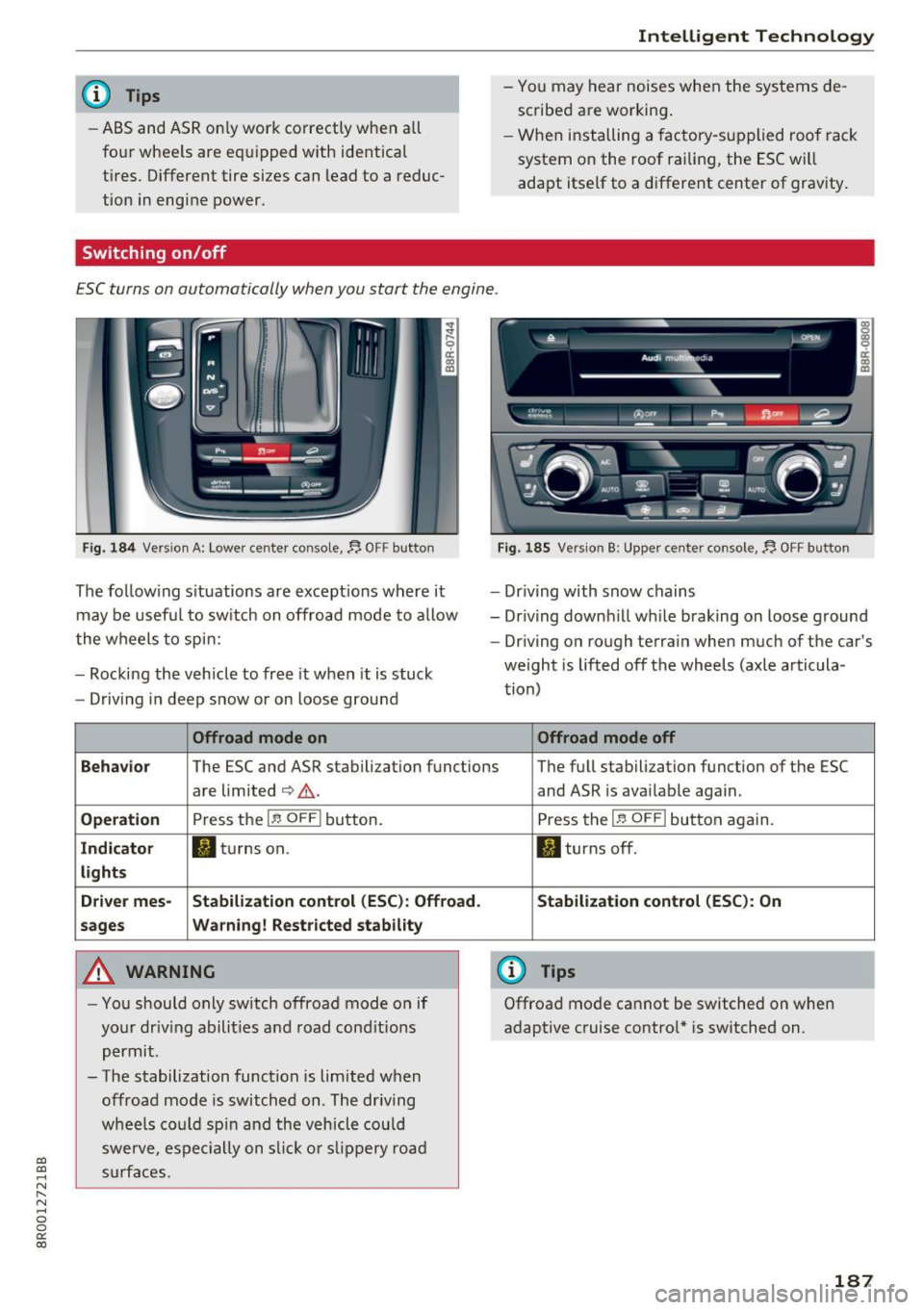
ESC turns on automatically when you start the engine.
Fig . 184 Versio n A: Lower cente r console,~ OFF button
The follow ing s ituations ar e except ions where i t
may be usef ul to sw itch on offroad mode to allow
the w heels to sp in:
- Rocking the vehicle to free it when it is stuck
- Driv ing i n deep snow or on loose ground
Offroad mode on
Fig. 185 Version B : Upper center console,~ OFF butto n
-Dr iv ing with snow chains
- Dr iv ing down hill while braking on loose g round
- Dr iving on rough terra in when much of t he car's
weight is lifted off the wheels (axle artic ula
t ion)
Offroad mode off
Behavior
The ESC and ASR stabilization functions The fu ll stabilization function of the ESC
are limited
¢ ,&. .
Operation Press the 1.$ OFF I button.
Indicator Ii) tu rns on.
lights
Driver mes- St abilization control (ESC ): Offroad.
sages Warning! Restricted stability
A WARNING
- Yo u should only sw itch offroad mode o n if
yo ur dr iv ing abilit ies a nd road cond it io ns
permit.
- The stabilization function is limited when
offroad mo de is switched on. The dr iving
w he els co uld s pin and the v eh icle cou ld
swe rve, es peci ally on s lick or slipp ery roa d
s ur fac es. and ASR
is ava ilable again.
P ress the
I!.! OFFI but ton again.
II turns off.
Stabilization control (ESC ): On
(D Tips
Offroad mode cannot be switched on whe n
adaptive c ruise contro l* is switched on.
187
Page 193 of 296
CD
CD
.... N ,-... N ..... 0 0 C<'. 00
-Before descending a steep grade , reduce
speed and shift transm iss ion into a lower
gear or lower driving range. Do not ride the
brakes or hold the pedal down too long or
too often . This could cause the brakes to get
hot and d iminish brak ing efficiency .
- Do not "r ide the brakes" by resting your foot
on the pedal when you do not intend to
bra ke. This may cause the bra kes to over
heat , premat ure wea r and increased stop
ping distance.
- Under certa in climat ic and operating condi
tions su ch as p assing thro ugh w ater, dr iving
in heavy ra in or after washing the vehicle,
the ef fectiveness of the brakes can be re
duced. In winter, ice can acc umulate on the
brake pads, linings, discs and drums . Care
fully apply b rakes for a test. Brakes wi ll dry
and ice coatings wi ll be cleaned off after a
few careful brake applications .
- Driv ing for an extended period of time on
salt-covered roads without using your
bra kes can also affect bra king efficiency .
Clean off accumulated sa lt coating from
bra ke discs and pads with a few caref ul
bra ke appl ic a tion s.
- If you damage the front spoiler, or if yo u in
sta ll a differen t spoi le r, be sure the air flow
to the front br akes is not o bstru cte d. O the r
wise the br ake system could over heat reduc
ing the e ffec tiveness of the entire brake sys
tem.
- Failure of one brake circuit will imp air the
brak ing capability resulting in an increased
stopping distance . Avoid driving the vehicle
and have it towed to the nearest a uthorized
Audi dealer or qualif ied workshop.
- Never let the vehicle roll to a stop with the
engine shut off .
- If the brake booster is not wor king, the
brake pedal m ust be pressed considerably
harder to make up for the lack of booster
assistance .
Intelligent Technology
Electromechanical power
assist, Dynamic steering
The electromechanical power assist helps the
driver when steering .
Power steering adap ts elec tronically based on
the vehicle speed .
Indicator lights and message s
• Steering defecti ve! Do not drive vehicle!
If this indi ca to r li ght tur ns on and st ays on and
t hi s message appea rs, the powe r steering may
have failed.
Stop t he vehi cle in a safe location as soon as pos
s ible. Do
not cont inue drivi ng. See yo ur author
ized Audi dea ler or o ther qualif ied repa ir facility
for assistance .
l;rij Dynamic steering : Sy stem fault! You can
continue driving
If the indicator light turns on and the message
appea rs , the steer ing may be more diffic ult to
move o r more sensitive than usu a l. Th e steering
m ay also be at an angle when dr iving st raig ht.
D rive slowly to your a uthorized Aud i dea le r or
qualified wo rksh op to have t he malfunct io n cor
rec ted .
'Iij Dynamic steering: Initializing
Aud i drive select* : if the indicato r light blinks and
the driver message appears, the dynamic steer
ing* is re init ia liz ed . After sta rting the engine , the
steering wheel will move slig htly . Re -initializa
t io n m ight be necessary if the steer ing whee l was
moved hard to t he left and r ight wh ile the veh icle
was not mov ing. The display turns off if the initi
aliza tion was successful.
(D Tips
- If the . or l~ij indicato r light only stays on
for a shor t time, you m ay cont inue drivi ng.
- The dynam ic stee ring* sta bility systems
r=;, page 186 are no t ava ilable in the event of
a system mal func tio n.
- For add itiona l information on dy namic
steering*
r=;, page 122 .
191
Page 198 of 296
Driving and th e en vironm ent
consumption by 10-15 percent. This section will
give you some tips on how you can help the envi
ronment and your pocketbook.
(D Tips
The consumption estimates as published by
ENVIRONMENTAL PROTECTION AGENCY
(EPA) and Transport Canada may not corre
spond to your actual consumption on the
road, which will vary depend ing upon vehicle
load and speed, road and weather conditions,
trip length, etc .
Drive smoothly and keep a lookout ahead
Vehicles use the most fuel when they are acceler
ating .
"'Avo id unnecessary accelerating and braking.
Vehicles use the most fuel when they are acceler
ating . If you anticipate what is going to happen
next, you will need to brake less and, thus, accel
erate less . Let the vehicle coast whenever possi
ble -for example when you see that the next traf
fic light is red .
Avoid full throttle
Driving a t moderate speeds saves fuel and im
proves your mileage .
"'Try and keep well below your car 's maximum
speed .
Accelerating gent ly reduces fuel consumption,
engine wear, and does not disturb the environ
ment.
Fue l cons umption, exhaust emissions and engine
noise increase d isproportionately at high speeds .
If you drive at approximately three q uarters of
top speed, fuel consumpt ion w ill be reduced by
one half. Never drive faster than the posted
speed limit and weather conditions permit.
196
· Reducing unnecessary idling
E ven when your car is just idling it burns up fuel .
"'Shut the engine off when you are not driving
the vehicle.
"' Do not warm up the vehicle by letting the en-
gine run at idle .
The idling phase is automatically reduced for
vehicles with the Start-Stop-System*. It is effi c ient to sw itch off the engine in vehicles without
the Start-Stop-System* when stopped at ra ilroad
cross ings and long red lights. Turning the engine
off fo r just 30-40 seconds saves more fuel than is
bur ned by s tarting the engine again .
It takes a long time for the engine to warm up
fully when it is runn ing at id le . However, wea r
and noxious emissions are especially high when
the engine is warming up . So yo u should dr ive
away as soon as you sta rt the eng ine and avo id
running at hig h rpms whi le the engine is st ill
warming up .
Q) Note
Do not leave eng ine idling una ttended after
starting. If warning lights shou ld come on to
indicate improper operation, they would go
unheeded. Extended idling also prod uces
heat, which could result in overheating or
other damage to the vehicle or other proper
ty .
· Regular maintenance
A badly tuned engine unnecessarily wastes a lot
of fuel .
"' Have your vehicle serviced at regular interva ls.
By having your vehicle regular ly serv iced by an
authorized Audi dea le r helps to ensure that it
r uns prope rly and economically . The condition of
your vehicle not on ly affects its safety and ability
to hold its value, it also affects
fuel consump
t ion .
Check your oil each time you fill your tank.
The amou nt o f oi l used is related to engine load
and speed. ..,
Page 200 of 296
Offroad dri ving
Offroad driving
Driving under difficult
conditions and off-road
General information
The operation of the Electronic Stabilization Con
trol (ESC) is expanded for operation away from
paved roads. In situations where slip or a differ
ential locking function is required, the offroad mode can be activated
<=> page 186. Your Audi al
so has permanent all-wheel drive in addition .
However, your Audi is not a pure offroad vehicle.
It was not built for driving under extreme condi
tions, e.g. for trips that are in the nature of an
expedition .
Drive only on roads and offroad sections which
match the design of your vehicle and your abili
ties as a driver. Never take risks!
Befo re driving offroad
-Check the eng ine oil level, tire pressure, coo l
ant level, and the fluid leve l in the windshield
washer reservoir.
- Stow luggage items and other objects in the
lu ggage compartment, and secure them
against sliding around.
After driving offroad
-After trips offroad, remove any twigs and other
foreign objects from the grill, the underbody
and the wheels. Pay specia l attention to foreign
objects (stones) which have become lodged in
the tire tread.
- Clean the body and the vehicle underside, and
inspect the vehicle for possible damage.
- Clean dirty windows, headlamp lenses, rear
lights, and license plates.
- Perform a brake check (particularly after travel
ling through water) .
A WARNING
- Drive especially attentive ly and plan ahead
in difficult road conditions and when off
road. Excessive speed or incorrect maneu
vers can cause in juries and damage to the
vehicle.
198
- Always adapt your speed and driving style to
road, offroad, traffic, and weather condi
tions. Drive especially slowly offroad when
your view is restricted.
- Please be aware that in offroad mode, par
ticularly on a smooth and slippery road, the
wheels may have an increased tendency to
spin and the vehicle may break away - dan
ger of skidding!
- Stability is limited in the offroad mode.
® For the sake of the environment
Avoid damage to the environment and re
spect nature.
(D Tips
Only drive where it is permitted and stay on
marked roads and paths.
Explanation of some technical terms
The following data refer to ideal conditions. De pending on vehicle load and ground conditions
and the env ironment, the numbers may vary. It is
the driver's responsibility to decide whether ave
hicle can overcome a specific s ituation
<=> .&. .
Gradient angle
The number of meters in alt itude gained over a
distance of 109.4 yards or 100 meters (grade)
are given as a percentage or degrees . Informa
tion about the gradient the vehicle can cl imb un
der its own power (depends in part on the road
surface and eng ine power). Maximum permitted
grade: 31
°
Ground clearance
The distance between the road surface and the lowest point of the vehicle underbody. Ground
clearance 7.9 in (200 mm)
.&, WARNING
Exceeding the stated maximum figures can
result in severe injuries or vehicle damage.
- All the information was gathered on level,
firm and non-slippery road surfaces, and un-
-
der dry weather conditions. ..,
Page 202 of 296
Trailer towing
Trailer towing
Driving with a trailer
General information
Your Audi was designed primarily for passenger
transportation.
If you plan to tow a trailer, please remember that
the additional load will affect durability, economy and performance.
Trailer towing not on ly places more stress on the
ve hicle, it also ca lls for more concentration from
the dr iver.
F or this reason, always follow the operating and
driving instructions provided and use common
sense.
Technical requirements
Trailer hitch
Use a weight-carrying hitch conforming to the
gross tra iler weight. The hitch must be suitab le
for your veh icle and tra iler and must be mounted
securely on the vehicle's chassis at a technically
sound
locat ion . Use on ly a trailer hitch with a re
movable ba ll mount . Always che ck with the t rail
er hitch man ufac tur er to make s ure t hat you are
using the co rrect hi tc h.
Do not use a bumper hitch.
The hitch must be installed in such a way that it
does not interfere with the impact -absorbing
bumper system. No mod ificat ions should be
made to the vehicle exhaust and b rake systems .
Fr om t ime to t ime, che ck that all hitch mo unti ng
bol ts rem ain securely f aste ned.
W hen you are not tow ing a tra iler, remove the
tra ile r hitc h ba ll mount . This prevents the hit ch
from caus ing damage s hou ld your veh icle be
s truck from be hind ¢
,&..
Trailer brakes
If you r trailer is equipped with a brak ing system,
check to be su re that it conforms to all regula
tions .
200
The t rai ler hydraulic bra ke system must not be
directly connected to the vehicle's hydraulic
bra ke system ¢&. .
Safety chains
Always use s afety chains be tween you r vehi cle
and t he tra ile r.
Trailer lights
Traile r lights must meet all regula tions . B e s ure
to check w ith your author ized Audi dealer for cor
r ec t wir ing, swi tches, an d relays.
Mirrors
If you are unable to see t he traffic behind you us
i ng t he regular outs ide mirrors, then yo u
must in
stall ex tended mirro rs . It is impo rtant that you
al ways have clear vision to the rear.
.&_ WARNING
- If a tra ile r has e lectr ical brake s ple ase no te
t h at these b ra kes are not activated by the
factory -fit ted contro l unit -risk of accident!
- After removing the traile r h itch, d o no t
s t o re it in your vehicle. In case of sud den
braking, the hitch co uld fly forwar d and in
jure you or yo ur passenge rs.
- Never install a "we igh t distribu tin g" or
"loa d eq ualizing" trailer hitch on your veh i
cle . The vehicle was not designed fo r these
kinds o f trailer hitches. The hitch attach
ment can fail, ca us ing the tra ile r to tear
loose from the vehicle .
- The Gross Vehicle Weight Rating for your
veh icle, found on the safety compliance la
be l on the driver's s ide B-pillar, must never
be exceeded under any circ umstances . Ex
ceed ing the Gross Vehicle We ight Rat ing of
your veh icle is likely to damage yo ur vehicle,
a nd such d amage will no t be covered by
your Limi ted New Vehicle W arra nty . Exceed
ing the Gross Ve hicl e We ight Rating will al
so change the pe rformance and han dling
characte ristics o f yo ur vehicle, which could
cause a crash result ing in se rious injury or
death.
Page 203 of 296
CD
CD
.... N ,-... N ..... 0 0 C<'. 00
Operating instructions
6" r-2
~·~
1/2"
1·1/2"
ill
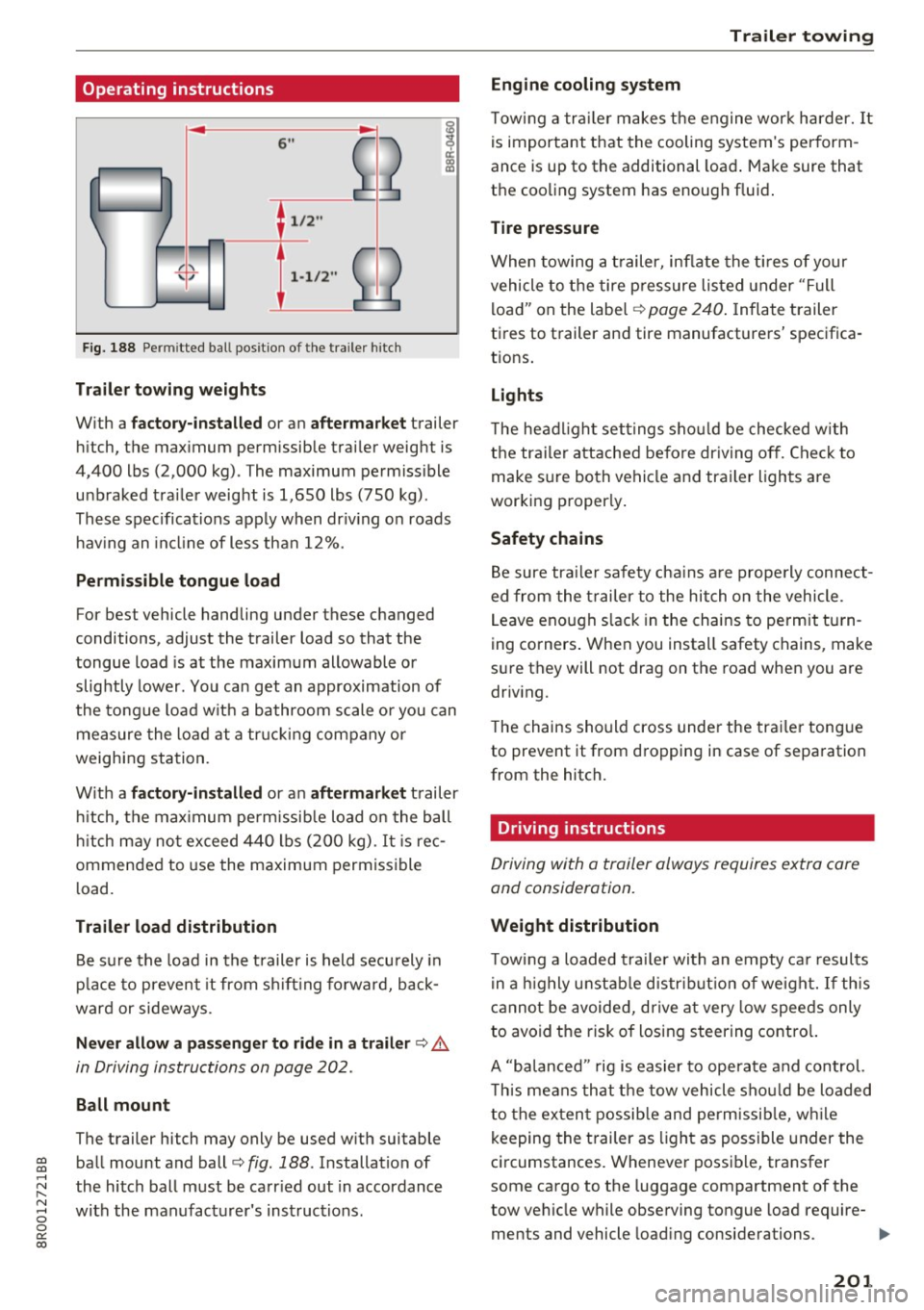
Fig. 188 Permi tted ba ll pos it io n of the trailer h itch
Trailer towing weights
With a
factory-installed or an aftermarket trailer
hitch, the maximum permissible trailer weight is
4,400 lbs (2,000 kg) . The maximum permissible
unbraked trailer weight is 1,650 lbs (750 kg).
These specifications apply when driving on roads having an incline of less than 12%.
Permissible tongue load
For best vehicle handling under these changed
conditions, adjust the trailer load so that the
tongue load is at the maximum allowable or
slightly lower. You can get an approximation of
the tongue load with a bathroom scale or you can
measure the load at a trucking company or
weighing station.
With a
factory-installed or an aftermarket trailer
hitch, the maximum permissible load on the ball
hitch may not exceed 440 lbs (200 kg) .
It is rec
ommended to use the maximum permissible
load.
Trailer load distribution Be sure the load in the trailer is held securely in
place to prevent it from shifting forward, back
ward or sideways.
Never allow a passenger to ride in a trailer ¢.&.
in Driving instructions on page 202.
Ball mount
The trailer hitch may only be used with suitable ball mount and ball¢
fig. 188 . Installation of
the hitch ball must be carried out in accordance
with the manufacturer's instructions .
Trailer towing
Engine cooling system
Towing a trailer makes the engine work harder. It
is important that the cooling system's perform
ance is up to the additional load. Make sure that
the cooling system has enough fluid.
Tire pressure
When towing a trailer, inflate the tires of your
vehicle to the tire pressure listed under "Full
load" on the label¢
page 240. Inflate trailer
tires to trailer and tire manufacturers' specifica
tions.
Lights
The headlight settings should be checked with
the trailer attached before driving off. Check to
make sure both vehicle and trailer lights are
working properly.
Safety chains
Be sure trailer safety chains are properly connect
ed from the trailer to the hitch on the vehicle .
Leave enough slack in the chains to permit turn
ing corners. When you install safety chains, make
sure they will not drag on the road when you are
driving.
The chains should cross under the trailer tongue
to prevent it from dropping in case of separation
from the hitch.
· Driving instructions
Driving with a trailer always requires extra care
and consideration.
Weight distribution
Towing a loaded trailer with an empty car results
in a highly unstable distribution of weight. If this
cannot be avoided, drive at very low speeds only
to avoid the risk of losing steering control.
A "balanced " rig is easier to operate and control.
This means that the tow vehicle should be loaded
to the extent possible and permissible, while
keeping the trailer as light as possible under the
circumstances. Whenever possible, transfer
some cargo to the luggage compartment of the
tow vehicle while observing tongue load require-
ments and vehicle loading considerations. .,.
201
Page 207 of 296
CD
CD
.... N ,-... N ..... 0 0 C<'. 00
wash operator to reduce the risk of accidents.
- To reduce the risk of cuts, protect yourself
from sharp metal components when wash
ing the underbody or the inside of the wheel
housings .
- After washing the vehicle, the brak ing effect
may be delayed due to mo isture on the
brake rotors or ice in the w inter . This in
creases the risk of an acc ident. The brakes
must be d ried fi rst w ith a few careful b rake
applications.
(D Note
- If you wash t he vehicle in an automatic car
wash, yo u m ust fold the exte rior m irrors in
to reduce the risk of damage. Power fo ld ing
exter ior mir ro rs* m ust only be folded in and
out using t he power folding fu nction .
- To reduce the risk of damage to the rims
a nd ti res, compare the width between the
whee ls on your vehi cle w it h the dis tance be
tween the guide rai ls in the car wash.
- To reduce t he risk of damage, compare the
height and width o f yo ur vehicle wi th the
Ca re and cleaning
height and w idth of the inside of the car
was h.
- T o red uce the risk of pa int damage, do not
was h the vehicle in d irect sun light .
- T o red uce the risk of d am age to the s urf ace,
do not use insect removing sponges, k itche n
sponges or similar items .
- Mat te finish painted veh icle components:
- To reduce the risk of damage to the sur-
face, do not use polishing agents or hard
wax .
- Never use protective wax. It can destroy
the matte finish effect .
- Do not place any stickers or magnetic
signs on vehicle parts painted with matte
finish paint . The paint cou ld be damaged
when the stickers or magne ts are re
moved .
@ For the sake of the environment
Only wash t he vehicle in facilities s pec ially de
s igned for that pu rpose . This will reduce the
r isk of dirty wate r contaminated with oil from
ente ring the sewe r sys tem.
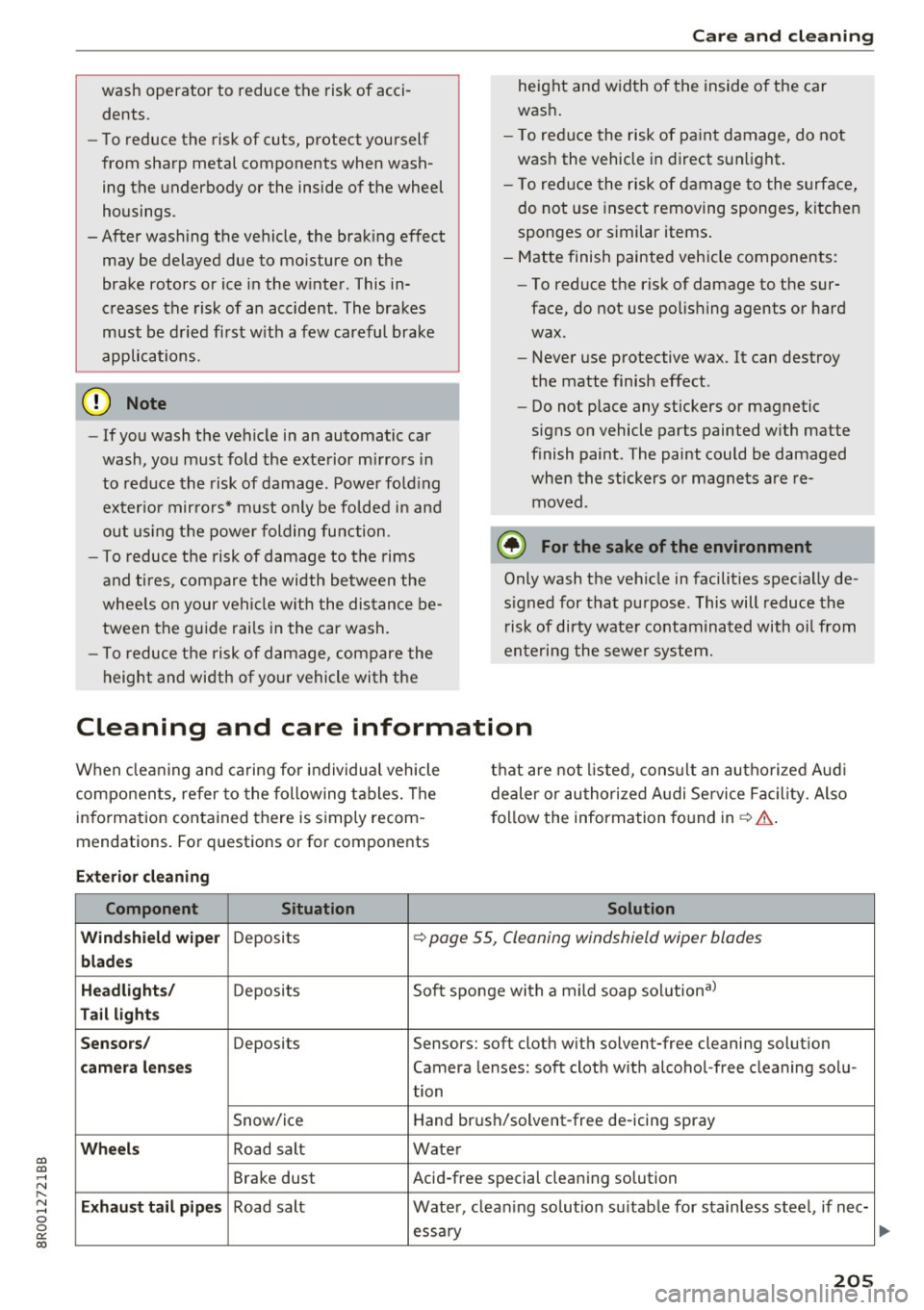
Cleaning and care information
When clea ning and caring for individua l vehicle
components, refer to the following tables. The
i nformation contained there is simply recom
mendations. For quest ions or for components t
h at are not listed, cons ult an autho rized Aud i
de aler or au thori zed Audi Se rvice Fac ility. Also
f o llow the information fo und in ~ .&. -
Exterior cleaning
Component Situation Solution
Windshield wiper
Deposits ~ page 55, Cleaning windshield wiper blades
blades
Headlights /
Deposits Soft spo nge with a m ild soap solution3>
Tail lights
Sensors /
Deposits Sensors: soft cloth wit h solvent-free cleaning solut ion
camera lens es Camera le nses: soft cloth w ith a lcohol -free cleaning solu-
tion
Snow/ice Hand br
ush/solvent-free de-icing spray
Wheels Road salt Water
Brake dust Acid-free special cleaning so
lution
E xhaust tail pipes Road salt Water, clean ing so lution su itab le for stainless stee l, if nee-
essary
205