rear view mirror AUDI Q5 2017 Owners Manual
[x] Cancel search | Manufacturer: AUDI, Model Year: 2017, Model line: Q5, Model: AUDI Q5 2017Pages: 296, PDF Size: 74.43 MB
Page 4 of 296
Table of contents
About this Owner's Manual. . . . . .
5
Operation . . . . . . . . . . . . . . . . . . . . . . . . 6
Cockpit . . . . . . . . . . . . . . . . . . . . . . . . . . . 6
General illustration . . . . . . . . . . . . . . . . . . 6
Instruments and indicator lights 8
Instruments . . . . . . . . . . . . . . . . . . . . . . . . 8
Indicator lights . . . . . . . . . . . . . . . . . . . . .
11
Driver information system . . . . . . 17
Introduction . . . . . . . . . . . . . . . . . . . . . . . . 17
On-board computer . . . . . . . . . . . . . . . . . . 19
Efficiency program . . . . . . . . . . . . . . . . . . . 22
On Board Diagnostic System (OBD) . . . . .
23
Electronic speed limiter. . . . . . . . . . . . . . . 23
Auto Check Control . . . . . . . . . . . . . . . . . . 24
Opening and closing . . . . . . . . . . . . . 33
Keys . . . . . . . . . . . . . . . . . . . . . . . . . . . . . .
33
Central locking . . . . . . . . . . . . . . . . . . . . . . 35
Opening and closing rear lid . . . . . . . . . . . 40
Automatic rear lid/trunk lid operation
41
Emergency unlocking of the lu ggage
compartment lid . . . . . . . . . . . . . . . . . . . . 42
Child safety lock . . . . . . . . . . . . . . . . . . . . . 42
Power windows . . . . . . . . . . . . . . . . . . . . . 43
Panorama roof . . . . . . . . . . . . . . . . . . . . . . 44
Garage door opener (Home link) . . . . . . . . 45
Lights and Vision . . . . . . . . . . . . . . . . . 49
Exterior lighting . . . . . . . . . . . . . . . . . . . . . 49
Interior lighti ng . . . . . . . . . . . . . . . . . . . . .
52
V1s1on . . . . . . . . . . . . . . . . . . . . . . . . . . . . . 53
Windshield wipers . . . . . . . . . . . . . . . . . . . 54
Mirror . . . . . . . . . . . . . . . . . . . . . . . . . . . . . 56
Digital compass . . . . . . . . . . . . . . . . . . . . .
58
Seats and storage ...... ... .. .. .. .
General informa tion .......... .... .. .
Fr ont seats . .. .... ........... .. .. .. .
Memory function ... ................ .
60
60
61
62
Rear seat . . . . . . . . . . . . . . . . . . . . . . . . . . 63
Head restraints . . . . . . . . . . . . . . . . . . . . . 64
Center armrest . . . . . . . . . . . . . . . . . . . . . . 65
Luggage compartment . . . . . . . . . . . . . . . 66
Roof rack . . . . . . . . . . . . . . . . . . . . . . . . . . 69
Beverage holders . . . . . . . . . . . . . . . . . . . .
71
2
Climatized cupholders . . . . . . . . . . . . . . . . 72
(upholders in the door pockets . . . . . . . . 73
Ashtray . . . . . . . . . . . . . . . . . . . . . . . . . . . . 73
Cigarette lighter/socket . . . . . . . . . . . . . . 73
Storing . . . . . . . . . . . . . . . . . . . . . . . . . . . . 74
Warm and cold . . . . . . . . . . . . . . . . . . . 77
Climate control system . . . . . . . . . . . . . . . 77
Dr1v1ng ..... .. .. .. .. ............... 81
Steering . . . . . . . . . . . . . . . . . . . . . . . . . . . 81
Ign ition lock . . . . . . . . . . . . . . . . . . . . . . . . 81
Convenience key . . . . . . . . . . . . . . . . . . . . . 84
Driver messages . . . . . . . . . . . . . . . . . . . . .
85
Electromechanical parking brake . . . . . . . 86
Start/Stop system . . . . . . . . . . . . . . . . . . . 88
Speed warning system . . . . . . . . . . . . . . . .
91
Cruise control system . . . . . . . . . . . . . . . . 92
Automatic transmission 94
Hybrid
............................ 100
Hybrid drive . . . . . . . . . . . . . . . . . . . . . . . . 100
Audi adaptive cruise control and
braking guard . . . . . . . . . . . . . . . . . . . .
109
Introduction . . . . . . . . . . . . . . . . . . . . . . . . 109
Genera l information . . . . . . . . . . . . . . . . . 109
Audi adaptive cruise control . . . . . . . . . . . 111
Audi braking guard . . . . . . . . . . . . . . . . . . 115
Messages . . . . . . . . . . . . . . . . . . . . . . . . . . 116
Audi side assist . . . . . . . . . . . . . . . . . . 118
S ide assist . . . . . . . . . . . . . . . . . . . . . . . . . 118
Audi drive select . . . . . . . . . . . . . . . . . 122
Drive settings . . . . . . . . . . . . . . . . . . . . . . . 122
Parking aid . . . . . . . . . . . . . . . . . . . . . . . 125
Parking system plus with rearview camera
Adjusting the display and warning tones
Trailer hitch ...... ... .............. .
Error messages 125
130
130
130
Safety . . . . . . . . . . . . . . . . . . . . . . . . . . . . 131
Driving safety . . . . . . . . . . . . . . . . . . . . 131
Basics . . . . . . . . . . . . . . . . . . . . . . . . . . . . . 131
Correct passenger seating positions . . . . . 132
Pedal area . . . . . . . . . . . . . . . . . . . . . . . . . . 135
Page 58 of 296
Lights and Vision
-To help prevent damage to the wiper sys
tem, a lways loosen blades which are frozen
to the windshie ld before operating w ipers .
- To help prevent damage to wiper blades, do
not use gasoline, kerose ne, paint thinner, or
other solvents on or near the wiper blades.
- To help prevent damage to the wiper arms
or other components, do not attempt to
move the wipers by hand.
@ Tips
- Comme rcial hot waxes applied by a utomat ic
car washes affect the how eas ily the glass
surface can be cleaned.
- You can also use the service position, fo r ex
ample, if you want to protect the windsh ield
from icing by using a cover.
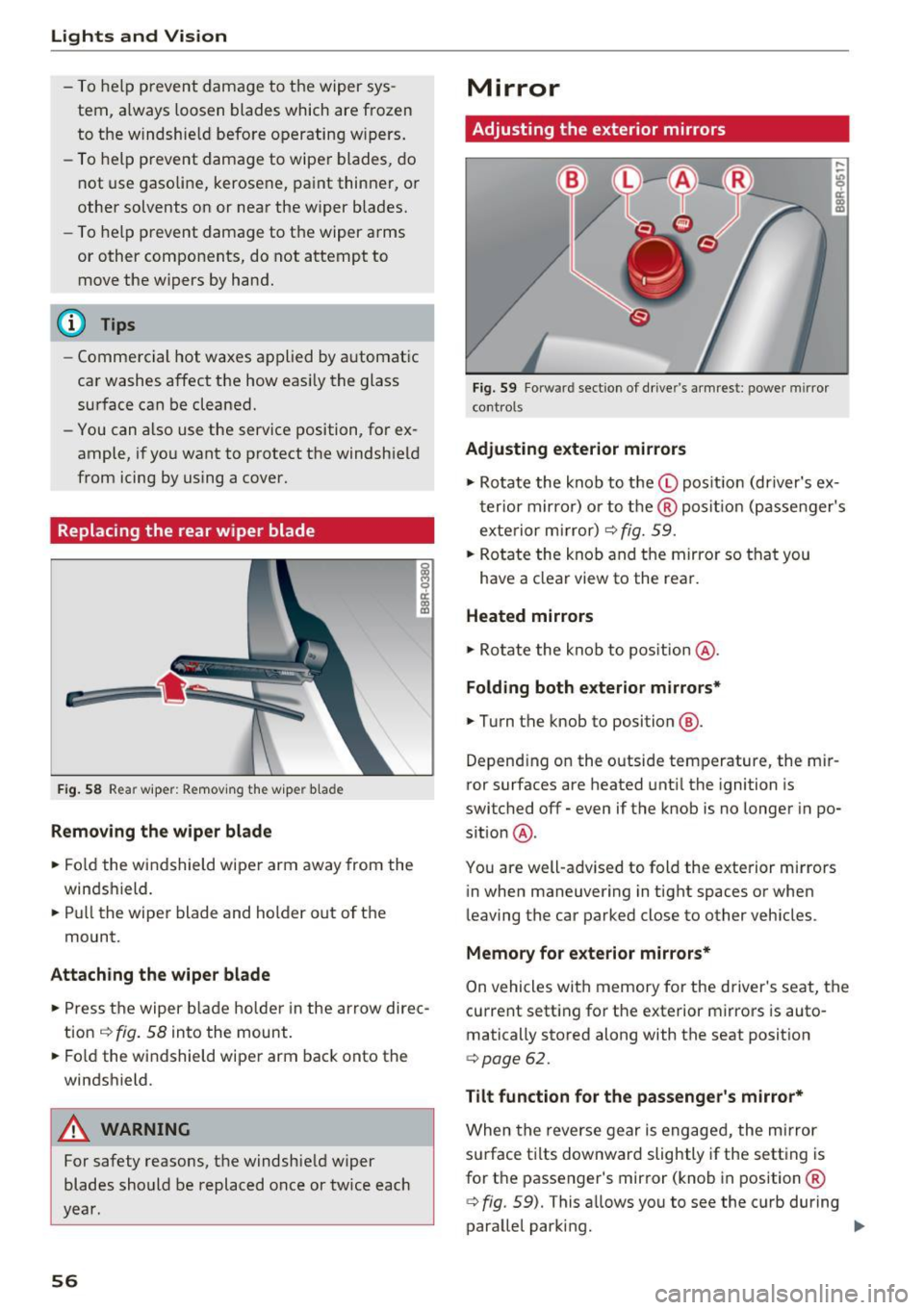
Replacing the rear wiper blade
F ig. 58 Rea r wiper: Remov ing the w iper b lade
Removing the wiper blade
.. Fo ld the wi ndshield wipe r arm away from the
windshield.
.. Pu ll the wiper blade and holder out of t he
mount.
Attaching the wiper blade
~ M 0 a: a, (C
.. Press t he wiper b la d e holde r in the arrow dire c
tion
c:> fig. 58 into the mount.
.. Fo ld the windshield wiper arm bac k onto the
windshield.
A WARNING
-
For safety reasons, the windshield w iper
blades sho uld be replaced once or twice each
year .
56
Mirror
Adjusting the exterior mirrors
Fig. 59 Forwa rd sect ion of dr ive r's armrest : power mirror
cont rols
Adjusting exterior mirrors
,...
-"' 9 a: ::,:
• Ro tate the knob to the© pos it io n (dr iver's ex
t erior mirro r) o r to t he ® posi tion (passe nger's
exterior m irror)
c:> fig. 59.
.. Rotate the knob and the mirro r so that you
have a clear view to the rea r.
Heated mirrors
.,. Ro tate the knob to pos ition @.
Folding both exterior mirrors*
.,. Turn the knob to position @.
Depend ing o n the outside temperature, the mi r
ror surfaces are heated unt il the ignition is
switched
off -even if the knob is no longer in po
s it ion @.
You are well-adv ised to fold the exte rior m irrors
in when maneuvering in tight spaces or when
leaving the car parked close to other vehicles .
Memory for e xterior mirrors*
On vehicles with memory for the driver's seat, the
current sett ing fo r the exterior mirrors is auto
matically stored along with the seat posit ion
<=> page 62.
Tilt function for the passenger 's mirror*
When the reverse gear is engaged, the mirror
s u rface t ilts downwar d slightly if the setting is
for t he passenger's mirror (knob in position ®
c:> fig. 59). This allows you to see the curb during
parallel parking. ..,_
Page 59 of 296
a,
a,
..... N r-N ..... 0 0
0:
co
The mirror returns to its initial position as soon
as reverse gear is dis e ngaged and vehicle speed is
above about 9 mph (15 km/h) . T he mirror also
returns to its ini tial posit ion if the switch is
moved to the driver's exter ior mirror © or the ig
n ition is switched off .
If the position of the m irror surface is changed
on a ti lted mirror , this new position will be auto
matically assigned to the remote key when the
vehicle is taken out of reverse gear .
(D Note
- Curved mirror surfaces (convex or spheri
cal") increase your field of v iew . Remember
that vehicles or other objects will appear
smaller and farther away than when seen in
a flat mirror . If you use th is m irror to esti
ma te distances of following vehicles when
changing lanes, yo u could estimate incor
rectly and cause an a ccident.
- If the mir ror housing is moved unin tention
ally (for example, wh ile pa rking yo ur vehi
cle), then you must first fold the m irror
electrica lly. Do not read just the mirror
hous ing manua lly. You could damage the
motor which contro ls the mirror.
- If you wash the vehicle in an automatic car
wash, yo u m ust fold the exterior m irrors in
to reduce the risk of damage to the mirrors. Never fold power folding exterior m irrors*
by hand . Only fold them in and out using
the power contro ls .
@ Tips
If there should be a ma lfunction in the e lec
trical system, you can still adjust the exterior m irro rs by p ressing the edge of the m irror .
Lights and V ision
Dimming the mirrors
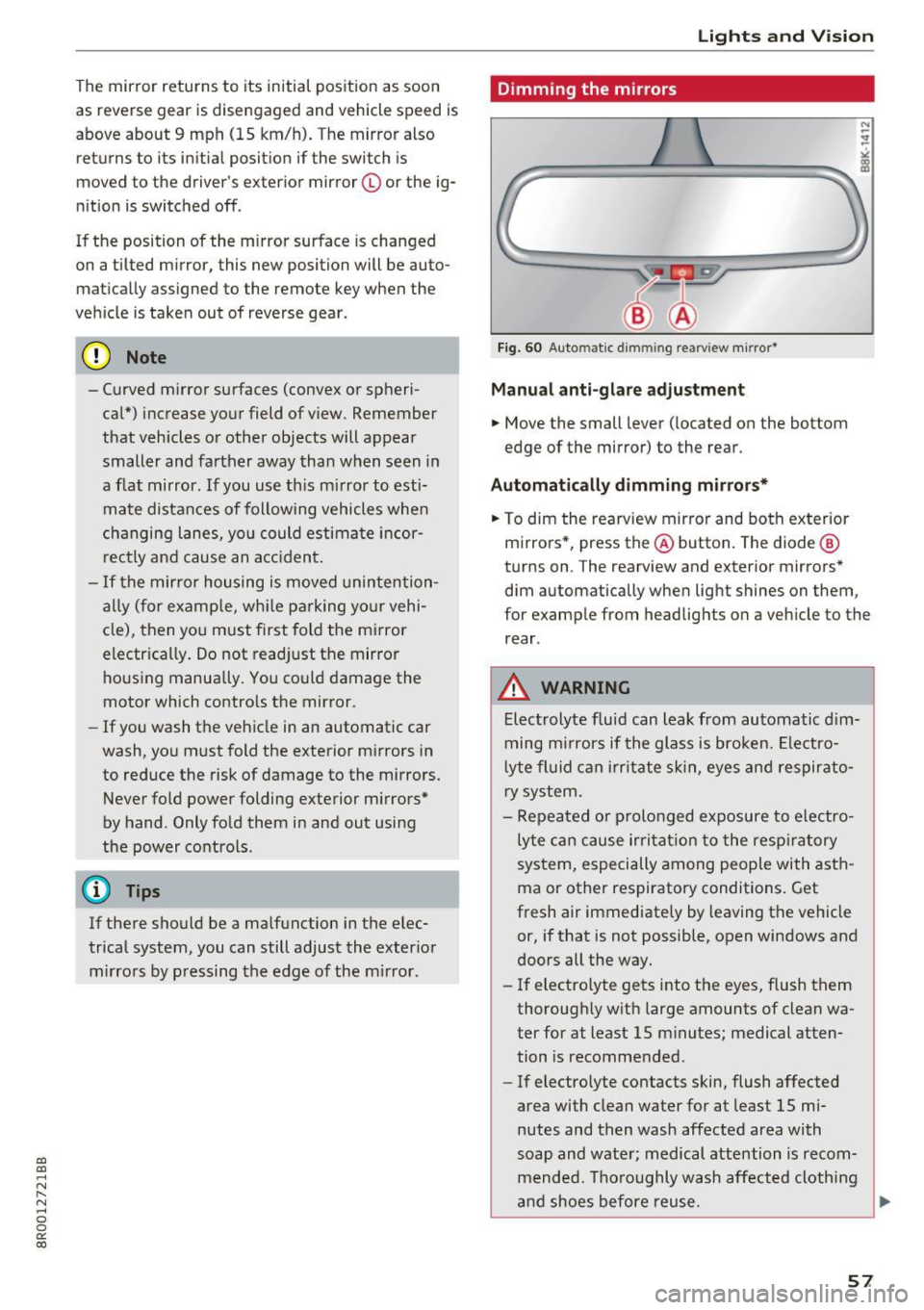
Fig. 60 Auto ma tic dimmin g rearvi ew m irror*
Manu al anti-glare adjustment
.. Move the small lever ( located on the bottom
edge of the mirror) to the rear .
Automat ically dimm ing mirro rs*
.. To dim the rearview mir ror and both exterior
m irrors *, press the@ button. The diode @
turns on . The rearv iew and exterior mirrors*
dim automatically when light shines on them ,
for example from headlights on a veh icle to the
rear .
_&. WARNING
-Electrolyte flu id can leak from automatic d im
ming m irrors if the glass is broken. Ele ctro
l yte fluid can i rr itate sk in, eyes and respirato
ry system .
- Repeated or p rolonged exposure to electro
ly te ca n cause irri tat ion to the resp iratory
system, especially among people with asth
ma or other respiratory conditions. Get
fresh air immediately by leaving the vehicle
or, if that is not possible, open windows and
doors all the way.
- If electro lyte gets into the eyes, flush them
thorough ly w ith large amounts of clean wa
ter for at least 15 m inutes; medical atten
tion is recomme nded .
- If electrolyte contacts skin, flush affected
area with clean water for at least 15 mi
nutes and then wash affected area with
soap and water; medical attention is recom mended. Thoroughly wash affected cloth ing
and shoes before reuse .
~
57
Page 60 of 296
Lights and Vision
-If swallowed and person is conscious, rinse
mouth with water for at least 15 minutes.
Do not induce vomiting unless instructed to
do so by medical professional. Get medical
attention immediately.
(D Note
Liquid electrolyte leaking from broken mirror
glass will damage any plastic surfaces it
comes in contact with . Clean up spilled elec
trolyte immediately with clean water and a
sponge.
{D) Tips
- Switching off the dimming function of the
inside rear view mirror also deactivates the
automatic dimming function of the exterior mirrors*.
- The automatic dimming mirrors do not dim
when the interior lighting is turned on or
the reverse gear is selected.
- Automatic dimming for the mirror only op
erates properly if the light striking the in
side mirror is not hindered by other objects.
Digital compass
Activating or deactivating the compass
Applies to: vehicles with digital compass
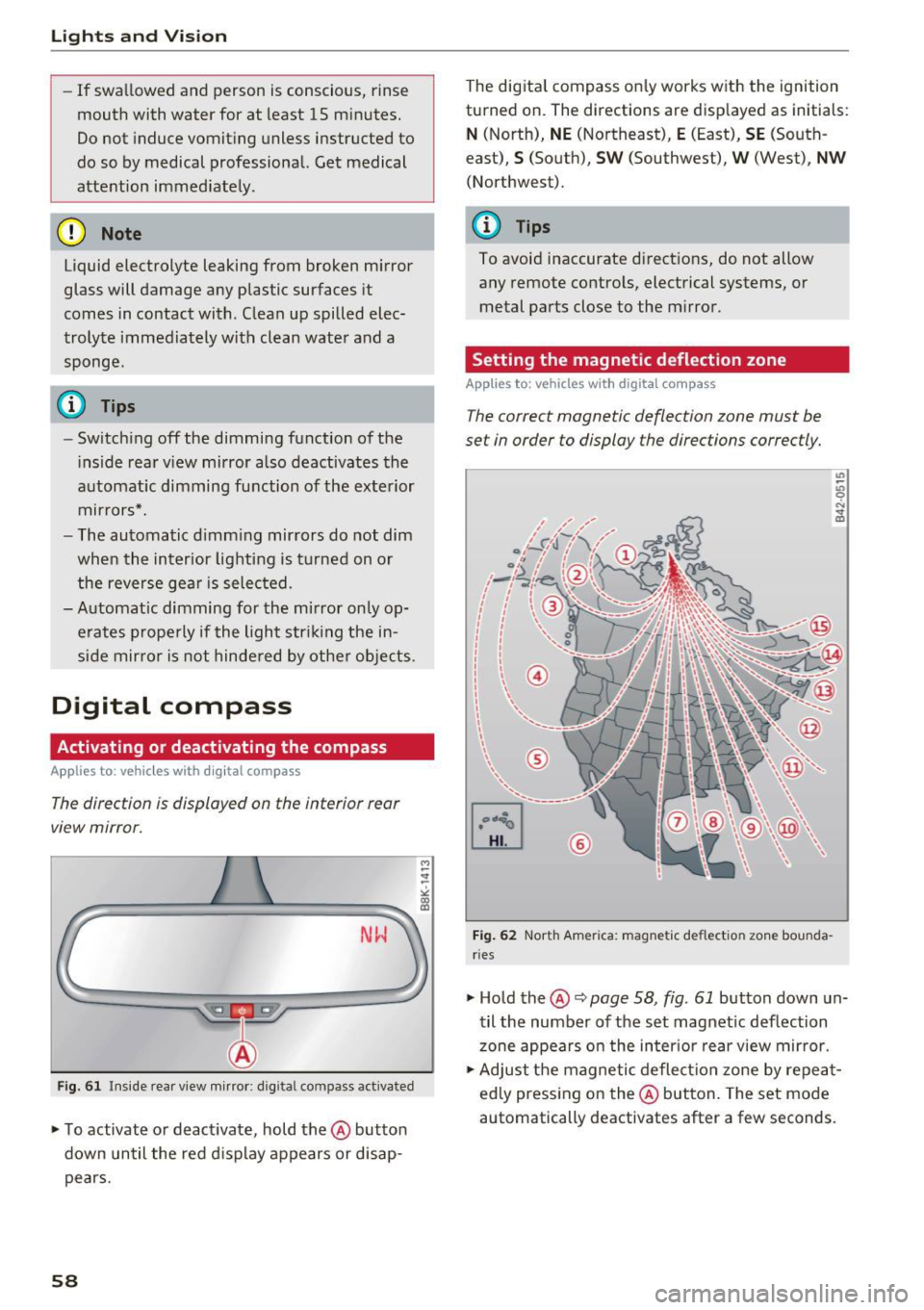
The direction is displayed on the interior rear
view mirror.
Fig. 61 Inside rea r view mirror: digi tal compass activated
~ To activate or deactivate, hold the @button
down until the red display appears or disap pears.
58
The digital compass only works with the ignition
turned on. The directions are displayed as initials:
N (North), NE (Northeast), E (East), SE (South
east),
S (South), SW (Southwest), W (West), NW
(Northwest).
(D Tips
To avoid inaccurate directions, do not allow any remote controls, electrical systems, or
metal parts close to the mirror.
Setting the magnetic deflection zone
Applies to : vehicles with digital compass
The correct magnetic deflection zone must be
set in order to display the directions correctly.
~
[mJ
®
Fig. 62 North America: magnetic deflection zone bounda
rie s
~ Hold the@c::> page 58, fig . 61 button down un
til the number of the set magnetic deflection
zone appears on the interior rear view mirror.
~ Adjust the magnetic deflection zone by repeat
edly pressing on the@button. The set mode
automatically deactivates after a few seconds.
Page 61 of 296
CD
CD
.... N ,-... N .... 0 0 C<'. 00
Calibrating the compass
Applies to: vehicles with digital compass
The compass has to be recalibrated if the display
is wrong or inaccurate .
.. Hold the@ button down until the letter C is
displayed on the interior rear view mirror .
.,. Drive in a circle at a speed of about 6 mph (10
km/h) until a d irection is shown on the interior
. . rear view mirror.
A WARNING
The digital compass is to be used as a direc
tional aid only. Even though you may want to
look at it whi le you are dr iving, you must sti ll
pay attention to traffic, road and weather
conditions as well as other possible hazards.
-
Lights and Vision
59
Page 64 of 296
Sea ts and stor age
Memory function
Memory for driver's seat
Applies to: vehicles with seat memory
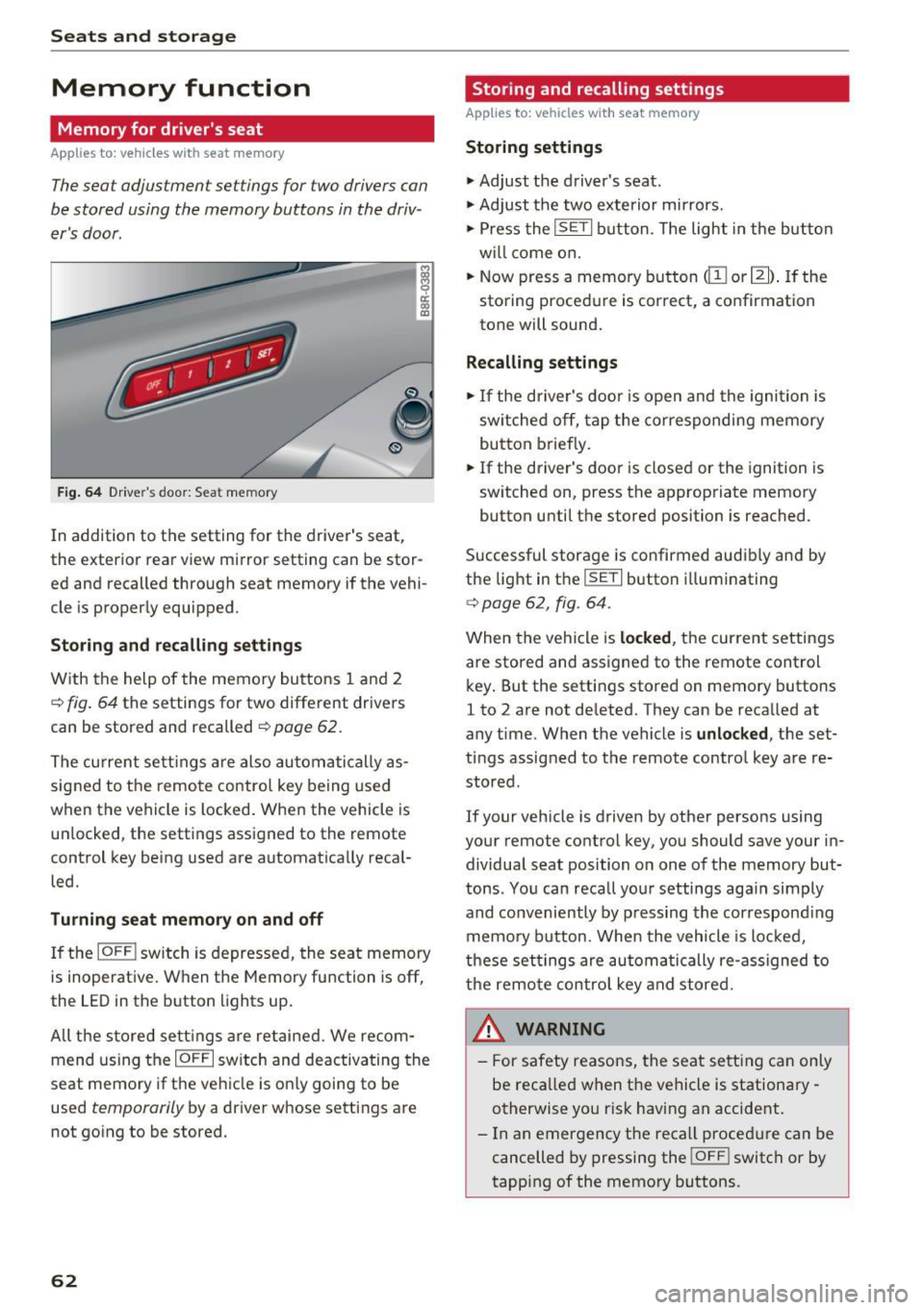
The seat adjustment settings for two drivers can
be stored using the memory buttons in the driv
e r's door.
F ig . 64 Dr ive r's doo r: Sea t memory
i ci: co a,
In addition to the setting for the drive r's seat,
the exterior rear view mirror setting can be stor ed and recalled through seat memory if the vehi
cle is properly equipped .
Storing and re calling s ettings
With the help of the memory buttons 1 and 2
c> fig . 64 the settings for two different drivers
can be stored and recalled
¢ page 62.
The cu rrent se ttings are also automatically as
signed to the remote contro l key being used
when the vehicle is locked . When the vehicle is
un locked , the settings assigned to the remote
control key being used are automatically recal
led.
Tu rnin g se at memo ry on and off
If the IO FFI switch is depressed, the seat memory
is inoperative. When the Memory function is off,
the LED in the button lights up.
All t he s tored se tt ings are retai ned. We recom
mend using the
I O FF I sw itch and deactivating the
seat memory if the vehicle is on ly going to be
used
temporarily by a driver whose settings are
not going to be stored.
62
Stor ing and recalling settings
Applies to: vehicles with seat memory
Storing settings
.,. Adjust the driver's seat .
.,. Adjust the two exterior mirrors.
.,. Press the
ISETI button . The light in the button
w ill come o n.
.,. Now press a memory button
dII or I]]) . If the
storing procedu re is correct, a confirmation
tone will sound.
Recalling settings
"' If the driver's door is open and the ignition is
sw itched off, tap the corresponding memory
button briefly .
.,. If the driver's door is closed or the ignition is
switched on, press the appropriate memory
button until the stored position is reached .
Successful storage is confirmed audib ly and by
the light in the
ISE TI button illuminating
c> page 62, fig. 64 .
When the vehicle is locked , the current settings
are stored and assigned to the remote control
key . But the settings stored on memory buttons
1 to 2 are not de leted. They can be recalled at
any time . When the vehicle is
unlocked , the set
tings assigned to the remote control key a re re
stored .
If your vehicle is driven by other persons using
your remote control key, you should save your in dividual seat position on one of the memory but
tons . You can recall your settings again simply
and conveniently by p ressing the correspond ing
memory button. When the vehicle is locked,
these settings are automatically re-ass igned to
the remo te contro l key and stored.
A WARNING
- For safety reasons, the seat sett ing can only
be reca lled when the vehicle is stationary
otherwise yo u ris k having an accident.
- In an emergency the reca ll proced ure can be
cancelled by pressing the
! OF F! switch or by
tapping of the memory buttons.
Page 120 of 296
Audi side assist
Audi side assist
Side assist
Description
Applies to: veh icles with Audi side assist
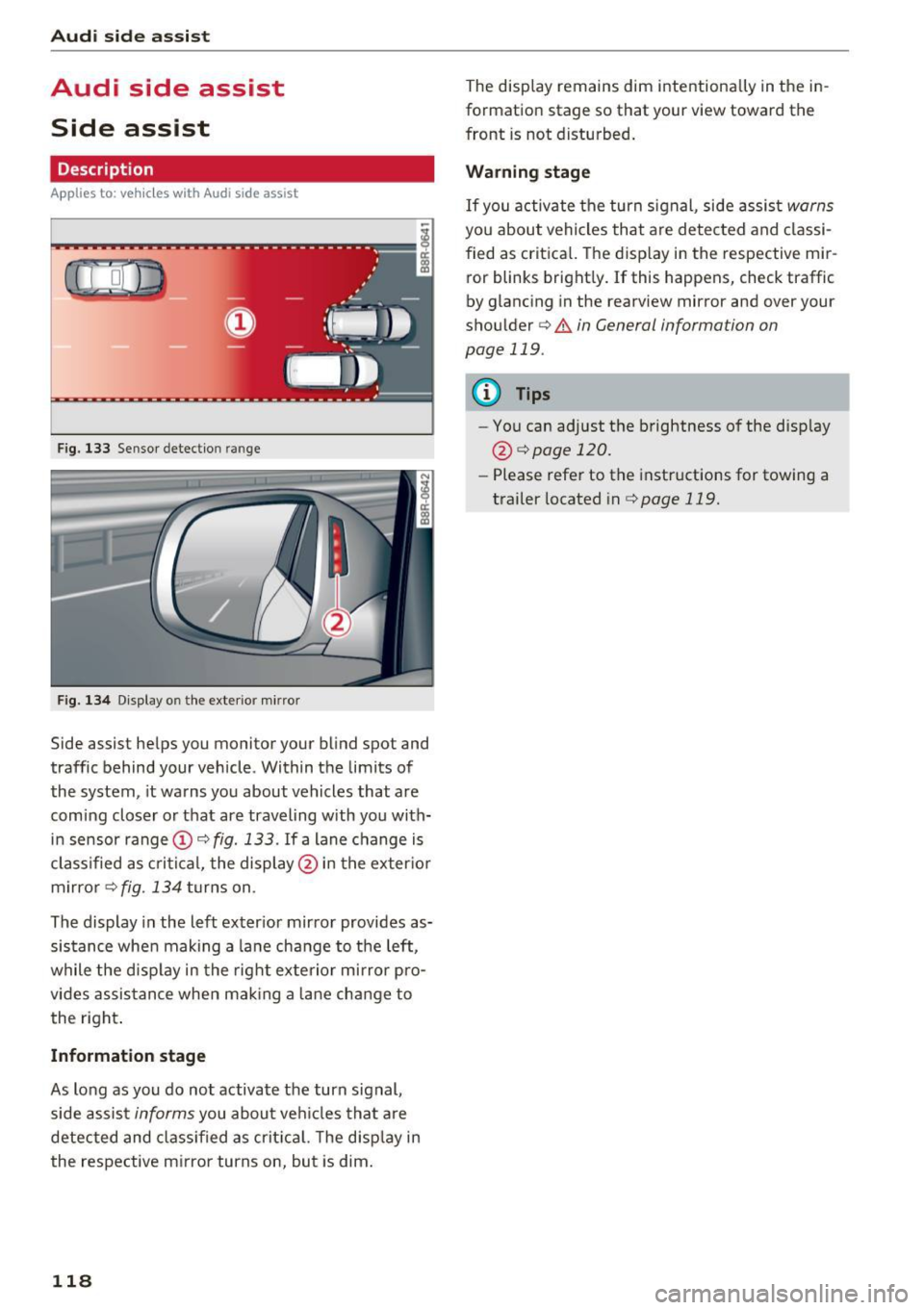
F ig. 133 Sensor detection range
Fig . 1 34 D isp lay on the exterio r m irror
Side assist helps you monitor your bl ind spot and
traffic behind your vehicle. Within the limits of
the system , it warns you about vehicles that are
comi ng closer o r that are traveling with you with
in sensor range
(D c:> fig. 133 . If a lane c hange is
cl assified as c ritic al, the displ ay @ in the exter io r
m irro r
c:> fig. 134 turns on .
The display in the left exter ior mir ro r provides as
sis tance whe n making a la ne change to the left,
while the disp lay in the rig ht exte rio r mi rror pro
vides assis tance when mak ing a lane chan ge to
the right .
Information stage
As long as you do no t activate the turn signal,
side assis t
informs you about ve hicles tha t are
detected and class if ied as crit ic al. T he disp lay in
the respe ctive m irror turns on, but is dim .
118
The display remains dim intentionally in the in
formation stage so that your view toward the
front is not disturbed .
Warning stage
If you activate the turn signal, side assis t warns
you about vehicles that are detected and classi
fied as crit ica l. T he disp lay in the respective mir
ror blinks bright ly.
If this happens, check traffic
by glancing in the rearview mirror and over your
shou lder
c:> .&. in General information on
page 119 .
{!) Tips
-You can adjust the brightness of the disp lay
@ i=>pagel20.
-Please refe r to the instructions for towing a
trailer located in
i=>page 119.
Page 122 of 296
Audi side assist
-Improper reliance on the side assist system
can cause collisions and serious personal in
jury:
- Never rely only on side assist when chang
ing lanes.
- Always check rear view mirrors to make
sure that it is safe to change lanes.
- Side assist cannot detect all vehicles under
all conditions -danger of accident!
- Please note that side assist indicates there
are approaching vehicles, or vehicles in your blind spot, only after your vehicle has
reached a driving speed of at least 19 mph
(30 km/h).
- In certain situations, the system may not
function or its function may be limited. For
example:
- if vehicles are approaching or being left
behind very quickly . The display may not
turn on in time .
- in poor weather conditions such as heavy
rain, snow or heavy mist .
- on very wide lanes, in tight curves or if
there is a rise in the road surface . Vehicles
in the adjacent lane may not be detected
because they are outside of the sensor
range.
(D Note
The sensors can be displaced by impacts or damage to the bumper, wheel housing and
underbody . This can affect the system . Have
your authorized Audi dealer or authorized
Audi Service Facility check their function.
(D Tips
-If the window glass in the driver's door or
front passenger's door has been tinted, the
display in the exterior mirror may be misin
terpreted.
- For Declaration of Compliance to United
States FCC and Industry Canada regulations
c::> page 2 79.
120
Activating and deactivating
Applies to : vehicles wit h Audi side ass ist
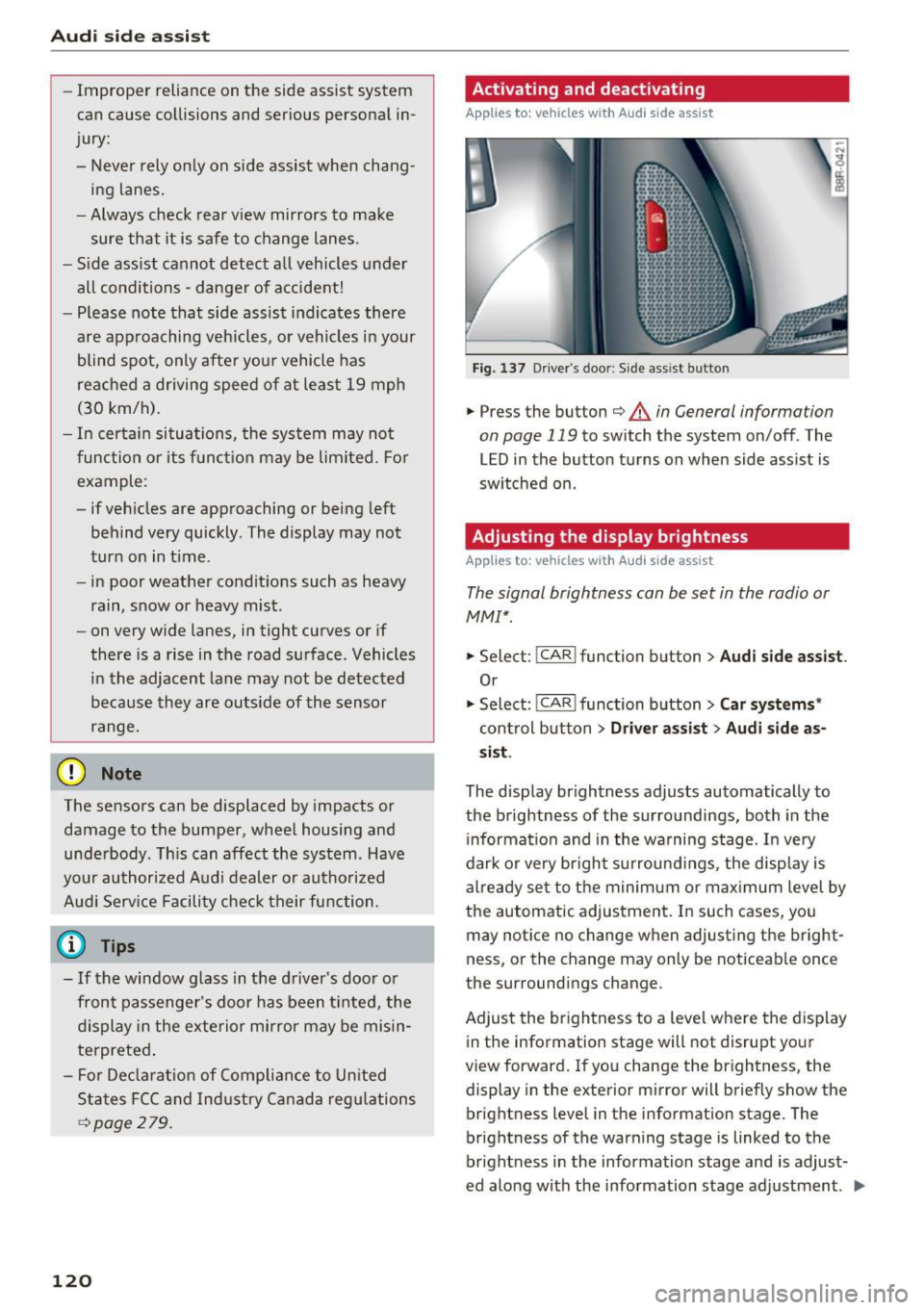
Fig. 137 D riv er's doo r: Side ass ist butto n
.,.. Press the button c::> &. in General information
on page 119
to switch the system on/off . The
LED in the button turns on when side assist is
switched on .
Adjusting the display brightness
Applies to: vehicles wit h Aud i side ass ist
The signal brightness can be set in the radio or
MMI* .
.,.. Select: I CAR I function button > Audi side assist.
Or
.,.. Select: I CAR I function button > Car systems*
control button > Driver assist> Audi side as
sist.
The display brightness adjusts automatically to
the brightness of the surroundings, both in the
information and in the warning stage. In very
dark or very bright surroundings, the display is
already set to the minimum or maximum level by
the automatic adjustment. In such cases, you may notice no change when adjusting the bright
ness, or the change may only be noticeable once
the surroundings change.
Adjust the brightness to a level where the display
in the information stage will not disrupt your
view forward. If you change the brightness, the
display in the exterior mirror will briefly show the
brightness level in the information stage . The
brightness of the warning stage is linked to the
brightness in the information stage and is adjust
ed along with the information stage adjustment . .,,.
Page 128 of 296
Parking aid
Rearview cam era cov erage area
The MM I display shows the area covered by the
rearview camera
c:> fig . 142 @. Objects that a re
not in the area covered @are not shown on the
MMI disp lay.
We recommend th at yo u pract ice pa rking with
the rearview camera in a traffic-free location or
parking lot to become familiar with the system,
the orientation lines, and their function . When
doing this, there should be good light and weath
er cond itions .
I n the MMI disp lay, objects or vehicles appear
closer or further away if :
- yo u are driving in reverse ge ar from a level su r
f ace onto an incl ine, or a downward s lope,
- yo u are d rivi ng in reverse gea r toward protr ud
ing obje cts,
- the ve hicl e is ca rry ing too much load in the
rear.
The accuracy of the orientation lines and b lue
surfaces d imin ishes if:
- the rearv iew camera does not provide a reliab le
image, for example, in poor visibility cond itions
or if the lens is d irty,
- the image on the screen is not visib le due to
sun glare and reflection .
Caring for the rearview camer a lens
The rearview camera is located above the rear li
cense plate bracket. For the parking system to
operate, the lens
c:> fig. 143 must be kept clean:
- Dampen the lens with a househo ld alcoho l-
based glass cleaner, and then wipe the lens
clean with a dry cloth
i::> (!).
-Remove snow with a hand br ush and ice pref
erab ly with a de -icing spray
i::> (!) .
A WARNING
-The parking system ca nnot replace the dr iv
er's attention . The dr iver alone is responsi
ble for parking a nd s imilar dr iv ing mane u
vers.
- Sensors have blind spots in wh ich objects
cannot be detected . Pay spec ial atten tion to
126
sma ll children and anima ls because the sen
sors cannot a lways detect them.
- Always keep your eyes on the vehicle's sur
roundings, us ing the rearv iew mirror as
wel l.
- Do not allow yourself to be dist racted from
traffic by the rearview camera pictures.
- If the position and the installation angle of
the camera has changed, for example, after
a rea r end co llision, do not continue to use
the system for safety reasons. Have it
checked by a q ualified dealership .
(D Note
-Low obstacles a lready signa led by a warning
can disappear from the system's detect ion
range as they are approached and w ill not
cont inue to be signaled . Objects such as
barrier cha ins, tra iler draw bars, t hin paint
ed vertical po les or fences may not be de
tecte d by the system, posi ng ris k of dam
age.
- Never use wa rm o r hot wate r to remove
s now or ice from the rearview came ra le ns ·
this could cause the lens to c rack!
- Whe n cleani ng the lens, never use products
tha t are abr asive .
Page 130 of 296
Parking aid
Reverse Parking
Applies to: vehicles w ith Aud i park ing system p lus w ith rear
view c amera
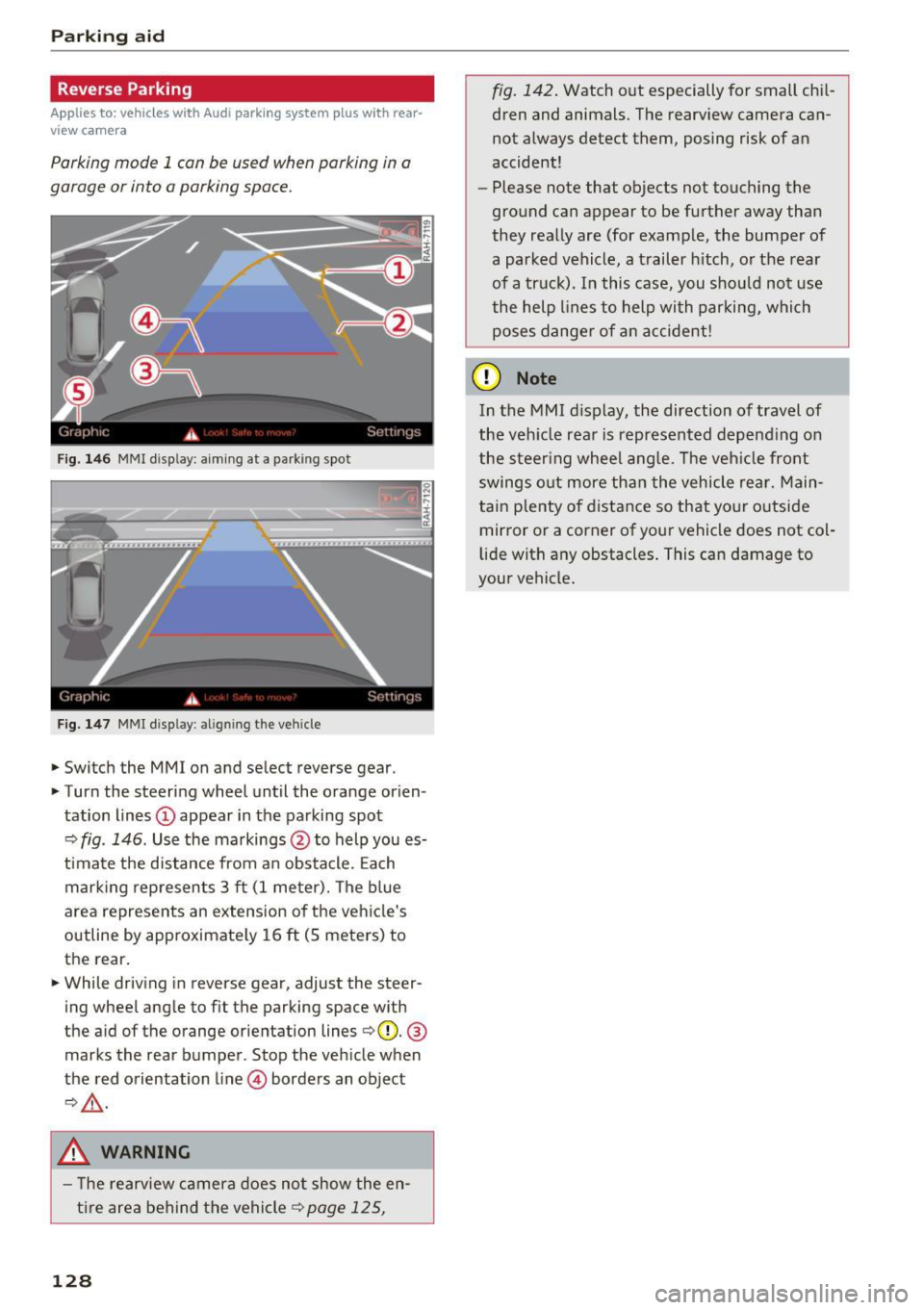
Parking mode 1 con be used when parking in a
garage or into a parking space.
Fig. 146 MMI disp lay: a iming at a parking spot
Fig. 147 MMI disp lay: align ing the vehicle
.,. Switch the MMI on and se lect reverse gear .
.,. Turn the steering wheel until the orange orien
tation lines
(D appear in the parking spot
¢ fig . 146. Use the markings @to help you es
timate the distance from an obstacle. Each
marking represents 3 ft (1 meter). The blue
area represents an extension of the vehicle's
outline by approximately 16
ft (S meters) to
the rear .
.,. While driving in reverse gear, adjust the steer
ing wheel angle to fit the parking space with
the a id of the orange orientation lines ¢(D.
®
marks the rear bumper . Stop the vehicle when
the red orientation line© borders an object
¢,&. .
.&_ WARNING
- The rearview camera does not show the en
tire area behind the vehicle¢
page 125,
128
fig. 142. Watch out especially for small chil
dren and animals. The rearview camera can
not always detect them, posing risk of an
accident!
- Please note that objects not touching the
ground can appear to be further away than
they really are (for example, the bumper of
a parked vehicle, a trailer hitch, or the rear
of a truck). In this case, you should not use
the help lines to help with parking, which
poses danger of an accident!
(D Note
In the MMI display, the direction of travel of
the vehicle rear is represented depending on
the steering wheel angle. The vehicle front
swings out more than the vehicle rear. Main
tain plenty of distance so that your outside
mirror or a corner of your vehicle does not col
lid e with any obstacles. This can damage to
your vehicle.