warning AUDI Q5 2018 Owners Manual
[x] Cancel search | Manufacturer: AUDI, Model Year: 2018, Model line: Q5, Model: AUDI Q5 2018Pages: 392, PDF Size: 60.56 MB
Page 135 of 392
u co ..... N r-N .....
~ 0 co
Rearview camera
Introduction
Applies to: vehicles with rearv iew camera
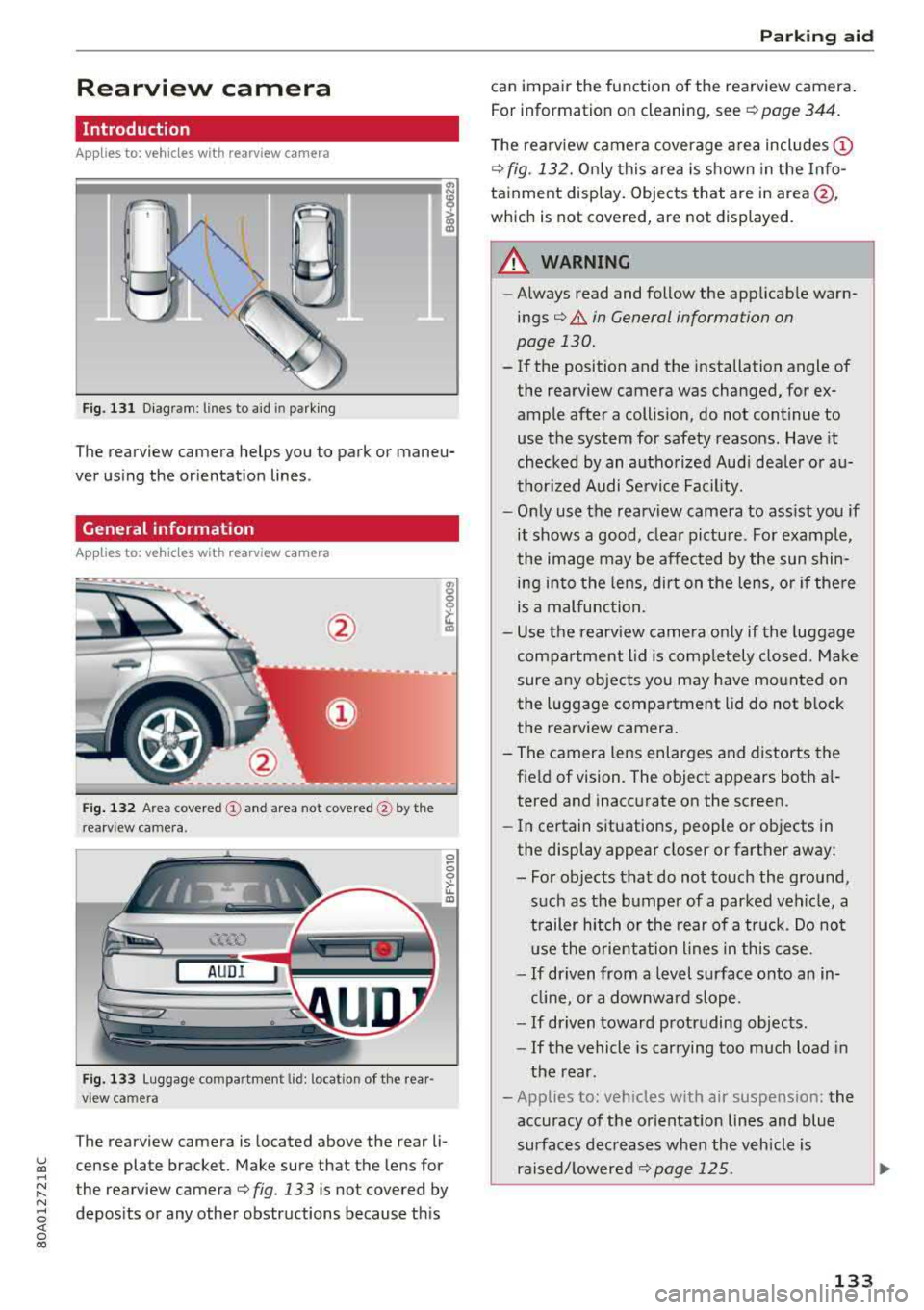
Fig. 131 Diagram: lines to aid in parking
The rearview camera helps you to park or maneu
ver us ing the orientation lines .
General information
Applies to: veh icles wit h rearv iew camera
Fig . 13 2 Area covered (y and area not covered @by th e
rearv iew camera .
AUDI
Fig. 1 33 Luggage compartment lid: locat io n of the rear
view camera
The rearview camera is located above the rear li
cense plate bracket. Make sure that the lens for
the rearview
camera¢ fig. 133 is not covered by
depos its or any other obstructions because th is
P ark ing aid
can impair the function of the rearview camera .
For information on cleaning, see
¢ page 344.
T he rearview camera coverage area includes (D
¢fig. 132. On ly this area is s hown in the Info
tainment display. Objects that are in
area@,
which is not covered, are not displayed.
A WARNING
-
-Always read and follow the applicab le warn-
ings¢ &. in General information on
page 130.
-If the position and the installation angle of
the rearview camera was changed, for ex
ample after a collision, do not continue to
use the system for safety reasons. Have it
checked by an autho rize d Aud i dea le r or a u
thor ized A udi Se rvice Fac ility.
-O nly use the rearv iew camera to ass ist you if
it shows a good, clea r pictu re . For example,
the image may be affected by the sun shin i n g into the lens, dirt on the lens, o r if the re
is a malfunction.
-U se the rearv iew came ra o nly if the luggage
compa rtment lid is comp letely closed. Make
sure any objects you may have mo unted on
the l uggage compartment lid do not block
the rea rview camera .
- The camera lens enlarges and distorts the field of vision. The object appears both a l
tered and inaccurate on the screen.
- In ce rtain situations, people o r objects in
the display appear closer or farther away :
- Fo r o bjects tha t do not touch the ground,
such as the bumper of a parked veh icle, a
trailer hitch o r the rear of a truck . Do no t
u se the orie nta tion l ines in th is case.
- If driven from a level surface onto an in
cl in e, or a downwar d slope.
- If driven toward protruding objec ts.
- If the vehicle is car rying too much load in
the rear .
- Applies to: veh icles w ith air suspens ion: the
accuracy of the or ientat ion lines and blue
surfaces dec reases whe n the vehicle is
raised/ lowere d¢
page 125.
133
Page 137 of 392
u co ..... N r-N .....
~ 0 co
~ Now you can position your vehicle in front of
the trailer ¢
A in General information on
page 135,
¢ (Din General information on
page 135.
The orange orientation line indi
cates the expected path toward the trailer
hitch . Use the blue lines to help you estimate
the d ista nce to the trailer h itch.
Peripheral cameras
Introduction
Applies to: vehicles with peripheral cameras
With this equipment, the parking system plus*
¢
page 131 is supplemented w ith various periph
eral cameras. The four cameras give you the fol
lowing views : area around the vehicle, front cor
ner v iew and rear corner v iew, view in front of the
veh icle and beh ind the veh icle .
General information
App lies to: veh icles with peripheral cameras
i
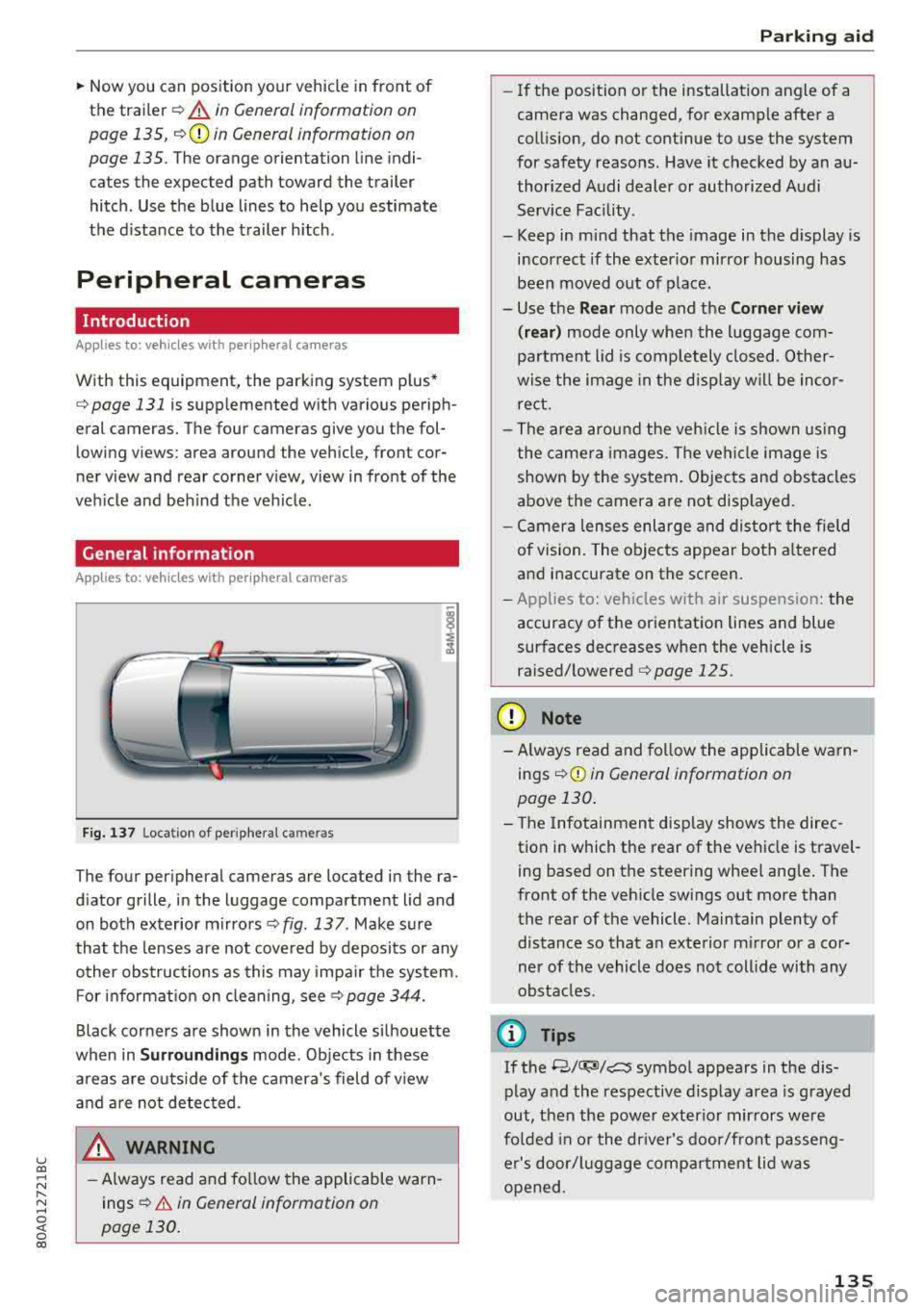
Fig. 137 Locat ion of periphera l ca mera s
The four per ipheral cameras are located in the ra
d iator grille, in the luggage compartment lid and
on both exterior mirrors ¢
fig. 13 7 . Make sure
that the lenses are not covered by deposits or any
other obstructions as this may impa ir the system.
F or info rmat io n on cleaning, see
c::> page 344.
Black corners are shown in the vehicle si lhouette
when in
Surroundings mode. Objects in these
a reas a re outside of the camera 's field of v iew
and a re not detec ted .
_& WARNING
-Always read and follow the applicable warn
ings ¢
A in General information on
page 130.
P ark ing aid
- If the position or the installation angle of a
camera was changed, for example after a
coll is ion, do not cont inue to use the system
for safety reasons. Have it checked by a n au
thorized A udi dealer or authorized Audi
Serv ice Facility.
- Keep in mind that the image in the display is
i n correct if the exterior mirror housing has
been
moved out of p la ce.
- Use the
Rear mode and the Corner view
( rear )
mode only when the luggage com
pa rtment lid is comp letely closed. Other
wise the image in the disp lay w ill be inco r
re ct.
- The area around the veh icle is shown using
the camera images. The vehi cle image is
shown by the system. Objects and obs tacles
above the camera are not disp layed .
- Ca mera lenses enl arge and distort the field
of vision. The o bjects appear both a ltered
a nd inaccurate on the screen.
- Applies to: vehicle s with air suspension: the
accuracy of the orientation lines and blue
surfaces dec reases whe n the vehicle is
raised/lowered <=>
page 125.
(D Note
-Always read and fo llow the applicable wa rn
ings
c::> (D in General information on
page 130 .
- The Info tainmen t display shows the direc
tion i n which the rear of the vehicle is travel
ing based on t he steering wheel ang le . The
front of the veh icle swings out mo re than
the rear of the vehicle. Maintain plenty of
distance so that a n exterior m irror or a cor
ner of the vehicle does not coll ide with any
obstacles.
(0 Tips
If the 8/0";JJ/c:5 symbo l appears in the d is
play a nd the res pect ive d isplay area is grayed
out, then the power exter ior mir rors we re
fo lded in or the dr iver's door/front passeng
e r's door/luggage comp artme nt lid w as
opened .
135
Page 141 of 392
u co ..... N ,..._
N ..... 0 <( 0 00
Drive to an authorized Audi dealer or authorized
Audi Service Facility immediately to have the
malfunct ion corrected.
Trailer hitch
Applies to: vehicles with a rear parking system/parking sys
tem plus/ rearv iew camera/peripheral cameras and trailer
hitc h
When the tra iler socket is in use, the parking sys
tem rear sensors are not activated when you shift into reverse gear or when you press the
Pw~ but
ton. This results i n the following restrictions.
Rear parking system*
There is no distance warning.
Parking system plus*
There is no distance warning for the rear. The
front sensors remain activated . The visual display
switches to trai ler mode.
Rearview camera* /peripheral cameras*
There is no distance warning for the rear. The
front sensors remain activated. The visual display
switches to trai ler mode. The rearview camera
image will not show the orientation lines and the
b lue surfaces.
@ Tips
Trailer hitches that are not installed at the
factory may cause the parking system to ma l
function or they may restrict its function.
Parking aid
139
Page 142 of 392
Intelligent Technology
Intelligent Technology Electronic Stabilization
Control (ESC)
Description
Electronic Stabilization Control (ESC) supports
driver safety. It reduces the risk of slipping and improves driving stability. ESC detects critica l sit
uations such as when the vehicle is oversteering
and understeering or the wheels are spinning.
The vehicle is stabilized by applying the brakes or
reducing eng ine torque. When the ESC engages,
the
D.1 ind icator light blinks in the instrument
cluste r.
The follow ing systems are integrated in the ESC:
Anti-lock braking system (ABS)
ABS prevents the wheels from locking when brak
ing. The vehicle can still be steered even during
hard braking. Apply steady pressure to the brake
pedal. Do not pump the pedal. A pulsing in the
brake pedal indicates that the system is acting to
stabilize the vehicle .
Brake assist system
The brake assist system can decrease braking dis
tance. It increases braking power when the driver
presses the brake pedal quickly in emergency sit
uations . You must press and hold the brake pedal
until the dangerous situat ion is over . In veh icles
with adapt ive c ruise control*, the brake assist
system is more sensitive if the distance detected
t o the vehicle dr iv ing ahead is too small.
Anti-Slip Regulation (ASR)
ASR reduces engine power when the drive wheels
beg in sp inning and adapts the force to the road
conditions . This makes it easie r to start, acceler
ate and dr ive up hill s.
Electronic Differential Lock (EDL)
EDL applies the brakes to a wheel that starts
spinning and transfers the drive power to the
other driving wheels. This funct ion is not availa
b le at higher speeds.
140
In extreme cases, EDL automatica lly switches off
to keep the brake on the braked whee l from over
heating. The vehicle is still working correctly. ED L
will switch on again automatically when condi
tions have returned to normal.
Power steering
The ESC can also support vehicle stability
through steering .
Selective wheel torque control
Selective wheel torque control is used when driv
in g on curves. Brak ing is targeted toward the
whee ls on the inside of the curve as needed. This
a llows more precise driving in curves.
Automatic post-collision braking system
The "automatic post-collis io n braking system"
can help to reduce the risk of sl iding and of addi
tional collisions after an accident. If the airbag
contro l modu le detects a collision, the vehicle is
braked by the ESC.
The vehicle does not brake automatically if:
-the driver presses the accelerator pedal, or
-the ESC, the brake system or the veh icle electri-
cal system are not functioning.
A WARNING
-The ESC and its integrated systems cannot
overcome the lim its imposed by natura l
p hys ical laws. Th is is espec ially impo rtant
on slippery or wet roads. If the systems be
gin acting to stabilize your vehicle, you
should immediately alter your speed to
match the road and traffic conditions. Do
not let the increased safety provided tempt
you into taking risks. This could increase
your r isk of a coll is ion.
-Please note the risk of a collision increases
when dr iv ing fast, especially through curves
and on slippery or wet roads, and when dr iv
ing too close to objects ahead . The ESC and
its integrated systems cannot always pre
ve nt co llisions
-there is still a risk of acci
dents!
Page 143 of 392
u co ..... N r--N ..... 0 <( 0 00
-Press t he acce lerato r pedal ca refully whe n
acce le ratin g on smooth , sli ppery sur faces
s u ch as ice and snow. The dr ive whee ls can
spin even w hen th ese con trol systems are
ins tall ed a nd th is can a ffect drivi ng s tabili ty
a nd incr ease the r is k of a coll is io n.
(D Tips
- The ABS and ASR only function co rrectly
whe n all fo ur whee ls have a s imilar wear
Switching on and off
Intelligent Technology
c ondi tion . Diff erent tir e si zes can lea d to a
re duction in eng ine power.
- You may hear n oises when t he systems de
sc ribe d are wor king.
- Applies to: vehicles with roof racks supplied
by the factory: when in st alli ng the roof rac k
s upplie d by t he factory on t he roof rail, se n
so r tec hno logy is use d to adjust the ESC to
any poss ible c hange in t he ve hicle's cente r
of grav ity resu lting from the load.
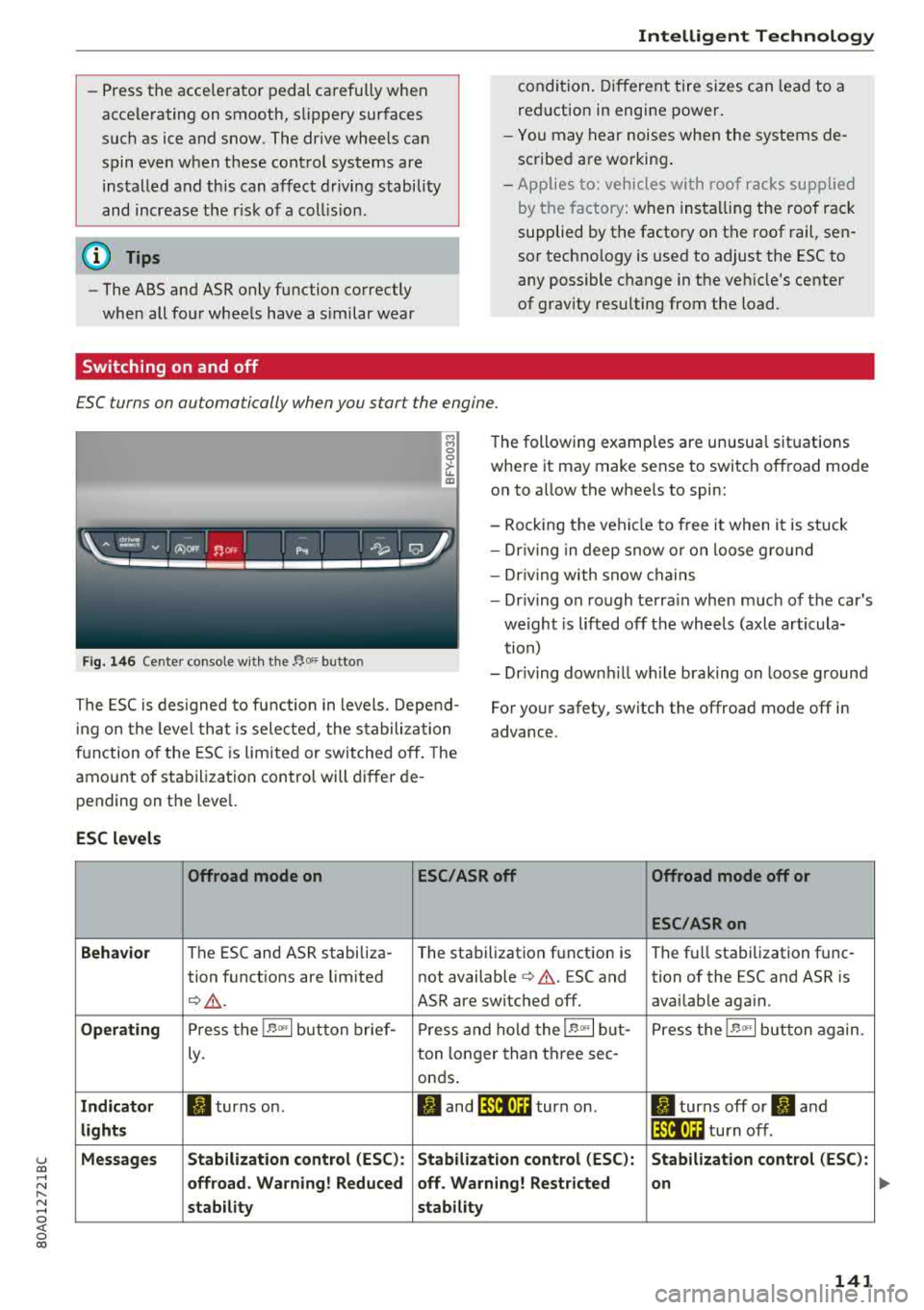
ESC turns on automatically when you start the engine.
F ig. 146 Ce nte r co nso le w it h th e 1',oFF butto n
The following examp les are unusua l situations
whe re it may make se nse to switch off road mode
o n to a llow the whee ls to spin:
- Rock ing t he veh icle to free i t when it is stuck
- Dr iv ing in deep snow o r on loose g ro und
- Dr iv ing with snow c hains
- Dr iv ing on ro ugh te rra in when much of the car 's
we ight is lifted off the wheels (axl e art icula
t ion)
- Dr iv ing down hill while b raking on loose g round
T he ES C is des igned to fu nction in levels . Depe nd
in g on the leve l that i s sele cted , the s ta b ili zat io n
f u nction o f the ES C i s lim ite d or sw it c hed off . The
amo unt o f sta biliza tio n control will differ de
pending on t he leve l. For yo
ur safety, switch the offroad mode off in
advance.
ESC levels
Offroad mode on ESC/ASRoff Offroad mode off or
ESC/ASRon
Behavior
T he ESC and ASR stabiliza -
The sta bilization f unction is T
h e f ull stabilizatio n fu nc -
tion f unct ions are limited not available
c> & . ESC and tion of the ESC and ASR is
Q _& . ASR are switc hed off . availab le aga in.
Operating P ress the 1.$ <>, I button brief - Pr ess and hold t he 1.$ <>, I but- P ress the 1.$ <>, I button again .
Ly. ton
lo n ge r than th ree sec -
on ds.
Indicator II turns on . JI and lf'lii•)H turn on. II turns off or II and
lights lf'lii•)~~ tu rn off.
Messages Stabilization control (ESC
): Stabil .ization control (ESC): Stabilization control (ESC ):
offroad . Warning! Reduced off . Warning! Restricted on
stability stability
141
..
Page 144 of 392
Intelligent Technology
A WARNING
You should only switch offroad mode on or
switch ESC/ ASR
off if your driving abilities
and the traff ic conditions perm it. There is a
r isk of slid ing.
- The stabilization function is limited when
offroad mode is switched on. The driving
wheels cou ld spin and the vehicle could
swerve, espec ially on slick or slippery road
surfaces.
- There is no vehicle stab ilizat ion when ESC/
ASR are switched
off .
Hill descent assist
Hill descent assist makes it possible to drive
down a hill at a constant speed.
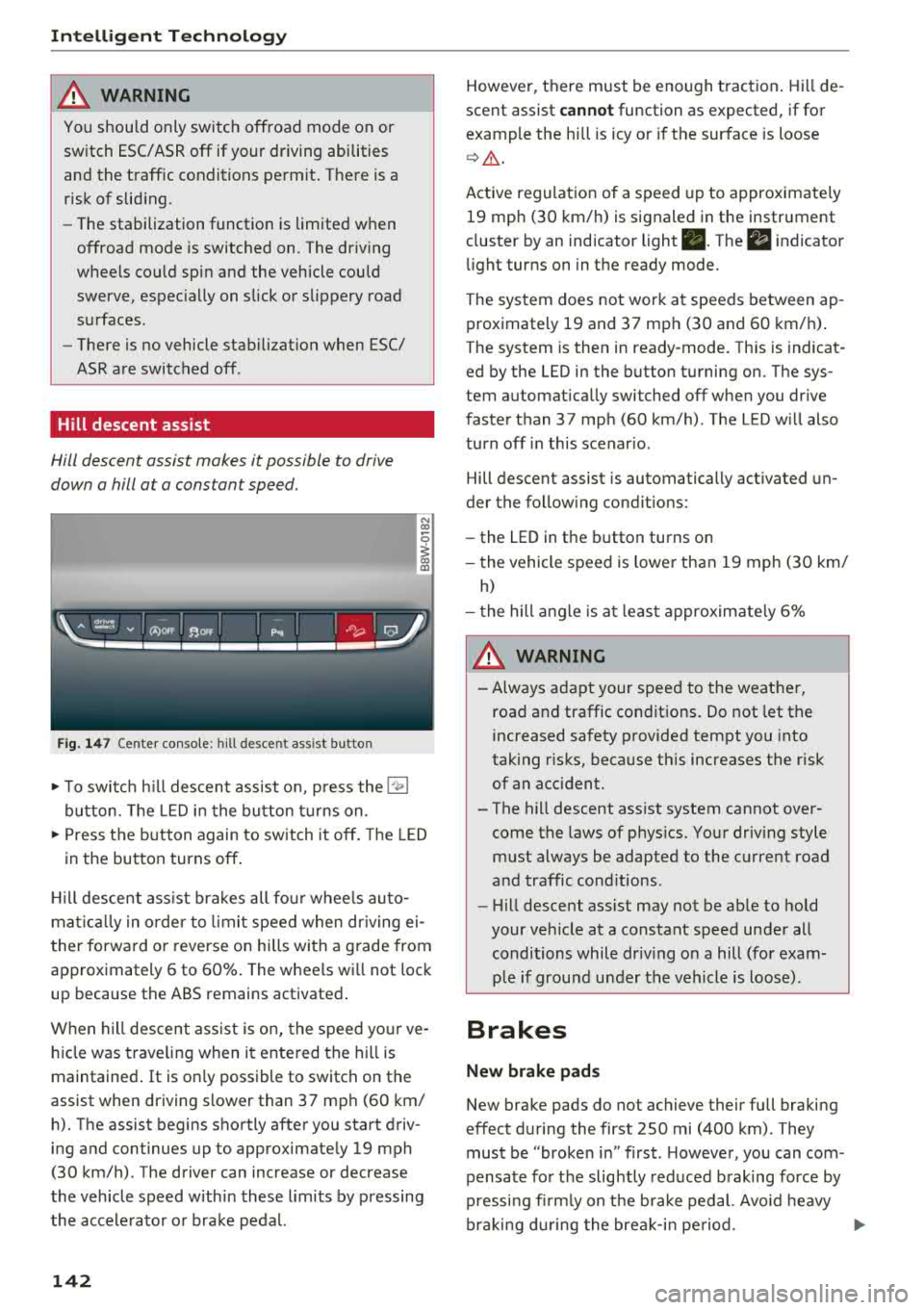
F ig . 147 Center console: hill desce nt ass ist button
.,. T o switc h hill descent assist on, press the l"l;,1
button. The LED in the button turns on.
-
N co
0
~ ID
.,. Press the button again to switch it off. The LED
in the button turns
off .
Hill descent ass ist brakes all fo ur whee ls auto
mat ically in o rder to limit speed when dr iving ei
ther forward or reverse on hills with a g rade from
approximately 6 to 60%. The wheels wi ll not lock
up because the ABS remains activated .
When hill descent ass ist is on, the speed yo ur ve
hicle was traveling when it ente red the hill is
maintained .
It is only possible to switch on the
assist when driving slower than 37 mph (60 km/
h). The assist begins shortly after you start driv
ing and continues up to approximate ly 19 mph
(30 km/h) . The driver can increase or decrease
the vehicle speed with in these limits by pressing
the accelerator or brake pedal.
142
However, there must be enough traction . Hi ll de
scent assist
cannot function as expected , if for
example the hill is icy or if the surface is loose
c> ,& .
Active regulation of a speed up to approximate ly
19 mph (30 km/h) is signaled in the instrument
cluster by an indicator light
• . The ii indicator
li ght turns on in the ready mode.
The system does not work at speeds between ap
proximately 19 and 37 mph (30 and 60 km/h).
The system is then in ready-mode. Th is is indicat
ed by the LED in the button turning on. The sys
tem automat ically switched off when you dr ive
faster than 37 mph (60 km/h) . The LED w ill also
turn off in this scenar io .
Hill descent assist is automatically activated un
der the follow ing condit ions:
- the LED in the button turns on
- the vehicle speed is lower than 19 mph (30 km/
h)
-the hill angle is at leas t approximate ly 6%
A WARNING
- Always adapt your speed to the weathe r,
road and traffic conditions . Do not let the
increased safety provided tempt you into
taking risks, because this increases the risk
of an accident .
- The hill descent assist system cannot over
come the laws of phys ics. Your driving style
must always be adapted to the current road
and traffic cond itions .
- Hill descent ass ist may not be ab le to hold
your veh icle at a constant speed under all
conditions while dr iv ing on a hill (fo r exam
p le if ground under the vehicle is loose).
Brakes
New brake pads
-
New brake pads do not achieve their full braking
effect during the first 250 mi (400 km). They
must be "broken in" first . H owever, you can com
pensate for the slightly reduced braking force by
pressi ng fi rml y on t he brake pedal. Avo id heavy
braking during the break-in period .
..,.
Page 145 of 392
u co ..... N r--N ..... 0 <( 0 00
Wear
Brake pad wear depends largely on the way the
vehicle is driven and on operating conditions.
This is especially true if you are driving frequently in the city and on curves or with a sporty driving
style.
Operating noise
Noises may occur when braking depending on the
speed, braking force and outside conditions such
as temperature and humidity.
Wet conditions or road salt
In certain situations, for example after driving
through water, in heavy rain or after washing
your car, the braking effect may be reduced due
to moisture or ice on the brake rotors and brake
pads. The brakes must be "dried" first with a few
careful brake applications.
At higher speeds and with the windshield wipers
turned on, the brake pads press against the brake
rotors for a short amount of time. This action,
which is not felt by the driver, happens at regular
intervals and ensures a better reaction time for
the brakes in wet weather.
The braking effect can also be reduced if you are
driving on salted roads and you do not apply the brakes for long periods of time. The layer of salt
on the brake rotors and pads must be worn off
first when the brakes are applied.
Corrosion
Leaving the vehicle parked for long periods of
time, low mileage and avoiding heavy braking
can contribute to corrosion on the brake rotors
and to dirty brake pads.
If you usually avoid heavy braking or if there is
corrosion present, occasional heavy braking at high speeds is recommended to clean the brake
rotors and
pads¢ ,&..
Brake system malfunction
If you notice that the brake pedal travel has sud
denly increased, then a brake circuit in the dual
circuit brake system may have malfunctioned. Drive to an authorized Audi dealer or authorized
Audi Service Facility immediately to have the
Intelligent Technology
problem corrected. On the way there, drive with
reduced speed and keep in mind that you will
need a longer distance to stop and you will need
to press the brake pedal harder.
Low brake fluid level
When the brake fluid level is low, malfunctions in
the brake system may occur. The brake fluid level
is electronically monitored.
Brake booster
The brake booster amplifies the pressure you ap
ply to the brake pedal.
& WARNING
= -
- Only apply the brakes for the purpose of
cleaning the brake system when road and
traffic conditions permit. You must not en
danger other road users. This increases the
risk of an accident.
- Never let the vehicle roll while the engine is
stopped because this increases the risk of an
accident.
- Never place objects in the driver's footwell.
An object could end up in the area around
the pedals and prevent you from using
them. You would not be able to use the ped
als if sudden driving or braking maneuvers
were needed, which increases the risk of an
accident.
- Only use floor mats that do not obstruct the
area around the pedals and that can be se
curely fastened in the footwells.
- To reduce the risk of injury, do not place
your foot under the brake pedal.
@ Note
- Never let the brakes "rub" by pressing the
pedal lightly when braking is not actually
necessary. This causes the brakes to over
heat and increases braking distance and
causes wear.
- Before driving downhill a long distance on a
steep hill, decrease your speed and select a
lower gear. This makes use of the engine
braking effect and relieves the brakes. If
you need to brake additionally, brake in in- tervals and not continuously.
.,,.
143
Page 147 of 392
u co ..... N r--N ..... 0 <( 0 00
Replacing tires
F or vehicles w it h all whee l dr ive, only wheels w ith
the same ro lling circumference should be used .
Avoid using tires with different tread depths
~ page 332, New tires or wheels.
A WARNING
- Also, in vehicles with all wheel drive, adapt your dr iv ing style to the current road and
traff ic conditions. Do not let the increased
safety provided tempt you into tak ing risks,
because th is increases the r isk of an acci
dent .
- The braking ability of your veh icle is limited
to the tract ion of the wheels. In this way, it
is not diffe rent from a two wheel dr ive vehi
cle. Do not be tempted to accelerate to a
high speed when the road is slippery, be
cause this increases the risk of an accident.
- Note that on wet streets, the front wheels
can "hydroplane" if driving at speeds that
are too high . Unlike front whee l drive
vehicles, the engine does not rev higher sud
denly when the vehicle begins hydroplaning.
For this reason, adapt your speed to the
road conditions to reduce the risk of an acc i
dent .
Energy management
Your vehicle is equipped with an intelligent ener
gy management system for distributing electrici
ty . This s ignificantly improves the starting ab ility
and increases the vehicle battery life .
(D Tips
- If you drive short distances frequently, the
vehicle battery may not charge enough
while dr iving . As a resu lt, convenience func
tions for elect rical equipment may be tem
porarily unavailable.
- The vehicle battery will gradua lly drain if
the vehicle is not driven fo r long pe riods of
time, or if electrical equipment is used
when the engine is not running . To ensure
that the vehicle can still be started, the electrica l equipment will be reduced or
switched off.
Intelligent Technology
Notice about data
recorded by the Event
Data Recorder and
vehicle control modules
Event Data Recorder
T his vehicle is equipped with an Event Data Re
corder (EDR). The main purpose of an EDR is to
record, in certain crash or near crash-like situa
tions, such as an airbag deployment or hitting a road obstacle, data that will assist in understand
ing how a vehicle's systems performed. The EDR
is designed to record data related to vehicle dy
nam ics and safety systems for a short per iod of
t ime, typ ically 30 seconds or less. The EDR in this
vehicle is designed to record such data as:
- How various systems in your vehicle were oper
ating;
- Whether or not the driver and passenger safety
belts were buckled/fastened;
- How far (if at all) the driver was depressing the
accelerator and/or brake pedal; and,
- How fast the vehicle was traveling.
These data can help provide a better understand
ing of the circumstances in which crashes and in
juries occur. NO TE: EDR data are recorded by your
vehicle only if a non-trivial crash situation occurs;
no data are recorded by the EDR under normal
driv ing cond itions and no personal data (e.g .,
name, gender, age, and crash location) are re
corded. However, othe r parties, such as law en
forcement, could comb ine t he EDR data with the
type of personally identifying data routinely ac
quired during a crash investigation.
T o read data recorded by an EDR, special equip
ment is required, and access to the vehicle or the
EDR is needed. In addition to th e ve hicle manu
facturer, other parties, such as law en forcement,
that have the special equipment, can read the in
formation if they have access to the vehicle or the
EDR.
Some state laws restrict the retrieval or down
l oading of data stored by ED Rs installed in a vehi
cle for the express purpose of retrieving data af
ter an accident or crash event without the own- er 's consent .
II>-
145
Page 149 of 392
u co ..... N r-N .....
~ 0 co
Multi Media Interface
Traffic safety information
Audi recommend s performing certain Infotain
ment system fun ctions, such as entering a desti
nation, only when the vehicle is stationary . Al
ways be prepared to stop operating the Infotain ment system in the interest of your safety and
the safety of other road users.
_& WARNING
Only use the Infotainment system when traf
fic conditions permit and always in a way that
allows you to maintain complete control over
your vehicle.
@ Tips
Certain functions are not available while driv
ing .
Multi Media Inte rface
Introduction
The Multi Media Interface, or MMI for short,
combines various sys tems for communication,
navigation* and en tertainment in your Audi. You
can operate the
MMI using the MM I control pan
el, the multifunction steering wheel or the voice
recognition system* .
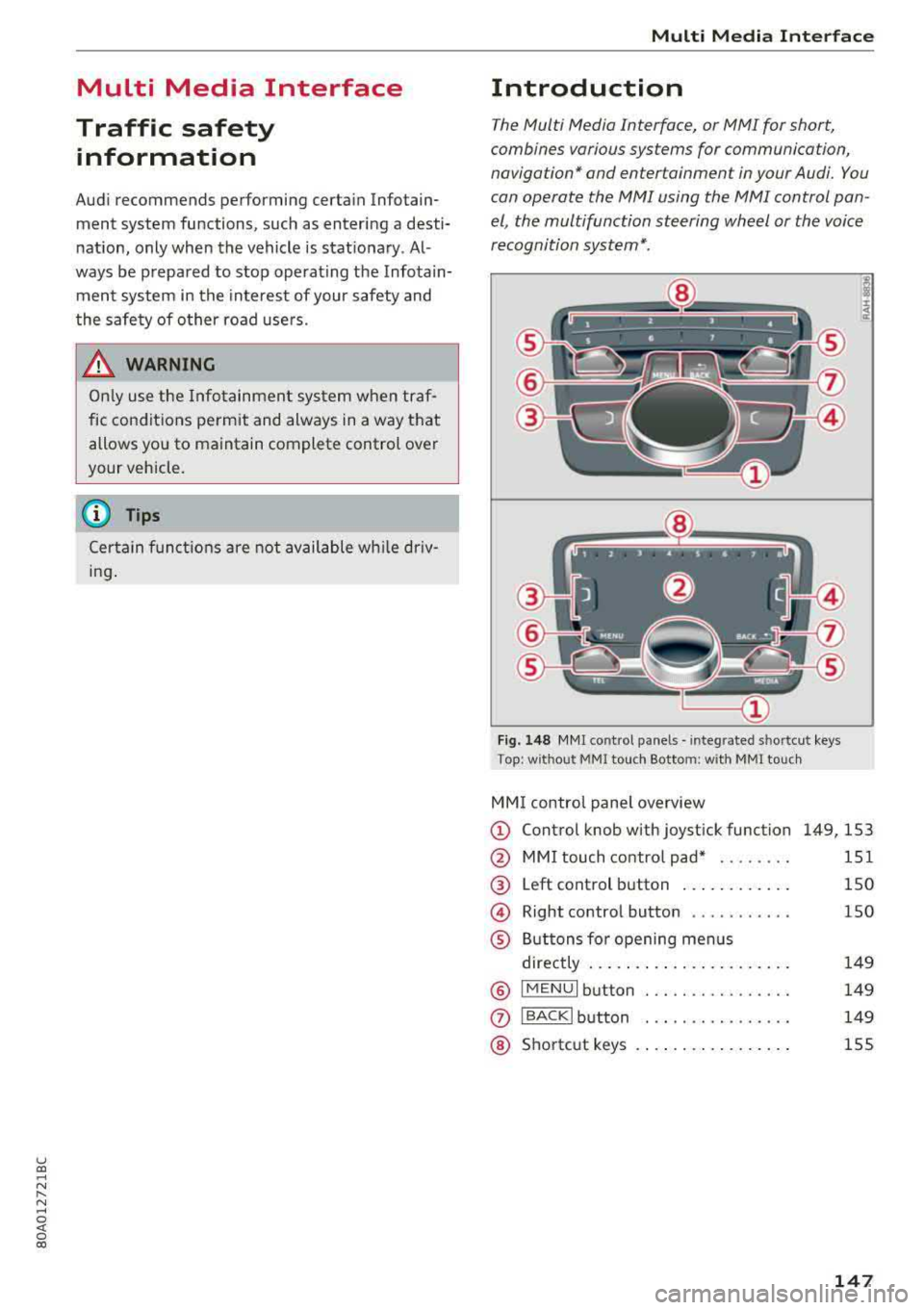
Fig. 148 MMI co ntrol p an els · integ rated s hortcu t keys
T op : w it ho ut MM I tou ch Bottom : w ith MM I touch
MM I control panel overview
© Control knob with joystick function 149, 153
@ MM I touch control pad* . . . . . . . . 151
@ Left control button . . . . . . . . . . . . 150
© Right control button . . . . . . . . . . . 150
® Buttons for opening menus
directly . . . . . . . . . . . . . . . . . . . . . . 149
@ IMENUI button . . . . . .. .. . . .. . . . 149
0 IBACKI button . . . .. . . . . . . . . . . . 149
@ Shortcut keys . . . . . . . . . . . . . . . . . 155
147
Page 150 of 392
Multi Media Interface
MMI On/Off knob with
joystick function
Operating
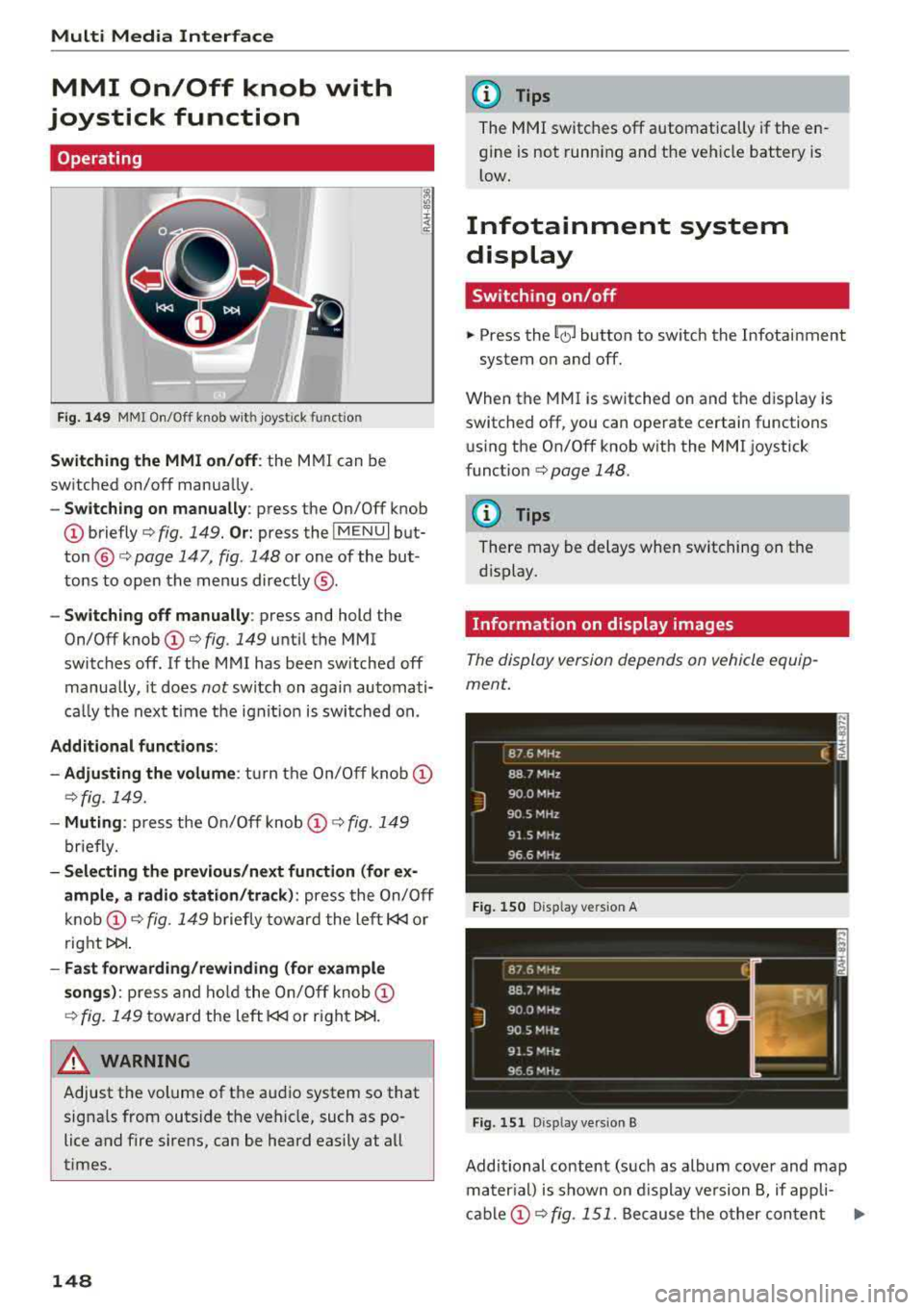
Fig.149 MMI On/Off knob wi th joystick functio n
Switching the MMI on/off: the MMI can be
switched on/off manually .
-Switching on manually : press the On/Off knob
@briefly c:> fig. 149. Or: press the IMENUI but
ton @ c:> page 147, fig. 148 or one of the but
tons to open the menus directly ®·
-Switching off manually: press and hold the
On/Off knob
(D c:> fig. 149 until the MMI
switches off. If the MMI has been switched off
manually, it does
not switch on again automati
ca lly the next time the ignit ion is switched on.
Additional functions:
- Adju sting the volume :
turn the On/Off knob (D
c:>fig. 149.
-Muting : press the On/Off knob (D c:> fig. 149
briefly.
- Selecting the previous /next function (for ex
ample, a radio station/track):
press the On/Off
knob
(D c:> fig . 149 briefly toward the left l
t>l>I .
-Fast forwarding/rewinding (for example
songs): press and hold the On/Off knob (D
c:> fig. 149 toward the left l
.&_ WARNING
Adjust the volume of the audio system so that
signals from outside the vehicle, such as po
lice and fire sirens, can be heard easily at all
times.
148
@ Tips
The MMI switches off automatically if the en
gine is not running and the vehicle battery is
low.
Infotainment system
display
Switching on/off
.. Press the~ button to switch the Infotainment
system on and off.
When the MMI is switched on and the display is
switched off, you can operate certain functions using the On/Off knob with the MMI joystick
funct ion
c:> page 148 .
{!) Tips
There may be delays when switching on the
display.
Information on display images
The display version depends on vehicle equip
ment.
_ 8_ 7_ 6
_ M_H _z ____________ ____ f. ;
88 7 MHz
J
900 MHz
90.5 MHz
91 5 MHz
96 6 MHz - -------------
Fig. 150 D isp lay vers ion A
Fig. 151 D isp lay vers ion B
Additional content (such as album cover and map
mater ial) is shown on display version B, if appli-
cable
(D c:> fig . 151. Because the other content Ill-