fuel AUDI Q5 2018 User Guide
[x] Cancel search | Manufacturer: AUDI, Model Year: 2018, Model line: Q5, Model: AUDI Q5 2018Pages: 392, PDF Size: 60.56 MB
Page 101 of 392
u co .... N ,..._
N ..... 0 <( 0 00
Operating the lap timer
.,. On the mult if u nct ion s teer ing whee l, tur n the
l e ft thumbw hee l
0 ~ page 12 unt il t he desired
menu item is displayed in the instrument cl us
ter .
.,. Press the left thumbwhee l to confirm the selec
t ion.
A WARNING
Your focus should always be on driving your
veh icle safely . As the dr ive r, yo u have com
plete responsib ility for safety in traffic. Only
use t he f unctions s uch as the lap time r in s uch
a way tha t you alw ays ma int ain com plete con
tr ol ove r your vehicle in all tra ffic s itu ations.
(D Tips
You ca n ret rieve information from the t rip
computer while t he lap t ime r stopwatch i s
r u nning.
Lap times and timing
Applies to: vehicles with lap timer
Requirement: the lap t imer must be o pen
~ page 98 .
Timing laps
.,. To start tim ing manually, se lect Start lap 1 in
the menu .
-
.,. To start tim ing a utomat ica lly as soon as you
begin to drive, select
Drive off to start lap 1 or
Start by driving off in the men u .
.,. To measure the lap t ime, select New lap in the
menu. T his starts timing the next lap at the
same t ime.
After completing a lap, the difference between
the last lap and the previous best lap time w ill be
ind icated with
a" -" or" +".
Pausing timing and displaying a split time
.,. To insert a pa use m , se lect Pau se in t he menu.
.,. T o resume timing, se lect Re sume in the men u .
.,. To display a split time, se lect Split time in the
men u. The split t ime
[fw] appears for approxi
mately 10 seconds in the instrument cluste r.
The timing of the current lap continues.
A ss istance systems
Resetting timing
.,. Using the mul tifun cti on steer ing whee l, sele ct
Re set time s in the menu.
(D Tips
- A m axim um of 99 lap t imes can be meas
ure d.
- If tim ing is pa used, you can continue i t later
even if yo u swi tc h t he ign ition o ff.
- Saved lap ti mes ca nnot be indiv id ua lly de
le ted from the tot al results.
- Th e saved lap t ime r va lues w ill remain after
sw itching the ign ition off.
Lap statistics
Applies to: vehicles with lap timer
Displaying lap statistics
You can display the numbe r of laps dr iven, the
fas test lap" +", the slowes t lap" -", and the aver
age t ime
"0" in t he instr ument cluster .
.,. On the multifunc tion steering w heel, select the
left contro l bu tton
> Lap stati stic s o r Sta tis
tics .
.,. Turn the thumbwheel down o r up to display the
individual lap times .
.,. To return to t he lap timing that was begun,
press the left thumbwheel.
Resetting lap statistics
.,. On the mul tif unc tion stee ring w heel, selec t:
the right control button
> Reset statistics.
(D Tips
The lap st atis tic s lis t the lap t imes fo r th e l ast
3 0 l aps . The fastest and slowes t lap time o ut
of up to 99 meas ured laps are a lso d isplayed.
Predictive efficiency
assist
Introduction
T he predict ive e fficiency assist he lps the driver to
drive with anticipation and therefore helps to
save fuel. The system accesses p redictive t rip da -
ta (including speed limits, inclines and the radius
Iii"
99
Page 104 of 392
Ass is tanc e system s
not cause the adaptive cruise control to
switc h off .
- After switching on t he ignit ion, the system
initially adj usts to a speed of 80 mph
(130 km/h) when driving onto highways
without a speed limit. Then the system ad
justs to the last speed stored by the driver.
- There is no adaptation to speed limits when
driving thro ugh h ighway interchanges and
when driving on or off the expressway.
- There is no pred ictive control at speed limits
under 20 mph (30 km/h).
- If a speed limit is only detected by the cam
era and the actua l speed is significantly
higher, then the speed limit will blink in the
display u ntil you have reached the requ ired
speed
Q page 98.
- Incorrect values from the camera-based
traffic s ign recogn ition* or outdated naviga
tion system map data can lead to incorrect
or implausible co ntro l.
- When route guidance is switched on, the system adapts to the route provided by the
navigation system. Driving w ithout route
g ui dance o r leaving a route can res ult in im
p lau sib le con trol.
- The system switches off when o utside of a
r oad system th at is re co rded in the navig a
tion system map data.
Settings in the Infotainment system
Applies to: vehicles with predictive efficiency assist
Predict ive messages*
~ In the Infotainment system, se lect: IMENU !
button > Vehicle > left contro l button > Dri ver
a ss istance > Eff iciency assist .
Predic tive messages are shown when this f unc
tion is sw itched on.
Setting predictive control*
~ Select in the Infota inment system: IMENU I but
ton
> Vehi cle > left contro l button > Dri ver a s
si stan ce > Audi adaptiv e cruise con trol > Pre
dictive control.
Set spe ed limit
-when this function is sw itched
on, t he system ad justs to the speed limits. This
102
can a lso be done with at to lerance, if desired . In
this scenario, you may fall be low or exceed the
set speed in favor of increased efficiency.
Adaptation to route ahead -whe n this funct ion
i s sw itched on, the system adapts to the route
ahead, such as reducing the speed when driving
around curves.
(D Tips
N o predictive messages are shown on vehicles
without a navigation system.
Audi adaptive cruise control
Description
Applies to: vehicles with Audi adaptive cruise control
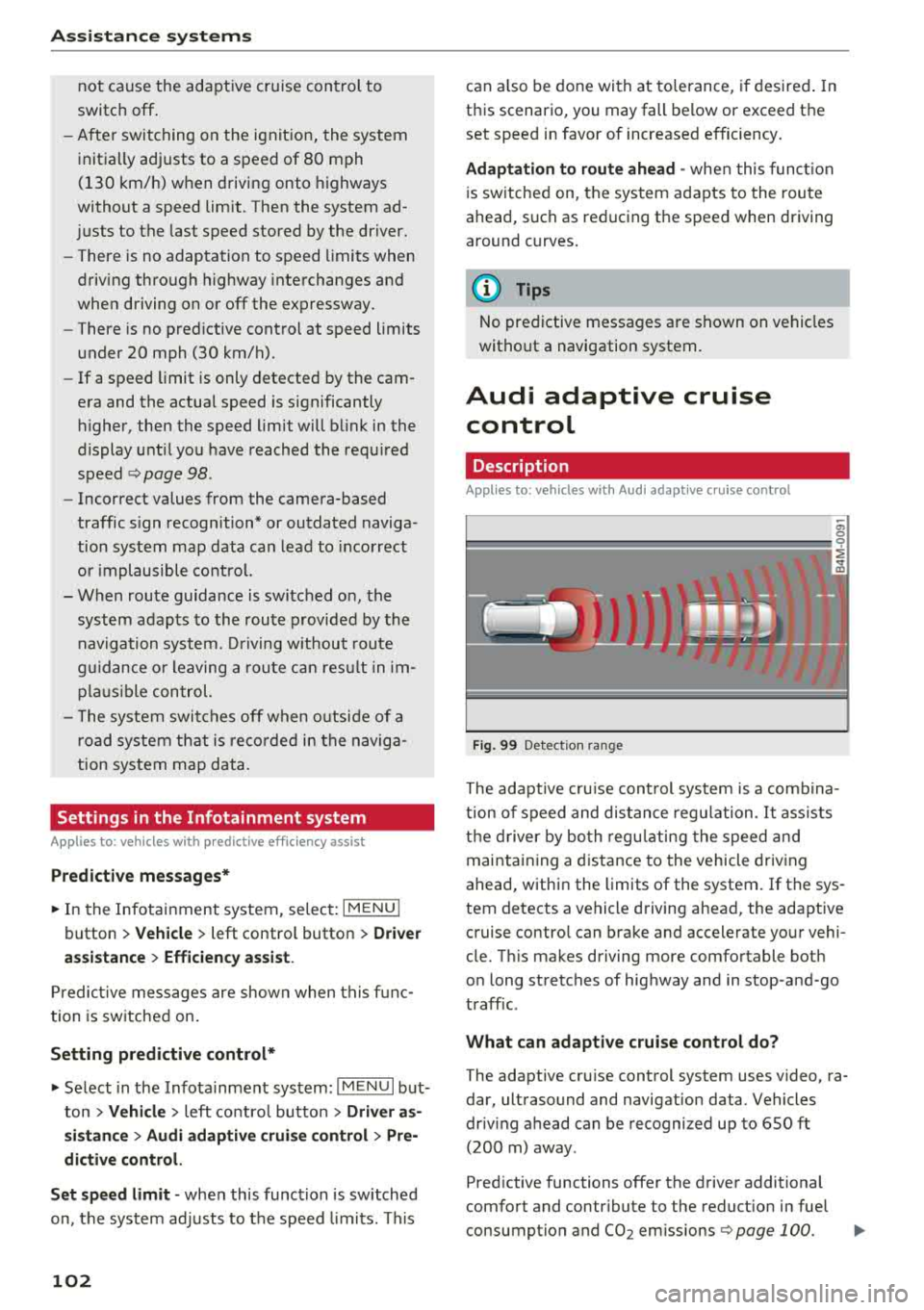
Fig. 99 Detect ion ra nge
The adaptive cru ise cont rol system is a comb ina
t ion of speed and distance regu lation .
It assists
t h e d river by bo th regu lating the speed and
maintain ing a d istance to the vehicle driv ing
ahead, within the limits of the system.
If the sys
tem detects a vehicle d riving ahead, the adaptive
cruise contro l can brake and accelerate your vehi
cle. T his makes driving more comfortable both
o n long stretches of highway and in stop -and-go
traffic.
What can adapti ve cruise control do?
The adaptive cru ise control system uses video, ra
dar, ultrasound and navigation data . Vehicles
driv ing ahead can be recognized up to 650 ft
(200 m) away .
Pred ictive functions offer the driver additional
comfort and contr ibute to the reduct ion in fuel
consumption and
CO2 em issions Q page 100. IJIJ,
Page 168 of 392
Voice recognition system
• Telephone
• Audi connect •
Favorites
• Call (XV)
• Navigation
• Directory
• Radio
• Media
• Enter number
• Redial
• Read new text message
• Nav igate to
(XY)
• Sound • Enter address/destination
• Help • Online destinations
• Help Speech dialog system
• Help Telephone •
Cancel route guidance
• Map
• Help Aud i connect •
Line
(XY)
• Help Navigation
• Help
Map
• Help Radio •
Next page/ previous page
• Cancel
• No. I meant (XV)
• Help Media • Correction
TE ~EPflON ~
• Enter number • Call list
• Delete number/ correction
• Redial
• Directory
• Call
(XV)
• Call mailbox
• Telephone favorites
• business
I private/ land tine I mobile
N~~It ~JION
• Nav igate to (XY)
• Start/ cancel route guidance
• Directory
• Last destinations • Block
route for
(XV) miles I Block
the next section
• Route list
• Calculate alternative routes
• Nav igation favorites
• Drive home
• Enter address •
Online destinations
• Special destination
• Enter country
I town I street I state
• Exclude route/ Exclude route for
(XV) km/ m
• Map
• Day map/ Night map
• 2D driving position map/ 2D north position map/ 3D map/ Destination map
I Overview map
~l!IDI CONNECT
• Audi connect
• Travel Information/ Parking Information
• Fuel prices
• Weather
RADIO
• Radio presets
• FM
• FM /AM/ SIRIUS XM
• Station (XV) / Frequency (XV)
• Traffic announcement on/ off
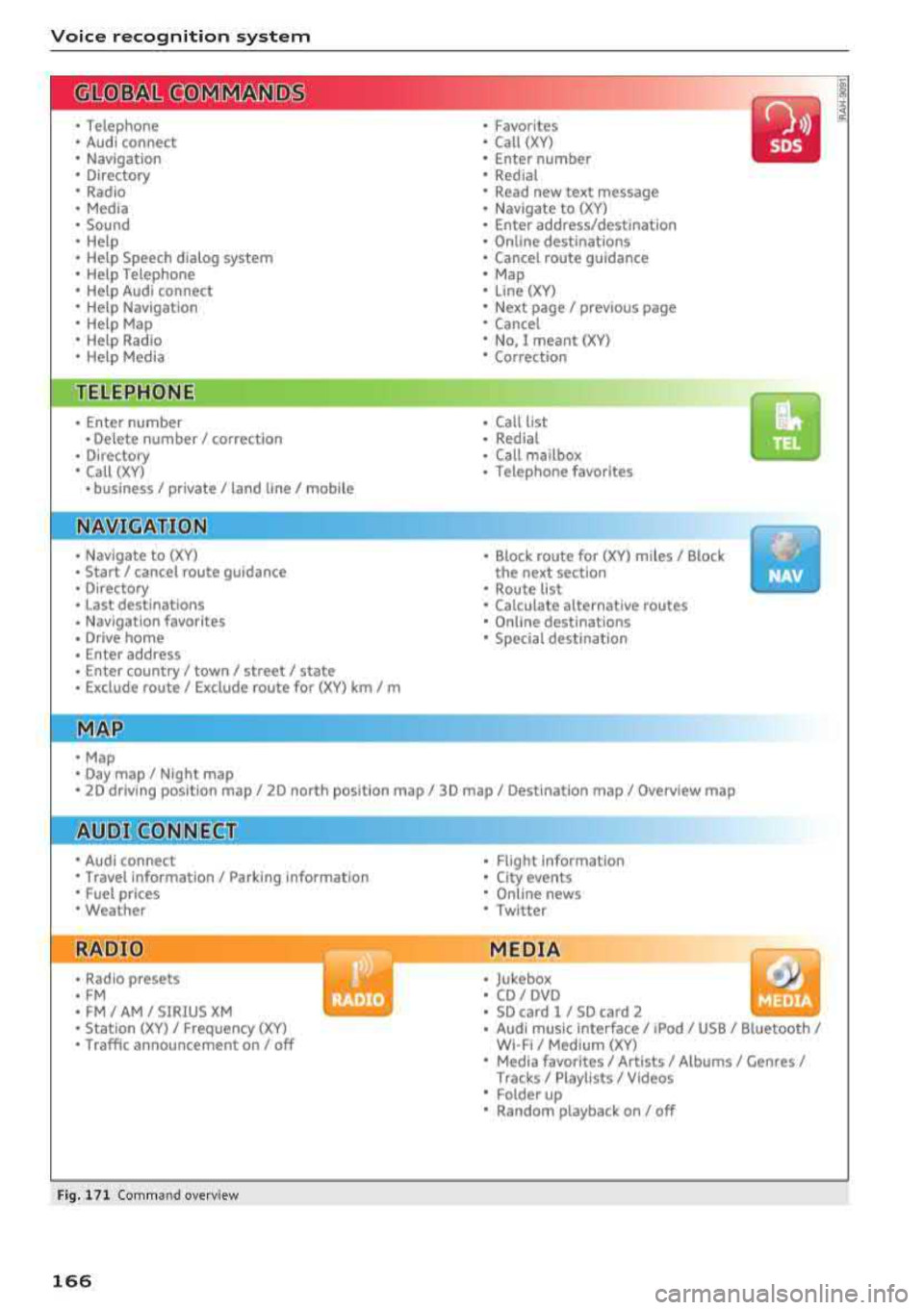
Fig. 171 Comm and overv iew
166
• Flight Informa tion
•
City events
• Online news
• Twitter
MEDIA
• Jukebox
• CD
I DVD
• SD card
l / SD card 2
• Audi music Interface/ I Pod/ USB / Bluetooth
I
WI -Fl I Med ium (XV)
• Media favorites
I Artists/ Albums/ Genres I
Tracks I Playll sts / Videos
• Folder up
• Random playback on / off
Page 171 of 392
u co ..... N r--N ..... 0 <( 0 00
Function
Calling the last number dialed
Dialing a phone num ber
Correcti ng the p hone number that
was entered
Showing contact information
L isten ing to messages
Entering the PIN (SIM)
C orre ct in g the P IN entry
Correcting data input
C los ing the f ull -s cr een command
list
(D Tips
Voice recognition system
Say :
Redial
Enter number
> after being prompted, say the telephone num-
ber in group s of individual numbers,
fo r example. 888 555
1212 > Dial
Correction / Delete number
Directory
> say the desired contact when prompted,
for example John Smith
Call voicemail
Enter PIN
> when prompted, say the PIN in individual numbers
> Save
Correction / Delete PIN
No I meant ( XV)
Close
- P lease note th at comm an d s can o nly be giv
en for the primary
phone *¢ page 1 74.
- Cont acts in the dire ctory can sele cted using
the fu ll name ("first name las t name" and
"last name, first name") as well as with only
the f irst or last nam e. This applies to cell
phones that t ransmit names separate d into
first and last names . -
For more informat io n on s uppo rted cell
phone s, vi sit www.audius a.c om/ blu etoo th
or cont act an a uthorized Audi dea ler or au
thorized Audi Service Fac ility.
Audi connect (Infotainment)
A pp lies to: ve hicles with vo ice recognition syste m and Audi co nnect (Infotainment)
Req uirement: the requirements fo r A udi co nnect
(Info tainmen t) must be met
¢ page 187.
Function Say:
Accessing A udi con nect I nfota in-Audi connect > follow the system prompts
me nt serv ices
Audi co nnect Infotainment services
Weather / Online news / Fuel prices / Parking information /
T ravel infor mation / Twitter / Online traffic information / City
Events / Flight information
Search areas for Au di connec t Info -Near destination / Nearby / In a new city
ta inment serv ices
Correcting data inp ut
No I meant (XV)
(D Tips
Always read t he cha pte r¢ page 194, Audi
connect (Infotainm ent) g en eral information .
169
Page 176 of 392
Tele phone
Telephone
Introduction
Applies to: vehicles with telephone
To make phone coils in your vehicle using the
/11/111, connect your cell phone to the /11/111 via
Bluetooth.
Hand sfree
After you have connected your ce ll phone to the
MMI via B luetooth, you can use the handsfree
system and operate telephone functions through
your
MMI. You can make calls using the antenna
on your cell phone.
A WARNING
-Medical experts warn that cell phones can
interfere w ith the funct ion of pacemakers .
Always mainta in a m inimum d istance of
about 8 inches (20 cm) between the ce ll
phone antenna and the pacemaker.
-Do not carry the cell phone in a pocket di
rectly over the pacemaker when the phone
is switched on.
-Sw itch the cell phone off immediately if
you suspect it may be interfering w ith the
pacemaker.
-Do not use the vo ice recognit ion system*
<=) page 167 in emergencies because your
vo ice may change in stressful situations. It
may take longer to dial the number or the
system may not be able to dia l it at all. Dial
the emergency n umbe r manua lly.
-Switch your cell phone off in areas where
there is a ris k of an exp losion . These loca
tions are not always clearly mar ked. This
may include gas stations, fuel and chemical
storage facilities or transport vehicles, o r lo
cations where fue l vapors (such as propane
or gaso line vapor in vehicles or bui ldings),
chemicals or large quantities of dust parti
cles (such as flour, sawdust or metal) may
be present in the air . This also applies to all
other locations where you would normally
turn your vehicle engine off .
-The demands of traffic requ ire your full at
tent io n. Always read the chapter
Q page 147, Traffic safety information.
174
-
@ Note
Always fo llow the information found in Q @ in
Wi -Fi hotspot on page 194.
(D Tips
-Th e Bluetooth connect ion range is limited
to inside the vehicle. It can also be affected by local conditions and interference with
other devices .
-To learn which Bluetooth connections and
wh ich of the funct ions in your ce ll phone are
supported, check with your cell phone serv
ice provider or the database for mob ile devi
ces at www .aud iusa .com/bluetooth.
Setup
Connecting a cell phone using Bluetooth
Applies to: vehicles with telephone
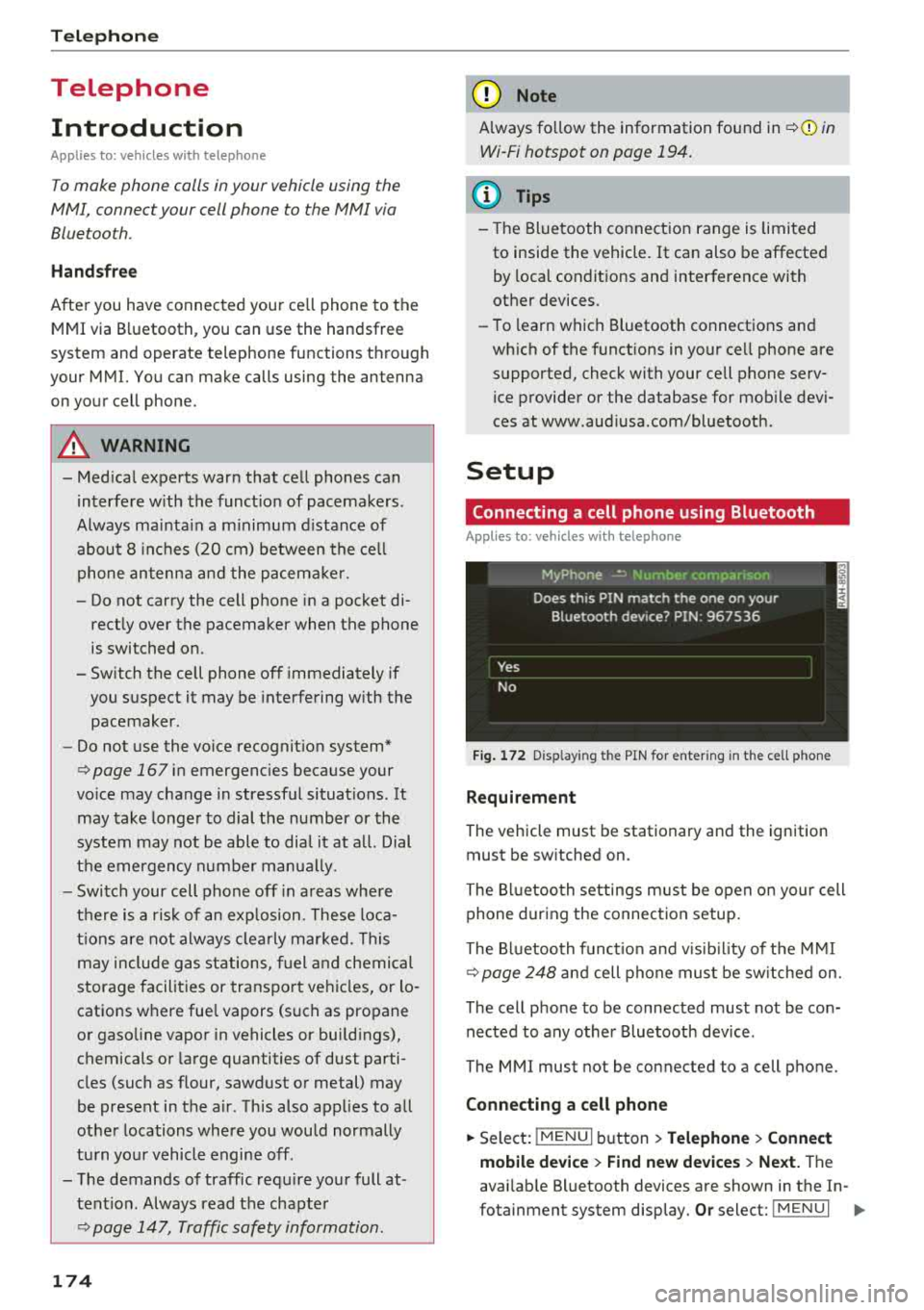
Fig . 172 D isp layin g the PIN for enter ing in t he cell phone
R equi rem ent
The vehicle must be stationary and the ignition
must be switched on.
The Bl uetooth settings m ust be open on your cell
phone during the connection setup.
The Bluetooth funct io n and v is ib il ity of the
MMI
Q page 248 and cell phone must be sw itched on.
The cell phone to be connected must not be con nected to any other Bluetooth device .
The
MMI mus t not be connected to a cell phone.
Conn ecting a c ell phon e
.. Select: IMENU I button> Telephone > Connect
mobile de vice > Find new de vic es > Next.
The
avai lab le Bluetooth devices are shown in the In-
fotainment system display.
Or select: ! MENUI 1111-
Page 191 of 392
u co ..... N r-N .....
~ 0 co
Closing Audi connect Infotainment services
Regardless of the fu nction selected, you c an
close a n Aud i connect Infotainmen t se rvice at any
time a nd return to the home screen
r::!> page 188,
fig . 180 .
Parking information
Applies to: vehicles with parking informa tion
Information on parking locations and fees in the
selected search area (for example
Nearby ).
~ Select and co nfirm Parking information.
You c an use the rig ht cont rol bu tton t o sort the
p a rking locations
By distance or By availability.
Travel information
Applies to: veh icles with travel informa tion
Information on attractions in the selecte d search
area.
~ S e lect and co nfirm Travel information .
~ Select and co nfirm an attraction to display t he
details .
Fuel prices
Applies to: veh icles with fuel prices
Information on gas stations with the lowest fue l
p rices fo r your vehicle in the selected search area.
~ Se lect and co nfirm Fuel price s.
You can use the right cont rol button to sort the
f u el p ric es
By price or By distance .
1l Servic e in pre para tio n at t he t ime of pr intin g. C an add l at
e r or i s onl y ava il able in certa in reg ion s.
Audi connect (Infotainment)
Traffic light information
Applies to: vehicles with traffic light information
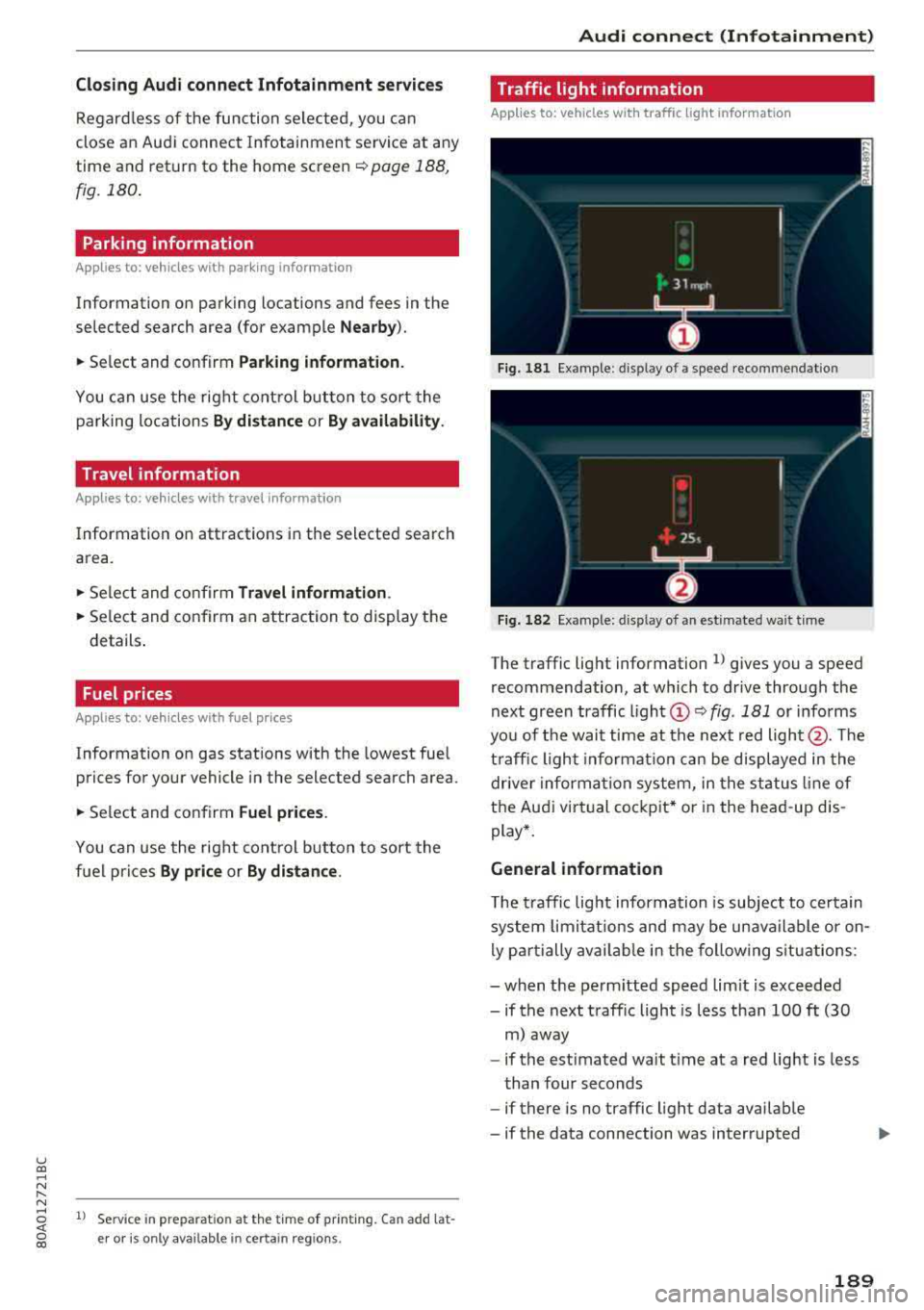
Fig. 18 1 Examp le : dis play o f a spee d recom menda tio n
Fig . 182 Example: d isp lay of an est imated wa it t ime
The traffic lig ht information l) gives you a speed
recommendation, at which to dr ive through the
next green traffic ligh t
(D r::!> fig. 181 or i nfo rms
yo u of t he wai t time at th e next red
light @. The
t ra ffic ligh t informat ion ca n be displaye d in the
drive r informa tion syste m, in the st atus lin e of
t h e Au di virtu al co ckpit* or in the he ad-up d is
play *.
General information
T he traffi c lig ht informa tion is subject to ce rt ain
s ystem lim itat ions an d may be un availa ble or on
l y p art ially avail abl e in the fo llow ing s ituations:
- when the pe rmitted speed l im it is exceede d
- if the next t raffic light is less than 100
ft (30
m ) away
- if the est imated wait t ime at a red lig ht is less
than four seconds
- if there is no traffic light data avai lab le
- if the data connection was interrupted
189
Page 200 of 392
Audi connect vehicle control
-Pay attention to upper-and lower -case let
ters when entering the vehicle code.
-If you do not have the 10-digit vehicl e code,
contact an authorized Audi dealer or author
ized Audi Service Facility .
Additional options
Applies to vehicles with Audi co nnect vehicle control
License subscription
The validity and expirat ion date of you r subscrip
tions are displayed. When
Warning before sub
scription expires
is activated, a message wi ll be
disp layed warning you that your license is about
to expire.
Select :
!MENU ! button> Audi connect > Display
available functions >
right control button> Li
cense subscription.
Resetting the primary user
F or examp le, you ca n reset the key user when
selling your vehicle in order to deactivate these
services .
Requirement: the ignition must be switched o n.
Select :
!M ENU ! button> Audi connect > right
control button
> Audi connect user management
> Key user > Reset key user .
Warning levels
Requirement: the primary user must have set one
or more warning levels. Secondary users can only
see if a warning level is active or not .
Select:
! MENU ! button> Audi connect > right
control button
> Alerts.
Remote locking and
unlocking
Applies to veh icles with Audi connect vehicle control
You can lock and unlock your veh icle using this
service .
Requirement
-This requires the 4-dig it PIN that you specified
during the verification on www.audiusa.com/
myaud i.
-The vehicle must be stationary.
198
-The ignition must be switched off.
Vehicle status report
Applies to vehicles w ith Aud i connect ve hicle control
The Dr iver Informat ion System collects data un
der certain conditions and sends it to a server.
When data is sto red, you can access va lues such
as these using the service :
-Remaining range,
-Fuel tank level,
-Oil level,
-If the vehicle doors are open/closed or locked/
un locked,
-mi leage,
-Next oil change
-Next service,
-Warning messages,
-If the parking lights are on/off .
A WARNING
Do not ignore messages and warning or ind i
cator lights that turn on in the vehicle be
cause of the info rmation in the status report.
This could lead to break downs in on the road ,
accidents and serious injuries.
Parking location
Applies to vehicles w it h Aud i connect ve hicle co ntrol
The vehicle collects data unde r ce rta in cond it ions
and sends it to a server .
When data is stored, you can access values such
as these using the service :
-Vehicle location display
-Display of one's own location
-Route to your vehicle
If your mob ile dev ice also has a navigation func
tion, you can nav igate to your last known parking
l ocation.
Deactivating and activating parking position
-Select: ! MENU!> Audi connect> Car Finder
parking position .
If you do not set./, no location information will
be sent to the server.
Page 213 of 392
u co ..... N ,..._
N ..... 0 <( 0 00
-Se lect and confirm a destination > right control
button
> Sto re as home addre ss.
Editing the home address
- Se lect the Home a ddre ss@ ~ page 203,
fig. 185.
- Se lect: rig ht contro l button > Edit hom e ad
dre ss.
-Select and confirm a new dest inat io n as the
home address.
The selected destination is stored as the new home address .
Favorites
Applies to: vehicles with navigation system
"'Press the I NAV/MAPI button repeated ly until
the
Ent er de stinati on menu is displayed
¢page 203, fig . 185.
- Storing a destin ation a s a f avo rite : searc h for
the des ired destination us ing the input fie ld.
Or : select a dest inat ion from the list. Se lect:
r ig ht control button
> St ore as favorite.
- Renaming a favorite :
select the left cont rol
bu tton
> Favorite s > a favorite from the list >
right cont rol button > R enam e fa vorite .
- Mov e favorite :
select a favorite from the list>
r ig ht cont rol but ton > Move favorite . Select
and confirm the location o f th e se lected favor
ite .
-Deleting a fa vorite : select a favorite from the
list>
right contro l button > Delete fa vo rite >
Delete this fa vo ri te or Delete all favorites.
Directory contacts
Applies to: vehicles with navigation system
Two addresses (private/business) can be as
signed as destinations for each contact in the di
rectory.
"' Press the I NAV/MAPI button repeated ly until
the
Enter destinati on menu is displayed
¢ page 203, fig. 185 .
Navigation
Storing a destination as a contact in the
dir ector y
Requirement: a ce ll phone must be connected to
the MMI
¢ page 174 .
-Select: a destination > right contro l button >
Add de stination to contact .
-Enter the first letters of t he des ired contact in
the free text search inp ut fie ld ¢
page 203,
fig. 185
and then select a contact from the list .
- Select and confirm
Add bu sine ss destination or
Add pri vate de stina tion.
Navigation settings
Applies to: vehicles with navigation system
"'Press the !NAV/MAP I button repeatedly unti l
the
Enter dest ination menu is displayed
¢page 203, fig.185 .
"' Select: r ight control button > Nav ig ation set-
ting s.
Depending on the selected function, the follow
ing settings can be selected:
Show alternati ve route s
Up to three suggested routes are shown on the
map when this function is switched
on ~
¢page 210 .
Low fuel warning
A message is d isplayed if the fue l gauge goes be
l ow the reserve marking w hen this function is
switched
on~-Confirming this message disp lays
a list of gas stations in the area. When a gas sta
tion is selected, route guidance from the current
vehicle position is calculated.
Trail er mode*
T railer mode is switched off at the factory .
When the funct io n is switched
on~, the max i
mum pe rm itted speed for ve hicles w ith t railers is
i nco rporated i nto t he ro ute guidance and the cal
c ul ated arriva l time is adjusted accord ingly. Trai l
er mode is displayed using
symbols- ':! in the side
menu on the map .
..,.
211
Page 247 of 392
u co ..... N r--N ..... 0 <( 0 00
System settings
Setting the date and
time
You can set the clock time manually or using the
CPS* .
.. Select : IMENU I button> Settings > left co ntro l
button >
MMI settings > Date & time.
.. Or : select : IMENU I button> Vehicle > left con-
t ro l button >
Vehicle settings > Date & time .
Automatic setting
When t his function is sw itched on g, the time
and date are a utomat ically set.
Time
R eq uirement: the Automatic setting must be
sw itched
off .
Press the cont ro l kn ob. Yo u ca n se t the Time
manually by turn ing and press ing the con trol
k nob.
Date
R eq uirement: the Automati c setting must be
sw itched
off.
Press the cont rol knob . Yo u can set the Date
manually by turn ing and press ing the cont rol
knob.
Time zone
When se lecting the approp riate t ime zone, a
sampling of countr ies in this zone will be listed .
Automatic time zone*
When t his function is sw itched on g , the time
will automatically ad just to the corresponding
time zone.
Automatic daylight saving time*
When t his function is sw itche d on g, the time
w ill automatically switc h to day light saving time .
Time format
If yo u select 24h , the clock will d isp lay, for ex
a m ple,
13 :00 . If yo u se lec t AM /PM , the clock
w ill d isp lay, for examp le,
1 :00 PM .
System settings
Date format
If you select DD .MM .YYYY , the date displ ay will
show, for example ,
31.08.2018. If you select
MM /DD/YYYY , the date disp lay w ill show, for ex
amp le,
08/31/2018. If you select YYYY-MM
DD ,
the date display will show, fo r example,
2018 -08 -31 .
MMI settings
.. Select: !ME NUI button> Settings > left control
button >
MMI settings .
Language
Yo u can c hange the display language as well as
the lang uage fo r the voice guidance * and voice
r ecognition system *.
T he num ber of langu ages av ailab le depends on
t h e ma rket.
Measurement units
The following meas urement u nits can be set de
pend ing on ava ilab ility:
Speed , Distance , Tem
perature , Fuel consumption , Volume , Pressure .
Tool tips
When this f unct ion is switched on g, yo ur MMI
shows you tips fo r inpu t. The freq uency of how
often it displays dec reases w ith time .
Speech dialog system
App lies to : vehicles wit h voice recog nitio n system
Depend ing on veh icle equipment, the following
funct ions may be ava ilable:
Command display : when this function is sw itch
ed on
g , th e M MI w ill show yo u the poss ible
commands for voice input in the respective
menu.
Short dialog : when this function is sw itche d on
g, a shorter form of the prompts is used .
Command during voice output*: thi s fu nction i s
swi tched on at the factory . W hen this func tion is
switched on
g , yo u can say new commands dur-
i ng announcements. You do not need to wa it for
the signal tone (beep) dur ing an announcement.
When the funct io n is swi tched off
0, you need to Iii>
245
Page 312 of 392
Checking and Filling
Checking and Filling Fuel
Gasoline grade
A pp lies to: ve hicles w ith gasoline engines
The correct gasoline grade is stated on the inside
of the fuel filler door .
The vehicle is equipped with a catalytic converter
and must only be driven with
unleaded gasoline .
Audi recommends using TOP TIER Detergent Gas
oline. Additional information on TOP TIER Deter
gent Gasoline can be found on the official web
site (www .toptiergas.com).
The individual gasoline grades are differentiated
by
octane ratings. This value is given with (R +M)/
2 equating to AKI or in RON.
The following headings match the corresponding
sticker in the fuel filler door .
UNLEADED FUEL ONLY MIN. (R+M)/2 87
Regular/ MIN. RON 91 Regular
Use regular gasoline with minimum 87 AKI/
91 RON
i::>@ .
The max imum eng ine power is only reached if
p rem ium gasol ine 91 AKI/ 95 RON is used.
UNLEADED FUEL ONLY PREMIUM MIN. (R
+M)/2 91 / SUPER MIN. RON 95
Using premium gaso line with minimum 91 AKI/
95 RON is recommended.
If premium gasoline is not available, you can also use regular gasoline 87 AKI/ 91 RON . However
this does reduce th e engine powe r slight ly.
0 Note
- Fillin g the tank just one time with leaded
fuel or other metallic additives will cause
permanent deter iorat ion to the catalytic
converter function.
- When gasoline with an octane rat ing that is
too low is used , h igh speeds or heavy engine
load can lead to engine damage.
310
(D Tips
The vehicle may be filled with fuel that has a
h igher octane rating than what is required by
the eng ine.
Blended gasoline
App lies to : vehicles wi th gaso line e ngi ne
Use of gasoline containing alcohol or MTBE
(methyl tertiary butyl ether)
You may use unleaded gasoline blended with al
cohol or MTBE (commonly referred to as oxygen
ates) if the blended mixture meets the following
criteria:
Blend of gasoline methanol (wood alcohol or
methyl alcohol)
- Anti-knock index must be 87 AKI or h igher.
- Blend must contain no more than
3% metha-
nol.
- Blend must contain more than
2% co-solvents.
Blend of gasoline and ethanol (grain alcohol or
ethyl alcohol)
-Anti-knock index must be 87 AK I or h igher.
- Blend must not conta in more than 15% etha-
nol.
Blend of gasoline and MTBE
- Anti -knock index must be 87 AKI or higher.
- Blend must not contain more than 15% MTBE.
Seasonally adjusted gasoline
Many gasoline grades are blended to perform es
pecially well for winter or summer dr iv ing . Dur
i ng seasonal change-over, we suggest that you
fill up at busy gas stat ions where the seasonal
adjustment is more lik ely to be made in t ime.
@ Note
- Methanol fuels which do not meet these re
quirements may cause corrosion and dam
age to plastic and rubber components in the
fuel system.
- Do not u se fue ls that fail to meet the speci-
fied criteria in this chapter.
...