steering AUDI Q5 2018 User Guide
[x] Cancel search | Manufacturer: AUDI, Model Year: 2018, Model line: Q5, Model: AUDI Q5 2018Pages: 392, PDF Size: 60.56 MB
Page 26 of 392

Cockpit overview
~ Safety belt
The. indicator light stays on unt il the driver's
and front passenger's safety belts a re fastened.
Above a certain speed, there will also be a warn
ing tone.
(D Tips
For additional information on safety belts,
see
"* page 261.
0 Generator/vehicle battery
If the . or(•) indicator light turns on, there is a
malfunction in the generator or the vehicle elec
tr ica l system .
• Electrical system: malfunction! Safely stop
vehicle
Do not continue driving and switch the engine
off. See an authorized Audi dea le r or aut horized
Audi Service Facility for assistance .
(•) Electrical system: malfunction! Restart not
possible. Please contact Service
The vehicle battery was disconnected from the
veh icle elect rical system and will no longer
charge . Drive to an authorized Aud i dealer or au
thorized Audi Service Facility immediately.
Do not stop the engine, or you will not be able to
start it aga in . If you can no longer start the en
g in e, see an authorized Aud i dealer or autho rized
Aud i Service Facility for assistanc e.
(•) F.lectrical system: malfunction! Please con
tact Service
Drive to an authorized Aud i dea ler or authorized
Aud i Serv ice Facility immediately . Because the ve
h icle battery is d ischarg ing, turn off all unneces
sary electr ical equipment such as the radio. See
an authorized Audi dealer or authorized Audi
Service Facility if the battery charge level is too
low.
(•) Electrical system: low battery charge. Bat
tery will be charged while driving
The start ing ability may be impaired.
24
If this message turns off after a little whi le, the
vehicle battery charged enoug h while driving.
If the message does not turn off and stay off
whe n driving, have an authorized Aud i dealer or
authorized Audi Service Facility repair the mal
function .
~ Engine oil pressure
• Turn off engine. Oil pressure too low
Stop the engine and do not continue driving.
Check the engine oi l level
~ page 317.
- If the eng ine oil level is too low, add engi ne oil
¢ page 317 . Only continue driving once the in
dicator light turns off .
- I f the engine oil level is correct and the indica
tor light still turns on, turn the engine off and
do not continue driving. See an authorized Audi
dealer or authorized Audi Service Facility for as
sistance.
(D Tips
T he oil pressure warn ing is not an oil leve l in
dicator. Always check the oil leve l regularly.
't'.:7;, Engine oil level (MIN)
Appl ies to: vehicles with o il level warning
• Please add oil immediately.
Add engi ne oil immediately ¢page 317.
Ill Please add max. x qt (l) oil. You can contin
ue driving
Add the maximum amount of oi l indicated in the
display as soon as possible
¢ page 317 .
~-Steering lock
• Steering: malfunction! Please stop vehicle
There is a ma lfunction in the e lectron ic steering
lock. You cannot tur n the ignition on.
Do
not tow your vehicle because it cannot be
steered. See an a uthorized Audi dea ler or author
i z ed Audi Service Facility for assistance.
...
Page 27 of 392

u co ..... N r--N ..... 0 <( 0 00
1!11 Steering lock: malfunction! Please contact
Service
There is a malfunction in the elect ronic stee ring
l o ck.
Dri ve to an authorized Aud i dea ler or authorized
Audi Service Fac ility imm ediately to have the
malfunction corrected.
A WARNING
Do not tow your vehicle when there is a mal
function in the electronic steering lock
-this
increases the risk of an accident .
~ Engine start system
• Engine start system: malfunction! Please
contact Service
Do not switch the ignition off because you may
not be able to switch it on again.
Drive to an authorized Aud i dea le r or authorized
Aud i Service Facility im media tely to have the
mal function corrected.
-
l::J Engine start system: malfunction! Please
contact Service
There is a malfunction in the engine starting sys
tem .
Drive to an authori zed Aud i dea ler or authori zed
Aud i Service Facility immediately to have the
malfunction corrected.
c;:::::,Hood
• Warning! Hood is not locked. Stop vehicle
and check the lock
If the indicator light turns on and the message
appears, the hood locking mechanism is not en
gaged correctly.
Stop immediately and close the hood
c>page 315.
0/Q Air suspension
Applies to: vehicles with air suspension
• Air suspension: malfunction. Safely stop ve
hicle . Steering and ground clearance limited
Cockpit overview
Due to a system ma lf u nction, your vehicle's
ground clearance is very low at the front or rear
axle* (in veh icles with all -whee l steering) . Be
cause of this, the wheels no longer have enough
clearance to steer correctly.
See an authorized Audi dealer or authorized Audi
Service Facility for assistance.
• Air suspension: malfunction! You can con
tinue driving slowly. Speed limited to max.
3S mph (60 km/h )
The re is a malfunction that can result in restrict
ed driving stability. T he speed is limit ed to a
maximum of 35 mph (60 km/h).
Drive to an authorized Audi dealer or authorized
A udi Service Facility immediately to have the
malfunction corrected.
• Air suspension: malfunction! You may con
tinue driving slowly at max. 35 mph (60 km/h)
There is a malfunction that can result in restrict
ed driv ing stab ility .
Drive to an authorized Audi dealer or authorized
Audi Service Facility immed iate ly at a maximum
speed of 35 mph (60 km/h) to have the malfunc
t ion corrected .
• Air suspension: service mode! Vehicle can be
moved but handling may be impaired
Carefully drive to an authorized Audi dea ler or
authorized Audi Service Facility immediately to
have the service mode deactivated .
II Air suspension: malfunction! Please contact
Service
T he re is a system malfunction that can result in
restricted driving stability or red uced ground
clearance.
Drive to an authorized Audi dealer or autho rized
A udi Service Facility immediately to have the
malfunction corrected.
II Air suspension: vehicle too low. Limited
ground clearance
The ground clearance is very low due to a system
malfunction . Wait until the a ir suspension sys-
tem has restored normal ground clearance .
.,.
25
Page 33 of 392
u co ..... N r-N .....
~ 0 co
Key set
Fig. 17 Your vehicle key set
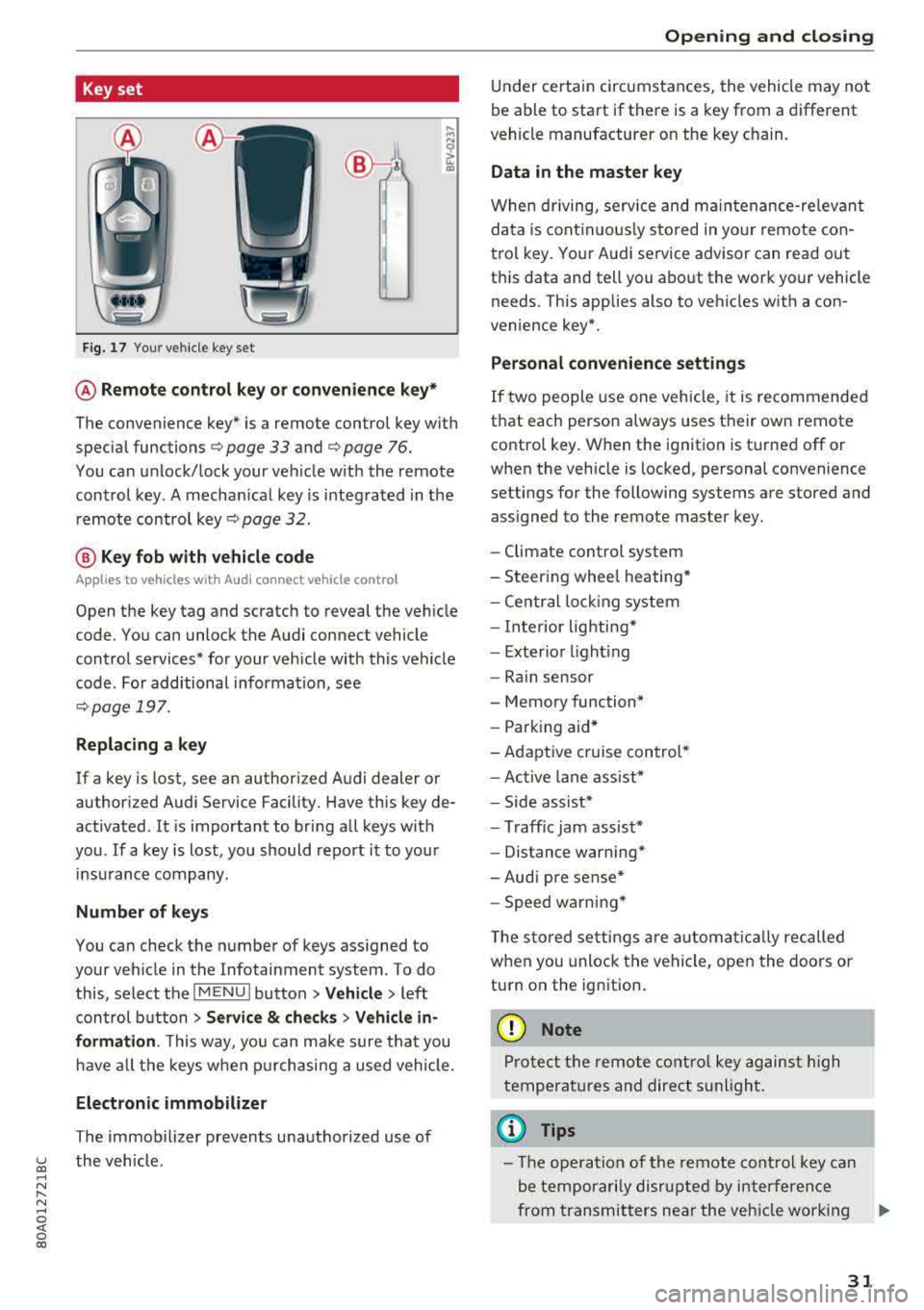
@ Remote control key or convenience key*
The convenience key* is a remote control key with
special
functions ¢ page 33 and¢ page 76.
You can unlock/lock your veh icle w ith the remote
control key. A mechan ical key is integrated in the
remote control
key¢ page 32.
@ Key fob with vehicle code
Applies to vehicles with Audi connect vehicle control
Open the key tag and scratch to reveal the vehicle
code. You can unlock the Audi connect vehicle
control services* for your vehicle with this vehicle
code . For additional informat ion, see
¢ page 197 .
Replacing a key
If a key is lost, see an authori zed Audi dealer or
authorized Audi Service Facility. Have this key de
activated . It is important to bring all keys with
you .
If a key is lost, you should report it to your
insurance company .
Number of keys
You can check the number of keys assigned to
your veh icle in the Infotainment system. To do
this, select the
I MENU I button >Ve hicle > left
control button
> Service & checks > Vehicle in
formation .
This way, you can make sure that you
ha ve all the keys when purchasing a used vehicle.
Electronic immobilizer
The immobilizer prevents unauthorized use of
the vehicle .
Opening and closing
Under certain circumstances, the vehicle may not
be able to start if there is a key from a different
vehicle manufacturer on the key c hain.
Data in the master key
When driving, service and maintenance-relevant
data is continuously stored in your remote con
trol key . Your Audi service advisor can read out
th is data and tell you about the work your vehicle
needs . This applies also to vehicles with a con
venience key*.
Personal convenience settings
If two people use one vehicle, it is recommended
that each person always uses their own remote
control key. When the ignition is turned off or
when the vehicle is locked, personal convenience
settings for the following systems are stored and assigned to the remote master key .
- Climate control system
- Steering wheel heating*
- Central locking system
- Interior lighting*
- Exterior lighting
- Rain sensor
- Memory function*
- Parking aid*
-Adaptive cruise control*
- Active lane assist*
- Side assist*
- Traff ic jam assist*
- Distance warning*
- Audi pre sense*
- Speed warning *
T he stored settings are automat ically recalled
when you unlock the vehicle, open the doors or
turn on the ignition.
(D Note
Protect the remote control key against high
temperat ures and direct sunlight.
(D Tips
- The operation of the remote control key can
be temporarily disrupted by interference
from transmitters near the veh icle work ing
..,_
31
Page 74 of 392
Warm and cold
SYNC Syn chr oniz ation
Use t he rocker sw itc h® to select the f unct ion.
When synchronization is switched on, the set
tings for the driver's side are applied to the front
passenger's side and the rear (except for seat
heating/venti lation*). When the settings on the
front passenger's side or in the rear are changed,
the synchron izat ion is automatically switched off
and
3 -z one appears in the display .
SET REAR function
Use the rocker switch ® to select the function .
When the function is switched on, you can adjust
all settings for the rear us ing the climate control
system controls in the cockpit . The rear climate
control system controls cannot be operated at
the same time . T his function switches off auto
mat ica lly after a ce rtain per iod of t ime or after
leav ing the menu.
Vents
You can open or close the center and rear vents in
the cockpit and the vents in the rear center con
sole us ing the r idged thumbwhee ls . T he levers
adjust the d irection of the airflow from the vents.
Re sidu al he at
You can activate the residual heat function when
the ignition is switched off by pressing the knob
(!) . The res idual heat from the coolant is used to
heat the vehicle interior. The residual heat func
tion switches off automatically afte r about 15
m inutes.
A WARNING
- Yo u should not use the re circulation mode
for an extended period of time, because no
fres h air is drawn in and the windows can
fog when cooling mode is sw itched off. This
increases the risk of an accident.
- Individuals with reduced sensitivity to pain
or temperature cou ld deve lop burns when
using the seat heating* funct ion. To reduce
the risk of injury, these ind iv iduals should
not use seat heati ng*.
72
@ Note
To avoid damaging the seat heating* ele
ments, do not knee l on the seats or p lace
heavy pressure on one area of the seat.
Setup
The climate control system basic settings ore ac
cessed in the Infotainment system .
.. Select in the Infotainment system : IMENU! but
ton
> Veh icle > left control button > Air condi
t ioning
Auto recirculation
When sw itched on, a utomat ic rec ircu lat ion con
tro ls the recircu lation mode automatically . If the
windows fog up, press
the® MAX button .
Automatic au xiliary heater *
The auxiliary heater he lps to wa rm the vehicle in
te rior more qu ic kl y.
Steering wheel heating
Applies to: vehicles with steering wheel heating
The steering wheel rim con be heated .
.. Press the lg\~ page 14, fig . 11 button on the
mu ltifu nction stee ring wheel to switch the
steer ing whee l heating on and off . The mes
sage
S teering wheel h eating : on /Ste ering
wheel heating: off
appears in the instrument
cluster display.
The tempe ra ture is ma inta ined at a constant lev
el when steering wheel heating is switc hed on .
The steer ing whee l heating sett ings are stored
automat ica lly and assigned to the remote control
k ey tha t is in use .
Page 77 of 392
u co ..... N r-N .....
~ 0 co
(D Note
-Have your vehicle maintained properly and
in accordance with the service recommenda
tions in your Warranty
& Maintenance book
let. Lack of proper maintenance as well as
improper use of the vehicle will impair the
function of the emission control system and
could lead to damage.
- Do not alter or remove any component of the Emission Control System unless approved by the manufacturer.
- Do not alter or remove any device, such as
heat shields, switches, ignition wires,
valves, which are designed to protect your
vehicle's Emission Control System and other important vehicle components.
(D Tips
The consumption estimates as published by
ENVIRONMENTAL PROTECTION AGENCY
(EPA) and Transport Canada may not corre
spond to your actual consumption on the
road, which will vary depending upon vehicle
load and speed, road and weather conditions,
trip length, etc.
Steering
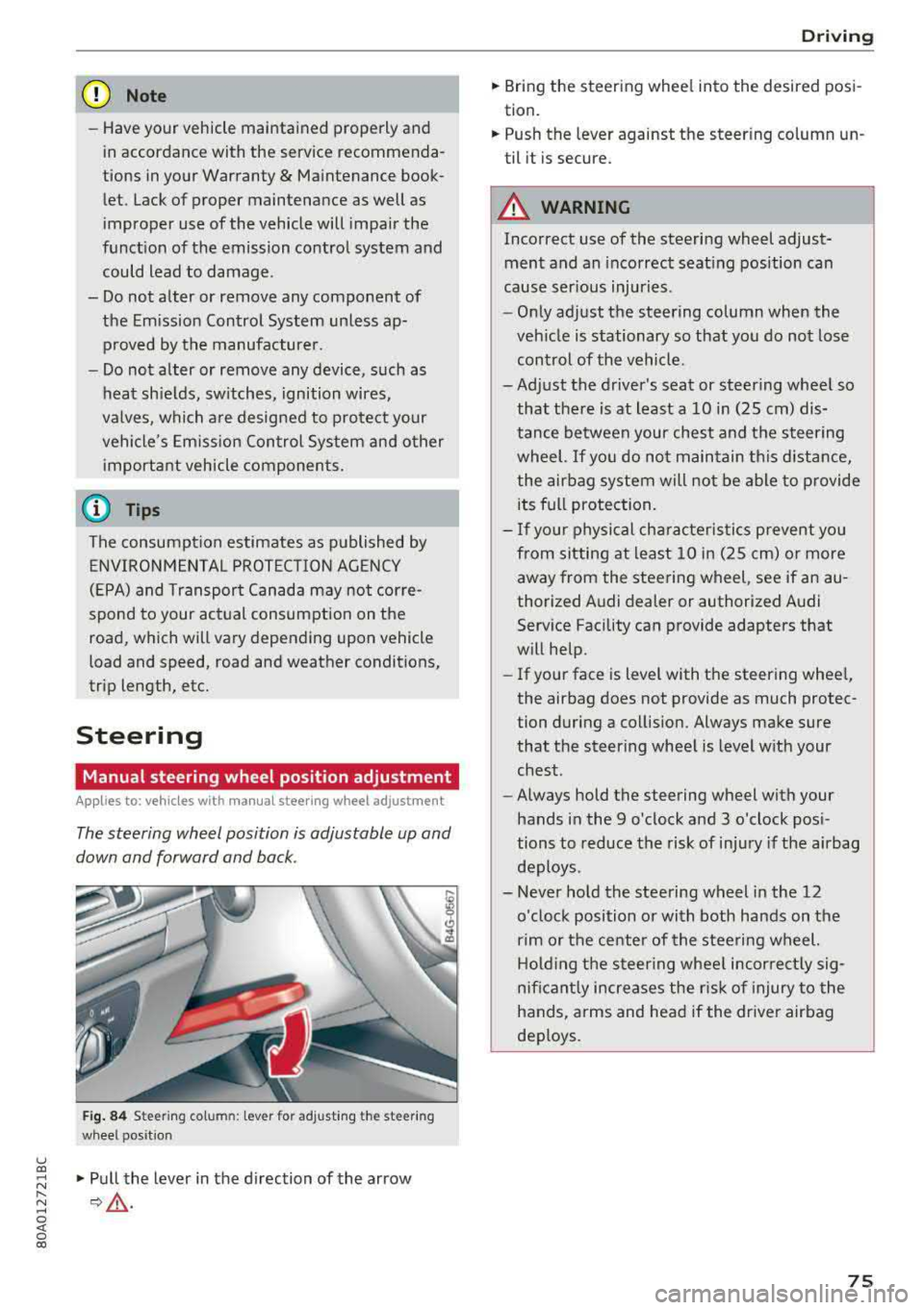
Manual steering wheel position adjustment
Applies to: vehicle s with manu al steering wheel adjustment
The steering wheel position is adjustable up and
down and forward and back.
Fig. 84 Steeri ng column: lever for adjust ing the steer ing
wheel position
"Pull the lever in the direction of the arrow
¢ .&.-
Driving
"Bring the steering wheel into the desired posi
tion.
" Push the leve r against the steer ing column un
til it is secure.
A WARNING
-Incorrect use of the steering wheel adjust
ment and an incorrect seating position can
cause serious injuries.
-
- Only adjust the steering column when the
vehicle is stationary so that you do not lose
control of the vehicle.
-Adjust the driver's seat or steering wheel so that there is at least a 10 in (25 cm) dis
tance between your chest and the steering
wheel. If you do not maintain this distance
I
the airbag system will not be able to provide
its full protection.
- If your physical characteristics prevent you
from sitting at least 10 in (25 cm) or more
away from the steering wheel, see if an au
thorized Audi dealer or authorized Audi Service Facility can provide adapters that
will help.
- If your face is level with the steering wheel,
the airbag does not provide as much protec
tion during a collision. Always make sure
that the steering wheel is level with your
chest.
- Always hold the steering wheel with your
hands in the 9 o'clock and 3 o'clock posi
tions to reduce the risk of injury if the airbag
deploys.
- Never hold the steering wheel in the 12
o'clock position or with both hands on the
rim or the center of the steering wheel.
Holding the steering wheel incorrectly sig
nificantly increases the risk of injury to the
hands, arms and head if the driver airbag
deploys.
75
Page 78 of 392
Driving
Power steering wheel position adjustment
App lies to: vehicles with power stee ring whee l adjustme nt
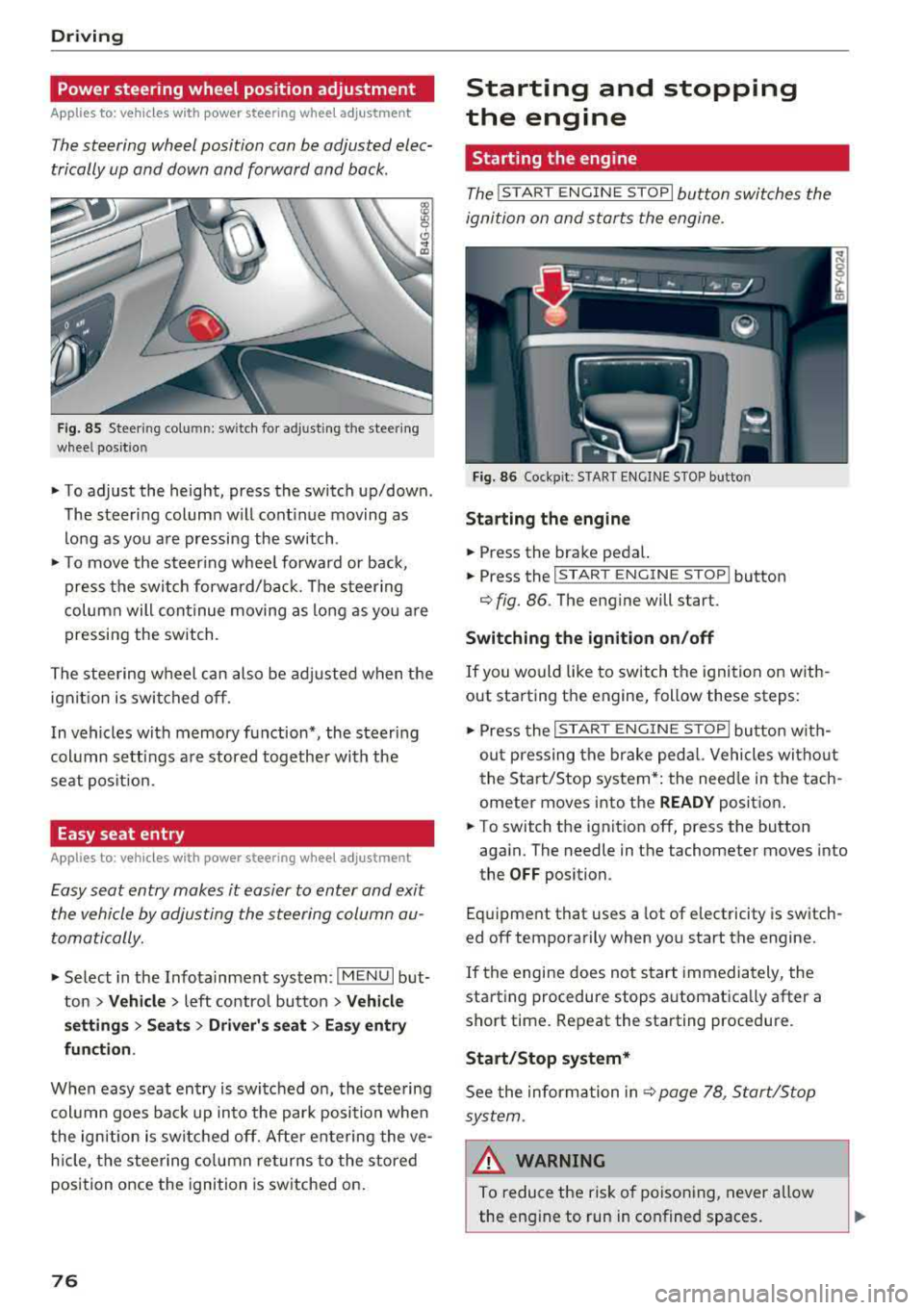
The steering wheel position can be adjusted elec
trically up and down and forward and back.
F ig. 85 Steer ing co lu m n: sw itch for ad just ing the steering
whee l pos it io n
.. To adjust the height, press the switch up/down .
The steer ing column w ill cont inue moving as
long as you are pressing the switch .
"To move the steering whee l forward or back,
press the swi tc h forward/bac k. T he steer ing
column will continue moving as long as you a re
pressing the switch .
The steering wheel can also be adjusted when the ign it io n is swit ched off .
In vehicles with memory function*, the steering
col umn sett ings a re stored together wi th the
seat pos it ion.
Easy seat entry
Applies to : vehicles with power stee ring wheel adjustme nt
Easy seat entry makes it easier to enter and exit
the vehicle by adjusting the steering column au
tomatically.
" Se lect in the Infota inment system: IMENU I but
ton
> Vehicle > left contro l button > Vehicl e
setting s > Seats > Driver 's seat > Ea sy entry
fun ction .
When easy seat entry is swi tched o n, the stee ring
col umn goes bac k up into the par k posi tion whe n
the ign ition is switched off. After ente ring the ve
h icle, the steering co lumn re turns to the stored
position once the ignition is switched on.
76
Starting and stopping
the engine
Starting the engine
The ! STAR T ENGINE ST OPI button switches the
ignition on and s tarts the engine.
Fig. 86 Coc kp it: S TART ENGINE STOP b utto n
Starting the engine
.. Press the brake pedal.
.. Press the I START ENGINE STOP ! button
¢fig. 86. The eng ine will start.
Switching the ignition on /off
If you would like to sw itch the ignition on w ith
out starting the engine, follow these steps:
" Press the I ST AR T ENGINE ST OP ! butto n w ith
out p ressing the brake ped al. Vehicles wi tho ut
the Start/Stop system* : the need le in the tach
ometer moves into the
READY posit ion .
.. To switch the ignition off, press the button
aga in. The needle in the tachometer moves into
the
OFF position.
Eq uipment that uses a lot of e lectricity is switch
ed off temporarily when you start the engine.
If the engine does not s tart immedia tely, the
starting procedure stops automatically after a
short time . Repeat the starting procedure .
Start/Stop system*
See the information in c::;, page 78, Start/Stop
sys tem .
& WARNING
To reduce the ris k of poisoning, never allow
the eng ine to run in confined spaces.
-
Page 79 of 392
u co ..... N r--N ..... 0 <( 0 00
@ Note
Avoid high engine speed, full throttle, and heavy engine load if the engine has not
reached operating temperature yet. You could
damage the engine.
@) For the sake of the environment
Do not let the engine run while parked to
warm up. Begin driving immediately. This re duces unnecessary emissions.
(D Tips
- Some noise after starting the engine is nor
mal and is no cause for concern.
- If you leave the vehicle with the ignition
switched on, the ignition will switch off af
ter a certain amount of time. Make sure that electrical equipment such as the exterior
lights are switched off.
Starting the engine
"'Bring the vehicle to a full stop.
"'Press the I START ENGI NE STO PI button
C? page 76, fig. 86.
Emergency off function*
If it is absolutely necessary, the engine can also
be turned off while driving at speeds starting at
4 mph (7 km/h). To switch the engine off, press
the
! START ENGINE STOPI button twice in a row
briefly or press and hold for longer than two sec
onds.
A WARNING
- Never turn off the engine before the vehicle
has come to a complete stop. The full func
tionality of the brake booster and the power steering is not guaranteed. You must use
more force to steer and brake the vehicle.
The fact that you cannot steer and brake as
usual can increase the risk of accidents and
serious injuries.
-If you leave the vehicle, switch the ignition
off and take the vehicle key with you .
If you
do not, the engine could be started and
electrical equipment such as the power win-
Driving
dows could be activated. This can lead to se
rious injuries.
- For safety reasons, always park the vehicle
with the selector lever in the "P" position.
Otherwise, there is the risk that the vehicle
could roll unintentionally.
@ Note
If the engine has been under heavy load for
an extended period of time, heat builds up in
the engine compartment after the engine is
switched off and there is a risk of damaging
the engine . For this reason, let the engine run
at idle for approximately two minutes before
shutting it off.
(D Tips
For up to 10 minutes after stopping the en
gine, the radiator fan may turn on again auto
matically or it may continue to run (even if
the ignition is switched off) for the following
reasons :
- The coolant temperature is increasing due
to
trapped heat.
- If the engine is warm and the engine com
partment also heats up from strong sun
light.
Messages
Engine running. Warning! Turn off ignition be
fore leaving vehicle
This message appears and a warning tone sounds
if you open the driver's door when the engine is
running.
Please press the brake pedal
This message appears if you do not press the brake pedal when starting the engine .
Ill Remote control key: key not detected. Is the
key still in the vehicle?
This indicator light turns on and this message ap
pears if the ignition key was removed from the
vehicle when the engine was running. If the igni
tion key is no longer in the vehicle, you cannot
switch on the ignition or start the engine once
..,.
77
Page 80 of 392
Driving
you stop it. You also cannot lock the vehicle from
the outside.
Shift to P, otherwise vehicle can roll away.
Doors do not lock if gearshift is not in
P
This message appears for safety reasons if the
selecto r lever is in the "N" position when you
switch the ignition off. Move the selector lever to
the "P" posit ion. Otherwise the vehicle is not pro
tected from rolling and it cannot be locked.
I) Remote control key : hold back of key
against the designated area. See owner's man
ual
I f the indicator light turns on and this message
appears, there is a malfunction
c:> page 78.
Shift to P before leaving vehicle, otherwise vehi
cle can roll away
This message appears if the driver's door is
opened while the ignition is switched on and the
transmission has not been shifted to the "P" posi
tion . Sh ift the transm iss ion into the "P" position
and turn off the ignition if you are leav ing the ve
h icle. Otherwise the vehicle could roll. Also see
<=:>page 79.
Starting the engine when there is a
malfunction
It may not be possible to start the engine under
certain circumstances, for example, if the bat
tery in the vehicle key is drained, if interference is
affecting the key or if there is a system malfunc tion.
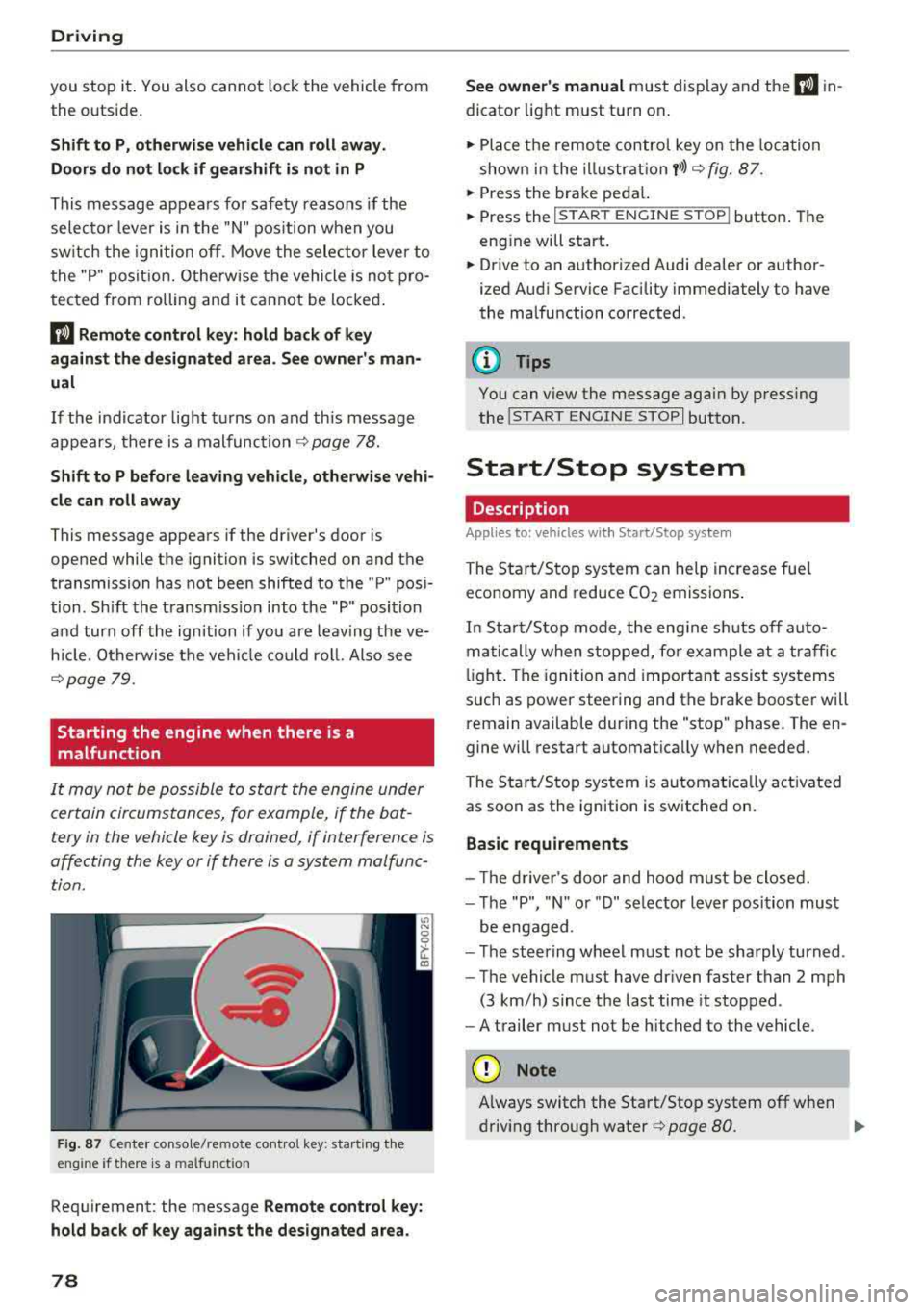
F ig. 87 Center console/remote contro l key : start ing the
eng ine if there is a malfunct ion
Requirement: the message Remote control key:
hold back of key against the designated area.
78
See owner's manual must display and the I) in
dicator light must turn on .
.,. Place the remote control key on the loca tion
shown in the illu strat ion
y >l) c:> fig. 87.
... Press the brake pedal.
... Press the I START ENGINE STOPI button. The
eng ine will start.
... Drive to an authorized Audi dealer or author
ized Aud i Service Facility immediately to have
the malfunction corrected .
(!) Tips
You can view the message aga in by pressing
the lS TART
ENGINE STOP I button.
Start/Stop system
Description
Appl ies to : vehicles wi th Start/Stop sys te m
The Start/Stop system can help increase fue l
economy and reduce CO2 emissions.
In Sta rt/S top mode, the engine sh uts off auto
matically when stopped, for example at a traffic
li ght . The ignition and important assist systems
such as power steering and the brake booster will
remain available dur ing the "stop" phase. The en
gine will restart automatically when needed.
The Start/Stop system is automat ica lly act ivated
as soon as the ignition is switched on.
Basic requirements
- Th e driver's door and hood must be closed.
- The "P", "N " or "D" selector lever position must
be engaged .
- The steering wheel must not be sharply turned .
- The vehicle must have dr iven faster than
2 mph
(3 km/h) since the last time it stopped.
- A trailer must not be hitched to the vehicle.
(D Note
Always switch the Start/Stop system off when
driving through water
r=;, page 80.
Page 100 of 392
Ass is tance sy stem s
Operating
Applies to: vehicles with camera -based traffic sign recogni
tion
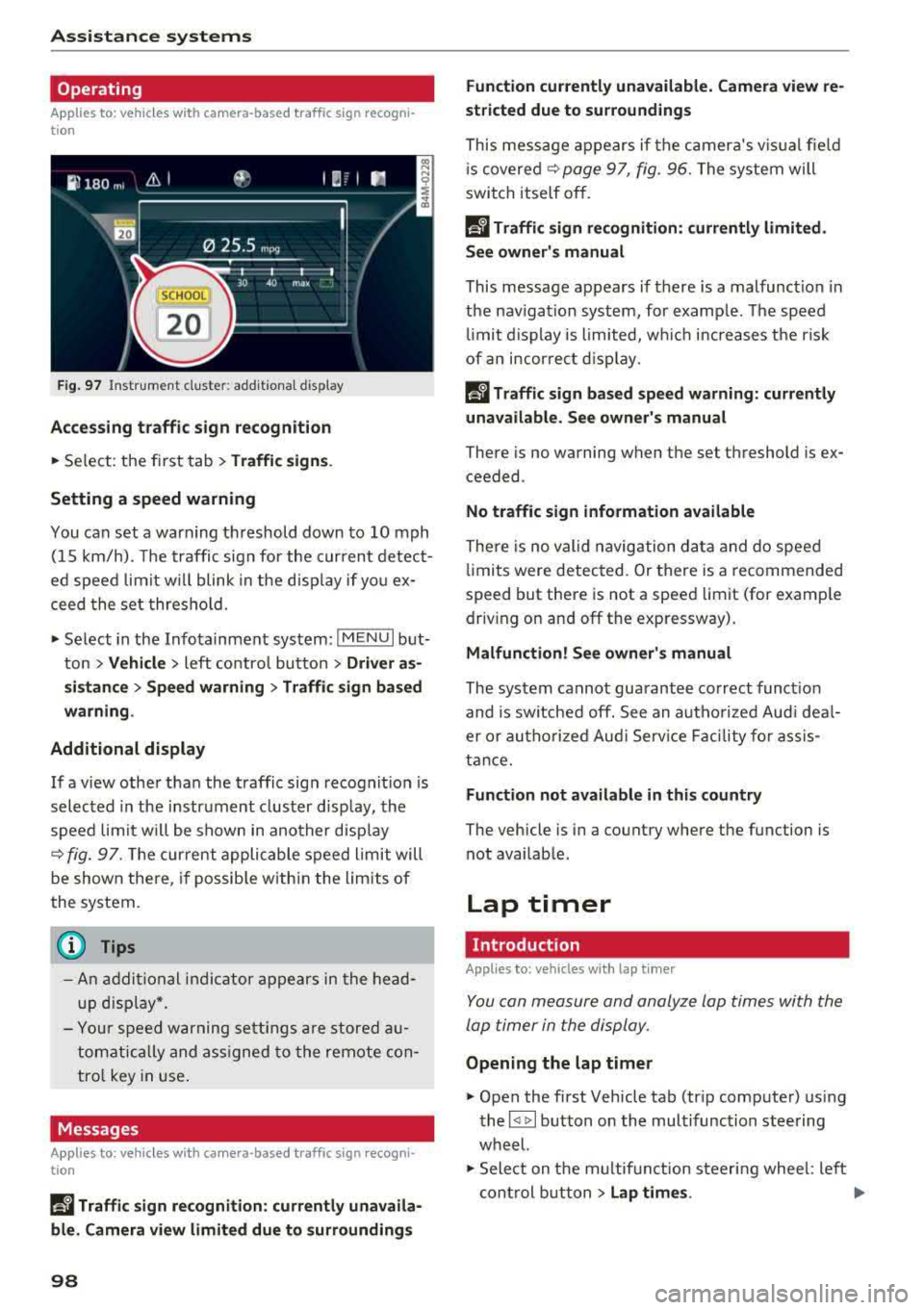
F ig . 97 Instrument clus te r: addi tiona l d isplay
Ac ces sing traffic sign recogn iti on
... Se lect: the first tab> T ra ffic si gns.
Setting a speed warning
You can set a warn ing th reshold down to 10 mph
(15 km/h). The traffic sign for the current detect
ed speed limit w ill blink in the disp lay if you ex
ceed the set thresho ld.
... Select in the Infotainment system: IM ENU I but
ton >
V ehi cle> left contro l button > Driver a s·
s is tan ce
> S pe ed war ning > Tr affic sign ba sed
w arning .
Add itional display
If a view other than the traffic sign recognit ion is
selected in the instrument cluster disp lay, the
speed limit w ill be shown in another disp lay
~ fig. 97 . The cur rent applicable speed limit will
be shown there , if possib le with in the limits of
the system.
(D Tips
- An additional indicator appears in the head
up d isplay*.
- Your speed warning settings a re stored au
tomatically and ass igned to the remote con
tro l key in use .
Messages
Applies to: vehicles with camera-based traffic sign recogn i
tion
P!\i Traffi c sign recognition : curren tly unavaila
ble _ Camera view limit ed du e to su rrounding s
98
Function currentl y una va ilable. Camera view re
stricted due to surroun ding s
This message appears if the camera's v is ual fie ld
i s
covered ~ page 97, fig. 96. The system will
switch itself o ff.
la Tr affic sign r ecog nition : currentl y limit ed .
Se e owner' s manua l
This message appears if there is a malfunct ion in
the nav igation system, for example . The speed
li mit d isplay is limited, wh ich inc reases the risk
of an incorrect d isp lay.
P!\i Traffic sign based speed warnin g: current ly
una vail able . Se e own er' s manual
There is no warning when the set threshold is ex
ceeded .
No traffic sign inf ormation available
There is no valid navigation data and do speed
li mits were detected. Or there is a recommended
speed but there is not a speed lim it (for examp le
driv ing on and off the expr essway) .
Malfun ction! S ee owner's manu al
The system cannot guarantee correct funct ion
and is switched off. See an autho rized Aud i dea l
er or autho rized Aud i Serv ice Faci lity for assis
tance.
Functi on not av ailable in this country
The vehicle is in a country where the function is
not availab le .
Lap timer
Introduction
Applies to: vehicles with lap t imer
You can measure and analyze lap times with the
lap timer in the display.
Opening the lap timer
... Open the first Vehicle tab (trip computer) using
the
l <1 1>I button on the multifunction steering
wheel.
... Sele ct on the m ultifunction steering wheel : lef t
cont rol b utton
> Lap time s. Ill-
Page 101 of 392
u co .... N ,..._
N ..... 0 <( 0 00
Operating the lap timer
.,. On the mult if u nct ion s teer ing whee l, tur n the
l e ft thumbw hee l
0 ~ page 12 unt il t he desired
menu item is displayed in the instrument cl us
ter .
.,. Press the left thumbwhee l to confirm the selec
t ion.
A WARNING
Your focus should always be on driving your
veh icle safely . As the dr ive r, yo u have com
plete responsib ility for safety in traffic. Only
use t he f unctions s uch as the lap time r in s uch
a way tha t you alw ays ma int ain com plete con
tr ol ove r your vehicle in all tra ffic s itu ations.
(D Tips
You ca n ret rieve information from the t rip
computer while t he lap t ime r stopwatch i s
r u nning.
Lap times and timing
Applies to: vehicles with lap timer
Requirement: the lap t imer must be o pen
~ page 98 .
Timing laps
.,. To start tim ing manually, se lect Start lap 1 in
the menu .
-
.,. To start tim ing a utomat ica lly as soon as you
begin to drive, select
Drive off to start lap 1 or
Start by driving off in the men u .
.,. To measure the lap t ime, select New lap in the
menu. T his starts timing the next lap at the
same t ime.
After completing a lap, the difference between
the last lap and the previous best lap time w ill be
ind icated with
a" -" or" +".
Pausing timing and displaying a split time
.,. To insert a pa use m , se lect Pau se in t he menu.
.,. T o resume timing, se lect Re sume in the men u .
.,. To display a split time, se lect Split time in the
men u. The split t ime
[fw] appears for approxi
mately 10 seconds in the instrument cluste r.
The timing of the current lap continues.
A ss istance systems
Resetting timing
.,. Using the mul tifun cti on steer ing whee l, sele ct
Re set time s in the menu.
(D Tips
- A m axim um of 99 lap t imes can be meas
ure d.
- If tim ing is pa used, you can continue i t later
even if yo u swi tc h t he ign ition o ff.
- Saved lap ti mes ca nnot be indiv id ua lly de
le ted from the tot al results.
- Th e saved lap t ime r va lues w ill remain after
sw itching the ign ition off.
Lap statistics
Applies to: vehicles with lap timer
Displaying lap statistics
You can display the numbe r of laps dr iven, the
fas test lap" +", the slowes t lap" -", and the aver
age t ime
"0" in t he instr ument cluster .
.,. On the multifunc tion steering w heel, select the
left contro l bu tton
> Lap stati stic s o r Sta tis
tics .
.,. Turn the thumbwheel down o r up to display the
individual lap times .
.,. To return to t he lap timing that was begun,
press the left thumbwheel.
Resetting lap statistics
.,. On the mul tif unc tion stee ring w heel, selec t:
the right control button
> Reset statistics.
(D Tips
The lap st atis tic s lis t the lap t imes fo r th e l ast
3 0 l aps . The fastest and slowes t lap time o ut
of up to 99 meas ured laps are a lso d isplayed.
Predictive efficiency
assist
Introduction
T he predict ive e fficiency assist he lps the driver to
drive with anticipation and therefore helps to
save fuel. The system accesses p redictive t rip da -
ta (including speed limits, inclines and the radius
Iii"
99