steering AUDI Q5 2018 Owner's Manual
[x] Cancel search | Manufacturer: AUDI, Model Year: 2018, Model line: Q5, Model: AUDI Q5 2018Pages: 392, PDF Size: 60.56 MB
Page 107 of 392

You can set any speed between 20 mph and 95 mph (30 km/h and 150 km/h).
I ndicato r lights and messages in t he i nstr ument
cluste r display inform you abou t the cur ren t sit
uation and setting.
An addit ional ind icator appears in the head- up
d isp lay* .
Switching adaptive cruise control on
"' Pull the lever toward you into position @
<=>fig . 103 .
Storing the speed and acti vating regul ation
"' To store the c urrent speed, press the !SE TI but
ton
<=> fig. 103. The stored speed is shown in the
speedometer in the LED
line @ and appears
briefly i n the status line @<=>
fig. 104 .
"'To activate the regu lation wh ile stat ionary, also
press the b rake peda l.
Switching adaptive cruise control off
"' Push the lever away from you into position @
unt il i t clicks i nto place . The message
ACC: off
appears .
® Indicator light s
II-Adaptive cruise control is switched on. No
ve hicles are detected ahead. The stored speed is
maintained.
•-A vehicle driving ahead was detected . The
adaptiv e cruis e control system regulates the
speed and distance to the vehicle dr iv ing ahead
and accelerates/brakes automatically.
•-Adaptive cruise control is switched on. Ave
h icle was detect ed ahead. You r vehicle is station
ary and will not start driving automatically.
ti)-Adaptive cru ise con trol is switched on. No
ve hicles were detected ahead. Yo ur vehicle is sta
tionary and will not start driving automatically .
•-The autom atic br aking is no t en ough to
main tain a sufficient distance to a veh icle dr iving
ahead. You must intervene
c:!;> page 108, Driver
u intervention request . co ..... N ,..._
N ..... 0 <( 0 00
Ass istance systems
© Instrument cluster display
If the Driver a ssistance displ ay is not shown in
the instr ument cluster d isp lay, you can open it
u sing the m ultif unction steering whee l buttons
c:!;> page 12.
Ba sed on the gr aphic disp lay, you c an dete rm ine
i f th e system is maintain ing a d istance to the ve
hicle driving a head and what t hat distance is .
No vehicle -no vehicle was detec ted dr iv ing
ahe ad.
Silver vehicle -a vehicle was detected driving
ahead.
Red v ehicle -reques t for driver interve ntion
<=> page 108 .
The five distan ce bars on the gauge © represent
the set distance (refer to
c:!;> page 107for infor
ma tion o n how to change t he d istance). If you
fall below the selected d ista nce, the distance
bars become red from the bottom upwa rd .
A WARNING
If yo u press the !SET I butto n w hen dr iv ing at
speed s below 20 mph (30 km/h), t he ve hicle
a ccelera tes au tom atic ally u p to 2 0 mph (30
k m/h), w hich is the minim um speed tha t can
b e set.
(D Tips
- If you swi tch t he ig nit io n o r th e adaptive
cr uise cont ro l sys tem o ff, t he set s peed is
erased fo r safe ty reasons .
- Th e Elect ronic S tab ili za tion Control ( ES C)
and the An ti- Slip -Reg ula tion (ASR) are a uto
matically swi tched o n when the adap tive
c ruise cont ro l is switched on .
105
Page 111 of 392
u co ..... N r-N .....
~ 0 co
Traffic jam assist
Applies to: ve hicles with traff ic jam ass ist
Traffic jam assist supports the driver when driv
ing in traffic jams or in heavy traffic.
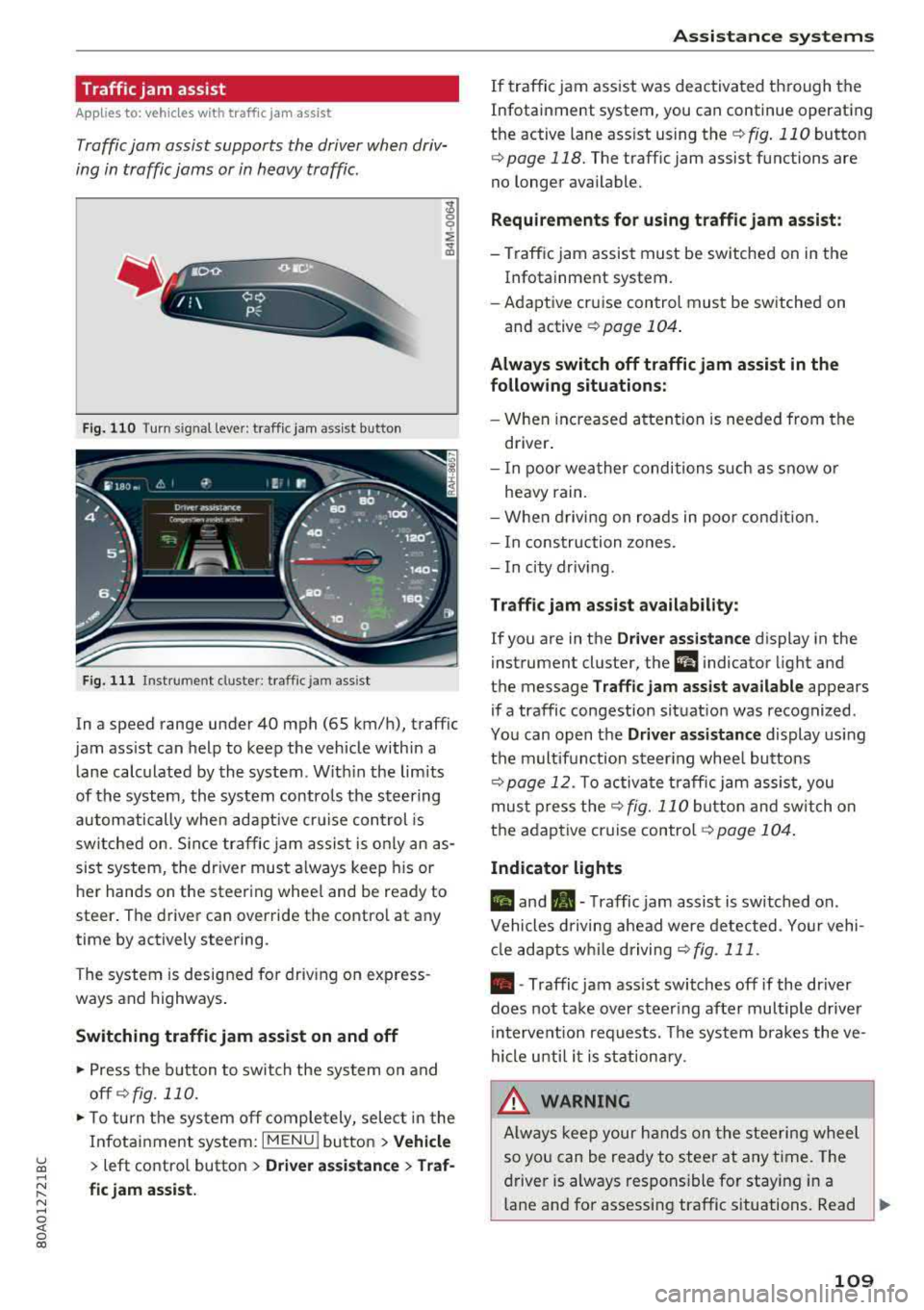
Fig. 110 Turn s ig n al leve r: traffic ja m ass ist button
F ig. 111 I nst ru ment duste r: tra ffic jam a ssist
In a speed range under 40 mph (65 km/h), traffic
jam ass ist can help to keep the vehicle within a
l ane calc ulated by the system . W ith in the lim its
of the system, the system contro ls the steering
automatically whe n adapt ive cr uise control is
switched on . S ince traffic jam assist is only an as
sist system, the dr iver must a lways keep his or
he r hands on the steer ing whee l and be ready to
steer . The driver can override the contro l at any
time by actively steering.
The system is designed for driv ing on express
ways and highways .
Switching traffic jam assist on and off
~ Press the b utton to switch the system on and
off ¢fig. 110.
~ To tu rn t he sys tem off comple tely, selec t in the
Infotai nment system:
I MENU ! button > Vehicle
> left contro l button > Driver a ssistance > Traf
fic jam assist.
A ssi st a nce systems
If traffic jam ass ist was deactivated through the
Infotainment system, you can continue operating
the active lane ass ist using
the ¢ fig. 110 button
¢ page 118. The traffic jam assist functions are
no longer available.
Requirements for using t raffic jam assi st :
-Traffic jam assist must be switched on in the
Infotainment system.
- Adapt ive cr uise con trol must be sw itched on
and active
r:::;, page 104 .
Always switch off traffic jam assist in the
following situations:
- When in cr eased a ttent ion is needed from the
driver .
- I n poor wea ther condi tions such as snow o r
heavy rain .
- When d riving on roads in poo r condit ion.
- I n construction zones.
- In city driv ing .
Traffic jam as sis t availabil ity :
If you are in the Dri ver assista nce display in the
instrument cluster, the
a i ndicator light and
the message
Traffi c jam as sist ava ilable appears
if a traffic congestion situat ion was recognized.
Yo u can open the
Driver assi stance display using
the m ultifunction steering whee l buttons
r:::;,page 12. To activa te traffic jam assist, you
mus t press the
r:::;, fig. 110 button and sw itch on
the adaptive cruise
contro l¢ page 104 .
Indicator lights
II and•-Traffic jam assist is switched on .
Vehicles d riving ahead were detected. Yo ur vehi
cl e adapts w hile driving
r:::;,fig . 111 .
•-Traffic jam ass ist switches off if the dr iver
does not take over steer ing after multiple driver
in terve ntion requests. The system b rakes the ve
hicle u nti l it is st ationary .
_& WARNING
Always keep y our hands on the stee ring whee l
so yo u can be ready to steer at any t ime . T he
driver is always respons ible fo r staying in a
lane and for assessi ng traffic situations . Read
..,.
109
Page 113 of 392
u co ..... N r--N ..... 0 <( 0 00
The road exceeds the maximum possible grade
for safe operation. The systems cannot be switch
ed on.
Ill AC C with traffic jam a ssis t: only availabl e in
D, Sor M
Select the "D/S " or " M" selector leve r pos it ion.
Ill A CC w ith tr affic j am ass is t: currentl y un
available . Parking brake applied
The systems sw itch off if you set the parking
brake . The systems are available again after you
release the parking brake .
llJ ACC with traffic jam a ssist: currentl y un·
av ailable. Stabili zation cont rol (E SC) input
This message appears if the Ele ctronic Stabili za
tion Control (ESC) is taking action to stabilize the
ve hicle . The systems switch off in this scenario .
Ill ACC with traffic jam a ssis t: manu al control!
This message appea rs if the veh icle rolls back
when sta rting on a slight incl ine, even t hough the
systems are active . P ress t he b rake peda l to pre
vent the vehicle from rolling or sta rting to move.
IIJ ACC w ith tr affic jam a ssis t: curr entl y un
availabl e. Downhill a ssis t activated
You cannot activate the system when hill hold as
sist is act ive .
II!! ACC with traffic jam assist: manual control!
This message appears if the driver does not take
over steering after mu ltip le driver intervention
requests and the system switches off . The vehicle
brakes unt il it is stationary .
ii Traffic jam a ssis t : una vailable. S ee o wner' s
manual
The system can no longer ensure that t he ve hicle
w ill stay in the lane and sw itches off. Have yo ur
vehicle checked by an a uth orized Audi dea ler or
authorized Audi Service Facility if the ma lfunc
tion is continuous .
14§ Traffic jam assis t : Plea se take over steering!
This message appea rs as soon as the system
stops detecting steer ing activ ity when the system
limits are rea ched. Always keep yo ur hands on
Ass istance systems
the steering whee l so you can be ready to steer at
any time.
14§ Traffic jam a ssis t : currentl y unavailable .
Pl ea se f asten se at belt
T he system switches off when the drive r's safety
belt is unfastened.
Ill AC C: eff iciency assist not available in thi s
countr y
The adaptation to speed lim its and routes ahead
is not available in this country .
IIJ ACC: predictive control currentl y una vaila
ble . See owne r's m anual
T he ad aptation to speed lim its and routes ahead
swi tches off at speed limits under 20 mph
(30 km/h) .
T he message ca n also appear if the adaptation to
speed limi ts and routes a head has a temporary
f ailure . Have your vehicle checked by an autho r
ized Audi dea ler or authorized Audi Service Facili
ty if the malfunction is continuous .
Distance warning : malfunction! Please contact
S erv ice
T he system cannot gua rantee that it will detect
vehicles correct ly and it has switc hed off. The ra
dar sensors have shifted or are fa ulty . Drive to an
authorized Aud i dea ler o r authorized Audi Serv ice
Facility immediate ly to have the ma lfunction cor
rected .
Distance warning : currentl y unavailable . Sen sor
view re stricted due to surrounding s. See own
e r' s manual
T his message appears if the rada r senso r view is
obstructed, for examp le by leaves, snow, heavy
spray or dirt. Clean the sensors
¢ page 103,
fig . 100.
Distance warning : curr entl y unavailable . See
owner' s manual
This message appears if the system has a tempo
r a ry fa il ur e. If this occurs m ultip le t imes, drive to
an a uth orized Aud i dea le r o r auth o rized Aud i
Se rvice Facility immed iate ly to have the ma lfunc -
t ion corrected .
liJ,,
111
Page 115 of 392
u co ..... N r--N ..... 0 <( 0 00
-Closi ng the w indows and sunroof*
- Activ ati ng the eme rgency fl ashe rs
l ).
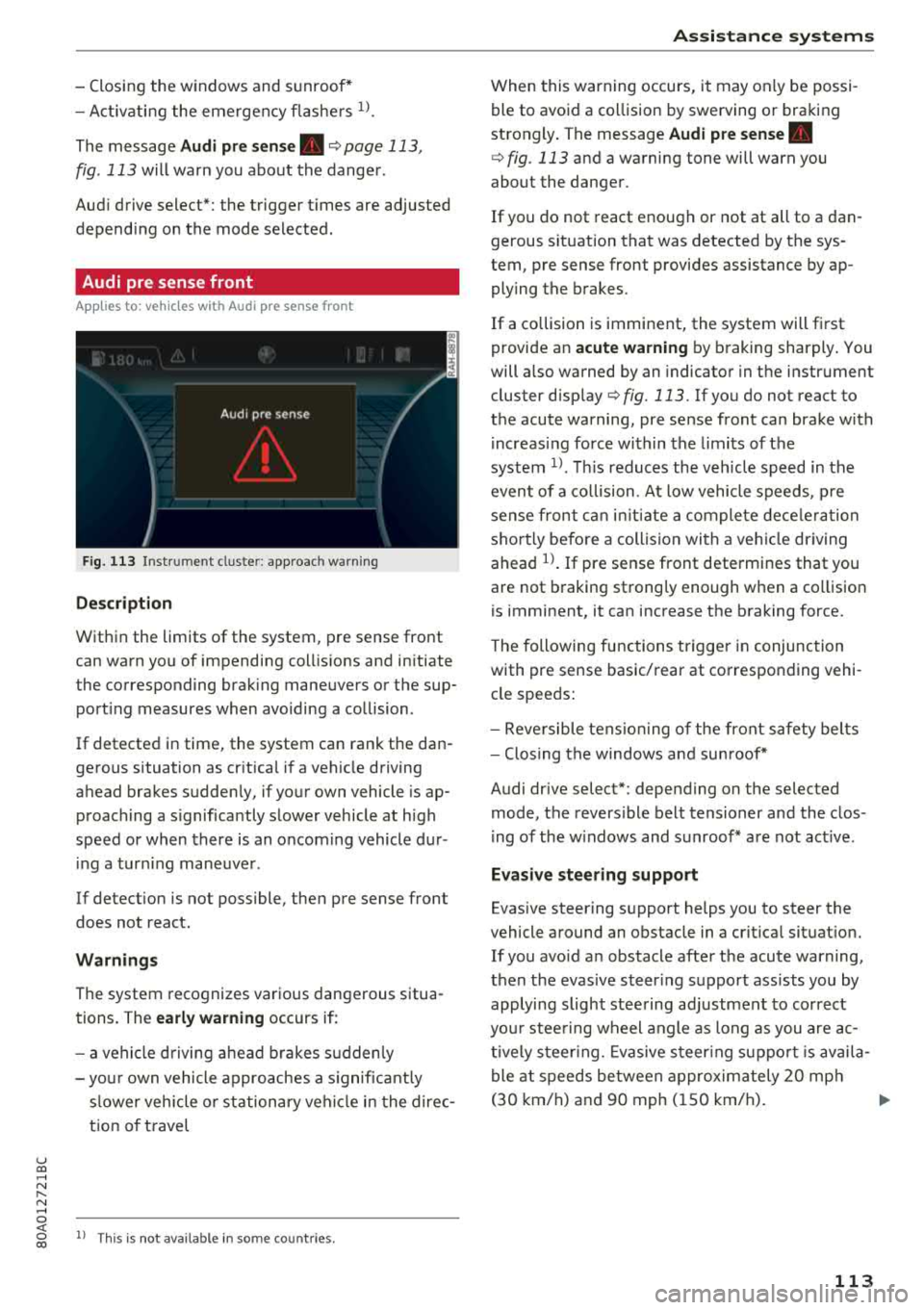
The message Audi pre sen se. ¢ page 113,
fig . 113 will warn you about the dange r.
Aud i drive select*: the trigger t imes are adjusted
depend ing on the mode selected .
Audi pre sense front
Applies to: vehicles with Audi pre sense front
Fig . 113 In strumen t clu ste r: approac h warn ing
Descr iption
Within the limits of the system, pre sense front
can warn yo u of impending coll is ions and in itiate
the corresponding brak ing maneuvers or the sup
port ing measures when avoiding a co llision .
If detected in time, the system can rank the dan
gerous situation as cr itica l if a vehicle driving
ahead brakes sudden ly, if you r own vehicle is ap
proaching a s ignificantly s lower vehicle at h igh
speed or when there is an oncom ing vehicle dur
i ng a tur ning maneuve r.
If detection is not poss ible, then pre sense front
does not react.
Warnings
The system recognizes various dange rous situa
tions. The
early warning occurs if:
- a vehicle d riving ahe ad brakes s udden ly
- yo ur own vehicle approaches a s ignificant ly
s lower veh icle o r st ation ary veh icle in the dire c
t ion of t ravel
ll Thi s is not availa ble in so m e co untrie s.
A ss istance systems
When this warning occurs, it may on ly be possi
ble to avoid a co llision by swerving o r braking
strongly . The message
Audi pre sense.
¢ fig . 113 and a wa rning tone will warn you
about the danger .
If you do not react enough or not at all to a dan
gerous sit uat ion that was detected by the sys
tem, p re sense front provides assistance by ap
ply ing the b rakes .
If a collision is imminent, the system will first
provide a n
acute warning by braking sharply . You
will a lso warned by an indicato r in the instr ument
cluster
disp lay¢ fig. 113 . If you do not react to
the acute warning, pre sense front can brake w ith
i ncreas ing fo rce wi thin the limits of the
system
1> . Thi s reduces the veh icle speed in the
even t of a co llision . At low vehicle speeds, p re
sense fron t can ini tia te a complete dece le ra tion
shor tly be fore a collision wi th a ve hicle dr iving
ahead
l)_ If pre sense front determi nes that you
are not braking strong ly enough when a co llision
is imminent, it can increase t he b raking force.
T he following fu nctions t rigge r in conjunction
with pre sense basic/rea r at co rresponding vehi
cle speeds:
- Reve rsible tens ion ing of the front safety bel ts
- Clos ing the windows and sun roof*
Audi drive select*: depending on the selec ted
mode, the revers ible be lt tensioner and the clos
i ng of the w indows and s unroof * are not act ive .
Evasive steering support
Evas ive steering s upport helps you to steer the
vehicle a round an obstacle in a crit ica l situat ion.
If you avo id a n obstacle after the acute warning,
then the evasive s teer ing suppo rt ass ists you by
applying sligh t stee ring adjustmen t to correct
yo ur stee ring w heel angle as long as you are ac
t ive ly s teer ing. Evasive s teer ing su ppo rt i s avai la
ble at speeds be tween approx im ately 20 mp h
( 3 0 km/h) and 9 0 mph ( 150 km/h) .
..,.
113
Page 119 of 392
u co ..... N r--N ..... 0 <( 0 00
This message appears if the pre sense functions
are switched off through the Infotainm ent sys
tem or if the system is not ready.
Audi active lane assist
Description
Applies to: vehicles with Audi active lane assist
Active lane assist (lane departure warning) de
tects lane marker lines within the limits of the
system using a camera in the windshield. If you
are approaching a detected lane marker line and
it appears likely that you will leave the lane, the
system will warn you with corrective stee ring .
You can override this steering at any time . If you
pass over a line, the steering wheel will vibrate
lightly . In order for this warning vibration to oc
cur, it must first be switched on in the Infotain
ment system. Active lane assist is ready for oper
ation when the lane marker line is detected on at
least one side of the vehicle.
The system is designed for driving on express
ways and highways and therefore only activates
at speeds above approximately 40 mph (65 km/
h).
Applies to: veh icles w ith side assist: if you acti
vate a turn signal when active lane assist is ready
and it classifies a lane change as critical because
of vehicles traveling alongside you or approach
ing you, there will be noticeable corrective steer
ing shortly before you leave the lane. This will at
tempt to keep your vehicle in the lane.
Applies to: veh icles w it h out s ide ass ist: the ready
system does not warn you if you activate a turn
signal before crossing the lane marker line. In
this case, it assumes that you are changing lanes
intentionally.
Applies to: vehicles with adaptive cruise control:
there is no corrective steering or warnings if the
syst em recognizes a distinct passing maneuver.
If the conditions are met, traffic jam assist
switches on at speeds under approximately
40 mph (65 km/h)
¢ page 109 .
Assistance systems
A WARNING
--
-The system warns the driver that the vehicle
is leaving the lane using corrective steering .
The driver is always responsible for keeping
the vehicle within the lane.
- The system can help you keep the vehicle in
the lane, but it does not drive by itself. Al
ways keep your hands on the steering
wheel.
- Corrective steering may not occur in certain
situations, such as during heavy braking.
- There may be cases where the camera does
not recognize all lane marker lines. Correc
tive steering can only take place on the side
of the vehicle where lane marker lines are
detected.
- Other road structures or objects could possi
bly be identified unintentionally as lane
marker lines. As a result, corrective steering
may be unexpected or may not occur.
- The camera view can be restricted, for ex
ample by vehicles driving ahead or by rain,
snow, heavy spray or light shining into the
camera. This can result in active lane assist
not detecting the lane marker lines or de
tecting them incorrectly .
- In certain situations where visibility is low,
the vehicle may switch from an "early" to
"late" steering correction.
- Under certain conditions such as ruts in the
road, an inclined roadway or crosswinds, the
corrective steering alone may not be enough
to keep the vehicle in the middle of the lane .
- For safety reasons, active lane assist must
not be used when there are poor road and/
or weather conditions such as slippery roads, fog, gravel, heavy rain, snow and the
potential for hydroplaning. Using active lane
assist under these conditions may increase
the risk of a crash.
117
Page 120 of 392
Assistance systems
Switching on /off
Applies to: vehicles with Audi active lane assist
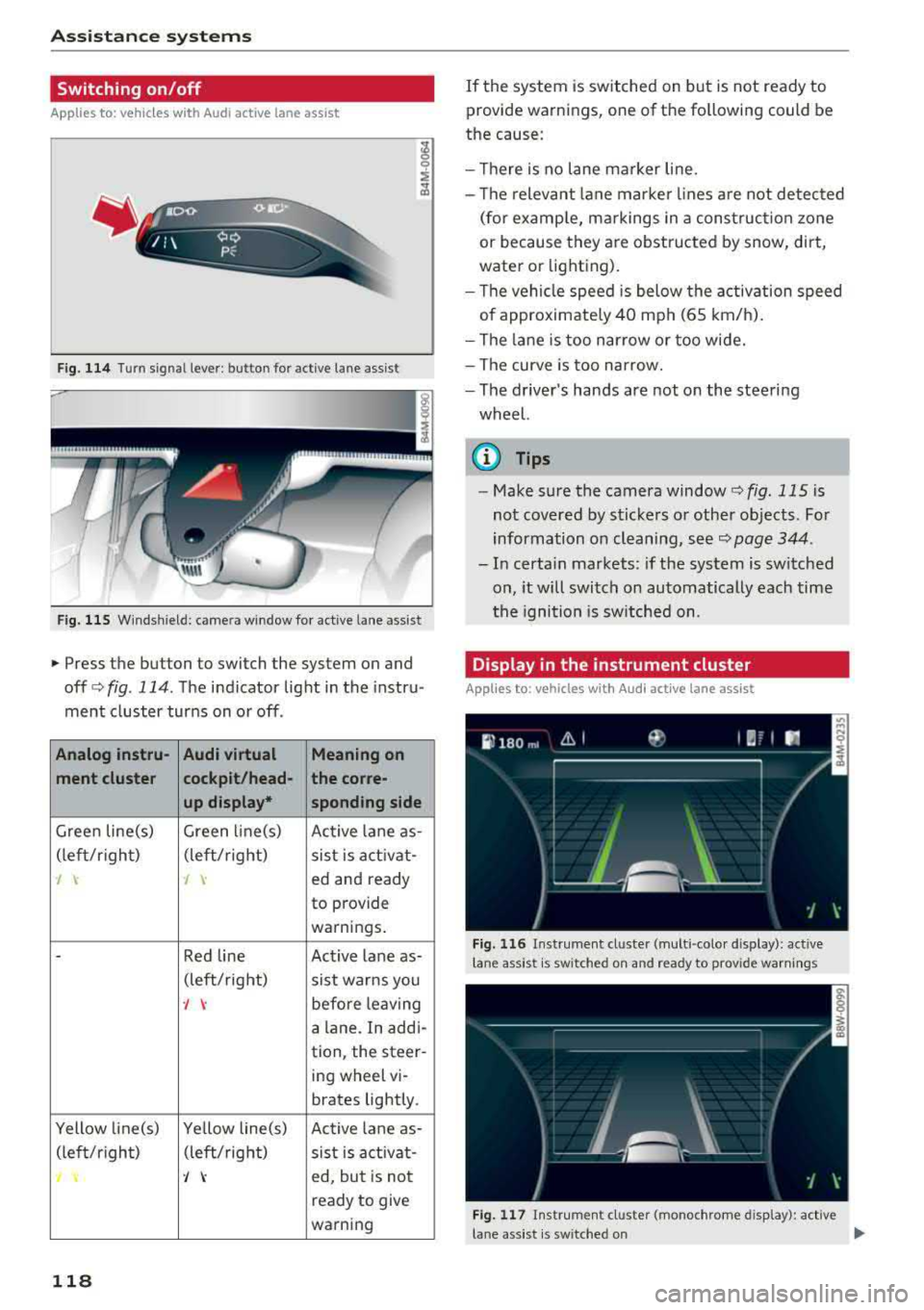
F ig. 114 Turn signal lever: butto n for act ive lane assist
F ig. 115 Windsh ield: camera window fo r ac tive lane assist
• Press the button to switch the system on and
off c:':>fig . 114. The indicator light in the instru
ment cluster turns on or off.
Analog instru- Audi virtual Meaning on
ment cluster cockpit/head- the corre-
up display• sponding side
Green line(s) Green li ne(s)
Active lane as-
(left/r ig ht) (left/right)
sist is activat-
-J 'I ed and ready
to provide
warnings .
-Red line Act ive lan e as-
(left/ right)
sist warns you
-J \: before leaving
a lane . In addi-
tion, the steer-
ing wheel vi-
brates lightly.
Yellow line(s) Yellow line(s)
Active lane as-
(left/r ig h t) (left/right)
sist is activat-
'/ \: ed, but is not
ready to give
warning
118
If the system is switched on but is not ready to
provide warnings, one of the following could be
the cause:
- Th ere is no lane marker line.
- Th e relevant lane marker lines are not detected
(for examp le, markings in a construction zone
or because they are obstructed by snow, dirt,
water or lighting).
- Th e vehicle speed is below the activation speed
of approximately 40 mph (65 km/h).
- The lane is too narrow or too wide.
- The curve is too narrow.
- The driver's hands are not on the steering
wheel.
{i) Tips
- Make sure the camera window<=> fig. 115 is
not covered by stickers or other objects. For
information on cleaning, see¢
page 344.
-In certa in markets: if the system is switched
on, it will switch on automatically each time
th e igni tion is switched on .
Display in the instrument cluster
Applies to: vehicles with Audi active lane assist
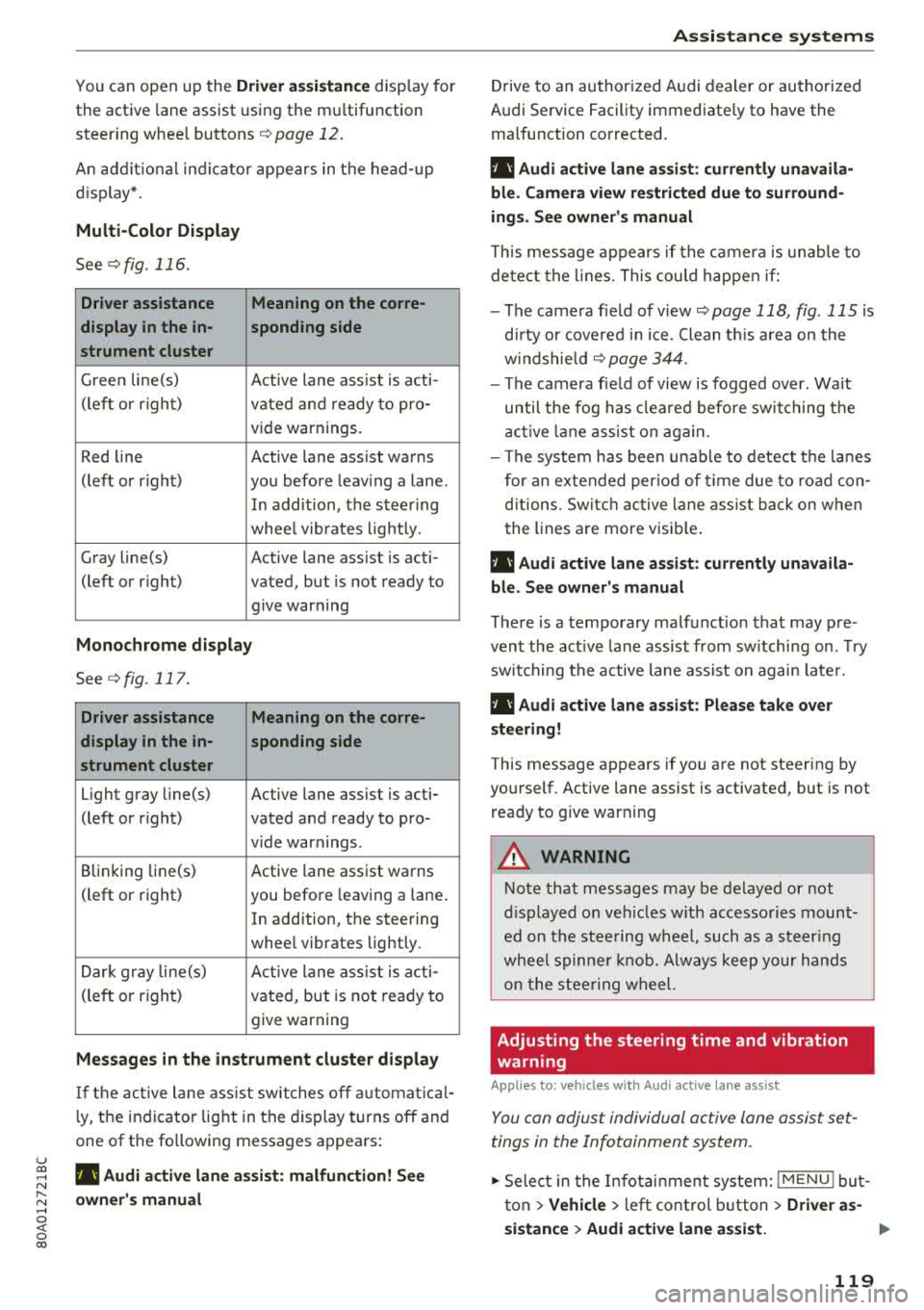
Fig. 116 Instr ument cluster (mult i- colo r dis play): active
l ane assist is sw itched on and ready to provide warn ings
Fig. 117 Instrument cluster (monochrome disp lay): active
lane assist is switched on
...
Page 121 of 392
u co ..... N ,..._
N ..... 0 <( 0 00
You can open up the Driver assistance disp lay for
the active lane assist using the m ultifunction
steer ing whee l buttons
¢ page 12 .
An addit ional ind ic a tor appears in the head- up
d isp lay* .
Multi-Color Display
See ¢fig . 116.
Driver assistance Meaning on the corre-
display in the in- sponding side
strument cluster
G ree n line(s)
Active lane assist is acti-
(left or r ight)
vated and ready to pro -
v ide warnings.
Red line Active lane assist warns
(left or r ight) you before leav ing a la ne .
In add ition, the steer ing
whee l vibrates lightly.
Gray line(s) Active lane assist is acti-
(left or right) vated, but is not ready to give warning
Monochrome display
See c>fig. 117.
Driver assistance Meaning on the corre-
display in the in- sponding side
strument cluster
Light gray line(s) Active lane assist is acti-
(left or r ight) vated and ready to pro-
vide warnings .
B linking Li ne(s)
Active lane assist warns
(left or right) you before leaving a lane .
In addition, the steering
whee l vibrates lightly.
Dar k gray line(s)
Active lane assist is acti -
(le ft or righ t)
vated, but is not ready to
give warning
Messages in the instrument cluster display
I f t he active lane ass ist swit ches off automat ic al
l y, t he indicator lig ht in the display turns off and
one of the following messages appea rs :
rl! Audi a ctiv e lan e assi st : malfunction! See
owner 's manu al
A ss istance systems
Drive to an authori zed A udi dealer or authori zed
Audi Service Facility immediate ly to have the
malfunction corrected.
rl! Audi active lane as sist: currently unavaila
ble . Camera view rest ricted due to surround
ings . See owne r's manual
T his message appears if the c amera is unab le to
de te ct the lines. This could happen if:
- The camera fie ld of view
c> page 118, fig . 115 is
d irty or covered i n ice . Clean t his area on the
w indshie ld
c> page 344.
- The camera fie ld of view is fogged over. Wait
until the fog has clea red befo re switching the
a cti ve lane ass ist o n again.
- The system has bee n unab le to detect the la nes
for an extended per io d of time due to roa d con
ditions . Switc h ac tive lane ass ist back on w hen
the lines are more visib le .
rl! Audi active lane assist: currently unavaila
bl e. See owner's manual
T here is a temporary malfunct ion that may pre
vent the act ive lane assis t from sw itchi ng on . Try
switching t he active lane assist on again late r.
rl! Audi active lane a ssist : Pl ease take over
steering!
This message appears if you are not steering by
yourself . Active lane assist is activated, but is not
ready to g ive war ning
A WARNING
-
No te that messages may be de layed or not
d isp layed o n ve hicl es w ith accesso ries moun t
ed on the stee ring w heel, such as a steer ing
whee l spinne r knob. Alw ays keep yo ur han ds
on the s tee ring wheel.
Adjusting the steering time and vibration
warning
Applies to: veh icles w it h Aud i act ive lane ass ist
You can adjus t individual active lane assist set
tings in the Infotainment system.
.,. Select in the Infotai nment system: I MENU ! but
t on >
Vehicle > le ft con trol b utton > Driver as-
sistance
> Audi active lane a ssis t. ..,.
119
Page 122 of 392
Ass is tance sy stem s
Stee ring time
Earl y: in th is sett ing, the correct ive steering hap
pens continuously to help keep the vehicle in the
center of the lane.
La te : in this setting, the system provides correc
tive steering just before a w heel goes over a de
tected lane marker line .
Vibration warning
You can switch the additional vibration warning
i n the stee ring wheel on or off .
,&. WARNING
-
With the vibration warning switched off,
t here will also be no visual warn ing in the in
strument cluster display when crossing a lane
marker line.
© Tips
I n certain mar kets: you r settings are stored
automatically and ass igned to the remote
control key in use .
Audi side assist
Description
App lies to: ve hicles w it h Aud i side ass ist
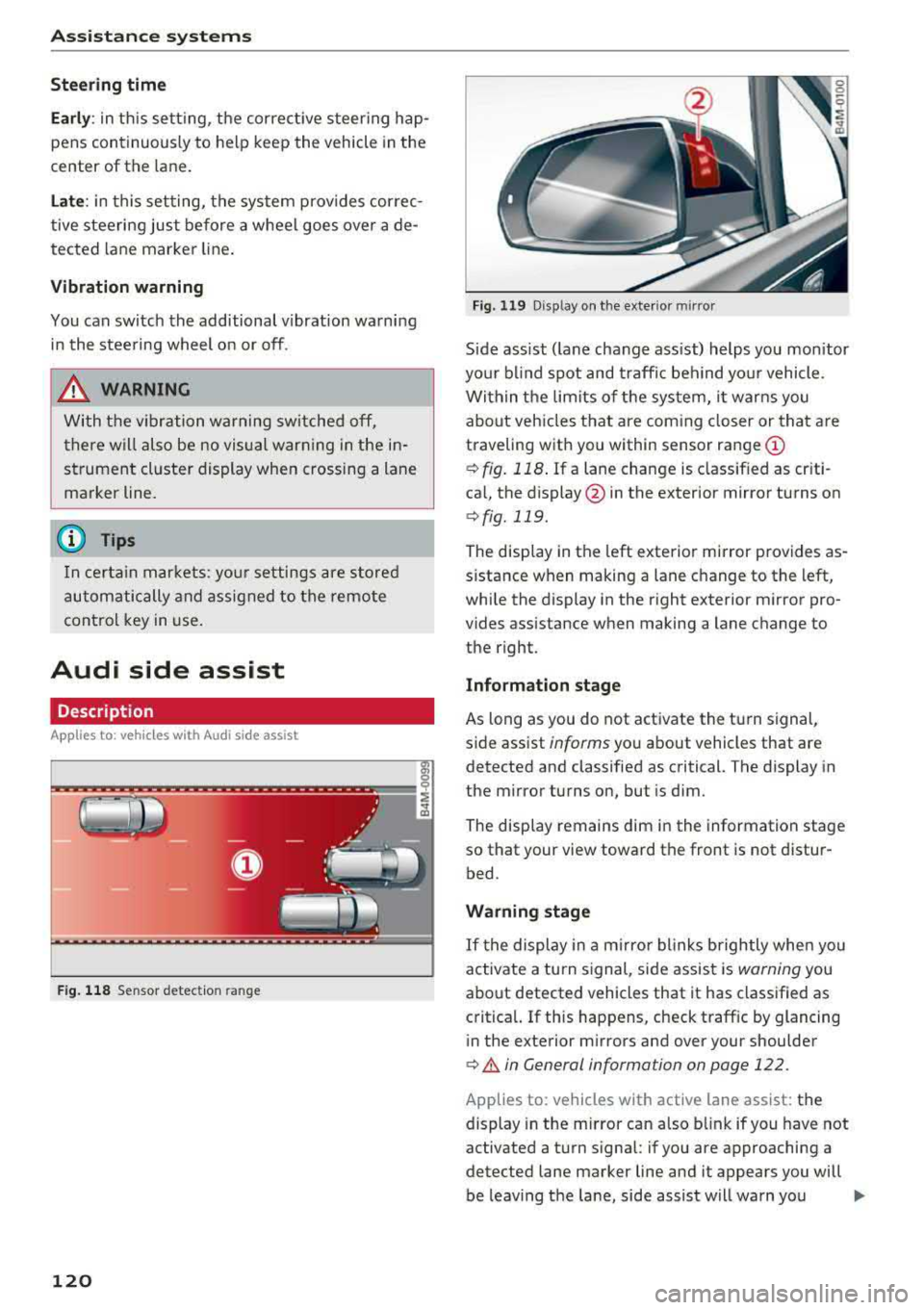
F ig . 11 8 Sensor detect ion ra n ge
120
Fig. 119 D isp lay on the exterior mirror
S ide ass ist ( lane change ass ist) helps you mon itor
you r bl ind spot and traff ic beh ind yo ur vehicle.
Within the limits of the system, it warns you about vehicles that are coming closer or that are
traveling with you within sensor range
(D
¢ fig. 118 . If a lane change is class ified as cr iti
ca l, the display @in the exterior mirror turns on
¢fig. 119.
The display in the left exterior mirror provides as
sistance when making a lane c hange to the left,
while the display in the r ight exterior m irror pro
vides assistance when making a lane change to
the right.
Information stage
As long as you do not activate the turn signal,
s ide assist
informs yo u about vehicles that are
detected and classified as critical. The display in
the mirror turns on, but is dim .
The disp lay remains dim in the information stage
so that your view toward the front is not distur
bed.
Warning stage
If t he display in a m irro r blinks brightly whe n you
activate a turn s ignal, side assist is
warning you
about detected vehicles that it has classified as
critica l. If this happens, check traff ic by glancing
in the exterior m irrors and over your shoulder
¢ A in General information on page 122 .
Applies to: vehicles with active lane assist: the
display in the m irror can also b link if you have not
activated a turn signal : if you are approaching a
detected lane marker line and it appears you will
be leaving the lane, side assist will warn you
..,.
Page 128 of 392
Assistance systems
Engine and automatic transmission
Depending on the mode , the engine and auto
matic transmission respond more quickly or in a
more balanced manner to accelerator peda l
movements. In the sporty
Dynamic mode, the
transmission shifts at higher speed ranges.
Air suspension*
The air suspension* is an electronically-control
led air suspension and damping system. The
ad
justment depends on the driving mode selected,
steering movements, the driver's braking and
ac
celeration, and as the road surface, vehicle speed
and load. The veh icle ground clearance depends
on the mode selected and the speed .
The ground clearance increases significantly
when the vehicle is in the
Allroad mode . At
speeds from approximate ly SO mph (80 km/h) to
75 mph (120 km/h), the ground clearance
re
duces in stages . When the speed decreases, the
ground clearance increases aga in automat ically .
The ground clearance is the lowest in
Dynamic
mode.
Suspension control*
The suspension control* uses sensors to record
information regard ing steering movements,
braking and acceleration operations by the driv
er, road surface, dr iv in g speed, and load. This
makes it possible to adapt damping to the driv
ing situation near ly in rea l time. With drive
se
lect, you can adjust the suspension contro l to be
sporty
( Dynamic ), comfortab le (C omfort ) or bal
anced
(A uto ).
Steering
The power steering adapts. Ind irect steer ing that
moves easi ly as in
Comfort mode is especia lly
suited to long drives on highways. The
Dynamic
mode provides sporty, direct steering.
The following applies to vehicles with dynamic
steering* : the steering ratio changes based on
vehicle speed in order to maintain optimum
steering effort for the driver at all times . This
sets the steering to be less sensitive at higher
speeds in order to prov ide improved vehicle con
trol. At reduced speeds, steering is more direct in
126
order to keep the steering effort as minima l as
possible when the driver is maneuvering the ve hi
cle. At low and average speeds, dynamic steer
i ng* addit iona lly prov ides more respons ive steer
i ng performance.
Sport differential*
As a component of the all whee l drive system
(quattro)
r=!> page 144, the sport differentia l dis
tributes the driving power to the rear axle
de
pending on the s ituation. The distr ibut ion of
power varies depending on the selected mode
from moderate
(C omfort ) to sporty (Dynamic ).
The goal is a high level of ag ility and ability to ac
celer ate on curves. The vehicle is very respons ive
to stee ring.
Adaptive cruise control (ACC)*
The behavior whe n accelerating can be adjusted
from comfortable to sporty, depending on the drive select mode . Adaptive cruise control also
r esponds to the driv in g behavior of the vehicle
ahead in a more conservative or sporty manner.
Engine sound*
The engine sound adapts to the current mode
and can be subtle to sporty .
@ Note
Applies to: vehicles with a ir suspension
- Make sure there is enough clearance above
and below the vehicle when pa rking. Th e
height of the vehicle (ground clearance) can
change once it is parked due to temperature
fluctuations, changes to the load conditions
and changes to the driving modes.
- When transporting the vehicle on a car
car
rier, train, ship or by other means, only tie
the vehicle down at the running sur face of
the tires, which is the outer c ircumference.
Securing the vehicle at the axle compo
nents, suspension struts or tow ing eyes is
not perm itted because the pressure in the
air suspens ion struts can change during
transport. The vehicle may not be secured
sufficiently if this happens .
Page 129 of 392
u co ..... N r--N ..... 0 <( 0 00
(D Tips
The "S" selector lever position automatically
engages when the
Dynamic mode is se lected .
Selecting the driving mode
Applies to: ve hicles with Audi drive select
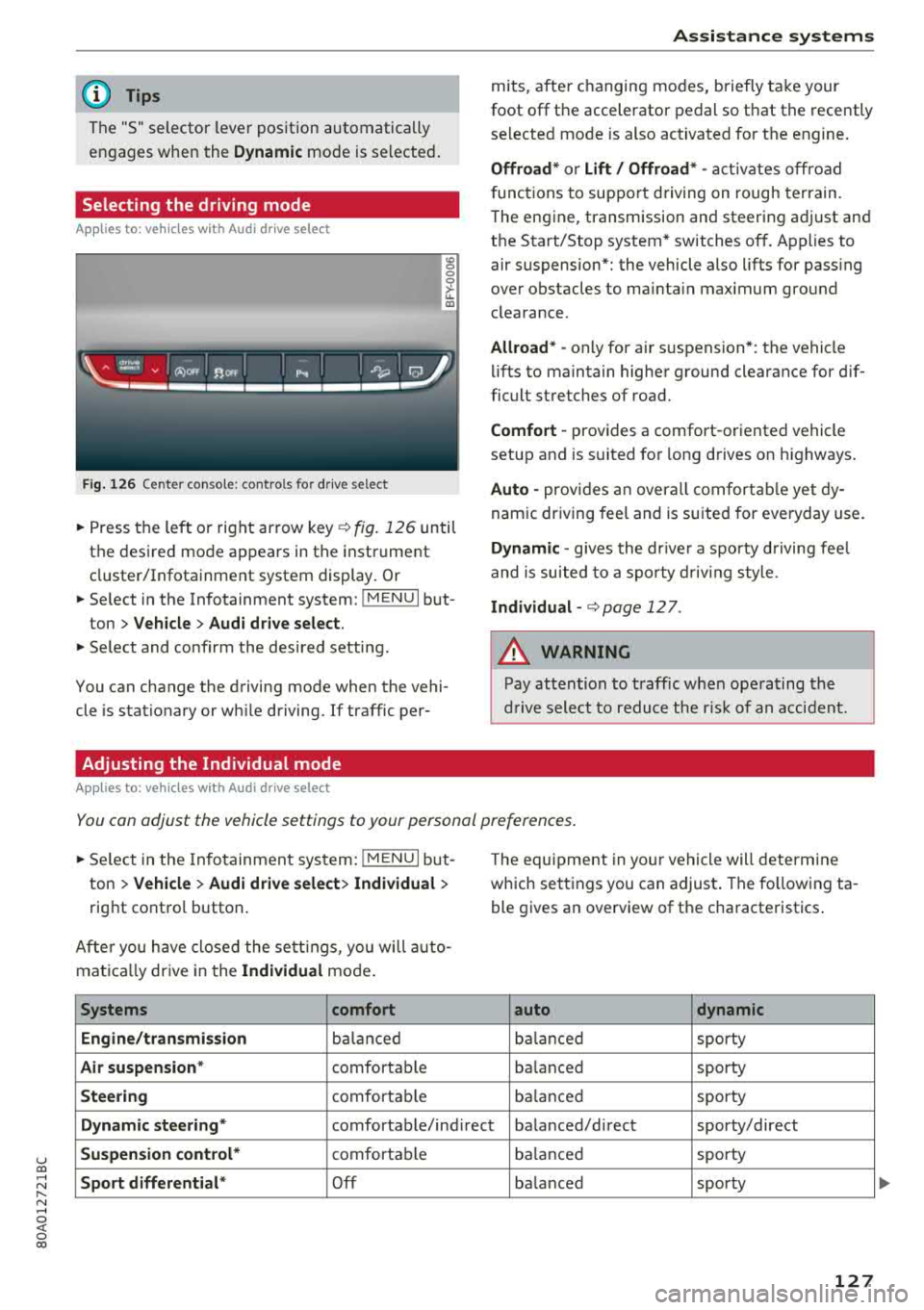
Fig. 126 Center conso le: controls for drive select
0 >'-LL ID
~ Press the left o r right arrow key¢ fig. 126 until
the desired mode appears in the instrument
cluster/Infotainment system display . Or
~ Se lect in the Infotainment system: !MENUI but-
ton
> Vehicle > Audi drive select.
~ Select and confirm the desired setting.
You can change the driving mode when the vehi
cle is stationary or wh ile driving. If traffic per-
Adjusting the Individual mode
Applies to: ve hicles with Audi drive select
Assistance systems
mits, after changing modes, briefly take your
foot
off the accelerator pedal so that the recently
selected mode is also activated for the engine.
Offroad* or Lift/ Offroad* -activates off road
f unct ions to support driving on rough terrain.
T he engine, transmission and steering adjust and
the Start/Stop system* switches
off. Applies to
air suspension*: the vehicle also lifts for pass ing
over obstacles to mainta in maximum ground
clearance.
Allroad * -only for ai r suspension *: the vehicle
lifts to maintain higher ground clearance for dif
ficult stretches of road.
Comfort -provides a comfort -oriented vehicle
setup and is suited fo r long d rives on h ighways .
Auto -provides an overall comfortable yet dy
namic driving feel and is suited for everyday use.
Dynamic -gives the drive r a sporty driving feel
and is suited to a sporty driving style .
Individual -¢ page 12 7.
A WARNING
-
Pay attention to traffic when operating the
drive select to reduce the risk of an accident.
You can adjust the vehicle settings to your personal preferences .
~ Select in the Infotainment system: !MENUI but
ton
> Vehicle > Audi drive select> Individual >
right contro l button.
Afte r you have closed the settings, you will auto
mat ica lly dr ive in the
Individual mode.
Systems comfort
Engine/transmission
balanced
Air suspension * comfortable
Steering comfortable Th
e equipment in yo ur vehicle will determine
which settings you can adjust . The fo llowing ta
ble gives an overview of the characteristics .
auto dynamic
balanced
sporty
ba lanced sporty
balanced sporty
Dynamic
steering* comfortable/ind irect ba lanced/direct sporty/direct
Suspension control* comfortab le balanced sporty
Sport differential* Off balanced sporty
127
...