air condition AUDI Q5 2018 Owners Manual
[x] Cancel search | Manufacturer: AUDI, Model Year: 2018, Model line: Q5, Model: AUDI Q5 2018Pages: 392, PDF Size: 60.56 MB
Page 52 of 392
Lights and Vision
move out of reverse and into another gear, the
new mirror position is stored and assigned to the
key you are using.
The mirror goes back into its original position
once you drive forward faster than 9 mph
(15 km/h) or turn t he ignition
off.
A WARNING
Curved mirror surfaces (for example convex)
enlarge the field of vision. However, they
make objects in the mirror appear smaller
and farther away. You may estimate incor
rectly when you use these mirrors to gauge
your distance from the vehicles behind you
when changing lanes, which increases the risk of an accident.
«1j) Note
-Applies to vehicles with power folding exte
rior mirrors: if the mirror housing was
moved by outside forces (such as an impact
when maneuvering), you must use the pow
er folding function to fold the mirror all the
way out. The mirrors will make a loud noise
when they latch into place. The mirror hous
ing must not be moved back into place by
hand because this would impair the func
tion of the mirror mechanism.
- Applies to vehicles without power folding
exterior mirrors : if the mirror housing was
moved by outside forces (such as an impact
when maneuvering), you must move it back in place by hand.
- If you wash the vehicle in an automatic car
wash, you must fold the exterior mirrors in
to reduce the risk of damage to the mirrors.
Never fold power folding exterior mirrors*
by hand . Only fold them in and out using
the power controls.
(D Tips
-If the power adjusting function malfunc
tions, the glass in both mirrors can be ad
justed by pressing on the edge of it by hand.
- The exterior mirror settings are stored with
the memory
function*~ page 59.
so
Dimming the mirrors
Your vehicle is equipped with a manual or auto
matic* dimming rearview mirror .
Manual dimming rearview mirror
.,. Pull the lever on the bottom of the mirror back.
Automatic dimming rearview mirror*
.,. The interior and exterior mirrors dim automati
cally when light shines on them, for example
from headlights on a vehicle behind you.
A WARNING
If the glass on an automatic dimming mirror
breaks, electrolyte can leak out. This liquid
can irritate the skin, eyes and respiratory sys
tem. If there is contact with the fluid, flush immediately with plenty of water. Consult a
physician if necessary .
- Repeated or long-term exposure to electro
lyte fluid can lead to irritation of the air
ways, especially in people with asthma or other respiratory conditions. Take deep
breaths immediately after leaving the vehi
cle or, if this is not possible, open all of the
doors and windows as wide as possible.
- If electrolyte fluid enters the eyes, flush
them thoroughly with a large amount of
clean water for at least 15 minutes and then
seek medical attention.
- If electrolyte fluid comes into contact with
the skin, flush the affected area with clean
water for at least 15 minutes and then clean
with soap and water and seek medical at tention. Clean affected clothing and shoes
thoroughly before wearing again.
- If the fluid was swallowed and the person is
conscious, flush the mouth with water for at
least 15 minutes . Do not induce vomiting
unless this is recommended by medical pro
fessionals. Seek medical attention immedi
ately .
@ Note
If the glass on an automatic dimming mirror
breaks, electrolyte can leak out. This liquid
damages plastic surfaces and paint. Clean
Page 54 of 392
Lights and Vision
@-Fast wiping
©-Single wipe. If you hold the lever in this posi
tion longer, the wipers switch from slow wiping
to fast wiping .
®-Clean the windshield . The wipers wipe one
time after several seconds of driving to remove
water droplets . You can switch this function off
by moving the lever to position ® within
10 sec
onds of the afterwipe. The afterwipe function is
r e activated the next time you switch the ignition
on.
Clean the headlights*. The headlight washer sys
tem* operates only when the low beam head
lights are on. If you move the lever into position
@, the headlights will be cleaned at fixed inter
vals .
@-Wipe the rear window. The number of wipes
depends on the windshield wiper movement.
The rear wiper automatically switches on when
the reverse gear is selected and the front wind
shield wipers are on and running.
(j) -Clean the rear window. The number of wipes
depends on how long the lever is held in position
(z). This may also clean the rearview camera, de
pending on the vehicle equipment.
A WARNING
- The rain sensor is only intended to assist the
driver. The driver may still be responsible
for manually switching the wipers on based on visibility conditions.
- The windshield may not be treated with wa ter-repelling windshield coating agents . Un
favorable conditions, such as wetness, dark
ness or low sun, can result in increased
glare, which increases the risk of an acci
dent. Wiper blade chatter is also possible.
- Properly functioning windshield wiper
blades are required for a clear view and safe
driving ~ page 53, Replacing wiper
blades .
«1j) Note
-If there is frost, make sure the windshield
wiper blades are not frozen to the wind-
52
shield. Switching on the windshield wipers
when the blades are frozen to the wind shield can damage the wiper blades.
- The windshield wiper system must be
switched off (lever in position 0) before us
ing a car wash. This prevents the wipers
from switching on unintentionally and caus ing damage to the windshield wiper system.
(D Tips
- The windshield wipers switch off when the
ignition is switched off. You can activate the
windshield wipers after the ignition is
switched back on by moving the windshield
wiper lever to any position .
- Worn or dirty windshield wiper blades result
in streaking. This can affect the rain sensor
function . Check your windshield wiper
blades regularly.
- The washer fluid nozzles for the windshield
washer system are heated at low tempera
tures when the ignition is on.
- When stopping temporarily, such as at a
traffic light, the speed of the windshield
wipers automatically reduces by one level.
Cleaning the wiper blades
Clean the wiper blades when you see wiper
streaks. Use a soft cloth and a glass cleaner.
Windshield wiper
.,. Place the windshield wiper arms in the service
position
~ page 53.
.,. Fold the windshield wiper arms away from the
windshield.
Rear window wiper
.,. Fold the wiper arm away from the rear window.
A WARNING
Dirty windshield wiper blades can impair vi
sion, which increases the risk of an accident.
-
Page 71 of 392
u co ..... N r--N ..... 0 <( 0 00
Warm and cold Climate control system
Description
The climate control system warms , cools and re
moves humidity from the air in the vehicle inte ri
or. It is the most effective when the w indows and
sunroof* are closed . If there is a bu ild -up of heat
inside the ve hicle, ventilation can he lp to speed
up the cooling process.
I n all he ating mode f unct ions except for
defrost ,
the blower on ly switches to a higher speed once
the engine coolant has reached a sufficient tem
perature .
Pollutant filter
The pollutant filte r removes pollutants such as
d ust and pollen from the a ir.
Key recognition
The climate control settings are automatically
sto red and assig ned to the remote control key
that is i n use .
Warm and c old
@ For the sake of the environment
If you wo uld like to reduce fue l consumption,
switch the air conditioning off. T his w ill also
r educe em issions.
(D Tips
- To prevent interference with the heating
and cooling output and to prevent the win
dows from fogging over, the a ir intake in
fro nt of the w indshie ld must be free of ice,
snow o r leaves .
- Condensation from the coo ling system can
dr ip and form a pudd le of water under the
veh icle . Th is is norma l and does not mean
t here is a lea k.
- The e nergy management system may tem
pora rily switch off certa in functions, s uch as
the seat heati ng* o r rear window defogger .
Th ese sys tems are av ailable aga in as soon
as t he e nergy supply has been restore d.
69
Page 76 of 392

Drivin g
engaged, for examp le when you notice that the
next traffic light is red . This produces an engine
braking effect, which helps to protect the brakes
and tires and reduces the emissions and fuel con
sumpt ion to zero (fuel shut-off during decelera
tion) .
Shift effici entl y
Upshifting earlier is an effective way to save fuel.
Staying in a gear too long uses fue l unnecessari
ly .
Press down on the acce lerator peda l slowly and
avoid "kick -down".
Avoid full acceleration
You shou ld rare ly t ravel at the maximum vehicle
speed. High speeds cause a d isp ropor tionately
high increase in fuel consumption, emissions and
traffic noise . Driving more slowly saves fue l.
Reduce idling time
The Start/Stop system* helps to reduce the idling
time automatically. In vehicles witho ut the Start/
Stop system* , it is
efficient to switch the eng ine
off when stopped at rai lroad crossings and long
red lights . Stopping the engine for
30 -40 sec
onds already saves more fu el than the amount of
extra fuel needed to restart the engine.
It t akes a very long time in idle to wa rm the en
gine up to operating temperature . Wear and
emissions are especially high in the warm -up
phase. Therefore, you should begin driving im
mediately after starting the engine. Avoid high
RPMs while do ing th is .
Ha ve mainten anc e performed regularly
By having maintenance performed regu lar ly on
your veh icle, you can he lp to reduc e fuel con
sumpt ion before you even start to dr ive. The
maintenance condition of your vehicle not only
affects traffic safety and long -term value but al
so impacts fuel consumption . A poorly main
tained engine can lead to fuel consumpt ion that
is
1 0% hi gher tha n normal.
74
Avoid short trip s
The engine and exh aust clean ing system mus t
reach their optima l operating temperature to ef
fective ly reduce consumption and emissions.
A cold engine uses a d isp roportionately high
amoun t of fue l. The eng ine re aches opera ting
temperat ure and cons umption norma lizes on ly
after approximate ly 2.5 mi les (4 km) .
Check the tire pressure
To save fue l, ma ke sure the t ires are always in
flated to the correct
press ure~ page 335. The
fuel consumpt ion can increase by
5% if the pres
sure is on ly
0 .5 bar too low. Due to t he increased
rolling resistance, low tire pressures wi ll also
l ead to greater tire wear and will affect driving
behavior.
Do not drive on winter tires year -round, as this
will consume up to
10% more fue l.
Eliminat e unnecessary weight
Since eve ry po und of ext ra weight increases f uel
consump tion, a quick inspec tion of the luggage
compartment may be worth it to avoid unneces
sary weight .
When not be ing used , a roof rack sho uld be re
moved to decrease the w ind resis tance of the ve
hicle . This will save you approx imately
12% fue l
at speeds from
6 2 -75 mph (100 -120 km/h) .
Save energy
The eng ine d rives the generator, which generates
electr ic ity; the f uel consumpt ion also inc reases
wi th the demand for e lec tricity . T he refore, sw itch
electrica l eq uipment o ff when you no longe r
need it . Examples of eq uipment that uses a lot of
energy are air blowers at a high setting, the rear
window defogger and seat heating* .
@ Note
Do not leave engine idling unattended after
starting. If warning lights s houl d come on to
i ndicate improper operation, they would go
unheeded. Extended idling also produces
h eat, which could result in overheating or
other damage to the veh icle or othe r proper
ty .
Page 77 of 392
u co ..... N r-N .....
~ 0 co
(D Note
-Have your vehicle maintained properly and
in accordance with the service recommenda
tions in your Warranty
& Maintenance book
let. Lack of proper maintenance as well as
improper use of the vehicle will impair the
function of the emission control system and
could lead to damage.
- Do not alter or remove any component of the Emission Control System unless approved by the manufacturer.
- Do not alter or remove any device, such as
heat shields, switches, ignition wires,
valves, which are designed to protect your
vehicle's Emission Control System and other important vehicle components.
(D Tips
The consumption estimates as published by
ENVIRONMENTAL PROTECTION AGENCY
(EPA) and Transport Canada may not corre
spond to your actual consumption on the
road, which will vary depending upon vehicle
load and speed, road and weather conditions,
trip length, etc.
Steering
Manual steering wheel position adjustment
Applies to: vehicle s with manu al steering wheel adjustment
The steering wheel position is adjustable up and
down and forward and back.
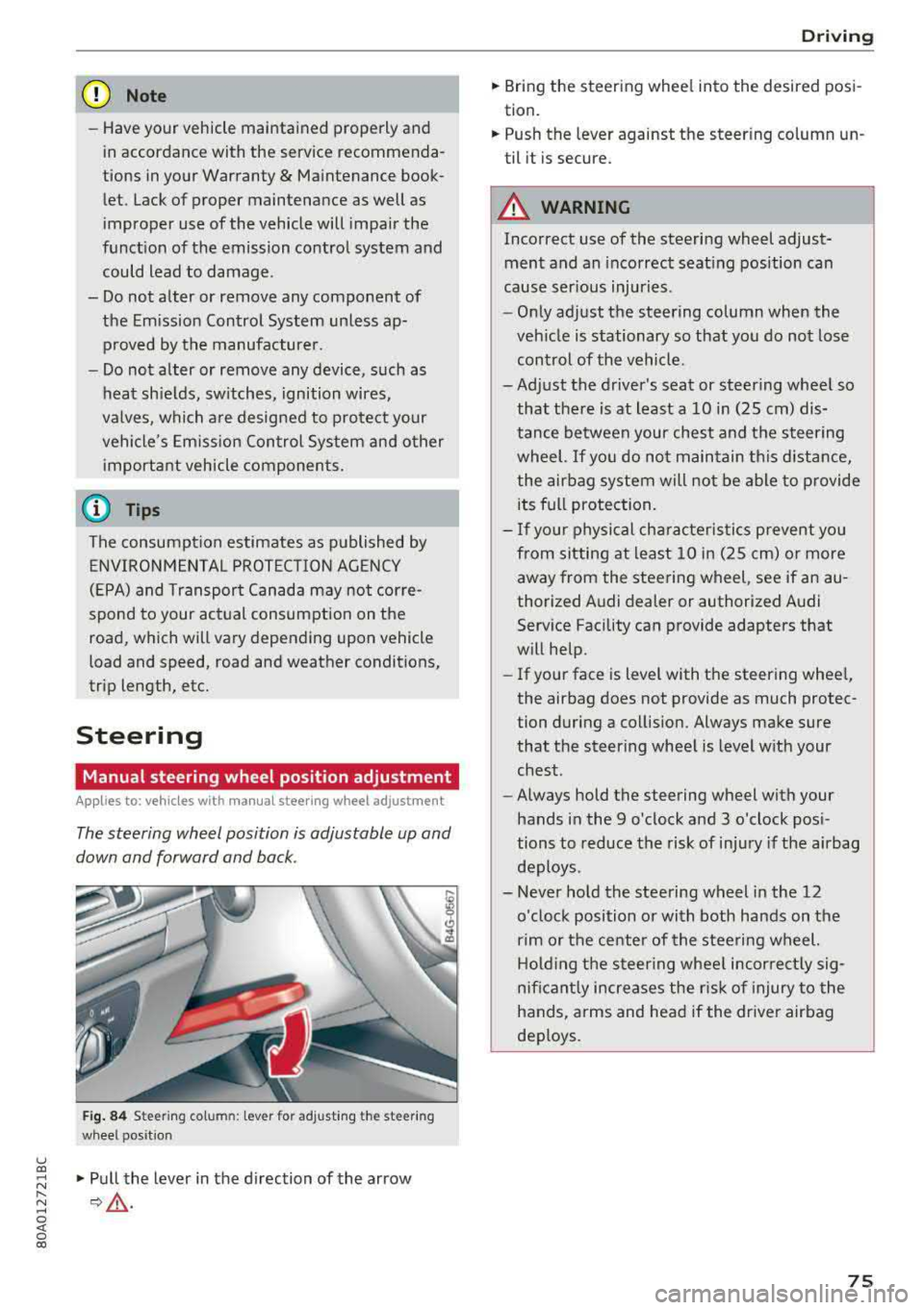
Fig. 84 Steeri ng column: lever for adjust ing the steer ing
wheel position
"Pull the lever in the direction of the arrow
¢ .&.-
Driving
"Bring the steering wheel into the desired posi
tion.
" Push the leve r against the steer ing column un
til it is secure.
A WARNING
-Incorrect use of the steering wheel adjust
ment and an incorrect seating position can
cause serious injuries.
-
- Only adjust the steering column when the
vehicle is stationary so that you do not lose
control of the vehicle.
-Adjust the driver's seat or steering wheel so that there is at least a 10 in (25 cm) dis
tance between your chest and the steering
wheel. If you do not maintain this distance
I
the airbag system will not be able to provide
its full protection.
- If your physical characteristics prevent you
from sitting at least 10 in (25 cm) or more
away from the steering wheel, see if an au
thorized Audi dealer or authorized Audi Service Facility can provide adapters that
will help.
- If your face is level with the steering wheel,
the airbag does not provide as much protec
tion during a collision. Always make sure
that the steering wheel is level with your
chest.
- Always hold the steering wheel with your
hands in the 9 o'clock and 3 o'clock posi
tions to reduce the risk of injury if the airbag
deploys.
- Never hold the steering wheel in the 12
o'clock position or with both hands on the
rim or the center of the steering wheel.
Holding the steering wheel incorrectly sig
nificantly increases the risk of injury to the
hands, arms and head if the driver airbag
deploys.
75
Page 123 of 392
about detected vehicles that it has classified as
critical.
@ Tips
You c an ad just t he brig htness on of the dis
play on the rearview
mirror ~ page 122.
General information
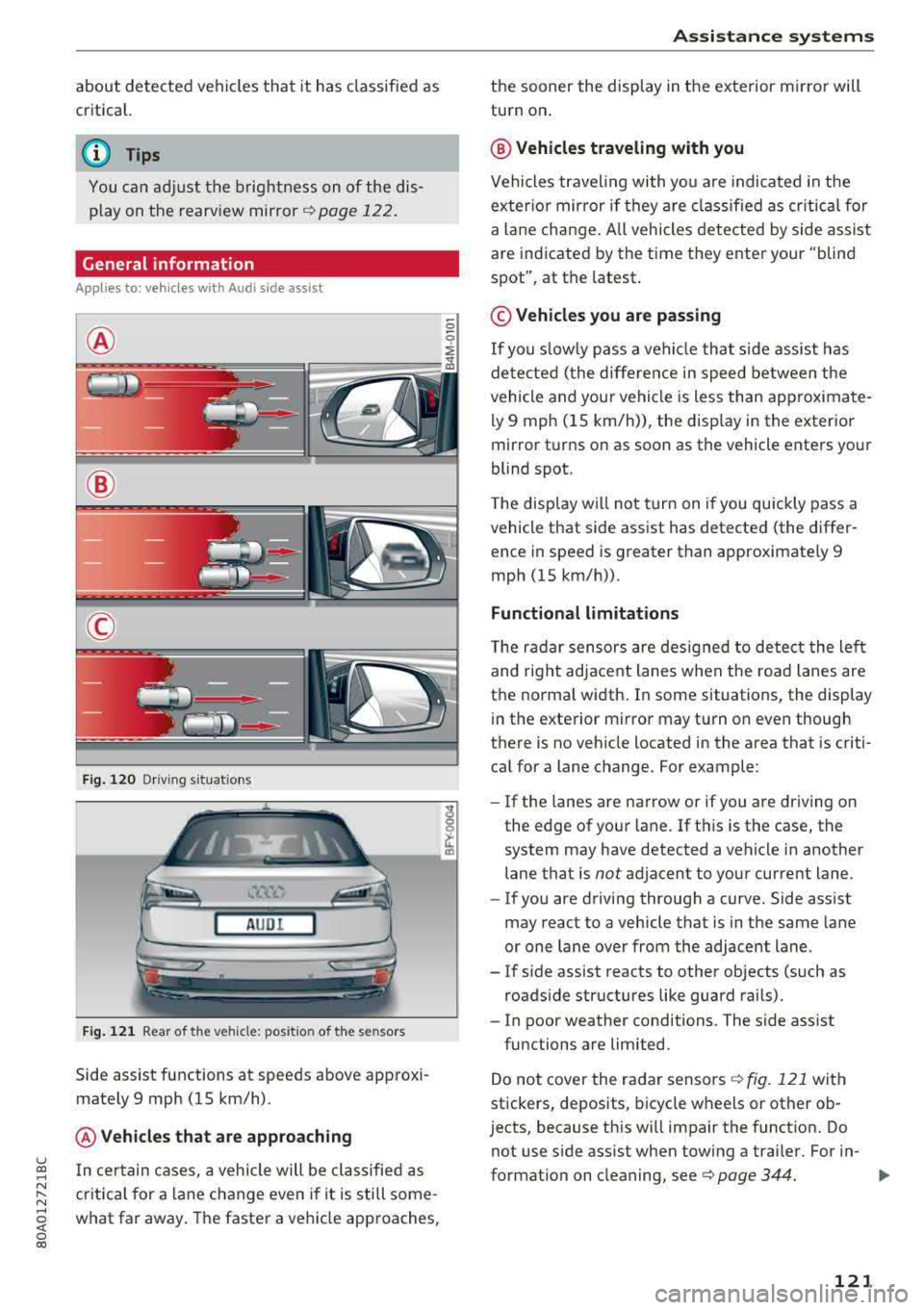
Applies to: vehicles with Audi side assist
@
@
©
F ig . 12 0 Dr ivi ng s it u at ions
A U DI
Fig . 121 Rea r of the ve hicle: pos it io n of the sensors
Side assist functions at speeds above app roxi
mately 9 mph (15 km/h) .
@Vehicles that are app roaching
u ~ I n certain cases, a vehicle will be classified as
N :::. cr itica l for a lane change even i f it is still some-,.....
~ what far away . The faste r a veh icle approaches,
0 co
A ssi st a nce systems
the sooner the display in the exterior m irror will
turn on .
@ Vehicles traveling with you
Vehicles traveling with yo u are indicated in the
exter io r mirror if they a re classified as cr itical for
a la ne change. A ll vehicles dete cted by s ide assist
are indicated by the time they ente r your "blind
spot", at the latest.
© Vehicles you are passing
If
you s lowly pass a vehicle that s ide assist has
de tected ( the differe nce in speed between the
vehicle and your vehicle is less than app roximate
ly 9 mph (15 km/h)), the disp lay in the exterior
mirror turns on as soon as the vehicle enters your
blind spot.
T he display w ill not tur n on if you quickly pass a
vehicle that side assist has detected (the differ ence in speed is greater than approximate ly 9
mph (15 km/h)) .
Functional limitations
The radar sensors are des igned to detect the left
and right adjacent lanes when the road lanes are
the norma l width . In some situations, the display
in the exte rior mirror may turn on even though
there is no vehicle located in the area that is criti cal for a lane change. For example :
-If the lanes are narrow or if you are driving on
the edge of your lane. If t his is the case, the
system may have detected a vehicle in another lane that is
not adjacent to your current lane .
- If you are driving through a curve. Side assist
may react to a vehicle that is in the same lane
or one lane over from the adjacent lane .
- If s ide assist reacts to other objects (such as
roads ide structures like guard rails).
- In poor weather conditions . The side assist
functions are limited.
Do not cover the radar sensors
Q fig. 121 with
stickers, deposits, bicycle wheels or other ob
jects, because this w ill impair the funct ion. Do
not use s ide ass ist when towing a trai ler. For in-
format io n on cleaning, see ¢
page 344. ..,.
121
Page 128 of 392
Assistance systems
Engine and automatic transmission
Depending on the mode , the engine and auto
matic transmission respond more quickly or in a
more balanced manner to accelerator peda l
movements. In the sporty
Dynamic mode, the
transmission shifts at higher speed ranges.
Air suspension*
The air suspension* is an electronically-control
led air suspension and damping system. The
ad
justment depends on the driving mode selected,
steering movements, the driver's braking and
ac
celeration, and as the road surface, vehicle speed
and load. The veh icle ground clearance depends
on the mode selected and the speed .
The ground clearance increases significantly
when the vehicle is in the
Allroad mode . At
speeds from approximate ly SO mph (80 km/h) to
75 mph (120 km/h), the ground clearance
re
duces in stages . When the speed decreases, the
ground clearance increases aga in automat ically .
The ground clearance is the lowest in
Dynamic
mode.
Suspension control*
The suspension control* uses sensors to record
information regard ing steering movements,
braking and acceleration operations by the driv
er, road surface, dr iv in g speed, and load. This
makes it possible to adapt damping to the driv
ing situation near ly in rea l time. With drive
se
lect, you can adjust the suspension contro l to be
sporty
( Dynamic ), comfortab le (C omfort ) or bal
anced
(A uto ).
Steering
The power steering adapts. Ind irect steer ing that
moves easi ly as in
Comfort mode is especia lly
suited to long drives on highways. The
Dynamic
mode provides sporty, direct steering.
The following applies to vehicles with dynamic
steering* : the steering ratio changes based on
vehicle speed in order to maintain optimum
steering effort for the driver at all times . This
sets the steering to be less sensitive at higher
speeds in order to prov ide improved vehicle con
trol. At reduced speeds, steering is more direct in
126
order to keep the steering effort as minima l as
possible when the driver is maneuvering the ve hi
cle. At low and average speeds, dynamic steer
i ng* addit iona lly prov ides more respons ive steer
i ng performance.
Sport differential*
As a component of the all whee l drive system
(quattro)
r=!> page 144, the sport differentia l dis
tributes the driving power to the rear axle
de
pending on the s ituation. The distr ibut ion of
power varies depending on the selected mode
from moderate
(C omfort ) to sporty (Dynamic ).
The goal is a high level of ag ility and ability to ac
celer ate on curves. The vehicle is very respons ive
to stee ring.
Adaptive cruise control (ACC)*
The behavior whe n accelerating can be adjusted
from comfortable to sporty, depending on the drive select mode . Adaptive cruise control also
r esponds to the driv in g behavior of the vehicle
ahead in a more conservative or sporty manner.
Engine sound*
The engine sound adapts to the current mode
and can be subtle to sporty .
@ Note
Applies to: vehicles with a ir suspension
- Make sure there is enough clearance above
and below the vehicle when pa rking. Th e
height of the vehicle (ground clearance) can
change once it is parked due to temperature
fluctuations, changes to the load conditions
and changes to the driving modes.
- When transporting the vehicle on a car
car
rier, train, ship or by other means, only tie
the vehicle down at the running sur face of
the tires, which is the outer c ircumference.
Securing the vehicle at the axle compo
nents, suspension struts or tow ing eyes is
not perm itted because the pressure in the
air suspens ion struts can change during
transport. The vehicle may not be secured
sufficiently if this happens .
Page 132 of 392
Parking aid
Parking aid
General information
A pplies to: ve hicles w ith a rea r parking sys te m /parking sys
tem p lus/rearv iew camera/peripheral cameras
Depending on your vehicle's equipment , various
parking aids will help you when parking and ma
neuvering.
The
rear parking system is an audible parking aid
that warns you of obstacles
behind the vehicle
¢ page 131.
The parking system plus assists you when park
ing by audibly and visually indicating objects de
tected
in front of and behind the vehicle
¢ page 131.
The rearview camera shows the area behind the
vehicle in the Infotainment system display. The lines in the rearview camera image help you to
park or maneuver
¢ page 133.
The peripheral cameras give various views to
help you when parking or maneuvering
¢ page 135 . The parking system plus functions
are also available ¢
page 131.
_& WARNING
-Always look for traffic and check the area
around your vehicle by looking at it directly
as well. The parking system cannot replace
the driver's attention. The driver is always
responsible when entering or leaving a park
ing space and during similar maneuvers.
- Please note that some surfaces, such as
clothing, are not detected by the system.
-
- Sensors and cameras have blind spots in
which people and objects cannot be detect
ed . Be especially cautious of small children
and animals.
- Always keep your eyes on the vehicle's sur roundings, using the rearview mirror as
well.
- The sensors can be displaced by impacts or
damage to the radiator grille, bumper,
wheel housing and the underbody . The park
ing system may be impaired as a result.
Have an authorized Audi dealer or author-
130
ized Audi Service Facility check their func
tion .
@ Note
-Some objects are not detected or displayed
by the system under certain circumstances:
- objects such as barrier chains, trailer draw
bars, vertical poles or fences
- objects above the sensors such as wall ex
tensions
- objects with certain surfaces or structures
such as chain link fences or powder snow
- If you continue driving closer to a low ob
ject, it may disappear from the sensor range . Note that you will no longer be
warned about this obstacle.
- Keep enough distance from the curb to re
duce the risk of damage to the rims .
(D Tips
-The system may provide a warning even
though there are no obstacles in the cover
age area in some situations, such as:
- certain road surfaces or when there is tall
grass
- external ultrasonic sources such as from
cleaning vehicles
- in heavy rain, snow, or thick vehicle ex
haust
- We recommend that you practice parking in
a traffic-free location or parking lot to be
come familiar with the system. When doing
this, there should be good light and weath
er conditions.
- You can change the volume of the signals
and the display ¢
page 138.
-Please refer to the instructions for towing a
trailer located in
¢page 139.
-What appears in the infotainment display is
somewhat time-delayed.
- The sensors must be kept clean and free of
snow and ice for the parking aid to operate.
- The rearview camera is cleaned when clean
ing the rear window
¢page 51.
Page 142 of 392
Intelligent Technology
Intelligent Technology Electronic Stabilization
Control (ESC)
Description
Electronic Stabilization Control (ESC) supports
driver safety. It reduces the risk of slipping and improves driving stability. ESC detects critica l sit
uations such as when the vehicle is oversteering
and understeering or the wheels are spinning.
The vehicle is stabilized by applying the brakes or
reducing eng ine torque. When the ESC engages,
the
D.1 ind icator light blinks in the instrument
cluste r.
The follow ing systems are integrated in the ESC:
Anti-lock braking system (ABS)
ABS prevents the wheels from locking when brak
ing. The vehicle can still be steered even during
hard braking. Apply steady pressure to the brake
pedal. Do not pump the pedal. A pulsing in the
brake pedal indicates that the system is acting to
stabilize the vehicle .
Brake assist system
The brake assist system can decrease braking dis
tance. It increases braking power when the driver
presses the brake pedal quickly in emergency sit
uations . You must press and hold the brake pedal
until the dangerous situat ion is over . In veh icles
with adapt ive c ruise control*, the brake assist
system is more sensitive if the distance detected
t o the vehicle dr iv ing ahead is too small.
Anti-Slip Regulation (ASR)
ASR reduces engine power when the drive wheels
beg in sp inning and adapts the force to the road
conditions . This makes it easie r to start, acceler
ate and dr ive up hill s.
Electronic Differential Lock (EDL)
EDL applies the brakes to a wheel that starts
spinning and transfers the drive power to the
other driving wheels. This funct ion is not availa
b le at higher speeds.
140
In extreme cases, EDL automatica lly switches off
to keep the brake on the braked whee l from over
heating. The vehicle is still working correctly. ED L
will switch on again automatically when condi
tions have returned to normal.
Power steering
The ESC can also support vehicle stability
through steering .
Selective wheel torque control
Selective wheel torque control is used when driv
in g on curves. Brak ing is targeted toward the
whee ls on the inside of the curve as needed. This
a llows more precise driving in curves.
Automatic post-collision braking system
The "automatic post-collis io n braking system"
can help to reduce the risk of sl iding and of addi
tional collisions after an accident. If the airbag
contro l modu le detects a collision, the vehicle is
braked by the ESC.
The vehicle does not brake automatically if:
-the driver presses the accelerator pedal, or
-the ESC, the brake system or the veh icle electri-
cal system are not functioning.
A WARNING
-The ESC and its integrated systems cannot
overcome the lim its imposed by natura l
p hys ical laws. Th is is espec ially impo rtant
on slippery or wet roads. If the systems be
gin acting to stabilize your vehicle, you
should immediately alter your speed to
match the road and traffic conditions. Do
not let the increased safety provided tempt
you into taking risks. This could increase
your r isk of a coll is ion.
-Please note the risk of a collision increases
when dr iv ing fast, especially through curves
and on slippery or wet roads, and when dr iv
ing too close to objects ahead . The ESC and
its integrated systems cannot always pre
ve nt co llisions
-there is still a risk of acci
dents!
Page 147 of 392
u co ..... N r--N ..... 0 <( 0 00
Replacing tires
F or vehicles w it h all whee l dr ive, only wheels w ith
the same ro lling circumference should be used .
Avoid using tires with different tread depths
~ page 332, New tires or wheels.
A WARNING
- Also, in vehicles with all wheel drive, adapt your dr iv ing style to the current road and
traff ic conditions. Do not let the increased
safety provided tempt you into tak ing risks,
because th is increases the r isk of an acci
dent .
- The braking ability of your veh icle is limited
to the tract ion of the wheels. In this way, it
is not diffe rent from a two wheel dr ive vehi
cle. Do not be tempted to accelerate to a
high speed when the road is slippery, be
cause this increases the risk of an accident.
- Note that on wet streets, the front wheels
can "hydroplane" if driving at speeds that
are too high . Unlike front whee l drive
vehicles, the engine does not rev higher sud
denly when the vehicle begins hydroplaning.
For this reason, adapt your speed to the
road conditions to reduce the risk of an acc i
dent .
Energy management
Your vehicle is equipped with an intelligent ener
gy management system for distributing electrici
ty . This s ignificantly improves the starting ab ility
and increases the vehicle battery life .
(D Tips
- If you drive short distances frequently, the
vehicle battery may not charge enough
while dr iving . As a resu lt, convenience func
tions for elect rical equipment may be tem
porarily unavailable.
- The vehicle battery will gradua lly drain if
the vehicle is not driven fo r long pe riods of
time, or if electrical equipment is used
when the engine is not running . To ensure
that the vehicle can still be started, the electrica l equipment will be reduced or
switched off.
Intelligent Technology
Notice about data
recorded by the Event
Data Recorder and
vehicle control modules
Event Data Recorder
T his vehicle is equipped with an Event Data Re
corder (EDR). The main purpose of an EDR is to
record, in certain crash or near crash-like situa
tions, such as an airbag deployment or hitting a road obstacle, data that will assist in understand
ing how a vehicle's systems performed. The EDR
is designed to record data related to vehicle dy
nam ics and safety systems for a short per iod of
t ime, typ ically 30 seconds or less. The EDR in this
vehicle is designed to record such data as:
- How various systems in your vehicle were oper
ating;
- Whether or not the driver and passenger safety
belts were buckled/fastened;
- How far (if at all) the driver was depressing the
accelerator and/or brake pedal; and,
- How fast the vehicle was traveling.
These data can help provide a better understand
ing of the circumstances in which crashes and in
juries occur. NO TE: EDR data are recorded by your
vehicle only if a non-trivial crash situation occurs;
no data are recorded by the EDR under normal
driv ing cond itions and no personal data (e.g .,
name, gender, age, and crash location) are re
corded. However, othe r parties, such as law en
forcement, could comb ine t he EDR data with the
type of personally identifying data routinely ac
quired during a crash investigation.
T o read data recorded by an EDR, special equip
ment is required, and access to the vehicle or the
EDR is needed. In addition to th e ve hicle manu
facturer, other parties, such as law en forcement,
that have the special equipment, can read the in
formation if they have access to the vehicle or the
EDR.
Some state laws restrict the retrieval or down
l oading of data stored by ED Rs installed in a vehi
cle for the express purpose of retrieving data af
ter an accident or crash event without the own- er 's consent .
II>-
145