warning lights AUDI Q5 2018 User Guide
[x] Cancel search | Manufacturer: AUDI, Model Year: 2018, Model line: Q5, Model: AUDI Q5 2018Pages: 392, PDF Size: 60.56 MB
Page 52 of 392
Lights and Vision
move out of reverse and into another gear, the
new mirror position is stored and assigned to the
key you are using.
The mirror goes back into its original position
once you drive forward faster than 9 mph
(15 km/h) or turn t he ignition
off.
A WARNING
Curved mirror surfaces (for example convex)
enlarge the field of vision. However, they
make objects in the mirror appear smaller
and farther away. You may estimate incor
rectly when you use these mirrors to gauge
your distance from the vehicles behind you
when changing lanes, which increases the risk of an accident.
«1j) Note
-Applies to vehicles with power folding exte
rior mirrors: if the mirror housing was
moved by outside forces (such as an impact
when maneuvering), you must use the pow
er folding function to fold the mirror all the
way out. The mirrors will make a loud noise
when they latch into place. The mirror hous
ing must not be moved back into place by
hand because this would impair the func
tion of the mirror mechanism.
- Applies to vehicles without power folding
exterior mirrors : if the mirror housing was
moved by outside forces (such as an impact
when maneuvering), you must move it back in place by hand.
- If you wash the vehicle in an automatic car
wash, you must fold the exterior mirrors in
to reduce the risk of damage to the mirrors.
Never fold power folding exterior mirrors*
by hand . Only fold them in and out using
the power controls.
(D Tips
-If the power adjusting function malfunc
tions, the glass in both mirrors can be ad
justed by pressing on the edge of it by hand.
- The exterior mirror settings are stored with
the memory
function*~ page 59.
so
Dimming the mirrors
Your vehicle is equipped with a manual or auto
matic* dimming rearview mirror .
Manual dimming rearview mirror
.,. Pull the lever on the bottom of the mirror back.
Automatic dimming rearview mirror*
.,. The interior and exterior mirrors dim automati
cally when light shines on them, for example
from headlights on a vehicle behind you.
A WARNING
If the glass on an automatic dimming mirror
breaks, electrolyte can leak out. This liquid
can irritate the skin, eyes and respiratory sys
tem. If there is contact with the fluid, flush immediately with plenty of water. Consult a
physician if necessary .
- Repeated or long-term exposure to electro
lyte fluid can lead to irritation of the air
ways, especially in people with asthma or other respiratory conditions. Take deep
breaths immediately after leaving the vehi
cle or, if this is not possible, open all of the
doors and windows as wide as possible.
- If electrolyte fluid enters the eyes, flush
them thoroughly with a large amount of
clean water for at least 15 minutes and then
seek medical attention.
- If electrolyte fluid comes into contact with
the skin, flush the affected area with clean
water for at least 15 minutes and then clean
with soap and water and seek medical at tention. Clean affected clothing and shoes
thoroughly before wearing again.
- If the fluid was swallowed and the person is
conscious, flush the mouth with water for at
least 15 minutes . Do not induce vomiting
unless this is recommended by medical pro
fessionals. Seek medical attention immedi
ately .
@ Note
If the glass on an automatic dimming mirror
breaks, electrolyte can leak out. This liquid
damages plastic surfaces and paint. Clean
Page 54 of 392
Lights and Vision
@-Fast wiping
©-Single wipe. If you hold the lever in this posi
tion longer, the wipers switch from slow wiping
to fast wiping .
®-Clean the windshield . The wipers wipe one
time after several seconds of driving to remove
water droplets . You can switch this function off
by moving the lever to position ® within
10 sec
onds of the afterwipe. The afterwipe function is
r e activated the next time you switch the ignition
on.
Clean the headlights*. The headlight washer sys
tem* operates only when the low beam head
lights are on. If you move the lever into position
@, the headlights will be cleaned at fixed inter
vals .
@-Wipe the rear window. The number of wipes
depends on the windshield wiper movement.
The rear wiper automatically switches on when
the reverse gear is selected and the front wind
shield wipers are on and running.
(j) -Clean the rear window. The number of wipes
depends on how long the lever is held in position
(z). This may also clean the rearview camera, de
pending on the vehicle equipment.
A WARNING
- The rain sensor is only intended to assist the
driver. The driver may still be responsible
for manually switching the wipers on based on visibility conditions.
- The windshield may not be treated with wa ter-repelling windshield coating agents . Un
favorable conditions, such as wetness, dark
ness or low sun, can result in increased
glare, which increases the risk of an acci
dent. Wiper blade chatter is also possible.
- Properly functioning windshield wiper
blades are required for a clear view and safe
driving ~ page 53, Replacing wiper
blades .
«1j) Note
-If there is frost, make sure the windshield
wiper blades are not frozen to the wind-
52
shield. Switching on the windshield wipers
when the blades are frozen to the wind shield can damage the wiper blades.
- The windshield wiper system must be
switched off (lever in position 0) before us
ing a car wash. This prevents the wipers
from switching on unintentionally and caus ing damage to the windshield wiper system.
(D Tips
- The windshield wipers switch off when the
ignition is switched off. You can activate the
windshield wipers after the ignition is
switched back on by moving the windshield
wiper lever to any position .
- Worn or dirty windshield wiper blades result
in streaking. This can affect the rain sensor
function . Check your windshield wiper
blades regularly.
- The washer fluid nozzles for the windshield
washer system are heated at low tempera
tures when the ignition is on.
- When stopping temporarily, such as at a
traffic light, the speed of the windshield
wipers automatically reduces by one level.
Cleaning the wiper blades
Clean the wiper blades when you see wiper
streaks. Use a soft cloth and a glass cleaner.
Windshield wiper
.,. Place the windshield wiper arms in the service
position
~ page 53.
.,. Fold the windshield wiper arms away from the
windshield.
Rear window wiper
.,. Fold the wiper arm away from the rear window.
A WARNING
Dirty windshield wiper blades can impair vi
sion, which increases the risk of an accident.
-
Page 55 of 392
u co ..... N r-N .....
~ 0 co
Replacing wiper blades
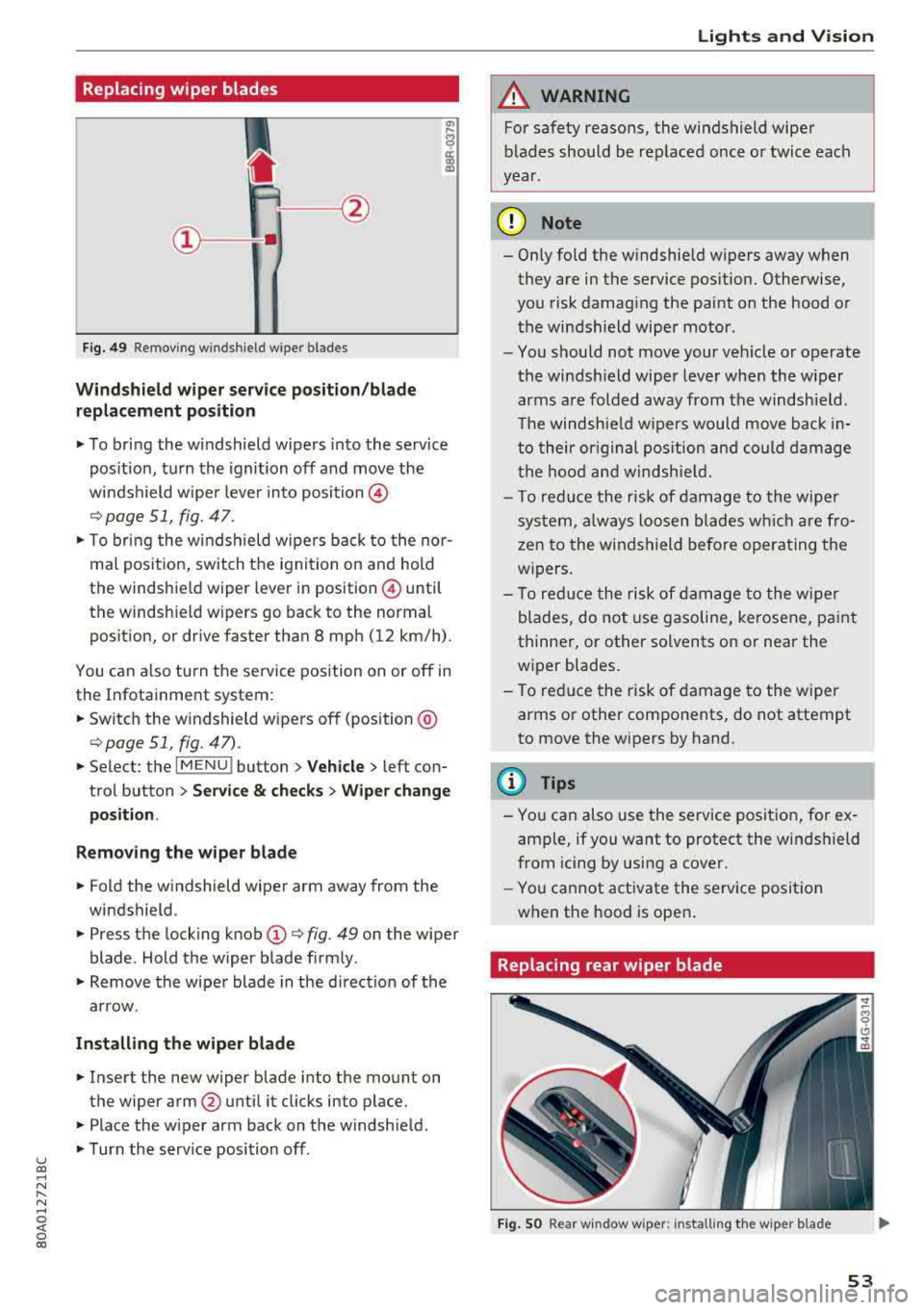
Fig. 49 Remov ing w indshi el d w iper blades
Windshield wiper serv ice po sition /blade
replacement position
"' To bring the windshield wipers into the service
pos ition, turn the ignition off and move the
windshield wiper lever into position @
¢ page 51, fig. 47.
"'T o bring the windshield wipers back to the nor
mal pos ition, switch the ignition on and hold
the windshie ld wiper lever in posit ion @ until
the windshie ld wipers go back to the normal
pos ition, or d rive faster than 8 mph (12 km/h) .
You can a lso tu rn the service position on or off in
the Infotainment system :
"'Switch the windshield wipers off (position @
¢page 51 , fig. 47) .
"'Select : the I MENU ! button> Vehicle> left con
trol button >
Service & checks > Wiper change
position .
Removing the wiper blade
"'Fold the windshield wiper arm away from the
windshield .
"' Press the locking knob (D ¢ fig. 49 on the wiper
blade . Hold the wiper blade firmly .
"'Remove the wiper blade in the direct ion of the
arrow .
Installing the wiper blade
"'Insert the new wiper blade into the mount on
the wiper arm
@ until it clicks into place.
"'Place the wiper arm back on the windshield .
"'Turn the serv ice position off.
Lights and Vision
A WARNING
For safety reasons, the windshield wiper
blades should be replaced once or twice each
year .
(D Note
- Only fold the windshield wipers away when
they are in the service pos ition. Otherwise,
you risk damaging the paint on the hood or
the windshield wiper motor .
- You should not move your veh icle or operate
the windsh ield wiper lever when the wiper
arms are folded away from the windshield .
Th e windshield wipers would move back in
to their or iginal pos ition and could damage
the hood and windshield.
- T o red uce the risk of damage to the wiper
system, always loosen blades wh ich are fro
zen to the windshield before operating the
w ipers.
- To reduce the risk of damage to the wiper
blades, do not use gasoline, kerosene, paint
thinner, or other solvents on or near the
wiper blades.
- To reduce the risk of damage to the wiper
arms or other components, do not attempt
to move the wipers by hand.
(D Tips
- You can also use the service position, for ex
ample, if you want to protect the windshield
from icing by using a cover .
- You cannot activate the service posit ion
when the hood is open .
Replacing rear wiper blade
Fig . SO Rear w indow wiper : installing the w ip er blade
53
Page 56 of 392
Lights and Vision
Removing the wiper blade
• Fo ld the wiper arm away from the rear window .
• Remove the wiper blade from its holder.
Installing the wiper blade
• Press the wiper b lade mount into the retainer.
• Fo ld the window wipe r arm bac k onto the rear
window.
WARNING
F or safety reasons, the windshie ld wiper
blades sho uld be replaced once or twice each
year .
Digital compass
Switching the compass on and off
App lies to: ve hicles w ith digital compass
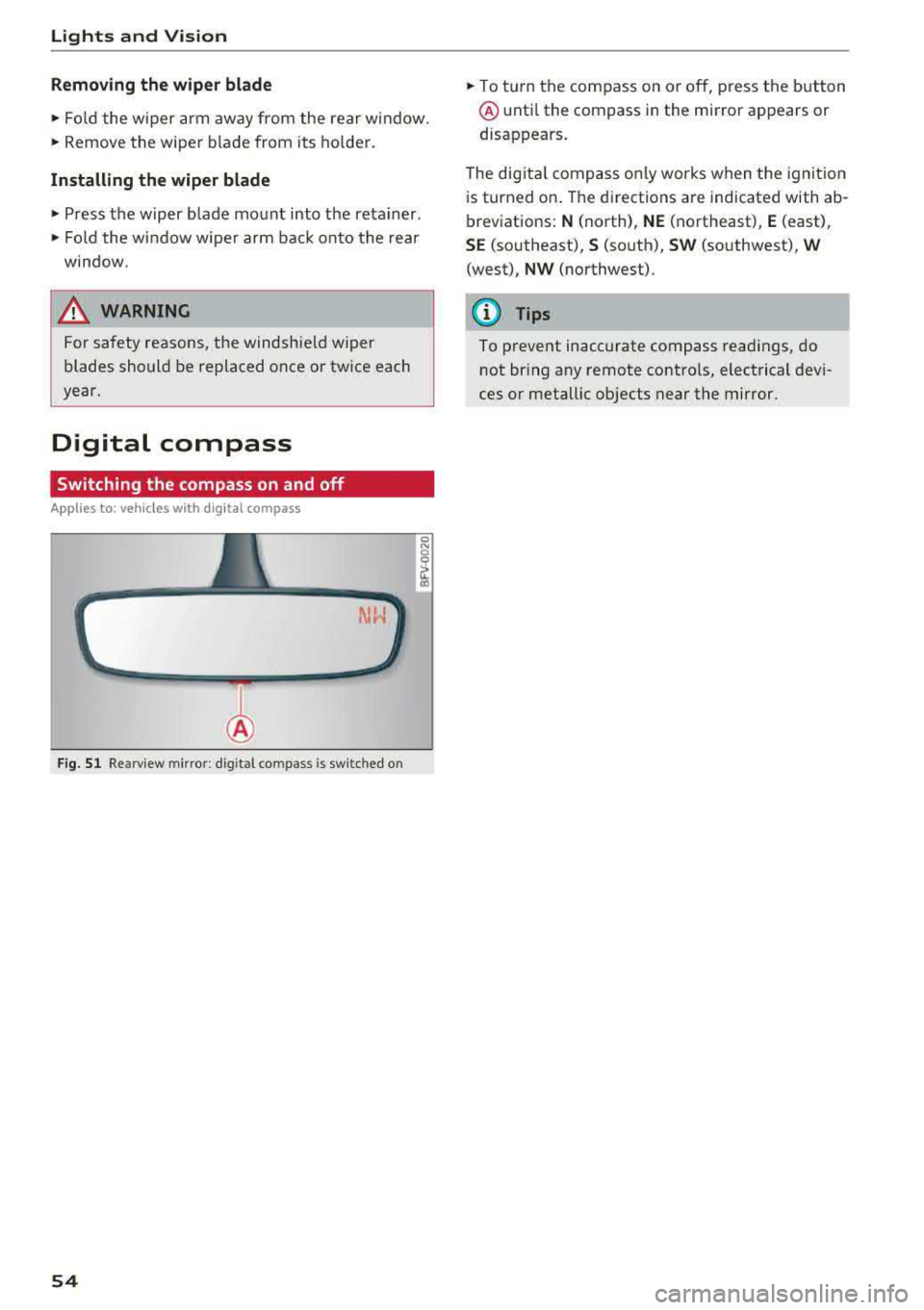
F ig . 51 Re arview m irror : dig it al co mpass is sw itc hed o n
54
• To turn the compass on or o ff, press the button
@ unti l the compass in the mi rror appears or
disappears.
The dig ita l compass o nly works when the ignit ion
i s turned on . T he directions a re indicated with ab
breviations:
N (north), NE (northeast), E (east),
SE (so utheast), S (so uth), SW (southwest), W
(west), NW (northwest) .
(D Tips
To prevent inaccurate compass readings, do
not br ing any remote contro ls, electrical devi
ces or metallic objects near the mirror.
Page 57 of 392
u co ..... N r-N .....
~ 0 co
Lights and Vision
Adjusting the magnetic zone
Applies to: ve hicles with d ig ital compass
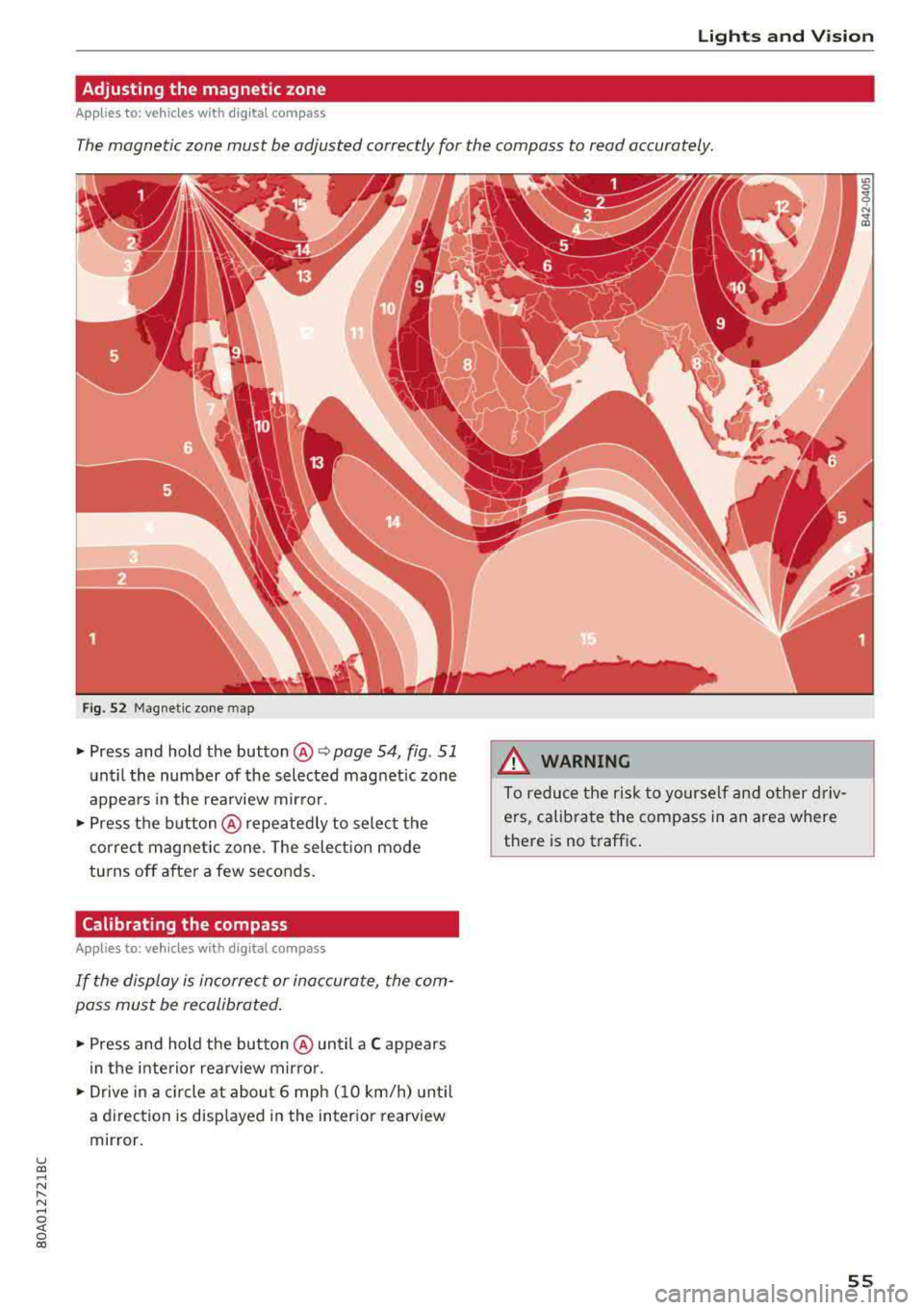
The magnetic zone must be adjusted correctly for the compass to read accurately.
Fig . 52 Magnetic zone map
• Press and hold the button @ Q page 54, fig . 51
until the number of the selected magnetic zone
appears in the rearview mirror .
• Press the button@repeatedly to select the
correct magnetic zone . The selection mode
turns off after a few seconds.
Calibrating the compass
A ppl ies to: ve hicles w ith d ig ital compass
If the display is incorrect or inaccurate, the com
pass must be recalibrated.
• Press and hold the button @ until a C appears
in the interior rearview mirror .
• Drive in a circle at about 6 mph (10 km/h) until
a direction is displayed in the interior rearview
mirror.
A WARNING
To reduce the risk to yourself and other driv
ers, calibrate the compass in an area where
there is no traffic.
.
55
Page 59 of 392
u co ..... N r-N .....
~ 0 co
• To select a seat setting, turn the multifunction
button
CD in the corresponding direction until
the desired seat setting is outlined in red.
• The arrows @ represent the possible adjust
ments . For example, to lower the lumbar sup
port , press the multifunction button
CD down.
The corresponding arrow @ lights up.
The following seat sett ings @are possible:
Massage function* -select the massage type
Wave , Stretch, Knead or Off You can adjust the
intensity of each massage from 1 to 3. You can
switch the selected massage on/off using the button @¢
fig. 55 .
lumbar support -you can adjust the lumbar sup
port up/down and to be stronger/weaker.
@ Tips
The massage function switches off automati cally after approximately 10 minutes.
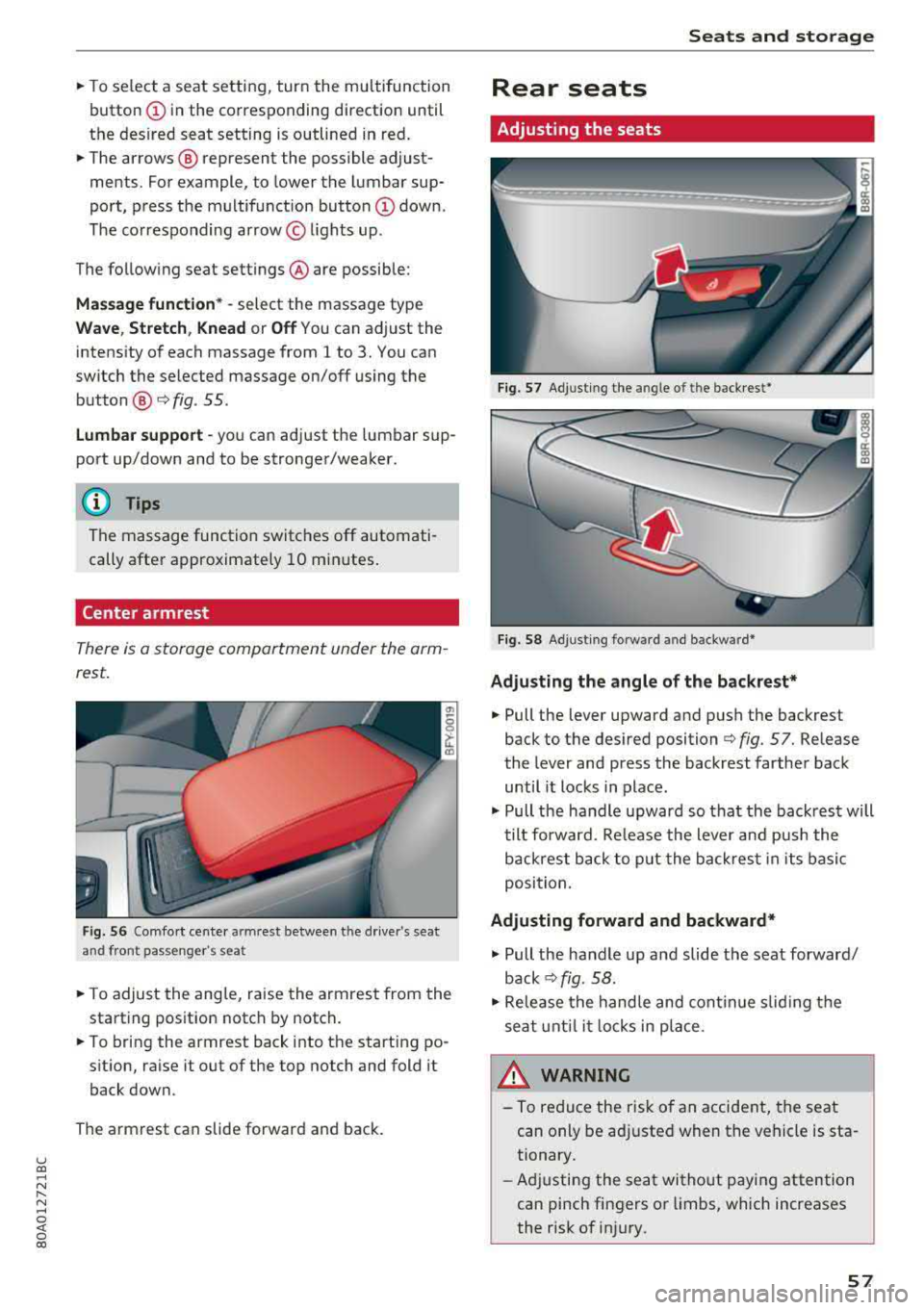
Center armrest
There is a storage compartment under the arm
rest.
Fig . 56 Comfort cente r armr est between t he driver 's sea t
and front passenger 's seat
• T o adjust the angle, raise the armrest from the
starting position notch by notch.
• To bring the armrest back into the starting po
sit ion, ra ise it out of the top notch and fold it
back down.
The armrest can slide forward and back.
Seats and storage
Rear seats
Adjusting the seats
Fig. 57 Adjust ing the angle of the backrest*
Fig. 58 Adj usting forw ard and backwa rd*
Adjusting the angle of the backrest*
• Pull the lever upward and push the backrest
back to the des ired position ¢
fig. 57. Release
the lever and press the backrest farther back
until it locks in place .
• Pull the handle upward so th at the back rest will
tilt forward. Release the lever and pus h the
backrest back to put the back rest in its basic
position.
Adjusting forward and backward*
• Pull the handle up and slide the seat forward/
back ¢fig. 58.
• Release the handle and continue sliding the
seat until it locks in place.
_& WARNING ~
-To reduce the risk of an accident, the seat
can only be adjusted when the vehicle is sta
tionary.
- Adjusting the seat without paying attention
can pinch fingers or lim bs, which increases
the risk of injury.
-
57
Page 76 of 392

Drivin g
engaged, for examp le when you notice that the
next traffic light is red . This produces an engine
braking effect, which helps to protect the brakes
and tires and reduces the emissions and fuel con
sumpt ion to zero (fuel shut-off during decelera
tion) .
Shift effici entl y
Upshifting earlier is an effective way to save fuel.
Staying in a gear too long uses fue l unnecessari
ly .
Press down on the acce lerator peda l slowly and
avoid "kick -down".
Avoid full acceleration
You shou ld rare ly t ravel at the maximum vehicle
speed. High speeds cause a d isp ropor tionately
high increase in fuel consumption, emissions and
traffic noise . Driving more slowly saves fue l.
Reduce idling time
The Start/Stop system* helps to reduce the idling
time automatically. In vehicles witho ut the Start/
Stop system* , it is
efficient to switch the eng ine
off when stopped at rai lroad crossings and long
red lights . Stopping the engine for
30 -40 sec
onds already saves more fu el than the amount of
extra fuel needed to restart the engine.
It t akes a very long time in idle to wa rm the en
gine up to operating temperature . Wear and
emissions are especially high in the warm -up
phase. Therefore, you should begin driving im
mediately after starting the engine. Avoid high
RPMs while do ing th is .
Ha ve mainten anc e performed regularly
By having maintenance performed regu lar ly on
your veh icle, you can he lp to reduc e fuel con
sumpt ion before you even start to dr ive. The
maintenance condition of your vehicle not only
affects traffic safety and long -term value but al
so impacts fuel consumption . A poorly main
tained engine can lead to fuel consumpt ion that
is
1 0% hi gher tha n normal.
74
Avoid short trip s
The engine and exh aust clean ing system mus t
reach their optima l operating temperature to ef
fective ly reduce consumption and emissions.
A cold engine uses a d isp roportionately high
amoun t of fue l. The eng ine re aches opera ting
temperat ure and cons umption norma lizes on ly
after approximate ly 2.5 mi les (4 km) .
Check the tire pressure
To save fue l, ma ke sure the t ires are always in
flated to the correct
press ure~ page 335. The
fuel consumpt ion can increase by
5% if the pres
sure is on ly
0 .5 bar too low. Due to t he increased
rolling resistance, low tire pressures wi ll also
l ead to greater tire wear and will affect driving
behavior.
Do not drive on winter tires year -round, as this
will consume up to
10% more fue l.
Eliminat e unnecessary weight
Since eve ry po und of ext ra weight increases f uel
consump tion, a quick inspec tion of the luggage
compartment may be worth it to avoid unneces
sary weight .
When not be ing used , a roof rack sho uld be re
moved to decrease the w ind resis tance of the ve
hicle . This will save you approx imately
12% fue l
at speeds from
6 2 -75 mph (100 -120 km/h) .
Save energy
The eng ine d rives the generator, which generates
electr ic ity; the f uel consumpt ion also inc reases
wi th the demand for e lec tricity . T he refore, sw itch
electrica l eq uipment o ff when you no longe r
need it . Examples of eq uipment that uses a lot of
energy are air blowers at a high setting, the rear
window defogger and seat heating* .
@ Note
Do not leave engine idling unattended after
starting. If warning lights s houl d come on to
i ndicate improper operation, they would go
unheeded. Extended idling also produces
h eat, which could result in overheating or
other damage to the veh icle or othe r proper
ty .
Page 79 of 392
u co ..... N r--N ..... 0 <( 0 00
@ Note
Avoid high engine speed, full throttle, and heavy engine load if the engine has not
reached operating temperature yet. You could
damage the engine.
@) For the sake of the environment
Do not let the engine run while parked to
warm up. Begin driving immediately. This re duces unnecessary emissions.
(D Tips
- Some noise after starting the engine is nor
mal and is no cause for concern.
- If you leave the vehicle with the ignition
switched on, the ignition will switch off af
ter a certain amount of time. Make sure that electrical equipment such as the exterior
lights are switched off.
Starting the engine
"'Bring the vehicle to a full stop.
"'Press the I START ENGI NE STO PI button
C? page 76, fig. 86.
Emergency off function*
If it is absolutely necessary, the engine can also
be turned off while driving at speeds starting at
4 mph (7 km/h). To switch the engine off, press
the
! START ENGINE STOPI button twice in a row
briefly or press and hold for longer than two sec
onds.
A WARNING
- Never turn off the engine before the vehicle
has come to a complete stop. The full func
tionality of the brake booster and the power steering is not guaranteed. You must use
more force to steer and brake the vehicle.
The fact that you cannot steer and brake as
usual can increase the risk of accidents and
serious injuries.
-If you leave the vehicle, switch the ignition
off and take the vehicle key with you .
If you
do not, the engine could be started and
electrical equipment such as the power win-
Driving
dows could be activated. This can lead to se
rious injuries.
- For safety reasons, always park the vehicle
with the selector lever in the "P" position.
Otherwise, there is the risk that the vehicle
could roll unintentionally.
@ Note
If the engine has been under heavy load for
an extended period of time, heat builds up in
the engine compartment after the engine is
switched off and there is a risk of damaging
the engine . For this reason, let the engine run
at idle for approximately two minutes before
shutting it off.
(D Tips
For up to 10 minutes after stopping the en
gine, the radiator fan may turn on again auto
matically or it may continue to run (even if
the ignition is switched off) for the following
reasons :
- The coolant temperature is increasing due
to
trapped heat.
- If the engine is warm and the engine com
partment also heats up from strong sun
light.
Messages
Engine running. Warning! Turn off ignition be
fore leaving vehicle
This message appears and a warning tone sounds
if you open the driver's door when the engine is
running.
Please press the brake pedal
This message appears if you do not press the brake pedal when starting the engine .
Ill Remote control key: key not detected. Is the
key still in the vehicle?
This indicator light turns on and this message ap
pears if the ignition key was removed from the
vehicle when the engine was running. If the igni
tion key is no longer in the vehicle, you cannot
switch on the ignition or start the engine once
..,.
77
Page 81 of 392

u co ..... N r--N ..... 0 <( 0 00
(D Tips
-Depending on the driving situation, the en
gine may already stop when
coasting before
the vehicle has come to a complete stop
ll.
- If you select the "D" selector lever position
after shifting into reverse, the vehicle must be driven faster than 6 mph (10 km/h) in or
der for the Start/Stop system to be active
again.
Stopping/starting the engine
Applies to: vehicles with Start/Stop system
"'Apply the brakes and keep your foot on the
brake pedal until the vehicle has stopped. The
rl1 indicator light appears in the instrument
cluster once the engine stops automatically .
"'The engine starts again when you take your
foot off the brake pedal. The indicator light
turns off.
(D Tips
-The ignition will turn off if you press the
I START ENGINE STOP I button during a stop
phase .
- You can determine for yourself if the engine
will stop or not by reducing or increasing
the amount of force you use to press the brake pedal. For example, if you only lightly
press on the brake pedal in stop-and-go
traffic or when turning, the engine will not
switch off when the vehicle is stationary. As
soon as you press the brake down harder,
the engine will switch off.
- Press the brake pedal during a Stop phase
to keep the vehicle from rolling.
Starting/stopping the engine automat
ically
Applies to: vehicles with Start/Stop system
The system checks if certain conditions are met
before and during the "stop" phase, and deter
mines if and how long the engine is stopped de
pending on the situation. For example, if power
usage is high, the engine will not be stopped .
ll Market-specific
Driving
Along with other conditions, the following fac
tors influence the automatic engine start or stop:
- Environmenta l conditions (slopes, inclines, ele-
vation, temperature)
- Battery (charge status, temperature, power us-
age)
- Engine temperature
- Assistance systems
- Driving behavior
If the
rid indicator light appears in the instru
ment cluster display, the engine will not be stop
ped.
Switching the ignition off automatically
Applies to: vehicles with Start/Stop system
If you leave the vehicle during a "stop" phase, the
engine can be restarted within approximately 30
seconds if the doors are closed, the driver's safe
ty belt is fastened and the brake pedal is pressed.
If you leave the vehicle longer than 30 seconds,
the ignition will switch off automatically to pre
vent the vehicle battery from draining. If this is
the case, the message
Start/stop system: igni
tion will be switched off in 30s
will appear in the
instrument cluster and, if the low beam head
lights are switched on, the parking lights will
switch on instead. The parking lights will switch
off after approximately 30 minutes or when you
lock the vehicle.
The ignition also switches off when you lock the
vehicle from the outside during a stop phase.
If the Start/Stop system has not turned off the
engine or if you have switched the Start/Stop sys
tem off manually, the ignition will not be auto matically switched off and the engine will contin
ue to run.
A WARNING
-To reduce the risk of poisoning, never allow
the engine to run in confined spaces.
-
79
Page 85 of 392
u co ..... N ,..._
N ..... 0 <( 0 00
-Clean the windows, headlights, tail lights and
the license plate if they are dirty.
-Perfo rm a brake test (especially a fter dr iving
t h rough water) .
A WARNING
-Be especia lly caut io us and aware when driv
ing under difficult conditions and when off
road. Vehicle damage and injur ies may occ ur
whe n drivi ng at excessively high speeds o r
w ith incorrect dr iv ing ma neuvers .
-Always adjust your speed and driv ing style
to the roads, te rra in, traffic and weather
co ndi tions. Dr ive espec ially slowly if the re is
low v is ibi lity when offroad .
-Please note that the wheels can spin more
and the vehicle can swe rve w hen in off road
mode, especially whe n the road is s lip pery
o r has loose su rface m ater ial.
- Driv ing stab ility is reduced w hen in off road
mode.
@ For the sake of the environment
Avoid harmi ng the enviro nment and show
considera tion for nature .
(D Tips
Only dr ive where it is permitted a nd a lways
stay on the provided roads a nd paths.
Explanation of technical terms
The follow ing data is based on ideal cond it io ns.
The val ues may d iffe r depend ing o n the vehicle
l oad, road character ist ics, and the a rea. The d riv
e r i s therefo re res ponsible for dec iding w hethe r a
ve hicl e can hand le a spe cific
s ituation ¢.&. .
Pitch angle
The amount of ver tica l elevation c hange (grade)
in a dis tances of 109 yards (100 mete rs) is speci
fied as a percentage o r in degrees. Spe cifica tion
of how s teep of a grade t he ve hicle can dr ive up
usi ng its own power (de pends on the road sur
face and the eng ine power, among other things) .
M axim um permitted pitch ang le : 3 1
°.
Driving
Ground clearance
T he dis ta n ce be tween the road surface and the
l owest point of the vehicle underbody. Gro und
clearance : 8 .1 in (205 mm)
A WARNING
= -
Exceeding the max imum specified va lues can
l ead to serious injuries or vehicle damage.
-A ll sp ec ificat ions were determine d base d on
a level, f irm, an d non -slippe ry road s urface
in dry weather conditions.
-The ideal cond itions do not apply in offroad
d riving. Do not always go a ll the way up to
the maximum val ues . Stay slightly below
them for safety .
Messages
There is only one motto when driving in difficult
condi tions and off road: drive slowly and with
caution!
Observe the following when driv ing on unpaved
roads :
.. Only dr ive in ter ra in tha t is sui table fo r the ve
hicle and yo ur dr iv ing ability . Never take any
unnecessa ry risks!
.. Dr ive slow ly and caref ully.
.. Pay attent ion to the ground clearance of your
veh icle .
.. Activa te the offroad mode as needed
¢ page 141 .
.. Use the hill de scent assist when d riving down
s teep
hills ¢ page 142 .
Difficult terrain and off-road
When driving in unfam iliar areas and off road,
dr ive slowly and keep o n the watch for unexpect
ed obstacles (such as pot ho les, rocks, tree
stumps , etc.).
To p reve nt the vehicle from bottom ing o ut and to
reduce the risk of underbody damage, you should
dr ive across uneven gro und o n only o ne si de of
t h e ve hicle so that on ly two of you r whee ls c ross
t h e u neven a re a, ins tead of drivin g ac ross the
cente r of the u neven area wit h all four wheels.
..,
83