lock AUDI Q5 2018 Owner's Manual
[x] Cancel search | Manufacturer: AUDI, Model Year: 2018, Model line: Q5, Model: AUDI Q5 2018Pages: 392, PDF Size: 60.56 MB
Page 43 of 392
u co ..... N ,..._
N ..... 0 <( 0 00
All power window switches are equipped with a
two-stage function *:
Opening and clo sing the windows
.,. T o open or close the w indow completely, p ress
the sw itc h down or p ull the sw itc h up br iefly to
the second level. The operation wi ll stop if the
switch is pressed/pu lled again.
.. To se lect a position in between opened and
closed, press/pull the switch to the first leve l
until the desired window position is reached.
Po wer window switch es
(D Left front door
@ R ight front door
@ L eft rea r door*
© Right rear door*
A WARNING
- If you leave the veh icle, switch the ignition
off and take the vehicle key with you. This
applies particularly when children remain in
the vehicle . Otherw ise children could start
the engine or operate elect rical equipment
(such as powe r windows), which inc reases
the risk of an acc ident. The power windows
c ontin ue to f unct ion until the driver's door
or front passenge r's door has been opened .
- Pay ca reful attent ion when closing the win
dows. Pin ching co uld cause serious injur ies.
- When loc king the veh icle from outside, the
vehicle mus t be unoccupied since the win
dows can no longer be opened in an emer
gency.
(D Tips
You can still open and close the w indows for
app roxima tely 10 minutes after tu rning the
ign it ion off. The power windows do no t switch
off until the driver's door or front passenger's
door has been opene d.
Opening and cl osing
Convenience opening/closing
Applies to: vehicles with convenience key
All of the windows and the roof* con be opened/
closed at the some time .
Convenience opening f eature
.. Press and hold the @ button on the remote con
trol key until a ll of the windows reach the de
sired position and the roof* is ti lted open .
Convenience closing feature
.. Press the t'fl button on the remote control key
until the roof* is closed
~ ,&. , or
.. Touch the sensor * on the door handle unti l all
of the windows and the roof* are closed. Do not place your hand in the door handle when doing
this .
Sett ing con ven ience opening in the
Infotainment system
.. Select in the Infotainment system: I MENU ! but
ton
> V ehicle > left control button > V ehicle
s etting s
> Central locking > Long press to
open windows .
A WARNING
-Never close the w indows o r the roof* ca re
lessly or in an uncon trolled manner, be
cause this increases the risk o f injury .
- For secur ity reasons, the win dows and the
roof* c an only be opened and closed with
the remote control key at a maxim um dis
tance of approximately 6.S feet (2 m) away
from the vehicle. Always pay attention when using the
t'fl button to close the windows
and the roof * so that no one is pinched. The
clos ing process will stop immediately when
the
t'fl button is released.
(D Tips
Applies to: vehicles with panorama glass roof:
the power sunshade also opens/closes when
opening/closing the roof .
-
41
Page 49 of 392
u co ..... N r-N .....
~ 0 co
~ Headlight a ssistant : ma lfun ction! See own
er 's manual
Drive to an autho rized Audi de aler o r a uthorized
Aud i Service Facility immedia tely to have the
mal funct ion corrected. You can still switch the
high beams on or off manually.
i:a Headlight a ssistant : currently unavailable.
Camera view restricted due to surroundings .
See owner 's manual
The camera view is b locked, fo r example by a
s ticker o r debris.
The senso r is located between the interior rear
view mir ror and the wi ndshield . Do not p lace any
sti cke rs in t his area on the wi ndshi eld.
,& WARNING
High beam assis tan t is only i ntended to assist
th e drive r. The dr iver is still re sponsib le for
contro lling the headlights and may need to
switch them on and off manually depend ing
on light and visib ility conditions. It may be
necessary to ope rate them manua lly in s itua
tions such as:
- In adverse weather cond itions such as fog,
heavy ra in, b low ing snow or sp raying water .
- On roads where oncoming traffic may be
partially obsc ured, such as expressways .
- W hen there are road users t hat do not have
s ufficient lighting, s uc h as bicyclers o r
vehicles with dirty ta il lamps.
- In tight cu rves and on steep hills .
- In poo rly lit areas .
- Wi th stro ng ref lec to rs, such as s igns.
- I f the area of t he windsh ield near the se nso r
is f ogg ed ove r, dir ty, i cy or covere d w ith a
sti cker.
Adjusting the exterior lighting
The fun ctio ns are adjust ed in the Infotainment
system.
• Select in the Info tainment sys tem: !ME NUI but
ton
> Vehicle > left contro l butto n > Vehicle
settings > Exterior lighting .
Lights and Vision
Automatic headlights
Yo u ca n adju st the following se ttings in the Au
tomatic headlights
men u:
Activation time -you can adjust if the a utomat ic
he adlig hts swi tch on
Early , Medium or Late ac
cording to the sensi tivity of the ligh t se nsor.
Headlight assistant * -you can switch the high
beam assis tan t* on and off.
Entry/exit lighting
When it is dark, the Entry/exit lighting ill umi
nates the area a round the vehicle when unlocking
the ve hicle and afte r swi tc h ing off the ignit io n
and opening the dr ive r's door.
The
Entry /exit lighting only works when it is
dark and the ligh t sw itch is in the
AUTO position.
Daytime running lights
USA models :
the daytime r unning lig hts can be
switched on/off . Select
On or Off.
Canada model s:
th is fu ncti on canno t be switche d
off. They act ivate au tomatically eac h time the ig
nition is switched on.
Emergency flashers
- --- - -- ----
~
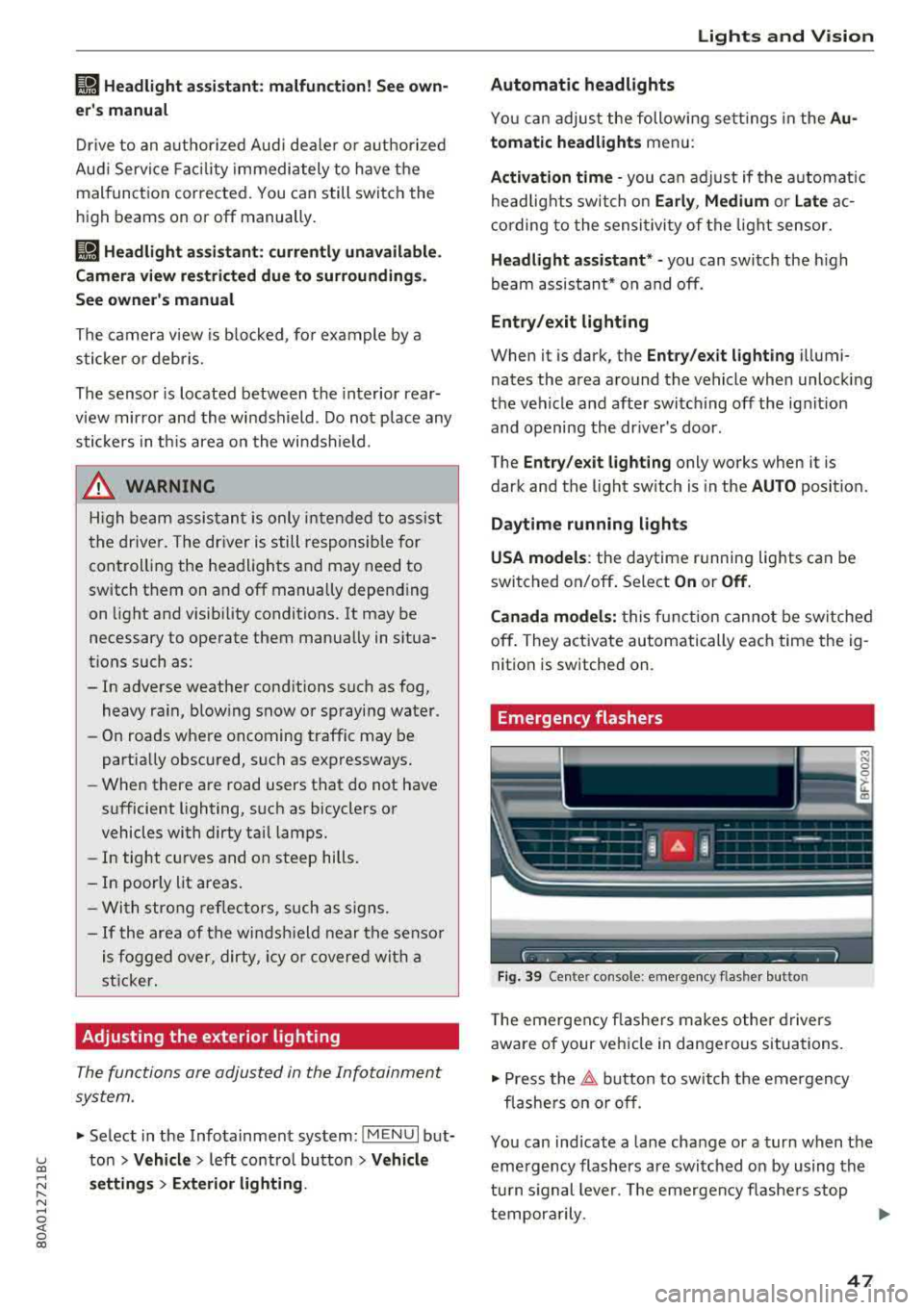
Fig . 39 Ce nter console: emergency flasher butto n
The eme rgen cy fla she rs m akes othe r dr iv e rs
aware of your vehi cle in dangerous situa tions.
• Press the ~ button to sw itch t he emergency
fl as he rs on or off.
You can ind icate a lane change or a turn when the
eme rgency flashers are swi tched on by using the
tu rn s ignal leve r. T he emergen cy flashe rs stop
tempor arily.
""
47
Page 51 of 392
u co ..... N r-N .....
~ 0 co
Version 1
To adjust the brightness of individual zones, se
lect
Front brightness* , Door brightness or Foot
well brightness.
Turn the control knob to th e left
or to th e right. Pr ess the control knob to confirm
the b rightness.
Version 2
Select and confirm one of the displayed profiles
by pressing the control knob.
Individual: you can customize the brightness and
color of individual zones. Press the right control
button. Press the control knob again to confirm
the settings.
Audi drive select: the interior and contour light
ing color changes depending on the driving mode
selected in drive select*
r::?vpage 125.
(0) Tips
The setting is automatically stored and as
signed to the remote control key that is being
used.
Instrument illumination
The brightness of the illumination for the instru
ments, display and head-up display* can be ad
justed.
--------... ~
i
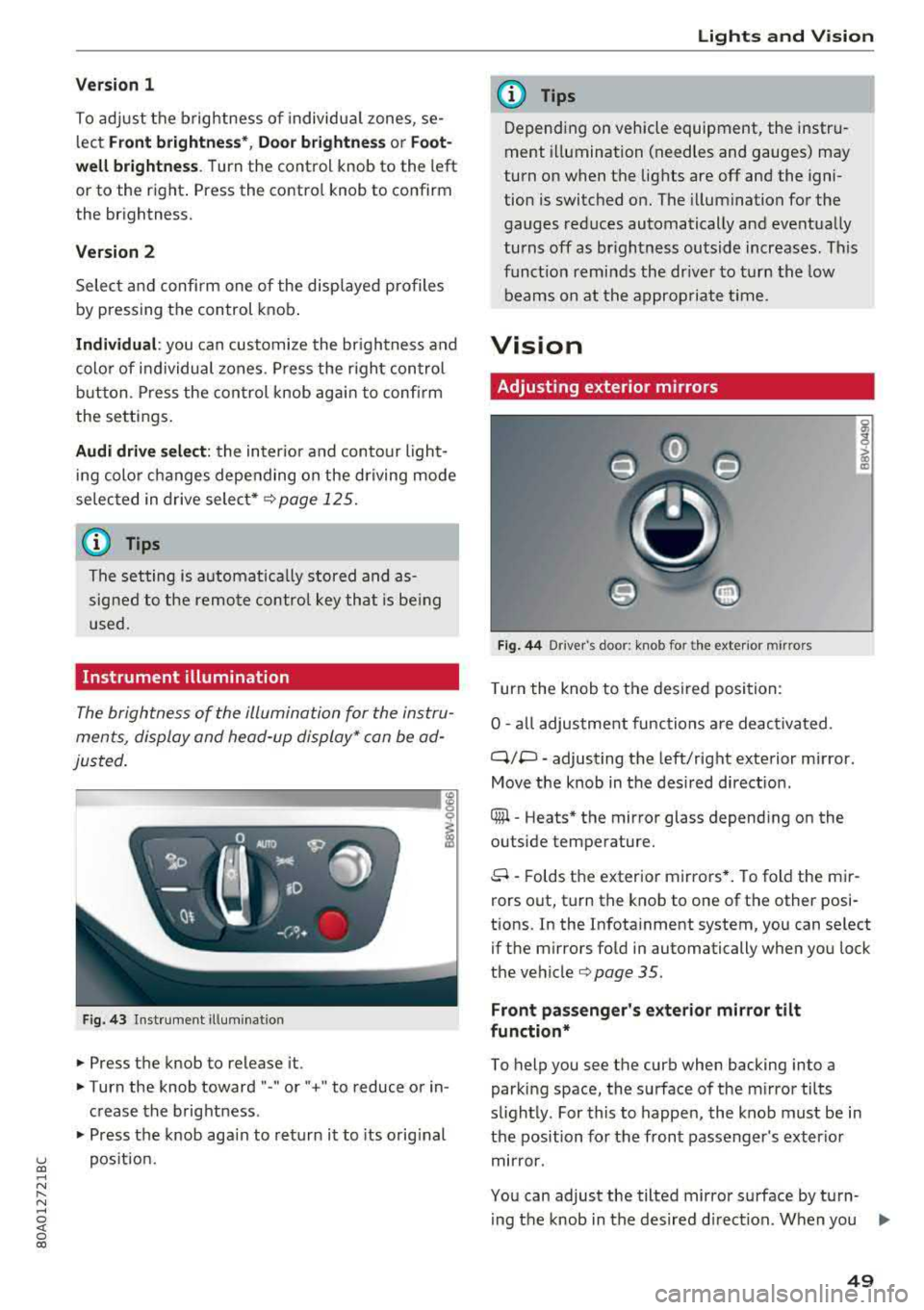
Fig. 43 Instrument i llumination
.. Press the knob to release it.
.. Turn the knob toward "-" or" +" to reduce or in
crease the brightness .
.. Press the knob again to return it to its original
position.
Lights and Vision
(D Tips
Depending on vehicle equipment, the instru
ment illumination (needles and gauges) may
turn on when the lights are off and the igni
tion is switched on. The illumination for the
gauges reduces automatically and eventually
turns off as brightness outside increases . This
function reminds the driver to turn the low
beams on at the appropriate time.
Vision
Adjusting exterior mirrors
Fig. 44 D river 's doo r: knob fo r the ext erior mirr ors
Turn the knob to the desired position:
0
-all adjustment functions are deactivated .
q;p -adjusting the left/right exterior mirror.
Move the knob in the desired direction .
® -Heats* the mirror glass depending on the
outside temperature.
8 -Folds the exterior mirrors*. To fold the mir
rors out, turn the knob to one of the other posi
tions. In the Infotainment system, you can select if the mirrors fold in automatically when you lock
the
vehicle¢ page 35 .
Front passenger's exterior mirror tilt
function*
To help you see the curb when backing into a
parking space, the surface of the mirror tilts
slightly. For this to happen, the knob must be in
the position for the front passenger's exterior
mirror.
You can adjust the tilted mirror surface by turn- ing the knob in the desired direction. When you
.,.
49
Page 55 of 392
u co ..... N r-N .....
~ 0 co
Replacing wiper blades
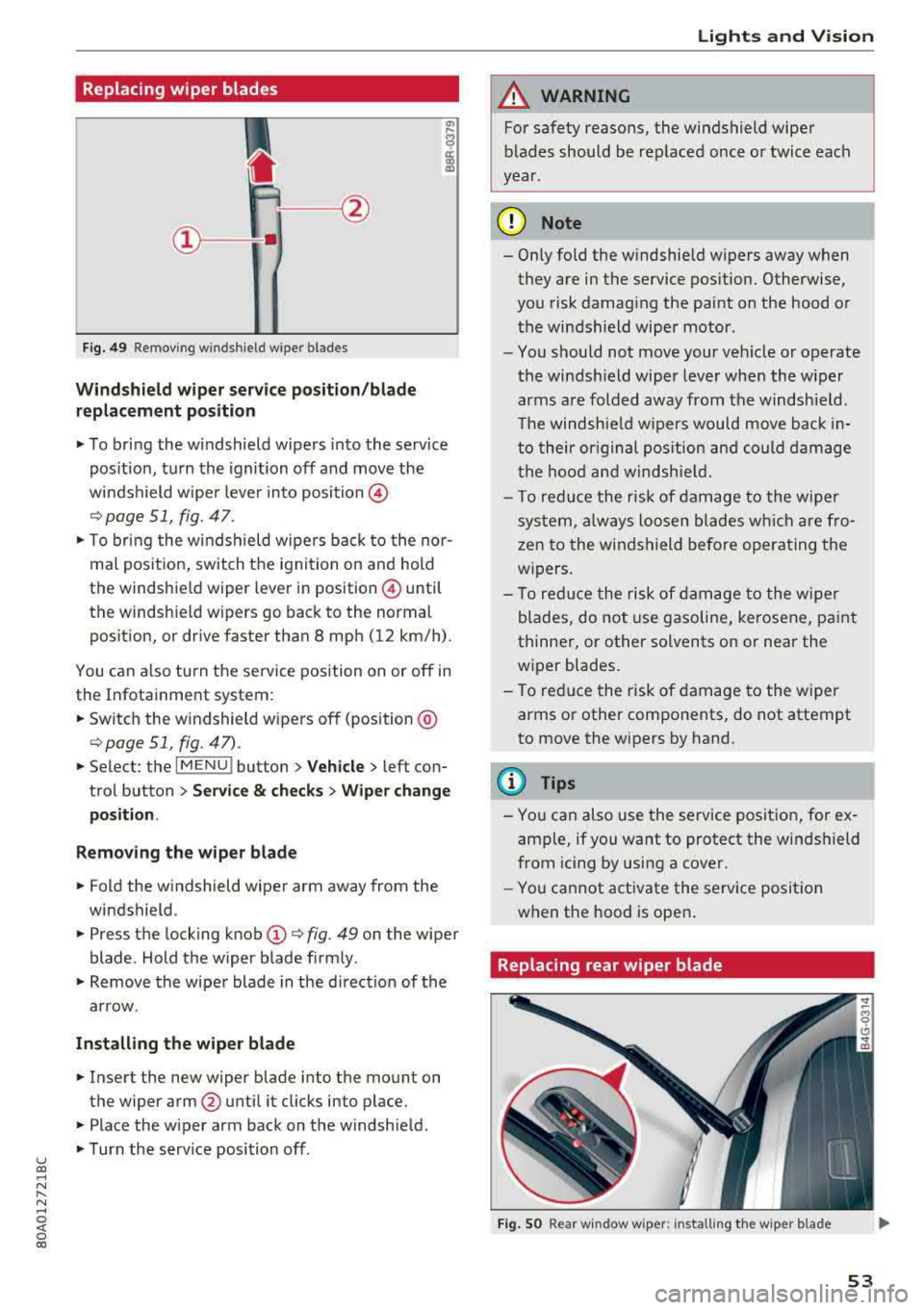
Fig. 49 Remov ing w indshi el d w iper blades
Windshield wiper serv ice po sition /blade
replacement position
"' To bring the windshield wipers into the service
pos ition, turn the ignition off and move the
windshield wiper lever into position @
¢ page 51, fig. 47.
"'T o bring the windshield wipers back to the nor
mal pos ition, switch the ignition on and hold
the windshie ld wiper lever in posit ion @ until
the windshie ld wipers go back to the normal
pos ition, or d rive faster than 8 mph (12 km/h) .
You can a lso tu rn the service position on or off in
the Infotainment system :
"'Switch the windshield wipers off (position @
¢page 51 , fig. 47) .
"'Select : the I MENU ! button> Vehicle> left con
trol button >
Service & checks > Wiper change
position .
Removing the wiper blade
"'Fold the windshield wiper arm away from the
windshield .
"' Press the locking knob (D ¢ fig. 49 on the wiper
blade . Hold the wiper blade firmly .
"'Remove the wiper blade in the direct ion of the
arrow .
Installing the wiper blade
"'Insert the new wiper blade into the mount on
the wiper arm
@ until it clicks into place.
"'Place the wiper arm back on the windshield .
"'Turn the serv ice position off.
Lights and Vision
A WARNING
For safety reasons, the windshield wiper
blades should be replaced once or twice each
year .
(D Note
- Only fold the windshield wipers away when
they are in the service pos ition. Otherwise,
you risk damaging the paint on the hood or
the windshield wiper motor .
- You should not move your veh icle or operate
the windsh ield wiper lever when the wiper
arms are folded away from the windshield .
Th e windshield wipers would move back in
to their or iginal pos ition and could damage
the hood and windshield.
- T o red uce the risk of damage to the wiper
system, always loosen blades wh ich are fro
zen to the windshield before operating the
w ipers.
- To reduce the risk of damage to the wiper
blades, do not use gasoline, kerosene, paint
thinner, or other solvents on or near the
wiper blades.
- To reduce the risk of damage to the wiper
arms or other components, do not attempt
to move the wipers by hand.
(D Tips
- You can also use the service position, for ex
ample, if you want to protect the windshield
from icing by using a cover .
- You cannot activate the service posit ion
when the hood is open .
Replacing rear wiper blade
Fig . SO Rear w indow wiper : installing the w ip er blade
53
Page 59 of 392
u co ..... N r-N .....
~ 0 co
• To select a seat setting, turn the multifunction
button
CD in the corresponding direction until
the desired seat setting is outlined in red.
• The arrows @ represent the possible adjust
ments . For example, to lower the lumbar sup
port , press the multifunction button
CD down.
The corresponding arrow @ lights up.
The following seat sett ings @are possible:
Massage function* -select the massage type
Wave , Stretch, Knead or Off You can adjust the
intensity of each massage from 1 to 3. You can
switch the selected massage on/off using the button @¢
fig. 55 .
lumbar support -you can adjust the lumbar sup
port up/down and to be stronger/weaker.
@ Tips
The massage function switches off automati cally after approximately 10 minutes.
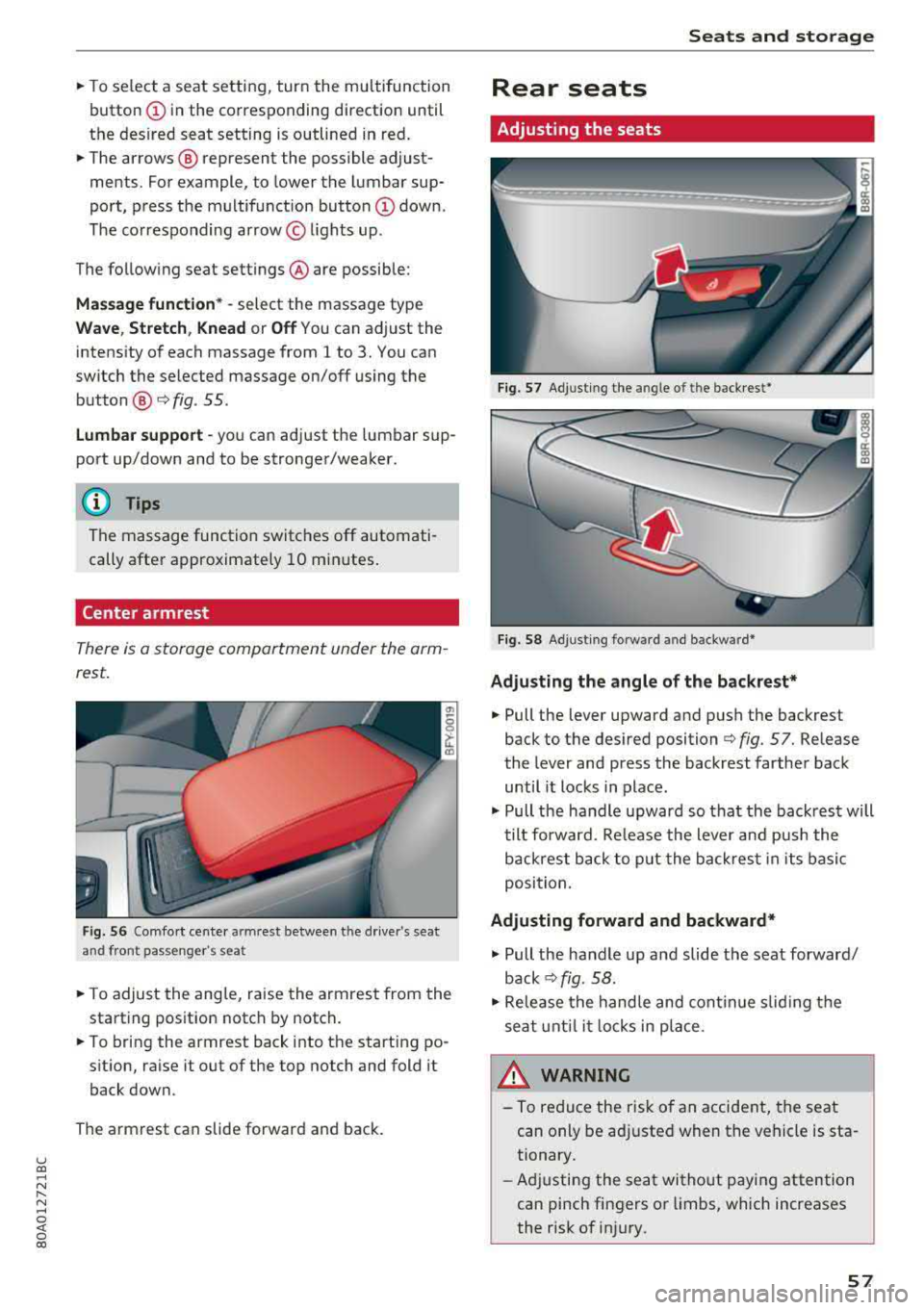
Center armrest
There is a storage compartment under the arm
rest.
Fig . 56 Comfort cente r armr est between t he driver 's sea t
and front passenger 's seat
• T o adjust the angle, raise the armrest from the
starting position notch by notch.
• To bring the armrest back into the starting po
sit ion, ra ise it out of the top notch and fold it
back down.
The armrest can slide forward and back.
Seats and storage
Rear seats
Adjusting the seats
Fig. 57 Adjust ing the angle of the backrest*
Fig. 58 Adj usting forw ard and backwa rd*
Adjusting the angle of the backrest*
• Pull the lever upward and push the backrest
back to the des ired position ¢
fig. 57. Release
the lever and press the backrest farther back
until it locks in place .
• Pull the handle upward so th at the back rest will
tilt forward. Release the lever and pus h the
backrest back to put the back rest in its basic
position.
Adjusting forward and backward*
• Pull the handle up and slide the seat forward/
back ¢fig. 58.
• Release the handle and continue sliding the
seat until it locks in place.
_& WARNING ~
-To reduce the risk of an accident, the seat
can only be adjusted when the vehicle is sta
tionary.
- Adjusting the seat without paying attention
can pinch fingers or lim bs, which increases
the risk of injury.
-
57
Page 60 of 392
Seats and stor age
Head restraints
Front head restraints
Applies to: vehicles with adjustable head restraints
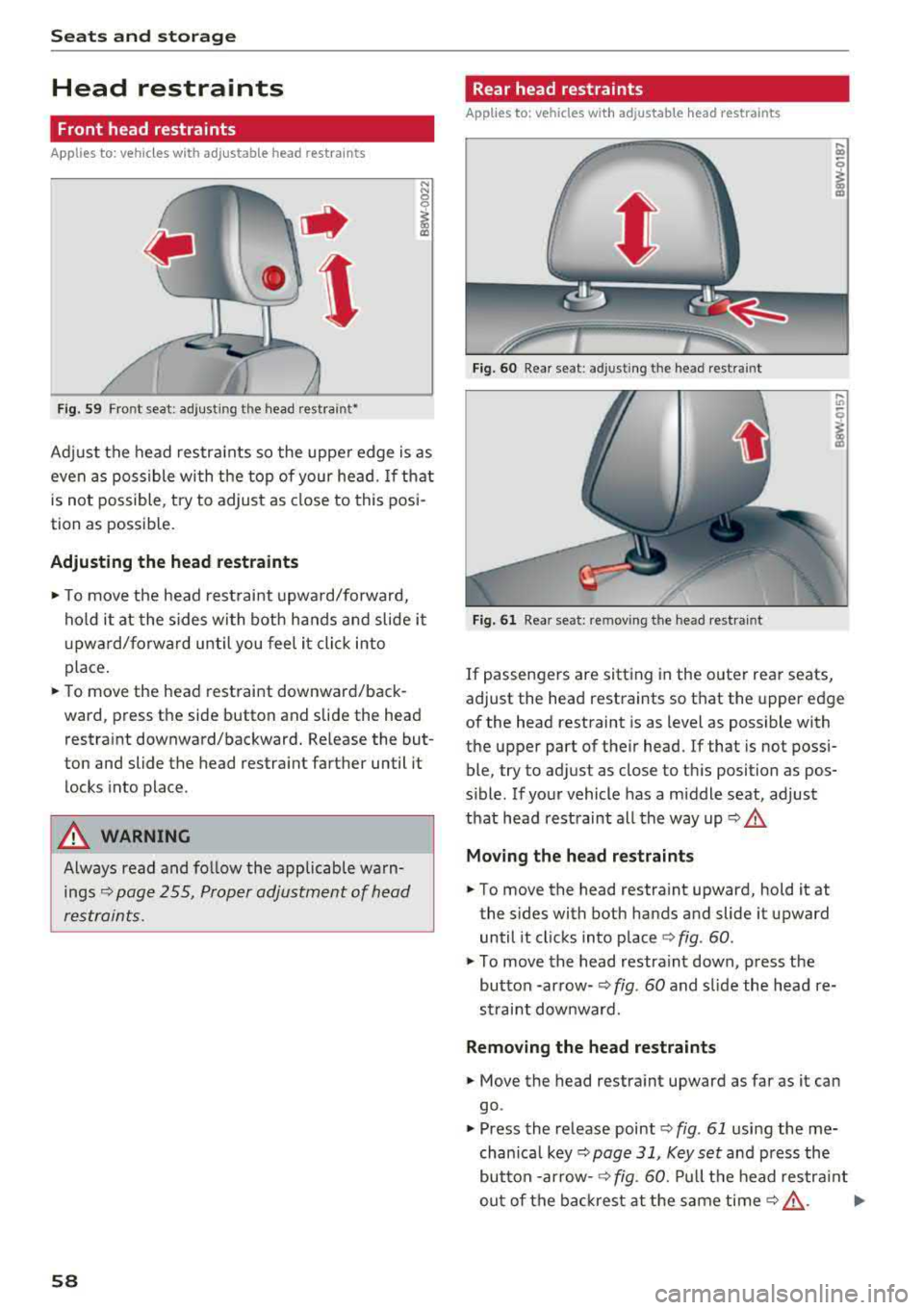
Fig . 59 Front seat: adjusting the head rest raint•
Adj ust the head restra ints so the uppe r edge is as
even as possible with the top of your head.
If that
is not possible, try to adjust as close to this posi
tion as possible.
Adjusting th e head restraints
"'To move the head rest raint upwa rd/forward,
hold it at the sides wi th both hands and slide it
u pward/forward un til you fee l it click into
place.
"' To move the head restraint downward/back
ward, press the side button and slide the head
restraint downward/backward. Re lease the but
ton and slide the head restraint farther until it
locks into place .
.,&. WARNING
Always read and fo llow the applicable warn
ings¢
page 255, Proper adjustment of head
restraints.
58
Rear head restraints
Applies to: vehicles with adjustable head restraints
Fig. 60 Rear seat: adjusting the head restraint
Fig. 61 Rear seat: removing the head restraint
.... m
I
If passengers are sitting in the outer rear seats,
adjust the head restraints so that the upper edge
of the head restraint is as level as possible with
the upper part of their head. If that is not possi
ble, try to adjust as close to this position as pos
s ible. If your vehicle has a middle seat, adjust
that head restraint all the way up ¢
.&,
Moving the head restraint s
"'To move the head restraint upward, hold it at
the s ides with both hands and slide it upward
until it cl icks into place ¢
fig. 60 .
"'To move the head restra int down, press the
button -arrow-
¢ fig . 60 and s lide the head re
s traint downward.
Remo ving the head r estraint s
"'Move the head restra int upward as far as it can
go .
"' Press the release point ¢ fig. 61 using the me
chanical key ¢
page 31, Key set and press the
button
-arrow- ¢ fig. 60. Pu ll the head restra int
out of the bac krest at the same
time ¢.&, . Ill>
Page 61 of 392
u co ..... N r-N .....
~ 0 co
Installing the head restraints
.,. Slide the posts on the head restraint dow n into
the gu ides unt il the posts click into place .
... Press the button -arrow-c::> fig. 60 and slide the
head restraint all th e way down. You should not
be able to remove the head restraint from the
backrest without pressing the button.
A WARNING
-Always read and follow the applicable warn
ings
c::> page 255 , Proper adjustment of
head restraints .
-Only remove the head restraints from the
rear seats when it is necessary for install ing
a ch ild safety sea t
c::> page 291, Child safe
ty. Install the head restra int aga in immedi
ately once the chi ld safety seat is removed .
Driv ing with the head restraints removed or
not in the upright position inc reases the risk
of serious inj ury.
Memory function
Description
Applies to: vehicles with memory function
Using the memo ry funct ion, you can qu ickly and
eas ily store a pe rsonal seat profile for the dr iver
and recall the setti ngs later. The memory f unc
tion is controlled by the remo te control key and
the memory buttons in the drive r's door.
The drive r's seat p rofile is stored again and as
signed to t he remote contro l key each time the
ve hicle is locked. When you open the door, the
seat prof ile is automatica lly reca lled . If two peo
p le use the vehicle, it is recommended that each
person always uses their
"own" remote control
key .
Two seat profiles can be stored each using the memory buttons . Once they are stored, these
seat profi les can be se lected at any time.
The fo llow ing settings are stored :
Seats and storag e
Remote con- Memory but-
trol key ton
Driver Driver
Seat X X
Both exterior
mirrors*
X X
Remote control key
Applies to: vehicles with memory function
The driver's seat profile can be assigned to the
remote control key when the vehicle is locked .
... Select in the Infotainment system: I MENU! but
ton
> Vehicle > left control button > Vehicle
setting s > Seat s > Driver's seat > Store set
ting s on remote control ke y.
(D Tips
If you do not wish to have the seat prof ile for
anothe r dr iver assigned to the remote control
k ey, sw itch the memory f unction off in the In
fotainment system.
Memory buttons
Applies to: vehicles with memory function
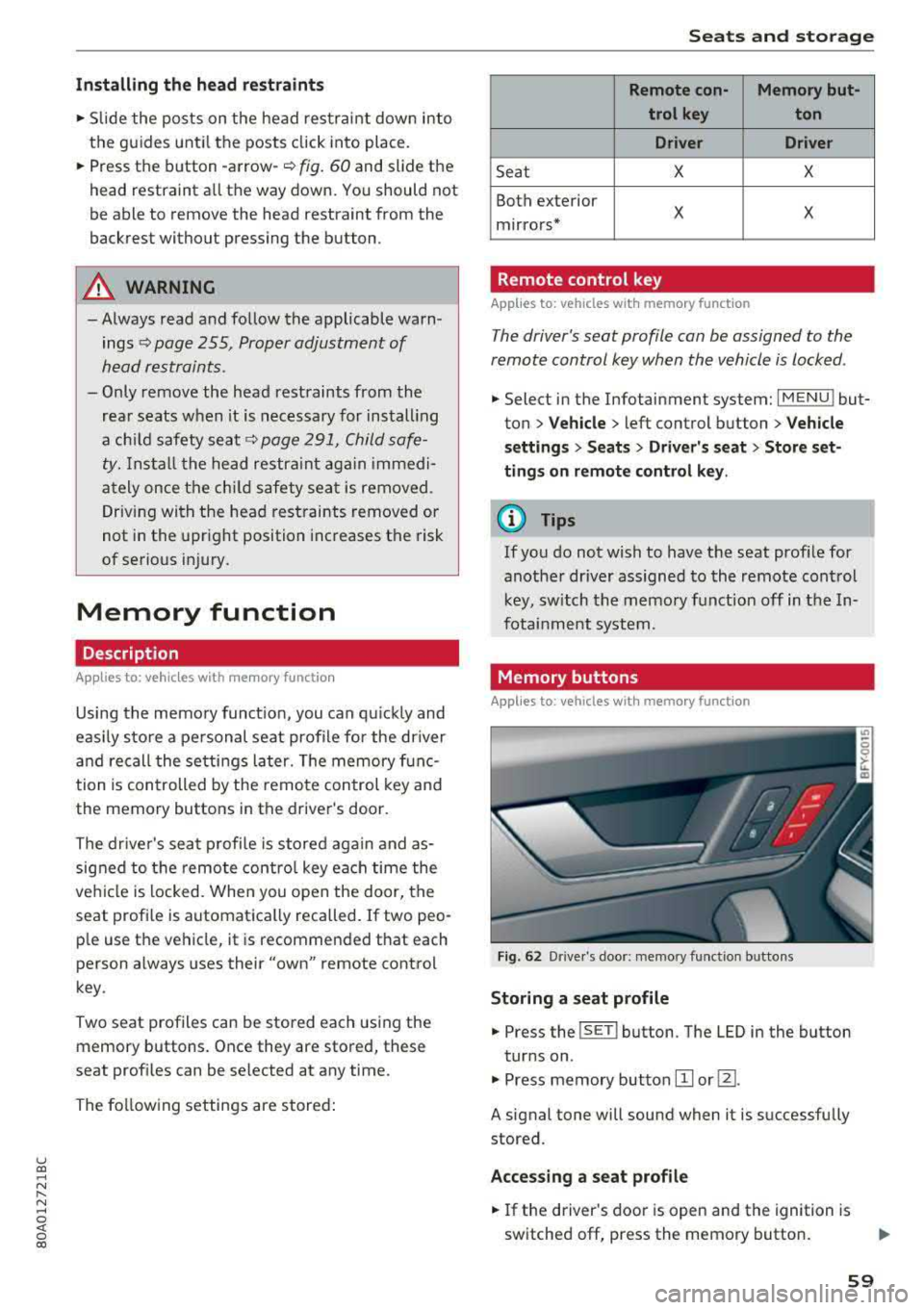
Fig. 62 Drive r's doo r: memory funct io n bu ttons
Storing a seat p rofile
... Press the ISET I button. The LED in the button
tur ns on .
.,. Press memory button IT] or@.
A signal tone will sound when it is successfully
stored.
Acces sing a seat profile
... If the driver's door is open and the ignition is
switched off, press the memory button .
59
Page 63 of 392
u co ..... N r-N .....
~ 0 co
-Do not use any breakable beverage contain
ers (for example, made out of glass or por
celain). You could be injured by them in the
event of an accident .
(D Note
Beverage containers in the cup holders should
always have a lid. If not, beverages could sp ill
and cause damage to vehicle equipment, such
electronics or seat covers .
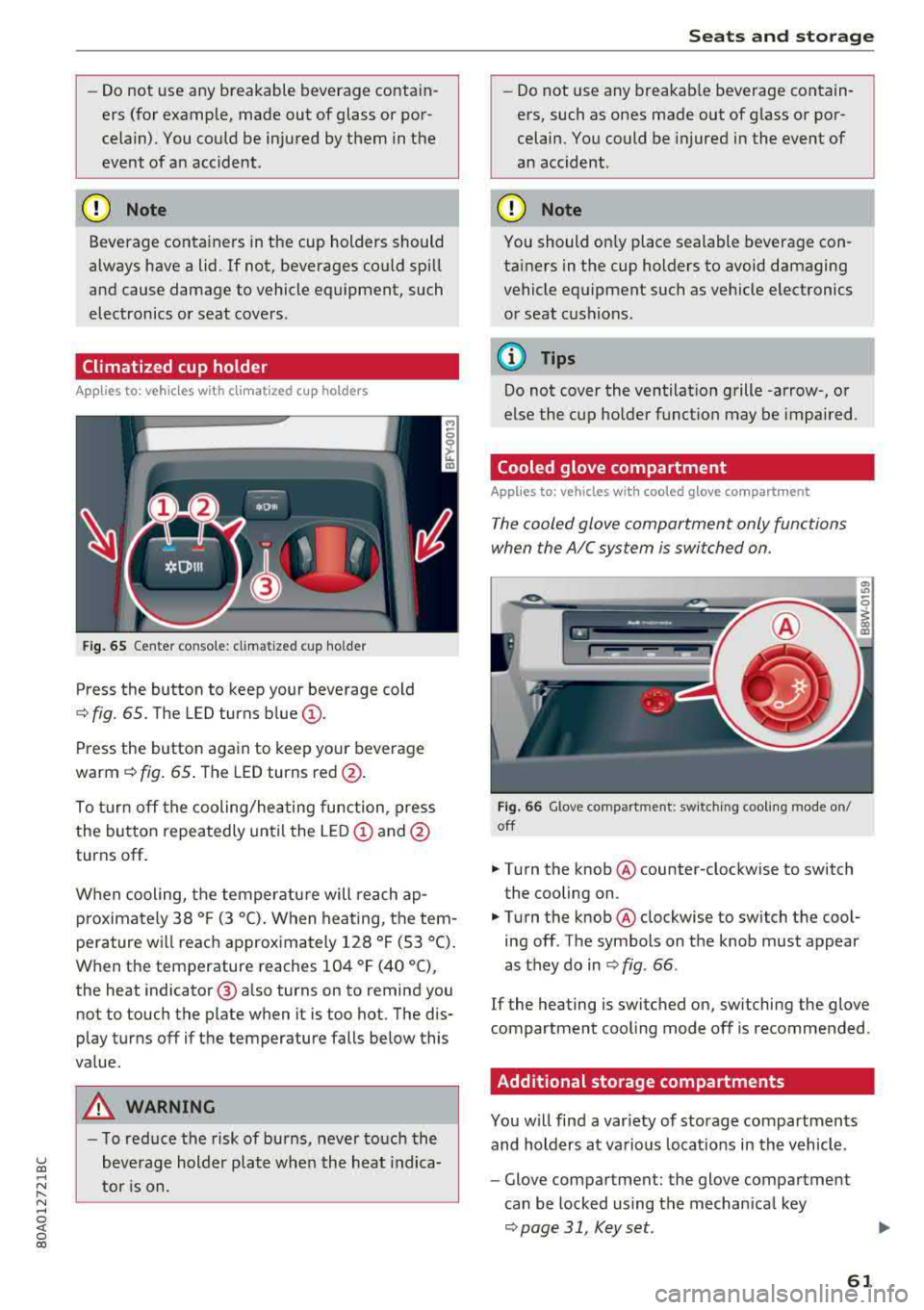
Climatized cup holder
Applies to: veh icles wit h clim atized cup holders
Fig. 65 Center co nsole: cl imatized cup holder
Press the button to keep your beverage cold
¢ fig. 65. The LED turns blue@.
Press the button again to keep your beverage
warm ¢ fig. 65 . The LED turns red @.
To turn off the cooling/heating function, press
the button repeatedly until the LED
(D and@
turns off .
When cooling, the temperature will reach
ap
p roximately 38 ° F (3 °C) . When heating, the tem
perature will reach approximately 128 ° F (53 °C).
When the temperature reaches 104 °F (40 °C),
the heat indicator @ also turns on to remind you
not to touch the plate when it is too hot. The dis
p lay turns off if the temperature falls below this
value.
_&, WARNING
- T o reduce the risk of burns, never touch the
beverage holder plate when the heat indica
tor is on.
Seats and storage
-Do not use any breakable beverage contain
ers, such as ones made out of glass or por
celain. You could be injured in the event of
an accident .
({I) Note
You should on ly place sealable beverage con
tainers in the cup holders to avoid damaging
vehicle equipment such as vehicle electronics
or seat cushions .
@ Tips
Do not cover the ventilation grille -arrow-, or
else the cup holder function may be impaired.
Cooled glove compartment
Applies to: vehicles with coo led glove compartment
The cooled glove compartment only functions
when the AIC system is switched on.
Fig . 66 G love compartment: switching cooling mode on/
off
.,. T ur n the knob @ counter-clockwise to switch
the cooling on .
.,. Turn the knob@ clockwise to switch the cool
ing off . The symbols on the knob must appear
as they do in
¢ fig. 66 .
If the heating is switched on, sw itching the glove
compartment cool ing mode off is recommended .
Additional storage compartments
You will find a var iety of storage compartments
and holders at various locat ions in the vehicle .
- Glove compartment: the glove compartment
can be locked using the mechan ical key
¢ page 31, Key set.
61
Page 65 of 392
u co ..... N r-N .....
~ 0 co
CD Note
Let the luggage compartment cover roll up
slowly to reduce the risk of damage.
Increasing the size of the vehicle interior
Applies to: ve hicles with fold ing backrests
The rear seat backrests con be folded forward ei
ther separately* or together.
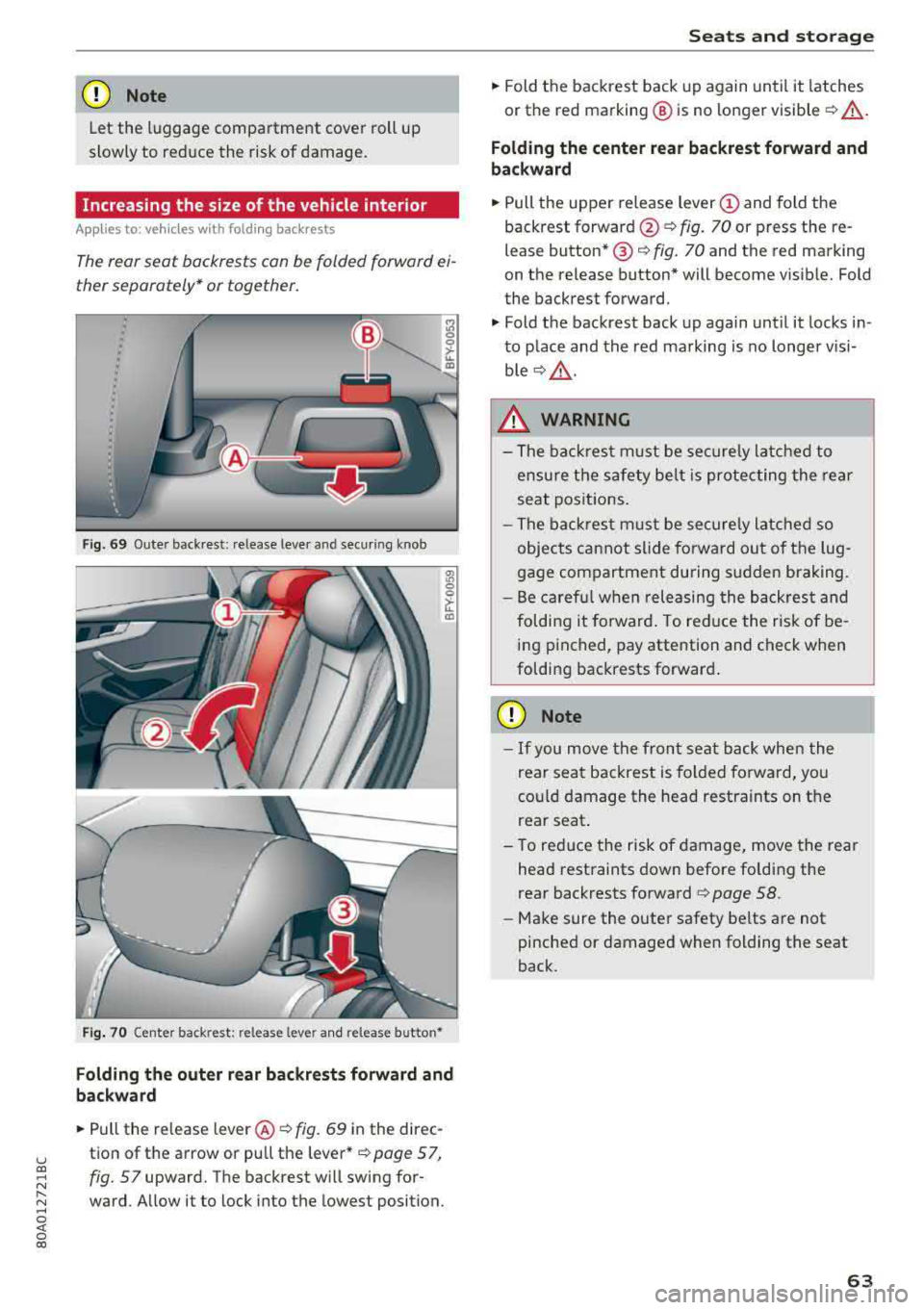
Fig . 69 Outer back rest: release lever and secu ring knob
Fig. 70 Center back rest: re lease leve r and release button •
Folding the outer rear backrests forward and
backward
"Pu ll the release lever @¢ fig. 69 in the direc
tion of the arrow or pull the lever*
¢page 57,
fig. 57
upward. The backrest will swing for
ward . Allow it to lock into the lowest position.
Seats and storage
"Fold the backrest back up again until it latches
or the red marking @ is no longer visible
¢ _& .
Folding the center rear backrest forward and
backward
" Pull the upper release lever (D and fold the
backrest
forward @¢ fig. 70 or press the re
lease button* @¢
fig. 70 and the red marking
on the release button* will become visib le. Fold
the backrest forward.
" Fold the backrest back up again until it locks in
to place and the red marking is no longer visi
b le ¢ _& .
_& WARNING
-The backrest must be securely latched to
ensure the safety belt is protecting the rear
seat positions.
- The backrest must be securely latched so
objects cannot slide forward out of the lug
gage compartment during sudden braking.
- Be careful when releasing the backrest and
folding it forward . To reduce the risk of be
ing pinched, pay attention and check when
folding backrests forward .
CD Note
-If you move the front seat back when the
rear seat backrest is folded forward, you
cou ld damage the head restraints on the
rear seat .
- To reduce the risk of damage, move the rear
head restraints down before folding the
rear backrests
forward ~ page 58.
-Make sure the outer safety be lts are not
pinched or damaged when folding the seat
back.
63
Page 67 of 392
u co ..... N r-N .....
~ 0 co
The height of the partition net can be adjusted.
This a llows you to transport long objects using
the cargo pass-through, wh ile keep ing the parti
tion net attached at the same time.
(D Tips
-The straps must face tow a rd the rear when
attaching the part ition net.
- You must disengage the part ition net before
fo lding the backrest back into the upright
position.
- The partition net can also be attached to the
adjustable
tie-downs* ~ page 65.
Tie-downs and luggage compartment net
A ppl ies to: ve hicles with tie -dow ns a nd l uggage compartment
n et
The cargo net prevents small objects from slid
tng .
liil
ell I
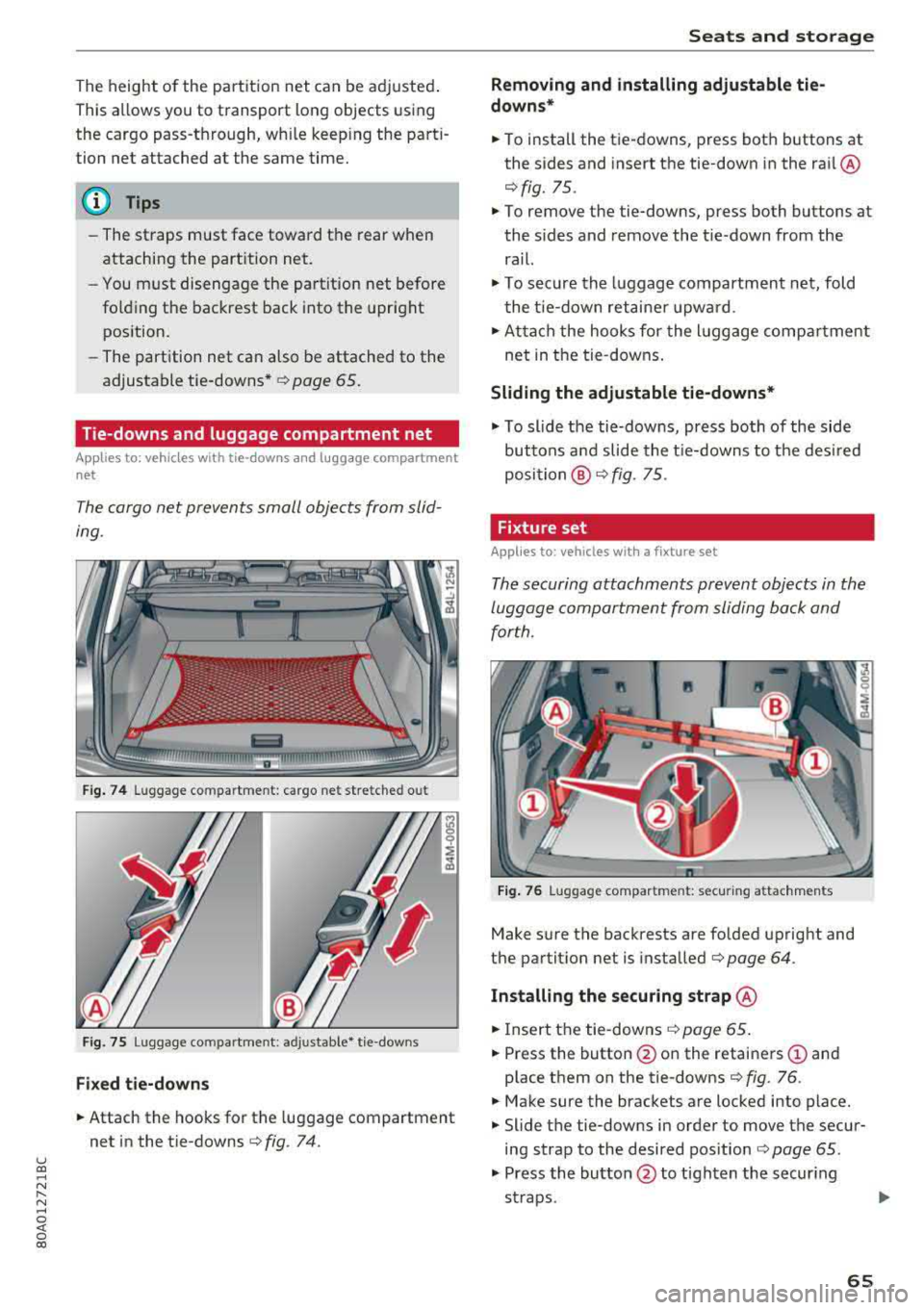
Fig. 74 Luggage compartment: cargo net stretched out
Fig. 75 Luggage compartment : adjusta ble* tie-downs
Fixed tie-downs
.. Attach the hooks for the luggage compartment
net in the tie-downs
c>fig . 74.
Seats and storage
Removing and installing adjustable tie
downs*
.. To install the tie-downs, press both buttons at
the sides and insert the tie-down in the rai l@
r=> fig. 75 .
.. To remove the tie-downs, press both buttons at
the sides and remove the tie-down from the
rail.
.. To secure the luggage compartment net, fold
the tie-down retaine r upward .
.. Attach the hooks for the lu ggage compa rtment
net in the tie-downs.
Sliding the adjustable tie-downs*
.. To slide the tie-downs, press both of the side
buttons a nd slide the tie-downs to the desired
position @r=>fig. 75.
Fixture set
A pp lies to: veh icles w ith a fixture se t
The securing attachments prevent objects in the
luggage compartment from sliding back and
for th.
Fig. 76 Luggage compartment: secur ing attachments
Make sure the backrests are folded upright and
the partit ion net is installed
c> page 64.
Installing the securing strap @
.. Insert the tie-downs c> page 65.
.. Press the button @on the retainers (D and
place them on the tie-downs
r::> fig. 76 .
.. Make sure the brackets are locked into place .
.. Slide the tie-downs in order to move the secur
ing strap to the desired pos ition
c> page 65.
.. Press the button @ to tighten the secur ing
straps .
1111>
65