brake AUDI Q5 2018 Owner's Guide
[x] Cancel search | Manufacturer: AUDI, Model Year: 2018, Model line: Q5, Model: AUDI Q5 2018Pages: 392, PDF Size: 60.56 MB
Page 105 of 392
u co ..... N r-N .....
~ 0 co
On open roads with no traffic, it functions like a
cruise control syst em . Th e stored spe ed is main
tained. When approach ing a veh icle driving
ahead, the adaptive c ruise control system auto
mat ica lly brakes to mat ch that vehicle's speed
and then maintains the set distance . As soon as
the system does not detect a vehicle driving ahead, adaptive cruise contro l accelerates up to
the stored speed.
In stop -and -go traff ic, adaptive cru ise control can
brake unt il the vehicle is stat io nary and then can
also start driving again automatically under cer
tain
condi tions ¢ page 106.
In traffic jams or stop -and -go traffic, traffic jam
assist can assist the
driver ¢ page 109 .
Which function s can be contr olled ?
When you switch adapt ive cruise control on, you
can set the current speed as the "control speed"
¢ page 104, Swi tching on/off.
When driving, you can stop c ruise contro l
¢ page 107 or change the speed ¢ page 106 at
any time.
You can a lso set the distance to the vehicle driv
ing ah ead and s et the driv ing mode of the adap
tive cruise
control ¢ page 10 7.
General information
Applies to: ve hicles with Audi adaptive cruise co ntro l
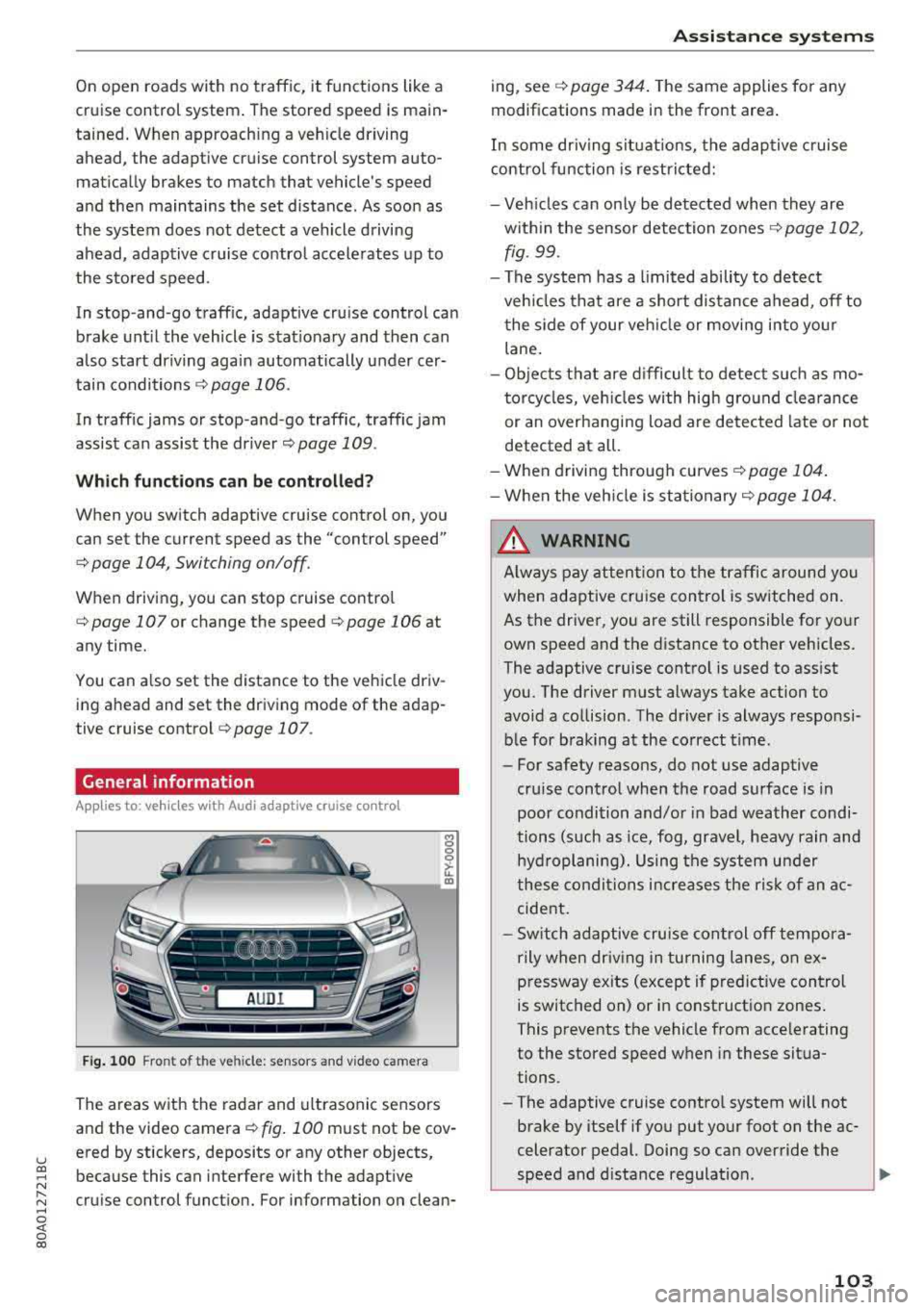
Fig. 10 0 Fro nt of the v ehi cle : se nso rs a nd v ideo cam era
The areas w ith the rada r and u ltrasonic sensors
and the video
camera ¢ fig. 100 must not be cov
ered by stickers, deposits or any other objects ,
because this can interfe re with the adapt ive
cru is e control funct ion. For information on clean-
A ssi st a nce systems
ing, see ¢ page 344 . The same applies fo r any
modifications made in the front area .
In some dr iving s it u ations, the adaptive c ruise
contro l func tion is restricte d:
- Veh icles can on ly be de tected when they are
w ith in the sensor detection zones
¢ page 102,
fig.
99 .
- The system has a limited ability to detect
ve hicles that are a short dis tance ahead, off to
t he side of your ve hicle or movi ng i nto yo ur
lane.
- Ob jects that are d ifficult to detect s uch as mo
torcycles, veh icles with high gro und clea rance
or an overhanging load are detec ted late or not
detected at all.
- When driving through curve s
¢page 104 .
-W he n the veh icle is sta tionary r=;, page 104 .
A WARNING
Always pay at ten tion to the traffic around you
when adaptive cru ise con trol is switched on .
As the driver, you are still responsible for your
own speed and the d istance to other veh icles.
The adaptive cruise cont rol is used to assist
you. The driver must always take action to
avoid a collision . The driver is always responsi
bl e for braking at the correct t ime.
- For safety reasons, do not use adaptive
cr uise control when the road surface is in
poor condi tion and/or in bad weather condi
tions (such as ice, fog, gravel, heavy rain and
hyd roplani ng) . Using the system under
these co ndi tions i ncrea ses the r is k of an a c
cide nt.
- Sw itch adaptive cru ise con trol
off tempora
r ily when dr iv ing in tu rning lanes, on e x
p re ssway ex its (except if predictive con trol
is switched on) or in construct io n zones .
This prevents the vehicle from acce lerating
to the stored speed w hen in these situa
tions.
- The adaptive cruise contro l system will not
brake by itself if you put yo ur foot on the ac
celerator pedal. Doing so can over ride the
speed and d ista nce regulation .
~
103
Page 106 of 392
Assistance systems
-When approaching stationary obstacles
such as stopped traffic, adaptive cruise con
trol will respond with limited function.
- Adaptive cruise control does not respond to
people, animals, or cross ing or oncoming
objects.
- The function of the radar sensors can be af
fected by reflective objects such as guard
rails, the entrance to a tunnel, heavy rain or
ice.
(D Note
The sensors can be displaced by impacts or
damage to the bumper, wheel housing and
underbody . Th is can impair the adaptive
cruise control. Have an authorized Audi dealer
or authorized Audi Service Facility check their
function.
@ Tips
For an explanation on conformity with the
FCC regulations in the United States and the
Industry Canada regulations, see
¢page 374.
In curves
Applies to: vehicles w ith Audi adaptive cruise control
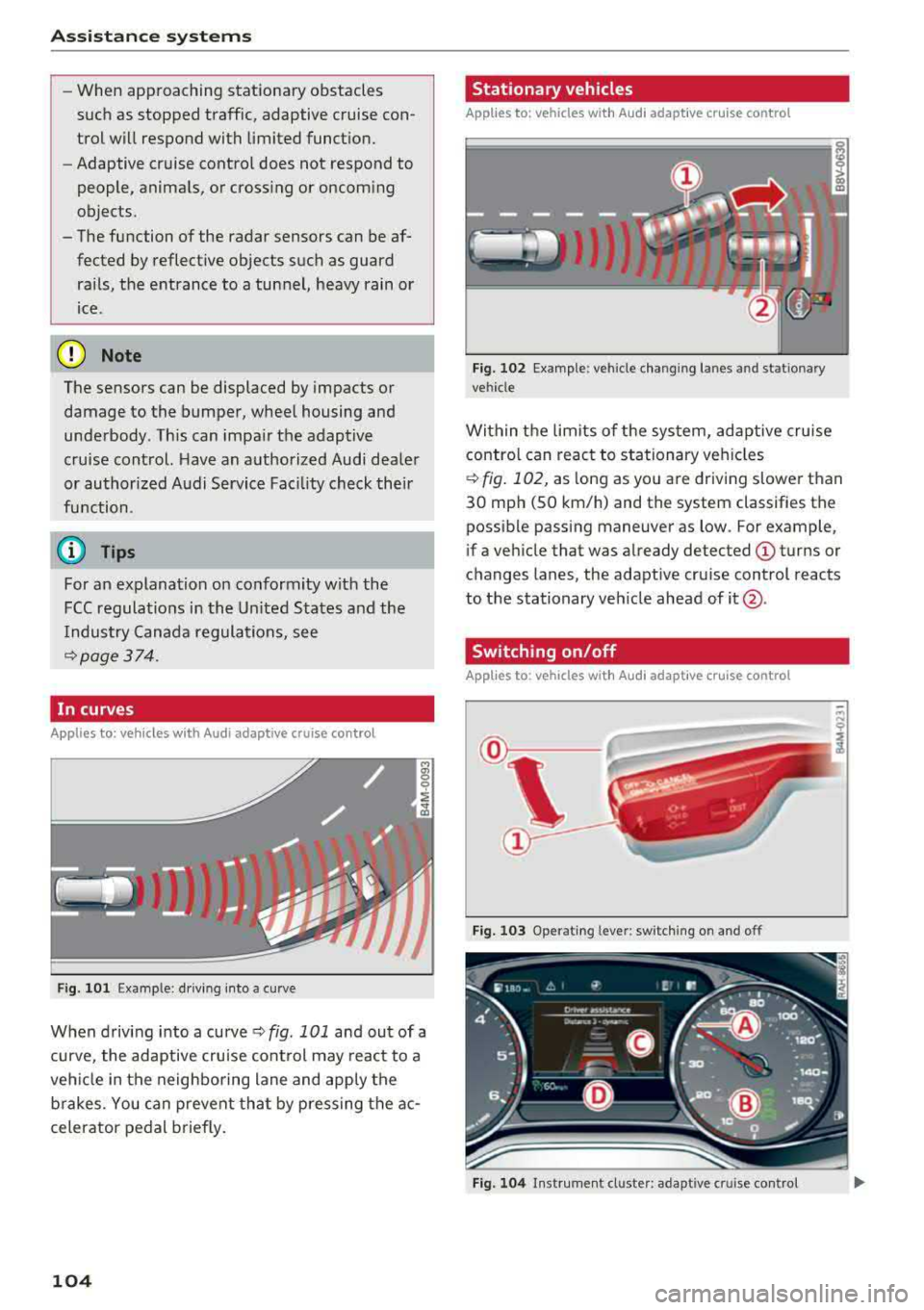
Fig . 101 Example: driving into a curve
When driving into a curve ¢ fig. 101 and out of a
curve, the adaptive cruise control may react to a
vehicle in the neighboring lane and apply the
brakes. You can prevent that by pressing the ac
celerator pedal briefly.
104
Stationary vehicles
Applies to: vehicles with Audi adapt ive cruise control
))
Fig . 102 Example: vehicle changing lanes and stationary
vehicle
Within the limits of the system, adaptive cruise control can react to stationary vehicles
¢
fig. 102, as long as you are driving slower than
30 mph (SO km/h) and the system classifies the
possible passing maneuver as low . For example,
if a vehicle that was already detected
(D turns or
c h anges lanes, the adaptive cruise control reacts
to the stationary vehicle ahead of
it @ .
Switching on/off
App lies to: vehicles with Audi adapt ive cruise control
Fig. 103 Operat ing leve r: sw itching on and off
Fig. 104 Instrument cl uster : adapt ive cruis e con trol
Page 107 of 392

You can set any speed between 20 mph and 95 mph (30 km/h and 150 km/h).
I ndicato r lights and messages in t he i nstr ument
cluste r display inform you abou t the cur ren t sit
uation and setting.
An addit ional ind icator appears in the head- up
d isp lay* .
Switching adaptive cruise control on
"' Pull the lever toward you into position @
<=>fig . 103 .
Storing the speed and acti vating regul ation
"' To store the c urrent speed, press the !SE TI but
ton
<=> fig. 103. The stored speed is shown in the
speedometer in the LED
line @ and appears
briefly i n the status line @<=>
fig. 104 .
"'To activate the regu lation wh ile stat ionary, also
press the b rake peda l.
Switching adaptive cruise control off
"' Push the lever away from you into position @
unt il i t clicks i nto place . The message
ACC: off
appears .
® Indicator light s
II-Adaptive cruise control is switched on. No
ve hicles are detected ahead. The stored speed is
maintained.
•-A vehicle driving ahead was detected . The
adaptiv e cruis e control system regulates the
speed and distance to the vehicle dr iv ing ahead
and accelerates/brakes automatically.
•-Adaptive cruise control is switched on. Ave
h icle was detect ed ahead. You r vehicle is station
ary and will not start driving automatically.
ti)-Adaptive cru ise con trol is switched on. No
ve hicles were detected ahead. Yo ur vehicle is sta
tionary and will not start driving automatically .
•-The autom atic br aking is no t en ough to
main tain a sufficient distance to a veh icle dr iving
ahead. You must intervene
c:!;> page 108, Driver
u intervention request . co ..... N ,..._
N ..... 0 <( 0 00
Ass istance systems
© Instrument cluster display
If the Driver a ssistance displ ay is not shown in
the instr ument cluster d isp lay, you can open it
u sing the m ultif unction steering whee l buttons
c:!;> page 12.
Ba sed on the gr aphic disp lay, you c an dete rm ine
i f th e system is maintain ing a d istance to the ve
hicle driving a head and what t hat distance is .
No vehicle -no vehicle was detec ted dr iv ing
ahe ad.
Silver vehicle -a vehicle was detected driving
ahead.
Red v ehicle -reques t for driver interve ntion
<=> page 108 .
The five distan ce bars on the gauge © represent
the set distance (refer to
c:!;> page 107for infor
ma tion o n how to change t he d istance). If you
fall below the selected d ista nce, the distance
bars become red from the bottom upwa rd .
A WARNING
If yo u press the !SET I butto n w hen dr iv ing at
speed s below 20 mph (30 km/h), t he ve hicle
a ccelera tes au tom atic ally u p to 2 0 mph (30
k m/h), w hich is the minim um speed tha t can
b e set.
(D Tips
- If you swi tch t he ig nit io n o r th e adaptive
cr uise cont ro l sys tem o ff, t he set s peed is
erased fo r safe ty reasons .
- Th e Elect ronic S tab ili za tion Control ( ES C)
and the An ti- Slip -Reg ula tion (ASR) are a uto
matically swi tched o n when the adap tive
c ruise cont ro l is switched on .
105
Page 108 of 392
Assistance systems
Changing the speed
Applies to: vehicles with Audi adaptive cruise contro l
0
f
' 0
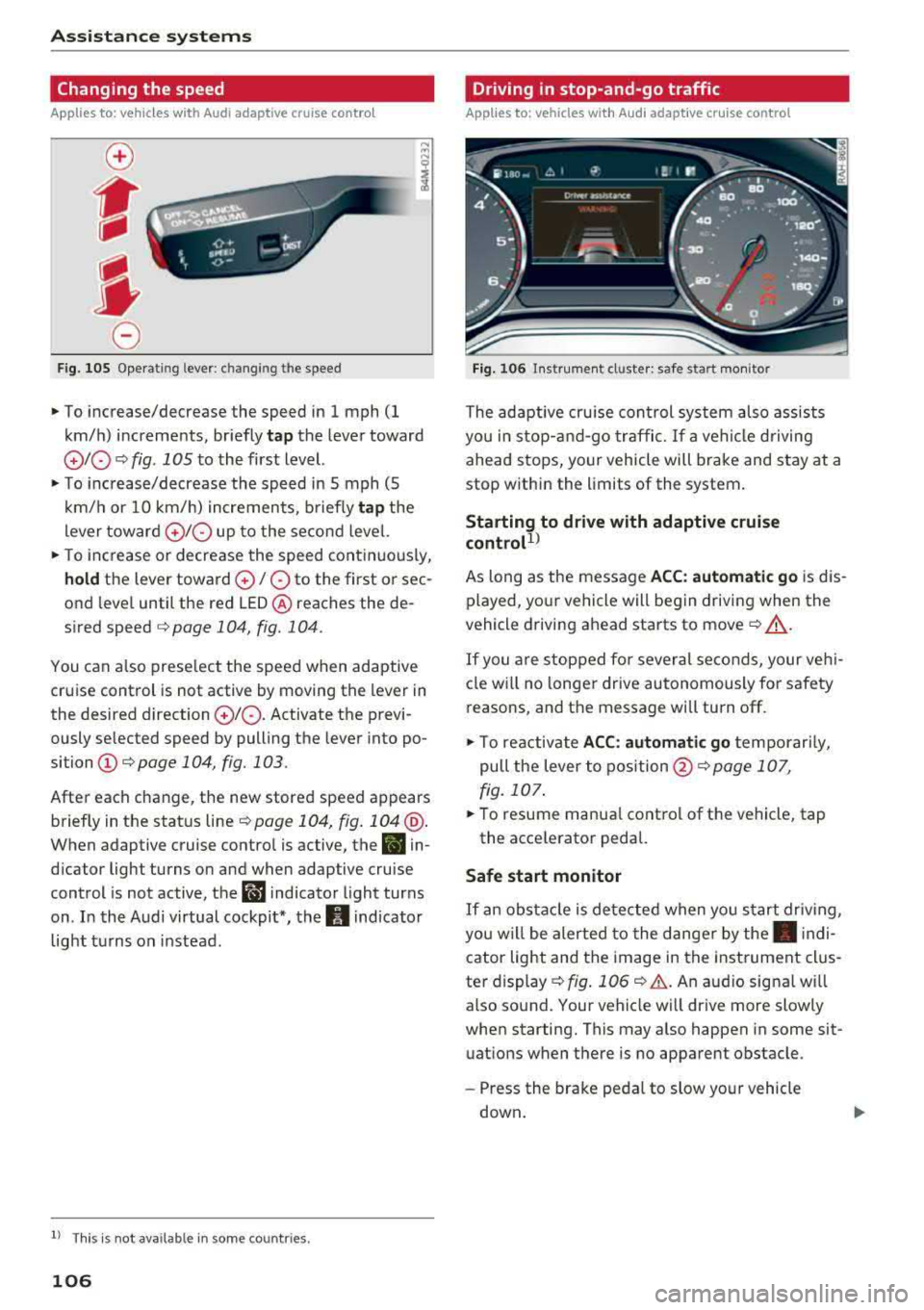
Fig. 105 Operat ing lever : c h ang ing the speed
~ To increase/decrease the speed in 1 mph (1
km/h) increments, br iefly
tap the lever toward
010 ¢ fig . 1 OS to the first level.
~ To increase/decrease the speed in 5 mph (5
km/h or 10 km/h) increments, briefly
tap the
lever toward
0 10 up to the second level.
~ To increase or decrease the speed continuously,
hold the lever toward 0 / 0 to the first o r sec
ond level until the red
LED @ reaches the de
s ir ed speed
¢ page 104 , fig. 104 .
You can also preselect the speed when adaptive
cruise control is not active by moving the lever in
the desired direction
010 . Activate the previ
ously se lected speed by pulling the lever into po
sition
(D ¢ page 104, fig. 103.
After each change, the new stored speed appears
briefly in the status
line ¢ page 104, fig. 104 @.
When adaptive cruise control is active, the B in
dicator light turns on and when adaptive cruise
control is not active, the
ll'J indicator light turns
on . In the Audi virtual cockpit*, the
II indicator
light turns on instead.
ll Thi s is not ava ilab le in som e coun tri es .
106
Driving in stop-and-go traffic
Applies to: vehicles with Audi adaptive cruise control
Fig. 106 In strume nt cl uster: safe s tart mo nitor
The adaptive cruise con trol system also assists
you in stop-and-go traffic.
If a vehicle driving
ahead stops, your vehicle will brake and stay at a
stop within the limits of the system.
Starting to drive with adaptive cruise
controt1>
As long as the message ACC: automatic go is dis
played, your vehicle will begin driving when the
vehicle driving ahead starts to move
c::> A_.
If you are stopped for several seconds, your veh i
cle will no lon ger drive autonomously for safety
reasons, and the message will turn off.
~ To reactivate ACC: automatic go temporarily,
pull the lever to
position @¢ page 107,
fig. 107.
~ To resume manua l control of the vehicle, tap
the accelerator pedal.
Safe start monitor
If an obstacle is detected when you start driv in g,
you w ill be alerted to the danger by
the. indi
cator light and the image in the instrument clus
ter display
c::> fig. 106 c::> &. . An audio signa l w ill
also sound. Your vehicle will drive more slowly
when starting. This may also happen in some sit
uations when there is no apparent obstacle .
-Press the brake pedal to slow your vehicle
down .
Page 109 of 392
u co ..... N r-N .....
~ 0 co
A WARNING
If the message ACC: autom atic go1
) appears,
your veh icle will start driving even if there is
an obstacle between your vehicle and the ve
hicle driv ing ahead . This increases the risk of
an ac cident.
@ Tips
- For safety reasons, your veh icle w ill only
start to drive automatical ly if:
- t he driver's safety belt is fastened
- all doors and the hood a re cl osed
- your vehicle is not stopped for a long per i-
od.
Interrupting cruise control
Applies to: vehicles with Audi adaptive cruise contro l
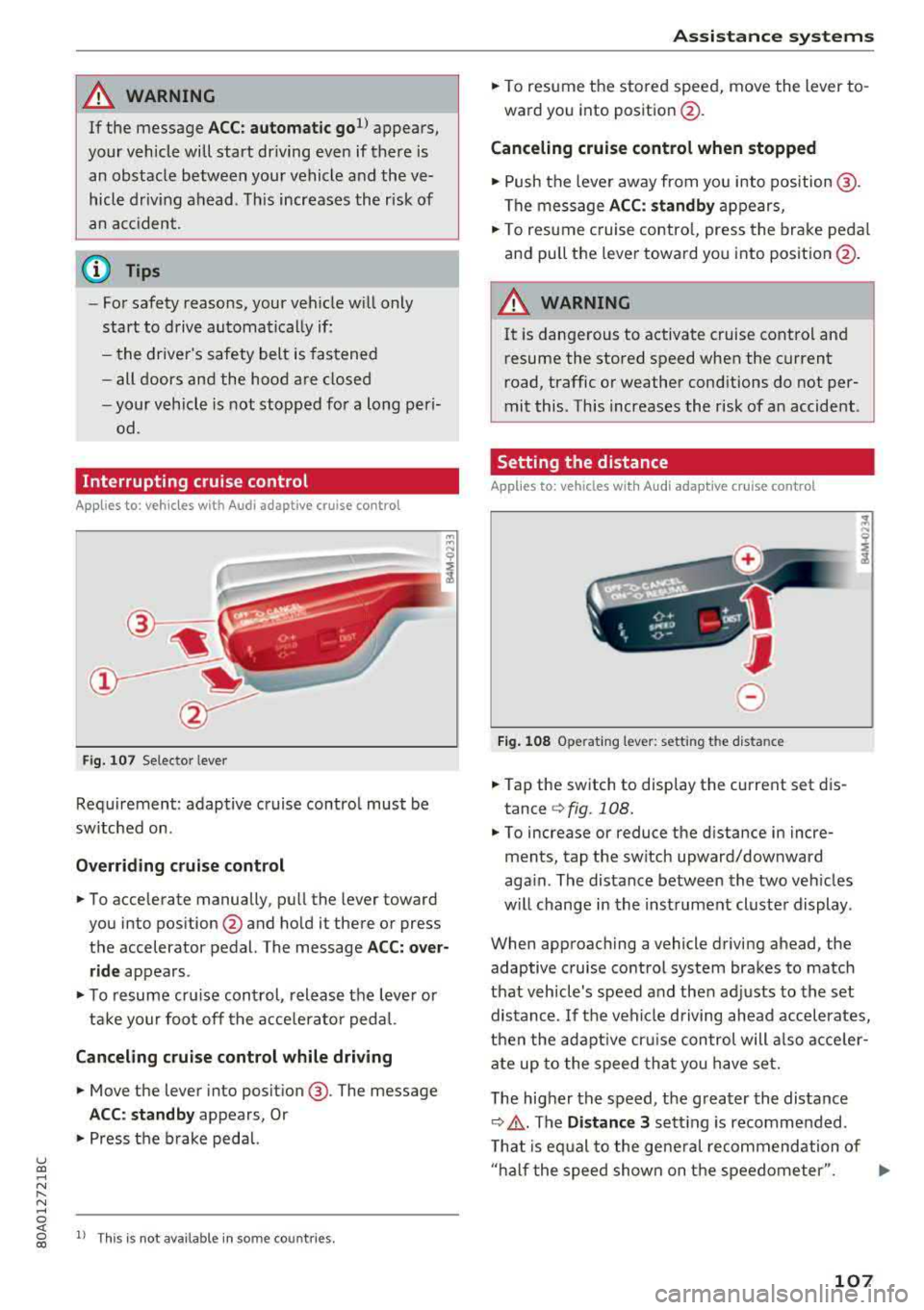
Fig . 107 Selecto r lever
Requirement: adaptive cruise contro l must be
sw itched on .
Overriding crui se control
"' To accelerate manually, pull the lever toward
you into position
@ and hold it there or press
the accelerator pedal. The message
ACC: over
ride
appears .
... To resume cr uise cont rol, release the leve r or
ta ke your foot off the acce le rato r peda l.
Canceling cruise control while driving
"'Move the lever into position @. The message
ACC: standby appears, Or
"'Press the b rake peda l.
l) This is no t available in some countries.
Assi st a nce systems
"' To resume the stored speed, move the lever to
ward you into position @.
Canceling cruise control when stopped
"' Push the lever away from you into position @.
The message
ACC: standby appears,
"' To resume c ruise contro l, press the brake peda l
and pull the lever toward you i nto position @.
A WARNING
It is dangerous to activate cruise contro l an d
resume the stored speed when the current
road, traffic or weather conditions do not per
mit this . This increases the risk of an accident .
Setting the distance
Applies to: vehicles with A udi ada ptive c ruise control
,
0
Fig. 1 08 Opera tin g lever: setting the distance
... Tap the switch to display the current set dis
tance
¢ fig. 108.
"'To increase or reduce the distance in incre
ments, tap the switch upward/downward
aga in . The distance between the two veh icles
w ill change in the inst rument cluste r display .
When approaching a vehicle driving ahead, the
adaptive cruise control system brakes to match
that vehicle's speed a nd then adj usts to the set
distance. If the veh icle d riving ahead accelerates,
t h en the adapt ive cr uise con trol will also acce ler
ate up to the speed th at you h ave set.
T he higher the speed, t he g reater the distance
¢ .&, .The Distance 3 sett ing is recommended .
T hat is eq ual to the ge ne ral recommendation of
" ha lf the speed shown on t he speedometer ".
..,.
107
Page 113 of 392
u co ..... N r--N ..... 0 <( 0 00
The road exceeds the maximum possible grade
for safe operation. The systems cannot be switch
ed on.
Ill AC C with traffic jam a ssis t: only availabl e in
D, Sor M
Select the "D/S " or " M" selector leve r pos it ion.
Ill A CC w ith tr affic j am ass is t: currentl y un
available . Parking brake applied
The systems sw itch off if you set the parking
brake . The systems are available again after you
release the parking brake .
llJ ACC with traffic jam a ssist: currentl y un·
av ailable. Stabili zation cont rol (E SC) input
This message appears if the Ele ctronic Stabili za
tion Control (ESC) is taking action to stabilize the
ve hicle . The systems switch off in this scenario .
Ill ACC with traffic jam a ssis t: manu al control!
This message appea rs if the veh icle rolls back
when sta rting on a slight incl ine, even t hough the
systems are active . P ress t he b rake peda l to pre
vent the vehicle from rolling or sta rting to move.
IIJ ACC w ith tr affic jam a ssis t: curr entl y un
availabl e. Downhill a ssis t activated
You cannot activate the system when hill hold as
sist is act ive .
II!! ACC with traffic jam assist: manual control!
This message appears if the driver does not take
over steering after mu ltip le driver intervention
requests and the system switches off . The vehicle
brakes unt il it is stationary .
ii Traffic jam a ssis t : una vailable. S ee o wner' s
manual
The system can no longer ensure that t he ve hicle
w ill stay in the lane and sw itches off. Have yo ur
vehicle checked by an a uth orized Audi dea ler or
authorized Audi Service Facility if the ma lfunc
tion is continuous .
14§ Traffic jam assis t : Plea se take over steering!
This message appea rs as soon as the system
stops detecting steer ing activ ity when the system
limits are rea ched. Always keep yo ur hands on
Ass istance systems
the steering whee l so you can be ready to steer at
any time.
14§ Traffic jam a ssis t : currentl y unavailable .
Pl ea se f asten se at belt
T he system switches off when the drive r's safety
belt is unfastened.
Ill AC C: eff iciency assist not available in thi s
countr y
The adaptation to speed lim its and routes ahead
is not available in this country .
IIJ ACC: predictive control currentl y una vaila
ble . See owne r's m anual
T he ad aptation to speed lim its and routes ahead
swi tches off at speed limits under 20 mph
(30 km/h) .
T he message ca n also appear if the adaptation to
speed limi ts and routes a head has a temporary
f ailure . Have your vehicle checked by an autho r
ized Audi dea ler or authorized Audi Service Facili
ty if the malfunction is continuous .
Distance warning : malfunction! Please contact
S erv ice
T he system cannot gua rantee that it will detect
vehicles correct ly and it has switc hed off. The ra
dar sensors have shifted or are fa ulty . Drive to an
authorized Aud i dea ler o r authorized Audi Serv ice
Facility immediate ly to have the ma lfunction cor
rected .
Distance warning : currentl y unavailable . Sen sor
view re stricted due to surrounding s. See own
e r' s manual
T his message appears if the rada r senso r view is
obstructed, for examp le by leaves, snow, heavy
spray or dirt. Clean the sensors
¢ page 103,
fig . 100.
Distance warning : curr entl y unavailable . See
owner' s manual
This message appears if the system has a tempo
r a ry fa il ur e. If this occurs m ultip le t imes, drive to
an a uth orized Aud i dea le r o r auth o rized Aud i
Se rvice Facility immed iate ly to have the ma lfunc -
t ion corrected .
liJ,,
111
Page 114 of 392
Ass is tanc e system s
ACC: Please fa sten seat belt
The system is not comp letely available if t he d riv
er 's seat be lt is unfas tened .
Station ary obje ct ahead
This message appears if you would like to switch
the system on and there is a stationary object di
rectly in front of your veh icle .
Doo r open
The system is not ava ilable when the door is
open .
Audi pre sense
Introduction
Applies to: ve hicles w ith Audi p re se nse
W ith in the limits of the system, the pre sense
functions can in it iate measures in particularly
dangerous s ituat ions to protect the ve hicle pas
sengers and ot her r oad users.
- Due to the interl ink ing of various vehicle sys
tems , crit ica l dr iv ing s ituat ions can be detected
by
pr e s ense basic and measu res fo r preventa
t ive occ upan t protect ion are can be initiated.
- T he
pre sen se front system uses the data from
t h e adapt ive cr uise control* radar sensors and
t h e camera to calc ulate the probab ility of a col
lision . Within the limits of the system, an im
pending collision with vehicles can be detected
in both urban and rural speed ranges. In this
case, the system warns the driver visually,
acoustically and with a jerk on the brakes if nec
essary . If needed, it can initiate a partial or fu ll
deceleration to reduce the collision speed or to
avo id the co llision unde r ce rtain c ircumstances .
In conjunct ion with p re sense basi c/rear, the
front safety belts are also revers ibly tensioned
whe n needed. The pre sense front is also act ive
when adaptive cruise control* is switched o ff.
- Pr e se nse rear con tains pre sense basic func
tions. It uses the data from the side assist* ra
dar sensors and calc ulates within the limits of
the system the probability of a rear end colli
sion with the vehicle behind you . Pre sense rear
is also active when s ide assist* is switched off .
112
-Within the limits of the system, pre sen se cit y
uses the camera data and can detect an im
pending collision with vehicles and pedestrians .
In this case, the system warns the driver visual ly, acoustical ly and w it h a jerk on the brakes if
necessary . If needed, it ca n initiate a full dece l
erat ion to reduce t he coll is ion speed or to avoid
the collision under certa in circumstances . In
conjunction with p re sense basi c/rear, the front
safety belts are a lso reve rsibly te nsioned whe n
needed.
& WARNING
Read the genera l information inc::> .&. in Gen
eral information on page 103,
~ .&. in Gener
al information on page 122.
(D Tips
- C erta in p re sense funct io ns sw itch off when
driving in reve rse.
- Th e pre sense f unct io ns m ay no t be ava ila
ble i f th ere is a ma lfunct ion in the ESC sys
tem or t he airbag control module .
-Note that the reve rsib le belt tens ione r o n
the front passenger 's side deactivates when
the front passenger's airbag is deactivated.
- Switch the pre sense off when yo u are not
using public streets or when loading the ve
hicle onto a vehicle carrier, train, ship or
other type of transportat ion. This can pre
vent an undesired intervention from the pre
sense system.
Audi pre sense basic
App lies to: vehicles wit h Audi pre sense basic
The pre se nse bas ic functions are activated at a
speed of approx imately 20 mp h (30 km/h) o r
highe r.
The following functions ca n be triggered u nder
certain co nd it io ns w it hi n the lim its of the sys
tem:
- Tensioning of the safety belts (for examp le,
during heavy brak ing) : the front safety belts
have reversible belt te nsioners . If a collision
does not occur , the safety belts loosen slig htly
and are ready to tr igger aga in.
...
Page 115 of 392
u co ..... N r--N ..... 0 <( 0 00
-Closi ng the w indows and sunroof*
- Activ ati ng the eme rgency fl ashe rs
l ).
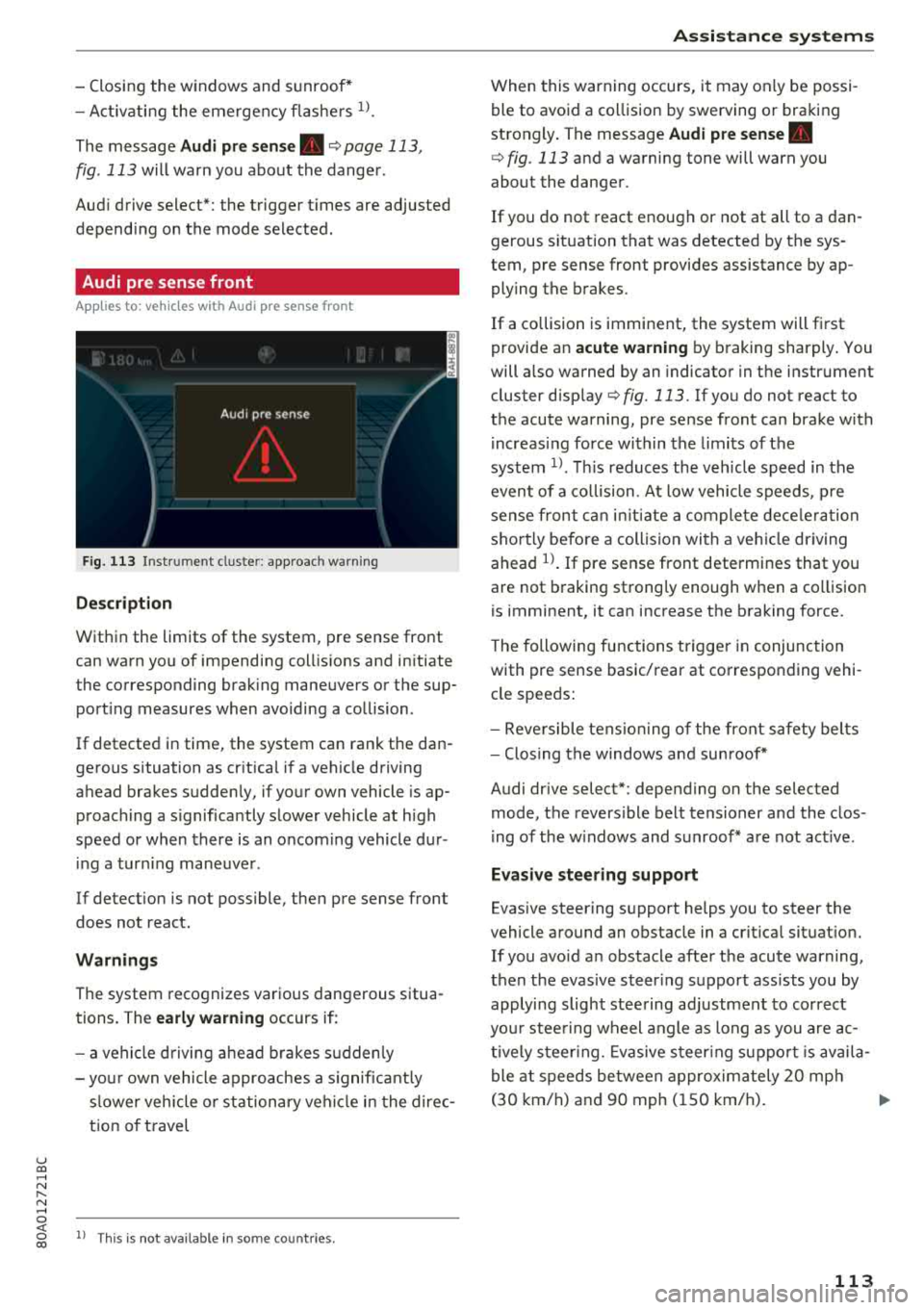
The message Audi pre sen se. ¢ page 113,
fig . 113 will warn you about the dange r.
Aud i drive select*: the trigger t imes are adjusted
depend ing on the mode selected .
Audi pre sense front
Applies to: vehicles with Audi pre sense front
Fig . 113 In strumen t clu ste r: approac h warn ing
Descr iption
Within the limits of the system, pre sense front
can warn yo u of impending coll is ions and in itiate
the corresponding brak ing maneuvers or the sup
port ing measures when avoiding a co llision .
If detected in time, the system can rank the dan
gerous situation as cr itica l if a vehicle driving
ahead brakes sudden ly, if you r own vehicle is ap
proaching a s ignificantly s lower vehicle at h igh
speed or when there is an oncom ing vehicle dur
i ng a tur ning maneuve r.
If detection is not poss ible, then pre sense front
does not react.
Warnings
The system recognizes various dange rous situa
tions. The
early warning occurs if:
- a vehicle d riving ahe ad brakes s udden ly
- yo ur own vehicle approaches a s ignificant ly
s lower veh icle o r st ation ary veh icle in the dire c
t ion of t ravel
ll Thi s is not availa ble in so m e co untrie s.
A ss istance systems
When this warning occurs, it may on ly be possi
ble to avoid a co llision by swerving o r braking
strongly . The message
Audi pre sense.
¢ fig . 113 and a wa rning tone will warn you
about the danger .
If you do not react enough or not at all to a dan
gerous sit uat ion that was detected by the sys
tem, p re sense front provides assistance by ap
ply ing the b rakes .
If a collision is imminent, the system will first
provide a n
acute warning by braking sharply . You
will a lso warned by an indicato r in the instr ument
cluster
disp lay¢ fig. 113 . If you do not react to
the acute warning, pre sense front can brake w ith
i ncreas ing fo rce wi thin the limits of the
system
1> . Thi s reduces the veh icle speed in the
even t of a co llision . At low vehicle speeds, p re
sense fron t can ini tia te a complete dece le ra tion
shor tly be fore a collision wi th a ve hicle dr iving
ahead
l)_ If pre sense front determi nes that you
are not braking strong ly enough when a co llision
is imminent, it can increase t he b raking force.
T he following fu nctions t rigge r in conjunction
with pre sense basic/rea r at co rresponding vehi
cle speeds:
- Reve rsible tens ion ing of the front safety bel ts
- Clos ing the windows and sun roof*
Audi drive select*: depending on the selec ted
mode, the revers ible be lt tensioner and the clos
i ng of the w indows and s unroof * are not act ive .
Evasive steering support
Evas ive steering s upport helps you to steer the
vehicle a round an obstacle in a crit ica l situat ion.
If you avo id a n obstacle after the acute warning,
then the evasive s teer ing suppo rt ass ists you by
applying sligh t stee ring adjustmen t to correct
yo ur stee ring w heel angle as long as you are ac
t ive ly s teer ing. Evasive s teer ing su ppo rt i s avai la
ble at speeds be tween approx im ately 20 mp h
( 3 0 km/h) and 9 0 mph ( 150 km/h) .
..,.
113
Page 116 of 392
Ass is tanc e system s
Turn a ssist
When start ing to dr ive and up to speeds of maxi
mum 6 mph (10 km/h), the turn assist uses a
braking intervention to prevent your vehicle from
colliding with an oncoming vehicle when turning left or right (available in certain co untries). The
braking intervent ion causes your vehicle to stay
in its lane.
A WARNING
-Pre sense front cannot overcome the laws of
physics . It is a system des igned to assist and
it cannot prevent a collision in every circum
sta nce. The d rive r must a lways i ntervene.
T he d river is always respons ib le for b raking
at the correct time. Do not let the increased
safety provided tempt you into taking risks .
This cou ld increase your risk of a co llision .
-The system can deploy incorrectly d ue to
system -specific limits .
-Please note that the sensors and the camera
do not always detect all objects or lane
markings. This increases the risk of an acci
dent.
-Pre sense front does not react to people, an
ima ls or ob jects that are crossing the veh i
cle's path or that are diff icu lt to detect
c::> &
in General information on page 103.
-Reflective ob jects s uch as guard rails or the
entrance to a tunnel, heavy rain and ice can
affect the function of the radar sensors and
the system's ability to detect a coll is io n risk.
{UJ) Note
The sensors can be displaced by impacts or
damage to the bumper, whee l housing and
underbody . Pre sense fro nt can be impa ired
by this. Have an authorized Aud i dealer or au
thori zed Aud i Service Fac ility check the ir func
tion.
(D Tips
-You can cancel the brak ing with increasing
fo rce that is in it iated by the system by b rak-
l) Th is is not ava ilab le in some co untri es .
114
ing yourse lf, by acce lerating not iceably or
by swerving.
-Keep in mind that pre sense front can brake
unexpectedly . A lways secure any cargo or
objects that you are transporting to reduce
the risk of damage or injury.
-Specific pre sense front functions switch off
when the ESC is restricted or sw itched off
c::> page 141 or the hill ho ld assist is switch
ed on
c::> page 142.
Audi pre sense rear
App lies to: vehicles wit h Audi side ass ist
If the risk of a collision with a vehicle ahead is de
tected, the follow ing funct ions can be triggered:
-Reversible tens ioning of the front safety belts
at the corresponding speeds.
-Closing the windows and sunroof*
- Activating the emergency f lashers with in -
creased frequency
ll .
The message Audi pre sen se. c::> page 113,
fig . 113
wi ll warn you about the danger.
Audi drive select* : th e function is not act ive de
pend ing on the mode selected.
A WARNING
-To re duce the r isk o f an accident, please
note that the side assist* radar sensors do
not a lways detect every object.
-
-P re sense rear does not react to people, ani
mals or objects that are crossing t he vehi
cle's path o r that are d ifficult to detect.
-R eflective objects such as guard rai ls, heavy
rain and ice can impair the function of the
radar sensors and the ability to detect a col
lision risk.
@ Note
The radar sensors can be disp laced by impacts
or damage to the bumper, w heel housing and
u nderbody. Pre sense rear can be impa ired by
..,.
Page 117 of 392
u co .... N ,..._
N .... 0 <( 0 00
this. H ave an authorized A udi deale r or a u
thorized A udi Service Faci lity check their func
tion.
(D Tips
-The pre sense rear functions switc h off
when towing a trai ler .
-The pre sense rear functions may also
switch off if there is a malfunction in the
side assist* system.
Audi pre sense city
A ppl ies to: ve hicles w ith Audi p re se nse c ity
D esc ription
Wit hin the limits of the system, pre sense city
can warn you of impending coll is ions w ith
ve hicles and pedestrians and initiate the applica
b le brak ing maneuver if needed. Pre sense city is
active at speeds of approximate ly 6 mph (10 km/
h) and h igher .
A pedestrian warning can occu r at speeds up to
SO mph (85 km/h), and vehicle warn ings ca n oc
cur at speeds up to 155 mph (250 km/h) . A pre
sense city braking maneuver is poss ible at speeds
up to SO mph (85 km/h).
Warnings
The system recogni zes var ious dangerous situa
tions . The
early warning occurs if:
-a vehicle driving ahead brakes s uddenly
-yo ur own vehicle approaches a significantly
s lower vehicle or stationary vehicle in the direc
t ion of travel
-a pedestrian is standing in the lane or is moving
into the lane
When t his wa rn in g oc curs, it may on ly be poss i
b le to avoid a co llision by swerv ing or braking
strong ly . T he message
Audi pre sense.
~ page 113, fig . 113 and a warning tone will
warn you about the danger .
Addit iona lly, a jerk on the brakes may occur as an
acute warning when there is an impending colli
sion. If you do not react to the acut e warning, pre
sense city can brake to the point of comp lete de
celerat ion w it hi n the lim its of the system. This
A ss istance systems
red uces the vehicle speed in the event o f a co lli
sio n. The message
Audi pre sense. also ap
pears .
T he following fu nctions a re trigge red in con junc
t ion w it h pre sense bas ic/rear :
-Reversible tens ion ing of the front safety belts
-Clos ing the windows and sunroof*
Audi drive select*: the function is not act ive de
pending on the mode selected.
A WARNING
-
-Pre sense city ca nnot overcome the laws of
p hys ics .
It is a sys tem designed to ass ist and
it cannot preven t a coll is io n in every circ um
s tance . The dr iver m ust a lw ays in terve ne.
T he d rive r is always responsible fo r brakin g
a t t he co rre ct time . Do not let the in cr eased
safety prov ided tempt you into taking r isks.
This could inc rease your r is k of a col lision .
-The system can dep loy incorrectly due to
system -specific limits.
-T o redu ce the r is k of an accident, please
note that the camera does not a lways detect
eve ry o bject.
-Pre sense city does not reac t to an ima ls,
crossing or oncoming ve hicles, objects such
as bars, ra ilings or railcars, and ob jects that
are difficult to detect
c> A in General infor
mation on page 103.
-In trailer mode, the bra king behavior o f the
tra ile r can be d ifferent than usual du ring au
tomatic braking.
A WARNING
--
Pre sense city may be restr icted or not ava ila
b le in the fo llow ing example s ituations:
-in heavy fog, ra in, spray, or snow
- when there are v isua l obst ruct ions, such as
g lare, reflections or variations in light
-when it is dar k
-if the camera window or the windshield is
d irty, iced over, damaged or cove red
-when dr iv ing o n snow, ice o r loose groun d
-in c urve s
-if the ESC was rest ricted or sw itched off
-when towing a trailer
115