ABS AUDI Q5 2018 Owners Manual
[x] Cancel search | Manufacturer: AUDI, Model Year: 2018, Model line: Q5, Model: AUDI Q5 2018Pages: 392, PDF Size: 60.56 MB
Page 14 of 392
Cockpit overv iew
Fuel level
The dis play (j) ¢ page 1 0, fig. 3 or ¢ page 10,
fig . 4 only f unctions when the ign ition is swi tc h
ed on. When the display has reached the reserve
mark, a red L ED turns on and the
H indicator
light turns on¢
page 27. The red LED wi ll blink
when the f uel leve l is very low.
F or the tank capacity in you r vehicle, refer to the
Technical Data
¢ page 369.
(gJ) Note
Never d rive until the tank is comple tely emp
ty. The irregular supp ly of fuel that resul ts
from that can ca use engine misfires. Uncom
busted fuel will then ente r the exhaust sys
tem. Th is can cause overheating and damage
to the cata lytic converter.
Odometer
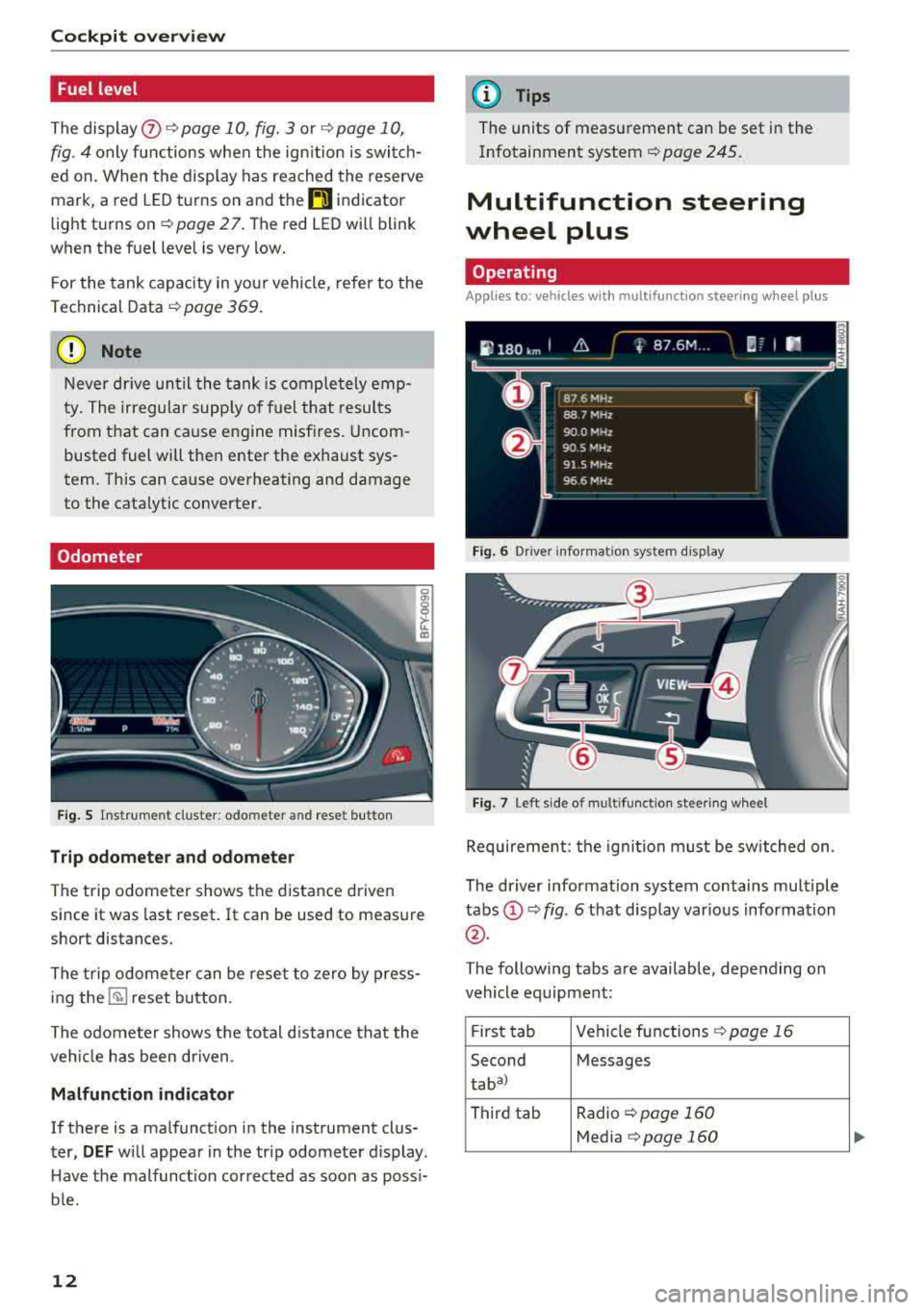
Fig. 5 Ins tru me nt cluster: odometer and reset button
Trip odometer and odometer
The trip odome ter shows the dist ance driven
since it was last reset. It can be used to measure
short distances.
The trip odome ter can be rese t to zero by press
ing
the ~ reset button.
The odometer shows the total d istance that the
ve hicl e has been dr iven .
Malfunction indicator
If there is a malfunct io n in the instrument clus
ter,
DEF w ill appea r in the trip odometer display .
H ave the malfunct ion corrected as soon as possi
b le.
12
@ Tips
The units of meas urement can be set in the
Infotainment system ¢
page 245.
Multifunction steering
wheel plus
Operating
Applies to: vehicles with mult ifunct ion steeri ng w heel plus
Fi g. 6 Dr ive r in fo rm atio n system dis p lay
Fig. 7 Left side of m ultifunctio n stee ring wheel
Requireme nt: the igni tion must be switched on.
The dr iver information system contains multiple
tabs (!)¢ fig. 6 that disp lay var ious information
@ .
The following tabs are available, depending on
vehicle eq uipment :
F ir st tab Vehicle
fu nctions ~ page 16
Second Messages
taba)
Third tab Radio ~ page 160
Media ~page 160
Page 15 of 392
u co ..... N r-N .....
~ 0 co
Fourth tab Telephone* c:>page 161
Fifth ta b Navigation* c:> page 162
Map* c:>page 163
a) This ta b is onl y visible when t here is at least one ind ica to r
l igh t or mess ag e di splaye d.
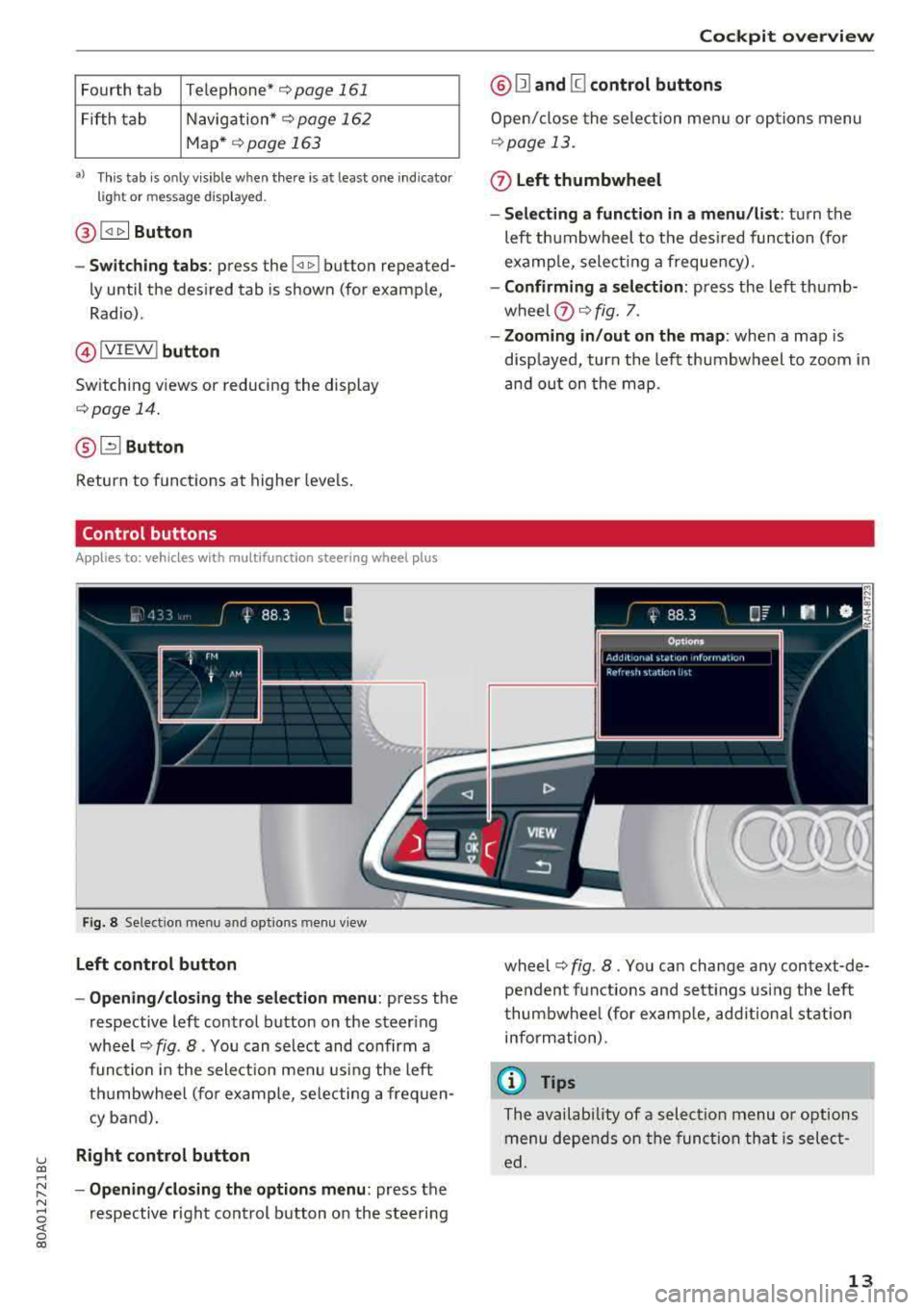
@ ~ Button
-Switching tabs : press the~ button repeated
ly until the des ired tab is shown (for example,
Radio) .
@IVIE W ! button
Sw itch ing v iews or reducing the display
c:> page 14.
@ [2] Button
Return to funct io ns at higher leve ls.
Control buttons
Applies to: ve hicles with multifunction steering wheel plus
Fig . 8 Se lect ion men u a nd opt io ns m enu v iew
Left control button
- Opening /closing the selection menu :
press the
respective lef t control button on the steer ing
wh eel
c:> fig . 8. You can select and co nfirm a
func tion in the sele ct ion me nu using the left
t hu mbwheel (fo r ex ample , se le cting a fre quen
cy b and).
Right control button
- Opening /closing the options menu :
press the
re spectiv e righ t control b utton o n the ste ering
Cockpit overview
@ Ill and [g control buttons
Open/ close the se le ction me nu or op tions menu
c:> page 13.
0 Left thumbwheel
- Selecting a function in a menu /list :
tur n the
left th umbwheel to the des ired function (fo r
e xamp le, select ing a freque ncy).
- Confirming a selection: press the lef t thumb
w heel
(?) c:> fig. 7.
- Zooming in /out on the map : when a map is
disp layed , turn the lef t thumbw heel to zoom i n
and ou t on t he map.
wheel
c:> fig . 8. You ca n change a ny con text-de
pe nden t fu nctions and se tt ings using the left
t humbwhee l (for examp le, add ition al stat ion
info rm ation).
© Tips
The availab ility of a s ele ct ion menu or options
me nu depe nds on the funct io n th at is selec t
ed.
13
Page 18 of 392
Cockpit overv ie w
(D Operating the driv er inform ation s yst em
The drive r informat ion system conta ins mult ip le
tabs
(D c::> page 12, fig. 6 that display various in
formation @c::>
page 12, fig. 6.
The fo llow ing tabs are ava ilable, depend ing on
ve hicle equ ipment :
First tab On-board computer
c::> page 16
Seco nd Messages
taba l
Third tab Rad io c::> page 160
Media c::> page 160
Fourth tab Telephone c::> page 161
al T
h is t ab is onl y v is ibl e w hen there is at lea st one ind ic a to r
light or mess age dis playe d.
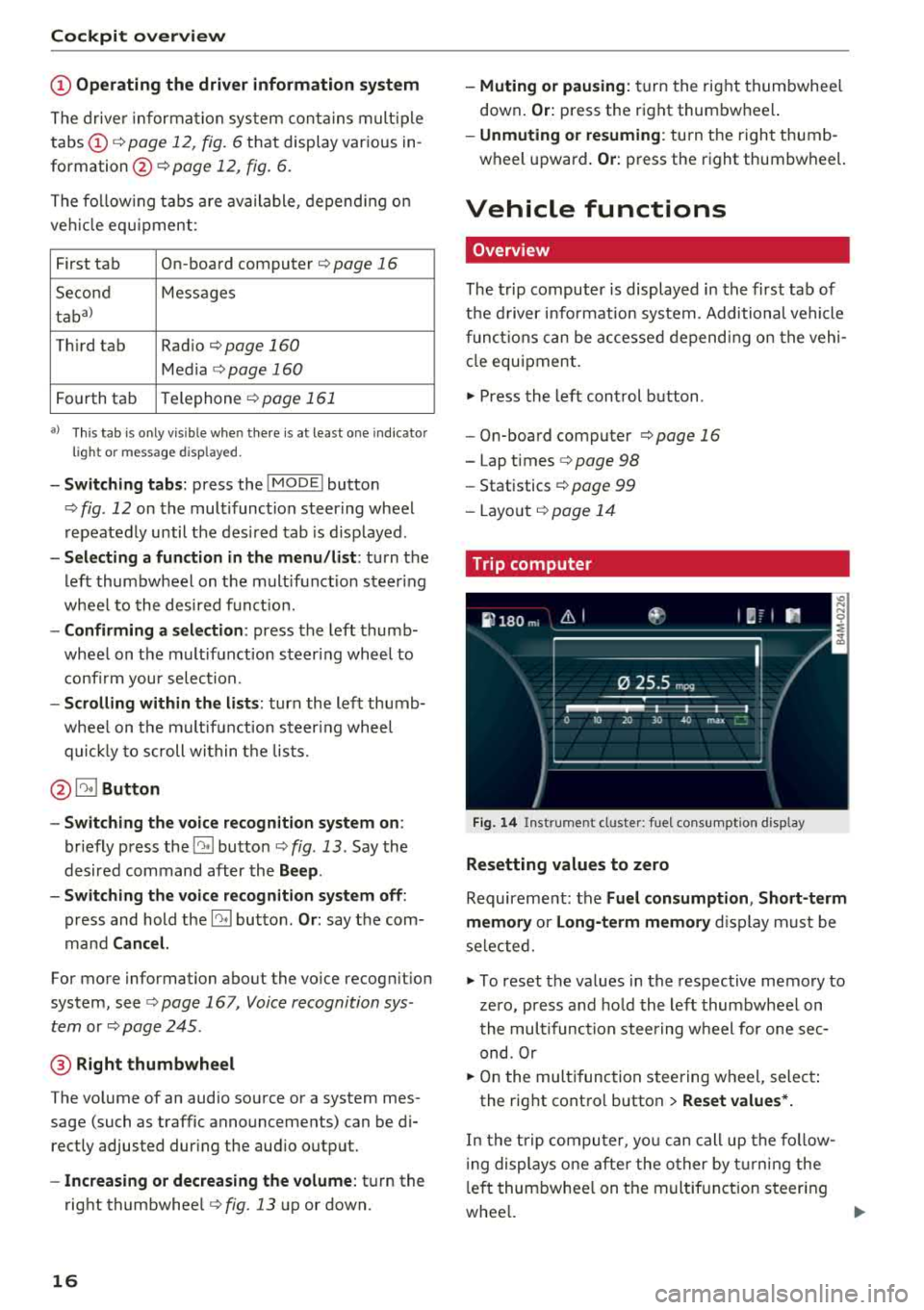
-Sw itching t abs: press the !MODE ! button
c::> fig. 12 on the mult ifunction steer ing wheel
repeatedly until the des ired tab is d isp layed .
-Selec ting a fun ction in the m enu /li st: turn the
left thumbwheel on the multifunct ion steer ing
whee l to the desired f unct ion.
-Confirming a selection : press the left thumb
wheel on the mu ltifunction steering whee l to
confi rm your select ion.
-Scrolling within the li sts: turn the left thumb
whee l on t he multifunct ion steer ing whee l
quic kly to scroll within the lists.
@ ~ Button
-Switching th e voi ce recognition sy stem on :
briefly press the 51 button c::> fig. 13 . Say the
desired command after the
B eep .
-Switching th e voice r ecogn ition sy st e m off :
press and hold the 51 button . Or: say the com
mand
Canc el.
Fo r more information about the vo ice recog nition
system, see
c::> page 16 7, Voice recognition sys
tem
or c::> page 245 .
@ Right thumbwheel
The volume of an audio source o r a system mes
sage ( such as traffic announcements) can be di
rect ly adjusted dur ing the aud io output.
-In creas ing or dec reasing the volume : turn the
right thumbwhee l
c::>fig. 13 up o r down.
16
-Muting o r pausing: turn the right thumbwhee l
down .
Or: press the right thumbwhe el.
-Unmuting o r re suming : turn the right thumb
wheel upward.
Or : press the right thumbwheel.
Vehicle functions
Overview
The t rip computer is displayed in the first tab of
t h e d river i nfo rmat ion system . Additional vehicle
funct ions can be accessed depend ing on the vehi
cle equ ipment .
.,. Press the left cont rol button .
-On-board computer c::>page 16
-Lap times c::> page 98
-Statistics c:> page 99
-Layo ut c::> page 14
Trip computer
F ig. 1 4 In str umen t cl uste r: fue l co nsu m pt io n disp lay
Resetting values to zero
Requirement: the Fuel con sumption , Short -term
memor y or Long -t e rm memor y
disp lay must be
selected.
.,. To reset the values in the respective memory to
zero, press and ho ld the left thumbwheel on
the mult ifunct ion stee ring w heel for one sec
ond. Or
.,. On the multifunction steering w heel, selec t:
the rig ht contro l button
> Re set value s*.
In the t rip compu ter, yo u can call up the fo llow
i ng displays one afte r the other by t urning the
l eft thumbwhee l on t he multif unction steering
whee l.
..,.
Page 22 of 392
Cockpit overv ie w
.....
,,.I...
TPMS
20
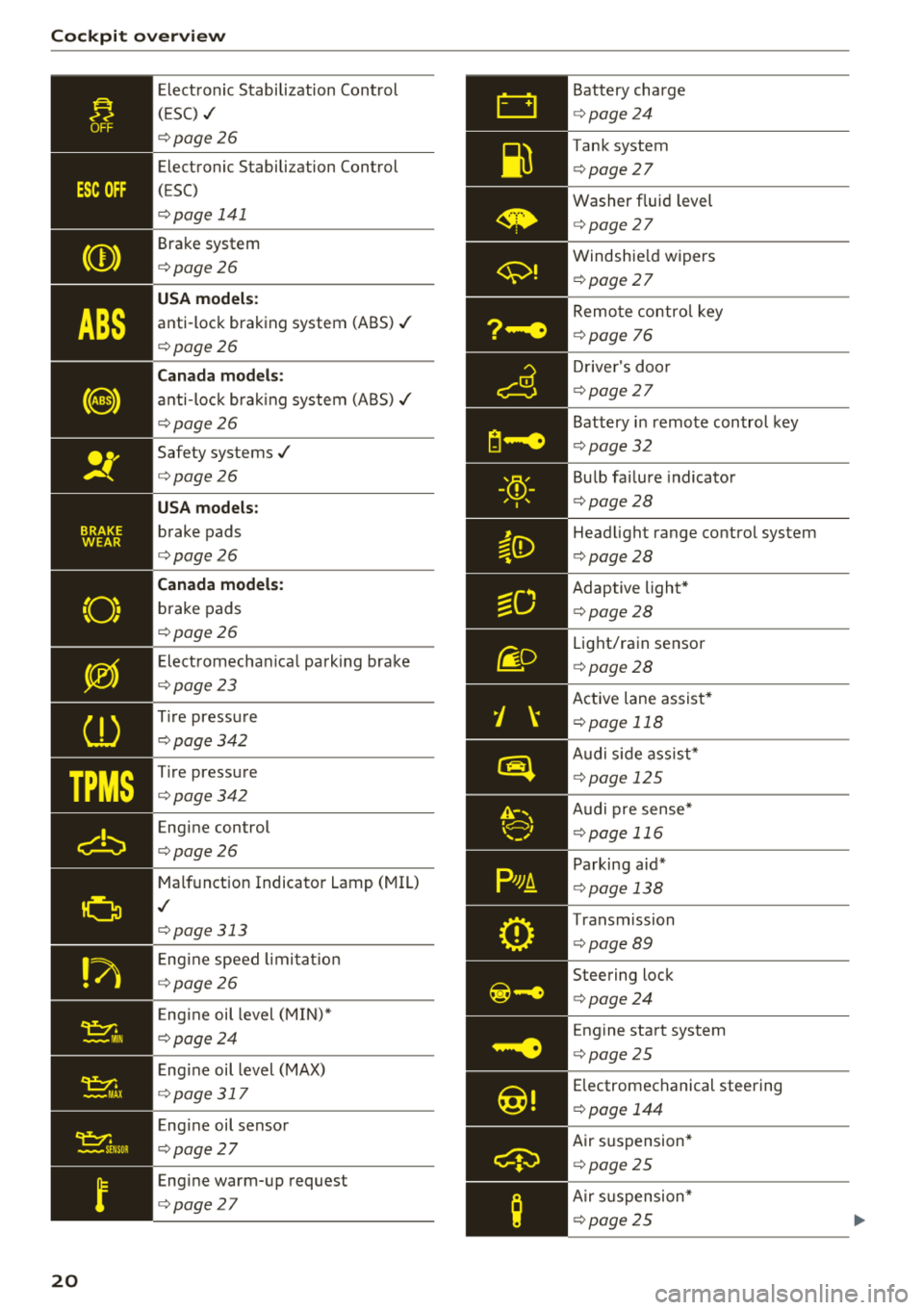
Elect ronic Stabilization Cont rol
( E SC)
./
¢ page 26
Electronic Stabilization Control
( E SC)
¢ page 141
Brake system
¢page26
USA model s:
anti-lock braking system (ABS) ./
¢page26
Canada models :
anti-loc k bra king system (ABS)./
¢ page26
Safety systems./
¢page26
USA models :
brake pads
¢page26
Canada models :
brake pads
¢page26
Elect romechan ica l parking brake
¢ page23
Tire pressure
¢ page342
Tire pressure
¢ page342
Engine control
¢page26
Malfunction Indicator Lamp (MIL)
./
¢page313
Eng ine speed limi ta ti on
¢ page26
Eng ine oil level (MIN)*
¢ page24
Eng ine oil level (MAX)
¢ page 317
Eng ine oil sensor
¢ page27
Engine warm-up request
¢page27
Battery charge
¢page24
Tank system
¢ page 27
Washer fluid level
¢page 27
Windshie ld wipers
¢ page 27
Remo te control key
¢ page 76
Drive r's doo r
¢page 27
Battery i n remote control key
¢ page 32
Bu lb fai lure indicator
¢ page28
Head light range control system
¢ page 28
Adaptive light*
¢page28
Light/rain sensor
¢page 28
Active lane assist*
¢page 118
Audi s ide ass ist*
¢ page 12 5
Audi pre sense *
¢page 11 6
Parking aid*
¢page 138
Transmission
¢ page 89
Steering lock
¢page 24
Engine start system
¢ page 25
Electromechanical steering
¢ page 144
Air suspension*
¢page 25
Air s uspension*
¢ page 25
Page 24 of 392

Cockpit overv ie w
Canada mod els:
speed war ning system*
¢ poge95
Active lane ass ist*
¢ page 118
Aud i side assist*
¢page 125
Camera-based traffic sign recogni
tion*
¢poge98
H igh beam assistant *
¢poge46
High beams
¢ poge46
High beam assistant *
¢poge46
BRAKE/(©) Brake system
If th is ind icator light turns on, there is a malfunc
tion in the brake system .
1111 (USA mod els ) /. (Canada models )
Brakes: stop veh icle and chec k bra ke fluid le vel
Stop the vehicle and check the brake fluid level.
See an authorized Audi dea ler or authorized Audi
Serv ice Facility for assistance if necessary.
1111 ( USA model s) /. (Canada model s)
B rake s: malfunction! Stop vehicle safel y
If t he i nd icator lig ht tu rns on and th is message
appears, there is a malfunc tion in the brake
booster.
I f t he ABS indicato r
light ~ (U SA mode ls) /
fee) (Canada mode ls), the ESC indicato r light Bl
a nd the bra ke system ind ic a tor light 1111 (USA
models)
/ . (Canada mode ls) all turn on and
this message appears, then t he ABS, ESC and
braking distribution are malfunctioning
¢ .&. .
Do not cont inue d rivi ng. See an autho rized Aud i
dea le r or autho rized Aud i Serv ice Facili ty fo r as
sistance
¢ .& .
1111 (USA m od els)/ . (Canada model s) Park
ing brake : malfun ction! Saf ely s top v ehicl e. Se e
owner 's manual
22
-If the ind icator light and the message appear
when the vehicle i s station ary or afte r switch
ing the ignition on ,
check if you can re lease the
parking brake. If you cannot release the park
ing brake, see an authorized Audi dealer or au
thorized Audi Service Fac ility . If you can release
the parki ng brake and the message st ill ap
pears , see an author ized Audi dealer or autho r
ized Aud i Serv ice Fac ility immediately to have
the ma lfu nction correc ted.
- If the ind icator light and message appear
while
dri ving ,
the hill sta rt ass ist o r emergency brak
ing function may be ma lfunction ing. It may not
be poss ible to set the park ing b rake o r release
it once it has been set. Do not park yo ur vehicle
on hills . See an aut horized Audi dea ler or au
thorized Audi Service Faci lity for assistance .
Brake boo ster : limited functionality . You can
continue d riv ing . Plea se cont act Ser vice
There is a ma lfunction in the b rake booster . The
brake booste r is ava ilab le, but its effective ness is
r educed. Br aking behavior may be d ifferent from
how it normally f unctions and the brake peda l
may vibrate .
D rive to an au thor ized A udi dealer or au tho riz ed
Audi Se rvice Fac il ity immed iate ly to have the
malfunction cor rected.
& WARNING
- Read and fo llow the warnings in
¢ page 314, Working in the engine com
portment
before opening the hood and
checking the brake fluid level.
- If the brake system indicator light does not
turn off or it turns on wh ile driving, the
brake flu id leve l in the reservo ir is too low,
and this increases the risk of an accident .
Stop the vehicle and do not continue driv ing . See an a utho rized Aud i dea le r o r au
thor ized A udi Se rvi ce Fac il ity for assistan ce.
- If t he brake system indicator light t urns on
together w it h the ABS and ESC indicator
lights, t he ABS/ ESC regu lating fu nction may
be ma lf u nct io ni ng. Funct io ns tha t stabi lize
the vehicle a re no longer available. This
co uld cause the vehicle to swerve, which
Ill>
Page 28 of 392

Cockpit overv ie w
Othe rw ise, conditions such as an uneven road
surface can lead to ve hicle damage.
B Su sp ension : malfun ction! You ma y continu e
driving
There is a suspension control malfunction .
Drive to an authorized Aud i dea ler or authorized
Aud i Serv ice Facility immediately to have the
malfunct ion corrected.
f;. ![J Electronic Stabilization Control (ESC)
If the D.1 indicato r light b links wh ile driving, the
E SC or ASR (Anti-S lip Reg ulation) is actively reg u
lating.
If the
Ii) i ndicato r light turns on, the system has
sw itched the ESC off. In this case, you can switch
the ign ition off and t hen o n to switch the ESC on
aga in. The indica tor ligh t turns off when the sys
tem is func tioning fully .
I f the
II indicato r light turns on, ESC was
sw itched off using the
1.$ ,., 1 button ~ page 140.
Stabilization control (ESC/ ABS): malfun ction!
See owner' s manual
If the Ii) indicator light and the [1] (USA mod
e ls)l liJ (Canada models) ABS indicator light turn
on and the message appears, there is a malfunc
tion in the ABS or the elect ronic d ifferential lock .
This a lso ca uses the ESC to malfunct ion. The
b rakes still f unct ion w it h t heir no rma l power , but
ABS is no t active.
Dr ive to an a utho rized Aud i deale r or a uth orized
Aud i Serv ice Facility immediately to have t he
malfunct io n corrected.
(D Tips
For add it ional information on ESC and ABS,
see
~ page 140.
!f Safety systems
The E,I ind icator ligh t moni to rs t he safety sys
tems .
I f t he
E,I indicato r light turns on o r blinks, there
is a malfunction in a safety sys tem .
26
Drive to an authori zed A udi dealer or au thori zed
Audi Service Facility immediate ly to have the
malfunction corrected.
A WARNING
-
Have the safety systems inspected immedi
ately. Otherwise, there is a r isk that the sys
tems may not activate during a collision,
which increases the risk of serious inju ry or
death.
( CD ) Brake system
miJ Brake s overheating . Please shift to D
There was a heavy load on the brakes . P lace the
selector lever in the "D/S" posit ion in order to use
t h e engine brak ing effect and reduce the load on
t h e b rakes.
wt:t /{0 ) Brake pads
II (USA model s)!£tjJ (Canada mod els ) Brake
pad s: wear limit reached. You can continue dri v
ing . Please contact Service
The bra ke pads a re wor n.
Drive to an authorized Audi dealer or authorized
Audi Service Fac il ity as soon as poss ible to have
t h e malfunct ion corrected.
d::, Engine control
II Drive sy ste m : malfun ction! Please contact
Service
There is a n eng ine contro l ma lfu nction .
D rive slowly to an authorized Audi dea ler or au
thorized Audi Serv ice Facility to have the engine
checked.
! '? Engine speed limitation
Ill Maximum engine speed : XXXX rpm
The engine speed is automatically limited to the
speed displayed in the instrument cluster . This
pro tects the engine from ove rheat ing.
The eng ine speed limitat ion deactivates once the
engine is no longer in the critical temperature
IJIJ,
Page 69 of 392
u co ..... N r-N .....
~ 0 co
Removing and in stalling the cargo floor
.,. To remove the cargo floo r, p ull the entire cargo
floor toward the back of the veh icl e.
... To insert the cargo f loor, slide it toward the
backr ests until i t aud ibly engag es into the tabs
r=> fig . 79 .
Roof rack
Applies to: veh icles with roof rack
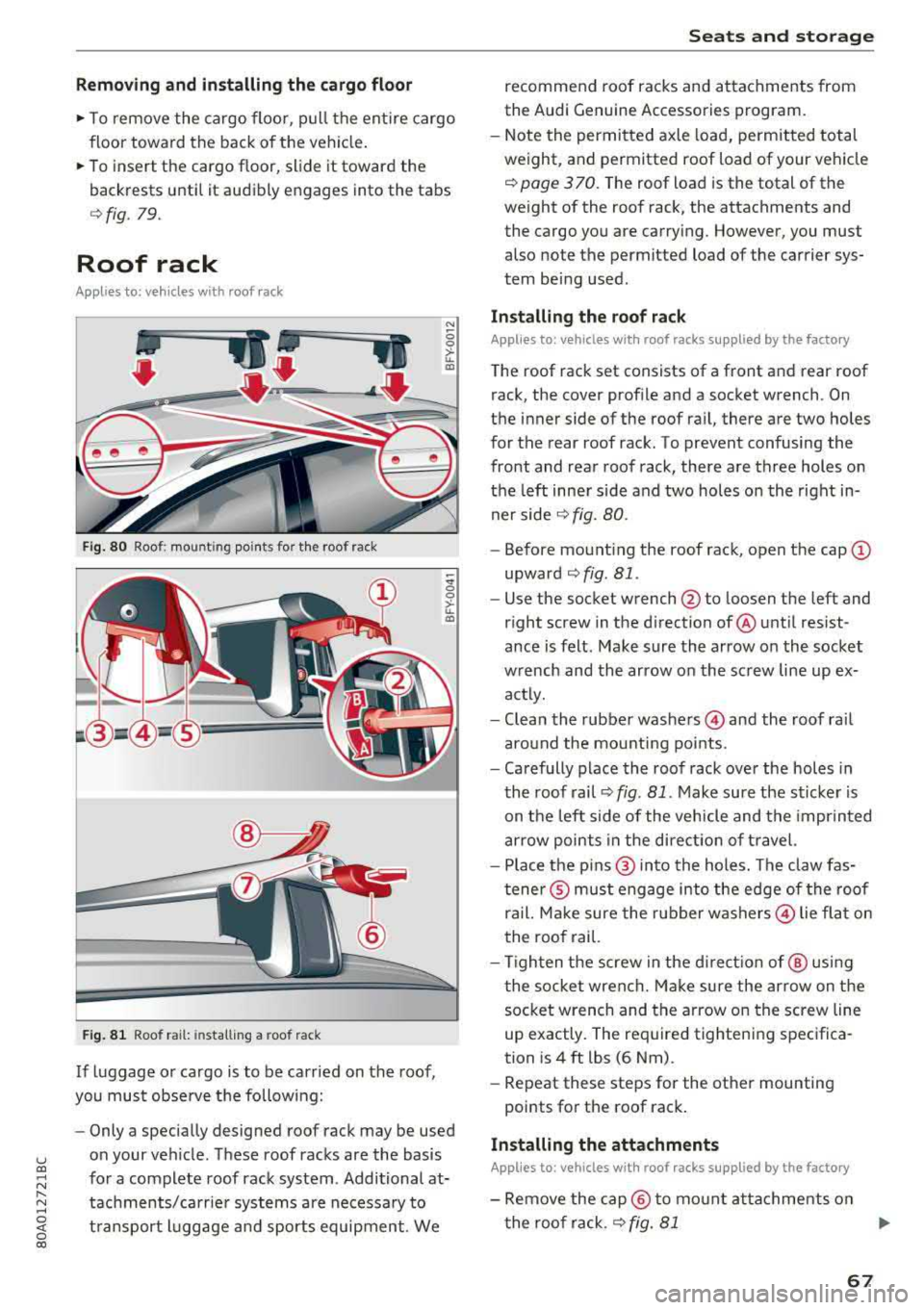
Fig. 80 Roo f: mount ing poi nts fo r th e ro of rack
F ig . 81 Roo f ra il: in sta lling a roo f ra ck
If luggage or cargo is to be carried on the roof ,
you must obse rve the following:
"' -0
0
>-u.. a,
-;!I; 0 >-u.. a,
- Only a specially designed roo f rack may be used
on your veh icle . These roof racks are the basis
for a complete roof rack system . Additional at
tachments/carrie r systems are necessary to
t ransport l uggage a nd sports equipment . We
S eats and storag e
recommend roof racks and attachme nts from
the Aud i G enu ine Accessories program .
- Note the permitted axle load, permitted total
weight , and permitted roof load of your veh icle
9 pag e 3 70 . The roof load is the total of the
weight of the roof rack, the attachments and
the cargo you are carrying . However, you must
also no te the permit ted load o f the carrier sys
tem being used .
Installing the ro of r ack
Applies to: vehicles with roof racks supplied by the factory
The roof rack set consists of a front and rear roof
rack, the cover profile and a socket wrench . On
the inner side of the roof rail, the re are two holes
for the rear roof rack. To prevent confusing the
front and rear roof rack, there a re three holes on
the left inner side and two holes on the right in
ner side
9 fig. 80 .
-Before mount ing the roof rack, open the cap (D
upward 9 fig . Bl .
- Use the socket wrench
@ to loo sen the left and
r ight screw in the d irection of @unt il res ist
ance is felt. Make sure the arrow on the socket
wrench and the arrow on the screw line up ex
actly.
- Clean the rubber
washers @ and the roof rai l
around the mounting points .
- Carefully place the roof rack over the holes in
the roof rail '=>
fig. 81 . Make sure the sticker is
on the left side of the vehicle and the imprinted
arrow points in the direct ion of travel.
- Place the p ins @ into the holes. The claw fas
tene r® must engage into the edge of the roof
ra il. Ma ke sure the rubber
washers @ lie flat on
the roof rai l.
- Tighten the screw in the directio n of @ using
t he socket wrench. Make sure the arrow on the
socket wrench and the arrow on the screw line
up exactly. The required tight ening specifica
tion is 4 ft lbs (6 Nm) .
- Repeat these steps for the other mounting
po ints for th e roof rack .
Installing the attachments
Applies to: vehicles with roof racks supplied by the factory
- Remove the cap@ to mo unt at tachments on
the roof rack .
9 fig. 81 ..,
67
Page 79 of 392
u co ..... N r--N ..... 0 <( 0 00
@ Note
Avoid high engine speed, full throttle, and heavy engine load if the engine has not
reached operating temperature yet. You could
damage the engine.
@) For the sake of the environment
Do not let the engine run while parked to
warm up. Begin driving immediately. This re duces unnecessary emissions.
(D Tips
- Some noise after starting the engine is nor
mal and is no cause for concern.
- If you leave the vehicle with the ignition
switched on, the ignition will switch off af
ter a certain amount of time. Make sure that electrical equipment such as the exterior
lights are switched off.
Starting the engine
"'Bring the vehicle to a full stop.
"'Press the I START ENGI NE STO PI button
C? page 76, fig. 86.
Emergency off function*
If it is absolutely necessary, the engine can also
be turned off while driving at speeds starting at
4 mph (7 km/h). To switch the engine off, press
the
! START ENGINE STOPI button twice in a row
briefly or press and hold for longer than two sec
onds.
A WARNING
- Never turn off the engine before the vehicle
has come to a complete stop. The full func
tionality of the brake booster and the power steering is not guaranteed. You must use
more force to steer and brake the vehicle.
The fact that you cannot steer and brake as
usual can increase the risk of accidents and
serious injuries.
-If you leave the vehicle, switch the ignition
off and take the vehicle key with you .
If you
do not, the engine could be started and
electrical equipment such as the power win-
Driving
dows could be activated. This can lead to se
rious injuries.
- For safety reasons, always park the vehicle
with the selector lever in the "P" position.
Otherwise, there is the risk that the vehicle
could roll unintentionally.
@ Note
If the engine has been under heavy load for
an extended period of time, heat builds up in
the engine compartment after the engine is
switched off and there is a risk of damaging
the engine . For this reason, let the engine run
at idle for approximately two minutes before
shutting it off.
(D Tips
For up to 10 minutes after stopping the en
gine, the radiator fan may turn on again auto
matically or it may continue to run (even if
the ignition is switched off) for the following
reasons :
- The coolant temperature is increasing due
to
trapped heat.
- If the engine is warm and the engine com
partment also heats up from strong sun
light.
Messages
Engine running. Warning! Turn off ignition be
fore leaving vehicle
This message appears and a warning tone sounds
if you open the driver's door when the engine is
running.
Please press the brake pedal
This message appears if you do not press the brake pedal when starting the engine .
Ill Remote control key: key not detected. Is the
key still in the vehicle?
This indicator light turns on and this message ap
pears if the ignition key was removed from the
vehicle when the engine was running. If the igni
tion key is no longer in the vehicle, you cannot
switch on the ignition or start the engine once
..,.
77
Page 83 of 392
u co ..... N r--N ..... 0 <( 0 00
~ To prevent the parking brake from releasing au
tomatica lly, pull and ho ld
the(®) switch and
press the acce lerator pedal. The park ing brake
remains set and prevents the veh icle from ro ll
ing backward.
~ You can release the(®) switch again once you are sure that you are g iv ing enough dr iv ing
force to the whee ls by pressing the accele rator
pedal.
Emergency braking function
You can use the emergency brak ing funct ion in an
emergency situation, or if the standard brake op
erat ion malfunct ions or is disabled .
~ Pull and hold the(®) switch.
~ As soon as you release the (®) switch or acceler-
ate, the brak ing stops .
Pu lling and holding the(®) switch while driv ing
the vehicle activates the emergency braking func
tion . The vehicle is braked at all four wheels by
activating the hydraulic brake system . The brak
i ng effect is s imilar to heavy
braking ~.,&. .
To reduce the r isk of activating the emergency
braking by mistake, a warn ing tone (buzzer)
sounds when
the(®) switch is pulled . Emergency
braking stops as soon as
the(®) switch is released
or the accele rato r peda l is p ressed .
Parking
~ Press the brake pedal to stop the vehicle.
~ Pull the(®) switch to set the parking brake.
~ Select the "P" selector lever posit ion .
~ Turn the eng ine off ~.,&. .
~ Turn the steer ing whee l w hen pa rking on in
clin es so that the whee ls will roll into the curb
i f t he ve hicle starts moving.
A WARNING
- Do not press the accelerator pedal inadver
tent ly if a gear is selected when the vehicle
is stationary and the engine is running. Oth
erwise, the veh icle w ill start to move imme
diately and th is could result in an acc ident.
- Emergency braking should only be used in an emergency, when the normal brake peda l
has failed or the brake pedal is obstructed .
Driving
During emergency braking, your vehicle will
brake s imilar to heavy braking. ESC and the
associated components (ABS, ASR, EDL)
cannot overcome the laws of physics .
Around curves and when road or weather
conditions are bad, a full brake applicat ion
can cause the veh icle to skid o r the rear end
to swerve, which inc reases the risk of an ac
cident.
- I f the power supply fails, you cannot set the
p ar king brake if it is released . In this case,
park the veh icle on leve l ground and secu re
it by placing the selector lever in the "P" po
sition. See an authorized Audi dealer or au
thor ized Audi Service Facility for assistance.
- Always set the parking brake when leaving
your veh icle, even if for a sho rt period of
time. Otherwise the vehicle could roll away, increasing the risk of an accident .
- If you leave the vehicle, switch the ignition off and take the veh icle key with you. This
applies particularly when children remain in
the vehicle . Otherwise, ch ildren cou ld start
the engine, release the parking brake or op
erate e lectr ica l equipment such as power
windows, wh ich increases the r is k of an acci
dent.
- No one, especially children, should remain
in the vehicle when it is lo cked. Lo cked
doors ma ke it more diffic ult for emergency
workers to get into the vehicle, which puts lives at risk .
(D Tips
When stopp ing at a t raff ic sign al or stopp ing
i n city traffic, yo u can set the park ing brake
manua lly . The vehicle does not have to be
held with the brake pedal. The parking brake
eliminates the tendency to creep when a se l ector lever position is engaged. As soon as
you press the accelerator peda l, the parking
brake re leases automatically and your vehicle
starts to move
~page 82 .
(D Tips
- Occasional noises when the parking brake is
set and released are normal and are not a
cause for concern .
.,.
81
Page 142 of 392
Intelligent Technology
Intelligent Technology Electronic Stabilization
Control (ESC)
Description
Electronic Stabilization Control (ESC) supports
driver safety. It reduces the risk of slipping and improves driving stability. ESC detects critica l sit
uations such as when the vehicle is oversteering
and understeering or the wheels are spinning.
The vehicle is stabilized by applying the brakes or
reducing eng ine torque. When the ESC engages,
the
D.1 ind icator light blinks in the instrument
cluste r.
The follow ing systems are integrated in the ESC:
Anti-lock braking system (ABS)
ABS prevents the wheels from locking when brak
ing. The vehicle can still be steered even during
hard braking. Apply steady pressure to the brake
pedal. Do not pump the pedal. A pulsing in the
brake pedal indicates that the system is acting to
stabilize the vehicle .
Brake assist system
The brake assist system can decrease braking dis
tance. It increases braking power when the driver
presses the brake pedal quickly in emergency sit
uations . You must press and hold the brake pedal
until the dangerous situat ion is over . In veh icles
with adapt ive c ruise control*, the brake assist
system is more sensitive if the distance detected
t o the vehicle dr iv ing ahead is too small.
Anti-Slip Regulation (ASR)
ASR reduces engine power when the drive wheels
beg in sp inning and adapts the force to the road
conditions . This makes it easie r to start, acceler
ate and dr ive up hill s.
Electronic Differential Lock (EDL)
EDL applies the brakes to a wheel that starts
spinning and transfers the drive power to the
other driving wheels. This funct ion is not availa
b le at higher speeds.
140
In extreme cases, EDL automatica lly switches off
to keep the brake on the braked whee l from over
heating. The vehicle is still working correctly. ED L
will switch on again automatically when condi
tions have returned to normal.
Power steering
The ESC can also support vehicle stability
through steering .
Selective wheel torque control
Selective wheel torque control is used when driv
in g on curves. Brak ing is targeted toward the
whee ls on the inside of the curve as needed. This
a llows more precise driving in curves.
Automatic post-collision braking system
The "automatic post-collis io n braking system"
can help to reduce the risk of sl iding and of addi
tional collisions after an accident. If the airbag
contro l modu le detects a collision, the vehicle is
braked by the ESC.
The vehicle does not brake automatically if:
-the driver presses the accelerator pedal, or
-the ESC, the brake system or the veh icle electri-
cal system are not functioning.
A WARNING
-The ESC and its integrated systems cannot
overcome the lim its imposed by natura l
p hys ical laws. Th is is espec ially impo rtant
on slippery or wet roads. If the systems be
gin acting to stabilize your vehicle, you
should immediately alter your speed to
match the road and traffic conditions. Do
not let the increased safety provided tempt
you into taking risks. This could increase
your r isk of a coll is ion.
-Please note the risk of a collision increases
when dr iv ing fast, especially through curves
and on slippery or wet roads, and when dr iv
ing too close to objects ahead . The ESC and
its integrated systems cannot always pre
ve nt co llisions
-there is still a risk of acci
dents!