gas AUDI Q5 2018 Owners Manual
[x] Cancel search | Manufacturer: AUDI, Model Year: 2018, Model line: Q5, Model: AUDI Q5 2018Pages: 392, PDF Size: 60.56 MB
Page 38 of 392
Opening and clo sin g
~ WARNING
Read and following all WARNINGS c:> .&. in De
scription on page 30.
Anti-theft alarm system
Applies to: vehicles w ith anti-t heft alarm system
If the anti -theft alarm system detects a vehicle
break-in, audio and v isual warning signals are
triggered. The anti-theft alarm system is switch
ed on or off when locking/unlocking your vehicle.
If the alarm is tr iggered, it w ill shut off automat
ically after a ce rta in amount of time .
Sw itching the alarm off manually
• To switch the alarm off, press the rrl button on
the remote control key or switch the ignition
on.
Depending on the vehicle equipment, the anti
theft alarm system may have the following fea
tures:
Break -in security feature
The alarm w ill sound if the re is a break- in at the
doors, hood, and/or luggage compartment lid.
Interior /towing protection monitoring
button*
The alarm wi ll be triggered if there are move
ments detected in the vehicle interior or if there
is a change in the veh icle ang le .
If you leave persons/an imals in the vehicle o r
have the vehicle t ransported, sw itch off the inte
rior/towing protection monitoring alarm to pre
vent the alarm from being triggered:
• Press the ffi button on the remote cont ro l key a
seco nd time
within 2 seconds. Or
• Applies to vehicles with convenience key: touch
the sensor on the door handle a second t ime
with in 2 se conds . Or
• Turn the mechanical key in the door lock to the
close pos it ion a second time
w ithin 2 second s.
• If you lock the veh icle now, then the interior/
towing protect ion monitor will stay off until
the next time the vehicle is u nlocked.
36
@ Tips
The interior/towing protection monitoring *
on ly functions correctly when the windows
and the roof* are closed.
Luggage compartment
lid
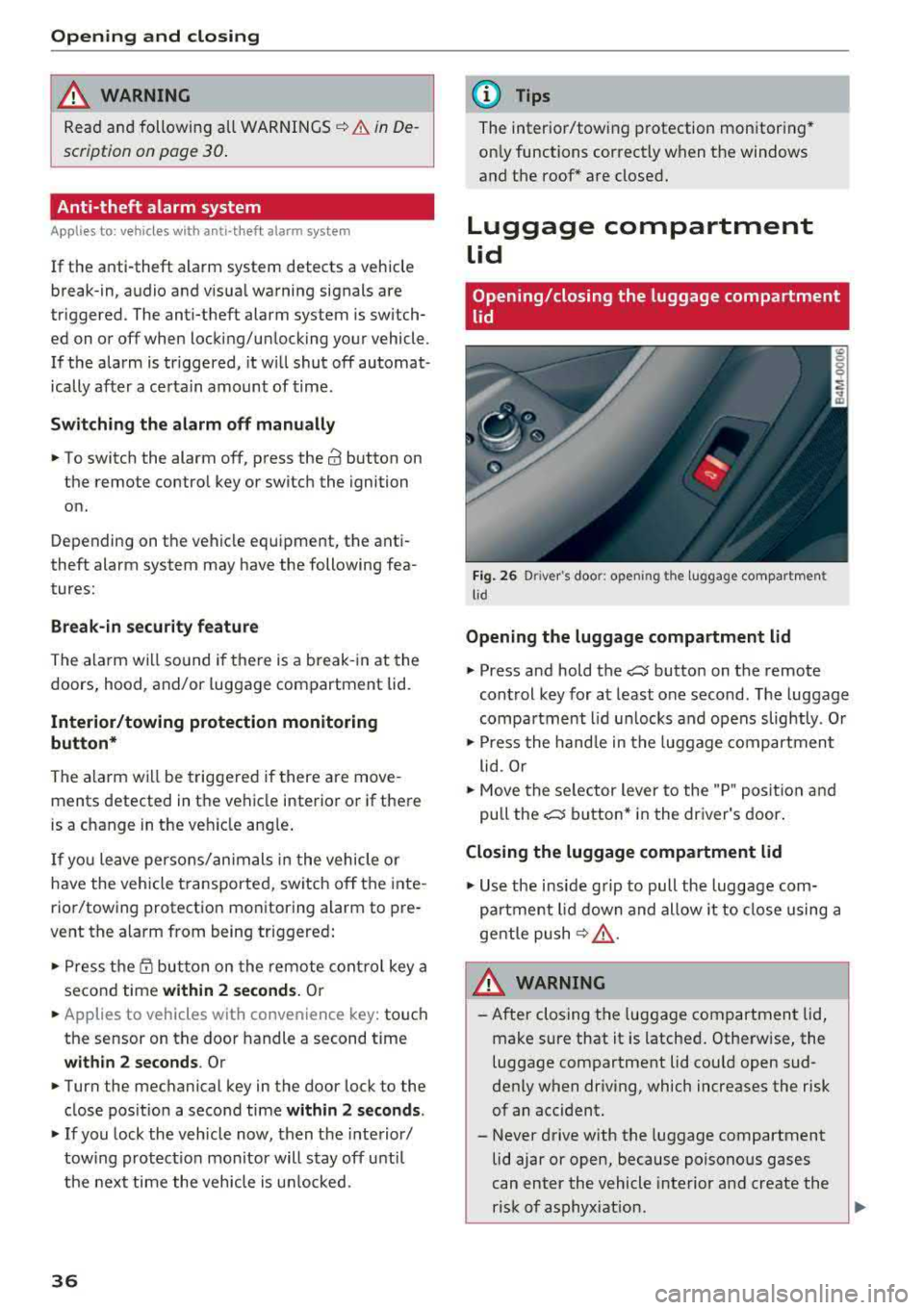
Opening/closing the luggage compartment
lid
F ig . 26 D river 's doo r: ope ning th e luggage compartmen t
l id
Opening the luggage compartment lid
• Press and hold the c::J button on the remote
control key for at least one second . The luggage
compa rtment l id u nlocks and opens slightly . Or
• Press the hand le in the luggage compartment
lid . Or
• Move the se lector lever to the "P" posit io n and
pull the
c::J button* in the dr iver's door .
Closing the luggage compartment lid
• Use the inside grip to pull the luggage com
pa rtment lid down and allow it to close using a
gentle push
¢ .&, .
&_ WARNING
-After closing the luggage compartment lid,
make sure that it is latched . Otherw ise, the
luggage compartment lid cou ld open sud
denly when driv ing, which increases the risk
of an accident.
- Never drive with the luggage compartment
lid ajar or open, because poisono us gases
can enter the vehicle interior and create the
risk of asphyx iat ion.
..,_
Page 40 of 392
Opening and clo sing
Storin g th e luggag e comp artm ent lid
o pening posit ion
~ Bring the luggage compartment lid into the de
sired open position. The position must be at a
certain height or higher to store.
~ Press and hold the C> button in the luggage
compartment lid for at least four seconds to
store the new open position . A visual and audio
s ignal will follow .
~ To set a h igher open position, wait at least five
seconds and then caref ully press the luggage
compartment lid upward .
~ Press and hold the C> button again for at least
four seconds to store the desired opening posi
tion.
The opening/closing process wi ll stop immedi
ately if :
- Yo u pull/release the
C> switch in the driver's
door, or
- Applies to: vehicles with convenience key:
press/release the
C> button on the remote
contro l key, or
- Applies to:
vehicles with conveniern;e key: press
the C> button or the {n but ton in the luggage
compartment lid, or
- Yo u push the hand le in the luggage compart
ment lid, or
- When something b locks the luggage compa rt
ment lid or makes it difficu lt fo r the lid to
move .
I f you press the hand le or one of the
C> or {n but
tons (veh icles w it h conven ience key*) now, the
luggage compartment lid w ill either open or
close, depending on its angle .
A WARNING
-After closing the luggage compartment lid,
make s ure that it is latched. Otherwise, the
l uggage compartment lid could open sud
denly when driving, which increases the risk
of an accident .
- Pay careful attention when closing the lug
gage compartment lid. Otherw ise, you could
cause serious injury to yourself or others de
spite the pinch protection .
38
-To reduce the risk of pinching injuries, a l
ways make sure that no one is in the operat ing area of the luggage compartment lid, in
cluding the hinge areas and the upper and
lower edge of the luggage compartment lid .
- Never drive with the luggage compartment
lid ajar or open, because poisonous gases
can enter the vehicle inte rior and create the
risk of asphyx iat ion.
- If there is a luggage rack (such as a bicycle rack) on the luggage compartment lid, the
luggage compartment lid may not ope n
comp letely under cert ain ci rcumstan ces or it
co uld close by itself if open due to t he extra
weight. There fore, the open luggage com
partment lid must be given additional sup
port or the cargo must fi rst be removed
from the luggage rack.
@ Note
The l uggage compa rtment lid can bump into
objects s uch as the garage ceiling when open
i ng and become damaged .
(D Tips
- The settings in the Infotainment system de
termine if t he luggage compartment lid can
be opened using the
hand le ~ page 35.
- Th ere are audible signals when closing the
luggage compartment lid with the remote
contro l key (vehicles with conven ience key*)
or with the
C> button in the driver's door.
- When the vehicle is locked, the luggage
compartment lid can be unlocked sepa rately
by pressing the
C> button on the remote
control key . The luggage compartme nt lid
locks automat ically when it is closed again.
- Applies to: vehicles with convenience key:
The luggage compartment lid can be closed
w ith the conven ience from a distance up to
approximate ly 9 ft (3 m).
- T he luggage compartment lid can be oper
ated manua lly if the veh icle battery is low .
It is necessa ry to use mo re force when do ing
this. Move the lid s low ly to redu ce the
amou nt o f fo rce needed.
..,.
Page 41 of 392
u co ..... N r-N .....
~ 0 co
-When the trailer socket is being used (for
example, for a bicycle rack), the luggage
compartment lid can be opened and closed using the handle or the foot motion activa
tion (vehicles with convenience key*).
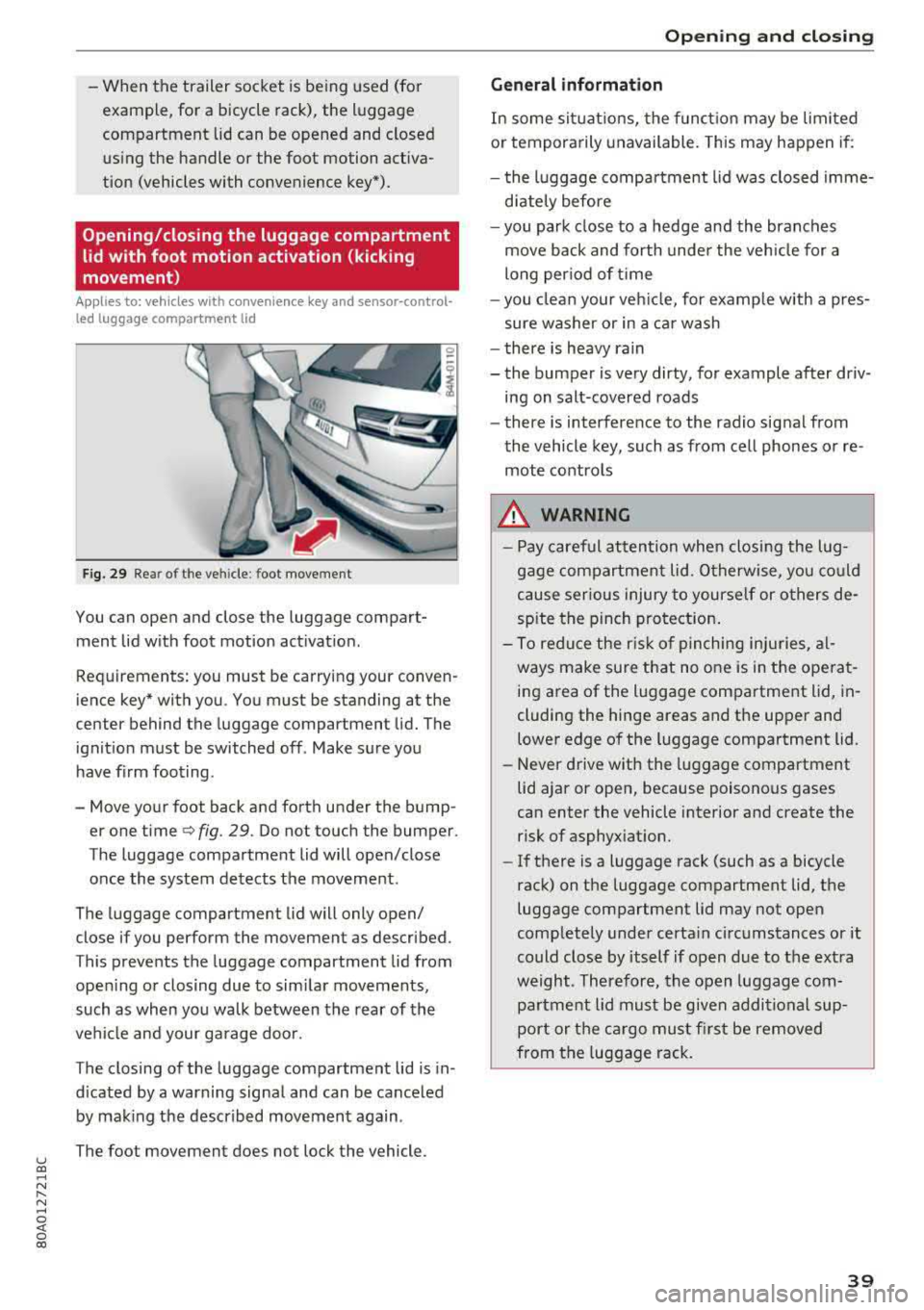
Opening/closing the luggage compartment
lid with foot motion activation (kicking
movement)
Applies to: veh icles with conven ience key and sensor-control
led luggage compartment lid
Fig. 29 Rea r of t he ve hicle : foot movement
You can open and close the luggage compart
ment lid w ith foot motion activat ion .
Requirements: you must be carrying your conven
ience key* with you . You must be standing at the
center behind the luggage compartment lid. The
ignition must be switched off . Make sure you
have f irm foot ing.
- Move your foot back and forth under the bump er one time
q fig. 29. Do not touch the bumper.
The luggage compartment lid will open/close
once the system detects the movement.
The luggage compartment lid will only open/
close if you perform the movement as described.
This prevents the luggage compartment lid from open ing or closing due to sim ilar movements,
such as when you walk between the rear of the
vehicle and your garage door.
The closing of the luggage compartment lid is in
d icated by a warning signa l and can be cance led
by making the described movement again .
The foot movement does not lock the vehicle.
Op eni ng and clos ing
General informat ion
In some sit uations, the funct ion may be limited
or temporarily unavailable. This may happen if:
- the l uggage compartment lid was closed imme
d iately before
- you park close to a hedge and the branches
move back and forth under the veh icle for a
long per iod of t i me
- you clean your veh icle, for example w ith a pres
sure washer or in a car wash
- there is heavy rain
- the bumper is very dirty, for example after driv- ing on salt-covered roads
- there is interference to the radio signal from
the vehicle key, such as from cell phones or re
mote controls
8,. WARNING
-Pay careful attention when closing the lug
gage compartment lid . O therwise, you co uld
cause serious injury to yourself or others de
spite the pinch protection .
-To reduce the risk of pinching inju ries, al
ways make sure that no o ne is in the ope rat
ing area of the luggage compartment lid, in
cluding the hinge areas and the upper and
lower edge of the luggage compartment lid.
-Never drive with the luggage compartment
lid ajar or open, because poisonous gases
can enter the vehicle interior and create the risk of asphyxiat ion.
-If there is a luggage rack (such as a bicycle
rack) on the luggage compartment lid, the
luggage compartment lid may not open
comp letely under certa in circumstances or it
could close by itself if open due to the ext ra
weight. Therefore, the open luggage com
partment lid must be given additional sup
port or the ca rgo must fi rst be removed
from the luggage rack.
3 9
Page 55 of 392
u co ..... N r-N .....
~ 0 co
Replacing wiper blades
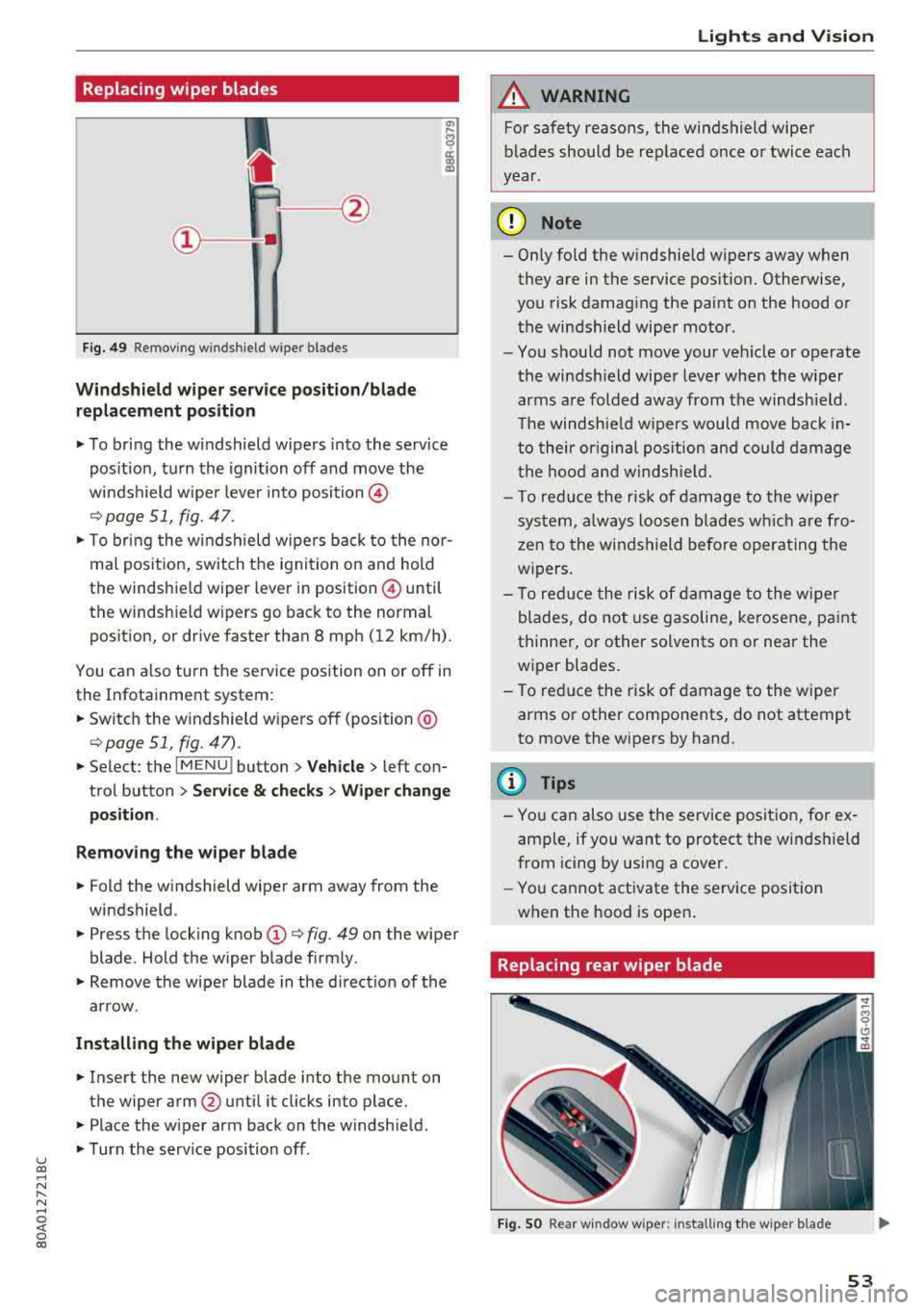
Fig. 49 Remov ing w indshi el d w iper blades
Windshield wiper serv ice po sition /blade
replacement position
"' To bring the windshield wipers into the service
pos ition, turn the ignition off and move the
windshield wiper lever into position @
¢ page 51, fig. 47.
"'T o bring the windshield wipers back to the nor
mal pos ition, switch the ignition on and hold
the windshie ld wiper lever in posit ion @ until
the windshie ld wipers go back to the normal
pos ition, or d rive faster than 8 mph (12 km/h) .
You can a lso tu rn the service position on or off in
the Infotainment system :
"'Switch the windshield wipers off (position @
¢page 51 , fig. 47) .
"'Select : the I MENU ! button> Vehicle> left con
trol button >
Service & checks > Wiper change
position .
Removing the wiper blade
"'Fold the windshield wiper arm away from the
windshield .
"' Press the locking knob (D ¢ fig. 49 on the wiper
blade . Hold the wiper blade firmly .
"'Remove the wiper blade in the direct ion of the
arrow .
Installing the wiper blade
"'Insert the new wiper blade into the mount on
the wiper arm
@ until it clicks into place.
"'Place the wiper arm back on the windshield .
"'Turn the serv ice position off.
Lights and Vision
A WARNING
For safety reasons, the windshield wiper
blades should be replaced once or twice each
year .
(D Note
- Only fold the windshield wipers away when
they are in the service pos ition. Otherwise,
you risk damaging the paint on the hood or
the windshield wiper motor .
- You should not move your veh icle or operate
the windsh ield wiper lever when the wiper
arms are folded away from the windshield .
Th e windshield wipers would move back in
to their or iginal pos ition and could damage
the hood and windshield.
- T o red uce the risk of damage to the wiper
system, always loosen blades wh ich are fro
zen to the windshield before operating the
w ipers.
- To reduce the risk of damage to the wiper
blades, do not use gasoline, kerosene, paint
thinner, or other solvents on or near the
wiper blades.
- To reduce the risk of damage to the wiper
arms or other components, do not attempt
to move the wipers by hand.
(D Tips
- You can also use the service position, for ex
ample, if you want to protect the windshield
from icing by using a cover .
- You cannot activate the service posit ion
when the hood is open .
Replacing rear wiper blade
Fig . SO Rear w indow wiper : installing the w ip er blade
53
Page 91 of 392
u co ..... N ,..._
N ..... 0 <( 0 00
Launch control program
App lies to: ve hicles with S tro nic tra nsm issio n
The launch control program provides the best
possible acceleration when starting from a stop.
Requirement: the eng ine must be at operating
temperature and the steer ing whee l must not be
turned .
~ Deactivate the Start/Stop system* c:> page 80.
The LED in the 10~ ·1 button turns on.
~ With the engine runn ing, press the ~
l fl - O~FF =I but
ton briefly
c> page 141 . The Ill indicator light
tu rns o n and the message
Stabil ization control
( ESC ): offroad . Warning! Reduc ed stabilit y
ap
pears in the inst rumen t cluste r display.
~ Pull the selector lever back o ut of t he "D/S" po
s it ion briefly to select the "S " position or se lect
the
D ynamic driving mode in drive se -
lect* ¢ page 12 7.
~ Press the brake pedal firmly with your left foot
and hold it all the way down for at least one
second.
~ At the same t ime, press the gas pedal all the
way dow n with your right foot unt il the engi ne
reaches and stays at a h igh RPM level.
~ Remove yo ur foot from t he b rake pedal within
five seconds
c:> ,&. .
A WARNING
-Always adapt yo ur driving to the traffic flow.
- O nly use the La unch contro l prog ram when
road and traffic conditions allow it and ot h
er drivers wi ll not be endangered or both
ered by your driving and the vehicle's accel
eration.
- Please note that the drive whee ls can spin
and the vehicle can break away when off
road mode is switched on, espec ia lly when
the road is slippery.
- Once the vehicle has started moving, press the
I~ OF F! button briefly to turn the offroad
mode off .
(D Tips
-The transmiss ion temperature may increase
s ignificantly after using the launc h control
program. If that happens, the program may
Driving
not be ava ilab le for a few minutes. It will be
avai lab le agai n after a coo l-down period.
- Whe n accelerati ng usi ng the launch cont ro l
program, all vehicle parts are s ubject to
heavy loads. This can lead to increased
wear.
Transmission malfunction
• Tran smiss ion: too hot. Please stop vehicle
Do not continue driving. Se lect the "P" selector
l ever posit ion and contact an authorized A udi
dealer or authorized Audi Service Fac ility for as
s istance.
• Tran smiss ion: malfunction! Plea se stop ve
hicle and shift to P
Do not continue dr iv ing . Se lect t he "P" selec to r
l ever posit ion and contact an authori zed A udi
dealer or authorized Audi Service Facility for as
s istance.
[O] Selector lever : malfunction ! You can con tin
ue d riving. Please contact Se rvice
The re is a system malfu nction in t he transmis
s io n. Dr ive to an a uth orized Aud i de aler o r au
tho rized Aud i Serv ice Facili ty immedia tely to have
the mal function corrected.
[i'J P button : malfun ction! Auto P when engine
off . Pl ea se conta ct Servi ce
T here is a malfunct ion in the "P" button on the
selector lever . The transm ission automatically
engages "P " when you sw itch off t he engine.
D rive to an author ized A udi dealer or autho riz ed
Audi Se rvice Faci lity immed iate ly to have the
malfunction corrected.
[i'J Select or lever : malfun ction! Gear change on
l y pos sibl e using both paddl e le ver s. Plea se con
ta ct Service
T here is a system malfunction in the transmis
s io n. You can con tinue dr iv ing with restr icted
funct ion. The se lector lever is not wo rk ing . Gea rs
can on ly be selected by tapping bo th shift pad
dles at the same time when the vehicle is station
ary
c> page 88 , fig . 92 . Pay attention to these-
l ected transmission position in the instrument
.,.
89
Page 173 of 392
u co .... N r--N ..... 0 <( 0 00
Voice recognition system
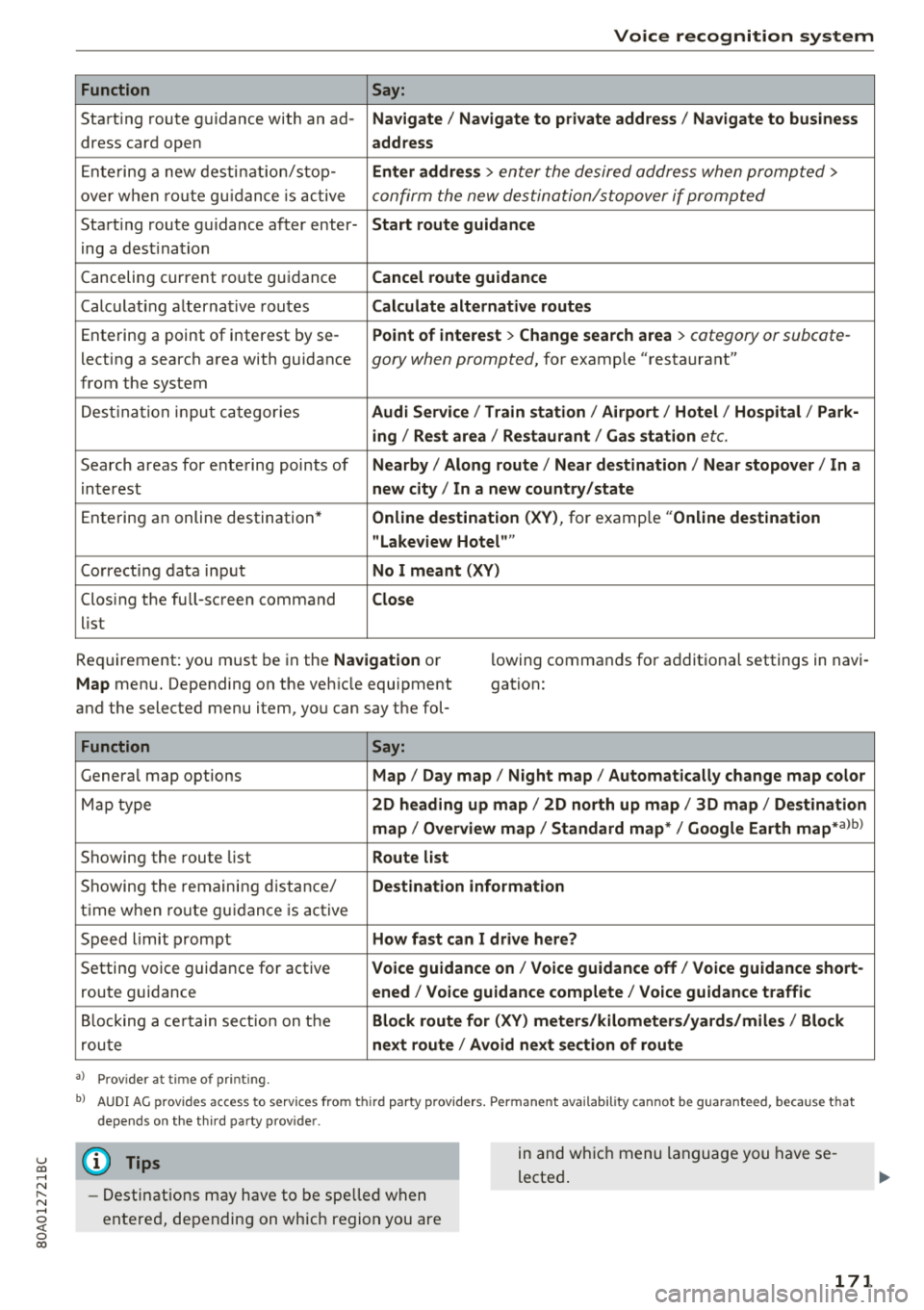
Function
Say:
Start ing route g uidance with an ad- Navigate/ Navigate to p riv ate addre ss/ Navig ate to business
dress card open address
E nte ring a new desti nat ion/stop -Enter addr ess
> enter the desired address when prompted>
over w hen ro ut e gu idance is ac tive confirm the new destination/stopover if prompted
Start ing route guidance after enter- Start route guidance
ing a dest ination
Canceling current ro ute g uidance Cancel route guidance
Calc ulat ing a lternat ive routes Calculate alternative route s
Ente ring a point of interest by se -Point of intere
st
> Change sea rch a rea > category or subcote-
lecting a search area with guidance gory when prompted, for example "restaurant"
from the system
Dest ina tion input ca tegor ies Audi Service / Train station /Airport / Hot el / Ho spital / Park-
ing / Re st area / Restaurant / Gas station
etc.
Search areas for entering points of Nearby/ Along route / Near de stination / Near stopover / In a
interest new city/ In a new country /state
Entering an online destination* Online dest
ination (XV), for examp le "Online de stination
" Lakeview Hotel" "
Correct ing data input No I meant (XV)
Clos ing the full -screen command
Close
list
Requirement: you must be in the Navigation or
Map menu. Depending on the veh icle equipment
and the selected menu item, you can say t he fol- l
owing commands for additional settings in navi
gation:
Function Say:
Genera l map options Map/ Day map / Night map / Automat ically change map color
Map type 2D heading up map/ 2D north up map / 3D map / De stination
map / Overview map / Standard map */ Google Earth
map* albl
Showing the route list Route list
Showing the remaini ng d istance/ Destination information
time w hen route guidance is active
Speed limit prompt How fast can I drive here?
Setting voice guidance for active Voice guidance on/ Voice guidance off / Voice guidance short-
route guidance ened / Voice guidance complete / Voice guidan ce traffic
B locking a ce rtain sect ion on t he Block route for (XV) meter s/kilometers /yards /miles / Block
rou te next route / Avoid n ext se ction of route
a ) Pro vid er a t tim e of pr inting .
bl AU DI AG provi des acc ess to s ervi ce s fro m thir d par ty prov id ers. P ermane nt a vailabi lity canno t be guarant eed, beca use tha t
de pen ds on the th ird party p ro vid er.
(D Tips
- Destinations may have to be spelled when
entered, depending on which region you are in and wh
ich menu language you have se
lected .
171
Page 176 of 392
Tele phone
Telephone
Introduction
Applies to: vehicles with telephone
To make phone coils in your vehicle using the
/11/111, connect your cell phone to the /11/111 via
Bluetooth.
Hand sfree
After you have connected your ce ll phone to the
MMI via B luetooth, you can use the handsfree
system and operate telephone functions through
your
MMI. You can make calls using the antenna
on your cell phone.
A WARNING
-Medical experts warn that cell phones can
interfere w ith the funct ion of pacemakers .
Always mainta in a m inimum d istance of
about 8 inches (20 cm) between the ce ll
phone antenna and the pacemaker.
-Do not carry the cell phone in a pocket di
rectly over the pacemaker when the phone
is switched on.
-Sw itch the cell phone off immediately if
you suspect it may be interfering w ith the
pacemaker.
-Do not use the vo ice recognit ion system*
<=) page 167 in emergencies because your
vo ice may change in stressful situations. It
may take longer to dial the number or the
system may not be able to dia l it at all. Dial
the emergency n umbe r manua lly.
-Switch your cell phone off in areas where
there is a ris k of an exp losion . These loca
tions are not always clearly mar ked. This
may include gas stations, fuel and chemical
storage facilities or transport vehicles, o r lo
cations where fue l vapors (such as propane
or gaso line vapor in vehicles or bui ldings),
chemicals or large quantities of dust parti
cles (such as flour, sawdust or metal) may
be present in the air . This also applies to all
other locations where you would normally
turn your vehicle engine off .
-The demands of traffic requ ire your full at
tent io n. Always read the chapter
Q page 147, Traffic safety information.
174
-
@ Note
Always fo llow the information found in Q @ in
Wi -Fi hotspot on page 194.
(D Tips
-Th e Bluetooth connect ion range is limited
to inside the vehicle. It can also be affected by local conditions and interference with
other devices .
-To learn which Bluetooth connections and
wh ich of the funct ions in your ce ll phone are
supported, check with your cell phone serv
ice provider or the database for mob ile devi
ces at www .aud iusa .com/bluetooth.
Setup
Connecting a cell phone using Bluetooth
Applies to: vehicles with telephone
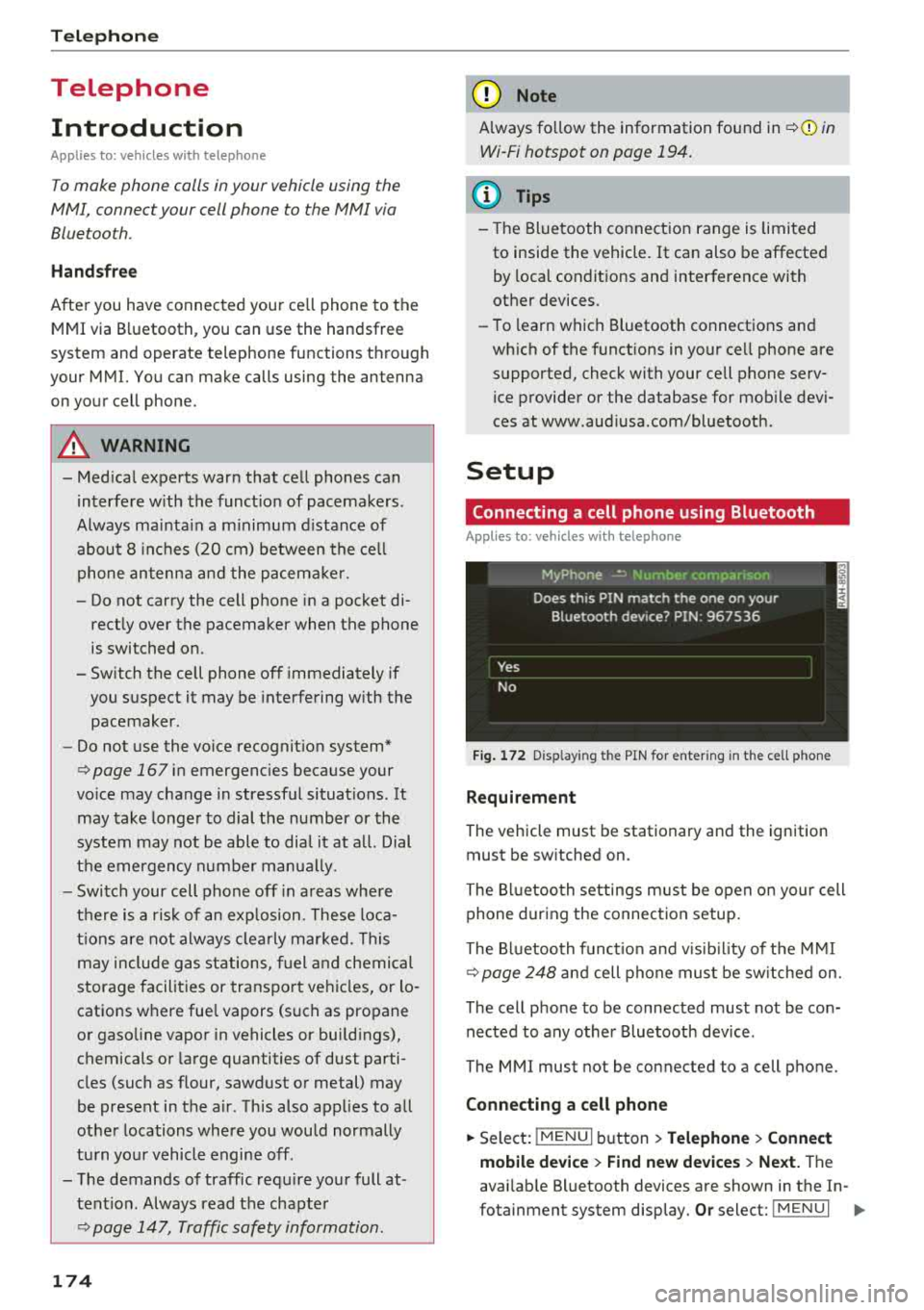
Fig . 172 D isp layin g the PIN for enter ing in t he cell phone
R equi rem ent
The vehicle must be stationary and the ignition
must be switched on.
The Bl uetooth settings m ust be open on your cell
phone during the connection setup.
The Bluetooth funct io n and v is ib il ity of the
MMI
Q page 248 and cell phone must be sw itched on.
The cell phone to be connected must not be con nected to any other Bluetooth device .
The
MMI mus t not be connected to a cell phone.
Conn ecting a c ell phon e
.. Select: IMENU I button> Telephone > Connect
mobile de vice > Find new de vic es > Next.
The
avai lab le Bluetooth devices are shown in the In-
fotainment system display.
Or select: ! MENUI 1111-
Page 191 of 392
u co ..... N r-N .....
~ 0 co
Closing Audi connect Infotainment services
Regardless of the fu nction selected, you c an
close a n Aud i connect Infotainmen t se rvice at any
time a nd return to the home screen
r::!> page 188,
fig . 180 .
Parking information
Applies to: vehicles with parking informa tion
Information on parking locations and fees in the
selected search area (for example
Nearby ).
~ Select and co nfirm Parking information.
You c an use the rig ht cont rol bu tton t o sort the
p a rking locations
By distance or By availability.
Travel information
Applies to: veh icles with travel informa tion
Information on attractions in the selecte d search
area.
~ S e lect and co nfirm Travel information .
~ Select and co nfirm an attraction to display t he
details .
Fuel prices
Applies to: veh icles with fuel prices
Information on gas stations with the lowest fue l
p rices fo r your vehicle in the selected search area.
~ Se lect and co nfirm Fuel price s.
You can use the right cont rol button to sort the
f u el p ric es
By price or By distance .
1l Servic e in pre para tio n at t he t ime of pr intin g. C an add l at
e r or i s onl y ava il able in certa in reg ion s.
Audi connect (Infotainment)
Traffic light information
Applies to: vehicles with traffic light information
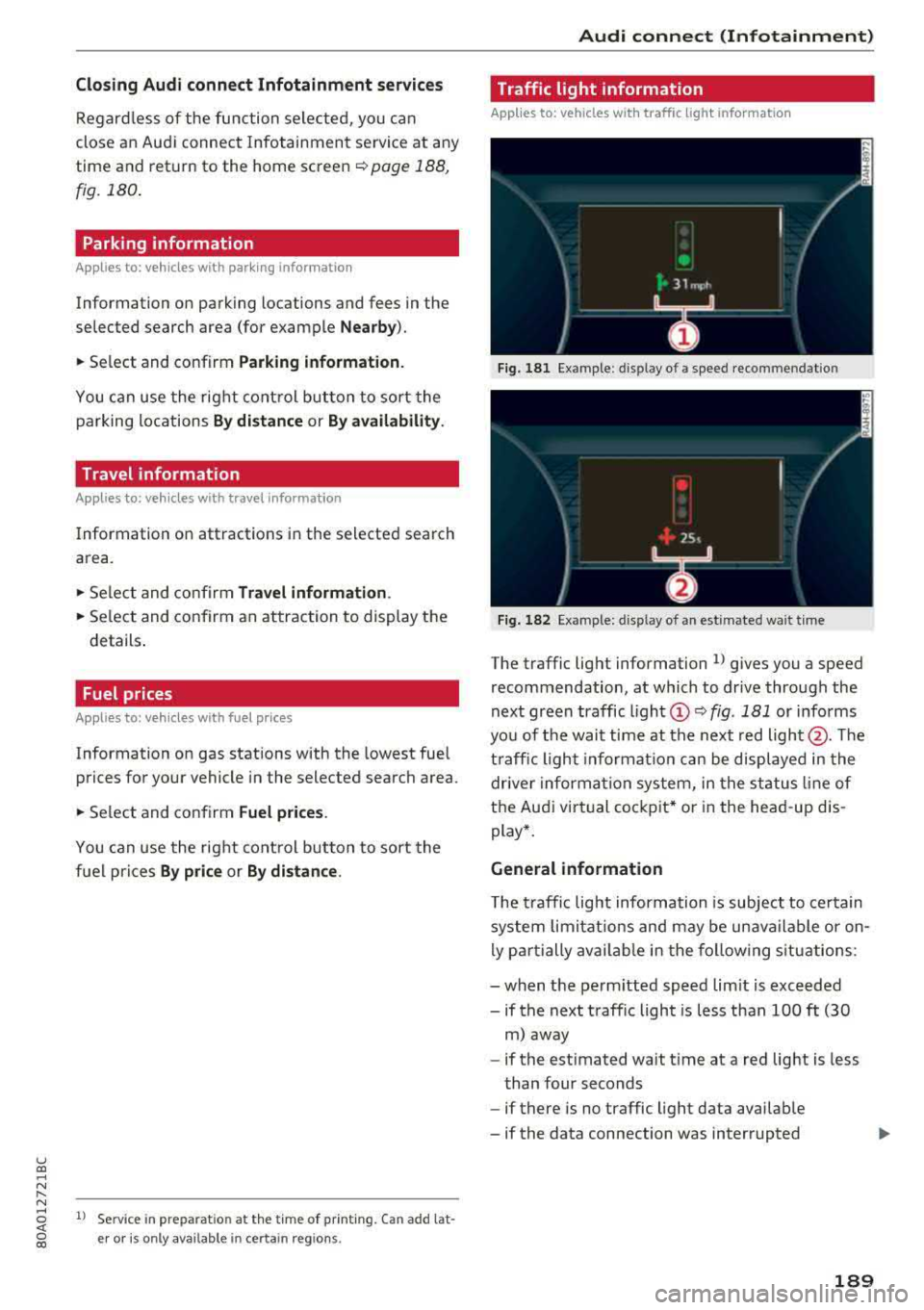
Fig. 18 1 Examp le : dis play o f a spee d recom menda tio n
Fig . 182 Example: d isp lay of an est imated wa it t ime
The traffic lig ht information l) gives you a speed
recommendation, at which to dr ive through the
next green traffic ligh t
(D r::!> fig. 181 or i nfo rms
yo u of t he wai t time at th e next red
light @. The
t ra ffic ligh t informat ion ca n be displaye d in the
drive r informa tion syste m, in the st atus lin e of
t h e Au di virtu al co ckpit* or in the he ad-up d is
play *.
General information
T he traffi c lig ht informa tion is subject to ce rt ain
s ystem lim itat ions an d may be un availa ble or on
l y p art ially avail abl e in the fo llow ing s ituations:
- when the pe rmitted speed l im it is exceede d
- if the next t raffic light is less than 100
ft (30
m ) away
- if the est imated wait t ime at a red lig ht is less
than four seconds
- if there is no traffic light data avai lab le
- if the data connection was interrupted
189
Page 213 of 392
u co ..... N ,..._
N ..... 0 <( 0 00
-Se lect and confirm a destination > right control
button
> Sto re as home addre ss.
Editing the home address
- Se lect the Home a ddre ss@ ~ page 203,
fig. 185.
- Se lect: rig ht contro l button > Edit hom e ad
dre ss.
-Select and confirm a new dest inat io n as the
home address.
The selected destination is stored as the new home address .
Favorites
Applies to: vehicles with navigation system
"'Press the I NAV/MAPI button repeated ly until
the
Ent er de stinati on menu is displayed
¢page 203, fig . 185.
- Storing a destin ation a s a f avo rite : searc h for
the des ired destination us ing the input fie ld.
Or : select a dest inat ion from the list. Se lect:
r ig ht control button
> St ore as favorite.
- Renaming a favorite :
select the left cont rol
bu tton
> Favorite s > a favorite from the list >
right cont rol button > R enam e fa vorite .
- Mov e favorite :
select a favorite from the list>
r ig ht cont rol but ton > Move favorite . Select
and confirm the location o f th e se lected favor
ite .
-Deleting a fa vorite : select a favorite from the
list>
right contro l button > Delete fa vo rite >
Delete this fa vo ri te or Delete all favorites.
Directory contacts
Applies to: vehicles with navigation system
Two addresses (private/business) can be as
signed as destinations for each contact in the di
rectory.
"' Press the I NAV/MAPI button repeated ly until
the
Enter destinati on menu is displayed
¢ page 203, fig. 185 .
Navigation
Storing a destination as a contact in the
dir ector y
Requirement: a ce ll phone must be connected to
the MMI
¢ page 174 .
-Select: a destination > right contro l button >
Add de stination to contact .
-Enter the first letters of t he des ired contact in
the free text search inp ut fie ld ¢
page 203,
fig. 185
and then select a contact from the list .
- Select and confirm
Add bu sine ss destination or
Add pri vate de stina tion.
Navigation settings
Applies to: vehicles with navigation system
"'Press the !NAV/MAP I button repeatedly unti l
the
Enter dest ination menu is displayed
¢page 203, fig.185 .
"' Select: r ight control button > Nav ig ation set-
ting s.
Depending on the selected function, the follow
ing settings can be selected:
Show alternati ve route s
Up to three suggested routes are shown on the
map when this function is switched
on ~
¢page 210 .
Low fuel warning
A message is d isplayed if the fue l gauge goes be
l ow the reserve marking w hen this function is
switched
on~-Confirming this message disp lays
a list of gas stations in the area. When a gas sta
tion is selected, route guidance from the current
vehicle position is calculated.
Trail er mode*
T railer mode is switched off at the factory .
When the funct io n is switched
on~, the max i
mum pe rm itted speed for ve hicles w ith t railers is
i nco rporated i nto t he ro ute guidance and the cal
c ul ated arriva l time is adjusted accord ingly. Trai l
er mode is displayed using
symbols- ':! in the side
menu on the map .
..,.
211
Page 260 of 392
Driving safety
A WARNING
Heavy loads will influence the way your vehi
cle handles . To help reduce the risk of a loss
of control leading to serious personal injury:
- Always keep in mind when transporting
heavy objects, that a change in the center of
gravity can also cause changes in vehicle
handling:
- Always distribute the load as evenly as
possible.
-Place heavy objects as far forward in the
luggage compartment as possible.
- Never exceed the Gross Axle Weight Rating
or the Gross Vehicle Weight Rating specified
on the safety compliance sticker on th e driv
er's side B-pillar. Exceeding permissible
weight standards can cause the vehicle to
slide and handle differently .
- Please observe information on safe driving
<=) page 252.
A WARNING
To help prevent poisonous exhaust gas from
being drawn into the vehicle, always keep the
rear lid closed while driving .
- Never transport objects larger than those
fitting completely into the luggage area be cause the rear lid cannot be fully closed .
- If you absolutely must drive with the rear lid
open, observe the following notes to reduce
the risk of poisoning:
- Close all windows,
- Close the sunroof*,
-Open all air outlets in the instrument pan-
el,
- Switch off the air recirculation,
- Set the fresh air fan to the highest speed .
A WARNING
Always make sure that the doors, all win
dows, the sunroof* and the rear lid are se
curely closed and locked to reduce the risk of
injury when the vehicle is not being used .
-After closing the rear lid , always make sure
that it is properly closed and locked.
258
-Never leave your vehicle unattended espe
cially with the rear lid left open. A child
could crawl into the vehicle through the lug
gage compartment and close the rear lid be
coming trapped and unable to get out . Be
ing trapped in a vehicle can lead to serious
personal injury.
- Never let children play in or around the vehi
cle .
- Never let passengers ride in the luggage
compartment . Vehicle occupants must al
ways be properly restrained in one of the
ve
hicle 's seating positions.
@ Note
If you are transporting large items with the
backrest folded down*, you should remove
the Rear Seat Entertainment (RSE)* and its
holder* to avoid damage.
© Tips
-Air circulation helps to reduce window fog
ging. Stale air escapes to the outside
through vents in the trim panel. Be sure to
keep these slots free and open .
-The tire pressure must correspond to the
load. The tire pressure label lists the recom
mended cold tire inflation pressures for the
vehicle at its maximum capacity weight and
the tires that were on your vehicle at the
time it was manufactured. For recommend ed tire pressures for normal load condi
tions, please see chapter
Q page 336 .
Tie-downs
The luggage compartmen t is equipped with four
t ie-downs to secure luggage and o ther i tems.
Use the tie-downs to secure your cargo properly
Qpage 25 7, L oading the luggage compartment.
In a collision , the laws of physics mean that even
smaller items that are loose in the vehicle will
become heavy missiles that can cause serious in
jury. Items in the vehicle possess ene rgy which
vary with vehicle speed and the weight of the
item . Vehicle speed is the mos t significant fac tor .
..,.