phone AUDI Q5 2019 Service Manual
[x] Cancel search | Manufacturer: AUDI, Model Year: 2019, Model line: Q5, Model: AUDI Q5 2019Pages: 392, PDF Size: 99.86 MB
Page 201 of 392
80A012721BG
Audiconnect
Dataplans!)
Appliesto:vehicleswith dataplans
Requirement:YoumusthavearegisteredmyAudi
accountatwww.audiusa.com/myaudi.Yourvehi-
clemustberegisteredinyourmyAudiaccount.
Youcanpurchasedataplansatwww.audiusa.
com/myaudi.
ZAWARNING
Alwaysfollow theinformationfoundin>AA
inGeneralinformationonpage192.
@)Note
Alwaysfollowtheinformationfoundin>@®in
Generalinformationonpage192.
(i)Tips
—Pleasenotethatanyvehiclepassengercan
deletetheSIMowner.
— Theassociatedvehicleisnotautomatically
deletedfromthecustomerportalforthe
cellphoneserviceproviderwhenyoudelete
theSIMownerinthevehicle.Ifsellingyour
vehicle,youshoulddeletethevehiclefrom
thecustomerportalforthecellphoneserv-
iceprovidertoavoidbeingchargedforaddi-
tionalpurchases.
DataPrivacy
Appliesto:vehicleswithAudiconnectInfotainment
AUDIAGcollects,uses,storesandsharesyour
personalinformation,suchascontactdata,vehi-
cledata,usagedata,drivingdataandprecisege-
olocation,inordertoprovideyouwiththeprod-
uctsandservicesyouhavepurchasedorrequest-
Troubleshooting
Appliesto:vehicleswithAudiconnectInfotainment
Theinformationthatfollowslistssometrouble-
shootingoptions.Theydependontheequip-
ment.
))_Notavailableineverymarket.
ed,andforanumberofotherpurposes,forex-
ample,totrackqualityissues,toperformance
andsafety,tomeetourinternalcomplianceorle-
galrequirementsandtomarkettocustomers
andpotentialcustomers.Foramorecomplete
listofthedatawecollect,howweuseitandwith
whomweshareit,pleasevisityourAudination-
al/salesregionwebsiteatwww.audi.com.
Thecollection,useandsharingmayvarydepend-
ingonyourmodelandmodelyear,yoursubscrip-
tionstatus,ortheserviceoffering.Forexample,
collection,useandsharingmayvarybetweenAu-
diconnectservices,ifyouhavedesignatedakey
user,orifyouaredrivingamodelequippedwith
persistentdatalogging.Please reviewthecom-
pletePrivacyStatementtounderstandourdata
handlingpracticeswithrespecttoaparticular
service.
Youcanfindadditionalinformationaboutourda-
taprivacypracticesinyourMMI.
>Select:[MENU]button>Audiconnect>right
controlbutton>AboutAudiconnect.
Informationaboutourprivacypracticesincon-
junctionwiththemobileAudiconnectapplica-
tioncanbefoundintheApplication’sPrivacy
Statement.
Foradditionalinformationabouttheprivacy
practicesrelatingtoAudiconnect,myAudi,or
otherwebsites,applicationsoronlineservicesas
wellasyourobligationswithrespecttousing
theseservices,andforadditionalinformationre-
gardingAudiconnectterms andconditions,
pleasevisityourAudinational/salesregionweb-
siteatwww.audi.com.
199
Page 203 of 392
80A012721BG
Emergencycall
Emergencycall
Introduction
Appliesto:vehicleswithemergencycallfunction
Dependingonthe countryandthevehicleequip-
ment,thefollowing functionsmaybeavailable.
Withtheemergencycall,youcancallforhelpin
dangeroussituationsasquicklyaspossible.Use
thisfunctionwhenemergencyhelpisneeded
=>page201.
Withonlineroadsideassistance,youcanrequest
assistanceifthereisabreakdownoraminoracci-
dent>page202.
@Tips
— TheservicesareprovidedthroughaSIM
cardinstalledinthevehicle.Thecostofthe
callanddataconnectionsisincludedinthe
priceoftheservices.Servicesareprovided
assumingthatthecellphonenetworkre-
quiredfortheinstalledSIMcardisfunction-
ingandavailable foruse.Theavailableserv-
icessetbyAudiAGareonlyavailablewithin
thecellphonenetworkcoverageareafor
thecellphoneserviceprovider selectedby
AudiAG.
—Youcanfindwhatdatawillbetransferredat
www.audiusa.com.
—Theseservicescannot bedeactivatedusing
thesettingsintheInfotainmentsystem.
Emergencycall
Appliesto:vehicleswithemergencycallfunction
Anemergencycallisacombinationofdatatrans-
missionandaphonecall.Thedatatransmission
fromyourvehicleforwardsimportantinforma-
tion,suchasthevehicleandpositiondata,tothe
emergencycallcenter.
@)Tips
Theavailability oftheservicesofferedde-
pendsonthecountryandmaychangeinthe
future.
Makinganemergencycall
Appliesto:vehicleswithemergencycallfunction
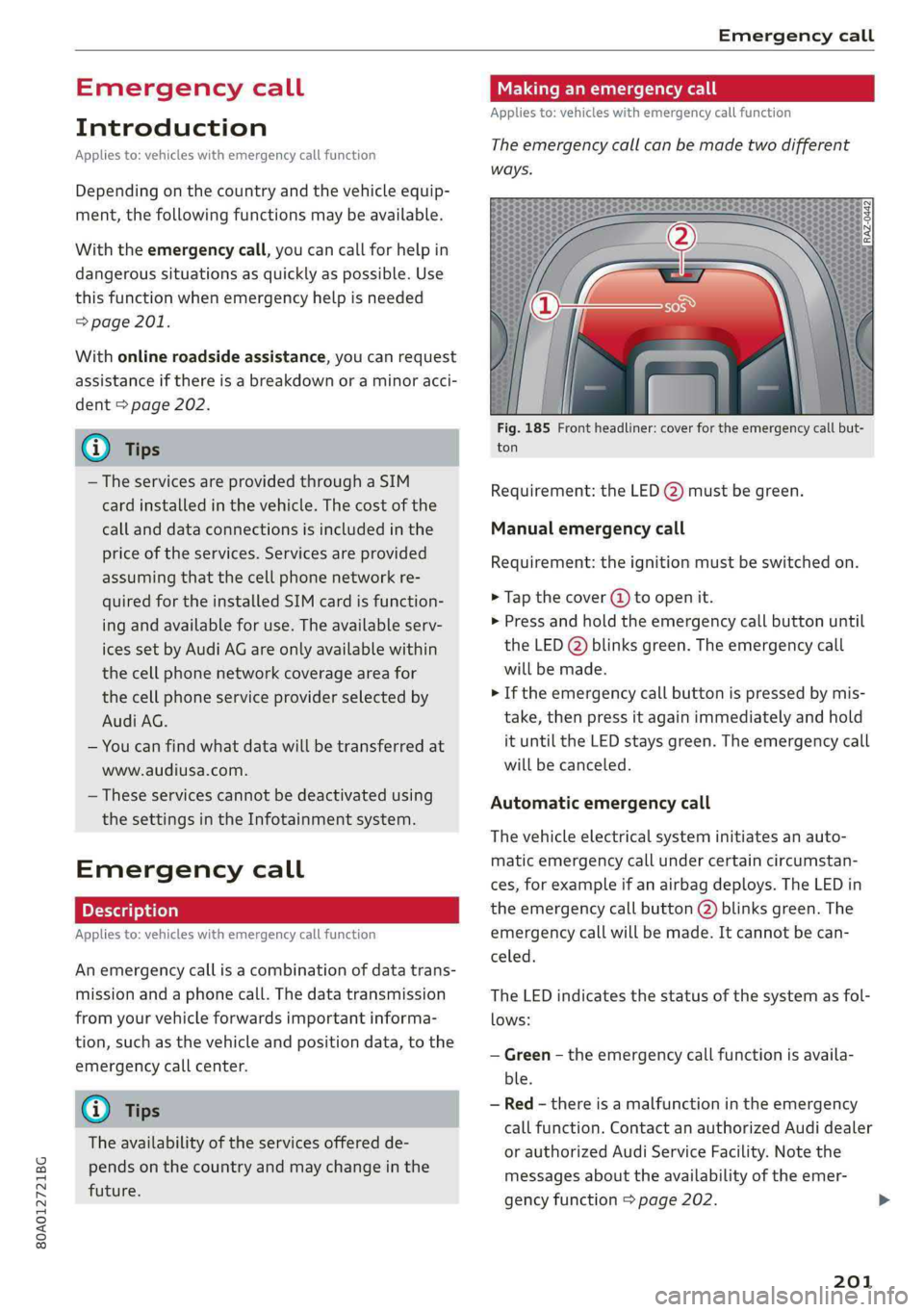
Theemergencycallcanbemadetwodifferent
ways.
Fig.185Frontheadliner:coverfortheemergencycallbut-
ton
Requirement:theLED@)mustbegreen.
Manualemergencycall
Requirement:theignitionmustbeswitchedon.
>Tapthecover(4)toopenit.
>Pressandholdthe emergencycallbuttonuntil
theLED()blinksgreen.Theemergencycall
willbemade.
>Iftheemergencycallbuttonispressedbymis-
take,thenpressitagainimmediatelyandhold
ituntiltheLEDstaysgreen.Theemergencycall
willbecanceled.
Automaticemergencycall
Thevehicleelectricalsysteminitiatesanauto-
matic emergencycallundercertaincircumstan-
ces,forexampleifanairbagdeploys.TheLEDin
the emergencycallbutton(2)blinksgreen.The
emergencycallwillbe made.Itcannot becan-
celed.
TheLEDindicatesthestatusofthesystemasfol-
lows:
—Green-theemergencycallfunctionisavaila-
ble.
—Red-thereisamalfunctionintheemergency
callfunction.ContactanauthorizedAudidealer
orauthorizedAudiServiceFacility.Notethe
messagesabouttheavailability oftheemer-
gencyfunction>page202.
201
Page 204 of 392
Emergencycall
—Off-theemergencycallfunctionisnotavaila-
ble,perhapsbecausenonetworkisavailable.
@)Tips
Iftheemergencycalliscanceledduetoa
poorconnection,thenthesystemautomati-
callytriestoconnectagain.
Appliesto:vehicleswithemergencycallfunction
303|Emergencycallfunction:malfunction!Re-
strictedfunctionality.PleasecontactService
Ifthisindicatorlightturnsonandthismessage
appears,the emergencycallfunctionisrestrict-
ed.Forexample,youcannotcalltheemergency
callcenter,butdatamaystill betransmittedun-
dercertaincircumstances.Drivetoanauthorized
AudidealerorauthorizedAudiServiceFacilityim-
mediatelytohavethemalfunctioncorrected.
&Emergencycallfunction:malfunction!Func-
tionunavailable.PleasecontactService
Ifthisindicatorlightturnsonandthismessage
appears,youcannotmakeanemergencycall.
DrivetoanauthorizedAudidealerorauthorized
AudiServiceFacilityimmediatelytohavethe
malfunctioncorrected.
Onlineroadside
assistance
Appliesto:vehicleswithonlineroadsideassistance
Anonlineroadsideassistancecall)) isacombina-
tionofdatatransmissionandaphonecall.The
data transmissionfromyourvehicleforwardsim-
portantinformationtothe Audiservicecenter,
suchasthevehicleandpositiondata.
))Theavailabilityoftheservicesoffereddependsonthe
countryandmaychangeinthefuture.
202
Callingonlineroadsideassistance
Appliesto:vehicleswithonlineroadsideassistance
RAZ-0443
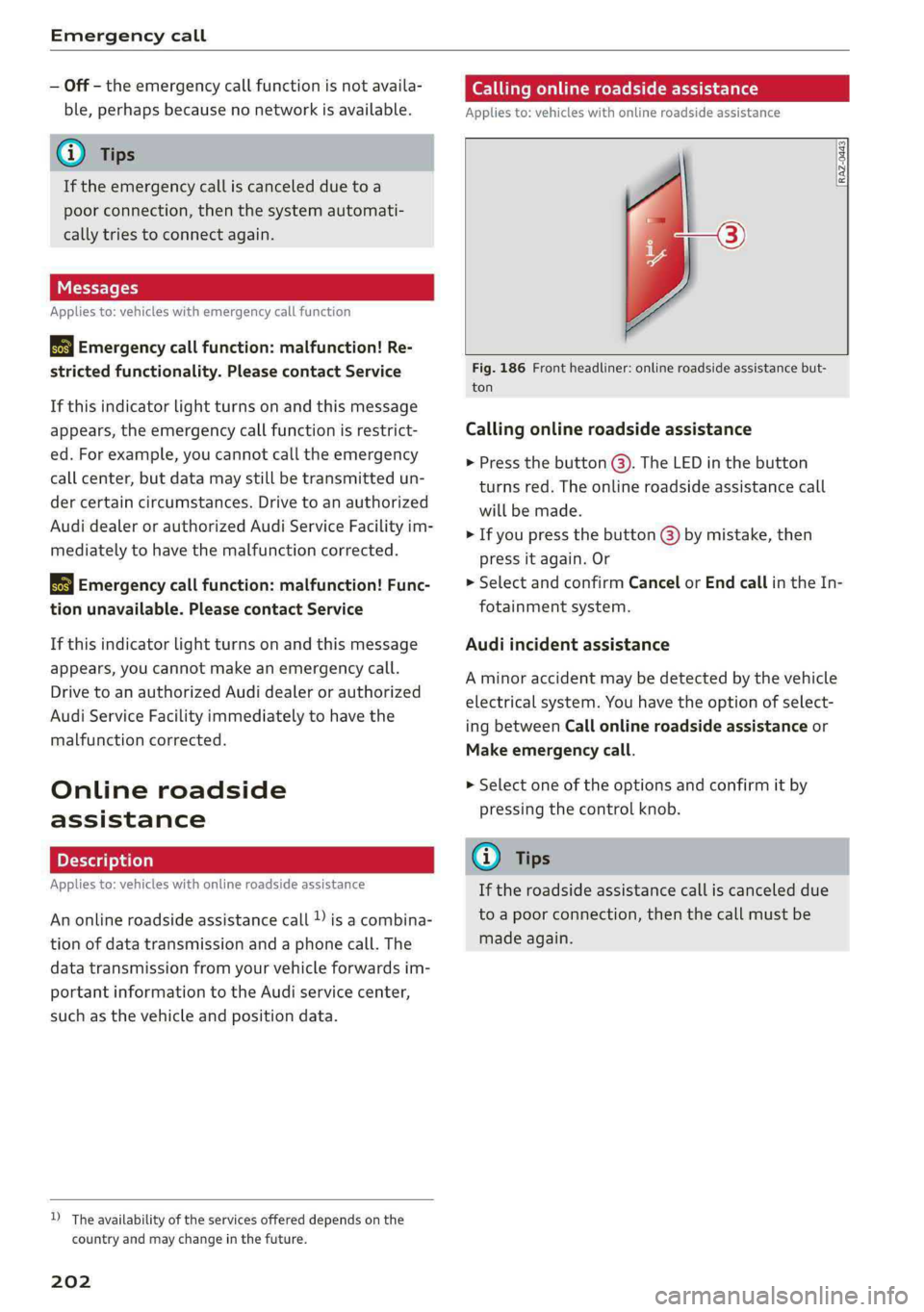
Fig.186Frontheadliner:onlineroadsideassistancebut-
ton
Callingonlineroadsideassistance
>Pressthebutton@).TheLEDinthebutton
turnsred.Theonlineroadsideassistancecall
willbemade.
>Ifyoupressthebutton@)bymistake,then
pressitagain.Or
>SelectandconfirmCancelorEndcallintheIn-
fotainmentsystem.
Audiincidentassistance
Aminoraccidentmaybedetectedbythevehicle
electricalsystem.Youhavethe optionofselect-
ingbetweenCallonlineroadsideassistanceor
Makeemergencycall.
>Selectoneoftheoptionsandconfirmitby
pressingthecontrolknob.
G)Tips
Iftheroadsideassistancecalliscanceleddue
toapoorconnection,thenthecallmustbe
madeagain.
Page 214 of 392
Navigation
TheMMInotifiesyouwhenyouareapproaching
selectedpointsofinterestwhenthisfunctionis
switchedonM.YoucanalsohaveaNotification
tone.
Presentationmode
ThePresentationmodehelpsyoutoeffectively
planatripandfollowtheplannedroutewithout
movingthevehicle.Youcan useSelectstarting
pointwhenyouwouldliketocalculatearoute
startingfromalocationotherthanthevehicle
position, forexample.StartPresentationmode
tosimulaterouteguidance.
Routecriteria
Appliesto:vehicleswithnavigationsystem
»[0]»[8]
>i)<(a
RAH-8472
Appliesto:vehicleswithnavigationsystem
>Pressthe [NAV/MAP]buttonrepeatedlyuntil
theEnterdestinationmenuisdisplayed
=>page203,fig.187.
>Select:rightcontrolbutton>Voiceguidance.
Voiceguidance:voiceguidancecanbeComplete
orShortened.WiththeTrafficfunction,voice
guidancepromptsareonlygivenwhenthereare
trafficincidentsonyourroute.WhenOffisse-
lected,novoiceguidanceisgiven.
Voiceguidanceduringphonecall:voiceguidance
duringaphonecallcan be switchedonoroff.
Entertainmentfader:see>page250.
Voiceguidancevolume:youcanadjustthevol-
umeduringvoiceguidanceusingtheOn/Offknob
=page152Youcanalsofindadditionalinforma-
tionunder>page250.
Map
Appliesto:vehicleswithnavigationsystem
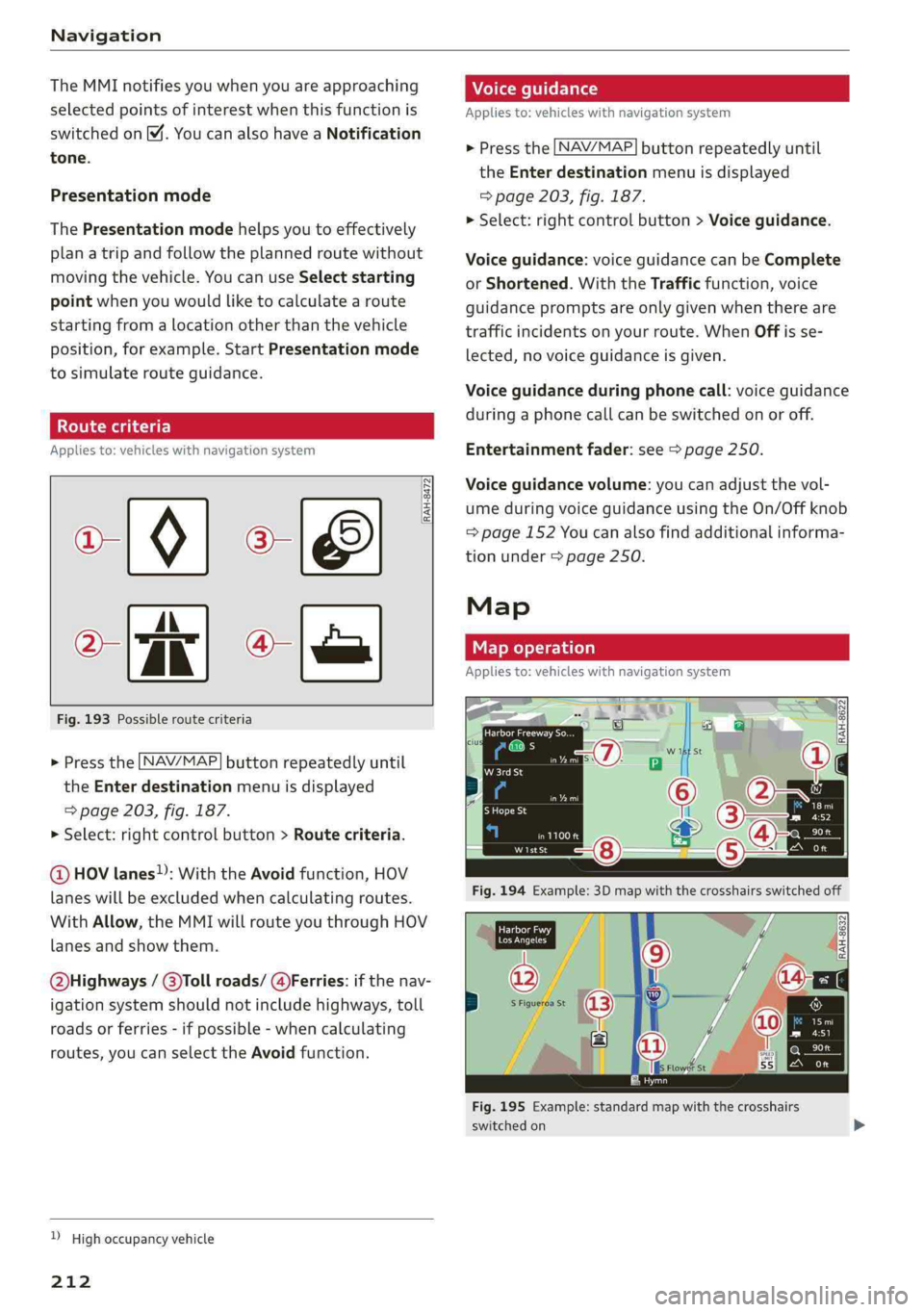
Fig.193Possibleroutecriteria
>Pressthe LNAV/MAP]buttonrepeatedlyuntil
the Enterdestinationmenuisdisplayed
=>page203,fig.187.
>Select:rightcontrolbutton>Routecriteria.
@HOVlanes”:WiththeAvoidfunction,HOV
laneswillbe excludedwhencalculatingroutes.
WithAllow,theMMIwillrouteyouthroughHOV
lanesandshowthem.
Q@bighways/@)Tollroads/@)Ferries:ifthenav-
igationsystemshould notincludehighways,toll
roadsorferries-ifpossible-whencalculating
routes,youcanselecttheAvoidfunction.
)Highoccupancyvehicle
212
Giro
eek
W1stSt
Fig.195Example:standardmapwiththecrosshairs
switchedon
Page 223 of 392
80A012721BG
Radio
Radiofunctions
etme)4at1a)
Appliesto:vehicleswithfreetextsearch
Usingthefreetextsearch,youcanselecttheor-
derthatthesearchtermsareenteredinthein-
putfield.Searchin allfrequencybandsforasta-
tionnameorprogramtype,suchasNews.
DTaP
Teaee
aTTaal)
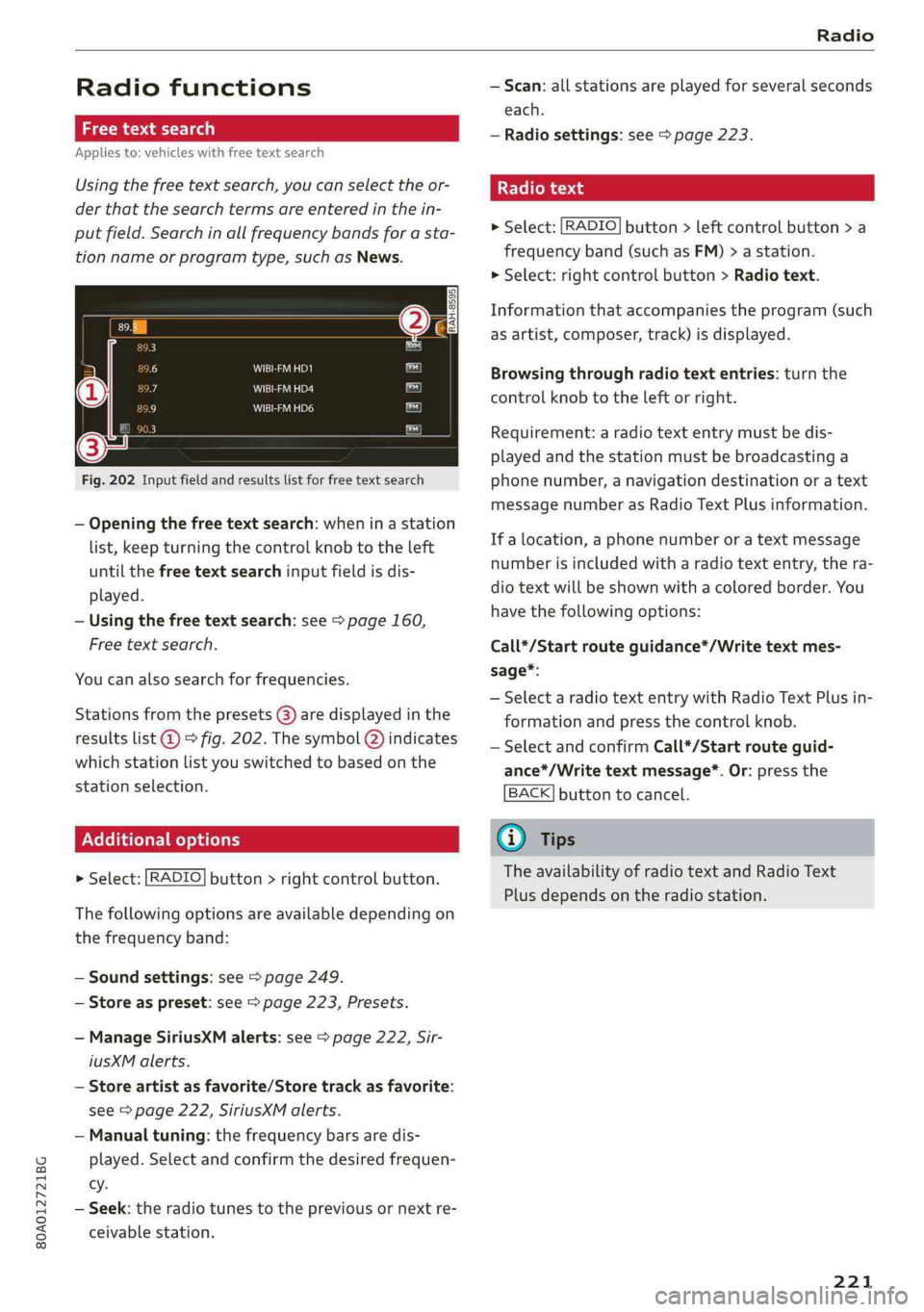
Fig.202Inputfieldandresultslistforfreetextsearch
—Openingthefreetextsearch: wheninastation
list,keepturningthecontrolknobtotheleft
untilthefreetextsearchinputfieldisdis-
played.
—Usingthefreetextsearch:see>page160,
Freetextsearch.
Youcanalsosearchforfrequencies.
Stationsfromthepresets(3)aredisplayedinthe
resultslist@)>fig.202.ThesymbolQ)indicates
whichstationlistyouswitchedtobasedonthe
stationselection.
EX]
naloptions
>Select:[RADIO]button>rightcontrolbutton.
Thefollowingoptionsareavailabledependingon
thefrequencyband:
—Soundsettings:see>page249.
—Storeaspreset:see>page223,Presets.
—ManageSiriusXMalerts:see>page222,Sir-
iusXMalerts.
—Storeartistasfavorite/Storetrackasfavorite:
see>page222,SiriusXMalerts.
—Manualtuning:thefrequencybarsaredis-
played.Selectandconfirmthedesiredfrequen-
cy.
—Seek:theradiotunestothepreviousornextre-
ceivablestation.
—Scan:allstationsareplayedforseveralseconds
each.
—Radiosettings:see>page223.
Radiotext
>Select:[RADIO]button>leftcontrolbutton>a
frequencyband(suchasFM)>astation.
>Select:rightcontrolbutton>Radiotext.
Informationthataccompaniestheprogram(such
asartist,composer,track)isdisplayed.
Browsingthroughradiotextentries:turnthe
controlknobtotheleftorright.
Requirement:aradiotextentrymustbedis-
playedandthestationmustbebroadcastinga
phonenumber,anavigationdestinationoratext
messagenumberasRadioTextPlusinformation.
If alocation,aphonenumberoratextmessage
numberisincludedwitharadiotextentry,thera-
diotextwillbeshownwithacoloredborder.You
havethefollowingoptions:
Call*/Startrouteguidance*/Writetextmes-
sage*:
—SelectaradiotextentrywithRadioTextPlusin-
formationandpressthecontrolknob.
—SelectandconfirmCall*/Startrouteguid-
ance*/Writetextmessage*.Or:pressthe
BACK]buttontocancel.
G)Tips
TheavailabilityofradiotextandRadioText
Plusdependsontheradiostation.
221
Page 230 of 392
Media
—Thestatusofthedeletingprocessisshownin
theMMI.Jukeboxplaybackstopsduringthede-
letingprocessandstartsagainautomatically
oncethedeletioniscomplete.
@)Note
Donotimportaudio/videofileswhentheen-
gineisturnedoffbecausethiswilldrainthe
vehiclebattery.
@)Tips
—TracksfromaudioCDscannotbeimported
totheJukeboxforlegalreasons.
—Filesthathavealreadybeenimportedare
automaticallyrecognizedandcannotbe
copiedtotheJukeboxagain.
—Itisnotpossible toplay audio/video*files
intheCD/DVD*drivewhileimportingthem.
— TheJukeboxdoesnotprovidean export
functionduetolegalreasons.
—Filesortrackswithoutadditionalstoredin-
formationarelistedasUnknown.Audirec-
ommendsaddingadditionalinformation
(such asID3tags)toaudiofiles.
—ResettheJukeboxtothefactorydefaultset-
tingswhensellingyourvehicle>page246.
Bluetoothaudioplayer
Appliesto:vehicleswithBluetoothaudioplayer
WiththeBluetoothaudioplayer,youcanplay
musicwirelesslyfrom yourBluetooth-capable
device(suchasacellphone)throughtheMMI.
Requirement:thevehiclemustbestationaryand
theignitionmustbe switchedon.TheBluetooth
settingswillopenonyourmobiledeviceduring
theconnectionsetup.TheBluetoothfunctionand
visibilityoftheMMI>page248andmobilede-
vicemustbe switchedon.TheBluetoothaudio
player>page248mustbe switchedoninthe
MMI.
—ConnectingaBluetoothplayer:pressthe
MEDIA]button.Presstheleftcontrolbutton
untilthesourcesoverviewisdisplayed.Select
andconfirmBluetoothaudioplayer@)
=>page234,fig.211.
228
—Ifnecessary,selectandconfirm,Notconnected
>ConnectBluetoothaudioplayer.TheBlue-
toothdevicesearchstarts.Followtheinstruc-
tionsintheMMI.
—SelectandconfirmthedesiredBluetoothdevice
fromthelist.TheMMIgeneratesaPINforthe
connection.
—SelectandconfirmYes.
—EnterthePINforconnectingonyourBluetooth
device.Or:ifthePINisalreadydisplayedon
yourBluetoothdevice,confirmitintheBlue-
toothdeviceandintheMMI.Thetimeallowed
forenteringthePINislimitedtoapproximately
30seconds.
Themediaisstartedandoperatedthroughthe
mobiledeviceortheMMI,dependingonthede-
vicebeingused.
(i)Tips
—Checkforanyconnectionrequestsonyour
Bluetoothdevice.
—MultipleBluetoothaudioplayerscan be
connectedtotheMMI,butonlyonemobile
devicecanbeactive.
—BluetoothprotocolsAVRCP(1.0/1.3/1.4)
andA2DParesupported.
—NotethevolumesettingonyourBluetooth
device.Audirecommendssettingyourmo-
biledevicetothemaximumvolumewhen
usingitasaBluetoothaudioplayer.
— Thesupportedmediafunctions(suchas
shuffle)dependontheBluetoothdevicebe-
ingused.
—Formoreinformationonsupporteddevices,
visitwww.audiusa.com/bluetoothorcon-
tactanauthorizedAudidealerorauthorized
AudiServiceFacility.
Page 231 of 392
80A012721BG
Media
Wi-Fiaudioplayer
Appliesto:vehicleswithWi-Fiaudioplayer
UsingtheWi-Fiaudioplayermediasourceonthe
MMI, youcanconnectandoperateyourWi-Fi-ca-
pablemediaplayer(suchasasmartphone)to
wirelesslyplaymusicfromyourmediaplayerli-
brary.Themediaplayerisconnectedthroughthe
vehicle'sWi-Fihotspot.AUPnPServerapporan
integratedUPnP/DLNAserveronyourmedia
playerisrequiredtoaccessyourmediaplayerli-
brary.
Requirement:theWi-Fifunctiononyourmedia
playermustbe switchedon.ThemyAudiappora
UPnPserverappmustbeinstalledonyourmedia
player.Or:youmustbeusingamediaplayerwith
anintegratedUPnP/DLNAserver.
—Connectingamediaplayer:pressthe[MEDIA
button.Presstheleftcontrolbuttonuntilthe
sourcesoverview>page234isdisplayed.Se-
lectandconfirm Wi-Fiaudioplayer(7)
=>page234,fig.211.
—Ifnecessary,selectandconfirmWi-Fiturned
off>TurnonWi-FitoactivateWi-Fiinthe
MMI.SelectWi-Fisettings,ifnecessary.Select
thesamesettingsonthewirelessmediaplayer
thatareusedfortheWi-Fihotspot.
—StartingtheWi-Fiaudioplayer:Startthe
myAudiapporanUPnPserverapp,orallow
mediasharingonyourdevice.
Operatingthemediaplayer:themediaplayeris
operatedthroughtheMMI.
—Presstheleftcontrolbuttonrepeatedlyuntil
theFoldersmenuitemappears.Selectandcon-
firmFolders.
—Playingmusicfromthemediaplayer:select
andconfirmMediacenter.
Webradio:see>page230.
objects,theycouldbethrownaroundthein-
sideofthevehicleinacrashandcauseseri-
ousinjuries.Storethesetypesofdevicesse-
curelywhiledriving.
—Donotuseanywirelessdevicesonthefront
seatswithinrangeoftheairbagswhiledriv-
ing.Also readandfollowthewarningsin
=page270,Frontairbags.
ZAWARNING
—Asthedriver,donotallowusageoftheWi-
Fihotspottodistractyoufromdriving,as
thiscouldincreasetheriskofanaccident.
—Itisonlysafe tousetablets,laptops,mobile
devicesandothersimilardeviceswhenthe
vehicleisstationarybecause,likeallloose
C)Note
Alwaysfollowtheinformationfoundin>@in
Generalinformationonpage192.
G)Tips
—Alwaysreadthechapter>page192,Audi
connect.
—PleasenotethataWi-Ficonnectiondoes
notautomaticallymakeitpossible touse
the
Internet.Foradditionalinformation,
see>page193.
—Toavoidinterruptionsduringplayback,de-
activatethepowersavingfunctiononthe
mediaplayer orconnectittoacharger.
—Theloadingtimesfortheaudiodatadepend
onthemediaplayerusedandthenumberof
filesthatitcontains.
—Amaximumof2,000entriesperdirectory
aredisplayedintheMMI.
—Songsdownloadedforofflineuseusingmu-
sicstreamingservicesarestoredonyour
mobiledevice(suchasasmartphone)and
maybeDRMprotected.TheWi-Fiaudio
playerwillnotplayDRMprotectedfiles.
—ContactanauthorizedAudidealeror au-
thorizedAudiServiceFacilityforadditional
informationontheWi-Fiaudioplayer.
229
Page 233 of 392
80A012721BG
Media
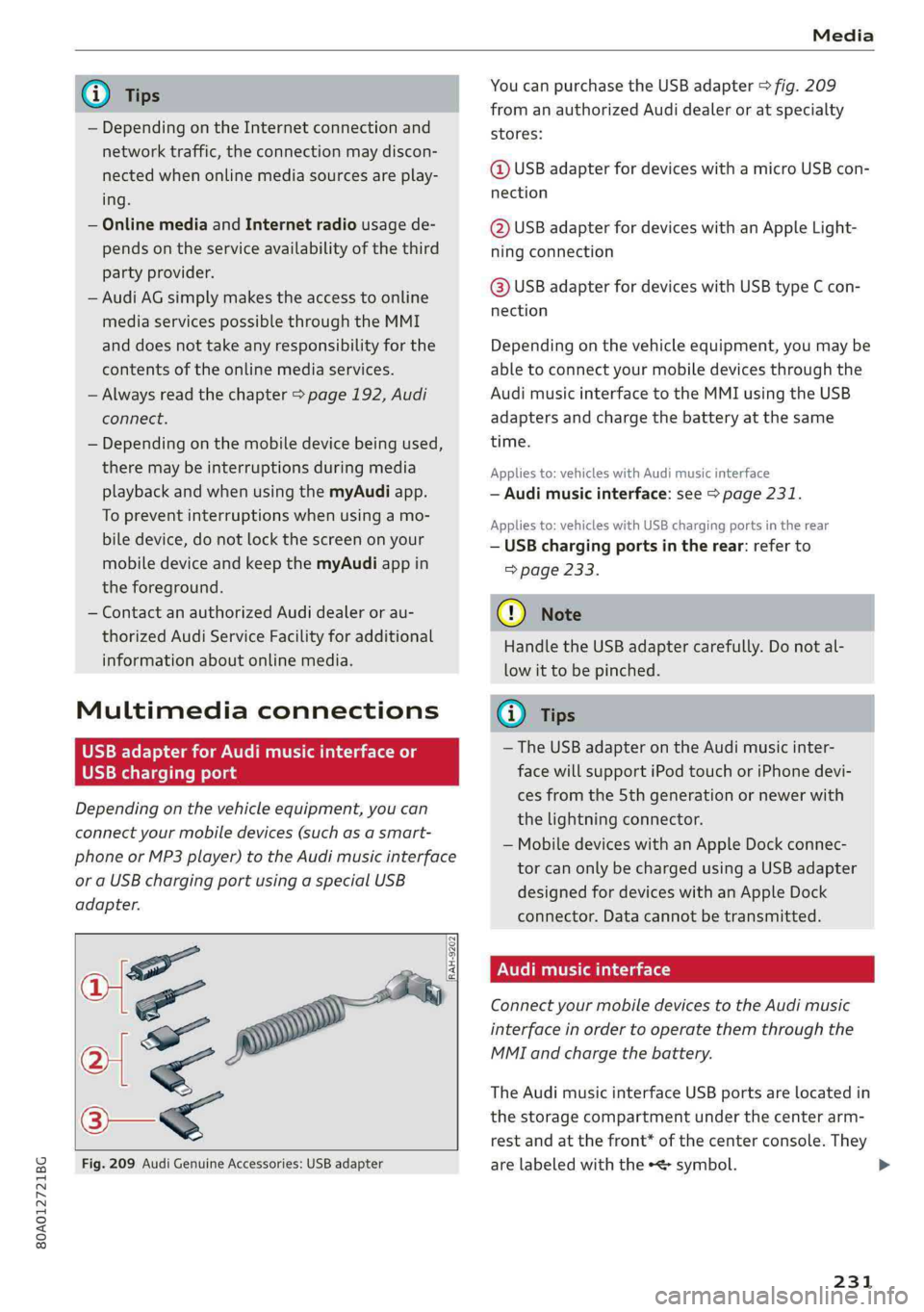
@TipsYoucanpurchasetheUSBadapter>fig.209
fromanauthorizedAudidealeroratspecialty
— Depending ontheInternetconnectionandstores:
networktraffic,the connectionmaydiscon-
nectedwhenonlinemediasourcesareplay-@USBadapterfordeviceswithamicroUSBcon-
ing.nection
—OnlinemediaandInternetradiousagede-@USBadapterfordeviceswithanAppleLight-
pendsontheserviceavailabilityofthethirdningconnection
partyprovider.
—AudiAGsimplymakestheaccesstoonlinehaaSeadsterfardevicesaitUSBGmeEcon
mediaservicespossiblethroughtheMMInection
anddoesnottakeanyresponsibilityfortheDepending onthevehicleequipment,youmaybe
contentsoftheonlinemediaservices.abletoconnectyourmobiledevicesthroughthe
—Alwaysreadthe chapter>page192,AudiAudimusicinterfacetotheMMIusingtheUSB
connect.adaptersandchargethebatteryatthesame
— Depending onthemobiledevicebeingused, time.
theremaybeinterruptionsduringmediaAppliesto:vehicleswithAudimusicinterface
playbackandwhenusingthemyAudiapp.—Audimusicinterface:see>page231.
TopreventinterruptionswhenSSeeAppliesto:vehicleswithUSBchargingportsintherear
biledevice,donotlockthescreenonyour—USBchargingportsintherear:referto
mobiledeviceandkeepthemyAudiappin>page233.
theforeground.
—ContactanauthorizedAudidealeror au-@)Note
thorizedAudiServiceFacilityforadditional
HandletheUSBadaptercarefully.Donotal-
informationaboutonlinemedia.
lowittobepinched.
MultimediaconnectionsG)Tips
—TheUSBadapteronthe Audimusicinter-
USBchargingportfacewillsupportiPodtouchoriPhonedevi-
cesfromthe 5thgenerationornewerwith
thelightningconnector.
—MobiledeviceswithanAppleDockconnec-
torcanonlybechargedusingaUSBadapter
designedfordeviceswithanAppleDock
connector.Datacannotbetransmitted.
Audimusicinterface
ConnectyourmobiledevicestotheAudimusic
interfaceinordertooperatethemthroughthe
MMIandchargethebattery.
Dependingonthevehicleequipment,youcan
connectyourmobiledevices(suchas asmart-
phoneorMP3player)totheAudimusicinterface
oraUSBchargingportusingaspecialUSB
adapter.
af
a|=
TheAudimusicinterfaceUSBportsarelocatedin
o—«thestoragecompartmentunderthecenterarm-
restandatthefront* ofthecenterconsole.They
Fig.209AudiGenuineAccessories:USBadapterarelabeledwiththe«
[RAH-9202
\
231
Page 234 of 392
Media
TheAudimusicinterfaceAUXinputislocatedin
thestoragecompartmentunderthecenter
armrestandislabeledwithAUX.
USBInput
—Connectingorchargingmobiledevicesusinga
USBadapter:ConnectthematchingUSBadapt-
ertothe AudimusicinterfaceUSBportand
thenconnectittothemobiledevice,forexam-
pleaniPhone.Thebatterywillchargeautomat-
ically.
—DisconnectingamobiledevicefromtheAudi
musicinterface:RemovetheUSBadapterfrom
the AudimusicinterfaceUSBport.
Themediaarestartedandoperatedthroughthe
mobiledeviceortheMMI,dependingonthede-
vicebeingused>page234.
Connectingmultiplemobiledevices:ifamobile
device(suchasasmartphone)isconnectedatthe
respectiveUSBportontheAudimusicinterface,
thenalldevicescanbeusedasa playbacksource.
AUXInput
—Connectingamobiledevice totheAUXinput:
ConnecttheAUXcabletotheAUXinputonthe
Audimusicinterfaceandthenconnectittothe
mobiledevice(forexample,anMP3playerora
smartphone).
—DisconnectingamobiledevicefromtheAUX
input:RemovetheAUXcablefromtheAUXin-
putonthe Audimusicinterface.
—Operation:selectandconfirmtheExternalau-
dioplayersource©)>page234,fig.210.Me-
diaisstartedandoperatedonthemobilede-
vice.
ZAWARNING
Drivingrequiresyourcompleteandundivided
attention.Asthedriver,youhavecompletere-
sponsibilityforsafetyintraffic.Neveroperate
mobiledeviceswhiledriving,becausethisin-
creasestheriskofanaccident.
1)Applies onlytoMTPdevices.DoesnotapplytoAppledevi-
cesandUSBmassstoragedevices.
232
@)Note
—UseaUSBextensioncabletoconnectdevi-
cesthathaveanintegratedUSBconnector
(suchasaUSBstick)topreventdamageto
yourUSBdeviceandthe Audimusicinter-
face.
—Extremelyhighorlow temperaturesthat
canoccurinsidevehiclescandamagemobile
devicesand/orimpairtheirperformance.
Neverleavemobiledevicesinthevehiclein
extremelyhighorlowtemperatures.
G)Tips
—Alwaysfollowtheinformationfoundin
=page59.
—Whenyouswitchtheignitionoff,theUSB
portsarestillsuppliedwithpoweruntilthe
energymanagementintervenes.
—DonotuseanadditionaladapterorUSBex-
tensioncabletoconnectmobiledevicesto
theAudimusicinterfacethatalreadyhavea
cableorthatmustbeconnectedwithaUSB
adapter(>page231).Using anadditional
adapterorUSextensioncablemayimpair
functionality.
—YoucanpurchasetheAUXconnectorcable
fromanauthorizedAudidealeror atspe-
cialtystores.
—Audirecommendssettingthevolumeofa
mobiledeviceconnectedtotheAUXinputto
approximately70%ofthemaximumvol-
ume.
—Functionalityisnotguaranteedformobile
devicesthatdonotconformtotheUSB2.0
specification.
—USBhubsarenotsupported.
—SomeversionsoftheiPodsuchastheiPod
shufflecannotbeconnectedtotheUSB
adapterfordeviceswithAppleDockconnec-
tor.ConnectthesedevicesusingaAUXcon-
nectorcable.
—Changedcontentonamobiledevice»)that
isconnectedtotheAudimusicinterface
maynotbedisplayedinthemediacenter.In>
Page 235 of 392
80A012721BG
Media
thiscase,resettheMediasettingsbackto
Factorysettings>page246.
—VideoplaybackthroughtheAudimusicin-
terfaceisonlysupportediftheconnected
deviceisrecognizedasaUSBstoragedevice
(forexampleaUSBstick).Appledevicesand
MTPdevices(such assmartphones)arenot
recognizedasUSBstoragedevices.
—iPod oriPhonemalfunctionsalsoaffectthe
operationoftheMMI.ResetyouriPodor
iPhoneifthishappens.
—AudirecommendsupdatingtheiPod or
iPhonesoftwaretothelatestversion.For
importantinformationonoperatingyour
iPod oriPhone,refertotheuserguidefor
thedevice.
— TheUSBadapteronthe Audimusicinter-
facewillsupportiPodtouchoriPhonedevi-
cesfromthe5thgenerationornewerwith
thelightningconnector.
—Formoreinformationaboutthe Audimusic
interfaceandsupporteddevices,checkthe
Audidatabaseformobiledevicesatwww.
audiusa.com/mp3orcontactanauthorized
AudidealerorauthorizedAudiServiceFa-
cility.
USBchargingportsintherear
Appliesto:vehicleswithUSBchargingportsintherear
Youcanchargethebatteryon yourmobiledevice
throughaUSBchargingport.
TwoUSBchargingportsarelocatedatthebackof
thecenterconsole.
—USBadapter:referto>page231,USBadapter
forAudimusicinterfaceorUSBchargingport.
—ChargingamobiledeviceusingtheUSB
adapter:connectyourmobiledevice toaUSB
chargingportusingasuitableUSBadapter.
—Disconnectingamobiledevicefromthecharg-
ingport:removetheUSBadapterfromtheUSB
chargingport.
—Disconnectingmobiledeviceswith anApple
Dockconnector:removetheAppleDockcon-
nectorfromtheAppledevicewiththerelease
tabspressedin.
ZAWARNING
Drivingrequiresyourcompleteandundivided
attention.Asthedriver,youhavecompletere-
sponsibilityforsafetyintraffic.Neveroperate
yourmobiledeviceswhiledriving,because
thisincreasestheriskofanaccident.
@)Note
Extremelyhighorlowtemperaturesthatcan
occurinsidevehiclescandamagemobiledevi-
cesand/orimpairtheirperformance.Never
leavemobiledevicesinthevehicleinex-
tremelyhighorlowtemperatures.
G)Tips
—Inpreparationatthetimeofprinting.
—Alwaysfollowtheinformationfoundin
=>page59.
—Whenyouswitchtheignitionoff,theUSB
portsarestillsupplied withpoweruntilthe
energymanagementintervenes.
—DonotuseanyadditionalUSBextensionca-
blesoradapterstoconnectmobiledevices
totheUSBchargingport thathavealready
beenconnectedbyaUSBadapter.Usingan
additionaladapterorUSextensioncable
mayimpairfunctionality.
— USBhubsarenotsupported.
—Refertothemanufacturer'soperatingman-
ual forimportantinformationregardingthe
operationofyourmobiledevice.
—Correctfunctionofallmobiledevicescan-
notbeguaranteed.
—Thevehiclebatterydrainswhenmobilede-
vicesareturnedonbuttheengineisoff.
Tat)eaedeSelaCol
Appliesto:vehicleswith Rear SeatEntertainmentpreparation
TheRear SeatEntertainmentpreparationin-
cludescablesandamountforAudiEntertain-
mentmobileinthedriver'sandfrontpassenger's
seatbackrests.
ThesuitableAudiEntertainmentmobileRear
SeatEntertainmentpackageisavailablethrough
AudiGenuineAccessories.
233
>