phone AUDI Q5 2019 Owner's Guide
[x] Cancel search | Manufacturer: AUDI, Model Year: 2019, Model line: Q5, Model: AUDI Q5 2019Pages: 392, PDF Size: 99.86 MB
Page 189 of 392
80A012721BG
Telephone
Forward
Theselectede-mailcanbeforwardedtoadiffer-
entrecipient.
Deletethismessage*
Theselectede-mailcanbedeleted.
Readout»)
YoucanhavetheMMIreadanopene-mail.
E-mailsettings*
Todisplaywhenanewe-mailisreceived,activate
theE-mailnotifications.Newe-mailsareindicat-
edwithanenvelope&intheInfotainmentsys-
temdisplaystatusline.
Connectionmanager
See>page246.
Bluetoothsettings*
See>page248.
Onlinesettings*
See>page248.
Wi-Fisettings
See>page198.
Telephonesettings
See>page189.
@)Tips
—MessagesthataredeletedintheMMIare
alsoautomaticallydeletedintheconnected
cellphone.
—You cannotreadanymessageswhiledriv-
ing.
Listeningtovoicemail
Appliesto:vehicleswithtelephone
>Select:[MENU]button>Telephone>leftcon-
trolbutton.SelectandconfirmCalllist/Direc-
tory/Favorites>Voicemail.
Notavailableinalllanguages.
—Enteringthevoicemailnumber:enterthede-
sirednumber.SelectandconfirmOK.
—Dialingthevoicemailnumber:selectandcon-
firmVoicemail.
@)Tips
—Thisservicemustbesetupandactivatedin
advancebythecellphoneserviceprovider.
Youcanobtainmoreinformationfromyour
cellphoneserviceprovider.
— Thevoicemailnumberdependsonthecell
phoneserviceprovider.
Directory
Openingthedirectory
Appliesto:vehicleswithtelephone
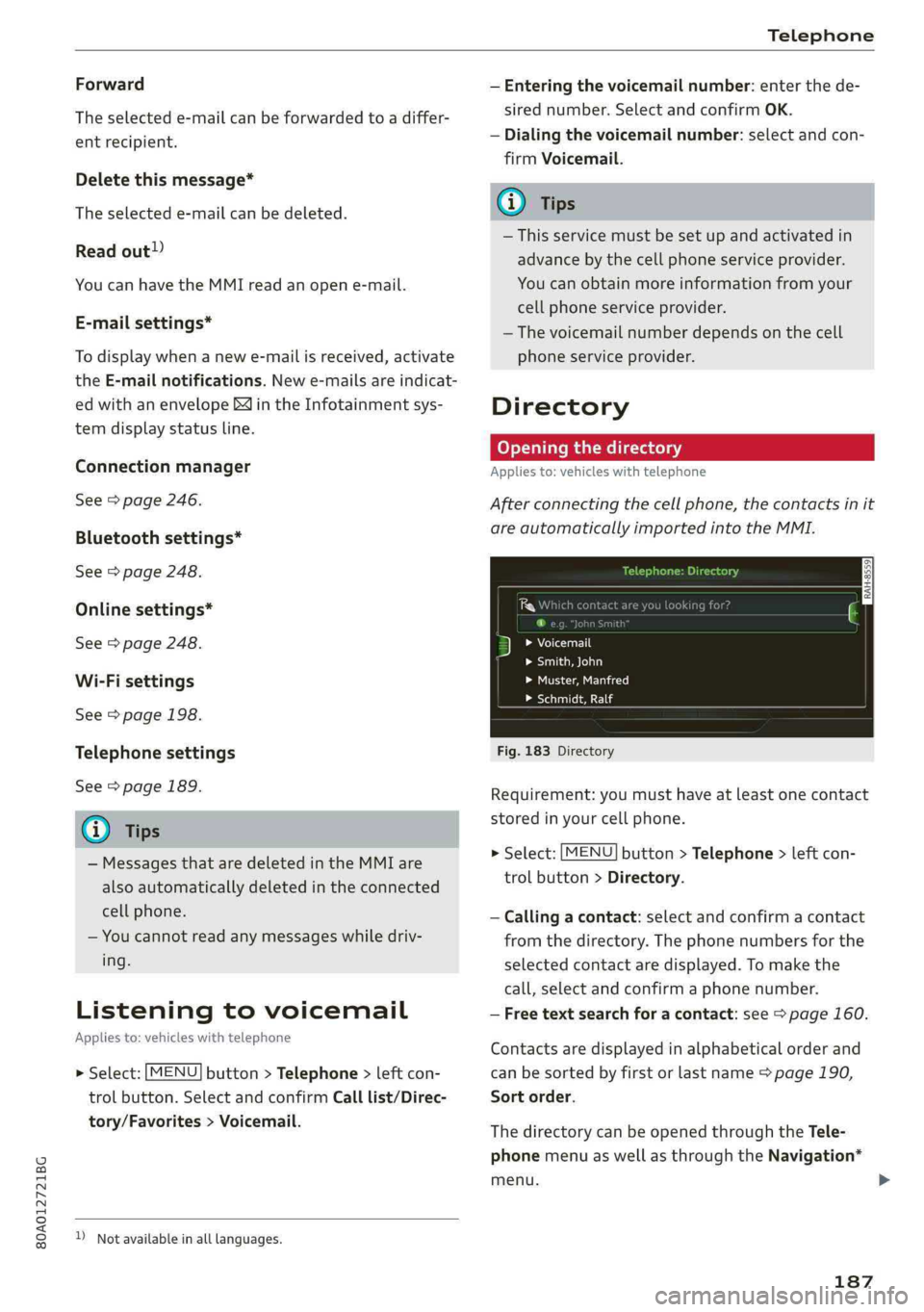
Afterconnectingthecellphone,thecontactsinit
areautomaticallyimportedintotheMMI.
Pw
FYLaolecuirls
>Smith,John
Peet)
LaLe
Fig.183Directory
Requirement:youmusthaveatleastonecontact
storedinyourcellphone.
>Select:[MENU]button>Telephone>leftcon-
trolbutton>Directory.
—Calling acontact:selectandconfirmacontact
fromthedirectory.Thephonenumbersforthe
selectedcontactaredisplayed.Tomakethe
call,selectandconfirmaphonenumber.
—Freetextsearchforacontact:see>page160.
Contactsaredisplayedinalphabeticalorderand
canbesortedbyfirstorlastname>page190,
Sortorder.
ThedirectorycanbeopenedthroughtheTele-
phonemenuaswellasthroughtheNavigation*
menu.
187
Page 190 of 392
Telephone
@Tips
—Additionalinformationonfreetextsearches
canbefoundunder>page160.
—Checkforapossiblerequesttosynchronize
onyourcellphone.Requeststosynchronize
thedirectorymustbeconfirmedso that
yourcellphonecontactscan beloadedinto
theMMI.
— ThecontactdisplayintheMMIdependson
themobiledevicebeingused.Formorein-
formationonsupportedmobiledevices,vis-
itwww.audiusa.com/bluetoothorcontact
anauthorizedAudidealerorauthorizedAu-
diServiceFacility.
—Pleasenotethatonlythedirectoryfromthe
primaryphone*isalwaysdisplayed.
— Thecontactsfromthemobiledevicemay
notbetransferredinalphabeticalorder.If
therearetoomanyentries,contactswith
differentfirstlettersmaybemissinginthe
MMI.
—ThecontactsinthelocalMMImemoryare
alwaysvisibleandcan be accessedbyother
users.
Freetextsearchforacontact
Appliesto:vehicleswithtelephone
MENU >Select:button>Telephone>leftcon-
trolbutton>Directory.
>Tolimitthesearch,entertheinitialsofthecon-
tactbeingsearchedwitheachinitialseparated
byaspaceintheinputfield.Enteradditional
lettersifnecessary.
> Selectandconfirmacontactfromthedirectory.
Thephonenumbersfortheselectedcontactare
displayed.
>Tomakethecall,selectandconfirmaphone
number.
G)Tips
—Youcanscrollthroughlonglistsquicklyby
turningthecontrolknobquickly.Thescroll-
ingspeeddependsonthenumberoflisten-
tries.
—Additionalinformationonfreetextsearches
canbefoundunder>page160.
188
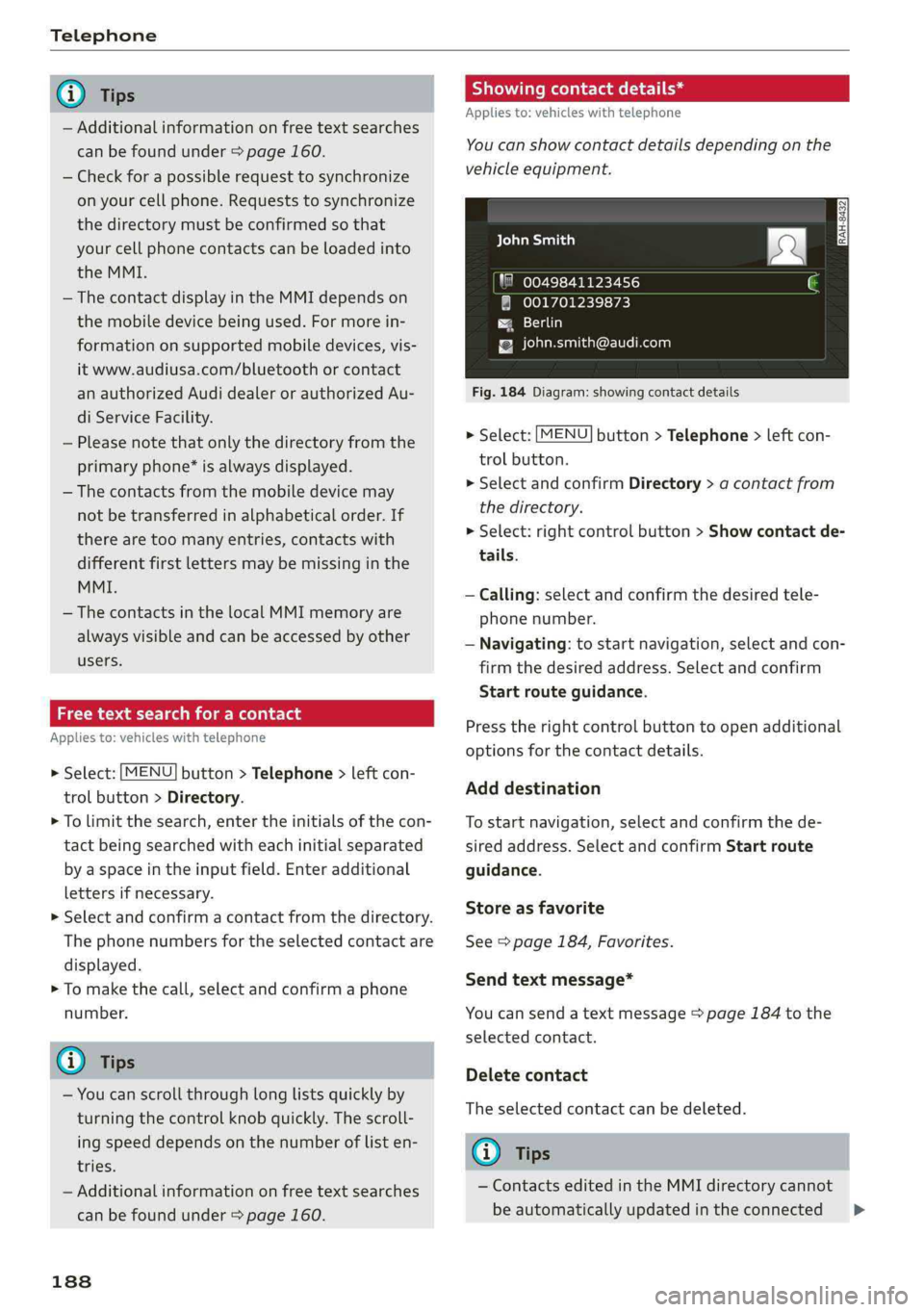
Showingcontactdetails*
Appliesto:vehicleswithtelephone
You canshowcontactdetailsdepending onthe
vehicleequipment.
aCeyealian)
"80049841123456
@001701239873
Paes)
{[email protected]
Fig.184Diagram:showingcontactdetails
>Select:[MENU
trolbutton.
>SelectandconfirmDirectory>acontactfrom
thedirectory.
>Select:rightcontrolbutton>Showcontactde-
tails.
button>Telephone>leftcon-
—Calling: selectandconfirmthedesiredtele-
phonenumber.
—Navigating:tostartnavigation,selectandcon-
firmthedesiredaddress.Selectandconfirm
Startrouteguidance.
Presstherightcontrolbuttontoopenadditional
optionsforthecontactdetails.
Adddestination
Tostartnavigation,selectandconfirmthede-
siredaddress.SelectandconfirmStartroute
guidance.
Storeasfavorite
See>page184,Favorites.
Sendtextmessage*
Youcansendatextmessage>page184tothe
selectedcontact.
Deletecontact
Theselectedcontactcan bedeleted.
Gi)Tips
—ContactseditedintheMMIdirectorycannot
beautomaticallyupdatedintheconnected>
Page 191 of 392
80A012721BG
Telephone
cellphone.Audirecommendseditingcell
phonecontactsdirectlyinthecellphone.
—OnlythecontactsinthelocalMMImemory
canbeeditedordeleted.
Importingandexportingcontacts
Appliesto:vehicleswithtelephone
ContactsinvCardformat(.vcf)canbeimported
intothedirectoryorexported.
Requirement:anSDcard mustbeinsertedinone
oftheSDcardreaders*>page226oraUSBstor-
agedevicemustbeconnectedtothe Audimusic
interface*>page231ortherequirementsfor
AudiconnectInfotainmentservices*mustbe
met>page192.
>Select:[MENU]button>Telephone>leftcon-
trolbutton>Directory.
>Select:rightcontrolbutton>Contactsettings.
—Importingcontactsfromastoragedevice:se-
lectandconfirmImportcontacts>SDcard
1/SDcard2orUSBdevice1/USBdevice2>
desiredcontacts>Startimport.
—Exportingcontactstoastoragedevice:select
andconfirmExportcontacts>SDcard1/SD
card2orUSBdevice1/USBdevice2>desired
contacts>Startexport.
—Selectingallcontactsatoncetoimport/
export:selectandconfirmImportcontacts/Ex-
port
contacts>SDcard1/SDcard2orUSBde-
vice1/USBdevice2> All >Startimport/Start
export.
G)Tips
—Alwaysreadthechapter>page192,Audi
connect.
—ForadditionalinformationonthemyAudi
account,visitwww.audiusa.com/myaudi.
— Theimportedcontactsarestoredinthelo-
calmemoryofthedirectory.
—Amaximumof1,000contactscanbeim-
ported.Youcancheckthedirectorymemory
capacityatanytime>page190.
+Dependsontheconnectedcellphone.
—Neversaveimportantdataonmemorycards
orUSBstoragedevices.Audiisnotresponsi-
blefordamagedorlostfilesandmedia.
—Contactsthatweredownloadedfromamo-
biledevicecannotbeexported.
—Thereshouldbenootherfilesor folderson
thestoragemediumcontainingthecontacts
tobeimported.
Additionalsettings
Telephonesettings
Appliesto:vehicleswithtelephone
>Select:[MENU]button>Telephone>rightcon-
trolbutton>Telephonesettings.
Calloptions*
Callforwarding:youcanswitchtheforwarding
ofincomingcallstoyourvoicemailortoanother
phonenumberonandoff.Youcan checkifthe
functionisactivatedordeactivatedwithCheck
status.
Callwaiting:youarealerted toanincomingcall
duringaphonecallwhenthefunctionisswitched
on[M.Youcancheckifthefunctionisactivated or
deactivatedwithCheckstatus.
Sendowntelephonenumber:sendingyour
phonenumberwithanoutgoingcallcanbeacti-
vatedanddeactivated.WiththeNetwork-de-
pendentsetting,thesettinglistedinthecon-
tractwiththecellphoneserviceproviderisused.
ThesettingsonlyapplytotheTelephonemenuin
theMMI.Pleasenotethatthesettingsonyour
mobiledevicewillapplyafterdisconnectingthe
Bluetoothconnection.Youcancheckifthefunc-
tionisactivated ordeactivatedwithChecksta-
tus.
Ringtoneandvolumesettings”)
UsingtheMutetelephonefunction,youcan
switchtheringtoneplaybackthroughtheMMI
speakeronandoff.Youcanplaytheringtonesus-
ingtheRingtonefunction.Selectandconfirm an
entryfromthelist.FortheRingtonevolume/
Messagevolumesettings,see>page250.The
189
Page 192 of 392
Telephone
Microphoneinputlevelcan beadjustedduringa
phonecallusingthecontrolknob.
iG)Tips
—Severalmobiledevicescan bepairedwith
theMMI,butonlytwo*mobiledevicescan
beactivelyconnected.
—TodeleteallpairedBluetoothdevices,the
Bluetoothfunctioncanberesettothefac-
torydefaultsettings>page246.
Additionaloptions
>Select:[MENU]button>Telephone>rightcon-
trolbutton.
Connectionmanager
See>page246.
Bluetoothsettings*
See>page248.
Onlinesettings*
See>page248.
Wi-Fisettings*
See>page198,Wi-Fisettings.
Directorysettings
Appliesto:vehicleswithtelephone
>Select:[MENU]button>Telephone>leftcon-
trolbutton>Directory>rightcontrolbutton>
Directorysettings.
Memorycapacity
ShowstheMemorycapacityforthedirectory.
Youcanmanageupto17,000contactswiththe
directory.Youcanloadupto4,000contactsfrom
yourcellphoneintoeachdirectory.Youcanalso
importupto1,000contactsfromastoragede-
vice.
Sortorder
Youcansortthecontactsinyourdirectoryalpha-
beticallyaccordingtoLastnameorFirstname.
Importcontacts/Exportcontacts
See>page189.
Downloaddirectory
ToupdatethecontactsintheMMI,youcanman-
uallydownloadyourmobiledevicecontacts.De-
pendingonthemobiledevice,youmayneedto
disconnectandreconnecttheBluetooth connec-
tiontoupdatethecontacts.
Hidecontactswithoutphonenumber
Whenthisfunctionisswitchedon,grayed-out
contacts thathavenophonenumbersstoredfor
themwillbehiddeninthedirectory.
Troubleshooting
Appliesto:vehicleswithtelephone
ProblemSolution
PairingthecellphonetotheMMI|Checkiftherequirementsforconnectingamobiledevicearemet
failed.=>page177.
=>page177.
Or:checkifyouaccidentallydeclinedthe connection setupPINon
yourcellphone.Ifnecessary,repeatthepairingprocess
Afterpairing,notallcontactsor
theMMI.
Avoidusingspecialcharactersinnames.
no
contactshavebeenloadedinto|Avoidusingcontactgroups onyourcellphone.
190
Page 193 of 392

80A012721BG
Telephone
Certaintelephonefunctionsare
grayedoutornotavailable.
Thetelephonefunctionsdependonthemobiledeviceservicepro-
viderandthemobiledeviceyouareusing.Youcanobtainmorein-
formationfromyourcellphoneserviceprovider,inyourcellphone
userguideorinthedatabaseformobiledevicesatwww.audiusa.
com/bluetooth.
Sometelephonefunctionsmay
beswitchedoffornotavailable,
eventhoughthemobiledeviceis
supported.
Oncorporatephones,someBluetoothsettingsmaynot becom-
patibleorthecellphoneBluetoothfunctionmaybedeactivated.
Youcanobtainmoreinformationfromyoursystemadministrator.
191
Page 194 of 392
Audiconnect
Audiconnect
Generalinformation
Dependingonthecountryandthevehicleequip-
ment,thefollowing functionsmaybeavailable:
—AudiconnectInfotainment
—Audiconnectvehiclecontrol
YoucanalsofindmoreinformationonAudicon-
nect
onlineatwww.audiusa.com.
ZA\WARNING
—Toreducetheriskofanaccident,onlyuse
Audiconnectserviceswhenroadandtraffic
conditionspermit.Alwaysreadandfollow
the
notesin>page151,Trafficsafetyinfor-
mation.
—Itisonlysafe tousetablets,laptops,mobile
devicesandothersimilardeviceswhenthe
vehicleisstationarybecause,likeallloose
objects,theycouldbethrownaroundthein-
sideofthevehicleinacrashandcauseseri-
ousinjuries.Storethesetypesofdevicesse-
curelywhiledriving.
—Asthedriver,donotallowusageoftheWi-
Fihotspottodistractyoufromdriving,as
thiscouldincreasetheriskofanaccident.
—Donotuseanywirelessdevicesonthefront
seatswithinrangeoftheairbagswhiledriv-
ing.Alsoreadthewarningsinthechapter
=page270,Frontairbags.
—Toreducetheriskofanaccident,use theAu-
diconnectInfotainmentserviceswithaWi-
Fihotspotonlyintherearseatwhentheve-
hicleisinmotion,oronlywhenthevehicleis
stationary.
@)Note
—Appliesto:embeddedSIMcardusage:The
connectioncostsofAudiconnectInfotain-
mentservicesareincludedinthepriceof
AudiconnectInfotainmentduring thesub-
scriptionperiodwithsomeexceptions.
Pleasenotethattheremaybeadditional
chargeswhenusingsomeservices.Forex-
ample,thisapplies toInternetradio/
podcastsorforInternetconnectionsand
192
servicesthatusetheWi-Fihotspot,suchas
onlinemediasources.Dependingonthe
country,dataplansmayneedtobepur-
chasedfortheseservices>page199.For
additionalinformation,seewww.audiusa.
com/myaudi.
—Incertainsituations,theWi-Fihotspotdata
connectionmaybeestablishedasareplace-
mentfortheSIMcardonyourWi-Fidevice.
Thisfeature dependsontheconfiguration
ofyourWi-Fideviceandoperatingsystem.
Thiscouldresultinfeesdependingonyour
cellphoneserviceprovider,especiallyifyou
areusingthisfeaturewhileabroad.Aflat
ratedataplanisstronglyrecommended.For
moreinformation,contactyourcellphone
serviceproviderorrefertotheowner'sman-
ualforyourWi-Fidevice.
—Youareresponsibleforallprecautionstaken
fordataprotection,anti-virusprotection,
andprotectionagainstlossofdataonmo-
biledevicesthatareused,forexample,to
accesstheInternetthroughtheWi-Fihot-
spot.
G)Tips
—Theavailabilityofservicesdependsonthe
subscription.
—AUDIAGprovidesaccesstoservicesfrom
thirdpartyproviders.Permanentavailability
cannotbe guaranteed,becausethatde-
pendsonthethirdpartyprovider.
—Useofthemostup-to-datemobilenetwork
standardisnotavailableineverycountry.
ContactanauthorizedAudidealeror au-
thorizedAudiServiceFacilityoryourcell
phoneserviceproviderforadditionalinfor-
mation.
—AudiconnectInfotainmentservicesareonly
availablewithinthecellphonenetworkcov-
eragefromyourcellphoneserviceprovider.
—Availability,scope,providers,screendisplay,
andcosts ofservicesmayvarydependingon
thecountry,model,modelyear,enddevice
andrates.
Page 196 of 392
Audiconnect
Saveaspreview
YoucanalsoseeapreviewoftheselectedAudi
connectInfotainmentservicesontheAudicon-
nectInfotainmenthomepage.
Showonmap
Youcanshowselectedcontentsonthemapand
usethemforrouteguidance.
Login
See>page193.
Readout)
YoucanallowtheMMItoreadouttheselected
contents.
Call
If aphonenumberwasassignedtoanentry,you
cancallthenumber,forexampleto reservetick-
ets.
Refresh
ThecontentsfortheselectedAudiconnectInfo-
tainmentservicearerefreshed.
Startrouteguidance
If alocationwassavedwithanentry,youcan use
itasthenavigationdestination.Routeguidance
startsimmediately.
Changesearcharea
Thesetsearchareacanbechangedatanytime.
Additionalinformationonsearchareascan be
foundunder>page206.
ClosingAudiconnectInfotainmentservices
Regardlessofthefunctionselected,youcan
closean AudiconnectInfotainmentserviceat
anytimeandreturn tothehomescreen.
Services
Appliesto:vehicleswithAudiconnectInfotainment
Dependingonthecountryandthevehicleequip-
ment,thefollowingservicesmaybeavailable:
D_Notavailableinalllanguages.
194
Weather
Informationoncurrentweatherconditionsas
wellasweatherforecastsfortheselectedsearch
area.
>SelectandconfirmWeather.
News
>Select:Onlinenews>desirednewsfeed>a
headline.
IfyouloggedintomyAudiinyourvehicle
=>page193,personalizednewsfeedscanbedis-
played.
Twitter
Requirement:Youmusthaveconnectedyourve-
hiclewithmyAudi>page193.Youmusthave
connectedyourmyAudiaccountwithTwitter.
YoucanonlyconnectoneTwitteraccountwith
yourmyAudiaccount.Notallsettingscanbead-
justedintheMMI.Somecanonlybeadjusted
throughtheTwitterwebsite.
>Select:Twitter>leftcontrolbutton>desired
function(forexample,Trends).
ZA\WARNING
Alwaysfollowtheinformationfoundin>A\
inGeneralinformationonpage192.
@Note
Alwaysfollowtheinformationfoundin>@in
Generalinformationonpage192.
Additionaloptions
Appliesto:vehicleswith AudiconnectInfotainment
>Select:[MENU
controlbutton.
button>Audiconnect>right
Dependingontheequipmentandthecountry,
thefollowingoptionsmaybeavailableinthe
overviewofAudiconnectInfotainmentservices:>
Page 197 of 392
80A012721BG
Audiconnect
AboutAudiconnect
Hereyouwillfindlegalinformationregarding
AudiconnectInfotainmentusage.
Login
See>page193.
Connectionmanager
See>page246.
Licensesubscription
Thevalidityandexpirationdateofyourlicenses
aredisplayed.
Refresh
ThecontentoftheselectedAudiconnectInfo-
tainmentserviceortheentireAudiconnectInfo-
tainmentlistisupdated.
Dataprivacy
Requirement:theignitionmustbe switchedon.
Location,vehicle,andpersonal dataaretransmit-
tedwhenusingAudiconnectservices.
Allowingsendingofdata
—SelectandconfirmActivatedataconnection.
Thedatamoduleforthe useofallAudiconnect
serviceswillbeactive.
Restrictingsendingofdata
—SelectandconfirmActivateprivacy.Thedata
connectionislimitedordeactivateddepending
ontheequipment.ThemajorityofAudiconnect
serviceswillnot beavailable.
Thefollowinginterfacesarenotaffectedbythis
setting:Bluetooth,BluetoothLowEnergy(BLE),
Wi-Ficonnection,Audismartphoneinterface
(ASI),NearFieldCommunication(NFC),charging
communication(e-tron),ElectronicTollCollect
(ETC),ifequipped.
@)Note
Alwaysfollowtheinformationfoundin>@in
Generalinformationonpage192.
)Dependsonthecountryand equipment. Theseservices
are availableforalimitedtime.
@Tips
—Ifthetransmissionofdataislimited,data
willstillbetransmittedtoverifysubscrip-
tions.
—Ifthetransmissionofdataislimited,itwill
havethefollowingeffectsontheexchange
ofdataforAudiconnectservicesandemer-
gencycalls,ifequipped:
—Theemergencycallfunctionwillremain
availablewithoutrestrictionsandwillcon-
tinuetotransmitdata.
—Ifanonlineroadsideassistancecallisini-
tiated,nodatawillbetransmitted,buta
callwillbemade.
—IftheGeofencingAlert,SpeedAlert,
and/orValetAlertserviceshavebeenacti-
vatedbythekeyuser,thentheywillre-
mainavailablewithoutrestrictionsand
continuetotransmitdata.
Audiconnectvehicle
controlservices
Appliesto:vehicleswith Audiconnectvehiclecontrol
WithAudiconnectvehiclecontrolservices)),you
canutilizevariousservicesusingthemyAudiapp
oronlineatwww.audiusa.com/myaudi.
Z\WARNING
Alwaysfollowtheinformationfoundin>AV
inGeneralinformationonpage192.
@Tips
—Accessingspecificdataorcontrollingfunc-
tionsremotelydependsonthechargelevel
ofthevehiclebattery.Therefore,these
functionsonlyhavelimitedavailabilityafter
switchingofftheignition.
— AneSIMcardestablishestheInternetcon-
nectionforAudiconnectvehiclecontrol
services.Thecostsforthisareincludedin
thepriceofAudiconnectvehiclecontrol
195
>
Page 198 of 392
Audiconnect
services.Thecellphonenetwork,forexam-
ple,mustbeavailabletouse theseservices.
Appliesto:vehicleswithAudiconnectvehiclecontrol
ForsomeAudiconnectvehiclecontrolservices,
thevehicleownermustbesetupasthekeyuser.
Setkeyuser
Requirement:akeyusermustnotbesetyet.The
ignitionmustbe switchedon.
>Tosetakeyuserforthevehicle,youwillneeda
myAudiaccount.Registeratwww.audiusa.
com/myaudi.
>Linkyourvehicletotheaccountatwww.
audiusa.com/myaudiandthenverifyyour
myAudiaccountimmediatelyinordertouse
the Audiconnectvehiclecontrolservices.
>YoucanalsoverifyyourmyAudiaccountlater.
Loginatwww.audiusa.com/myaudiwithyour
accessinformationandverifyyourmyAudiac-
countinusermanagementusingtheverifica-
tionprocessthatisgiven.
>Select:[MENU]button>Audiconnect>ifnec-
essary,Displayavailablefunctions>rightcon-
trolbutton>Audiconnectusermanagement>
Keyuser>Set keyuser.
>EnteryourmyAudiusernameandthe10-digit
vehiclecode=page29.Thekeyuserisset.You
havetherightstouse the Audiconnectvehicle
controlservices>page196aswellastheabili-
tytomanageothervehiclefunctionsandany
otherusers.
Resettingtheprimaryuser
Ifyouremovethekeyuser,allotherusersand
theirauthorizationswillbedeleted.Itwillno
longerbepossibletouse the Audiconnectvehi-
clecontrolservices.
Requirement:akeyusermustbeset.Theignition
mustbe switchedon.
Select:[MENU]button>Audiconnect>right
controlbutton>Audiconnectusermanagement
>Keyuser>Resetkeyuser.
196
UsingthemyAudiapp
>InstallthemyAudiapponyourmobiledevice
andloginwithyouraccessinformation.
(i)Tips
—Ifyousellyourvehicle,resetthekeyuser
andrestoreallsettings tothefactoryde-
faultsettings>page246.
—Itmayalsobenecessarytoenteryour4-
digitmyAudiPINwhenaccessingsomeAudi
connectvehiclecontrolservices.
—Storethevehiclecodeinasecureplace.It
maybenecessarytore-enterthevehicle
code.
—Payattentiontoupper-andlower-caselet-
terswhenenteringthevehiclecode.
—Ifyoudonot havethe10-digitvehiclecode,
contactanauthorizedAudidealerorauthor-
izedAudiServiceFacility.
Additionaloptions
Appliesto:vehicleswith Audiconnectvehiclecontrol
Licensesubscription
Thevalidityandexpirationdateofyoursubscrip-
tionsaredisplayed.Whenthisfunctionisactivat-
ed,youwillbenotifiedbeforeyoursubscription
expires.
MENU Select:button>Audiconnect>Display
availablefunctions>rightcontrolbutton>Li-
censesubscription.
Warninglevels
Requirement:theprimaryusermusthavesetone
ormorewarninglevels.Secondaryuserscanonly
seeifawarninglevelisactiveornot.
MENU Select:button>Audiconnect>right
controlbutton>Alerts.
Services
Appliesto:vehicleswith Audiconnectvehiclecontrol
Dependingonthecountryandthevehicleequip-
ment,thefollowingservicesmaybeavailable:>
Page 200 of 392
Audiconnect
Dependingonthecountry,vehicleequipment,
andconnectiontype,thefollowingfunctionsmay
beavailable:
Dataconnectionsettings
UsingtheDataconnectionsettingsmenu,you
cansetwhenthesystemshouldconnecttothe
Internet.TheInternetconnectiondisconnects
automaticallyoncetherequested Audiconnect
Infotainmentservicenolongerrequiresanydata.
—Connectionsetup:youcanselectwhenadata
connection should beestablished.
—Audiconnect(MMI):whenthisfunctionis
switchedon,adataconnectionisautomatically
establishedinordertouseAudiconnectInfo-
tainmentservices.
—Wi-Fidevices:whenthisfunctionisswitched
on,youcanallowordenyInternetconnections.
ZAWARNING
Alwaysfollowtheinformationfoundin>A\
inGeneralinformationonpage192.
@)Note
Alwaysfollowtheinformationfoundin>@in
Generalinformationonpage192.
@Tips
Formoreinformationonroamingcharges,
contactyourcellphoneserviceprovider.
Wi-Fisettings
Appliesto:vehicleswithWi-Fihotspot
YoucanusetheMMIasaWi-Fihotspottocon-
nect
uptoeight Wi-FidevicestotheInternet.
Requirement:theignitionmustbe switchedon.
>Select:[MENU]button>Telephone>rightcon-
trolbutton>Wi-Fisettings.
Dependingonthecountryandthevehicleequip-
ment,thefollowing functionsmaybeavailable:
198
Wi-Fi
Whenthisfunctionisswitchedon,theMMIWi-Fi
hotspotisactiveandvisibletootherdevices(for
example,laptopsandcellphones).Youcancon-
nectyourWi-FidevicetotheMMIandusetheIn-
ternetconnectionifnecessary.Ifyouswitchoff
theWi-FiintheMMI,theWi-Fihotspotwillbe
deactivated.Therefore,anyotherdevicesaccess-
ingtheWi-Fihotspotwillnolongerbeconnected
totheWi-Fi.
Networkkey
TheWi-Ficonnectionbetweenyourvehicleand
yourWi-Fideviceisencrypted.Toestablishacon-
nection,youmustenterthefollowingvalues
whensettingupyourwirelessdevice.Youcan
changethemifnecessary.
—Accesspoint(SSID):NameoftheWi-Finet-
work.
—Password:arandompasswordwassetinthe
MMIatthefactory.Thepasswordcanbe
changed.Theencryptionmethodrequiresa
passwordtobeatleasteightcharacterslong.
Chooseasecurepassword.
—Visibletoothers:ThevisibilityofyourWi-Fi
networkcanbeswitchedonandoff.
Z\WARNING
Alwaysfollowtheinformationfoundin>A\
inGeneralinformationonpage192.
()Note
Alwaysfollowtheinformationfoundin©in
Generalinformationonpage192.
G)Tips
InvehicleswithoutAudiconnectInfotain-
ment,theuseoftheWi-Fihotspotisonly
possiblefortheWi-Fiaudioplayer*.Adata
connectiontotheInternetcannotbeestab-
lished.