phone AUDI Q5 2019 User Guide
[x] Cancel search | Manufacturer: AUDI, Model Year: 2019, Model line: Q5, Model: AUDI Q5 2019Pages: 392, PDF Size: 99.86 MB
Page 164 of 392
MultiMediaInterface
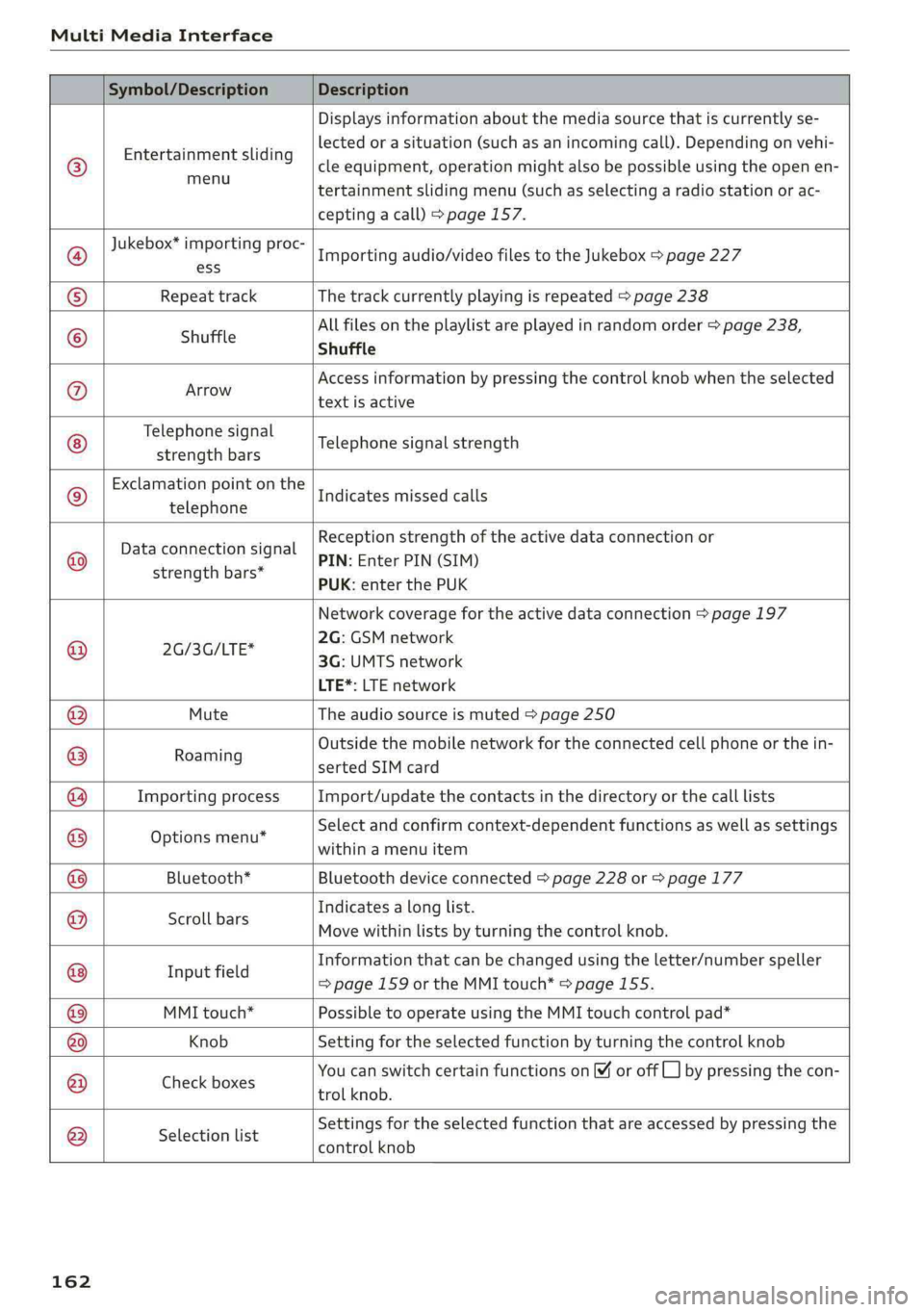
Symbol/DescriptionDescription
©
Entertainmentsliding
menu
Displaysinformationaboutthemediasourcethatiscurrentlyse-
lectedorasituation(suchasanincomingcall).Dependingonvehi-
cleequipment,operationmightalsobepossibleusingtheopenen-
tertainmentslidingmenu(suchasselectingaradiostationorac-
ceptingacall)>page157.
Jukebox*importingproc-
Importingaudio/videofilestotheJukebox>page227
textisactive
Telephonesignal
strengthbars
®ess
®RepeattrackThetrackcurrentlyplayingisrepeated>page238
Allfilesontheplaylistareplayedinrandomorder>page238,
©shuffleShuffle
®AvroAccessinformationbypressingthecontrolknobwhentheselected
Telephonesignalstrength
Exclamationpointonthe
telephone
Indicatesmissedcalls
©
|
©
Dataconnectionsignal
strengthbars*
Receptionstrengthoftheactivedataconnectionor
PIN:EnterPIN(SIM)
PUK:enterthePUK
Networkcoveragefortheactivedataconnection>page197
2G:GSMnetwork
2G/3G/LTE*
3G:UMTSnetwork
LTE*:LTEnetwork
MuteTheaudiosourceismuted>page250
.Outsidethemobilenetworkfortheconnectedcellphoneorthein-
Roaming
sertedSIMcard
ImportingprocessImport/updatethecontactsinthedirectoryorthecalllists
Optionsmenu*
Selectandconfirmcontext-dependentfunctionsaswellas settings
withinamenuitem
@|
©
|©)
©
|O|
©
Bluetooth*Bluetoothdeviceconnected>page228or>page177
Scrollbars
Indicatesalonglist.
Movewithinlistsbyturningthecontrolknob.
Informationthatcanbechangedusingtheletter/numberspeller
I fi
nputfield=>page159ortheMMItouch*>page155.
MMItouch*PossibletooperateusingtheMMItouchcontrolpad*
KnobSettingfortheselectedfunctionbyturningthecontrolknob
CheeenoxesYoucanswitchcertainfunctionsonoroffCL]bypressingthecon-
trolknob.
®
|
®
|\O|@|
©
|
©
Selectionlist
Settingsfortheselectedfunctionthatareaccessedbypressingthe
controlknob
162
Page 166 of 392
Multifunctionsteeringwheel
@Tips
—Alwaysfollowtheinformationfoundin
=>page225.
—Pleasenotethatwithinamediasourcein
thedriverinformationsystem,onlyplaylists
thatwereselectedthroughtheMMIcontrol
panelcanbeplayed>page235.
—PayattentiontotheInfotainmentsystem
displayifnecessary.Dependingonthese-
lectedfunction,itmaybenecessarytouse
theMMIcontrolpanel.
Telephone
Appliesto:vehicleswith multifunctionsteeringwheeland
telephone
AlPe
Calllist
Pe
Weg
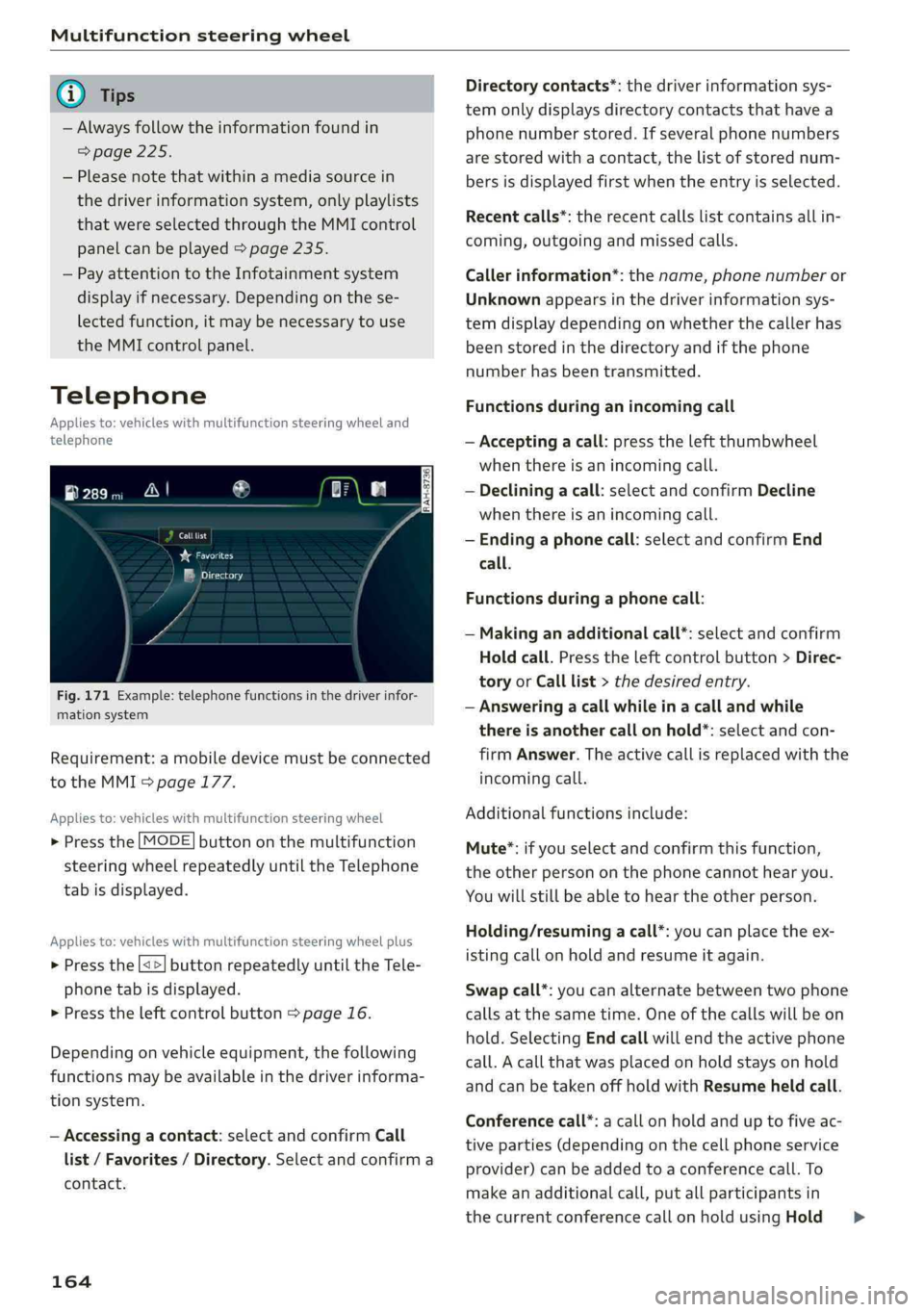
Fig.171Example:telephonefunctionsinthedriverinfor-
mationsystem
Requirement:amobiledevicemustbeconnected
totheMMI>page177.
Appliesto:vehicleswith multifunctionsteeringwheel
>Pressthe[MODE]buttononthemultifunction
steeringwheelrepeatedlyuntiltheTelephone
tabisdisplayed.
Appliesto:vehicleswith multifunctionsteeringwheelplus
> Pressthe[<>]buttonrepeatedlyuntiltheTele-
phonetabisdisplayed.
>Presstheleftcontrolbutton>page16.
Dependingonvehicleequipment,thefollowing
functionsmaybeavailableinthedriverinforma-
tionsystem.
—Accessingacontact:selectandconfirmCall
list/Favorites/Directory.Selectandconfirma
contact.
164
Directorycontacts*:thedriverinformationsys-
temonlydisplaysdirectorycontacts thathavea
phonenumberstored.Ifseveralphonenumbers
arestoredwithacontact,thelistofstorednum-
bersisdisplayedfirstwhentheentryisselected.
Recentcalls*:therecentcallslistcontainsallin-
coming,outgoingandmissedcalls.
Callerinformation*:thename,phonenumberor
Unknownappearsinthedriverinformationsys-
temdisplaydependingonwhetherthecallerhas
beenstoredinthedirectoryandifthephone
numberhasbeentransmitted.
Functionsduringanincomingcall
—Acceptingacall:presstheleftthumbwheel
whenthereisanincomingcall.
—Decliningacall:selectandconfirmDecline
whenthereisanincomingcall.
—Endinga phonecall:selectandconfirmEnd
call.
Functionsduringa phonecall:
—Makinganadditionalcall*:selectandconfirm
Holdcall.Presstheleftcontrolbutton>Direc-
toryorCalllist>thedesiredentry.
—Answeringacallwhileinacallandwhile
thereisanothercall onhold*:selectandcon-
firmAnswer.Theactivecallisreplacedwiththe
incomingcall.
Additionalfunctionsinclude:
Mute®*:ifyouselectandconfirmthisfunction,
theotherpersononthephonecannothearyou.
Youwillstillbeabletohear theotherperson.
Holding/resumingacall*:youcanplacetheex-
istingcallonholdandresumeitagain.
Swapcall*:youcanalternatebetweentwophone
callsatthesametime.Oneofthecallswillbeon
hold.SelectingEndcallwillendtheactivephone
call.Acallthatwasplacedonholdstaysonhold
andcanbetakenoffholdwithResumeheldcall.
Conferencecall*:acallonholdanduptofiveac-
tiveparties(dependingonthecellphoneservice
provider)canbeaddedtoaconferencecall.To
makeanadditionalcall,putallparticipantsin
thecurrentconferencecallonholdusingHold>
Page 167 of 392
80A012721BG
Multifunctionsteeringwheel
conference™.Bypressingtheleftcontrolbutton,
youcanmakeadditionalcallsfromthedirectory
orthecalllist.Resumeconference*takesallpar-
ticipantsoffhold.
@Tips
— Thephonefunctionscanonlybecontrolled
withthemultifunctionsteeringwheelifthe
phoneequipmentwasinstalledatthefac-
tory.
— Thetelephonefunctionsdependonthecell
phoneandwhethertheyaresupportedby
yourcellphoneserviceproviderornot.
— TheCallwaiting*functionmustbeactivat-
edinyourcellphoneandintheMMIinor-
dertobealerted whenthereisanincoming
callduringanactivecall.Thecalloptions
dependonthecellphoneandservicepro-
vider.Youcanobtainmoreinformationfrom
yourcellphoneserviceprovider.
Navigation
Co)YeeeCLy1)
Appliesto:vehicleswithmultifunctionsteeringwheeland
navigationsystem
Requirement:adestinationmustbe entered
=page203andtherouteguidancemustbe
started.
>Pressthe[<>]buttononthemultifunction
steeringwheelrepeatedlyuntiltheNavigation
tabisdisplayed.
>Presstheleftcontrolbutton>page16.
Dependingonvehicleequipment,thefollowing
functions
maybeavailableinthedriverinforma-
tionsystem.
—Displayingnavigationduringactiveroute
guidance:selectandconfirmMap*/Street
view*orArrowview”.
— Showingthemapwhenrouteguidanceisnot
active*:selectandconfirmMap”.
—Accessinglastdestinations:selectandconfirm
Lastdestinations>thedesireddestination.
—Accessingfavorites*:selectandconfirmFavor-
ites>thedesireddestination.
—Startingrouteguidancetothestoredhome
address:selectandconfirmCancelrouteguid-
anceifnecessaryandthenHomeaddress.
Ifyouhavenotstartedanyrouteguidance,a
compass(analoginstrumentcluster)orthear-
rowview(monochromeinstrumentcluster)is
displayeddependingontheequipment.Themap
isdisplayedintheAudivirtualcockpit*.
Cancelingactiverouteguidance
—Select:rightcontrolbutton>Cancelroute
guidance
Additionalsettings
—Select:rightcontrolbutton>desiredentry.
Depending onthefunctionselected,thefollow-
ingadditional settingsmaybepossible:
—Mapdisplay>page214.
—Mapcolors>page214.
—Maporientation>page214.
—Automaticzoom>page215.
Navigationviewwithrouteguidance
tad)
Appliesto:vehicleswithnavigationsystem andAudivirtual
cockpit
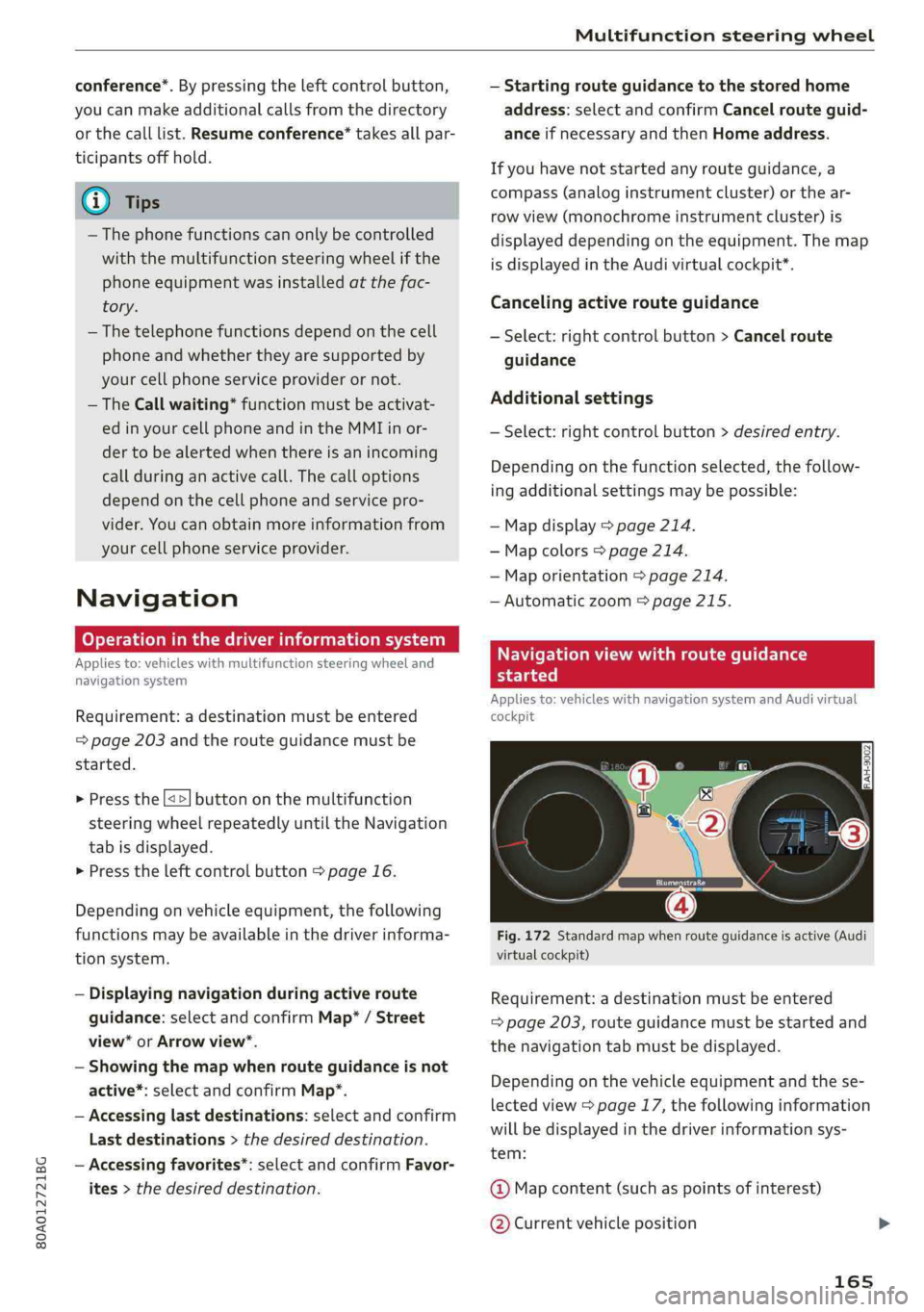
Fig.172Standardmapwhenrouteguidanceisactive(Audi
virtualcockpit)
Requirement:adestinationmustbeentered
=>page203,routeguidancemustbestartedand
thenavigationtabmustbedisplayed.
Depending onthevehicleequipmentandthese-
lectedview>page17,thefollowinginformation
willbedisplayedinthedriverinformationsys-
tem:
@Mapcontent(suchaspointsofinterest)
@Currentvehicleposition
165
Page 171 of 392
80A012721BG
Voicerecognitionsystem
OBARECOMMANDS
RAH-9091
*Telephone+Favorites
+Audiconnect*Call(XY)
*Navigation*Enternumber
*Directory*Redial
*Radio*Readnewtextmessage
*Media+Navigateto(XY)
+Sound+Enteraddress/destination
*Help+Onlinedestinations
+HelpSpeechdialogsystem*Cancelrouteguidance
*HelpTelephone*Map
*HelpAudiconnect+Line(XY)
*HelpNavigation*Next page/previouspage
*HelpMap*Cancel
*HelpRadio*No,Imeant(XY)
*HelpMedia*Correction
TELEPHONE:
+Enternumber+CalllistCs
+Deletenumber/correction+Redialsie
+Directory+Callmailbox
*Call(XY)+Telephonefavorites
*business/private/landline/mobile
NAVIGATION;
+Navigateto(XY)+Block routefor(XY)miles/Block
+Start/cancelrouteguidancethenextsection
+Directory*Routelist
+Lastdestinations*Calculatealternativeroutes
+Navigationfavorites*Onlinedestinations
+Drivehome*Specialdestination
-Enteraddress
+Entercountry/town/street/state
+Excluderoute/Excluderoutefor(XY)km/m
+Map
*Daymap/Nightmap
*2Ddrivingpositionmap/2Dnorthpositionmap/3Dmap/Destinationmap/Overviewmap
AUDICONNECT
*AudiconnectFlightinformation
*Travelinformation/Parkinginformation*Cityevents
*Fuelprices*Onlinenews
*Weather*Twitter
RADIO)MEDIA
+Radiopresets|*Jukeboxs))
°FM*CD/DVD
*FM/AM/SIRIUSXM seedy+SDcard1/SDcard2BRS
+Station(XY)/Frequency(XY)-Audimusicinterface/iPod/USB/Bluetooth/
*Trafficannouncementon/offWi-Fi/Medium(XY)
*Mediafavorites/Artists/Albums/Genres/
Tracks/Playlists/Videos
*Folderup
*Randomplaybackon/off
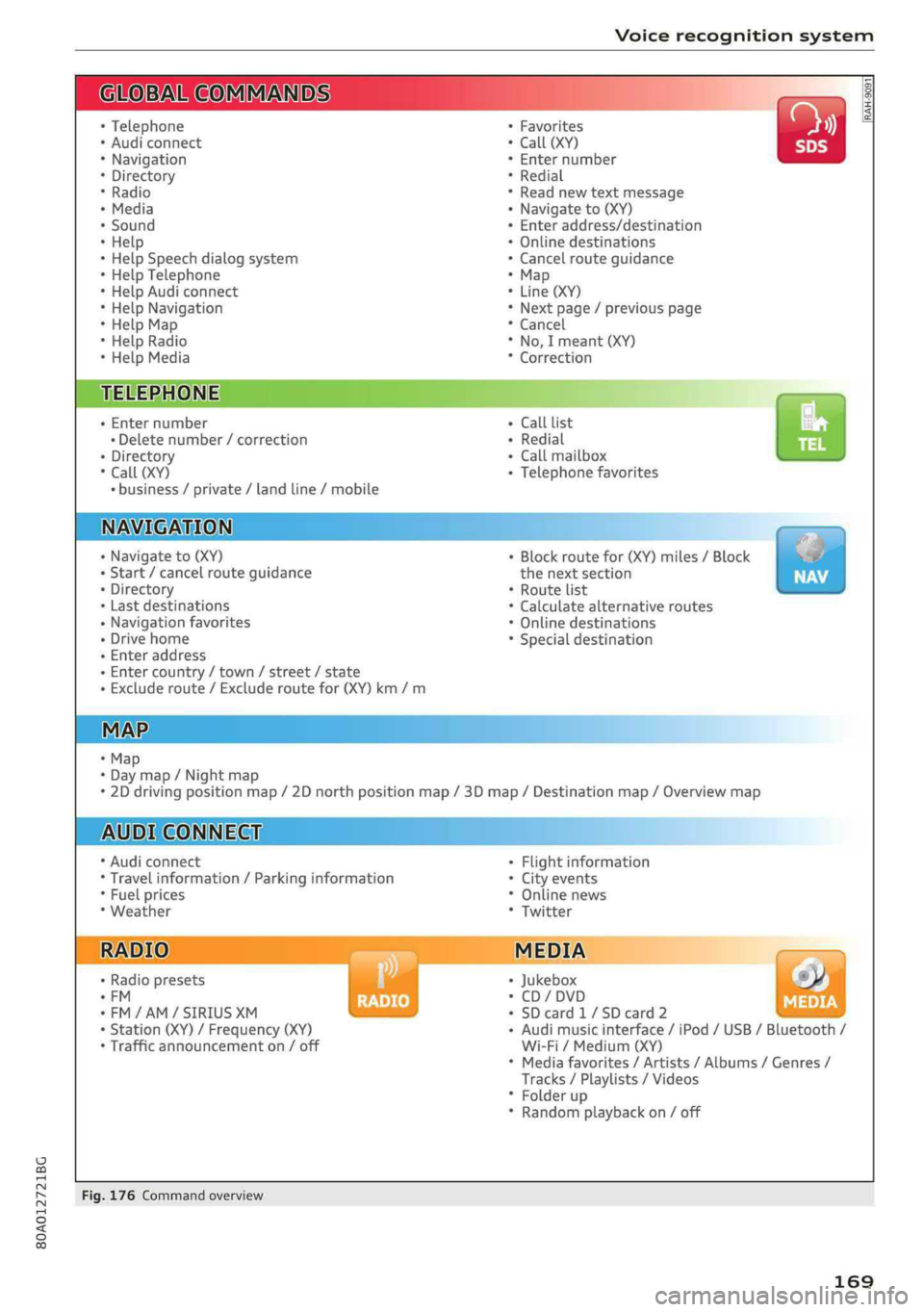
Fig.176Commandoverview
169
Page 172 of 392
Voicerecognitionsystem
Voicerecognitionsystem
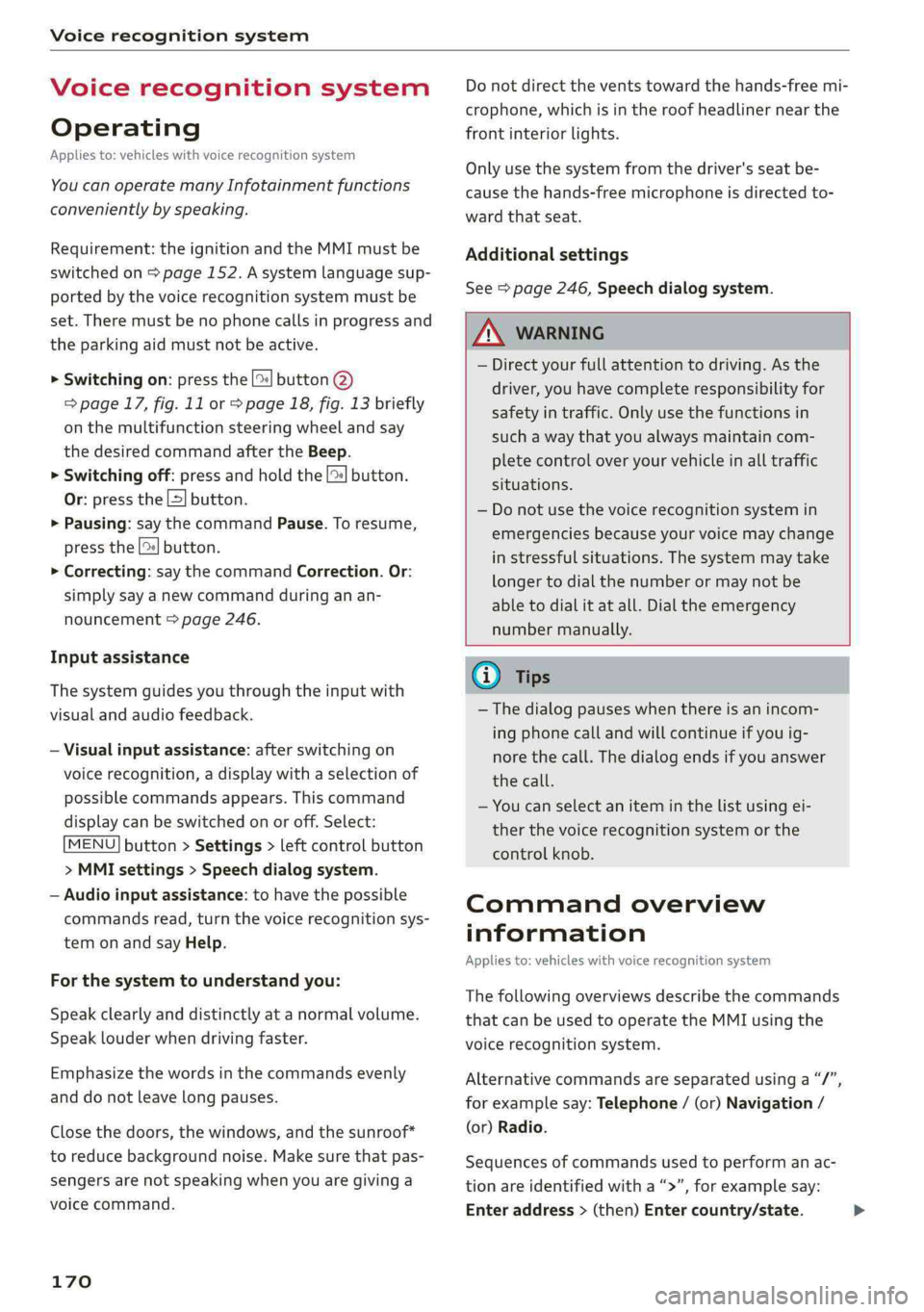
Operating
Appliesto:vehicleswithvoicerecognitionsystem
YoucanoperatemanyInfotainmentfunctions
convenientlybyspeaking.
Requirement:theignitionandtheMMImustbe
switched
on>page152.Asystemlanguagesup-
portedbythevoicerecognitionsystemmustbe
set.Theremustbenophonecallsinprogressand
theparkingaidmustnotbeactive.
>Switchingon:pressthe[%]button@
=>page17,fig.11or>page18,fig.13briefly
onthemultifunctionsteeringwheelandsay
thedesiredcommandaftertheBeep.
>Switchingoff:pressandholdthe|™]button.
Or:pressthe|5|button.
>Pausing:saythecommandPause.Toresume,
pressthe|]button.
>Correcting:saythecommandCorrection.Or:
simplysayanewcommandduringanan-
nouncement>page246.
Inputassistance
Thesystemguidesyouthroughtheinputwith
visualandaudiofeedback.
—Visualinputassistance:afterswitchingon
voicerecognition,adisplaywithaselectionof
possiblecommandsappears.Thiscommand
displaycanbe switchedonoroff.Select:
MENU]button>Settings>leftcontrolbutton
>MMIsettings>Speechdialogsystem.
—Audioinputassistance: tohavethepossible
commandsread,turnthevoicerecognitionsys-
temonandsayHelp.
Forthesystemtounderstandyou:
Speakclearlyanddistinctly atanormalvolume.
Speaklouderwhendrivingfaster.
Emphasizethewordsinthecommandsevenly
anddonotleavelongpauses.
Closethedoors,thewindows,andthesunroof*
toreducebackgroundnoise.Makesurethatpas-
sengersarenotspeakingwhenyouaregivinga
voicecommand.
170
Donotdirecttheventstowardthehands-freemi-
crophone,whichisintheroofheadlinernearthe
frontinteriorlights.
Onlyusethesystemfromthedriver'sseatbe-
causethehands-freemicrophoneisdirectedto-
wardthatseat.
Additionalsettings
See>page246,Speechdialogsystem.
ZAWARNING
—Directyourfullattentiontodriving.Asthe
driver,youhavecompleteresponsibilityfor
safetyintraffic.Onlyusethefunctionsin
suchawaythatyoualwaysmaintaincom-
pletecontroloveryourvehicleinalltraffic
situations.
—Donotuse thevoicerecognitionsystemin
emergenciesbecauseyourvoicemaychange
instressfulsituations.Thesystemmaytake
longertodialthenumberormaynotbe
abletodialitatall.Dialtheemergency
numbermanually.
Gi)Tips
— Thedialogpauseswhenthereisanincom-
ingphonecallandwillcontinueifyouig-
norethecall.Thedialogendsifyouanswer
thecall.
—Youcanselectan iteminthelistusingei-
therthevoicerecognitionsystemorthe
controlknob.
Commandoverview
information
Appliesto:vehicleswithvoicerecognitionsystem
Thefollowingoverviewsdescribethecommands
thatcan beusedtooperatetheMMIusingthe
voicerecognitionsystem.
Alternativecommandsareseparatedusinga“/”,
forexamplesay:Telephone/(or)Navigation/
(or)Radio.
Sequencesofcommandsusedtoperformanac-
tionareidentifiedwitha “>”,forexamplesay:
Enteraddress>(then)Entercountry/state.>
Page 173 of 392
80A012721BG
Voicerecognitionsystem
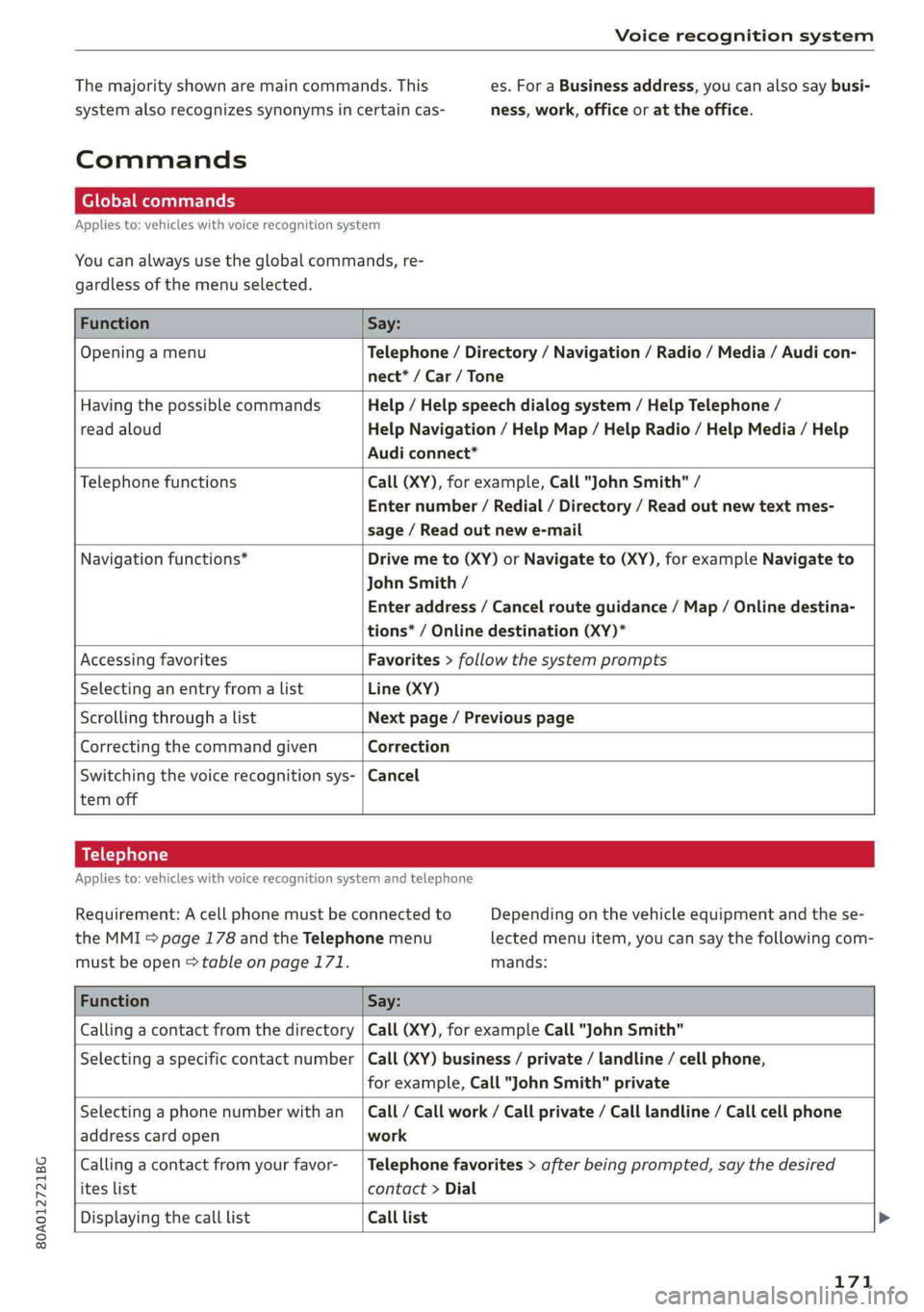
Themajorityshownaremaincommands.Thises.ForaBusinessaddress,youcanalsosaybusi-
systemalsorecognizessynonymsincertaincas-ness,work,officeor attheoffice.
Commands
Globalcommands
Appliesto:vehicleswithvoicerecognitionsystem
Youcanalwaysusetheglobalcommands,re-
gardlessofthemenuselected.
FunctionSay:
OpeningamenuTelephone/Directory/Navigation/Radio/Media/Audicon-
nect*/Car/Tone
HavingthepossiblecommandsHelp/Helpspeechdialogsystem/HelpTelephone/
readaloudHelpNavigation/HelpMap/HelpRadio/HelpMedia/Help
Audi
connect*
TelephonefunctionsCall(XY),forexample,Call"JohnSmith"/
Enternumber/Redial/Directory/Readoutnewtextmes-
sage/Readoutnewe-mail
Navigationfunctions*Drivemeto(XY)orNavigateto(XY),forexampleNavigateto
JohnSmith/
Enteraddress/Cancelrouteguidance/Map/Onlinedestina-
tions*/Onlinedestination(XY)*
AccessingfavoritesFavorites>followthesystemprompts
SelectinganentryfromalistLine(XY)
ScrollingthroughalistNextpage/Previouspage
CorrectingthecommandgivenCorrection
Switchingthevoicerecognitionsys-|Cancel
temoff
Telephone
Appliesto:vehicleswithvoicerecognitionsystemandtelephone
Requirement:AcellphonemustbeconnectedtoDepending onthevehicleequipmentandthese-
theMMI>page178andtheTelephonemenulectedmenuitem,youcansaythefollowingcom-
mustbeopen>tableonpage171.mands:
FunctionSay:
Callingacontactfromthedirectory|Call(XY),forexampleCall"JohnSmith"
Selectinga specificcontactnumber|Call(XY)business/private/landline/cellphone,
forexample,Call"JohnSmith"private
Selectingaphonenumberwithan|Call/Callwork/Callprivate/Calllandline/Callcellphone
addresscardopenwork
Callingacontactfromyourfavor-|Telephonefavorites>afterbeingprompted,saythedesired
iteslistcontact>Dial
DisplayingthecalllistCalllist>
171
Page 174 of 392
Voicerecognitionsystem
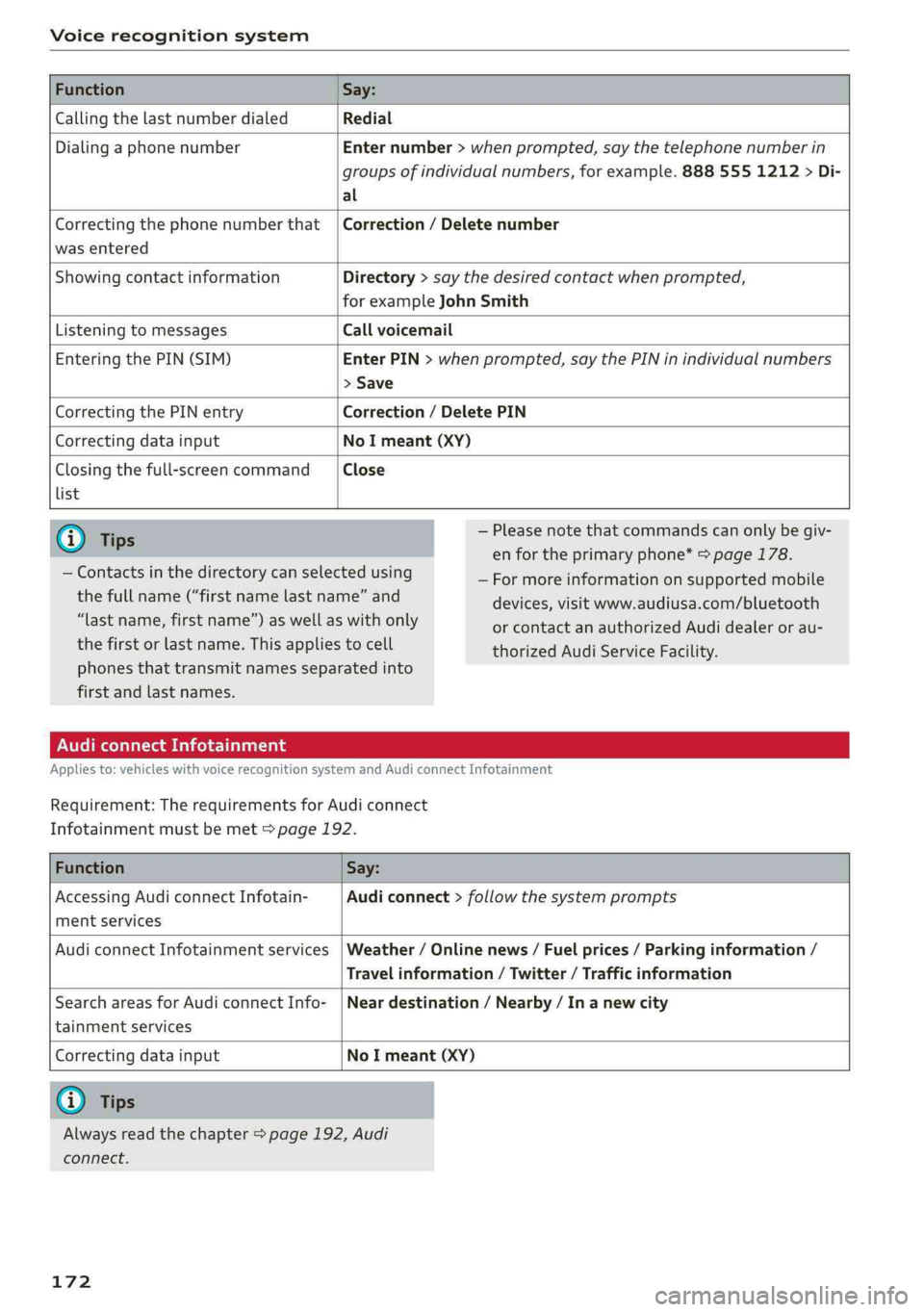
FunctionSay:
CallingthelastnumberdialedRedial
DialingaphonenumberEnternumber>whenprompted,saythetelephonenumberin
groupsofindividualnumbers,forexample.8885551212>Di-
al
Correctingthephonenumberthat
wasentered
Correction/Deletenumber
ShowingcontactinformationDirectory>saythedesiredcontactwhenprompted,
forexampleJohnSmith
ListeningtomessagesCallvoicemail
EnteringthePIN(SIM)EnterPIN>whenprompted,saythePINinindividualnumbers
>Save
CorrectingthePINentryCorrection/DeletePIN
CorrectingdatainputNoImeant(XY)
Closingthefull-screencommand
list
Close
@)Tips
—Contactsinthedirectorycanselectedusing
thefullname(“firstnamelastname”and
“lastname,firstname”)aswellaswithonly
thefirstorlastname.Thisappliestocell
—Pleasenotethatcommandscanonlybegiv-
enfortheprimaryphone*>page178.
—Formoreinformationonsupportedmobile
devices,visitwww.audiusa.com/bluetooth
orcontactanauthorizedAudidealeror au-
thorizedAudiServiceFacility.
phonesthattransmit namesseparatedinto
firstandlastnames.
AudiconnectInfotainment
Appliesto:vehicleswithvoicerecognitionsystem andAudiconnectInfotainment
Requirement:TherequirementsforAudiconnect
Infotainmentmustbemet>page192.
FunctionSay:
AccessingAudiconnectInfotain-
mentservices
Audiconnect>follow thesystemprompts
AudiconnectInfotainmentservicesWeather/Onlinenews/Fuelprices/Parkinginformation/
Travelinformation/Twitter/Trafficinformation
SearchareasforAudiconnectInfo-
tainmentservices
Neardestination/Nearby/In anewcity
Correctingdatainput
NoImeant(XY)
@Tips
Alwaysreadthechapter>page192,Audi
connect.
172
Page 175 of 392
80A012721BG
Voicerecognitionsystem
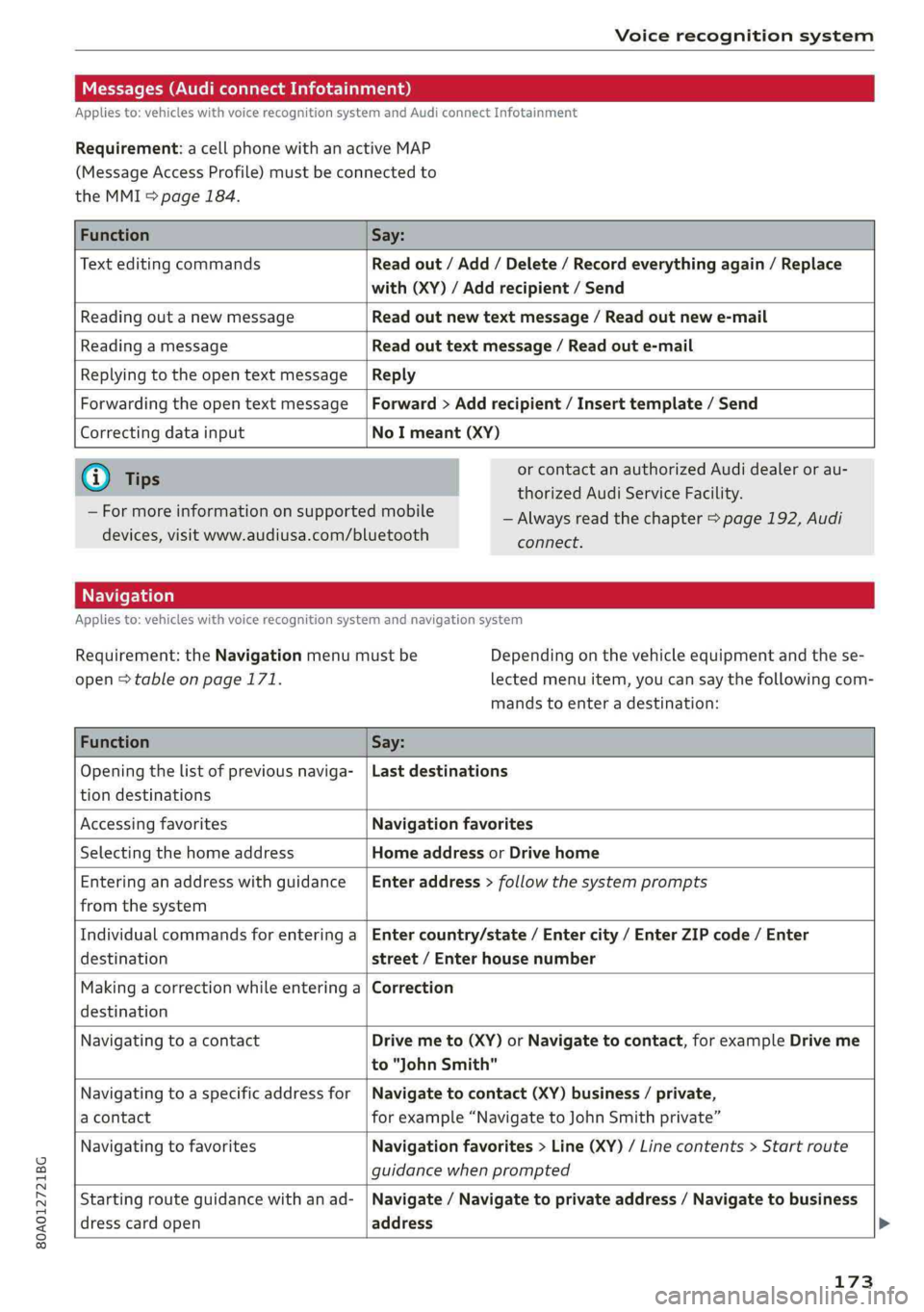
Messages(AudiconnectInfotainment)
Appliesto:vehicleswithvoicerecognitionsystemandAudiconnectInfotainment
Requirement:acellphonewithanactiveMAP
(MessageAccessProfile)mustbeconnectedto
theMMI>page184.
FunctionSay:
TexteditingcommandsReadout/Add/Delete/Recordeverythingagain/Replace
with(XY)/Addrecipient/Send
ReadingoutanewmessageReadoutnewtextmessage/Readoutnewe-mail
ReadingamessageReadouttextmessage/Readoute-mail
ReplyingtotheopentextmessageReply
ForwardingtheopentextmessageForward>Addrecipient/Inserttemplate/Send
Correctingdatainput
NoImeant(XY)
G@)Tips
—Formoreinformationonsupportedmobile
devices,visitwww.audiusa.com/bluetooth
orcontactanauthorizedAudidealeror au-
thorizedAudiServiceFacility.
—Alwaysreadthechapter>page192,Audi
connect.
Appliesto:vehicleswithvoicerecognitionsystem andnavigationsystem
Requirement:theNavigationmenumustbe
open>tableonpage171.
Depending onthevehicleequipmentandthese-
lectedmenuitem,youcansaythefollowingcom-
mandstoenteradestination:
FunctionSay:
Openingthelistofpreviousnaviga-
tiondestinations
Lastdestinations
AccessingfavoritesNavigationfavorites
SelectingthehomeaddressHomeaddressorDrivehome
Enteringan addresswithguidance
fromthesystem
Enteraddress>followthesystemprompts
Individualcommandsforenteringa
destination
Entercountry/state/Entercity/EnterZIPcode/Enter
street/Enterhousenumber
Makingacorrectionwhileenteringa
destination
Correction
NavigatingtoacontactDrivemeto(XY)orNavigatetocontact,forexampleDriveme
to"JohnSmith"
Navigatingtoa specificaddressfor
acontact
Navigatetocontact(XY)business/private,
forexample“NavigatetoJohnSmithprivate”
NavigatingtofavoritesNavigationfavorites>Line(XY)/Linecontents>Start route
guidancewhenprompted
Startingrouteguidancewithanad-
dresscardopen
Navigate/Navigatetoprivateaddress/Navigatetobusiness
address
173
Page 177 of 392
80A012721BG
Voicerecognitionsystem
Appliesto:vehicleswithvoicerecognitionsystem
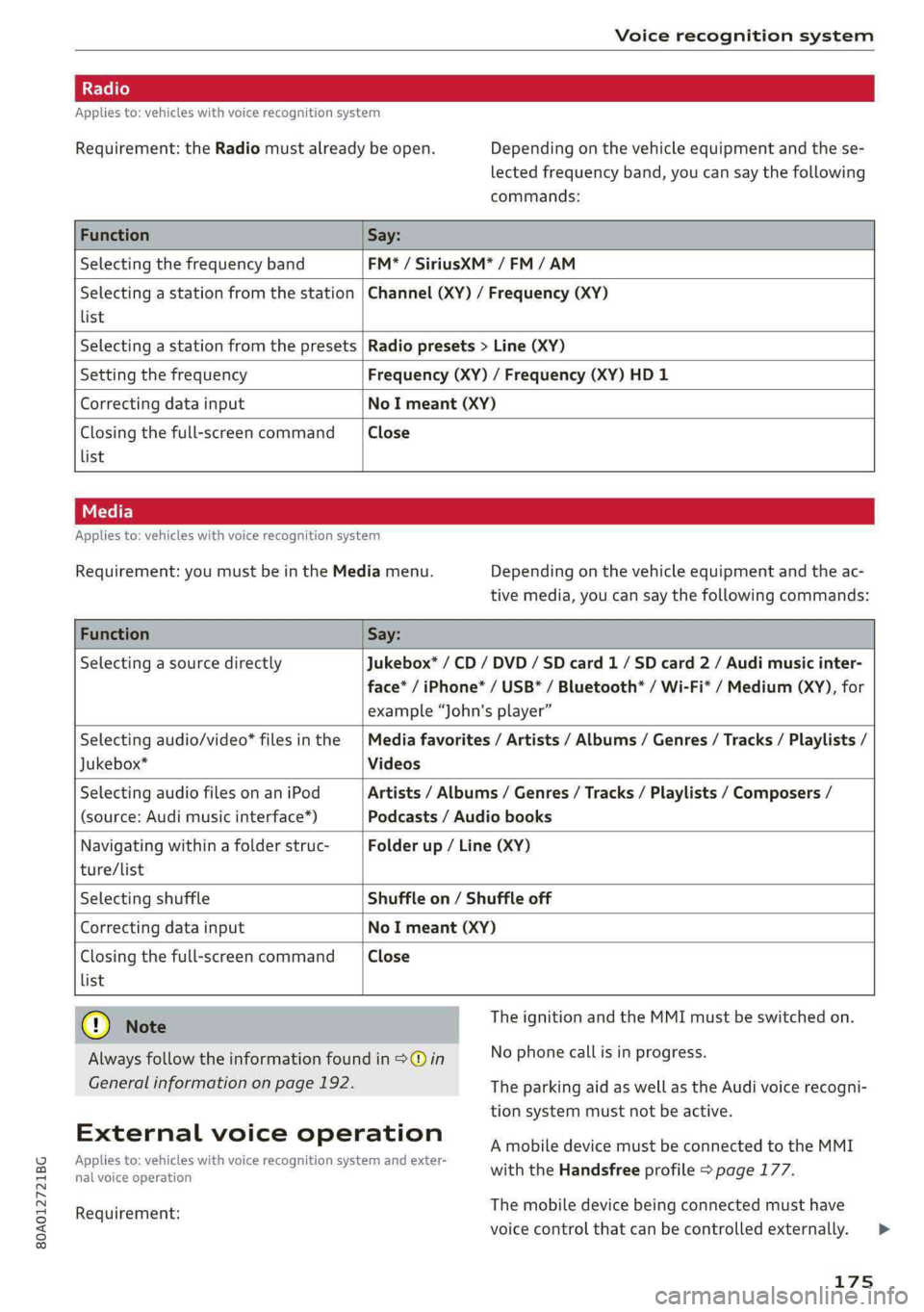
Requirement:theRadiomustalreadybeopen.Depending onthevehicleequipmentandthese-
lectedfrequencyband,youcansaythefollowing
commands:
FunctionSay:
SelectingthefrequencybandFM*/SiriusXM*/FM/AM
Selectingastationfromthestation|Channel(XY)/Frequency(XY)
list
Selectingastationfromthepresets|Radiopresets>Line(XY)
SettingthefrequencyFrequency(XY)/Frequency(XY)HD1
CorrectingdatainputNoImeant(XY)
Closingthefull-screencommandClose
list
Appliesto:vehicleswithvoicerecognitionsystem
Requirement:youmustbeintheMediamenu.Depending onthevehicleequipmentandtheac-
tivemedia,youcansaythefollowingcommands:
FunctionSay:
SelectingasourcedirectlyJukebox*/CD/DVD/SDcard1/SDcard2/Audimusicinter-
face*/iPhone*/USB*/Bluetooth®/Wi-Fi*/Medium(XY),for
example“John'splayer”
Selectingaudio/video"filesinthe|Mediafavorites/Artists/Albums/Genres/Tracks/Playlists/
Jukebox*Videos
SelectingaudiofilesonaniPodArtists/Albums/Genres/Tracks/Playlists/Composers/
(source:Audimusicinterface*)Podcasts/Audiobooks
Navigatingwithinafolderstruc-Folderup/Line(XY)
ture/list
SelectingshuffleShuffleon/Shuffleoff
CorrectingdatainputNoImeant(XY)
Closingthefull-screencommand|Close
list
TheignitionandtheMMImustbe switchedon.
Note
Alwaysfollowtheinformationfoundin>@inNophonecallisinprogress.
Generalinformationonpage192.TheparkingaidaswellastheAudivoicerecogni-
tionsystemmustnotbeactive.
Externalvoiceoperation
Appliesto:vehicleswithvoicerecognitionsystem andexter-
nalvoiceoperation
AmobiledevicemustbeconnectedtotheMMI
withtheHandsfreeprofile>page177.
Themobiledevicebeingconnectedmusthave
voicecontrolthatcanbecontrolledexternally.>
Requirement:
175
Page 178 of 392
Voicerecognitionsystem
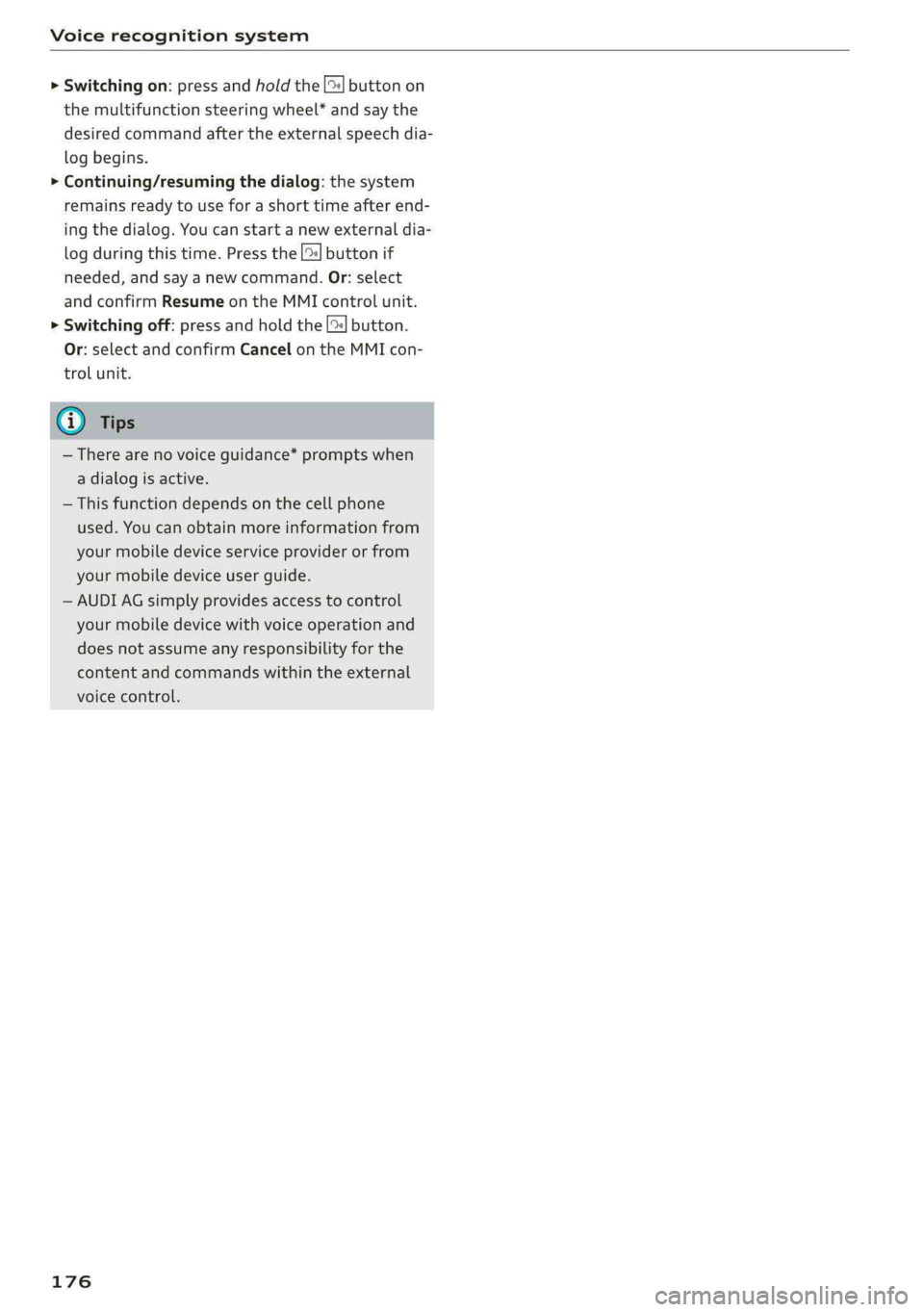
>Switchingon:pressandholdthe[>|buttonon
themultifunctionsteeringwheel*andsaythe
desiredcommandaftertheexternalspeechdia-
logbegins.
>Continuing/resumingthedialog:thesystem
remainsreadytouseforashorttimeafterend-
ingthedialog.Youcanstartanewexternaldia-
logduringthistime. Pressthe|]buttonif
needed,andsayanewcommand.Or:select
andconfirmResumeontheMMIcontrolunit.
>Switchingoff:pressandholdthe|%|button.
Or:selectandconfirmCancelontheMMIcon-
trolunit.
@)Tips
—Therearenovoiceguidance*promptswhen
adialogisactive.
—Thisfunctiondependsonthecellphone
used.Youcanobtainmoreinformationfrom
yourmobiledeviceserviceproviderorfrom
yourmobiledeviceuserguide.
—AUDIAGsimplyprovidesaccesstocontrol
yourmobiledevicewithvoiceoperationand
doesnotassumeanyresponsibilityforthe
contentandcommandswithintheexternal
voicecontrol.
176