steering AUDI Q5 2019 Service Manual
[x] Cancel search | Manufacturer: AUDI, Model Year: 2019, Model line: Q5, Model: AUDI Q5 2019Pages: 392, PDF Size: 99.86 MB
Page 137 of 392
80A012721BG
Parkingaid
—Keepinmindthattheimageinthedisplayis
incorrectiftheexteriormirrorhousinghas
beenmovedoutofplace.
—Onlyuse theimagesprovidedby thecamera
ontherearofthevehiclewhentheluggage
compartmentlidiscompletelyclosed.Make
sureanyobjectsyoumayhavemountedon
theluggagecompartmentliddonotblock
therearviewcamera.
— Theareaaroundthevehicleisshownusing
thecameraimages.Thevehicleimageis
shownbythesystem.Objectsandobstacles
abovethecameraarenotdisplayed.
—Cameralensesenlargeanddistortthefield
ofvision.Theobjectsappearbothaltered
andinaccurateonthescreen.
—Appliesto:vehicleswithairsuspension:the
accuracyoftheorientationlinesandblue
surfacesdecreaseswhenthevehicleis
raised/lowered>page125.
@)Note
—Alwaysreadandfollowtheapplicablewarn-
ings>@inGeneralinformationon
page129.
— TheInfotainmentdisplayshowsthedirec-
tioninwhichtherearofthevehicleistravel-
ingbasedonthesteeringwheelangle.The
frontofthevehicleswings outmorethan
therearofthevehicle.Maintainplentyof
distanceso thatanexteriormirrororacor-
nerofthevehicledoesnotcollidewithany
obstacles.
G)Tips
—Ifthe2/&8/
grayedout,thenthepowerexteriormirrors
werefoldedinorthedriver'sdoor/front
passenger'sdoor/luggagecompartmentlid
wasopened.
—Thereisnodistancewarningfortherear
andthesides*whentrailertowingmodeis
detected.Thefrontsensorsremainactivat-
ed.Thevisualdisplayswitchestotrailer
mode.Therearviewcameraimagewillnot
showtheorientationlinesandthebluesur-
faces.Thereisnoguaranteethefunctions
willswitchoffwhenusingaretrofittedtrail-
erhitch.
ice
Appliesto:vehicleswithperipheralcameras
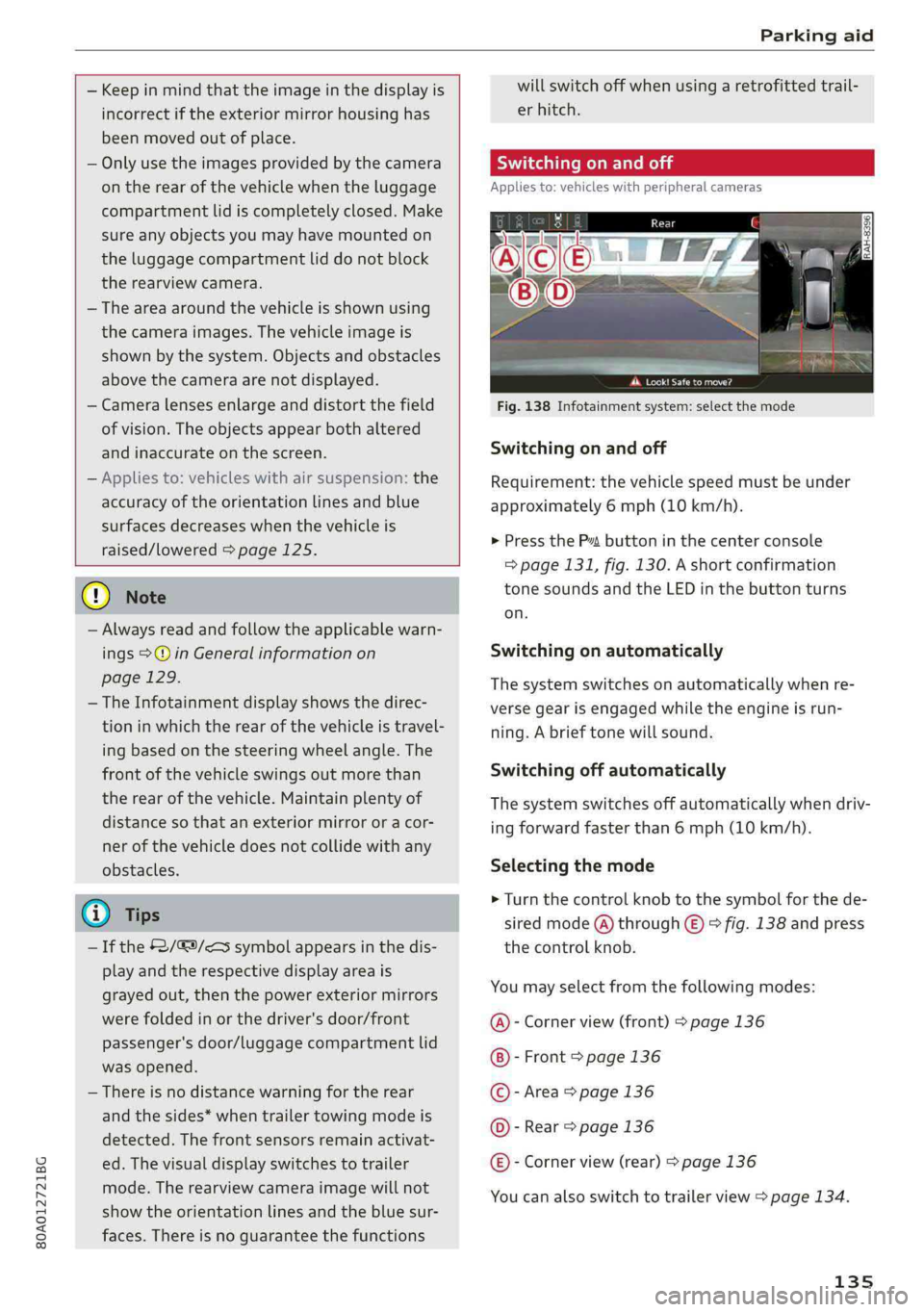
Fig.138Infotainmentsystem:selectthemode
Switchingonandoff
Requirement:thevehiclespeedmustbeunder
approximately6mph(10km/h).
>PressthePsbuttoninthecenterconsole
=>page131,fig.130.Ashortconfirmation
tonesoundsandtheLEDinthebuttonturns
on.
Switchingonautomatically
Thesystemswitchesonautomaticallywhenre-
versegearisengagedwhiletheengineisrun-
ning.Abrieftonewillsound.
Switchingoffautomatically
Thesystemswitchesoffautomaticallywhendriv-
ingforwardfasterthan6mph(10km/h).
Selectingthemode
>Turn thecontrolknobtothesymbolforthede-
siredmode(A)through©)>fig.138andpress
thecontrolknob.
Youmayselectfromthefollowingmodes:
@-Cornerview(front)>page136
-Front>page136
©-Area>page136
©-Rear>page136
@®-Cornerview(rear)>page136
Youcanalsoswitchtotrailerview>page134.
135
Page 139 of 392
80A012721BG
Parkingaid
j
Appliesto:vehicleswithperipheralcameras
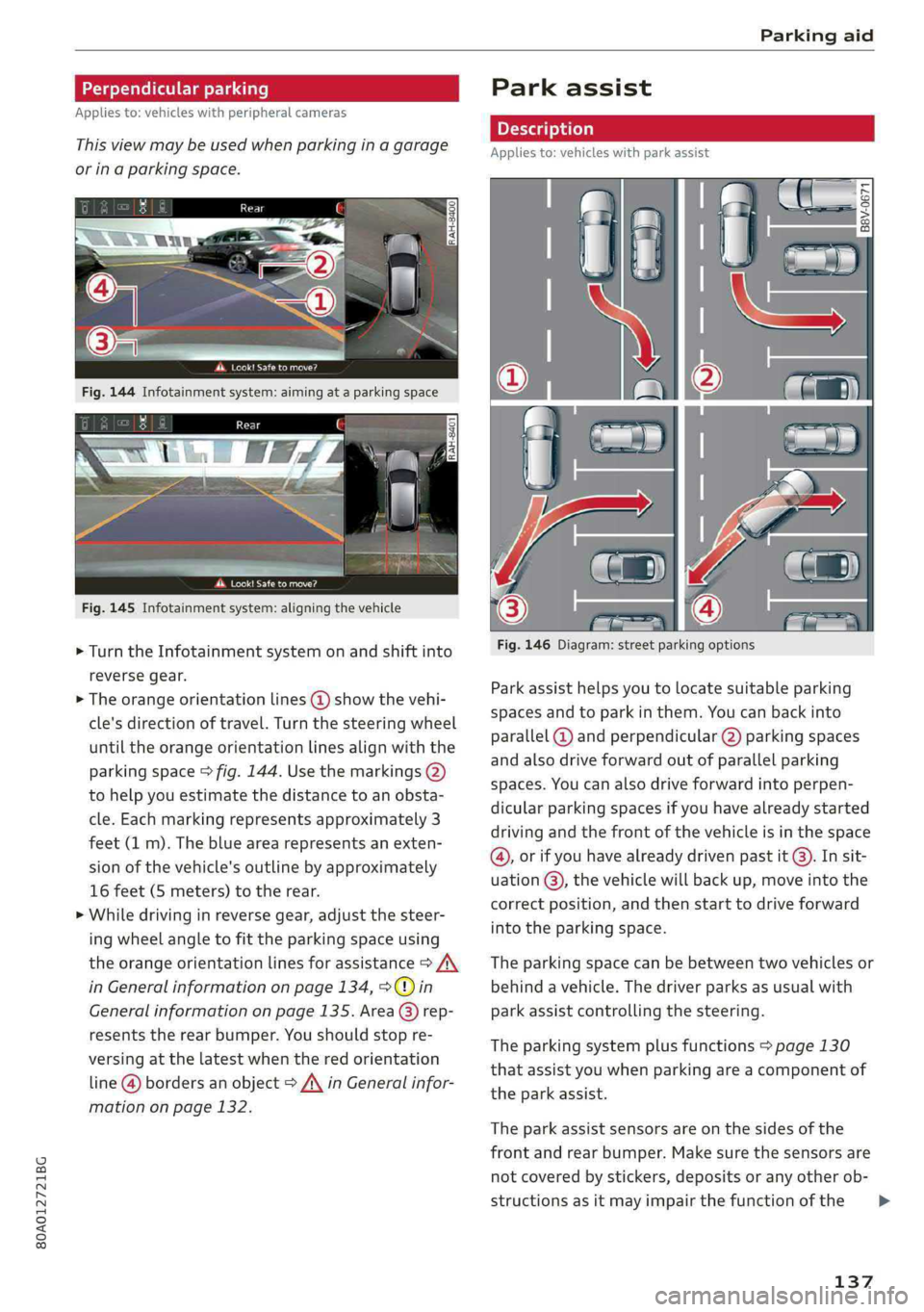
Thisviewmaybe usedwhenparkinginagarage
orinaparkingspace.
Fig.145Infotainmentsystem:aligningthevehicle
>Turn theInfotainmentsystem onandshiftinto
reversegear.
>Theorangeorientationlines@showthevehi-
cle'sdirectionoftravel.Turn thesteeringwheel
untiltheorangeorientationlinesalignwiththe
parkingspace>fig.144.Usethemarkings@)
tohelpyouestimatethedistancetoanobsta-
cle.Eachmarkingrepresentsapproximately3
feet(1m).Thebluearearepresentsanexten-
sionofthevehicle'soutlinebyapproximately
16feet(5meters)totherear.
>Whiledrivinginreversegear,adjustthesteer-
ing
wheelangletofittheparkingspaceusing
theorangeorientationlinesforassistance>A\
inGeneralinformationonpage134,>@)in
Generalinformationonpage135.Area@)rep-
resentstherearbumper.Youshouldstopre-
versingatthelatestwhentheredorientation
line@bordersanobject>A\inGeneralinfor-
mationonpage132.
Parkassist
Fig.146Diagram:streetparkingoptions
Parkassisthelpsyoutolocatesuitableparking
spacesandtoparkinthem.Youcanbackinto
parallel(@)andperpendicular(2)parkingspaces
andalsodriveforwardoutofparallelparking
spaces.Youcanalsodriveforwardintoperpen-
dicularparkingspacesifyouhavealreadystarted
drivingandthefrontofthevehicleisinthespace
@,orifyouhavealreadydrivenpastit@).Insit-
uation@),thevehiclewillbackup,moveintothe
correctposition,andthenstarttodriveforward
intotheparkingspace.
Theparkingspacecanbebetweentwovehiclesor
behindavehicle.Thedriverparksasusualwith
park
assistcontrollingthesteering.
Theparkingsystemplusfunctions>page130
thatassistyouwhenparkingareacomponentof
theparkassist.
Theparkassistsensorsareonthesidesofthe
frontandrearbumper.Makesurethesensorsare
notcoveredbystickers,depositsoranyotherob-
structionsasitmayimpairthefunctionofthe
137
>
Page 140 of 392
Parkingaid
system.Forinformationoncleaning,see
=>page343.
Whenparkingspacesaresmall,theparkingsys-
temsignalsacontinuoustonewhenanobstacle
islessthanapproximately0.7feet(0.20m)
away.Donotcontinuedrivingfarther.
ZAWARNING
—Alwaysreadandfollowtheapplicablewarn-
ings>AinGeneralinformationon
page129.
—Pleasenotethat parkassistonlycontrols
thesteering.Thedriverisalwaysresponsi-
bleforbrakingandaccelerating.
— Thedrivermustdecideiftheparkingspace
displayedissuitableforthevehicle.
—Thevehiclewillchangepositionwhenpark-
ing.Makesureyoudonotendangeranyoth-
erdrivers.
—Whenusingparkassisttodriveintoorout
ofaparkingspace,thesteeringwheelturns
quicklyonitsown.Reachingintothesteer-
ing
wheelspokeswhilethisishappeningcan
resultininjury.
@)Note
—Alwaysreadandfollowtheapplicablewarn-
ings>@inGeneralinformationon
page129.
—Parkassistguidesthevehicleeitheraway
fromcurbsorontothemifothervehicles
areparkedonthecurb.Makesurethatyour
vehicle'stiresandrimsarenotdamaged.
Takeoversteeringattherighttime.
—Certainconditionsaroundtheparkingspace
mayresultinthevehiclenotbeingparked
asexpected.
—Objectssuchaspillarsorposts.
—Groundcoveringsuchasgravel,snowor
ice
G)Tips
— TheElectronicStabilizationControl(ESC)
mustnotbe switchedoffduringtheparking
process>page145.
—Parkingintightcurveswith parkassistis
notpossible.
138
—Youcannotparkwith parkassistwhenyou
aretowingatrailerorhavetheconnectorin-
sertedinthetrailersocket.
Sleemela
Appliesto:vehicleswithparkassist
3S
2 x a
oO
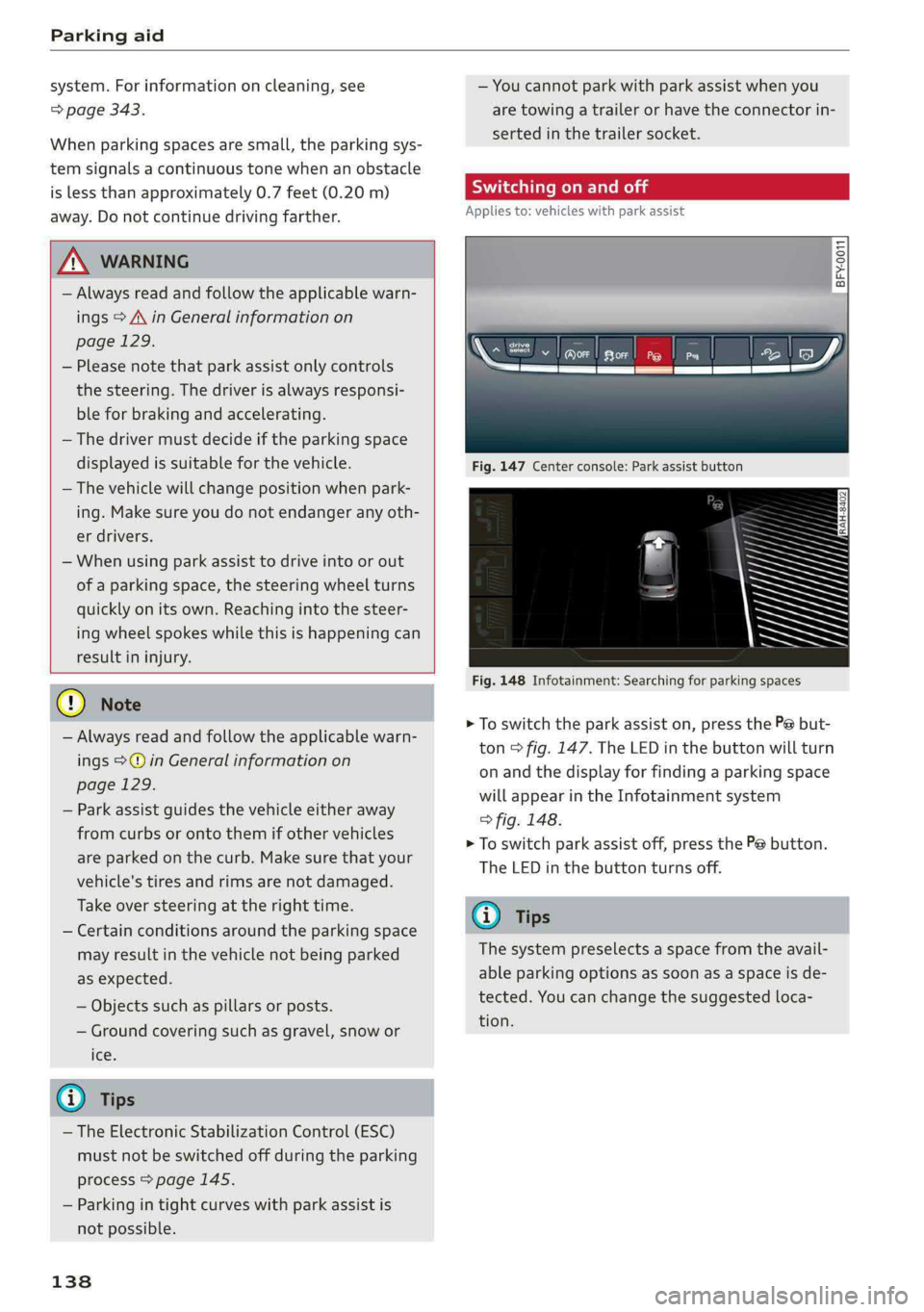
Fig.147Centerconsole:Parkassistbutton
Fig.148Infotainment:Searchingforparkingspaces
>Toswitchtheparkassiston,pressthePebut-
ton>fig.147.The LEDinthebuttonwillturn
onandthedisplayforfindingaparkingspace
willappearintheInfotainmentsystem
>fig.148.
>Toswitchparkassistoff,pressthePebutton.
TheLEDinthebuttonturnsoff.
G)Tips
Thesystempreselectsaspacefromtheavail-
ableparkingoptionsassoonasaspaceisde-
tected.Youcanchangethesuggestedloca-
tion.
Page 142 of 392
Parkingaid
Startingthe parkingprocess
Appliesto:vehicleswithparkassist
Theresponsibilityiswiththedriverwhenpark-
ing.
Requirement:asuitableparkingspacemustbe
foundandselected>page139.Thevehiclemust
initiallybestationary.
> Selectthereversegearafterstoppingbriefly.
>Removeyourhandsfromthesteeringwheel.
>Payattentiontothepathofthevehicle.When
thetrafficsituationallows,presstheaccelera-
torpedalaccordingly>A\inDescriptionon
page138,>@inDescriptiononpage138.
>FollowthevisualinstructionsintheInfotain-
mentsystemdisplayandinstrumentcluster
alongwiththewarningtonesuntiltheparking
processhasended.Thearrowsonthevehicle
indicatethenecessarydirectionoftravel.
Parkassistautomaticallysteersthevehicleinto
theparkingspacewhilethedriverpressesthe
pedals.Themaximumparkingspeedis4mph
(7km/h).
Interruptingtheparkassist
Ifthespeedistoohighand youtakeoversteer-
ing,parkassistswitchesoff.Tocontinueparking,
[email protected]
playswillappearagainintheInfotainmentsys-
temdisplayandtheinstrumentcluster.
G)Tips
Youcanalsocancelthedirectionoftravel
specifiedbythesystembyswitchingbetween
forwardandreversegears.Basedontheposi-
tionofthevehicle,thesystemthencalculates
theadditionalsteeringanddrivingdirections
formaneuvering.
Leavingaparallelparkingspace
Appliesto:vehicleswith parkassist
Theresponsibilityiswiththedriverwhenleaving
aparkingspace.
Ifyouparkedthevehicleinaparallelparking
space,parkassistcanhelpyoudriveoutofit.
140
>Starttheengine.
>PressthePebutton>page138,fig. 147.
>Waituntilamessageappearsthatrequeststhe
directiontotravelinforexitingtheparking
space.
>Activatetheappropriateturnsignal.Themes-
sageStartautomaticunparkingprocedureap-
pears.
>Removeyourhandsfromthesteeringwheel.
>Pressthecontrolknobtostarttheprocedure
forexitingtheparkingspace.
>Payattentiontothepathofthevehicle.When
thetrafficsituationallows,presstheaccelera-
torpedalaccordingly> A\inDescriptionon
page138,>@)inDescriptiononpage138.
>Followthevisualinstructions>page140and
thewarningtoneuntilthevehiclehasfinished
exitingtheparkingspace.
>Driveinthedirectionindicatedbythearrowson
thevehicle.
>Theprocedurehasendedwhenadditionalcor-
rectivemovementsarenolongernecessary.
Takeoversteering.
Parkassistautomaticallysteersthevehicleoutof
theparkingspacewhilethedriverpressesthe
pedals.Themaximumspeedforexitingaparking
spaceis3mph(5km/h).
Interruptingthe parkassist
Ifthespeedistoohighand youtakeoversteer-
ing,parkassistswitchesoff.Tocontinueexiting
theparkingspace,switchtheengineoffandon.
ThenpressthePebuttonagain.Otherwise,leave
theparkingspacewithoutusingparkassist.
Appliesto:vehicleswithparkassist
roo"Parkassist:canceled.Steeringinputbydriv-
er.Pleasetakeoversteering!
Parkassistwascanceledbecausethedrivertook
oversteering.Tocontinueparking, pressthePe
buttonagain.
Parkassist:timelimitexceeded
aor]Parkassist:canceled.Timelimitexceeded.
Pleasetakeoversteering!
Page 143 of 392
80A012721BG
Parkingaid
Theparkingprocesswasnotcompletedwithin
approximatelysixminutesofactivatingparkas-
sist.Tocontinueparking, pressthePebutton
again.
Parkassist:canceled.Speedtoohigh.Please
take oversteering!
Thespeedenteringtheparkingspaceistoohigh.
Drivenofasterthan4mph(7km/h).
Parkassist:canceled.Stabilizationcontrol
(ESC)input.Pleasetakeoversteering!
The ESCtookactiontostabilizethevehicle.Take
oversteering.Completeparkingwithoutusing
parkassistordriveoutoftheparkingspace.
Parkassist:currentlyunavailable.Stabiliza-
tioncontrol(ESC)off
The ESCwasswitchedoff.The ESCmustbe
switched
ontouseparkassist.
Parkassist:malfunction!Pleasecontact
Service
Parkassist:malfunction!Takeoversteering!
PleasecontactService.
Contact anauthorizedAudidealerorauthorized
AudiServiceFacility.Youcannotparkwithpark
assistifthereisasystemmalfunction.
Parkassist:currentlyunavailable
Parkassist:currentlyunavailable.Please
take oversteering!
Parkingwithparkassistisnotpossible.Trypark-
ingagainorswitchtheignitionoffandbackon
againifnecessary.
Parkassist:ended.Pleasetakeoversteering
andcontinuedriving
Theprocessofexitingtheparkingspacewith
park
assisthasended.Please takeoversteering.
Parkassist:canceled.Parkingspacetoo
small.Pleasetake oversteering!
Parkinginthisspacewithparkassistisnotpossi-
ble.Parkwithoutusingparkassistorfindalarger
parkingspace.
Parkassist:canceled.Obstacledetected.
Pleasetakeoversteering!
Parkingwith parkassistwasstopped becausethe
vehiclecouldcollidewithanobstacle.
ro]Parkassist:ended
Parkassist:ended.Pleasetakeoversteer-
ing!
Parkingwith parkassisthasended.
&Parkassist:unavailableincurrentAudidrive
selectmode
Parkassist:canceled.Unavailableincurrent
Audidriveselectmode.Pleasetakeoversteer-
ing!
ParkassistisnotavailableinLift/Offroad*or
Allroad*mode.Selectadifferentmodeindrive
select>page125.
&Parkassist:stabilizationcontrol(ESC)input
Thedisplayedparkingspacewasrejectedbecause
theESCtookactiontostabilizethevehicle.
&Parkassist:currently unavailable.Towing
mode
Youcannotparkwith parkassistwhenyouare
towingatrailer.
roo]Parkassist:notstoppedlongenough
Afterengagingthereversegear,parkassistmust
stopbrieflyinordertoactivatethesteering.Fol-
lowtheinstructionsintheinstrumentclusteror
theInfotainmentsystemdisplay.
&Parkassist:canceled.Unabletoleave park-
ingspaceautomatically.Parkingspacetoo
small
Theparkingspaceistoosmallforthevehicleto
automaticallyleavethespace.Leavetheparking
spacewithoutusingparkassist.
Parkassist:canceled.Pleasetakeoversteer-
ing!
Parkingwith parkassistwasstopped.
Parkassist:notavailablewhenusingarear
carrier
You cannotparkwith parkassistwhenyouare
towingatrailerorwhenarearcarrierisattached.
141
Page 146 of 392
IntelligentTechnology
IntelligentTechnology
ElectronicStabilization
Control(ESC)
ElectronicStabilizationControl(ESC)supports
driversafety.Itreducestheriskofslippingand
improvesdrivingstability.ESCdetectscriticalsit-
uations,suchasifthevehicleisoversteeringor
understeering,orifthewheelsare spinning.The
brakesareappliedortheenginetorqueisre-
ducedinordertostabilizethevehicle.Whenthe
ESCengages,theBindicatorlightblinksinthe
instrumentcluster.
ThefollowingsystemsareintegratedintheESC:
Anti-lockbrakingsystem(ABS)
ABSpreventsthewheelsfromlockingwhenbrak-
ing.Thevehiclecanstillbesteeredevenduring
hardbraking.Applysteadypressuretothebrake
pedal.Donotpumpthepedal.Apulsinginthe
brakepedalindicatesthatthesystemisacting to
stabilizethevehicle.
Brakeassistsystem
Thebrakeassistsystemcandecreasebrakingdis-
tance.Itincreasesbrakingpowerwhenthe driver
pressesthebrakepedalquicklyinemergencysit-
uations.Youmustpressandholdthebrakepedal
untilthedangeroussituationisover.Invehicles
withadaptivecruisecontrol*,thebrakeassist
systemismoresensitiveifthedistancedetected
tothevehicledrivingaheadistoosmall.
Anti-SlipRegulation(ASR)
ASRreducesdrivepowerwhenthedrivewheels
beginspinningandadaptsthepowertotheroad
conditions.Thismakesiteasiertostart,acceler-
ateanddriveuphills.
ElectronicDifferentialLock(EDL)
TheEDLappliesthe brakestowheelsthatare
slippingandtransfersthedrivepowertotheoth-
erwheels.Thisfunctionisnotavailableathigher
speeds.
144
Inextremecases,EDLautomaticallyswitchesoff
tokeepthebrakeonthebrakedwheelfromover-
heating.Thevehicleisstillfunctioningcorrectly.
EDLwillswitchonagainautomaticallywhencon-
ditionshavereturnedtonormal.
Powersteering
The ESCcanalsosupportvehiclestability
throughsteering.
Selectivewheeltorquecontrol
Selectivewheeltorquecontrolisusedwhendriv-
ingoncurves.Brakingistargetedtowardthe
wheelsontheinsideofthecurveasneeded.This
allowsmoreprecisedrivingincurves.
Automaticpost-collisionbrakingsystem
Theautomaticpost-collisionbrakingsystemcan
helptoreducetheriskofslidingandofaddition-
alcollisionsafteranaccident.Iftheairbagcon-
trolmoduledetectsacollision,thevehicleis
braked bytheESC.
Thevehicledoesnotbrakeautomaticallyifoneof
thefollowingoccurs:
—Thedriverpressestheacceleratorpedal
—TheESC,thebrakesystem,orthevehicleelec-
tricalsystemisnotfunctioning
ZAWARNING
— The ESCanditsintegratedsystemscannot
overcomethelimitsimposedbynatural
physicallaws.Thisisespeciallyimportanton
slipperyorwetroads.Ifthesystemsbegin
actingtostabilizeyourvehicle,youshould
immediatelyalteryourspeedtomatchthe
roadandtrafficconditions.Donotletthein-
creasedsafetyprovidedtemptyouintotak-
ingrisks.Thiscouldincreaseyourriskofa
collision.
—Pleasenotetheriskofacollisionincreases
whendrivingfast,especiallythroughcurves
andonslipperyorwetroads,andwhendriv-
ingtooclosetoobjectsahead.The ESC and
itsintegratedsystemscannotalwayspre-
ventcollisions-thereisstillariskofacci-
dents!
Page 149 of 392
80A012721BG
IntelligentTechnology
Brakingeffect
Theresponsetimefromthebrakesdependson
theweatherandenvironmentalconditions.To
ensuretheoptimumbrakingeffect,thebrake
systemiscleanedatregularintervals.Thisis
donebyapplyingthebrakepadstothebrakero-
torsforashortperiodoftimewhendrivingat
highspeedswhenthewindshieldwipersare
switchedon.
Ifthebrakesystembecomesdamp,forexample
afterdrivinginheavyrain,thebrakingeffectmay
bedelayed.Otherfactorsthatcouldtemporarily
increasetheresponsetimeofthebrakesinclude:
—Wetconditions
—Lowtemperatures,ice,andsnow
—Roadscoveredinsalt
—Dirtybrakepads
Corrosion
Corrosionmayformonthebrakerotorsifthereis
no heavybraking,ifthevehicleisnotdrivenfor
longperiodsoftime,orifthevehicleisnotdriv-
enfrequentlyorforlongdistances.Inthiscase,
brakingheavilyseveraltimeswhiledrivingat
highspeedscancleanthebrakerotors>A\.
Brakepads
Newbrakepadsdonotachievetheirfullbraking
effectduringthefirst250miles(400km).They
mustbe“brokenin”first.However,youcancom-
pensatefortheslightlyreducedbrakingforceby
pressingfirmlyonthebrakepedal.Avoidheavy
brakingduringthebreak-inperiod.
Brakepadweardependslargelyonthewaythe
vehicleisdrivenandonoperatingconditions.
Brakepadwearincreaseswhendrivingfrequently
inthecityorshortdistancesorwhenusingavery
sportydrivingstyle.
—Duetotheriskofinjury,onlyhaveanau-
thorizedAudidealerorauthorizedAudi
ServiceFacilityworkonthebrakesystem.
Incorrectrepairscouldimpairthefunction.
—Neverletthevehiclerollwhiletheengineis
stoppedbecausethisincreasestheriskofan
accident.
— Depending onvehicleequipment,thebrake
pedal
maymovedownwardautomatically
duringautonomousbrakingmaneuvers.To
reducetheriskofinjury,donotplaceyour
ZA\WARNING
—Onlyapplythebrakesforthepurposeof
cleaningthebrakesystemwhenroadand
trafficconditionspermit.Youmustnoten-
dangerotherroadusersandincreasethe
riskofanaccident.
footunderthebrakepedal.
C)Note
—Neverletthebrakes“rub”bypressingthe
pedallightlywhenbrakingisnotactually
necessary. Thiscancausethebrakestoover-
heatandincreasesbrakingdistanceand
causeswear.
—Beforedrivingonlongstretcheswithsteep
hills,reduce thevehiclespeedandshifttoa
lowergeartouse theenginebrakingeffect.
Thisreducestheloadonthebrakes.Ifyou
needtobrakeadditionally,brakeinintervals
andnotcontinuously.
(i)Tips
—Ifyouretrofityourvehiclewithafrontspoil-
er,wheelcoversorsimilaritems,makesure
thattheairflowtothebrakesisnotob-
structed.Otherwisethebrakesystemcan
overheat.
—Alsorefertotheinformationaboutbrake
fluid>page319.
Electromechanical
steering,Dynamic
steering
Theelectromechanicalsteeringsupportsthe
driver'ssteeringmovements.
Powersteeringadaptselectronicallybasedon
thevehiclespeed.
Indicatorlightsandmessages
aSteering:malfunction!Pleasestopvehicle
147
>
Page 150 of 392
IntelligentTechnology
Ifthisindicatorlightturnsonandstaysonand
thismessageappears,thepowersteeringmay
havefailed.
Stopthevehicleinasafelocationassoonaspos-
sible.Donotcontinuedriving.Seeanauthorized
AudidealerorauthorizedAudiServiceFacilityfor
assistance.
aSteering:malfunction!Youcancontinue
driving
Iftheindicatorlightturnsonandthismessage
appears,thesteeringwheelmaybemoredifficult
tomoveormoresensitivethanusual.Thesteer-
ing
wheelmayalsobeturnedtothesidewhen
drivingstraight.
DriveslowlytoanauthorizedAudidealeror au-
thorizedAudiServiceFacilitytohavethemal-
functioncorrected.
Dynamicsteering:correctingsteeringwheel
position
Iftheindicatorlightturnsonandthismessage
appears,thedynamicsteering”isreinitializing.
Thesteeringwheelwillbeeasytomoveafter
startingtheengine.Reinitializationmightbe
necessaryifthesteeringwheelwasmovedwhile
theenginewasswitchedoff.Thedisplayturnsoff
iftheinitializationwassuccessful.
@Tips
—Iftheaoralindicatorlightonlystayson
forashorttime,youmaycontinuedriving.
— Thedynamicsteeringstabilitysystems
=>page144arenotavailableintheeventof
asystemmalfunction.
—Foradditionalinformationondynamic
steering,see>page125.
Allwheeldrive(quattro)
Theall-wheeldrivesystemdistributesthedriving
powervariablytothefrontandrearaxletoim-
provethedrivingcharacteristics.Itworkstogeth-
erwithselectivewheeltorquecontrol,whichcan
activatewhendrivingthroughcurves
=>page144.
148
Appliesto:Vehicleswithquattroultra:Ifthe
drivingsituationdoesnotrequireallwheeldrive,
thentherearsection ofthedrivetrainwilldecou-
pleandthussavefuel.Thesystemconstantlyde-
terminesandanticipatesifallwheeldriveis
needed.Thisallowsthereardrivetrainto recou-
pleshortlybeforeitisneeded.
Theallwheeldriveconceptisdesignedforhigh
enginepower.Yourvehicleisexceptionallypow-
erfulandhasexcellentdrivingcharacteristics
bothundernormaldrivingconditionsandon
snowandice.Alwaysreadandfollowsafetypre-
cautions>A\.
ZAWARNING
—Eveninvehicleswithallwheeldrive,you
shouldadaptyourdrivingstyletothecur-
rentroadandtrafficconditionstoreduce
theriskofanaccident.
— Thebrakingabilityofyourvehicleislimited
tothetractionofthewheels.Inthisway,it
isnotdifferentfromatwowheeldrivevehi-
cle.Donotdrivetoofastbecausethisin-
creasestheriskofanaccident.
—Notethatonwetstreets,thefrontwheels
can“hydroplane’”ifdrivingatspeedsthat
aretoohigh.Unlikefrontwheeldrivevehi-
cles,theengineRPMdoesnotincreasesud-
denlywhenthevehiclebeginshydroplaning.
Adaptyourspeedtotheroadconditionsto
reducetheriskofanaccident.
Sportdifferential
Appliesto:Vehicleswithsportdifferential
Thesportdifferentialdistributesthedrivepower
totherearaxlebasedonthesituation.Thegoal
isahighlevelofagilityandabilitytoaccelerate
oncurves.Thevehicleisvery responsivetosteer-
ing.ThesettingsdependontheselectedAudi
driveselect*mode.
Energymanagement
Yourvehicleisequippedwithanintelligentener-
gymanagementsystemfordistributingelectrici-
ty.Thissignificantlyimprovesthestartingability
andincreasesthevehiclebatterylife.
Page 153 of 392
80A012721BG
MultiMediaInterface
MultiMediaInterface
Trafficsafety
information
AudirecommendsperformingcertainInfotain-
mentsystemfunctions,suchasenteringa desti-
nation,onlywhenthevehicleisstationary.Al-
waysbepreparedtostopoperating theInfotain-
mentsystemintheinterestofyoursafetyand
thesafety ofotherroadusers.
Introduction
TheMultiMediaInterface,orMMIforshort,
combinesvarioussystemsforcommunication,
navigation*andentertainmentinyourAudi.You
canoperatetheMMIusingtheMMIcontrolpan-
el,themultifunctionsteeringwheelorthevoice
recognitionsystem*.
RAH-8836|
Z\WARNING
Onlyuse theInfotainmentsystemwhenroad,
traffic,weather,andvisibilityconditionsper-
mitandalwaysinawaythatallowsyouto
maintaincompletecontroloveryourvehicle.
@Tips
Certainfunctionsarenotavailablewhiledriv-
ing.
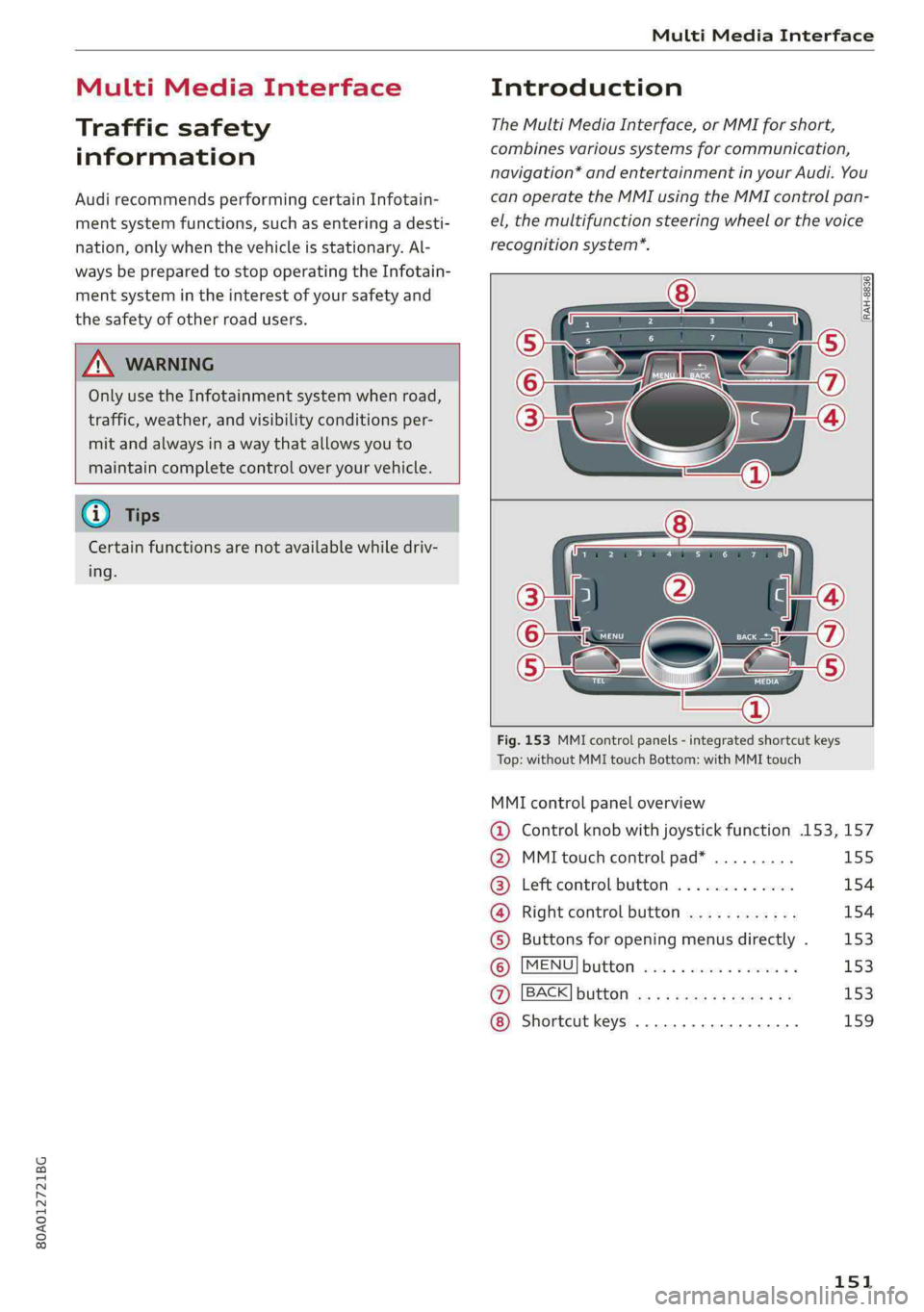
Fig.153MMIcontrolpanels-integratedshortcutkeys
Top:withoutMMItouchBottom:withMMItouch
MMIcontrolpaneloverview
@Controlknobwithjoystickfunction.153,157
@MMItouchcontrolpad*.........155
®Leftcontrolbutton.............154
@®Rightcontrolbutton............154
©)Buttonsforopeningmenusdirectly.153
6)[MENUButtonssceaoc2canevocermin&153
@)[BACK]button<3:+eavesseweae153
Shortcutkeys.........2..00000159
151
Page 165 of 392
80A012721BG
Multifunctionsteeringwheel
Multifunctionsteering
wheel
Introduction
Appliesto:vehicleswith multifunctionsteeringwheel
Inthedriverinformationsystemdisplay,youcan
controlnumerousInfotainmentfunctionsusing
themultifunctionsteeringwheelplus*>page 15
orthemultifunctionsteeringwheel*>page18.
Youcancontrol additionalInfotainmentfunc-
tionsusingtheMMIcontrolpanel>page151in
theInfotainmentsystemdisplay.
ZAWARNING
Directyourfullattentiontodriving.Asthe
driver,youhavecompleteresponsibilityfor
safetyintraffic.Only use thefunctionsinsuch
awaythatyoualwaysmaintaincompletecon-
troloveryourvehicleinalltrafficsituations.
Radio
Appliesto:vehicleswith multifunctionsteeringwheelandra-
dio
Appliesto:vehicleswith multifunctionsteeringwheel
>Pressthe[MODE]buttononthemultifunction
steeringwheelrepeatedlyuntiltheRadio/
Mediatabisdisplayed.
Appliesto:vehicleswith multifunctionsteeringwheelplus
>Pressthe|< >|buttononthemultifunction
steeringwheelrepeatedlyuntiltheRadio/
Mediatabisdisplayed.
>Presstheleftcontrolbutton>page16.
Dependingonvehicleequipment,thefollowing
functions
maybeavailableinthedriverinforma-
tionsystem.
—Selectingthefrequencyband:selectandcon-
firmafrequencyband.
—Selectingastationfromthestationlist:select
andconfirmaradiostation.
—Selectingastationfromthepresetslist:select
andconfirmPresetsandthenaradiostation.
—Openingamediasource:selectandconfirmTo
media.
Additionalsettings
—Select:rightcontrolbutton>desiredentry.
See>page223.
G)Tips
PayattentiontotheInfotainmentsystemdis-
playifnecessary.Dependingontheselected
function,itmaybenecessarytousetheMMI
control panel.
Media
Appliesto:vehicleswithmultifunctionsteeringwheeland
media
Requirement:amediadrivemustcontainaudio/
videofiles>page226.
Appliesto:vehicleswithmultifunctionsteeringwheel
>Pressthe[MODE]buttononthemultifunction
steeringwheelrepeatedlyuntiltheRadio/
Mediatabisdisplayed.
Appliesto:vehicleswithmultifunctionsteeringwheelplus
>»Pressthe[<>]buttononthemultifunction
steeringwheelrepeatedlyuntiltheRadio/
Mediatabisdisplayed.
>Presstheleftcontrolbutton>page16.
Depending onvehicleequipment,thefollowing
functionsmaybeavailableinthedriverinforma-
tionsystem.
—Selectingamediasource:selectandconfirma
sourcesuchastheSDcard.
—Switchingtotheradio:selectandconfirmTo
radio.
—Playinganaudio/videofile:selectandconfirm
afile.
—Pausing/resumingplayback:presstheright
thumbwheel@)>page17,fig.11.Toresume
playback,presstherightthumbwheelagain.
—Openingadditionaltrackinformation:select:
rightcontrolbutton>Show"NowPlaying"
screen.
Foradditionalinformation, see>page237.>
163