service AUDI Q5 2019 Manual PDF
[x] Cancel search | Manufacturer: AUDI, Model Year: 2019, Model line: Q5, Model: AUDI Q5 2019Pages: 392, PDF Size: 99.86 MB
Page 198 of 392
Audiconnect
services.Thecellphonenetwork,forexam-
ple,mustbeavailabletouse theseservices.
Appliesto:vehicleswithAudiconnectvehiclecontrol
ForsomeAudiconnectvehiclecontrolservices,
thevehicleownermustbesetupasthekeyuser.
Setkeyuser
Requirement:akeyusermustnotbesetyet.The
ignitionmustbe switchedon.
>Tosetakeyuserforthevehicle,youwillneeda
myAudiaccount.Registeratwww.audiusa.
com/myaudi.
>Linkyourvehicletotheaccountatwww.
audiusa.com/myaudiandthenverifyyour
myAudiaccountimmediatelyinordertouse
the Audiconnectvehiclecontrolservices.
>YoucanalsoverifyyourmyAudiaccountlater.
Loginatwww.audiusa.com/myaudiwithyour
accessinformationandverifyyourmyAudiac-
countinusermanagementusingtheverifica-
tionprocessthatisgiven.
>Select:[MENU]button>Audiconnect>ifnec-
essary,Displayavailablefunctions>rightcon-
trolbutton>Audiconnectusermanagement>
Keyuser>Set keyuser.
>EnteryourmyAudiusernameandthe10-digit
vehiclecode=page29.Thekeyuserisset.You
havetherightstouse the Audiconnectvehicle
controlservices>page196aswellastheabili-
tytomanageothervehiclefunctionsandany
otherusers.
Resettingtheprimaryuser
Ifyouremovethekeyuser,allotherusersand
theirauthorizationswillbedeleted.Itwillno
longerbepossibletouse the Audiconnectvehi-
clecontrolservices.
Requirement:akeyusermustbeset.Theignition
mustbe switchedon.
Select:[MENU]button>Audiconnect>right
controlbutton>Audiconnectusermanagement
>Keyuser>Resetkeyuser.
196
UsingthemyAudiapp
>InstallthemyAudiapponyourmobiledevice
andloginwithyouraccessinformation.
(i)Tips
—Ifyousellyourvehicle,resetthekeyuser
andrestoreallsettings tothefactoryde-
faultsettings>page246.
—Itmayalsobenecessarytoenteryour4-
digitmyAudiPINwhenaccessingsomeAudi
connectvehiclecontrolservices.
—Storethevehiclecodeinasecureplace.It
maybenecessarytore-enterthevehicle
code.
—Payattentiontoupper-andlower-caselet-
terswhenenteringthevehiclecode.
—Ifyoudonot havethe10-digitvehiclecode,
contactanauthorizedAudidealerorauthor-
izedAudiServiceFacility.
Additionaloptions
Appliesto:vehicleswith Audiconnectvehiclecontrol
Licensesubscription
Thevalidityandexpirationdateofyoursubscrip-
tionsaredisplayed.Whenthisfunctionisactivat-
ed,youwillbenotifiedbeforeyoursubscription
expires.
MENU Select:button>Audiconnect>Display
availablefunctions>rightcontrolbutton>Li-
censesubscription.
Warninglevels
Requirement:theprimaryusermusthavesetone
ormorewarninglevels.Secondaryuserscanonly
seeifawarninglevelisactiveornot.
MENU Select:button>Audiconnect>right
controlbutton>Alerts.
Services
Appliesto:vehicleswith Audiconnectvehiclecontrol
Dependingonthecountryandthevehicleequip-
ment,thefollowingservicesmaybeavailable:>
Page 199 of 392
80A012721BG
Audiconnect
Remotelockingandunlocking
Requirement:thevehiclemustbeparkingand
theignitionmustbeswitchedoff.
Thisserviceallowsyoutounlockorlockyourve-
hicle.
Vehiclestatusreport
Thisservicetransfersdriverinformationsystem
datatoaserver.Dependingonthevehicleequip-
ment,certaindatamaybeaccessed,suchasthe
remainingrangeormileage.Thevaluesmaydif-
ferfromthevaluesdisplayedinthevehicle.
CarFinder
Thisservicetransmitstheparkinglocationtoa
server whentheignitionisswitchedoff.Thevehi-
clelocation,yourlocation,ortheroutetoyour
vehiclecanbedisplayed.Thenewparkingloca-
tioncannotbedeterminedwiththisserviceifthe
vehicleismovedaftershuttingthevehicleoff
andwithoutswitchingtheignitiononandoff
again,forexampleifthevehicleistowedorsto-
len.
—Deactivatingandactivatingtheparkingposi-
tion:Select:[MENU]>Audiconnect>Carfind-
er.
OnlineAudiservicerequest
Requirement:theservicemustbeactivatedon-
lineatwww.audiusa.com/myaudiandanauthor-
izedAudidealerorauthorizedAudiservicefacili-
tymustbeselected.
Thisservicetransmitsservice-relevantdatato
yourselectedauthorizedAudidealerorauthor-
izedAudiservicefacility.Theywillcontactyou
beforeyournextserviceappointment.
StolenVehicleLocator
Thisserviceassistsyouinlocatingyourvehicleif
itisstolen.
—Contactthepolice.YoureceiveaCaseID.
—CalltheservicehotlineandgiveyourCaseID.
Theservicehotlinewillforwardtheestablished
datatothepolice.YoureceivetheAudiService
hotlinenumberwhenyoupurchaseyourvehicle.
GeofencingAlert
Requirement:akeyusermustbesetinthevehi-
cle>page196.
Thisserviceallowsyouto setpermittedandfor-
biddenzonesforyourvehicleaswellassettime
limitsforthesezones.Ifyourvehicleleavesa
permittedzoneorentersaforbiddenzone,you
willbenotifiedwithapushnotificationand/oran
e-mail.
SpeedAlert
Requirement:akeyusermustbesetinthevehi-
cle>page196.
Youcansetuptotwospeedlimitsforyourvehi-
cleusingthis service.Ifyourvehicleexceedsaset
speedlimit,youwillbenotifiedwithapushnoti-
ficationand/ore-mail.
ValetAlert
Requirement:akeyusermustbesetinthevehi-
cle>page196.
Ifyougiveyourvehicletoaparkingservice,you
cansetazoneandaspeedlimitusingthemyAu-
diapp.Ifthevehicleleavesthezoneorexceeds
thespeedlimit,youwillbenotifiedwithapush
notificationand/ore-mail.
ZA\WARNING
Donotignoremessagesandwarningorindi-
catorlightsthatturnoninthevehiclebe-
causeoftheinformationinthevehiclestatus
report.Thiscouldlead tobreakdownsinon
theroad,accidentsandseriousinjuries.
@)Tips
Forsomeservices,youcanselectifyouwould
liketobenotifiedwithapushnotification
and/orane-mail.
Settings
Co)ate-Mar-iancola4
>Select:[MENU]button>Audiconnect>right
controlbutton>Connectionmanager.
>Select:rightcontrolbutton>Onlinesettings>
Dataconnectionsettings.
197
>
Page 200 of 392
Audiconnect
Dependingonthecountry,vehicleequipment,
andconnectiontype,thefollowingfunctionsmay
beavailable:
Dataconnectionsettings
UsingtheDataconnectionsettingsmenu,you
cansetwhenthesystemshouldconnecttothe
Internet.TheInternetconnectiondisconnects
automaticallyoncetherequested Audiconnect
Infotainmentservicenolongerrequiresanydata.
—Connectionsetup:youcanselectwhenadata
connection should beestablished.
—Audiconnect(MMI):whenthisfunctionis
switchedon,adataconnectionisautomatically
establishedinordertouseAudiconnectInfo-
tainmentservices.
—Wi-Fidevices:whenthisfunctionisswitched
on,youcanallowordenyInternetconnections.
ZAWARNING
Alwaysfollowtheinformationfoundin>A\
inGeneralinformationonpage192.
@)Note
Alwaysfollowtheinformationfoundin>@in
Generalinformationonpage192.
@Tips
Formoreinformationonroamingcharges,
contactyourcellphoneserviceprovider.
Wi-Fisettings
Appliesto:vehicleswithWi-Fihotspot
YoucanusetheMMIasaWi-Fihotspottocon-
nect
uptoeight Wi-FidevicestotheInternet.
Requirement:theignitionmustbe switchedon.
>Select:[MENU]button>Telephone>rightcon-
trolbutton>Wi-Fisettings.
Dependingonthecountryandthevehicleequip-
ment,thefollowing functionsmaybeavailable:
198
Wi-Fi
Whenthisfunctionisswitchedon,theMMIWi-Fi
hotspotisactiveandvisibletootherdevices(for
example,laptopsandcellphones).Youcancon-
nectyourWi-FidevicetotheMMIandusetheIn-
ternetconnectionifnecessary.Ifyouswitchoff
theWi-FiintheMMI,theWi-Fihotspotwillbe
deactivated.Therefore,anyotherdevicesaccess-
ingtheWi-Fihotspotwillnolongerbeconnected
totheWi-Fi.
Networkkey
TheWi-Ficonnectionbetweenyourvehicleand
yourWi-Fideviceisencrypted.Toestablishacon-
nection,youmustenterthefollowingvalues
whensettingupyourwirelessdevice.Youcan
changethemifnecessary.
—Accesspoint(SSID):NameoftheWi-Finet-
work.
—Password:arandompasswordwassetinthe
MMIatthefactory.Thepasswordcanbe
changed.Theencryptionmethodrequiresa
passwordtobeatleasteightcharacterslong.
Chooseasecurepassword.
—Visibletoothers:ThevisibilityofyourWi-Fi
networkcanbeswitchedonandoff.
Z\WARNING
Alwaysfollowtheinformationfoundin>A\
inGeneralinformationonpage192.
()Note
Alwaysfollowtheinformationfoundin©in
Generalinformationonpage192.
G)Tips
InvehicleswithoutAudiconnectInfotain-
ment,theuseoftheWi-Fihotspotisonly
possiblefortheWi-Fiaudioplayer*.Adata
connectiontotheInternetcannotbeestab-
lished.
Page 201 of 392
80A012721BG
Audiconnect
Dataplans!)
Appliesto:vehicleswith dataplans
Requirement:YoumusthavearegisteredmyAudi
accountatwww.audiusa.com/myaudi.Yourvehi-
clemustberegisteredinyourmyAudiaccount.
Youcanpurchasedataplansatwww.audiusa.
com/myaudi.
ZAWARNING
Alwaysfollow theinformationfoundin>AA
inGeneralinformationonpage192.
@)Note
Alwaysfollowtheinformationfoundin>@®in
Generalinformationonpage192.
(i)Tips
—Pleasenotethatanyvehiclepassengercan
deletetheSIMowner.
— Theassociatedvehicleisnotautomatically
deletedfromthecustomerportalforthe
cellphoneserviceproviderwhenyoudelete
theSIMownerinthevehicle.Ifsellingyour
vehicle,youshoulddeletethevehiclefrom
thecustomerportalforthecellphoneserv-
iceprovidertoavoidbeingchargedforaddi-
tionalpurchases.
DataPrivacy
Appliesto:vehicleswithAudiconnectInfotainment
AUDIAGcollects,uses,storesandsharesyour
personalinformation,suchascontactdata,vehi-
cledata,usagedata,drivingdataandprecisege-
olocation,inordertoprovideyouwiththeprod-
uctsandservicesyouhavepurchasedorrequest-
Troubleshooting
Appliesto:vehicleswithAudiconnectInfotainment
Theinformationthatfollowslistssometrouble-
shootingoptions.Theydependontheequip-
ment.
))_Notavailableineverymarket.
ed,andforanumberofotherpurposes,forex-
ample,totrackqualityissues,toperformance
andsafety,tomeetourinternalcomplianceorle-
galrequirementsandtomarkettocustomers
andpotentialcustomers.Foramorecomplete
listofthedatawecollect,howweuseitandwith
whomweshareit,pleasevisityourAudination-
al/salesregionwebsiteatwww.audi.com.
Thecollection,useandsharingmayvarydepend-
ingonyourmodelandmodelyear,yoursubscrip-
tionstatus,ortheserviceoffering.Forexample,
collection,useandsharingmayvarybetweenAu-
diconnectservices,ifyouhavedesignatedakey
user,orifyouaredrivingamodelequippedwith
persistentdatalogging.Please reviewthecom-
pletePrivacyStatementtounderstandourdata
handlingpracticeswithrespecttoaparticular
service.
Youcanfindadditionalinformationaboutourda-
taprivacypracticesinyourMMI.
>Select:[MENU]button>Audiconnect>right
controlbutton>AboutAudiconnect.
Informationaboutourprivacypracticesincon-
junctionwiththemobileAudiconnectapplica-
tioncanbefoundintheApplication’sPrivacy
Statement.
Foradditionalinformationabouttheprivacy
practicesrelatingtoAudiconnect,myAudi,or
otherwebsites,applicationsoronlineservicesas
wellasyourobligationswithrespecttousing
theseservices,andforadditionalinformationre-
gardingAudiconnectterms andconditions,
pleasevisityourAudinational/salesregionweb-
siteatwww.audi.com.
199
Page 202 of 392
Audiconnect
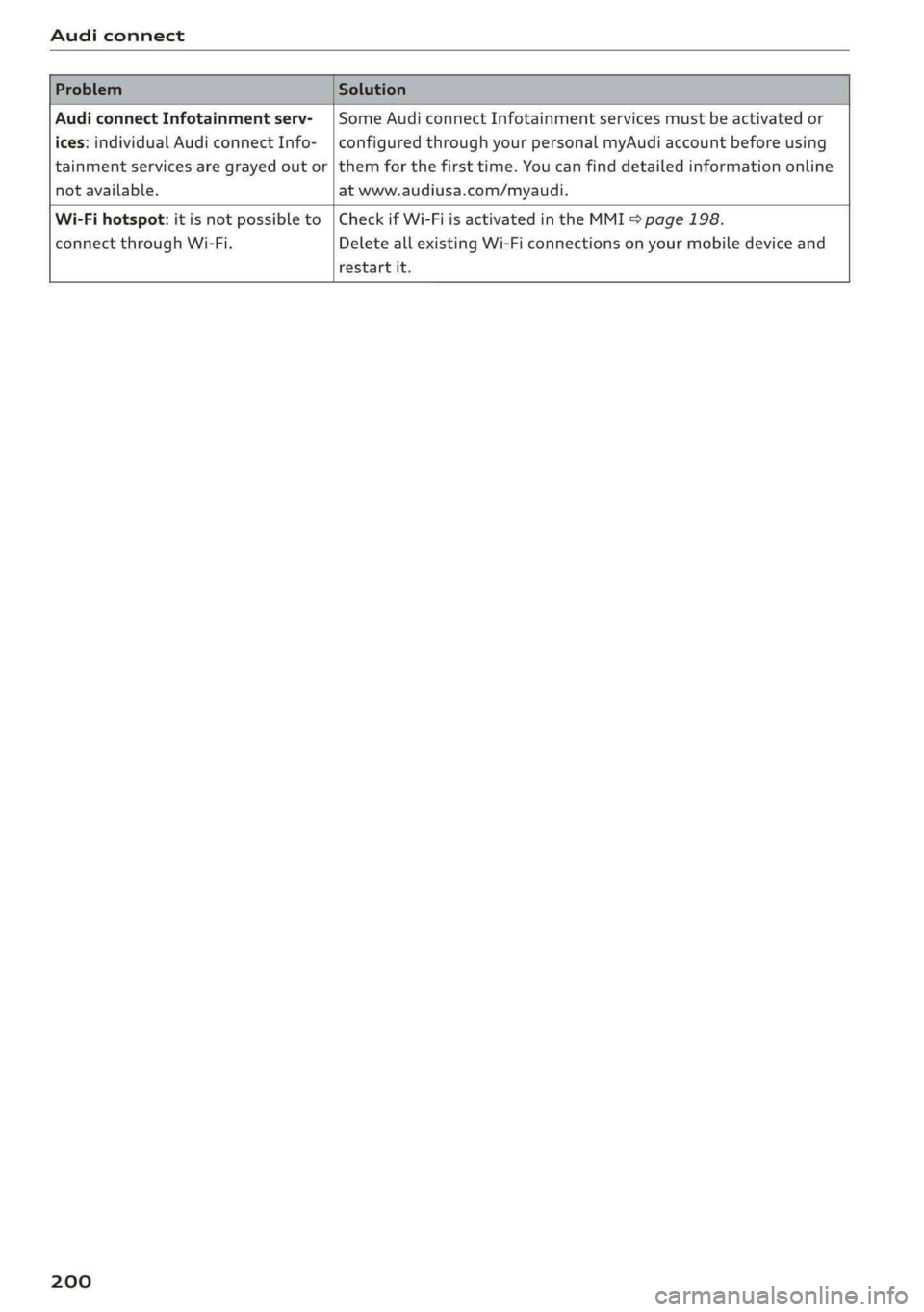
AudiconnectInfotainmentserv-|SomeAudiconnectInfotainmentservicesmustbeactivatedor
ices:individualAudiconnectInfo-|configuredthroughyourpersonalmyAudiaccountbeforeusing
tainmentservicesaregrayed outor|themforthefirsttime.Youcanfinddetailedinformationonline
notavailable.atwww.audiusa.com/myaudi.
Wi-Fihotspot:itisnotpossibleto|CheckifWi-FiisactivatedintheMMI>page198.
connectthroughWi-Fi.DeleteallexistingWi-Ficonnectionsonyourmobiledeviceand
restartit.
200
Page 203 of 392
80A012721BG
Emergencycall
Emergencycall
Introduction
Appliesto:vehicleswithemergencycallfunction
Dependingonthe countryandthevehicleequip-
ment,thefollowing functionsmaybeavailable.
Withtheemergencycall,youcancallforhelpin
dangeroussituationsasquicklyaspossible.Use
thisfunctionwhenemergencyhelpisneeded
=>page201.
Withonlineroadsideassistance,youcanrequest
assistanceifthereisabreakdownoraminoracci-
dent>page202.
@Tips
— TheservicesareprovidedthroughaSIM
cardinstalledinthevehicle.Thecostofthe
callanddataconnectionsisincludedinthe
priceoftheservices.Servicesareprovided
assumingthatthecellphonenetworkre-
quiredfortheinstalledSIMcardisfunction-
ingandavailable foruse.Theavailableserv-
icessetbyAudiAGareonlyavailablewithin
thecellphonenetworkcoverageareafor
thecellphoneserviceprovider selectedby
AudiAG.
—Youcanfindwhatdatawillbetransferredat
www.audiusa.com.
—Theseservicescannot bedeactivatedusing
thesettingsintheInfotainmentsystem.
Emergencycall
Appliesto:vehicleswithemergencycallfunction
Anemergencycallisacombinationofdatatrans-
missionandaphonecall.Thedatatransmission
fromyourvehicleforwardsimportantinforma-
tion,suchasthevehicleandpositiondata,tothe
emergencycallcenter.
@)Tips
Theavailability oftheservicesofferedde-
pendsonthecountryandmaychangeinthe
future.
Makinganemergencycall
Appliesto:vehicleswithemergencycallfunction
Theemergencycallcanbemadetwodifferent
ways.
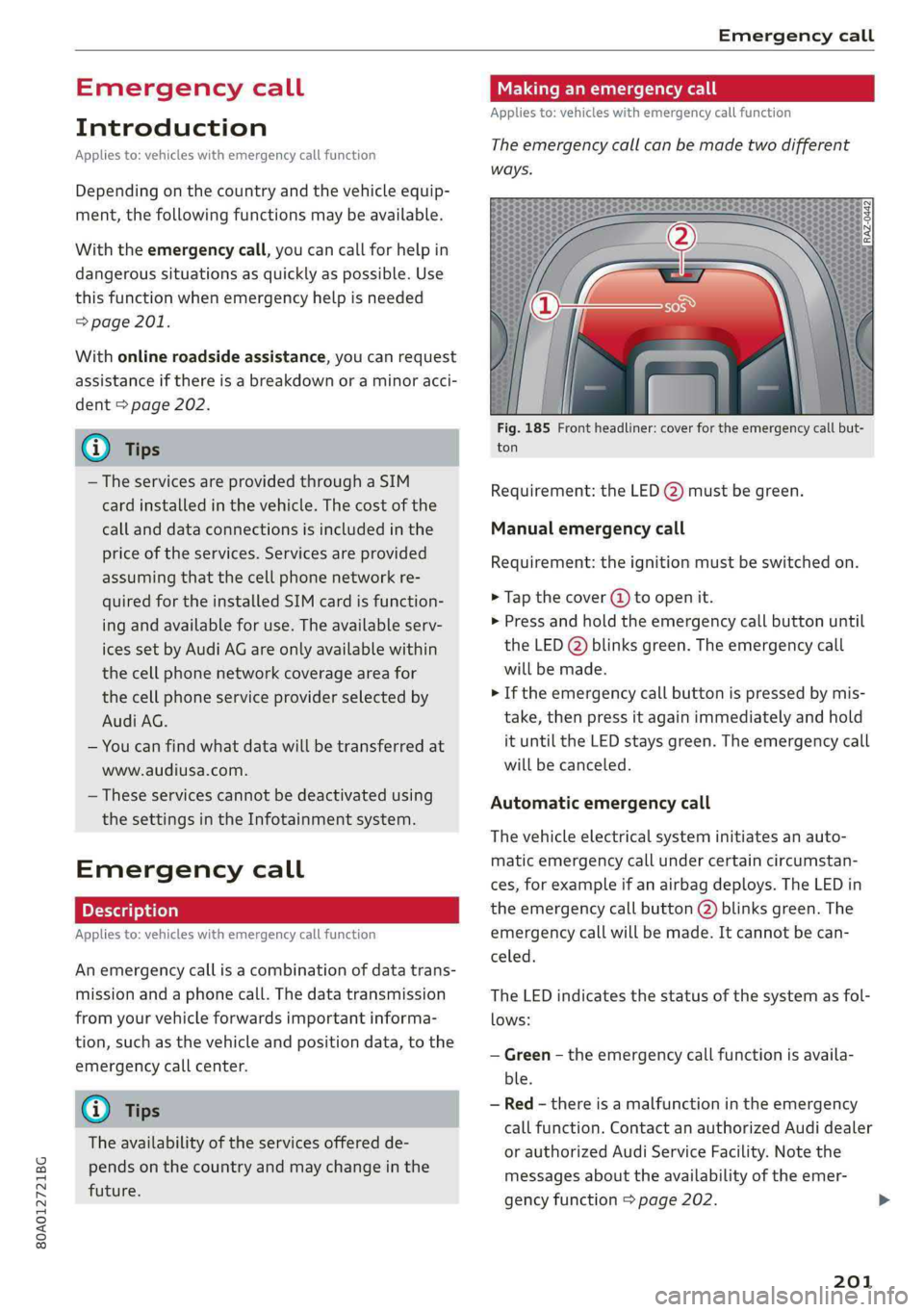
Fig.185Frontheadliner:coverfortheemergencycallbut-
ton
Requirement:theLED@)mustbegreen.
Manualemergencycall
Requirement:theignitionmustbeswitchedon.
>Tapthecover(4)toopenit.
>Pressandholdthe emergencycallbuttonuntil
theLED()blinksgreen.Theemergencycall
willbemade.
>Iftheemergencycallbuttonispressedbymis-
take,thenpressitagainimmediatelyandhold
ituntiltheLEDstaysgreen.Theemergencycall
willbecanceled.
Automaticemergencycall
Thevehicleelectricalsysteminitiatesanauto-
matic emergencycallundercertaincircumstan-
ces,forexampleifanairbagdeploys.TheLEDin
the emergencycallbutton(2)blinksgreen.The
emergencycallwillbe made.Itcannot becan-
celed.
TheLEDindicatesthestatusofthesystemasfol-
lows:
—Green-theemergencycallfunctionisavaila-
ble.
—Red-thereisamalfunctionintheemergency
callfunction.ContactanauthorizedAudidealer
orauthorizedAudiServiceFacility.Notethe
messagesabouttheavailability oftheemer-
gencyfunction>page202.
201
Page 204 of 392
Emergencycall
—Off-theemergencycallfunctionisnotavaila-
ble,perhapsbecausenonetworkisavailable.
@)Tips
Iftheemergencycalliscanceledduetoa
poorconnection,thenthesystemautomati-
callytriestoconnectagain.
Appliesto:vehicleswithemergencycallfunction
303|Emergencycallfunction:malfunction!Re-
strictedfunctionality.PleasecontactService
Ifthisindicatorlightturnsonandthismessage
appears,the emergencycallfunctionisrestrict-
ed.Forexample,youcannotcalltheemergency
callcenter,butdatamaystill betransmittedun-
dercertaincircumstances.Drivetoanauthorized
AudidealerorauthorizedAudiServiceFacilityim-
mediatelytohavethemalfunctioncorrected.
&Emergencycallfunction:malfunction!Func-
tionunavailable.PleasecontactService
Ifthisindicatorlightturnsonandthismessage
appears,youcannotmakeanemergencycall.
DrivetoanauthorizedAudidealerorauthorized
AudiServiceFacilityimmediatelytohavethe
malfunctioncorrected.
Onlineroadside
assistance
Appliesto:vehicleswithonlineroadsideassistance
Anonlineroadsideassistancecall)) isacombina-
tionofdatatransmissionandaphonecall.The
data transmissionfromyourvehicleforwardsim-
portantinformationtothe Audiservicecenter,
suchasthevehicleandpositiondata.
))Theavailabilityoftheservicesoffereddependsonthe
countryandmaychangeinthefuture.
202
Callingonlineroadsideassistance
Appliesto:vehicleswithonlineroadsideassistance
RAZ-0443
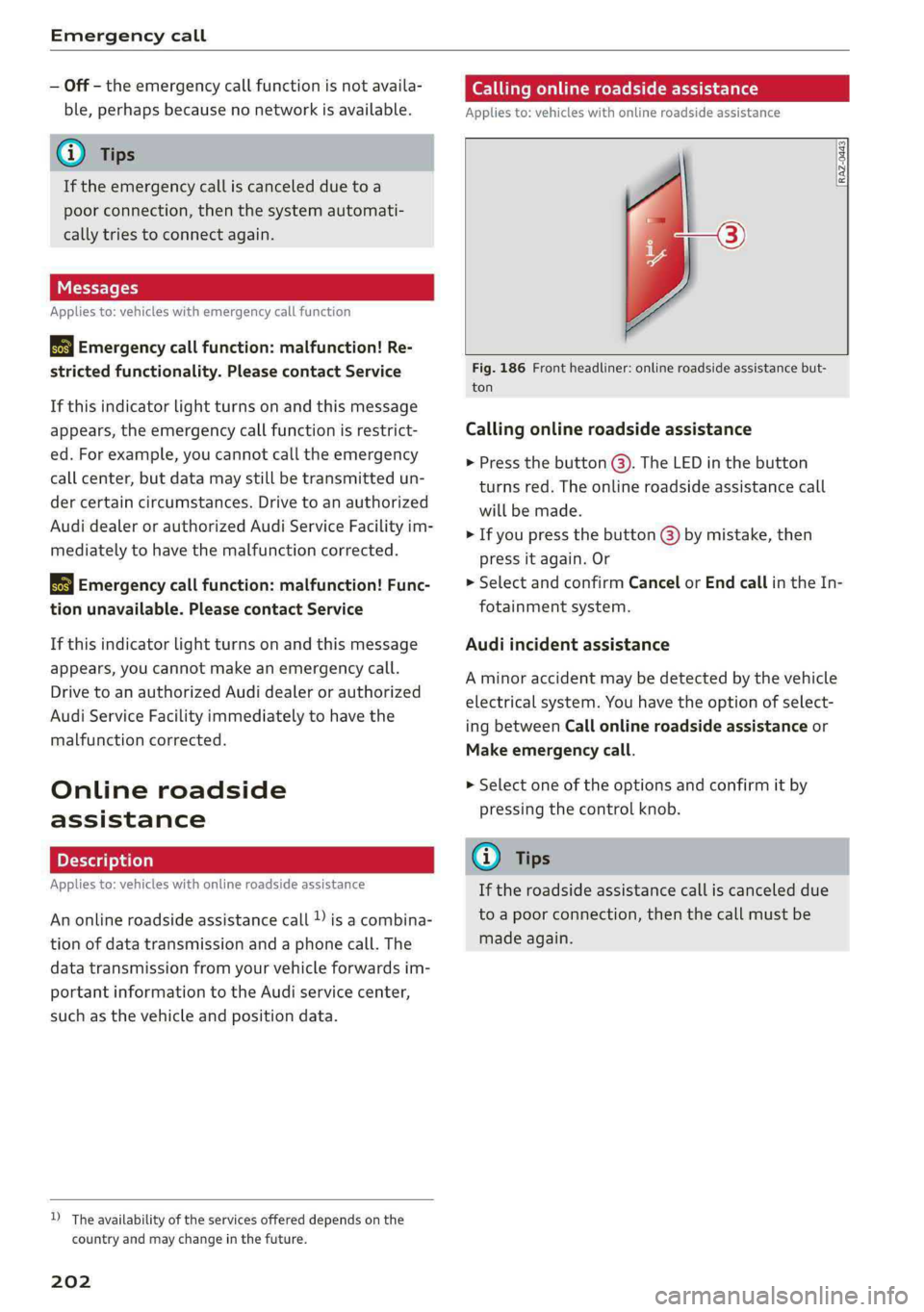
Fig.186Frontheadliner:onlineroadsideassistancebut-
ton
Callingonlineroadsideassistance
>Pressthebutton@).TheLEDinthebutton
turnsred.Theonlineroadsideassistancecall
willbemade.
>Ifyoupressthebutton@)bymistake,then
pressitagain.Or
>SelectandconfirmCancelorEndcallintheIn-
fotainmentsystem.
Audiincidentassistance
Aminoraccidentmaybedetectedbythevehicle
electricalsystem.Youhavethe optionofselect-
ingbetweenCallonlineroadsideassistanceor
Makeemergencycall.
>Selectoneoftheoptionsandconfirmitby
pressingthecontrolknob.
G)Tips
Iftheroadsideassistancecalliscanceleddue
toapoorconnection,thenthecallmustbe
madeagain.
Page 216 of 392
Navigation
Routelist
Theroutelistcanonlybedisplayedwhenroute
guidanceisactiveandcontainsinformationre-
gardingtheroute,thenamesofthestreetsand
the lengthoftheroutesections.Whentraveling
onhighways,possibleparkinglotsandrestareas
areshown,whichyoucanselectasastopover.
POIsalongtheroute
Requirement:routeguidancemustbeactive.
Searchingforpointsofinterestalongyourcur-
rentrouteForadditionalinformation,see
=>page206.
Additionaloptionsonthemap
Appliesto:vehicleswithnavigationsystem
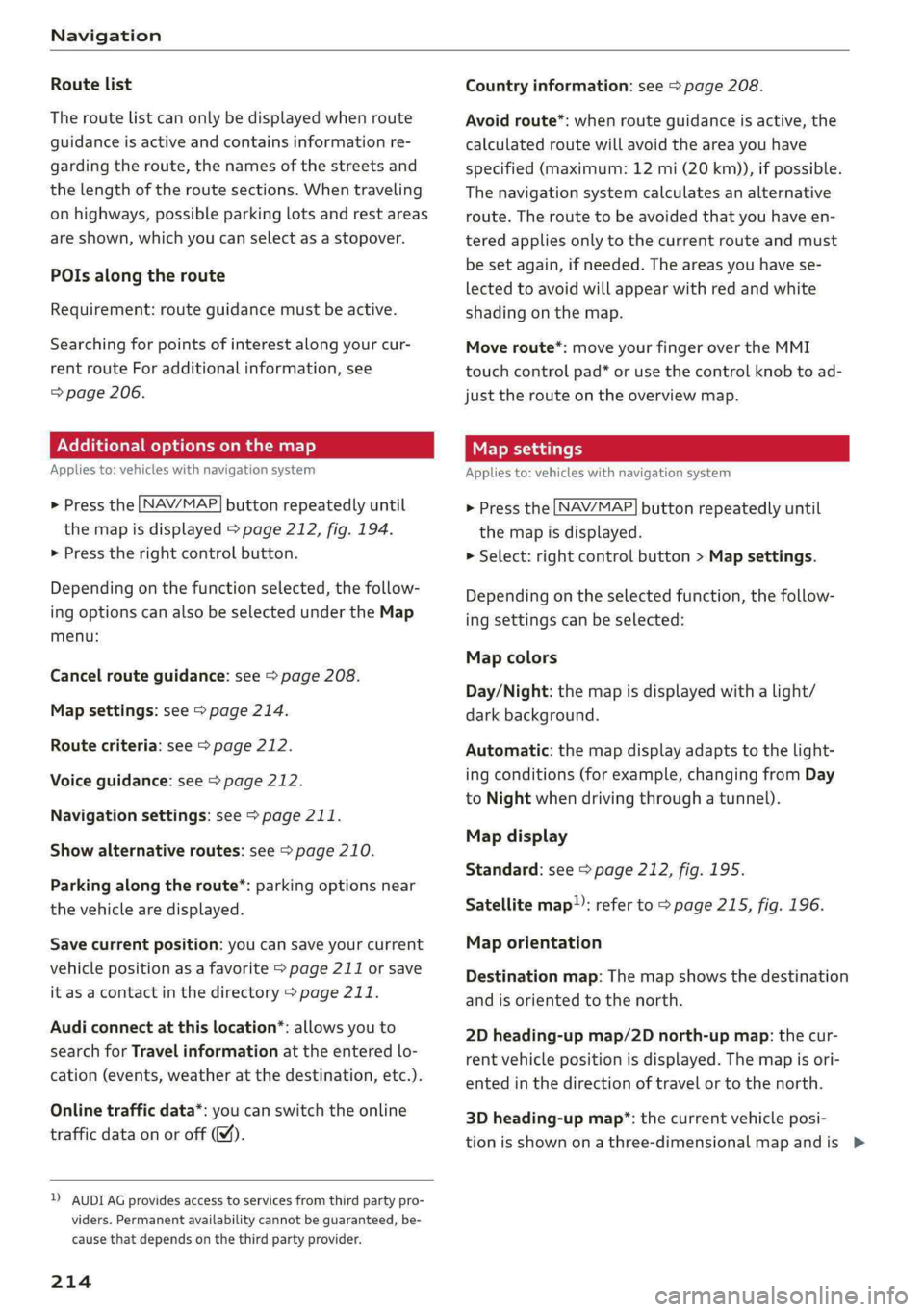
>Pressthe [NAV/MAP]buttonrepeatedlyuntil
themapisdisplayed>page212,fig.194.
>Presstherightcontrolbutton.
Dependingonthefunctionselected,thefollow-
ingoptionscanalsobeselectedundertheMap
menu:
Cancelrouteguidance:see>page208.
Mapsettings:see>page214.
Routecriteria:see>page212.
Voiceguidance:see>page212.
Navigationsettings:see>page211.
Showalternativeroutes:see>page210.
Parkingalongtheroute”:parkingoptionsnear
thevehiclearedisplayed.
Savecurrentposition:youcansaveyourcurrent
vehiclepositionasafavorite>page211orsave
itasacontactinthedirectory>page211.
Audiconnectatthislocation*:allowsyouto
searchforTravelinformationattheenteredlo-
cation(events,weatheratthedestination,etc.).
Onlinetrafficdata*:youcanswitchtheonline
trafficdataonoroff(M).
2)AUDIAGprovidesaccesstoservicesfromthirdpartypro-
viders.Permanentavailabilitycannotbeguaranteed,be-
causethatdependsonthethirdpartyprovider.
214
Countryinformation:see>page208.
Avoidroute*:whenrouteguidanceisactive,the
calculatedroutewillavoidtheareayouhave
specified(maximum:12mi(20km)),ifpossible.
Thenavigationsystemcalculatesanalternative
route.Theroutetobeavoidedthatyouhaveen-
teredappliesonlytothecurrentrouteandmust
besetagain,ifneeded.Theareasyouhavese-
lectedtoavoidwillappearwithredandwhite
shadingonthemap.
Moveroute*:moveyourfingerovertheMMI
touchcontrolpad*oruse thecontrolknobto ad-
justtherouteonthe overviewmap.
Mapsettings
Appliesto:vehicleswithnavigationsystem
>Pressthe LNAV/MAP]buttonrepeatedlyuntil
themapisdisplayed.
>Select:rightcontrolbutton>Mapsettings.
Dependingontheselectedfunction,thefollow-
ingsettingscanbeselected:
Mapcolors
Day/Night:themapisdisplayedwitha light/
darkbackground.
Automatic:themapdisplayadaptstothelight-
ingconditions(forexample,changingfromDay
toNightwhendrivingthroughatunnel).
Mapdisplay
Standard:see>page212,fig.195.
Satellitemap”:referto>page215,fig. 196.
Maporientation
Destinationmap:Themapshowsthedestination
andisorientedtothenorth.
2Dheading-upmap/2Dnorth-upmap:thecur-
rentvehiclepositionisdisplayed.Themapisori-
entedinthedirectionoftravelor tothenorth.
3Dheading-upmap”:thecurrentvehicleposi-
tionisshownonathree-dimensionalmapandis>
Page 217 of 392
80A012721BG
Navigation
orientedtothedirectionoftravel.Atascaleof
62mi(100km)andlarger,themaporientation
istothenorth.
Overviewmap:theentireroutefromthevehicle
positiontothedestinationorthenextstopoveris
displayedonthemap.Themapscaledependson
the lengthoftherouteandadaptsautomatically.
Themapisorientedtothenorth.
Routeinformation
Thedisplayofrouteinformation,suchasthecur-
rentstreetbeingdrivenonorpointsofinterest
alongthecurrentroute>page212,fig.194,can
be switchedon/offorcanbeminimizedonthe
displayofupcomingmaneuvers.
Automaticzoom
On:themapscaleisadaptedautomaticallyde-
pendingonthetypeof roadbeingtraveled(ex-
pressway,highway,otherroads)sothatyoual-
wayshaveanoptimaloverviewoftheroadahead.
Thescalewillalsobeautomaticallyadapted
whenthereareupcomingmaneuverstoprovidea
betterdetailedview.
Intersection:whenrouteguidanceisactive,the
maptemporarilyzoomsintoadetailedscale
whenthereareupcomingmaneuverssothatyou
can seethestreetorturnbetter.
Off:themapscaleyouhavechosenismain-
tained.
MMImapcontents
Youcanswitchthedisplayofadditionalinforma-
tiononthemapintheInfotainmentsystemdis-
playonoroff.
Theweatherforecastisdisplayedona3mile(5
km)scaleonthemap.
Instrumentclustermapcontents
Youcanalsosetwhichmapcontentdisplaysin
theinstrumentcluster>page166.
))AUDIAGprovidesaccesstoservicesfromthirdpartypro-
viders.Permanentavailabilitycannotbeguaranteed,be-
causethatdependsonthethirdpartyprovider.
Satellitemap
Appliesto:vehicleswithnavigationsystem andAudiconnect
Infotainment
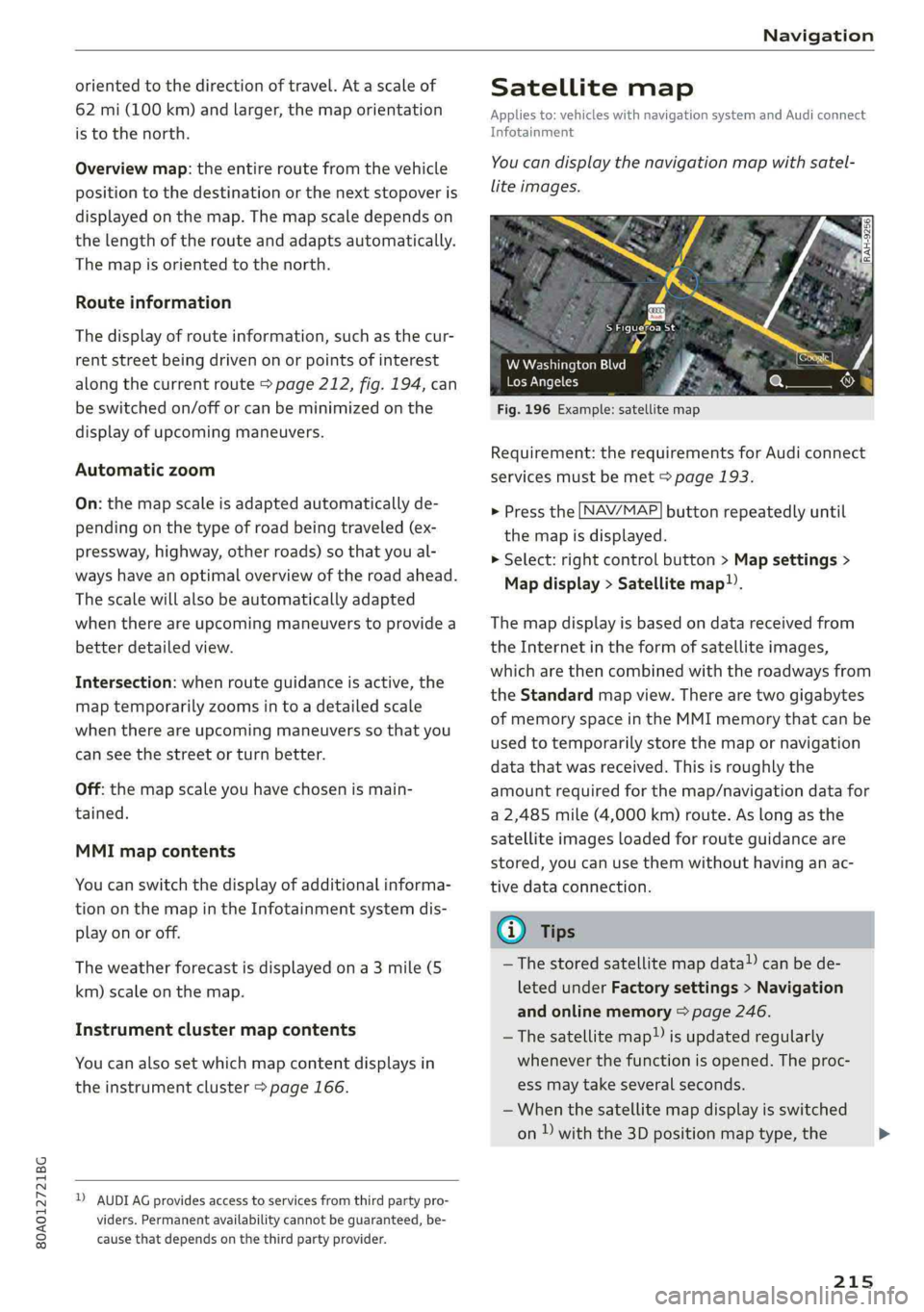
You candisplaythenavigationmapwithsatel-
liteimages.
SFigueroaSt
Fig.196Example:satellitemap
WWashingtonBlvd
LosAngeles
Requirement:therequirementsforAudiconnect
servicesmustbemet>page193.
>Pressthe [NAV/MAP]buttonrepeatedlyuntil
themapisdisplayed.
>Select:rightcontrolbutton>Mapsettings>
Mapdisplay>Satellitemap).
Themapdisplayisbasedondatareceivedfrom
theInternetintheformofsatelliteimages,
whicharethencombinedwiththeroadwaysfrom
theStandardmapview.Therearetwogigabytes
ofmemoryspaceintheMMImemorythatcanbe
usedtotemporarilystorethemapornavigation
datathatwasreceived.Thisisroughlythe
amountrequiredforthemap/navigationdatafor
a2,485mile(4,000km)route.Aslongasthe
satelliteimagesloadedforrouteguidanceare
stored,youcan usethemwithouthavinganac-
tivedataconnection.
GTips
—Thestoredsatellitemapdata!)canbede-
letedunderFactorysettings>Navigation
andonlinememory>page246.
~Thesatellitemap!)isupdatedregularly
wheneverthefunctionisopened.Theproc-
essmaytakeseveralseconds.
—Whenthesatellitemapdisplayisswitched
on)withthe3Dpositionmaptype,the
215
>
Page 218 of 392
Navigation
MMIdisplayautomaticallyswitchestothe
2Dmaptypewhendrivingthroughtunnels.
—Also readtheinformationinthechapter
=page192,Audiconnect.
—Foradditionalinformation,visitwww.
audiusa.com.
Mapupdate
Appliesto:vehicleswithnavigationsystem
Therearemultipleoptionsavailableforupdating
yourmapmaterial:
—Mapupdatesthroughthe onlinemapupdate*
>page216.
—ImportmapupdatesfromtheSDcard*toyour
MMI.Youcanfindadditionalinformationon-
lineatwww.audiusa.com/myaudi.
—MapupdateatanauthorizedAudidealeror au-
thorizedAudiServiceFacility.Thiscanresultin
additionalcosts.
Onlinemapupdate
Appliesto:vehicleswithnavigationsystemandAudiconnect
Infotainment
Usingtheonlinemapupdate,youcanupdate
themapmaterialinyournavigationsystemdi-
rectlyfromyourvehicle.
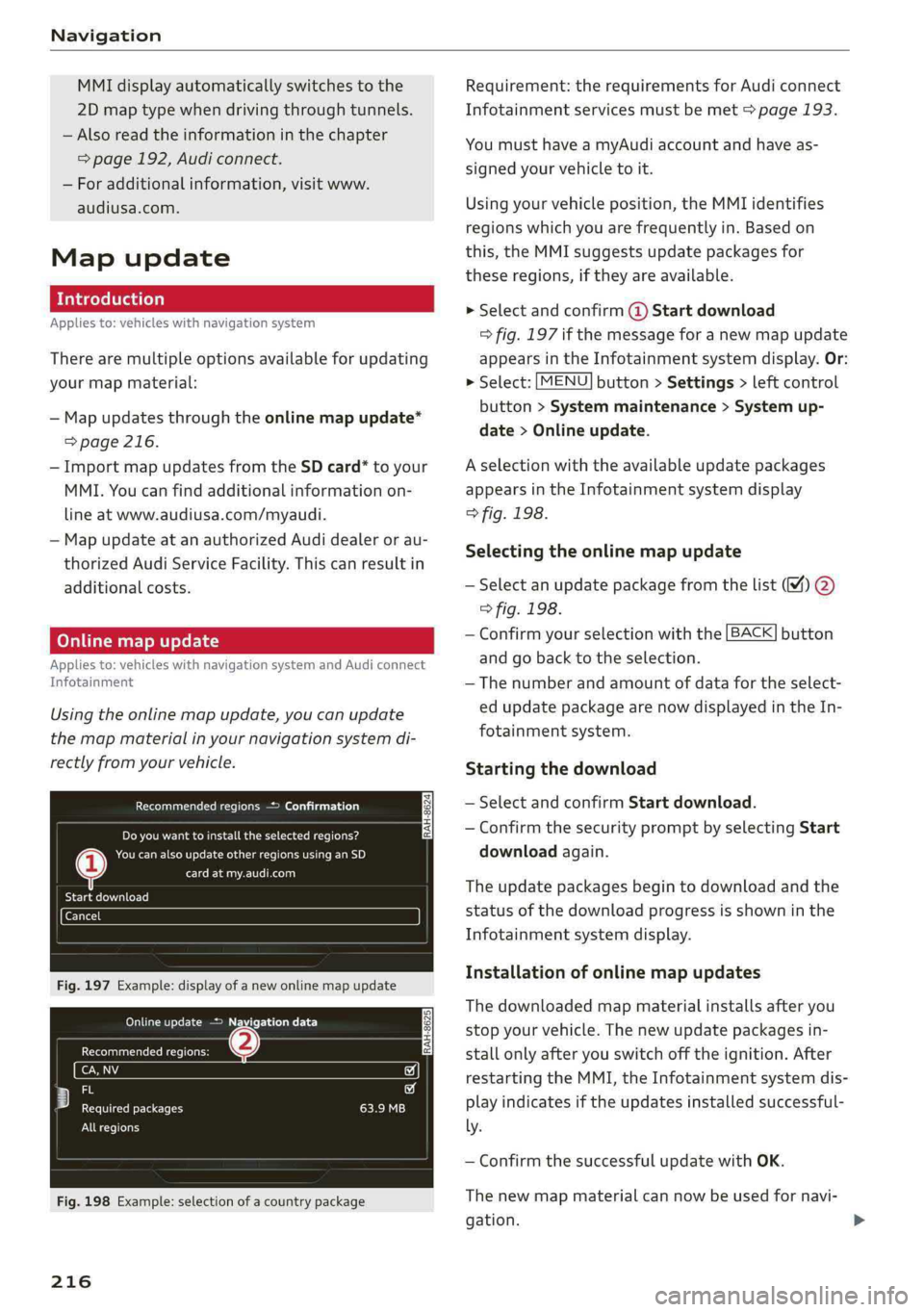
Recommendedregions->Confirmation
[RAH-8624]LOTRolRUTae
Cannelel
BTCCelTe)
Fig.197Example:displayofanewonlinemapupdate
OMGriceetcare)
GecmaeuteCRiees
io
Fy)iecf
ereReteeleERI)
Allregions
Fig.198Example:selectionofacountrypackage
216
Requirement:therequirementsforAudiconnect
Infotainmentservicesmustbemet>page193.
YoumusthaveamyAudiaccountandhaveas-
signedyourvehicletoit.
Usingyourvehicleposition,theMMIidentifies
regionswhichyouarefrequentlyin.Basedon
this,theMMIsuggestsupdatepackagesfor
theseregions,iftheyareavailable.
»Selectandconfirm@Startdownload
=>fig.197ifthemessageforanewmapupdate
appearsintheInfotainmentsystemdisplay.Or:
>Select:[MENU]button>Settings>leftcontrol
button>Systemmaintenance>Systemup-
date>Onlineupdate.
Aselectionwiththeavailableupdatepackages
appearsintheInfotainmentsystemdisplay
>fig.198.
Selectingtheonlinemapupdate
—Selectanupdatepackagefromthelist%)@
>fig.198.
—Confirmyourselectionwiththe[BACK]button
and gobacktotheselection.
—Thenumberandamountofdatafortheselect-
edupdatepackagearenowdisplayedintheIn-
fotainmentsystem.
Startingthedownload
—SelectandconfirmStartdownload.
—ConfirmthesecuritypromptbyselectingStart
downloadagain.
Theupdatepackagesbegintodownloadandthe
statusofthedownloadprogressisshowninthe
Infotainmentsystemdisplay.
Installationofonlinemapupdates
Thedownloadedmapmaterialinstallsafteryou
stopyourvehicle.Thenewupdatepackagesin-
stallonlyafteryouswitchofftheignition.After
restartingtheMMI,theInfotainmentsystemdis-
playindicatesiftheupdatesinstalledsuccessful-
ly.
—ConfirmthesuccessfulupdatewithOK.
Thenewmapmaterialcannowbeusedfornavi-
gation.