service AUDI Q5 2019 Workshop Manual
[x] Cancel search | Manufacturer: AUDI, Model Year: 2019, Model line: Q5, Model: AUDI Q5 2019Pages: 392, PDF Size: 99.86 MB
Page 167 of 392
80A012721BG
Multifunctionsteeringwheel
conference™.Bypressingtheleftcontrolbutton,
youcanmakeadditionalcallsfromthedirectory
orthecalllist.Resumeconference*takesallpar-
ticipantsoffhold.
@Tips
— Thephonefunctionscanonlybecontrolled
withthemultifunctionsteeringwheelifthe
phoneequipmentwasinstalledatthefac-
tory.
— Thetelephonefunctionsdependonthecell
phoneandwhethertheyaresupportedby
yourcellphoneserviceproviderornot.
— TheCallwaiting*functionmustbeactivat-
edinyourcellphoneandintheMMIinor-
dertobealerted whenthereisanincoming
callduringanactivecall.Thecalloptions
dependonthecellphoneandservicepro-
vider.Youcanobtainmoreinformationfrom
yourcellphoneserviceprovider.
Navigation
Co)YeeeCLy1)
Appliesto:vehicleswithmultifunctionsteeringwheeland
navigationsystem
Requirement:adestinationmustbe entered
=page203andtherouteguidancemustbe
started.
>Pressthe[<>]buttononthemultifunction
steeringwheelrepeatedlyuntiltheNavigation
tabisdisplayed.
>Presstheleftcontrolbutton>page16.
Dependingonvehicleequipment,thefollowing
functions
maybeavailableinthedriverinforma-
tionsystem.
—Displayingnavigationduringactiveroute
guidance:selectandconfirmMap*/Street
view*orArrowview”.
— Showingthemapwhenrouteguidanceisnot
active*:selectandconfirmMap”.
—Accessinglastdestinations:selectandconfirm
Lastdestinations>thedesireddestination.
—Accessingfavorites*:selectandconfirmFavor-
ites>thedesireddestination.
—Startingrouteguidancetothestoredhome
address:selectandconfirmCancelrouteguid-
anceifnecessaryandthenHomeaddress.
Ifyouhavenotstartedanyrouteguidance,a
compass(analoginstrumentcluster)orthear-
rowview(monochromeinstrumentcluster)is
displayeddependingontheequipment.Themap
isdisplayedintheAudivirtualcockpit*.
Cancelingactiverouteguidance
—Select:rightcontrolbutton>Cancelroute
guidance
Additionalsettings
—Select:rightcontrolbutton>desiredentry.
Depending onthefunctionselected,thefollow-
ingadditional settingsmaybepossible:
—Mapdisplay>page214.
—Mapcolors>page214.
—Maporientation>page214.
—Automaticzoom>page215.
Navigationviewwithrouteguidance
tad)
Appliesto:vehicleswithnavigationsystem andAudivirtual
cockpit
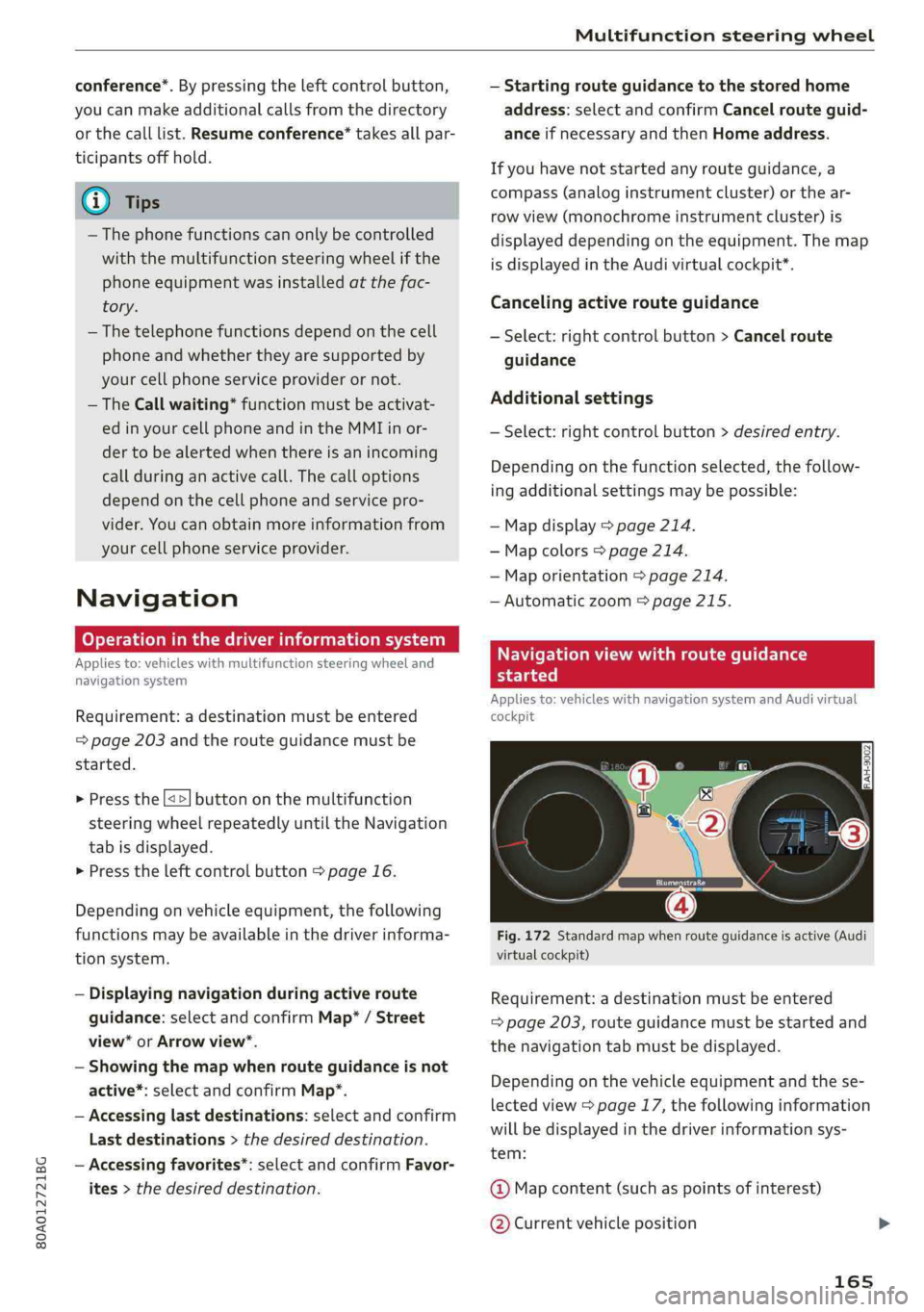
Fig.172Standardmapwhenrouteguidanceisactive(Audi
virtualcockpit)
Requirement:adestinationmustbeentered
=>page203,routeguidancemustbestartedand
thenavigationtabmustbedisplayed.
Depending onthevehicleequipmentandthese-
lectedview>page17,thefollowinginformation
willbedisplayedinthedriverinformationsys-
tem:
@Mapcontent(suchaspointsofinterest)
@Currentvehicleposition
165
Page 174 of 392
Voicerecognitionsystem
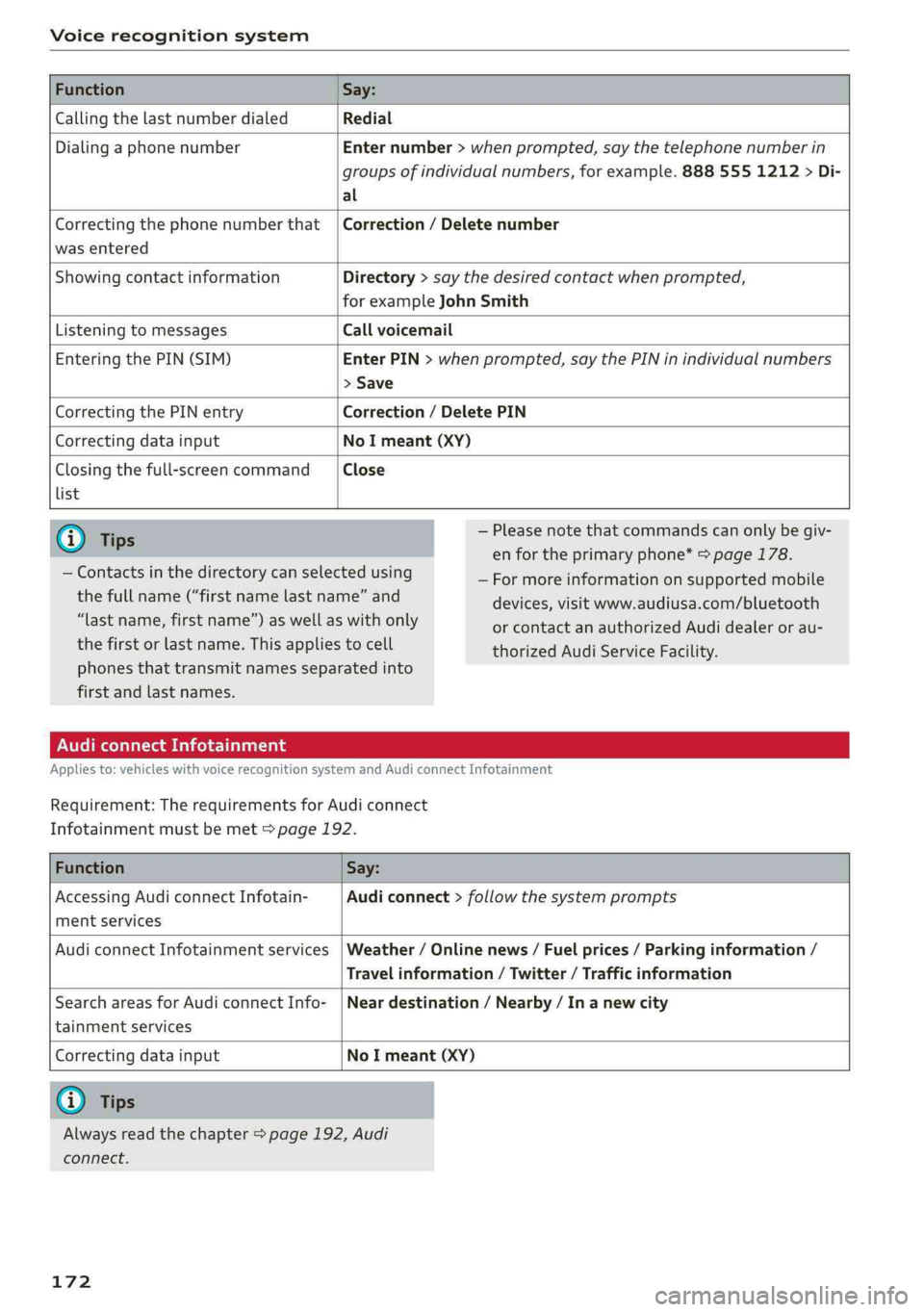
FunctionSay:
CallingthelastnumberdialedRedial
DialingaphonenumberEnternumber>whenprompted,saythetelephonenumberin
groupsofindividualnumbers,forexample.8885551212>Di-
al
Correctingthephonenumberthat
wasentered
Correction/Deletenumber
ShowingcontactinformationDirectory>saythedesiredcontactwhenprompted,
forexampleJohnSmith
ListeningtomessagesCallvoicemail
EnteringthePIN(SIM)EnterPIN>whenprompted,saythePINinindividualnumbers
>Save
CorrectingthePINentryCorrection/DeletePIN
CorrectingdatainputNoImeant(XY)
Closingthefull-screencommand
list
Close
@)Tips
—Contactsinthedirectorycanselectedusing
thefullname(“firstnamelastname”and
“lastname,firstname”)aswellaswithonly
thefirstorlastname.Thisappliestocell
—Pleasenotethatcommandscanonlybegiv-
enfortheprimaryphone*>page178.
—Formoreinformationonsupportedmobile
devices,visitwww.audiusa.com/bluetooth
orcontactanauthorizedAudidealeror au-
thorizedAudiServiceFacility.
phonesthattransmit namesseparatedinto
firstandlastnames.
AudiconnectInfotainment
Appliesto:vehicleswithvoicerecognitionsystem andAudiconnectInfotainment
Requirement:TherequirementsforAudiconnect
Infotainmentmustbemet>page192.
FunctionSay:
AccessingAudiconnectInfotain-
mentservices
Audiconnect>follow thesystemprompts
AudiconnectInfotainmentservicesWeather/Onlinenews/Fuelprices/Parkinginformation/
Travelinformation/Twitter/Trafficinformation
SearchareasforAudiconnectInfo-
tainmentservices
Neardestination/Nearby/In anewcity
Correctingdatainput
NoImeant(XY)
@Tips
Alwaysreadthechapter>page192,Audi
connect.
172
Page 175 of 392
80A012721BG
Voicerecognitionsystem
Messages(AudiconnectInfotainment)
Appliesto:vehicleswithvoicerecognitionsystemandAudiconnectInfotainment
Requirement:acellphonewithanactiveMAP
(MessageAccessProfile)mustbeconnectedto
theMMI>page184.
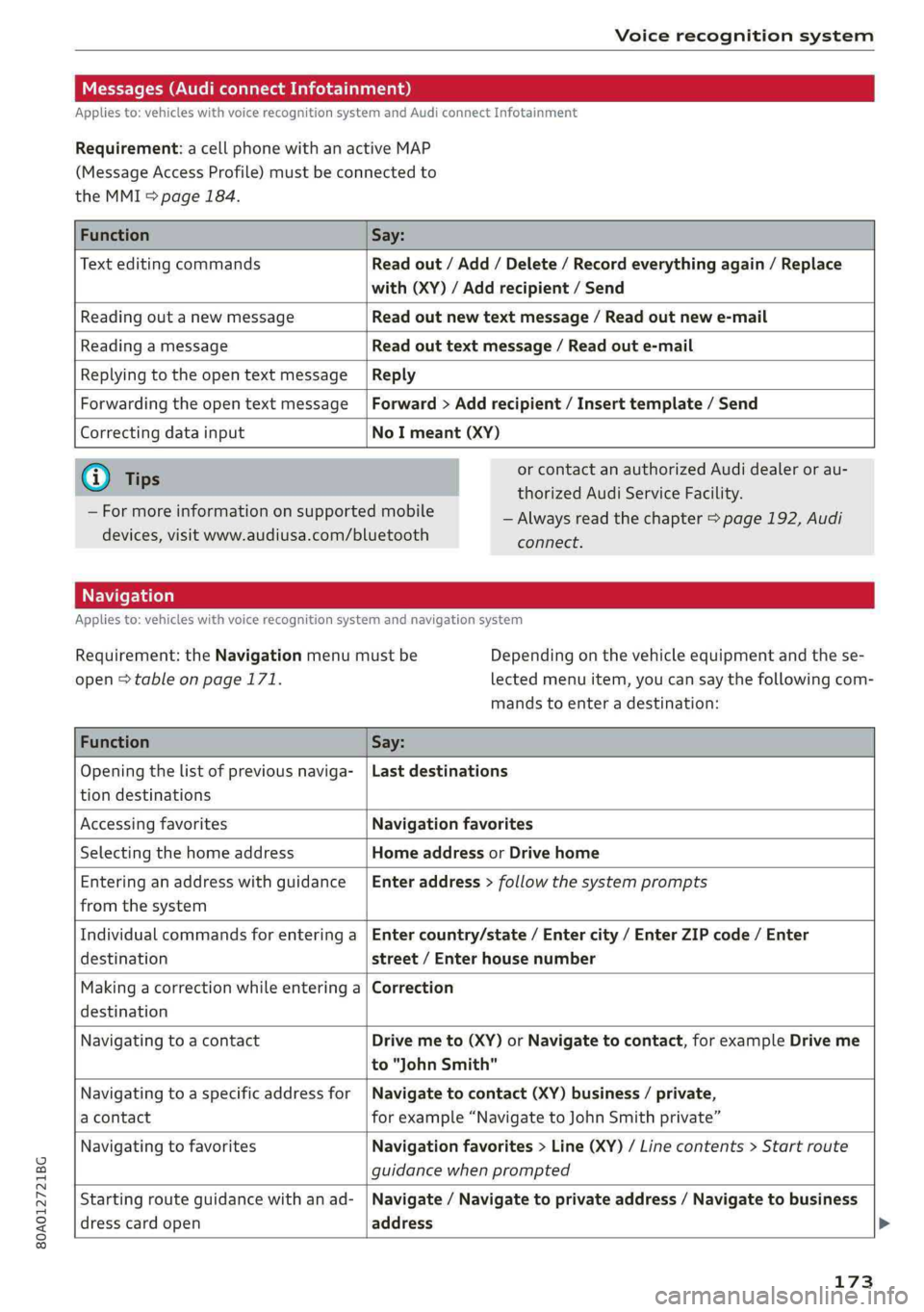
FunctionSay:
TexteditingcommandsReadout/Add/Delete/Recordeverythingagain/Replace
with(XY)/Addrecipient/Send
ReadingoutanewmessageReadoutnewtextmessage/Readoutnewe-mail
ReadingamessageReadouttextmessage/Readoute-mail
ReplyingtotheopentextmessageReply
ForwardingtheopentextmessageForward>Addrecipient/Inserttemplate/Send
Correctingdatainput
NoImeant(XY)
G@)Tips
—Formoreinformationonsupportedmobile
devices,visitwww.audiusa.com/bluetooth
orcontactanauthorizedAudidealeror au-
thorizedAudiServiceFacility.
—Alwaysreadthechapter>page192,Audi
connect.
Appliesto:vehicleswithvoicerecognitionsystem andnavigationsystem
Requirement:theNavigationmenumustbe
open>tableonpage171.
Depending onthevehicleequipmentandthese-
lectedmenuitem,youcansaythefollowingcom-
mandstoenteradestination:
FunctionSay:
Openingthelistofpreviousnaviga-
tiondestinations
Lastdestinations
AccessingfavoritesNavigationfavorites
SelectingthehomeaddressHomeaddressorDrivehome
Enteringan addresswithguidance
fromthesystem
Enteraddress>followthesystemprompts
Individualcommandsforenteringa
destination
Entercountry/state/Entercity/EnterZIPcode/Enter
street/Enterhousenumber
Makingacorrectionwhileenteringa
destination
Correction
NavigatingtoacontactDrivemeto(XY)orNavigatetocontact,forexampleDriveme
to"JohnSmith"
Navigatingtoa specificaddressfor
acontact
Navigatetocontact(XY)business/private,
forexample“NavigatetoJohnSmithprivate”
NavigatingtofavoritesNavigationfavorites>Line(XY)/Linecontents>Start route
guidancewhenprompted
Startingrouteguidancewithanad-
dresscardopen
Navigate/Navigatetoprivateaddress/Navigatetobusiness
address
173
Page 176 of 392
Voicerecognitionsystem
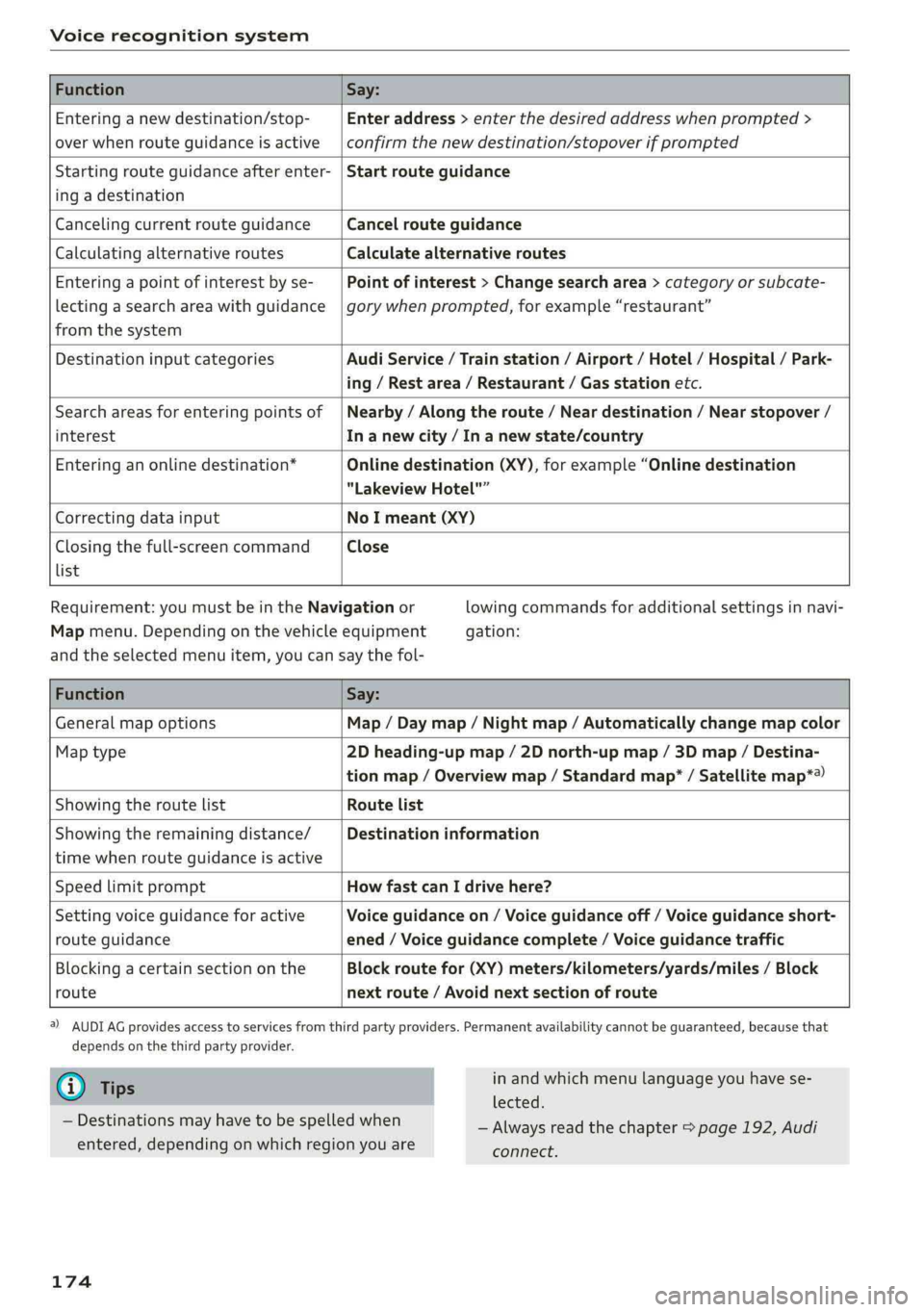
FunctionSay:
Enteringanewdestination/stop-
overwhenrouteguidanceisactive
Enteraddress>enterthedesiredaddresswhenprompted>
confirmthenewdestination/stopoverifprompted
Startingrouteguidanceafterenter-
ingadestination
Startrouteguidance
CancelingcurrentrouteguidanceCancelrouteguidance
CalculatingalternativeroutesCalculatealternativeroutes
Enteringapointofinterestbyse-
lectingasearchareawithguidance
fromthesystem
Pointofinterest>Changesearcharea>categoryorsubcate-
gorywhenprompted,forexample“restaurant”
DestinationinputcategoriesAudiService/Trainstation/Airport/Hotel/Hospital/Park-
ing/Restarea/Restaurant/Gasstationetc.
Searchareasforenteringpointsof
interest
Nearby/Alongtheroute/Neardestination/Nearstopover/
In anewcity/In anewstate/country
Enteringanonlinedestination*Onlinedestination(XY),forexample“Onlinedestination
"LakeviewHotel"”
CorrectingdatainputNoImeant(XY)
Closingthefull-screencommand
list
Close
Requirement: youmustbeintheNavigationor
Mapmenu.Dependingonthevehicleequipment
lowingcommandsforadditionalsettingsinnavi-
gation:
andtheselectedmenuitem,youcansaythefol-
FunctionSay:
GeneralmapoptionsMap/Daymap/Nightmap/Automaticallychangemapcolor
Maptype2Dheading-upmap/2Dnorth-upmap/3Dmap/Destina-
tionmap/Overviewmap/Standardmap*/Satellitemap*®)
Showingtheroute listRoutelist
Showingtheremainingdistance/
timewhenrouteguidanceisactive
Destinationinformation
SpeedlimitpromptHowfastcanIdrivehere?
Settingvoiceguidanceforactive
routeguidance
Voiceguidanceon/Voiceguidanceoff/Voiceguidanceshort-
ened/Voiceguidancecomplete/Voiceguidancetraffic
Blockingacertainsectiononthe
route
Blockroutefor(XY)meters/kilometers/yards/miles/Block
nextroute/Avoidnextsectionofroute
)AUDIAGprovidesaccesstoservicesfromthirdpartyproviders.Permanentavailabilitycannotbeguaranteed,becausethat
dependsonthethirdpartyprovider.
@Tips
—Destinationsmayhavetobespelledwhen
entered,dependingonwhichregionyouare
174
inandwhichmenulanguageyouhavese-
lected.
—Alwaysreadthe chapter>page192,Audi
connect.
Page 178 of 392
Voicerecognitionsystem
>Switchingon:pressandholdthe[>|buttonon
themultifunctionsteeringwheel*andsaythe
desiredcommandaftertheexternalspeechdia-
logbegins.
>Continuing/resumingthedialog:thesystem
remainsreadytouseforashorttimeafterend-
ingthedialog.Youcanstartanewexternaldia-
logduringthistime. Pressthe|]buttonif
needed,andsayanewcommand.Or:select
andconfirmResumeontheMMIcontrolunit.
>Switchingoff:pressandholdthe|%|button.
Or:selectandconfirmCancelontheMMIcon-
trolunit.
@)Tips
—Therearenovoiceguidance*promptswhen
adialogisactive.
—Thisfunctiondependsonthecellphone
used.Youcanobtainmoreinformationfrom
yourmobiledeviceserviceproviderorfrom
yourmobiledeviceuserguide.
—AUDIAGsimplyprovidesaccesstocontrol
yourmobiledevicewithvoiceoperationand
doesnotassumeanyresponsibilityforthe
contentandcommandswithintheexternal
voicecontrol.
176
Page 179 of 392
80A012721BG
Telephone
Telephone
Introduction
Appliesto:vehicleswithtelephone
Tomakephonecallsinyourvehicleusingthe
MMI,connectyourcellphonetotheMMIvia
Bluetooth.
Handsfree
Afteryouhaveconnectedyourmobiledevice to
theMMIviaBluetooth,youcan use thehandsfree
systemandoperatetelephonefunctionsthrough
yourMMI.Youcanmakecallsusingtheantenna
onyourmobiledevice.
Withthe Audiphonebox’,callsaremadeusing
theexteriorantennaonthevehicle.Usingtheex-
ternalantennahelpswhenthereisalowsignal
andalsoprovidesbetterreceptionquality
=>page180.
ZAWARNING
—Medicalexpertswarnthatmobiledevices
caninterferewiththefunctionofpacemak-
ers.Alwaysmaintainaminimumdistanceof
about8inches(20cm)betweenthecell
phoneantennaandthepacemaker.
—Donotcarrythemobiledeviceinapocket
directlyoverthepacemakerwhenthe
phoneisswitchedon.
—Switchthemobiledeviceoffimmediately
ifyoususpectitmaybeinterferingwith
thepacemaker.
—Donotuse thevoicerecognitionsystem*
=page170inemergenciesbecauseyour
voicemaychangeinstressfulsituations.The
systemmaytakelongertodialthenumber
ormaynotbeabletodialitatall.Dialthe
emergencynumbermanually.
—Switchyourmobiledeviceoffinareaswhere
thereisariskofanexplosion.Theseloca-
tionsarenotalwaysclearlymarked.This
mayincludegasstations,fuelandchemical
storagefacilitiesortransportvehicles,orlo-
cationswherefuelvapors(such aspropane
orgasolinevaporinvehiclesorbuildings),
chemicalsorlargequantitiesofdustparti-
cles(suchasflour,sawdustormetal)may
bepresentintheair.Thisalsoapplies toall
otherlocationswhereyouwouldnormally
turnyourvehicleengineoff.
— Thedemandsoftrafficrequireyourfullat-
tention.Alwaysreadthechapter
=>page151,Trafficsafetyinformation.
@)Note
Alwaysfollowtheinformationfoundin>@in
Generalinformationonpage192.
@)Tips
—TheBluetoothconnectionrangeislimited
toinsidethevehicle.Itcanalsobeaffected
bylocalconditionsandinterferencewith
otherdevices.
—TolearnwhichBluetoothconnectionsand
whichofthefunctionsinyourmobiledevice
aresupported,checkwithyourmobilede-
viceserviceproviderorthedatabaseformo-
biledevicesatwww.audiusa.com/
bluetooth.
Setup
ConnectingacellphoneusingBluetooth
Appliesto:vehicleswithtelephone
Naonro)ated
DoesthisPINmatchtheoneon your
Bluetoothdevice?PIN:967536
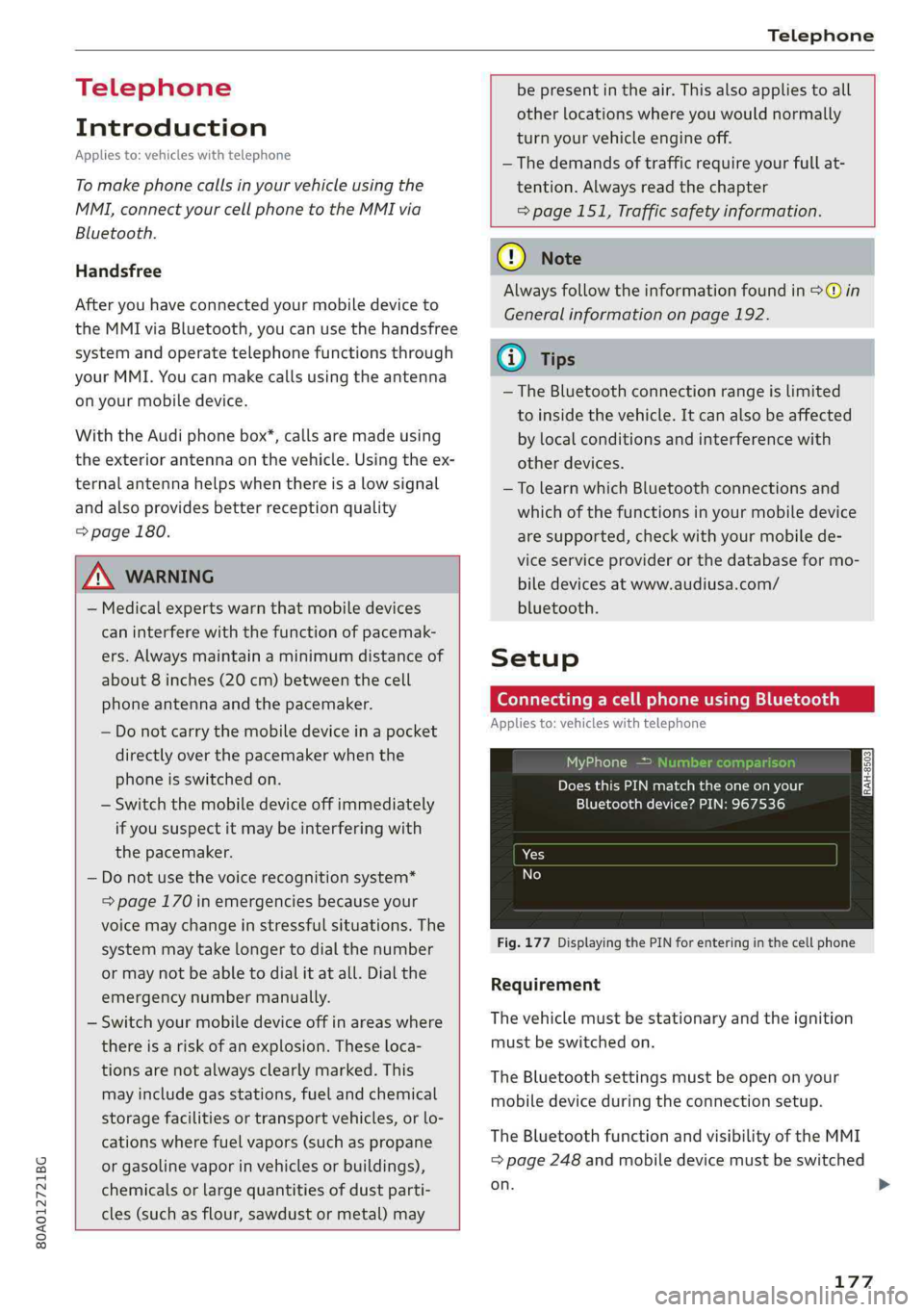
Fig.177DisplayingthePINforenteringinthecellphone
Requirement
Thevehiclemustbestationaryandtheignition
mustbe switchedon.
TheBluetoothsettingsmustbeopenonyour
mobiledeviceduringtheconnectionsetup.
TheBluetoothfunctionandvisibilityoftheMMI
=page248andmobiledevicemustbe switched
on.
177
Page 180 of 392
![AUDI Q5 2019 Workshop Manual Telephone
Themobiledevicethatwillbeconnectedmust
not beconnectedtoanyotherBluetoothdevice.
TheMMImustnotbeconnectedtoamobilede-
vice.
Connectingamobiledevice
>Select:[MENU]button>Telephone>Conne](/img/6/57631/w960_57631-179.png "AUDI Q5 2019 Workshop Manual Telephone
Themobiledevicethatwillbeconnectedmust
not beconnectedtoanyotherBluetoothdevice.
TheMMImustnotbeconnectedtoamobilede-
vice.
Connectingamobiledevice
>Select:[MENU]button>Telephone>Conne")
Telephone
Themobiledevicethatwillbeconnectedmust
not beconnectedtoanyotherBluetoothdevice.
TheMMImustnotbeconnectedtoamobilede-
vice.
Connectingamobiledevice
>Select:[MENU]button>Telephone>Connect
mobiledevice>Findnewdevices>Next.The
availableBluetoothdevicesareshownintheIn-
fotainmentsystemdisplay.Orselect:[MENU
button>Settings>leftcontrolbutton>MMI
settings>Connectionmanager©page246.
> Selectandconfirmthedesiredcellphonefrom
thelistofdisplayedBluetoothdevices.
>TheMMIgeneratesaPINfortheconnection
setup>fig.177.
>»SelectandconfirmYes.
>EnterthePINforconnectingonyourcell
phone.Or:whenthePINisdisplayedonyour
cellphone,confirmthePINonyourcellphone
andintheMMI.Thetimeallowedforentering
thePINislimitedtoapproximately30seconds.
>Payattentiontoanyadditionalsystemprompts
displayedonyourcellphone,forexampleifthe
systemshouldconnectautomaticallyinthefu-
ture.Dependingonthecellphone,youmay
havetoconfirmdownloadingthedirectorysep-
arately.
Afterconnectingsuccessfully
Afterconnectingsuccessfully,informationabout
theconnectedprofileswillappear.Youcanalso
changetheprofileslater.Select:[MENU]button>
Settings> leftcontrolbutton>MMIsettings>
Connectionmanager>page246.
Inaddition,thecellphonecontactsareautomat-
icallyloadedintheMMIdirectory.Thisprocess
cantakeseveralminutes,dependingonthenum-
berofcontacts.
Youcanalsomakeyourconnectedcellphonethe
defaultphonebyselectingSetasdefaulttele-
phoneintheConnectionmanager>page248.
@)Note
Alwaysfollowtheinformationfoundin>@in
Generalinformationonpage192.
178
G)Tips
— MakingphonecallsthroughtheMMIisonly
possibleusingtheHandsfreeBluetoothpro-
file.
—Youcanapplyadditionalsettingstocon-
nectedmobiledevicesusingtheConnection
manager>page246.
—YoucanalsosearchfortheMMIon yourmo-
biledeviceusingtheBluetoothdevice
search.
—Youonlyhavetopairyourdeviceonetime.
Bluetoothdevicesthatarealreadypaired
automaticallyconnecttotheMMIwhenthe
Bluetooth
functionisswitchedon,when
theyarewithinrange,andwhentheignition
isswitchedon.Thelastconnectedmobile
deviceisgivenfirstpriority.
—AuthorizingtheMMIconnectiononyour
mobiledevicewillmakeitpossibletocon-
nectautomatically.
—Payattentiontoanysystempromptsdis-
playedonyourcellphone,forexampleif
thesystemshouldconnectautomaticallyin
thefuture.Depending onthecellphone,
youmayalsoneedtodownloadthedirecto-
ryandconfirmaccesstoyourtextmessages
separately.
—Whenleavingthevehicle,theBluetooth
connectiontothemobiledevicewillauto-
maticallydisconnect.Depending onyour
mobiledevice,phonecallsinprogressmay
beautomaticallyredirectedfromtheMMI
toyourmobiledeviceso thatyoucancon-
tinuethecallonyourphone.
—Youcanobtainmoreinformationfromyour
mobiledeviceserviceproviderorfromyour
mobiledeviceuserguide. Forinformation
onusingthetelephone,visitwww.audiusa.
com/bluetoothorcontactanauthorizedAu-
didealerorauthorizedAudiServiceFacility.
—Appliesto:vehicleswithoutsecondary
phone:Severalcellphonescanbepairedto
theMMI,butonlyonecellphonecan beac-
tivelyconnectedtotheMMI.
Page 182 of 392
Telephone
UsingtheAudiphone
box
Appliesto:vehicleswithAudiphonebox
Youcanchargeyourmobiledevicebatteryusing
theAudiphonebox.Youcanmakecallsthrough
theexteriorantenna*onthevehicle.Usingthe
externalantenna*helpswhenthereisalowsig-
nalandalsoprovidesbetterreceptionquality.
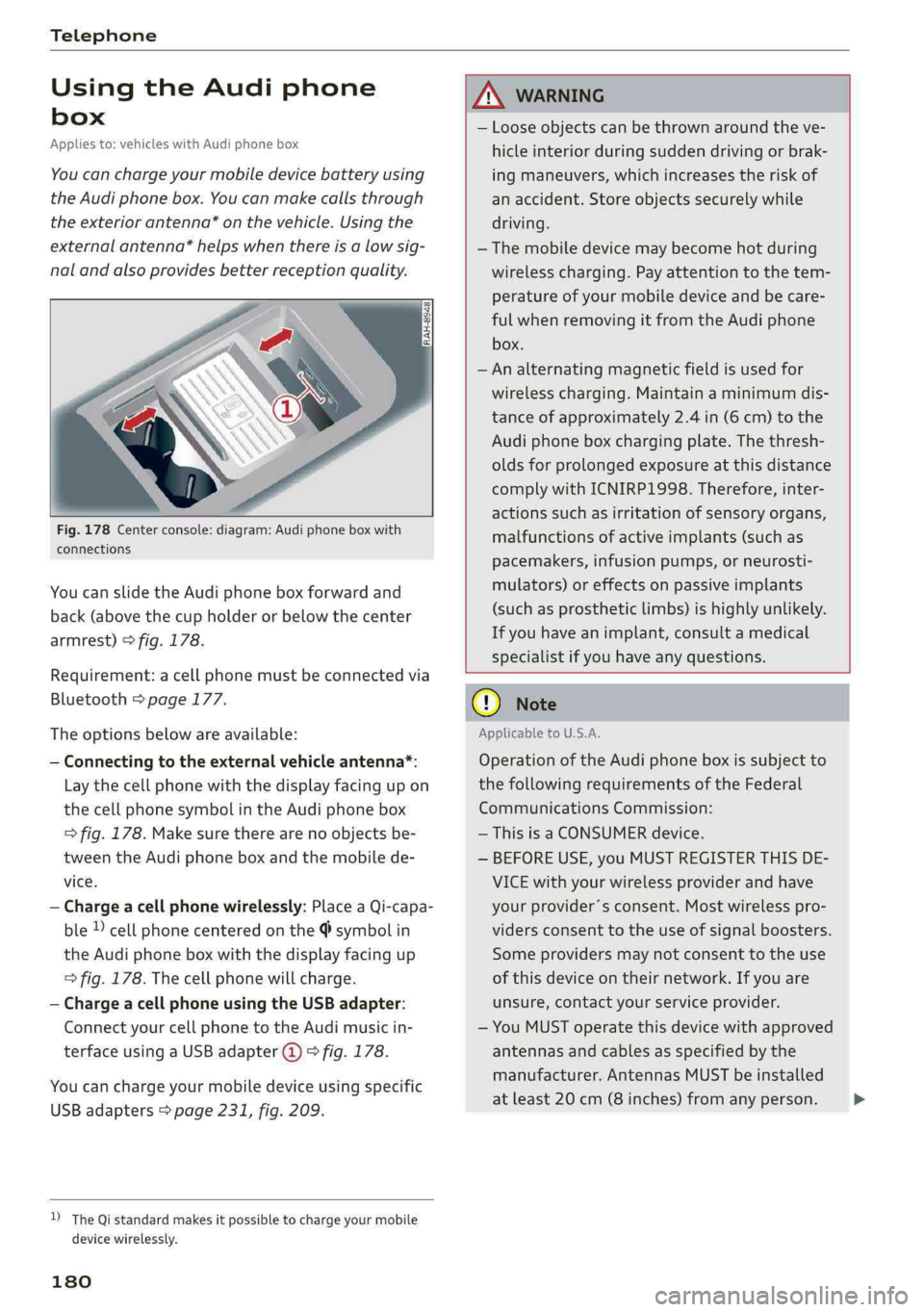
Fig.178Centerconsole:diagram:Audiphoneboxwith
connections
Youcanslidethe Audiphoneboxforwardand
back(abovethecupholderorbelowthecenter
armrest)>fig.178.
Requirement:acellphonemustbeconnectedvia
Bluetooth>page177.
Theoptionsbelowareavailable:
—Connectingtotheexternalvehicleantenna*:
Laythecellphonewiththedisplayfacingupon
thecellphonesymbolintheAudiphonebox
>fig.178.Makesuretherearenoobjectsbe-
tweenthe Audiphoneboxandthemobilede-
vice.
—Chargeacellphonewirelessly:PlaceaQi-capa-
ble»cellphonecenteredonthe@symbolin
the Audiphoneboxwiththedisplayfacingup
=>fig.178.Thecellphonewillcharge.
—ChargeacellphoneusingtheUSBadapter:
Connectyourcellphonetothe Audimusicin-
terfaceusingaUSBadapter@)>fig.178.
Youcanchargeyourmobiledeviceusingspecific
USBadapters>page231,fig.209.
D_TheQistandardmakesitpossibletocharge yourmobile
devicewirelessly.
180
ANWARNING
—Looseobjectscanbethrownaroundtheve-
hicleinteriorduringsuddendrivingorbrak-
ingmaneuvers, whichincreasestheriskof
anaccident.Storeobjectssecurelywhile
driving.
— Themobiledevicemaybecomehotduring
wirelesscharging.Payattentiontothetem-
perature ofyourmobiledeviceandbecare-
fulwhenremovingitfromthe Audiphone
box.
—Analternatingmagneticfieldisusedfor
wirelesscharging.Maintainaminimumdis-
tanceofapproximately2.4in(6cm)tothe
Audi
phoneboxchargingplate.Thethresh-
oldsforprolongedexposureatthisdistance
complywithICNIRP1998.Therefore,inter-
actionssuchasirritationofsensoryorgans,
malfunctionsofactiveimplants(suchas
pacemakers,infusionpumps,orneurosti-
mulators)oreffectsonpassiveimplants
(such as prostheticlimbs)ishighlyunlikely.
Ifyouhaveanimplant,consultamedical
specialistifyouhaveanyquestions.
()Note
ApplicabletoU.S.A.
Operationofthe Audiphoneboxissubjectto
thefollowingrequirementsoftheFederal
CommunicationsCommission:
—ThisisaCONSUMERdevice.
—BEFOREUSE,youMUSTREGISTERTHISDE-
VICEwithyourwirelessproviderandhave
yourprovider’sconsent.Mostwirelesspro-
vidersconsenttotheuseofsignalboosters.
Someprovidersmaynotconsenttothe use
ofthisdeviceontheirnetwork.Ifyouare
unsure,contactyourserviceprovider.
—YouMUSToperatethisdevicewithapproved
antennas
andcablesasspecifiedby the
manufacturer.AntennasMUSTbeinstalled
atleast20cm(8inches)fromanyperson.
Page 183 of 392
80A012721BG
Telephone
—YouMUSTceaseoperatingthisdeviceim-
mediatelyifrequestedby theFCCora
licensedwirelessserviceprovider.
—WARNING:E911locationinformationmay
notbeprovidedormaybeinaccuratefor
callsservedbyusingthisdevice.
@)Note
ApplicabletoCanada
InCanada,operationofaZoneEnhancer,
suchasanAudiPhoneBox,issubjecttothe
followingrequirementsoftheInnovation,
ScienceandEconomicDevelopmentCanada
(ISED):
—ThisisaCONSUMERdevice.
—BEFOREUSE,youMUSTmeetallrequire-
mentssetoutinCPC-2-1-05.
—YouMUSToperatethisdevicewithapproved
antennas
andcablesasspecifiedbythe
manufacturer.AntennasMUSTNOTbein-
stalledwithin20cmofanyperson.
—YouMUSTceaseoperatingthisdeviceim-
mediatelyifrequestedbyISEDoralicensed
wirelessserviceprovider.
—WARNING:£911locationinformationmay
notbeprovidedormaybeinaccuratefor
callsservedbyusingthisdevice.
@Tips
— TheAudiphoneboxisnotavailableinall
countries.Foradditionalinformation,con-
tactanauthorizedAudidealership.
—Placingthemobiledeviceinabagorprotec-
tivesleeveinsidetheAudiphoneboxcanin-
terferewiththeconnectiontotheexternal
antenna*.
—Metallicobjectsinthe Audiphoneboxblock
thewirelesschargingofyourmobiledevice
andcallsmadeusingtheexteriorantenna’*.
—Thechargingtimeandtemperaturewillvary
dependingonthemobiledevicebeingused.
—Yourmobiledevicecanonlybechargedin
theAudiphoneboxwhentheignitionis
switchedon.
—Toreducetheriskofmalfunctions,make
surethemobiledeviceispositionedcorrect-
ly intheAudiphonebox.
—Themaximumchargingoutputis5watts.
—Strongtransmissionqualitycannot beguar-
anteedifmorethanonemobiledeviceisin
thebox.*
—Onlyonemobiledeviceatatimecan be
chargedwirelesslyintheAudiphonebox.
—AudirecommendsusingAudiGenuineAc-
cessories.Audihasverifiedtheirreliability,
safety,andsuitability.
—YoucanpurchaseaUSBadapterfromanau-
thorizedAudidealerorauthorizedAudi
ServiceFacility,oratspecialtystores.
Usingthetelephone
Openingthetelephone
Appliesto:vehicleswithtelephone
Calllist
(2*Favorites
©—:Directory
18Emaisle
Vamessage(mobiledevice)
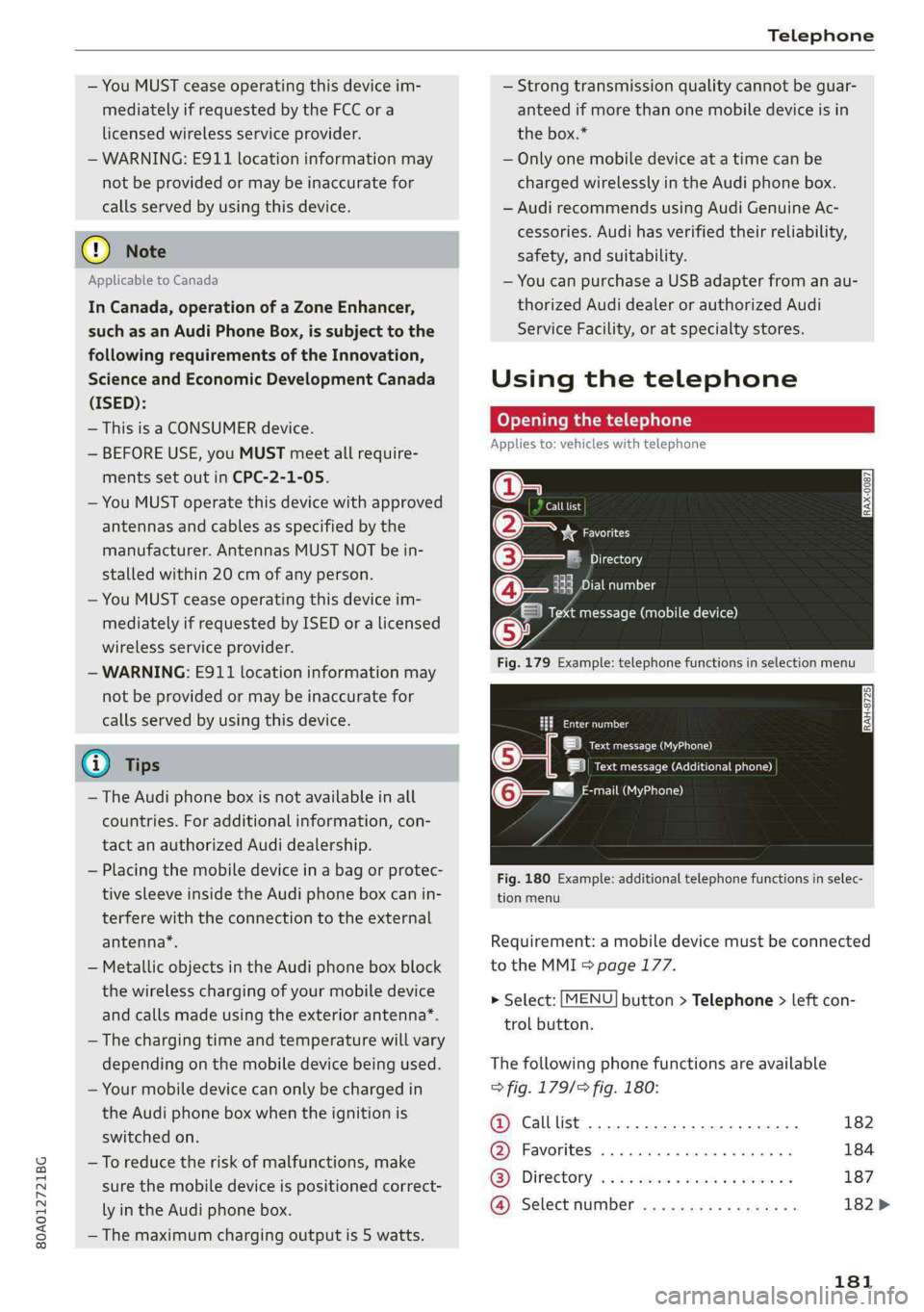
Fig.179Example:telephonefunctionsinselectionmenu
Cmnal
LetaAa)
|ieeeACCneura)
mail(MyPhone)@-—"
Fig.180Example:additionaltelephonefunctionsinselec-
tionmenu
Requirement:amobiledevicemustbeconnected
totheMMI>page177.
>Select:[MENU]button>Telephone>leftcon-
trolbutton.
Thefollowingphonefunctionsareavailable
>fig.179/9fig.180:
@Calllist20.0.0...eee182
@®Favorites..............0.00008184
GS]Directory,wo:csamonswmm2 ymeeeas187
@Selectnumber..............0-.182>
181
Page 185 of 392
80A012721BG
Telephone
selecttherightcontrolbutton>Clearinput
field.
NeelaleRomUeleeReltt
Appliesto:vehicleswithtelephone
—Acceptingacall:selectandconfirmAnswer.
—Decliningacall:selectandconfirmDecline.
—Mutinganactivecall:selectandconfirmMute.
—Endingaphonecall/canceldialing:selectand
confirmEndcall.
Callerinformation:thename, phonenumberor
UnknownappearsintheInfotainmentsystem
displaydependingonifthecallerhasbeenstored
inthedirectoryandifthephonenumberhas
beentransmitted.Apicturemayalsobedis-
played,dependingonwhetheryouhaveassigned
apicturetoacontactinyourdirectoryandifit
wastransferredtoyourMMI.Youcanfindoutif
yourmobiledevicesupportsthisfunctionfrom
yourmobiledevicenetworkprovider,yourmobile
deviceowner'smanual,or atwww.audiusa.com/
bluetooth.
G)Tips
—Theradioormediaplaybackismutedduring
aphonecall.
—Missedcallsaredisplayedwithasymbolin
thestatuslineoftheInfotainmentsystem
display@)>page161,fig.170.
Duringaphonecall
Appliesto:vehicleswithtelephone
Requirement:theremustbeacallinprogress.
>Endcall:youcanendaphonecall.
>Sendtonesequence:youcanentertonese-
quences(DTMF)directlyusingthenumber
spellerandsendtotheotherpersononthe
call.
>Othercalloptions:presstherightcontrolbut-
ton.
Thefollowingoptionsmaybepossibleduringa
calldependingonthemobiledevicebeingused
andthetypeofconnection:
—Answeringanadditionalcall:ifthereisanin-
comingcallwhileanothercallisactive,youcan
selectAnswertoput theexistingcallonhold
andanswertheincomingcall.IfyouselectDe-
cline,theincomingcallwillbedeclined.
—Acceptinganincomingcallwhenthereisanac-
tivecallandacallonhold:selectReplace.The
activecallisreplacedwiththeincomingcall.
—Mutingtheincomingcall:selectandconfirm
Mute.
—Additionalcall:select:Findcontact>Calllist/
Directory/Favorites>anentryfromthelist.
Mute:ifyouselectandconfirmthisfunction,the
otherpersononthephonecannothearyou.You
willstillbeabletoheartheotherperson.Toturn
themicrophonebackon,selectandconfirmUn-
mute.
Holdcall/Resumeheldcall:youcanplacetheex-
istingcallonholdandresumeitagain.Toresume
thecall,selectandconfirm thecallyouwould
liketoresume.
Transfercalltomobiledevice*:selectandcon-
firmTransfercalltomobiledevicetotransfer
theexistingcallfromtheMMItoyourcellphone.
Switchtohands-freemode*:Requirement:you
musthaveaphonecallinprogressonyourcell
phone.SelectandconfirmSwitchtohands-free
modetotransferthecallfromyourcellphone
backtotheMMI.
Swapcall:alternatebetweentwophonecalls
whileoneofthecallsisonhold.SelectingEnd
call willendtheactivephonecall.Aphonecall
onholdcanberesumedusingtherightcontrol
button>Resume.
Connectionmanager:see>page246.
Telephonesettings:see>page189.
@Tips
—Tobenotifiedofanincomingcallduringa
phonecall,thecallwaitingfunctioninyour
cellphonemustbeswitchedonwhenusing
theHandsfreeprofile.
—Youcanobtainmoreinformationfromyour
mobiledeviceserviceproviderorfromyour
mobiledeviceuserguide.
—Whenleavingthevehicle,theBluetooth
connectiontothemobiledevicewill
183
>