service AUDI Q5 2019 Service Manual
[x] Cancel search | Manufacturer: AUDI, Model Year: 2019, Model line: Q5, Model: AUDI Q5 2019Pages: 392, PDF Size: 99.86 MB
Page 134 of 392
Parkingaid
Switchingoffautomatically
Thedistanceindicatorfortheparkingsystem
plusswitchesoffautomaticallywhendrivingfor-
wardfasterthan6mph(10km/h).
G)Tips
IfyoupresstheP“buttontoswitchthepark-
ingaidoff,itcanonlybereactivatedautomat-
icallywhenoneofthefollowingconditionsis
met:
— Thevehiclespeedexceeds6mph(10km/h)
—Theignitionisswitchedoffandbackon
again
— Theparkingbrakeissetandthenreleased
—The"P"selectorleverpositionisengaged
andreleasedagain
Rearviewcamera
Introduction
Appliesto:vehicleswith rearviewcamera
B8V-0629
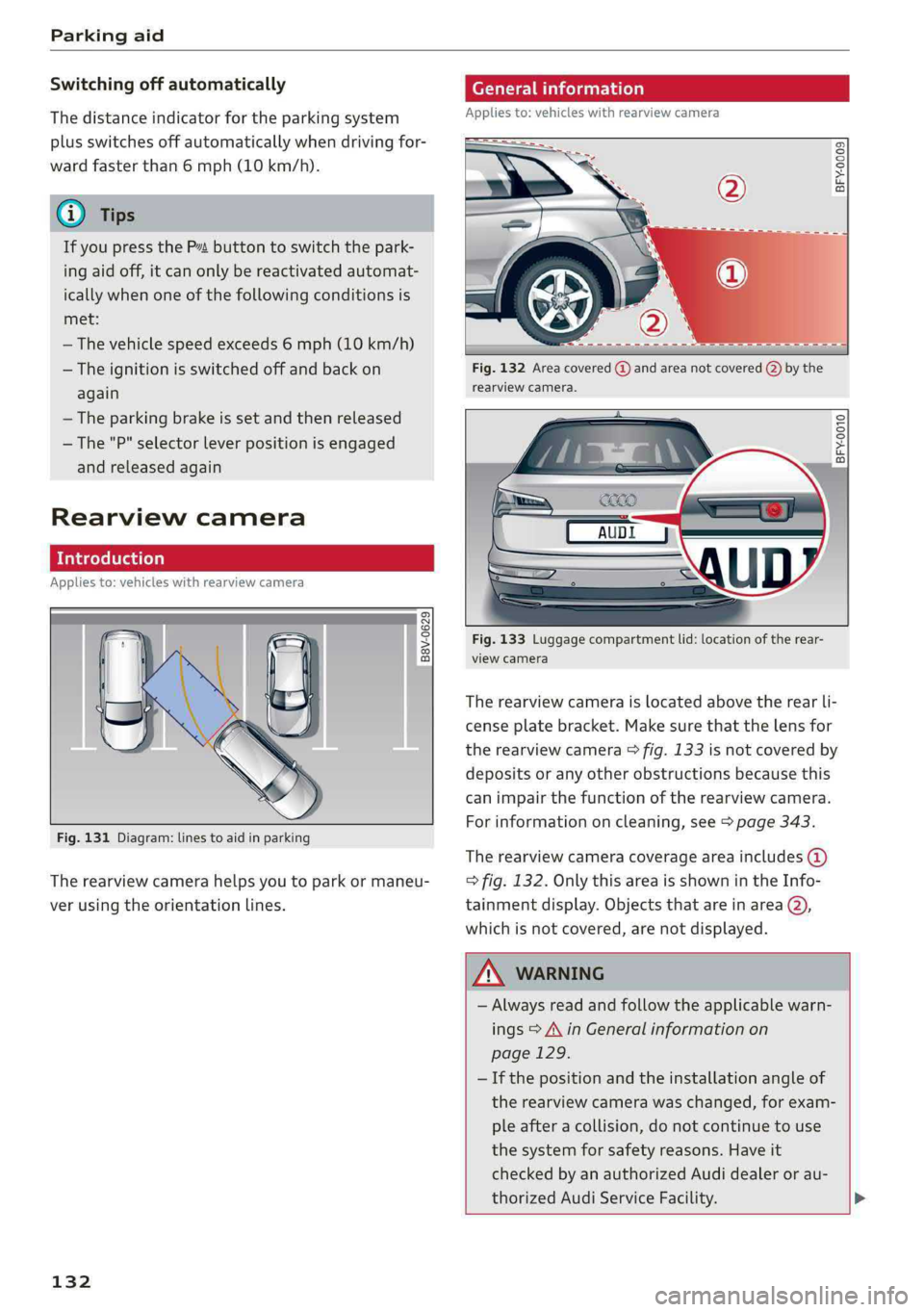
Fig.131Diagram:linestoaidinparking
Therearviewcamerahelpsyoutoparkormaneu-
verusingtheorientationlines.
132
Generalinformation
Appliesto:vehicleswithrearviewcamera
ByS S 2
aoa
Fig.132Areacovered@)andareanotcovered()bythe
rearviewcamera.
Ghorcc.
Fig.133Luggagecompartmentlid:locationoftherear-
viewcamera
Therearviewcameraislocatedabovetherearli-
censeplatebracket.Makesurethatthelensfor
therearviewcamera>fig.133isnotcoveredby
depositsoranyotherobstructionsbecausethis
can impairthefunctionoftherearviewcamera.
Forinformationoncleaning,see>page343.
Therearviewcameracoverageareaincludes()
=>fig.132. OnlythisareaisshownintheInfo-
tainmentdisplay.Objectsthatareinarea@),
whichisnotcovered,arenotdisplayed.
ZAWARNING
—Alwaysreadandfollow theapplicablewarn-
ings>A\inGeneralinformationon
page129.
—Ifthepositionandtheinstallation angleof
therearviewcamerawaschanged,forexam-
pleafteracollision,donotcontinuetouse
the
systemforsafetyreasons.Haveit
checkedby anauthorizedAudidealeror au-
thorizedAudiServiceFacility.>
Page 136 of 392
Parkingaid
>Turn theInfotainmentsystemonandshiftinto
reversegear.
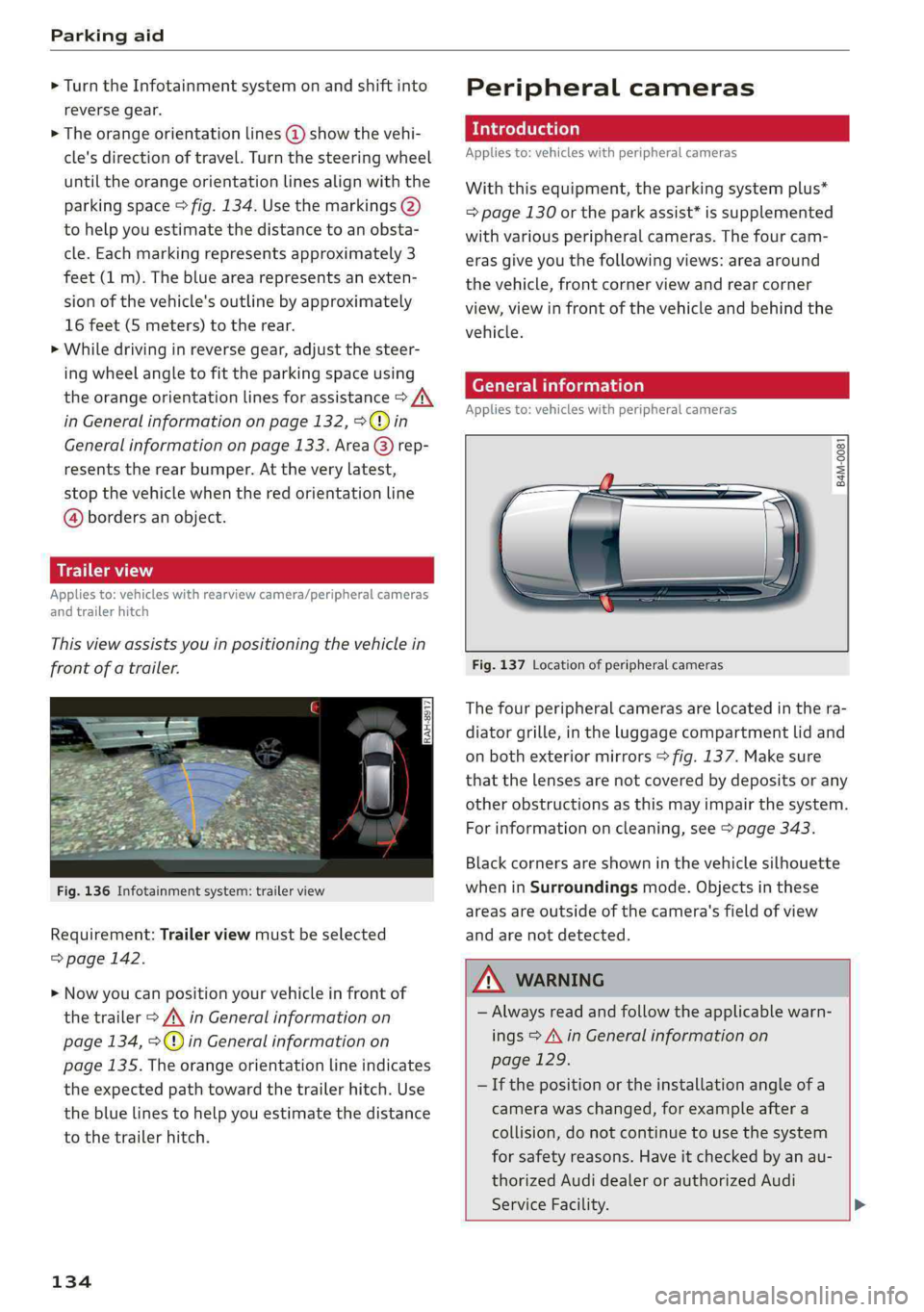
>Theorangeorientationlines@showthevehi-
cle'sdirectionoftravel.Turn thesteeringwheel
untiltheorangeorientationlinesalignwiththe
parkingspace>fig.134.Usethemarkings@)
tohelpyouestimatethedistancetoanobsta-
cle.Eachmarkingrepresentsapproximately3
feet(1m).Thebluearearepresentsanexten-
sionofthevehicle'soutlinebyapproximately
16feet(5meters)totherear.
>Whiledrivinginreversegear,adjustthesteer-
ingwheelangletofittheparkingspaceusing
theorangeorientationlinesforassistance>A\
inGeneralinformationonpage132,>@)in
Generalinformationonpage133.Area@)rep-
resentstherearbumper.Attheverylatest,
stopthevehiclewhentheredorientationline
@bordersanobject.
NirliCimUCW
Appliesto:vehicleswith rearviewcamera/peripheralcameras
andtrailerhitch
Thisviewassistsyouinpositioningthevehiclein
frontofatrailer.
Fig.136Infotainmentsystem:trailerview
Requirement:Trailerviewmustbeselected
=>page142.
>Nowyoucanpositionyourvehicleinfrontof
thetrailer>/\inGeneralinformationon
page134,>@)inGeneralinformationon
page135.Theorangeorientationlineindicates
theexpectedpathtowardthetrailerhitch.Use
thebluelinestohelpyouestimatethedistance
tothetrailerhitch.
134
Peripheralcameras
Introduction
Appliesto:vehicleswithperipheralcameras
Withthisequipment,theparkingsystemplus*
=page130ortheparkassist*issupplemented
withvariousperipheralcameras.Thefourcam-
erasgiveyouthefollowingviews:areaaround
thevehicle,frontcornerviewandrearcorner
view,viewinfrontofthevehicleandbehindthe
vehicle.
Generalinformation
Appliesto:vehicleswithperipheralcameras
B4M-0081
Fig.137Locationofperipheralcameras
Thefourperipheralcamerasarelocatedinthera-
diatorgrille,intheluggagecompartmentlidand
onbothexteriormirrors>fig.137.Makesure
thatthelensesarenotcoveredbydepositsorany
otherobstructionsasthismayimpairthesystem.
Forinformationoncleaning,see>page343.
Blackcornersareshowninthevehiclesilhouette
wheninSurroundingsmode.Objectsinthese
areasareoutsideofthecamera'sfieldofview
andarenotdetected.
Z\WARNING
—Alwaysreadandfollowtheapplicablewarn-
ings>A\inGeneralinformationon
page129.
—Ifthepositionortheinstallationangleofa
camerawaschanged,forexampleaftera
collision,donotcontinuetouse thesystem
forsafety reasons.Haveitcheckedby anau-
thorizedAudidealerorauthorizedAudi
ServiceFacility.>
Page 143 of 392
80A012721BG
Parkingaid
Theparkingprocesswasnotcompletedwithin
approximatelysixminutesofactivatingparkas-
sist.Tocontinueparking, pressthePebutton
again.
Parkassist:canceled.Speedtoohigh.Please
take oversteering!
Thespeedenteringtheparkingspaceistoohigh.
Drivenofasterthan4mph(7km/h).
Parkassist:canceled.Stabilizationcontrol
(ESC)input.Pleasetakeoversteering!
The ESCtookactiontostabilizethevehicle.Take
oversteering.Completeparkingwithoutusing
parkassistordriveoutoftheparkingspace.
Parkassist:currentlyunavailable.Stabiliza-
tioncontrol(ESC)off
The ESCwasswitchedoff.The ESCmustbe
switched
ontouseparkassist.
Parkassist:malfunction!Pleasecontact
Service
Parkassist:malfunction!Takeoversteering!
PleasecontactService.
Contact anauthorizedAudidealerorauthorized
AudiServiceFacility.Youcannotparkwithpark
assistifthereisasystemmalfunction.
Parkassist:currentlyunavailable
Parkassist:currentlyunavailable.Please
take oversteering!
Parkingwithparkassistisnotpossible.Trypark-
ingagainorswitchtheignitionoffandbackon
againifnecessary.
Parkassist:ended.Pleasetakeoversteering
andcontinuedriving
Theprocessofexitingtheparkingspacewith
park
assisthasended.Please takeoversteering.
Parkassist:canceled.Parkingspacetoo
small.Pleasetake oversteering!
Parkinginthisspacewithparkassistisnotpossi-
ble.Parkwithoutusingparkassistorfindalarger
parkingspace.
Parkassist:canceled.Obstacledetected.
Pleasetakeoversteering!
Parkingwith parkassistwasstopped becausethe
vehiclecouldcollidewithanobstacle.
ro]Parkassist:ended
Parkassist:ended.Pleasetakeoversteer-
ing!
Parkingwith parkassisthasended.
&Parkassist:unavailableincurrentAudidrive
selectmode
Parkassist:canceled.Unavailableincurrent
Audidriveselectmode.Pleasetakeoversteer-
ing!
ParkassistisnotavailableinLift/Offroad*or
Allroad*mode.Selectadifferentmodeindrive
select>page125.
&Parkassist:stabilizationcontrol(ESC)input
Thedisplayedparkingspacewasrejectedbecause
theESCtookactiontostabilizethevehicle.
&Parkassist:currently unavailable.Towing
mode
Youcannotparkwith parkassistwhenyouare
towingatrailer.
roo]Parkassist:notstoppedlongenough
Afterengagingthereversegear,parkassistmust
stopbrieflyinordertoactivatethesteering.Fol-
lowtheinstructionsintheinstrumentclusteror
theInfotainmentsystemdisplay.
&Parkassist:canceled.Unabletoleave park-
ingspaceautomatically.Parkingspacetoo
small
Theparkingspaceistoosmallforthevehicleto
automaticallyleavethespace.Leavetheparking
spacewithoutusingparkassist.
Parkassist:canceled.Pleasetakeoversteer-
ing!
Parkingwith parkassistwasstopped.
Parkassist:notavailablewhenusingarear
carrier
You cannotparkwith parkassistwhenyouare
towingatrailerorwhenarearcarrierisattached.
141
Page 144 of 392
Parkingaid
Adjustingtheparkingaid
Appliesto:vehicleswitharearparkingsystem/parkingsys-
templus/rearviewcamera/peripheralcameras/parkassist.
ThefunctionsareadjustedintheInfotainment
system.
> SelectintheInfotainmentsystem:[MENU]but-
ton>Vehicle> leftcontrolbutton>Driveras-
sistance>Parkingaid.Or
>Whentheparkingaidisactive,selectintheIn-
fotainmentsystem:rightcontrolbutton*.
Endsystem*-stoptheparkingaid
Activateautomatically*-switchautomaticacti-
vationon/off
Frontvolume*-volumeforthefrontandside*
area
Rearvolume-volumeforthereararea
Entertainmentfader-thevolumeoftheaudio/
videosourceisLoweredwhentheparkingsystem
isturnedon.
View*-switchbetweenanopticaldisplay
(Graphic)andcameraimage(Camera)onthe
sideofthedisplay.
Trailerview*-showtrailerview
Automaticfront/rearcamerachanging”-the
view
behindthevehicle(Rearmode)isdisplayed
automaticallywhenyoushiftintoreversegear.
Theviewinfrontofthevehicle(Frontmode)is
displayedautomaticallywhenyoushiftintothe
forwardgears.Whenfirstactivatinginaforward
gearwiththeP”button,thefrontsideviewis
displayed(Cornerview(front)mode).
IfyoudonotsettheV,theviewbehindthevehi-
cle(Rearmode)isalwaysdisplayedanditdoes
notswitchtothe Frontmodewhenaforward
gearisselected.
G)Tips
—Severalmenuscanbeaccessedwiththe
rightcontrolbuttononlywhentheparking
aidisactive.
—Certain settings areautomaticallystored
andassignedtothevehiclekeybeingused.
142
— Thenewlevelisdemonstratedbriefly*when
thevolumeisadjusted.
Errormessages
Appliesto:vehicleswitharearparkingsystem/parkingsys-
templus/rearviewcamera/peripheralcameras/parkassist.
wRearparkingaid:malfunction!Obstacles
cannotbedetected
wwFront parkingaid:malfunction!Obstacles
cannotbedetected
wwParkingaid:malfunction!Obstaclescannot
bedetected
Whenoneofthesemessagesappears,thereisa
systemmalfunction.The LEDintheP”buttonal-
soblinkswhenswitchingiton.Therelevantmes-
sageonlyappearsagainwhenyoumanuallyacti-
vatetheparkingaidwiththebutton.
Rearparkingaid:obstacledetectionrestrict-
ed
Therearcross-trafficassist*>page124,Rear
cross-trafficassistisnotavailable.EithertheESC
isswitchedoff,ortheradarsensorsmaybecov-
ered byabikerack,stickers,leaves,snoworother
objects.SwitchtheESCon,orcleantheareain
frontofthesensorsifnecessary>page121,
fig.122.Ifthismessagecontinuestobedis-
played,driveimmediatelytoanauthorizedAudi
dealerorauthorizedAudiServiceFacilitytohave
themalfunctionrepaired.
Parkingsystemplus*/Parkassist*
If asensororspeakerisfaulty,theP4symbol
willappearinfrontof/behindthevehicleinthe
Infotainmentsystemdisplay.If arearsensoris
faulty,onlyobstaclesthatareinareas(@)and
areshown>page130,fig.128.Ifafrontsensor
isfaulty,onlyobstaclesthatareinareas©and
©areshown.
Peripheralcameras*
Thereisasystemmalfunctionifthe#4symbol
appearsandthecorrespondingareaofthedis-
playisshowninblack.Thecameraisnotworking
inthisarea.
Page 145 of 392
80A012721BG
Parkingaid
DriveimmediatelytoanauthorizedAudidealer
orauthorizedAudiServiceFacilitytohavethe
malfunction
repaired.
143
Page 149 of 392
80A012721BG
IntelligentTechnology
Brakingeffect
Theresponsetimefromthebrakesdependson
theweatherandenvironmentalconditions.To
ensuretheoptimumbrakingeffect,thebrake
systemiscleanedatregularintervals.Thisis
donebyapplyingthebrakepadstothebrakero-
torsforashortperiodoftimewhendrivingat
highspeedswhenthewindshieldwipersare
switchedon.
Ifthebrakesystembecomesdamp,forexample
afterdrivinginheavyrain,thebrakingeffectmay
bedelayed.Otherfactorsthatcouldtemporarily
increasetheresponsetimeofthebrakesinclude:
—Wetconditions
—Lowtemperatures,ice,andsnow
—Roadscoveredinsalt
—Dirtybrakepads
Corrosion
Corrosionmayformonthebrakerotorsifthereis
no heavybraking,ifthevehicleisnotdrivenfor
longperiodsoftime,orifthevehicleisnotdriv-
enfrequentlyorforlongdistances.Inthiscase,
brakingheavilyseveraltimeswhiledrivingat
highspeedscancleanthebrakerotors>A\.
Brakepads
Newbrakepadsdonotachievetheirfullbraking
effectduringthefirst250miles(400km).They
mustbe“brokenin”first.However,youcancom-
pensatefortheslightlyreducedbrakingforceby
pressingfirmlyonthebrakepedal.Avoidheavy
brakingduringthebreak-inperiod.
Brakepadweardependslargelyonthewaythe
vehicleisdrivenandonoperatingconditions.
Brakepadwearincreaseswhendrivingfrequently
inthecityorshortdistancesorwhenusingavery
sportydrivingstyle.
—Duetotheriskofinjury,onlyhaveanau-
thorizedAudidealerorauthorizedAudi
ServiceFacilityworkonthebrakesystem.
Incorrectrepairscouldimpairthefunction.
—Neverletthevehiclerollwhiletheengineis
stoppedbecausethisincreasestheriskofan
accident.
— Depending onvehicleequipment,thebrake
pedal
maymovedownwardautomatically
duringautonomousbrakingmaneuvers.To
reducetheriskofinjury,donotplaceyour
ZA\WARNING
—Onlyapplythebrakesforthepurposeof
cleaningthebrakesystemwhenroadand
trafficconditionspermit.Youmustnoten-
dangerotherroadusersandincreasethe
riskofanaccident.
footunderthebrakepedal.
C)Note
—Neverletthebrakes“rub”bypressingthe
pedallightlywhenbrakingisnotactually
necessary. Thiscancausethebrakestoover-
heatandincreasesbrakingdistanceand
causeswear.
—Beforedrivingonlongstretcheswithsteep
hills,reduce thevehiclespeedandshifttoa
lowergeartouse theenginebrakingeffect.
Thisreducestheloadonthebrakes.Ifyou
needtobrakeadditionally,brakeinintervals
andnotcontinuously.
(i)Tips
—Ifyouretrofityourvehiclewithafrontspoil-
er,wheelcoversorsimilaritems,makesure
thattheairflowtothebrakesisnotob-
structed.Otherwisethebrakesystemcan
overheat.
—Alsorefertotheinformationaboutbrake
fluid>page319.
Electromechanical
steering,Dynamic
steering
Theelectromechanicalsteeringsupportsthe
driver'ssteeringmovements.
Powersteeringadaptselectronicallybasedon
thevehiclespeed.
Indicatorlightsandmessages
aSteering:malfunction!Pleasestopvehicle
147
>
Page 150 of 392
IntelligentTechnology
Ifthisindicatorlightturnsonandstaysonand
thismessageappears,thepowersteeringmay
havefailed.
Stopthevehicleinasafelocationassoonaspos-
sible.Donotcontinuedriving.Seeanauthorized
AudidealerorauthorizedAudiServiceFacilityfor
assistance.
aSteering:malfunction!Youcancontinue
driving
Iftheindicatorlightturnsonandthismessage
appears,thesteeringwheelmaybemoredifficult
tomoveormoresensitivethanusual.Thesteer-
ing
wheelmayalsobeturnedtothesidewhen
drivingstraight.
DriveslowlytoanauthorizedAudidealeror au-
thorizedAudiServiceFacilitytohavethemal-
functioncorrected.
Dynamicsteering:correctingsteeringwheel
position
Iftheindicatorlightturnsonandthismessage
appears,thedynamicsteering”isreinitializing.
Thesteeringwheelwillbeeasytomoveafter
startingtheengine.Reinitializationmightbe
necessaryifthesteeringwheelwasmovedwhile
theenginewasswitchedoff.Thedisplayturnsoff
iftheinitializationwassuccessful.
@Tips
—Iftheaoralindicatorlightonlystayson
forashorttime,youmaycontinuedriving.
— Thedynamicsteeringstabilitysystems
=>page144arenotavailableintheeventof
asystemmalfunction.
—Foradditionalinformationondynamic
steering,see>page125.
Allwheeldrive(quattro)
Theall-wheeldrivesystemdistributesthedriving
powervariablytothefrontandrearaxletoim-
provethedrivingcharacteristics.Itworkstogeth-
erwithselectivewheeltorquecontrol,whichcan
activatewhendrivingthroughcurves
=>page144.
148
Appliesto:Vehicleswithquattroultra:Ifthe
drivingsituationdoesnotrequireallwheeldrive,
thentherearsection ofthedrivetrainwilldecou-
pleandthussavefuel.Thesystemconstantlyde-
terminesandanticipatesifallwheeldriveis
needed.Thisallowsthereardrivetrainto recou-
pleshortlybeforeitisneeded.
Theallwheeldriveconceptisdesignedforhigh
enginepower.Yourvehicleisexceptionallypow-
erfulandhasexcellentdrivingcharacteristics
bothundernormaldrivingconditionsandon
snowandice.Alwaysreadandfollowsafetypre-
cautions>A\.
ZAWARNING
—Eveninvehicleswithallwheeldrive,you
shouldadaptyourdrivingstyletothecur-
rentroadandtrafficconditionstoreduce
theriskofanaccident.
— Thebrakingabilityofyourvehicleislimited
tothetractionofthewheels.Inthisway,it
isnotdifferentfromatwowheeldrivevehi-
cle.Donotdrivetoofastbecausethisin-
creasestheriskofanaccident.
—Notethatonwetstreets,thefrontwheels
can“hydroplane’”ifdrivingatspeedsthat
aretoohigh.Unlikefrontwheeldrivevehi-
cles,theengineRPMdoesnotincreasesud-
denlywhenthevehiclebeginshydroplaning.
Adaptyourspeedtotheroadconditionsto
reducetheriskofanaccident.
Sportdifferential
Appliesto:Vehicleswithsportdifferential
Thesportdifferentialdistributesthedrivepower
totherearaxlebasedonthesituation.Thegoal
isahighlevelofagilityandabilitytoaccelerate
oncurves.Thevehicleisvery responsivetosteer-
ing.ThesettingsdependontheselectedAudi
driveselect*mode.
Energymanagement
Yourvehicleisequippedwithanintelligentener-
gymanagementsystemfordistributingelectrici-
ty.Thissignificantlyimprovesthestartingability
andincreasesthevehiclebatterylife.
Page 152 of 392
IntelligentTechnology
systemuseandperformanceintheeventofa
crash.Storeddatacanalsoonlybereadand
downloadedwithspecialequipmentthatisdi-
rectlyconnectedtothevehicle.
@Tips
YourvehiclemaybeequippedwithAudicon-
nect.YouruseofcertainAudiconnectfea-
turesrequireswirelessservicesthatarepro-
videdbyathirdpartywirelesstelecommuni-
cationsprovider.Fordetailsregardinghowin-
formationobtainedthroughAudiconnectis
collected,processed,transmitted,used,and
shared,pleaseseeyourcontractwiththe
wirelesstelecommunicationsprovider.
150
Page 158 of 392
MultiMediaInterface
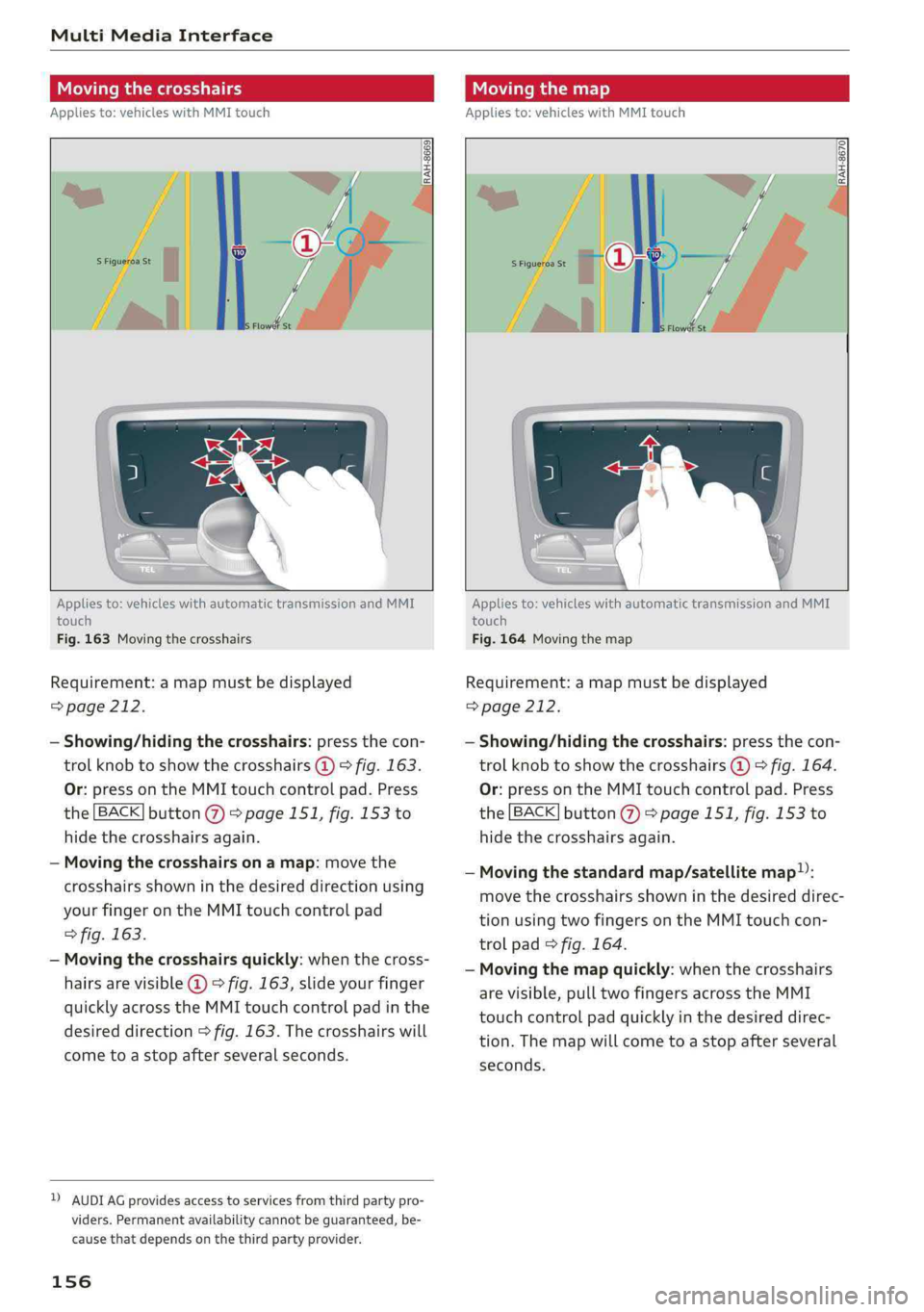
Movingthecrosshairs
Appliesto:vehicleswithMMItouch
Movingthemap
Appliesto:vehicleswithMMItouch
RAH-8670|
Appliesto:vehicleswithautomatictransmissionandMMI
touch
Fig.163Movingthecrosshairs
Requirement:amapmustbedisplayed
=>page212.
—Showing/hidingthecrosshairs:pressthecon-
trolknobtoshowthecrosshairs@)>fig.163.
Or:pressontheMMItouchcontrolpad.Press
the[BACK]button@>page151,fig.153to
hidethecrosshairsagain.
—Movingthecrosshairsonamap:movethe
crosshairsshowninthedesireddirectionusing
yourfingerontheMMItouchcontrolpad
>fig.163.
—Movingthecrosshairsquickly:whenthecross-
hairsarevisible@©fig.163,slideyourfinger
quicklyacrosstheMMItouchcontrolpadinthe
desireddirection>fig.163.Thecrosshairswill
cometoastopafterseveralseconds.
DAUDIAGprovidesaccesstoservicesfromthirdpartypro-
viders.Permanentavailabilitycannotbeguaranteed,be-
causethat dependsonthethirdpartyprovider.
156
Appliesto:vehicleswithautomatictransmissionandMMI
touch
Fig.164Movingthemap
Requirement:amapmustbedisplayed
=>page212.
—Showing/hidingthecrosshairs:pressthecon-
trolknobtoshowthecrosshairs@)©fig.164.
Or:pressontheMMItouchcontrolpad.Press
the[BACK]button@>page151,fig.153to
hidethecrosshairsagain.
—Movingthestandardmap/satellitemap):
movethecrosshairsshowninthedesireddirec-
tionusingtwofingersontheMMItouchcon-
trolpad>fig.164.
—Movingthemapquickly:whenthecrosshairs
arevisible,pulltwofingersacrosstheMMI
touchcontrolpadquicklyinthedesireddirec-
tion.Themapwillcometoastopafterseveral
seconds.
Page 166 of 392
Multifunctionsteeringwheel
@Tips
—Alwaysfollowtheinformationfoundin
=>page225.
—Pleasenotethatwithinamediasourcein
thedriverinformationsystem,onlyplaylists
thatwereselectedthroughtheMMIcontrol
panelcanbeplayed>page235.
—PayattentiontotheInfotainmentsystem
displayifnecessary.Dependingonthese-
lectedfunction,itmaybenecessarytouse
theMMIcontrolpanel.
Telephone
Appliesto:vehicleswith multifunctionsteeringwheeland
telephone
AlPe
Calllist
Pe
Weg
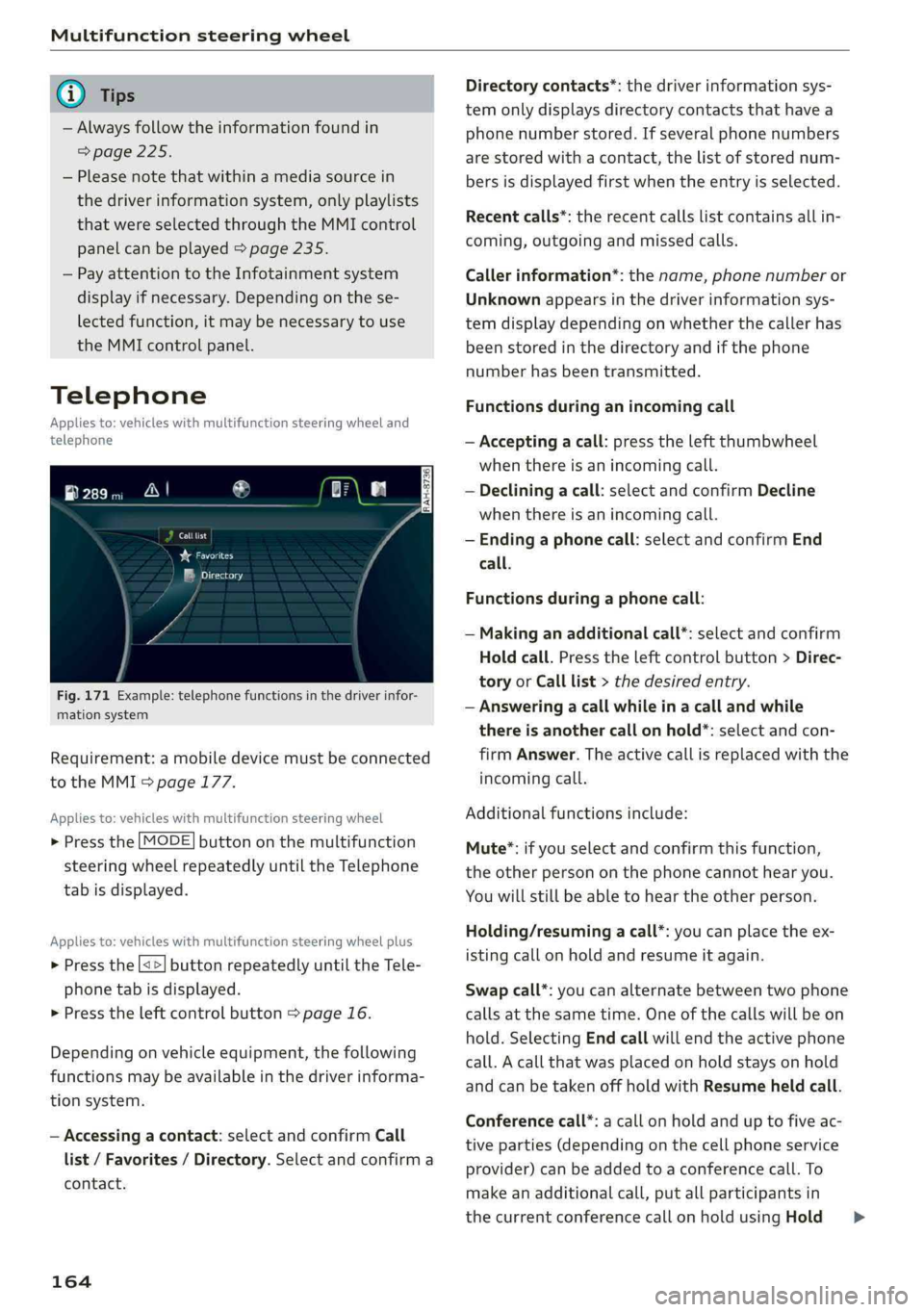
Fig.171Example:telephonefunctionsinthedriverinfor-
mationsystem
Requirement:amobiledevicemustbeconnected
totheMMI>page177.
Appliesto:vehicleswith multifunctionsteeringwheel
>Pressthe[MODE]buttononthemultifunction
steeringwheelrepeatedlyuntiltheTelephone
tabisdisplayed.
Appliesto:vehicleswith multifunctionsteeringwheelplus
> Pressthe[<>]buttonrepeatedlyuntiltheTele-
phonetabisdisplayed.
>Presstheleftcontrolbutton>page16.
Dependingonvehicleequipment,thefollowing
functionsmaybeavailableinthedriverinforma-
tionsystem.
—Accessingacontact:selectandconfirmCall
list/Favorites/Directory.Selectandconfirma
contact.
164
Directorycontacts*:thedriverinformationsys-
temonlydisplaysdirectorycontacts thathavea
phonenumberstored.Ifseveralphonenumbers
arestoredwithacontact,thelistofstorednum-
bersisdisplayedfirstwhentheentryisselected.
Recentcalls*:therecentcallslistcontainsallin-
coming,outgoingandmissedcalls.
Callerinformation*:thename,phonenumberor
Unknownappearsinthedriverinformationsys-
temdisplaydependingonwhetherthecallerhas
beenstoredinthedirectoryandifthephone
numberhasbeentransmitted.
Functionsduringanincomingcall
—Acceptingacall:presstheleftthumbwheel
whenthereisanincomingcall.
—Decliningacall:selectandconfirmDecline
whenthereisanincomingcall.
—Endinga phonecall:selectandconfirmEnd
call.
Functionsduringa phonecall:
—Makinganadditionalcall*:selectandconfirm
Holdcall.Presstheleftcontrolbutton>Direc-
toryorCalllist>thedesiredentry.
—Answeringacallwhileinacallandwhile
thereisanothercall onhold*:selectandcon-
firmAnswer.Theactivecallisreplacedwiththe
incomingcall.
Additionalfunctionsinclude:
Mute®*:ifyouselectandconfirmthisfunction,
theotherpersononthephonecannothearyou.
Youwillstillbeabletohear theotherperson.
Holding/resumingacall*:youcanplacetheex-
istingcallonholdandresumeitagain.
Swapcall*:youcanalternatebetweentwophone
callsatthesametime.Oneofthecallswillbeon
hold.SelectingEndcallwillendtheactivephone
call.Acallthatwasplacedonholdstaysonhold
andcanbetakenoffholdwithResumeheldcall.
Conferencecall*:acallonholdanduptofiveac-
tiveparties(dependingonthecellphoneservice
provider)canbeaddedtoaconferencecall.To
makeanadditionalcall,putallparticipantsin
thecurrentconferencecallonholdusingHold>